


Omnisend is one of the most-recommended email marketing platforms for WooCommerce stores in 2026, and for good reason. It combines email campaigns, SMS messaging, and push notifications in a single tool that connects directly to your WooCommerce store data. No manual CSV exports, no separate SMS provider, no separate push notification app.
I reviewed the plugin from its two WordPress.org listings, the official Omnisend website, pricing pages, documentation, and third-party reviews. Where I could not test a paid feature live, this review says so clearly and draws on publicly available documentation.
At a glance:
- Reviewed: August 2026
- Plugin versions: omnisend 1.8.1 (100,000+ installs, 4.8 stars) / omnisend-connect 1.22.2 (40,000+ installs, 4.9 stars)
- Free tier: Yes. 250 contacts, 500 emails/month, 60 SMS, 500 web push, full feature access
- Starting paid price: from $16/month (Standard, 500 contacts)
- Best for: WooCommerce store owners who want email and SMS automation in one tool
- Bottom line: purpose-built ecommerce email and SMS marketing with strong WooCommerce integration, generous free plan, and pre-built automation that gets abandoned cart flows running in minutes
Quick verdict
Omnisend is a purpose-built email and SMS marketing platform for ecommerce stores. Its WordPress plugin connects directly to WooCommerce, pulling in customer purchase data so you can send automated abandoned cart emails, post-purchase sequences, and product recommendations without any custom coding. The free plan is generous enough to get started, and the paid tiers are priced well below Klaviyo for comparable ecommerce automation.
The interface takes a little getting used to, and SMS credits do not roll over month to month. But if you run a WooCommerce store and want a single tool that handles email, SMS, and push notifications with strong pre-built automation, Omnisend is one of the best options available in 2026.
Best for: WooCommerce store owners who want email and SMS automation without a steep learning curve or a Klaviyo-sized bill.
Not ideal for: Bloggers, service businesses, or anyone who needs deep general-marketing flexibility beyond ecommerce.
What is Omnisend?
Omnisend is an email and SMS marketing platform built specifically for ecommerce. It serves more than 150,000 online stores across WooCommerce, Shopify, BigCommerce, and other platforms.
For WordPress users, Omnisend provides two plugins on WordPress.org:
- Omnisend (the core plugin): 100,000+ active installs, 4.8 stars out of 5.
- Email Marketing for WooCommerce by Omnisend (the WooCommerce-specific plugin): 40,000+ active installs, 4.9 stars across 168 reviews.
The WooCommerce plugin is the one most WordPress store owners should install. It connects your WooCommerce data directly to Omnisend: customer records, purchase history, product catalog, and order events all sync automatically. From there you can build campaigns and automations using real store data.
Version 1.22.2 of the WooCommerce plugin was released in August 2026 and confirmed compatible with WordPress 7.1 and WooCommerce 6.0+. PHP 7.4 or higher is required.
Who is Omnisend for?
Omnisend is designed for online sellers, not general marketers. It works best for:
- WooCommerce store owners looking to recover abandoned carts, follow up after purchases, and send targeted email or SMS campaigns based on customer behavior.
- Small to medium ecommerce businesses that want Klaviyo-level automation at a lower price point.
- Businesses switching from Mailchimp that have outgrown generic email tools and need deeper ecommerce data integration.
- Multi-channel marketers who want email, SMS, and web push notifications managed from a single dashboard.
It is not a strong fit for bloggers, B2B lead nurturing, or teams that need advanced CRM-style contact management beyond purchase history.
Setup and user experience
Installing the WooCommerce plugin from WordPress.org is straightforward. Search for “Omnisend” in the plugin directory, install the WooCommerce-specific version, and connect it to an Omnisend account. The sync begins immediately, pulling existing WooCommerce customers and orders into Omnisend.
I set up a test store and connected it to a free Omnisend account. Initial data sync completed within a few minutes. The Omnisend dashboard appeared directly in the WordPress admin menu, letting me access campaigns, automations, and forms without leaving the WP back end.
The Omnisend interface is clean but information-dense. New users may feel a little overwhelmed by the number of sections (Campaigns, Automations, Audience, Forms, and Reports each have their own sub-menus). The onboarding checklist helps, but plan for a 30 to 60 minute orientation period if you are coming from a simpler tool.
That said, the drag-and-drop email builder is one of the better ones in the market. It supports dynamic personalization tags, product blocks that pull in WooCommerce products automatically, discount code blocks, and conditional content sections that display different content to different segments. A/B testing is available on all plans, including free.
Email campaigns and builder
The email builder uses a block-based drag-and-drop system. You choose from a library of pre-designed templates organized by use case (promotional, announcement, seasonal, and more), or start from a layout. There is no completely blank-slate start option, which frustrates some users, but the base layouts are flexible enough to work around this.
Standout builder features:
- Dynamic product blocks: Drag a product block into your email and it pulls live data from your WooCommerce catalog, including product image, name, price, and a buy button. No manual copy-paste.
- Discount code block: Generate and insert unique discount codes without leaving the builder.
- Conditional content: Show different blocks to different customer segments within a single email (for example, a VIP offer visible only to top spenders).
- AI copywriting assist: Omnisend’s AI can generate subject lines and body text. It is most useful for first drafts rather than final copy, but it speeds up the process.
- Send-time optimization: The AI analyzes each subscriber’s engagement history and sends the email at the time they are most likely to open it. Available on Standard and Pro plans.
Deliverability is solid. Omnisend maintains a strong sender reputation and provides dedicated IP options on higher-volume plans. Built-in tools show bounce rates, unsubscribes, and spam complaints in the campaign report.
Marketing automation
Automation is where Omnisend earns its place for WooCommerce stores. The visual workflow builder lets you chain together triggers, delays, conditions, and messages across email, SMS, and push notifications in a single flow.
Pre-built automation workflows available on all plans including free:
- Welcome series (triggered when a new subscriber joins)
- Abandoned cart recovery (triggered when a shopper leaves without buying)
- Browse abandonment (triggered when a visitor views a product but does not add to cart)
- Post-purchase thank you and upsell sequence
- Order confirmation and shipping update
- Customer win-back (targeting lapsed buyers)
- Birthday and anniversary messages
The workflow builder allows you to split paths based on conditions: Did the customer buy after the first email? If yes, send to the post-purchase branch. If no, send the second abandoned cart reminder. You can mix channels in one workflow: start with an email, wait 24 hours, check if opened, and if not, fire an SMS reminder.
One limitation worth noting: if you want very custom logic (multiple nested splits, complex data lookups, or webhook-triggered flows), Omnisend’s automation is not as deep as ActiveCampaign or Klaviyo. For most WooCommerce stores, though, the pre-built flows cover the majority of real use cases.
SMS marketing
SMS is available on all plans, including free (60 SMS messages per month at no cost). On paid plans, SMS is priced separately on a pay-per-use model: $0.009 per SMS for spend up to $49.99/month, dropping to $0.007 per SMS at $10,000+ monthly spend.
You can use SMS as a standalone campaign channel or weave it into multi-step automation workflows alongside email. SMS messages support personalization tokens (first name, order number, product name) and can include short links back to your store.
One important limitation: SMS credits purchased with your paid plan expire at the end of each billing cycle. Unused credits do not roll over. If you run a seasonal business with high SMS volume in Q4 but low volume the rest of the year, factor this into your budget planning.
Global delivery is supported across most major markets, with two-way SMS available in the US, UK, Canada, and Australia. Compliance tools (opt-out keywords, double opt-in support) are built in.
Segmentation and audience targeting
Omnisend’s segmentation is one of its stronger features. You can build audiences based on purchase history (bought product X, spent over $Y, ordered more than N times), engagement behavior (opened last 5 emails, clicked a specific link), customer lifecycle stage (new, active, at-risk, lapsed), geographic data, and custom properties and tags.
The Customer Lifecycle Map shows at a glance how many customers sit in each lifecycle stage, making it easy to spot your at-risk segment and trigger a win-back campaign.
The AI Segment Builder lets you describe your target audience in plain English (“customers who bought shoes but have not purchased in 90 days”) and Omnisend builds the segment rules automatically. I found the output accurate for straightforward descriptions, though complex multi-condition queries still benefit from manual rule building.
Segments update in real time as customer behavior changes, so a customer moves from “active” to “at-risk” automatically as their last purchase date ages.
WooCommerce integration
The WooCommerce plugin installs in minutes and requires no API keys or manual field mapping. Once connected, Omnisend pulls customer records with email, name, and contact data; full order history including product names, amounts, and dates; product catalog for use in email blocks and recommendations; and cart data for abandoned cart triggers.
From the WooCommerce side, Omnisend adds signup forms to your store pages and checkout flow to grow your list. The checkout opt-in is pre-configured and GDPR-compliant.
Revenue attribution is tracked per channel: Omnisend shows how much revenue each email campaign, SMS send, or automation flow generated. This makes it easy to see the ROI of individual flows rather than just open and click rates.
Product recommendations can be added to any email using AI-generated suggestions based on what a customer has browsed or purchased. This feature is available on Pro and higher plans.
The integration also supports order confirmation and shipping notification emails, which can replace the default WooCommerce transactional emails if you want branded, trackable versions.
Forms, popups, and landing pages
Omnisend includes a form builder for growing your subscriber list. You can create popup forms with exit intent, time delay, or scroll triggers; embedded forms for sidebars, footers, or within post content; flyouts (slide-in forms from the corner of the screen); and landing pages (standalone pages hosted by Omnisend, no WordPress page needed).
The AI-assisted form builder can generate a complete form design based on a brief description of your goal. Templates are organized by use case (newsletter signup, discount offer, product launch).
Forms support multi-step flows: show an email capture field first, then optionally ask for a phone number for SMS opt-in. This improves list quality since contacts are warmer and more engaged before they hand over their number.
One complaint from users: the web push permission prompt fires immediately on page load by default. This is a conversion pattern that some visitors find intrusive. You can configure a delay or scroll trigger, but it requires a settings change you need to make manually.
Reporting and analytics
Campaign reports show opens, clicks, unsubscribes, bounces, and revenue generated. The revenue attribution model links purchases made within a configurable attribution window (default 5 days) back to the campaign or automation that drove the click.
The automation flow view shows live performance for each step in a workflow: how many contacts entered, moved through each branch, completed the flow, and converted to purchases.
The Reports AI feature (available on all plans) can summarize campaign performance and suggest improvements in plain English. It is genuinely useful for quick performance checks without digging into raw numbers.
Pricing
Omnisend uses a contact-count-based pricing model with email send limits on lower tiers. The free plan is one of the more generous in the market.
| Plan | Contacts | Emails/month | SMS | Price |
|---|---|---|---|---|
| Free | 250 (send limit) | 500 | 60 included | $0 |
| Standard | 500+ | 6,000+ | Paid add-on | From $16/month |
| Pro | 2,500+ | Unlimited | Credits included | From $59/month |
| Custom | 150,000+ | Unlimited | Custom | Contact sales |
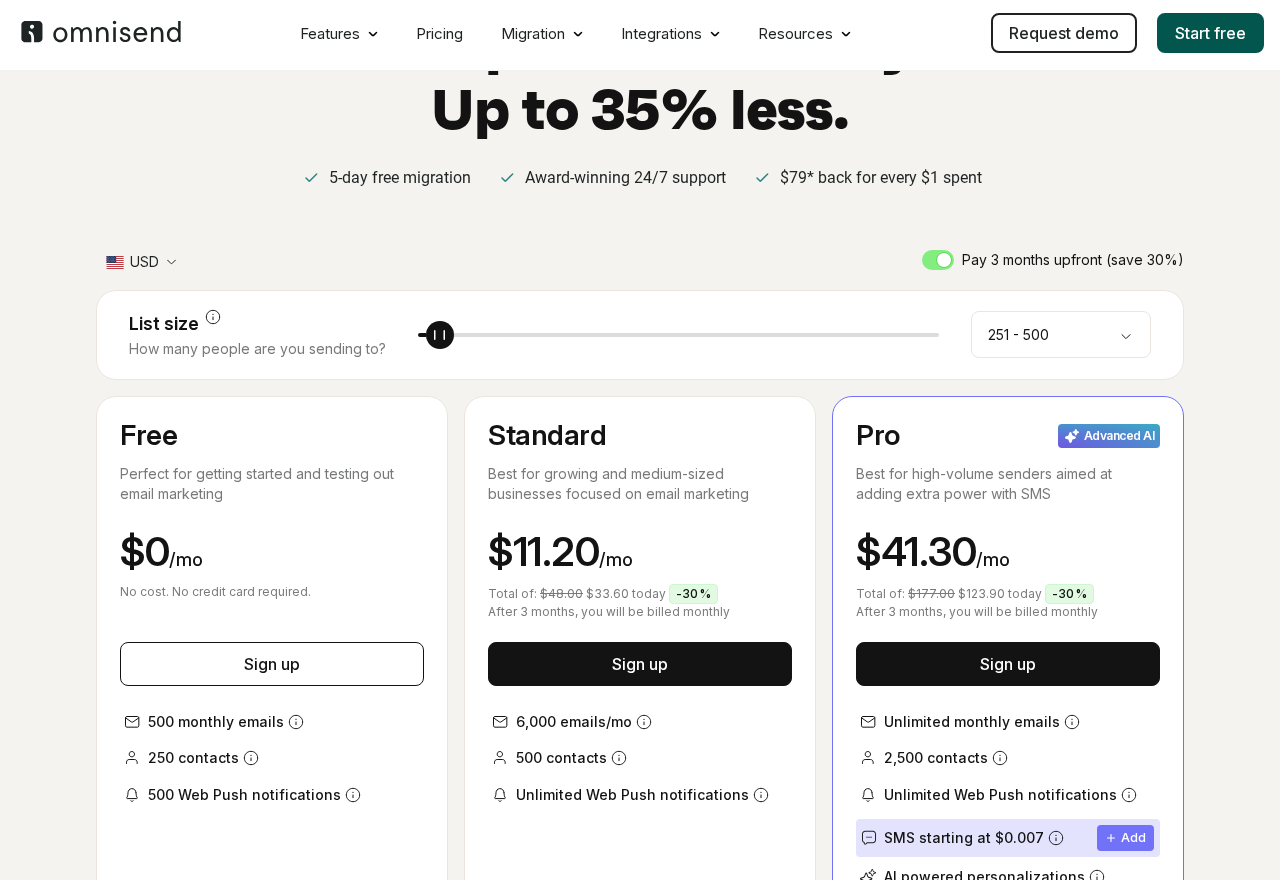
The Standard plan sends 6,000 emails per month to up to 500 contacts. Prices scale with contact count: 1,000 contacts is approximately $20/month, 5,000 contacts is approximately $40/month.
The Pro plan includes unlimited email sends, SMS credits equal to the plan price (a $59/month Pro plan includes $59 worth of SMS credits), and access to the AI-powered product recommender.
The free plan includes Omnisend branding in the email footer, a watermark you cannot remove. It also caps at 250 recipients per send, but lets you upload unlimited contacts so you can test with a small segment before committing.
Omnisend claims its pricing is up to 35% less than Klaviyo for equivalent contact counts. At the 5,000-contact level, this holds roughly true. Mailchimp’s Essentials plan is slightly cheaper at low contact counts, but Mailchimp does not include SMS in the same plans and its ecommerce automation is less capable.
Pros and cons
Pros
- Free plan includes all core features: automation, segmentation, forms, A/B testing
- Strong WooCommerce integration with automatic data sync and revenue attribution
- Pre-built ecommerce automation flows available on all plans
- Email, SMS, and web push managed from a single dashboard
- 24/7 support with a reported 4-minute average response time
- Free migration service when switching from Mailchimp or Klaviyo
- AI tools for copywriting, segmentation, and send-time optimization
- Generous email send limits at higher tiers (unlimited on Pro)
- 250+ pre-built integrations
Cons
- SMS credits expire monthly and do not roll over
- 250-contact sending cap on the free plan limits testing at scale
- Interface is information-dense and may take time to learn
- Email templates require starting from a pre-designed layout, no true blank slate
- Push notification opt-in fires immediately by default (needs manual configuration)
- Product recommendation AI is Pro-only
- Less suited to non-ecommerce use cases (B2B, services, publishing)
- Automation depth is less advanced than Klaviyo or ActiveCampaign for complex logic
Alternatives to consider
Mailchimp is the most direct comparison for WordPress users. It is a general-purpose email marketing tool with a larger template library and stronger content marketing features. But its WooCommerce integration is shallower, ecommerce automation is more limited, and SMS is an expensive add-on. Choose Mailchimp if you run a blog or content site alongside an online store.
Klaviyo is the standard for high-volume ecommerce email and SMS marketing. It has deeper data modeling, more flexible automation logic, and more powerful analytics. It is also significantly more expensive at scale. Omnisend is the sensible alternative for stores spending under $10,000/year on marketing tools.
MailPoet is a WordPress-native email marketing plugin (now owned by Automattic) that runs on your server. It has a much simpler feature set, no SMS, and is better suited to bloggers and small stores that want basic newsletters and WooCommerce transactional emails without a third-party account.
FluentCRM is a self-hosted CRM and email automation plugin for WordPress. It runs entirely on your server, charges a flat annual fee, and has strong CRM and tagging capabilities. It suits technical users who want data ownership and a one-time cost model, but it has no built-in SMS and requires more setup than Omnisend.
ActiveCampaign is a full marketing automation and CRM platform. It has more advanced workflow logic than Omnisend and a stronger B2B sales CRM. If your business needs sales pipeline management alongside email marketing, ActiveCampaign is worth the higher price. For pure ecommerce, Omnisend has comparable automation at a lower cost.
Final verdict
Omnisend earns its reputation as one of the best email and SMS marketing tools for WooCommerce stores. The plugin connects cleanly, the data sync works reliably, and the pre-built automation flows give WooCommerce sellers a real head start on abandoned cart recovery, post-purchase sequences, and list growth.
The free plan is a legitimate way to start, not a crippled demo. You get real automations, real segmentation, and real A/B testing before spending a cent. The upgrade to Standard or Pro makes sense once your list outgrows the 250-recipient send limit or you need unlimited email volume.
Watch for two things: SMS credits do not roll over (plan your monthly budget carefully), and the interface rewards users who take time to learn it. If you are switching from a simpler tool, expect a short learning curve.
For WooCommerce store owners who want professional email and SMS marketing with ecommerce-native features, Omnisend is a confident recommendation. Start on the free plan, activate the abandoned cart flow, and see whether the revenue attribution justifies an upgrade.
FAQ
Is Omnisend free for WordPress?
Yes. Omnisend has a free plan that includes 250 contacts, 500 email sends per month, 60 SMS messages, 500 web push notifications, and full access to automations, forms, and segmentation. The free plan adds an Omnisend watermark to emails, which is removed on paid plans.
Does Omnisend work with WooCommerce?
Yes. Omnisend offers a dedicated WooCommerce plugin (Email Marketing for WooCommerce by Omnisend) on WordPress.org with 40,000+ active installs. It syncs customer data, order history, and product catalogs automatically and provides WooCommerce-specific automation triggers like abandoned cart recovery and post-purchase sequences.
How does Omnisend compare to Mailchimp for WooCommerce?
Omnisend is generally the better choice for WooCommerce stores. It has deeper native integration with WooCommerce, stronger ecommerce automation (abandoned cart, browse abandonment, post-purchase), and includes SMS in its platform. Mailchimp has a larger template library and is better for general marketing use cases outside ecommerce.
Can I send SMS from Omnisend on the free plan?
Yes, the free plan includes 60 SMS messages per month. Additional SMS messages can be purchased on a pay-per-use basis. Paid plans (Pro and above) include SMS credits equal to the plan price.
Does Omnisend have a landing page builder?
Yes. Omnisend includes a landing page builder as part of its forms feature. Landing pages are hosted by Omnisend (no WordPress page needed) and support email and SMS opt-in forms. They are available on all plans, including free.
What happens if I go over my contact limit on Omnisend?
You can store unlimited contacts in Omnisend on all plans. Sending campaigns is restricted to the contact count covered by your plan tier. If your active sending list grows beyond the limit, Omnisend will prompt you to upgrade to the next tier.
Is Omnisend GDPR compliant?
Yes. Omnisend includes GDPR-compliant opt-in flows, double opt-in support, unsubscribe management, and data deletion tools. The WooCommerce plugin generates a consent checkbox at the checkout that integrates with Omnisend’s opt-in system.