

Quick Verdict
Otter Blocks is a capable, performance-conscious Gutenberg block plugin from the team behind the popular Neve theme. The free version gives you over 20 solid blocks, a growing pattern library, smooth animations, and an AI-powered page generator that actually works. The paid tier adds WooCommerce tools, advanced visibility rules, and a live search block that serious store owners will want.
It is not the largest block library on the market. Spectra and Kadence Blocks both offer broader free collections. But Otter punches above its weight on the AI integration side, and its per-block asset loading keeps pages fast. If you want a Gutenberg upgrade that does not slow your site down and includes genuine AI tools, Otter deserves a serious look.
Best for: Bloggers, content creators, small business owners, and Neve theme users who want native Gutenberg building without switching to a heavy page builder.
| Plugin | Otter Blocks |
| Developer | Themeisle |
| Free version | Yes (26+ blocks) |
| Pro price | From $69/year |
| Active installs | 300,000+ |
| Rating | 4.7/5 (249 reviews) |
| Latest version | 3.2.2 (August 2026) |
| Requires | WordPress 6.6+, PHP 5.6+ |
What Is Otter Blocks?
Otter Blocks is a Gutenberg page building plugin built by Themeisle, the Romanian company also known for the Neve theme and the Orbit Fox plugin. The project has been active since 2018, and the plugin has grown from a small block add-on into a full-featured page building extension with AI capabilities.
The plugin extends WordPress’s native block editor rather than replacing it. You still work inside Gutenberg. Otter simply adds blocks, patterns, and controls that the core editor does not ship with.
As of August 2026, Otter Blocks is at version 3.2.2. The plugin has over 300,000 active installations and 3.3 million cumulative downloads. The GitHub repository shows 6,768 commits across its lifetime, which speaks to how actively it is maintained.
One thing worth noting upfront: Otter integrates especially well with the Neve theme. Some interface elements are tighter, and the pattern library gets additional designs when both are active. That said, the plugin works with any block-editor-compatible theme.
Who Is Otter Blocks Best For?
Otter Blocks suits a few specific types of users better than others.
Gutenberg-first users who left for page builders. This plugin is specifically built to fill the gaps that push people toward Elementor or Divi. If you want to stay inside the native editor, Otter is one of the strongest reasons to do so.
Neve theme users. Because both products come from Themeisle, the pairing gives you a tightly integrated setup. Patterns look on-brand right away. Performance stays lean.
Small business owners and bloggers. The free tier covers most blogging and content use cases. Contact forms, countdown timers, icon lists, social sharing, and the posts grid are all available without paying anything.
WordPress developers and freelancers. The Agency plan at $149/year covers unlimited client sites. The WooCommerce Builder (Pro) is a legitimate value-add for e-commerce builds.
Who it is not a fit for: Teams that need dozens of highly specialized blocks out of the box, or developers who prefer a minimal block set with deep customization. Kadence or GenerateBlocks may fit those needs better.
Setup and First Impressions
Installing Otter Blocks takes under two minutes. Search “Otter Blocks” in the WordPress plugin directory, install, and activate. No account creation is required for the free version. The plugin adds a new “Otter” tab inside the Settings menu where you can toggle individual blocks, enable or disable the AI features, and configure Google Maps API keys.
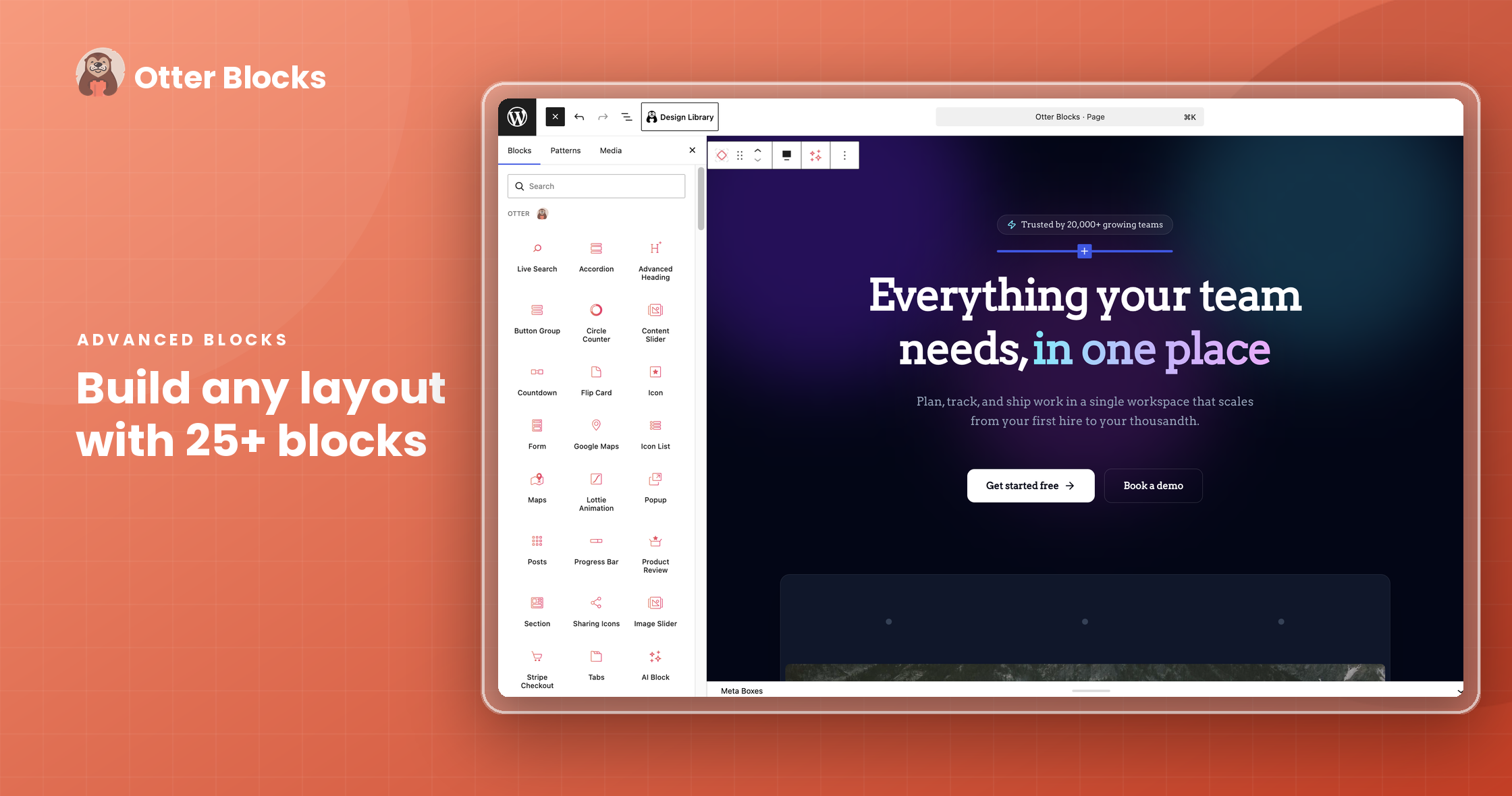
The block panel inside the editor is clean. Otter’s blocks appear in their own section labeled “Otter Blocks” so you can find them quickly without scrolling through the full block list. Each block opens a familiar sidebar with tabs for Settings and Advanced options.
Performance on a clean test install was noticeably good. Otter loads only the CSS and JavaScript for blocks that actually appear on a given page. A post using only the Advanced Heading block and an Icon List adds minimal overhead. That is not true of every block plugin. Some load their full asset bundle on every page regardless of usage.
One small friction point: the first time I opened the AI block, it prompted me to connect an OpenAI, Claude, or Gemini API key. That is expected for any AI feature that calls a third-party model, but users unfamiliar with API key setup may find it a stumbling block. Otter does not offer AI features through its own infrastructure; you use your own API account.
Block Library: What You Get Free
The free version includes over 20 blocks. Here is a breakdown of what I found most useful in practice.
Section Block
The Section block is Otter’s column and layout container. You can set column counts, gap sizes, vertical alignment, background options (color, gradient, image, video), border radius, and box shadow. It supports responsive column stacking and custom breakpoints. For most layouts you need to build, the Section block covers it.
Advanced Heading
The stock Gutenberg heading block is functional but limited on styling. Otter’s Advanced Heading adds a highlight text option, decorative highlight overlays, shadow, letter spacing, and line height controls. You can split the heading into two styled parts, which is useful for pulling out a keyword or phrase in a contrasting color.
Accordion and Tabs
Both blocks work as expected and render clean markup. The Accordion block is especially useful for FAQ sections. Tabs look good without custom CSS and handle nested content well. I checked the generated HTML for both and found no unnecessary wrapper divs.
Contact Form
The free Contact Form block covers the basics: name, email, subject, and message fields. Submissions are stored in the WordPress database and can now be exported as CSV or XML (added in version 3.2.2). Third-party integrations include Mailchimp and Brevo for list-building. There is no native spam filtering in the free version; you connect reCAPTCHA or Cloudflare Turnstile through the settings.
A recurring complaint in the support forum involves reCAPTCHA and Turnstile occasionally failing to render correctly, particularly after plugin updates. Worth testing after any Otter update if your form uses CAPTCHA.
Posts Grid
The Posts block generates a content grid or list from any post type. You can filter by category, tag, or taxonomy, set the number of posts, choose between grid and list layouts, and control which meta fields appear. It is a good block for building archive pages or “related posts” sections inside content.
Countdown
The Countdown block supports both fixed-date and recurring countdowns. You can show it as a simple number display or with a more designed ring/circular style. There is an “evergreen” mode that starts the countdown fresh for each visitor.
Product Review
The Product Review block builds a structured review card with a star rating, pros and cons list, a summary, and a call-to-action button. It generates ReviewRating schema markup automatically. For affiliate-style content or comparison posts, this is one of the more practically useful free blocks.
Lottie Animation
Drop in a Lottie JSON file and the block renders the animation inline. You can control playback triggers (scroll, hover, viewport), animation speed, and loop behavior. A niche block, but it works well when you need it.
Flip Card
Cards that flip on hover to reveal a back face. Useful for portfolios and feature callouts. The effect works cleanly on desktop; mobile behavior defaults to a tap.
Sharing Icons
A social sharing block that generates accessible share buttons. You can choose which networks appear, control icon size, and set a custom label. Simpler and lighter than most dedicated sharing plugins.
AI Features: Genuinely Useful, With Caveats
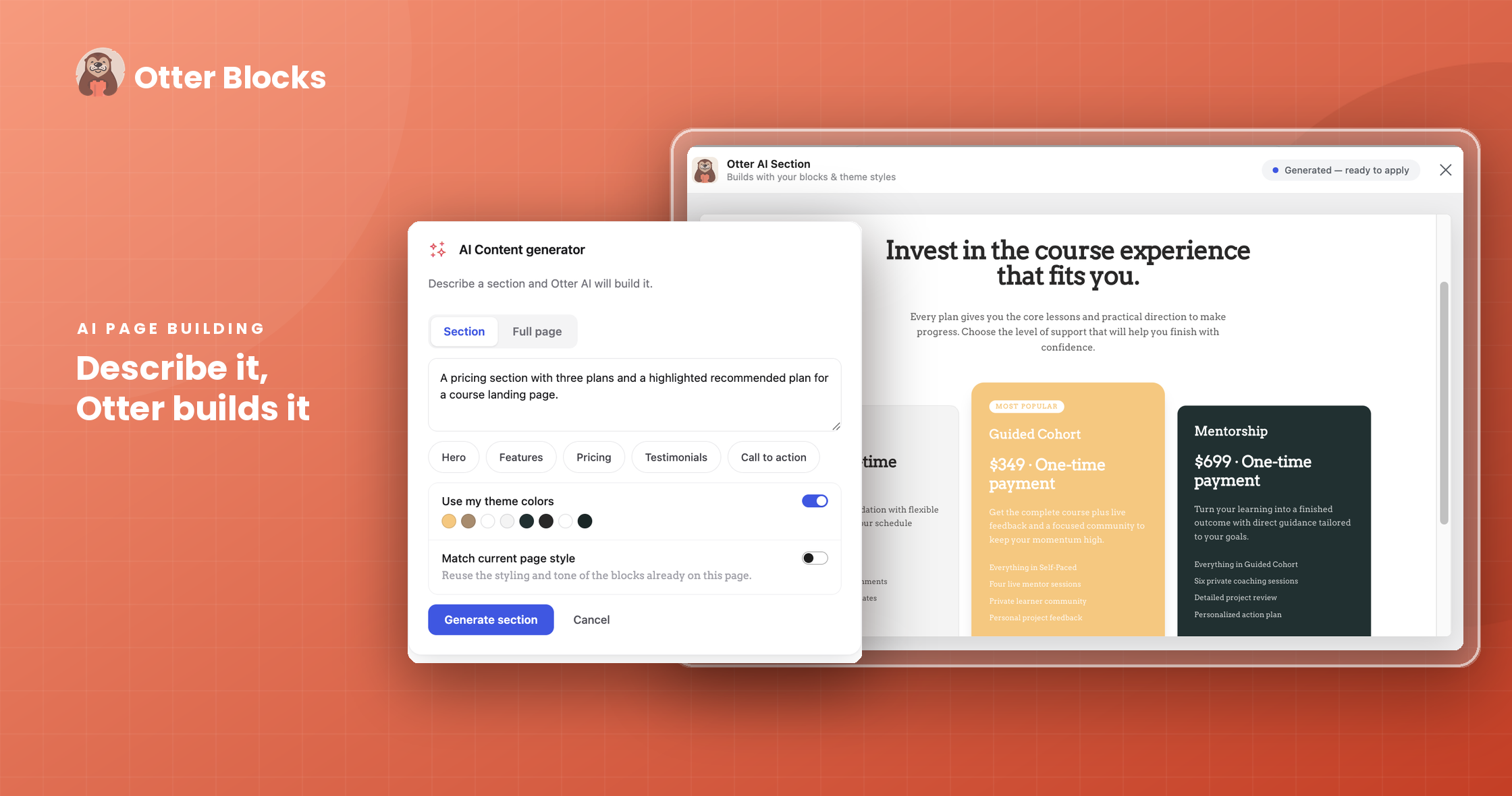
The AI Block is one of the more interesting additions to the plugin in recent versions. You describe the layout you want in plain text, select a connected AI model (OpenAI GPT, Anthropic Claude, or Google Gemini), and the plugin generates native Gutenberg blocks matching your description. The output is editable Gutenberg markup, not a locked template.
In my testing, the AI generator handled requests like “a two-column section with a heading on the left and a bullet list on the right” accurately. More complex requests such as a full landing page section with a hero, testimonials, and a CTA grid produced reasonable starting points that needed minor cleanup.
A few important caveats:
- You need your own API key. Otter does not proxy the AI calls. You pay your AI provider directly for token usage.
- Quality depends on the model you connect. GPT-4 and Claude 3 Opus produce better results than lighter models.
- AI generation is additive, not replacement. It creates blocks from scratch based on your prompt. It does not redesign existing content.
The AI Toolbar is a separate feature that appears inside the editing area for text blocks. It can rewrite, summarize, translate, or adjust the tone of selected text. This is essentially the same AI writing assistant you see in other tools, integrated directly into Gutenberg. It works well for quick rewrites without leaving the editor.
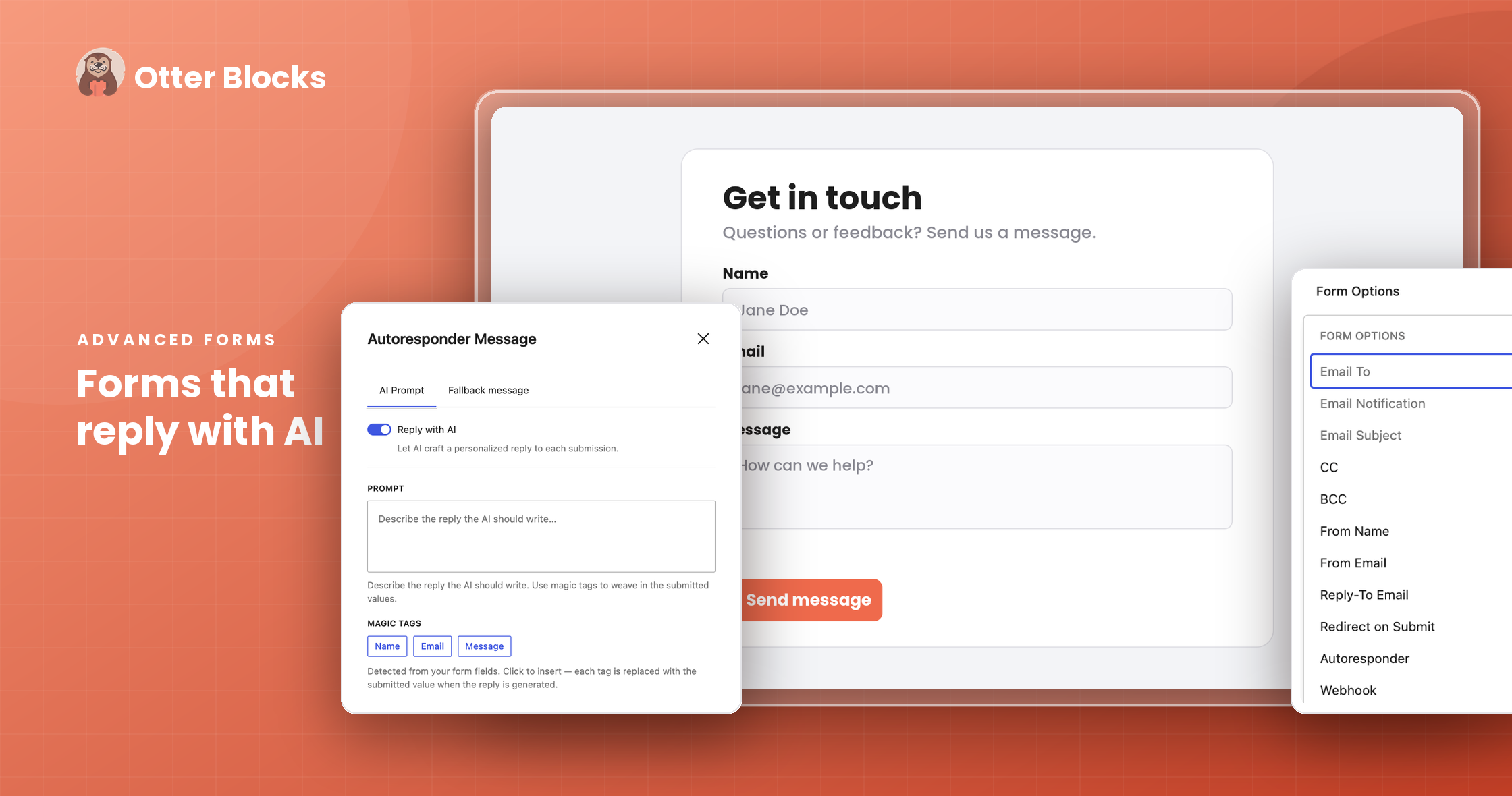
The AI Form Autoresponder is a Pro-only feature. It generates personalized email replies to form submissions based on what the user submitted.
Animations and Visibility Conditions
Animations
Every block in the Otter ecosystem supports the animation library. You will find over 50 effects organized into categories: fade, bounce, flip, slide, rotate, zoom, and more. Each animation can be set to trigger on page load or on scroll entry into the viewport. You can control duration, delay, and intensity.
The animations are CSS-based and perform well without causing layout shift. I noticed no jank on a mid-range test device during scroll-triggered animations on a pattern-heavy test page.
Visibility Conditions
Visibility Conditions let you control whether a block is shown or hidden based on rules you define. The free version covers the most useful basics:
- User logged in or logged out
- User role
- Post type
The Pro version adds:
- URL query string parameters
- Date range and day/time targeting
- WooCommerce conditions (cart contents, order history, product category)
- Cookie-based rules
- Device type (show/hide on mobile, tablet, or desktop)
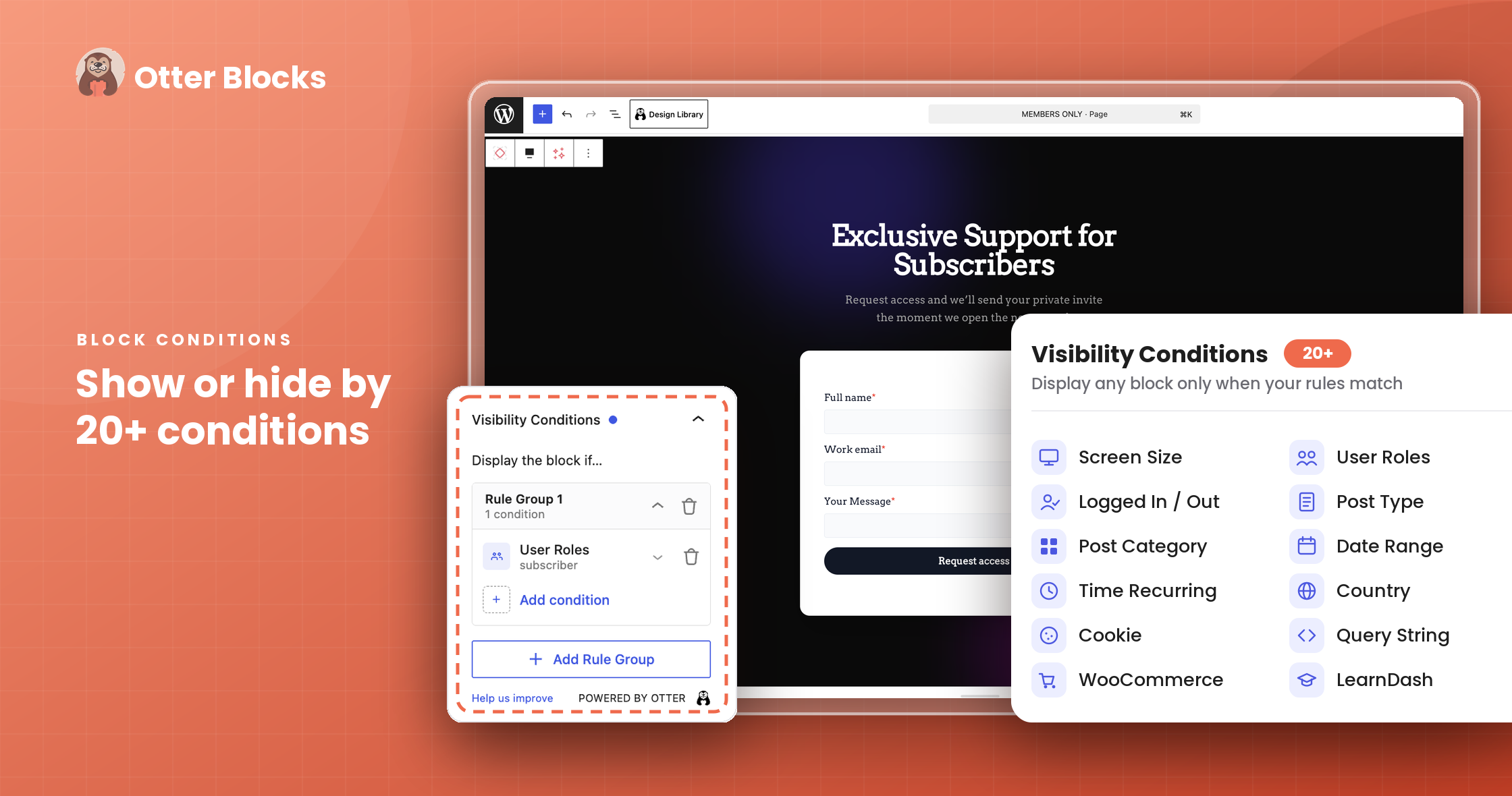
For membership sites, marketing campaigns, or WooCommerce stores running promotions, the Pro visibility rules are genuinely practical. Showing a different CTA to logged-in users than to visitors is the kind of personalization most sites want but rarely implement without custom code.
Pattern Library
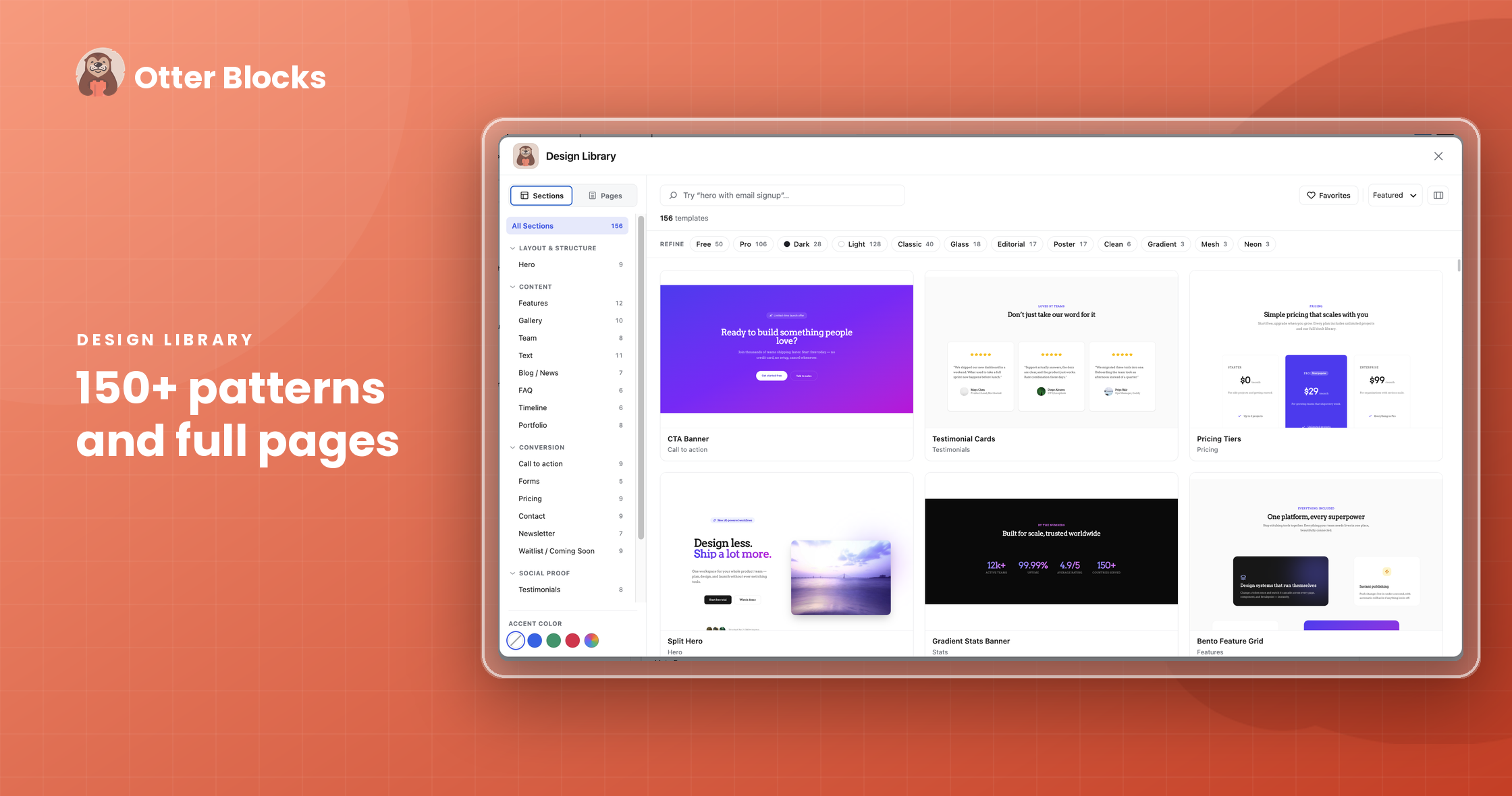
Otter ships with a library of pre-built patterns accessible through the block inserter. Categories include headers, pricing tables, call-to-action sections, testimonials, team grids, and full page layouts.
The patterns are built with Otter’s own blocks, so they work correctly out of the box. Most are minimally styled with neutral colors, so they take on your theme’s typographic styles reasonably well without needing heavy edits.
The library is smaller than what Kadence or Spectra offer. Kadence ships with 800+ patterns. Otter’s library is more curated. If you need dozens of starting points for different design styles, Kadence will serve you better.
Pro Features: What the Upgrade Adds
Upgrading to any paid plan unlocks the following features across all your licensed sites.
WooCommerce Builder
The WooCommerce Builder lets you design custom single product page templates using Gutenberg blocks. You can rebuild the product gallery, description area, tabs, and buy button using draggable blocks, then assign the template to specific product categories or individual products. This is a meaningful feature for stores that want more design control without installing a dedicated page builder.
Advanced Forms (Pro)
The Pro tier expands the Contact Form block with:
- Multi-step forms
- File upload support
- Conditional field logic (show/hide fields based on previous answers)
- AI Autoresponder for personalized email replies
- Webhook integrations
Live Search
The Live Search block replaces the default WordPress search with an AJAX-powered search that returns results in real time without a page reload. Results can include thumbnails, categories, and post type labels.
Modal Block
A dedicated modal/lightbox block with configurable open triggers (button click, scroll, time on page, exit intent). The popup block in the free version uses a similar trigger system; the Modal block adds more trigger flexibility and content options.
Business Hours Block
A block for displaying business hours with day-by-day control, open/closed labels, and highlight styling for the current day. Useful for local businesses.
Product Review Comparison Table
A comparison table block for displaying multiple products side by side with star ratings, price columns, and CTA buttons. Generates comparison schema markup.
Pricing and Value
Otter Blocks follows a straightforward annual license model. All plans include the full feature set; the tiers differ only by site count and support priority.
| Plan | Price/Year | Sites | Support |
|---|---|---|---|
| Personal | $69 | 1 | Within 12 business hours |
| Business | $99 | 5 | Within 8 business hours (priority) |
| Agency | $149 | Unlimited | Within 6 business hours (premium) |
All plans come with a 30-day no-questions-asked refund guarantee. Renewals occur at the regular price (roughly 2x the introductory rate), so factor that into the total cost of ownership over two or more years.
The Agency plan at $149/year for unlimited sites is competitive for freelancers. Kadence Blocks Pro charges more for agency-level access. The per-site Personal plan at $69 is reasonable if you need WooCommerce Builder or advanced forms for a single site.
Is the free version enough? For bloggers and content-heavy sites, yes. The free tier covers page layout, forms, countdown, posts grid, animations, and basic visibility conditions. You hit the ceiling when you need WooCommerce integration, multi-step forms, or advanced targeting rules.
Pros and Cons
Pros
- Free tier is genuinely useful with 20+ working blocks
- Per-block asset loading keeps pages fast
- AI Block and AI Toolbar are well-integrated and support multiple AI providers
- Works with any Gutenberg-compatible theme
- CSV/XML form export (added recently) is a practical addition
- Agency plan is competitively priced for unlimited sites
- 30-day money-back guarantee on all plans
- Active development: 6,768 commits, regular updates
Cons
- Block library is smaller than Kadence Blocks or Spectra (pattern library especially)
- AI features require you to supply and pay for your own API key
- Some users report delayed compatibility with new WordPress versions (WP 6.9 compatibility had a gap)
- Form-related issues (reCAPTCHA conflicts, post-upgrade breakage) appear in the support forum more than expected
- Support response times vary; some forum threads show weeks between responses
- Renewal pricing is significantly higher than introductory price (approximately 2x)
Alternatives to Otter Blocks
Kadence Blocks
Kadence Blocks has 600,000+ active installs and a 4.8/5 star rating. The free version includes a large block library and 800+ patterns. It is the most popular alternative in the same category. Kadence Blocks Pro adds dynamic content, advanced forms, and custom layout blocks. It is slightly more expensive than Otter at the single-site level. If pattern variety matters to you, Kadence is the stronger choice.
Spectra (Ultimate Addons for Gutenberg)
Spectra has over 1 million active installs, making it the largest Gutenberg block plugin by install count. The free version is generous. One important note: the plugin recently transitioned to a “Spectra Legacy” maintenance mode with no new features. New development is happening in a separate plugin called Spectra Blocks. If you start with Spectra today, check which product direction you are committing to.
GenerateBlocks
GenerateBlocks takes a different approach. It offers only 9 core blocks but gives you deep control over each one. The philosophy is “fewer, more flexible blocks” rather than a large specialist library. GenerateBlocks works especially well alongside the GeneratePress theme. Active installs sit around 200,000, and it holds a 4.9/5 rating. If you prefer minimal, composable building blocks over a large library, GenerateBlocks is worth evaluating.
Final Verdict
Otter Blocks earns its 4.7-star community rating. It is a well-maintained, performance-conscious Gutenberg block plugin with a genuinely useful free tier and an AI feature set that is ahead of most competitors at this price point.
The limitations are real: fewer patterns than Kadence, some inconsistent support responsiveness, and AI features that require API key management that will intimidate less technical users. The compatibility lag with newer WordPress versions is worth watching as an ongoing concern.
For Neve theme users, the pairing is an easy recommendation. For everyone else, the decision comes down to what you need most. Choose Otter if you prioritize AI integration, performance, and a clean Gutenberg experience. Choose Kadence if you need a larger pattern library and a more established ecosystem. Choose GenerateBlocks if you want a minimal, composable approach.
At $69/year for a single site, the Pro tier is not a large ask if the WooCommerce Builder or advanced forms features are on your requirements list. The 30-day refund policy removes most of the risk from trying it.
Recommended for: Neve theme users, bloggers upgrading from core Gutenberg, and WordPress developers building light-to-medium sites with WooCommerce.
Pass if: You need 100+ patterns out of the box, prefer zero AI dependency, or need a large block ecosystem with third-party add-ons.
This review is part of our WordPress plugin reviews series, where we test plugins hands-on before recommending them.
Frequently Asked Questions
Does Otter Blocks work with any WordPress theme?
Yes. Otter Blocks is compatible with any theme that supports the block editor (Gutenberg). It integrates most tightly with the Neve theme from the same developer, but all blocks and features work across other themes.
Is the free version of Otter Blocks genuinely useful?
Yes. The free tier includes 20+ blocks covering layout, content, forms, animations, and basic visibility conditions. Bloggers and content sites can use it indefinitely without needing the Pro upgrade. The ceiling comes when you need WooCommerce tools, advanced form logic, or Pro-only blocks like Live Search.
Do I need a paid AI service to use the AI features?
Yes. Otter’s AI Block and AI Toolbar require you to connect your own API key from OpenAI, Anthropic (Claude), or Google (Gemini). You pay your AI provider for token usage directly. Otter does not add a markup on AI costs.
Will Otter Blocks slow my site down?
It is designed not to. Each block loads only the CSS and JavaScript files it specifically requires. A page that uses three Otter blocks will load only the assets for those three blocks, not the full plugin library.
How does Otter Blocks compare to Elementor?
Elementor is a traditional page builder with a drag-and-drop canvas outside the native WordPress editor. Otter Blocks works inside the Gutenberg editor. If you prefer the native WordPress editing experience, Otter is a strong alternative. If you want the legacy Elementor drag-and-drop interface, they serve different workflows.
What happens if I cancel my Pro subscription?
Your site will continue to show previously built content. Pro blocks that were already placed on pages will remain visible to visitors. You lose access to the Pro settings panel and cannot add new Pro blocks or configure Pro features after your subscription ends.
Is there a lifetime license option?
As of mid-2026, Themeisle offers annual subscriptions only for Otter Blocks Pro. There is no lifetime license available.
Does Otter Blocks include WooCommerce features in the free version?
The Stripe Checkout block is available in the free version for simple payment collection. The WooCommerce Builder (for custom single product page templates) and the Add to Cart block are Pro-only features.