


Paid Memberships Pro has been doing membership sites on WordPress since 2011. That is 15 years of iteration on a single problem: helping site owners sell access, restrict content, and manage recurring subscribers without gluing together a dozen separate tools.
That long track record shows up in places most review articles skip: the depth of the add-on library, the developer hooks baked into every corner of the plugin, the care taken with payment gateway reliability. It also shows up in a significant 2024 decision that every prospective user should know about before they start: PMPro is no longer distributed through WordPress.org.
What this review covers and how it was researched. This is a documentation-based review of Paid Memberships Pro version 3.8.2, released July 13, 2026. I reviewed the official documentation at paidmembershipspro.com in depth, examined the changelog from v3.5 through v3.8.2 on GitHub, explored the pricing and add-on library, and reviewed PMPro’s own published documentation screenshots showing the admin UI, payment settings, member management screens, and frontend pages. I could not complete a live WordPress sandbox installation due to memory constraints in the review environment; all admin UI descriptions and screenshots in this article are sourced from PMPro’s official documentation pages and are clearly attributed as such. Pricing figures are from paidmembershipspro.com as of July 2026 and should be verified before purchasing.
At a glance
Plugin version: 3.8.2 (released July 13, 2026)
WordPress.org listing: closed as of October 17, 2024 (voluntary departure; plugin is still free and actively maintained)
User base: 90,000-plus online businesses (vendor-stated, paidmembershipspro.com)
Ratings: 4.3/5 on G2 and 5.0/5 on Capterra (15 reviews), as cited on paidmembershipspro.com
Free plugin: yes, downloaded directly from paidmembershipspro.com
Paid plans start at: $49 per month (Standard) or $499 per year
Bottom line: a mature, developer-friendly membership plugin with a genuinely capable free tier and a sprawling add-on ecosystem; the departure from WordPress.org adds a small installation wrinkle but does not affect how the plugin works
Quick verdict
Paid Memberships Pro earns its reputation as one of the most complete free membership plugins for WordPress. The free version handles unlimited membership levels, content restriction, Stripe and PayPal recurring payments, a customizable checkout flow, and a full member account dashboard. That is more than most competitors offer without a paid plan.
The trade-offs are real. The add-on model means features like abandoned cart recovery, member directories, group accounts, and gift memberships require a paid Standard plan. The plugin is no longer in the WordPress plugin directory, so it takes one extra step to install. And for teams that want everything in one clean UI without extension management, the add-on approach requires some ecosystem fluency.
For developers and site builders who want control, the 300-plus action and filter hooks and 8 REST API endpoints make PMPro one of the most extensible membership plugins in the WordPress space.
Quick verdict
Best for: content creators, associations, nonprofits, online communities, coaches, newsletters, and course sites that need a reliable free foundation with room to extend.
Best fit by stage: solo site owners and small teams starting out (free tier), growing membership businesses needing premium support and tools (Standard), established operators who want managed hosting included (Max).
Standout: 15-plus years of active development, genuinely capable free core, 100-plus officially supported add-ons, strong developer extensibility.
Watch out for: plugin is no longer on WordPress.org (install from vendor site); some essential features (abandoned cart, member directory, group accounts) require a paid plan; the Standard plan is priced monthly, which adds up.

What Paid Memberships Pro is
Paid Memberships Pro is a self-hosted WordPress membership plugin built to handle three jobs at once: restricting content to paying members, managing subscriptions with recurring billing, and giving site owners a complete admin system for member management.
It was created by Jason Coleman and Kim Coleman at Stranger Studios, LLC, a company they founded in 2006. The plugin went public in 2011 and has been under continuous development since. Stranger Studios focuses entirely on the PMPro product. Unlike several major WordPress plugins that have been acquired into larger holding companies, PMPro remains independently owned and operated by its original creators.
The plugin is 100 percent GPL and open source. The source code lives on GitHub at github.com/strangerstudios/paid-memberships-pro. The core plugin is free. Revenue comes from the Standard plan (which bundles 54 premium add-ons plus support) and the Max plan (which adds managed WordPress hosting on top).
The core plugin creates nine frontend pages automatically during setup: Membership Account, Membership Billing, Membership Checkout, Membership Confirmation, Membership Cancel, Membership Levels, Member Profile Edit, Log In, and Membership Order/Invoice. That means a functional membership site is closer to reality after activation than many plugins suggest.
As of October 17, 2024, PMPro is no longer listed in the WordPress.org Plugins Repository. The team requested the removal voluntarily. Free plugin updates now arrive through PMPro’s own license server. Existing users who have either the core plugin or the free PMPro Update Manager add-on active continue to see updates in their WordPress dashboard exactly as before.
Who PMPro is best for
Strong fit:
- Content creators and bloggers running paid newsletters or exclusive posts. The free core can restrict individual posts, categories, and page content without any add-on. Writers running a tiered subscription model get unlimited membership levels and working Stripe payments without touching a paid plan.
- Associations and nonprofits. PMPro explicitly serves associations and nonprofits as a primary use case. The ability to create multiple free and paid levels, collect custom profile fields at registration, and handle manual payments for members who pay by check fits organizations that mix voluntary and dues-based membership models.
- Online communities. Native integrations with bbPress, BuddyPress, and BuddyBoss (all available as free add-ons) make PMPro one of the most capable options for community-driven sites that want forums and social profiles gated behind membership levels.
- Course and coaching sites. A dedicated Courses for Membership add-on is available for free, and LearnDash and LifterLMS integrations extend that further. Sites that need a proper LMS can keep PMPro for membership management and connect it to a course plugin rather than using an all-in-one system.
- Developers building for clients. The 300-plus action and filter hooks, 8 REST API endpoints, and openly published code make PMPro one of the most predictable membership plugins to extend. A decade-plus of community development means most common customization patterns are already documented.
- Sites that want a free foundation with room to grow. The free plugin does more than most alternatives require a paid plan to match. Starting free and upgrading as revenue grows is a realistic path.
Weaker fit:
- Users who want everything in one plugin with no add-on management. MemberPress bundles more features into its paid plans without requiring separate add-on installations. If the add-on model is frustrating, a tighter all-in-one product may suit you better.
- Teams that need a hosted solution quickly. The self-hosted free and Standard plans require you to supply WordPress hosting, manage performance, and handle updates. The Max plan includes managed hosting, but its pricing reflects that.
- Sellers of digital downloads first. PMPro is built around access and subscription management, not file delivery. If your primary product is a downloadable file, Easy Digital Downloads or WooCommerce with a digital delivery extension will give you a more complete experience.
- Sites that depend on the WordPress.org plugin directory for updates. If your site uses a tool or service that pulls plugins directly from the .org repository, you will need to adjust your update workflow.
Installation and setup
Installing PMPro in 2026 requires one extra step compared to plugins still on WordPress.org: you download the zip file directly from paidmembershipspro.com and upload it via Plugins > Add New > Upload Plugin in WordPress. There is no search-and-install path through the WordPress admin.
Once activated, PMPro adds a Memberships menu item in the WordPress admin sidebar and creates its nine required frontend pages. According to PMPro’s official documentation, the recommended setup sequence is:
- Create at least one membership level under Memberships > Settings > Levels.
- Configure payment gateway settings under Memberships > Settings > Payment Settings.
- Review email templates under Memberships > Settings > Email.
- Check content restriction settings for your posts, pages, and categories.
- Test the checkout flow on the frontend.
The screenshot below, published by PMPro in their official documentation, shows the admin dashboard immediately after activating the plugin. The Initial Setup panel presents three primary tasks with green checkmarks once completed: View Membership Levels, Manage Membership Pages, and Configure Payment Settings. A separate Other Settings section provides quick links to user fields, email templates, design settings, and add-on discovery.
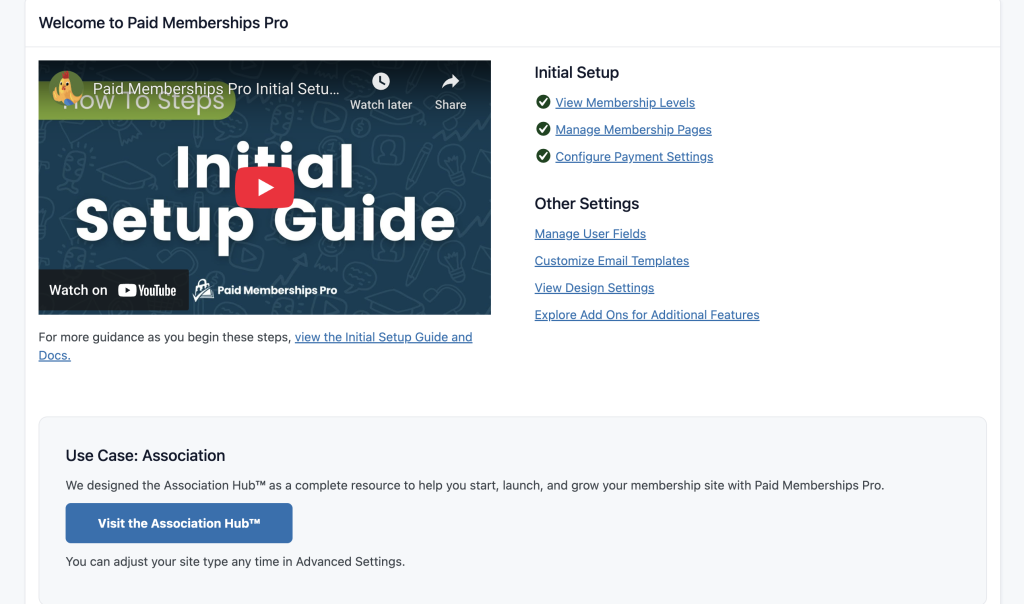
The plugin does not run a step-by-step guided wizard. You are working directly in the admin panel from the start, which suits experienced WordPress users but may feel less directed to newcomers.
For ongoing updates after the WordPress.org departure, the free PMPro Update Manager add-on connects your site to PMPro’s own license server and delivers updates through the standard WordPress dashboard update flow.
Membership levels
Membership level configuration in PMPro is more flexible than most competitors at the free tier. According to PMPro’s official documentation, each level supports:
- Free or paid access at any price you set
- One-time or recurring billing
- Flexible billing cycles: daily, weekly, monthly, annually, or a custom number of days
- Trial pricing with a different initial amount and billing period
- Expiration dates (members automatically lose access after a set number of days or months)
- Custom profile fields collected at checkout, scoped to specific levels
Starting with PMPro 3.0, members can hold multiple membership levels simultaneously. That opens up use cases like: a base community level that gives forum access plus a premium content level that adds gated articles, where a member holds both at the same time.
Level Groups control how multiple levels interact. An admin sets up groups to define whether levels in the same group are exclusive (a member can only hold one at a time) or stackable. That structure gives site owners precise control over upgrade, downgrade, and cross-sell paths without custom code.
One important note from the documentation: changes made to an existing level’s pricing apply only to new checkouts. Existing subscribers with active recurring payments are not retroactively affected, which matters to understand before editing a live level.
Content restriction
Content restriction is PMPro’s core job, and it handles it across a wide range of content types. On individual posts and pages, the Memberships metabox in the WordPress editor shows every active level and lets you toggle access per level. Restrict a page to the Gold level, and non-members see either a teaser excerpt or a fully hidden content block with a customizable message.
Restriction can also be applied at the category level. Every post in a restricted category inherits the access rule without individual post editing.
Inside the block editor, a Content Visibility block handles inline visibility control: you can show or hide individual blocks within a post based on membership status. That means you can publish a partially public article with a gated premium section in the middle, rather than having to choose between fully public and fully restricted.
PMPro’s documentation lists 28 content types that can be restricted. Custom post types from third-party plugins require the Custom Post Type Membership Access add-on.
A built-in Admin Membership Access feature lets administrators preview the site as different membership levels, useful for checking restriction rules without logging in and out repeatedly.
Payment gateways
Stripe and PayPal are included in the free core plugin, and both support recurring subscriptions. PMPro’s official gateway page states explicitly: “All of our gateway integrations support recurring subscriptions and are provided for free in the core plugin or through a free integration.” (Source: paidmembershipspro.com/gateway/)
Additional gateways are available as free add-ons: Paystack, CCBill, Payfast, and Square. Authorize.net and Braintree are also documented as supported options. A manual payment gateway is included in core for sites that accept bank transfers, checks, or invoiced payments.
The screenshot below, published in PMPro’s official documentation, shows the Payment Gateway Settings admin screen. It lists installed gateways with their status and a brief description. In the example, Stripe is the Primary Gateway, PayPal Express is an enabled add-on gateway, and Check (Pay by Check) is also enabled. Each gateway has an Edit Settings button for configuring its API keys, test mode, and options.
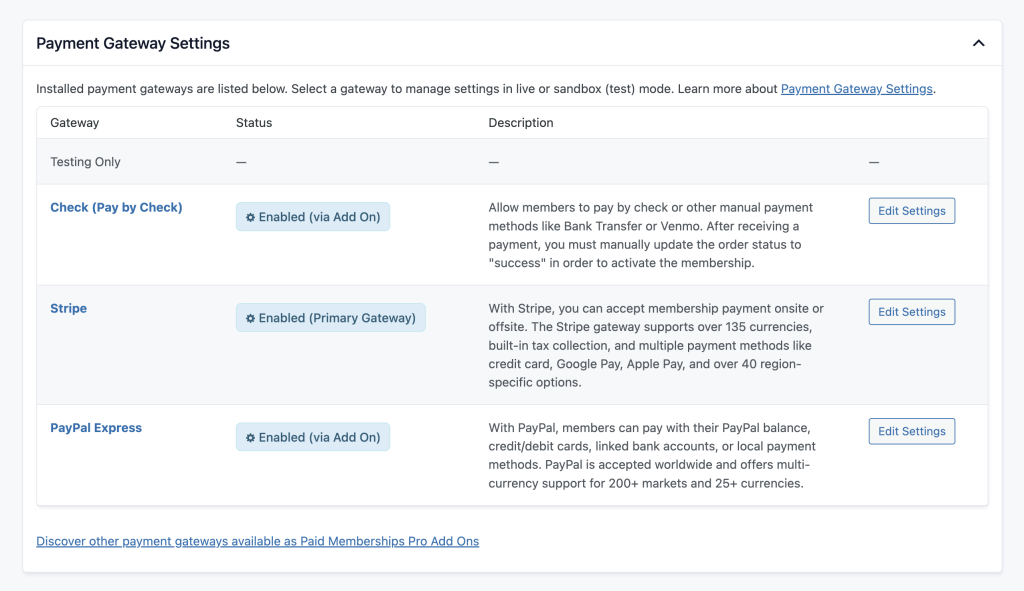
One notable change in v3.7.1 (March 2026): PayPal Express was deprecated. PMPro’s release notes pointed users toward Stripe as the primary recurring payment gateway going forward.
Member management and admin tools
The Members List is PMPro’s central admin screen for managing subscribers. PMPro’s official documentation screenshot shows columns for Username, ID, First Name, Last Name, Email, Level, Level ID, Subscription amount, Registered date, Start Date, and End Date. Admins can filter the list by membership level, export to CSV, add a new member manually, or use Quick Search (added in v3.7) to find a specific member.
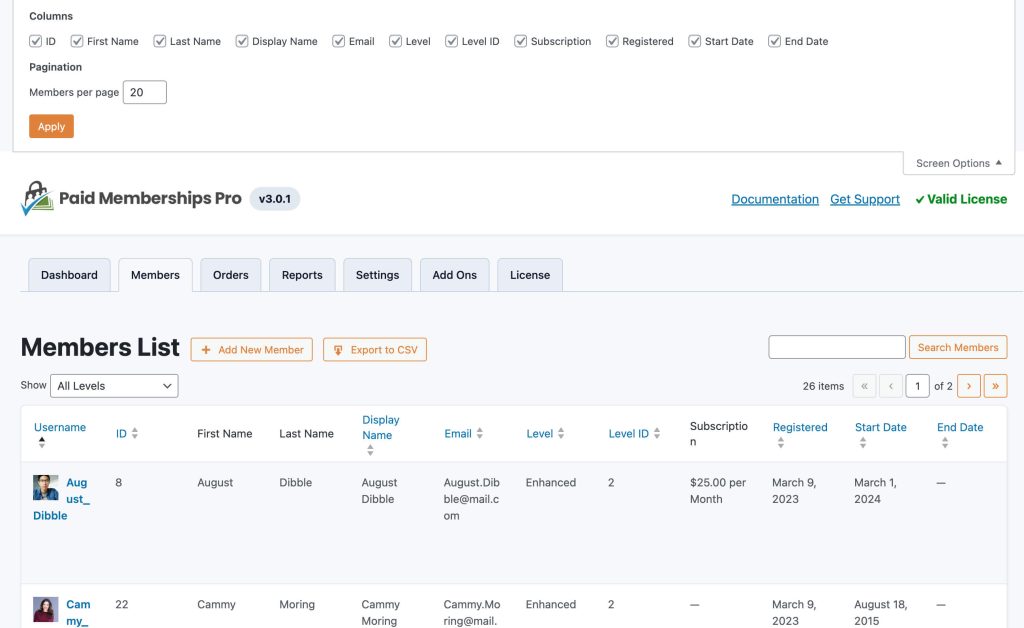
The tab bar in this screenshot shows the full scope of PMPro’s admin section: Dashboard, Members, Orders, Reports, Settings, Add Ons, and License. All membership management, order history, financial reports, and plugin configuration are accessible within PMPro’s own admin area.
Administrators can manage memberships at the individual user level: manually add or remove memberships, upgrade or downgrade between levels, and cancel recurring subscriptions without touching the payment gateway.
Frontend member experience
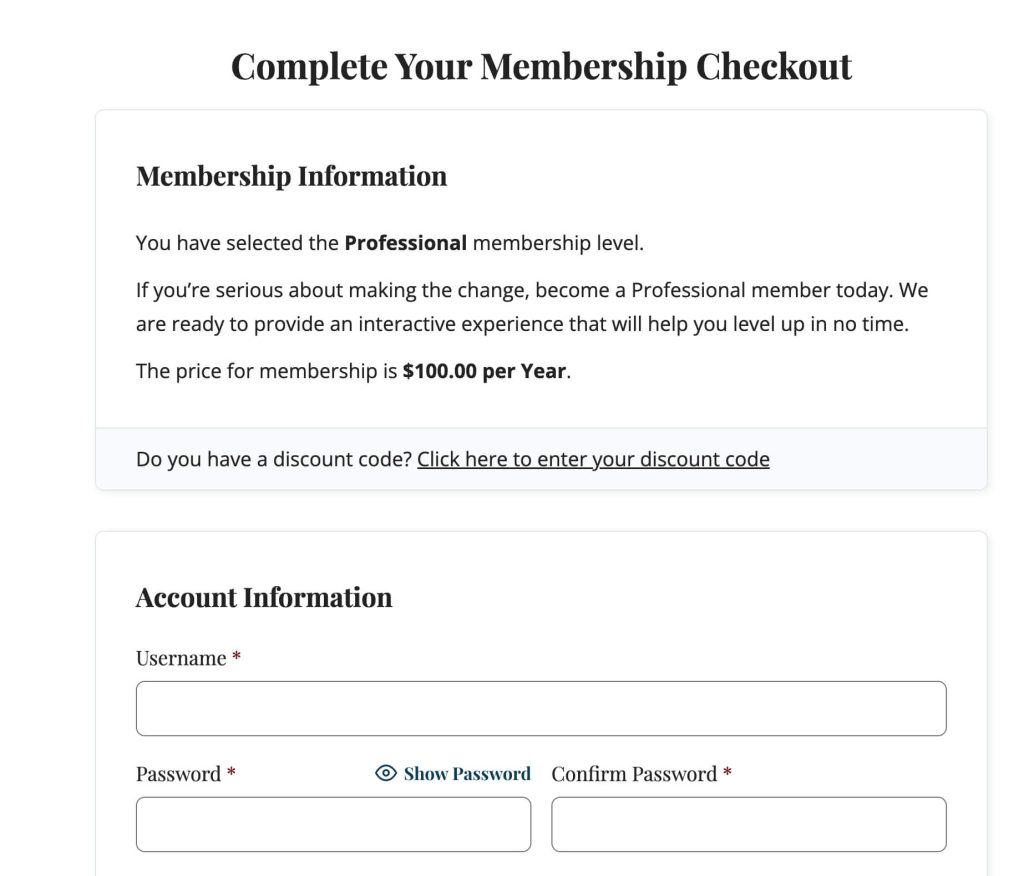
The frontend checkout and member account pages are created automatically by PMPro and are ready to use without custom page building. PMPro’s official documentation screenshot of the checkout page shows a “Complete Your Membership Checkout” heading, a Membership Information panel confirming the selected level and price, a discount code option, and an Account Information form for new members registering during checkout.
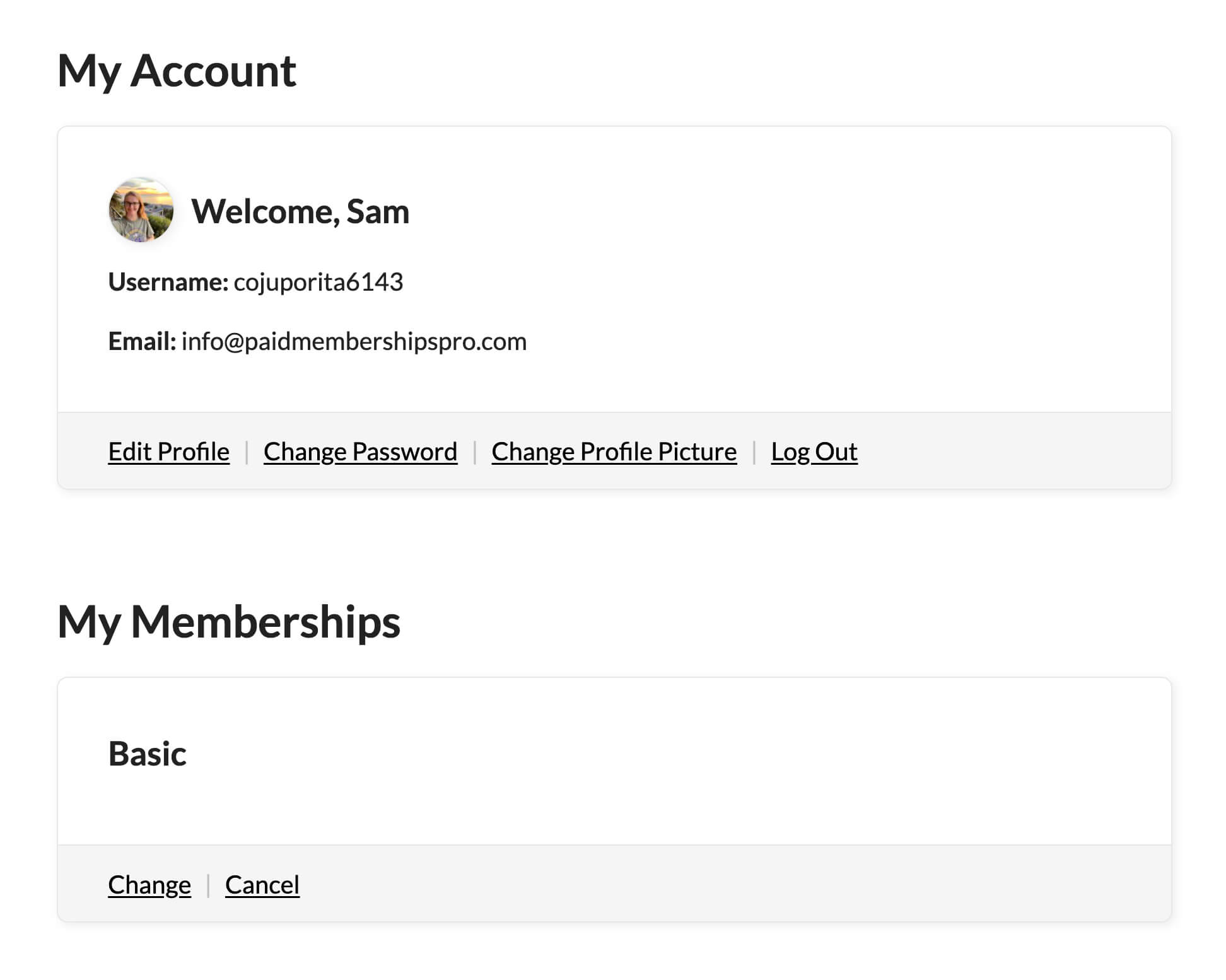
The Member Account page gives logged-in members a self-service hub. PMPro’s official documentation screenshot for v3.7 shows a profile card with the member’s avatar, display name, username, email, and action links (Edit Profile, Change Password, Change Profile Picture, Log Out). Below the profile, a My Memberships section shows the current active level name with Change and Cancel links.
All of these pages use standard WordPress shortcodes and, in recent versions, Gutenberg blocks. PMPro ships 20 blocks for the WordPress block editor, covering checkout forms, content visibility, billing management, account profile panels, and more.
The free Memberlite theme is built specifically for PMPro sites and adds styled versions of all member-facing pages. It is not required; PMPro works with any WordPress theme.
Add-ons ecosystem
PMPro’s add-on library is one of its strongest differentiators. The official add-on count exceeds 100, organized across categories: Admin, Checkout, Content, Courses, Email, Enhancement, Integration, Payment, and User.
The free tier includes 25 add-ons. The Standard plan adds 54 premium add-ons. That split is key to understanding what costs money.
Notable free add-ons:
- Courses for Membership: adds a lightweight course structure without a separate LMS plugin.
- Events for Members-Only: integrates with The Events Calendar to restrict event access by membership level.
- BuddyPress and BuddyBoss Integration: gates community features behind membership levels.
- bbPress Integration: restricts forum access by level.
- Mailchimp, MailerLite, Kit (ConvertKit), AWeber, and Constant Contact Integrations: sync member data with email marketing platforms automatically.
- Zapier Webhook Automations: connects PMPro to thousands of third-party apps without custom code.
- WooCommerce Integration: links membership levels to WooCommerce product access and pricing.
- Roles for Membership Levels: assigns WordPress user roles based on membership level.
- MemberPress Migration Toolkit: imports member data from MemberPress for sites switching platforms.
- PMPro Update Manager: maintains automatic plugin updates now that PMPro distributes from its own server rather than WordPress.org.
Notable premium add-ons (Standard plan or higher):
- Abandoned Cart Recovery: contacts members who started checkout but did not complete it.
- Gift Membership: allows members to purchase memberships as gifts for others.
- Group Accounts: lets one account manage sub-accounts for a team or family.
- Member Directory: adds a searchable, filterable directory of all active members.
- Payment Plans: splits a membership fee into installments.
- Social Login: lets members sign in with Google, Facebook, or other social accounts.
- Variable Pricing (Pay What You Want): allows members to choose their payment amount above a minimum.
(Source: paidmembershipspro.com/add-ons/)
Developer tools
PMPro is one of the most developer-friendly membership plugins for WordPress. The codebase is fully GPL, publicly documented, and has been extended by a community of developers since 2011.
The plugin provides over 300 action and filter hooks across its core functionality, covering registration, checkout, level changes, content restriction, and payment processing. Eight REST API endpoints cover the core membership operations, making PMPro integrable with external systems, mobile apps, or headless WordPress builds without relying on custom plugin code. (Source: paidmembershipspro.com/documentation/advanced/api/)
The GitHub repository at github.com/strangerstudios/paid-memberships-pro is active and transparent. The changelog shows a consistent release cadence with multiple minor versions per month and security patches shipped promptly.
What changed in recent versions
PMPro v3.5 (September 2025) introduced Action Scheduler to replace wp-cron for background task processing. This is a meaningful change for sites with large member databases. Action Scheduler processes tasks sequentially in batches and pauses automatically when server load increases. Membership expiration notices, payment reminders, and activity emails now queue reliably without flooding the server.
v3.5 also introduced file restrictions for sensitive files like payment gateway debug logs, a new payment settings UI that separates gateway configuration onto distinct pages, and a refreshed admin dashboard layout.
v3.7 (March 2026) added native avatar upload functionality and a Quick Search feature in the admin for finding members. It also shipped Liquid syntax email templates for more flexible email logic.
v3.8 (June 2026) expanded the email template editor with full Liquid syntax support and added a new membership level shortcode. It also added taxonomy restriction filters for more granular content control.
v3.8.1 (June 2026) improved checkout button styling and added HTML accessibility improvements. v3.8.2 (July 2026) patched security issues in user field sanitization and Authorize.net handler validation, and fixed a CSV export bug.
(Source: github.com/strangerstudios/paid-memberships-pro/blob/dev/CHANGELOG.txt)
The WordPress.org departure
On October 17, 2024, Paid Memberships Pro closed its WordPress.org plugin listing at the team’s own request. CEO Jason Coleman cited concerns about Matt Mullenweg’s conduct following WordCamp US 2024 and his takeover of the Advanced Custom Fields plugin. Coleman stated: “We would not be supporting open source if we were to distribute our plugin from a site where Matt will lock out users for any reason.” (Source: paidmembershipspro.com/leaving-wordpress-org/)
For users, the practical effects are limited:
- New installs require downloading the plugin zip from paidmembershipspro.com rather than searching in the WordPress admin.
- Existing installs with the core plugin or the PMPro Update Manager add-on continue receiving updates through PMPro’s own license server, with no change to the WordPress dashboard update flow.
- Security is maintained through the same standards as before. The code remains on GitHub for public review.
- Third-party compatibility is unaffected. Any plugin or theme that worked with PMPro before October 2024 continues to work.
One friction point worth noting: WordPress management tools and hosting control panels that automate WordPress.org plugin updates will not detect PMPro updates automatically. Teams using centralized management dashboards (such as ManageWP or MainWP) may need to configure the PMPro update source separately.
Pricing and license value

PMPro’s pricing in July 2026 (source: paidmembershipspro.com/pricing/):
Free
$0
Core plugin, Memberlite theme, 25 free add-ons
No license key, no premium add-ons, no official support
Best for: developers, testers, solo sites starting out
Standard
$49 per month, or $499 per year (saves approximately two months)
All free features plus 54 premium add-ons, 1-site license key, technical support
Does not include managed hosting or implementation services
Best for: self-hosted sites that need premium add-ons and priority support
Max
$99 per month (reduced from $149), or $999 per year
Managed hosting (2 CPUs, 4 GB RAM, 80 GB SSD), free site migration, “Do It For Me” implementation service, CDN, daily backups, SSL and DDoS protection, email management
Capacity: 0 to 1,000 orders per month
Best for: growing sites that want hosting, performance, and done-for-you setup in one plan
Max 2x
$299 per month, or $2,999 per year
All Max features with larger server specs (4 CPUs, 8 GB RAM, 200 GB SSD)
Capacity: 1,000 to 5,000 orders per month
Best for: established high-volume membership sites
All plans include a 100-day money-back guarantee with no questions asked.
Value assessment: The free tier is genuinely strong. Unlimited membership levels, Stripe and PayPal recurring billing, full content restriction, and nine auto-created member pages make it one of the most capable free membership plugins available. The gap from free to Standard is the 54 premium add-ons and access to support.
At $499 per year, Standard sits within range of MemberPress, which is priced at $199.50 per year introductory for Launch (regularly $399) up to $399.60 per year for Scale (regularly $999). Note: MemberPress’s entry-level Launch plan charges a 4.9% transaction fee on payments; Growth and Scale plans eliminate it. That transaction fee changes the true cost comparison significantly at any meaningful transaction volume. PMPro charges no transaction fee at any plan level. (Source: memberpress.com/plans/)
The Max plan’s price reflects bundled hosting. If you already pay for managed WordPress hosting separately, comparing Max to Standard-plus-your-current-host will clarify whether the consolidation saves money or costs more.
The Standard plan grants a 1-site license key. Teams managing multiple membership sites should contact PMPro to understand multi-site pricing options.
Pros and cons
Pros
- Capable free version that competes with features other plugins put behind paywalls
- Unlimited membership levels with flexible billing options at no cost
- Stripe and PayPal recurring subscriptions included in the core free plugin
- All gateway integrations support recurring subscriptions (stated on paidmembershipspro.com/gateway/)
- 100-plus officially supported add-ons, with a large free subset
- Active development since 2011 with consistent security patching
- 300-plus action/filter hooks and a REST API for developers
- Integrations with LearnDash, LifterLMS, bbPress, BuddyPress, and BuddyBoss as free add-ons
- Members can hold multiple levels simultaneously (since v3.0)
- 100-day money-back guarantee on paid plans
- Open-source and GPL licensed; code publicly auditable on GitHub
- No transaction fees at any plan level
Cons
- No longer on WordPress.org: requires manual zip download and separate update configuration
- No guided onboarding wizard: setup involves navigating multiple admin screens without step-by-step prompting
- Premium features like abandoned cart recovery, member directories, and group accounts require the Standard plan ($499/year)
- Standard plan is single-site; no published unlimited-site tier for agencies
- PayPal Express deprecated in v3.7.1, affecting sites relying on that integration
- Content restriction for custom post types requires a separate add-on
- The add-on model can result in many active plugins on complex sites
- No live WordPress.org install count or review count since the October 2024 closure
Alternatives
MemberPress is the most direct comparison. It is a premium-only plugin with no free tier. Introductory pricing runs from $199.50 per year (Launch, regularly $399) to $399.60 per year (Scale, regularly $999). The Launch plan includes a 4.9% transaction fee; Growth and Scale plans eliminate it. MemberPress includes a built-in course builder, affiliate program integration, and more bundled features without separate add-on management. It remains on WordPress.org. (Source: memberpress.com/plans/)
Restrict Content Pro merged into the Easy Digital Downloads ecosystem under Awesome Motive. It is now available as a content restriction feature within EDD’s paid plans rather than as a standalone product. Teams that need digital product delivery alongside membership may find the EDD ecosystem a cleaner fit.
MemberMouse is a premium membership plugin with strong subscription analytics and churn management. Pricing starts higher than PMPro Standard. It suits e-commerce-adjacent membership businesses that need detailed revenue reporting.
SureMembers (from SureCraft, makers of SureCart) is a newer, lighter option focused on access control. It works best paired with SureCart for selling memberships rather than as a standalone tool.
For most WordPress users, PMPro and MemberPress are the primary decision. Choose PMPro if a capable free tier and developer extensibility matter. Choose MemberPress if you prefer an all-in-one experience with a native course builder and are willing to pay from day one.
Final verdict
Paid Memberships Pro is one of the most honest free membership plugins for WordPress. The free core does not feel like a stripped-down demo: it handles real membership sites at real scale. Stripe and PayPal recurring billing, unlimited levels, full content restriction, and a complete member-facing page set are all available without spending anything.
The plugin rewards teams that invest time in understanding its architecture. The add-on model gives you a lot of options, but it also means you need to know which add-ons you need before you need them. The departure from WordPress.org adds a small installation and update management wrinkle that did not exist before 2024.
After 15 years of continuous development, PMPro is not a plugin that is still figuring itself out. The changelog is full of security patches, performance improvements, and API refinements. The team has taken principled stances on open-source values that some users will find reassuring and others will find inconvenient. Both reactions are legitimate.
If you are building a membership site on WordPress and want a free, capable, extensible foundation, Paid Memberships Pro is the plugin to start with. You can read more WordPress plugin reviews in our reviews section.