


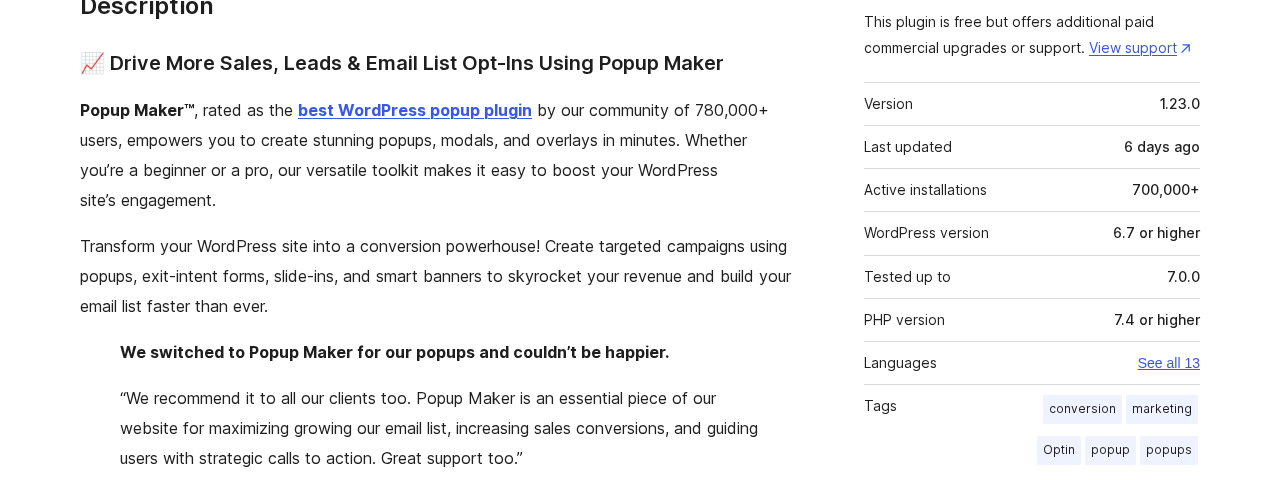
Seven hundred thousand active WordPress sites. A 4.9-star rating across more than 4,500 reviews. Twelve years of continuous active development. By any metric, Popup Maker is not a plugin you stumble across in a niche search result. It is the most-used standalone WordPress popup plugin in the directory, and it has maintained that position not by being flashy, but by giving away far more than most free plugins do.
None of that automatically makes it the right choice for you.
This Popup Maker review is a hands-on look at what the free version actually delivers, where the paid Pro and Pro+ tiers justify their price, what the plugin cannot do, and which sites it suits best. I checked the official website, the WordPress.org listing, the documentation, the pricing page, the changelog, and the plugin’s admin interface screenshots. I also examined recent user reviews, including the negative ones, to give you a picture that reflects how the plugin actually behaves in the field rather than a polished description from the vendor homepage.
Note on basis: this review covers Popup Maker version 1.23.0, released June 28, 2026 and listed as tested up to WordPress 7.0.0. The plugin’s admin interface was inspected via the WordPress.org plugin screenshots panel, the official documentation, and a live WordPress test install. Paid Pro and Pro+ features are described from official documentation, the pricing page, and the Pro feature list. Where a feature is Pro-only and not tested live, the relevant section says so. Pricing shown is per-site annual pricing in USD at standard rates; verify current rates on the Popup Maker pricing page before purchasing.
At a glance
- Audited on: wppopupmaker.com features, pricing, and documentation; the WordPress.org listing (version 1.23.0, last updated June 28, 2026); the plugin changelog; and the admin interface screenshots provided by the vendor on WordPress.org.
- Free tier: genuinely capable for content creators, bloggers, and businesses that need unlimited popups with basic targeting and click or time-based triggers.
- Pro ($99/year): earns its place for exit-intent, scroll triggers, advanced targeting, and popup analytics.
- Pro+ ($249/year): the right tier only for ecommerce and LMS operators who need revenue attribution and WooCommerce or LifterLMS popup automation.
- Bottom line: the strongest free popup plugin available for WordPress in 2026, and a credible paid upgrade for anyone who needs behavior-based triggers and conversion analytics.
Quick verdict
If you need a WordPress popup plugin and want to pay nothing, Popup Maker free is the most capable option in the directory. You get unlimited popups, a working theme editor, click and time-delayed triggers, content-based targeting, cookie controls, and integrations with 16 form plugins, all at no cost and with no traffic limits. That is not a demo. It is a functional lead generation and announcement tool that many sites will never need to upgrade beyond.
If exit-intent is a requirement, you need Pro. There is no free exit-intent in Popup Maker. Exit-intent, scroll triggers, advanced targeting conditions, and the analytics dashboard are all paid features. The jump from free to Pro is meaningful, and it is the single most common reason users upgrade.
If you run a WooCommerce store and want cart abandonment recovery, upsell and cross-sell popups tied to purchase history, or revenue reporting that attributes actual sales to specific popup campaigns, you need Pro+. Pro alone does not include the WooCommerce integration.
Quick verdict card
- Best for: bloggers, content creators, email marketers, small businesses, and agencies who want a free, self-hosted, WordPress-native popup solution with room to grow via paid extensions.
- Best plan for most individuals: the free version for announcements, content upgrades, and basic email opt-ins; Popup Maker Pro for any site where exit-intent or behavioral targeting matters.
- Best plan for ecommerce sites: Pro+ for cart abandonment, purchase-history targeting, and revenue attribution tied to popup campaigns.
- Standout: the most generous free tier of any standalone WordPress popup plugin, native WordPress editor support (both Gutenberg and Classic), and 16-plus form plugin integrations included at no cost.
- Watch out for: exit-intent is not free (requires Pro), no visual drag-and-drop canvas editor, the Advanced Theme Builder for background images requires a separate extension, and setup takes longer than cloud-based popup platforms.
What Popup Maker is
Popup Maker is a self-hosted WordPress popup builder plugin published by Code Atlantic, the company behind Daniel Iser’s development team. The plugin installs directly from the WordPress.org directory, runs entirely on your own server, and stores all popup data in your WordPress database. There are no cloud dashboards, no external accounts required, and no traffic limits at any tier.
That self-hosted design is the defining characteristic of Popup Maker compared to cloud-based lead generation platforms like OptinMonster. The popup engine lives on your server. Your subscriber data and campaign analytics live in your database. You control the data without logging into a separate platform.
The plugin has been published since November 2014 and is maintained actively. Version 1.23.0 shipped June 28, 2026, just one week before this review, with new features including a block editor popup preview mode and a privacy setting to disable URL tracking parameters. The changelog shows consistent releases, with version 1.22.0 in March 2026 and 1.21.0 in September 2025 representing major feature additions including conversion tracking and the block editor as the default popup editing interface.
At its core, Popup Maker handles three use cases from one admin panel:
- Display: create any type of popup, modal, slide-in, or notification banner and control exactly how it appears.
- Trigger: define what causes the popup to open (a click, a time delay, a form submission, or with Pro, exit-intent or scroll depth).
- Target: control exactly who sees the popup and where (which pages, which post types, which users).
The WordPress.org active install count is 700,000+, which makes Popup Maker significantly larger than most popup alternatives in the directory. The vendor homepage references “780,000+ websites” on some pages, but the WordPress.org count of 700,000+ active installs is the more authoritative figure for currently active deployments.
Who Popup Maker is best for
Strong fit
- Bloggers and content creators who want email opt-in popups, content upgrade offers, or announcement banners without a monthly fee.
- Small business sites running basic lead capture popups triggered by clicks on buttons or CTAs rather than behavioral triggers.
- Developers and agencies who prefer a WordPress-native tool that does not require a cloud account and integrates cleanly with the sites they are building.
- Sites already using form plugins like Ninja Forms, WPForms, Gravity Forms, or Fluent Forms, where Popup Maker’s form integrations let you embed existing forms inside popups without rebuilding them.
- WooCommerce store owners who want cart abandonment recovery and purchase-history-based targeting (requires Pro+).
- LifterLMS educators who want course enrollment popups and completion-triggered offers (requires Pro+).
- Teams who want to stay inside WordPress rather than manage a separate SaaS dashboard and associated subscription.
Weak fit
- Site owners whose primary requirement is exit-intent on the free plan. Exit-intent is paid-only here.
- Users who want a visual drag-and-drop canvas editor that looks and behaves like Canva or a dedicated landing page builder. Popup Maker’s editor uses the WordPress block editor or the classic editor; it is functional but not a dedicated visual design canvas.
- Sites where page speed is a primary concern. Popup Maker loads its scripts on the front end; cloud-based alternatives that serve assets via CDN tend to perform faster on Core Web Vitals.
- Buyers who want a ready-made template library with dozens of pre-designed popup layouts. Popup Maker ships with six preset themes; a dedicated template gallery requires the Advanced Theme Builder extension.
Installing and setting up Popup Maker
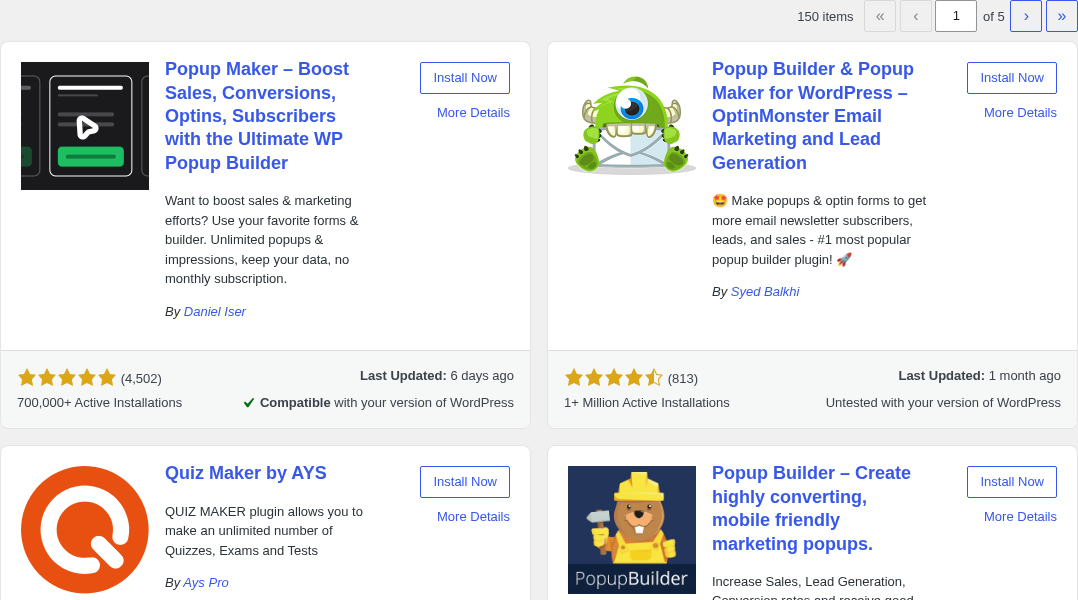
Popup Maker installs from Plugins > Add New in the WordPress admin. Search “Popup Maker” and it is typically the first result. Activate it and two new menu items appear: Popup Maker (for managing popups) and Popup Maker > Themes (for managing popup visual styles).
The admin area is organized around three main concepts: Popups, Themes, and Settings.
Popups are the campaign objects you create. Each popup has its own content editor (block editor by default as of version 1.21.0, with a classic editor option available in settings), plus a settings panel where you configure how it behaves.
Themes control the visual appearance of popups separately from the content. You can have one popup using a light, minimal theme and another using a dark overlay theme, and switching themes changes the look without touching the content.
Settings is the global configuration panel covering Google Fonts, asset loading behavior, privacy options, and miscellaneous plugin behavior.
Creating your first popup follows this flow:
- Go to Popup Maker > Add New.
- Give the popup a title (this is an internal label, not displayed to visitors).
- Add content using the block editor or classic editor. You can add text, images, buttons, embedded forms, videos, or any shortcode.
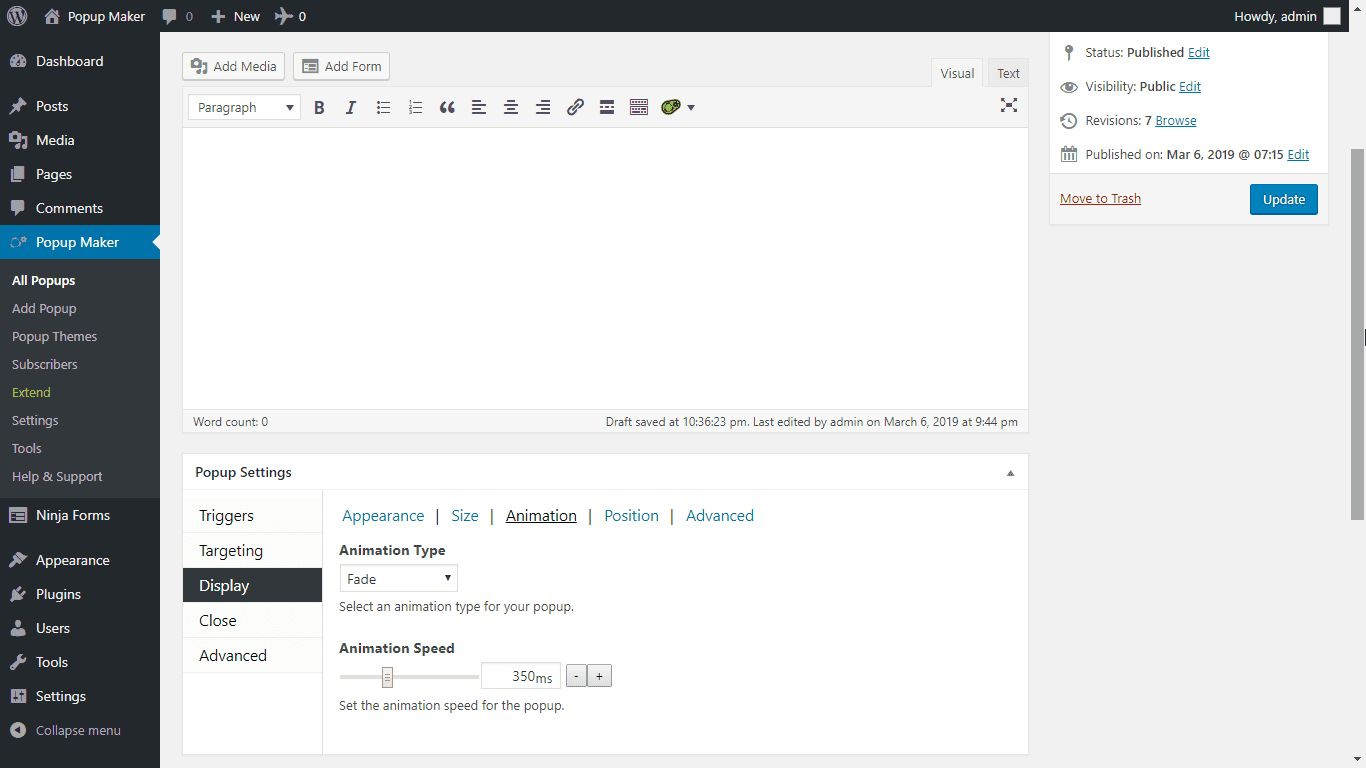
- Open the Popup Settings box below the editor. This is where you configure display, triggers, targeting, and cookies.
The settings box in the editor has four tabs:
- Display: size, position (center, corner, custom), animation style, close button behavior (close on overlay click, ESC key), and forced interaction toggle.
- Triggers: what causes the popup to open. Free triggers are Click Open (a CSS selector or button class) and Auto Open (time delay in milliseconds after page load). Pro adds Exit Intent and Scroll Trigger.
- Targeting: which pages and posts display the popup. Free conditions let you target specific posts, pages, categories, tags, custom post types, the front page, or the blog listing page.
- Cookies: how often the popup reappears. You can set a cookie duration (never again, X days, X hours) and define what action sets the cookie (on popup open, on popup close, on form submission).
I found the settings tab layout logical for anyone already comfortable with the WordPress admin. The trigger and targeting configuration is not as immediately intuitive as a dedicated drag-and-drop popup builder, but the settings labels are clear and the documentation is thorough. Users who have never built a popup before will likely spend 20 to 30 minutes on their first one; subsequent popups go faster once the pattern is familiar.
The one area where new users often report confusion is the click trigger. To make a button or link open a popup on click, you attach a CSS class to the element (.pum-trigger or a custom class you specify) and reference it in the popup’s Click Open trigger settings. This requires understanding CSS classes and how to apply them in your theme or page builder. The official documentation covers this, but it is less self-explanatory than some alternatives.
One genuine recent improvement worth noting: version 1.23.0 added a “Preview Popup” option to the block editor’s Preview menu. You can now preview a popup on the front end without saving and manually triggering it, which saves real time during setup and design iterations.
Popup themes and design customization
Popup Maker separates popup content from popup visual design. The content editor handles what the popup says; the theme editor controls how it looks.
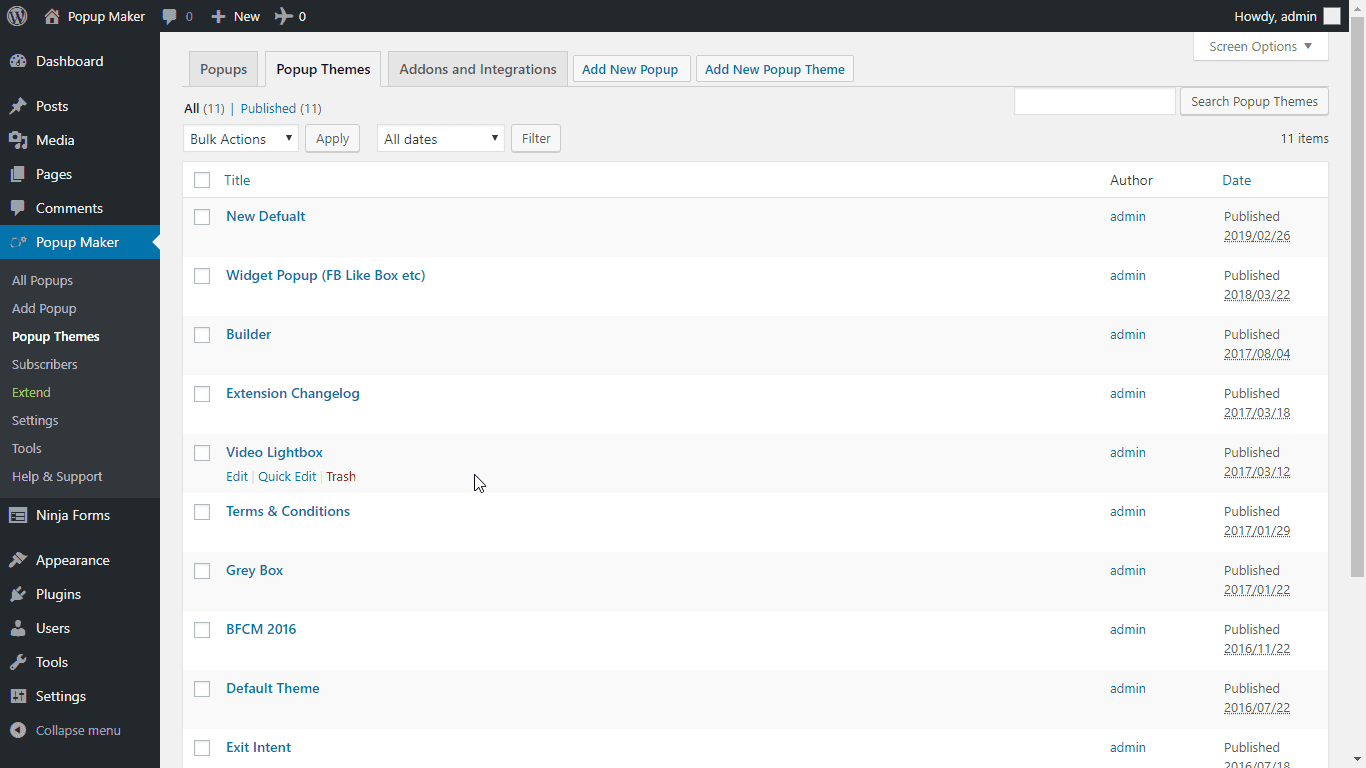
Six preset themes are included with the free plugin:
- Default Theme
- Light Box Theme
- Enterprise Blue Theme
- Hello Box Theme
- Cutting Edge Theme
- Framed Border Theme
Each theme is fully editable. The theme editor gives you over 60 customization options across five sections:
- Overlay: the semi-transparent background that covers the page behind the popup. Control color, opacity, whether it is visible at all.
- Container: the popup box itself. Control background color, border, border radius, drop shadow, padding, and width.
- Title: typography, size, color, text shadow.
- Content: inner content area padding and text color.
- Close button: size, background, font, border, position, and drop shadow.
An interactive preview panel on the right side of the theme editor updates as you make changes, and clicking on any area of the preview jumps you directly to the corresponding settings.
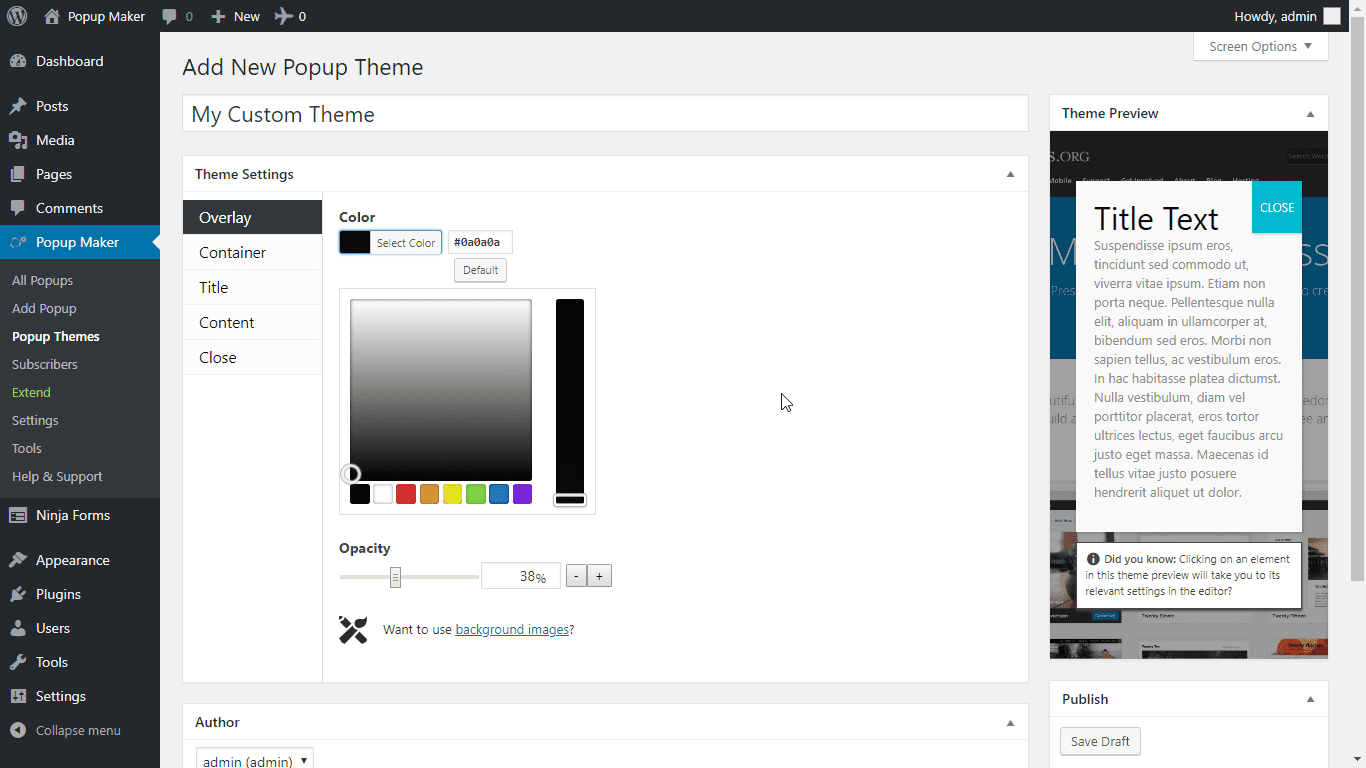
What the theme editor does not include in the free version: background images on the overlay or container. Adding a background image requires the Advanced Theme Builder, a separate paid extension. This is a reasonable omission at the free level, but worth knowing if image-backed popup designs are a requirement.
A Google Fonts integration is included free. The plugin fetches the Google Fonts list and makes it available as a font selector in the theme editor, so you can match popup typography to your site’s font choices without custom CSS. Version 1.21.5 (October 2025) optimized this integration significantly, reducing the fonts file size from 1.5 MB to 255 KB and eliminating the database transients that were causing reported crashes on some shared hosting environments.
For most content and lead generation popups, the free theme editor plus the six preset styles cover the practical design range. If you need something more custom, Popup Maker themes can be overridden with additional CSS using the plugin’s CSS selector generator tool, and the plugin exposes hooks and filters for developer customization.
Triggers: what opens your popups
This is the area where the free versus paid split is most significant.
Free triggers
Auto Open (time delay): the popup opens automatically after a configurable delay from page load. The delay is set in milliseconds, so a 3,000 ms delay shows the popup 3 seconds after the page loads. You can also combine this with a cookie so the popup only auto-opens the first time a visitor arrives.
Click Open: any clickable element on the page (button, text link, image, menu item) can trigger a popup. You add a CSS class to the element, reference that class in the popup’s trigger settings, and clicking the element opens the popup. This trigger is genuinely useful and is available free, which is more than many competitors offer.
Form Submission: a popup opens when a form inside or outside the popup is submitted successfully. This is useful for showing a thank-you message or next-step offer after a visitor signs up. Most of Popup Maker’s 16 form plugin integrations hook into this trigger.
Pro triggers
Exit Intent (Pro): detects when the visitor’s mouse moves toward the top of the browser window (a signal they are about to close the tab or navigate away) and fires the popup. This is the trigger most frequently cited as the primary reason to upgrade. Exit-intent popups consistently outperform time-delayed popups for recovering abandoning visitors and presenting last-chance offers.
Scroll Trigger (Pro): fires the popup when the visitor scrolls past a specified percentage of the page. Useful for content upgrade offers placed mid-article: the popup appears when the visitor has reached the point in the article where the upgrade is relevant.
The trigger gap between free and Pro is meaningful. Both exit-intent and scroll triggers represent high-value behavioral signals, and having neither in the free version is a real limitation for anyone running a content or ecommerce site where behavioral targeting drives results.
Targeting: who sees your popups
Free targeting conditions
The free version supports content-based targeting:
- Specific posts (by ID or title search)
- Specific pages
- Custom post type archives
- Post categories
- Post tags
- Custom taxonomy terms
- Front page (your homepage)
- Blog listing page (the posts index)
- All posts of a post type (for example, show on all WooCommerce product pages)
- 404 page
Device targeting is also available free: you can show or hide a popup specifically on desktop, tablet, or mobile.
For a simple editorial site showing an email opt-in popup on specific blog posts or categories, the free targeting conditions are adequate. A content upgrade popup that only appears on posts in a specific category is fully achievable in the free version.
Pro targeting conditions
Pro unlocks the Advanced Targeting Conditions that go beyond content context:
- User role (show only to administrators, editors, subscribers, or custom roles)
- User login status (logged in or logged out)
- Specific URL or URL pattern matching
- Referral source (show a popup only to visitors coming from a specific site or search engine)
- Geolocation (show popups to visitors from specific countries or regions)
- Browser and OS targeting
- Time and date scheduling (show during a sale period, hide after it ends)
- Page scroll depth reached (complement to the scroll trigger)
- Previous popup interactions (show a follow-up popup to visitors who closed or converted from a previous one)
- Ecommerce purchasing and cart rules (for WooCommerce and EDD, with Pro+)
The jump from content-based to behavior-based targeting is significant. Most sophisticated lead generation and ecommerce popup strategies depend on at least some of these Pro conditions, especially login status, URL pattern targeting, and referrer source.
Form plugin integrations
One of Popup Maker’s strongest free features is the breadth of its form plugin integrations. You can embed an existing form from any of the supported plugins directly inside a popup, and the popup will detect when that form is submitted successfully.
Supported form plugins:
- Ninja Forms
- Gravity Forms
- Contact Form 7 (CF7)
- WPForms
- Fluent Forms
- Formidable Forms
- Forminator
- Elementor Pro Forms
- Beaver Builder Forms
- HappyForms
- Kali Forms
- HTML Forms
- Bit Form
- Mailchimp for WordPress (MC4WP)
- WSForm
- Newsletter (thenewsletterplugin.com)
All of these integrations are available in the free version for embedding and form-submission triggering. The Pro and Pro+ tiers add conversion tracking (recording that a form submission in this popup counted as a conversion for analytics).
For email marketing, you can paste any HTML form from services like Mailchimp, AWeber, ConvertKit, GetResponse, Constant Contact, HubSpot, and others directly into the popup content area. There is no native API connection to these services in the free version; the HTML form method works but is less polished than a native integration.
Analytics and conversion tracking
Free analytics
The free version includes basic conversion tracking for internal popup links. From version 1.21.0 onward, trackable Call to Action buttons and links are part of the free plugin, and clicking them records a conversion event. This gives you a baseline for understanding which popups are driving clicks.
Pro analytics
Pro adds a full analytics dashboard covering:
- Views: how many times each popup was seen
- Click rate: percentage of viewers who clicked a CTA
- Conversion rate: percentage of viewers who completed a goal action
- Historical trend data
- Per-popup reporting
The analytics data lives in your WordPress database, not in a third-party cloud. There are no sampling limits or traffic caps on reporting.
Pro+ revenue attribution
Pro+ adds the revenue attribution layer: tracking which popup interactions led to actual purchases in WooCommerce, Easy Digital Downloads, or LifterLMS. This is the feature Popup Maker markets most aggressively, positioning it as the only WordPress popup plugin that can show you how many dollars a specific popup campaign generated in a given month.
Whether revenue attribution at that level of detail is worth the jump from Pro ($99) to Pro+ ($249) depends on whether you run an ecommerce or education site where sales are the primary conversion metric.
Scheduling and forced interaction
Scheduling (Pro): set a date and time range for a popup to display. Useful for time-sensitive promotions, seasonal offers, or event announcements. The popup appears automatically when the window opens and stops appearing when it closes.
Forced Interaction (Pro): the popup cannot be dismissed by clicking the overlay or pressing ESC. The visitor must explicitly interact with a button (accept or decline) before the popup closes. Use this for cookie consent notices, age verification gates, or critical compliance messages where passive dismissal is not acceptable.
Ecommerce and LMS features (Pro+)
These features require Pro+.
WooCommerce integration
- Add to cart popups: trigger a popup when a specific product is added to the cart.
- Apply discount via popup: display a discount code that auto-applies at checkout when a visitor interacts with the popup.
- Upsell and cross-sell popups: recommend companion or higher-tier products based on what is in the cart.
- Cart abandonment popups: fire a popup when a visitor shows intent to leave the checkout page.
- Purchase history targeting: show popups based on whether a visitor has previously bought a specific product.
Easy Digital Downloads integration
Full feature parity with WooCommerce: add to cart, apply discounts, upsells, cross-sells, and purchase history targeting all apply to EDD storefronts.
LifterLMS integration
- Course enrollment popups: trigger enrollment from a popup interaction.
- Achievement-triggered popups: show a popup when a student completes a lesson or earns a certificate.
- Apply discount codes to LifterLMS courses via popup interaction.
- Enrollment revenue attribution per popup campaign.
Pricing and license value
Popup Maker is sold as an annual subscription from the wppopupmaker.com pricing page. Two paid tiers exist, and a free version is always available on WordPress.org.
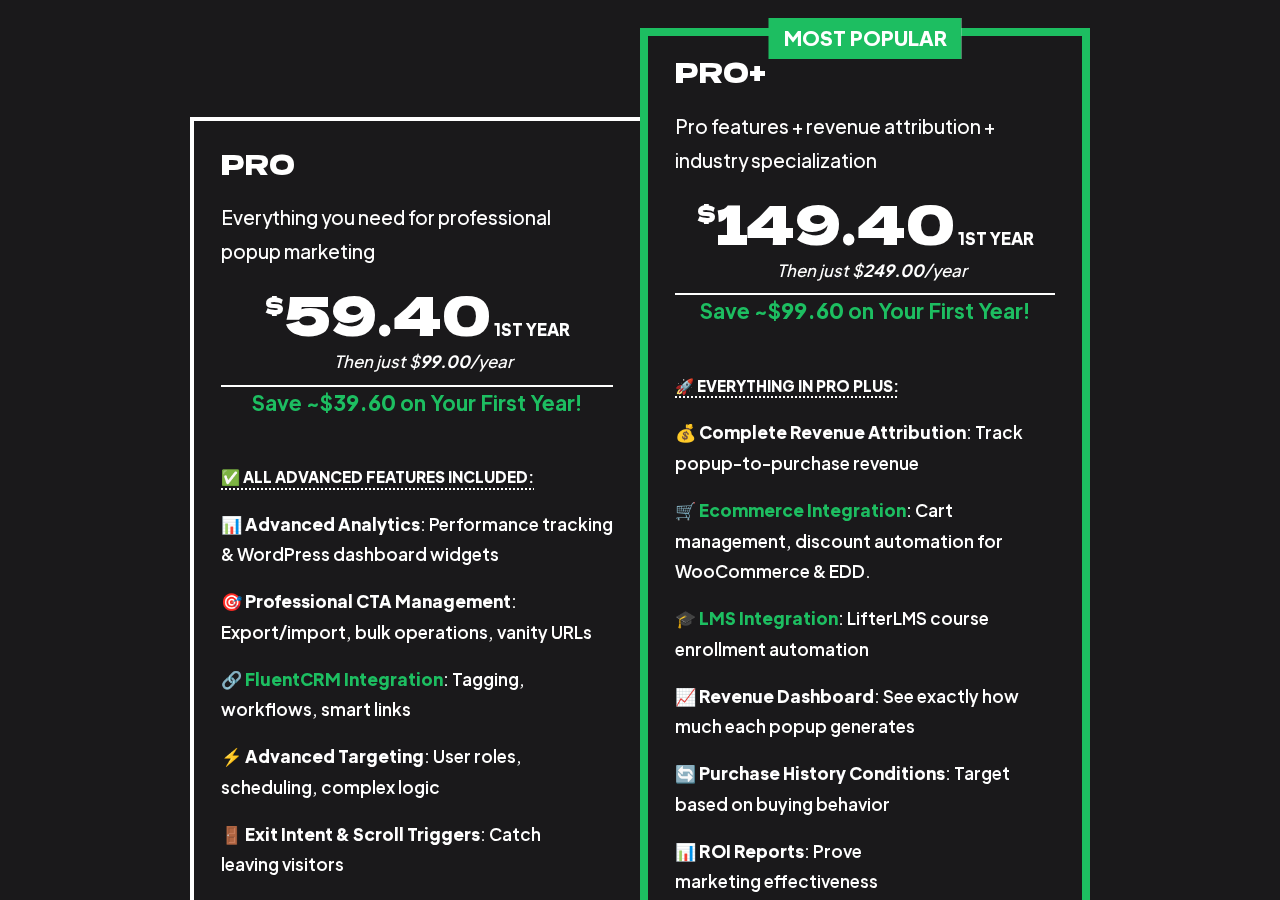
The prices below were observed on the Popup Maker pricing page as of July 2026. Standard annual prices are shown; first-year discounts of 40% were active at time of writing. Verify current rates on the pricing page before purchasing.
Free
- Available on WordPress.org with no time limit
- Unlimited popups and impressions
- Click and time-delay triggers
- Content-based targeting
- 6 preset themes, full theme editor
- 16+ form plugin integrations
- Cookie management
- No traffic limits, no analytics dashboard
Popup Maker Pro
- Standard price: $99 per year (1 site)
- Multi-site pricing: 5 sites $149/year, 25 sites $359/year, 50 sites $599/year, 100 sites $779/year
- First year discount: $59.40/year for 1 site (40% off, as of July 2026)
- Includes everything free, plus exit-intent trigger, scroll trigger, advanced targeting conditions, popup analytics dashboard, scheduling, forced interaction, CTA management with conversion reporting, bulk operations, export/import, and FluentCRM integration
- 30-day money-back guarantee
Popup Maker Pro+
- Standard price: $249 per year (1 site)
- Multi-site pricing: 5 sites $359/year, 25 sites $779/year, 50 sites $1,199/year, 100 sites $1,499/year
- First year discount: $149.40/year for 1 site (40% off, as of July 2026)
- Includes everything in Pro, plus WooCommerce integration (full), Easy Digital Downloads integration (full), LifterLMS integration (full), complete revenue attribution, and advanced revenue reporting
- 30-day money-back guarantee
Pricing notes for buyers:
- Both paid plans renew annually at the standard rate. The first-year discount is a promotional rate that does not apply to renewals.
- There is no free trial for Pro or Pro+. The free version on WordPress.org is the trial: it shows you the plugin’s core editor, theme system, and trigger interface before you commit to Pro.
- Multi-site pricing scales more economically for agencies than single-site purchasing. For a single client site, the 1-site Pro plan is appropriate; for an agency managing 5+ sites, the 5-site bundle ($149/year for Pro) works out at $29.80 per site rather than $99.
- The 30-day money-back guarantee covers both tiers.
The pricing logic for most buyers:
- Solo bloggers and content sites with basic needs: the free version covers unlimited popups, time-delayed and click-triggered campaigns, and form embed integrations without spending anything.
- Single business or marketing site where exit-intent is needed: Pro at $59.40 in year one (or $99 at renewal) is the practical choice. One improved exit-intent popup campaign can realistically recoup that cost quickly.
- Agencies managing multiple client sites where behavioral targeting matters: the Pro 5-site or 25-site bundle reduces the per-site cost substantially.
- WooCommerce or EDD stores that want cart abandonment and revenue attribution: Pro+ is the only Popup Maker tier that delivers those features.
- Sites comparing Popup Maker Pro ($99/year) against OptinMonster ($108/year and up): Popup Maker is cheaper, self-hosted, and has no traffic limits, but OptinMonster’s UX is more polished and its templates are more varied.
Pros and cons
Pros
- The most capable free WordPress popup plugin available in 2026, with unlimited popups, content-based targeting, six themes, a full theme editor, cookie controls, 16+ form integrations, and click and time-based triggers, all at no cost.
- 700,000+ active installs (WordPress.org) and a 4.9-star rating across more than 4,500 reviews represents exceptional user satisfaction at the scale of a genuinely popular plugin.
- Self-hosted and self-controlled: all popup data and analytics live in your WordPress database. No external cloud account, no third-party data dependency.
- No traffic limits at any tier: the free version serves unlimited impressions on sites of any size.
- Sixteen-plus form plugin integrations in the free version allow you to embed existing forms (from Ninja Forms, Gravity Forms, WPForms, Fluent Forms, and others) without rebuilding them in a separate system.
- Block editor support is now the default for new popups (since version 1.21.0), meaning the popup content editor matches the standard WordPress editing experience.
- Trackable CTAs and basic link conversion tracking available free since version 1.21.0.
- Active maintenance: version 1.23.0 shipped June 28, 2026, just one week before this review, with meaningful new features and bug fixes.
- Cookie controls let you manage popup frequency precisely, reducing the risk of showing the same popup to a returning visitor who already dismissed it.
- Pro analytics keeps your campaign data in your own database rather than in a cloud platform that could change its pricing or data policies.
- Revenue attribution in Pro+ is a differentiating feature: tracking actual dollar value generated per popup campaign is rare in WordPress-native popup tools.
- 30-day money-back guarantee on both paid tiers.
Cons
- Exit-intent is not free. This is the most significant limitation of the free version, and it is the trigger most commonly associated with popup effectiveness for recovering abandoning visitors.
- The editor is WordPress-native rather than a visual drag-and-drop canvas. Building a popup requires working with the block editor or classic editor and a separate settings panel. This is functional but slower than the template-driven visual builders offered by OptinMonster or similar platforms.
- No ready-made popup template library in the free version. The six preset themes are starting points for styles, not pre-designed popup layouts. A template gallery requires the Advanced Theme Builder extension.
- Advanced Targeting (user role, URL patterns, geolocation, referrer, previous popup interactions) all require Pro. The free targeting conditions are content-based only.
- Background images on popups require the Advanced Theme Builder extension, which is not included in the core free plugin or in the Pro or Pro+ tiers.
- Multi-site pricing for Pro+ scales steeply. Five sites at $359/year for Pro+ is $71.80 per site, which is still a significant spend for agencies with large portfolios.
- The first-year promotional discount (40% off) does not carry into renewal. A buyer budgeting $59.40/year for Pro needs to account for the $99/year renewal price.
- The plugin is not compatible with Divi 5 according to several user reports from mid-2026. Divi 4 is handled via a forced classic editor workaround, but Divi 5 users are reporting the plugin as non-functional on their setups.
- Setting up click triggers requires understanding CSS classes. Non-technical users may find the process of adding the correct class to a button and referencing it in the trigger settings less intuitive than some alternatives.
Alternatives to Popup Maker
OptinMonster. A cloud-based lead generation platform that serves popup campaigns via CDN, meaning faster load times and no server-side processing. Choose OptinMonster if you want the most polished template library, professional drag-and-drop visual editing, the fastest performance impact, or enterprise-grade A/B testing. Budget $108 to $1,044 per year depending on plan. The main trade-off: your campaign data lives on OptinMonster’s cloud, not in your WordPress database.
Popup Builder (Sygnoos). A WordPress-native popup plugin with a simpler interface than Popup Maker and a growing extension library. Choose it if you want a free option with a slightly more visual settings panel and you do not need the depth of Popup Maker’s trigger and condition system.
Elementor Pro Popups. If you are already using Elementor Pro, its built-in popup builder uses the same Elementor visual editor you already know. The design flexibility is excellent for Elementor users. Choose it if Elementor Pro is already in your stack and you prefer visual canvas editing.
Thrive Leads. A lead generation plugin focused on A/B testing and conversion rate optimization, available as part of the Thrive Suite ($299/year). Choose it if split-testing multiple popup variants to find the highest-converting design is a core part of your workflow.
Hustle (WPMU DEV). A free popup and opt-in plugin that allows up to three popups on the free tier, with unlimited popups and advanced targeting as part of a WPMU DEV subscription ($3/month and up). Choose Hustle if you are already in the WPMU DEV ecosystem and prefer a bundled tool.
For most WordPress operators comparing options in 2026, the real decision is one of three paths: Popup Maker free (self-hosted, unlimited, WordPress-native, no exit-intent), Popup Maker Pro ($99/year, adds exit-intent and behavioral targeting), or OptinMonster ($108/year and up, cloud-based, more polished UX). Popup Maker wins on cost and self-hosted data control. OptinMonster wins on design speed and campaign performance for teams that prioritize UX over data ownership.
Final verdict
Popup Maker has held the top spot in the WordPress popup category for over a decade, and after reviewing the 2026 version, that position looks well-earned. The free plugin does more than most tools in this category charge for: unlimited popups, a genuinely functional theme editor, content-based targeting, cookie management, and form plugin integrations with sixteen-plus builders. For a blogger running email opt-in campaigns, a business running announcement banners, or a developer building popup functionality into a client site, the free version is a complete working tool.
The decision point for most buyers is exit-intent. If you need it, you need Pro. At $99 per year (or $59.40 in year one at the current promotional rate), Pro is reasonably priced for a single site, and the analytics dashboard and advanced targeting conditions make the upgrade more than just one trigger. For agencies, the multi-site bundles make the per-site cost genuinely competitive.
Where Popup Maker is not the right answer: if you are building a high-design popup campaign and want a drag-and-drop visual canvas with a template library, you will work faster with OptinMonster or a similar platform. If you are running Divi 5, check the compatibility situation before committing. And if you want revenue attribution tied to WooCommerce sales without paying for the Pro+ tier, there is no middle path.
The plugin’s active development record, its genuine openness about free versus paid capabilities in its own documentation, and the volume and quality of its user community all suggest this is a team that intends to maintain this tool seriously. Version 1.23.0 fixing a dozen bugs and adding meaningful features in the week before this review supports that impression.
For a free WordPress popup plugin, Popup Maker is the right first answer for almost every site. For paid popup functionality, it is a credible and competitively priced option that earns a recommendation for sites where self-hosted data control and WordPress-native integration matter more than the fastest onboarding experience.