


Quick Verdict
Sensei LMS is a clean, block-native WordPress LMS from Automattic. The free version works well for basic course creation. To sell courses, you need Sensei Pro (from €157/year) plus WooCommerce. If you already run a WooCommerce store, it fits naturally. If you don’t, the dependency doubles your setup effort.
Rating: 3.8 / 5
Best for: WordPress-first educators, WooCommerce store owners adding courses
Not ideal for: Creators who want native payments without WooCommerce, teams needing large-scale cohort management without WC
Automattic built WordPress.com. It runs WooCommerce. It owns Tumblr and Jetpack. And it makes Sensei LMS, a WordPress learning management system plugin that has been around since the WooThemes era.
I tested Sensei LMS to find out whether it deserves a place in the crowded WordPress LMS market. The short answer: it’s genuinely good for a specific type of site owner. But there are real limitations that could push you toward a competitor.
Here is what I found.
What Is Sensei LMS?
Sensei LMS is a WordPress plugin that lets you build and deliver online courses from inside your WordPress dashboard. You create courses, add lessons and modules, build quizzes, and track student progress, all without leaving the WordPress admin.
The plugin was originally developed by WooThemes, which Automattic acquired in 2015. Since then, Automattic has maintained Sensei as an open-source project on GitHub and uses it internally for employee training. That internal use is part of what keeps the plugin actively maintained and updated.
The core plugin is free on WordPress.org. As of July 2026, it is on version 4.26.2 with 10,000+ active installations and a 3.5 out of 5 star rating from 40 reviews. There is also a premium extension called Sensei Pro, available through WooCommerce.com, that unlocks course selling and advanced features.
What makes Sensei distinctive is its complete embrace of the WordPress Block Editor. Every course, lesson, and quiz is built using Gutenberg blocks. There is no separate drag-and-drop builder, no second admin skin. If you know how to write a WordPress post, you already know the basic interface.
Who Is Sensei LMS Best For?
Sensei LMS fits certain site owners very well and is a poor fit for others.
It works best for:
- WordPress site owners who want to add courses without moving to a separate platform
- WooCommerce store owners who want to sell digital courses alongside other products
- Small to mid-size educators building their first course library
- Developers and agencies who prefer open-source, Gutenberg-native plugins
- Internal training programs that don’t need payment processing
- Bloggers converting existing content into structured courses
It is less suited for:
- Creators who need course sales without WooCommerce dependency
- Platforms expecting large student cohorts at launch (10,000+ install base is relatively small)
- Teams that need extensive third-party marketing integrations out of the box
- Anyone who relies on Elementor or other page builders for their site design
Setup and First Impressions
Installing Sensei LMS follows the standard WordPress plugin process. I found it in the WordPress plugin directory, installed it, and activated it in under two minutes.
On first activation, Sensei runs a short setup wizard. It asks a few simple questions about your goals, whether you’re building courses for public enrollment, team training, or selling. The wizard is optional and short. It does not overwhelm you with configuration options upfront.
After activation, you get a new “Courses” section in the WordPress admin sidebar. The rest of the WordPress admin looks exactly the same. No second panel, no separate dashboard skin, no jarring interface change.
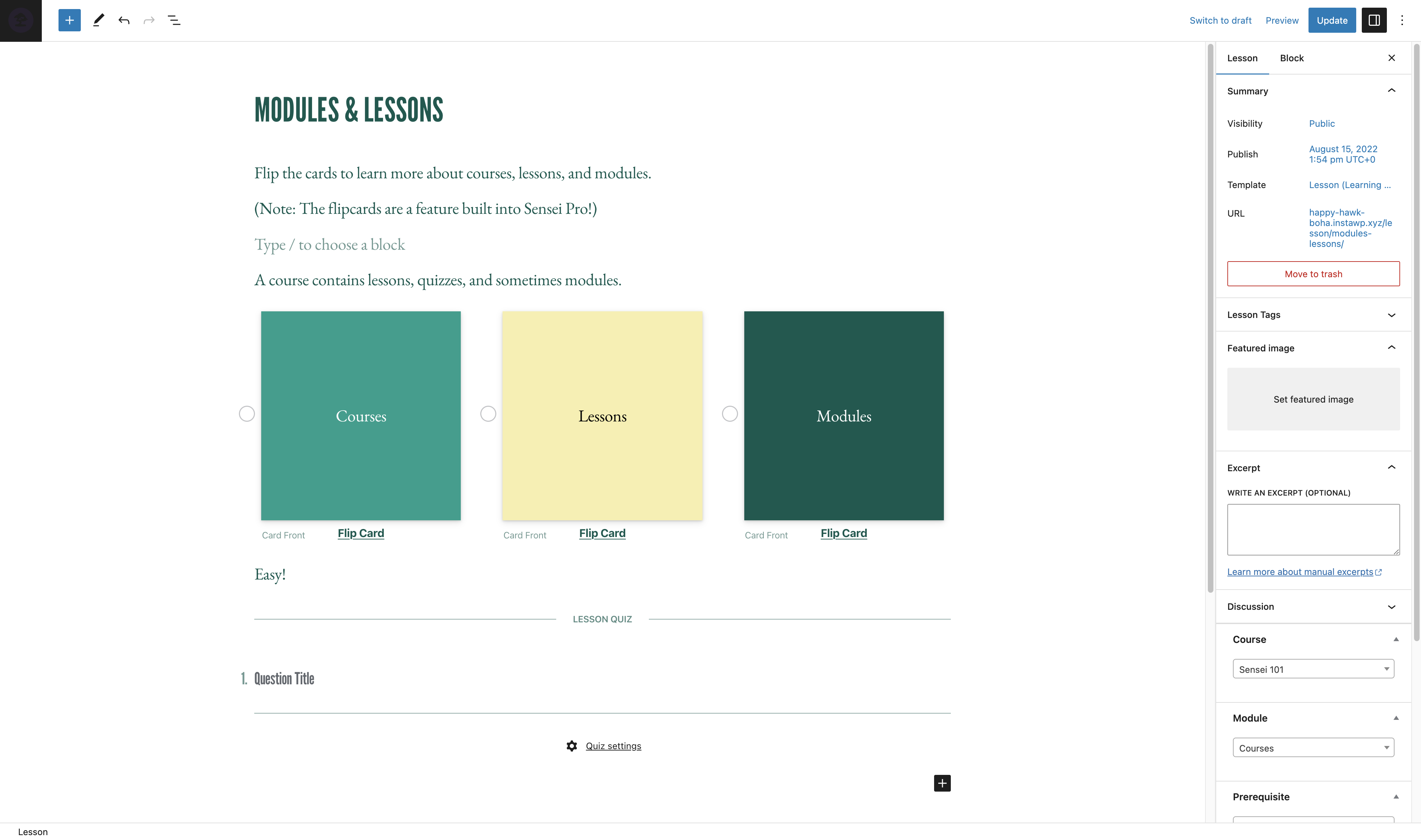
I created a test course by clicking “Add New” under Courses. I was immediately in the block editor with a standard WordPress editing experience. I added a title, used the Course Outline block to create a module structure, and added three test lessons.
Each lesson is its own WordPress post. You open it in the block editor, add content, and insert quiz blocks or video blocks as needed. The structure is logical.
The quiz builder is embedded directly in lessons. You add a Quiz block to the lesson, then add question blocks inside it. I added a multiple-choice question and a fill-in-the-blank question. The interface was clean and predictable.
Where setup gets complicated: Selling courses requires WooCommerce. If you want paid access, you need to install WooCommerce, configure a payment gateway, and link WooCommerce products to your Sensei courses. For a site that already runs WooCommerce, this is trivial. For a site that doesn’t, it is a significant extra step compared to competitors like Tutor LMS that include native checkout.
Key Features
Course Builder
Sensei’s course builder lives entirely inside the WordPress Block Editor. You structure content using a Course Outline block that shows your module and lesson hierarchy in a collapsible tree. You can add lessons by typing directly into the outline or by creating new lesson pages separately.
The Course Outline block lets you reorder lessons and modules. It updates the student-facing course page automatically.
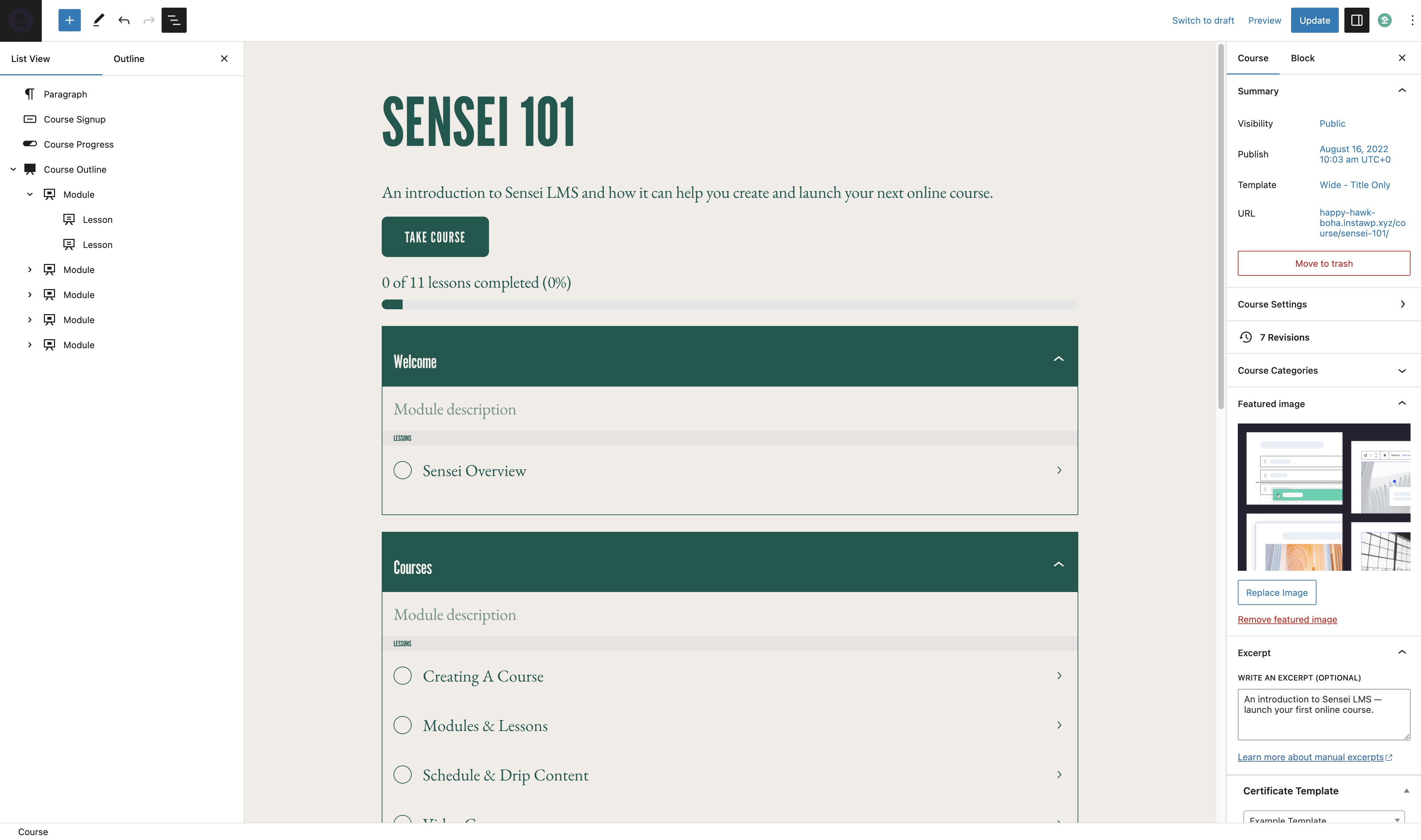
What this approach lacks is a standalone visual builder panel like the one LearnDash provides. There is no bird’s-eye drag-and-drop layout view separate from the editor. For users managing large courses with 50+ lessons, the block editor view can get long. This is a real trade-off versus purpose-built course builder interfaces.
Learning Mode
Learning Mode is the feature I found most compelling. When a student opens a lesson, the plugin strips away the WordPress theme header, footer, sidebar, and navigation. The student sees only the lesson content, a lesson navigation panel, and a progress indicator.
The result is a focused, app-like experience that you can deliver inside a regular WordPress site without custom development. Most LMS plugins require significant theme customization or a dedicated LMS theme to achieve this. Sensei delivers it out of the box.
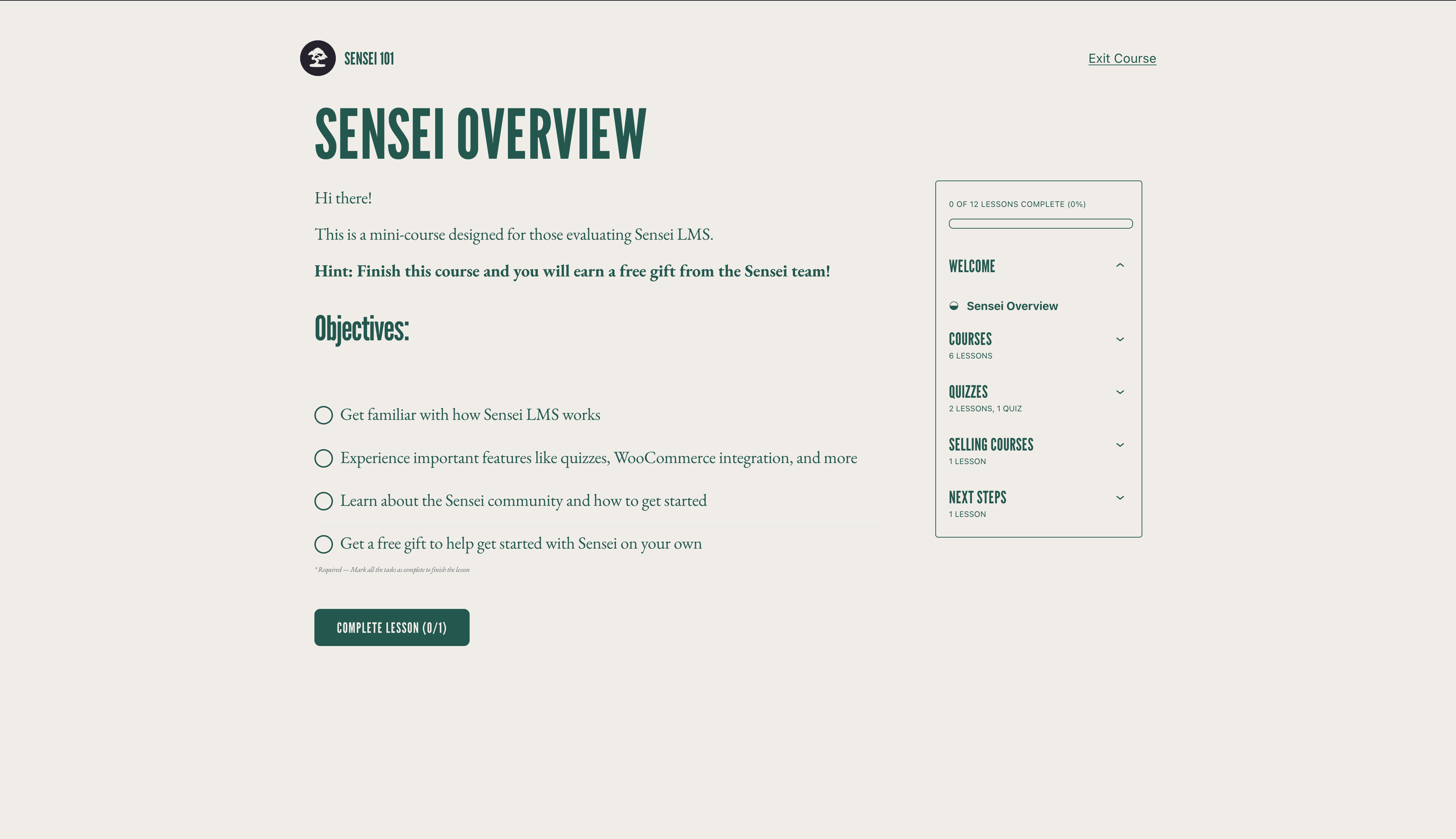
Learning Mode is especially effective for video lessons. Without site navigation pulling attention elsewhere, completion rates on video content tend to be higher.
Quiz Engine
Sensei’s quiz engine supports multiple question formats in the free version.
Free question types:
- Multiple choice
- True/false
- Fill-in-the-blank
- Free response
- File upload
Sensei Pro adds:
- Quiz timers
- Ordering questions
- Enhanced auto-grading and feedback settings
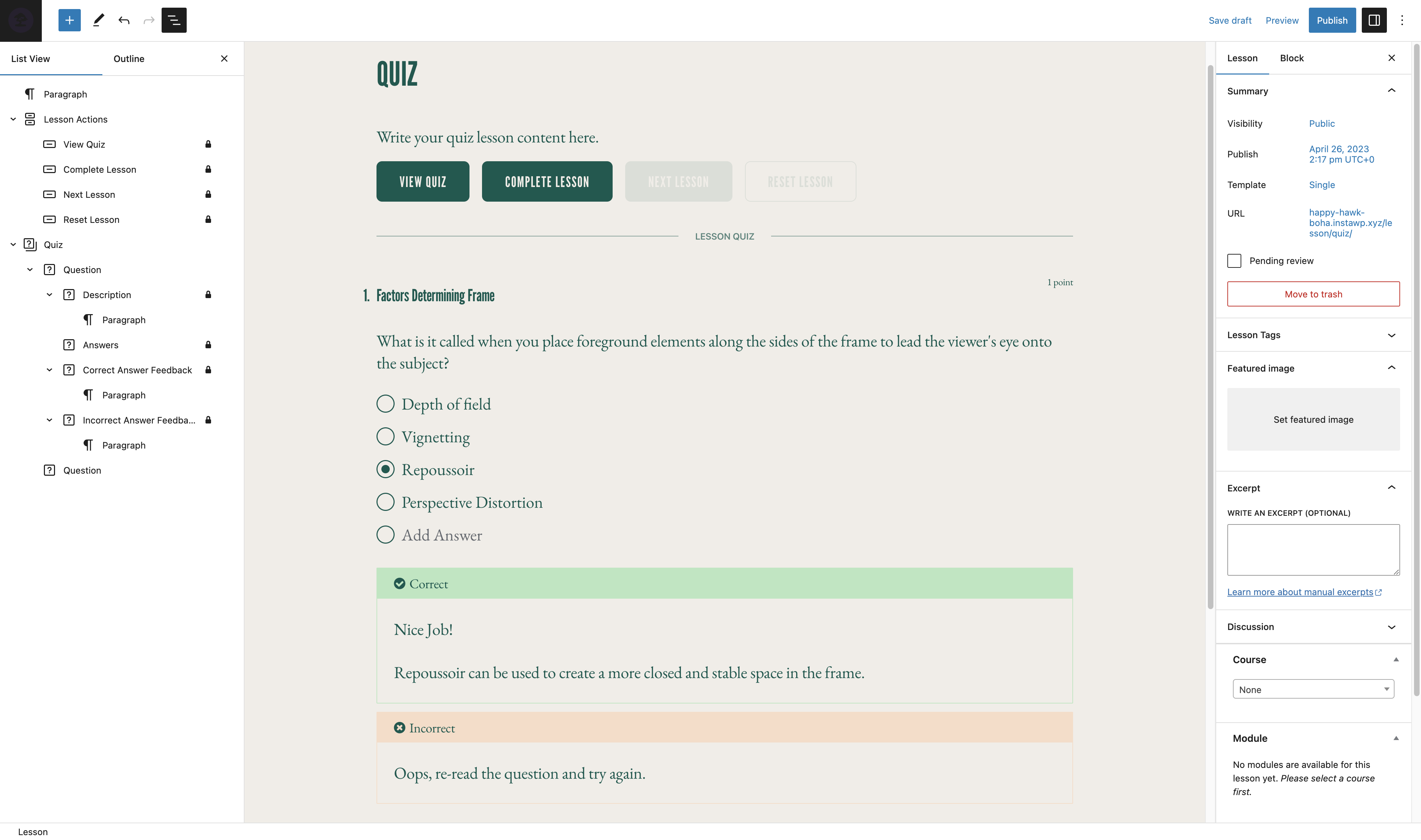
The quiz blocks appear inside the lesson editor. Students answer questions at the end of a lesson, and Sensei can require a minimum passing score before the lesson is marked complete.
The block-based quiz builder is functional. One practical issue: adding many questions to a single quiz makes the lesson editor page very long, since questions are individual blocks stacked inside the lesson. Quizzes with 20+ questions become awkward to manage in this layout. A dedicated quiz interface, like the one LifterLMS provides, handles large quizzes more cleanly.
Student Progress Tracking
Sensei tracks enrollment, lesson completion, quiz scores, and overall course completion for every student. In the admin area, you can view reports by course or by student.
The Reports section shows enrollment counts, average grades, completion rates, and last activity dates. Individual student records show their progress through each lesson.
Version 4.26.0 (released June 2026) introduced High-Performance Progress Storage. This is a significant improvement. Earlier versions had performance issues on sites with many students due to slow database queries in the reports section. The new storage layer uses object caching and optimized query patterns, which should meaningfully improve performance for growing course businesses.
Video Embedding
Sensei supports video embedding via a Featured Video block that accepts YouTube, Vimeo, and VideoPress links. You can set video completion as a requirement before students can mark a lesson as done.
This video-gating feature is available in the free version. Students cannot click “Complete Lesson” until the video finishes playing. For educators who need students to watch content before progressing, this is a useful enforcement mechanism.
Certificates
Sensei LMS does not include certificate generation in the core plugin. However, a free extension called Sensei Certificates is available separately on WordPress.org. It generates PDF certificates automatically when a student completes a course. The certificate design is customizable through block templates.
Having this as a separate plugin rather than a core feature keeps the main plugin lighter but does mean one extra installation step for anyone who wants certificates.
Content Drip (Sensei Pro)
Content drip in Sensei Pro lets you schedule when lessons become available after a student enrolls. You can set a delay in days between enrollment and lesson unlock, or unlock lessons on a specific calendar date.
This is useful for cohort-based launches where all students should receive content on the same schedule, or for email course sequences that drip content weekly.
Content drip is not available in the free version.
Groups and Cohorts (Sensei Pro)
Sensei Pro lets you create student groups and enroll multiple students at once. Groups can have their own access dates, making cohort launches manageable.
For an organization running monthly training cohorts or an educator running live course rounds with hundreds of students, group management is a practical time-saver. Without it (in the free version), you manage enrollment student by student.
Co-Teacher Feature (Sensei Pro)
Sensei Pro supports co-teachers: you can assign additional WordPress users as co-instructors on a specific course. Co-teachers can manage that course’s content and students without having full site admin access.
This is useful for agencies managing courses on behalf of clients, or for courses with multiple subject matter experts contributing content.
WooCommerce Integration for Course Sales (Sensei Pro)
To charge for course access, you need Sensei Pro and WooCommerce. The integration links a WooCommerce product to a Sensei course. A student purchases the product, and Sensei automatically grants them course access.
This architecture has real advantages for WooCommerce sites: you get the full WooCommerce checkout experience, payment gateway ecosystem, order management, and receipt emails. Sensei Pro also works with WooCommerce Subscriptions (for recurring course access billing) and WooCommerce Memberships (for bundling courses inside a membership plan).
The limitation: if your site doesn’t run WooCommerce, you need to install, configure, and maintain it just to enable checkout. Competitors like Tutor LMS include their own native checkout without this dependency.
Interactive Blocks (Sensei Pro)
Sensei Pro adds three interactive content blocks that go beyond standard lesson text:
- Flashcards: Two-sided cards for spaced repetition study
- Image hotspots: Clickable areas on images that reveal tooltips or content
- Task lists: Checklist blocks students can check off as they work through a lesson
These are genuinely useful for skills-based and process-oriented courses. Flashcards in particular are a tool that most WordPress LMS plugins don’t include without third-party add-ons.
Pricing
Free Version
The free Sensei LMS plugin is available on WordPress.org at no cost. It includes:
- Full course, module, and lesson creation
- Block-based quiz builder with five question types
- Student progress tracking and reports
- Learning Mode
- Video embedding with completion gating
- Course showcase
- 14 course-specific Gutenberg blocks
- Multisite support
- Community translations in 18 languages
The core limitation of the free version: you cannot gate course access behind a payment. Courses can be open to anyone, or you can manually enroll students, but there is no built-in purchase flow in the free plugin.
Sensei Pro
| Plan | Price | Sites |
|---|---|---|
| 1-year | €157/year | 1 site |
| 2-year | €251.20 total (save 20%) | 1 site |
| Agency | Contact for pricing | Up to 20 sites |
All plans include a 30-day money-back guarantee. Sensei Pro is sold in euros through WooCommerce.com. At current exchange rates, €157 is approximately $170 USD.
Sensei Pro adds: WooCommerce course selling, content drip, groups and cohorts, quiz timers, interactive blocks (flashcards, hotspots, task lists), co-teachers, course prerequisites, access periods, conditional content, and priority support.
Competitor Pricing Comparison
| Plugin | Entry Price | Unlimited Sites? | Native Payments? |
|---|---|---|---|
| Sensei Pro | €157/year (1 site) | Agency (20 sites) | No (requires WooCommerce) |
| LearnDash Essentials | $259/year | Yes, all plans | Yes |
| LifterLMS Earth | $199/year (1 site) | No | Yes (Stripe/PayPal) |
| Tutor LMS Pro | $199/year (1 site) | No | Yes |
Sensei Pro is the only option in this group that requires a separate eCommerce plugin for payments. LearnDash stands out for covering unlimited sites on all plans, which makes it significantly better value for agencies or multi-site owners.
Pros and Cons
Pros
- Genuinely native block editor experience, no separate builder to learn
- Learning Mode delivers a professional, distraction-free student view
- Free version handles basic course creation well with no paywalls on content features
- Actively developed by Automattic, with recent security and performance improvements
- Open-source (GPLv2) and developer-friendly with public GitHub repo
- High-Performance Progress Storage in v4.26.0 improves scalability
- Compatible with WooCommerce Subscriptions and Memberships for flexible billing
- 30-day money-back guarantee on Pro
- Free certificate extension available
Cons
- Selling courses requires Sensei Pro plus WooCommerce, two separate plugins
- Pricing displayed in euros, which adds currency confusion for USD-based buyers
- Only 10,000+ active installs, a small install base compared to LearnDash or LifterLMS
- 3.5/5 user rating on WordPress.org, with notable support complaints
- Some users report support responsiveness issues with Pro (AI chatbot instead of human)
- Poor compatibility with Elementor and other page builders
- Content drip and group management locked behind Pro
- No multi-site pricing transparency (Agency plan price not listed publicly)
- Block editor quiz builder becomes unwieldy for large quizzes (20+ questions)
Alternatives to Sensei LMS
LearnDash
LearnDash is one of the most established WordPress LMS plugins, and it remains the benchmark for features and ecosystem. Plans start at $259/year and every plan includes unlimited site activations. Unlike Sensei, LearnDash includes native payment processing through Stripe and PayPal without requiring WooCommerce.
Higher tiers add AI course outline generation, advanced analytics, weighted grading, and multi-instructor management.
Choose LearnDash if: You run multiple sites, want an LMS without WooCommerce dependency, or need the most mature feature set available.
LifterLMS
LifterLMS has a strong free core that includes more selling functionality than Sensei’s free version. Paid bundles start at $199/year with Stripe and PayPal processing included. The LifterLMS add-on ecosystem is large, covering email marketing integrations, forms, quizzes, and more.
Choose LifterLMS if: You want a capable free tier with selling enabled, or if you need specific third-party integrations that LifterLMS covers.
Tutor LMS
Tutor LMS is the most direct competitor to Sensei in terms of price and positioning. It starts at $199/year for a single site, includes native eCommerce without WooCommerce, and has a modern interface with an AI Studio for course outline generation.
Choose Tutor LMS if: You want course selling without adding WooCommerce, prefer a more modern visual interface, or want AI-assisted course creation at the same price tier.
Final Verdict
Sensei LMS earns its place in the WordPress LMS market, but for a narrower audience than the top competitors.
The block editor integration is genuinely well-done. If you already work in Gutenberg and want to add courses to your WordPress site with the least possible friction, Sensei is one of the best options available. The free version is substantive, and Learning Mode is a standout feature that delivers real value without any extra cost.
The WooCommerce dependency for course selling is the plugin’s biggest structural weakness. It is not a deal-breaker if you already run a WooCommerce store. For that use case, Sensei Pro at €157/year is a reasonable price that gives you a clean, integrated LMS with familiar tools. But if you are starting fresh and your goal is to sell courses, the requirement to configure both Sensei Pro and WooCommerce before your first student can check out is a meaningful extra step compared to competitors that bundle payment processing in.
The 3.5/5 rating on WordPress.org deserves acknowledgment. The complaints are consistent: limited free-tier selling, support responsiveness variability, and page builder incompatibility. These are real issues that a segment of users runs into.
Bottom line: If your site already runs WooCommerce, Sensei LMS is an excellent choice. If it doesn’t, and especially if you’re in a hurry to launch, Tutor LMS or LearnDash will get you to a paid course with less friction.
FAQ
What is Sensei LMS?
Sensei LMS is a WordPress plugin for creating and delivering online courses. It is built by Automattic, the company behind WordPress.com and WooCommerce. The plugin works within the native WordPress Block Editor and supports courses, lessons, modules, quizzes, and student progress tracking.
Is Sensei LMS free?
Yes, the core Sensei LMS plugin is free and available on WordPress.org. A paid upgrade called Sensei Pro is available through WooCommerce.com and adds course selling, content drip, groups, and other advanced features.
Does Sensei LMS require WooCommerce?
The free version does not require WooCommerce for creating and delivering free courses. However, selling courses with a payment gate requires both Sensei Pro and WooCommerce.
How much does Sensei Pro cost?
Sensei Pro costs €157 per year for a single-site license. A two-year plan costs €251.20, a 20% saving. All plans include a 30-day money-back guarantee. An Agency plan (up to 20 sites) is available but the price is not listed publicly.
Who makes Sensei LMS?
Sensei LMS is developed by Automattic. Automattic also runs WordPress.com, WooCommerce, Jetpack, and Tumblr. Automattic uses Sensei internally for employee training.
How does Sensei LMS compare to LearnDash?
LearnDash starts at $259/year and includes unlimited site activations, native payment processing without WooCommerce, and an AI course builder on higher plans. Sensei Pro starts at €157/year but requires WooCommerce for payments. LearnDash is better value for multi-site use. Sensei is a better fit if you are already on WooCommerce.
Does Sensei LMS support automatic certificates?
Sensei LMS does not include certificate generation in the core plugin. A free extension called Sensei Certificates, available separately on WordPress.org, generates PDF certificates automatically when students complete a course.
Can I sell courses with the free version of Sensei LMS?
No. Course selling via WooCommerce requires Sensei Pro. The free plugin supports creating and delivering free or manually enrolled courses but does not include payment gating.
Does Sensei LMS support content drip?
Yes, but only with Sensei Pro. Content drip lets you schedule lesson availability after enrollment, releasing content on a delay or on specific dates. It is not available in the free version.
Is Sensei LMS compatible with Elementor?
Sensei LMS is designed for the native WordPress Block Editor. Compatibility with Elementor and other page builders is limited. Some users report styling and layout conflicts when using Sensei on Elementor-built sites. If your site depends heavily on Elementor, test this carefully before committing.
How many languages does Sensei LMS support?
The free plugin has community translations in 18 languages. Sensei Pro includes professional translations in 16 languages.
Does Sensei LMS support WordPress Multisite?
Yes. Sensei LMS is compatible with WordPress Multisite. One Sensei Pro license covers one site. The Agency plan supports up to 20 sites.
What blocks does Sensei LMS add to the WordPress editor?
Sensei LMS adds 14 custom blocks: Course Outline, Course Actions, Course Results, Course Title, Lesson Properties, Lesson Actions, Featured Video, Quiz, Conditional Content, Student Courses, Module, Exit Course, Category Question, and Course Theme Lesson Module.
Does Sensei LMS support live video or Zoom classes?
Sensei LMS does not have built-in Zoom or live video. However, you can add links to Zoom, Google Meet, or other conferencing platforms inside lesson content. A meeting lesson layout is available to present these links cleanly.
What is Learning Mode in Sensei LMS?
Learning Mode is a distraction-free display mode that hides the WordPress theme header, footer, sidebar, and navigation when a student is inside a lesson. Students see only the lesson content and a progress bar. It creates an app-like experience without custom development.