

Simple Membership has been on WordPress.org since May 2014. That is 12 years of active development, 3.4 million downloads, and a 4.6-star rating across 474 reviews. One reviewer on WordPress.org described the experience of setting up a paywall for a newspaper the night before launch and having the site running by 9am the next morning: “Lives up to its name. Fantastic plugin and free.” Another reviewer titled their post: “Fantastic Plugin, ‘simple’ in the name does not mean few features.”
That second title captures the tension I want to address in this review. Simple Membership sounds like a basic, limited plugin. It is not. The core plugin is free, available directly from WordPress.org, and ships with recurring PayPal and Stripe payments, unlimited membership levels, full content protection, and a surprisingly deep admin interface. It also has a premium addon ecosystem where some features that feel essential (WooCommerce integration, bbPress integration, member directory) cost extra.
What this review covers and how it was tested. I installed Simple Membership version 4.7.9 in a clean WordPress sandbox, created a membership level, worked through the content protection setup, explored the payment settings, and reviewed the member management dashboard. I also read the official documentation at simple-membership-plugin.com, examined the changelog across recent releases on WordPress.org, explored the addons and pricing pages, and reviewed real user feedback from the WordPress.org reviews section.
At a glance:
- Plugin version: 4.7.9 (released July 27, 2026)
- WordPress.org listing: yes, active
- Active sites: 40,000-plus (per vendor site)
- Downloads: 3.4 million-plus (WordPress.org)
- Rating: 4.6/5 across 474 reviews (398 five-star)
- Author: wp.insider
- Free plugin: yes, downloaded from WordPress.org
- Paid support: $39 per ticket (optional)
- Bottom line: a mature, capable, genuinely free membership plugin with an active addon ecosystem; some features you might expect in the core (WooCommerce, bbPress, member directory) require paid addons
Quick verdict
Simple Membership earns its place as one of the most complete free membership plugins on WordPress.org. The core plugin includes unlimited membership levels, full content protection, PayPal and Stripe recurring payments, a member management dashboard, login attempt limits, active login limits (to block account sharing), and 30-plus language translations. That is more than most comparable plugins offer without a paid plan.
The trade-offs are real but specific. The addon model means features like WooCommerce payment integration, bbPress forum access control, a member directory, and email integrations beyond MailChimp require paid addons. The admin UI is functional rather than polished. And paid support operates per-ticket at $39 rather than as an included subscription.
For site owners who want to start with zero cost and a plugin that will not hit artificial feature ceilings, Simple Membership is worth a serious look.
Best for: bloggers, content creators, course sites, community forums, and newspaper-style paywalls that want recurring payments without paying for a membership plugin subscription.
Best fit by stage: solo site owners and small teams starting with no plugin budget (free core); growing sites that need WooCommerce checkout, bbPress forums, or email automation beyond MailChimp (paid addons).
Standout: 12 years of active development, recurring PayPal and Stripe built-in, 22 free addons including Zapier, social login, and MailChimp, all at zero cost.
Watch out for: WooCommerce integration, bbPress, member directory, 2FA, and ConvertKit/MailerLite/AWeber integrations all require paid addons; the name undersells what the plugin actually does.
What Simple Membership is
Simple Membership is a self-hosted WordPress membership plugin built and maintained by wp.insider. It first appeared on WordPress.org in May 2014 and has been under continuous development since. The core plugin is 100 percent free and GPL-licensed. Revenue comes from optional premium addons sold individually and per-ticket paid support at $39 per issue.
The plugin’s job is to control who can see what on your WordPress site. You create membership levels (free, Silver, Gold, or anything you name), assign posts and pages to those levels, and let the plugin handle the rest: registration, login, payment, account management, expiry, and renewal.
Unlike Paid Memberships Pro, which left WordPress.org in late 2024, Simple Membership remains on the repository. Unlike MemberPress, it has no mandatory entry cost. The plugin occupies a position between the very lightweight access restriction tools (like simple shortcode-based protectors) and the heavy commercial membership platforms (like WishList Member).
Who Simple Membership is best for
Strong fit:
- Bloggers and content creators building a paywall. The free core handles PayPal and Stripe recurring payments out of the box. A newsletter, an online magazine, or a premium tutorial site can run without spending a dollar on the plugin itself.
- Sites that need multi-language support. Simple Membership ships with translations for 30-plus languages including German, French, Spanish, Chinese, Portuguese, Russian, Dutch, Japanese, Arabic, and more. That is a wide baseline for international sites.
- Developers who want customization flexibility. The plugin provides action and filter hooks across core functionality, plus a free API addon for programmatic member management. Community examples and thorough documentation make extending it practical.
- Organizations with tight budgets. Churches, community groups, associations, and nonprofits that need a gated-content site and recurring dues collection can run the full core without any cost.
- Sites using PayPal or Stripe for recurring subscriptions. Both gateways are built in and both support recurring billing. You do not need a premium plan to collect monthly or annual subscription fees.
- Site owners who learn by reading documentation. The plugin comes with a PDF quick-start guide and an extensive documentation site that covers setup, payment configuration, content protection, and shortcodes systematically. It is one of the better-documented free WordPress plugins.
Weaker fit:
- Teams that want WooCommerce payment integration. The WooCommerce payment integration for Simple Membership is a premium addon. If you plan to use WooCommerce as your payment layer, you will need to purchase that addon.
- Sites running bbPress forums. bbPress integration is also a premium addon. If forum access control is central to your membership model, budget for this at the outset.
- Users who need a member directory. A member directory is not included in the core. The Member Directory Listing Addon is premium.
- Teams that want two-factor authentication. The 2FA addon is a premium add-on.
- Sites using ConvertKit, MailerLite, or AWeber. These email integrations are premium addons. MailChimp is the only email platform included in the free addon set.
- Anyone who needs same-day support. The paid support response time is 24 to 48 hours. The free forum runs on the plugin’s own website and is community-moderated.
Installation and setup
Simple Membership installs directly from the WordPress admin dashboard via Plugins > Add New. Search “Simple Membership,” install, and activate. The process takes under a minute and there are no unusual prompts or license key screens.
After activation, the plugin adds a “WP Membership” menu to the left sidebar with sub-items for Members, Membership Levels, Settings, Payments, Tools, Reports, and Add-ons. The admin structure is organized and easy to navigate from the first visit.
Required frontend pages are not created automatically. You create a login page, a registration page, and a member profile page by hand, using shortcodes provided by the plugin. The documentation walks through this step clearly, and a PDF quick-start guide is available from the official site. There is no in-admin wizard, which is a small but real friction point for beginners who are used to onboarding-style setup flows.
Once the pages exist, the flow for launching a basic paid membership site is:
- Create a membership level under Membership Levels > Add Level. Set the level name, default WordPress role, and access duration.
- Create a payment button (PayPal or Stripe) linked to that level.
- Add the payment button shortcode to a membership join page.
- Protect the posts or pages you want behind that level using the content protection meta box in each post editor.
The admin sidebar remains consistent throughout the process, with all major sections reachable in one click from any admin screen.
Membership levels
Membership levels in Simple Membership are flexible. Each level supports:
- A custom name, description, and access duration
- Fixed duration in days, weeks, months, or years
- No-expiry access (until canceled)
- Fixed future expiry date (members access until a specific calendar date)
- Annual membership (calendar-year or fiscal-year based, added in version 4.7.1)
- Subscription-driven access, where the membership stays active as long as the subscription payment is current
Levels can be free (email activation required or open) or paid (via PayPal, Stripe, or Braintree button). You can run both free and paid levels simultaneously on the same site. A common setup is a free level for a community account and a paid level for premium content access.
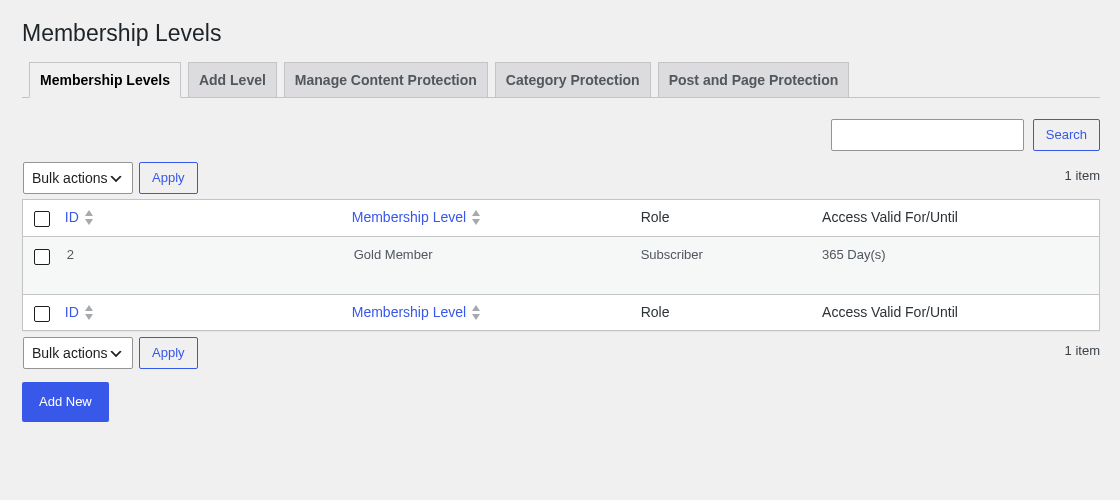
There is no native “hold multiple levels simultaneously” feature built in to the core. Members are assigned one level at a time. Membership upgrades are handled through a separate upgrade payment button that moves the member from their current level to a higher one.
The membership level admin screen has improved over recent versions. Version 4.7.0 added better validation logic for the Add/Edit Membership Level interface, simplifying the process of creating and editing levels.
Content protection
Content protection is straightforward to apply. In the WordPress post or page editor, a meta box labeled “Simple WP Membership Protection” appears below the editor area. You select whether to protect the content and choose the membership level that can access it. Non-members visiting the page see a customizable message with a prompt to log in or join.
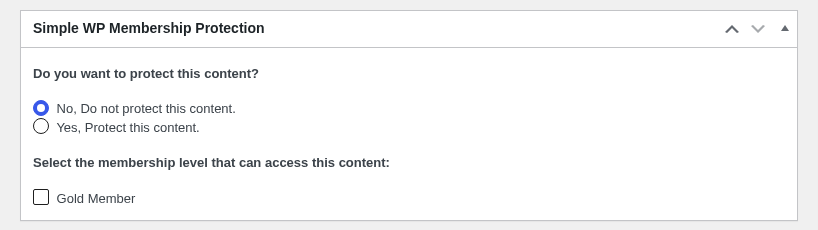
Protection options go beyond individual posts and pages:
- Category protection: restrict all posts in a category at once. New posts added to the category inherit the restriction automatically.
- Partial or teaser content protection: a free addon enables “more tag” protection, where the public sees a teaser intro and members see the full article. This is useful for magazine or blog paywalls where you want some content visible for SEO and conversion.
- Custom post type protection: a free addon extends protection to custom post types from other plugins. There is also a premium “Custom Post Type Protection Enhanced” addon for more granular control.
- Attachment page protection: media attachment pages can be restricted alongside the parent post.
- Bulk protection: a bulk action in the posts list lets you apply or remove protection from multiple posts at once.
- Comment protection: you can restrict the ability to leave comments to members only.
- WooCommerce product page protection: added in version 4.6.7, you can restrict WooCommerce product pages using the standard content protection interface.
The “More Tag Protection” addon (free) is worth calling out specifically because partial content paywalls are a common publishing pattern that many free plugins do not support without a paid upgrade.
The content protection message shown to non-members is configurable in the plugin settings. You can use a custom message with merge tags to personalize it.
Payment gateways
Simple Membership supports three payment gateways in the core plugin:
- PayPal: one-time and recurring/subscription payments. Uses the modern PayPal Checkout API. The plugin has been actively maintained to clean up legacy PayPal code: version 4.7.7 removed obsolete Smart Checkout code and the deprecated hosted button code. PayPal Standard IPN validation now also validates the merchant/receiver email for additional security.
- Stripe: one-time and recurring/subscription payments. Stripe is the more actively maintained of the two at this point. Version 4.7.6 added a Stripe webhook signing secret requirement for subscription webhooks, adding a meaningful security layer. Version 4.7.9 ships with a fix for a PayPal trial subscription security issue, showing the team actively responds to security disclosures.
- Braintree: one-time payments only. Braintree does not support recurring subscriptions through this plugin.
Two additional payment integration paths exist for users who already use these plugins:
- Accept Stripe Payments plugin integration: if you use the separate “Accept Stripe Payments” plugin, Simple Membership can hook into it for payment processing.
- WP Express Checkout plugin integration: similarly, if you use WP Express Checkout, Simple Membership can integrate with it.
WooCommerce payment integration is a premium addon. If you want WooCommerce to handle the payment process while Simple Membership handles the access control, you need to purchase that addon.
One real-world note from a WordPress.org reviewer: a newspaper site running on Stripe had no major payment completion issues, while PayPal had occasional cases where a member completed payment but did not get redirected through the rest of the registration flow correctly, requiring manual account creation. That reviewer ultimately disabled PayPal and switched exclusively to Stripe. This is not a universal experience, but it is worth noting for sites that plan to use PayPal as the primary payment method.
Member management
The member management dashboard gives admins a full view of their membership roster. The Members screen shows all registered members with columns for ID, username, first name, last name, email, membership level, access start date, account state, last login date, and notes. Filters let you narrow the list by account state (Active, Inactive, Activation Required, Pending, Incomplete, Expired) or by membership level. A keyword search bar is also available.
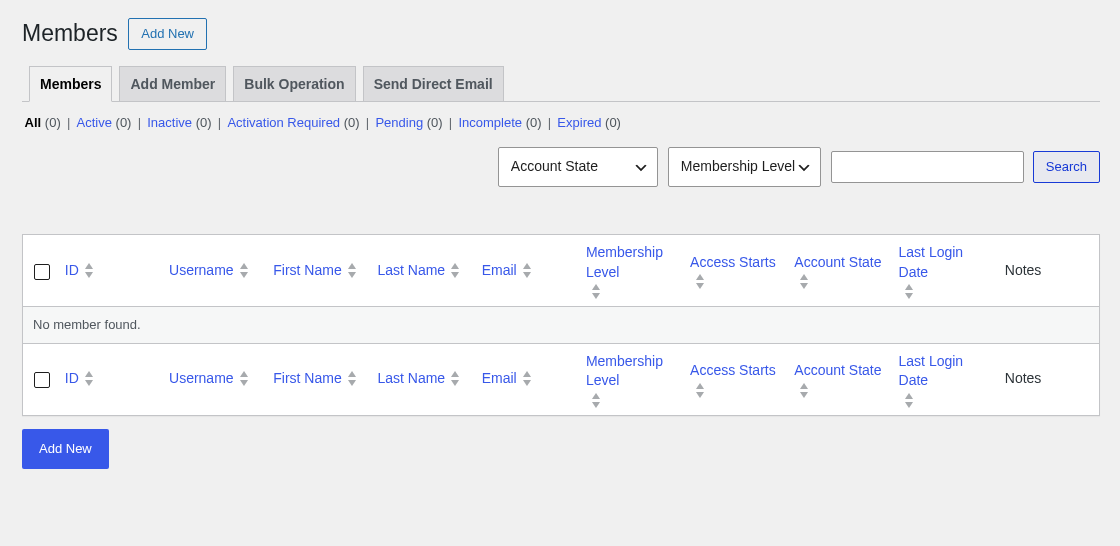
From the member list, admins can:
- Edit any member’s profile, level, and account status
- Manually approve or activate pending accounts
- Send a quick notification email to a member
- Delete a member account
- Export the member list to CSV
The Member Data Exporter addon (premium) provides more flexible export options.
Private notes can be saved on individual member profiles. This is useful for tracking manual payments, custom arrangements, or support history.
Simple Membership tracks login events (timestamps per login, when enabled) and enforces an active login limit. The active login limit means that if a member is already logged in on one device, a second login from a different device will be blocked or the first session will be ended, depending on your configuration. This directly addresses account sharing, which is a common problem for subscription content sites.
Failed login attempt limits are also configurable. After a set number of failed attempts, the system blocks further attempts temporarily, which reduces the risk of brute-force attacks on member accounts.
Version 4.7.4 added a search option in the payments table, letting admins look up payments by member. This makes reconciling payments against member accounts more practical on larger sites.
Frontend member experience
The frontend experience for members is handled through shortcodes placed on standard WordPress pages:
- [swpm_login_form]: member login form, with a password visibility toggle added in version 4.7.9.
- [swpm_registration_form]: new member registration form, with the same visibility toggle in the latest release.
- [swpm_profile_form]: member profile editing form.
- [swpm_payment_button id=”X”]: payment button for a specific membership level.
- [swpm_thank_you_page_registration]: the registration completion page.
The login form can also be added to a sidebar widget, giving members a persistent login widget without a dedicated page. The plugin also supports auto-login after registration, configurable redirection after login (per membership level), and configurable redirection after logout.
Members can request password resets via a link if the “Enable Password Reset Using Link” option is turned on in general settings. As one WordPress.org reviewer noted, this option should be reviewed during setup: it defaults to disabled, and if left that way, password recovery behavior can be confusing for members.
A “Force Strong Password” option is available in settings. When enabled, the registration form and profile edit form reject weak passwords. Version 4.7.9 added a password visibility toggle on both forms, improving usability for members on mobile devices.
The Social Login addon (free, added in version 4.6.8) lets members sign in with their Google or Facebook accounts. This works as a login method, not as a payment method.
Add-ons ecosystem
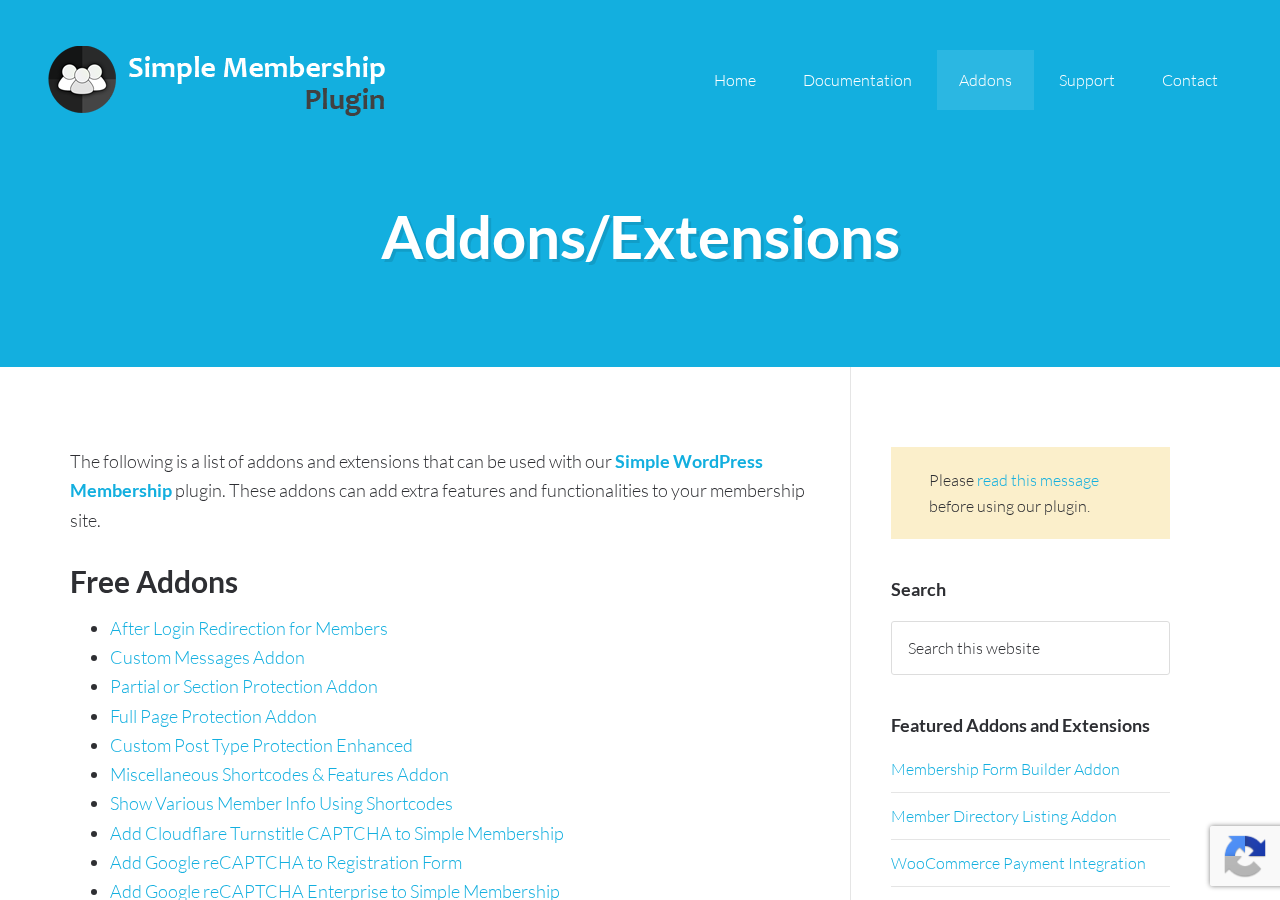
Simple Membership has a notably large free addon library for a free plugin. I counted 22 free addons at the time of this review (August 2026), including:
Free addons
- After Login Redirection for Members
- Custom Messages Addon
- Partial or Section Protection Addon
- Full Page Protection Addon
- Custom Post Type Protection Enhanced
- Miscellaneous Shortcodes and Features Addon
- Show Various Member Info Using Shortcodes
- Cloudflare Turnstile CAPTCHA Integration
- Google reCAPTCHA for Registration Form
- Google reCAPTCHA Enterprise Integration
- Bulk Import Member Data from CSV
- WP User Import (import existing WordPress users as members)
- Minimum Password Length Override Addon
- MailChimp Integration
- WP Affiliate Platform Integration
- Affiliates Manager Integration
- Auto-Fill Contact Forms with Logged-In User Info
- Zapier Webhook Integration
- Reset Settings and Data Addon
- Data Migration Addon
- Simple Membership API Addon
- Social Login Addon (Google, Facebook)
The Zapier webhook integration (free) is particularly valuable. It opens up connections to thousands of third-party tools without custom code, covering CRMs, email platforms, spreadsheets, and automation workflows.
Premium addons
- Membership Form Builder Addon
- Member Directory Listing Addon
- Dynamic Menus Addon
- Member Data Exporter Addon
- bbPress Forum Integration Addon
- Protect Older Posts Addon
- ConvertKit Integration Addon
- MailerLite Integration Addon
- AWeber Integration Addon
- Expiry Email Notification and Broadcast Addon
- Member Payments Listing Addon
- WooCommerce Payment Integration
- Two-Factor Authentication (2FA) Addon
The premium addon pricing is not listed centrally. Each addon has its own purchase page on the vendor site. Budget for this before choosing a setup that relies on bbPress, WooCommerce, or a member directory.
One pattern worth understanding: Simple Membership’s free addon count is high, but the addons that many users consider “expected” features of a membership plugin (bbPress, WooCommerce, member directory, email automation beyond MailChimp) are behind the premium addon paywall. This is different from Paid Memberships Pro, which includes a larger set of free integrations in its free core. It is not a dealbreaker, but it is a planning consideration.
Developer tools
Simple Membership provides a documented set of action and filter hooks for customization. The changelog references specific hooks added across recent releases: swpm_ipn_account_upgrade_event, swpm_ipn_account_renewal_event, swpm_payment_button_shortcode_start_output, swpm_override_login_limit, swpm_email_prompt_to_complete_registration_body, swpm_after_login_form_output, and others.
The free Simple Membership API Addon extends this with programmatic access to query, create, and update member accounts.
The plugin is GPL-licensed and the code is available via the WordPress.org SVN repository. For developers building custom member management flows, automation integrations, or client sites, the hook coverage and the free API addon provide a solid starting point without requiring any paid upgrade.
Language support
Simple Membership ships with translations for over 30 languages including: English, German, French, Spanish (Spain and Venezuela), Chinese, Portuguese (Brazil and Portugal), Swedish, Macedonian, Polish, Turkish, Russian, Dutch (Netherlands and Belgium), Romanian, Danish, Lithuanian, Serbian, Japanese, Greek, Latvian, Indonesian, Hebrew, Catalan, Hungarian, Bosnian, Slovak, Italian, Norwegian, Mexican, Arabic, Czech, and Finnish.
This is an unusually broad translation coverage for a free plugin and makes Simple Membership a practical option for international sites without additional localization work.
Pricing and support
Simple Membership’s pricing model is simple: the core plugin is free.
Free
- Core plugin with all core features
- 22 free addons
- Community forum support on simple-membership-plugin.com
- No license key required
Paid support
- $39 per ticket
- Covers troubleshooting of one issue per ticket
- Response time: 24 to 48 hours
- Does not cover customization requests (separate quote required)
- Premium addon support for paid addon purchasers is handled separately via a purchase verification form
Premium addons
- Sold individually via the vendor site
- Pricing is listed per addon (no central pricing page)
- Notable premium addons: WooCommerce payment integration, bbPress integration, member directory, 2FA, ConvertKit/MailerLite/AWeber integrations
The support model is the part of Simple Membership that diverges most sharply from the alternatives. MemberPress includes email support in its plans starting at $199.50 per year (introductory). Paid Memberships Pro includes technical support in its Standard plan at $499 per year. Simple Membership’s core plugin is free, but if you need guaranteed troubleshooting support, you pay per issue at $39.
For solo site owners and developers who are comfortable reading documentation and posting to a free forum, this is a fine trade. For agencies or clients who need a defined support SLA, the per-ticket model at 24-to-48-hour response time is a constraint worth planning for.
What changed in recent versions
4.7.9 (July 2026): Added password visibility toggle on the registration and edit profile forms. Fixed a PayPal trial subscription security issue (responsible disclosure credited to Ananda Dhakal).
4.7.8 (June 2026): Security improvements to PayPal Standard IPN handling: validation of the subscr_ref parameter, sanitization of payment notification code, and better error checking in the create_wp_user function. Three separate credited disclosures.
4.7.7: Removed obsolete PayPal Smart Checkout code. PayPal Standard IPN now validates the merchant/receiver email address. Removed deprecated legacy PayPal hosted button code.
4.7.6: Stripe webhook signing secret is now required for processing Stripe subscription webhook events. A meaningful security upgrade for sites using Stripe recurring billing.
4.7.4: Fixed annual expiry date bug. Login timestamps now use the site’s timezone setting. Added payment search in the payments table. Added Stripe webhook API version notice.
4.7.3: New action hooks for account upgrade and renewal events. bbPress role update improvement to prevent interference with existing forum roles.
4.7.1: Added annual membership support (calendar-year based). Stripe webhook endpoint URL displayed in settings for easy copy-paste.
4.6.9: Added {expiry_date} email merge tag. Bulk account activate email now supports merge tags.
4.6.8: Free Social Login addon released (Google and Facebook login).
4.6.7: WooCommerce product page protection added. Manual approval button added in admin for member profiles.
4.6.5: Separate email notifications for account upgrades and account renewals.
The changelog shows a consistent pattern of security-focused updates, PayPal code modernization, and small UX improvements. No major architecture changes are visible across recent versions. The plugin is in maintenance and refinement mode rather than rapid expansion.
Pros and cons
Pros
- Core plugin is completely free with no feature time limits or trial periods
- PayPal and Stripe recurring subscription payments included at no cost
- 22 free addons including Zapier, MailChimp, social login, Google reCAPTCHA, and CSV import
- 30-plus language translations built in
- Remains active on WordPress.org (no manual download required)
- 4.6/5 average from 474 reviews on WordPress.org
- 12-plus years of continuous development with consistent security patch cadence
- Active login limits prevent account sharing without an extra plugin
- Login attempt limits and login event tracking included
- Password visibility toggle on registration and profile forms (4.7.9)
- Annual/calendar-year membership support (4.7.1)
- Strong documentation with PDF quick-start guide
- Developer hooks and free API addon
- Works with any WordPress theme
Cons
- WooCommerce payment integration requires a premium addon
- bbPress forum integration requires a premium addon
- Member directory requires a premium addon
- Two-factor authentication requires a premium addon
- ConvertKit, MailerLite, and AWeber email integrations are premium addons (only MailChimp is free)
- Braintree supports one-time payments only, not recurring subscriptions
- No in-admin onboarding wizard: setup relies on documentation
- Frontend pages must be created manually with shortcodes
- Admin UI is utilitarian and not visually polished compared to commercial alternatives
- Paid support is per-ticket at $39 with 24-to-48-hour response (no subscription support plan)
- No native built-in reporting or revenue analytics (basic payments log only)
- Some users have reported occasional PayPal payment completion issues in real-world deployments
- Active install count is not publicly disclosed on WordPress.org (vendor states 40,000-plus)
- No native multiple-level simultaneous membership for the same user
Alternatives
Paid Memberships Pro is the closest free-tier comparison. Like Simple Membership, the core is free. Unlike Simple Membership, PMPro is no longer on WordPress.org (it left in October 2024). PMPro’s free tier includes 25 free add-ons and its premium Standard plan ($499/year) bundles 54 add-ons with official support. PMPro also supports members holding multiple levels simultaneously. For developers, PMPro offers more than 300 action/filter hooks and 8 REST API endpoints. If staying on WordPress.org matters, Simple Membership has the edge; if you want more free integrations and multi-level membership, PMPro may be the better free starting point.
MemberPress is a premium-only plugin with no free tier. Entry price is $199.50 per year introductory (regularly $399 for the Launch plan). MemberPress bundles a course builder, affiliate program access, and more features without a separate addon model. The Launch plan charges a 4.9% transaction fee on payments; Growth and Scale plans eliminate it. If you want a polished all-in-one experience and do not mind paying from day one, MemberPress is the main commercial alternative.
Restrict Content Pro has been folded into the Easy Digital Downloads ecosystem under Awesome Motive. It is now a feature within EDD’s paid plans rather than a standalone product. If you are primarily selling digital downloads alongside membership access, the EDD ecosystem may offer a more unified experience.
WishList Member is a premium membership plugin aimed at course creators and community builders. Pricing starts around $149 per year. It has no free tier and is designed to be an all-in-one solution with tighter integrations for LMS plugins.
For most WordPress users considering a free or low-cost start, the real decision is between Simple Membership and Paid Memberships Pro. Both are capable free options. Simple Membership stays on WordPress.org and has lower initial complexity. Paid Memberships Pro has a larger free addon library and supports simultaneous multiple levels.
Final verdict
Simple Membership does more than its name suggests. Twelve years of development have produced a membership plugin that handles the core job well: restrict content, accept recurring payments, manage members, and stay out of the way of your existing theme. The free addon library (22 addons) extends this considerably, and the 30-plus language translations make it accessible globally.
The gaps are specific and knowable in advance. If you need WooCommerce checkout, bbPress access control, a member directory, 2FA, or email automation via ConvertKit or MailerLite, you will be buying addons. That is not hidden, but the plugin’s name and initial impression do not prepare you for it.
Real users have been running membership sites on this plugin for over a decade. The WordPress.org review history includes a newspaper paywalling its content overnight, a community forum protecting premium resources, and coaches restricting course content. A 4.6-star average from 474 reviews over 12 years is not an accident.
If you want to start a membership site with a free plugin and a clear upgrade path when you need it, Simple Membership is a legitimate first choice.
FAQ
Is Simple Membership really free?
Yes. The core plugin is 100 percent free and available directly from WordPress.org. It includes unlimited membership levels, PayPal and Stripe recurring payments, full content protection, a member management dashboard, and more at no cost. Optional paid addons extend the feature set, and paid support costs $39 per ticket.
Does Simple Membership support recurring payments?
Yes. PayPal and Stripe both support one-time and recurring (subscription) payments in the free core plugin. Braintree supports one-time payments only and does not support recurring subscriptions through this plugin.
What payment gateways does it support?
The core plugin supports PayPal, Stripe, and Braintree. Additional integration paths exist through the Accept Stripe Payments plugin and the WP Express Checkout plugin. WooCommerce as a payment layer requires the premium WooCommerce Payment Integration addon.
Does it work with WooCommerce?
WooCommerce product page protection was added to the core in version 4.6.7. However, using WooCommerce as the payment processor for membership purchases requires the WooCommerce Payment Integration premium addon.
How do I get support?
Free support is available through the community support forum on simple-membership-plugin.com. Guaranteed paid support (troubleshooting of one issue) costs $39 per ticket with a 24-to-48-hour response time. Premium addon support is available for addon purchasers through a separate form on the vendor site.
Is there a member directory?
Not in the core plugin. The Member Directory Listing Addon is a premium addon that adds a searchable, filterable directory of members.
Can I restrict content by category?
Yes. Category-level protection is a core feature. All posts in a restricted category inherit the access rule automatically.
Does it support two-factor authentication?
Not in the free core. Two-factor authentication is available through the 2FA premium addon.
How many sites is it used on?
The vendor’s support page states the plugin is actively used on over 40,000 sites. WordPress.org shows 3.4 million downloads since 2014. The public active install count on WordPress.org uses banded numbers and is not shown precisely in the API for this plugin.
Is Simple Membership still actively maintained?
Yes. Version 4.7.9 was released in July 2026. The changelog shows consistent releases including security patches, PayPal code modernization, UI improvements, and new hooks. The plugin is actively developed after 12 years.
Can I restrict access to bbPress forums?
bbPress integration is a premium addon (bbPress Forum Integration Addon). It is not included in the free core.