


At a glance
Audited on: sitekit.withgoogle.com features and documentation; WordPress.org plugin listing (version 1.185.0, last updated August 2026, tested up to WordPress 7.0.4); plugin changelog; public user reviews. Audited August 20, 2026.
Cost: Free. Site Kit has no paid tier.
Services covered: Search Console, Analytics (GA4), PageSpeed Insights, AdSense, Google Ads, Tag Manager, Sign in with Google, Reader Revenue Manager.
Bottom line: Google’s own plugin is the right starting point for any WordPress site that wants free, straightforward access to Google’s core measurement tools without writing code. For sites that need deep in-WordPress reformatted reporting, WooCommerce revenue attribution, AI analytics queries, or per-author content breakdowns, a paid alternative (MonsterInsights, ExactMetrics) adds those layers on top.
Five million WordPress site owners. That is the active install count Site Kit by Google carries on WordPress.org as of August 2026, making it the most widely installed WordPress analytics and Search Console plugin, and one of the most deployed WordPress plugins of any kind. The pitch has been consistent since Google first released it: stop logging into separate Google tabs to check your traffic, Search Console performance, site speed, and ad revenue. Get all of that inside WordPress, from the company that runs the services.
In 2026, Site Kit is at version 1.185.0 and covers eight Google services through a single authenticated connection: Search Console, Analytics (GA4), PageSpeed Insights, AdSense, Google Ads, Tag Manager, Sign in with Google, and Reader Revenue Manager. The plugin is completely free and open source. There are no paid tiers, no subscription, and no feature limits behind a paywall. Every capability ships in the single free plugin.
This review covers version 1.185.0, released in the week of August 19, 2026, with setup flow improvements and Reader Revenue Manager express setup additions. I worked through the official Site Kit website (sitekit.withgoogle.com), its full documentation, the WordPress.org listing, the public changelog, and user reviews. Where a feature requires a specific Google account type (AdSense approval or a Reader Revenue Manager publication), the relevant section says so clearly.
Quick verdict
Site Kit by Google earns its position as the most-installed WordPress analytics plugin by being exactly what most WordPress site owners need: a zero-cost, zero-configuration-overhead way to connect WordPress to the Google services they are already using. Authentication is handled through a standard Google OAuth flow, Search Console ownership verification happens automatically, and GA4 tracking code is placed without touching the theme. After setup, you get a unified dashboard with traffic, search performance, site speed, and ad revenue data in one admin screen.
Where Site Kit is different from paid competitors is in what it does not provide: it does not reformat GA4 data into a deep set of WordPress-native reports. It surfaces the most important metrics on a dashboard, with links to native Google interfaces for deeper analysis. If your analytics workflow involves regularly checking WooCommerce revenue, per-author traffic attribution, form conversion rates, or AI-driven analytics queries inside WordPress without navigating to analytics.google.com, then Site Kit is not the complete solution. It is the right foundation, and a paid plugin adds the reporting layer on top.
Quick verdict
Best for: WordPress site owners, bloggers, and developers who want free, direct access to GA4, Search Console, PageSpeed Insights, and AdSense data in their WordPress dashboard without writing code.
Best fit: any site that uses one or more Google services and wants a single authenticated connection point inside WordPress at zero cost.
Best alternative for deeper reporting: MonsterInsights or ExactMetrics if you need deep in-WordPress reporting, WooCommerce eCommerce tracking, AI analytics queries, or per-author content breakdowns.
Standout: zero cost with no paid tier; official Google plugin; covers eight Google services; 5+ million active installs; Core Web Vitals; Dashboard Sharing; Reader Revenue Manager; Site Goals conversion tracking for WooCommerce and major form plugins.
Watch out for: dashboard surfaces key metrics but links to native Google interfaces for deep analysis; no AI analytics queries; no per-author or per-category traffic breakdowns; data takes a few days to appear after initial connection; setup can be confusing in multi-Google-account environments.
What Site Kit by Google is
Site Kit by Google is the official WordPress plugin from Google that connects your WordPress site to up to eight Google products through a single authentication flow. It was built by Google’s own team and is actively maintained by them. The plugin is free, open source, and published on WordPress.org under the slug “google-site-kit.”
Site Kit is not an analytics platform in its own right. It does not store data independently. All data (traffic, search impressions, site speed scores, ad revenue) lives in the corresponding Google service. Site Kit reads that data through the relevant APIs and displays it inside the WordPress admin dashboard. If you disconnect Site Kit or uninstall it, your data in each Google service remains intact.
This architecture is both a strength and a limitation. The strength: you are always working with fresh, authoritative data from the actual Google services, with no intermediary database or sync delay. The limitation: Site Kit is a window into Google’s data, not a full analytics layer inside WordPress. For the depth of reformatting, custom report building, and in-WordPress decision support that paid plugins provide, you need to visit the native Google interfaces or add a paid analytics plugin.
The WordPress.org listing shows 5+ million active installs and a 4.2-star rating across 1,009 reviews as of August 2026. The rating breakdown is 738 five-star, 51 four-star, 35 three-star, 41 two-star, and 144 one-star. The one-star proportion is notably smaller than ExactMetrics’ (which has more one-star than five-star reviews). Most one-star complaints relate to setup complexity in multi-Google-account environments or data visibility delays after the first connection, not to a paywall blocking expected features.
The plugin requires WordPress 5.2 or higher, PHP 7.4 or higher, and a publicly accessible website. It does not function on sites behind authentication walls or in staging environments without specific configuration.
Who Site Kit by Google is best for
Strong fit:
- WordPress site owners and bloggers who want to see their GA4 traffic, Search Console search performance, and PageSpeed scores in one WordPress admin screen without any subscription cost.
- Sites already publishing AdSense ads who want to monitor earnings alongside traffic data without switching between tabs and Google accounts.
- Developers and agencies who set up WordPress sites for clients and want a clean, zero-cost way to connect Google services and share dashboard access with clients without giving them full admin rights.
- Publishers running membership or subscription models who want to integrate Reader Revenue Manager for newsletter signups, subscription prompts, and one-off contribution calls to action.
- Site owners using WooCommerce or major form plugins (WPForms, Contact Form 7, Ninja Forms) who want basic conversion tracking and top-channel attribution through the Site Goals feature at no extra cost.
- Any WordPress site that is not yet using a paid analytics plugin and wants a solid Google-backed starting point.
Weak fit:
- WooCommerce stores that need deep revenue tracking: per-product revenue, cart abandonment rates, coupon performance, average order value, and user journey data inside WordPress. Site Goals provides basic eCommerce conversion metrics, but the full WooCommerce data layer requires MonsterInsights Pro or a similar paid plugin.
- Content sites with multiple authors that need per-author, per-category, or per-tag traffic attribution inside WordPress. Site Kit does not offer custom dimension reporting at that level.
- Sites running paid advertising across multiple platforms (Google Ads, Meta, TikTok, LinkedIn) who need unified conversion tracking through a single WordPress plugin. Site Kit manages Google Ads through Tag Manager but does not integrate Meta or other ad networks.
- Teams relying on natural language analytics queries or AI-generated insights inside WordPress. Site Kit has no AI analytics interface.
- Sites that do not want any connection to Google Analytics for privacy, compliance, or strategic reasons. Matomo, Burst Statistics, or Plausible are the correct path.
Setting up Site Kit by Google
Site Kit installs from the WordPress admin under Plugins > Add New. Searching “Site Kit” finds the plugin with its distinctive Google branding. Installation is one click.
After activation, Site Kit launches a setup wizard that begins with a Google account authentication step. You sign in with your Google account, Site Kit requests permission to read data from your Google services, and you authorize the connection. Site Kit then verifies that it can connect your WordPress site to Google Search Console by creating or confirming an existing Search Console property.
Search Console verification is the core of the setup flow. Site Kit creates a URL-prefix property for your domain in Search Console if one does not already exist, and verifies it automatically, without requiring you to add an HTML file to your server or paste a meta tag in your theme. This automatic verification eliminates one of the most commonly problematic manual steps in WordPress analytics setup.
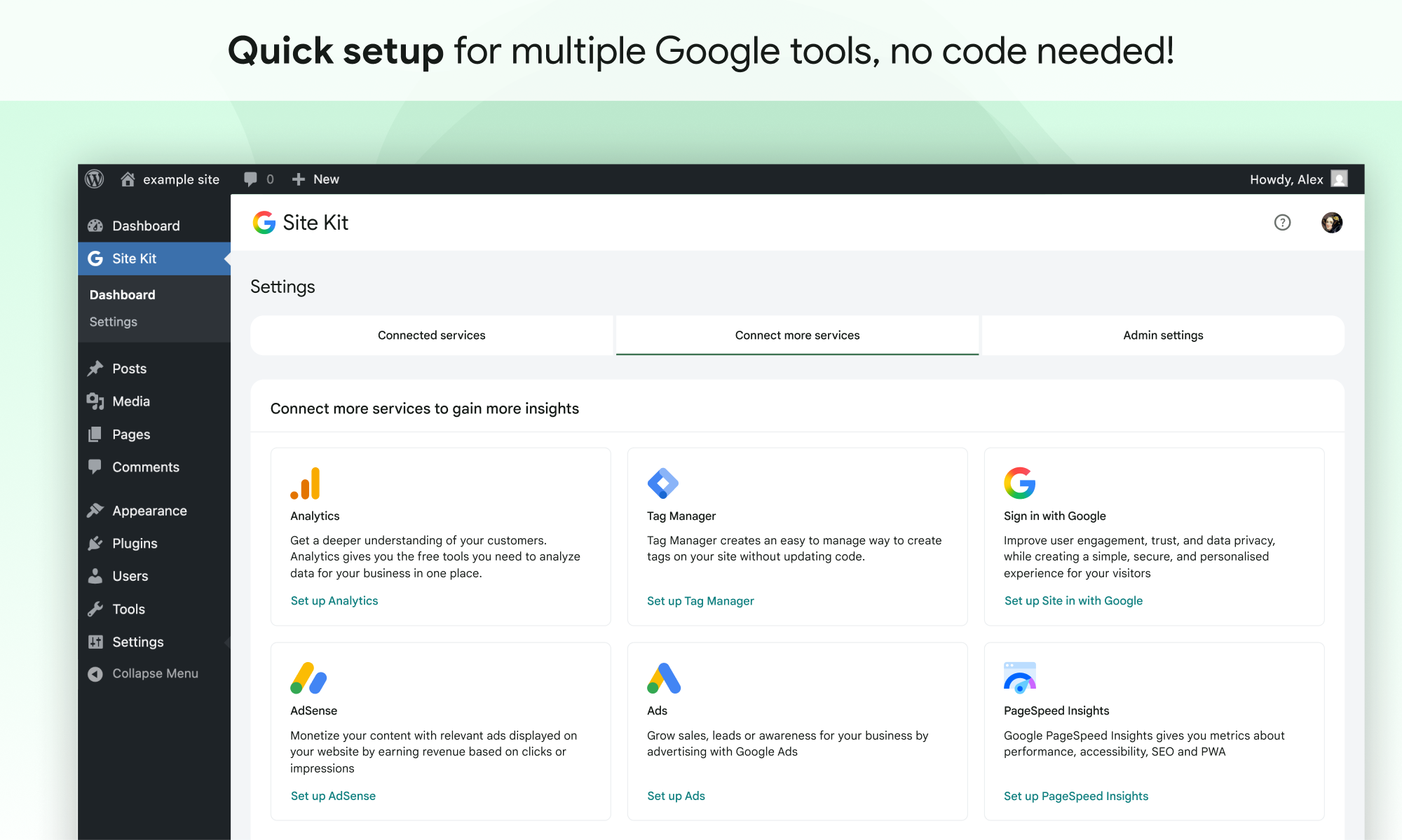
After Search Console is connected, you can add additional services from the setup wizard or later from Site Kit > Settings > Connected Services. Each module has its own setup step. Analytics setup includes account selection: you can connect to an existing GA4 property or create a new one during setup, and Site Kit handles the Google unified tag placement automatically using the GT- format.
One timing note: Site Kit documentation is explicit that “it can take a few days after connecting” for data to appear in the dashboard for the first time. This is a GA4 and Search Console API behavior, not a Site Kit issue, but users who install the plugin expecting immediate data can find the empty widgets during the first 24-72 hours confusing. Setup complexity also scales with your Google account situation: a fresh WordPress install with one Google account is straightforward; a site with multiple Google accounts and existing Search Console properties may require additional troubleshooting steps.
Dashboard and Key Metrics
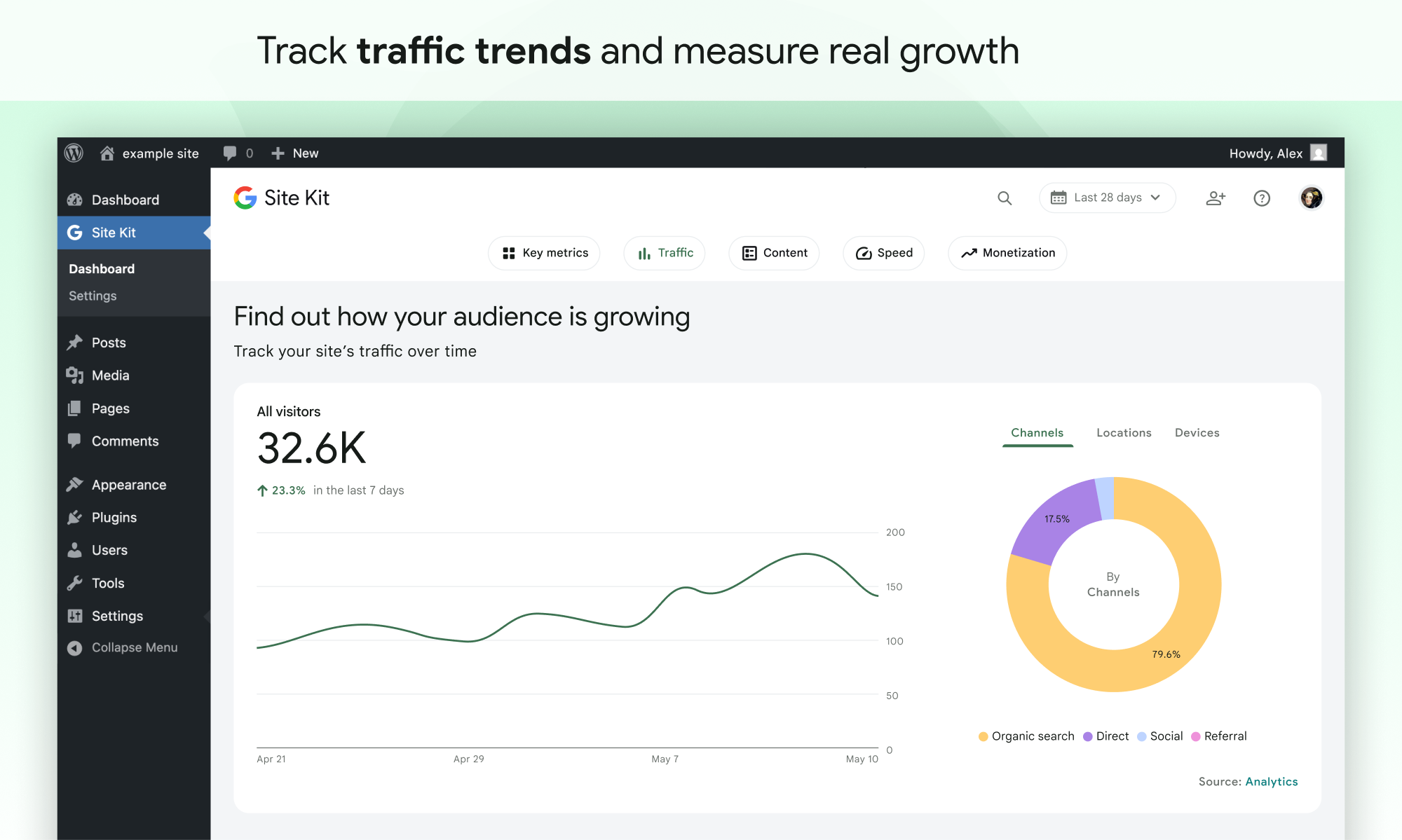
After setup, Site Kit adds a “Site Kit” item to the left WordPress navigation. The main dashboard screen is organized into sections: Overview, Traffic, Content, and Speed, with widgets pulling data from each connected service.
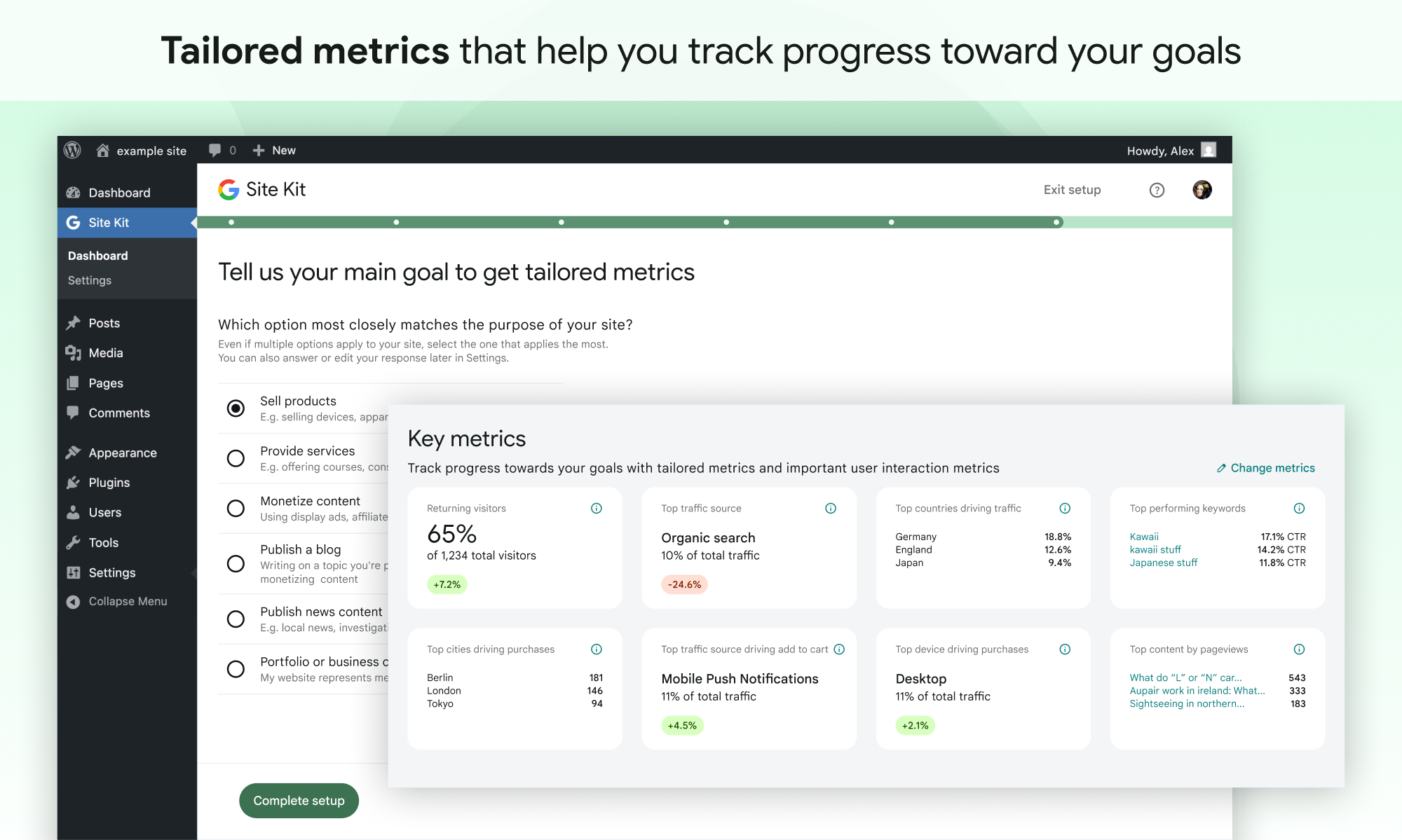
The Key Metrics feature is the most customizable element. Key Metrics is a configurable widget row at the top of the dashboard that shows between 2 and 8 metrics selected from a library of over 30. To configure it, you answer three questions about your site (site type, publishing frequency, and main business goal) and Site Kit recommends the most relevant metrics. You can also skip the questionnaire and select metrics directly.
Available metrics span several categories:
- Visitor analytics: new visitors, returning visitors, pages per visit, visit length.
- Content performance: most engaging pages, least engaging pages, top pages by returning visitors, top recent trending pages.
- Traffic insights: top traffic source, top cities and countries by traffic, most engaged traffic source.
- Conversion data: top converting traffic source, top pages driving leads, top cities driving purchases.
- Revenue: top earning pages, top cities driving add-to-cart events, top device type driving purchases.
Below Key Metrics, the dashboard shows service-specific widgets: traffic data from GA4, search performance from Search Console, speed scores from PageSpeed Insights, and earnings from AdSense. All widgets link to the corresponding native Google interface for deeper analysis. The WordPress admin toolbar integration is a practical addition: when browsing individual pages or posts on the front end while logged in, an admin bar item shows page-specific analytics and search performance data for the current URL.
Search Console integration
Search Console is the core required service, it cannot be disconnected once Site Kit is configured, because it handles site ownership verification. The integration surfaces Search Console data throughout the dashboard: impressions, clicks, click-through rate, and average ranking position for the site as a whole and for individual pages.
The Traffic section shows organic search traffic metrics. The Content section shows individual page Search Console data alongside GA4 traffic data. This combination, traffic from all sources (GA4) alongside traffic from Google Search specifically (Search Console), is the main practical value of having both services in Site Kit.
Individual page Search Console data is available in the WordPress admin bar when browsing front-end pages: each post or page shows its impressions, clicks, and position data for the last 28 days. For content publishers who want to spot which articles are ranking but getting low click-through rates, this page-level Search Console access without opening the native interface is genuinely useful.
Analytics (GA4) integration
The Analytics module connects Site Kit to Google Analytics 4. Site Kit manages GA4 tag placement using the Google unified tag (GT- prefix), which means a single tag handles both GA4 data collection and Google Ads conversion tracking if that module is also connected.
Analytics dashboard widgets show total unique visitors, sessions, pageviews, new versus returning visitors, and session duration. The Traffic section shows top traffic sources and channels. The Content section shows top pages by session count and recent trending content.
Site Kit can create a new GA4 property and a new Google Analytics account during setup if you do not already have one. For sites starting from scratch, this eliminates the need to navigate the Google Analytics interface before the plugin is useful. The Analytics module also powers the more advanced features: Key Metrics pull from GA4, Visitor Groups use GA4 audience definitions, and Site Goals conversion tracking feeds GA4 events. For deeper analysis, Site Kit links directly to analytics.google.com from each widget.
PageSpeed Insights integration
PageSpeed Insights is automatically enabled when Site Kit is set up, with no additional configuration required. The Speed section of the dashboard shows separate performance scores for mobile and desktop. The data comes in three forms: In the Lab (simulated page load performance), In the Field (real-world Core Web Vitals data from Chrome User Experience Report covering the past 28 days), and How to Improve (actionable optimization recommendations, including WordPress-specific suggestions).
For site owners who want to know their Core Web Vitals status without visiting pagespeed.web.dev, the Speed widget covers the relevant ground. The data updates automatically each time you visit the Site Kit dashboard, and you can drill down to page-specific scores. PageSpeed Insights data also appears in the WordPress admin toolbar for each individual page while browsing the front end.
AdSense integration
The AdSense module connects Site Kit to your Google AdSense account. Once connected, the AdSense widget shows earnings by day, total period earnings, page RPM (revenue per thousand pageviews), and impressions. A link to adsense.google.com provides access to the full AdSense reporting interface.
Site Kit handles automatic AdSense code placement, inserting the AdSense auto-ads snippet without requiring theme editing, which eliminates the most common source of manual AdSense setup errors. AdSense requires an existing Google AdSense account and Google’s site approval before ads display. Site Kit can facilitate account creation during setup, but site approval can take a few days and is required before the earnings widget shows real data.
Site Goals: eCommerce and lead generation tracking
Site Goals is one of Site Kit’s more substantive features and is frequently underestimated when comparing it to paid alternatives. Site Goals adds a dedicated widget area to the dashboard based on visitor conversion actions. It activates automatically when GA4 is connected and at least one supported plugin is running with conversion tracking enabled.
For eCommerce sites running WooCommerce or Easy Digital Downloads, Site Goals tracks sales rate, total sales, add-to-cart rates, top traffic channels driving purchases, top pages driving purchase conversions, and sales breakdown by device type, geography, and visitor type.
For lead generation sites running contact forms through Contact Form 7, WPForms, or Ninja Forms, Site Goals tracks form completion rates, top channels capturing leads, pages driving lead conversions, and lead source breakdown by geography and device.
This is not the WooCommerce revenue tracking depth of MonsterInsights Pro. Site Goals does not show per-product revenue, average order value, coupon performance, cart abandonment rates, or user journey tracking before purchase. But for a free plugin, it is a meaningful conversion tracking layer that would otherwise require a paid plugin or manual GA4 custom event configuration. Site Goals supports up to six customizable metric tiles and handles advanced breakdowns when multiple supported plugins are active simultaneously.
Visitor Groups (audience segmentation)
The Visitor Groups feature connects Site Kit to GA4’s audience definitions, letting you filter dashboard metrics by specific visitor segments: new visitors, returning visitors, purchasers, or any audience you have configured in GA4. Setup is through Site Kit > Settings > Admin Settings > Visitor Groups. Site Kit automatically creates “New visitors” and “Returning visitors” audience groups if you have not configured GA4 audiences previously.
Filtering by visitor group changes the metrics shown across the dashboard: you can view total visitors, visits per visitor, pages per visit, pageviews, geographic data, and top content separately for each segment. The practical use case is answering questions like “which content do returning visitors read most?” or “where do new visitors come from?” without navigating GA4’s exploration reports. Visitor group selections are per-user, not site-wide, so different admins can filter to different segments independently.
Dashboard Sharing for teams and clients
Dashboard Sharing addresses a real workflow gap: sharing analytics data with team members, editors, or clients who do not have (and should not have) full WordPress admin access. Administrators who connected a Google service can grant view access for that service’s dashboard data to any WordPress user role that has the edit_posts capability. The sharing is per-service: you can share Analytics and Search Console data without sharing AdSense earnings data.
Users with shared dashboard access see a read-only Site Kit dashboard showing only the services their role has been granted access to. They can also see page-level stats in the WordPress admin toolbar while browsing the front end, which is particularly useful for editors and content authors checking the performance of specific articles. For agencies managing client sites: connect your Google account, configure the services, and grant the client view access without requiring them to go through their own Google OAuth connection.
Email reports
Site Kit added email report subscriptions in version 1.178.0 (May 2026). Reports are available at three frequencies: weekly (last 7 days), monthly (previous month), or quarterly. Users opt in through the Google account menu in Site Kit, and administrators can invite other eligible users to subscribe. Reports contain site performance metrics drawn from connected services, with content varying by the user’s access level.
Reports are periodic only, with no option to send on-demand reports, and report format customization is not currently supported. For agencies who want branded PDF reports with custom logos, paid plugins like ExactMetrics offer that at paid tiers; Site Kit’s email reports are functional but straightforward.
Other Google services: Tag Manager, Google Ads, Sign in with Google, Reader Revenue Manager
Tag Manager connects your site to a Google Tag Manager container and places the GTM code automatically. Site Kit recommends connecting GA4 and Google Ads directly through Site Kit rather than through Tag Manager tags, because the direct connection enables Key Metrics data that Tag Manager-managed tags cannot populate.
Google Ads enables the shared Google unified tag that powers both GA4 and Ads conversion tracking from a single code snippet, reducing configuration overhead compared to managing both tags separately.
Sign in with Google lets site visitors authenticate using their Google account instead of a WordPress username and password. One-tap sign-in is supported for users with an active Google browser session. The integration extends to WooCommerce checkout pages and WordPress comment forms. Google reported up to 2x improvements in conversion rates for login and registration flows after adding one-tap sign-in.
Reader Revenue Manager enables publishers to add newsletter signup prompts, subscription calls to action, contribution requests, and paywalls through Site Kit and WordPress blocks. Setup requires creating a publication in Google’s Publisher Center and waiting for Google approval, which can take up to two weeks. This is a substantive feature for news publishers, newsletter operators, and content monetization sites.
GDPR and Consent Mode
Site Kit implements Google’s Consent Mode to handle GDPR compliance. The setup requires two additional plugins: WP Consent API (which standardizes consent signal communication between WordPress plugins) and a compatible consent management plugin (Complianz, Cookiebot by Usercentrics, or CookieYes). When consent mode is enabled, Site Kit dynamically adjusts how Analytics and Ads tags operate based on each visitor’s cookie consent choices.
For visitors in the European Economic Area, Switzerland, and the United Kingdom, the setup ensures that only visitors who have explicitly consented are fully tracked, in line with Google’s Digital Markets Act requirements. Site Kit documentation notes that when consent mode is enabled through Site Kit, you should not separately enable it in the CMP plugin, as Site Kit handles it and double-enabling causes conflicts.
Pricing
Site Kit by Google is free. There are no paid tiers, no premium features behind a subscription, and no license limits by site count. Every capability is available in the single free plugin. This is the most important fact about Site Kit for buyers comparing it to MonsterInsights or ExactMetrics: the comparison is not between a free limited version and a paid complete version. It is between a free complete tool that surfaces Google data in WordPress, and a paid tool that reformats that same GA4 data into a deeper set of in-WordPress reports and tracking features.
Pros and cons
Pros
- Completely free. No paid tier, no subscription, no feature limits.
- Official Google plugin maintained by Google’s own engineering team. Updates are consistent and the plugin is tested to current WordPress versions.
- 5+ million active installs and a 4.2-star rating. The rating reflects a product where the free experience matches user expectations.
- Single authentication flow for up to eight Google services.
- Automatic Search Console verification, without manual HTML file uploads or meta tag insertions.
- Key Metrics widget offers 2-8 configurable metrics from a library of 30+, tailored by site type and goals.
- Site Goals provides eCommerce and lead generation conversion tracking for WooCommerce, Easy Digital Downloads, WPForms, Contact Form 7, and Ninja Forms at zero cost.
- Core Web Vitals and PageSpeed Insights data available inside WordPress without running a separate audit.
- Dashboard Sharing lets you share specific service data with non-admin team members and clients, with per-service granularity.
- Reader Revenue Manager integration. No paid GA4 dashboard plugin offers direct Google Publisher Center integration.
- Consent Mode built in, with support for Complianz, Cookiebot, and CookieYes.
- Email reports (weekly, monthly, quarterly) added in May 2026.
- No vendor lock-in. All data lives in your own Google accounts. Uninstalling Site Kit does not affect historical GA4 or Search Console data.
- Active development: v1.185.0 in August 2026 adds Reader Revenue Manager express setup and email reporting improvements.
Cons
- The dashboard surfaces key metrics but is not a substitute for native Google interfaces for deep analysis. Custom reports, audience analysis, and funnel exploration require visiting analytics.google.com.
- No per-author, per-category, or per-tag traffic reporting inside WordPress.
- No WooCommerce revenue tracking at the depth paid plugins offer. Site Goals covers conversion rates and top channels but not per-product revenue, cart abandonment, coupon performance, or average order value.
- No AI analytics queries. MonsterInsights and ExactMetrics offer natural language analytics interfaces. Site Kit has no equivalent.
- No integrated outbound link, affiliate link, or file download tracking through toggle switches. These require Tag Manager configuration.
- Setup friction in multi-Google-account environments, including organization Google Workspace accounts.
- Data delay of 24-72 hours after initial connection before dashboard widgets show data.
- Some users report dark-mode visibility issues following a recent update.
- Reader Revenue Manager requires Google Publisher Center approval of up to two weeks.
- PageSpeed Insights measures site performance but does not improve it. A dedicated performance plugin remains necessary for optimization.
Alternatives to Site Kit by Google
- MonsterInsights. The most direct paid alternative. MonsterInsights Pro adds deep in-WordPress GA4 reporting (15+ reports), automatic WooCommerce eCommerce tracking, form conversion tracking, custom dimensions (author, category, published date), affiliate link tracking, Charlie Chat AI analytics queries, and advanced PPC conversion tracking. Starting at $99.50/year promotional for one site. For a WooCommerce store with real revenue attribution needs, MonsterInsights Pro pays for itself quickly. For a personal blog, Site Kit covers the essentials at zero cost.
- ExactMetrics. A sister product to MonsterInsights from the same company, at the same price points ($99.50/year Plus, $199.50/year Pro for 5 sites at promotional rates). ExactMetrics offers a 100-site agency plan that MonsterInsights does not. Feature coverage and the Site Kit comparison follow the same logic as MonsterInsights.
- Analytify. A simpler, lower-priced paid GA4 dashboard plugin for WordPress. Pro plans start below MonsterInsights Plus pricing. Feature depth is lighter: fewer integrations, no AI chat, lighter eCommerce tracking. Sits between Site Kit (free, minimal reformatting) and MonsterInsights (comprehensive, higher cost).
- Burst Statistics. A privacy-first, self-hosted WordPress analytics plugin. Tracks visitors without cookies, stores data on your own server, and sends nothing to Google. The right tool for sites where Google Analytics is not acceptable for privacy or compliance reasons.
- Matomo for WordPress. Self-hosted analytics with a full feature set including goals, eCommerce tracking, heat maps, and session recording. No Google dependency. More complex to configure and maintain. The correct choice for organizations that have decided GA4 is not acceptable under their compliance framework.
- GA Google Analytics (by RaMMicHaeL). A lightweight plugin that inserts only the GA4 tracking code. No dashboard, no reports, no integrations. For developers who manage GA4 natively and want zero abstraction overhead.
Final verdict
Site Kit by Google earns a clear recommendation as the starting point for WordPress analytics. Five million active installs and a 4.2-star rating reflect a large, broadly satisfied user base, and that rating is earned. The plugin does what it promises: it connects WordPress to Google’s services, places tracking code correctly, surfaces the most important metrics on a unified dashboard, and stays out of the way.
The zero cost is significant. For a blogger, a small business, or a developer setting up client sites, there is no rational reason not to start with Site Kit. The Core Web Vitals data, the Site Goals eCommerce and lead tracking, the Key Metrics customization, and the Dashboard Sharing capability are all substantive features that would cost money through any alternative.
The honest limitations require equal acknowledgment. Site Kit is not a reformatted analytics suite inside WordPress. It is a window into Google’s own interfaces. Users who want WooCommerce revenue trends, per-author traffic attribution, form conversion rate breakdowns, or natural language analytics queries without leaving WordPress are not fully served by Site Kit alone. Those use cases require a paid plugin.
The practical advice: if you are deciding between Site Kit and nothing, install Site Kit. If you are deciding between Site Kit and a paid plugin, install Site Kit first and add a paid plugin only when you identify a specific reporting gap. If you run a WooCommerce store where revenue tracking and cart abandonment data are decision-critical, MonsterInsights Pro is the right tool from the start. If you are an EU-facing site that needs GDPR-compliant analytics, Site Kit’s Consent Mode with WP Consent API and a compatible CMP is a correct, free implementation path.