


WordPress creates multiple resized copies of every uploaded image and applies a default JPEG quality setting during that process. That built-in handling produces usable thumbnail sizes, but it stops well short of full optimization: no EXIF metadata stripping, no conversion to WebP or AVIF, no CDN delivery, and no way to bulk-reprocess an existing library. The result is unnecessary page weight that accumulates as your media library grows.
Smush, developed by WPMU DEV, is one of the longest-running image optimization plugins in the WordPress ecosystem. It launched in December 2008, now counts over 1 million active installs, and carries a 4.8 out of 5 rating across more than 6,000 reviews on WordPress.org.
This review is based on the WordPress.org plugin listing, official WPMU DEV documentation and product pages, the official changelog, and the five plugin screenshots published by WPMU DEV on WordPress.org. It covers version 4.1.2, released June 22, 2026.
Quick Verdict
Quick Verdict
Smush earns its place as the most popular free image optimization plugin in WordPress by making compression genuinely zero-friction for new users. Install it, activate it, and it starts working. No account required for basic use, no API key, no credit system. The free tier covers lossless and lossy compression, bulk optimization with no image-count limit, lazy loading, and Directory Smush for files outside the media library. The tradeoff is clear: the features most likely to improve PageSpeed scores on established sites (WebP, AVIF, CDN delivery) all sit behind a paid subscription. The 5MB file size ceiling in the free version is also a real limitation for sites handling high-resolution photography.
Best for: Beginners, small site owners, and anyone who wants solid compression without account registration or credit tracking.
Not ideal for: Sites that need WebP or AVIF without paying, or photographers who regularly upload large high-resolution files.
What Smush Is
Smush is a WordPress plugin that compresses and optimizes images in your media library and, optionally, in other directories on your server. It can also lazy load images, convert them to WebP or AVIF formats (Pro), and deliver them through a global CDN (Pro).
Unlike ShortPixel or Imagify, which require external API keys from the start, Smush’s free tier works immediately after activation with no registration required for basic compression. The plugin connects to WPMU DEV’s cloud servers for processing, but that connection is automatic and requires no manual key entry for the core free features.
A note on naming: the plugin on WordPress.org is listed as “Smush” or “WP Smush.” The Pro version is sold through WPMU DEV as part of a broader membership that bundles other plugins including Hummingbird (performance), Defender (security), SmartCrawl (SEO), Snapshot (backups), and Forminator (forms).
Who It Is Best For
Smush fits these situations particularly well:
- Beginners and first-time site owners who want compression to happen automatically without configuring an API key or tracking credits. The free tier handles this with minimal setup.
- Bloggers and content sites with images under 5MB. The free plan covers these without restrictions on image count, making it easy to keep a whole library optimized.
- Sites already in the WPMU DEV ecosystem. If you already pay for WPMU DEV services, Smush Pro is included. The full feature set at that point, covering WebP, AVIF, CDN, LCP preloading, and dynamic resizing, is genuinely comprehensive.
- Sites with images stored outside the uploads folder. Directory Smush is one of the few features in this category that optimizes images in theme folders, plugin directories, and other server locations, not just the WordPress Media Library.
It is less ideal for:
- Photographers and WooCommerce stores that regularly upload images above 5MB. The free tier skips these entirely.
- Users who need WebP or AVIF without paying. Both are Pro-only features.
- Developers who want fully local compression with no images leaving their server. Smush sends images to WPMU DEV’s cloud for processing.
Setup and User Experience
First Activation
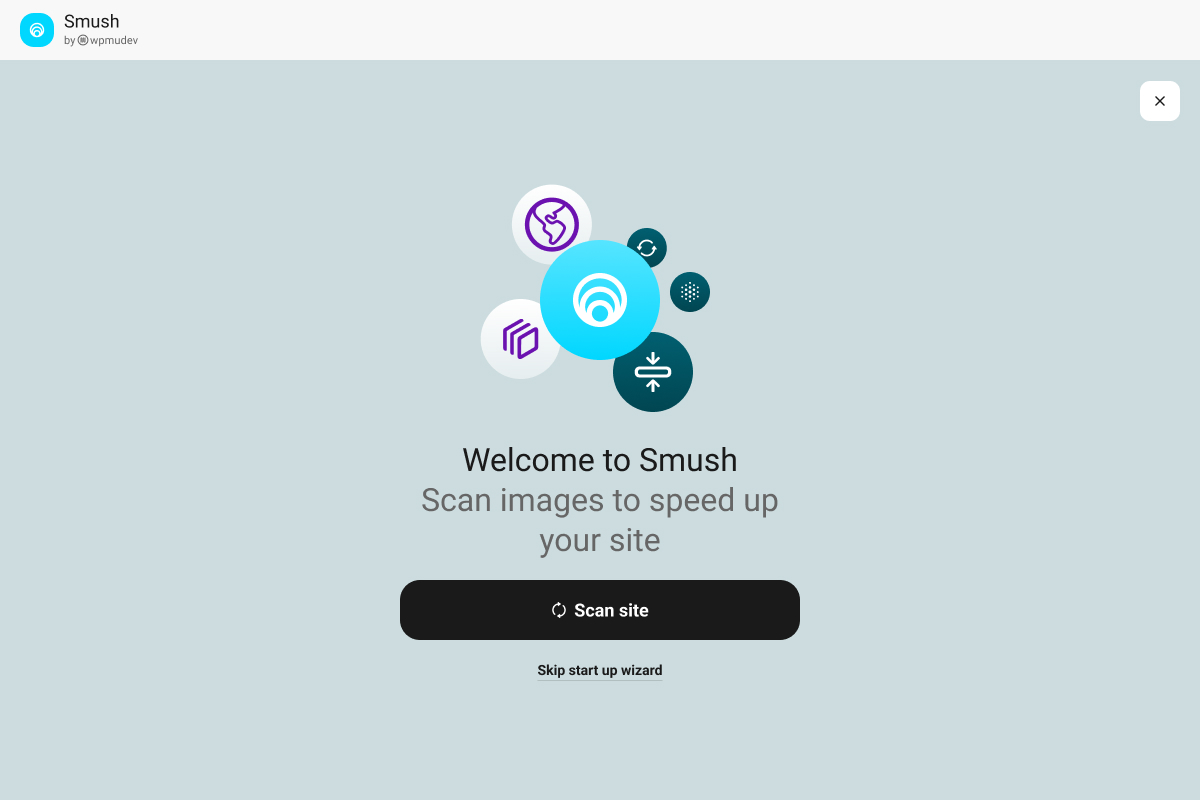
Installation requires no external accounts for basic free operation. After activating the plugin, a Quick Setup Wizard walks through compression preferences and lazy loading in a few steps. The wizard applies sensible defaults, and most users can accept them without reading documentation. The official setup wizard screenshot shows a clean, minimal welcome screen with a prominent “Scan site” button as the primary action.
The v4.0 update released in April 2026 redesigned the entire interface. The new layout is cleaner, removes clutter from earlier versions, and introduces an Activity Log that records optimization events, configuration changes, and library scans in real time. For sites with multiple administrators, the Activity Log makes it straightforward to see what was processed and when.
One useful detail added in v4.0: Enhanced Super Compression is now available at no cost to users connected to the free WPMU DEV Hub. Hub is a free WPMU DEV account, not a paid plan. Connecting to Hub unlocks the enhanced Super lossy algorithm and also enables background processing, which runs optimization via cron without requiring a browser tab to stay open. Ultra compression (the 5X tier visible in the dashboard), remains a Pro-only feature requiring a paid Smush subscription.
The Main Dashboard
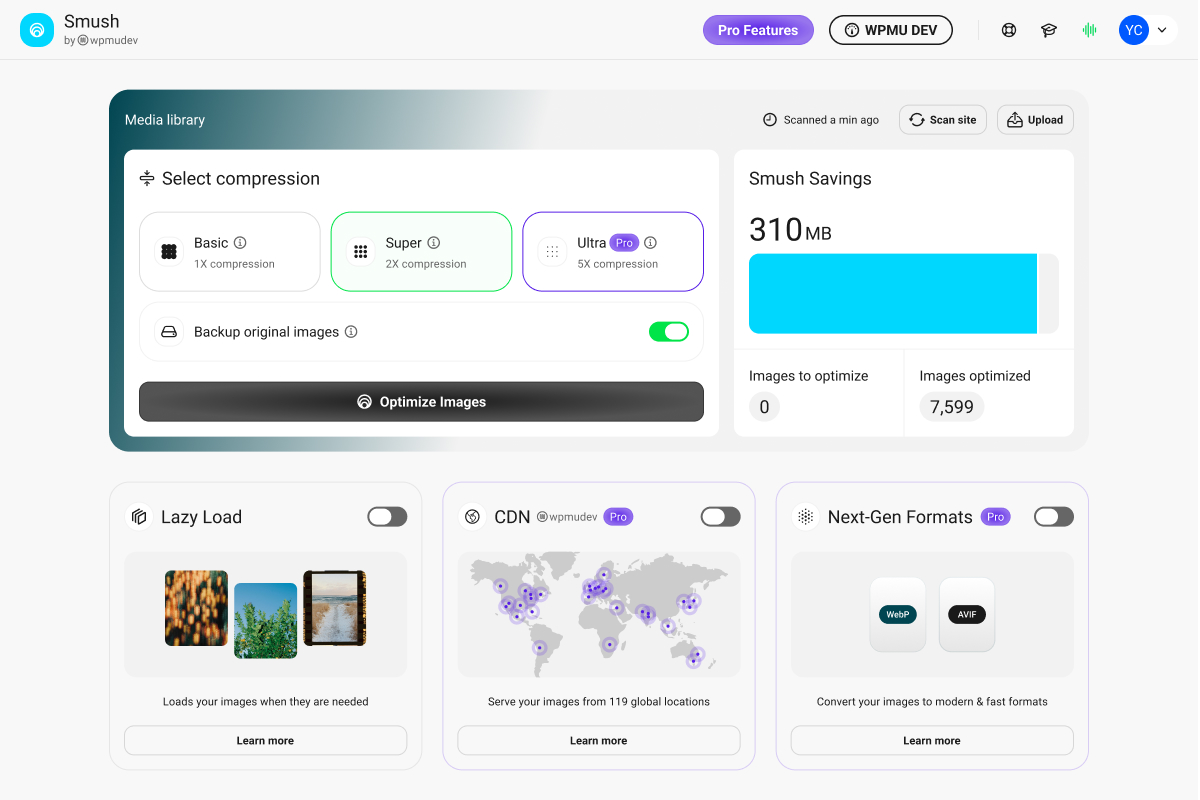
The v4.0 dashboard is organized into a clear summary panel and feature cards. The compression mode selector shows three options in a row: Basic (1X compression), Super (2X compression), and Ultra (5X compression, Pro). Super is the default selection shown in the official dashboard screenshot, highlighted in green. Ultra carries a Pro badge indicating it requires a paid Smush plan.
Below the compression mode selector, the dashboard shows running totals: in the example visible in the official screenshot, Smush had saved 310MB of image weight across 7,599 optimized images, with zero images left to optimize. This summary gives a clear sense of the plugin’s running output without requiring navigation to a separate stats page.
Feature cards below the stats surface Lazy Load, CDN, and Next-Gen Formats. CDN, Next-Gen Formats, and Ultra are all labeled Pro in the free state, making tier distinctions visible without hiding the features entirely.
Settings and Controls
The main settings are organized into dedicated tabs:
- Bulk Smush: Run optimization across the entire media library. Since v4.0, there is no 50-image batch limit; the optimizer runs continuously in the background.
- Compression: Choose Basic (lossless), Super (lossy, free), or Ultra (lossy, Pro). Enhanced Super Compression is available to Hub-connected free users since v4.0.
- Lazy Load: Toggle lazy loading for standard images, background images, and optionally YouTube and Vimeo video thumbnails.
- Directory Smush: Select server directories outside the standard uploads folder to include in optimization runs.
- Integrations: Manage connections to WP Offload Media and similar tools.
Settings auto-save as you make changes, a behavior introduced in v4.0 that removes the friction of clicking a save button after each adjustment.
Bulk Optimization
The bulk optimizer processes the entire media library in a single run, compressing each image and all its WordPress-generated thumbnail sizes. Background mode handles heavy optimization tasks via cron, which means you can start a bulk run and navigate away from the browser without interrupting the process.
The Activity Log shows real-time progress and records the reason for any failure, making troubleshooting straightforward when individual images are skipped or error out.
Directory Smush
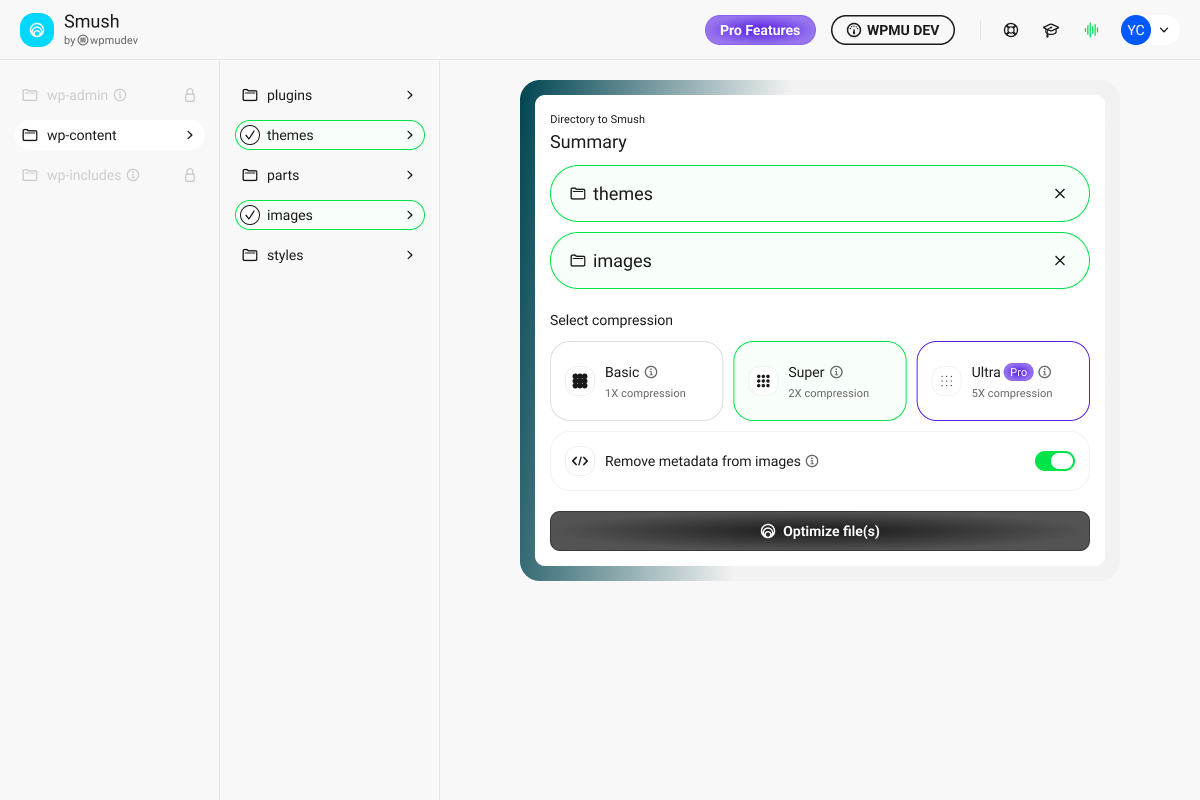
This feature optimizes images stored outside the standard WordPress uploads folder. You select a directory (for example, a theme’s images folder), and Smush scans and compresses what it finds there. Results appear in a table showing savings per file.
The official Directory Smush screenshot shows a two-panel layout: a file tree on the left (with themes and images folders selected and marked with green checkmarks), and a compression selection modal on the right that shows Basic, Super, and Ultra options. The Ultra option shows a Pro badge, correctly indicating it requires a paid Smush plan. A “Remove metadata from images” toggle is enabled below the compression selector, and an “Optimize file(s)” button completes the action.
Directory Smush is available in the free version and is useful for legacy image files, theme assets, and plugin images that were never processed through the standard upload flow.
Main Features
Compression: Basic, Super, and Ultra
Smush offers three compression levels.
Basic is lossless compression. It strips metadata (EXIF data, ICC color profiles) and removes non-visible data without changing pixel values. File size reductions are moderate, typically 10 to 30 percent on standard JPEG images. The right choice when the original pixel data needs to remain intact.
Super is lossy compression. It applies algorithms that discard some image data to achieve better file size reduction, typically 40 to 70 percent on JPEG images. Visible quality difference is minimal at normal screen resolutions. Super has been free since June 2022 (v3.10.0). The v4.0 update (April 2026) introduced Enhanced Super Compression for users connected to the free WPMU DEV Hub, improving the algorithm further at no additional cost.
Ultra is the highest compression tier, described as achieving up to 5x reduction compared to Basic. Ultra requires a paid Smush Pro subscription and was introduced as a Pro feature in July 2023 (v3.14.0). All compression runs through WPMU DEV’s cloud servers regardless of tier, which is worth noting for sites with privacy-sensitive content.
Compression level is set globally. Unlike ShortPixel, which lets you reassign individual images to different modes from the Media Library, Smush applies one setting to all images.
Lazy Loading and Video Lazy Load
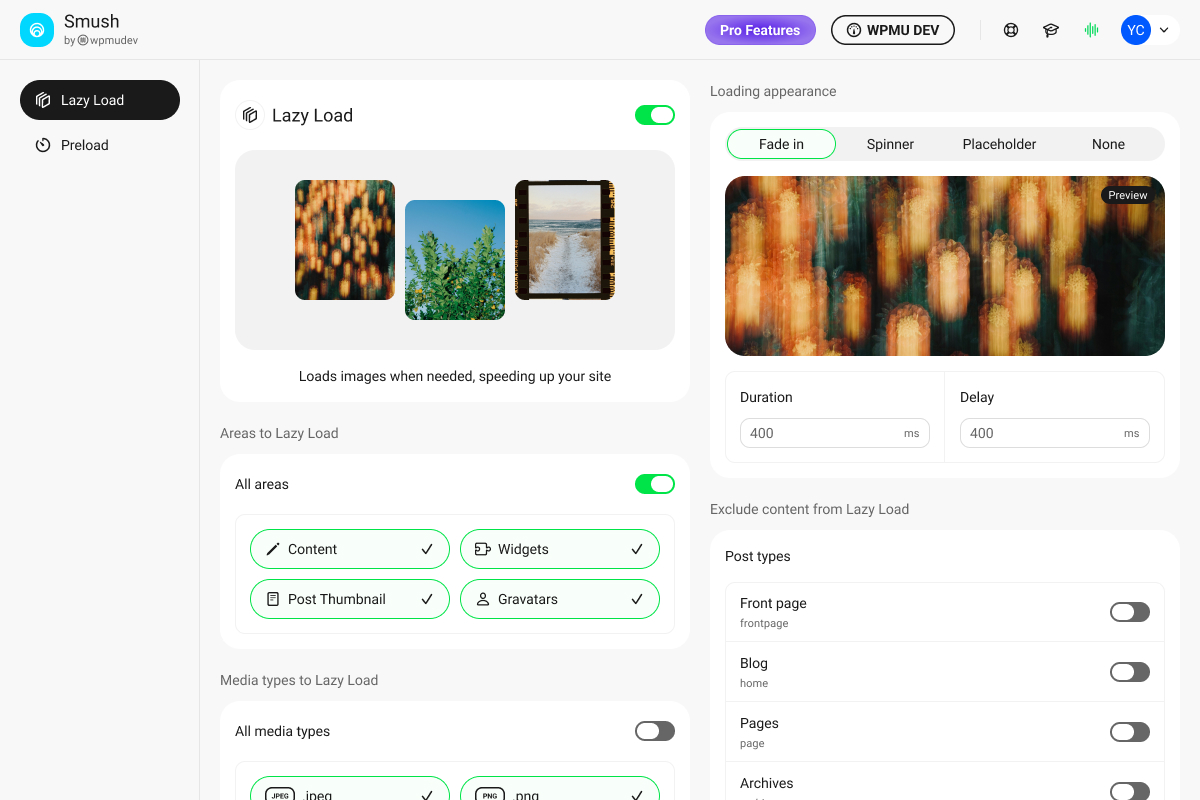
Lazy loading defers image requests until the image is approaching the visible viewport, reducing initial page weight and improving perceived load time on content-heavy pages.
The official Lazy Load screenshot shows the panel’s scope clearly: all four content areas (Content, Widgets, Post Thumbnail, Gravatars) are enabled by default. Loading appearance offers four choices: Fade in, Spinner, Placeholder, and None, with a live preview panel on the right. Duration and Delay are configurable in milliseconds. An “Exclude content from Lazy Load” section at the bottom lets you disable lazy loading per post type (Front page, Blog, Pages, Archives).
Smush’s free lazy loading handles standard img elements and background images. Free users also get video lazy loading for YouTube and Vimeo embeds, which was added in June 2025 (v3.20.0).
Smush Pro adds LCP preload, which automatically detects the largest above-the-fold image on each page and adds a fetchpriority=high preload hint, directly targeting the Largest Contentful Paint Core Web Vitals metric. The LCP preload feature was added in May 2025 (v3.19.0).
WebP and AVIF Conversion (Pro)
Both next-gen formats are available in Smush Pro only. The plugin offers two delivery paths:
- Direct Conversion: Serves WebP or AVIF to compatible browsers using a local file method that does not require CDN or server configuration changes.
- Server Configuration: Adds rewrite rules to serve pre-generated WebP or AVIF files from a local directory. Supported on Apache, NGINX, Litespeed, Cloudways, IIS, and Bedrock environments.
Both formats use a picture element with a fallback to the original format for browsers without next-gen format support.
AVIF was added in March 2025 (v3.18.0). It typically achieves better compression than WebP at equivalent visual quality, particularly on photographic content, though encoding can be slower for very large images.
The free version of Smush does not include WebP or AVIF. If your site shows a “Serve images in next-gen formats” warning in PageSpeed Insights, the free version will not resolve that flag.
CDN Delivery (Pro only)
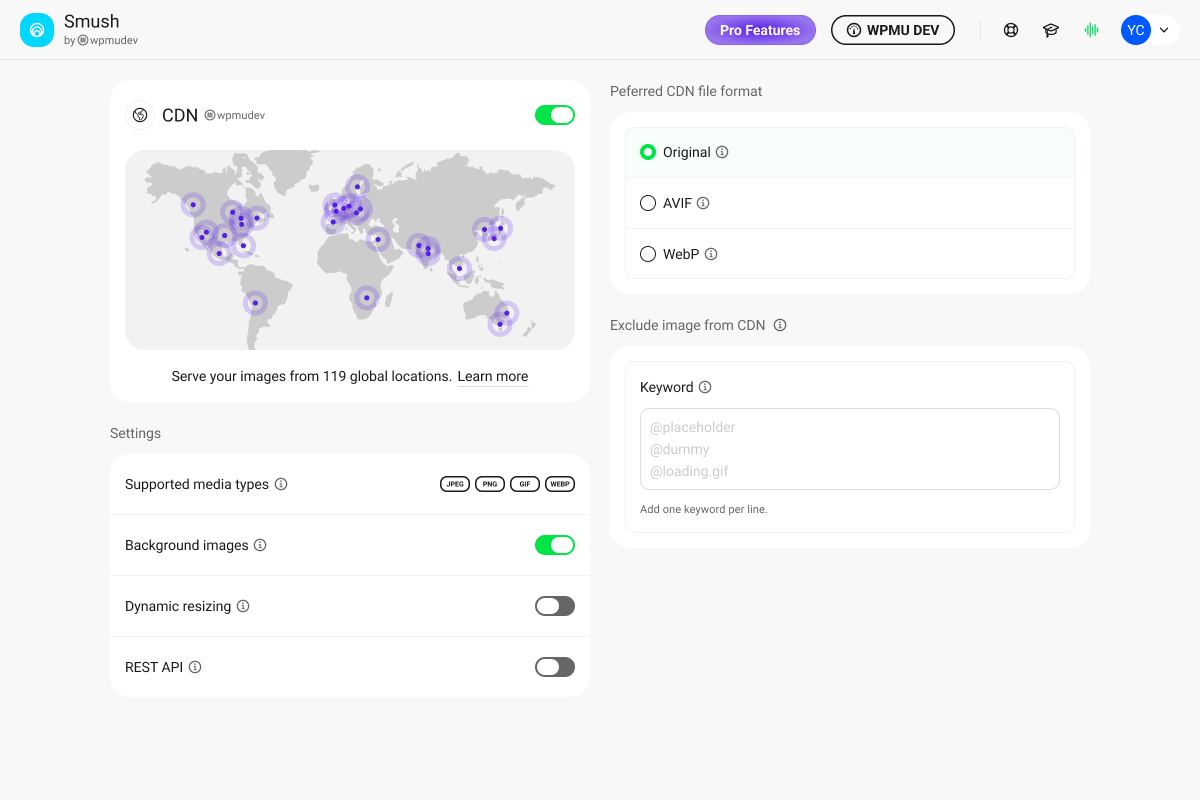
Smush Pro connects to a global CDN operated by WPMU DEV with 119 server locations, serving images from the nearest node to each visitor. This screen is accessible only on a paid Smush Pro plan.
The official CDN screenshot shows the full settings panel: the CDN is enabled (toggle on), the world map visualization shows delivery node locations, and the Settings section reveals supported media types (JPEG, PNG, GIF, WebP), with Background images enabled and Dynamic resizing and REST API both off by default. A “Preferred CDN file format” selector on the right offers Original, AVIF, and WebP options.
CDN bandwidth limits depend on plan:
| Plan | Sites | CDN Bandwidth |
|---|---|---|
| Basic | 1 | 50 GB/month |
| Standard | 3 | 100 GB/month |
| Plus | 10 | 250 GB/month |
| Premium | Unlimited | 500 GB/month |
The CDN supports dynamic image sizing, which resizes images on the fly to fit their container dimensions, resolving the “Properly size images” PageSpeed warning without manual resizing work. It also handles WebP and AVIF delivery alongside JPEG and PNG originals.
Image Resizing and Dimension Management
Smush can resize large images on upload to a maximum width or height you specify. This trims oversized source files at the point of entry rather than relying on CSS to hide excess pixels.
The Pro CDN adds dimension management automatically: images are served at the exact pixel size needed for each visitor’s device and container, including Retina display variants.
Smush also adds missing width and height attributes to img elements automatically, which reduces layout shifts and addresses the “Ensure images have explicit width and height” Core Web Vitals check (available in both free and Pro through the lazy load module).
Original Image Backup and Restore
Smush backs up each original image before any compression or resizing. Restoration is available per image from the Media Library view, or in bulk from the Bulk Smush screen. Since v3.23.0 (December 2025), backing up and optimizing originals is enabled by default for new installs, and a Bulk Restore option was added to the Media Library page.
PNG to JPG Conversion
Smush can convert PNG images to JPG format during optimization. This is available in the free version (restored in v4.0.2 after a brief regression). The conversion is useful for screenshots and flat-color images where JPEG compression is appropriate and a white background is acceptable. Transparent PNGs should not be converted.
WP Offload Media Integration
For sites storing media in Amazon S3, Google Cloud Storage, or similar cloud services via WP Offload Media, Smush can process offloaded images. The free version includes limited compatibility, and Pro expands the integration for full cloud media library optimization.
Compatibility
- Gutenberg block editor
- Elementor, Divi, WPBakery, Avada
- WooCommerce product images and thumbnails
- NextGEN Gallery
- Gravity Forms uploads
- WP Offload Media
- WP Retina 2x
- WPML multilingual
- WordPress Multisite (sub-folder and sub-domain)
- PHP 7.4 or higher
- WordPress 6.4 or higher (tested to 7.0)
Pricing and License Value
Free Version
No cost. No account required for Basic and Super compression. Covers lossless and lossy compression, bulk optimization without an image-count limit, lazy loading, video lazy load, Directory Smush, PNG to JPG conversion, and original image backup. A free WPMU DEV Hub account unlocks Enhanced Super Compression and background processing. Ultra (5X) compression requires a paid Pro plan.
The 5MB file size ceiling is the most significant free-tier limitation. Images above 5MB are skipped entirely and shown as unoptimized. For a blog with standard photography at typical camera export sizes, this may not matter. For sites handling high-resolution product images, a meaningful portion of uploads may go unoptimized on the free plan.
Smush Pro Plans
Smush Pro is sold as part of a WPMU DEV membership. All plans bundle Smush with additional WPMU DEV plugins including Hummingbird, Defender, SmartCrawl, Snapshot, and Forminator. You are paying for the full toolkit, not Smush alone.
| Plan | Sites | Annual Price | CDN Bandwidth |
|---|---|---|---|
| Basic | 1 | $36/year | 50 GB/month |
| Standard | 3 | $60/year | 100 GB/month |
| Plus | 10 | $120/year | 250 GB/month |
| Premium | Unlimited | Contact required | 500 GB/month |
A 30-day money-back guarantee applies to all paid plans.
At $36/year for a single site, Smush Pro is well-priced if you need WebP, AVIF, and CDN delivery. The bundle value is real if you also need performance monitoring (Hummingbird) or security tools (Defender). If you only need image optimization and have no use for the other WPMU DEV tools, standalone options like ShortPixel or Imagify offer a simpler pricing comparison without the bundle.
Pros and Cons
Pros
- Zero-friction setup: no API key or account needed for Basic and Super compression
- Lossy (Super) compression is free, including on the bulk optimizer
- Enhanced Super Compression available free to Hub-connected users since v4.0 (April 2026)
- No image-count limit on bulk optimization in the free version (removed in v4.0)
- Background processing free since v4.0 (no browser tab required)
- Directory Smush handles images outside the standard media library
- Lazy loading free, including video lazy load for YouTube and Vimeo embeds
- Original image backup and bulk restore included in the free version
- PNG to JPG conversion available to free users
- Strong compatibility with Gutenberg, Elementor, Divi, WooCommerce, WPML, and Gravity Forms
- Activity Log in v4.0 makes it easy to audit what was processed and when
- 1+ million active installations and 4.8/5 rating across 6,000 reviews
- Actively maintained with regular updates and a good support resolution rate
Cons
- WebP and AVIF conversion require Smush Pro (paid)
- CDN delivery requires Smush Pro (paid)
- 5MB file size limit in the free version: images above 5MB are silently skipped
- No compression mode equivalent to ShortPixel’s Glossy: no quality-preserving middle ground between lossy and lossless
- All compression (Basic, Super, and Ultra) routes through WPMU DEV’s external cloud servers, a privacy consideration for sensitive content
- Ultra (5X) compression is Pro-only: free users cannot access the highest compression tier regardless of Hub connection
- Hub account registration is required to unlock Enhanced Super Compression, adding a step some users do not expect
- LCP preload and advanced lazy load features are Pro-only
- Pricing model bundles many plugins you may not need: single-purpose tools like ShortPixel or Imagify may be cleaner if image optimization is your only goal
- Maximum file size for Pro is 256MB, which covers most use cases but may not suit high-end media workflows
Alternatives
ShortPixel Image Optimizer is the strongest comparison for compression quality. It offers three modes: Lossy, Lossless, and Glossy (a quality-preserving lossy mode unique to ShortPixel with no equivalent in Smush). WebP and AVIF are available in the paid tier. ShortPixel uses a credit-based model starting at $9.99/month unlimited or one-time credit packages from $19.99. It requires an API key even for the free 100-credit/month tier. For sites prioritizing maximum compression ratios or photography quality via the Glossy mode, ShortPixel is the main alternative to evaluate.
Imagify is made by the same team as WP Rocket and integrates natively with it. It offers smart compression with a visual before/after view in the Media Library. The Growth plan includes unlimited optimization. AVIF is not supported, and Imagify has no Glossy-equivalent mode. A good choice for WP Rocket users who want tight performance tool integration.
EWWW Image Optimizer compresses images locally on your server for lossless optimization with no external API required by default. An API key enables lossy compression and WebP. EWWW is the right choice for sites where images must never leave the hosting environment. Configuration is more involved and it is not a beginner-friendly plugin.
Optimole serves images through its own CDN and optimizes them on the fly without modifying the WordPress media library. Images are served from Optimole’s network rather than your domain. The free plan includes limited visitor bandwidth. A good option for sites that want a CDN-first approach and are comfortable with images served from a third-party domain.
Final Verdict
Smush earns its dominant position in the image optimization category through a combination of simplicity and a genuinely strong free tier. The setup is frictionless. Lossy compression is free. Bulk optimization has no image-count limit. Background processing runs without a browser tab. Directory Smush handles content outside the standard media library. For any site owner who has put off image optimization because it seemed complicated, Smush makes it possible to start immediately without spending anything or learning much.
The limitations are real but clearly documented. WebP and AVIF require a paid plan. The 5MB free-tier ceiling catches photographers and WooCommerce stores handling large originals. The compression output in Super mode is reliable but does not reach the maximum reduction ratios that ShortPixel achieves in its Lossy or Glossy modes on photographic content.
The pricing model requires a brief read before upgrading. A WPMU DEV membership bundles Smush with several other plugins. If you want image optimization alone, standalone tools give a cleaner cost comparison. If you already use or would benefit from WPMU DEV’s performance, security, or SEO tools, the bundle pricing makes Smush Pro genuinely affordable.
For most WordPress sites, the free version of Smush is sufficient. For sites that need WebP delivery and CDN serving, upgrading to the $36/year Basic plan is straightforward and competitively priced for a single site.
Score: 4.2 / 5