


Social proof works. Displaying customer testimonials on a WordPress site consistently increases conversions, reduces bounce rates, and builds the kind of trust that no sales copy can replicate on its own. The challenge has always been making testimonials look good and collecting them without friction. Strong Testimonials has been solving that problem since 2014.
With more than 90,000 active installs, a 4.8-star rating across 614 reviews, and a genuinely capable free tier, it is the most widely used dedicated testimonials plugin in the WordPress repository. This review covers version 3.3.6, last updated August 6, 2026. I worked through the official plugin pages, WordPress.org listing and reviews, the pricing page, and publicly available documentation to give you an accurate picture of what you actually get at each tier.
At a glance
- Audited on: strongtestimonials.com features, pricing, and documentation pages; the WordPress.org plugin listing (version 3.3.6, last updated August 6, 2026, tested up to WordPress 7.1); the plugin changelog; user reviews and forum threads. Pricing verified against strongtestimonials.com/pricing on August 30, 2026.
- Free tier: unlimited display views, list and grid and slideshow and masonry layouts, customizable submission form with drag-and-drop field editing, star ratings, three shortcodes including average rating display, widget support, Gutenberg blocks, GDPR-compliant data handling, WPML and Polylang compatibility.
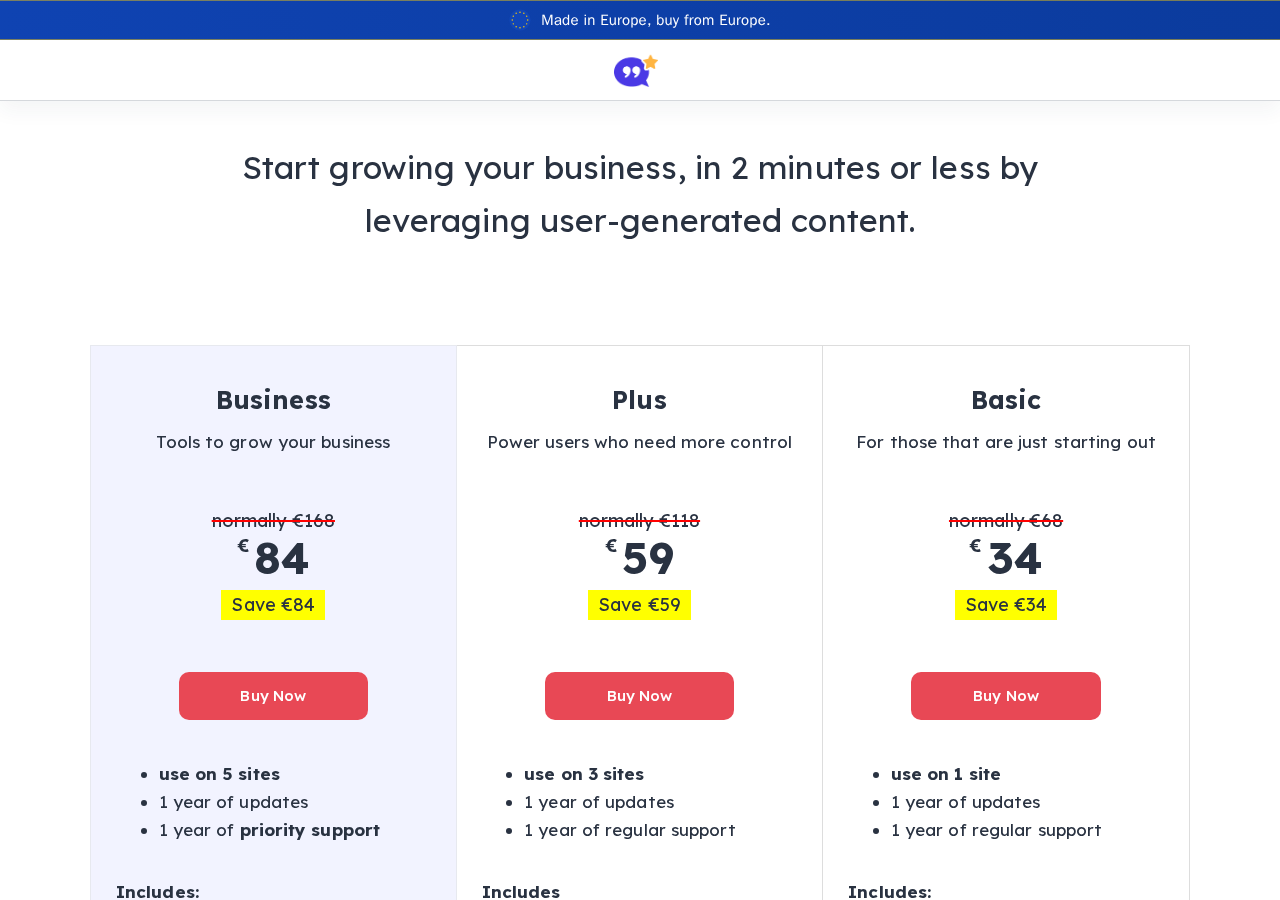
- Paid tiers: Basic at roughly $34/year for 1 site (adds Country Selector); Plus at roughly $59/year for 3 sites (adds schema markup, advanced views, professional templates, third-party importer for Google/Facebook/Yelp and others, CAPTCHA); Business at roughly $84/year for 5 sites (adds custom form fields, multiple forms, infinite scroll, enhanced emails, MailChimp integration). All plans include a 14-day money-back guarantee.
- Bottom line: Strong Testimonials earns its top spot in the WordPress testimonials category by giving more in the free version than most competitors give in their paid tiers. Schema markup and the third-party importer are meaningful paid upgrades. Most small sites will not need to open their wallet.
Quick verdict
Strong Testimonials offers one of the most capable free tiers of any WordPress testimonials plugin. You get unlimited display views, multiple layout options, a customizable submission form, shortcode support, and star ratings at zero cost. The plugin is actively maintained, with multiple updates shipped in 2026 alone.
The paid plans add schema markup for rich snippets, professional templates, third-party review imports, and custom form fields. These are real upgrades for specific use cases, not token extras. Most small business sites will cover their needs entirely with the free version.
Quick verdict summary
- Best for: Small to medium business sites, WooCommerce stores, and agencies that want a reliable free testimonials solution with a clear upgrade path.
- Best free plan value: Unlimited views, layouts, shortcodes, and form builder at no cost. One of the strongest free tiers in the category.
- Best paid plan: Plus at roughly $59/year for 3 sites covers the most meaningful upgrades: schema markup and third-party importer. Business at roughly $84/year adds custom form fields and multiple forms.
- Standout: Unlimited views in free version; intuitive view builder with live preview; 4.8-star rating across 614+ reviews; actively maintained with 2026 releases; GDPR compliant by default.
- Watch out for: Schema markup requires a paid plan; some updates have temporarily broken existing functionality; Google import has user-reported reliability issues; no migration tool from other WordPress testimonial plugins; video testimonials not yet available.
- Our rating: 4.3 / 5

What Strong Testimonials is
Strong Testimonials is a WordPress plugin by WP Chill that lets you collect, manage, and display customer testimonials on any self-hosted WordPress site. It has been in active development since 2014, which in the WordPress plugin landscape translates to a battle-tested codebase and a developer who has weathered multiple platform changes.
The plugin gives you a custom post type for testimonials, a flexible view builder that controls how testimonials appear on your site, and an optional submission form so visitors can contribute their own reviews directly. Everything runs within your WordPress admin. No external account is required, no data leaves your server by default, and no subscription is needed to get meaningful functionality.
The central concept is the “view.” A view is a saved configuration that defines which testimonials to display, which layout to use, and which fields to render. You can create as many views as you need, each producing a unique shortcode. This approach means a homepage can show a three-column grid of top testimonials while a product page shows a slideshow filtered to testimonials for that specific product, all managed from one plugin.
Who Strong Testimonials is best for
Strong fit
- Small to medium business sites that want a proven, free testimonials solution without a recurring cost.
- Site owners who need testimonials in multiple layouts across different pages, each controlled independently through the view system.
- Businesses that want visitors to submit testimonials directly on the site via a customizable front-end form, without using a third-party review platform.
- WooCommerce store owners who want to display product-specific testimonials on product or category pages.
- Sites that need GDPR-compliant testimonial collection with no external data dependencies.
- Agencies managing multiple client sites who want a generous per-site allowance on paid plans.
Less suited if
- Your primary goal is automatically pulling reviews from Google, Yelp, or Booking (that requires the Plus or Business plan).
- You need schema markup for rich snippets in the free version. Site Reviews, a competing plugin, includes schema markup at no cost.
- You are migrating from another WordPress testimonials plugin. There is no migration importer for existing WP testimonial data.
- Video testimonials are essential to your strategy. The feature is listed as “coming soon” on the vendor site but is not available as of version 3.3.6.
Hands-on setup and user experience
Installation is standard. Search “Strong Testimonials” in Plugins, Add New Plugin, install, and activate. The plugin adds a “Testimonials” menu item in your WordPress admin with sub-menus for testimonials, views, and settings. There is no onboarding wizard, which is fine: the interface is direct enough that you can understand it without guided setup.
Adding testimonials
Testimonials are added through the admin area, which operates like a custom post type. Each entry has fields for name, company, website, client photo, star rating, and testimonial content. The drag-and-drop field editor lets you reorder fields and control which ones appear in the submission form and in the display view.
In the free version, testimonials are added manually. If you already have reviews on Google or Facebook, you will need the Plus or Business importer extension to pull them in automatically. The free version does not read data from external platforms or from other WordPress testimonial plugins or themes.
Creating a display view
Go to Testimonials, Views, Add New. The view editor lets you configure:
- Mode: display (show testimonials) or form (collect submissions from visitors)
- Layout: list, columns, grid, masonry, or slideshow
- Filtering: all testimonials, or filtered by category or tag
- Fields: choose which fields appear and in what order (name, photo, rating, company, etc.)
- Template: select a starter layout template
- Pagination: standard WordPress pagination (infinite scroll is a paid add-on)
Once saved, a shortcode is generated automatically: [testimonial_view id="1"]. Paste it into any page, post, or widget area. Getting from a fresh install to a working testimonial section took me about 15 minutes including entering sample content.
Form mode
Setting a view to form mode generates a front-end submission form. Visitors fill in their details, submit, and the testimonial goes into pending status until you approve it. The site admin receives a notification email. This covers the collection workflow without a separate form plugin. The drag-and-drop field editor makes it straightforward to add or remove fields and change the order.
Main features
Display layouts
The free version includes five layout types:
- List: classic stacked layout, one testimonial per row
- Columns: two or three column arrangement, adjustable in view settings
- Grid: responsive card grid with uniform height cards
- Masonry: Pinterest-style variable-height layout that stacks efficiently
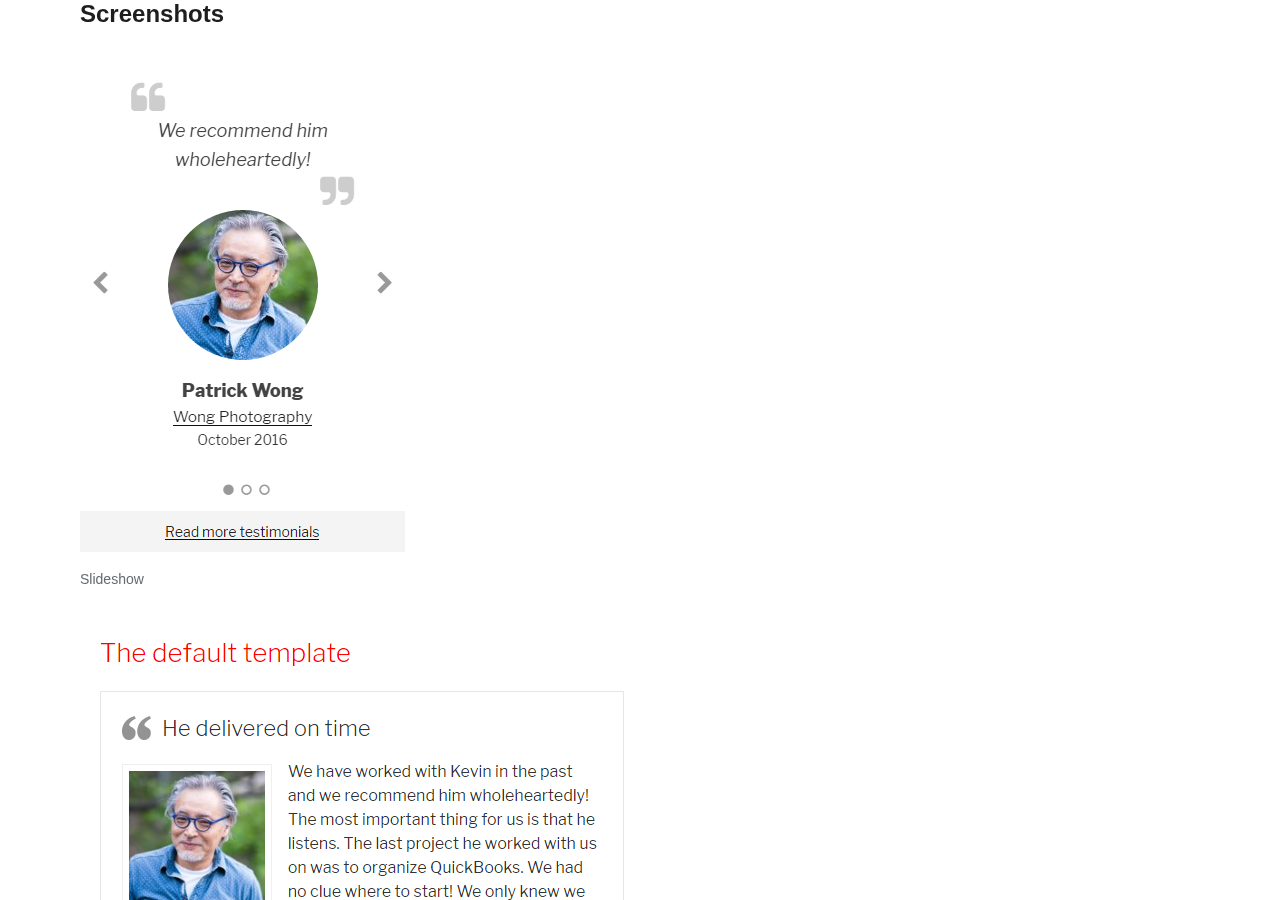
- Slideshow: auto-playing or manually controlled carousel with navigation arrows and dots
All layouts are responsive and inherit your theme’s base typography and spacing. This means testimonials look coherent with your existing design rather than appearing as a foreign widget. You can fine-tune colors and spacing through the built-in settings panel, or write custom CSS for precise control. The slideshow works reliably: speed, autoplay, arrows, and navigation dots are all exposed as settings in the view editor.
Shortcodes
Three shortcodes ship with the plugin in the free version:
[testimonial_view id="1"]– Render a saved view in display or form mode[testimonial_count]– Show the total count of published testimonials[testimonial_average_rating]– Display the mean star rating with visual star icons
The shortcodes work in any page builder (Elementor, Divi, Bricks, and others) via a shortcode block. Native Gutenberg blocks and classic widget support are also included. The WordPress testimonials shortcode approach covers every embedding scenario without requiring additional plugins.
Star ratings
Star ratings are a free feature. Each testimonial can carry a score from 1 to 5 stars. The rating field appears in both the admin entry form and the front-end submission form. The [testimonial_average_rating] shortcode calculates the mean across all published testimonials and renders it with visual stars, giving you an aggregate social proof signal without requiring a paid plan.
GDPR compliance
By default, the plugin stores no data on external servers and sends nothing to remote services. Email addresses entered through submission forms are not exposed on the front end. No cookies are set unless you enable CAPTCHA, which relies on Google reCAPTCHA. This baseline behavior covers GDPR requirements for most standard use cases without additional configuration.
Schema markup for rich snippets (Plus and Business)
Schema markup is locked to the Plus and Business paid plans. It tells search engines the structure of your testimonials, which can enable star rating rich snippets in Google search results. This is the upgrade decision most site owners will face first. If search visibility and rich snippets matter to your business, the Plus plan makes sense on schema markup alone. If you need schema at no cost, Site Reviews is an alternative that includes it in the free version.
Third-party importer (Plus and Business)
The importer extension connects to Google, Facebook, Booking.com, Airbnb, Yelp, Trustpilot, Capterra, and G2. Reviews pulled from those platforms land in your testimonials library and can be displayed like any other entry.
One caveat worth noting: user reviews on WordPress.org specifically mention inconsistent results with the Google import. The sync runs on a schedule and has been described as unreliable in certain setups. Test it carefully before building a customer-facing page around it.
Custom form fields (Business)
The Business plan adds fully custom submission form fields. Instead of only the default name, company, website, photo, rating, and testimonial fields, you can add fields like “Job Title,” “Project Type,” “Industry,” or anything relevant to your business. For agencies or SaaS companies where standard fields do not capture enough context, custom fields are the practical reason to choose Business over Plus.
Multiple forms, MailChimp, and more (Business)
The Business plan also unlocks multiple independent submission forms, infinite scroll, enhanced admin notification emails, MailChimp list synchronization, category filters for display views, and user role management. These features suit agencies and larger operations that need granular control over testimonial collection workflows across multiple products or services.
Pricing
Strong Testimonials is free to download from the WordPress.org repository. Paid plans are sold as annual licenses at strongtestimonials.com. Prices below are introductory rates shown on the vendor site as of August 30, 2026. Renewals are at full price, roughly double the introductory rate. The vendor site displays prices in EUR; check strongtestimonials.com/pricing for current rates and currency.
| Plan | Intro Price | Sites | Key additions over free |
|---|---|---|---|
| Free | $0 | Unlimited | Unlimited views, layouts, shortcodes, submission form, star ratings |
| Basic | ~$34/yr | 1 | Country selector add-on only |
| Plus | ~$59/yr | 3 | Schema markup, advanced views, professional templates, third-party importer, CAPTCHA/Honeypot, custom properties |
| Business | ~$84/yr | 5 | Everything in Plus + custom form fields, multiple forms, infinite scroll, enhanced emails, MailChimp, category filters, user role management |
All paid plans include one year of updates, regular support (Plus and Business get priority support), and a 14-day money-back guarantee. Licenses are valid for one year from purchase date.
Is a paid plan worth it?
For most small sites, the free version covers all practical needs. The clearest reasons to upgrade:
- Choose Plus if you want schema markup for Google rich snippets, or you need to import reviews automatically from Google, Yelp, or similar platforms. At roughly $59/year for 3 sites, the per-site cost is low if you manage multiple properties.
- Choose Business if you need custom form fields for product-specific or service-specific testimonial collection, or if you need separate forms for different products or campaigns. MailChimp integration is a bonus if you run email marketing.
- Skip Basic. The Basic plan adds only the Country Selector feature at roughly $34/year for one site. That is a narrow value proposition for most buyers compared to the free version.
Pros and cons
Pros
- Free tier is one of the most capable in the WordPress testimonials category
- Unlimited views and layout options at no cost
- Intuitive view builder with live preview and no code required
- Shortcode, Gutenberg block, and widget support without extra plugins
- Star ratings and average rating shortcode included free
- Clean code, GDPR compliant, no external data sharing by default
- 4.8/5 rating across 614+ WordPress.org reviews
- Actively maintained with multiple 2026 releases including security fixes
- 9 translation languages supported
- 14-day money-back guarantee on paid plans
- WooCommerce-compatible
Cons
- Schema markup for rich snippets requires a paid plan
- Custom form fields and multiple forms locked to the Business tier
- No migration tool from other WordPress testimonial plugins
- Google import has user-reported reliability issues
- Some updates have temporarily broken existing functionality
- Video testimonials not yet available (listed as coming soon)
- Free template design variety is limited compared to premium-only plugins
Alternatives to Strong Testimonials
Site Reviews
Site Reviews is the closest free alternative. It models itself on platform-style review systems (similar to TripAdvisor) with built-in approval workflows, Akismet spam filtering, and automatic schema markup in the free version. If schema markup is your priority and budget is zero, Site Reviews is the stronger choice on that specific point. The trade-off is a more rigid structure that makes custom layouts harder than Strong Testimonials’ view builder approach.
Thrive Ovation
Thrive Ovation is premium-only and available as part of Thrive Suite (around $299/year). Its standout feature is automated testimonial collection: it sends post-purchase requests to customers and imports positive responses automatically. If automated collection outreach is the core requirement, it operates in a different category from Strong Testimonials. For most small businesses, the price and complexity are overkill.
WP Testimonials with Widget
WP Testimonials with Widget is a lighter-weight free plugin. It covers basic static testimonial display but lacks the submission form, view builder, and layout flexibility of Strong Testimonials. Suitable if you need one simple testimonial block and nothing more.
Real Testimonials
Real Testimonials is a newer entrant with clean design and a modern admin interface. Paid plans start at around $49/year. It has fewer user reviews and a shorter track record than Strong Testimonials, which matters when evaluating long-term reliability for a live site. Worth watching, but not the safer bet yet.
Final verdict
Strong Testimonials earns its position as the default recommendation in the WordPress testimonials category. The free version is a complete working tool, not a crippled trial. Unlimited views, multiple layout options, a front-end submission form, star ratings, and shortcode support make it functional for most sites without spending anything.
The paid plans add features that matter for specific use cases. Schema markup for rich snippets is the most compelling reason to upgrade to Plus. Custom form fields and multiple collection forms make the Business plan logical for agencies and SaaS products. The Basic plan at roughly $34/year for the Country Selector alone is a hard sell.
The honest limitations: some updates have introduced temporary regressions, and the Google import has reliability issues per user reports. Neither is a dealbreaker, but they are worth knowing. For a free testimonials plugin with a well-structured upgrade path and an active developer, Strong Testimonials remains the starting point we recommend.
Rating: 4.3 / 5
Frequently asked questions
Is Strong Testimonials completely free?
The core plugin is free and available on WordPress.org. The free version includes unlimited views, multiple layouts, a testimonial submission form, star ratings, and shortcode support. Paid plans add schema markup, professional templates, third-party imports, and custom form fields.
Does Strong Testimonials support schema markup for Google rich snippets?
Schema markup is available on the Plus and Business paid plans only, not in the free version. If you need schema markup at no cost, Site Reviews is an alternative that includes it in its free tier.
Can I import testimonials from Google or Yelp?
Yes, but only on the Plus or Business plan. The third-party importer supports Google, Facebook, Booking.com, Airbnb, Yelp, Trustpilot, Capterra, and G2. Note that some users have reported inconsistent results with the Google import in particular.
Can visitors submit testimonials directly on my site?
Yes. The free version includes a form-mode view that generates a front-end submission form. You add it to any page via shortcode or widget. Submitted testimonials enter pending status and are published only after you approve them.
Does Strong Testimonials work with page builders?
Yes. The shortcode [testimonial_view id="X"] works in any page builder (Elementor, Divi, Bricks, and others) via a shortcode block. It also supports the Gutenberg block editor natively and classic widgets.
What is the difference between the Plus and Business plans?
Plus adds schema markup, advanced views, professional templates, the third-party importer, CAPTCHA/Honeypot spam protection, and custom properties. Business adds everything in Plus and also includes custom form fields, multiple independent forms, infinite scroll, enhanced emails, MailChimp integration, category filters for display views, and user role management.
Is there a money-back guarantee?
Yes. All paid plans include a 14-day money-back guarantee.
Can Strong Testimonials import my existing testimonials from another plugin?
No. There is no migration tool for importing testimonials stored by another WordPress plugin or theme. You would need to re-enter them manually, or use the third-party importer for external platforms like Google or Yelp.