


Quick Verdict
Supsystic Data Tables Generator is a mature, actively maintained WordPress plugin for building interactive data tables with built-in chart support. The free version is genuinely useful and covers the core use cases: sortable, searchable, paginated tables with CSV and Google Sheets import. The Pro version ($49/year or $149 lifetime) adds formula calculations, front-end editing, and advanced WooCommerce filtering.
After 12 years on the market, it has earned a 4.7-star rating across nearly 500 reviews. The support quality for Pro subscribers stands out. The free tier has real limits (no formulas, no front-end editing), but for straightforward data tables and charts, it punches above its weight.
Best for: Site owners who need data tables with built-in charting, teams pulling in Google Sheets data, and WooCommerce store managers who want product listing tables.
Weakest point: The pricing page and official plugin landing page return 404 errors as of this review, making it harder for new buyers to evaluate before purchasing.
What Is Supsystic Data Tables Generator?
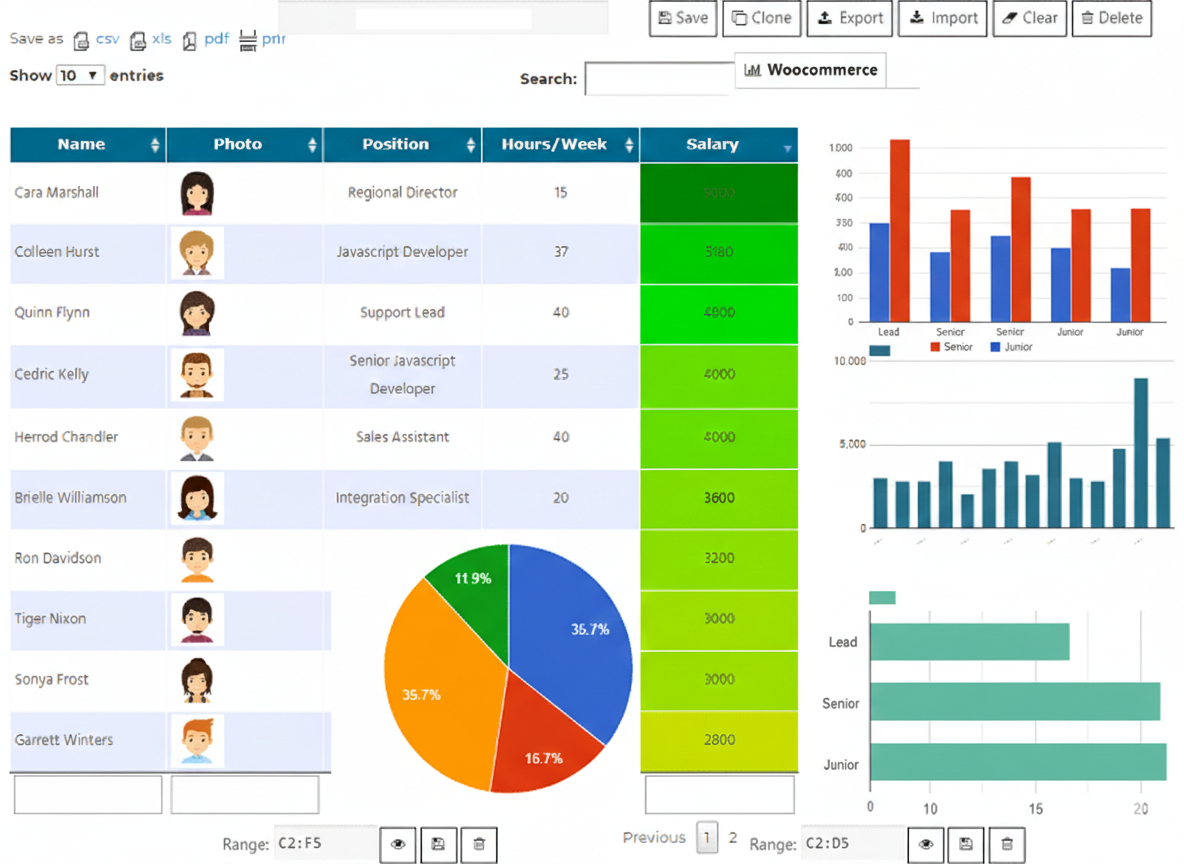
Data Tables Generator by Supsystic is a WordPress plugin that brings spreadsheet-style tables to the front end of your website. The developer’s own description calls it “Excel spreadsheets for WordPress websites,” and that framing is accurate. You build tables in an admin editor, add data manually or import it from external sources, configure appearance and behavior, then embed the result with a shortcode or block.
The plugin covers a wider scope than basic table builders. Alongside the table itself, it generates charts and graphs directly from the table data. That combination, tables plus visualizations in one interface, is the feature that separates it from simpler alternatives like TablePress.
It ships with an active-installations count of 10,000 or more on WordPress.org, a 4.7-star average from 498 reviews, and a development history stretching back over a decade. The changelog shows 18 updates released in 2026 alone, covering security hardening, SQLite support, PHP 8.x compatibility, and a new WooCommerce product table type.
Who Is It Best For?
Supsystic Data Tables Generator fits these situations well:
- Data publishers who want sortable, searchable tables with chart overlays, without building custom code.
- Teams working in Google Sheets or Excel who need data to sync automatically into a WordPress page.
- WooCommerce store owners who want a product table layout as an alternative to the standard grid or list view.
- Small to mid-size sites running on the free version for standard display tables.
- Power users who need formula calculations or front-end editing and are willing to pay for Pro.
It is less suited to teams needing a visual drag-and-drop table designer, sites requiring complex conditional formatting in the free tier, or teams who want a single polished plugin landing page to review before buying (the official URL returned a 404 at review time).
Setup and First Impressions
Installation follows the standard WordPress plugin workflow. Search for “Data Tables Generator by Supsystic” in the Plugins screen, install, and activate. The plugin adds a “Data Tables” menu item to the sidebar.
A table creation wizard, added in version 1.12.0 (June 2026), launches on first use. It guides you through choosing a table type (standard data table or WooCommerce product table), setting initial columns and rows, and selecting a data source. For simple use cases, the wizard gets you to a working table in under five minutes.
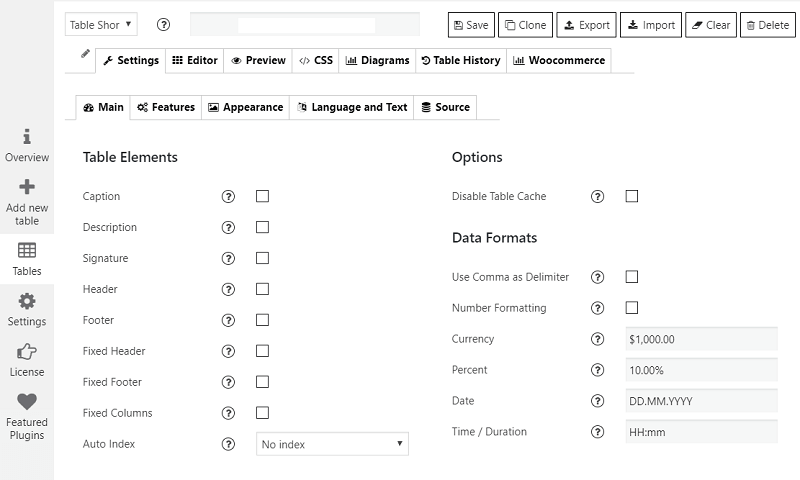
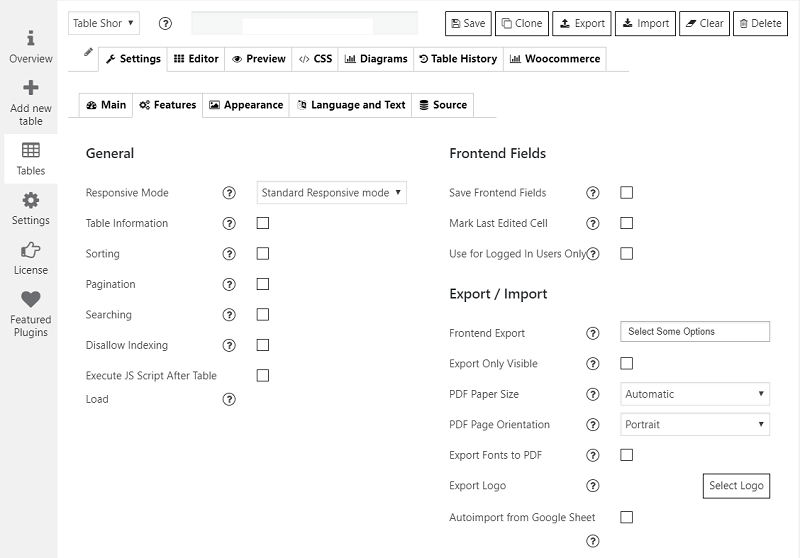
The editor itself resembles a spreadsheet application. Cells are editable in place, columns and rows can be added or deleted, and settings for appearance, sorting, search, and pagination sit in tabs above the editor.
Core Features
Table Creation and the Data Editor
The central editor works like a stripped-down spreadsheet. You click a cell to type, use tab or arrow keys to navigate, and right-click for row/column operations. The interface is straightforward, though it lacks the polish of a dedicated spreadsheet application.
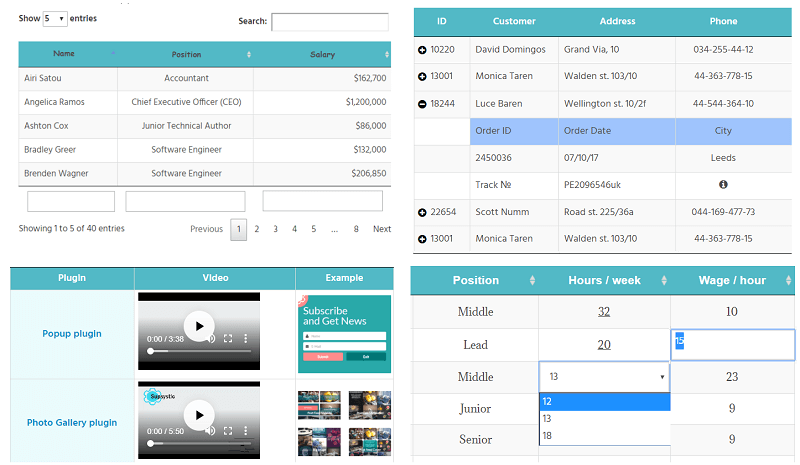
Cells support more than plain text. Images, video embeds, links, icons, and raw HTML all work inside individual cells. That makes the plugin usable for things like product comparison tables, staff directories, or feature lists where you want visual elements alongside data.
Data Import: CSV, Excel, Google Sheets, MySQL, SQLite, and More
The import system is one of the plugin’s strongest selling points for teams managing data outside of WordPress.
CSV and Excel: Upload a file and the plugin parses it into the table editor. Large spreadsheets import without rebuilding each cell manually.
Google Sheets: Connect a spreadsheet by URL. The table can pull in data from Google Sheets dynamically, so when the sheet updates, the table updates automatically. Version 1.13.0 (July 2026) fixed a critical error in Google Sheets imports that affected some connection flows.
MySQL and PostgreSQL: Connect to a database and pull data directly. PostgreSQL support was added in version 1.12.02 (July 2026). SQLite support arrived in version 1.14.2 (August 2026).
SFTP auto-sync: Version 1.12.02 also introduced an SFTP auto-sync source for scheduled data pulls from remote files.
For most content teams the Google Sheets integration is the most useful. For developers managing data in a database, the MySQL/PostgreSQL connection is a significant time saver.
Charts and Visualizations
The plugin generates charts directly from table data. You do not need a separate chart plugin. Chart types include standard bar, line, and pie charts as well as 3D chart variations. Charts update when the underlying table data changes.
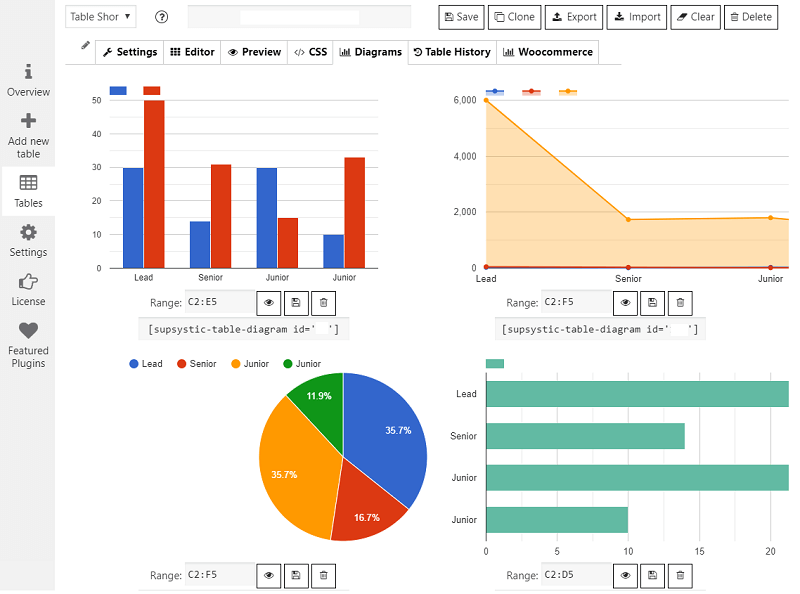
The legend toggling feature lets front-end visitors interact with charts, showing or hiding individual data series. You can generate a chart from a specific subset of columns rather than the full table.
The chart feature is the key differentiator when comparing this plugin to TablePress, which handles tables well but offers no built-in charting.
Sorting, Searching, Pagination, and Responsive Behavior
All four interactive controls are present in the free version. The search field filters table rows live as the user types. Sorting is configurable per column. Pagination controls the number of rows shown per page.
Column visibility controls let visitors show or hide specific columns, useful for wide tables on mobile. Version 1.14.2 added responsive column hiding, configurable per breakpoint.
The responsive design adapts table layout automatically to smaller screens. For very wide tables with many columns, this prevents horizontal overflow that would otherwise break the page layout.
AI Integration (Free and Pro AI Add-on)
Version 1.11.0 (April 2026) introduced an AI-powered table assistant. The implementation uses the MCP open standard, which means it works with any compatible AI assistant: ChatGPT, Claude, Gemini, Microsoft Copilot, Cursor, and others.
Free tier: Read and analyze table data through AI chat or voice. Ask questions, run calculations, and get summaries. No coding required.
Pro AI add-on (separate purchase, requires Pro base): Create new tables, edit existing ones, apply formulas, modify formatting, and handle imports/exports through conversational AI commands.
The AI add-on is not bundled with the Pro plugin. It is a separate purchase on top of the Pro license. The exact price of the add-on was not published on an accessible page at review time; check supsystic.com before buying.
WooCommerce Product Tables
A dedicated WooCommerce product table type was introduced in version 1.12.0 (June 2026). It displays store products in a table format with sorting and search, as an alternative to the default WooCommerce grid or list.
The free version handles manual product assignment, column sorting, and loader customization. The Pro version adds category and attribute filtering, advanced design templates, and more granular control over which products appear and how.
The WooCommerce table type requires WooCommerce to be active. Standard data tables work independently of WooCommerce.
Styling and Appearance
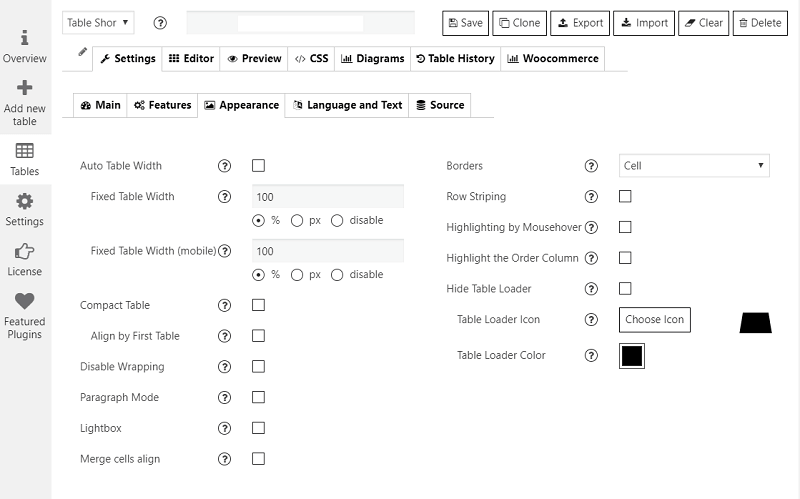
The Appearance tab in the editor controls fonts, colors, borders, spacing, and row height. You can apply a preset theme or customize each element individually. Advanced users can inject custom CSS.
What the Free Version Cannot Do
The gap between free and Pro is real. If you need any of the following, the free version will not cover you:
- Formula calculations (totals, percentages, computed fields): Pro only.
- Front-end editing (letting logged-in users edit table data without going to wp-admin): Pro only.
- Advanced filtering on the front end beyond basic column sort: Pro only.
- WooCommerce advanced filters (category, attribute): Pro only.
- Pro AI add-on (create and edit tables through AI): separate purchase, requires Pro.
Pricing
Supsystic Data Tables Generator uses a straightforward pricing model with a free tier and two paid options.
| Plan | Price | What you get |
|---|---|---|
| Free | $0 | Core tables, charts, import, search, sort, pagination, basic WooCommerce table, free AI analysis |
| Pro | $49/year or $149 lifetime | Formulas, front-end editing, advanced filters, WooCommerce Pro features, priority support |
| Bundle | $99/year | All 11 Supsystic Pro plugins |
A 30-day money-back guarantee applies to paid plans.
If you only need one plugin, $49/year for Pro is a competitive rate for what you get. The $149 lifetime license is a particularly good deal for long-term projects. The $99/year bundle makes sense only if you use multiple Supsystic plugins.
Note: The dedicated pricing page was not accessible during this review. Prices above are sourced from the Supsystic plugins overview page. Verify at supsystic.com before purchasing.
Pros and Cons
Pros
- Free version is genuinely useful, not a stripped trial
- Built-in charting in a table plugin is unusual and valuable
- Imports from CSV, Excel, Google Sheets, MySQL, PostgreSQL, and SQLite
- Actively developed: 18 or more updates in 2026
- AI analysis of tables works in the free version
- 4.7-star rating from nearly 500 reviews
- Lifetime license at $149 is good value
Cons
- Formula calculations require Pro; some competitors include them for free
- No front-end editing without Pro
- Official plugin and pricing pages return 404 errors
- The Pro AI add-on costs extra on top of the Pro license
- 10,000 or more active installs is modest compared to established alternatives
- Admin editor lacks the polish of modern visual builders
Alternatives
Ninja Tables is the closest free alternative with similar interactivity and a cleaner admin interface. Its free version includes more styling options but lacks the built-in chart generation.
TablePress is the most widely used free table plugin with over a million active installs. It is simpler, more stable, and has a larger add-on ecosystem. No built-in charts.
WP Data Tables is a premium-focused plugin with strong MySQL and Google Sheets support, advanced chart options, and conditional formatting. It starts at a higher price point but offers deeper reporting features for data-heavy sites.
If charts are not a requirement, Ninja Tables or TablePress are better starting points. If you need charts alongside your tables and want to stay in a single plugin, Supsystic is a strong choice.
Final Verdict
Supsystic Data Tables Generator delivers on its core promise: interactive tables with built-in charts, solid import options, and active development. For a free plugin it is hard to fault, and the Pro pricing is reasonable.
The main reasons to look elsewhere are the absence of formulas in the free tier, the extra cost of the AI add-on on top of Pro, and the modest install base compared to alternatives. The website issues (404 on the plugin page and pricing page) create friction at the point of purchase.
If your use case involves data tables that need a visual chart component, or if you are importing from Google Sheets or a database, this plugin is worth installing and testing. The free version carries real functionality, and the lifetime Pro license at $149 is a fair deal for long-term projects.
Rating: 4.1 / 5
FAQ
Is Supsystic Data Tables Generator free?
Yes. A free version is available on WordPress.org with core table features including sorting, searching, pagination, chart generation, and CSV/Google Sheets import. The Pro version ($49/year or $149 lifetime) unlocks formula calculations, front-end editing, and advanced filters.
Can I use Supsystic Data Tables Generator without coding?
Yes. Tables are built in a spreadsheet-style editor and embedded with a shortcode or block. No coding is required for standard use cases. Custom CSS is available for advanced styling.
Does Supsystic Data Tables Generator support Google Sheets?
Yes. You can connect a Google Sheets spreadsheet by URL, and the table will pull in data dynamically. A Google Sheets import fix was included in version 1.13.0 (July 2026).
What chart types does Supsystic Data Tables Generator support?
The plugin generates charts directly from table data, including bar charts, line charts, pie charts, and 3D chart variants. Charts update automatically when the table data changes.
Does Supsystic Data Tables Generator work with WooCommerce?
Yes. Version 1.12.0 (June 2026) introduced a dedicated WooCommerce Product Table type. The free version supports manual product assignment and column sorting. The Pro version adds category and attribute filtering.
Is the AI feature free?
The basic AI integration is free. It lets you read and analyze table data through AI chat or voice using any MCP-compatible assistant (ChatGPT, Claude, Gemini, and others). Creating or editing tables through AI requires the Pro AI add-on, which is an additional purchase on top of the Pro plugin.
What databases does Supsystic Data Tables Generator connect to?
The plugin supports MySQL, PostgreSQL (added June 2026), and SQLite (added August 2026). It also supports CSV, Excel, and Google Sheets imports and SFTP auto-sync for scheduled data pulls.
How often is the plugin updated?
Frequently. The plugin received 18 or more updates in 2026 alone, covering security patches, new features, and compatibility improvements. It is tested up to WordPress 7.0.4 and PHP 8.5.
What is the difference between the Pro plugin and the Pro AI add-on?
The Pro plugin is the main paid upgrade ($49/year or $149 lifetime) and unlocks formula calculations, front-end editing, and advanced WooCommerce features. The Pro AI add-on is a separate additional purchase that enables creating and editing tables through AI commands. The add-on requires the Pro plugin to be installed first.
Is there a money-back guarantee?
Yes. Supsystic offers a 30-day money-back guarantee on paid plans.