


The Events Calendar is the most-installed event management plugin in the WordPress ecosystem. It has been around since 2009, has powered over a billion events by the company’s own count, and sits on 600,000 or more active WordPress sites right now. Those are hard numbers to dismiss.
But 2026 is not 2024. If you search for “The Events Calendar” today, theeventscalendar.com redirects you to liquidweb.com. The plugin’s longtime parent, StellarWP, rebranded under Nexcess, which is part of Liquid Web. The free plugin remains on WordPress.org, but the commercial tiers look nothing like the old a la carte add-on model users spent years building their setups around. Pricing, support workflows, and even the primary domain have changed.
This review covers the plugin as it actually exists in mid-2026: what the free version delivers, what the paid tiers cost under the new structure, what the Liquid Web transition means in practice, and whether this plugin still deserves its default-recommendation status for WordPress event sites.
Basis of this review. I navigated through the plugin’s frontend views on the official public demo at demo.theeventscalendar.com, including the list view, photo view, day view, and a single event detail page. Screenshots from those sessions are marked below as “demo capture.” The event creation and admin interface are shown via official vendor screenshots from the WordPress.org plugin screenshots tab. I also audited the WordPress.org listing (version 6.17.1, updated July 22, 2026), the Liquid Web commercial product pages, the 2026 changelog, and a representative sample of user reviews from June and July 2026. I did not have access to a licensed paid install for end-to-end testing of Essentials, Pro, or Elite paid features. Where a paid feature is described from documentation rather than direct experience, the paragraph says so.
Quick verdict
The Events Calendar is still a capable WordPress events plugin at the free tier. If you need clean event display without ticketing, it is well-maintained, well-documented, and delivers genuine SEO value out of the box.
The paid story is more complicated. The old model, where you bought Events Calendar Pro for around $99 per year and added individual add-ons for what you needed, has been discontinued. Individual add-on purchases are no longer available to new customers. The current Liquid Web plans start at $259 per year and bundle features in ways that force teams to pay for capabilities they may not use. Support quality has visibly declined since the transition, based on recent WordPress.org reviews. That is a real concern for anyone evaluating the paid tiers.
Quick verdict card
- Best for: Organizations and businesses that need a mature, WordPress-native event calendar with optional ticketing.
- Easiest win: The free plugin, if all you need is a clean event listing with month and list views.
- Most defensible paid tier: Pro ($399/yr) for teams that sell tickets at volume and want to keep 100% of revenue.
- Skip if: You need recurring events as your only premium feature and do not want to pay $259/yr to unlock them.
- Watch out for: Support response times post-acquisition, pricing model confusion for legacy users, Block Editor integration gaps.
What is The Events Calendar
The Events Calendar is a WordPress plugin for creating and displaying events. It was first published in January 2010 by Modern Tribe, a WordPress agency. The plugin moved to StellarWP (a brand owned by Liquid Web), which rebranded under Nexcess, also part of Liquid Web, in early 2026. The primary domain, theeventscalendar.com, now permanently redirects to liquidweb.com. Support documentation has moved to docs.nexcess.com.
The free plugin lives at wordpress.org/plugins/the-events-calendar/ and installs like any standard WordPress plugin. It adds a custom post type for events, multiple calendar view layouts, event taxonomy support, Google Maps integration, and JSON-LD structured data for SEO. You can run a fully functional public event calendar from the free plugin alone.
The commercial tiers were previously sold as individual premium add-ons: Events Calendar Pro, Event Tickets Plus, Community Events, Promoter, Event Aggregator, and others. Those individual add-ons are no longer available for purchase by new customers. Under the 2026 Liquid Web structure, the feature suite is sold exclusively as three bundled annual plans through liquidweb.com.
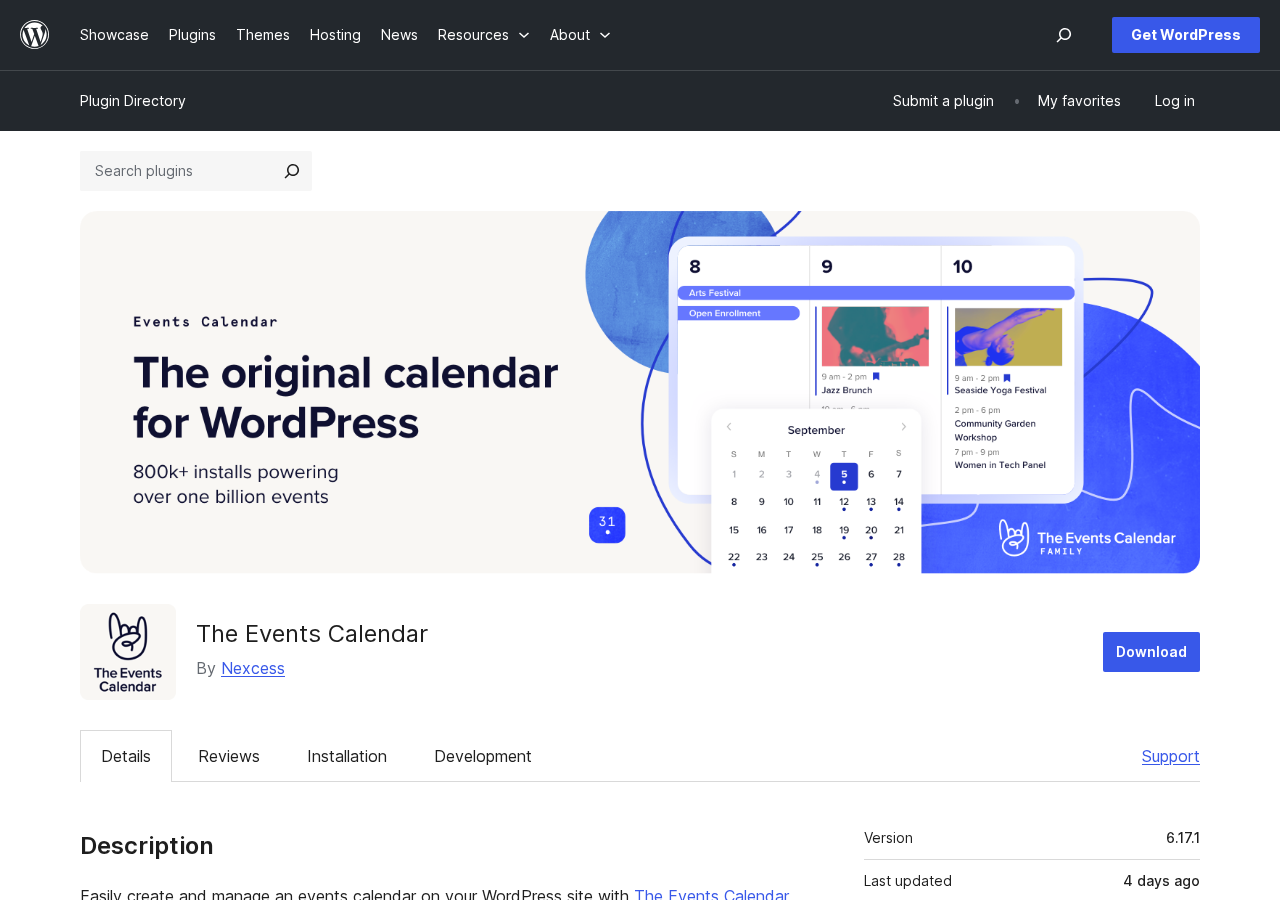
The plugin claims 800,000 or more active installs across the total install base. The WordPress.org free plugin listing shows 600,000 or more. Both figures put it well ahead of any direct competitor in raw install count.
Who The Events Calendar is best for
Strong fit:
- Community organizations, universities, nonprofits, and local governments that need a public event calendar on an existing WordPress site.
- Businesses running regular public events: music venues, theaters, sports clubs, conference organizers, fitness studios.
- Organizations that want to own their attendee data and ticket revenue without a third-party platform taking a commission cut.
- Agencies building event sites for clients who need a well-documented, widely compatible plugin with a fifteen-year track record.
- Sites that need SEO-optimized event listings with structured data output at no extra cost.
Weaker fit:
- Solo or hobbyist site owners who only need one or two events per year and do not want an annual subscription.
- Teams that need recurring events as the only premium feature and find $259 per year hard to justify for that alone.
- Developers who prefer a clean Block Editor-first admin experience. The plugin’s admin UI is a legacy PHP framework that sits awkwardly alongside native WordPress editing.
- Teams whose primary support window falls outside North American business hours. Recent reviews suggest response times have become inconsistent since the acquisition.
The free plugin: what you actually get
The free version of The Events Calendar on WordPress.org is a genuine, usable events plugin, not a stripped-down teaser. Here is what it covers.
Event creation and management
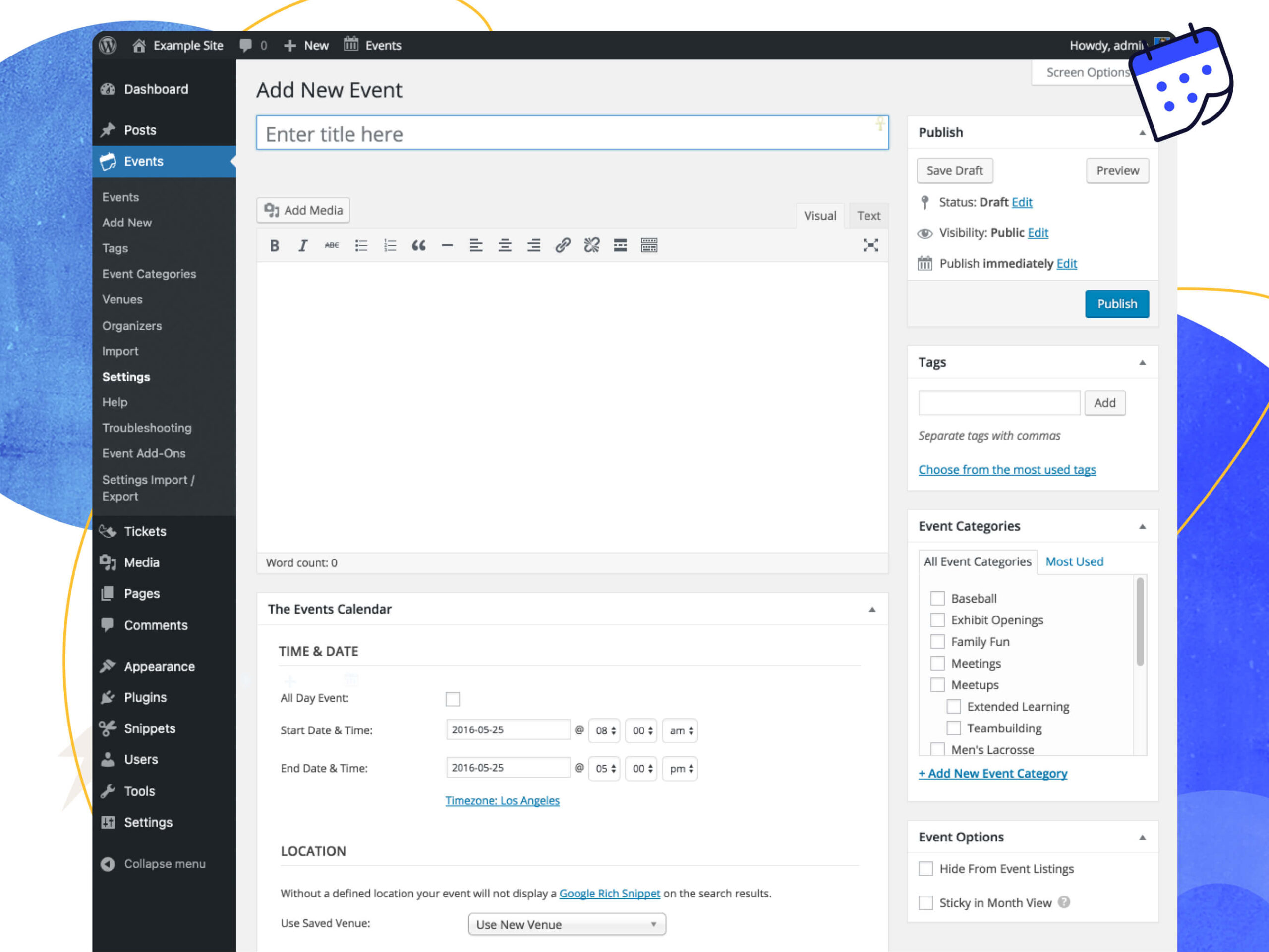
The event creation screen adds a structured meta box to the standard post editor (shown in the official vendor screenshot below). You fill in the event title, start and end date and time, a venue with address and optional Google Maps link, and an organizer. Events can be marked as all-day or virtual. Categories and tags work the same way they do on standard WordPress posts.
Calendar views
The free plugin ships with month view, list view, and day view.
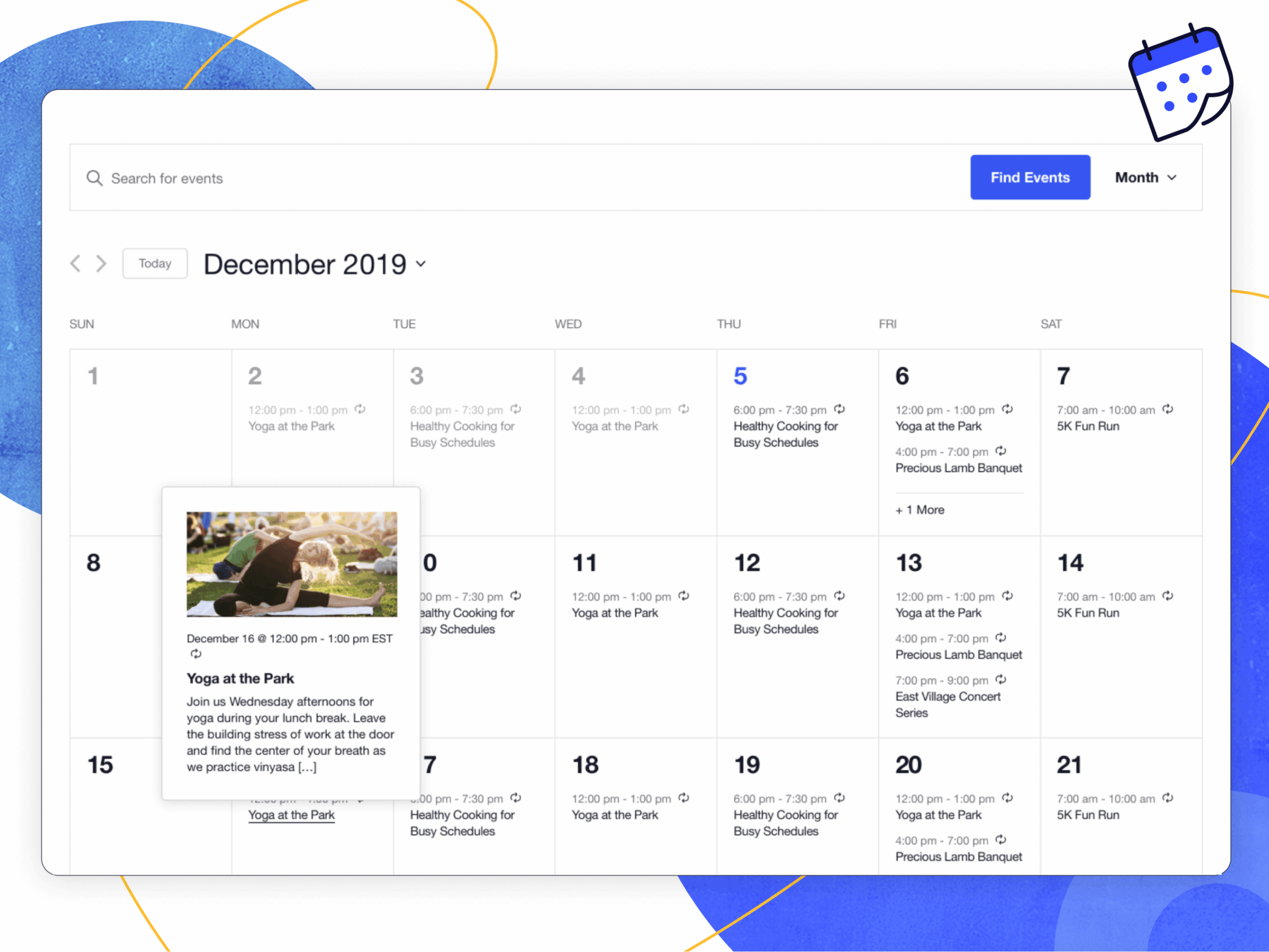
The month view renders a traditional grid calendar with event titles on their respective dates. Hovering over an event title shows a brief tooltip with time and a description excerpt, as shown in the vendor screenshot below.
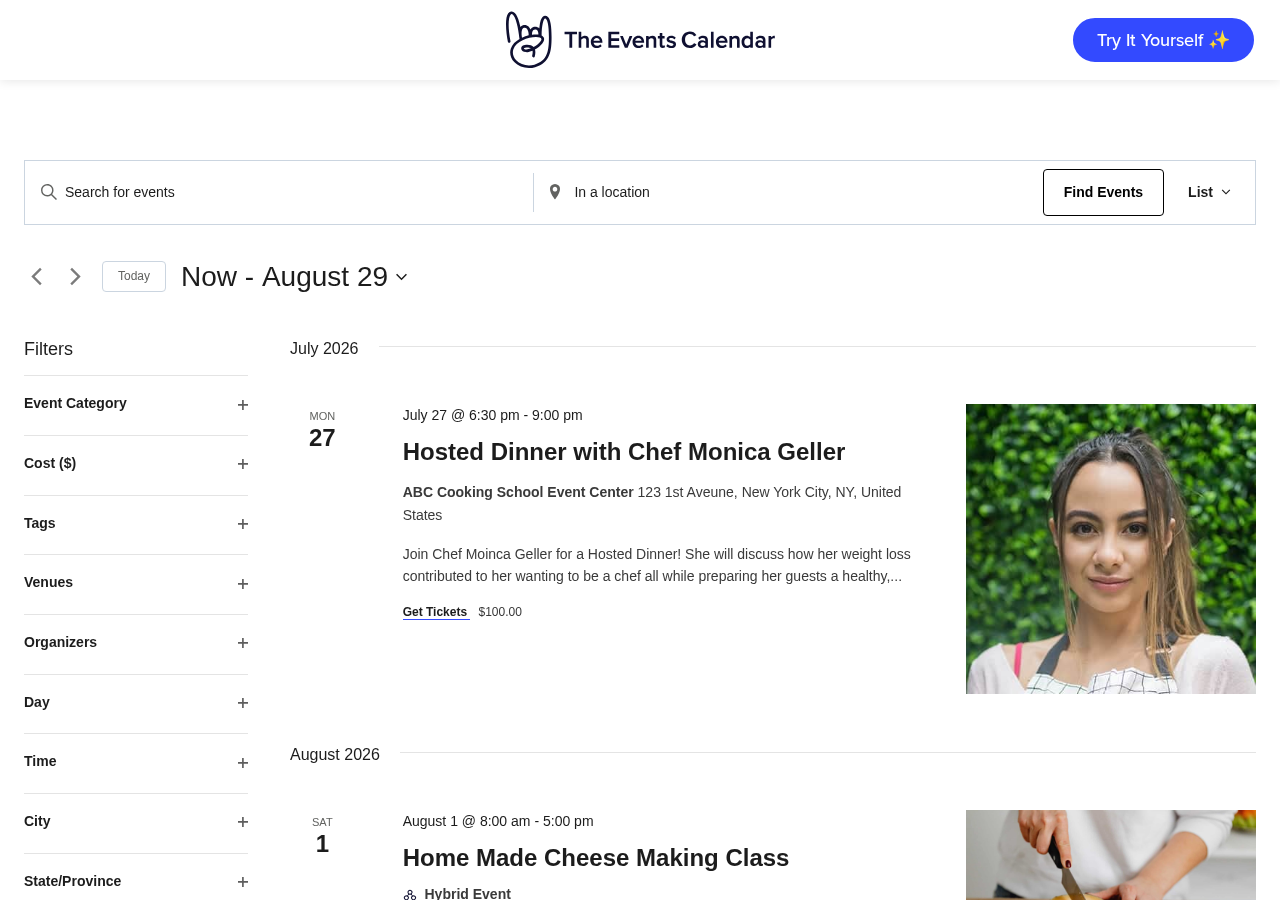
List view renders events as a vertical list ordered by date, showing title, time, venue, and excerpt for each entry. Day view shows all events for a chosen date in a timeline-style layout.
I navigated through list view and day view on the official Nexcess/Events Calendar public demo. The list view loads events with AJAX, the filter sidebar responds immediately on interaction, and the layout adapts cleanly on narrow viewports. These three views cover most basic use cases.
Event search
A search bar lets visitors search by keyword across event titles and descriptions. Advanced category and tag filtering, and the Filter Bar widget, require a paid plan.
Google Maps integration
When you add a venue address, the plugin can display an embedded Google map on the event detail page. A Google Maps API key is required and configured through the plugin settings.
iCal and Google Calendar export
Each event page includes a one-click download link for iCal format (.ics). Visitors can subscribe to the full calendar feed in Google Calendar or Apple Calendar. This works in the free version.
SEO: JSON-LD structured data
The plugin adds JSON-LD schema markup to event pages automatically. Event dates, locations, and descriptions become eligible for Google rich snippet treatment when Google indexes them. This is one of the more practically valuable free features for site owners who care about search visibility.
REST API endpoints
The free plugin exposes WP REST API endpoints for events, venues, and organizers. Developers can query event data from external apps or build headless calendar displays using standard WordPress API calls.
AJAX navigation
Calendar navigation, such as switching months or switching between list and day views, works via AJAX without full page reloads. On the official demo the experience is fluid.
What is not in the free tier
- Full recurring event series management with individual exception editing or bulk series editing
- Photo view, week view, map view, or summary view
- Calendar shortcodes for embedding filtered event listings on specific pages
- Advanced custom event fields
- Payment-integrated ticketing (the separate free Event Tickets plugin adds PayPal-only sales)
- Automatic event importing from external sources
- The Filter Bar advanced filtering widget
- Community event submissions from the frontend
The paid plans: pricing under Liquid Web
The original commercial model was a free core plugin plus individually purchased premium add-ons. Events Calendar Pro ran around $99 per year and unlocked recurring events, additional views, shortcodes, and custom fields. New customers can no longer buy those add-ons individually. Under the 2026 Liquid Web structure, the feature suite is sold exclusively as three bundled annual plans.
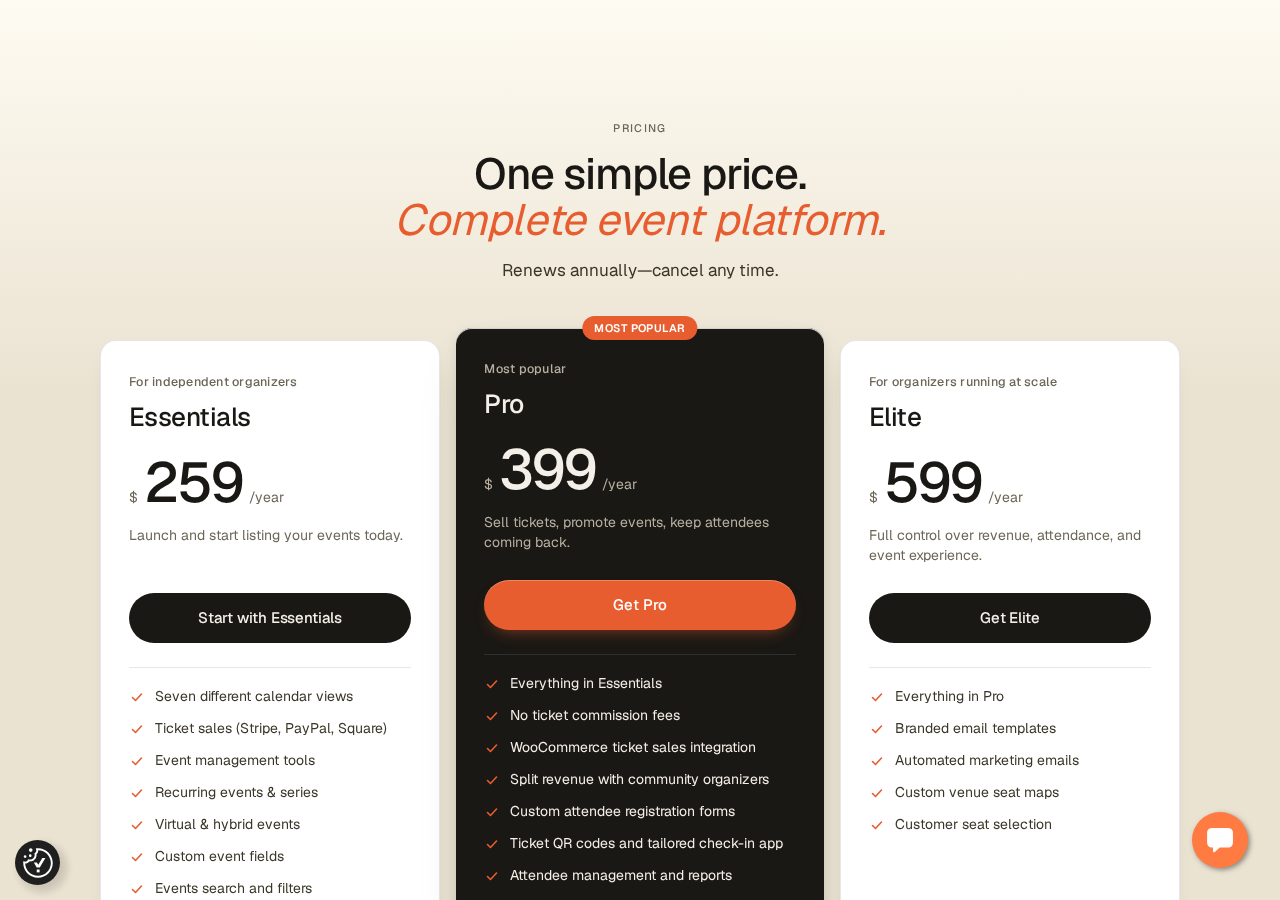
Essentials: $259 per year (for independent organizers)
- All seven calendar views: month, list, day, week, photo, map, and summary
- Ticket sales via Stripe, PayPal, and Square
- Full recurring events and series management
- Virtual and hybrid event support
- Custom event fields
- Advanced event search and filters
- Community event submissions with approval workflow
- Calendar shortcodes
- Event importing up to 100 events per day
Pro: $399 per year (most popular)
Everything in Essentials, plus:
- Zero-commission ticket sales
- WooCommerce integration for ticket sales alongside products and coupons
- Revenue splitting for co-organizers
- Custom attendee registration forms
- QR code check-in with offline-capable check-in app
- Attendee management dashboard and export reports
- Event importing up to 200 events per day
Elite: $599 per year (for organizers running at scale)
Everything in Pro, plus:
- Automated email marketing triggered by attendee actions
- Audience segmentation
- Branded email templates without platform branding
- Interactive venue seating maps with per-section pricing
- Customer seat selection
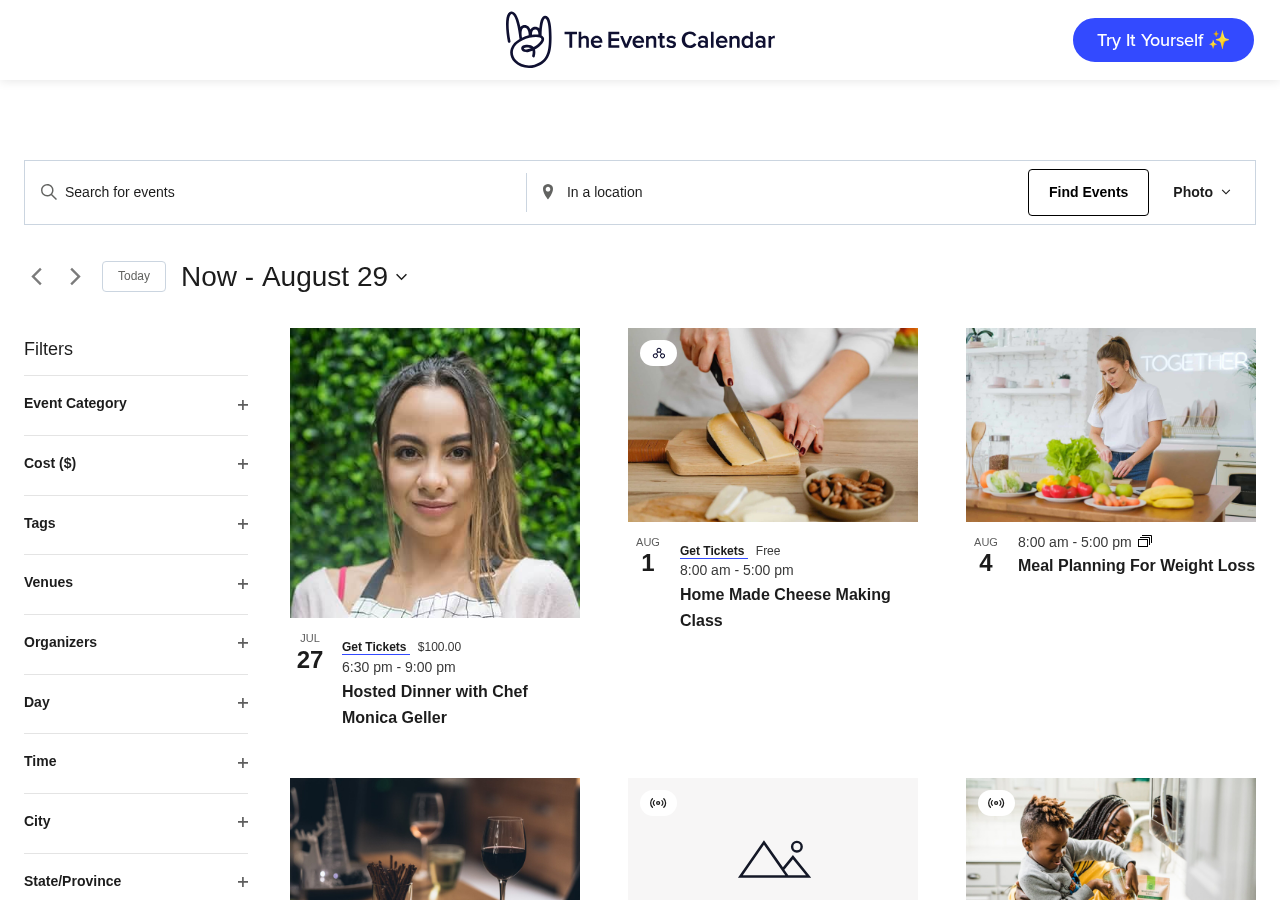
The photo view, available from Essentials upward, replaces the list layout with a visual grid of event cards. This paid-tier view is shown below as it appears on the official vendor demo site.
Comparing old and new pricing
For teams that previously ran the free Events Calendar plugin plus the free Event Tickets plugin for PayPal-only ticket sales, Essentials at $259 per year introduces a real new cost.
For teams that previously purchased Events Calendar Pro at around $99 per year, the minimum paid tier is now $259, roughly 2.6 times the old price.
For teams that previously combined Events Calendar Pro, Event Tickets Plus, and Community Events as separate add-ons, the bundled Essentials plan may represent similar or lower combined cost. But that was a minority use case. Whether the new pricing is fair depends almost entirely on how many of the bundled features you actually use.
Ticketing and payments
The free Event Tickets plugin (separate from The Events Calendar) still exists on WordPress.org with 90,000 or more active installs. It provides PayPal-only ticketing at no cost. If PayPal is sufficient, basic ticketing remains free.
If you need Stripe, Square, or WooCommerce integration, or if you want to bundle ticket sales with product purchases using coupons and order management, those require Essentials or Pro respectively.
The Pro tier removes platform commission fees. The Essentials tier includes ticket sales but does not disclose its commission rate on the Liquid Web product page. This is a meaningful gap: “No ticket commission fees” is called out explicitly as a Pro differentiator, implying Essentials does carry some per-ticket cost. Verify this with Liquid Web before purchasing Essentials if per-ticket fees affect your economics.
Zero-commission ticketing at Pro ($399/yr) is a genuine financial argument for organizations selling tickets at meaningful volume. Eventbrite charges per-ticket fees; keeping 100% of revenue on the Pro plan can pay for the annual subscription quickly.
Custom attendee registration forms (collecting dietary preferences, session choices, or custom data) are a Pro and above feature. The single event detail page on the official demo shows how ticket prices and a “Get Tickets” link integrate into the event display.

Recurring events
Full recurring event management is a paid feature at the Essentials level and above. At Essentials, you can set daily, weekly, monthly, yearly, and custom interval recurrence rules. You can manage individual occurrences within a series, set exceptions, and let visitors register for a single occurrence or the full series.
The free plugin includes only limited recurring support at the display level. The granular controls required for real-world use, such as editing individual occurrences, adding exceptions, and bulk-editing a series, require a paid plan.
This is a meaningful limitation for many common use cases. Weekly fitness classes, monthly community meetups, and conference series that skip holidays all need reliable recurring event handling.
Community event submissions
Community event submissions are included from the Essentials plan. Visitors submit event listings from the frontend. Administrators review and approve them before they go live. The workflow supports manual review per submission or auto-approve. This targets community calendars, event directories, and membership sites where external organizers publish their own listings.
QR check-in and attendee management
QR code check-in is a Pro and Elite feature. Attendees receive a QR code with their ticket. Staff use a companion check-in app to scan codes at the door. The app is documented to work offline, which is practical for venues with unreliable connectivity during busy events. Based on official documentation; not tested directly.
Attendee management gives organizers a dashboard view of registrations filterable by ticket type, with CSV export. This covers the basic post-event reporting and communications need.
Venue seating maps (Elite only)
Interactive seating maps are exclusive to the Elite plan at $599 per year. The drag-and-drop builder lets you define sections, general admission zones, and assigned seating with per-section pricing and QR code sync for check-in. This targets theaters, arenas, and venues that need seat-level ticketing inside WordPress. Based on official documentation only; not tested directly.
Email marketing (Elite only)
Automated event email marketing is included only in Elite. Emails trigger based on attendee actions: event published, event updated, event approaching. You can segment audiences by ticket type, use branded templates, and track open rates, clicks, and conversions. Based on official documentation only; not tested directly.
Most event organizers want automated email communication eventually. Whether $599 per year is the right way to get it depends on how much of the rest of the Elite tier you use. A standalone tool such as Mailchimp or ActiveCampaign, connected via plugin or webhook, may be more economical if email marketing is your only Elite need.
The 2026 ownership change: what it actually means
This is the section that most plugin comparison articles skip.
The Events Calendar has changed ownership and branding multiple times. Modern Tribe built it, StellarWP acquired it, and the plugin was rebranded under Nexcess in early 2026 (per changelog entry 6.16.0: “rebranded from StellarWP to Nexcess”). The primary domain now permanently redirects to liquidweb.com. Documentation has moved to docs.nexcess.com. Support runs through Liquid Web channels.
The practical consequences, documented in WordPress.org reviews from June and July 2026:
Licensing confusion. Users holding annual Events Calendar Pro licenses or older perpetual licenses reported conflicting status information in the new Nexcess account portal. Some could not confirm whether their license was active or had lapsed during the transition.
Unsolicited admin changes. Multiple reviewers noted that a plugin update added promotional menu items to their WordPress admin dashboard without notification or opt-in. This is widely considered poor plugin citizenship.
Support delays. Reviews from long-term Pro users describe going four or more days without a response on licensing or functionality questions. One reviewer emailed three times during a renewal window with no reply.
Pricing opacity. The new plan structure is not prominently communicated to legacy users. Some discovered the new prices only when attempting to renew.
These are not minor UX complaints. They reflect real friction during a brand and infrastructure transition that was not managed smoothly from the customer’s perspective.
The underlying plugin has not deteriorated. Version 6.17.1 shipped on July 22, 2026 with substantive bug fixes. Accessibility has been a consistent development focus across 2025 and 2026, with WCAG compliance improvements in several releases. Security patches have been applied promptly. The core product is actively maintained.
The tension in this review: the product itself is solid, but the commercial relationship around it has introduced real friction that buyers considering paid plans should factor in.
Pricing
| Plan | Annual price | Best for |
|---|---|---|
| Free (WordPress.org) | $0 | Basic calendar display, no ticketing |
| Event Tickets (free WP.org plugin) | $0 | PayPal-only ticket sales |
| Essentials | $259/yr | All views, ticket sales (Stripe/Square/PayPal), full recurring events |
| Pro | $399/yr | Zero-commission tickets, WooCommerce, QR check-in, attendee reports |
| Elite | $599/yr | Email marketing, seating maps, full feature set |
Notes on pricing: the Liquid Web product page does not show a multi-site license option. Verify whether the plan covers one domain or multiple before purchasing if you manage more than one site. No perpetual license option is visible; all plans renew annually. The commission rate on Essentials ticket sales is not disclosed on the product page. A 48-hour free trial is available without a credit card at demo.theeventscalendar.com.
Pros and cons
Pros
- Largest install base of any WordPress events plugin, meaning broad theme compatibility and third-party integration support
- Free tier is genuinely usable for event display without ticketing
- JSON-LD structured data in the free plugin is a real, zero-effort SEO benefit
- REST API endpoints for developers and headless setups
- Offline-capable QR check-in at the Pro tier
- Zero-commission ticket sales at Pro, which can pay for the annual subscription at moderate ticket volumes
- Actively maintained with regular bug fix and security patch releases
- Accessibility improvements have been a consistent priority through 2025-2026
- 48-hour free trial of paid plans with no credit card required
- iCal and Google Calendar export for visitor convenience
Cons
- Full recurring event management requires a paid plan, a significant limitation for many basic use cases
- Minimum paid plan starts at $259/yr, a 2.6x increase from the old Events Calendar Pro at around $99/yr
- Individual add-ons discontinued for new customers; the only commercial path is a bundled plan
- Support quality has declined post-acquisition, with multiple verified reports of multi-day or unanswered tickets
- Block Editor integration is not enabled by default; the admin UI is a legacy PHP framework that does not align with current WordPress conventions
- The primary domain now redirects to Liquid Web, creating brand continuity confusion for existing users
- Unsolicited admin menu additions reported by multiple reviewers following a plugin update
- Essentials commission rate on ticket sales is not disclosed on the product page
- No visible multi-site pricing option
- PHP warnings in the codebase flagged by developer reviewers on WordPress.org
Alternatives
Event Organiser
Event Organiser is a free, developer-focused events plugin with 20,000 or more active installs. Its recurring event rules are more granular than The Events Calendar’s free tier, supporting patterns such as “every third Tuesday of every fourth month.” It includes iCal import and export, category color-coding, venue map widgets, and a full shortcode and template API. Premium add-ons for booking, Stripe payment, and frontend submissions are available separately.
If you need sophisticated recurring event logic and developer-friendly extensibility without a commercial subscription, Event Organiser is worth testing. Its smaller install base means community support resources are thinner and theme compatibility is less broadly tested.
Eventin (WP Event Solution)
Eventin is an actively developed events plugin with 10,000 or more active installs. Its free version includes multi-tier ticket pricing, WooCommerce integration, Stripe and PayPal payments, Zoom integration for virtual events, QR code check-in, PDF ticket generation, recurring events, custom registration forms, and CSV attendee export. A Pro tier adds AI event content generation, a seat map builder, certificate generation, and multi-vendor support.
Eventin’s free tier is a direct competitor to The Events Calendar’s Essentials plan ($259/yr). For teams evaluating cost, testing Eventin’s free plugin alongside The Events Calendar’s free plugin is a sensible first step before committing to any paid plan.
Sugar Calendar
Sugar Calendar is a lightweight paid plugin focused on clean calendar display without feature sprawl. It is built for users who want a calendar that does not conflict with the rest of their WordPress setup. Pricing is lower than The Events Calendar’s paid tiers. A practical option for content-only sites that need clean calendar UI without a full ticketing ecosystem.
Final verdict
The Events Calendar earned its reputation over fifteen years. The core product is well-maintained. The free plugin’s structured data output, REST API, and clean three-view calendar cover a large share of what event organizers actually need. The infrastructure is mature.
The 2026 situation is more complicated than the install count suggests. The Liquid Web acquisition has introduced genuine support friction. The pricing model has changed in ways that increase costs for most existing users. Individual add-on purchases are gone for new customers. The Block Editor experience lags where WordPress is heading.
My recommendation: start with the free plugin and test it honestly against your requirements. If you need ticketing, compare Eventin’s free tier before committing to $259 per year. If you have already built significant infrastructure around The Events Calendar’s ecosystem, such as custom templates, trained staff, and existing integrations, the switching cost is real and the paid plans may still be the right path despite the price increase.
For organizations running professional event operations with meaningful ticket volume, Pro at $399 per year is defensible math. Zero-commission ticket sales pay for the subscription faster than most teams expect.
The plugin remains recommended, with genuine reservations about support reliability and pricing transparency that did not exist in earlier versions of this product.