


More than four million downloads. A hundred thousand active installs. A 4.4-star rating on WordPress.org. Version 4.0 landed in July 2026 with a complete interface redesign, new quiz types, a Kids Mode, built-in AI course generation, and an app-like mobile experience.
Tutor LMS is not a niche plugin. It is one of the most actively developed WordPress LMS plugins available, and the 4.0 release is the biggest leap the plugin has taken since its original launch.
Whether it deserves a place on your site depends on what you actually need. This review covers the free plugin, the Pro pricing, the quiz and course builder, the native eCommerce system, the AI Studio, and the gaps that matter most.
Note on basis: this review is built on the WordPress.org plugin listing, official tutorlms.com feature pages, the full version 4.0.0, 4.0.1, 4.0.2, and 4.0.3 changelogs, and inspection of the admin screenshots published on WordPress.org by the vendor. A hands-on install of the free plugin was attempted but could not be completed. Where a feature is described from documentation or vendor-provided screenshots rather than direct hands-on testing, the text says so explicitly. Pricing was captured from tutorlms.com on July 24, 2026; verify before purchasing.
At a glance
- Plugin: Tutor LMS, version 4.0.3 (July 24, 2026)
- Developer: Themeum
- WordPress.org active installs: 100,000+
- Rating: 4.4 stars from 583 reviews on WordPress.org
- Free tier: genuinely capable for building and selling courses, with native eCommerce included
- Pro: adds AI Studio, advanced quiz types, Kids Mode, Live Lesson Hub, Course Calendar, dynamic certificates, and more
- Pro pricing: $199/year (1 site) to $799/year (unlimited sites); lifetime options from $499
Quick verdict
Tutor LMS is the best argument for free-with-native-eCommerce in the WordPress LMS category. The free plugin lets you build courses, run quizzes, sell access with PayPal and Stripe, create subscriptions, and manage instructors without touching WooCommerce or spending a dollar. That combination alone sets it apart from most competitors.
The v4.0 redesign, released in July 2026, is a meaningful improvement. The student learning area is cleaner, the mobile experience is now genuinely usable rather than just technically responsive, and the instructor dashboard finally shows earnings and student activity in one place.
The Pro upgrade is worth it if you need AI-assisted course creation, advanced quiz types, Zoom or Meet-based live lessons, or dynamic certificates. At $199/year for one site, the barrier is reasonable.
What Tutor LMS is not: a hands-off hosted platform. You are building your own LMS on WordPress, which means you manage hosting, security, backups, and updates. The v4.0 release also triggered a wave of bug reports that Themeum resolved across three quick patch releases, but that pattern is worth noting for teams on tight timelines.
- Best for: solo course creators, small online schools, coaching businesses, and developers building LMS sites for clients.
- Best plan for most individuals: the free version for a single course site; Individual Pro ($199/year) if you need AI Studio or advanced quizzes.
- Best plan for agencies: Business ($399/year) for up to 10 client sites; Agency ($799/year) for unlimited.
- Standout: native eCommerce with PayPal, Stripe, Paddle, and more built in, no WooCommerce required; genuinely modern UI after v4.0.
- Watch out for: AI Studio needs your own connected AI provider account at extra cost (OpenAI, Anthropic Claude, or Google Gemini via the WordPress AI Connector since v4.1.0); v4.0 caused initial compatibility issues that were patched but may affect heavily customized sites.
What Tutor LMS is
Tutor LMS is a self-hosted WordPress LMS plugin built by Themeum, a product company that also makes Qubely and other WordPress tools. The plugin installs from WordPress.org, runs on your own hosting account, and turns any WordPress site into a full learning management system.
The core plugin is free. A Pro upgrade (tutorlms.com) adds a specific set of advanced features. The plugin has been available since 2019 and released version 4.0.0 in July 2026, the most significant redesign in its history.
Tutor LMS covers the full LMS workflow from one plugin:
- Course creation: build courses with lessons, topics, videos, quizzes, assignments, and downloadable resources
- Student management: enrollment, progress tracking, completion certificates, and role-based dashboards
- Monetization: sell courses via native eCommerce (no WooCommerce needed), subscriptions, and course bundles
- Instructor management: multi-instructor support, commission allocation, and a dedicated instructor dashboard
- Assessment: quiz builder with multiple question types, assignments with grading, and automated completion tracking
The plugin is self-contained by design. For most use cases, you do not need a separate eCommerce plugin, a separate certificate plugin, or a separate quiz plugin. That consolidation is both a strength (fewer moving parts) and a risk (Tutor LMS is a large single plugin; any version issue affects everything at once).
Who Tutor LMS is best for
Strong fit
- Solo course creators and coaches who want to launch a course site without a large plugin stack. The free version handles courses, quizzes, and sales from one plugin.
- Small online schools and academies that need multi-instructor support, student dashboards, and certificate issuance without enterprise-level pricing.
- Developers and agencies building LMS sites for clients. The Business and Agency Pro plans cover multiple client sites on one license.
- Nonprofits and community builders who want to offer free courses with structured learning paths and completion tracking.
- Educators who use Zoom or Google Meet for live sessions and want to integrate those into a structured course environment (Pro Live Lesson Hub).
- Content creators targeting younger audiences who could benefit from the Kids Mode interface (Pro).
Weak fit
- Teams who need a fully managed eLearning platform without server responsibility. Tutor LMS requires you to manage WordPress hosting, security, backups, and plugin updates yourself.
- Organizations where stability on upgrade cycles is critical. The v4.0 release showed that major Tutor LMS versions can introduce breaking changes; teams should test upgrades in staging before applying to production.
- Buyers who need AI-generated course content without paying for a separate AI provider account. The AI Studio is a Pro feature that also requires you to connect and fund your own AI provider account (OpenAI, Anthropic Claude, or Google Gemini, via the WordPress AI Connector since v4.1.0). The cost of API calls is on top of the Pro license.
- Stores that need deep WooCommerce integration as the primary commerce layer. Tutor LMS’s native eCommerce is the preferred path; WooCommerce integration exists in Pro but adds complexity.
- Sites running heavily customized themes or page builders, which may need extra work after the v4.0 redesign due to changed frontend structure.
Installing and setting up Tutor LMS
The following section is based on the plugin’s setup documentation and the WordPress.org plugin description.
Tutor LMS installs from Plugins > Add New in the WordPress admin. Searching “Tutor LMS” returns it as the first result. After activation, a Tutor LMS menu appears in the left sidebar with sections for Courses, Students, Reports, and Settings.
According to the official plugin documentation, the initial setup creates three WordPress pages automatically: a course catalog page (an archive listing all published courses), a dashboard page for students and instructors, and a checkout page for paid courses. These are standard WordPress pages that Tutor LMS creates and manages.
The settings panel is organized into tabs covering eCommerce configuration, monetization options (including which payment gateways to enable), email notification templates, content drip rules, and certificate design. According to the WordPress.org plugin description, no coding is required to complete the initial setup.
Based on the WordPress.org screenshots panel, the admin interface after activation looks like this:
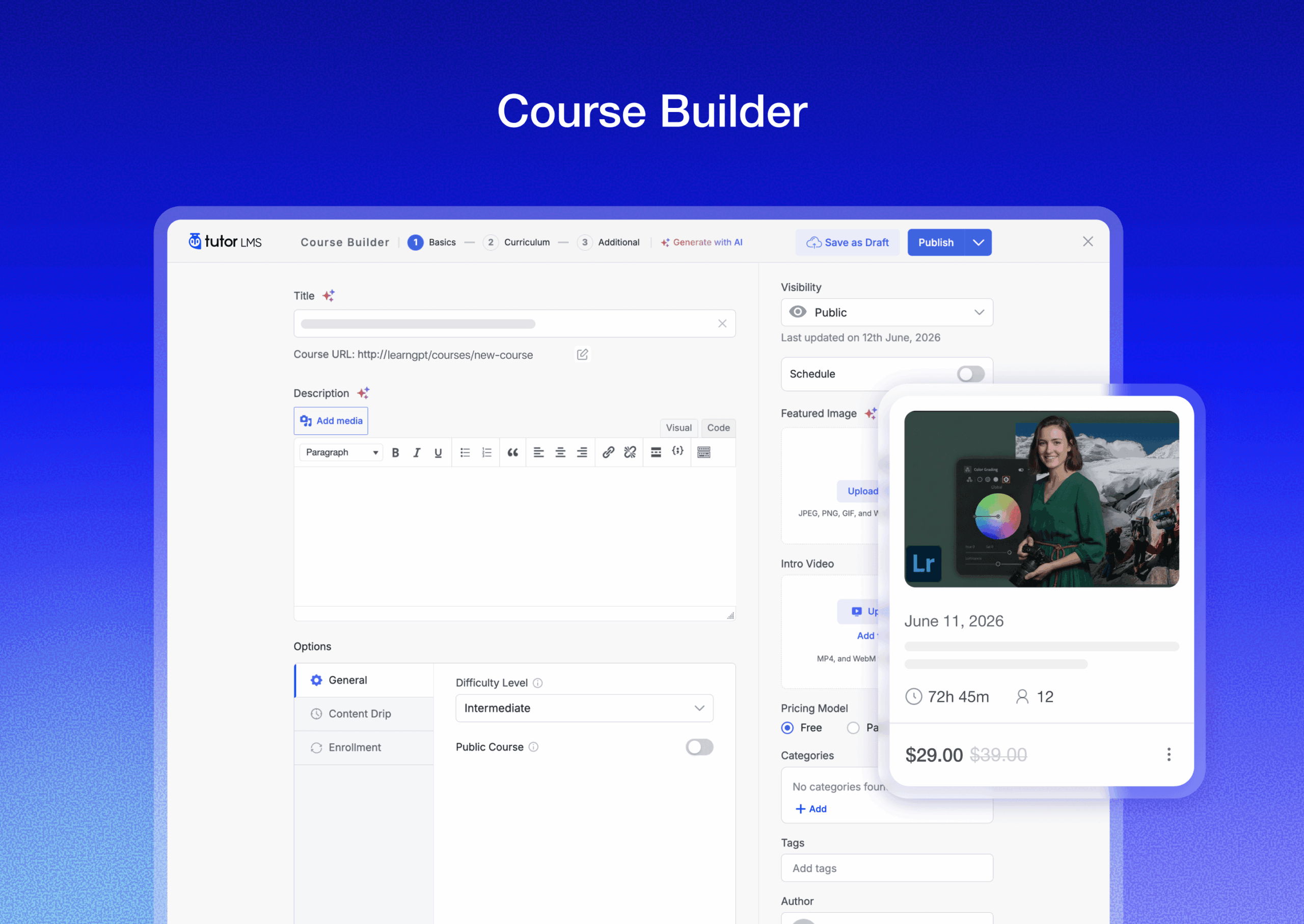
A Spotlight Mode is available that hides the WordPress header and footer so the course builder fills the full screen without distraction, according to the plugin description on WordPress.org.
Course builder
The course builder is the plugin’s centerpiece. Based on the WordPress.org feature description and the plugin’s public documentation, the workflow works as follows:
You create a course with a title, description, video trailer, difficulty level, and duration estimate. Inside the course, you add topics. Inside each topic, you add lessons, quizzes, and assignments in any order.
Lessons support text content, video embeds from multiple sources (self-hosted, YouTube, Vimeo, Bunny.net, and other embedded video providers), audio files, and downloadable resources. Video lessons can include chapter markers. Students can take notes directly inside the learning area and revisit those notes from a central Notes panel.
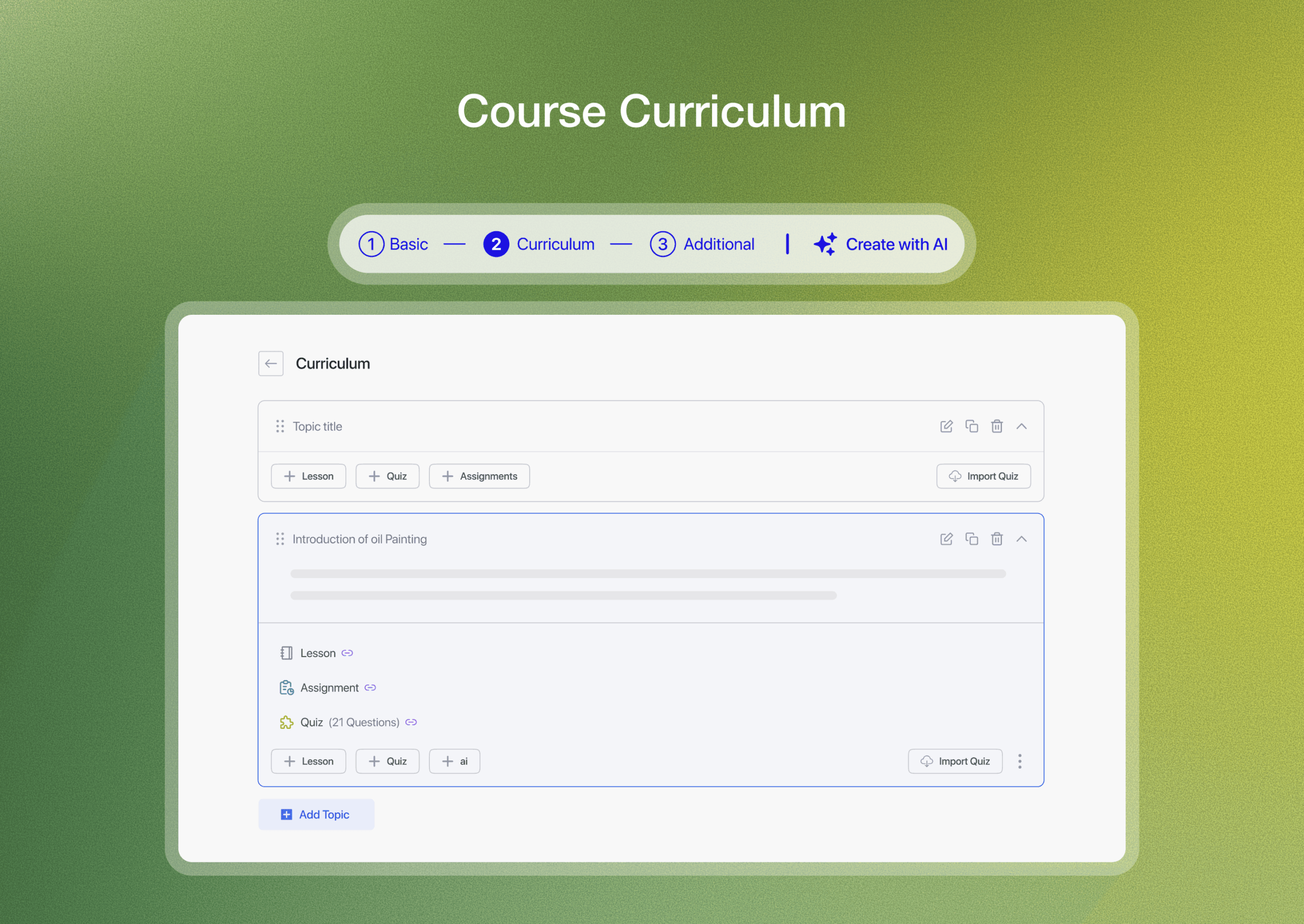
The curriculum panel shows the full course structure in a collapsible tree. According to the WordPress.org description, you can drag items to reorder them, duplicate lessons across topics, or move a quiz from one topic to another.
Content drip is listed as a free feature in the WordPress.org description and allows you to delay lesson access by days after enrollment, unlock lessons on specific dates, or make them sequential.
Quiz builder
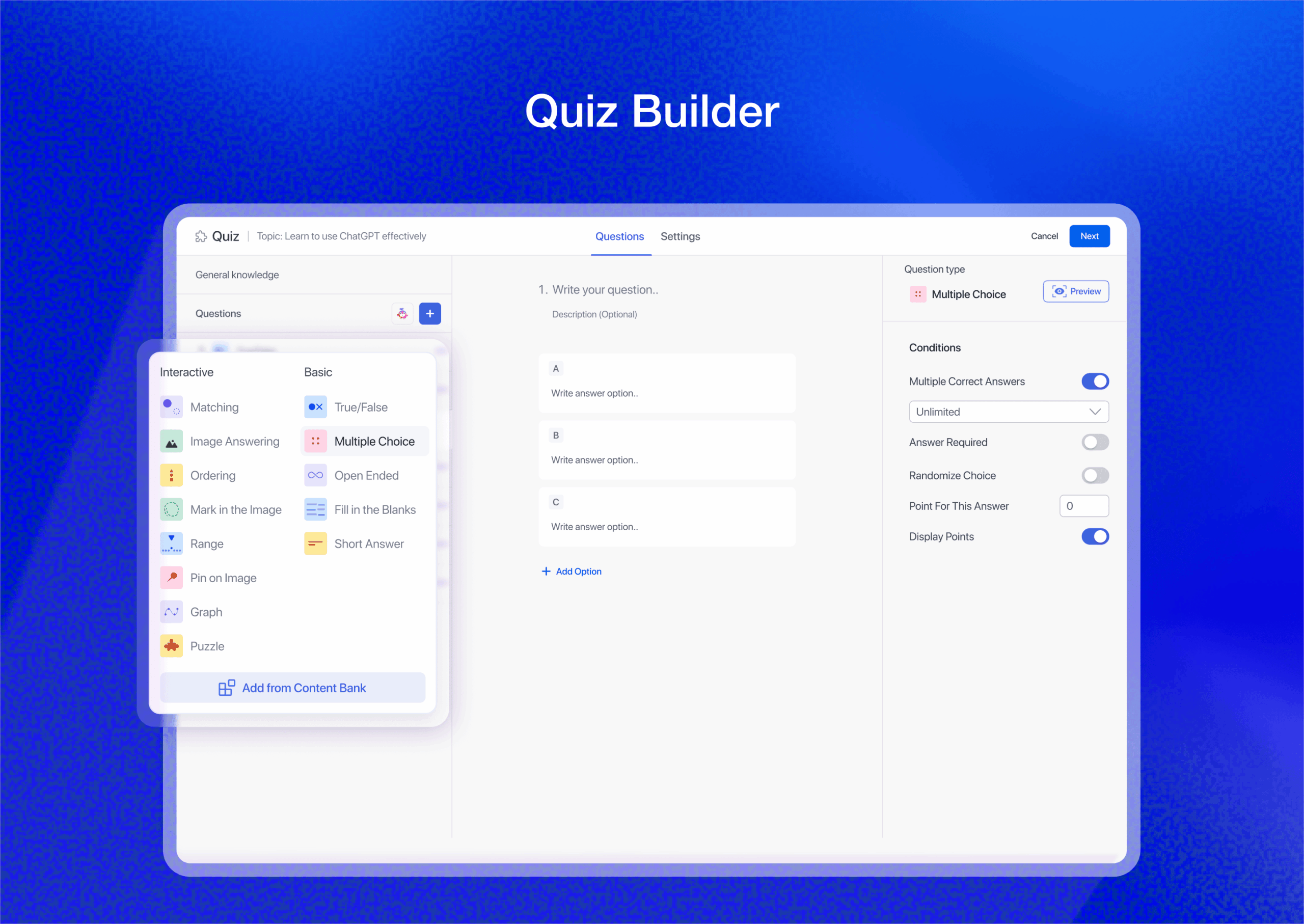
Tutor LMS has one of the most extensive quiz builders in any free WordPress LMS plugin. Based on the WordPress.org plugin description and version 4.0.0 changelog, the free version supports:
- Multiple choice (one or more correct answers)
- Single choice (radio button style)
- True/False
- Fill in the blanks
- Short answer
- Matching (pair items from two columns)
- Image matching
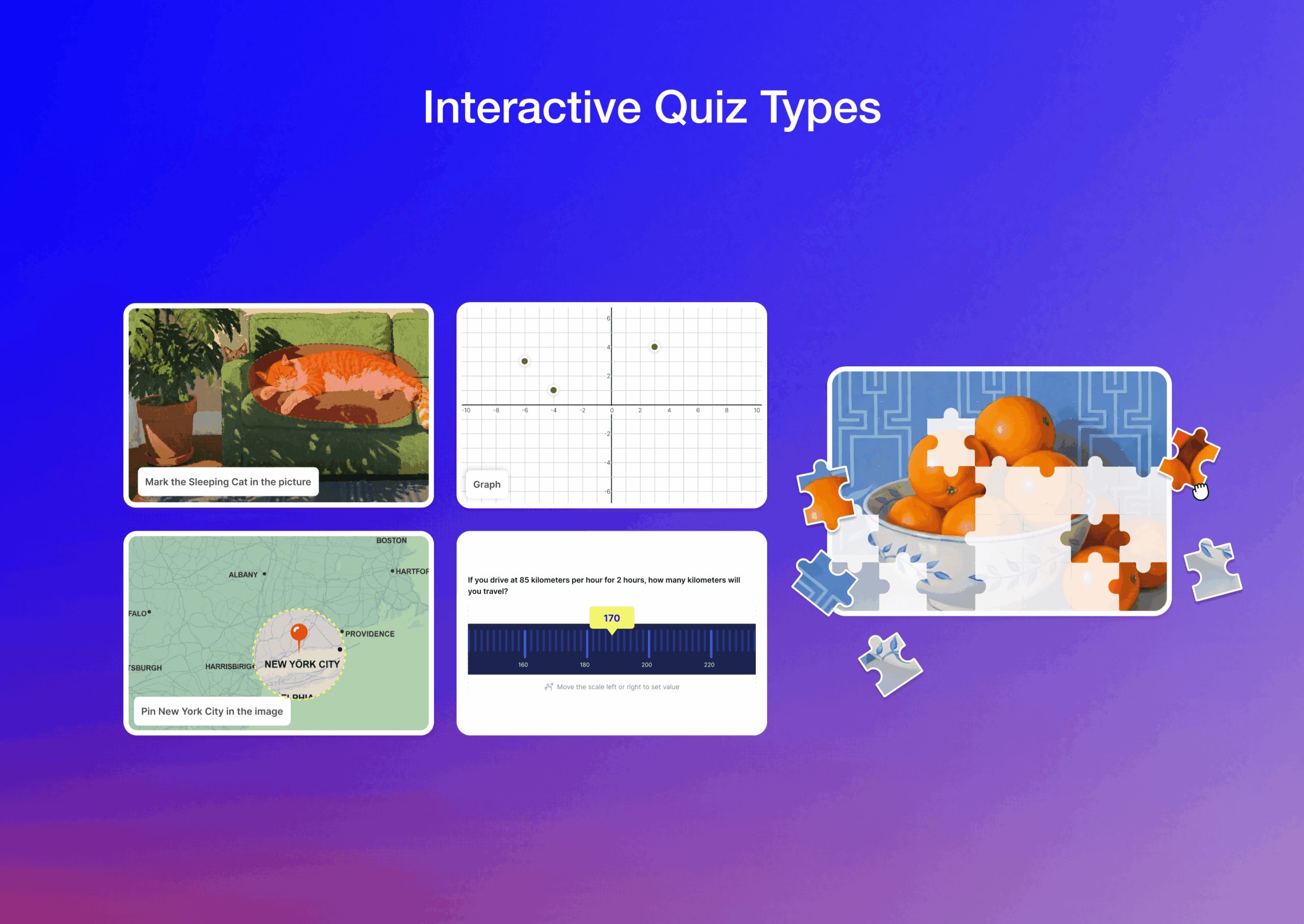
The Pro version added five quiz types in v4.0.0, confirmed in the changelog:
- Draw Image (students draw on a provided image)
- Pin Image (students mark a point on an image)
- Range (slider-based numerical response)
- Puzzle (drag-and-drop piece arrangement)
- Graph (plot-based response)
According to the plugin description, each quiz supports a configurable time limit, a maximum attempts count, a passing grade threshold, and randomized question order. Answer explanations can be added to each question for post-quiz review.
Student and instructor experience
Student dashboard
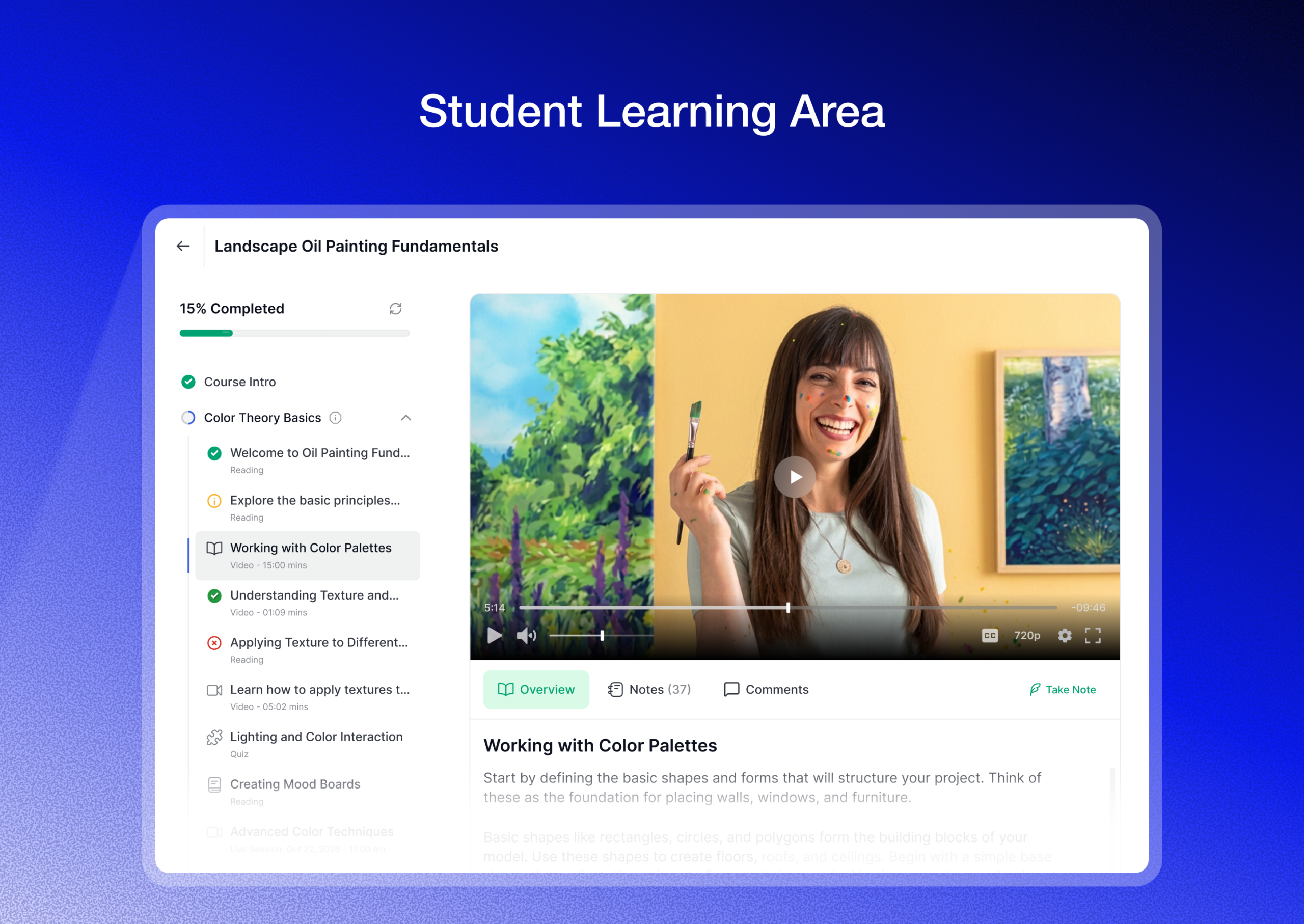
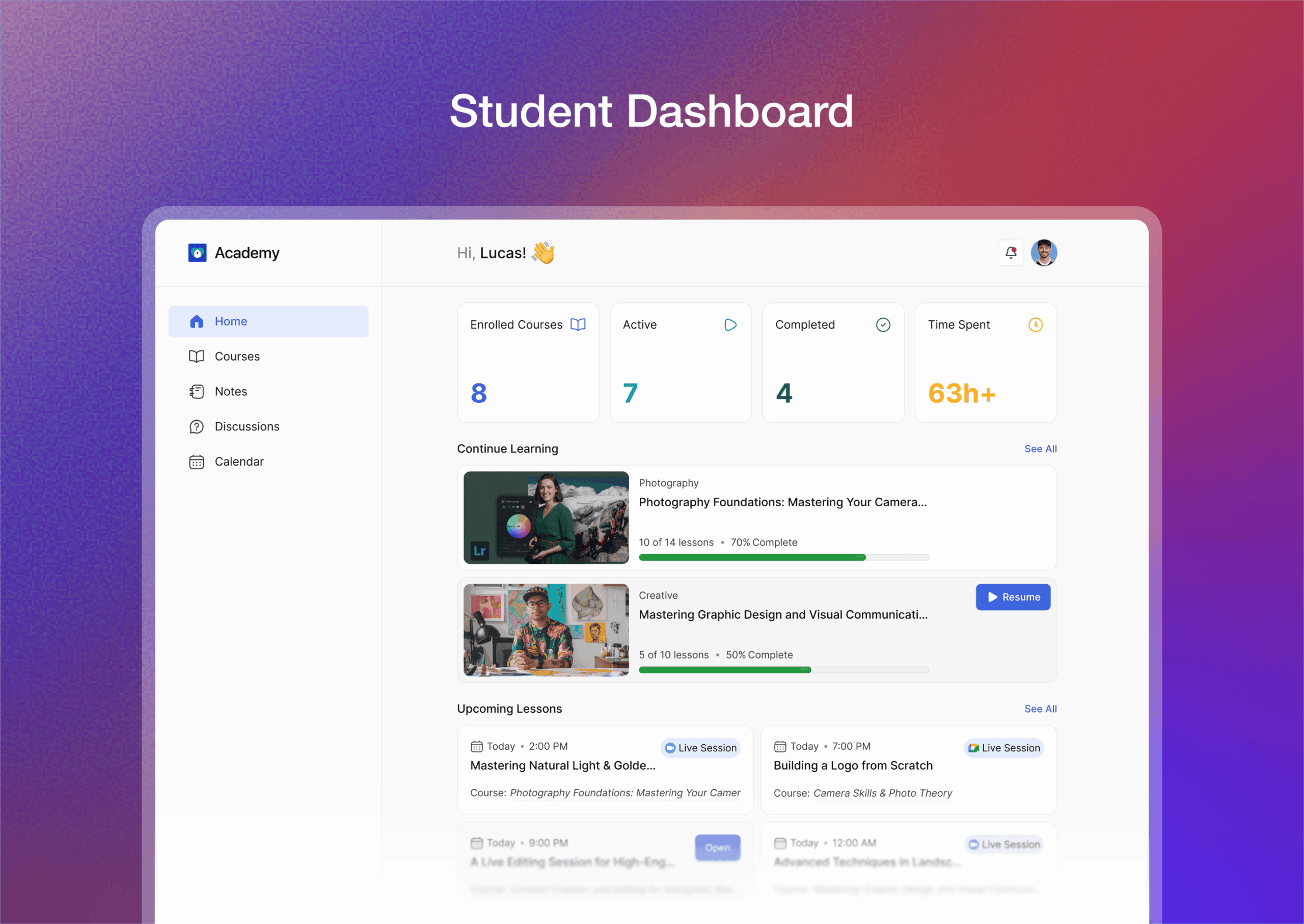
The v4.0 student dashboard is a significant redesign documented in the changelog and visible in the WordPress.org screenshots. It shows enrolled courses with progress percentages, upcoming lessons and live sessions, active quizzes, assignment due dates, and recent certificates earned.
Based on the vendor screenshots, the learning area has the lesson sidebar always visible but collapsible, the video player in the center, and a notes panel accessible from the same screen. Discussions and Q&A threads are accessible from within the lesson view according to the feature description.
Light and Dark mode were added in v4.0.0 per the changelog.
Mobile experience
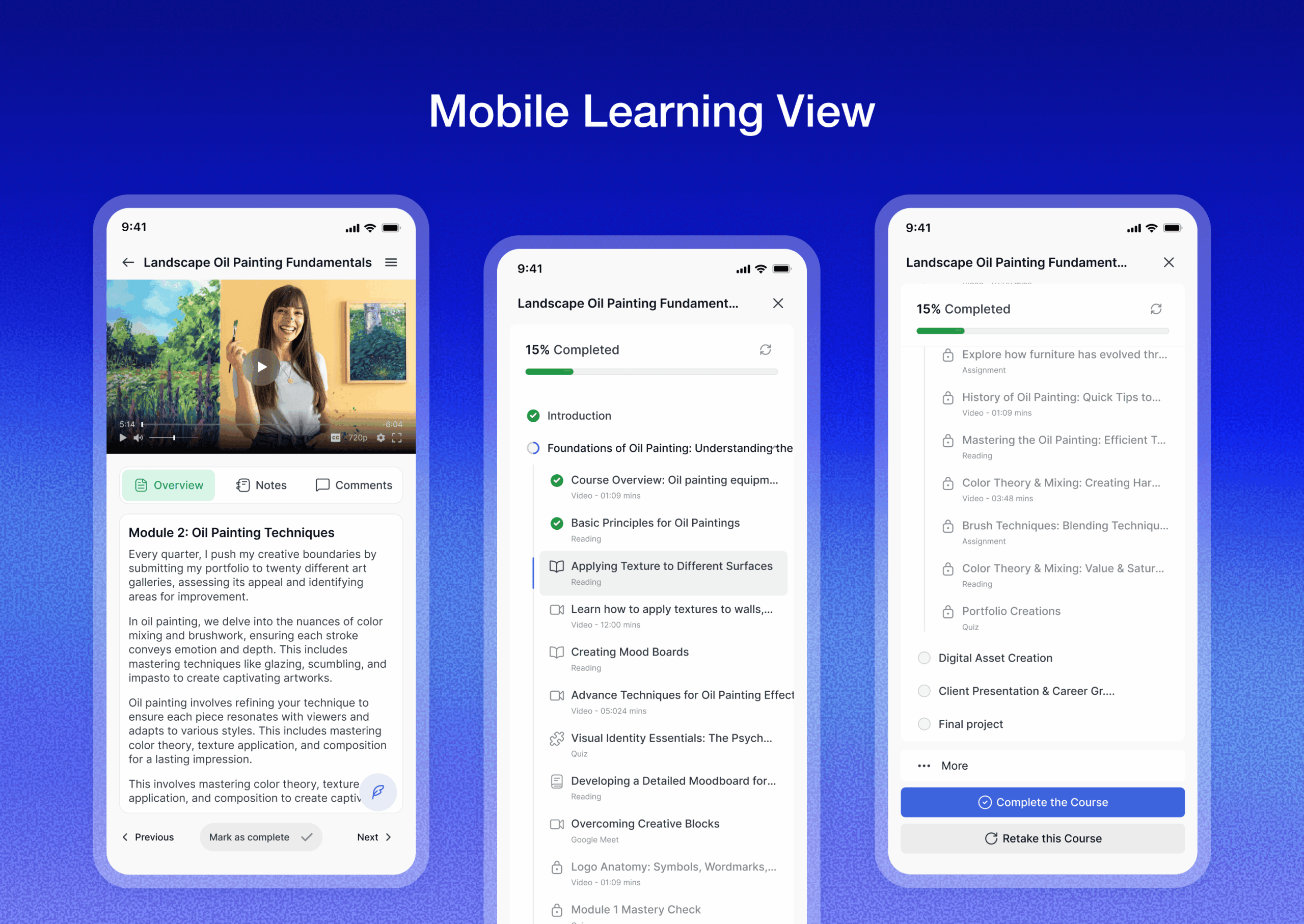
The v4.0 changelog describes a new “App-like mobile experience with thumb-friendly navigation.” The WordPress.org screenshot shows a bottom navigation bar and a vertically scrollable lesson layout that looks meaningfully different from a standard responsive layout. Version 4.0.1 fixed a missing Quiz Details button on mobile, confirming the mobile experience was also being patched after the initial release.
Instructor dashboard
Per the v4.0.0 changelog, the instructor dashboard was redesigned to show earnings overview, course stats, and student activity. The changelog also added the ability to switch between instructor and student views directly from the dashboard.
Multi-instructor commission allocation is described as a free feature in the plugin description: the admin sets commission percentages, instructors request withdrawals.
Kids Mode (Pro)
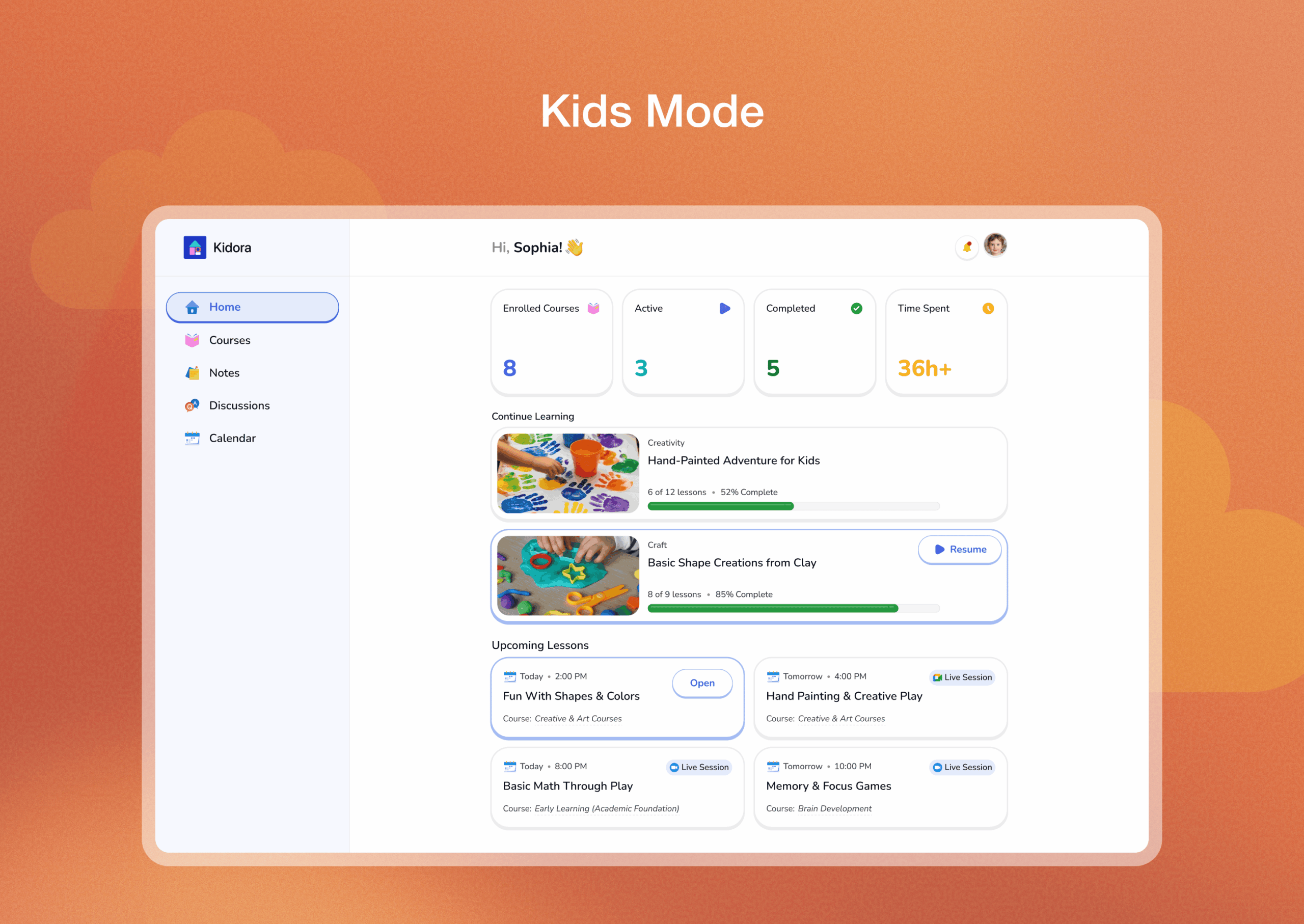
Kids Mode is listed as a Pro feature in the WordPress.org description and confirmed as Pro in the v4.0.0 changelog. The WordPress.org screenshot shows a colorful, playful interface with large icons and simplified navigation that looks significantly different from the standard interface.
Native eCommerce and monetization
According to the WordPress.org description and the tutorlms.com eCommerce feature page, Tutor LMS does not require WooCommerce. The Native eCommerce system handles:
- Course pricing (single purchase or subscription)
- Coupon codes with percentage or fixed-amount discounts
- Tax management
- Order management with refunds
- Purchase history for students
- Guest checkout support
- Multiple payment gateways: PayPal, Stripe, Paddle, Mollie, Razorpay
This is one of Tutor LMS’s clearest differentiators. Most WordPress LMS plugins treat WooCommerce as the default commerce layer. Tutor LMS built its own, and for simple course sales the description suggests it is a more unified experience.
WooCommerce integration is listed as a Pro add-on for sites already running WooCommerce.
Subscriptions and memberships
The built-in subscriptions feature is described on tutorlms.com as supporting monthly, annual, and custom billing intervals. Plans can give students access to all courses, a specific set of courses, or a course bundle. This appears to be available in the free version based on the WordPress.org feature list.
Course bundles and gift courses (Pro)
Course bundles and gift courses are listed in the WordPress.org feature list and appear to be Pro-only based on the feature description phrasing. These let site owners sell multiple courses together or let buyers purchase access for another user.
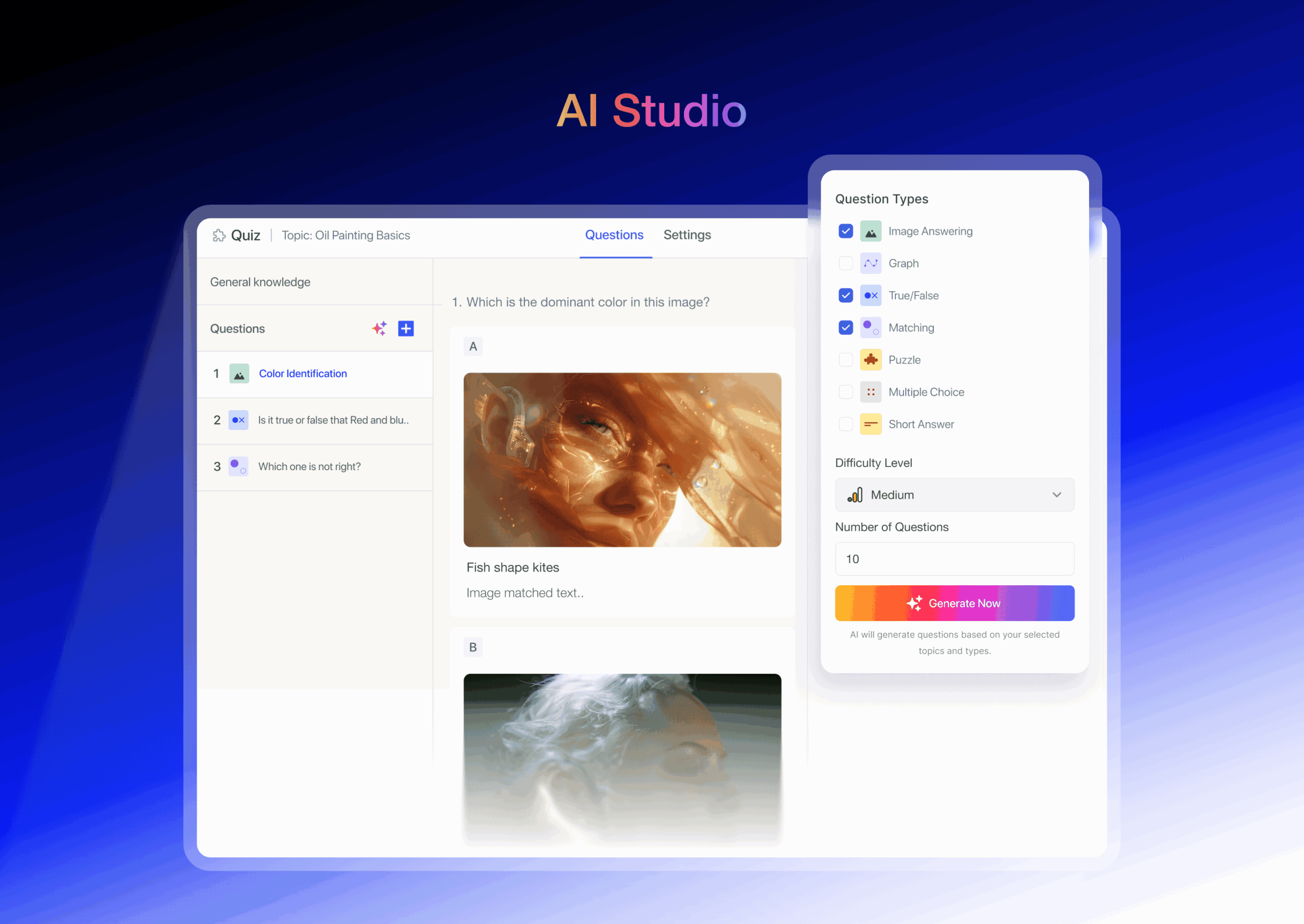
AI Studio (Pro, requires your own AI provider account)
AI Studio is confirmed as a Pro feature in the tutorlms.com pricing page. Based on the official description, it generates course outlines, lessons, quizzes, and assignments from a text prompt.
There is a critical practical note: AI Studio runs on a connected AI provider account, not a credit included in the Pro license. Earlier Tutor LMS versions connected AI Studio to OpenAI only. As of version 4.1.0 (released September 29, 2026), Tutor LMS integrated the WordPress AI Connector, the official WordPress AI plugin framework (wordpress.org/plugins/ai), giving AI Studio a broader way to connect to supported AI providers. The WordPress AI plugin works through separate connector plugins for OpenAI, Anthropic (Claude), and Google (Gemini), so which of those you can use depends on which connector plugin is installed and connected. This integration requires WordPress 7.0 or later, per Tutor LMS’s own release notes. Either way, you pay Tutor LMS for the Pro license and separately pay whichever AI provider you connect, based on usage; Tutor LMS does not cover or discount those API costs.
For occasional course generation this is a small incremental cost. For teams generating many courses, API costs accumulate regardless of which provider is connected. AI-generated content should be treated as a draft requiring editorial review before publishing.
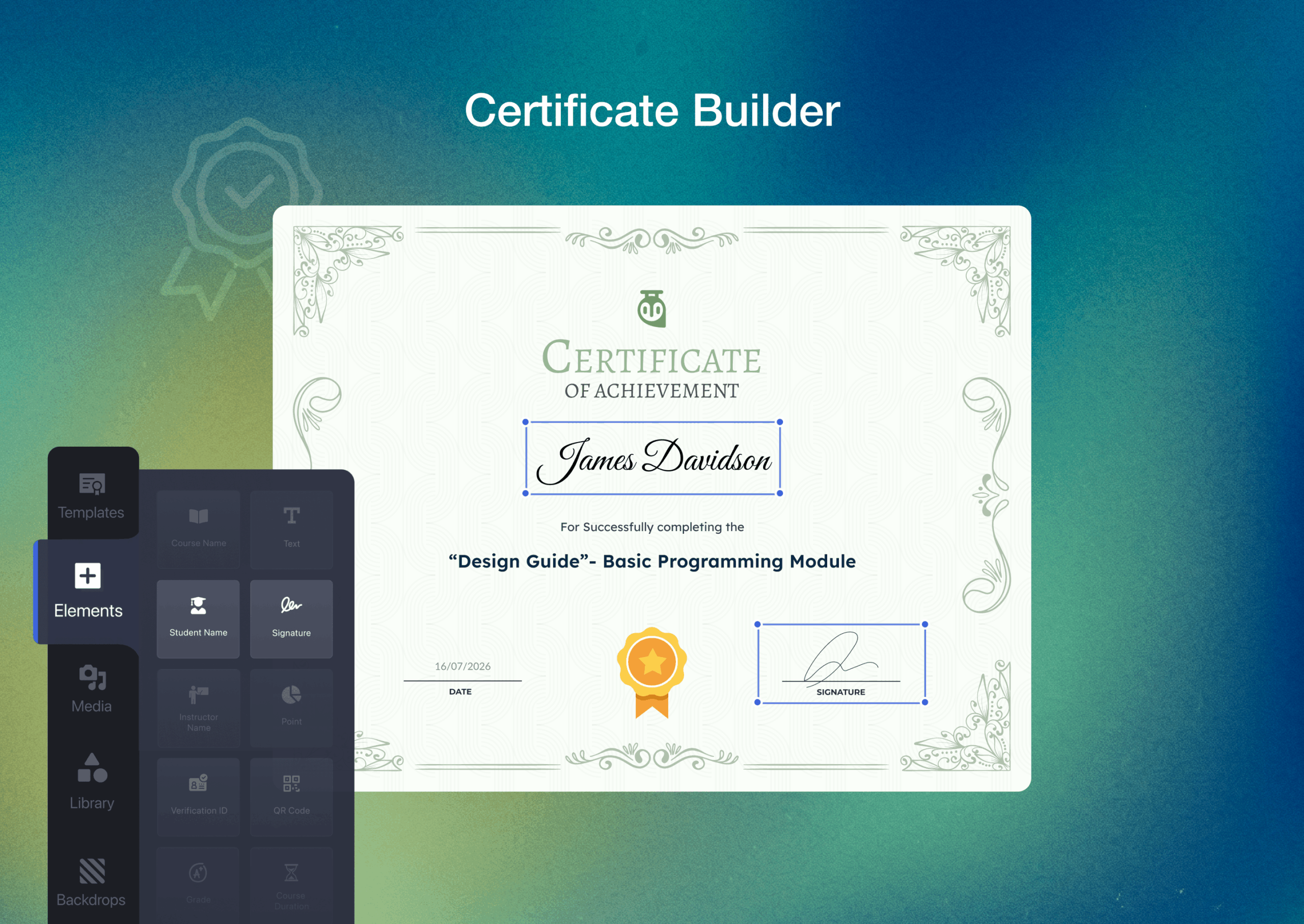
Certificates
According to the WordPress.org feature list, the free version includes a drag-and-drop certificate builder. The plugin issues certificates automatically when a student completes a course.
The Pro version adds dynamic certificate unlocking (certificates unlock when a student reaches a grade threshold, confirmed as Pro in the v4.0.0 changelog) and certificate verification (a unique URL or code lets anyone verify a certificate’s authenticity, also confirmed Pro in the changelog).
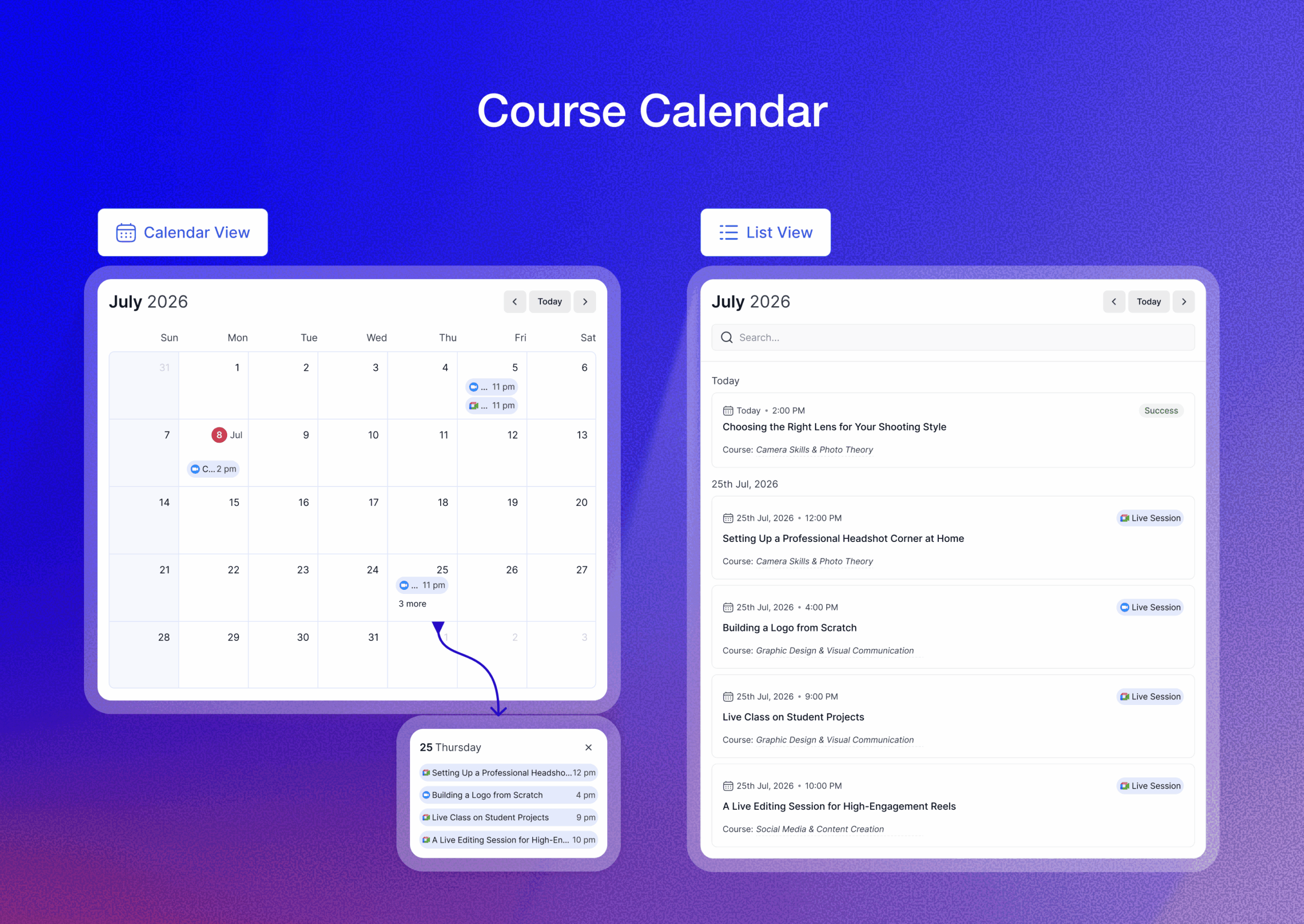
Course Calendar (Pro)
The Course Calendar is listed as a Pro feature introduced in v4.0.0 (“New Course Calendar with milestones and visual roadmap (Pro)” in the changelog). Based on the WordPress.org screenshot, it shows upcoming lessons, assignment due dates, and live session schedules in a calendar view.
For structured programs with a defined start and end, such as cohort-based courses or school semesters, a calendar view makes the learning schedule more legible for students.
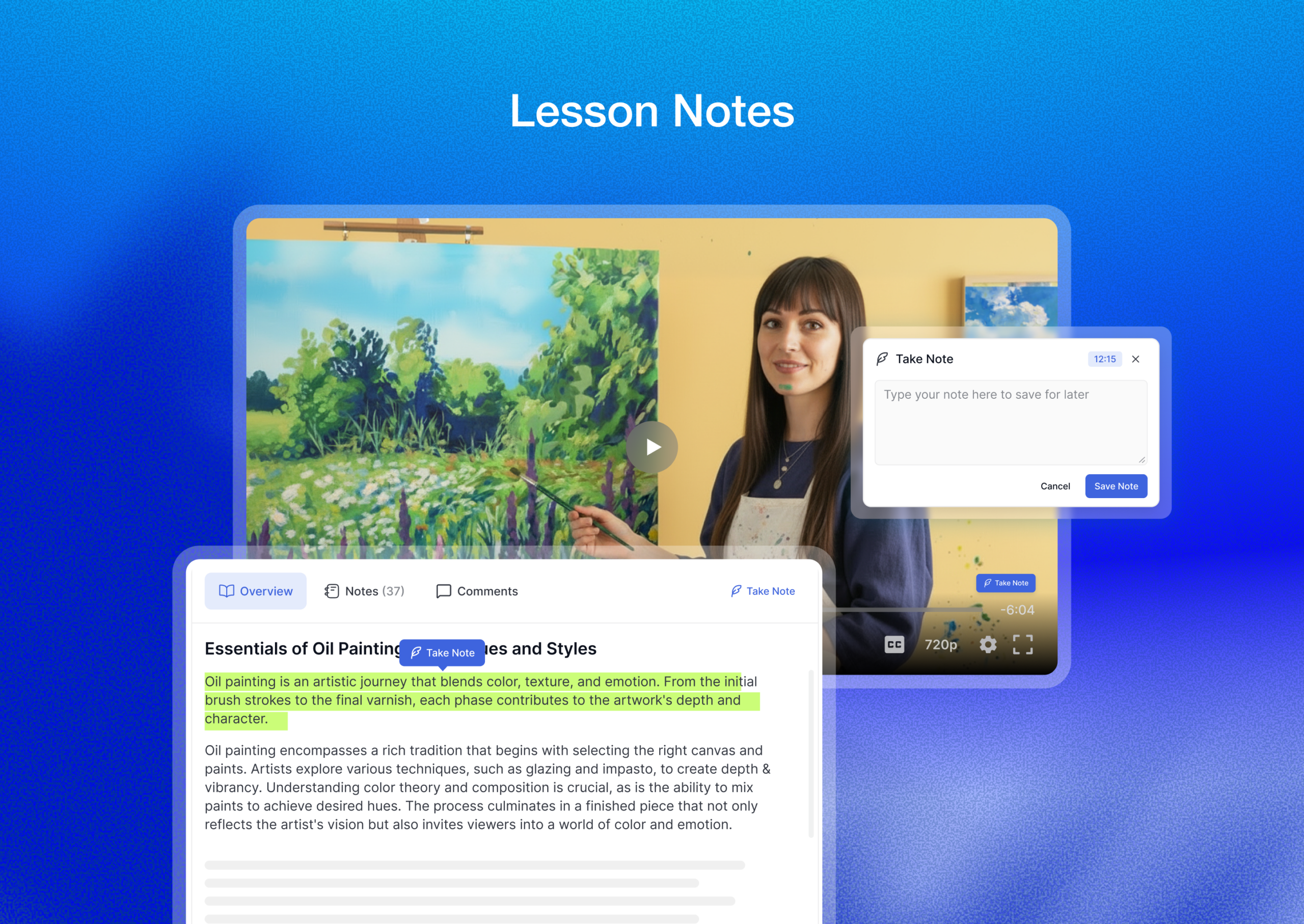
Lesson notes
Per the WordPress.org feature list, students can take notes directly inside the lesson view. Notes are saved per-lesson and accessible from a central notes panel in the student dashboard. The v4.0.0 changelog added “Centralized notes across all lessons and videos.”
Assignments
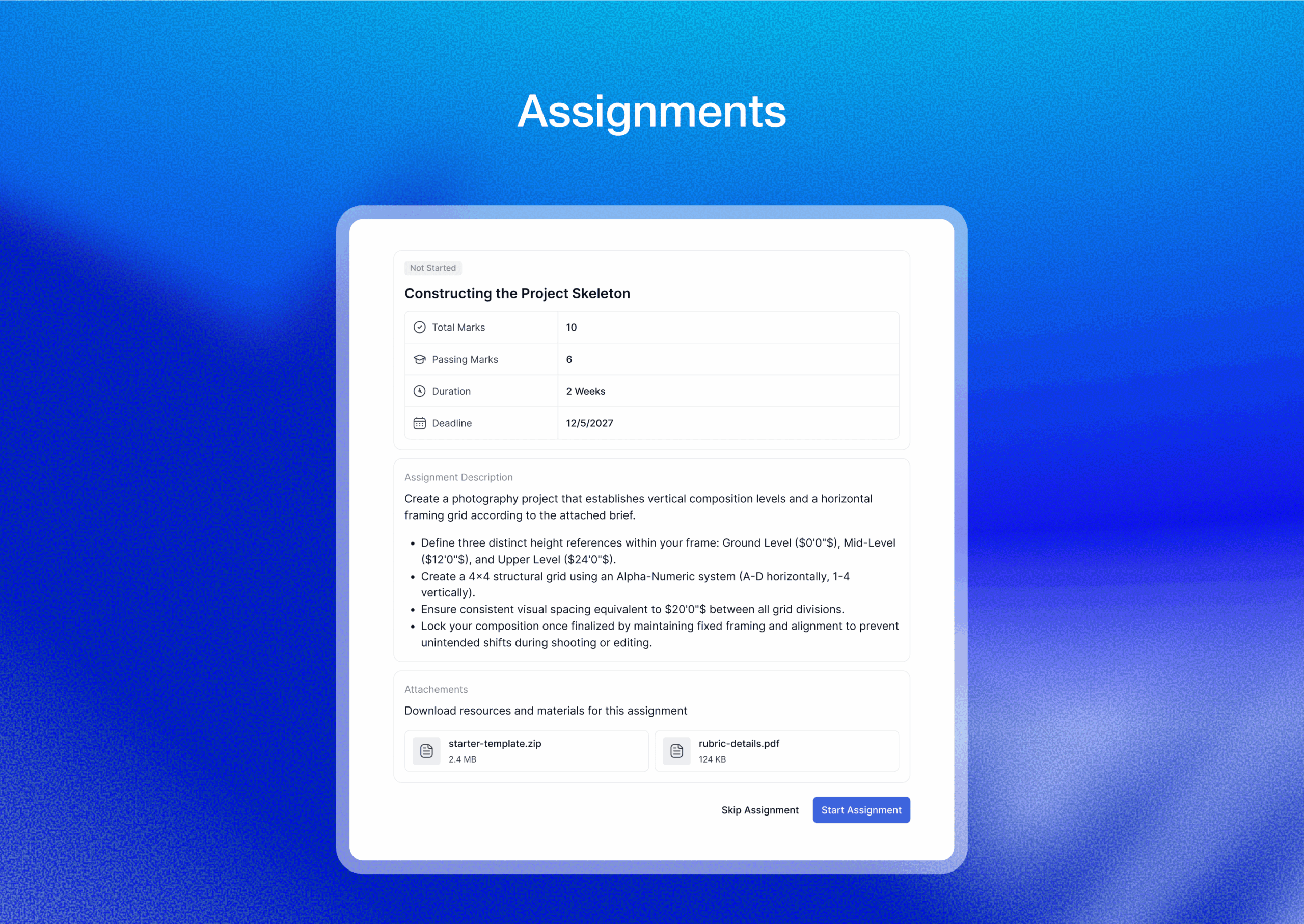
Per the WordPress.org plugin description, the Assignments module lets instructors create submitted-work tasks where students upload files or write long-form responses. Instructors review submissions, add feedback, and assign grades.
Content security
The WordPress.org plugin description lists the following content protection features as part of the free plugin:
- Copy protection: disables text selection on lesson pages
- Hotlink prevention: blocks external sites from embedding your video files directly
- Active login session management: admins and students can view and terminate active sessions
- Two-factor authentication: optional 2FA for student accounts
- Honeypot and reCAPTCHA integration: reduces spam registrations
- Email verification on registration
These features are described in the plugin documentation. The copy protection and hotlink prevention claims are based on vendor documentation and were not independently verified in this review.
Pricing and license value
Tutor LMS Pro is sold from tutorlms.com in two billing modes: annual subscriptions and lifetime purchases. All plans include the same feature set; the difference is the number of sites.
Pricing captured from tutorlms.com on July 24, 2026. Verify current pricing before purchasing.
Annual plans
- Individual: $199/year. 1 site. All pro add-ons and features, unlimited courses and users, Pro themes, AI Studio (requires a separately connected and funded AI provider account, such as OpenAI, Anthropic Claude, or Google Gemini), priority support, 1 year of updates.
- Business: $399/year. Up to 10 sites. Same feature set. Labeled most popular.
- Agency: $799/year. Unlimited sites. Same feature set.
Lifetime plans
- Individual: $499 one-time. 1 site.
- Business: $999 one-time. Up to 10 sites.
- Agency: $1,999 one-time. Up to 50 sites.
The lifetime plans are increasingly rare in this category. For agencies or creators who plan to use Tutor LMS for several years, the lifetime Business plan at $999 becomes cheaper than three years of annual payments at $399.
Important notes for buyers
- AI Studio requires your own connected AI provider account (OpenAI, Anthropic Claude, or Google Gemini, via the WordPress AI Connector since v4.1.0). API call costs are not included in the Pro license and are billed separately by whichever provider you connect.
- Pro themes are included with all plans.
- A 30-day money-back guarantee is offered. Verify current refund terms on tutorlms.com before purchasing.
- The free version on WordPress.org is a permanent free tier, not a time-limited trial.
Value comparison
At $199/year for one site, Tutor LMS Pro is in the same price range as LearnDash’s starter tier. The main differentiator is that Tutor LMS bundles more in the base Pro license (native eCommerce, subscriptions, Kids Mode, course bundles, AI Studio) rather than selling add-ons separately as some competitors do. If you only need basic course delivery, the free version covers it without payment.
Pros and cons
Pros
- Free version includes native eCommerce with PayPal, Stripe, Paddle, Mollie, and Razorpay, removing the need for WooCommerce for course sales.
- Version 4.0 delivers a modern UI with an app-like mobile experience that is ahead of most competitors in this category based on the vendor screenshots.
- Quiz builder supports seven question types on free and twelve on Pro, which is the most feature-complete in a free WordPress LMS plugin by current comparison.
- Certificate builder with drag-and-drop design is included in the free version; dynamic certificates and verification are Pro.
- Built-in subscriptions and memberships are described as part of the free feature set.
- Multi-instructor support with commission allocation handles marketplace-style LMS sites.
- AI Studio (Pro) generates course drafts from a prompt, useful for quickly seeding course structure.
- Content security features (copy protection, hotlink prevention, 2FA, reCAPTCHA) described as free features.
- Kids Mode (Pro) adds a distinct interface for younger learners.
- Lifetime pricing option is available.
- Actively maintained: version 4.0.3 shipped July 24, 2026, two weeks after the major redesign.
- 100,000+ active installs and 4.4 stars from 583 WP.org reviews.
Cons
- AI Studio (Pro) requires your own connected AI provider account (OpenAI, Anthropic Claude, or Google Gemini, since the v4.1.0 WordPress AI Connector integration). The Pro license does not include API credits.
- Version 4.0.0 introduced a major redesign that caused a wave of bug reports, including video loading failures, quiz starting issues, and frontend dashboard problems confirmed in the public support forum. Patches in 4.0.1, 4.0.2, and 4.0.3 resolved most issues, but teams should test v4.x upgrades in staging before applying to production.
- WooCommerce Subscriptions compatibility issues were active in the WP.org support forum at the time of this review. Teams relying on WooCommerce Subscriptions should test carefully.
- Self-hosted: all server responsibility falls on the site owner.
- Active install count (100,000+) is lower than LearnDash and LifterLMS, meaning smaller community testing depth at edge cases.
- Some features reasonable to expect in a free LMS plugin are gated behind Pro, including social login, certain advanced quiz types, and the Course Calendar.
- No hosted or SaaS option.
Alternatives to Tutor LMS
- LearnDash. The most widely used premium WordPress LMS plugin, used by universities and enterprise eLearning teams. Choose LearnDash if long-term plugin stability, extensive third-party add-on support, and community size matter more than cost or a native eCommerce layer. No free tier.
- LifterLMS. A free core plugin with a modular paid add-on structure. Choose LifterLMS if you want a lighter free base and prefer to pay only for specific features rather than an all-in-one Pro license.
- LearnPress. A free WordPress LMS with many free add-ons from ThimPress. Choose LearnPress if budget is the overriding constraint and you do not need the quiz depth or modern interface that Tutor LMS offers.
- Sensei LMS. By Automattic. Choose Sensei if you are already in the WooCommerce ecosystem and want a single vendor for content, course delivery, and commerce.
- MasterStudy LMS. A free-core alternative from StylemixThemes with similar all-in-one positioning to Tutor LMS. Choose MasterStudy if you want to evaluate an alternative free LMS with comparable features and a lower Pro price.
For most new course creators, the realistic choice is between Tutor LMS and LifterLMS on the free side, and between Tutor LMS Pro and LearnDash on the paid side. Tutor LMS wins on native eCommerce in the free tier and on price at the individual site level. LearnDash wins on feature maturity and ecosystem depth.
Final verdict
Tutor LMS earned its position as a serious WordPress LMS option before the v4.0 redesign. The native eCommerce system, the quiz builder depth, and the multi-instructor support all hold up against paid competitors that require WooCommerce extensions to reach the same level.
The v4.0 redesign changes the surface experience. The student learning area, based on vendor screenshots and the changelog description, is now the most polished UI in the free WordPress LMS category. The instructor dashboard was rebuilt around earnings and student activity data. The mobile experience is designed for phones, not just scaled down from desktop.
The concerns are real. The AI Studio costs more than the license implies because of the separate, self-funded AI provider account it requires, whichever provider you connect. The v4.0 release had enough post-launch bugs that teams on production sites should treat it like any major plugin update: test in staging first. The WooCommerce Subscriptions compatibility issue was unresolved in the public support forum at the time of writing.
For solo creators, small schools, and agencies building client LMS sites, Tutor LMS free is the first plugin I would recommend evaluating in this category. The Pro upgrade at $199/year is a reasonable step up when AI Studio, advanced quiz types, live sessions, or dynamic certificates are on the requirements list.
For teams with existing enterprise WordPress setups, WooCommerce dependencies, or a requirement for a long track record under heavy load, LearnDash remains the safer established choice.
FAQ
Is Tutor LMS free?
Yes. Tutor LMS is available as a permanent free plugin on WordPress.org. The free version includes the course builder, quiz builder with seven question types, native eCommerce with multiple payment gateways, built-in subscriptions, certificates with a drag-and-drop builder, instructor management, and multi-instructor commission support. There is no time limit on the free tier. Tutor LMS Pro is a paid upgrade that adds AI Studio, advanced quiz types, Kids Mode, Live Lesson Hub, Course Calendar, dynamic certificates, and other features.
How many active installs does Tutor LMS have?
The WordPress.org listing reports 100,000+ active installs. Cumulative downloads across all versions are over 4.29 million.
Do I need WooCommerce for Tutor LMS?
No. Tutor LMS includes a Native eCommerce system that handles course sales, subscriptions, coupons, taxes, refunds, and multiple payment gateways (PayPal, Stripe, Paddle, Mollie, Razorpay) without requiring WooCommerce. WooCommerce integration is available as a Pro add-on for sites already using WooCommerce, but it is not required.
Does AI Studio come with the free version?
No. AI Studio is a Pro-only feature, and it also requires your own connected AI provider account. Earlier versions connected AI Studio to OpenAI only; as of Tutor LMS 4.1.0 (September 2026), AI Studio integrates with the WordPress AI Connector, the official WordPress AI plugin framework, which works through separate connector plugins for OpenAI, Anthropic (Claude), and Google (Gemini), and requires WordPress 7.0 or later. The cost of AI API calls is not included in the Pro license and is billed separately by whichever provider you connect. Verify current provider setup and API pricing on tutorlms.com before using AI Studio at scale.
What is the difference between Tutor LMS free and Pro?
The free version includes the course builder, lesson management, quiz builder (seven types), native eCommerce, subscriptions, certificates with a drag-and-drop editor, content drip, student and instructor dashboards, multi-instructor support with commissions, discussions and Q&A, and content security features. Tutor LMS Pro adds AI Studio, five advanced interactive quiz types, Kids Mode, Live Lesson Hub for Zoom or Google Meet, Course Calendar with milestones, certificates with dynamic unlocking and verification, social login, course bundles, gift courses, advanced analytics and reports, and WooCommerce integration.
What payment gateways does Tutor LMS support?
The native eCommerce system supports PayPal, Stripe, Paddle, Mollie, and Razorpay per the WordPress.org feature description. Guest checkout is supported.
What is the Tutor LMS Pro pricing?
As of July 2026: Annual plans at $199/year (1 site), $399/year (up to 10 sites), $799/year (unlimited sites). Lifetime plans at $499 (1 site), $999 (up to 10 sites), $1,999 (up to 50 sites). All plans include the same feature set. Verify pricing on tutorlms.com before purchasing.
Is there a Tutor LMS money-back guarantee?
Yes. Tutor LMS Pro offers a 30-day money-back guarantee. Verify current refund terms on tutorlms.com before purchasing.
Can I use Tutor LMS for a multi-instructor online marketplace?
Yes, according to the plugin description. Multiple instructors can create and manage their own courses under one site. The admin sets commission percentages, instructors request withdrawals, and students see all courses regardless of instructor.
What happened in the Tutor LMS 4.0 release?
Version 4.0.0 (July 8, 2026) was a major redesign with a new student learning area, app-like mobile experience, Kids Mode, five new Pro quiz types, new instructor and student dashboards, Live Lesson Hub (Pro), Course Calendar (Pro), unified discussions, and accessibility improvements. It triggered post-release bug reports confirmed in the WordPress.org support forum including video loading failures, quiz starting issues, and frontend dashboard problems. Versions 4.0.1 (July 10, 2026), 4.0.2 (July 22, 2026), and 4.0.3 (July 24, 2026) addressed most of these issues. Teams should test the v4.x upgrade in a staging environment before applying to live.
Does Tutor LMS work with Elementor?
Yes, per the plugin description. A dedicated Elementor addons plugin for Tutor LMS is available on WordPress.org. Divi modules are also available on WordPress.org. Oxygen Builder is listed as compatible.