

Quick Verdict
Ultimate Member is one of the most complete free membership plugins available for WordPress. The core plugin handles user profiles, registration, login, member directories, and content restriction without charging a cent. Paid plans unlock a large library of community extensions at $276 to $348 per year.
If you want a membership or community site without paying up front, this is the strongest starting point on WordPress. The main trade-off: advanced community features like Groups, Private Messages, and Stripe subscriptions require a paid plan, and annual-only billing without a lifetime option makes the long-term cost add up.
| Free version | Yes, 100% free core plugin |
| Paid plans | $276/year (Standard), $348/year (Pro) |
| Active installs | 200,000+ |
| Rating (WordPress.org) | 4.4/5 from 1,444 reviews |
| Plugin version tested | 2.12.1 (July 2026) |
| Requires | WordPress 6.2+, PHP 7.0+ |
| Official site | ultimatemember.com |
| WordPress.org | wordpress.org/plugins/ultimate-member/ |
What Is Ultimate Member?
Ultimate Member is a WordPress plugin that turns your site into a membership platform. It adds front-end user registration, login, profile pages, member directories, and role-based access controls, all without requiring users to ever see the WordPress admin.
The plugin has been live since January 2015 and has accumulated over 13 million downloads. It’s maintained by the Ultimate Member Group Ltd, a company registered in Scotland. Development is active: the July 2026 release (version 2.12.1) patched two security vulnerabilities and added new oEmbed field capabilities.
The core plugin is free and open-source. Revenue comes from paid extensions sold individually or bundled in annual plans.
Who Is Ultimate Member Best For?
Good fit
- Bloggers or site owners building a first community or membership site on a budget
- Developers who want a solid foundation with hooks and filters to build on
- Sites needing multiple user roles with different permissions (job boards, directories, niche communities)
- Projects that start free and may upgrade as they grow
- Multi-site setups (the plugin supports WordPress multisite)
Not the best fit
- Sites that primarily need to sell course access or digital products (MemberPress or Paid Memberships Pro fit that use case better)
- Teams needing a full community platform out of the box without extensions (BuddyBoss is more all-in-one)
- Sites that need perpetual licensing (Ultimate Member is annual-only)
Hands-On Setup and First Impressions
Installing the plugin from the WordPress.org repository is standard: search for “Ultimate Member” in the Plugins screen, install, and activate. On activation, the plugin automatically creates the core pages it needs: Login, Register, User, Account, and Members.
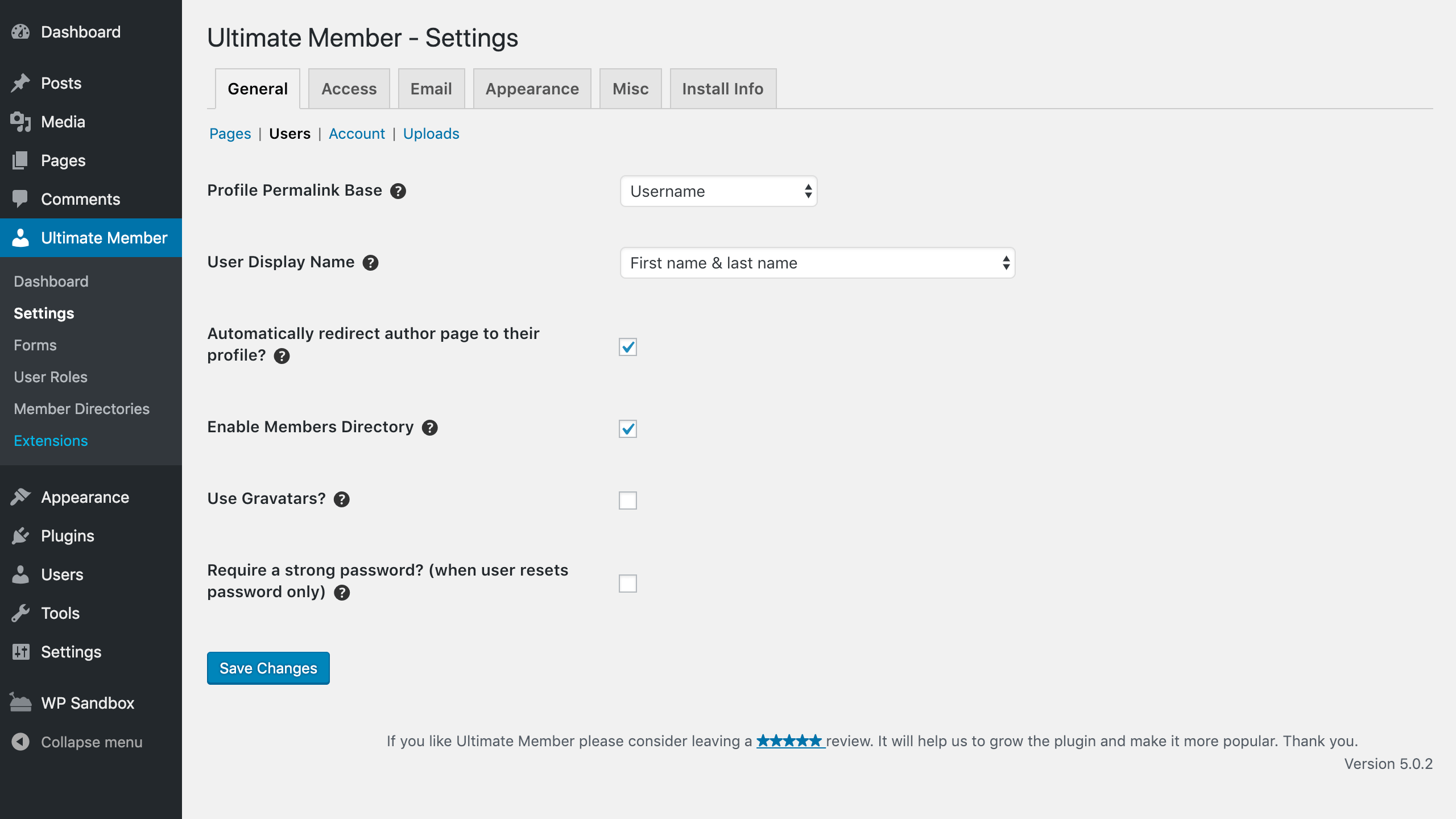
The admin sidebar gains a new “Ultimate Member” section with items: Dashboard, Settings, Forms, User Roles, Member Directories, and Extensions.
The Settings screen has six tabs: General, Access, Email, Appearance, Misc, and Install Info. The General tab covers essential options like Profile Permalink Base (username, first/last name, or user ID), User Display Name, Members Directory toggle, and Gravatar support.
The setup feels lightweight. There are no multi-screen wizards or forced onboarding flows. Most decisions are made from a single settings page with clear labels.
Core Features
User Profiles
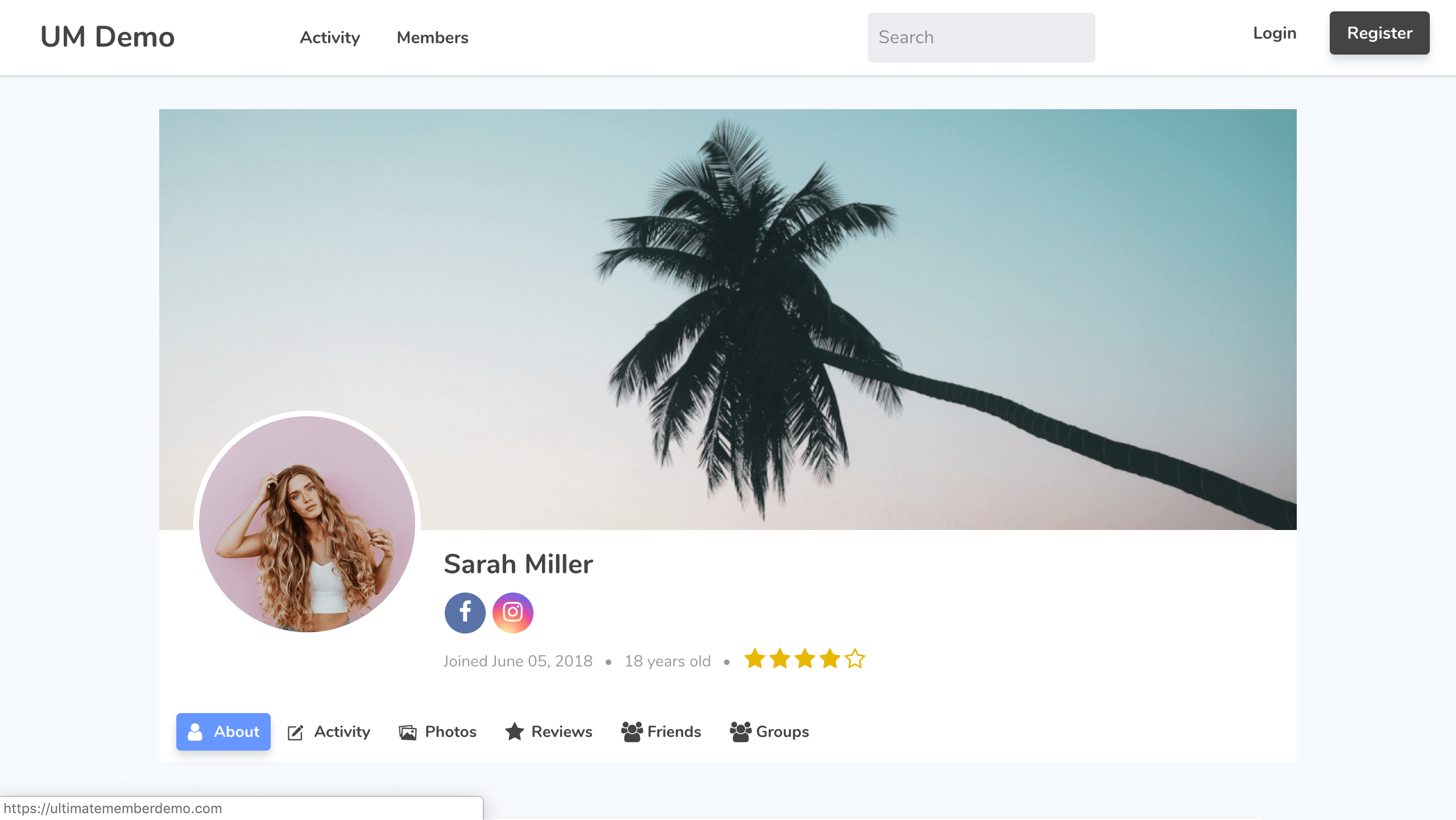
Every registered member gets a front-end profile page automatically. The profile includes a large cover photo, a circular profile photo, the member’s display name, social media icons, key user info fields (like join date or bio), and a star rating if User Reviews is active.
Profile tabs are configurable. Out of the box you get an About tab showing the user’s field data. Paid extensions add Activity, Photos, Reviews, Friends, and Groups tabs.
I found the default profile layout genuinely polished. It looks like something you’d expect from a purpose-built social platform, not a generic WordPress add-on. The cover photo aspect ratio and profile photo shape are both configurable from Settings.
Member Directories
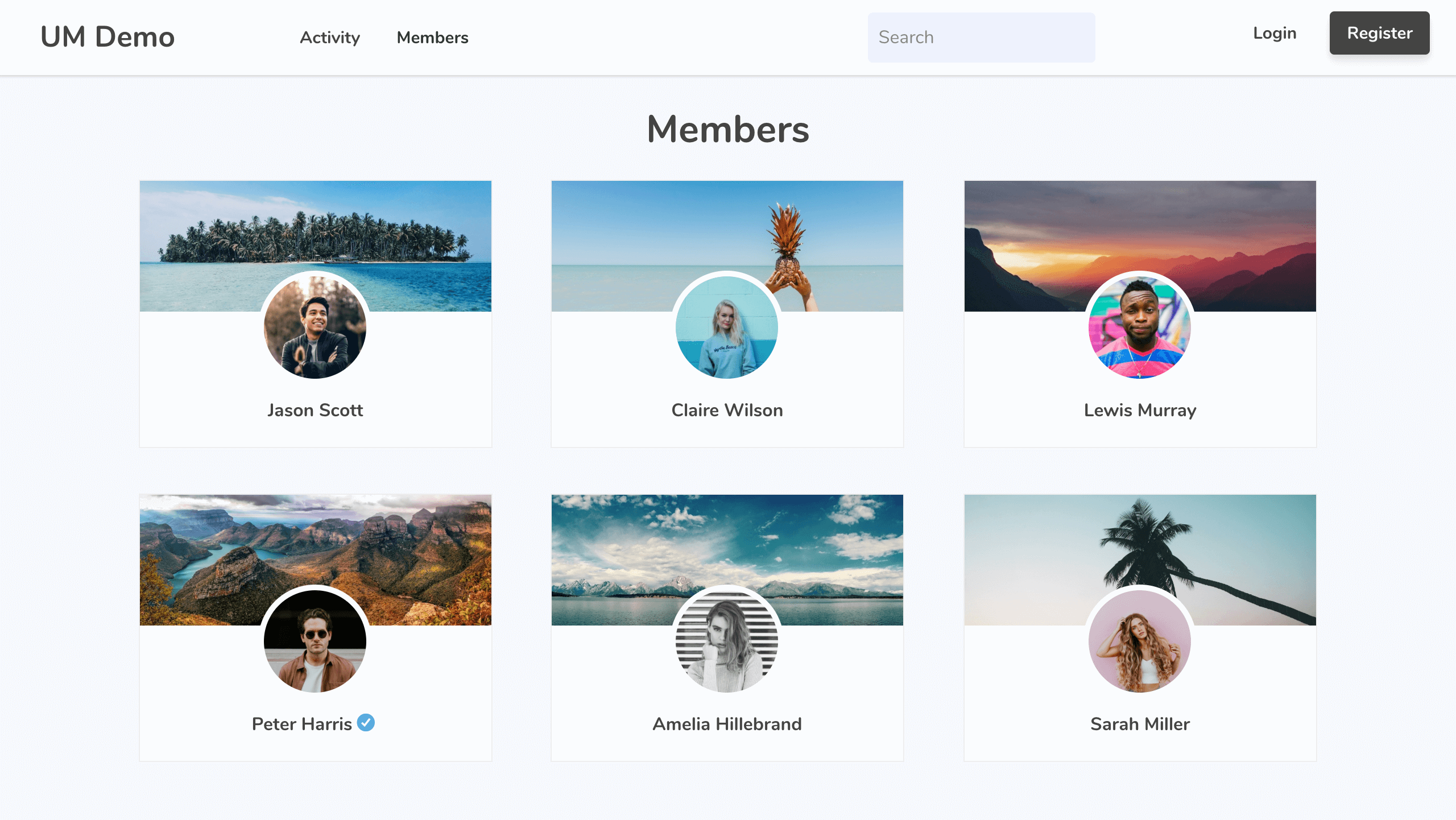
The member directory displays all registered members in a grid layout. Each card shows the member’s cover photo, profile photo, and name. A verified badge appears next to members with the Verified Users extension active.
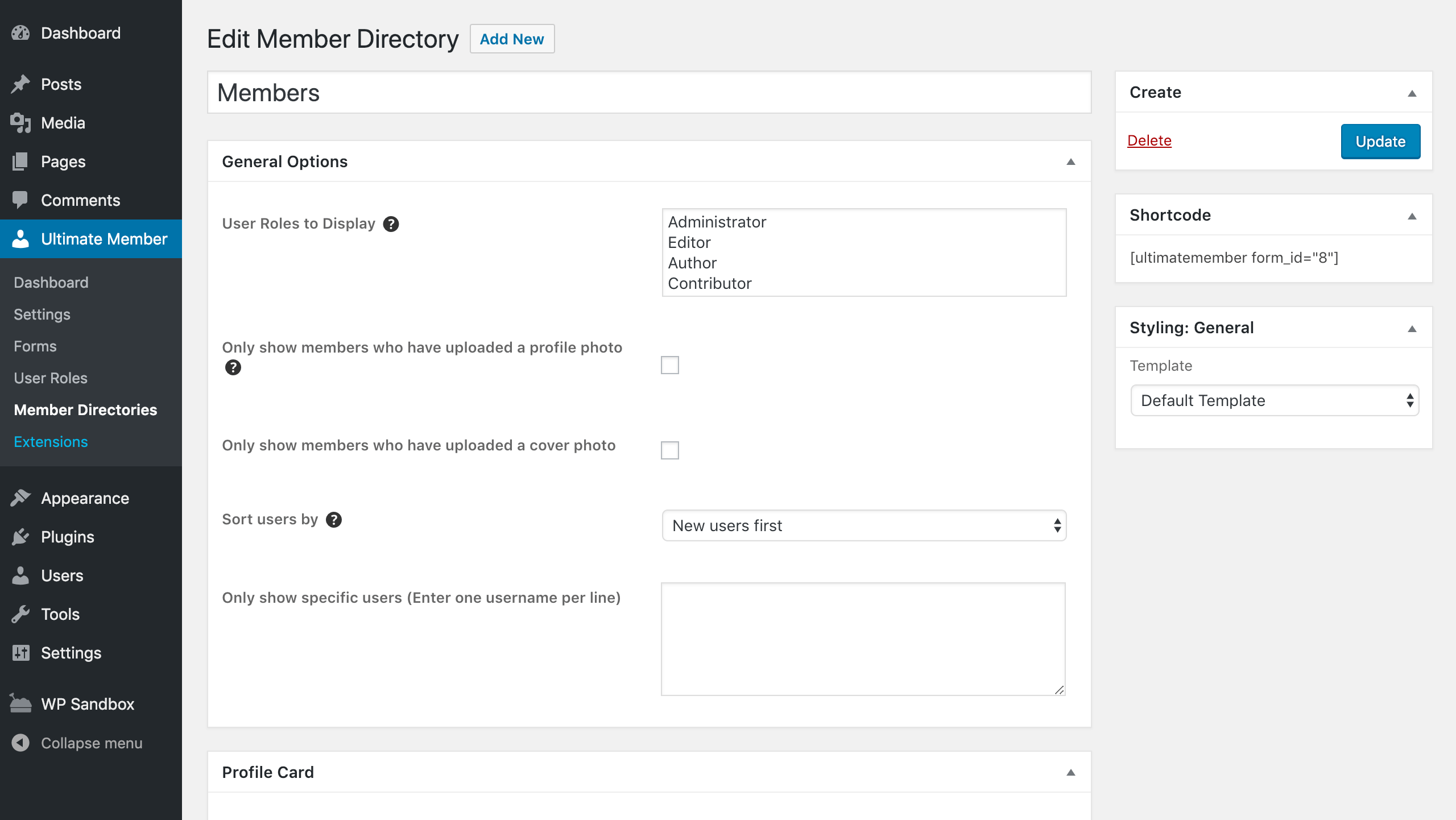
From the admin, you configure each directory with:
- Which user roles to display
- Whether to require a profile photo or cover photo before a member appears
- Sort order (newest first, oldest first, first name, last name, etc.)
- Search filters based on your custom fields
- Profiles per page
- Template selection
Each directory gets a shortcode you drop onto any page. You can run multiple directories on the same site, each showing different roles or with different configurations.
Registration and Login Forms
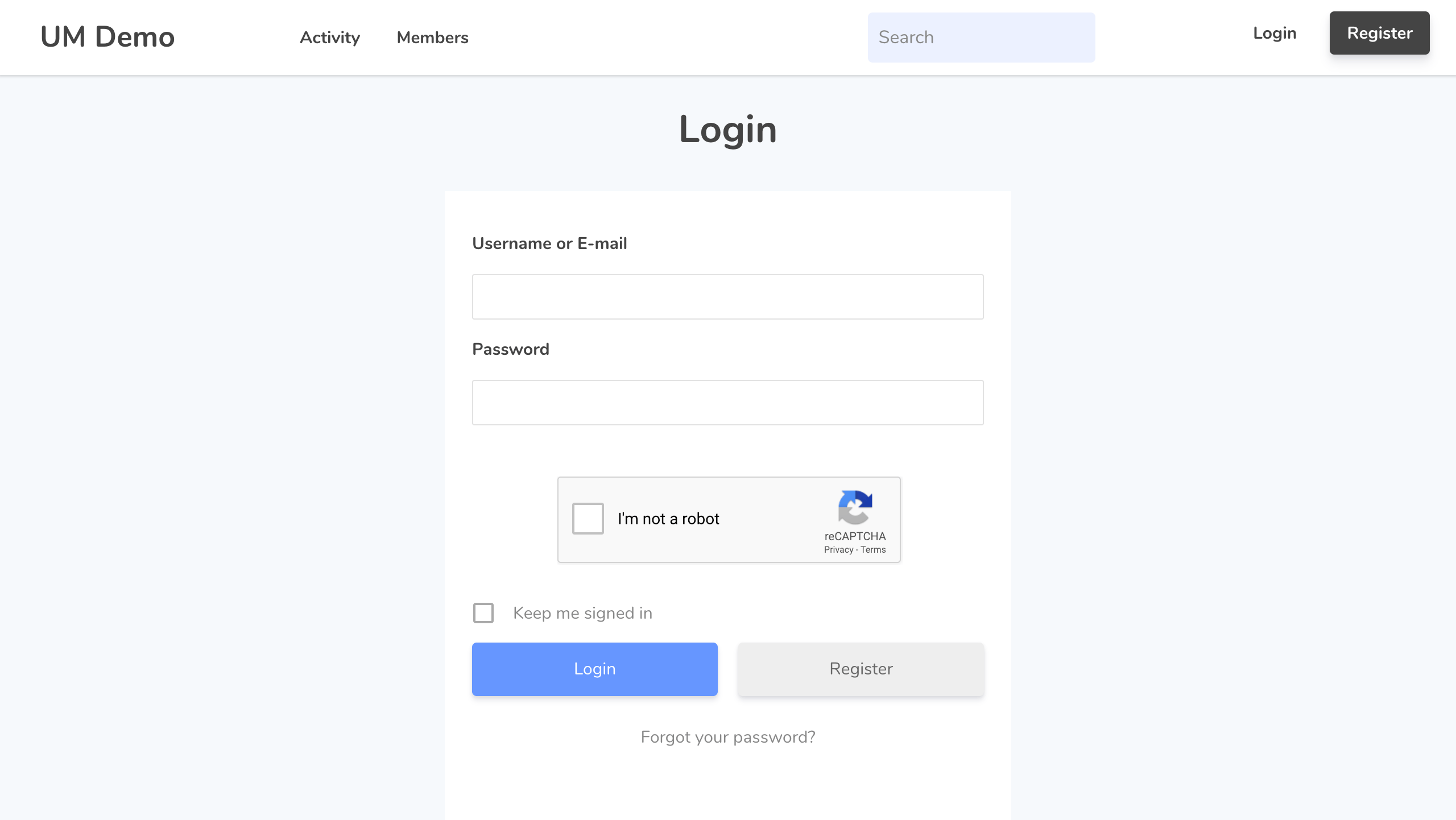
Registration and login happen entirely on the front-end. Users never touch the WordPress admin dashboard or the default wp-login.php page.
The login form includes username/email and password fields, a “Forgot your password?” link, and optional reCAPTCHA. Built-in anti-spam protection includes a honeypot field, a time delay on the submit button, and WordPress nonces.
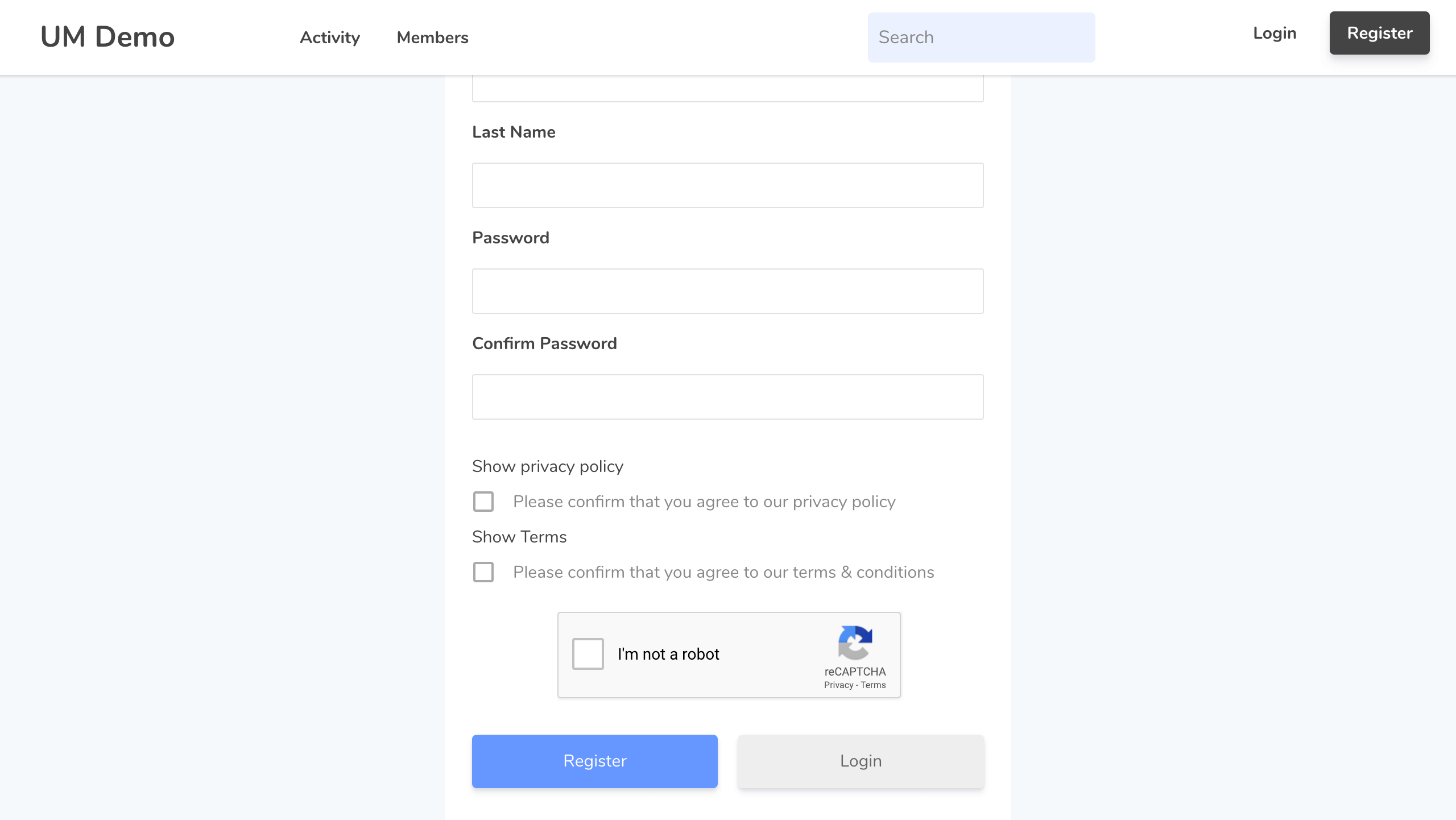
The registration form supports:
- Multiple forms for different user roles
- Role selection fields so users can pick their own role on sign-up
- Configurable registration status (auto-approve, email activation, or manual admin review)
- Redirect after registration (profile page or custom URL)
- Terms and conditions checkbox (via the free Terms and Conditions extension)
Drag-and-Drop Form Builder
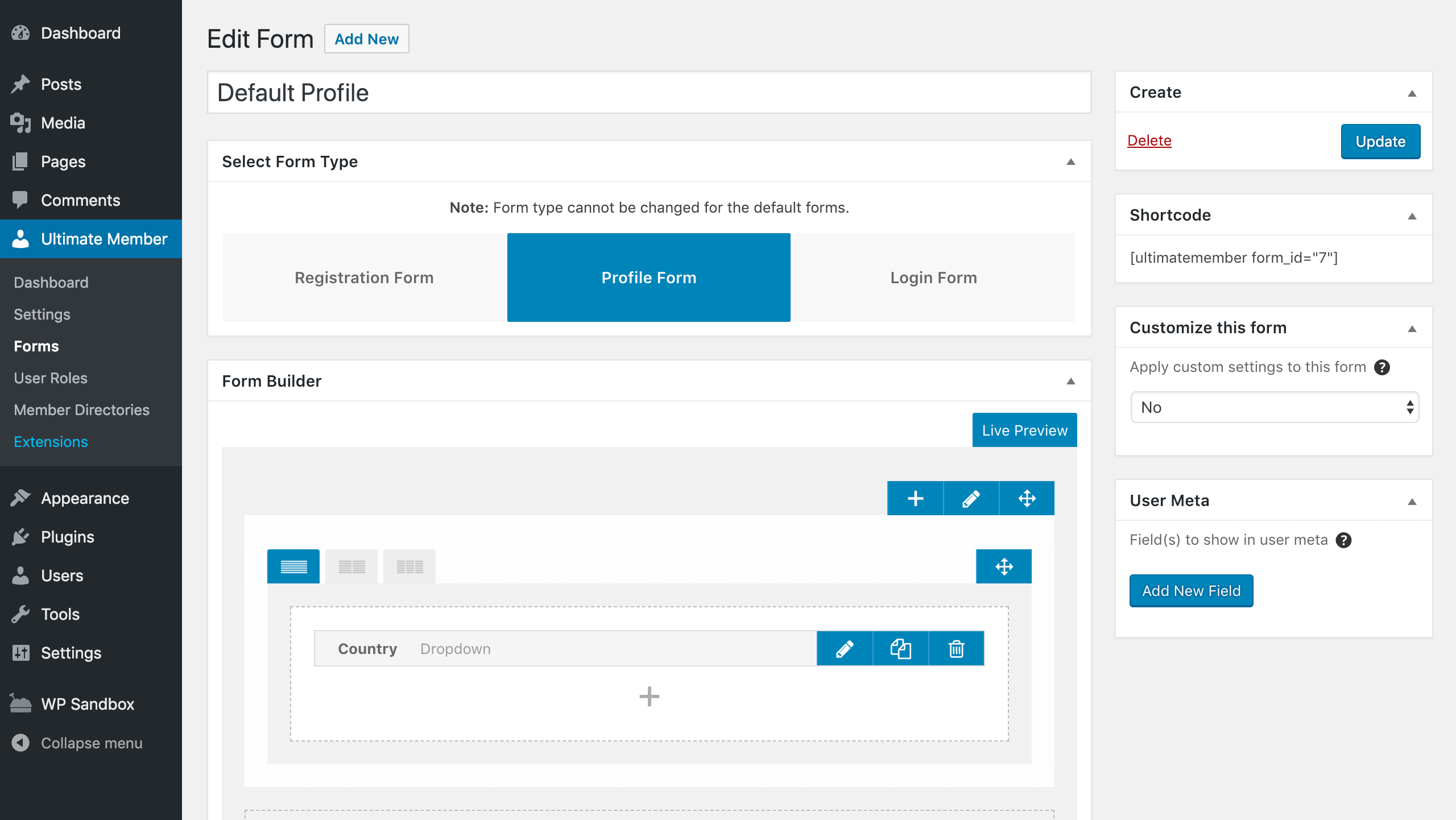
The form builder is where Ultimate Member genuinely shines. Every registration form, profile form, and login form is built visually inside the WordPress admin.
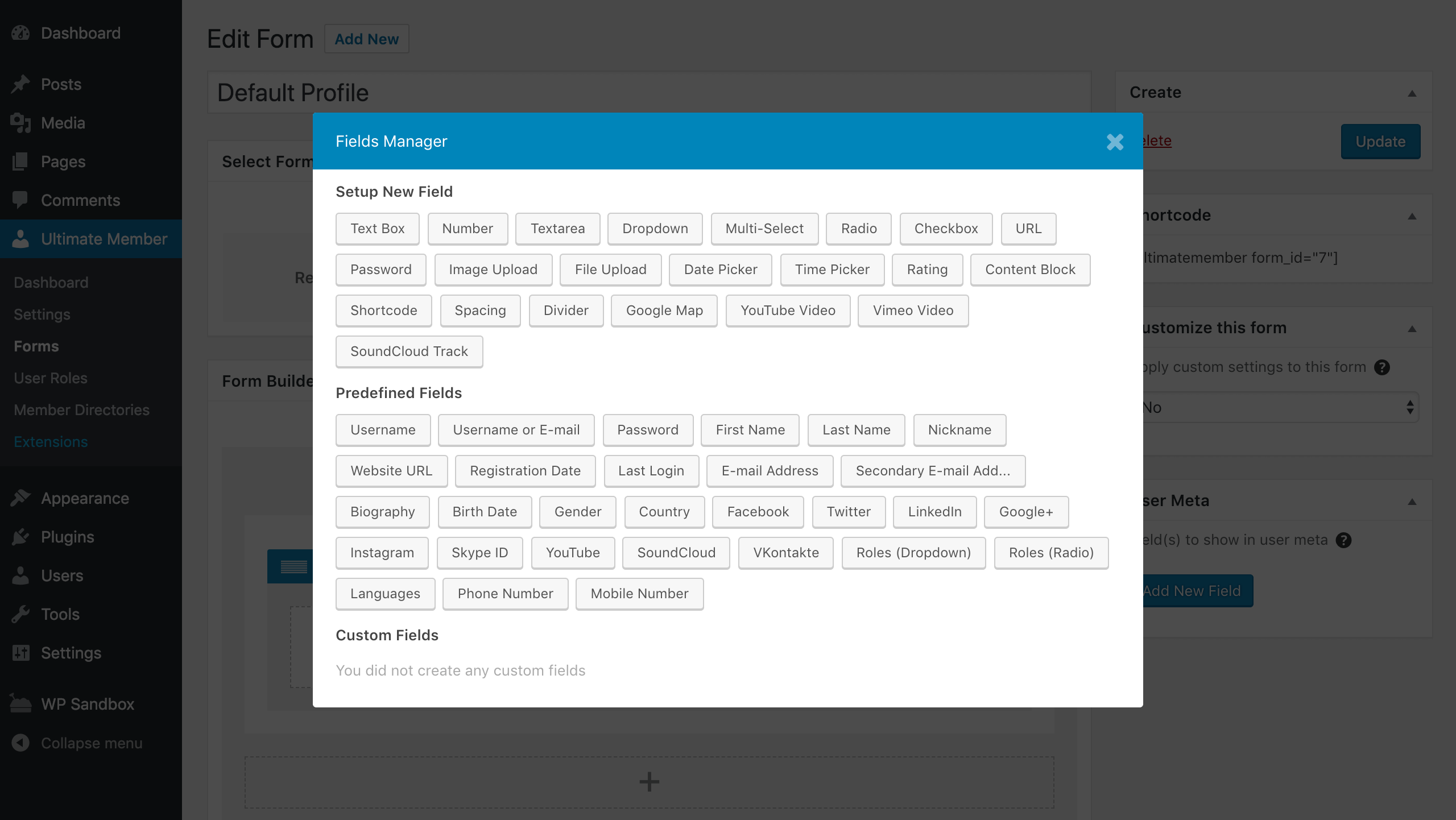
The Fields Manager shows all available field types grouped into three categories:
Custom field types (20+):
Text Box, Number, Textarea, Dropdown, Multi-Select, Radio, Checkbox, URL, Password, Image Upload, File Upload, Date Picker, Time Picker, Rating, Content Block, Shortcode, Spacing, Divider, Google Map, YouTube Video, Vimeo Video, SoundCloud Track
Predefined fields:
Username, First Name, Last Name, Email Address, Password, Biography, Birth Date, Gender, Country, Website URL, Registration Date, Last Login, Social profiles (Facebook, Twitter, LinkedIn, Google+, Instagram, Skype ID, YouTube, SoundCloud, VKontakte), Roles, Languages, Phone Number, Mobile Number
Custom fields: fields you define yourself, reusable across forms.
Each field has detailed settings: title, label, placeholder, meta key, help text, privacy control, default value, validation rules, length limits, visibility settings, whether it’s required, whether users can edit it, icon, and conditional logic support.
Conditional fields are included in the free version. You can show or hide fields based on the value of another field, which is useful for dynamic registration flows.
User Roles and Permissions
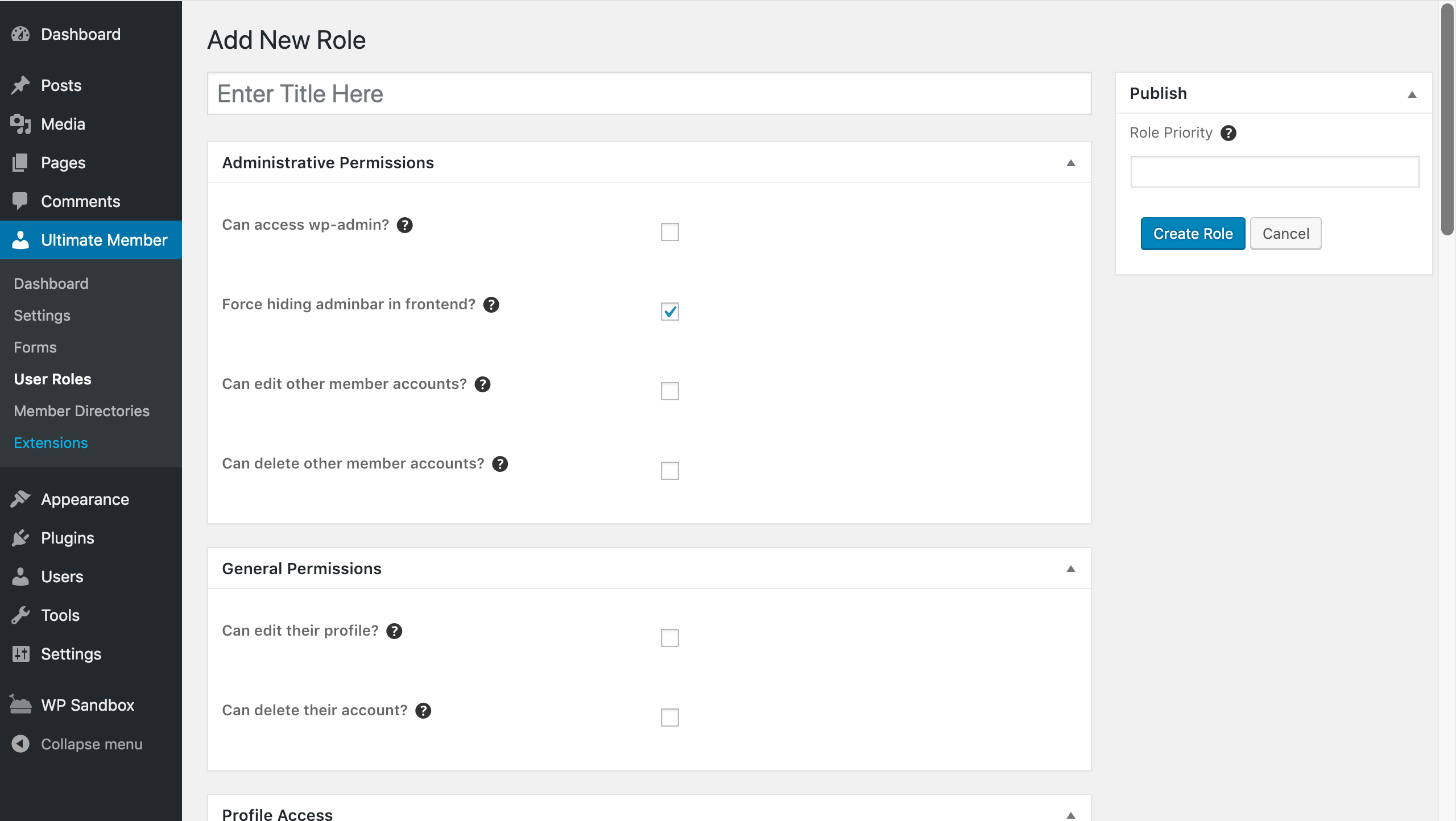
Ultimate Member replaces the default WordPress role system for front-end members. You create roles from scratch and configure each one individually.
Every role lets you set:
- Administrative permissions: Can access wp-admin? Can edit or delete other members?
- General permissions: Can edit their profile? Can delete their account?
- Profile access: Which roles can view this role’s profiles?
- Registration behavior: Auto-approve, email activation, or manual review
- Login redirect: Profile, custom URL, admin, or refresh current page
- Logout redirect: Homepage or custom URL
You can create multiple roles and assign a different registration form to each. This makes the plugin suitable for sites with distinct member types (for example, employers vs. job seekers, or patients vs. practitioners).
User Account Page
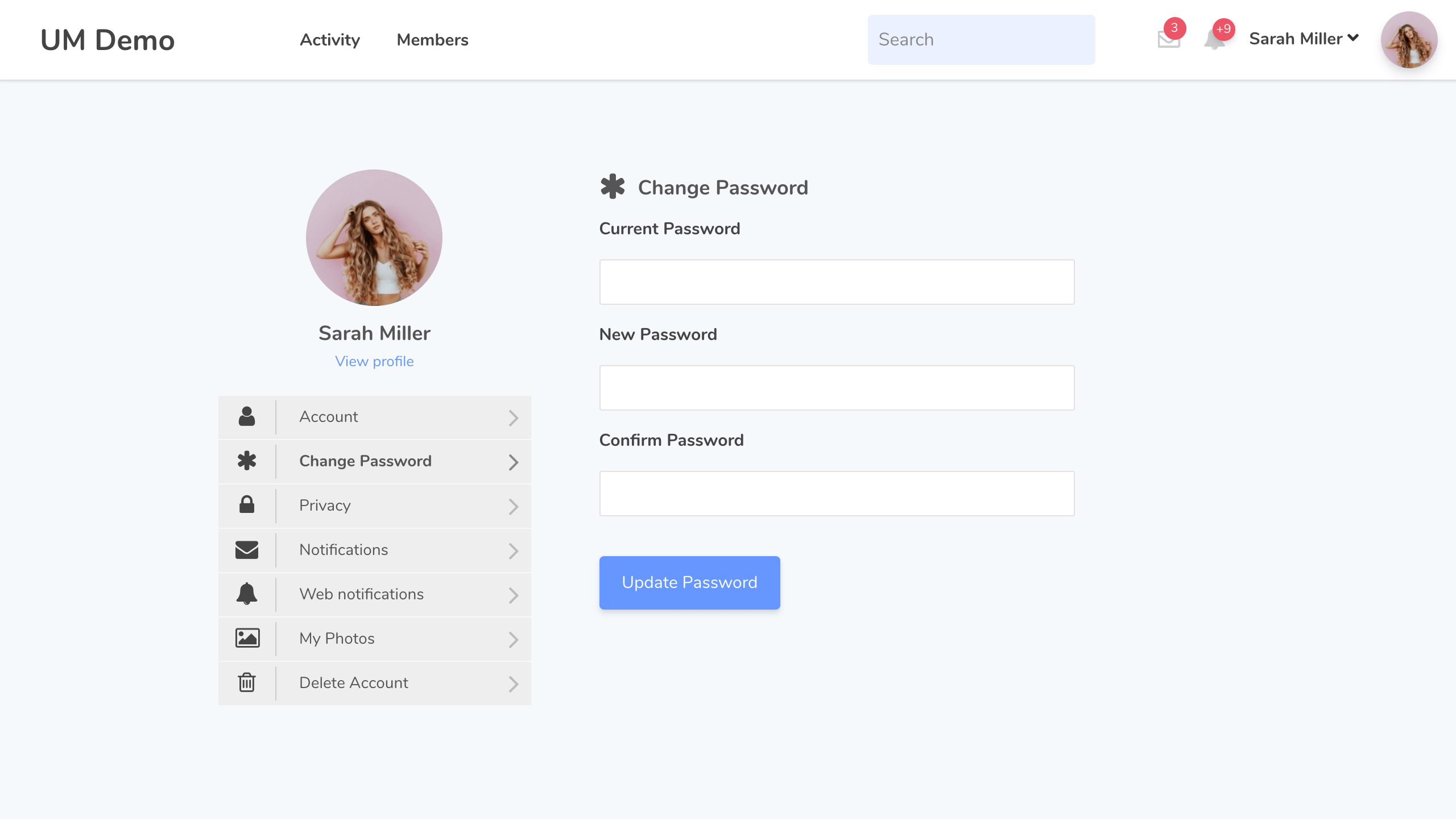
Every member gets an account management page on the front-end. The sidebar menu in the account area shows:
- Account (name and email)
- Change Password
- Privacy (make profile private, hide from directory)
- Notifications (with the Notifications extension)
- Web notifications
- My Photos (with User Photos extension)
- Delete Account
Users must enter their current password before changing to a new one. Account deletion also requires password confirmation. These are sensible security defaults.
Content Restriction
Access control works at two levels:
Global: Make the entire site accessible to everyone, or require login for all content.
Per post/page: Override the global rule on individual pages. You can restrict to logged-in users, to specific roles, or leave open for logged-out visitors. A redirect URL handles users who try to access restricted content without permission.
You can also control nav menu item visibility by role, so logged-out users never see member-only links.
User Emails
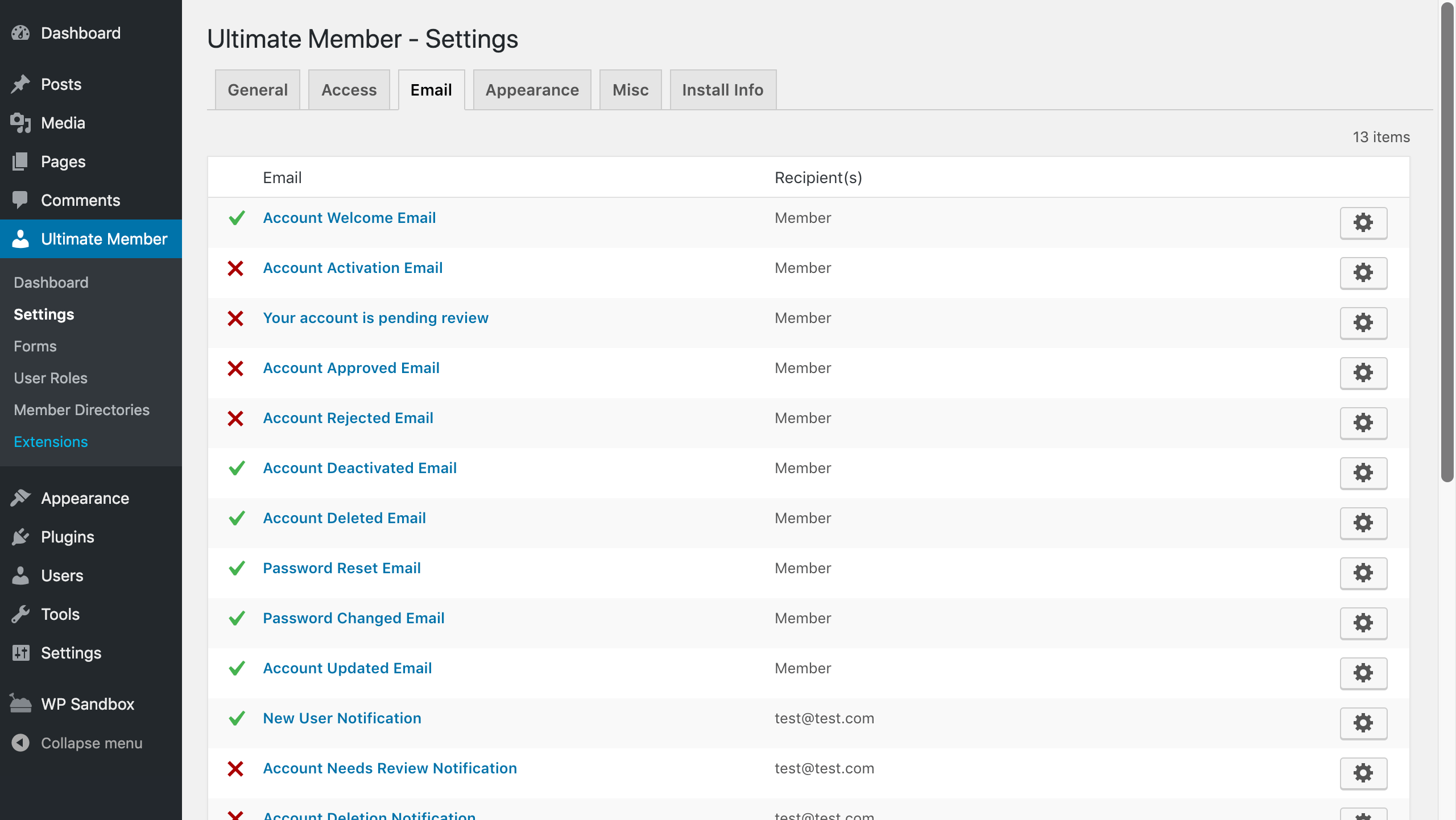
The plugin ships with 13 configurable email templates covering the full account lifecycle:
- Account Welcome Email
- Account Activation Email
- Account Pending Review
- Account Approved Email
- Account Rejected Email
- Account Deactivated Email
- Account Deleted Email
- Password Reset Email
- Password Changed Email
- Account Updated Email
- New User Notification (admin)
- Account Needs Review Notification (admin)
- Account Deletion Notification (admin)
Each template can be enabled or disabled independently. You edit the content and subject line from the admin. Templates are plain text/HTML, not a drag-and-drop email builder, which is functional but basic.
Paid Extensions
The free plugin covers the core membership use case well. Paid extensions layer on community and monetization features. All extensions are sold via annual plans or individually.
Standard Plan – $276/year (1 site)
Includes 21 extensions:
| Extension | What it does |
|---|---|
| Social Login | Login/register via Facebook, Google, LinkedIn, X, and more |
| Groups | Users create and join topic-based groups |
| Friends | Users send and accept friend requests |
| Followers | Users follow each other |
| Private Messages | Direct messaging between members |
| Real-time Notifications | In-site notification system |
| User Reviews | Members rate and review each other (5 stars) |
| User Tags | Tag system for member profiles |
| User Bookmarks | Members bookmark content on your site |
| User Photos | Members upload photo galleries to their profile |
| User Notes | Members create public and private profile notes |
| Private Content | Content visible only to the logged-in user who owns it |
| Profile Completeness | Encourage or require members to complete profiles |
| Verified Users | Admin-controlled account verification badges |
| User Locations | Members add location; display them on a map |
| Social Activity | Members create wall posts and see activity feeds |
| Notices | Conditional notices and alerts to users |
| Profile Tabs | Add custom tabs to user profiles |
| Online Users | Display currently online members |
| WooCommerce | Integrate membership with WooCommerce stores |
| MailChimp | Sync members to MailChimp lists on registration |
Free integrations also available: Terms and Conditions, Google reCAPTCHA, Unsplash, ForumWP, JobBoardWP, myCRED.
Pro Plan – $348/year (2 sites)
Everything in Standard plus:
- Stripe: Sell paid membership subscriptions directly via Stripe. Members pay to access gated content or roles.
- Zapier: Connect Ultimate Member to 7,000+ apps via Zapier triggers and actions.
- 2-site license instead of 1.
Individual Extension Pricing
Individual extensions can be purchased separately if you only need one or two. Per-extension prices are not listed on the main pricing page; check the Extensions page on the official site for current rates.
Pricing Summary
| Plan | Price | Sites | Extensions |
|---|---|---|---|
| Free | $0 forever | Unlimited | Core features only |
| Standard | $276/year | 1 | 21 extensions |
| Pro | $348/year | 2 | 21 extensions + Stripe + Zapier |
- Annual billing only. No monthly option. No lifetime license.
- 30-day money-back guarantee on paid plans.
- License includes 1 year of updates and email support.
- After 1 year without renewal, the plugin and extensions continue to work but stop receiving updates.
- Prices are in USD; taxes may apply.
The free core plugin has no user cap. Your cost does not rise as your community grows. That is a meaningful advantage over SaaS membership platforms that charge per member or per seat.
Pros and Cons
Pros
- Genuinely free core. User profiles, registration, login, member directories, content restriction, and a full form builder at zero cost.
- No per-user pricing. Unlike SaaS alternatives, your cost does not rise as your membership grows.
- 200,000+ active installs. One of the most widely used membership plugins on WordPress, with a track record going back to 2015.
- Rich field builder. 20+ field types, predefined social fields, conditional logic, and custom fields are all free.
- Flexible role system. Create multiple user roles with independent permission sets, registration flows, and redirects.
- Mobile responsive. Profiles, directories, and forms adapt cleanly to phone and tablet screens.
- Multi-site compatible. Works on both single and multi-site WordPress installations.
- Active development. The plugin received a security update in July 2026 and has a well-maintained changelog.
- Developer-friendly. Dozens of hooks and filters, published API documentation, and GitHub source access.
- 30-day money-back. Paid plans come with a no-questions-asked refund policy.
Cons
- Annual billing only. No monthly or lifetime option. The cost resets every year.
- Standard plan covers only 1 site. Two or more sites require the Pro plan at $348/year.
- Stripe and Zapier locked to Pro. If you need paid memberships via Stripe, the Standard plan falls short.
- Security patches needed regularly. Recent versions patched two CVE-listed vulnerabilities. Keeping it updated promptly is important.
- Email templates are basic. There is no drag-and-drop email editor; templates are plain HTML/text fields only.
- Extension updates require ongoing renewal. If you stop paying, extensions keep working but stop receiving security fixes and compatibility updates.
- $276/year feels steep for smaller sites. If you only need one or two extensions, check whether individual purchase costs less.
Alternatives to Ultimate Member
ProfilePress is the closest free-first alternative. It covers registration, login, user profiles, and content restriction. Paid tiers add WooCommerce and Stripe monetization. Worth comparing on pricing if Ultimate Member’s extension bundle feels like more than you need.
Paid Memberships Pro is better suited when the primary goal is selling memberships to access content or courses. It has a free core, strong WooCommerce integration, and a large add-on library. User profiles and community features are thinner than Ultimate Member.
BuddyBoss targets sites that need a full community platform from day one: activity feeds, groups, private messaging, and forums built in without extra extensions. It starts at $228/year (single site). The trade-off is a heavier footprint and higher minimum cost.
MemberPress is a premium-only plugin starting around $179/year. It excels at drip content, course access, and subscription management. It does not offer user profiles or member directories comparable to Ultimate Member.
Final Verdict
Ultimate Member earns its reputation as the leading free membership and user profile plugin for WordPress. The core is legitimately capable: you can build a real community site without spending anything, and the drag-and-drop form builder with conditional logic alone would justify the install on many projects.
The paid plans make sense if your site needs social features like Groups, Private Messages, or Followers, or if you need Stripe-powered paid memberships. At $276 to $348 per year, the pricing is reasonable for a site with active members and real revenue potential. It’s harder to justify for a small side project or early-stage community.
Watch the security update cadence. Ultimate Member has addressed multiple CVEs in recent versions. None of the issues are reasons to avoid the plugin, but keeping it updated promptly matters more here than with some alternatives.
For most WordPress sites starting a membership or community feature from scratch, Ultimate Member is the right first plugin to evaluate.