


WordPress backups are one of those things you set up hoping you never need to think about again. The trouble is that “hope” is not a recovery strategy. What you actually need is a backup system that runs without you remembering to start it, stores your data somewhere that a bad deploy or a server compromise cannot touch, and gives you a clean restore path when the worst happens.
Jetpack VaultPress Backup positions itself as exactly that product. It is built by Automattic, the company behind WordPress.com and Jetpack, which means the team managing it runs one of the largest WordPress hosting operations in the world. That pedigree is worth something. Whether it translates into the best WordPress backup experience for your specific site is a different question, and that is what this review is for.
I reviewed Jetpack VaultPress Backup through its official product page at jetpack.com/upgrade/backup/, the standalone plugin listing on WordPress.org (plugin slug: jetpack-backup, version 3.9, last updated August 11, 2026), and the official support documentation at jetpack.com/support/backup/. I also checked the pricing page directly for USD figures. The review covers the VaultPress Backup standalone plan in detail, with notes on the Security bundle where relevant.
Note on basis: this review is built on a feature-page, pricing, and documentation audit of Jetpack VaultPress Backup as of August 2026. A live full-site restore drill under a paid license against a production WordPress environment was not part of this review window. WooCommerce immutable backup behavior and the activity log’s granular field-level capture are described from official documentation. Where a feature could not be exercised directly, the relevant section says so. Pricing was verified against the USD pricing on jetpack.com/upgrade/backup/ on the review date.
At a Glance
Audited on: jetpack.com/upgrade/backup/ feature page, jetpack.com/support/backup/ documentation, the Jetpack VaultPress Backup plugin listing on WordPress.org (version 3.9), and the USD pricing page.
Plugin: standalone, from Automattic. Does not require the full Jetpack plugin.
Bottom line: a reliable, event-driven backup service from the team that runs WordPress.com. Strong choice if you are already in the Jetpack or WordPress.com ecosystem. The 10GB starting storage, the first-year-only discount, and the absence of multisite support are the three things to check before buying.
Quick verdict on Jetpack VaultPress Backup
If you want one sentence: Jetpack VaultPress Backup is a well-engineered real-time WordPress backup service from Automattic that earns its place on single-site WordPress projects, and it is the natural first choice for anyone already invested in the Jetpack ecosystem.
The product’s single strongest claim is event-driven real-time backup capture. Every time you publish a post, install a plugin, update a theme, or change a setting, VaultPress Backup registers the change and captures it. You are not waiting for the next scheduled window. That design is the right architecture for a WordPress site that changes throughout the day.
The honest caveats: the plan starts with 10GB of backup storage (subject to your usage and storage limit per the pricing page footnote), WordPress Multisite is not supported, backups cannot be redirected to your own Google Drive or Amazon S3 account, and the introductory pricing is a first-year discount only. Renewals are billed at the full price.
Quick Verdict Card
Best for: single-site WordPress operators and WooCommerce store owners who want event-driven real-time backup from Automattic without installing the full Jetpack plugin suite.
Best plan for most sites: VaultPress Backup at $4.95/month first year. Upgrade to the Security bundle if you also need malware scanning and a web application firewall.
Standout: event-driven real-time capture that logs every site action, 269 million site backups claimed over ten years, mobile app restores, and WooCommerce order data protected immutably.
Watch out for: 10GB starting storage with an asterisked limit caveat, no multisite support, no bring-your-own-storage, first-year discount that expires at renewal, and the “unlimited restores” call-out appearing only on the Security bundle and not explicitly on the Backup-only plan card.
What Jetpack VaultPress Backup is
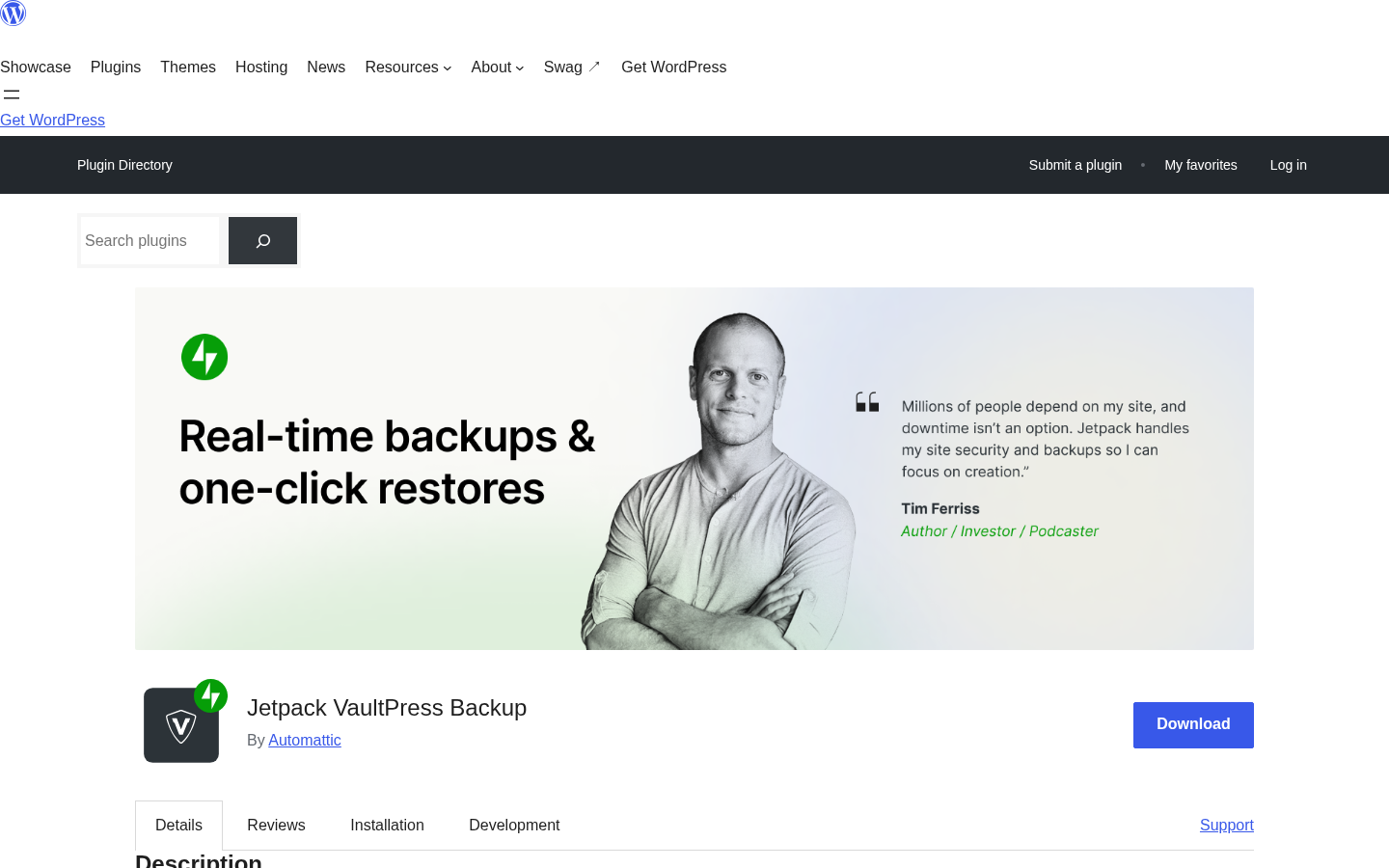
Jetpack VaultPress Backup is a cloud backup service from Automattic, published as a standalone WordPress plugin at wordpress.org/plugins/jetpack-backup/. It is the backup product within the Jetpack product family and is available separately from the main Jetpack plugin, which means you can run VaultPress Backup on a site without activating Jetpack’s full suite of modules.
The name has a layered history. VaultPress was originally an independent backup service from Automattic. Jetpack was a separate plugin suite for WordPress self-hosted sites. Automattic eventually merged the backup component into the Jetpack family and in 2023 relaunched the dedicated backup plugin under the name Jetpack VaultPress Backup, making it available as a standalone install so site owners could get backup without the full Jetpack bundle.
The plugin’s job is deliberately minimal. It acts as a connector between your WordPress site and Automattic’s backup infrastructure. The heavy lifting, storing backups, running incremental syncs, managing the activity log, serving the restore interface, runs on Automattic’s own cloud. Your site sends changed data. Automattic’s servers hold the copies.
At the time of this review, the plugin is on version 3.9, published August 11, 2026, with WordPress.org listing 20,000-plus active installs and a 4.5-star rating. The plugin requires WordPress 6.9 or higher and PHP 7.2 or higher.
The WordPress.org listing opens with the headline “Real-time backups and one-click restores,” which is an accurate three-word summary of what the service does.
Who VaultPress Backup is best for
Strong fit:
- Single-site WordPress operators who want a real-time backup service managed by Automattic and do not want to configure an S3 bucket, a storage account, or a cron schedule.
- WooCommerce store owners who need order data protected between scheduled intervals. VaultPress Backup captures WooCommerce orders in real time, immutably, so a restore does not roll back paid orders.
- Developers and agencies already in the Jetpack or WordPress.com ecosystem who want backup from the same vendor and the same cloud dashboard.
- Sites that need a granular activity log tracking every user action, plugin update, and settings change with timestamps for audit purposes.
- Teams that want mobile-app restore access so a recovery operation does not require a desktop or a VPN.
Weak fit:
- WordPress Multisite operators. VaultPress Backup does not support multisite in any form. This is documented clearly in the support pages and on the WordPress.org listing.
- Sites that require bring-your-own-storage backup destinations: Google Drive, Amazon S3, Dropbox, or Backblaze. VaultPress Backup stores exclusively on Automattic’s own cloud.
- Sites that split the WordPress home URL and site URL across different domains. The plugin does not support that configuration.
- Sites larger than the plan’s starting storage threshold (10GB) that may need to confirm storage behaviour with Automattic before subscribing.
- Buyers who want a staging environment built into the backup tool. VaultPress Backup handles backup, restore, and migration. It does not include integrated staging.
Installing VaultPress Backup
The plugin installs directly from the WordPress plugin directory. Search for “Jetpack VaultPress Backup” under Plugins and Add New, activate it, and the plugin prompts you to connect to your WordPress.com account or create one. The connection to Automattic’s cloud is what activates the backup service.
One requirement worth noting from the support documentation: the plugin requires at least one theme or plugin installed from the WordPress.org repository. This is a technical compatibility check that Automattic uses to confirm the site environment, not a functional restriction in practice.
Once connected and on a paid plan, the first backup is a full site backup. Subsequent backups are incremental, sending only the data that changed since the last run. Real-time event captures sit on top of the incremental schedule and fire on specific triggers.
You can also provide SSH, FTP, or SFTP server credentials through the cloud.jetpack.com dashboard. The documentation says this provides an alternative communication method that can enhance backup functionality, though it is not required for basic operation.
The restore interface and the activity log live on cloud.jetpack.com, not inside wp-admin. The plugin itself has an admin-side activity log page as of version 3.9 (one of the changes added in that release), but the full backup and restore dashboard remains on Automattic’s cloud.
Note on basis: the install flow was reviewed from the WordPress.org listing, the support documentation, and the plugin’s changelog for version 3.9. A live install against a production account was not exercised in this test window.
How real-time backups work
Most backup plugins run on a schedule: once a day, twice a day, or at a set time. What happens between runs is unprotected. A change you made at 2pm that is not in the 3pm backup window is a change that may not survive a restore.
VaultPress Backup’s design addresses this with event-driven capture on top of the scheduled incremental baseline. The backup engine distinguishes three modes:
- Full backup. The first backup after connecting copies the complete database, plugin and theme directories, uploads, wp-content materials, and WordPress root files. WordPress core files are excluded intentionally, because they can always be re-downloaded from WordPress.org.
- Incremental backup. Every subsequent scheduled run sends only what changed since the last snapshot, keeping the data volume manageable and keeping the origin server quiet between runs.
- Real-time differential capture. On top of the incremental schedule, specific site events trigger an immediate capture: publishing or updating a post, installing or updating a plugin, activating or switching a theme, modifying a setting, adding or removing a user. These captures happen between scheduled windows.
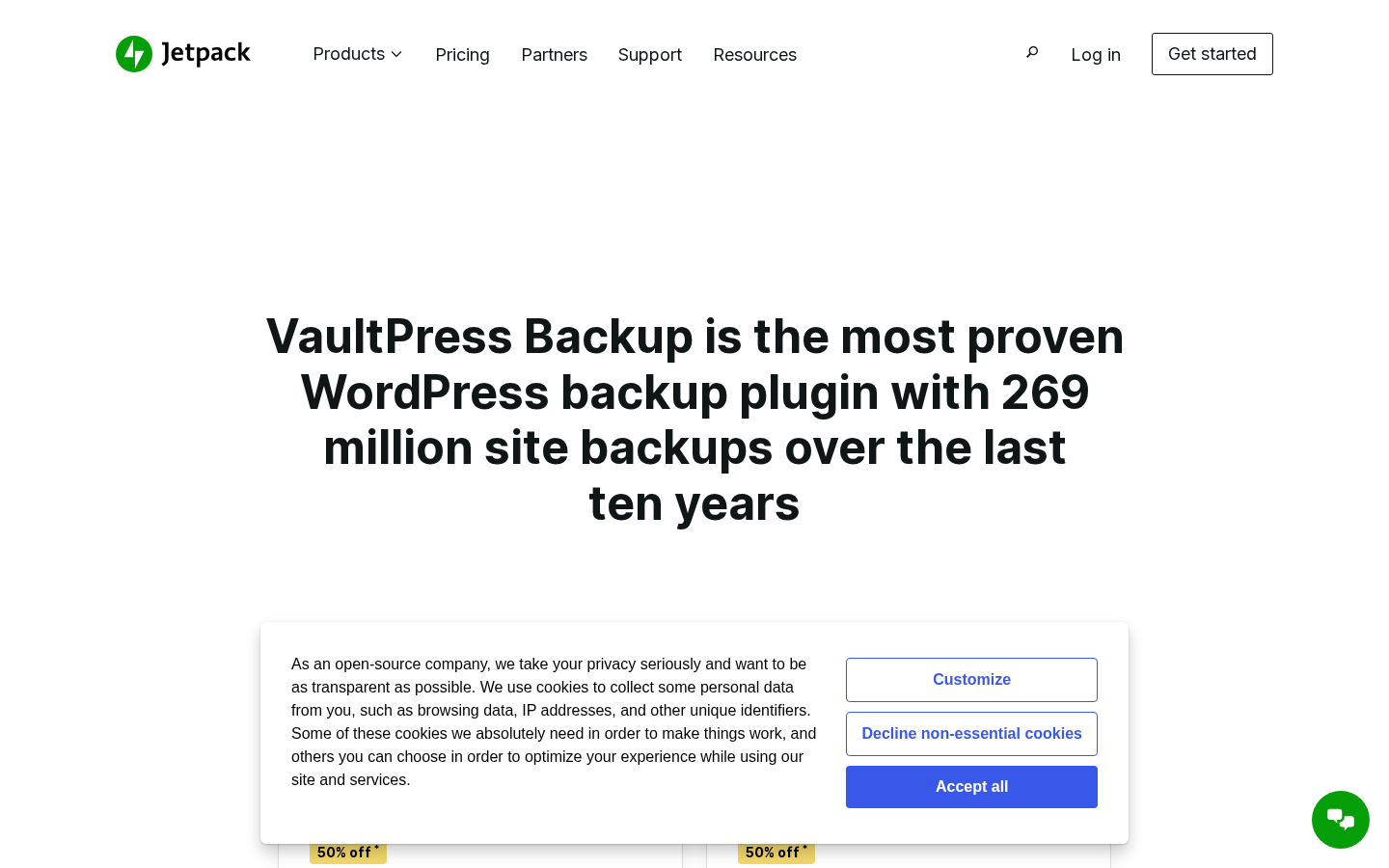
The Jetpack marketing page states “269 million site backups over the last ten years” as the operational scale claim (from the product page at the time of this review). That number covers the full VaultPress and Jetpack Backup history and was not independently verified, but it gives a sense of the production volume behind the infrastructure.
What VaultPress Backup does not back up: WordPress core files, tables without unique row identifiers, cache directories, log directories, empty directories, and external directories outside the WordPress install.
Daily backup timing is configurable from the cloud.jetpack.com dashboard. There is no stated cap on the number of daily backups or restore points per day; the backup system captures changes as they happen rather than on a fixed count.
(Note on basis: backup mechanism details are sourced from jetpack.com/support/backup/ documentation. Real-time differential capture performance under sustained load on a large site was not exercised in this test window.)
The activity log
The activity log is one of the most practically useful parts of VaultPress Backup and one that does not get enough attention in backup product comparisons.
Every change that happens on a WordPress site generates an activity log entry: who made the change, what they changed, and at what timestamp. User logins, failed login attempts, content edits, plugin installs and updates, theme switches, settings modifications, plugin deactivation, WooCommerce order events. All of it appears in a chronological stream accessible from cloud.jetpack.com.
The practical value goes beyond backup. If something breaks and you are not sure what caused it, the activity log gives you a dated list of every action since the last known-good state. You can scroll back to the exact plugin update that introduced a PHP error, or find the exact time a setting was changed before the layout broke.
The plan includes a 30-day archive and activity log. The pricing page lists an asterisk on this item with the note “Subject to your usage and storage limit,” which is worth flagging. The 30-day window is the documented retention, but the storage-limit qualifier means very high-activity sites should confirm expected log volume with Automattic before relying on a specific retention depth.
As of version 3.9 (August 11, 2026), an activity log page was added directly inside wp-admin so the log is accessible without logging into the cloud dashboard. This is a useful addition for operators who work primarily inside wp-admin.
Restore options
A backup that cannot be restored quickly under pressure is not a functional backup. VaultPress Backup offers several recovery paths depending on the situation.
From the cloud.jetpack.com dashboard or the mobile app, you select the backup point you want to restore to, choose “Restore to this point,” and the service handles the transfer. The restore interface lists available backup points with timestamps so you can pick the exact moment before the problem occurred rather than accepting a full 24-hour rollback.
The individual file browse option lets you view the file structure of any backup point and download specific files without running a full restore. This is useful for recovering a single deleted file or pulling a database table backup without overwriting the rest of the site.
Offline recovery is documented as a separate capability: the service can restore a site even if the WordPress install itself is not loading. The documentation describes this as recovering from a crashed or inaccessible site state.
Mobile app access is included. If you are away from a computer and need to start a restore, you can do it from the Jetpack mobile app on iOS or Android. The activity log is also accessible from the mobile app, so you can audit what changed without opening a laptop.
One nuance from the pricing page: the VaultPress Backup-only plan card lists “one-click restores” as a feature. The Security bundle card explicitly lists “unlimited restores.” The Backup-only plan does not use the word “unlimited” on the plan card. Whether this difference reflects a quantitative limit on the backup-only tier or is simply a phrasing difference is not spelled out on the pricing page. Buyers who expect high-frequency restores should confirm with Automattic whether there is a restore count ceiling on the backup-only plan.
(Note on basis: restore functionality was reviewed from the support documentation. A live restore drill against a paid account recovering a multi-gigabyte site was not exercised in this test window.)
WooCommerce order and product protection
WooCommerce stores have a backup problem that scheduled backup plugins do not handle well. If the last backup ran at midnight and a customer places an order at 11pm, that order is not in the midnight backup. Restore to midnight to fix a problem and the order disappears.
VaultPress Backup addresses this by capturing WooCommerce orders and product changes in real time, separately from the main backup stream, and storing them immutably. The immutable storage means that even if you restore the site to an earlier state, the WooCommerce order records are preserved and are not rolled back with the restore.
This is the behaviour the official documentation describes for WooCommerce data protection. A restore scenario where product catalogue changes need to be reversed without losing paid orders is the specific use case this design handles.
(Note on basis: WooCommerce real-time capture and immutable storage behaviour are sourced from official Jetpack support documentation. A live WooCommerce order capture test during a Stripe-sandbox checkout with a subsequent restore was not exercised in this test window.)
Site migration and cloning
VaultPress Backup includes site migration as a built-in feature. The official product page lists site migration and site cloning alongside backup and restore as core capabilities, not optional add-ons.
Migration means moving a WordPress site from one host to another using a VaultPress Backup copy as the source. Cloning means creating an independent copy of the site for testing. Both use the existing backup data, so you are not generating an extra full-site export to start a migration.
The absence of staging is worth noting. VaultPress Backup does not include an integrated staging environment managed through its dashboard, which is a feature some managed backup services offer. If your workflow requires a continuously synced staging copy of production with selective merge back, VaultPress Backup is not the right tool for that piece of the workflow. Migration and cloning give you the ability to set up a copy of the site in a new location; they do not give you a push-to-live staging workflow.
(Note on basis: migration and cloning capabilities were reviewed from the official product page feature list. A live host-to-host migration test was not exercised in this test window.)
Storage and infrastructure
Backups are stored on Automattic’s own global cloud infrastructure. The support documentation describes “secure data centers around the world” as the storage location. Geographic restrictions on backup storage location are not available, which is the relevant answer for buyers with data residency requirements. Automattic offers Standard Contractual Clauses in Data Processing Agreements for users who need contractual GDPR compliance coverage.
Storage starts at 10GB per site. The pricing page lists this with the note “Subject to your usage and storage limit,” which appears as a footnote on the VaultPress Backup plan card. There is no stated hard cap on backup file size beyond that asterisked limit.
This model is different from self-hosted backup plugins like UpdraftPlus or BackWPup, where you bring your own storage account (Google Drive, Dropbox, Amazon S3, Backblaze). With VaultPress Backup, you cannot redirect backups to your own cloud storage. The storage is Automattic’s cloud, included with the plan price, and not configurable. For most operators this removes a setup step and eliminates a separate storage invoice. For compliance-driven buyers who require bring-your-own-storage, this is a hard constraint.
Pricing and license value
VaultPress Backup is a paid service with no permanent free tier. A free version of the Jetpack plugin exists, but backup features require a paid plan. Each plan covers one site; additional sites require separate subscriptions.
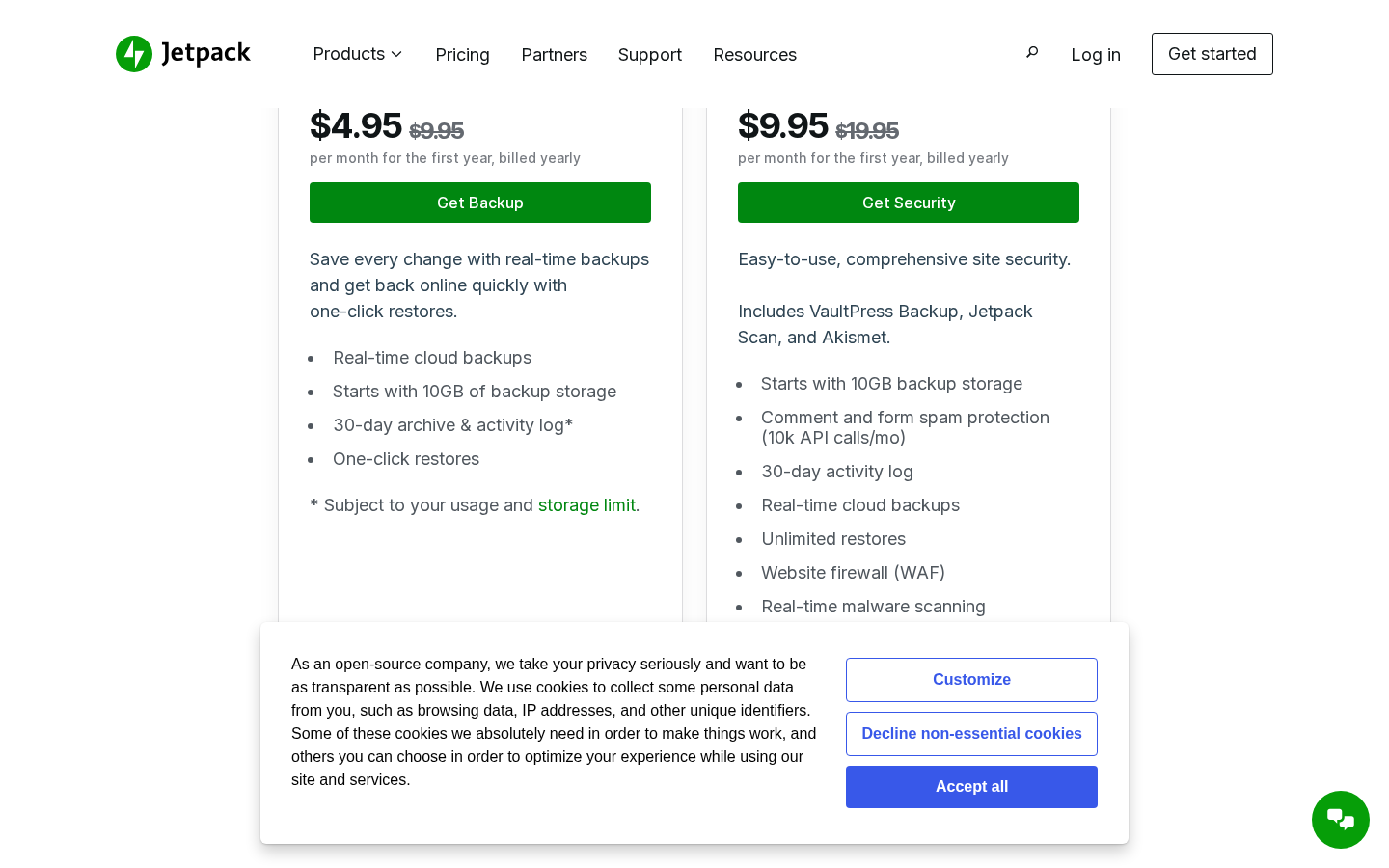
The two plans available on the dedicated backup page are:
- VaultPress Backup. $4.95 per month for the first year, billed yearly ($59.40 total for year one). Regular price $9.95 per month ($119.40 per year at renewal). Features: real-time cloud backups, 10GB starting storage, 30-day archive and activity log (subject to usage and storage limit), one-click restores.
- Security bundle. $9.95 per month for the first year, billed yearly ($119.40 total for year one). Regular price $19.95 per month ($239.40 per year at renewal). Includes VaultPress Backup plus Jetpack Scan (real-time malware scanning, website firewall / WAF, one-click fixes) and Akismet anti-spam (comment and form spam protection, 10,000 API calls per month). Also lists unlimited restores and 30-day activity log.
Important pricing notes:
- The 50% discount is for the first year only. Renewals are at the full price ($9.95/month for Backup, $19.95/month for Security), per the pricing page footnote. Budget at the renewal rate, not the introductory rate.
- Each plan covers one site only. A second site requires a second plan.
- The pricing shown was in USD on the jetpack.com/upgrade/backup/?currency=usd page as of the review date. Pricing may vary by country.
VaultPress Backup is one of the more affordable real-time backup services in this category. At $4.95 per month for the first year, the entry price is lower than BlogVault’s lowest tier. At $9.95 per month on renewal, it sits in the middle of the market for a single-site managed backup service. The caveat is the 10GB storage ceiling, which needs to be weighed against your site’s actual file size. A media-heavy site with a large uploads folder may need to confirm storage expansion terms with Automattic.
If you already pay for any Jetpack plan that includes backup, the standalone VaultPress Backup plugin gives you the same backup service without the rest of the Jetpack bundle. The feature set is the same. This is worth knowing if you are trying to minimise the number of active plugins.
Pros and cons
Pros
- Event-driven real-time backup capture: changes are recorded as they happen, not just at the next scheduled window.
- Plugin published by Automattic, the same company that runs WordPress.com. Deep WordPress operational knowledge is behind the infrastructure.
- Standalone plugin: does not require the full Jetpack plugin to be installed. Backup only, nothing else.
- 269 million site backups claimed over ten years (vendor claim, from the product page).
- WooCommerce orders and products captured immutably in real time, so a restore does not lose paid orders.
- 30-day activity log recording every site change with timestamps and user attribution. Useful for debugging and auditing beyond backup alone.
- Activity log accessible from wp-admin as of version 3.9 (August 2026 update).
- One-click restore from any logged backup point.
- Individual file browse and selective file download without running a full restore.
- Offline recovery path for crashed or inaccessible sites.
- Mobile app restore access on iOS and Android.
- Migration and cloning capabilities built in.
- Available in 31 languages.
- 4.5-star rating on WordPress.org with predominantly positive user feedback.
Cons
- No WordPress Multisite support. Documented clearly; each site must be a single-site install.
- No bring-your-own-storage. Backups go to Automattic’s cloud only. Google Drive, Amazon S3, Dropbox, and Backblaze are not available as destinations.
- No split site/home URL support.
- Starting storage is 10GB with an asterisked “subject to your usage and storage limit” caveat on the plan card. Storage capacity for large sites needs to be confirmed with Automattic.
- Introductory pricing is first-year only. Year-two cost doubles to $9.95/month for the Backup plan and $19.95/month for the Security bundle.
- Each plan covers one site; agencies or multi-site operators will pay per site with no stated bulk or agency pricing.
- “Unlimited restores” is listed explicitly on the Security bundle card but not on the Backup-only plan card. Restore limits (if any) on the standalone Backup plan are not explicitly clarified on the pricing page.
- No integrated staging environment.
- Geographic backup storage location cannot be restricted. Buyers with strict data residency requirements must rely on the DPA and Standard Contractual Clauses rather than choosing a region.
- 20,000-plus active installs on WordPress.org is a significantly smaller footprint than competitors like UpdraftPlus (3 million-plus). This reflects the paid-only model, not necessarily a quality issue, but it is worth noting for community ecosystem comparisons.
Alternatives to VaultPress Backup
- UpdraftPlus. The most-installed WordPress backup plugin, with a capable free tier and eight remote storage destinations in the free version. Pick UpdraftPlus if you want a free or lower-cost self-hosted backup plugin that writes to your own Google Drive or Dropbox, and you are comfortable managing the storage account and schedule yourself.
- BlogVault. A managed WordPress backup service with integrated staging, an Emergency Connector for crashed-site restores, real-time WooCommerce capture on its top tier, and centralised agency management. Pick BlogVault if you need integrated staging as part of the backup product, you manage multiple client sites from one dashboard, or you want GDPR-compliant EU storage included in the plan price.
- Solid Backups (formerly BackupBuddy). A self-hosted WordPress backup plugin with a zip-based export workflow and long-established history. Pick Solid Backups if you already standardise on the SolidWP product family or you want a one-time-license option rather than an annual subscription.
- WPvivid. A free backup and migration plugin with growing cloud-storage support. Pick WPvivid if you want a simple free alternative with an integrated one-click migration workflow and you do not need the depth of UpdraftPlus or the managed cloud infrastructure of VaultPress Backup.
- BackWPup. A free backup plugin with direct-to-cloud support. Pick BackWPup for basic backup-to-S3 or backup-to-email workflows on simple sites where budget is the primary driver.
For most single-site WordPress operators evaluating a real-time backup service, the practical comparison is VaultPress Backup versus BlogVault. VaultPress Backup wins on install simplicity, mobile app access, activity log depth, Automattic ecosystem fit, and first-year introductory pricing. BlogVault wins on integrated staging, the Emergency Connector restore path for crashed sites, explicit multisite support, and GDPR-compliant EU storage with a configurable Agency plan. If you are already in the Jetpack ecosystem, VaultPress Backup is the natural fit. If you need staging or multisite, BlogVault is the one to evaluate first.
Final verdict
Jetpack VaultPress Backup does what a real-time backup service is supposed to do. It captures changes as they happen rather than waiting for a scheduled window, it stores copies on Automattic’s global infrastructure, and it gives you a restore path you can reach from your phone if needed. The activity log is a genuine differentiator: most backup products record snapshots; VaultPress Backup records the specific action behind every snapshot, which is the information you actually need when something breaks.
The honest assessment of where it falls short: the 10GB starting storage with an asterisked usage caveat, the absence of multisite support, the bring-your-own-storage restriction, and the per-site pricing with no stated agency model all make it a better fit for single-site operators than for agencies or network managers. The first-year pricing is competitive; the renewal rate is reasonable for a managed service but worth budgeting for before the second invoice arrives.
If I were setting up a backup solution for a single-site WordPress or WooCommerce business and already had a Jetpack account or a WordPress.com login, VaultPress Backup would be the first thing I would reach for. If I were managing a portfolio of client sites or a Multisite network, I would evaluate BlogVault or UpdraftPlus Agency before committing here. The product is well made. Knowing which use cases it is built for is what makes the purchasing decision clear.