


Wordfence is the most-installed WordPress security plugin in the world, with over 5 million active sites running it. That figure is not a marketing claim pulled from a press release. It is on the plugin’s WordPress.org listing page, where it also shows 4.7 stars across nearly 5,000 reviews and a download count that crossed 419 million by mid-2026. For a plugin to reach those numbers over more than a decade, it needs to be doing something right.
What Wordfence does right is combining three things that most competing plugins separate: a web application firewall, a malware scanner, and login security tools, all inside a single free plugin install. That combination, powered by the company’s proprietary Threat Defense Feed, is the core reason Wordfence became the default security plugin recommendation for WordPress site owners who want real protection rather than a settings page that looks busy.
The tradeoffs matter as well. The free version carries a 30-day delay on its firewall rules and malware signatures, which means your site is always running last month’s threat intelligence. The plugin is endpoint-based, meaning it runs inside WordPress rather than filtering traffic before it reaches your server, which creates a heavier server footprint than alternatives like Sucuri or Cloudflare. And the gap between the free tier and the first paid plan ($149/year) is wider in feature terms than some buyers expect.
This review covers the plugin’s features, pricing structure, and how it compares to the alternatives you are most likely to be weighing against it.
How I reviewed this plugin: I reviewed Wordfence version 8.2.2 (current as of August 2026) by auditing the WordPress.org plugin listing, the full changelog from v8.0 through v8.2.2, the live Wordfence pricing page, the official products page at wordfence.com, and all nine official screenshots from the WordPress.org listing. I attempted to install the free plugin in a WordPress sandbox environment using WordPress Playground (playground.wordpress.net) in a headless browser. However, WordPress Playground crashed consistently during Wordfence’s activation step across multiple test configurations, which Wordfence’s own complex activation hooks appear to be incompatible with the WASM environment. Other sandbox routes (TasteWP, local PHP) were unavailable in the test environment. Where this review describes UI behavior, it is sourced from official first-party screenshots and documentation rather than a live install.
At a glance
Plugin version reviewed: 8.2.2 (released May 13, 2026)
Active installs: 5 million-plus
WordPress.org rating: 4.7/5 from 4,967 reviews
PHP requirement: 7.0 or higher
WordPress requirement: 4.7 or higher (tested to 7.0.2)
Company: Defiant Inc. (founded by Mark Maunder)
Plans: Free, Premium ($149/year), Care ($590/year), Response ($1,250/year)
Quick verdict
If you want one sentence: Wordfence is the strongest free security plugin available for WordPress, and the only free option that combines a real WAF with a malware scanner, but the free version’s 30-day threat delay is a genuine limitation for any site that handles user accounts, transactions, or sensitive data.
The free version gives you more than most plugins charge for. The paid plans scale from a self-managed premium upgrade at $149/year to a fully managed security service with 24/7 incident response at $1,250/year. Very few WordPress security products offer that range from a single provider.
Quick verdict
Best for: WordPress site owners who want WAF and malware scanning from a single plugin without paying anything to start.
Best paid plan for most sites: Premium ($149/year) for any site where the 30-day threat delay is unacceptable. Care ($590/year) for business owners who want the Wordfence team to handle security entirely.
Standout: the free WAF and malware scanner combination that no other major plugin matches without a paid plan. Also: Wordfence PRISM, the company’s autonomous AI vulnerability researcher, which detected a backdoored plugin within two hours of the malicious code being introduced in July 2026.
Watch out for: 30-day delay on free-tier threat intelligence, heavier server footprint than lighter alternatives, and the endpoint WAF model which processes blocked requests after they reach your server.
What Wordfence is
Wordfence is a WordPress security plugin built and maintained by Defiant Inc., a company whose sole focus is WordPress security. Mark Maunder, the founder and CEO, has been running it since 2011 and publishing WordPress security research since before that. The plugin has grown from a login hardening tool into what the company describes as an endpoint security platform: it sits at the WordPress application level, integrates with the core WordPress execution path, and makes security decisions using context that a cloud firewall cannot access.
The products now span well beyond the main plugin. Wordfence CLI is a command-line malware scanner for enterprise and hosting provider use. Wordfence Intelligence is a public vulnerability database, available free via a website, an API, and webhooks, backed by a bug bounty program that offered the highest per-vulnerability payouts in the WordPress security industry as of mid-2026. Wordfence PRISM is an autonomous AI agent that became the company’s top vulnerability researcher: in July 2026, it identified a critical authentication bypass backdoor in a plugin with 20,000 active installs within two hours of the malicious code being introduced.
For the purposes of this review, the focus is on the Wordfence Security plugin for WordPress, the product you install from WordPress.org. The other products are worth knowing about as context for the company behind the plugin.
The plugin’s architecture is intentionally different from cloud-based security services like Sucuri or Cloudflare. Those intercept your traffic at the DNS level before it reaches your server. Wordfence’s firewall runs inside WordPress, at what the company calls the endpoint. This has practical consequences in both directions. Malicious requests still reach your server and consume resources before Wordfence blocks them. On the other side, Wordfence has access to WordPress application context: it knows whether the person making a request is a logged-in administrator, what role they have, and whether their request matches a pattern that only makes sense in a WordPress environment. The company claims this application context is used in more than 80 percent of the firewall rules it enforces.
That is not a trade-off to ignore. A cloud WAF can be bypassed by an attacker who knows your server’s real IP address. The Wordfence endpoint WAF cannot be bypassed in the same way, because it runs inside the application. But it also cannot stop a request from consuming your server’s CPU and memory before it gets blocked, which matters on shared or resource-constrained hosting.
Who Wordfence is best for
Strong fit
- WordPress site owners who want a free plugin that actually does the core security job: real WAF plus malware scanning. No other major free WordPress security plugin matches this combination.
- Sites where malware scanning is a non-negotiable requirement. If you need to know whether your files have been compromised, Wordfence’s free scanner gives you that. Solid Security, the main comparable alternative for free users, has no malware scanner at any tier.
- Agencies and developers who manage multiple WordPress sites and want Wordfence Central, which is free for unlimited sites and provides centralized scanning, configuration templates, and security event monitoring from one dashboard.
- Any site owner willing to pay $149/year who wants the closest thing to a complete security product in a single plugin: real-time firewall rules, real-time malware signatures, a blocklist of 40,000-plus malicious IPs, country blocking, audit logging, and ticket support.
- Hosted sites on managed WordPress platforms that allow plugin installation and where the server resources can handle Wordfence’s footprint.
Weak fit
- Sites on heavily resource-constrained shared hosting where Wordfence’s server load is a real concern. The plugin is known to be heavier than minimalist alternatives.
- Site owners who want passkey or passwordless login support. Wordfence does not offer passkeys. Solid Security Pro does.
- Organizations that want a DNS-level WAF that intercepts traffic before it reaches the server. Sucuri and Cloudflare handle this better than Wordfence by design.
- Buyers who need a specific free vulnerability patching integration like Patchstack virtual patching. Wordfence has its own threat intelligence, not a Patchstack integration.
- Sites where the operator wants malware scanning to run off-server to avoid resource impact. MalCare runs scans on its own infrastructure, not on your origin server.
Installation and setup
Wordfence installs from WordPress.org. The plugin is available by searching “Wordfence” in the WordPress plugin directory. Activation brings you directly to the dashboard, which shows the current status of your firewall, scanner, and any active notifications.
The initial firewall setup requires one deliberate step that can trip up first-time users: Wordfence uses an optimized firewall mode that loads before WordPress and PHP to catch threats earlier in the request lifecycle. Enabling this mode requires adding a line to your wp-config.php or .htaccess file. The plugin prompts you to do this and can apply the change automatically, but you need to confirm it. Sites that stay in the default mode run the firewall in the standard WordPress hook system, which still provides protection but does not give Wordfence the earliest possible entry point in the request chain.
The scanner runs automatically on a schedule. For free users, that schedule is every three days. For Premium users, scans run as frequently as Wordfence chooses to run them (the Premium plan shows “Unlimited” scheduled scans). The free tier’s three-day interval means you could have a compromised file sit undetected for up to three days before the next scan catches it.
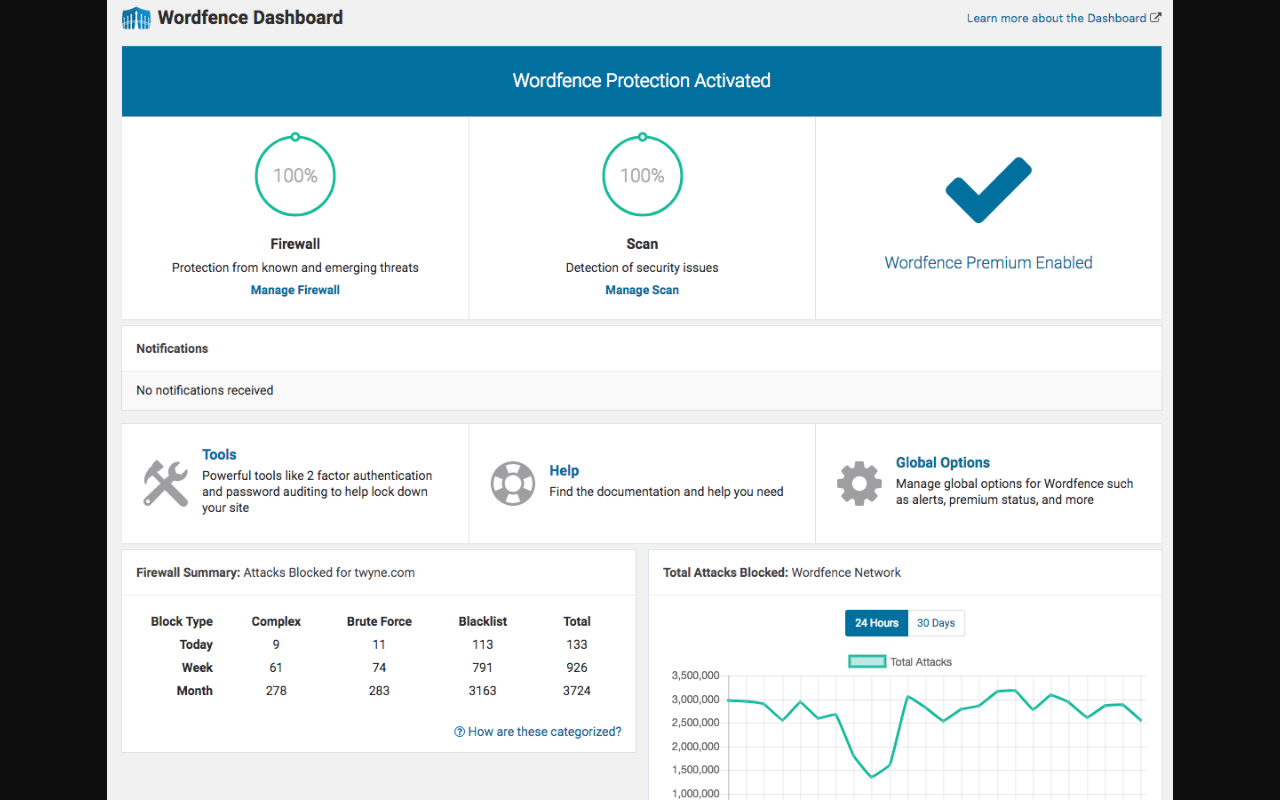
The dashboard is functional. It shows your firewall and scan status, recent notifications, and two key data panels: your site’s own attack statistics (broken down by complex attacks, brute force, and blocklist hits) and a live chart of attacks blocked across the entire Wordfence network. That second panel puts your individual site’s threat volume in context: on a typical day, the Wordfence network blocks hundreds of millions of attacks across 5 million-plus sites.
Web Application Firewall
The Wordfence firewall is the plugin’s most-cited feature and the one where the free tier’s limitations matter most.
What the firewall does at every tier: it identifies and blocks malicious HTTP requests using a set of firewall rules built and maintained by the Wordfence security research team. When a request matches a rule, Wordfence blocks it before it can interact with your WordPress application. The rules cover common WordPress attack patterns: SQL injection, cross-site scripting, remote file inclusion, and a growing set of plugin-specific vulnerability exploits as they emerge.
What the free tier limits: all firewall rules are delayed by 30 days. When the Wordfence team creates a new rule to block a newly discovered exploit, premium subscribers get that rule immediately. Free users get it after 30 days. During that window, your site’s firewall is operating without coverage for whatever new exploit just emerged.
To put this in practical terms: in July 2026, Wordfence published research on wp2shell, a critical unauthenticated remote code execution chain in WordPress core, the first critical unauthenticated RCE in WordPress core in nearly a decade. Sites running Wordfence Premium received the corresponding firewall rules as soon as the Wordfence team created them. Sites on the free plan had a 30-day exposure window. That specific vulnerability was patched in WordPress core on July 17, 2026, so users who kept WordPress updated were protected by the core patch, but the general principle applies to the long tail of plugin and theme exploits that make up most real-world attacks.
The firewall has 692 rules as of July 2026.
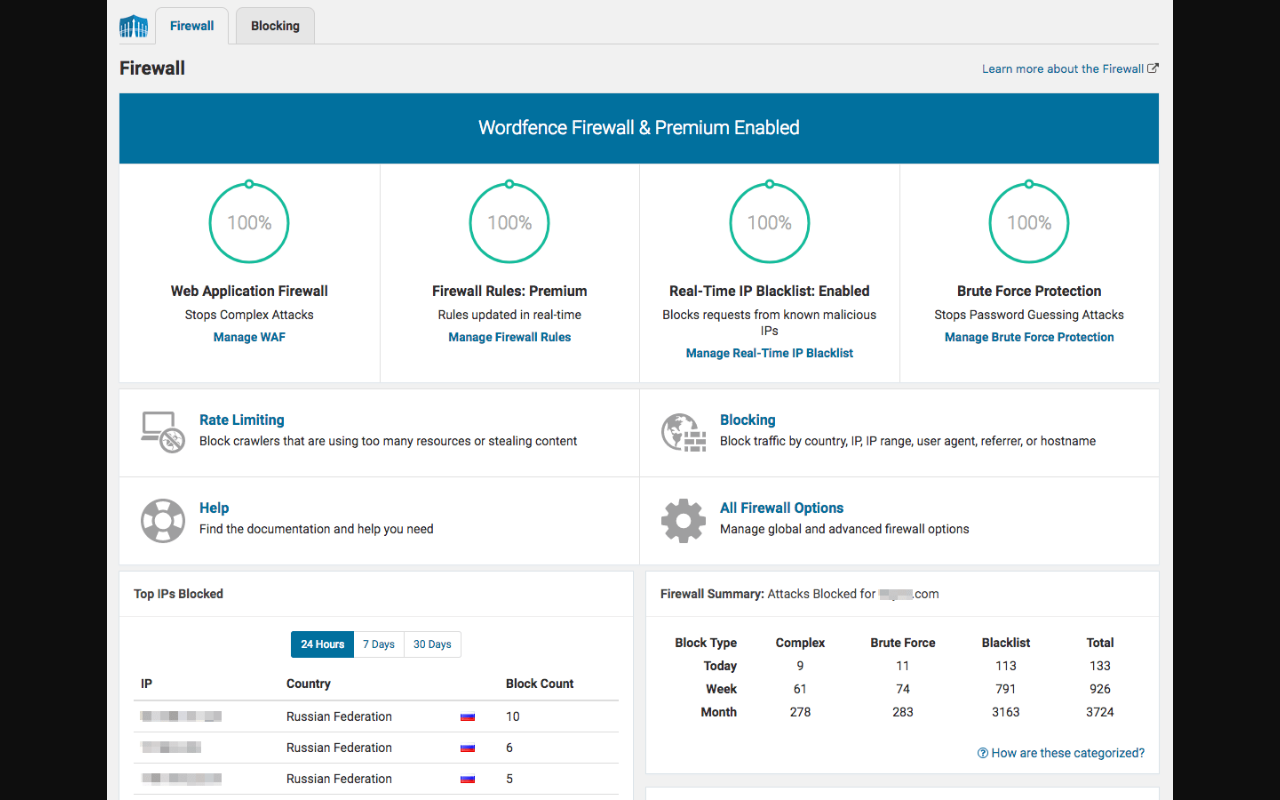
Real-Time IP Blocklist (Premium only). The Premium plan adds a continuously updated list of the most malicious IP addresses currently active across the Wordfence network. As of July 2026, the blocklist covered 40,000-plus known threat actors, with 322,000 new malicious IPs added to the broader network intelligence in the preceding 30 days. This blocklist blocks all requests from listed IPs before the firewall even evaluates the request content, which reduces server load compared to processing their requests through the rule engine.
Firewall Learning Mode. When you first install Wordfence, the firewall runs in learning mode to map your site’s normal traffic patterns before enforcing rules that could block legitimate requests. The recommended approach is to let learning mode run for a week before switching to Protection Mode. During learning mode, the firewall logs threats but does not block them.
Rate Limiting. Both free and paid users can configure rate limiting rules that throttle IPs making too many requests within a time window. This addresses scraper bots, crawlers that exceed your resource budget, and some types of distributed brute force attacks that spread their attempts over many IPs.
Malware Scanner
The malware scanner is where Wordfence most clearly separates itself from alternatives that focus only on login security or hardening. At every tier, including free, Wordfence scans your site’s files for malware.
What the scanner checks:
- WordPress core files, comparing them against the original versions from WordPress.org to detect modifications.
- Installed plugin and theme files, checked against their WordPress.org repository versions.
- Custom files that are not part of any registered plugin or theme (orphaned files are a common malware hiding spot).
- Known malware signatures, checked against Wordfence’s database of 6,171 real-time signatures (the real-time set available to Premium; the free tier runs signatures that are 30 days behind).
- Known backdoors, including named variants such as C99, R57, RootShell, and dozens of others.
- Malicious redirects and code injections inside post content and database fields.
- URLs in comments, posts, and files checked against Google’s Safe Browsing list.
- The site’s reputation: whether your domain or IP is on spam or spamvertising blacklists.
The scanner also alerts on outdated or abandoned plugins, which addresses the vulnerability angle separately from the malware angle: an outdated plugin with a known CVE is a future malware entry point even if no malware is present yet.
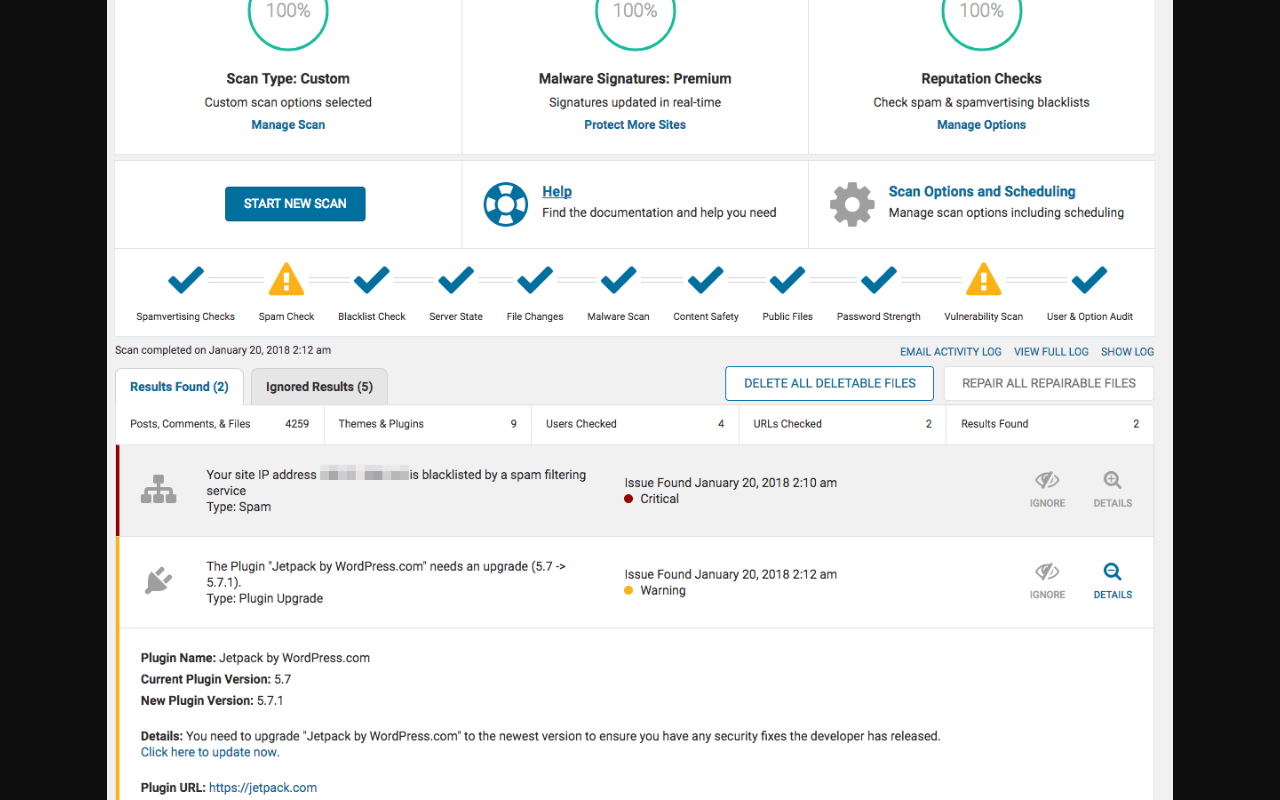
The scan results page offers two important bulk actions: Repair All Repairable Files (which overwrites modified core and plugin files with clean versions from the WordPress.org repository) and Delete All Deletable Files (which removes files the scanner identifies as non-standard and deletable). These actions can remove malware from your files directly from the plugin dashboard. This is a meaningful capability that lighter security plugins do not offer.
Scan types. The settings page offers four scan presets:
- Limited Scan: minimal resource use, for shared hosting plans with tight resource limits.
- Standard Scan: Wordfence’s recommended default.
- High Sensitivity: deeper scan for sites that may have been compromised.
- Custom Scan: activated when you adjust individual settings manually.
Free tier limitation. On the free plan, malware signatures are delayed by 30 days, matching the firewall rule delay. The real-time signature set contains 6,171 signatures. Free users run against signatures that are one month old, which means recently discovered malware variants are not detected until the next cycle.
Login security and two-factor authentication
Login attacks are the most common attack type against WordPress sites. The Wordfence homepage states that the average WordPress site receives 41 requests per day probing for weak or breached passwords. Login security is built into the free plugin and covers the most important protections without a paid plan.
Two-factor authentication. Wordfence 2FA works with any TOTP-based authenticator app: Google Authenticator, Authy, FreeOTP, and others. The setup flow presents a QR code for scanning plus a text key for manual entry, five single-use recovery codes for account recovery, and a verification field to confirm the TOTP app is connected before activating 2FA.
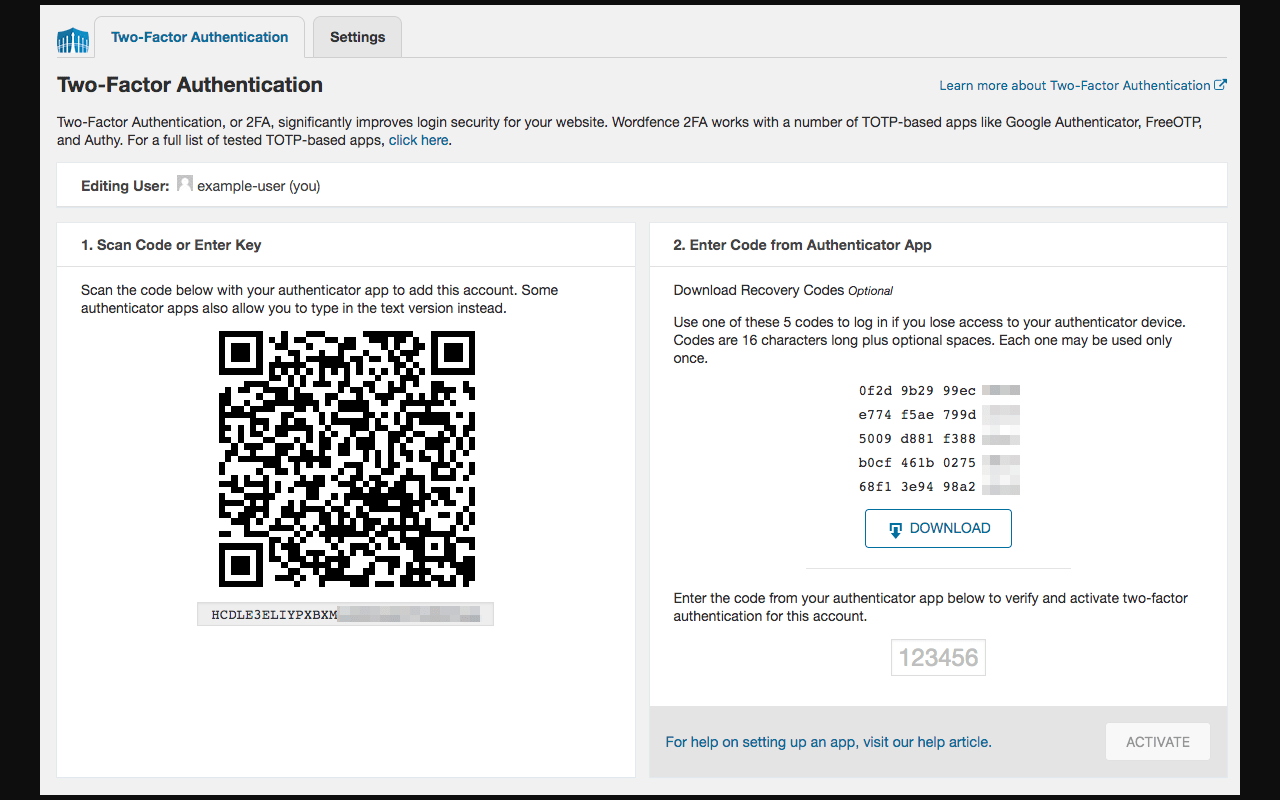
2FA can be configured per user role. You can require it for administrators without affecting editors or subscribers. The 2FA screen also accommodates WooCommerce custom account pages and XML-RPC connections.
Note: SMS-based 2FA was discontinued in the July 1, 2026 update cycle (announced in v8.2.0, April 2026). Anyone who had SMS codes configured needs to migrate to TOTP-based authentication.
Password security. Free users get the “Block logins for administrators using known compromised passwords” feature, which checks the entered password against a database of known-breached credentials. This extends to the REST API as of v8.1.1 (November 2025): password strength enforcement now applies when users authenticate through the API, not only through the web login form.
Login page CAPTCHA. Wordfence integrates CAPTCHA on the login form to stop automated login bots. This is available at all tiers.
Username enumeration prevention. The brute force settings include an option to prevent WordPress from revealing valid usernames through login error messages and the /?author=N parameter. This stops attackers from using error message differences or URL scanning to build a list of valid accounts to target.
Brute force protection
The brute force protection settings give you direct control over the login throttling behavior. Configurable settings include:
- How many login failures before lockout (default: 20 within a time window)
- How many failed password reset requests before lockout
- The time window for counting failures
- How long to lock out an IP after the threshold is reached
- Immediate lockout for invalid usernames (blocking the IP the moment someone tries a username that does not exist on the site)
- A permanent block list for specific usernames that are always targeted (admin, administrator, root) so any login attempt using them triggers an immediate block regardless of the failure count
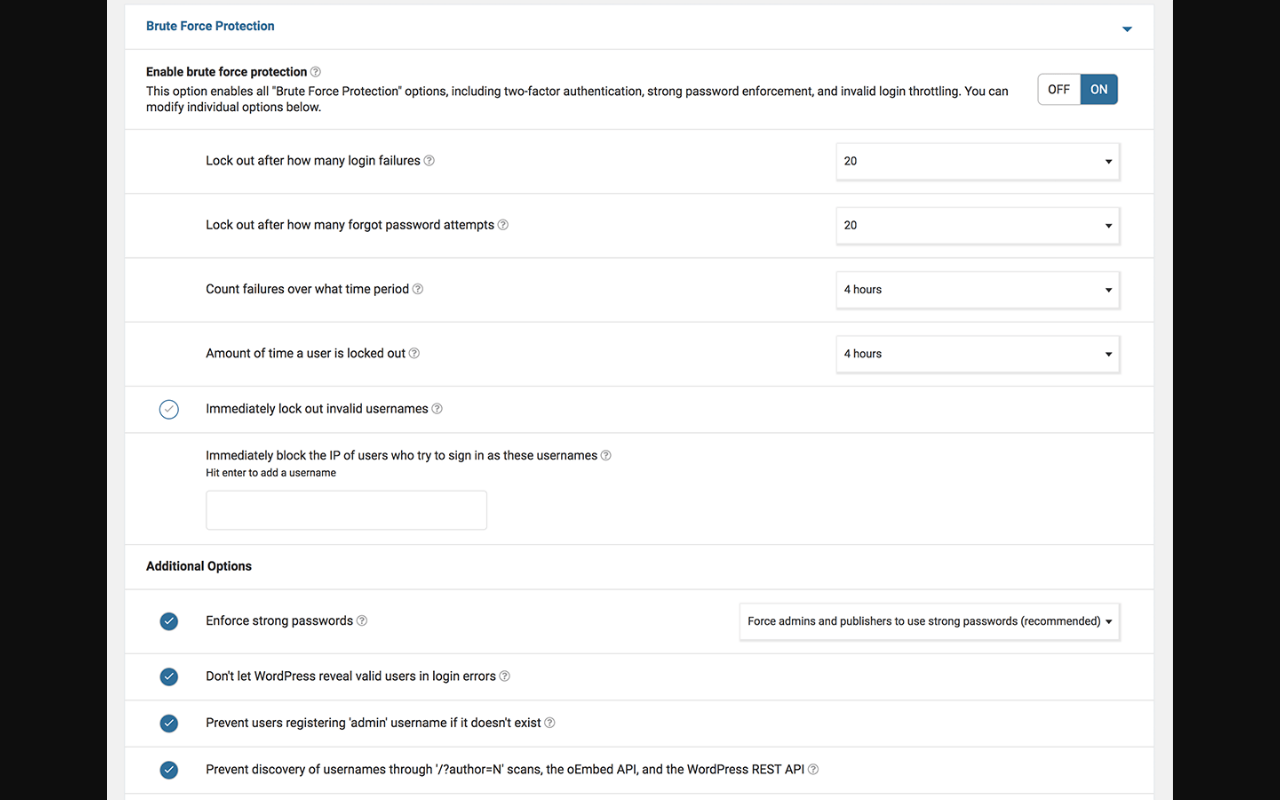
The “Prevent users registering ‘admin’ username if it doesn’t exist” option closes a specific attack preparation vector: an attacker cannot register an ‘admin’ account on a site where none exists, which would give them a legitimate account to escalate from.
The “Don’t let WordPress reveal valid users in login errors” setting changes the error messages WordPress shows after a failed login. By default, WordPress tells you whether the username was wrong or the password was wrong. Wordfence replaces that with a generic error, removing the attacker’s ability to confirm valid usernames before moving to password attacks.
Live Traffic monitoring
Live Traffic is one of Wordfence’s distinctive features and one that sets it apart from analytics tools like Google Analytics.
The Live Traffic view logs every HTTP request that hits your site at the server level, including requests from bots, crawlers, and attackers that never execute JavaScript and therefore never appear in analytics packages. Each logged request shows the visitor type (Human, Bot, Warning, Blocked), their location, the page they visited, the time, their IP address, their hostname, and the HTTP response code.
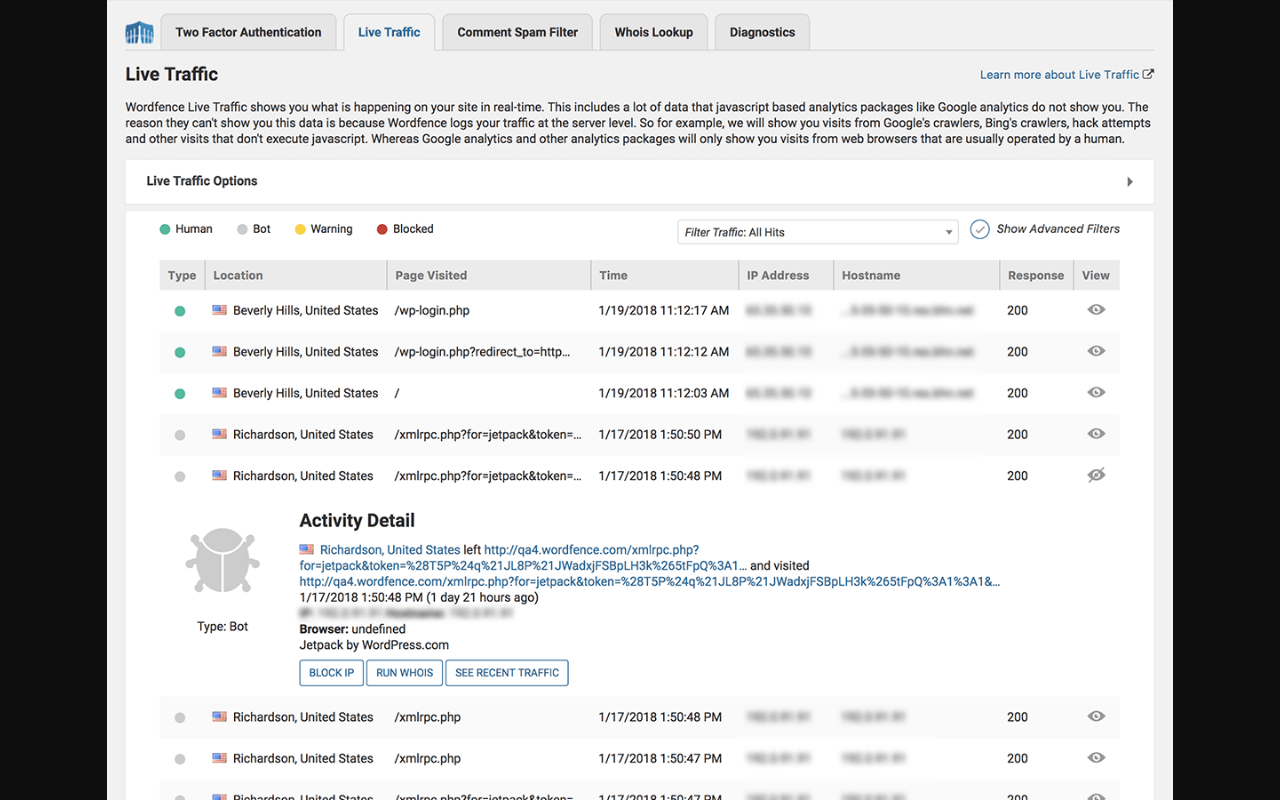
For each entry, you can click through to see full request details, run a Whois lookup on the IP, view all recent traffic from that IP, and block the IP immediately. The ability to go from “I see something suspicious in live traffic” to “that IP is blocked” in two clicks is practical for site operators who actively monitor their security.
The Activity Detail panel shows what each visitor was doing: the specific URL they accessed, whether they were identified as a bot, and what software they were using. Wordfence identifies the bot type and user agent, which lets you distinguish legitimate service calls from attack probes.
Live Traffic consumes database storage. On high-traffic sites, the volume of logged requests can be significant. Wordfence provides controls to limit what gets logged and how long records are retained.
Blocking tools
The blocking screen handles IP-level and pattern-based blocking beyond the firewall’s rule-based blocking. Manual blocking options:
- Block individual IP addresses permanently.
- Block IP ranges using CIDR notation.
- Block by hostname (useful for blocking entire cloud provider or bot networks by reverse DNS).
- Block by user agent string (blocks specific browsers, tools, or crawlers).
- Block by referrer (blocks requests from specific sites or referrer patterns).
These manual rules are available in the free tier.
Country blocking (Premium only). Premium subscribers can block all traffic from specific countries. This is a blunt instrument but useful for sites that serve a specific geographic market and want to reduce attack noise from regions they have no legitimate traffic from. Country blocking is managed through the same blocking interface, with a token field that expands to show all selected countries (a UI improvement in v8.2.2).
The blocking screen also shows the top IPs Wordfence has been blocking, with counts for 24 hours, 7 days, and 30 days. This overview is useful for identifying whether a specific IP is genuinely targeting your site repeatedly or was blocked once by a scan rule.
Security Audit Log (Premium)
The Audit Log tracks user and system activity in security-sensitive areas of the site and stores it remotely via Wordfence Central, which means a compromised site cannot have its audit log wiped. What the Audit Log records:
- Administrator logins and logouts
- User creation and modification
- Plugin and theme installation, activation, deactivation, and deletion
- WordPress core updates
- Post and page creation and edits
- Settings changes in security-sensitive admin areas
The log retention period differs by plan:
- Free: no audit log access
- Premium: 30 days of history
- Care: 6 months of history
- Response: 1 year of history
For incident investigation, the audit log is the forensic record that tells you what happened before a compromise was noticed. Remote tamper-proof storage through Wordfence Central means the log survives even if an attacker gains admin access and tries to cover their tracks.
Wordfence Central
Wordfence Central is a centralized management platform that is free for all Wordfence users, including free plugin users, with no site limit. What Central provides:
- A unified security dashboard showing the status of all connected WordPress sites in one view.
- Configuration templates: create a standard Wordfence configuration once and push it to multiple sites.
- Launch scans across all sites from a single interface.
- View security events across all sites, sorted by severity.
- Manage Wordfence licenses for each site.
- View the audit log for sites with paid licenses (the audit log is stored in Central and accessible from the main dashboard).
For agencies or anyone managing more than a few WordPress sites, Wordfence Central reduces the operational overhead of keeping each site’s security configuration current. The template system in particular solves the problem of new client sites getting inconsistent security settings because someone had to configure Wordfence from scratch each time.
Free vs Premium vs Care vs Response
Here is the complete comparison across all four plans:
| Feature | Free | Premium | Care | Response |
|---|---|---|---|---|
| Endpoint Firewall (WAF) | Yes (30-day rule delay) | Yes (real-time rules) | Yes (real-time rules) | Yes (real-time rules) |
| Malware Scanner | Yes (30-day sig delay) | Yes (real-time sigs) | Yes (real-time sigs) | Yes (real-time sigs) |
| Real-Time IP Blocklist | No | Yes | Yes | Yes |
| Country Blocking | No | Yes | Yes | Yes |
| Brute Force Protection | Yes | Yes | Yes | Yes |
| Login Security (2FA, CAPTCHA) | Yes | Yes | Yes | Yes |
| Rate Limiting | Yes | Yes | Yes | Yes |
| File Change Detection | Yes | Yes | Yes | Yes |
| Plugin/Theme Vulnerability Monitoring | Yes | Yes | Yes | Yes |
| Live Traffic Monitoring | Yes | Yes | Yes | Yes |
| Scheduled Scans | Every 3 days | Unlimited | Unlimited | Unlimited |
| Security Audit Log | No | 30 days | 6 months | 1 year |
| Wordfence Central | Free, unlimited sites | Free, unlimited sites | Free, unlimited sites | Free, unlimited sites |
| Customer Support | Volunteer forums | Ticket-based | Priority tickets | 1-hour response |
| Hands-on Install and Configuration | No | No | Yes (by Wordfence team) | Yes (by Wordfence team) |
| Security Audit and Recommendations | No | No | Once yearly | Once yearly + optional second |
| Malware Cleanup if Found in Audit | No | No | Yes | Yes |
| Site Security Monitoring | No | No | Yes | Yes |
| Incident Investigation and Malware Removal | No | No | Yes | Yes |
| 24/7/365 Incident Response | No | No | No | Yes |
| 1-Hour Response Time | No | No | No | Yes |
| Annual Price | $0 | $149 | $590 | $1,250 |
Pricing
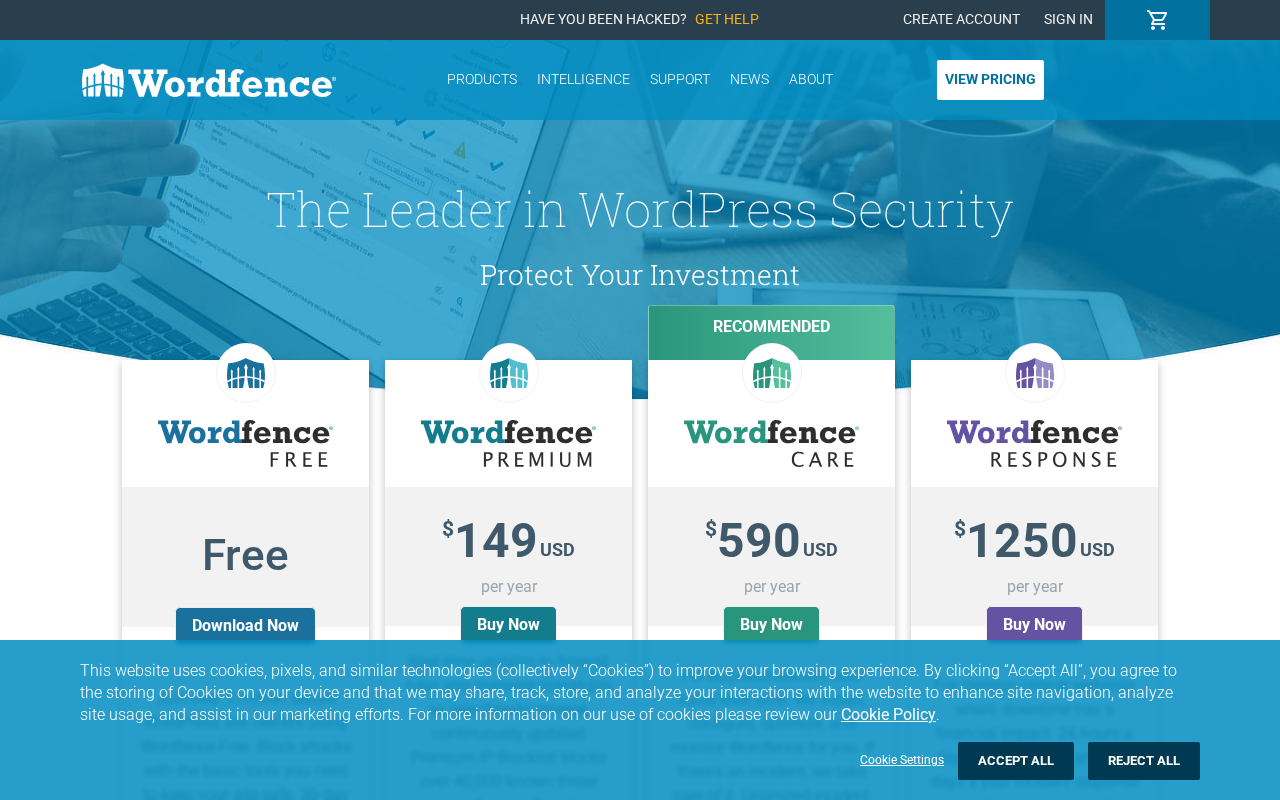
Wordfence prices each license per site per year. There is no free trial for paid plans. A license purchased for one site covers that domain and can also be used on staging and development environments for the same project. Verify current pricing at wordfence.com before purchasing, as prices are subject to change.
Free ($0): Unlimited use, no expiration. The free plugin runs the full feature set with the 30-day delay on threat intelligence and the every-three-days scan schedule. Free users get volunteer forum support.
Premium ($149/year per site): Removes the 30-day delay on both firewall rules and malware signatures. Adds the real-time IP blocklist, country blocking, audit log access (30 days), unlimited scan scheduling, and ticket-based support. This is the minimum tier for a site that stores user data, handles transactions, or is actively managed.
Care ($590/year per site): The Care plan bridges the gap between self-managed and fully managed security. The Wordfence team installs, configures, and optimizes the plugin for your site, performs an annual security audit with recommendations, handles malware cleanup if anything surfaces during the audit, monitors your site’s security status, and provides incident response with investigation and malware removal if an attack succeeds. Post-incident work includes blocklist removal and search engine cleanup. Support runs on priority tickets during business hours.
Response ($1,250/year per site): For sites where downtime has a direct financial cost. Wordfence’s dedicated incident response team is available 24 hours a day, 7 days a week, 365 days a year, with a contractual 1-hour response time and a 24-hour time-to-resolution commitment. This is the plan for businesses whose revenue depends on the site being available and where a security incident at 2 a.m. on a Sunday cannot wait until Monday morning.
One note on the Care and Response tiers: these are managed service plans, not just plugin licenses. You are paying for access to the Wordfence security team’s time and expertise in addition to the real-time threat intelligence. For most self-administered site owners, the comparison is between Free and Premium. Care and Response are primarily relevant to businesses and agencies that would otherwise be paying an in-house security professional or a third-party incident response firm.
Performance considerations
Wordfence’s server footprint is the most consistently cited criticism in user reviews and comparison articles. The plugin runs inside WordPress, which means every web request processes through the Wordfence firewall code before the rest of your application runs. The Learning Mode phase in particular can increase database queries while the firewall maps your normal traffic patterns.
Wordfence has worked on this. The v8.1.1 release in November 2025 included a specific fix: “Reduced per-hit database query load around logging.” This directly addresses the main source of Wordfence’s database overhead.
Practical impact depends on your hosting environment. On managed WordPress hosting with dedicated resources, Wordfence’s overhead is typically negligible. On shared hosting with tight CPU and memory limits, the difference between Wordfence and a lighter plugin like Solid Security is measurable. The Limited Scan option exists specifically to reduce resource use on constrained environments.
If server resource usage is a hard constraint, consider whether the malware scanning capability is worth the trade-off, or whether a lighter hardening plugin combined with a separate off-site scanner addresses your requirements better.
Pros and cons
Pros
- The only major free WordPress security plugin that combines a full WAF and malware scanner without a paid plan.
- 5 million-plus active installs backed by 14 years of continuous development by a company that does only WordPress security.
- Real-time threat intelligence on Premium, with the Threat Defense Feed powering both firewall rules (692 as of July 2026) and malware signatures (6,171 in the real-time set).
- Premium IP blocklist that covers 40,000-plus known malicious IPs and updates continuously, allowing pre-emptive blocking before any rule evaluation.
- Built-in malware removal tools (Repair All Repairable Files, Delete All Deletable Files) that let you clean compromised files directly from the plugin dashboard.
- Live Traffic view that logs all server-level requests, including bots and attackers that bypass JavaScript analytics.
- Wordfence Central is free for unlimited sites, providing centralized management, configuration templates, and remote audit log storage.
- Wordfence PRISM AI system published groundbreaking security research, including detecting a backdoored plugin within two hours of introduction in July 2026.
- Country blocking available on Premium, covering geographic traffic filtering for sites with a defined geographic audience.
- Password security checks breached passwords at login, including via the REST API as of v8.1.1.
- WooCommerce and multisite compatible.
- Endpoint WAF model cannot be bypassed by attackers who discover your server’s real IP (unlike DNS-level WAF).
Cons
- 30-day delay on free-tier firewall rules and malware signatures. Your site runs last month’s threat intelligence, which is a real gap when actively exploited vulnerabilities emerge.
- Scans run only every three days on the free plan. A malware infection can go undetected for up to three days between scan cycles.
- Known to be heavier on server resources than minimalist alternatives like Solid Security, particularly on shared hosting with CPU and memory limits.
- Endpoint WAF processes malicious requests after they reach your server, consuming resources even for blocked requests. DNS-level WAFs (Sucuri, Cloudflare) intercept before the server.
- No passkeys or passwordless login support at any tier. Solid Security Pro has this; Wordfence does not.
- SMS two-factor authentication was discontinued with the July 1, 2026 update. Users who relied on SMS codes need to migrate to TOTP apps.
- The real-time IP blocklist (Premium only) means free users miss the pre-emptive blocking of known attack sources.
- No third-party vulnerability patching integration like Patchstack. Wordfence has its own vulnerability intelligence but no virtual patching feature for plugin vulnerabilities.
- No built-in backup functionality. Wordfence focuses entirely on security; backups require a separate plugin.
Alternatives to Wordfence
Solid Security (formerly iThemes Security, now Kadence Security). A strong login security and hardening plugin with a free tier that includes 2FA, brute force protection, vulnerability scanning (via Patchstack), file change detection, and site hardening. The major gap: Solid Security has no malware scanner at any tier. Pro features now require the $299/year Kadence bundle instead of a standalone $99 plan. Best pick if you want the lightest possible server footprint, passkey/passwordless login (Pro), and don’t need a malware scanner.
Sucuri. Cloud-based website security platform with a DNS-level WAF that filters traffic before it reaches your WordPress server. The Basic WAF plan starts at $199/year and includes malware scanning, a security activity audit log, and a post-hack cleanup service. Best pick if you want network-level traffic filtering, a managed malware removal guarantee, and are comfortable with the setup complexity of changing your DNS to route traffic through Sucuri’s network.
MalCare. Automated malware scanner and one-click removal tool where the scanning runs on MalCare’s servers rather than yours, so there is no performance impact on your origin site. Starts at $99/year for one site. Best pick if malware detection and removal are your priority and you specifically do not want a scanning workload running on your own server.
Patchstack. Vulnerability intelligence and virtual patching service. Community plan is free for unlimited sites. Developer plan at $14.99/month adds real-time patching and priority alerts. Best pick if you want automated virtual patches that block known exploits before you update the vulnerable plugin, as a standalone service or alongside a lighter security plugin.
Cloudflare. Not a WordPress plugin, but a DNS proxy that sits in front of your server and provides WAF, DDoS protection, CDN, and bot filtering. Free plan includes basic WAF rules; Pro plan ($20/month) adds more advanced WAF. Best pick if your traffic volume justifies network-level security infrastructure and you want the CDN and performance benefits alongside the security layer.
The honest summary: no single tool does everything equally well. Wordfence’s free tier is the best starting point for WordPress security if you want WAF plus malware scanning at zero cost. For specific needs (DNS firewall, managed cleanup, passkeys, off-server scanning), the alternatives each have a clearer edge.
Final verdict
Wordfence earned its place as the most-installed WordPress security plugin because it does something no competitor in the free tier matches: it gives you a real web application firewall and a working malware scanner without paying anything.
The core limitation of the free version is clear and honest about itself. The 30-day delay on threat intelligence is not hidden in fine print; Wordfence labels it on the pricing page and in the plugin description. If your site holds user accounts, processes payments, or runs a business, that delay is the thing that should push you toward the $149/year Premium plan. Thirty days of protection lag is the gap between knowing about an exploit when it is actively used against WordPress sites and knowing about it a month later.
The Premium plan at $149/year is priced reasonably for what it delivers: real-time firewall rules, real-time malware signatures, the IP blocklist, country blocking, an audit log, and ticket support. It is a complete self-managed security tool. The jump to Care ($590/year) or Response ($1,250/year) is a shift in the value proposition, from a software license to a managed service. Whether those tiers make financial sense depends entirely on how much your site’s uptime and security are worth versus the cost of the Wordfence team handling it for you.
Two limitations worth noting: Wordfence does not offer passkeys, which is increasingly the most secure login option, and it runs on your server, which means it uses your resources. Both of those are real drawbacks compared to specific alternatives, not minor edge cases.
For most WordPress site owners, the recommendation is straightforward: start with the free version. It provides meaningful protection. If your site grows to the point where the 30-day threat delay feels like a gamble, upgrade to Premium. If you want to remove security from your personal to-do list entirely, Care is the plan that pays someone else to do it. Browse more WordPress plugin reviews to compare other security and utility plugins side by side.