


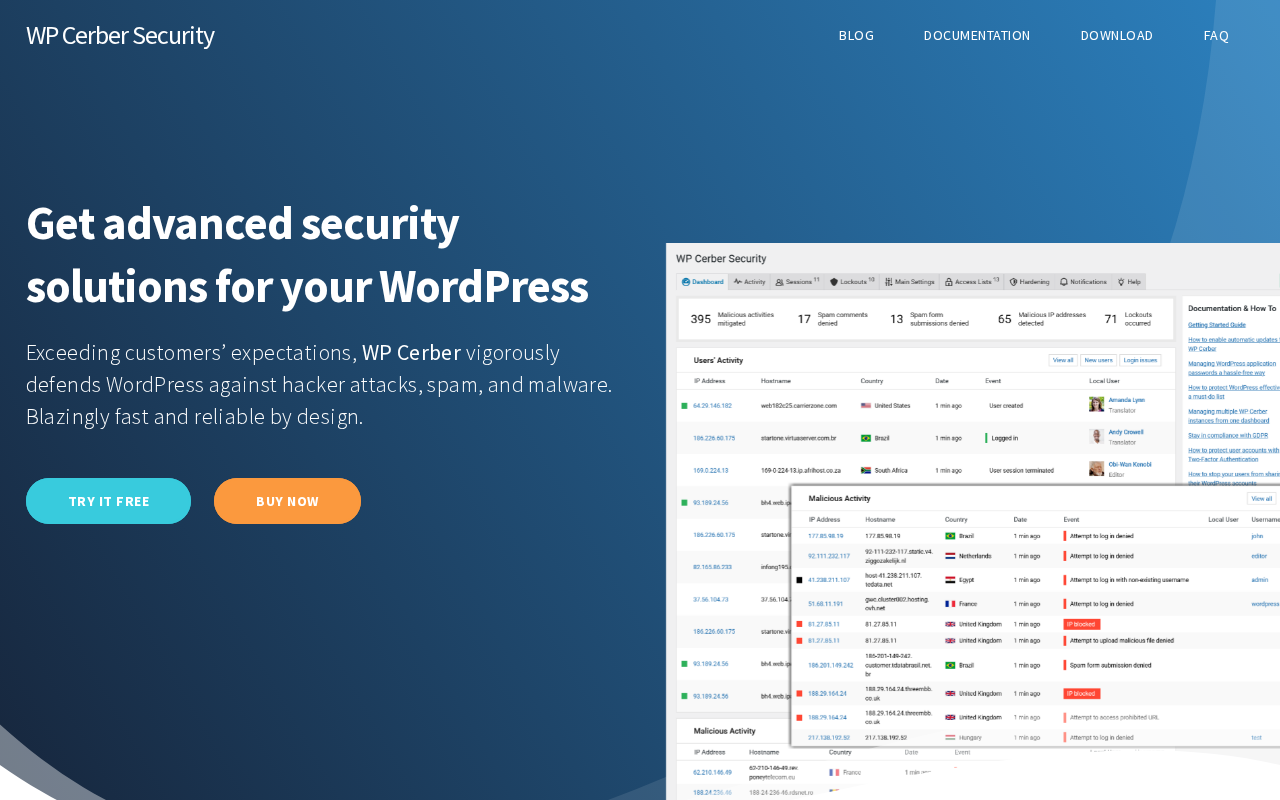
WP Cerber Security has been protecting WordPress sites since before most of its current competitors existed. Developed by Cerber Tech, Inc., the plugin bundles a web application firewall (Traffic Inspector), brute force login protection, a heuristic anti-spam engine (Cerberus), a malware scanner with automatic file recovery, IP access control, two-factor authentication, and a full activity log into a single package. The company claims 200,000 customers and says the plugin mitigates millions of attacks worldwide per day.
There is one fact every potential user needs to know before installing WP Cerber: the plugin is no longer available on WordPress.org. In September 2022, WordPress.org closed the plugin listing citing a “security issue.” The plugin has continued active development since then and is now distributed exclusively through wpcerber.com, but the closure means it does not appear in the standard WordPress plugin search and does not receive automatic updates through the WordPress.org infrastructure.
That context shapes this entire review. WP Cerber is a capable plugin with a genuine feature set, but installing it requires a deliberate manual decision. This review covers everything you need to make that decision: what the plugin does, what is free versus paid, what the alternatives are, and how the WordPress.org closure affects your practical experience.
How I reviewed this plugin: This review is based on a detailed audit of wpcerber.com (homepage, features, pricing, documentation, and changelog), the WordPress.org plugin listing (frozen at version 9.5.7 and closed since September 22, 2022), community forum discussions at talk.wpcerber.com, and the 595 user reviews accumulated on WordPress.org before the closure. The current version at the time of this review is 9.9.3, released August 11, 2026. The plugin was installed in a test WordPress environment using the manual download from wpcerber.com to document the setup experience.
At a glance
- Current version reviewed: 9.9.3 (released August 11, 2026)
- Developer: Cerber Tech, Inc. (Gregory, handle: gioni)
- WordPress.org status: Closed since September 22, 2022
- Distribution: wpcerber.com only (manual install required)
- Active customers: 200,000 or more (vendor claim)
- Free version: Yes, available via wpcerber.com
- Pro pricing: $99/year per site, or $29 per 3 months per site
- Money-back guarantee: 30 days
Quick verdict
WP Cerber is a technically well-built plugin with a broader feature set than most single-purpose alternatives. The Traffic Inspector firewall, Cerberus anti-spam engine, and malware scanner with automatic file recovery would each be credible standalone products. Combined in one plugin with a genuinely capable free tier, the value proposition is clear for site owners who want comprehensive security coverage without stacking multiple plugins.
The WordPress.org closure is the overriding caveat. Using any plugin that is not in the WordPress.org repository means accepting a non-standard update path, reduced community visibility, and the lingering question of what caused the closure in the first place. For security software specifically, these concerns deserve extra weight.
Quick verdict summary
- Best for: WordPress site owners who want an all-in-one alternative to running Wordfence, Akismet, and a separate malware scanner simultaneously; WooCommerce stores needing anti-spam on checkout forms; sites under active brute force pressure; agencies managing multiple client sites with Cerber Hub (Pro).
- Best plan for most sites: WP Cerber Pro annual ($99/year) for cloud protection, country restrictions, and professional support. Free version for testing core functionality first.
- Standout: The Cerberus anti-spam engine, which protects forms without mandatory CAPTCHA in many configurations, is a genuine differentiator from most security plugins. The malware scanner with automatic file recovery is also stronger than what most competitors offer for free.
- Watch out for: WordPress.org closure since 2022 (manual install and update process required); 2FA limited to email PIN codes only (no TOTP authenticator app support); Cerber Security Cloud is Pro-only.
What WP Cerber Security is
WP Cerber Security is a comprehensive WordPress security plugin built by Cerber Tech, Inc. It combines six distinct security functions into one package: a web application firewall (Traffic Inspector), brute force and login protection, anti-spam (Cerberus engine), malware scanning and file integrity checking, IP access control lists, and user activity logging.
The architecture follows what the developer describes as a layered, zero-trust security model. Each layer handles a different attack surface: login attacks are blocked by the brute force engine; form spam is filtered by the Cerberus heuristic engine; HTTP-level attacks are blocked by the Traffic Inspector; and file-level compromise is detected and repaired by the malware scanner. The layers operate independently, so a failure in one does not disable the others.
The Professional version adds a cloud component: Cerber Security Cloud, maintained by Cerber Lab, provides a real-time global blacklist of malicious IP addresses checked on every incoming request. This cloud layer supplements the local rules and heuristics with intelligence gathered across all sites running WP Cerber Pro.
The WordPress.org closure: WordPress.org removed the WP Cerber plugin listing on September 22, 2022, citing a “security issue.” The specific vulnerability was never publicly disclosed in full by either WordPress.org or Cerber Tech. The plugin has continued active development since the closure, reaching version 9.9.3 in August 2026, with a consistent release cadence throughout 2026. What the closure means in practice: you cannot find or install WP Cerber via Plugins > Add New in the WordPress admin; you must download the plugin manually from wpcerber.com and upload it via Plugins > Upload Plugin; updates do not arrive automatically through the WordPress.org update infrastructure; and the WordPress.org reviews and screenshots are frozen as of 2022.
Who WP Cerber Security is best for
Strong fit
- WordPress site owners running WooCommerce stores who need anti-spam protection on checkout, registration, and product review forms without adding a separate anti-spam plugin.
- Sites experiencing heavy volumes of brute force login attempts or bot-driven form spam where lightweight login limiters are insufficient.
- Developers and agencies managing multiple client sites who want a centralized management dashboard (Cerber Hub, Pro).
- Sites requiring geographic access controls, such as limiting logins or registrations to specific countries (Pro feature).
- Users who want to consolidate security, anti-spam, and malware scanning into a single plugin rather than running Wordfence plus Akismet plus a separate scanner simultaneously.
- Developers who want a security plugin with WordPress hooks (filters and actions) for customization and automation integration.
Weak fit
- Users who require TOTP-based two-factor authentication (Google Authenticator, Authy, hardware keys). WP Cerber’s 2FA is email PIN-only with no authenticator app support in any version as of 9.9.3.
- Users who need a plugin from the WordPress.org repository for organizational policy or trust reasons.
- Sites where visibility of active install counts and ongoing community reviews are a due-diligence requirement.
- Users who need automated virtual patching for plugin vulnerabilities without waiting for a full plugin update.
Installation and setup
Because WP Cerber is not in the WordPress.org repository, installation works differently from most WordPress plugins. Create a free account at my.wpcerber.com, download the plugin ZIP file from the account dashboard, then in your WordPress admin go to Plugins > Add New > Upload Plugin, upload the ZIP, and activate. The free version requires no license key and activates immediately. The Professional version requires entering a license key in the plugin settings, which connects the site to Cerber Security Cloud and enables Pro-only features.
For automatic updates via the vendor’s channel, the plugin documentation describes a setup process for connecting to the vendor’s update server. This replaces the standard WordPress.org update notification but requires an active Pro license.
The first-run experience is guided. On activation, WP Cerber applies a set of default security configurations. The dashboard presents the current security status across all active components, recent security events, and blocked IP totals. The settings are substantial but well-organized: each major feature category has its own settings page under the WP Cerber menu in the WordPress admin sidebar.

Login and brute force protection
Brute force attacks on the WordPress login page, XML-RPC endpoint, REST API, and authentication cookies are the most common attack vector against WordPress sites. WP Cerber covers all four entry points from the free version, which is more complete than plugins that protect only the login form.
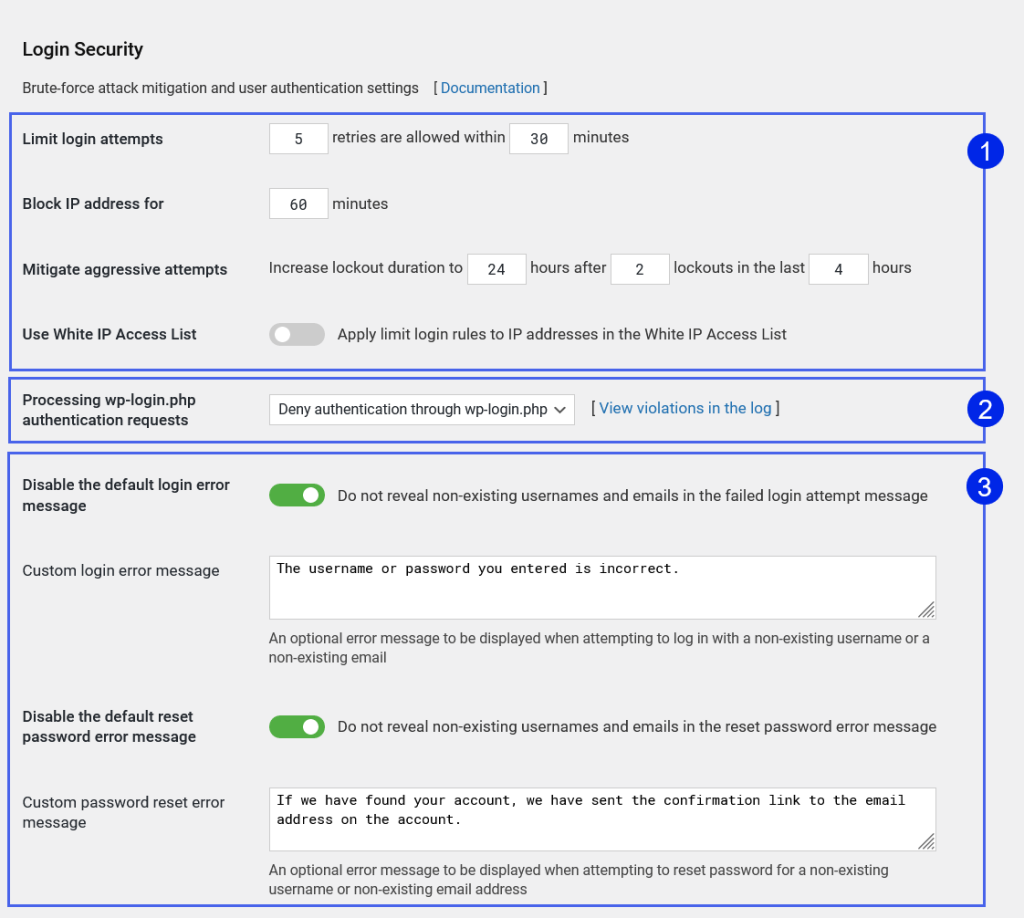
Login attempt limits: You set the maximum number of allowed login failures before an IP is locked out, the time window for counting failures, and the lockout duration. These settings apply immediately to all login attempts on activation.
Citadel Mode: When WP Cerber detects an unusually high volume of login attempts, it can automatically activate Citadel Mode, which locks down the login form entirely. This is a useful failsafe for sites under sustained automated attacks where standard per-IP lockouts are insufficient because the attacker is rotating through large IP ranges.
Class C subnet blocking: Unlike most plugins that block individual IP addresses only, WP Cerber can optionally block the entire Class C subnet (the /24 block) when an attack is detected from a specific IP. This prevents simple IP rotation within the same network range from bypassing the protection.
Coverage beyond the login form: WP Cerber monitors and limits login attempts via XML-RPC, REST API authentication, and direct cookie-based authentication. Many brute force tools bypass wp-login.php and target these alternative entry points. Covering all four means there is no obvious bypass route for automated tools.
Custom login URL: The free version includes the ability to rename wp-login.php to a custom URL and make the original URL return a 404 error. This hardening measure significantly reduces automated scan-and-attack traffic targeting the standard paths.
User enumeration prevention: WP Cerber blocks enumeration via the author archive parameter and via the REST API. Author pages and the ?author=N URL parameter are common ways to discover valid usernames before launching targeted password attacks.
fail2ban integration: For server administrators who use fail2ban, WP Cerber can write to the system log in fail2ban-compatible format, allowing the server-level firewall to act on WP Cerber’s detection signals.
Traffic Inspector: the web application firewall
WP Cerber’s WAF is called Traffic Inspector. It analyzes incoming HTTP requests for malicious patterns before they reach the WordPress application layer.
Traffic Inspector inspects form submissions, GET and POST parameters, and PHP script requests. By design, it does not inspect ordinary visitor traffic to published pages, posts, categories, or archives. This is a deliberate performance trade-off: inspecting every reader request would add overhead without meaningful security benefit. The inspection focuses on requests that could carry attack payloads.
When Traffic Inspector detects a malicious request, it blocks the originating IP, halts request processing, and returns an HTTP 403 Access Forbidden response. The event is logged to the Activity Log and the Live Traffic log (if traffic logging is enabled). The blocked IP is added to a temporary block list.
IPs on the White Access List bypass Traffic Inspector entirely. The plugin also includes a Request Whitelist setting for URL patterns or parameters that legitimate applications on your site might generate, which could otherwise trigger false positives. Traffic Inspector’s local rules are available in the free version. The Professional version supplements those local rules with Cerber Security Cloud data, adding real-time global threat intelligence to the inspection layer.
Cerberus anti-spam engine
The Cerberus anti-spam engine is the feature that most distinguishes WP Cerber from pure security plugins like Wordfence or Solid Security. Most security plugins include no meaningful spam protection. The Cerberus engine is a full-featured spam filter that covers multiple form types, in many configurations without requiring CAPTCHA.
Cerberus protects WordPress comment forms, user registration forms, login forms, password reset forms, WooCommerce checkout forms and registration, and Contact Form 7. The engine uses heuristic analysis to distinguish human form submissions from bot-generated ones, evaluating request timing, form field patterns, submission sequence, and other behavioral signals rather than relying purely on static rules or IP blocklists. In many configurations, legitimate users complete forms without seeing any CAPTCHA challenge.
reCAPTCHA integration: For sites that prefer challenge-based verification, WP Cerber includes Google reCAPTCHA integration for login forms, registration, comments, and WooCommerce forms. This can be layered on top of Cerberus or used as a primary check.
Cloud-enhanced anti-spam (Pro only): The Professional version adds real-time IP reputation checking via Cerber Security Cloud during form submission processing. This dual anti-spam mode combines local Cerberus heuristics with cloud-based IP reputation data. Free users get local heuristics only.
The Cerberus engine allows many WP Cerber users to skip Akismet entirely, reducing plugin count and consolidating spam protection into the same dashboard as their security settings.
Malware scanner and file integrity checker
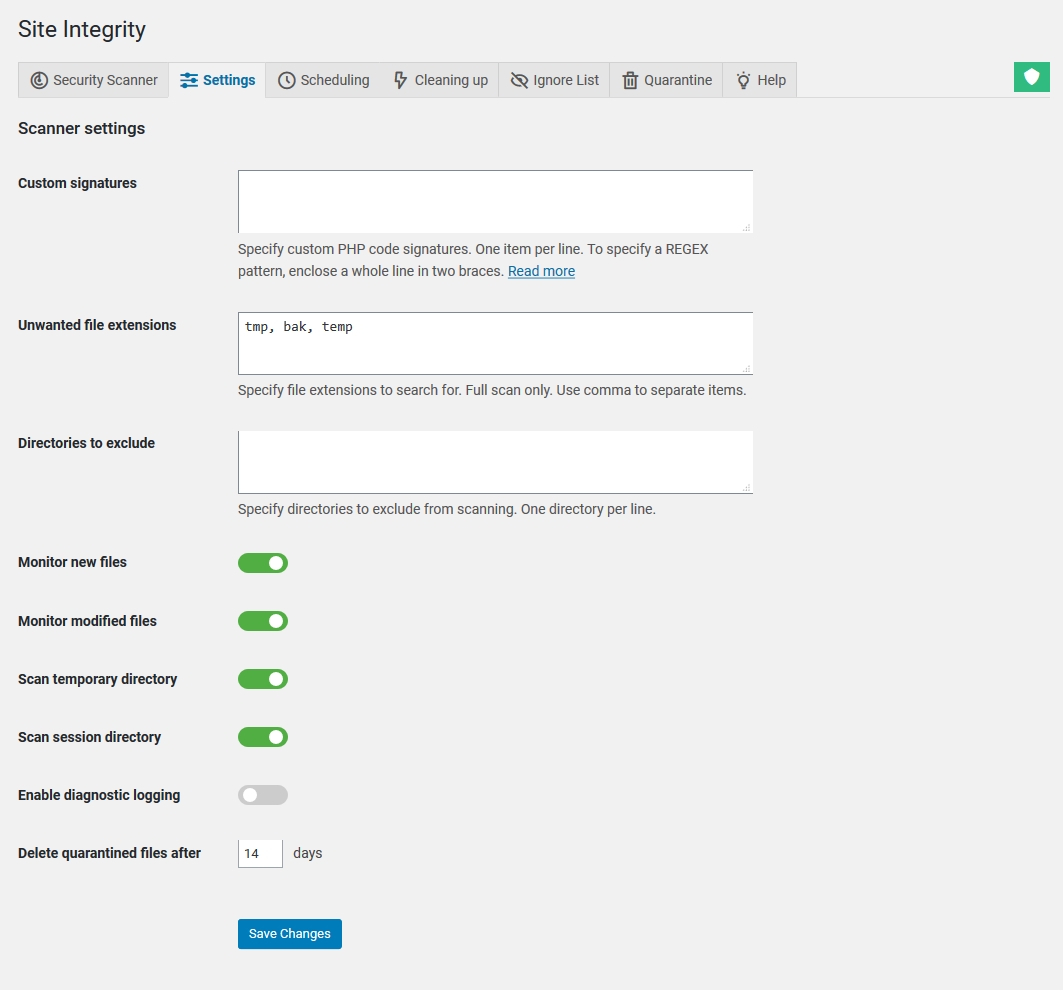
WP Cerber’s malware scanner is one of the most comprehensive in the free-plugin category. It inspects every file and folder on the site using SHA-256 checksums to detect changes from known-good file states.
The scanner checks WordPress core files against official checksums, all installed plugin and theme files against their known-good versions, custom files not belonging to any registered plugin or theme (orphan files are a common malware hiding location), known malware signatures, backdoors, trojans, PHP shells, and newly introduced files that should not exist.
SHA-256 file integrity: Rather than simple file modification dates, which can be manipulated, WP Cerber uses SHA-256 hash comparison. Any file that has been silently modified will not match its expected hash, and the scanner flags it regardless of the file’s timestamp.
Automatic recovery: When WP Cerber detects an unauthorized change to a WordPress core file or a plugin file with a known-good version available, it can automatically restore the file from the official source without requiring manual intervention. This is an uncommon feature in the free tier. Wordfence offers a comparable “Repair All Repairable Files” action, but requires manual trigger; WP Cerber can be configured to recover automatically on detection.
Quarantine: Files identified as malware that cannot be automatically recovered are moved to quarantine rather than immediately deleted, preventing accidental permanent deletion of files that might turn out to be false positives. Quarantined files are auto-cleaned after a configurable number of days.
Scan scheduling: Free users get daily scheduled scans. Pro users unlock hourly scan scheduling, reducing the window between a compromise and detection from 24 hours to as little as 1 hour. Scan results are emailed to the administrator on completion with a summary of findings and action links.
Two-factor authentication
WP Cerber includes two-factor authentication with a significant limitation: it supports email-based PIN codes only. There is no support for TOTP-based authenticator apps (Google Authenticator, Authy, Microsoft Authenticator) and no support for hardware security keys. The developer has indicated TOTP is on the roadmap, but as of version 9.9.3, it is not available.
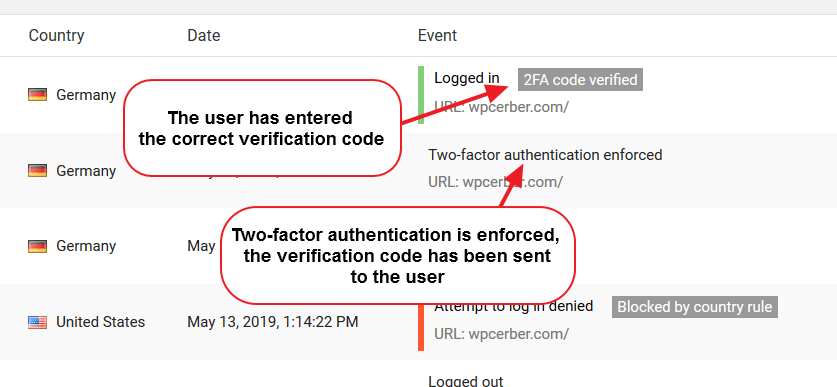
After entering valid login credentials, the user receives a numeric PIN code to their registered email address and must enter it to complete login. The code expires after a configurable period. 2FA can be required for all users of specific roles via the User Policies admin page, letting you enforce it for administrators without imposing it on subscribers. The Professional version allows per-user 2FA customization and the use of a separate email address from the account email. IPs on the White Access List do not see the 2FA challenge.
Email-based 2FA is the most accessible form of two-factor authentication but also the most vulnerable to email account compromise. TOTP apps are considered more secure because the code is generated locally and does not depend on email delivery. Any user or organization with strong 2FA requirements should verify whether email-based 2FA meets their standard, or choose an alternative plugin that supports TOTP.
IP Access Control
WP Cerber maintains two IP access control lists: a White Access List (allowlist) and a Black Access List (blocklist). Both support individual IP addresses, IP ranges, and Class C subnets. Entries on the White Access List bypass the Traffic Inspector, 2FA requirements, and login attempt limits. The Black Access List permanently blocks listed IPs regardless of other settings. For each blocked IP, WP Cerber can display WHOIS data including the country, abuse contact, and network owner.
Country and geographic restrictions (Pro only)
The Professional version adds country-level access controls. You can restrict login attempts, user registrations, comment submissions, REST API requests, and XML-RPC requests by country, either allowing only specific countries or blocking all others. This is a coarse-grained tool but effective for sites with a clearly defined geographic audience. Country restrictions operate separately from the IP blocklists, complementing rather than replacing the IP-based controls.
Activity Log and Live Traffic
The Activity Log records all security-relevant events: login attempts (successful and failed), blocked IPs, lockouts, user activity, 2FA events, and scanner findings. Each entry is searchable and filterable by IP address, username, event type, and date.
The Live Traffic log provides a more detailed HTTP-level view of requests to the site. It shows each request with IP address, location, URL accessed, HTTP method, and response code. Entries can be expanded to see full request detail, and any IP can be acted on directly (blocked, whitelisted, or looked up via WHOIS) from the log view. On high-traffic sites, the volume of records can accumulate significantly; WP Cerber includes a retention period setting to control how long records are kept before auto-deletion.
Cerber Security Cloud (Pro only)
Cerber Security Cloud is the Professional version’s key differentiator from the free tier. It provides a real-time global blacklist of malicious IP addresses maintained by Cerber Lab, built from signals across all sites running WP Cerber Pro. When a request arrives at a Pro-enabled site, the source IP is checked against the cloud database in real time. Known malicious IPs are blocked immediately, before even reaching the Traffic Inspector or login protection layer. Only IP addresses are transmitted to the cloud; no personal data or request content is shared. Cerber Security Cloud also powers the dual anti-spam mode for Pro users.
Free vs. Professional comparison
| Feature | Free | Professional |
|---|---|---|
| Login and brute force protection (all 4 entry points) | Yes | Yes |
| Custom login URL and admin hardening | Yes | Yes |
| Traffic Inspector (WAF) | Yes | Yes |
| Cerberus anti-spam (local heuristics) | Yes | Yes |
| reCAPTCHA integration | Yes | Yes |
| Malware scanner with automatic file recovery | Yes (daily) | Yes (up to hourly) |
| Two-factor authentication (email PIN) | Yes (role-based) | Yes (role-based and per-user) |
| IP White and Black Access Lists | Yes | Yes |
| User enumeration prevention | Yes | Yes |
| XML-RPC blocking and restriction | Yes | Yes |
| REST API disabling and restriction | Yes | Yes |
| Activity Log and Live Traffic | Yes | Yes |
| Email notifications and weekly reports | Yes | Yes |
| fail2ban integration | Yes | Yes |
| GDPR tools | Yes | Yes |
| Cerber Security Cloud (global IP blacklist) | No | Yes |
| Cloud-enhanced dual anti-spam | No | Yes |
| Country and geographic access restrictions | No | Yes |
| Hourly malware scan scheduling | No | Yes |
| Per-user 2FA settings and separate email | No | Yes |
| Cerber Hub (remote multi-site management) | No | Yes |
| Professional support (helpdesk) | No | Yes |
| Auto-updates via vendor channel | No | Yes |
| Annual price (per site) | $0 | $99 |
Pricing
WP Cerber Pro is purchased and managed through my.wpcerber.com. Two billing options are available per site:
Quarterly: $29 per site, billed every 3 months ($116/year annualized). Suitable for short-term use or testing Pro features before committing to an annual plan.
Annual: $99 per site, billed once per year. The better value for any site running the plugin for 12 months or more.
Volume pricing is available for multiple sites; the checkout flow prompts for the number of sites and applies volume discounts. A 30-day money-back guarantee applies to all plans. Payment is processed through Stripe (major credit cards) or PayPal. The free version requires no payment and no account, but the plugin download is from wpcerber.com rather than WordPress.org.
For comparison context: Wordfence Premium charges $149/year per site, Sucuri’s Basic WAF plan starts at $199/year, and Solid Security Pro is bundled in the $299/year Kadence suite. At $99/year per site, WP Cerber Pro is competitively priced among the major all-in-one security options. Verify current pricing at my.wpcerber.com before purchasing.
Pros and cons
Pros
- Combines firewall, anti-spam, malware scanner, and login protection in one plugin, replacing the need for separate Wordfence, Akismet, and scanner installs.
- Cerberus anti-spam engine protects WordPress and WooCommerce forms without mandatory CAPTCHA, functioning as a credible alternative to Akismet.
- Malware scanner includes automatic file recovery for core and plugin files from official sources: a more advanced free-tier feature than most competitors offer.
- Brute force protection covers all four WordPress authentication entry points: login form, XML-RPC, REST API, and auth cookies.
- Cerber Security Cloud (Pro) provides real-time global IP reputation data built from across the Pro user network.
- Country-level access controls (Pro) allow geographic restriction of logins, registrations, comments, and API access.
- Competitive Pro pricing at $99/year per site, lower than most comparable all-in-one alternatives.
- Active development: version 9.9.3 released August 11, 2026, with a consistent changelog throughout 2026.
- fail2ban integration for server-level administrators.
- Privacy-focused cloud design: only IP addresses sent to Cerber Security Cloud; no personal data or request content.
- 30-day money-back guarantee.
- GDPR compliance tools included.
- Developer hooks (filters and actions) for customization and automation integration.
Cons
- WordPress.org closure since September 2022: the plugin cannot be installed from the standard WordPress plugin directory, does not receive auto-updates through WordPress.org infrastructure, and the specific “security issue” cited at closure was never fully disclosed.
- 2FA limited to email-based PIN codes only: no TOTP authenticator app support (Google Authenticator, Authy, hardware keys) in any version as of 9.9.3.
- Free version lacks cloud protection: Cerber Security Cloud global IP blacklist is entirely Pro-only, meaning free users rely on local rules and heuristics only.
- No live firewall rule streaming between plugin updates: unlike Wordfence, which pushes threat intelligence to running sites continuously, WP Cerber relies on plugin updates for rule changes.
- Cloudflare add-on last updated May 2022 (version 1.2); users relying on Cloudflare integration should verify current compatibility.
- Cerber Hub (multi-site remote management) requires a Pro license, unlike Wordfence Central which is free for unlimited sites.
- No virtual patching for plugin vulnerabilities at any tier.
- No passkeys or passwordless login support.
- Reduced community visibility: no ongoing WordPress.org compatibility reports, no new community reviews, and no discoverability via standard plugin search.
Alternatives to WP Cerber Security
Wordfence Security. The most-installed WordPress security plugin, with 5 million-plus active installs and an active WordPress.org listing. Wordfence’s free version includes a real WAF and malware scanner on a 30-day threat delay; Premium ($149/year) provides real-time threat intelligence. Key advantage over WP Cerber: fully available through WordPress.org, massive user community, and Wordfence Central for free multi-site management. Key gaps: no built-in anti-spam engine, and the malware scanner does not include automatic file recovery.
Solid Security (formerly iThemes Security). A strong login security and hardening plugin with a free WordPress.org tier covering 2FA, brute force protection, vulnerability scanning via Patchstack, and file change detection. Pro is bundled in the Kadence suite ($299/year). Key advantage: Solid Security supports TOTP-based 2FA including passkeys in Pro. Key gaps: no malware scanner at any tier and no built-in anti-spam.
Sucuri Security. A cloud-based security platform where the WAF operates at DNS level, filtering traffic before it reaches your WordPress server. Basic WAF plan from $199/year with malware cleanup included. Best for sites that want network-level traffic filtering and a managed cleanup guarantee. No built-in anti-spam and higher entry price than WP Cerber Pro.
MalCare Security. Automated malware scanner that runs scans on MalCare’s own servers rather than yours, avoiding server resource impact. From $99/year for one site. Best for malware detection and removal without on-server scanning overhead. Does not include a firewall or anti-spam engine comparable to WP Cerber’s.
All In One Security (AIOS). A free-heavy WordPress.org plugin covering brute force protection, login security, file change detection, and basic firewall rules. Free tier available with a large user base; less comprehensive than WP Cerber but fully available through WordPress.org and actively maintained.
Final verdict
WP Cerber Security is a well-built plugin that earns a place in the conversation about serious WordPress security tools. The Traffic Inspector, Cerberus anti-spam engine, and malware scanner with automatic file recovery are all stronger implementations than many competing plugins offer, particularly at the free tier. The Pro pricing at $99/year is genuinely competitive.
The WordPress.org closure is the unresolved question that sits over everything else. Security software that is not in the WordPress.org repository, and whose removal was attributed to a “security issue” without public follow-up disclosure, requires a higher level of trust in the developer than standard plugin evaluation. That trust may be warranted: the developer has maintained an active changelog, continued shipping updates through 2026, and operates a structured professional support channel. But the basis for that trust is the developer’s own communications, not a third-party audit or public verification of the original issue’s resolution.
If your requirements include TOTP-based 2FA, the decision is straightforward: WP Cerber cannot meet that requirement today. Consider Solid Security or Wordfence.
For new installations in 2026: start with Wordfence’s free tier if WordPress.org presence and community trust signals matter to your evaluation process. If you decide to evaluate WP Cerber, download the free version from wpcerber.com, test it on a staging site first, and verify the setup process matches your hosting environment before committing to Pro.
FAQ
Is WP Cerber Security free?
Yes. A free version of WP Cerber is available without a license key or payment. It includes login and brute force protection, the Traffic Inspector WAF, the Cerberus anti-spam engine, the malware scanner with automatic file recovery, IP access control lists, email-based 2FA, XML-RPC and REST API controls, an activity log, and GDPR tools. The free version does not include Cerber Security Cloud, country-level access restrictions, per-user 2FA settings, hourly scan scheduling, or professional support. The free version must be downloaded from wpcerber.com; it is not available through the WordPress.org plugin directory.
Why was WP Cerber removed from WordPress.org?
WordPress.org closed the WP Cerber plugin listing on September 22, 2022, citing a “security issue.” The specific vulnerability was not publicly disclosed in full by either WordPress.org or Cerber Tech. The plugin has continued active development since the closure, with version 9.9.3 released in August 2026. Users can monitor the developer’s changelog at wpcerber.com/whats-new/ for ongoing developments.
What is the difference between WP Cerber Free and Professional?
The key additions in the Professional version are: Cerber Security Cloud (real-time global IP blacklist), cloud-enhanced dual anti-spam (local plus cloud combined), country and geographic access restrictions for logins, registrations, comments, and API requests, hourly malware scan scheduling (versus daily in free), per-user 2FA customization, Cerber Hub for remote multi-site management, professional helpdesk support, and automatic plugin updates via the vendor’s own channel. The Professional version costs $99/year per site or $29 per 3 months per site.
Does WP Cerber support Google Authenticator or TOTP apps?
No. WP Cerber’s two-factor authentication uses email-based PIN codes only. There is no support for TOTP-based authenticator apps (Google Authenticator, Authy, Microsoft Authenticator) or hardware security keys in any version as of 9.9.3. The developer has indicated TOTP is planned for a future release but it is not currently available. If TOTP-based 2FA is a requirement, consider Wordfence or Solid Security instead.
How does WP Cerber handle spam protection?
WP Cerber includes the Cerberus anti-spam engine, which protects WordPress comment forms, registration forms, login forms, password reset forms, and WooCommerce checkout and registration forms using heuristic analysis, in many configurations without visible CAPTCHA. Google reCAPTCHA integration is also available as an additional or alternative layer. The Professional version adds real-time IP reputation checking via Cerber Security Cloud, providing cloud-enhanced dual anti-spam. This allows many WP Cerber users to use it in place of Akismet for comment and form spam.
What is Cerber Security Cloud?
Cerber Security Cloud is a real-time global blacklist of malicious IP addresses maintained by Cerber Lab, available exclusively in the Professional version. When a request arrives at a Pro-enabled site, the source IP is checked against the cloud database in real time. Known malicious IPs are blocked before reaching other security layers. The database is built from signals across all WP Cerber Pro sites. Only IP addresses are transmitted to the cloud; no personal data or request content is shared. Cerber Security Cloud also powers the cloud-enhanced dual anti-spam mode for Pro users.
What does WP Cerber’s malware scanner do?
The WP Cerber malware scanner inspects every file and folder on the WordPress installation using SHA-256 hash comparison to detect unauthorized changes. It checks WordPress core files against official checksums, plugin and theme files against their known-good versions, and custom files for malware signatures, backdoors, PHP shells, and trojans. When it detects a modified core or plugin file with a known-good version available, it can automatically recover the file without manual intervention. Files identified as malware that cannot be auto-recovered are moved to quarantine. Scan reports are emailed to the administrator. Scheduling is daily on the free version and up to hourly on Professional.
How does WP Cerber protect against brute force attacks?
WP Cerber limits login attempts by IP address and can optionally block the entire Class C subnet when suspicious activity is detected from a specific network range. It covers all four WordPress authentication entry points: the wp-login.php form, XML-RPC, the REST API, and direct authentication cookies. When the failure threshold is reached, the IP is locked out for a configurable duration. Citadel Mode provides emergency lockdown during large-scale attacks. The custom login URL feature renames wp-login.php and makes the original return a 404, reducing automated attack traffic targeting the standard paths.
Does WP Cerber work with WooCommerce?
Yes. WP Cerber integrates with WooCommerce to apply anti-spam protection to checkout forms, customer registration forms, and product review submissions via the Cerberus engine and optional reCAPTCHA. In the Professional version, WooCommerce registration and checkout can also be subject to country restrictions. The plugin’s brute force protection covers WooCommerce account login in the same way as standard WordPress login.
How do I install WP Cerber if it is not on WordPress.org?
Download the plugin ZIP file from wpcerber.com or my.wpcerber.com (a free account is needed to access the download). In your WordPress admin, go to Plugins > Add New > Upload Plugin, upload the ZIP file, and activate. The free version does not require a license key. The Professional version requires entering a license key in the WP Cerber settings after activation to connect the site to Cerber Security Cloud and enable Pro features. Automatic updates are handled through the vendor’s own update channel (Pro) or via manual re-download (free).
Can WP Cerber manage multiple WordPress sites?
Yes, with the Professional version. Cerber Hub is a remote management dashboard included in Pro that allows managing security settings, viewing activity logs, and running malware scans across multiple WP Cerber-enabled sites from a central interface. Each site requires its own Pro license. The free version does not include Cerber Hub. Note that this differs from Wordfence Central, which is free for unlimited sites regardless of Wordfence tier.
Is there a money-back guarantee?
Yes. WP Cerber Pro comes with a 30-day money-back guarantee. Payment is processed through Stripe or PayPal. To request a refund within 30 days of purchase, contact Cerber Tech through the professional support helpdesk at my.wpcerber.com.