


At a glance
- Plugin: WP Extended Search
- Version: 2.2.1
- Price: Free (no premium tier)
- Active installs: 20,000+
- Rating: 4.9/5 from 72 reviews (WordPress.org)
- Tested up to: WordPress 6.9.7
- Best for: Sites that need to search custom post types, custom fields, taxonomies, and author names without replacing WordPress core search
- Not ideal for: Sites needing AJAX live search, weighted relevance scoring, or built-in search analytics
WordPress’s default search is limited. Out of the box it searches only post titles and content, ignores custom fields, skips custom post types that are not explicitly configured, and applies no relevance tuning whatsoever. For many sites that means important content simply does not surface in search results.
WP Extended Search fixes this without replacing the entire search engine. It layers additional query parameters on top of WordPress core search, giving you control over which fields, post types, taxonomies, and meta keys are included in each search query. The plugin is 100% free with no upsell, open source, and has earned a 4.9/5 rating from 72 reviews on WordPress.org.
This review walks through the plugin’s settings panel, its WooCommerce integration, how multiple search configurations work, and where the plugin’s limitations become relevant.
Quick verdict
WP Extended Search is the most practical free option if you need WordPress to search custom fields, meta data, or custom taxonomies without buying a premium plugin. Setup takes minutes, the settings panel is clean, and it works alongside your existing search form. The biggest limitation is that it does not add AJAX live search or relevance weighting. If those matter, you are looking at a different class of plugin. For content-heavy sites, membership platforms, directories, or WooCommerce stores that just need broader search coverage, WP Extended Search is a solid free pick.
Rating: 4 / 5
What is WP Extended Search?
WP Extended Search is a free WordPress plugin by Sumit Singh that extends the native WordPress search query. Rather than replacing WordPress’s built-in search with a separate engine, it modifies the WP_Query that runs behind every search request.
You configure what the search should include through a Settings panel (Settings > Extended Search). Each configuration is called a “setting” and you can create multiple settings for different search forms across your site. A global setting automatically applies to any search triggered by the default WordPress search widget or form.
The plugin has been on WordPress.org since its initial release and reached version 2.2.1 in April 2025. It is tested up to WordPress 6.9.7 and requires PHP 7.0 or higher. The source code is available on GitHub.
Who is WP Extended Search best for?
WP Extended Search fits a specific need: sites that want broader search coverage without paying for a premium search plugin.
Good fit:
- Portfolio or directory sites with custom post types (listings, resources, case studies) that do not show up in WordPress search by default
- WooCommerce stores that need customers to search by product SKU, attribute value, or product description fields
- Membership or community sites that store member data in custom fields and need those fields to be searchable
- Developer-built sites where content is structured across multiple post types and the client needs a single search to cover all of them
- Budget-constrained projects where a free tool covers the requirement
Not a good fit:
- Sites where AJAX live-search (results appearing while the visitor types) is required
- Projects needing relevance scoring, TF-IDF weighting, or fuzzy matching
- Teams that need built-in search analytics or query logs
- Sites with very high search volume where a dedicated search engine makes more sense
Setup and first impressions
Installing WP Extended Search follows the standard WordPress plugin process. Search for “WP Extended Search” in Plugins > Add New, install, and activate. After activation, a new menu item appears under Settings > Extended Search.
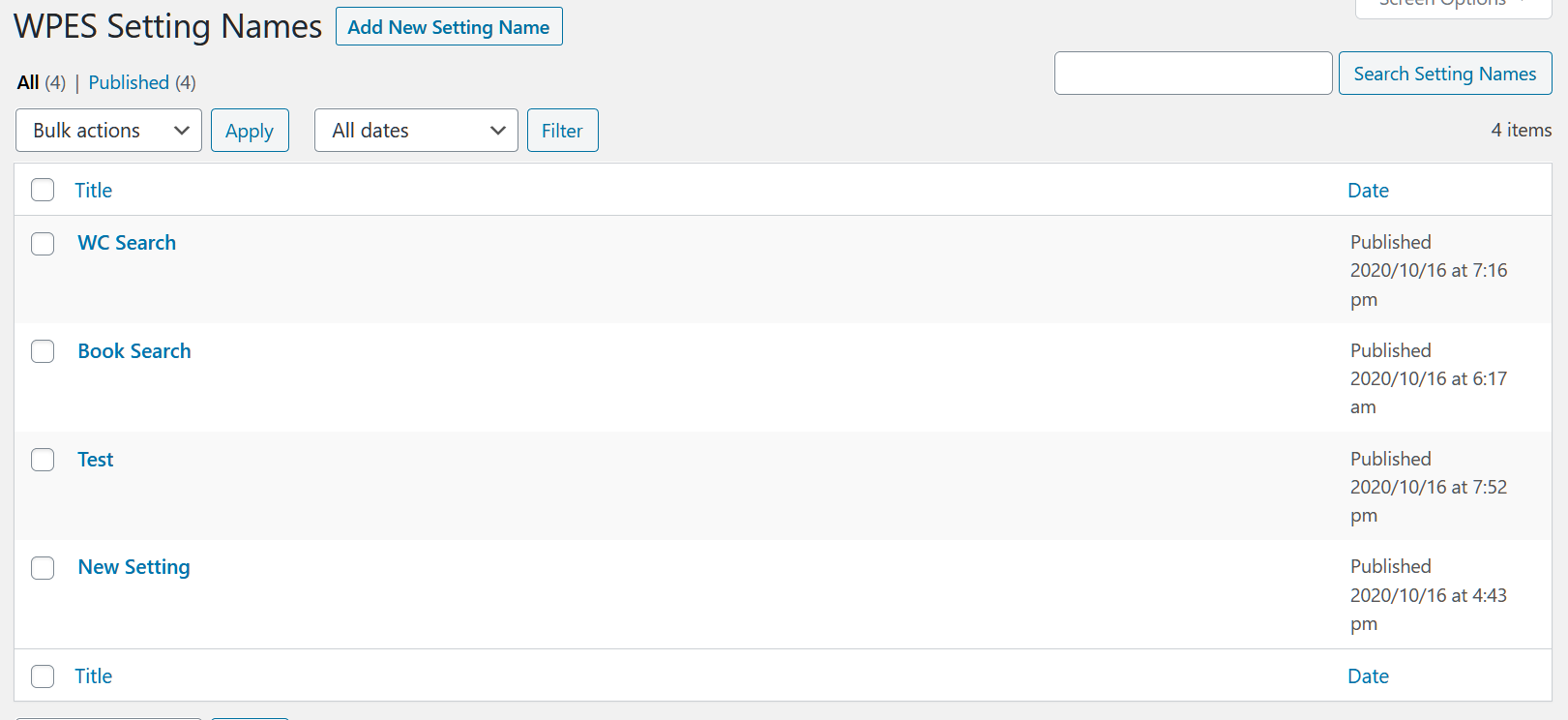
The settings panel is straightforward. The first screen lists your search configurations (called “settings”), each identified by a name. There is one default setting named “Global” which applies site-wide. You can edit the Global setting or add additional named settings for specific search forms.
When you open a setting to edit it, you see a series of checkboxes and dropdowns organized into logical groups. There are no modal popups or multi-step wizards. The interface is clean by design, which suits experienced WordPress users well, though it may feel sparse to someone expecting a visual drag-and-drop builder.

Search scope control
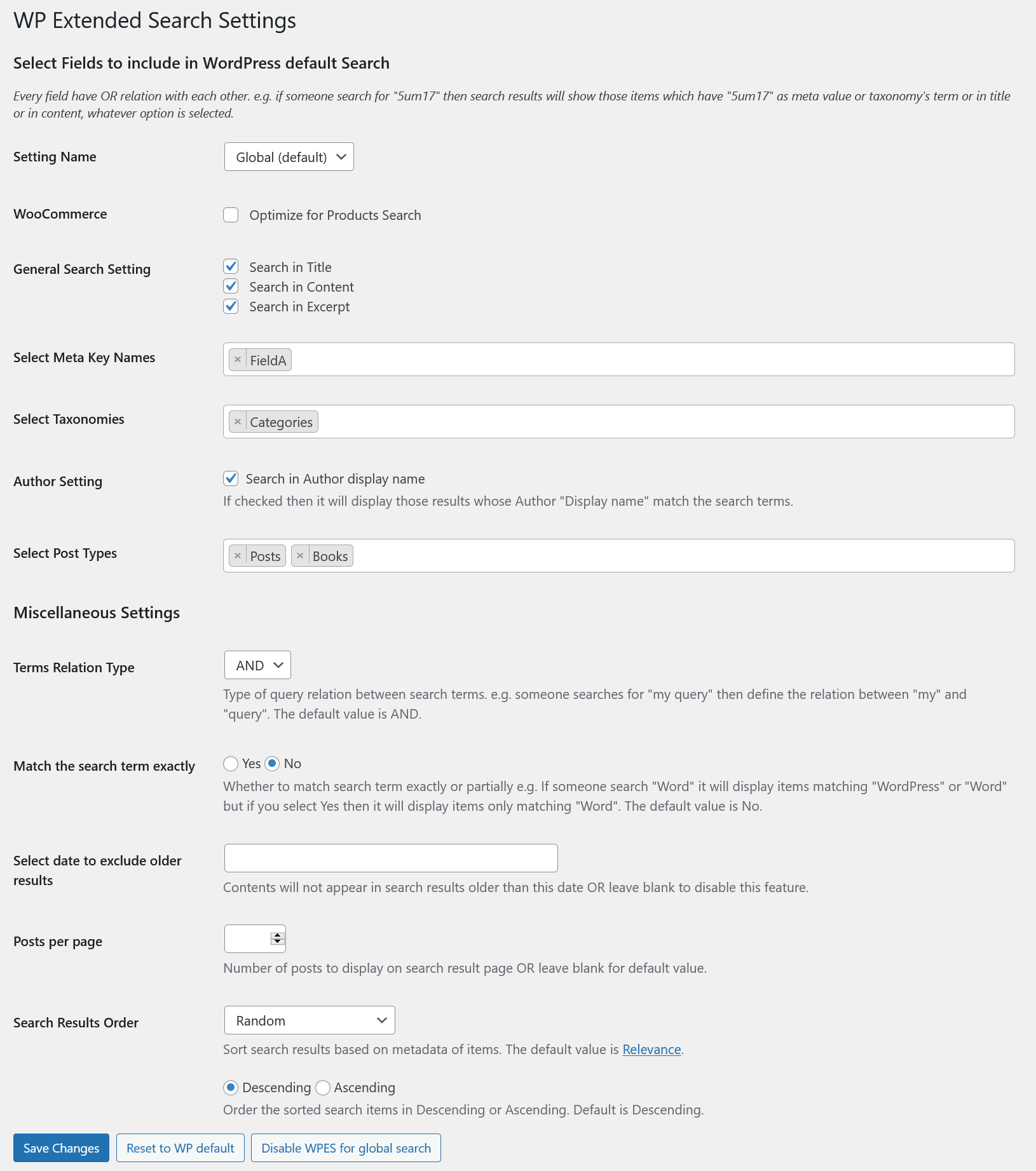
The core feature of WP Extended Search is the ability to choose what the search query looks at. The default WordPress search checks only post titles and content. The plugin adds the following options:
Post fields: You can toggle whether the search includes the post title, post content, and post excerpt independently. This is useful when you want to search content and excerpts but not titles, or when you want title-only search for a specific form.
Author names: Enable this and searches will match posts by the author’s display name. Useful for blogs, bylined content, and contributor sites.
Custom taxonomies: The plugin lists all registered taxonomies (categories, tags, and any custom ones your theme or plugins register). You can select which ones the search should look inside. If you have a “Location” or “Industry” taxonomy on a custom post type, enabling it means a visitor searching for “London” will find posts tagged with that term.
Post meta (custom fields): This is often the main reason people install the plugin. You specify meta key names, and the search will check those fields. A product that stores dimensions in a _product_dimensions meta key becomes searchable by dimension value once you add that key to the configuration.
Post types: Choose which post types are included in results. You can include any registered public post type alongside standard posts and pages.
Multiple search configurations
Each search configuration you create can have different settings. A site might have:
- A global configuration that searches posts and pages across title, content, and category
- A product-search configuration that also includes product SKU, attributes, and meta fields specific to WooCommerce
- A staff-directory configuration that searches a “Staff” custom post type by name, department taxonomy, and bio excerpt
You deploy each configuration by attaching it to a form. The plugin supports four deployment methods:
- Widget: Adds a search widget to widget areas with a setting selector
- Shortcode:
[wpes_search setting="your-setting-name"]placed anywhere via the block editor or classic editor - PHP function:
wpes_search_form("your-setting-name")for direct theme integration - Hidden HTML field: A small addition to an existing
searchform.phptemplate to route that form through a specific configuration
The shortcode and PHP function approaches are practical for custom-built themes. The widget works for standard sidebar or header placements.
WooCommerce integration
When WooCommerce is active, WP Extended Search detects it and adds a dedicated option in the settings panel: “Optimize for Products Search.” Enabling this switches the search output to use WooCommerce’s search template instead of the standard WordPress loop template, which ensures proper product card rendering.
With WooCommerce-specific fields enabled, the search can match:
- Product SKU (exact or partial)
- Product attributes (color, size, material, or any other registered attribute)
- Custom product meta fields you specify
This is particularly useful for stores with large catalogs where customers might search by a partial SKU or a product attribute value that would not normally appear in the post title or description.
The plugin handles the query layer, not the results display. It adds those fields to the SQL WHERE clause so matched products are returned. Rendering those results still uses your WooCommerce or theme templates.
Advanced filters and query controls
Beyond field selection, WP Extended Search provides several filters that narrow or adjust how search results are returned:
Date filtering: You can set an offset to exclude content older than a specified number of days. A site that needs search to surface only recent news or announcements can set this without modifying queries in code.
Results per page: Override the default posts_per_page for a specific search configuration without touching the general Settings > Reading options.
Sort order: Change how results are ordered (by date, title, or menu order). WordPress core does not provide true relevance scoring, so ordering by “relevance” is limited to what the database returns.
AND / OR logic: Control whether search terms are combined with AND (all terms must match) or OR (any term can match). AND mode narrows results and is usually preferable for longer queries; OR mode returns more results and works better for short single-word searches.
Exact vs. partial matching: Switch between exact word matching and partial matching. Partial matching is the default WordPress behavior (it wraps terms with % wildcards in the SQL LIKE clause). Exact matching tightens the query for sites where false positives are a problem.
Attachment filtering: When attachments are included in search results, you can limit which file types appear using MIME type restrictions (for example, only PDFs or only images).
Disable global search: If you want to remove the default site-wide search entirely and rely only on your configured forms, there is a dedicated option to disable global search.
WPML and multilingual support
WP Extended Search includes WPML compatibility, which means multilingual sites using the WPML plugin can configure search separately per language. Custom field values and taxonomy terms are matched within the appropriate language context.
The plugin is available in four locales including Arabic and Traditional Chinese, indicating active community translation.
Pricing
WP Extended Search is 100% free. There is no premium version, no license key, and no paid add-on. The plugin is open source and hosted on both WordPress.org and GitHub.
This is good for budget projects and small sites. The tradeoff is that there is no commercial entity with a financial incentive to maintain it. The last update (version 2.2.1) was released in April 2025, approximately 17 months before this review. The plugin author responds to support topics on WordPress.org, but a 17-month gap between updates is longer than many actively developed free plugins. Sites that need long-term reliability should monitor this cadence before committing.
Pros and cons
Pros
- Completely free, no upsell or premium tier
- Extends native WordPress search without replacing it (lower conflict risk)
- Custom field and meta key search out of the box
- Clean, simple settings panel
- WooCommerce integration included
- Multiple named configurations for different search forms
- WPML support for multilingual sites
- Open source
Cons
- No AJAX live search or type-ahead autocomplete
- No relevance scoring or TF-IDF weighting
- No built-in search analytics or query logs
- Minimal interface may feel sparse for non-developers
- Last update was April 2025 (17+ months ago; worth monitoring for long-term reliability)
- Requires knowing exact meta key names to configure field search
Alternatives
WP Extended Search fills a specific gap, but depending on what you need, one of these alternatives might serve you better.
Relevanssi is the leading free WordPress search replacement. It replaces the default search engine entirely with TF-IDF relevance scoring, partial word matching, and synonym support. If accurate relevance ranking matters more to you than searching additional fields, Relevanssi is the stronger free option. A premium version (EUR 120/year) adds WooCommerce support and more.
Ivory Search is a freemium plugin that adds AJAX search, multiple search forms, and WooCommerce integration. The free version covers the basics; paid tiers add more search types and styling options. If you need live search that appears as the visitor types, Ivory Search is worth considering.
SearchWP is a premium-only search plugin starting at $99/year. It offers full document indexing (including PDFs), a visual algorithm builder, WooCommerce search, and detailed analytics. If your budget allows a paid plugin and you need enterprise-level search customization, SearchWP is the most complete option.
Ajax Search Pro is a commercial plugin (from $36 one-time on CodeCanyon). It focuses on visual live search with a drag-and-drop form builder and extensive styling controls. If the search widget’s visual design is a priority and you want AJAX results, Ajax Search Pro delivers that in ways WP Extended Search does not.
For sites that simply need broader search coverage at no cost, without live search or heavy analytics, WP Extended Search remains the cleanest free solution.
Final verdict
WP Extended Search does one job and does it well: it makes the WordPress search query look in more places. Custom post types, meta fields, author names, and custom taxonomies all become searchable through a clean settings panel, at no cost.
The plugin is not a full search engine replacement and does not try to be. It does not add AJAX live search, does not rerank results by relevance, and does not log queries. Those limitations are real. But for a large segment of WordPress sites, they are not blockers.
If your users cannot find content because WordPress is ignoring custom fields or post types, WP Extended Search fixes that problem for free, with minimal setup, and without introducing heavyweight dependencies. That makes it a practical tool worth knowing about in 2026.
Rating: 4 / 5