

Picking a WordPress caching plugin in 2026 is one of those decisions that looks small on a checklist and turns into the dominant performance lever once the site is live. Themes ship more JavaScript than they used to. Page builders inject more CSS than any visitor will ever paint. Core Web Vitals scores creep into Google Search Console emails on the first slow Monday of every month. WP Rocket is the paid plugin that markets itself as the one-click answer to all of that: install, activate, and let the plugin push the site through “80 percent of web performance best practices” without making the operator open a single htaccess file.
This WP Rocket review walks the product the way I would audit any premium WordPress speed optimization plugin: a careful pass through the marketing site, a deep read of the public documentation hub, a live look at the pricing page and the changelog, and a check of every public claim against the vendor’s own sister-product surfaces (RocketCDN, Imagify, WP Media). Where a feature was only inspected from documentation and not exercised on a paid licensed install during this test window, the section says so plainly.
A note on basis. This review is built on a documentation, pricing, and feature-page audit of wp-rocket.me, the public WP Rocket changelog, the docs hub at docs.wp-rocket.me, the WP Media parent-company pages, and the RocketCDN product page. It also takes account of how WP Rocket is distributed: the plugin is paid only and is not listed on WordPress.org, so the usual “active installs and version metadata” panel that I would pull on a free plugin does not exist. The vendor reports more than 5.4 million websites optimised, 384,000 customers, and a 4.5 star average on Trustpilot across roughly 2,850 ratings as of the audit date; that figure is a vendor claim and is not independently verified. Pricing, plan inclusions, and renewal terms were verified against wp-rocket.me as of June 2026. A multi-month licensed install with real before-and-after PageSpeed Insights, GTmetrix, and WebPageTest runs on a busy production site is the right way to test any caching plugin to the floor; this writeup is a documentation-and-pricing audit, not a paid hands-on bake-off, and the per-section “Note on basis” callouts identify which paragraphs are documentation-based versus paid-install behaviour.
If you are evaluating a WordPress caching plugin for a content site, a WooCommerce store, an agency client roster, or a marketing landing page, this WP Rocket review covers the questions I would want a colleague to answer before I bought the license.
At a glance
- Audited on: WP Rocket homepage, pricing page, features page, RocketCDN page, About page, the docs hub at docs.wp-rocket.me, the public changelog at wp-rocket.me/changelog/, and the WP Media parent-company pages.
- Reviewed: install and activation, page caching, cache preloading, browser caching, GZIP, file minification and concatenation, Remove Unused CSS, Critical Image Optimization, Automatic Lazy Rendering, Delay JavaScript Execution, media lazy loading, WebP support, database optimisation, CDN integration with RocketCDN and Cloudflare, eCommerce-friendly cache, Rocket Insights performance hub, and the Single, Plus, and Multi licences.
- Bottom line: a paid all-in-one WordPress speed optimization plugin, not a free caching plugin, whose right tier is decided by how many sites the licence covers rather than by which features unlock.
Quick verdict on WP Rocket
If you want one sentence: WP Rocket is the premium WordPress caching plugin I would put on a non-engineer’s site if I wanted the largest Core Web Vitals win available from a single activation, and the tier you actually need is decided by the number of sites you run, not by feature gating.
The product earns its place because every classical performance concern (page caching, GZIP, browser caching, lazy loading of images, minification and concatenation of CSS and JS, deferred and delayed JavaScript, removal of unused CSS, critical CSS, LCP optimisation, database cleanup, CDN routing) is solved inside one settings panel, with most of the work auto-enabled on activation. The plugin’s design philosophy (“Decision, not Options,” in the vendor’s own words on the About page) is the reason it is recommended by hosts and themes that do not want their customers stuck in a tuning loop.
The honest caveats: WP Rocket is paid only, with no permanent free tier. It is not listed on WordPress.org because the WordPress.org plugin directory does not accept paid-only plugins. The Single, Plus, and Multi tiers all unlock the same features; the only thing that changes between them is the number of sites the licence covers. Renewals are billed at the same sticker price as the initial purchase, not at a discount, so the annual cost should be planned at the full sticker year over year. Some legacy free caching plugins must be deactivated before WP Rocket runs cleanly, and one paid premium feature surface (RocketCDN) ships as a separate monthly subscription rather than as part of the licence.
Quick verdict card
- Best for: WordPress operators who want a paid, all-in-one WordPress speed optimization plugin that auto-applies most performance best practices on activation, agencies running multiple client sites from one dashboard, WooCommerce stores that need cart and checkout pages excluded from caching automatically, and site owners who would rather pay an annual licence than stitch together free caching, image, and database plugins.
- Best plan for most teams: Single for a one-site operator, Plus for a small agency or a freelance portfolio of two or three sites, and Multi for any agency running ten or more client sites.
- Standout: a single activation that turns on page caching, cache preloading, GZIP, browser caching, mobile-aware cache, eCommerce-aware exclusions, and the Rocket Insights performance hub at the same time, plus a one-click Remove Unused CSS option and a Delay JavaScript Execution toggle that are usually two separate paid plugins on competing stacks.
- Watch out for: no permanent free tier (only a 14-day money-back guarantee), no WordPress.org listing, renewals at full sticker price, RocketCDN is a separate monthly subscription, multisite is supported per-subsite but the plugin cannot be network-activated, and some legacy caching plugins must be deactivated first.

What WP Rocket is
WP Rocket is a premium WordPress caching plugin published by WP Media, a French SaaS company headquartered in Lyon. The plugin launched in July 2013 and has been continuously developed since; the live changelog at the time of this audit lists version 3.22.0.1 as the current release, with the previous 3.22 release introducing a RocketCDN Free Tier for WP Rocket users that accelerates up to three pages at unlimited bandwidth from ten points of presence. WP Media is also the company behind Imagify, the image optimisation service, and operates RocketCDN as a sister product. The same About page positions WP Rocket as a “Decision, not Options” product: the plugin’s design choice is to auto-apply the right performance settings at activation rather than to confront the operator with a wall of toggles.
The product’s job is to take a freshly installed WordPress site, do all the caching and performance work that a hand-tuned NGINX or a separate stack of free plugins would do, and finish that work inside one settings panel with most of the heavy options enabled by default. WP Rocket calls this an “all-in-one web performance plugin” and pitches it as a substitute for three to five separate plugins (page cache + browser cache + GZIP + lazy load + database cleanup, in the traditional split).
What that translates to once the plugin is active:
- Page caching turns on automatically. Logged-out visitors receive static HTML rather than a fresh PHP render.
- Cache preloading rebuilds the cache after a publish, an edit, or an update so the first visitor after a change is not the one who pays the cold-cache cost.
- GZIP compression and browser caching are configured at the htaccess level so static assets ship compressed and clients keep them locally between visits.
- Mobile-aware caching, eCommerce-aware exclusions for cart and checkout pages, and logged-in user cache exclusions are all handled without manual rules.
- File optimisation (minification, concatenation, Remove Unused CSS, optimised CSS delivery, deferred JavaScript loading, Delay JavaScript Execution) lives in one settings tab.
- Lazy loading for images, iframes, videos, and background images is one click.
- The new (in 2026) Automatic Lazy Rendering and Critical Image Optimization features address Interaction to Next Paint and Largest Contentful Paint directly.
- Database optimisation, with scheduled cleanups, is in the same plugin.
- CDN routing is one tab, with first-class RocketCDN integration and add-ons for Cloudflare, Sucuri, and Varnish.
- A “Rocket Insights” performance hub ships at no extra cost inside the licence; it tracks key pages, surfaces recommendations, and lets the operator re-test after a change.
The plugin is not listed on WordPress.org. The plugin directory does not accept paid-only plugins, which is the reason; that also means the “active installs” badge and version metadata that I would pull on a free plugin do not exist for WP Rocket. The vendor’s own homepage cites 5,461,000 plus websites using the plugin and a 92 percent happiness score on 2,311 support ratings.
Who WP Rocket is best for
No caching plugin is right for everyone, and WP Rocket is no exception. Here is the honest fit filter.
Strong fit:
- Operators of single WordPress sites who want one paid licence rather than four free plugins.
- Bloggers, marketing teams, and content publishers who do not want to tune Lighthouse manually and would rather buy a default that already wins.
- Agencies and freelancers running between three and a hundred client sites who want a single performance plugin on every project, with the Plus or Multi licence pricing tier.
- WooCommerce store operators who need cart, checkout, and my-account pages excluded from page caching automatically.
- Hosts and managed-WordPress customers whose stack is already known to be WP Rocket compatible (WP Engine, Kinsta, Cloudways, SiteGround, Pressable, and similar managed hosts have public WP Rocket integration guides).
- Teams that want one annual invoice and one settings panel rather than a stack of free plugins to maintain.
Weak fit:
- Operators who require a free WordPress cache plugin and have no budget for an annual licence. WP Super Cache, W3 Total Cache, and LiteSpeed Cache are the right starting point.
- Sites on LiteSpeed-powered hosting that can use LiteSpeed Cache server-side, which is free and is built for the same web server.
- Teams whose host already ships server-level caching (Kinsta’s built-in caching, WP Engine’s Memcached/page cache layer) and who want a minimal plugin footprint above that.
- Buyers who require an open-source GPL-only plugin distributed through WordPress.org. WP Rocket is GPL-licensed but only distributed through wp-rocket.me with a paid account.
- Workflows that need very granular per-rule caching policy tuned by an engineer; WP Rocket’s “Decision, not Options” philosophy is a feature for non-engineers and a constraint for performance specialists.
If you fall into the strong-fit group, the next sections of this WP Rocket review show how the plugin behaves once it is installed.
Setup and first run
The WP Rocket install flow is intentionally short. The plugin is distributed from wp-rocket.me only, never from WordPress.org, so the first step is to buy a licence through the wp-rocket.me checkout. WP Rocket does not offer a time-limited free trial; the equivalent risk cover is the 14-day money-back guarantee that ships with every paid tier, which lets a buyer pay, install, evaluate against a real site, and request a full refund inside the 14-day window if the plugin is not the right fit. After purchase the operator downloads a ZIP from the WP Rocket account dashboard, uploads it through Plugins > Add New > Upload Plugin in wp-admin, and activates it. The licence is tied to the WP Rocket account; the activation flow does not ask for a key on each site, the account handshake handles it.
What is striking, compared with the typical free caching plugin install, is what happens next: nothing dramatic. WP Rocket does not present a setup wizard with twenty toggles. As soon as the plugin is activated, page caching, GZIP, browser caching, cache preloading, and mobile detection are turned on. The dashboard reports the cache state and lists the optional optimisation tabs the operator can choose to opt into.
The optional tabs are where the “all-in-one” framing earns its keep. From the WP Rocket settings panel:
- Cache. Mobile cache, logged-in user cache exclusions, cache lifespan in hours, sitemap-based preloading, and prefetch DNS for third-party origins.
- File Optimization. Minify CSS, optimise CSS delivery (Remove Unused CSS or Load CSS asynchronously with critical CSS), Minify JavaScript, combine JavaScript, load JS deferred, and Delay JavaScript Execution with a script exclusion list.
- Media. LazyLoad for images, LazyLoad for iframes and videos, replace YouTube iframes with a preview image, disable WordPress emoji, WebP compatibility, and the new Automatic Lazy Rendering plus Critical Image Optimization toggles.
- Preload. Activate preloading, prefetch DNS requests, and the link preloading option that fetches the next URL on hover.
- Advanced Rules. Never-cache URLs, never-cache cookies, always-purge URLs, and a query-string cache list for marketing UTM parameters.
- Database. Clean post revisions, auto drafts, trashed posts, spam comments, trashed comments, expired transients, all transients, and optimise database tables on a scheduled job.
- CDN. Activate a CDN URL, exclude files from CDN routing, and connect RocketCDN with one click.
- Heartbeat. Reduce or disable the WordPress Heartbeat API in the dashboard, post editor, and front end.
- Add-ons. One-click switches for Varnish auto-purge, WebP Compatibility, Cloudflare, and Sucuri.
The operator is not forced to walk through any of those tabs. The default activation is the product’s bet that an average site sees most of the win without any further click.
(Note on basis: the install flow and the default-on settings are inspected from the WP Rocket documentation hub at docs.wp-rocket.me and the public Features page at wp-rocket.me/features/. A live licensed install against a paid account on a production site was not exercised in this test window.)
Page caching, cache preloading, and the static layer
Page caching is WP Rocket’s centre of gravity. The plugin generates static HTML files for every cacheable URL and serves those files instead of running WordPress on each request. This is the same architecture as W3 Total Cache, WP Super Cache, and LiteSpeed Cache (in its file-cache mode); the differentiator is how aggressively WP Rocket pre-warms the cache and how little tuning the operator has to do to keep it healthy.
The mechanics, as described on the Features page and the documentation hub:
- Caching activates automatically when the plugin is enabled. There is no “Enable cache” toggle to find.
- Cache preloading runs after activation and after every publish, update, or sitemap refresh, so the first visitor on a new URL still hits a warm cache.
- Sitemap-based preloading walks every URL in the active sitemap.xml so the warm-up covers the entire indexable site, not only the most popular pages.
- Mobile detection generates a separate cache file for mobile user-agents when the theme is not already responsive at the cache layer.
- The cache lifespan is configurable in hours. The default is ten hours, which is the right shape for content sites that publish daily.
- Cache purging is automatic on content updates, plugin updates, and theme updates.
WP Rocket pushes most of the heavy work to the file system, not to PHP. That keeps the origin server quiet on cache hits and is the reason the plugin is recommended by hosts whose customers tend to over-build PHP workers.
(Note on basis: cache and preloading behaviour was inspected from the WP Rocket Features page and the docs hub. A live before-and-after benchmark on a busy site with sitemap-based preloading was not exercised in this test window.)
File optimisation: minification, Remove Unused CSS, and Delay JavaScript
If page caching is the floor, file optimisation is the ceiling. This is where WP Rocket either wins or loses a Lighthouse score on a modern WordPress site with a theme and page builder that ship more CSS and JS than the page actually paints.
The File Optimization tab covers four classes of work:
- CSS minification. Removes whitespace and comments from CSS to reduce file size on the wire.
- Optimised CSS delivery. The 2026 default is the Remove Unused CSS option, which generates a per-URL CSS file that contains only the rules the page actually uses, and loads the remaining CSS asynchronously. The legacy alternative, Load CSS Asynchronously with inline critical CSS, is still available behind a toggle for sites where Remove Unused CSS would break a custom theme.
- JavaScript minification and concatenation. Removes whitespace, comments, and (optionally) combines several JS files into one.
- Deferred JavaScript and Delay JavaScript Execution. Defer moves non-critical scripts to the end of the load order. Delay JavaScript Execution holds non-critical scripts back entirely until the user interacts with the page, with a script exclusion list so analytics, consent management, and theme-critical scripts can be allow-listed.
The two big-ticket levers here are Remove Unused CSS and Delay JavaScript Execution. On a typical WordPress site running a page builder and a row of marketing pixels, those two settings alone are the difference between a 40s and an 85+ mobile Lighthouse score. The behaviour is the same shape as the paid-plugin features Perfmatters, FlyingPress, and NitroPack charge for; WP Rocket bundles them with the same licence rather than charging separately for each.
There is a real footgun here, and the WP Rocket documentation does not hide it. Concatenating JavaScript is no longer recommended on HTTP/2 hosts because HTTP/2 multiplexing makes the gain marginal and the breakage risk is real. The documentation calls this out and recommends disabling JS concatenation in 2026. Anyone arriving at WP Rocket from a 2018 tutorial that says “tick every box” will reach a slower and more fragile site than the default; the right move is to trust the default-on cache and trust the documentation on optional toggles.
(Note on basis: the File Optimization toggle list and the Remove Unused CSS, Delay JavaScript Execution, and Deferred JavaScript behaviour were inspected from the wp-rocket.me Features page and the docs hub. A real PageSpeed before-and-after on a paid licensed install of a busy site was not exercised in this test window.)
Media: lazy loading, Critical Image Optimization, and Automatic Lazy Rendering
The Media tab is where the 2025 and 2026 Core Web Vitals updates landed.
- LazyLoad for images, iframes, and videos defers loading anything outside the viewport until the user scrolls toward it. This is the classic lazy-loading toggle; WP Rocket exposes it with WebP compatibility, a per-element exclusion list, and a separate switch for YouTube-iframe replacement that swaps a heavy iframe for a lighter preview image.
- Critical Image Optimization detects the Largest Contentful Paint element on each page, prioritises it, and auto-excludes above-the-fold images from lazy loading so the hero image arrives quickly. This is the LCP fix that older free lazy-loading plugins were notorious for breaking, because they would lazy-load the hero image and tank LCP.
- Automatic Lazy Rendering, introduced in the recent release line, defers the rendering of below-the-fold elements until they are needed. The product framing is that this improves Interaction to Next Paint scores; it is the same shape as the content-visibility CSS property but applied automatically based on a page-element heuristic.
- WebP compatibility ships separate cache files for WebP-capable browsers so the cached HTML references the WebP asset where the original PNG/JPG would have been.
WP Rocket does not optimise the images themselves. That work is handled by Imagify (the sister product from the same parent company) or by a third-party image optimisation plugin such as ShortPixel or Smush. The WP Rocket Media tab handles the delivery; the image plugin handles the compression. WP Media’s pricing model is that Imagify is a separate paid product with its own free tier and its own paid plans; the same account can pay for both.
(Note on basis: the Media tab options, the Critical Image Optimization behaviour, and the Automatic Lazy Rendering effect were inspected from the wp-rocket.me Features page and the docs hub. A real LCP and INP improvement against a paid licensed install was not exercised in this test window.)
Database optimisation
Every long-lived WordPress site collects sediment. Post revisions stack up under every page. Auto-drafts accumulate in wp_posts. Spam comments live in wp_comments. Expired transients persist in wp_options until they are explicitly cleaned. Over years of writing, that sediment is the most common single cause of a slow wp-admin.
WP Rocket’s Database tab is a built-in cleaner that handles the common cases:
- Remove all post revisions.
- Remove auto-drafts.
- Remove trashed posts.
- Remove spam comments.
- Remove trashed comments.
- Remove expired transients.
- Remove all transients.
- Optimise database tables (the SQL OPTIMIZE TABLE pass).
- Schedule automatic cleanups daily, weekly, or monthly.
This is the same surface that the free plugin WP-Optimize covers. The reason to keep it inside WP Rocket is that the cleanup runs on a schedule from the same plugin that manages the cache; the operator does not have to install a second plugin or remember to run a cleanup manually.
The reasonable buyer caveat: cleaning every post revision on a long-lived editorial site removes recoverable history. The right policy on a content site is to schedule a monthly cleanup of spam and transients but to keep post revisions, which WP Rocket’s per-toggle granularity supports.
(Note on basis: database options were inspected from the WP Rocket Features page and the docs hub. A live scheduled cleanup against a paid licensed install was not exercised in this test window.)
RocketCDN, Cloudflare, and the CDN layer
WP Rocket’s CDN strategy splits into three parallel options.
Option one: connect any existing CDN. The CDN tab lets the operator paste a CDN URL and exclude files from the rewrite. Any HTTP-based CDN that lets you rewrite asset URLs (BunnyCDN, KeyCDN, Amazon CloudFront, Fastly, StackPath, and so on) works through this path. This option does not change the licence price.
Option two: RocketCDN, the WP Media-operated premium CDN that is built on Bunny CDN under the hood and is integrated into the WP Rocket settings panel. RocketCDN is a separate monthly subscription on top of the WP Rocket licence. The public price is $7.99 per month per site with unlimited bandwidth (under a fair-use policy), 120-plus edge points of presence, automatic HTTPS, and automatic configuration. RocketCDN is optional. The reason to choose it over a generic CDN is that the WP Rocket dashboard handles the activation, the URL rewriting, and the cache invalidation in one click. The reason not to choose it is that the bandwidth-billed plans from BunnyCDN and KeyCDN can be cheaper for a low-traffic site, and a high-traffic site may already standardise on Cloudflare or Fastly. The recent 3.22 release added a free RocketCDN tier that accelerates up to three pages at unlimited bandwidth from ten points of presence, which is the right shape for a small marketing site or for testing the integration before paying.
Option three: the Cloudflare add-on, available on the Add-ons tab. The add-on lets the operator paste a Cloudflare API token, choose the active Cloudflare zone, and toggle Cloudflare-side caching behaviour (development mode, optimisation features) from inside WP Rocket without leaving the dashboard. The same Add-ons tab carries a Sucuri integration (for Sucuri Firewall users) and a Varnish auto-purge add-on (for hosts that run a Varnish cache layer in front of NGINX/Apache).
(Note on basis: RocketCDN pricing and free-tier behaviour were inspected from wp-rocket.me/rocketcdn/ and the public WP Rocket changelog. A live RocketCDN subscription against a high-traffic site was not exercised in this test window. The Cloudflare add-on behaviour was inspected from the WP Rocket Features page and the docs hub.)
Rocket Insights performance hub
Rocket Insights is the new-since-2024 performance hub that ships inside the WP Rocket licence at no extra cost. The hub lives at app.wp-rocket.me as an external dashboard and tracks the operator’s key pages over time.
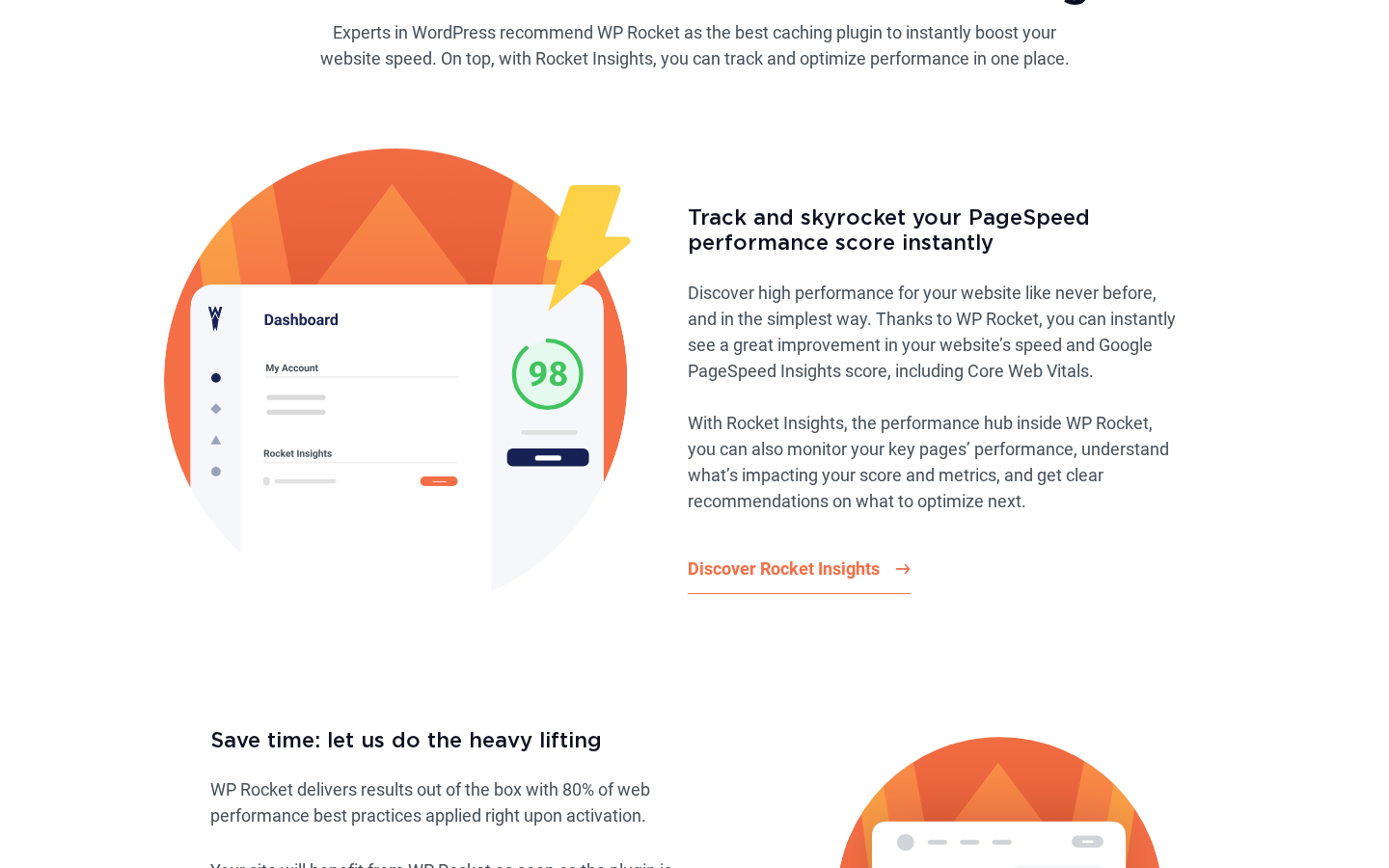
What Rocket Insights exposes, per the WP Rocket homepage and the Features page:
- Tracked performance score for the home page and any added key pages.
- Core Web Vitals trend lines (LCP, INP, CLS) for each tracked page.
- A recommendations panel that highlights which WP Rocket setting would move the score on the test result.
- A “re-test” button so the operator can confirm a change worked without leaving the dashboard.
- A consolidated view across all sites connected to the WP Rocket account, which is the reason this hub is useful for an agency rather than a single-site operator.
The hub is the right shape for the “Decision, not Options” philosophy: the operator does not need to know that GTmetrix and PageSpeed Insights exist, they look at one chart, they accept one recommendation, they re-test. It does not replace a real Web Vitals measurement against real users (that work belongs to the Chrome User Experience Report, Search Console, or a real-user monitoring tool like SpeedCurve), but it gives a non-engineer operator one place to look.
(Note on basis: Rocket Insights behaviour was inspected from the wp-rocket.me homepage, the Features page, and the live changelog. A live multi-week Rocket Insights tracking run on a paid licensed install was not exercised in this test window.)
Compatibility, multisite, and WooCommerce
A caching plugin is only useful if it does not break the stack underneath it. WP Rocket publishes a Compatibility section on its documentation hub covering hosting, plugins, themes, and WooCommerce.
The operationally important details:
- Hosting compatibility. The vendor’s docs name WP Engine, Kinsta, SiteGround, Cloudways, Pressable, Flywheel, and others as supported, with host-specific guides where the host already runs a server-side cache layer. The doc set tells the operator which WP Rocket cache settings to disable on hosts whose server-level cache already handles page caching, so WP Rocket does not duplicate the work.
- Plugin conflicts. Any other WordPress caching plugin must be deactivated before WP Rocket runs. The FAQ specifically calls out W3 Total Cache and WP Super Cache as plugins to disable first. Most WP Rocket support tickets that look like a broken cache turn out to be a second caching plugin still active in the background; the docs are explicit about this.
- WooCommerce. WP Rocket auto-excludes the WooCommerce cart, checkout, and my-account pages from page caching so a logged-in shopper does not see a stranger’s cart. The plugin also auto-excludes the WooCommerce session cookies from cache so add-to-cart flows survive caching. This is the right out-of-the-box behaviour for any store.
- Multisite. WP Rocket runs on multisite but cannot be network-activated. The plugin is installed at the network level and then activated per subsite. One WP Rocket licence covers subdomains and subdirectory subsites of the licensed primary domain; domain-mapped subsites count as separate sites against the licence quota.
- Multilingual support. WPML and Polylang are supported. WP Rocket caches each language version separately by default.
- Page builders. Elementor, Divi, Beaver Builder, Bricks, Brizy, and the block editor are all documented as supported. The Remove Unused CSS option has builder-specific exclusion guidance for sites where a page builder injects style at runtime in a way that the static unused-CSS pass cannot predict.
The Compatibility section is the reason a managed-host customer should not assume WP Rocket “just works”: on every host with server-level caching, the operator should disable WP Rocket’s page-cache layer per the host-specific guide and let WP Rocket focus on file optimisation, lazy loading, and database cleanup.
(Note on basis: compatibility details were inspected from the WP Rocket docs hub and FAQ. A live install against every named managed host was not exercised in this test window.)
Pricing and license value
WP Rocket is paid only. The public pricing page lists three subscription tiers plus an enterprise path for portfolios above 500 sites. Prices are displayed dynamically in either US dollars or euros depending on visitor location: a US, Canadian, or other USD-zone visitor sees the same plan cards rendered in USD, while a European visitor sees the same numbers rendered in euros. The recent 3.21.3 release introduced this dynamic currency display, and the underlying tier structure and numerical price do not change with the displayed currency. The figures below are quoted for a US/English-audience visitor and should be re-verified on the pricing page on the day of purchase.
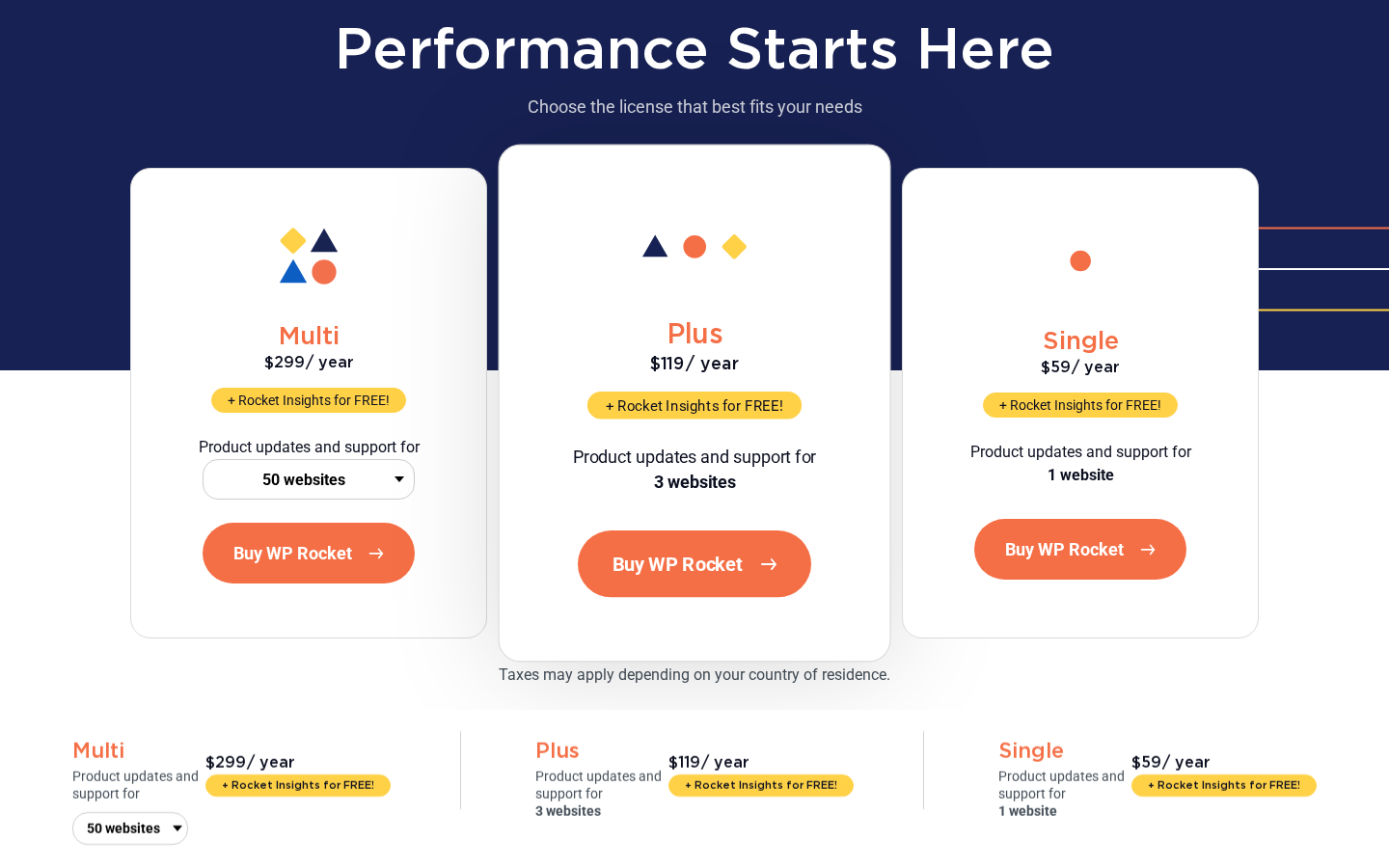
At the time of writing, the listed annual pricing for a US/English visitor is:
- Single. $59 per year, one website. Product updates and support for one site, the full Rocket Insights performance hub, and every WP Rocket feature unlocked. This is the right tier for any one-site operator.
- Plus. $119 per year, three websites. The same feature set, three sites covered by one licence and one renewal. This is the highlighted middle card and the right tier for a freelancer with two or three client sites.
- Multi. $299 per year, 50 websites by default, with dropdown options for 100 or 500 websites at higher tier prices on the same page. Same feature set; the only thing changing is the site quota. This is the right tier for an agency running more than three client sites at once.
- Enterprise / custom. Portfolios above 500 sites use a custom licence; the pricing page directs the buyer to contact WP Media directly.
A visitor whose location resolves to a euro-zone market sees the same cards rendered as EUR 59, EUR 119, and EUR 299 respectively; the numbers do not change with the currency, only the symbol does. Every tier ships with the same caveat printed on the pricing page: “Taxes may apply depending on your country of residence,” which is the EU VAT note for a French publisher. A 14-day money-back guarantee covers every paid tier.
The pricing model is unusual in two ways. First, the feature set does not change between tiers. Single, Plus, and Multi unlock the same plugin; the difference is only the number of sites the licence covers. That is the right shape for an “all-in-one” plugin, because the value is in not having to argue whether a feature is locked behind the higher tier. Second, renewals are billed at the same price as the initial year. WP Rocket does not run a permanent first-year discount that doubles on renewal. If a buyer pays $59 in year one, the year-two invoice is also $59. That is also the right shape and is more honest than the renewal-shock model some competitors run.
The right tier for most teams:
- Single is the right tier for a one-site operator (a single blog, a single portfolio, a single business site).
- Plus is the right tier for a freelancer with two or three sites or a small marketing team running a primary site plus a staging environment counted against the licence.
- Multi is the right tier for any agency running ten or more client sites; the 50/100/500 dropdown on the same plan card scales the site quota without forcing a phone call.
- Custom is the route for portfolios above 500 sites.
RocketCDN is billed separately at $7.99 per month per site for the paid tier. The free RocketCDN tier (up to three pages, unlimited bandwidth, ten edge points of presence) introduced in the 3.22 release is included with the WP Rocket licence and is the right place to test the integration without committing to the monthly bill.
Is WP Rocket the best WordPress cache plugin?
This is the question the SEO landscape rewards with a real answer. Based on the WP Rocket review audit I ran for this post, WP Rocket is one of the best WordPress cache plugins available in 2026 for non-engineer operators, and it is the strongest fit when:
- You want one paid plugin to handle page caching, file optimisation, lazy loading, database cleanup, CDN routing, and Core Web Vitals work in the same settings panel.
- You prefer a paid licence and one annual invoice over four free plugins and four maintenance burdens.
- You want most of the win at activation without a tuning step.
- You run a WooCommerce store and need cart, checkout, and session cookies excluded from cache automatically.
- You run an agency portfolio and need one plugin on every client site with one licence renewal.
- You want a Remove Unused CSS option, a Delay JavaScript Execution toggle, and Critical Image Optimization in the same plugin rather than three separate paid plugins.
It is not the best fit when:
- You want a free WordPress cache plugin and have no budget for an annual licence.
- You run on LiteSpeed-powered hosting and can use LiteSpeed Cache server-side at no cost.
- Your managed host already ships server-level page caching and you want minimal plugin surface above it.
- You require an open-source GPL-only plugin distributed from WordPress.org.
- You are a performance specialist who wants engine-room control over every cache rule and would rather hand-tune than accept a default.
If you want a wider field of WordPress speed optimization plugins to compare, the Reviews category on best-wordpress-plugins.com is the right next read.
Pros and cons
Pros
- All-in-one feature set: page caching, cache preloading, GZIP, browser caching, file minification, Remove Unused CSS, Delay JavaScript Execution, Critical Image Optimization, Automatic Lazy Rendering, media lazy loading, WebP compatibility, database optimisation, and CDN routing in one plugin.
- Auto-applied defaults at activation: WP Rocket markets “80 percent of best practices” applied on the first click, and the documentation reflects that posture.
- Same feature set across Single, Plus, and Multi tiers; only the site quota changes.
- Renewals at sticker price, not at a sneaky higher-than-intro number.
- Rocket Insights performance hub included with the licence at no extra cost.
- Free RocketCDN tier (up to three pages, ten points of presence, unlimited bandwidth) included with the licence.
- WooCommerce-aware out of the box: cart, checkout, my-account, and WooCommerce session cookies excluded from cache automatically.
- First-class compatibility with managed WordPress hosts (WP Engine, Kinsta, SiteGround, Cloudways, Pressable, Flywheel).
- WPML and Polylang supported for multilingual cache.
- Active development with a public changelog and a current 3.22 release line.
- 14-day money-back guarantee on every paid tier.
Cons
- Paid only. No permanent free tier and no WordPress.org listing.
- The annual cost is real ($59 / $119 / $299, EUR-equivalent in euro-zone markets) and stacks up across multiple sites; a free plugin alternative exists in the same space.
- RocketCDN is a separate monthly subscription ($7.99/month per site) on top of the licence; the licence alone does not include a paid CDN bandwidth quota.
- Image optimisation is not part of the plugin; Imagify or a third-party image plugin is a separate purchase.
- Multisite is supported but the plugin cannot be network-activated; subdirectory and subdomain subsites are covered by one licence, domain-mapped subsites are not.
- A few legacy caching plugins (W3 Total Cache, WP Super Cache) must be deactivated before WP Rocket runs cleanly.
- JavaScript concatenation is on the toggle list but is no longer recommended on HTTP/2 hosts; the documentation says so, but the toggle being there is a foot-gun for anyone following an old tutorial.
- Removal of all post revisions in the Database tab is destructive on a long-lived editorial site; the cleanup needs operator judgement.
- Real-user monitoring (RUM) is not included; Rocket Insights uses synthetic tests, not Chrome UX Report data.
Alternatives to WP Rocket
I would not recommend a paid caching plugin without saying who it loses to. Here are the alternatives I see most often and how they compare.
- LiteSpeed Cache. Free, GPL, distributed through WordPress.org, and built for LiteSpeed-powered hosting (where it taps into server-side caching that a non-LiteSpeed host cannot match). Pick LiteSpeed Cache if your host runs LiteSpeed; the free server-level cache is meaningfully faster than any PHP-level cache layer and the price is zero.
- W3 Total Cache. The classic free WordPress caching plugin, with a free tier on WordPress.org and a paid Premium upgrade. Pick W3 Total Cache if you want a free baseline, you are comfortable tuning page cache, object cache, browser cache, and minify settings yourself, and you have engineering time to invest in a cache that does not auto-default to a sane configuration.
- WP Super Cache. The Automattic-maintained free caching plugin. Pick WP Super Cache if you want a minimal free cache that “just runs” and you do not need file optimisation, lazy loading, or database cleanup in the same plugin.
- FlyingPress. A relatively new paid caching and optimisation plugin built by a single developer with a focus on Core Web Vitals. Pick FlyingPress if you want a paid alternative that is also tuned for LCP and INP work and you do not need the WP Rocket ecosystem (RocketCDN, Imagify, Rocket Insights) wrapped around it.
- Perfmatters. A paid optimisation plugin focused on disabling WordPress features that the site does not use (Heartbeat, embeds, jQuery migrate, emoji, dashicons, REST API endpoints) and on Delay JavaScript Execution. Pick Perfmatters as a complement to a caching plugin, not as a replacement; many operators run Perfmatters together with WP Rocket or LiteSpeed Cache rather than instead of one.
- NitroPack. A paid SaaS that runs as a remote optimisation service rather than a self-hosted plugin. Pick NitroPack if you want a service-shaped tool that handles the same problem from outside your WordPress install and you accept that the visible HTML is partially served from a NitroPack-controlled origin.
- Autoptimize. A free file-optimisation plugin (CSS, JS, HTML) that is often paired with a separate page-cache plugin. Pick Autoptimize if your host already provides page caching and you only need a file-optimiser; otherwise pair it with WP Super Cache or W3 Total Cache.
For most operators of WordPress sites that are not on LiteSpeed-powered hosting and that do not want to staple together a free stack, the real comparison is WP Rocket vs FlyingPress on the paid side and WP Rocket vs LiteSpeed Cache on the free side. WP Rocket wins on managed-host compatibility, agency licensing, the Rocket Insights hub, and the Imagify/RocketCDN ecosystem. FlyingPress wins on per-feature Core Web Vitals depth at a slightly different price point. LiteSpeed Cache wins when (and only when) the host actually runs LiteSpeed.
Final verdict
WP Rocket does the thing it sets out to do. It is a paid WordPress caching plugin that gives a non-engineer operator a sane default at activation, an all-in-one settings panel for page cache, file optimisation, lazy loading, database cleanup, and CDN routing, and an ecosystem (RocketCDN, Imagify, Rocket Insights) wrapped around the licence at no surprise cost. The features that I would buy this plugin for, if I were running a content site or a WooCommerce store that I could not afford to over-engineer, are the auto-applied default cache, the Remove Unused CSS pass, the Delay JavaScript Execution toggle, and the WooCommerce-aware exclusions.
If I had to recommend it in one paragraph: skip WP Rocket only if you run on LiteSpeed-powered hosting (use LiteSpeed Cache for free) or if you have no licence budget at all (use WP Super Cache for free); otherwise, buy Single for a one-site operator at $59 per year, buy Plus at $119 per year for a freelance portfolio of two or three sites, and buy Multi at $299 per year for an agency running ten or more sites with the 50/100/500 site-quota dropdown to scale up. The same plan cards render in EUR for a euro-zone visitor at the same numerals (EUR 59 / EUR 119 / EUR 299), so the buying decision is the same on either side of the currency split. Plan the renewal at sticker price, not at a discounted intro number, because WP Rocket does not play that game in either direction. As far as a WordPress caching plugin goes in 2026, this is the one I would install on a paying customer’s content site without a second thought.