

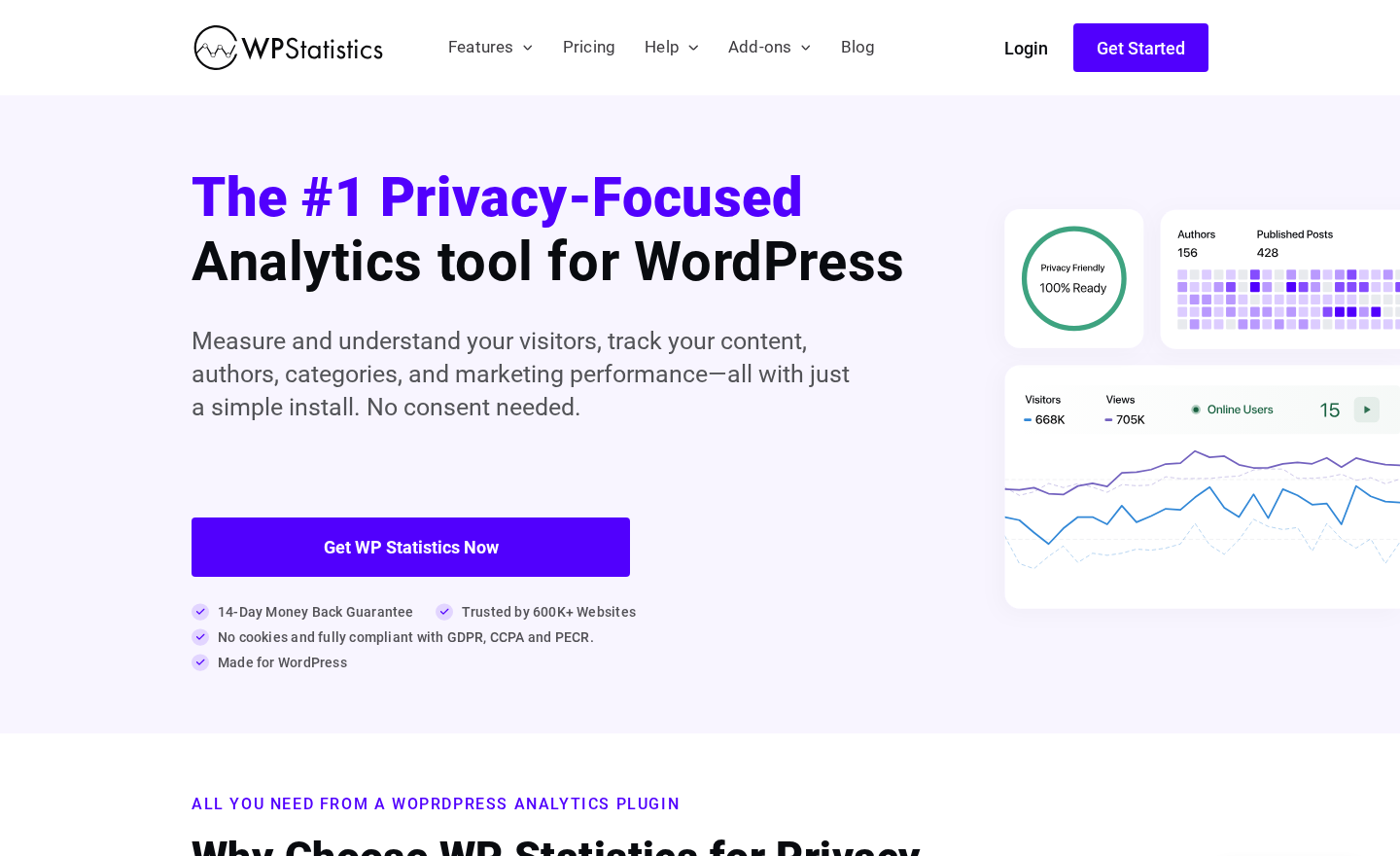
Six hundred thousand WordPress sites have installed WP Statistics, and most of them did it for the same reason: they wanted traffic data without handing that data to Google. Since its release in March 2011, WP Statistics has positioned itself as the self-hosted, cookie-free alternative to Google Analytics-dependent plugins. The pitch is straightforward: your analytics stay on your server, no consent banners required, and your visitors’ privacy is protected by design.
In 2026, that pitch resonates more than ever. GDPR enforcement actions have intensified across the EU. The Austrian and French data protection authorities have already ruled that Google Analytics data transfers to US servers violate GDPR. Swedish, Danish, Finnish, and Italian regulators have followed. For site owners navigating this landscape, the idea of analytics that never leave their own WordPress database is not just a privacy statement. It is practical risk management.
This review covers WP Statistics version 14.16.10, last updated July 25, 2026, and tested up to WordPress 7.0.4. I worked through the official website at wp-statistics.com, the WordPress.org plugin listing, the documentation hub, the pricing page, official screenshots, and publicly available product materials. Where premium add-on features could not be tested directly, the relevant section says so explicitly.
At a glance
Audited on: wp-statistics.com features, pricing, and documentation pages; the WordPress.org plugin listing (version 14.16.10, last updated July 25, 2026, tested up to WordPress 7.0.4, requires WordPress 6.6 or higher and PHP 7.4 or higher); the plugin changelog; and official screenshots on WordPress.org. Pricing checked against wp-statistics.com/pricing on August 20, 2026.
Free tier: cookie-free GDPR/CCPA/PECR compliant analytics, overview dashboard, content analytics, author analytics, geographic analytics, device and browser reports, traffic source tracking, real-time online visitor count, privacy audit tool, visitor journey view, role-based access, self-hosted data storage.
Paid tiers: Single Site at $119/year, Up to 5 Sites at $249/year, Unlimited (up to 100 sites, fair usage) at $449/year. All premium tiers include all add-ons bundled: Data Plus, Marketing, Advanced Reporting, Real-Time Stats, Mini Chart, Advanced Widgets, Customization, and REST API. 14-day money-back guarantee.
Bottom line: the most capable self-hosted, cookie-free WordPress analytics plugin available when privacy compliance is the primary requirement. The free version is genuinely useful. Premium unlocks real-time live feeds, Google Search Console integration, campaign tracking, and scheduled reporting. The trade-off versus Google Analytics-connected plugins is simpler reports and no cross-device identity graph, not a deficiency in core traffic measurement.

Quick verdict
WP Statistics earns its 600,000-install count by delivering real analytics without the privacy infrastructure overhead that Google Analytics requires. Install it, activate it, and you immediately get a working traffic dashboard. No OAuth, no external API connection, no consent banner configuration needed.
The quality of the free version is one of the strongest arguments for WP Statistics relative to its competitors. Content analytics, author performance, geographic breakdown, device reports, and traffic source tracking all ship without a paid subscription. The privacy audit tool, which walks through your data collection settings and flags potential compliance issues, is also free.
Premium adds what power users need: live visitor feeds, Search Console keyword data, campaign/UTM tracking, custom events and goals, outbound link monitoring, and scheduled email or PDF reports. The $119/year single-site price is competitive against alternatives like Burst Statistics Pro and Matomo for WordPress.
The honest limitation is that WP Statistics does not integrate with Google Analytics. That is by design, not an oversight. If you need a GA4 data layer for WooCommerce eCommerce tracking, Google Ads conversion attribution, or the cross-device identity matching GA4 provides, WP Statistics is not your tool. It is the right choice when you want to own your data completely and avoid the consent management overhead that GA4-based plugins require.
Quick verdict card
Best for: WordPress site owners, bloggers, content teams, and European site operators who need accurate traffic data under GDPR/CCPA constraints without cookie consent banners or Google Analytics.
Best plan for single sites: the free version is sufficient for basic traffic monitoring. Single Site Premium at $119/year adds the real-time live feed, Search Console integration, campaign tracking, scheduled email reports, and custom events.
Best plan for agencies: Unlimited Premium at $449/year covers up to 100 sites under fair usage with all premium features, making per-site cost minimal for agencies managing compliance-conscious client portfolios.
Standout: genuinely cookie-free operation with no consent banner needed; self-hosted data that never leaves your WordPress database; a comprehensive privacy audit tool; the free version covers a wider feature set than most competing privacy analytics free tiers.
Watch out for: no Google Analytics integration by design; report depth is narrower than GA4-connected plugins; the 4.1-star rating (757 reviews, July 2026) is lower than most competitors; some advanced features like real-time live feeds require premium; support forum resolution rate on WordPress.org was 4 of 6 issues in the last two months.
What WP Statistics is
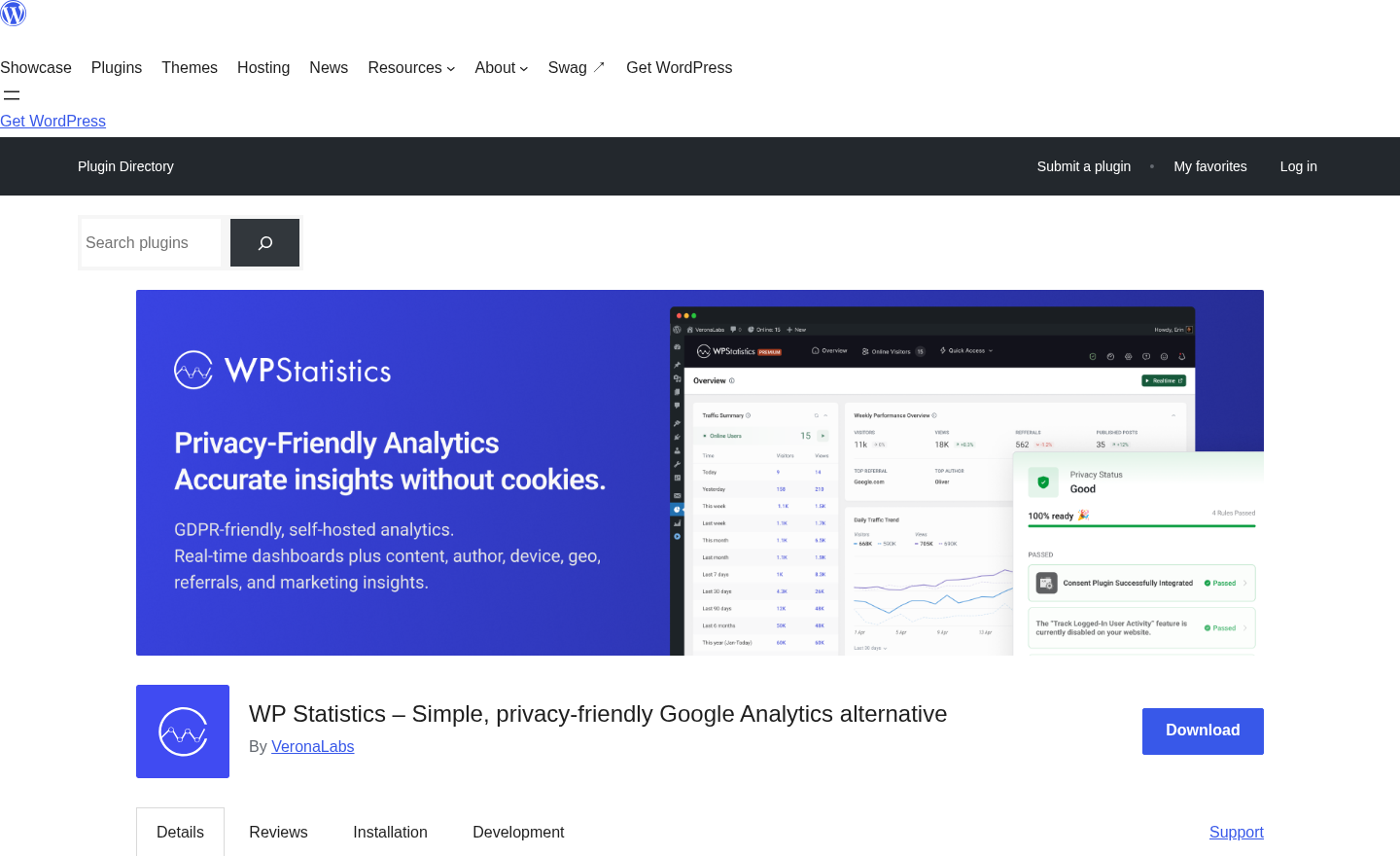
WP Statistics is a self-hosted WordPress analytics plugin that records visitor data directly into your WordPress database, without any external service connection and without placing cookies on visitor browsers. It has been maintained by VeronaLabs since 2011 and reached version 14.16.10 in July 2026.
The core concept distinguishes WP Statistics from every Google Analytics-connected plugin in the WordPress ecosystem. MonsterInsights, ExactMetrics, Analytify, and Site Kit all function as connectors: they send your visitor data to Google’s infrastructure, read it back through the GA4 API, and display it inside WordPress. WP Statistics never sends data anywhere. Every pageview, every referral, every geographic data point lives in your own WordPress MySQL database and is controlled entirely through the WordPress admin.
This design choice has a direct compliance consequence: because WP Statistics does not use cookies and does not transfer data to third-party servers, it operates in compliance with GDPR, CCPA, and PECR without requiring a cookie consent banner. Visitors who block cookies, who use tracking-protection browsers, or who decline consent are still counted.
The plugin requires WordPress 6.6 or higher and PHP 7.4 or higher. It carries 600,000+ active installs on WordPress.org as of August 2026, a 4.1-star rating across 757 reviews, and the free version has been available since 2011, making it one of the longest-running analytics plugins in the WordPress ecosystem.
Who WP Statistics is best for
Strong fit:
- WordPress site owners who want GDPR/CCPA compliant traffic analytics without a cookie consent banner. WP Statistics’s cookie-free architecture means no consent management platform is required for the analytics layer.
- European businesses operating under strict data protection requirements where transferring visitor data to US-based services such as Google Analytics raises legal concerns under Chapter V of GDPR.
- Bloggers and content creators who want a readable traffic dashboard inside WordPress without creating a Google Analytics account or connecting an external API.
- Content teams and editorial sites that need author-level and category-level performance data built into the analytics platform at no extra cost.
- Developers and agencies managing privacy-conscious client sites who want a single plugin that handles compliance, traffic data, and reporting without third-party data sharing.
- Site owners who have already disabled Google Analytics due to compliance requirements and need a self-hosted replacement.
- Membership sites and educational platforms where tracking individual logged-in user behavior through UserID tracking is useful while maintaining compliance.
Weak fit:
- WooCommerce store operators who need GA4 eCommerce tracking, conversion attribution connected to Google Ads, or cross-device purchase data. WP Statistics has no Google Analytics integration and no eCommerce funnel reporting.
- Sites that require real-time streaming analytics with sub-second latency. WP Statistics’s real-time feature (available in premium) shows live visitors but is not a streaming event processing tool.
- Teams already deeply invested in the Google Analytics infrastructure, including custom dimensions, attribution models, and Looker Studio reporting. Migrating to WP Statistics means leaving that ecosystem.
- Sites relying on advanced advertising attribution such as Meta Pixel, Google Ads conversion tracking, or TikTok Pixel. WP Statistics does not handle advertising platform integrations.
- Developers who need a complete data warehouse layer with raw event exports and custom SQL queries on large datasets. While WP Statistics stores data in MySQL, the reporting layer is fixed, and the REST API add-on is the main extensibility path.
Setting up WP Statistics
WP Statistics installs from the standard WordPress admin plugin screen. Search for “WP Statistics” and it appears as the first result with a shield logo and 600,000+ active installs displayed. Free installation takes one click. Activation requires no external account creation, no OAuth authentication, and no API key.
After activation, the plugin begins recording data immediately. The first screen you see is the overview dashboard, populated with data starting from the moment of activation. Unlike Google Analytics-connected plugins, there is no authentication wizard to complete and no “connect your account” step because WP Statistics does not connect to any external account.
The settings panel covers data collection preferences, privacy configuration, geolocation (which requires a MaxMind GeoLite2 database download, either automatic through the plugin or manual upload), exclusion rules for IP ranges, user roles, and bots, and performance options. The geolocation setup is the one step that requires a short configuration decision: the plugin can download the GeoLite2 database automatically or you can upload a local copy. Most users leave the default automatic download enabled.
WP Statistics collects geographic data through IP address lookup against the local GeoLite2 database. The plugin hashes or discards raw IP addresses depending on your privacy settings, which means geographic data is available without storing the full IP address in your database. The privacy audit screen walks through each data point being collected and allows you to configure what gets retained.
Overview dashboard and main reports
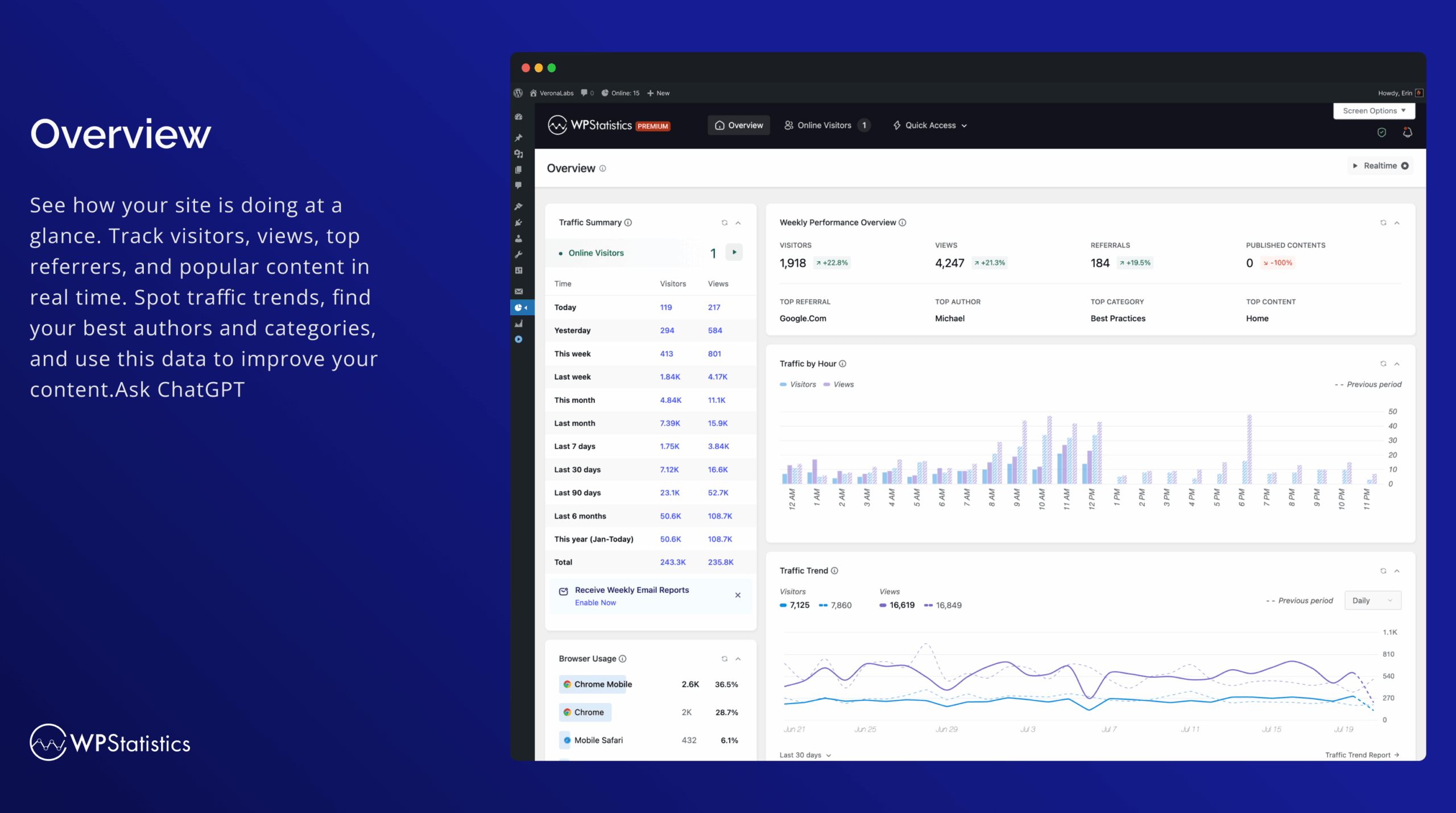
The WP Statistics dashboard loads inside the WordPress admin as a dedicated top-level menu. The main overview screen shows:
- A primary chart with daily visitor and page view counts over the selected date range.
- A summary row: total visitors, total page views, average views per visitor, and average visit duration.
- Top content: posts and pages ranked by views for the selected period.
- Traffic sources: direct, search, referral, social, and other channel breakdown.
- Geographic summary: top countries by visitor count.
- Device and browser breakdown: desktop, mobile, tablet split with browser name distribution.
- Online visitors: a live count of users currently on the site (free version shows count; premium adds individual session detail).
This covers the standard set of traffic questions most site owners ask daily: how many people visited, where did they come from, what did they read, where are they located, and what device are they on. For a content-focused site or personal blog, this is enough to make publishing decisions without any premium upgrade.
The date range selector allows filtering to today, yesterday, the last 7 days, 30 days, 90 days, 365 days, or a custom range. Custom date ranges work in the free version, which is a meaningful advantage over MonsterInsights Lite’s 30-day cap.
Content analytics
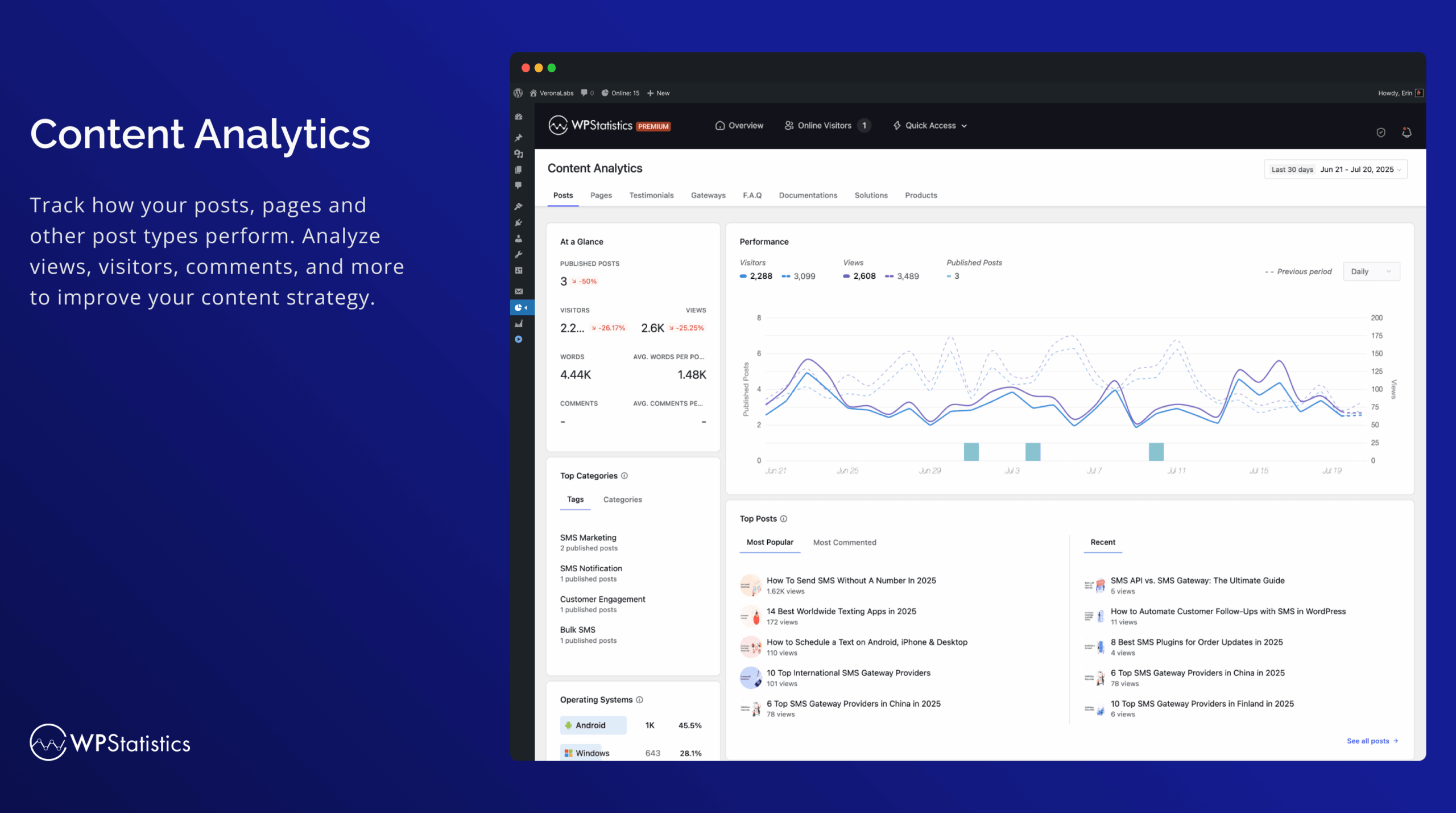
The content analytics report shows performance data for individual posts and pages: view counts, unique visitors, referral sources specific to each piece, and publication date. The report is sortable by views and by word count. The word count correlation view is a distinct feature: it shows whether longer content consistently outperforms shorter content across your specific audience, something most analytics tools do not surface without custom dimension configuration.
Category analytics extends the same view to content categories, letting you see which topic clusters drive the most traffic across all posts. For editorial teams making content investment decisions, seeing that a specific category drives 40% of total traffic despite representing only 15% of published articles is actionable data that Google Analytics surfaces only through custom report configuration.
Geographic and map view
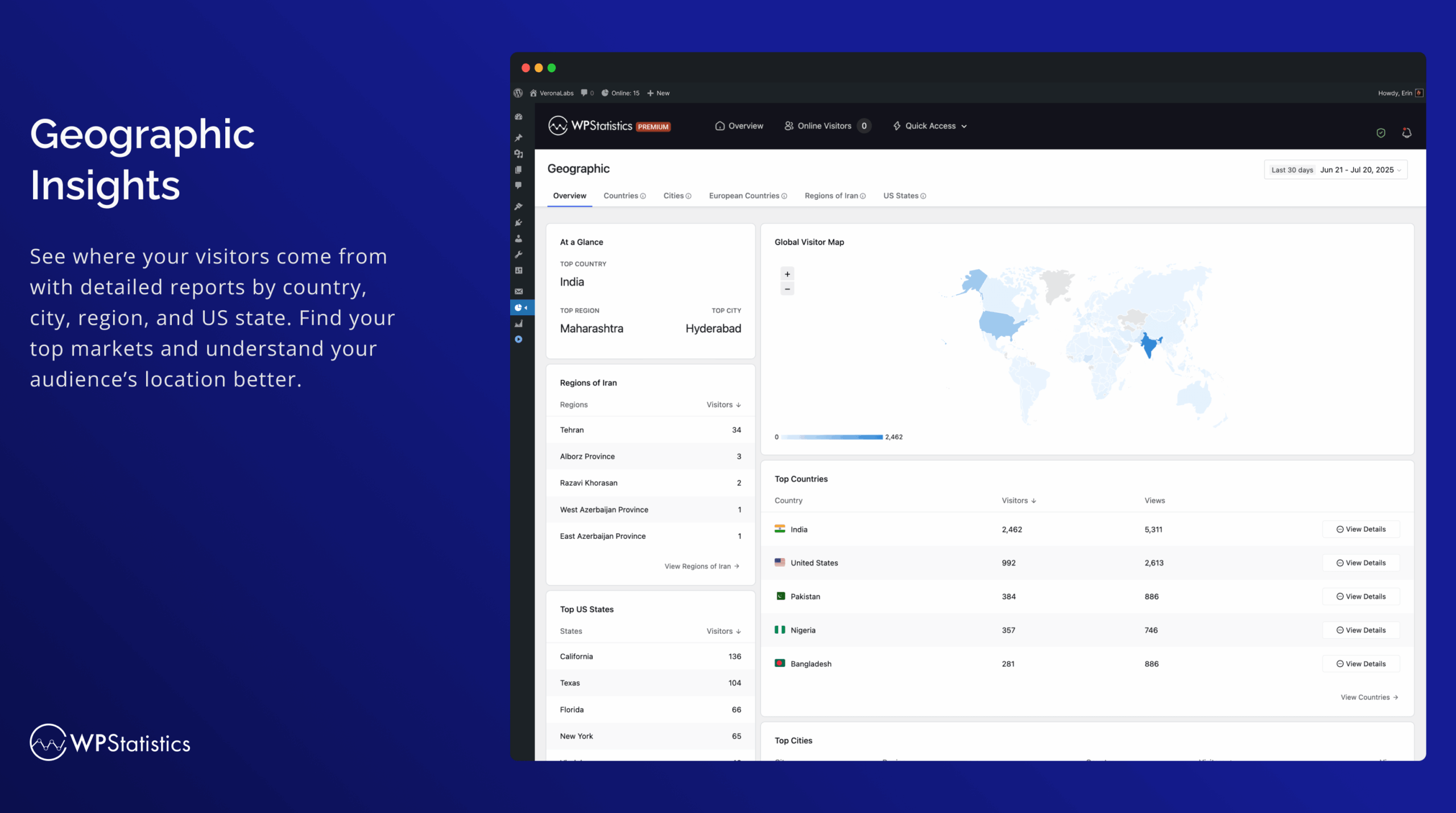
The geographic report is one of the most visually distinctive features of WP Statistics. The map view renders a world map with country-level shading, where darker regions indicate higher visitor counts. Below the map, a ranked table breaks down visitors by country, with the option to drill further into regions and cities.
City-level data requires the full GeoLite2 database and is available in the free version, which differentiates WP Statistics from privacy analytics competitors that limit geographic detail to paid tiers. Seeing that your European visitors are concentrated in Germany, the Netherlands, and Sweden rather than just “Europe” is useful for content localization decisions.
Author analytics
The author analytics module shows each contributing author’s publishing activity and traffic performance: number of posts published, total views across their content, average views per post, and ranking against other authors. Word count totals per author are included in the view.
This is a built-in feature of the free version. For editorial teams that commission content from multiple contributors, having author-level traffic attribution inside the analytics tool without configuring custom GA4 dimensions is a notable convenience. The author view is also useful for individual creators managing their own content mix, seeing which types of posts generate the most traffic by looking at which months or content batches performed best.
Real-time stats (premium)
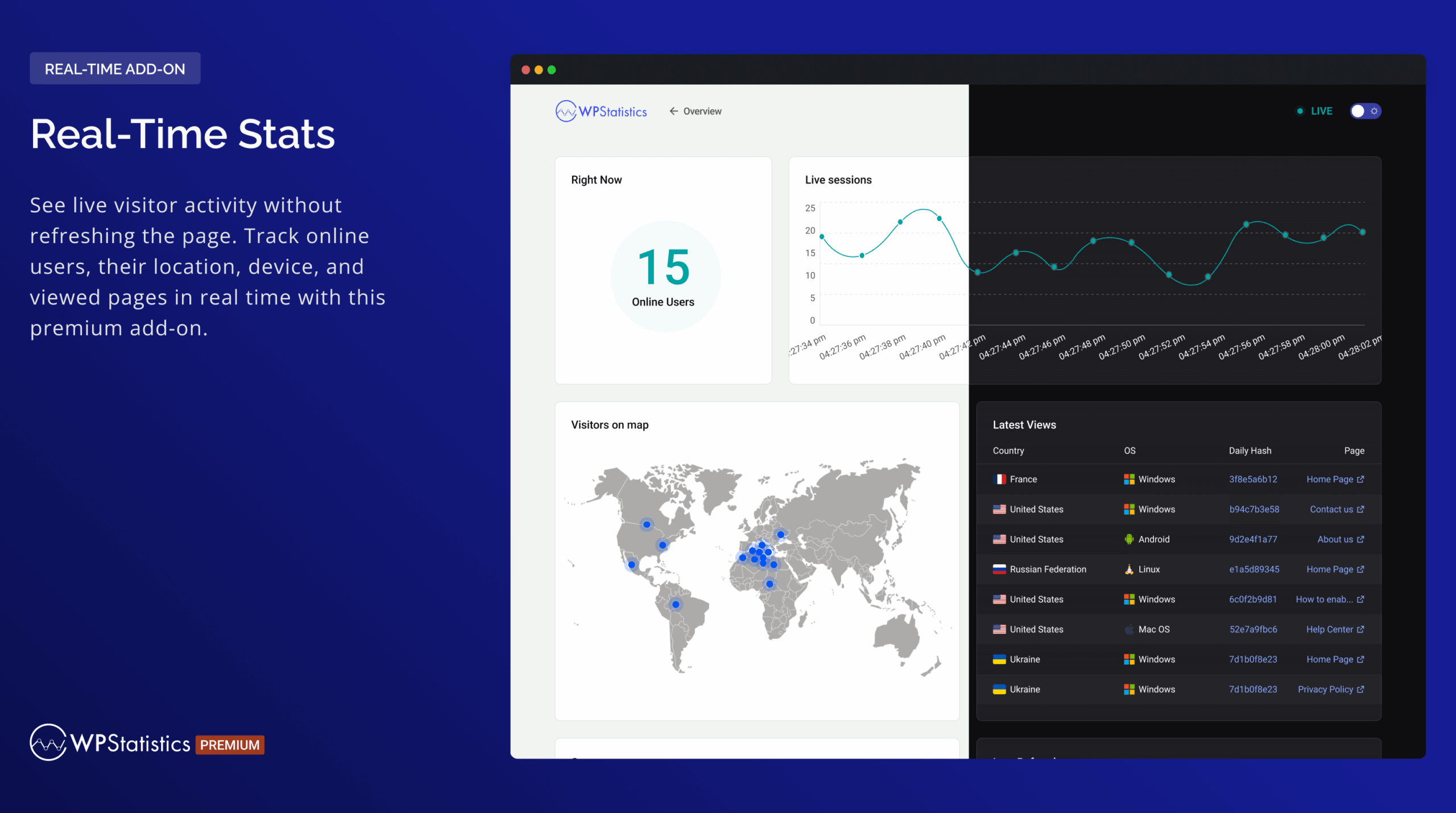
The real-time stats add-on, included in all premium plans, shows live visitor sessions updating without page refresh. The view displays currently active visitors, which pages they are on, their geographic location, the device they are using, and how long they have been on the current page.
For site owners who publish content and want to see immediate traffic from newsletter sends, social posts, or featured placement, the real-time view delivers that without navigating to a separate analytics service. The free version shows only a count of online visitors; the individual session feed detail requires premium.
Privacy features and the privacy audit tool
WP Statistics’s privacy architecture is the core differentiator, and the plugin documents it more thoroughly than any competitor in the self-hosted analytics category.
Key privacy mechanisms in the free version:
- Cookie-free by default. No cookies are written to visitor browsers. No consent banner is required for the analytics layer because there is no cookie-based tracking.
- IP anonymization options. The plugin supports hashing IP addresses before storage, storing only a partial IP, or discarding IP data entirely after geographic lookup. All three options comply with GDPR Article 5’s data minimization principle.
- Single-day data isolation. Daily visitor records are isolated, which means the plugin cannot track the same visitor across multiple days unless they are logged in with a WordPress account and UserID tracking is enabled.
- No cross-site tracking. Data collection is limited to your own site. There is no advertising network, no tracking pixel, and no data shared with any external party.
- Self-hosted database. All data lives in WordPress MySQL tables. Backups, deletion, and export are handled through standard WordPress tools.
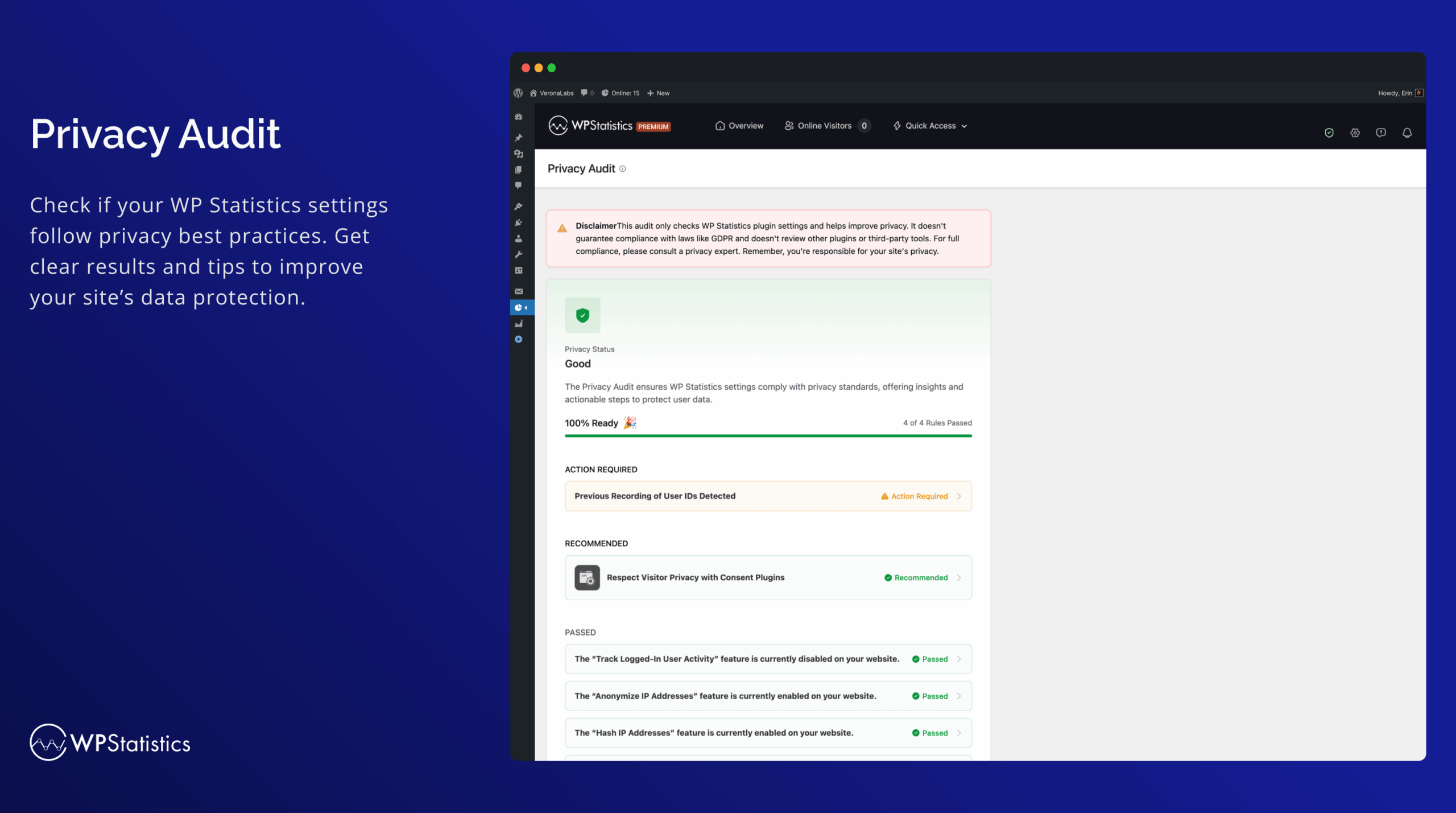
The privacy audit tool, accessible from the WP Statistics admin menu, is a checklist-style screen that evaluates your current data collection settings and flags anything that could create compliance exposure. It covers IP handling, data retention settings, exclusion rules, and any premium features that expand data collection. Running the audit after initial setup and after any plugin update is a recommended practice the documentation explicitly suggests.
Premium add-ons and what they unlock
WP Statistics Premium bundles all add-ons into the subscription price. Individual add-ons can also be purchased separately, though the pricing page does not list individual add-on prices, which makes the bundle the practical choice for anyone who needs more than one upgrade.
Marketing add-on. Tracks UTM campaign parameters, connects to Google Search Console for keyword and impressions data, and enables custom event and goal tracking. This is the add-on that brings WP Statistics closest to what MonsterInsights Pro offers in terms of marketing attribution and conversion measurement. Campaign reports show visits, behavior, and goal completions per UTM source, medium, and campaign.
Data Plus add-on. Extends analytics to custom post types and custom taxonomies beyond the default posts/pages/categories. Adds outbound link click tracking and file download tracking. For sites with WooCommerce products, custom portfolio items, or other non-standard post types, Data Plus makes WP Statistics cover the full site rather than only standard content.
Advanced Reporting add-on. Generates scheduled email reports, PDF reports, and HTML reports. You can configure report frequency (daily, weekly, monthly), the metrics included, and the recipient list. Scheduled PDF reports are useful for client reporting or internal team updates without requiring dashboard access.
Real-Time Stats add-on. Adds the live visitor session feed that updates without page refresh, as described in the dashboard section above.
Mini Chart add-on. Adds compact sparkline charts to the WordPress post list and edit screens. Each post and page shows a small trend line for its view count directly in the admin list, letting you see traffic trends without opening a separate analytics screen.
REST API add-on. Enables WP Statistics REST API endpoints, making analytics data available to headless WordPress setups, external dashboards, or custom integrations. The endpoints expose visitor counts, top content, geographic data, and other core metrics programmatically.
Advanced Widgets add-on. Provides Gutenberg blocks and classic theme widgets that display analytics data publicly or in the WordPress admin sidebar. Useful for editorial sites that want to show visitor counts or trending posts to readers.
Customization add-on. Enables white-label options: renaming the plugin in the admin menu, changing header branding, and creating custom admin appearances. Targeted at agencies that manage WP Statistics installs for clients and want to present it under their own brand.
Pricing and license value
WP Statistics Premium is sold as an annual subscription from wp-statistics.com/pricing. Three plans are available, all priced in USD and cancellable at any time. Prices as observed on August 20, 2026:
Single Site. 1 site. $119/year. Includes all add-ons: Data Plus, Marketing, Advanced Reporting, Real-Time Stats, Mini Chart, Advanced Widgets, Customization, REST API. Priority support included.
Up to 5 Sites. Up to 5 sites. $249/year. Same full feature set as Single Site. At 5 sites, that is $49.80 per site per year.
Unlimited. Up to 100 sites under fair usage policy. $449/year. Same full feature set. At 100 sites, $4.49 per site per year.
All plans include a 14-day money-back guarantee with no questions asked. No free trial for premium features; the free WordPress.org version functions as the trial. WP Statistics notes that introductory pricing applies and that renewals may differ: verify current renewal pricing at time of purchase.
The pricing comparison to benchmark against:
- Burst Statistics Pro runs at $69/year for a single site, the lowest-priced self-hosted analytics option with meaningful features, though its feature depth is narrower.
- Matomo for WordPress (self-hosted) is free but requires significant server resources and technical setup. Matomo Cloud starts at approximately $23/month.
- MonsterInsights Plus costs $99.50/year (promotional) for a single site, but is entirely dependent on Google Analytics.
- Plausible Analytics starts at $9/month ($108/year) for the cloud-hosted version; no self-hosted WordPress plugin is available.
For the self-hosted privacy analytics category specifically, WP Statistics Premium at $119/year is reasonably positioned. The all-add-ons-included bundle is clean, and the 5-sites and unlimited tier pricing is strong for agencies.
Pros and cons
Pros
- Genuinely cookie-free analytics with no consent banner needed. Cookie-less operation is a design principle, not a configuration option.
- Comprehensive free version. Content analytics, author analytics, geographic breakdown including city-level data, device reports, traffic source tracking, the privacy audit tool, visitor journey, and custom date ranges all work without a paid subscription.
- Data never leaves your server. Everything is stored in your WordPress MySQL database. No Google, no third-party service, no data transfer agreement required.
- The privacy audit tool is a concrete, actionable compliance feature that no direct competitor provides at this level of detail.
- Geographic map view with city-level drilling, available in the free version.
- Author analytics built into the free tier, eliminating the custom GA4 dimension setup that MonsterInsights and ExactMetrics require for the same data.
- Compatible with ad blockers and tracking protection. WP Statistics uses server-side tracking rather than a browser-executed JavaScript snippet, so ad blockers do not affect data collection.
- No Google account required. For site owners who do not want a Google account connected to their site, this is a practical advantage.
- Active development: version 14.16.10 released July 25, 2026, with continuous updates since 2011.
- 14-day money-back guarantee on all premium plans.
Cons
- No Google Analytics integration. WP Statistics cannot replace GA4-connected plugins for sites that rely on GA4 for advertising attribution, eCommerce tracking, or the broader Google ecosystem.
- 4.1-star average rating (757 reviews) is lower than most WordPress analytics competitors. MonsterInsights sits at 4.5 stars across 3,148 reviews. The 109 one-star reviews include complaints about data accuracy and support responsiveness.
- Support forum resolution rate noted as 4 of 6 issues resolved in the last two months on WordPress.org, lower than the “excellent” designation most top-tier plugins carry.
- Real-time live visitor session detail requires premium. The free version shows only the count of currently online visitors, not the individual live feed.
- No advertising platform integrations. No Meta Pixel, no Google Ads conversion tracking, no LinkedIn Insight Tag.
- Custom events and goals require the Marketing premium add-on. Conversion tracking for button clicks or form submissions is not available in the free version.
- Report UI is functional but less polished than MonsterInsights or the native GA4 interface. Some users note the admin screens feel dated compared to more recently redesigned competitors.
- No cross-device tracking. The same visitor using a phone in the morning and a laptop in the afternoon is counted as two visitors. This is the deliberate privacy trade-off.
- Data retention management requires manual configuration. Older data is kept indefinitely by default; setting up automatic data pruning requires configuration in the plugin settings.
Alternatives to WP Statistics
- MonsterInsights. The most widely installed WordPress analytics plugin at 2 million+ free installs. Connects to GA4, surfaces reports inside WordPress, and handles WooCommerce eCommerce tracking automatically on Pro. Choose MonsterInsights if you need GA4 integration, eCommerce reporting, or the broader Google ecosystem. Plus at $99.50/year (promotional) for one site. Not a privacy-first option; GA4 data goes to Google servers.
- Burst Statistics. The closest direct WP Statistics alternative at a lower price. Cookie-free, self-hosted, GDPR compliant. Burst Statistics Pro starts at $69/year for a single site. Feature depth is narrower: fewer report types, no built-in author analytics, simpler geographic data. Choose Burst Statistics if simplicity and price are the primary priorities.
- Matomo for WordPress. The most feature-complete self-hosted analytics solution. Matomo offers eCommerce tracking, heat maps, session recording, A/B testing, funnel analysis, and goal tracking in a self-hosted environment. Matomo requires significantly more server resources and technical setup than WP Statistics. Choose Matomo when you need GA4-level feature depth without Google.
- ExactMetrics. A GA4-connected plugin with in-WordPress reporting at the same price tier ($99.50/year promotional for a single site). Not a privacy alternative; data goes to Google. The choice between ExactMetrics and MonsterInsights is mostly UX preference.
- Site Kit by Google. The official free Google plugin for WordPress. Zero cost, connects GA4, Search Console, PageSpeed, AdSense. Not privacy-first. Choose Site Kit if you want basic GA4 integration at no cost and are comfortable with Google data sharing.
- Analytify. A lower-priced GA4-connected alternative to MonsterInsights. Pro plans start below MonsterInsights Plus pricing. Not self-hosted; data goes to Google. Choose Analytify if you want GA4 reports in WordPress at a lower subscription price without needing WooCommerce eCommerce tracking.
- Plausible Analytics. Cloud-hosted privacy analytics as a service. GDPR compliant, cookie-free. Starts at $9/month ($108/year). No self-hosted WordPress plugin; requires embedding a script from Plausible’s servers. Choose Plausible if you prefer a managed SaaS over a self-hosted solution.
For most privacy-focused WordPress site owners, the real decision is WP Statistics versus Burst Statistics (WP Statistics has more features at a higher price, Burst Statistics is simpler and cheaper), WP Statistics versus Matomo (WP Statistics is lighter and easier, Matomo is more powerful and heavier), and WP Statistics versus switching to a GA4-connected plugin (an irreducible choice between data ownership and Google Analytics integration).
Final verdict
WP Statistics delivers on its core promise: real traffic analytics, stored entirely on your own WordPress server, without cookies, without a consent banner, and without any data leaving your site. For site owners whose analytics strategy is shaped by GDPR compliance concerns, data ownership, or a deliberate choice to operate outside the Google ecosystem, WP Statistics is the most practical choice in the WordPress plugin directory.
The free version is genuinely strong. Author analytics, city-level geographic data, content analytics, custom date ranges, and the privacy audit tool all work without a subscription. Most personal sites, blogs, and small editorial operations will find the free version sufficient for daily traffic monitoring needs.
The premium upgrade makes sense when you need real-time live visitor feeds for content publishing workflows, Google Search Console keyword data integrated with your traffic analytics, UTM campaign tracking for marketing operations, custom event and goal tracking for conversion measurement, or scheduled email reports for team or client reporting. At $119/year for a single site, that is a reasonable price for what the premium bundle delivers.
The honest comparisons to keep in mind: WP Statistics will not replicate what MonsterInsights does. It will not give you WooCommerce eCommerce tracking, GA4 funnel reports, or advertising platform conversion attribution. If those are requirements, WP Statistics is the wrong tool regardless of the privacy benefits.
Where WP Statistics fits cleanly is for the site owner who has already decided that Google Analytics is not the right choice and wants a capable, well-maintained, genuinely privacy-respecting alternative that installs like any other WordPress plugin. That audience is larger than it was five years ago, and WP Statistics is built specifically for it.