


If you are browsing plugin options in the WPMU Dev ecosystem, SmartCrawl SEO keeps appearing on recommended lists. It ships as a free WordPress plugin on WordPress.org, but the features that make it genuinely interesting, such as automated site crawls, automatic internal linking, IndexNow, and WooCommerce SEO, live behind a WPMU Dev membership.
I reviewed SmartCrawl for this guide using the WordPress.org free version documentation, the official plugin feature pages, the WPMU Dev membership description, the changelog through version 3.16.4, and public user feedback from the 169 WordPress.org reviews. The paid Pro features are documented from first-party WPMU Dev sources. I note clearly where documentation rather than direct hands-on use informed each section.
This SmartCrawl review covers what you actually get on the free plugin, what the Pro unlock adds, how the pricing stacks up against standalone SEO plugins, and whether it belongs on your site.
At a glance
| Plugin | SmartCrawl SEO (free) + SmartCrawl Pro (WPMU Dev membership) |
| Developer | WPMU Dev |
| Current version | 3.16.4 (updated August 19, 2026) |
| Active installs | 20,000+ (free plugin on WordPress.org) |
| Rating | 4.8 / 5 from 169 reviews on WordPress.org |
| Free tier | Setup wizard, SEO Checkup, content analysis, sitemaps, schema markup (150+ types), redirect manager, breadcrumbs, Open Graph, Twitter Cards |
| Pro tier | Automatic internal linking, scheduled crawls, IndexNow, WooCommerce SEO, Hub central dashboard, white label, location-based redirects |
| Pricing (Pro) | From $3/month billed annually as part of WPMU Dev full plugin bundle |
| Best for | WPMU Dev subscribers, multisite networks, sites wanting free-tier redirects and schema |
| Requirements | WordPress 6.4+, PHP 7.4+ |
Quick verdict on SmartCrawl SEO
SmartCrawl SEO is a capable WordPress SEO plugin with an unusually generous free tier. The free plugin gives you redirect management and schema markup that competitors often lock behind paid plans. The tradeoff is that the Pro version is only available as part of a WPMU Dev membership costing $3 to $20 per month for the full plugin bundle. You cannot buy SmartCrawl Pro as a standalone product.
If you are already a WPMU Dev subscriber, or you are weighing the membership for Smush, Hummingbird, or Defender, SmartCrawl is a strong SEO plugin to fold in. If you only want an SEO plugin, a standalone option like Rank Math or Yoast SEO gives you a simpler purchase decision and a much larger community.
Quick verdict summary
- Best for: WPMU Dev subscribers, multisite managers, and small to medium sites that want schema and redirects on the free tier without paying for a standalone SEO premium upgrade.
- Not ideal for: Content-heavy sites needing AI-generated meta descriptions, teams that want a standalone SEO plugin purchase, or anyone who does not need the rest of the WPMU Dev plugin suite.
- Standout: Built-in site crawler, 150-plus schema types available free, redirect manager on the free tier, and a setup wizard that imports cleanly from Yoast and Rank Math.
- Watch out for: SmartCrawl Pro requires a WPMU Dev membership, not a standalone purchase. The install base (20,000+) is small compared to Rank Math (4M+) or Yoast (10M+), which means a thinner third-party integration and tutorial ecosystem.
What SmartCrawl SEO is
SmartCrawl SEO is a WordPress search engine optimization plugin built and maintained by WPMU Dev, the company behind a suite of WordPress tools covering performance (Hummingbird), image optimization (Smush), security (Defender), and forms (Forminator). SmartCrawl is their SEO entry in that collection.
The free plugin lives on WordPress.org under the slug smartcrawl-seo. The Pro version is distributed through WPMU Dev membership rather than WordPress.org and installs as an extension on top of the free plugin.
The plugin takes a modular approach. After installation, you get a dashboard with toggleable modules covering the Sitemap, SEO Checkup, Titles and Meta, Social, Schema, Redirects, Breadcrumbs, and Advanced Settings. You turn on what you need rather than getting one monolithic settings panel.
This design makes SmartCrawl feel lighter than Yoast or Rank Math for basic setups. It also means the feature surface looks smaller until you dig into individual modules.
Free plugin on WordPress.org
The free SmartCrawl SEO plugin covers the core set of tools most sites actually use for on-page SEO and technical setup:
- Setup wizard: One-click initial configuration that detects your existing SEO plugin (Yoast or Rank Math) and imports your existing titles, meta descriptions, and focus keywords before you deactivate the old plugin. The import step is important, because losing per-page keyword data during a migration is a real risk with some competitors.
- SEO Checkup: A health-check scanner that reviews your site for common SEO issues including missing meta descriptions, duplicate content, broken links, and missing alt tags. It generates a score and a prioritized list of issues to fix.
- Titles and Meta: Template-based meta title and description management for posts, pages, custom post types, archives, and taxonomies.
- Social integration: Open Graph support for Facebook shares and Twitter Cards for X (Twitter) previews. Pinterest site verification is included.
- XML Sitemap generator: Customizable by post type and taxonomy. News sitemap support is included in the free plugin.
- Redirect manager: 301, 302, and other redirect types are available in the free plugin. Most competitors reserve redirects for paid plans.
- Breadcrumbs: An activatable breadcrumb module. Version 3.16.2 expanded breadcrumb support to WooCommerce product pages and custom post types.
- Schema markup: A schema type builder supporting 150-plus structured data types on the free plan, including Article, Product, Local Business, FAQ, Recipe, Event, Video, and more.
- Robots.txt editor: Manage your robots.txt directly from the WordPress admin.
- Moz integration: Connect a Moz account to pull domain authority and page authority metrics into your WordPress dashboard.
- Multisite support: Network-level settings for WordPress multisite installations, with the ability to push global settings to sub-sites while allowing per-site overrides.
Pro features (WPMU Dev membership)
The Pro upgrade adds these on top of the free plugin:
- Automatic internal linking: Define keyword or phrase rules, and SmartCrawl automatically inserts internal links across your content when those keywords appear.
- Scheduled SEO audits: Automate the SEO Checkup to run on a schedule, with reports delivered to your dashboard or email.
- Scheduled URL crawls: Run automated crawl jobs that detect broken links, redirect chains, and other technical issues across the full site.
- IndexNow integration: Notify Bing and other IndexNow-compatible search engines instantly when content is published or updated. This was added in version 3.14.0 (July 2025).
- WooCommerce SEO: Preset SEO optimizations for WooCommerce product pages, product categories, and shop archives.
- The Hub central dashboard: Manage SmartCrawl settings, SEO health scores, and automation across all your WPMU Dev-connected sites from a single external dashboard.
- White label: Rebrand SmartCrawl with your own agency or client branding.
- Location-based redirects: Advanced redirect rules that trigger based on visitor location, with Regex pattern support.
Who SmartCrawl SEO is best for
SmartCrawl has a specific fit, and it is worth being direct about it.
Strong fit
- WordPress site owners already subscribed to WPMU Dev for Smush, Hummingbird, or another plugin in the suite. SmartCrawl is included in the membership, so the extra cost is zero.
- Multisite network administrators who need a single plugin to handle network-wide SEO defaults with per-site override options.
- Agencies managing client WordPress sites who want Hub dashboard access to monitor SEO health across multiple sites without individual logins.
- Small business and local business sites that want schema markup, sitemaps, and redirects without paying for a premium standalone SEO plugin.
- Sites with active WooCommerce stores already in the WPMU Dev ecosystem that want WooCommerce-specific SEO optimizations from the same vendor.
Weaker fit
- Sites that only need an SEO plugin and nothing else from WPMU Dev. Paying $3 to $20 per month for a membership just for SmartCrawl is hard to justify when Rank Math free covers almost the same ground.
- Content-heavy publishing sites that need multiple focus keywords, AI-assisted meta descriptions, or advanced content optimization tools. SmartCrawl has no AI features.
- Teams that want the largest community, extensive third-party integration support, and a plugin that major SEO workflows reference. Yoast and Rank Math win on ecosystem size.
- Anyone making a decision based on install count. SmartCrawl’s 20,000-plus active installs on WordPress.org is a fraction of Yoast (10M+) or Rank Math (4M+).
Hands-on setup and user experience
The SmartCrawl setup wizard runs automatically after activation. The first screen asks you to connect a WPMU Dev account or skip. Skipping keeps you on the free plugin with all free features active.
The wizard detects whether Yoast SEO or Rank Math is active and offers to import all existing SEO data (titles, meta descriptions, focus keywords) before you deactivate the old plugin. The import covers per-post meta, global template settings, and redirect rules where transferable. One recurring user report: the import does not handle plugins other than Yoast and Rank Math well, so a migration from SEOPress or AIOSEO may require using Yoast as an intermediate step.
After the wizard, you land on a module dashboard. Each module shows as a card with an on/off toggle and a Settings link. You activate only what you need.
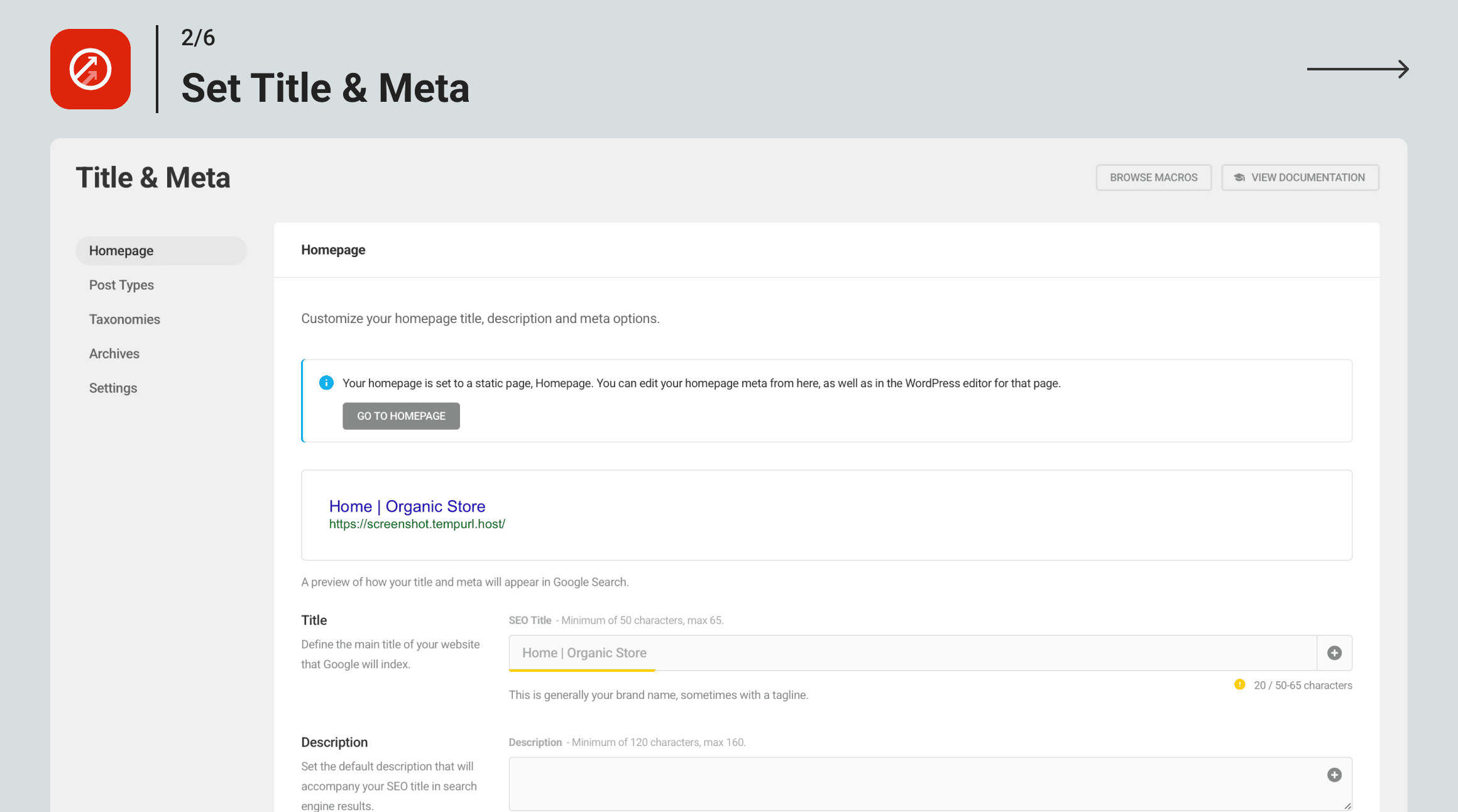
The Titles and Meta screen uses token-based templates. You insert variables like %post_title%, %site_name%, and %sep% into the title template fields, and a live preview renders below the field.
The post editor integration moved to the Gutenberg sidebar in version 3.16.2. Before that update, the SmartCrawl meta box appeared below the editor. The sidebar placement feels more modern and keeps the editing area clear.
The SEO Checkup runs manually from the dashboard and generates a health score with specific issues listed by category: meta tags, content issues, links, social media, and performance signals. The categorization makes triage straightforward. Scheduled checkups are a Pro feature.
One area where SmartCrawl shows its smaller scale: the content analysis in the post editor is functional but thinner than Rank Math or Yoast. It checks for keyword presence, density, and basic readability, but it does not check passive voice usage, transition sentence frequency, or keyword distribution across headings with the granularity that Yoast’s readability analysis provides even on the free tier.
Core features in depth
Sitemap management
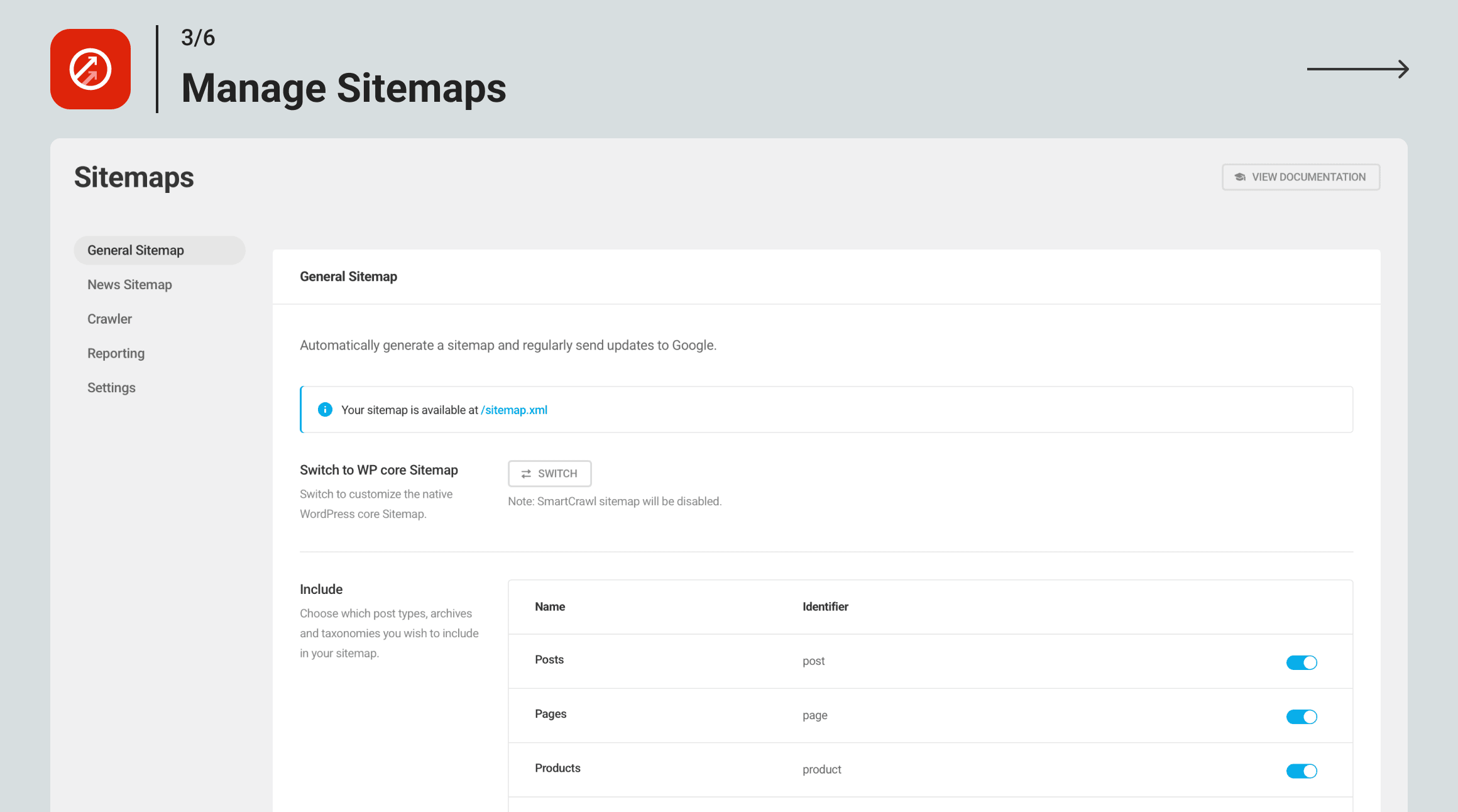
The sitemap module handles standard XML sitemaps for posts, pages, custom post types, and taxonomies. You toggle each content type in or out, set image inclusion, and exclude specific URLs from the sitemap. The news sitemap module is available on the free plugin, which is notable because Google News sitemaps are often locked behind paid tiers elsewhere.
One limitation to note: automatic sitemap submission via IndexNow is Pro-only. The free plugin pings search engines using the traditional ping protocol on content changes, which still works but is less immediate than IndexNow.
Redirect management
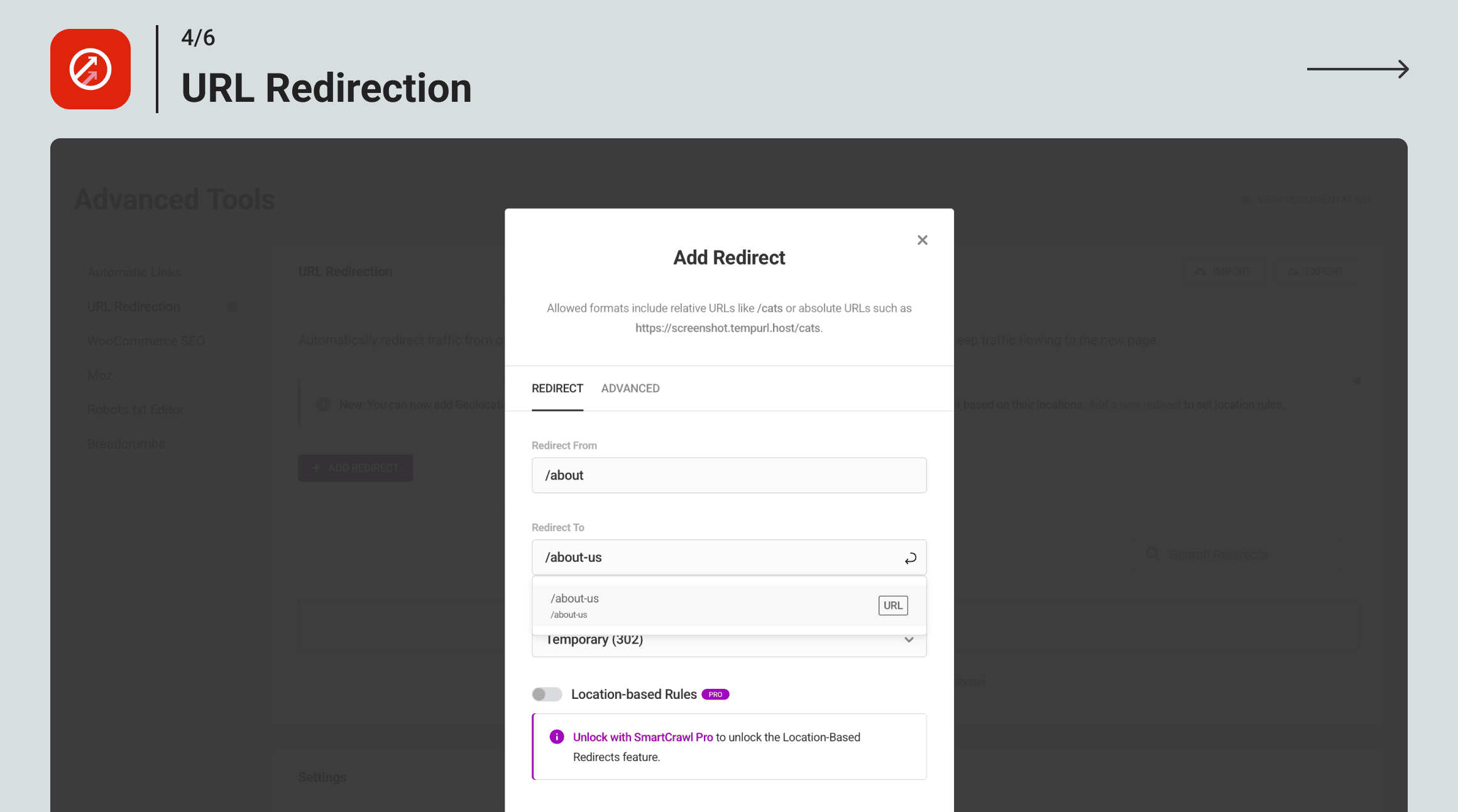
The redirect manager is one of SmartCrawl’s clearest advantages on the free tier. You get 301, 302, 307, 410, and 451 redirect types without paying. Yoast requires a premium purchase for redirects. Rank Math includes redirects on its free tier too, so this differentiates SmartCrawl from Yoast specifically rather than from the broader field.
Regex support and location-based redirect rules are Pro-only. For most small to medium sites, the standard redirect types in the free plugin cover everything needed.
A notable missing feature: SmartCrawl does not automatically create a redirect when you change a post’s slug. If you update a slug in WordPress, you have to add the old-to-new URL redirect manually. Rank Math and Yoast Premium both offer automatic slug-change redirect capture.
Schema markup and structured data
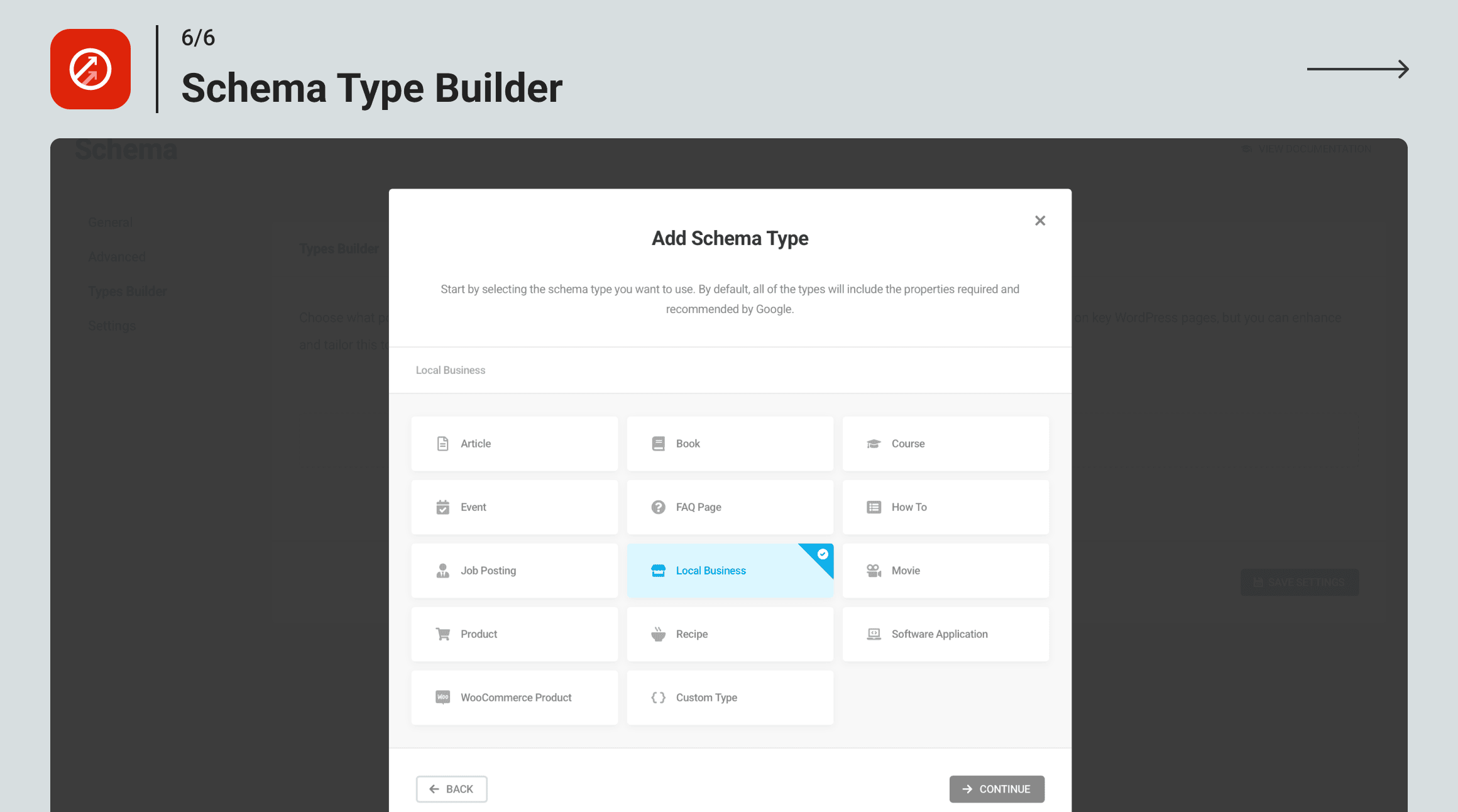
The schema module is a standout on the free tier. SmartCrawl supports 150-plus schema types with a visual type builder. You configure schema defaults globally and override at the post or page level. Supported types cover Article, BlogPosting, Product, LocalBusiness, Event, FAQ, HowTo, Recipe, VideoObject, Person, and many more.
SmartCrawl’s schema outputs are valid JSON-LD. What it does not do as well as Rank Math PRO is produce an interconnected schema graph, where schema objects (Person, WebPage, Article, BreadcrumbList) are linked together into a graph structure. SmartCrawl’s schema is functional and correct, but the graph approach that Rank Math PRO uses tends to generate richer structured data coverage in search results.
For standard Article, FAQ, or LocalBusiness schema on a small to medium site, SmartCrawl’s free schema module is more than adequate.
WooCommerce SEO
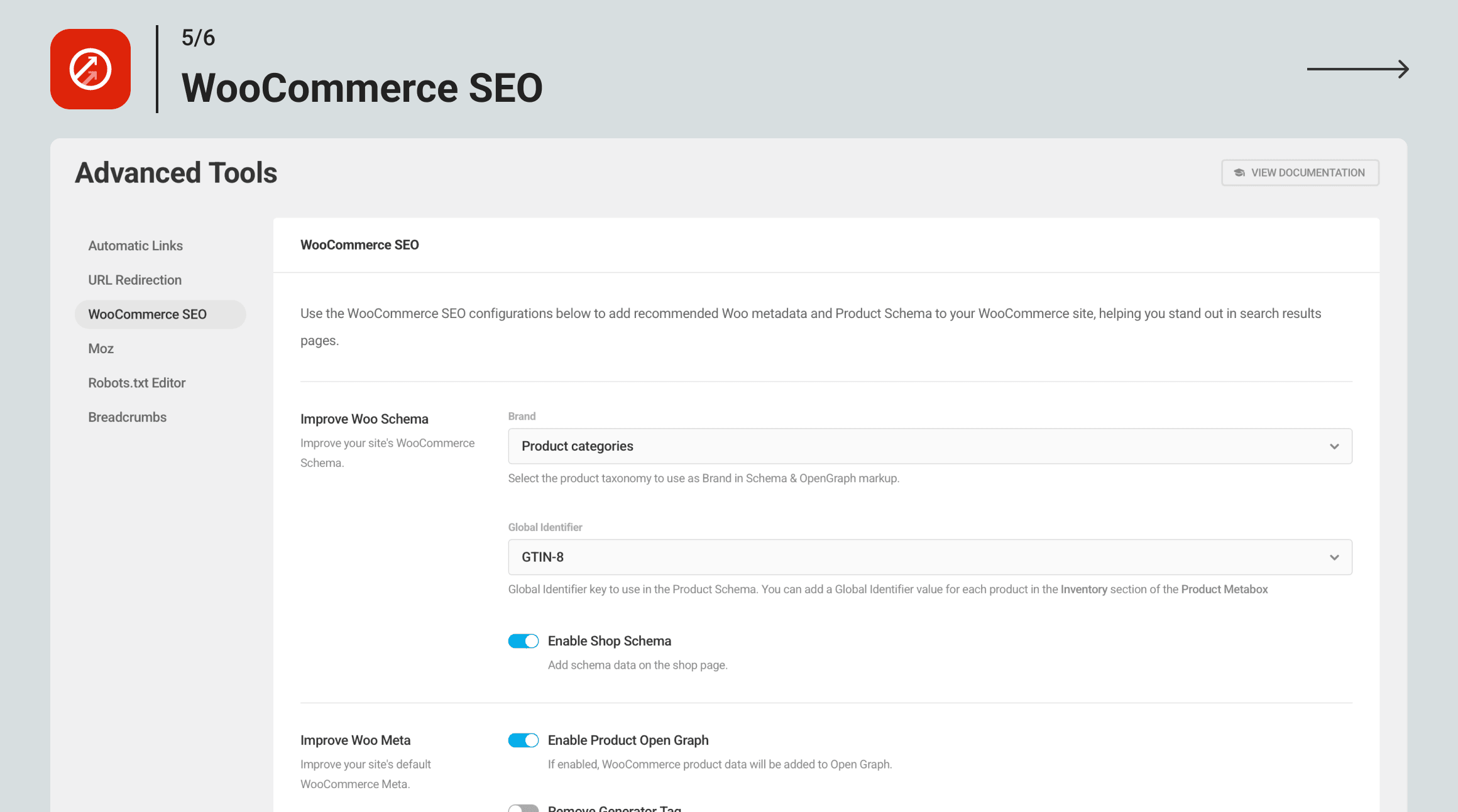
WooCommerce SEO is a Pro-only feature. It adds preset meta title and description templates for product pages, category pages, and the shop archive. It also handles product schema (Product, Offer, AggregateRating) for product rich results in search.
For store owners already on WPMU Dev membership, having WooCommerce SEO bundled alongside Smush and Hummingbird in one subscription is convenient. For stores not already using the WPMU Dev stack, standalone WooCommerce SEO options like AIOSEO’s WooCommerce module may offer deeper per-product controls without the full membership dependency.
Automatic internal linking (Pro)
The automatic linking module lets you define keyword-to-URL rules. SmartCrawl scans published content and inserts links wherever the trigger keyword appears. You set the link frequency (once per post or up to a set number per keyword) and can exclude specific URLs or post types from receiving links.
This is comparable to Rank Math’s AI Link Genius in function, except SmartCrawl’s version is rule-based rather than AI-assisted. You define the rules manually. For sites with a controlled internal linking strategy, such as specific product or category pages that should be linked consistently, this is useful. For sites that want the plugin to surface relevant link opportunities automatically, Rank Math’s AI approach is more hands-off.
Pricing and license value
SmartCrawl Pro is not available as a standalone plugin purchase. Accessing Pro features requires a WPMU Dev membership:
| Plan | Price per month (billed annually) |
| Basic | $3/month (1 site): all WPMU Dev Pro plugins, 5GB CDN, 5GB backup, 24/7 support |
| Standard | $5/month (3 sites): all WPMU Dev Pro plugins, 10GB CDN, 10GB backup, 24/7 support |
| Plus | $10/month (10 sites): all WPMU Dev Pro plugins, 20GB CDN, 20GB backup, 24/7 support |
| Premium | $20/month (unlimited sites): all WPMU Dev Pro plugins, 50GB CDN, 50GB backup, 24/7 support |
WPMU Dev offers a 7-day free trial. All plans include access to all 40-plus WPMU Dev Pro plugins, not just SmartCrawl. Smush Pro, Hummingbird Pro, Defender Pro, Forminator Pro, and Hustle Pro all come with the membership.
The value question is whether you need those other plugins. If you are already paying for Smush Pro or Hummingbird Pro individually, a WPMU Dev membership is likely cheaper overall. If SmartCrawl is the only plugin you want from the suite, the entry cost of $36 per year for one site compares unfavourably with Rank Math Free at zero cost or Rank Math PRO at $69 per year as a standalone SEO plugin with a deeper feature set.
For agencies managing multiple client sites, the Plus plan ($120 per year for 10 sites) and Premium plan ($240 per year for unlimited sites) represent competitive pricing when the full plugin bundle is factored in.
Pros and cons
Pros
- Redirect manager available on the free plugin (most competitors lock this to premium)
- 150-plus schema types on the free tier with a visual schema type builder
- Built-in SEO health checkup and site crawler available free (scheduled crawls require Pro)
- Clean, modular interface with no aggressive upsells inside the plugin
- Solid multisite support with network-level default settings
- Setup wizard imports cleanly from Yoast and Rank Math with keyword data preserved
- News sitemaps included on the free tier (often a paid feature elsewhere)
- Strong value for WPMU Dev subscribers already using Smush, Hummingbird, or Defender
- Breadcrumbs available free, expanded to WooCommerce and custom post types in v3.16.2
- Active maintenance: v3.16.4 shipped August 2026 with continued timely updates
Cons
- Pro requires a full WPMU Dev membership, not a standalone plugin purchase
- Install base of 20,000-plus on WP.org is small vs. Yoast (10M+) and Rank Math (4M+), meaning a thinner third-party integration and tutorial ecosystem
- No AI features: no AI-generated meta descriptions, no AI-assisted internal linking suggestions
- Automatic linking is rule-based and fully manual, not AI-driven
- Content analysis in the post editor is less detailed than Yoast’s free readability analysis
- No automatic redirect creation when slugs change (manual entry required)
- Migration from non-Yoast/Rank Math plugins may require an intermediate step
- Some user-reported focus keyword data loss after certain plugin updates
- IndexNow (InstantIndexing) is Pro-only
- No option to remove the category URL prefix from permalinks (Rank Math and Yoast both support this)
Alternatives to SmartCrawl SEO
Rank Math SEO. The most capable free SEO plugin available for WordPress today. The free tier includes unlimited focus keywords, 18-plus schema types, a redirect manager, 404 monitor, Google Search Console integration, and a well-structured setup wizard. If you want a free WordPress SEO plugin and are not in the WPMU Dev ecosystem, Rank Math is the first to evaluate. Read our Rank Math review for the full comparison.
Yoast SEO. The industry-standard WordPress SEO plugin with 10M-plus active installs. The free version covers meta titles, descriptions, XML sitemaps, and readability analysis. Yoast Premium ($99 per year for a single site) adds redirects, multiple focus keywords, internal linking suggestions, and AI-generated meta descriptions. A better choice for beginners who want structured guidance and the largest possible community.
All in One SEO. A solid alternative for WooCommerce store owners and news publishers. AIOSEO includes News Sitemap, Video SEO, and a Local SEO module. Paid tiers start at around $49 per year. Read our All in One SEO review for hands-on details.
SEOPress. A budget-friendly standalone SEO plugin at $49 per year with unlimited site licenses. Covers meta, sitemaps, schema, redirects, and content analysis without a platform dependency.
The SEO Framework. A lightweight, privacy-first SEO plugin with no upsells and a minimal interface. The free tier handles meta, sitemaps, and structured data without the weight of a Rank Math or Yoast installation. Best for experienced WordPress users who prefer minimal configuration.
Final verdict
SmartCrawl SEO is a well-built WordPress SEO plugin with a genuinely competitive free tier. The redirect manager, schema builder with 150-plus types, and SEO health checkup available on the free plugin are features that competitors often charge for. The setup wizard is one of the better migration experiences available when moving from Yoast or Rank Math.
The limitation is structural rather than functional: SmartCrawl Pro is only available through a WPMU Dev membership. That is a great deal if you already use or plan to use other WPMU Dev plugins. It is a harder sell if you only need an SEO plugin.
For WPMU Dev subscribers, SmartCrawl is an easy addition to the stack. For everyone else, Rank Math free covers most of the same ground at zero cost, and Yoast or AIOSEO handle whatever remains. Choose SmartCrawl if the WPMU Dev ecosystem is already part of your setup, or if you specifically want a multisite SEO management tool with a central Hub dashboard.
Browse more plugin reviews to compare your options.