


Most WordPress builders follow a familiar playbook: start with a simple drag-and-drop editor, add a widget library, layer on templates, and call it done. Bricks takes a different approach. It is built for people who actually know CSS, want to write their own class systems, and care more about what comes out in the browser than how many pre-built widgets are in the panel.
That positioning creates a real question: is Bricks Builder the right site builder for your work, or is the developer focus overkill for what you actually need? I explored Bricks through the official free playground and researched the full feature set from the documentation, changelog, and feature pages. Here is what I found.
At a glance
- Reviewed: Bricks Builder 2.3.9 stable + 2.4 beta2 (July 2026)
- Tested via: Official free playground at try.bricksbuilder.io (no downloadable free version exists)
- Best for: Developers and agencies building performance-critical custom WordPress websites
- Pricing: From $79/year (Starter, 1 site); lifetime license at $599 (unlimited sites)
- Bottom line: The cleanest HTML output of any major WordPress visual builder, with native CSS Grid, no jQuery, and honest flat-feature pricing across all plans.
Quick verdict
Bricks Builder is the strongest performance-first visual site builder in the WordPress ecosystem right now. It produces cleaner HTML than Elementor or Divi by a significant margin, runs without jQuery, and gives developers native access to CSS classes, variables, grid, and flexbox directly in the editor. The pricing model is transparent: every plan gets the same full feature set with no tiered feature walls. The learning curve is steeper than most builders, and there is no free downloadable version (only a free online playground), but for developers and agencies who take code quality seriously, Bricks is difficult to ignore.
Quick verdict card
- Best for: Developers and agencies building performance-critical, custom client websites on WordPress.
- Best use case: Full site design with dynamic content, custom class systems, WooCommerce stores, and complex query-driven layouts.
- Standout: Native CSS Grid and Flexbox controls, no jQuery, a query loop builder that handles any WordPress data, and a pricing model where all plans get every feature.
- Watch out for: A steeper learning curve than Elementor or Divi, no free downloadable version (playground only), each multisite subsite counts separately against license limits, and a community and add-on ecosystem that is smaller than Elementor’s.
What Bricks Builder is
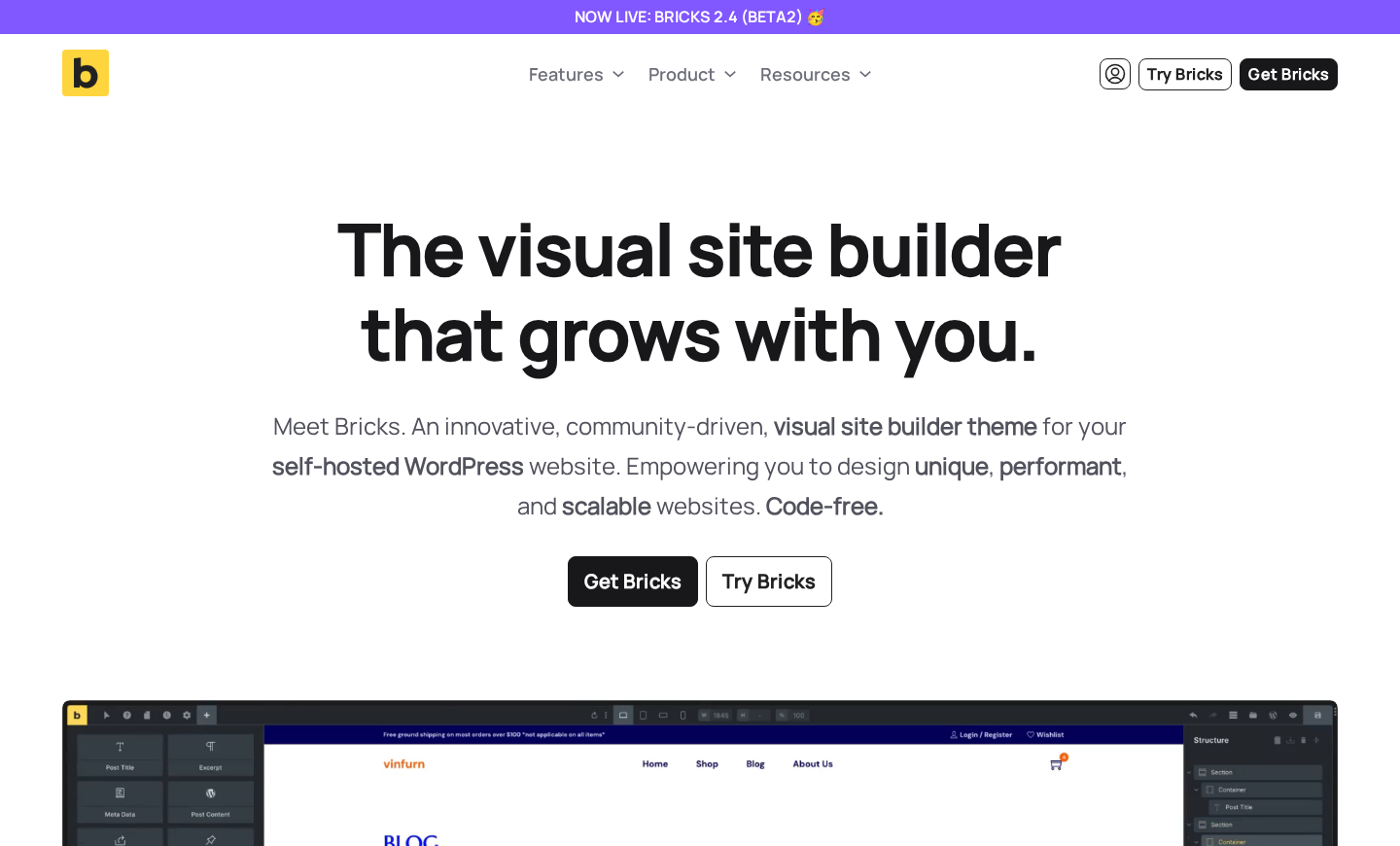
Bricks Builder is a premium WordPress site builder. One distinction worth noting early: Bricks is technically a WordPress theme, not a plugin. You install it as your active WordPress theme, not through the plugin directory. This is an important practical detail because it affects how you think about your stack and what it means if you ever want to move away from it.
The project is developed and maintained by a small independent team. Bricks is not backed by a large company and has no free version on WordPress.org. Instead, the team offers a free online playground at try.bricksbuilder.io where you can test the full builder interface before purchasing. The company operates through bricksbuilder.io.
The first public release of Bricks came in 2021, putting it squarely in the generation of builders that emerged as an alternative to the Elementor and Divi era. It was designed with a philosophy the team describes consistently: clean code, developer-grade controls, and no unnecessary weight. Unlike older builders that carry legacy architecture from WordPress’s pre-Gutenberg days, Bricks was built with modern web standards in mind from the start.
As of July 2026, the current stable release is version 2.3.9. Version 2.4 is in public beta, adding AI Abilities through the WordPress Abilities API and MCP support, a new Builder Browser for managing content centrally, and a global import/export system for transferring complete design systems between sites.
Who Bricks Builder is best for
Bricks Builder makes sense if you:
- Build custom WordPress websites professionally, whether for clients or your own projects, and you want the HTML output to be something you’re not embarrassed by.
- Have a working understanding of CSS. The CSS class system, flexbox controls, and grid builder are all things you should want to use, not things you should feel like you need to avoid.
- Run an agency or freelance practice where page performance is a real client deliverable, not an afterthought.
- Need to build dynamic content layouts (post grids, custom loops, filterable archives, directory listings) and you want to do it visually without reaching for a separate plugin every time.
- Want WooCommerce store design done inside a single builder rather than through a patchwork of shop page templates and third-party WooCommerce extensions.
- Are building something where Webflow-level control would be nice but you want to stay on WordPress. Bricks gets compared to Webflow by multiple users in testimonials for a reason.
Bricks Builder is a weaker fit if you:
- Are new to web design and looking for the quickest path to a working website. The interface is powerful but not as immediately intuitive as Elementor’s. Expect a real learning curve measured in days, not hours.
- Need a large third-party add-on ecosystem. Bricks has a growing add-on market, but it is a fraction of what Elementor offers.
- Want a free downloadable version to test before committing. The free playground at try.bricksbuilder.io is the only no-cost testing option.
- Run WordPress Multisite installations where each subsite needs to be licensed separately. Each subdomain counts against your license limit, which adds up quickly on large networks.
Setup and first impression
Disclosure: Bricks Builder has no free downloadable version and no WordPress.org listing. My hands-on testing was done through the official Bricks free playground at try.bricksbuilder.io, which provides a clean, isolated WordPress installation with the current Bricks version pre-installed. Features I could not test through the playground were researched from the official documentation and changelog.
The playground experience is closer to a real install than a simple demo. You get a fresh WordPress admin and can edit pages, apply templates, switch between breakpoints, and explore every section of the builder interface. It is ephemeral (each session creates a temporary environment) but it gives a genuine feel for the workflow.
On a licensed install, Bricks is activated like any WordPress theme: you upload the theme ZIP from your Bricks account, activate it, and then enter your license key in the Bricks admin settings. There is no plugin to install separately. The entire site-building experience runs through the theme.
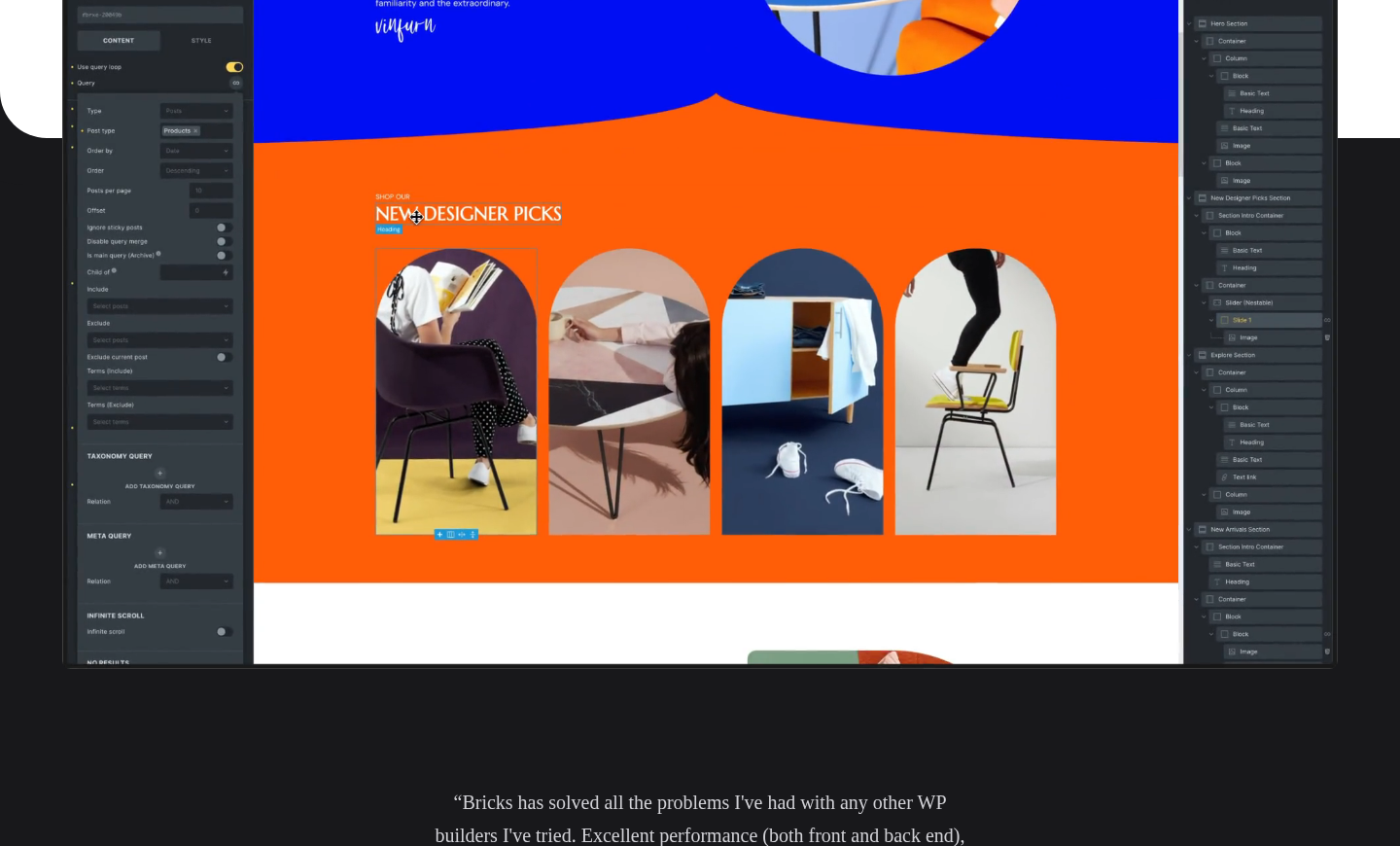
On first launch of the builder, the initial impression is that this is not a beginner-first product. The panel layout is more detailed than Elementor’s. There is a structure panel (a hierarchical tree of every element on the page), a control panel for element settings, and a canvas. Each element has multiple settings tabs covering layout, style, and custom code. The density of options is high by design, not by accident.
What the interface does not have: unnecessary paddings, wizard-style onboarding, or simplified “beginner mode” toggles. Bricks trusts that the person using it already knows what flexbox is.
The editor interface
The Bricks builder interface has three primary panels:
The canvas is the live-preview area where you see your page as you build it. You can click any element on the canvas to select it and edit it. Drag-and-drop works for moving elements. You can also right-click elements for a context menu with copy, paste, duplicate, and save-as-template options.
The structure panel (left side) shows a nested tree of every element on the page. On complex pages with deeply nested layouts, the structure panel is the faster way to select and navigate elements rather than clicking through the canvas. You can expand, collapse, duplicate, and reorder elements in the tree directly.
The control panel (right side) shows every setting for the currently selected element. Settings are split across tabs: content/style/layout/advanced, with the exact tabs depending on the element type. The depth of controls here is where Bricks separates from simpler builders. For any element, you can set styles globally, per CSS class, per breakpoint, and per pseudo-class or pseudo-element, all from the same panel.
The top bar provides access to breakpoint switching (desktop and mobile-first modes are both supported, with unlimited custom breakpoints), undo/redo, the structure panel toggle, and the save/publish button.
The CSS class system is the most important thing to understand about how Bricks handles styling. Instead of applying inline styles to each element independently (as Elementor and Divi do by default), Bricks encourages you to create CSS classes and style them once. Assign the same class to multiple elements and any style change updates all of them simultaneously. This is how professional front-end developers work, and Bricks makes it viable inside a visual builder context without requiring you to write CSS externally.
Core features
Flexbox and CSS Grid
Bricks gives you direct access to flexbox and CSS Grid properties through the builder UI. You can set display: flex or display: grid on any container element and configure every corresponding property (flex direction, wrap, gap, align items, justify content, grid template columns, grid template rows, and so on) from the style panel without touching code. A visual grid builder helps you set up column and row structures with a click.
This is a meaningful departure from builders that abstract layout into simplified “column” and “row” concepts. With Bricks, the CSS that gets generated matches what a developer would write by hand, which is why Bricks sites consistently produce smaller, more efficient stylesheets than comparable Elementor builds.
Query Loop Builder
The Query Loop Builder is one of the features that draws developers away from competitors. Any container element can be turned into a query loop: you configure a WP_Query through the builder UI (selecting post type, number of posts, taxonomy terms, author, ordering, and more), then design the loop item visually using dynamic data tags for title, featured image, excerpt, date, and any custom field. The loop renders live in the builder so you can design on real data.
You can also write your own custom PHP query directly inside the builder if you need query logic that goes beyond what the visual query builder covers. Infinite scroll, AJAX pagination, and “load more” buttons are built in.
For directory sites, real estate listings, portfolio archives, recipe sites, and any content-heavy build where you need to query and display WordPress data dynamically, this is the feature that makes Bricks viable without additional plugins.
Popup Builder
Bricks includes a popup builder that requires no additional plugin. You design popups as full Bricks layouts, with access to every element and the complete design system. Trigger controls let you set popups to open on page load, after a time delay, on scroll percentage, on element click, or on exit intent. You can set display conditions to show popups on specific pages or to specific user roles.
For agencies building lead capture, announcements, or gated content, the built-in popup system removes a common plugin dependency.
WooCommerce Builder
Bricks includes a full WooCommerce builder for designing every part of a WooCommerce store: product listing pages, single product pages, cart, checkout, My Account, and shop archives. Version 2.4 (in beta) adds streamlined WooCommerce v2 elements for Cart, Checkout, and Account pages that let you design multiple states (filled cart, empty cart, logged-in account, lost password, and more) within a single element rather than maintaining separate templates.
This eliminates the need for a separate WooCommerce page builder plugin on top of Bricks, which is a common extra cost on Elementor-based agency stacks.
Menu Builder
The Menu Builder supports designing fully custom desktop and mobile navigation menus inside the Bricks editor. Mega menus are supported, including nested layouts with columns, images, and icons inside the mega menu panel. Menus are accessible by default with proper ARIA attributes and keyboard navigation.
Conditions and Interactions
The Conditions system lets you show or hide any element based on rules: logged-in status, user role, device type, date/time range, URL parameters, custom field values, and more. These are all configured visually through the builder without code.
The Interactions system handles event-driven behavior: click, hover, scroll, and other triggers can toggle element visibility, add or remove CSS classes, animate elements, or run custom JavaScript. For most common interaction patterns (hover dropdowns, accordion behaviors, scroll-triggered reveals), you can build them inside Bricks without adding a JavaScript library.
Dynamic Data
Bricks has a comprehensive dynamic data system for connecting element content to WordPress database fields. Post title, featured image, author name, date, excerpt, custom taxonomy terms, comments count, and any ACF (Advanced Custom Fields) field can all be pulled into any element’s text, image, or link fields using a dynamic data tag. The system supports Pods, Metabox, and JetEngine as well.
For theme building (custom post type archives, member directories, event listings, or anything where content is database-driven rather than static) this is the equivalent of Elementor Pro’s dynamic content system.
Custom Code
Every element in Bricks has an Advanced tab where you can add custom CSS and JavaScript scoped to that element. There are also global code injection areas for the site header, body start, and footer. Custom PHP is supported at the template level. These are not workarounds or hacks: they are first-class features in the builder UI.
Bricks 2.4 adds optional automatic code signing in developer mode and the ability to store the license key as a PHP constant, which is useful for deployment workflows and blueprint sites.
AI Abilities (Bricks 2.4 beta)
The 2.4 beta introduces a significant new capability: Bricks AI Abilities expose builder actions through the WordPress Abilities API and MCP (Model Context Protocol). Once configured, compatible AI clients including Cursor, Claude Code, and GitHub Copilot can create and edit Bricks pages, templates, components, and global data programmatically.
This is a genuinely novel direction for a WordPress builder. Native MCP integration means AI-assisted site building workflows are possible without browser plugins or third-party bridge tools. The initial ability set covers pages, elements, templates, components, global data, design systems, dynamic data, query loops, navigation menus, WooCommerce setup, import/export, and HTML-to-Bricks conversion.
For agencies and developers who are already using AI coding tools in their workflow, this is a feature worth watching closely as 2.4 moves toward a stable release.
Templates
Every Bricks plan includes access to free pre-built templates: page wireframes and design sets covering landing pages, homepages, service pages, portfolios, and WooCommerce stores. Templates can be loaded directly into the builder and customized. There is also community template access through the Bricks account.
110+ Elements
Bricks ships with over 110 built-in elements covering everything from basic content (headings, text, buttons, images, video) to layout containers, nav menus, WooCommerce components, forms, social icons, code blocks, maps, sliders, tabs, accordions, icon boxes, countdown timers, progress bars, and more. The element library grows with each release.
Performance
Bricks consistently outperforms Elementor and Divi on raw page speed metrics, and the reasons are structural rather than incidental:
No jQuery. Bricks runs on Vanilla JavaScript. jQuery is one of the most commonly flagged performance issues on WordPress sites (adding roughly 90KB gzipped even when most of its functionality goes unused). Removing it as a dependency eliminates a request and reduces parse time on every page.
Clean, semantic HTML. The HTML Bricks outputs follows standard web conventions. Elements get meaningful IDs and classes. There are no deeply nested wrapper divs layered around every piece of content. The DOM stays lean, which directly reduces layout thrashing and improves Cumulative Layout Shift scores.
CSS class-based styling. Because Bricks encourages a class-based design system rather than per-element inline styles, the generated stylesheet is more efficient. Shared classes mean less repeated CSS. The specificity is manageable rather than escalating through specificity wars between inline styles and theme styles.
Lazy loading by default. Images, background images, and videos all support lazy loading out of the box. Assets load when they enter the viewport, not all at once on page load.
Optimized font loading. Variable fonts are supported with optimized loading to reduce font-related CLS and LCP issues.
Script reduction. Scripts for elements not present on a given page are not loaded. A page with no slider loads no slider JavaScript.
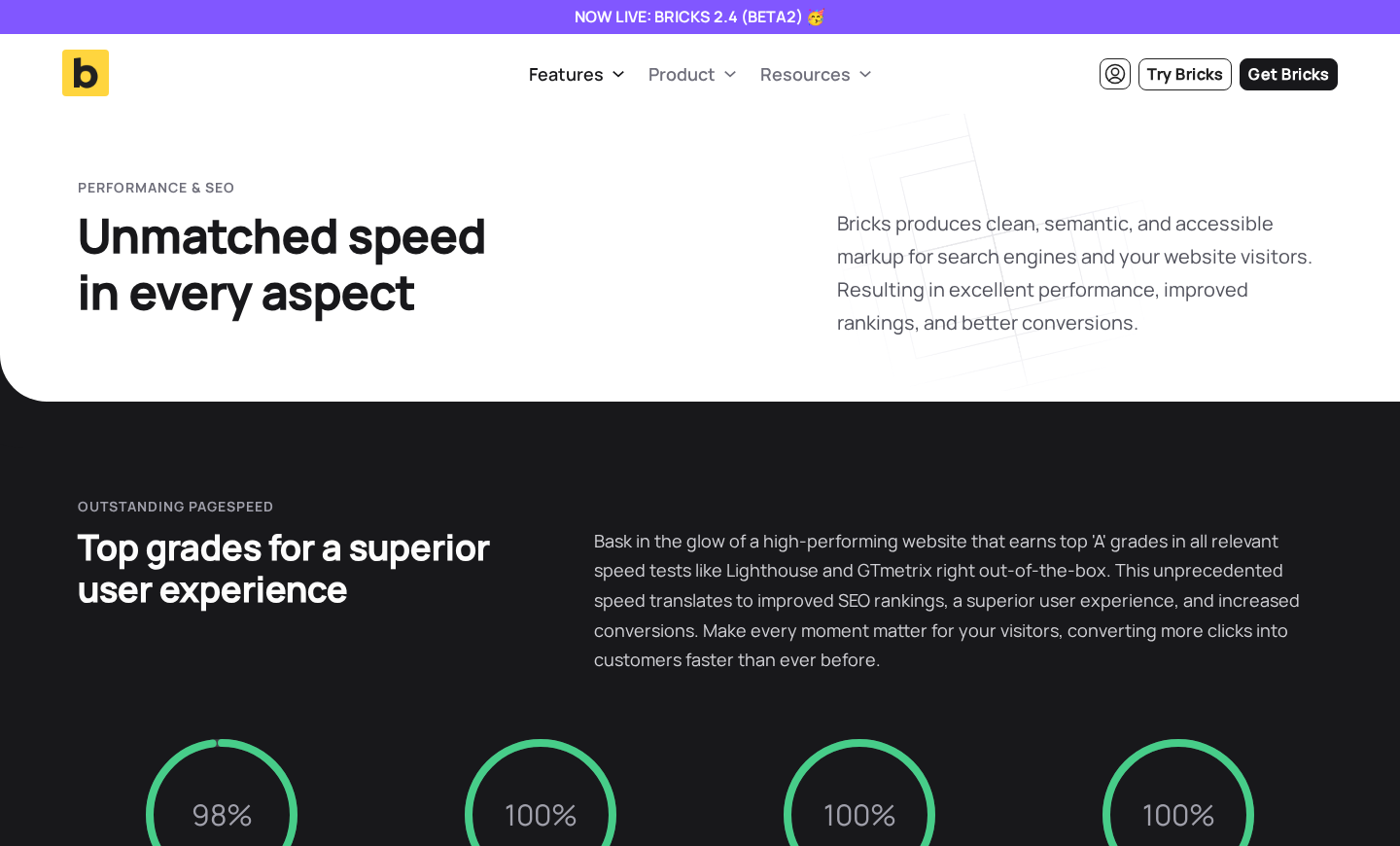
In practice, fresh Bricks builds consistently achieve high Lighthouse Performance scores without a caching plugin, which is not a claim that can be made for most other visual builders. Multiple users report Lighthouse scores of 90-100 on Bricks sites with no additional optimization plugins. The official performance page shows benchmark targets of 98% Performance, 100% SEO, 100% Accessibility, and 100% Best Practices from Lighthouse.
The honest qualifier: these numbers are achievable on clean builds. If you stack multiple large add-ons, embed complex third-party scripts, or use lots of large images, performance degrades as it would with any builder. Bricks gives you the best starting point, not a guarantee.
Recent updates
Bricks is actively developed with regular releases. Some notable additions in recent versions:
- Components (introduced earlier in 2025-2026): Reusable design components with variant support, slots, and synced/unsynced instances. Changes to a component propagate to all instances automatically.
- Builder Interface Customizer and Profiles (2.4 beta): Customize where each panel sits in the builder, save layouts as profiles, and assign profiles to user roles. Useful for agencies handing sites to clients with a simplified interface.
- Global Import/Export (2.4 beta): Transfer theme styles, global classes, variables, color palettes, breakpoints, components, templates, and custom fonts between sites via a ZIP export.
- Bi-directional CSS Sync (2.4 beta): Edit custom CSS and the corresponding style controls stay in sync. Change a property in the CSS editor and the visual control updates; change the visual control and it writes back to the CSS editor.
Pricing
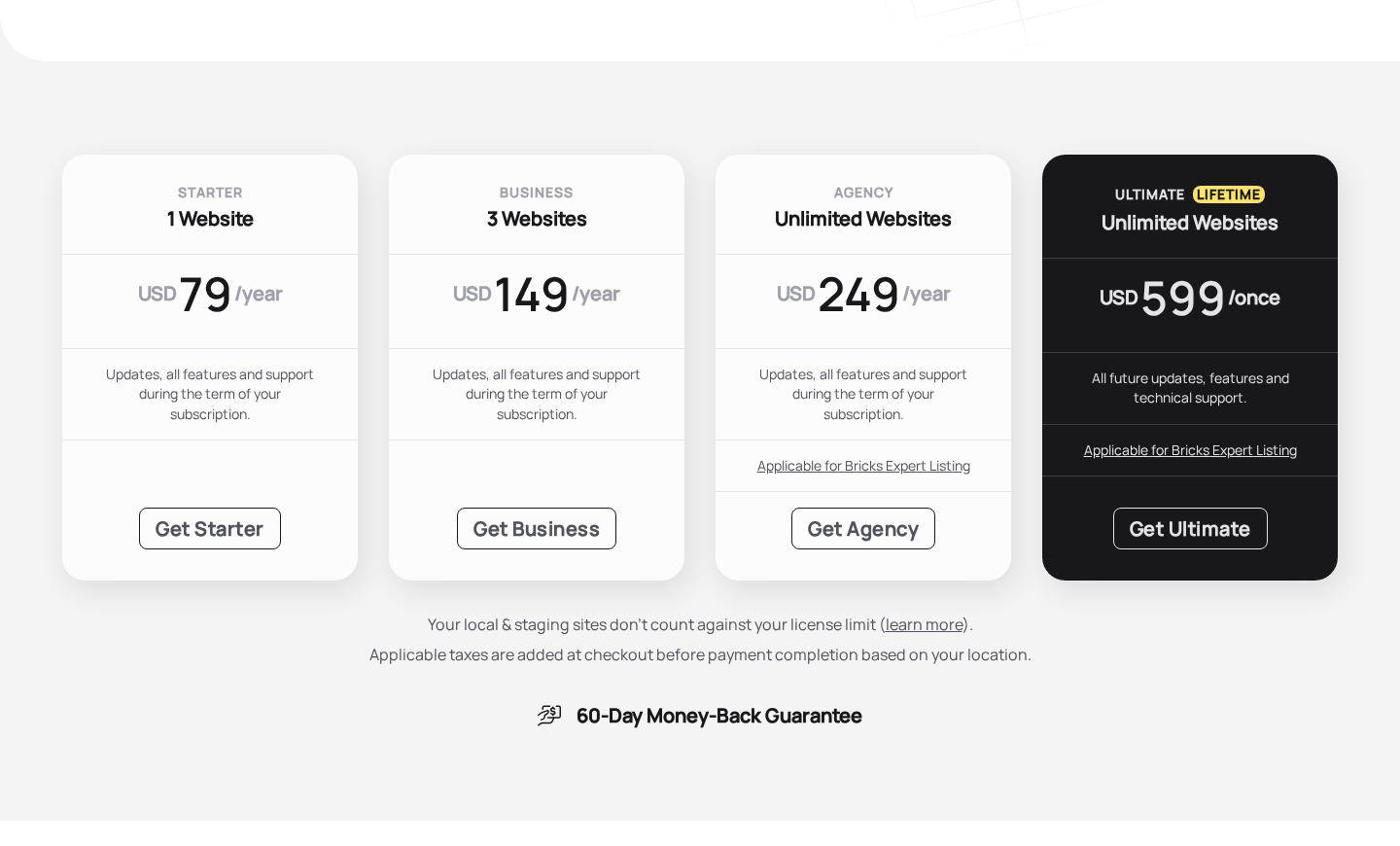
Bricks uses a straightforward pricing model: every plan includes the complete feature set. There are no premium feature add-ons or module unlock tiers. The only difference between plans is the number of live website activations.
| Plan | Price | Sites | License type |
|---|---|---|---|
| Starter | $79/year | 1 website | Annual subscription |
| Business | $149/year | 3 websites | Annual subscription |
| Agency | $249/year | Unlimited websites | Annual subscription |
| Ultimate | $599 one-time | Unlimited websites | Lifetime (all future updates) |
All plans include: every available element (110+), Query Loop Builder, Menu Builder, Popup Builder, WooCommerce Builder, Conditions and Interactions, Dynamic Data, custom code (HTML, CSS, JS, PHP), pre-made templates, community template access, technical support (email and forum), and regular updates.
Local and staging site installations do not count against the license limit. You can run a Starter license on your live site and one or more local or staging copies simultaneously.
For solo developers or freelancers: the Starter plan at $79/year covers a single live client site and is the entry point to the full feature set. The Business plan at $149/year is the right fit for someone maintaining a small client portfolio. The Agency plan at $249/year with unlimited sites is where Bricks becomes very price-competitive for anyone running five or more active client sites.
The Ultimate lifetime license at $599 requires only a one-time payment and covers all future updates and support. For an agency with a stable Bricks workflow, the payback period on the lifetime license versus the Agency annual plan is less than three years.
The Agency and Ultimate plans include eligibility for the Bricks Expert Listing, which is the official directory of certified Bricks builders. This is useful for agencies that want inbound referrals from the Bricks website.
All plans include a 60-day money-back guarantee, which is more generous than most competitors in this category.
Subscriptions cancel cleanly: after cancellation, the license remains active until the end of the billing period, then loses access to updates and support. You can still edit existing Bricks sites after cancellation, but running outdated software carries a security risk that the team explicitly flags.
Honest drawbacks
The learning curve is real. Bricks is marketed as accessible to beginners, and the team’s FAQ notes you do not need to be a developer to use it. But the honest experience is that the interface density, the CSS class system, and the depth of controls create a steeper ramp than Elementor or Beaver Builder. If you are new to web design, expect several days of familiarization before your workflow feels efficient. Developers who understand CSS will feel at home faster.
No free downloadable version. You cannot download Bricks, install it on your own WordPress, and test it for free. The playground at try.bricksbuilder.io is genuinely functional and lets you explore the full interface, but sessions are temporary and you cannot install your own plugins or connect your own data. For someone who wants to test Bricks on a real local environment before buying, the 60-day money-back guarantee is the practical solution, but it requires purchasing first.
Multisite licensing is per-subsite. Each subsite in a WordPress Multisite installation needs its own license activation and counts against your plan’s site limit. For large Multisite networks, this can make the Starter and Business plans impractical and the Agency plan (unlimited sites) the only viable option. Other builders like Beaver Builder handle Multisite differently at the network level, which some agencies prefer.
Smaller community and add-on ecosystem. Bricks has an active Facebook group, a public forum, and a growing number of third-party add-ons (BricksExtras, BricksForge, and others). But the total volume of tutorials, YouTube content, third-party add-ons, and community-built templates is a fraction of what is available for Elementor. If your team relies on finding solutions to niche problems via a quick search, you will sometimes find the Bricks community and documentation are thinner than you are used to.
No native form builder with submission management. Bricks includes form elements that can send email notifications, but there is no built-in form submission dashboard, conditional logic, payment integration, or file upload management. For anything beyond basic contact forms, you will need to add a separate form plugin like Fluent Forms, WPForms, or Gravity Forms.
Bricks is a theme, not a plugin. Installing Bricks as your active theme means you cannot run another theme at the same time. If a client wants to move away from Bricks later, the migration path requires rebuilding in a new theme, not just deactivating a plugin. Content (text and images stored in the post database) survives, but the visual layouts do not survive in a portable format the way plugin-based builders sometimes handle this.
Alternatives
Elementor (free tier + Pro from $59/year for 1 site). The market leader with 10+ million active installs on WordPress.org. Larger feature set, vastly larger ecosystem of add-ons, templates, and tutorials. Heavier page output than Bricks. The v4 Atomic Editor (2026) brought significant architecture improvements, but also update-related disruption for some users. The right choice if ecosystem size and feature breadth matter more than code quality.
Beaver Builder ($89/year, 1 site). Stability-first, developer-friendly alternative with 12 years of production history. Produces cleaner code than Elementor but heavier than Bricks. Includes Beaver Themer (full site editing) in all paid plans. Better for agencies where client-site stability and team onboarding speed matter more than absolute performance.
Kadence Blocks (free + Pro from $79/year). Gutenberg-first approach. Tightly integrated with the native block editor. Very strong performance and accessibility story. Better for content-forward sites than for pixel-perfect custom design work.
Breakdance (from $199/year, unlimited sites). Closest direct competitor to Bricks in philosophy: developer-grade controls, clean code, performance focus. A newer product from some of the original Oxygen Builder team. Smaller community and ecosystem than Bricks, but strong pricing for unlimited sites.
Pros and cons
Pros
- Cleanest HTML and CSS output of any major visual WordPress site builder.
- No jQuery: Vanilla JavaScript only, reducing page weight on every site.
- Native CSS Grid and Flexbox controls in the builder UI, with no wrapper abstractions.
- Class-based design system for maintainable, scalable stylesheets.
- All plans include every feature: no feature tiers or premium add-on walls.
- Query Loop Builder handles any WordPress data visually, including custom PHP queries.
- Built-in Popup Builder, WooCommerce Builder, and Menu Builder reduce plugin dependencies.
- Dynamic Data system works with ACF, Pods, Metabox, and native WordPress fields.
- Conditions and Interactions cover most common show/hide and event-driven behaviors without custom JavaScript.
- Custom code (HTML, CSS, JS, PHP) is a first-class feature, not a workaround.
- Unlimited custom breakpoints with both desktop-first and mobile-first editing modes.
- Local and staging sites do not count against license limits.
- 60-day money-back guarantee on all plans.
- Ultimate lifetime license at $599 is excellent value for agencies with a stable Bricks workflow.
- Active development with frequent releases, including 2.4 beta with AI Abilities.
- Free playground to test the full interface before purchasing.
Cons
- Steeper learning curve than Elementor, Divi, or Beaver Builder.
- No free downloadable version: must purchase before installing on your own WordPress.
- Each multisite subsite counts against the license limit separately.
- Smaller third-party add-on ecosystem and community compared to Elementor.
- No built-in form submission management or conditional-logic forms.
- Bricks is a theme, not a plugin: switching away requires rebuilding layouts.
- Multisite network-level management is not as streamlined as Beaver Builder’s approach.
- Documentation and community resources can be thinner for niche use cases.
- 2.4 beta changes (AI Abilities, Interface Customizer, Global Import/Export) are not yet in stable release as of July 2026.
Final verdict
Bricks Builder earns its reputation as the performance-first WordPress site builder for developers and agencies. If you measure a site builder by the quality of what it outputs (not the number of widgets in the panel or the size of the template library) Bricks is the strongest option in the WordPress market right now. The HTML is clean, the CSS is maintainable, the performance ceiling is higher than any comparable visual builder, and the pricing model is honest: you pay for site licenses, not for feature unlocks.
The Agency plan at $249 per year for unlimited sites is where the value proposition becomes hard to argue with. At roughly $20 per month for unlimited client websites, with the full feature set included, Bricks offers compelling economics for a professional agency that has already climbed the learning curve. The Ultimate lifetime license at $599 is a serious consideration for anyone confident in their Bricks workflow long term.
The honest caveats matter. The learning curve is real. The ecosystem is smaller. There is no free download. And if you need a polished form builder, conditional logic forms, or submission management, you are adding a plugin on top of Bricks regardless of plan tier.
For developers who care about what their sites actually produce in the browser: Bricks is the right answer. For designers who want the widest possible template library and the fastest onboarding: Elementor is still the more practical starting point. For agencies where client-site stability is the number-one concern: Beaver Builder’s track record remains strong. Bricks occupies a distinct, well-defined space and occupies it well.
Browse more WordPress plugin reviews in the Reviews section.