


An appointment booking plugin has one job: take a customer from “I want to book something” to “booking confirmed” without friction, then handle the backend work (notifications, calendar sync, payment) automatically. Amelia does this, and it does more than most WordPress booking plugins because it covers both individual appointments and full event management inside the same install.
I tested Amelia on the official public demo (barbershop, events, customer panel, employee panel), reviewed the pricing and features page in detail against version 9.6.1 released June 18, 2026, and walked through the plan comparison matrix to understand exactly what each tier buys. Where a paid feature was not exercisable without a live licensed install, I say so.
If you run a service business on WordPress and you are evaluating whether Amelia is worth buying, this is the review I would want to read before making that decision.
At a glance
Tested on: Official Amelia barbershop demo, events demo, customer panel, employee panel, features page, pricing page, and WordPress.org listing (version 9.6.1, June 2026).
Free version: Yes. Amelia Lite is available on WordPress.org with Square payment processing included at no cost.
Active installs: 90,000+ with a 4.6-star rating across 773 reviews on WordPress.org.
Bottom line: A strong appointment and event booking plugin with a generous free tier, clean UI, and a deep feature set on higher plans. The main catch for multi-site teams is that Pro still limits you to one domain; you need Elite for 20 sites.
Quick verdict on Amelia
If you want one sentence: Amelia is one of the most capable WordPress booking plugins available in 2026, and its free tier plus native event management make it a genuine option that most appointment-only plugins cannot match at any price.
The plugin earns its position because it covers two distinct use cases inside one install. Appointment booking (service selection, staff selection, date and time picker, custom fields, recurring schedules, packages, deposits) and event management (ticketed events, recurring events, QR code e-tickets, variable ticket pricing, event waiting lists) are both first-class features, not bolt-ons. Most WordPress booking plugins treat events as an afterthought or skip them entirely.
The honest caveats: the Pro plan, despite its “for growing businesses” positioning, limits you to one domain, which means agencies or multi-site owners must jump straight to Elite. The notification system is powerful for email and SMS but does not include Telegram as a delivery channel. And the free version, while genuinely useful, caps you at one employee, which rules it out for anything beyond a single-person operation.
Quick verdict card
Best for: Service businesses, event organizers, fitness studios, salons, clinics, coaches, and agencies that need both appointment scheduling and event ticketing inside WordPress.
Best plan for most teams: Standard for a single-location business that needs recurring appointments and reminders; Pro for businesses that need packages, calendar sync, and online meeting integrations; Elite for agencies handling multiple client sites.
Standout: Native event management with QR e-tickets, a usable free tier, and a modern booking UI that works across page builders.
Watch out for: Pro plan is capped at one domain, same as Standard; Elite jumps to 20 domains with no in-between option for two to five sites; Starter plan has no Lifetime purchase option.
What Amelia is
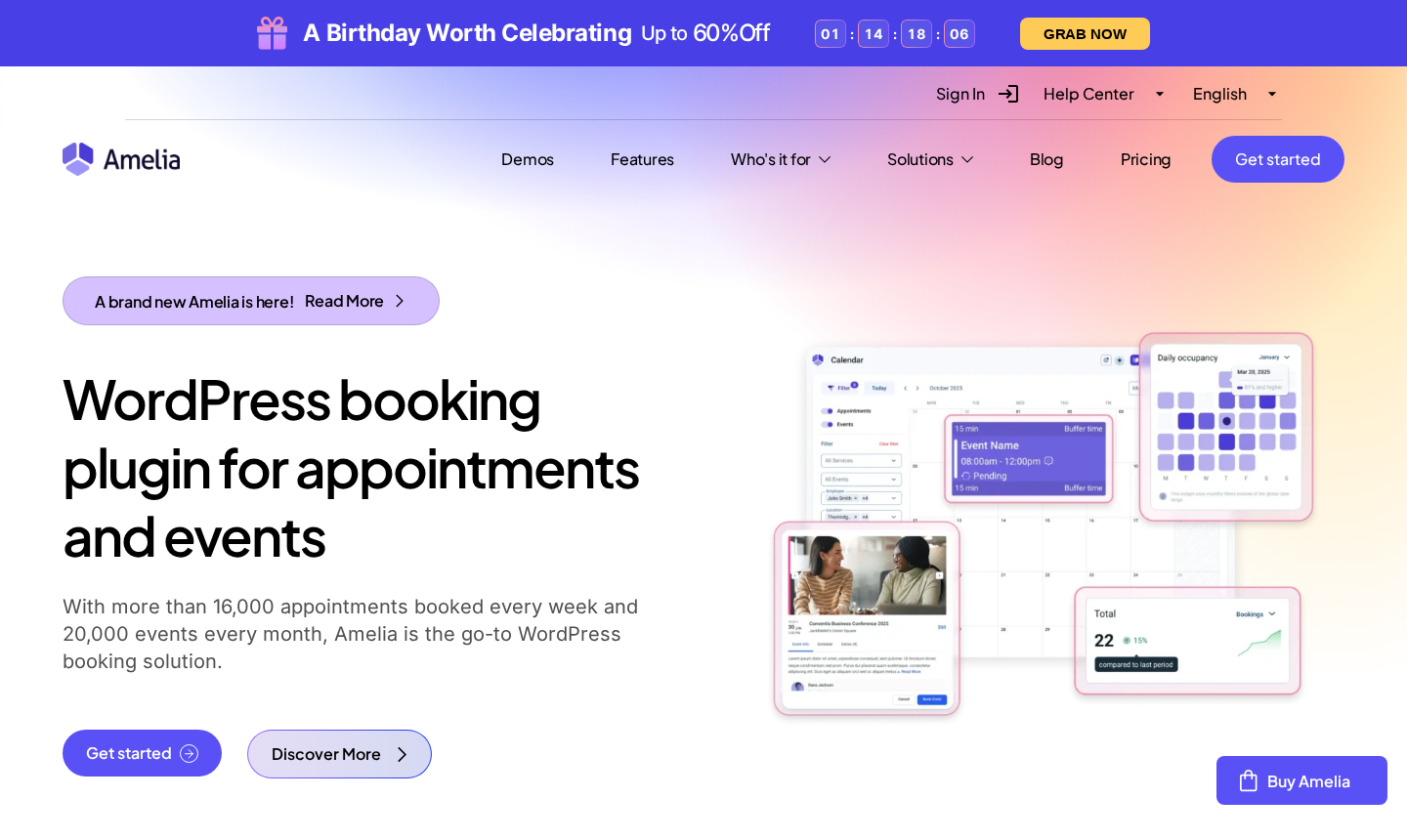
Amelia is a WordPress appointment and event booking plugin published by Melograno Venture Studio (the TMS-Outsource team, based in Belgrade). It was first released on WordPress.org in December 2018 and is currently on version 9.6.1. It installs as a standard WordPress plugin, adds its own admin menu inside wp-admin, and renders booking forms on the front end via shortcodes, Gutenberg blocks, Elementor widgets, or Divi modules.
The plugin’s scope is broader than most in its category. It handles:
- Step-by-step appointment booking with service, staff, date, time, and custom field steps.
- A catalog-style booking view where customers search services like a menu and select packages or individual sessions.
- Full event booking: one-off events, recurring events, ticketed events with variable pricing, and QR code e-tickets for attendees.
- Employee schedule management with working hours, breaks, days off, and per-employee service assignment.
- Multiple locations with address, contact data, and geolocation.
- Payment processing through Square (free), PayPal, Stripe, Mollie, RazorPay, WooCommerce, and Barion.
- Calendar sync with Google Calendar, Apple Calendar, and Outlook Calendar.
- Online meeting integrations with Zoom, Google Meet, Microsoft Teams, and Lessonspace.
- Automated email and SMS notifications, plus WhatsApp integration on higher tiers.
- A customer panel where clients manage their bookings and history.
- An employee panel where staff manage their schedules, availability, and appointments.
The free version (Amelia Lite) is a real product, not a stripped demo. It handles one employee, basic appointment booking, and Square payment processing without a license. Most competing plugins in this space either have no free tier at all or publish a free tier that is too limited to use in production.
Who Amelia is best for
I find it more useful to say who a plugin fits than to claim it fits everyone.
Strong fit
- Service businesses that run on WordPress and want self-hosted booking instead of a SaaS subscription.
- Beauty salons, barbershops, spas, photography studios, healthcare providers, dental clinics, gyms, yoga studios, personal trainers, car repair shops, law firms, coaches, and consultants.
- Event organizers, class instructors, workshop hosts, and venues that need to sell tickets and manage attendee lists inside WordPress rather than on Eventbrite or a separate platform.
- Solo operators or very small teams who want a real booking system without paying a monthly fee: Amelia Lite covers one employee with Square payments at no cost.
- Agencies building booking systems for clients who want a modern UI and don’t need more than 20 client site installs.
Weak fit
- Multi-site agencies that need more than 20 licensed domains: Amelia’s highest plan covers 20 domains, and there is no unlimited-domain tier.
- Teams that rely on Telegram as a notification channel: Amelia supports email, SMS, and WhatsApp, but not Telegram.
- Buyers who want built-in loyalty points: Amelia integrates with MyCred for a loyalty layer, but it is a third-party add-on, not a native module.
- Teams that want a white-label admin experience to resell under their own brand: Amelia does not have a prominent white-labeling feature.
The customer-facing booking widget
Amelia offers two customer-facing booking form styles, and the fact that both exist matters because different businesses need different flows.
The step-by-step booking wizard walks the customer through sequential steps: service selection, staff selection, date and time, customer information, and confirmation. Each step is a single screen. The customer cannot move forward until the current step is complete, which reduces form abandonment and keeps the flow focused. The wizard embeds with the [ameliastepbooking] shortcode.
The catalog booking form is a search-and-browse interface. Customers see all services and packages in a filterable grid, similar to browsing a menu. They can filter by employee, switch between packages and individual services, see pricing and duration on each card, and tap “Continue” to start the booking for that item. I tested this on the official barbershop demo and found it clean and fast. The filter runs client-side, so there is no page reload between selections.
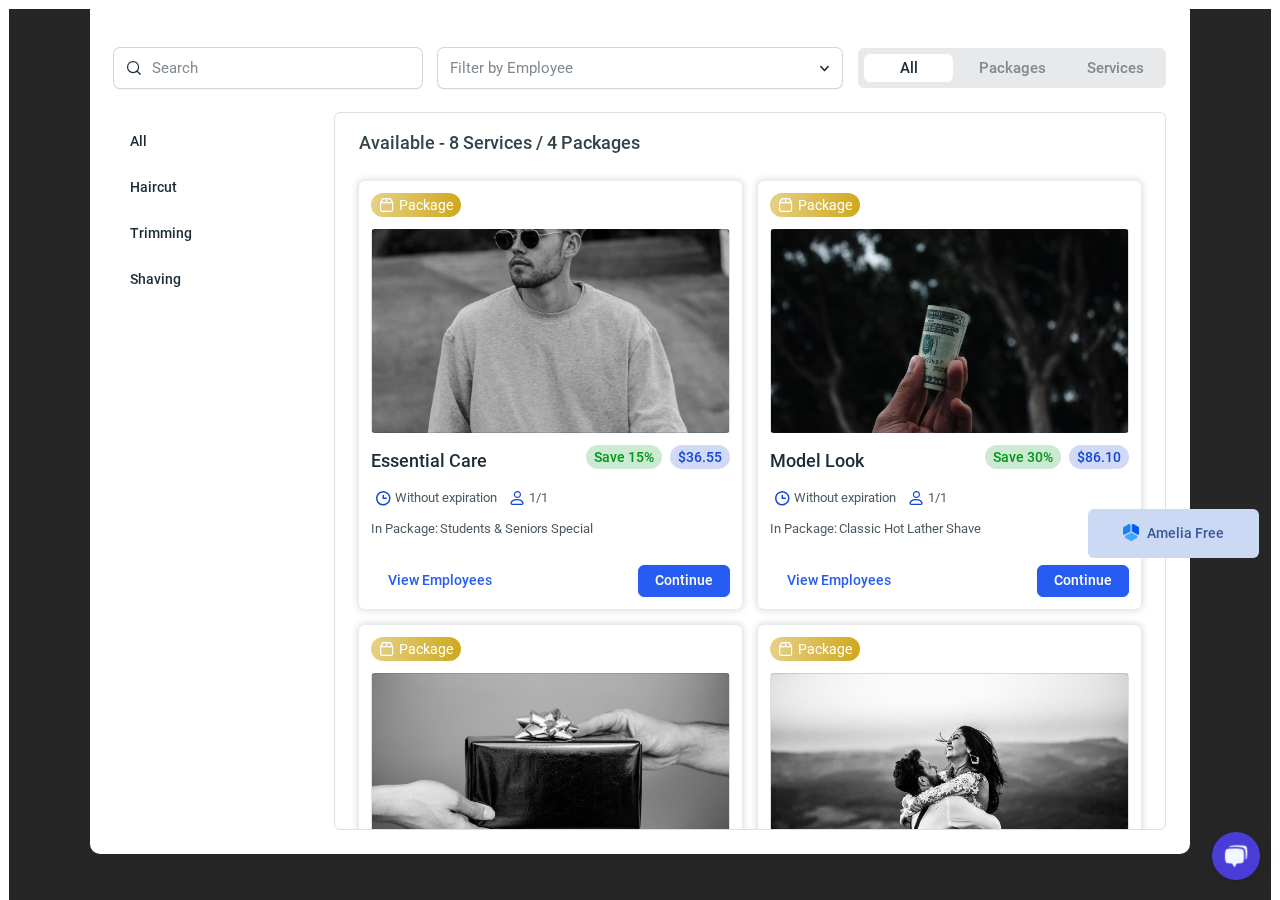
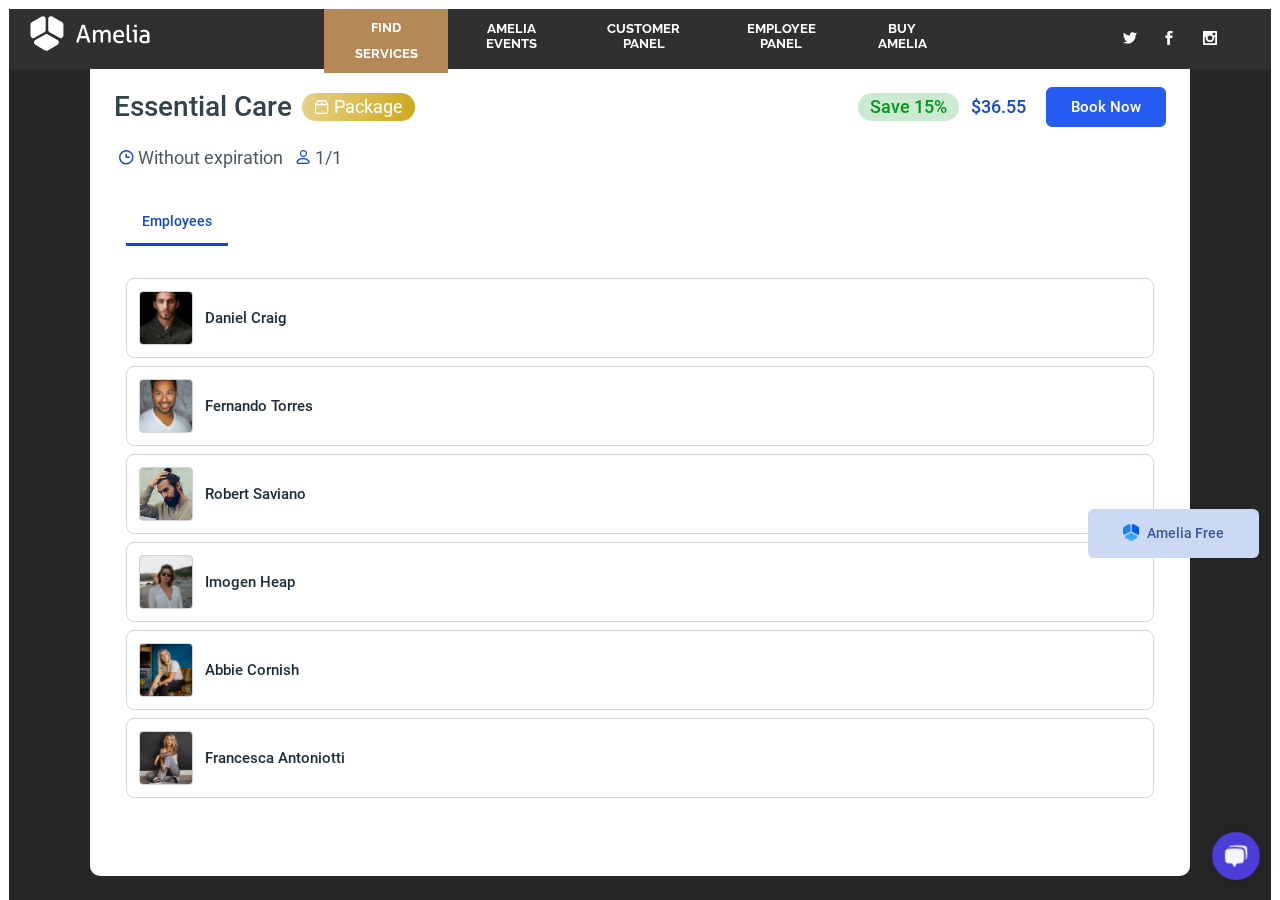
What I looked for first in both forms is whether they get out of the customer’s way. The catalog form does. The package card shows price, duration, employee count, and a savings percentage in a single card without any clutter. Clicking “Continue” on a package opens an employee selection step where each staff member has a photo and name card. From there, the customer picks a date and time, fills in contact details, and confirms.
A few details worth calling out:
- Both form types are embeddable via shortcode, Gutenberg block, Elementor widget, or Divi module. They work on-page and in popup mode.
- Custom fields (checkboxes, text areas, file uploads, address linked to Google Maps) can be added to the information step. Address fields link to Google Maps on Pro and above.
- The forms are mobile-first. The same shortcode renders cleanly on a phone without extra CSS work.
- URL parameters let you pre-fill service, employee, or location, which is how teams build dedicated landing pages for individual services or staff members and how paid ad creatives link directly to a specific booking path.
- Time zones are automatically detected from the customer’s browser, which matters for international or remote service businesses.
(Note on basis: I tested the catalog form and the package booking flow on the barbershop demo. The step-by-step wizard behavior and URL parameter pre-filling are documented in the official knowledge base. Custom field behavior in paid tiers was not tested against a live licensed install.)
Event booking: the feature that sets Amelia apart
Most WordPress booking plugins handle appointments only. Amelia treats event booking as a first-class feature with its own display modes, ticketing system, and management tools.
An event in Amelia is different from an appointment. An appointment is a one-on-one or group service session. An event is a publicly listed happening with a capacity, a ticket price, attendee registration, and potentially multiple ticket types at different prices. Think yoga class series, photography workshop, clinic open day, concert, conference, or seasonal event.
What the event system includes:
- Event list and calendar views: Events display in a list view (searchable, filterable by tag or date) or in a calendar format with clickable dates. I saw both modes on the barbershop events demo. The list view showed six available events with slot counts, prices, and a “Read more” button for each.
- Recurring events: Events can repeat daily, weekly, monthly, or yearly, with options for specific days of the week. A recurring yoga class that runs every Tuesday and Thursday is set up once, not manually recreated.
- Ticket types and variable pricing: One event can have multiple ticket types with different names, prices, and capacities. For example: Early Bird ($15), Standard ($25), VIP ($50). Each ticket type manages its own inventory.
- QR code e-tickets: Each attendee receives a unique QR code ticket via email after booking. This is useful for in-person check-in at classes, workshops, and events.
- Deposit payments for events: Attendees can pay a deposit to hold a spot and pay the remainder later.
- Event waiting list: When an event is full, customers can join a waiting list and get notified if a spot opens (Pro plan and above).
- Online meetings for events: Zoom, Google Meet, and Microsoft Teams links auto-generate for virtual events.
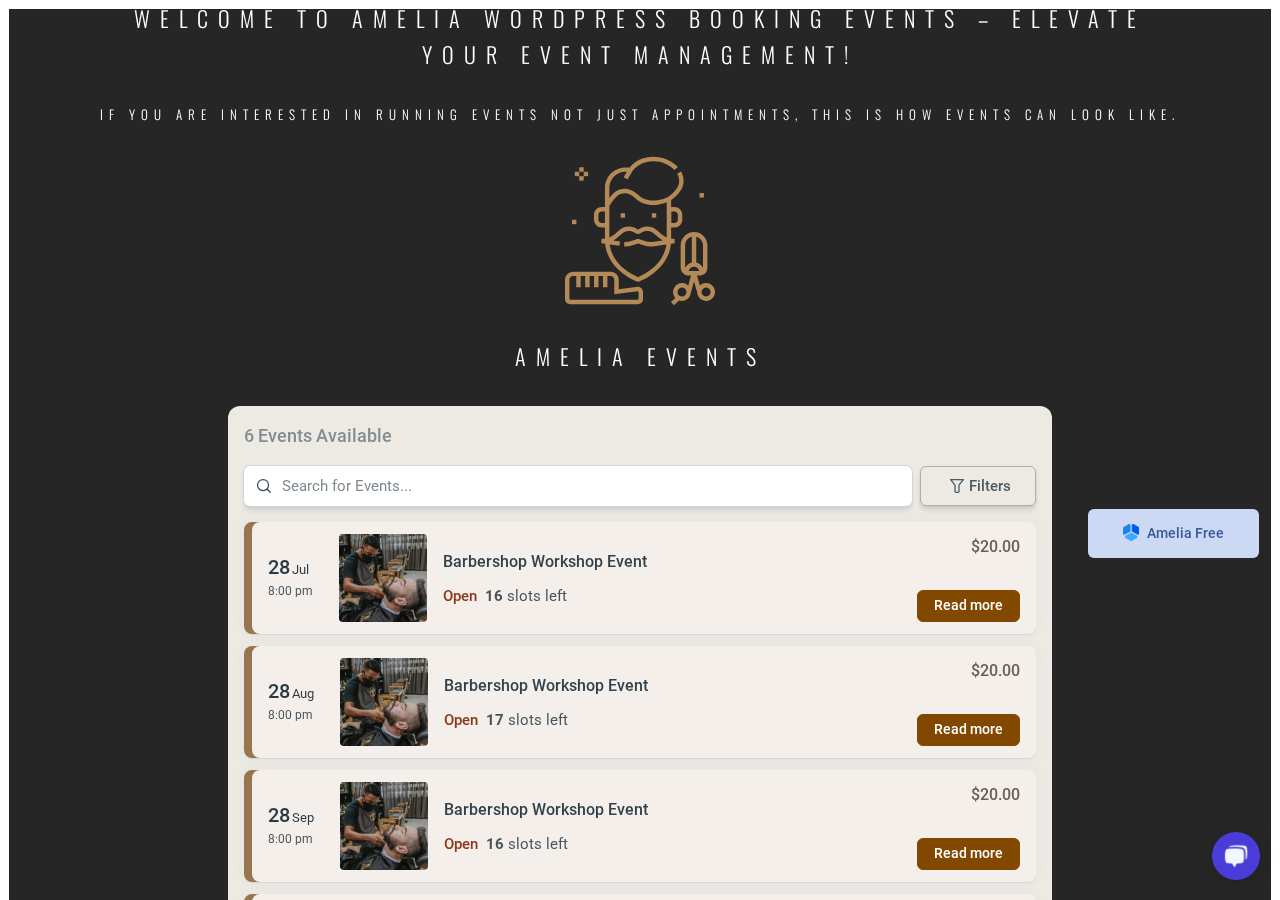
This event layer is genuinely useful for businesses that run both appointments and workshops. A fitness studio can book personal training sessions (appointments) and manage a weekly group class series (events) from the same Amelia install. Without this, teams typically reach for a separate plugin or a SaaS event platform.
(Note on basis: Event list and slot count were confirmed on the live barbershop events demo. Ticket type management, QR code generation, and event waiting list behavior are documented on the features page. I did not purchase a ticket end-to-end or exercise the QR code redemption flow in this test window.)
Setup and the admin experience
Amelia installs the same way as any premium WordPress plugin. You download the ZIP from your Amelia account, upload via Plugins > Add New > Upload Plugin, activate, and enter the license key. The onboarding flow is short: set your company name, working hours, and time zone, then add your first service and employee.
The admin dashboard is clean and functional. At the top, it shows summary cards for today’s appointments, this week’s revenue, and upcoming bookings. Below that, a chart panel shows appointment volume and revenue over a selected date range. The left sidebar groups everything into logical modules: Dashboard, Calendar, Appointments, Events, Finance, Catalog, Customers, Notifications, and Settings.
What I noticed about the admin UI compared to other booking plugins:
- The layout is more polished and modern than most competitors. Navigation is flat and uses descriptive labels rather than icon-only menus.
- The Catalog section (services, packages, service categories, service extras) groups all customer-facing product data in one place rather than scattering it across settings screens.
- The Finance section (coupons, invoices, financial details) is its own module, which keeps billing data separate from scheduling data.
- User roles are built in: admin, manager, employee, and customer. Each role has an adjustable scope. Managers can handle their own bookings and customers without accessing global settings.
The Settings area does have some depth. Payment gateway configuration, notification templates, calendar integrations, and online meeting setup each live in their own Settings sub-screen. A new admin will want to budget about 30 to 45 minutes to work through Settings on first setup, especially if configuring Stripe, Zoom, or Google Calendar sync.
Two rough edges I noticed:
- The first-time setup has no guided wizard. You are dropped into the dashboard and left to explore the Settings menu to configure integrations. A setup checklist or wizard would help new users significantly.
- Some settings screens (especially notification templates) require familiarity with placeholder variables. The documentation covers this, but it is not immediately self-explanatory.
Neither of these is a deal-breaker. They are normal for a full-featured booking plugin.
Admin calendar and appointment management
The admin calendar is the screen I check first when evaluating any booking plugin. Amelia gives you month, week, day, and list views, plus a new “By Employees” view added in version 9.5 (May 2026) that shows each employee’s appointments in side-by-side daily columns.
The “By Employees” view is genuinely useful for multi-staff operations. A salon with four stylists can see all four daily schedules at a glance without switching filters. Each appointment card shows the service name, customer name, and status. Clicking a card opens the appointment detail panel where you can edit status, reassign staff, view customer details, and process a refund if applicable.
The Appointments screen is the table view of the same data, useful for bulk operations and end-of-day reconciliation. From there, you can export, filter by date or status, and jump into customer records.
Creating appointments from the admin side uses the same step sequence as the public booking form, which keeps the admin and customer experiences consistent. Staff members with employee role access manage their own appointments via the employee panel without needing wp-admin access.
One feature I want to call out is the appointment title preview added in the changelog. Appointment cards on the calendar now show a preview of the title directly on the card, so admins do not have to click into each appointment to identify it. Small detail, real improvement for busy calendars.
Services, staff, and locations
Amelia separates the booking primitives cleanly. Services define what is sold: name, duration (or multiple durations with individual pricing), price, category, buffer time, and capacity. Staff members define who delivers the service: working hours, days off, breaks, linked services, linked locations, and photo. Locations define where the service is delivered: address, phone, geolocation, and linked staff.
Notable capacity controls:
- Group appointments: One staff member can host multiple customers in the same slot. Set a capacity limit on the service and Amelia prevents overbooking automatically. A yoga instructor running a class of up to 12 students is one capacity setting.
- Resources management: Shared or single-use resources (rooms, equipment, vehicles) can be linked to services so that Amelia blocks the resource when it is in use. A clinic with two treatment rooms can assign each room as a resource and prevent two appointments from being booked in the same room at the same time. Resources are a Pro and Elite feature.
- Custom service durations: One service can offer 30, 45, 60, or 90-minute options with individual pricing per duration and per employee. The time slot picker adjusts automatically when the customer selects a duration.
- Buffer time: Padding before and after appointments prevents back-to-back scheduling and gives staff time to reset between clients.
- Pricing by number of people: Group booking pricing can scale based on attendee count, which is relevant for private group sessions or shared experience bookings. This is a Pro and above feature, added recently.
The Private Service option lets you hide a service from the public catalog while still allowing it to be booked via direct link. That is useful for pricing tiers you do not want to advertise publicly or for VIP services.
(Note on basis: Service and staff configuration behavior was confirmed against the features page and the barbershop demo. End-to-end resource conflict blocking was not tested against a live multi-staff licensed install.)
Notifications and automation
Amelia sends automated notifications for booking confirmations, reminders, follow-ups, rescheduling, cancellations, and payment events. The notification templates use placeholder variables (customer name, service, date, staff name, location, payment amount, and so on) and support HTML formatting.
Notification delivery channels vary by plan:
- Email: Included on all plans, including Amelia Lite. Email templates are configurable per notification type.
- SMS: Available on paid plans. Amelia uses its own SMS credits system via an in-dashboard purchase, rather than requiring a separate Twilio account. That is a simpler setup than some competitors.
- WhatsApp: Available on Pro and Elite plans. WhatsApp notifications follow the same template system as email.
- No Telegram support: Amelia does not offer Telegram as a notification channel. If Telegram is part of your team’s communication stack, you would need a webhook to pipe notifications out via Make or Zapier.
Custom notification timing is a Standard plan feature and above. The Starter plan sends the default confirmation and reminder but does not let you build custom notification sequences or change the reminder offset.
WebHooks (Pro and Elite) let you send booking event data to a third-party URL on create, update, or cancel events. That is the bridge to Zapier, Make, or a custom internal endpoint for teams that need to integrate Amelia with a CRM, a marketing automation platform, or a custom database. The Bit Integrations add-on (available as a third-party connector) extends this further to 200+ tools. WP Fusion connects Amelia to 50+ CRMs and marketing platforms.
IvyForms integration, added in version 9.6 (June 2026), allows intake forms to be completed before the booking is confirmed, with field mapping between the form responses and the Amelia customer record. This is useful for healthcare, legal, or coaching contexts where pre-booking intake is required.
Payment integrations
Amelia handles payments across several gateways. Square is the standout because it is included in the free version, meaning even a solo operator using Amelia Lite can accept card payments through Square, including Apple Pay and Google Pay via Square’s checkout.
Paid plan gateways:
- PayPal: Available from Standard up.
- Stripe: Available from Standard up. Stripe Connect (on Elite) enables commission-based payment splitting between a platform and individual employees.
- Mollie: Available on higher plans.
- RazorPay: Available on higher plans. A popular gateway for India-based businesses.
- WooCommerce: Full WooCommerce compatibility lets Amelia use WooCommerce’s checkout, tax settings, and payment methods.
- Barion: Available for Hungarian-market businesses.
- Square: Free on all plans including Amelia Lite.
“Pay via Link” lets you send a personalized payment URL in the confirmation email, so a customer can pay after booking without a payment gateway being required at form submission. Refund processing (Stripe, PayPal, Mollie, RazorPay, WooCommerce) is a Pro and above feature.
Deposit payments (require a percentage or fixed upfront payment to confirm a booking) are a Standard plan feature and above. Customers pay the deposit at booking and the remainder at the appointment or via a payment link.
Invoices generate automatically per booking and are available from Starter plan upward. Tax configuration sits in its own Finance module within the Settings.
Calendar and meeting integrations
Calendar sync is a Pro and Elite feature. Amelia connects to:
- Google Calendar: Bidirectional sync. Appointments and events booked in Amelia appear on the employee’s Google Calendar, and existing Google Calendar events block the corresponding time in Amelia. Version 9.4 (April 2026) added support for multiple Google Calendar accounts per employee.
- Outlook Calendar: Bidirectional sync, also with multi-calendar support per employee added in version 9.4.
- Apple Calendar: Employee availability sync with Apple Calendar.
- Microsoft Teams: Online meeting link generation for appointments and events booked via Amelia.
- Zoom: Native Zoom meeting creation. Booking an appointment with Zoom integration auto-creates a meeting and includes the join link in the confirmation notification.
- Google Meet: Same auto-creation behavior as Zoom.
- Lessonspace: Online classroom creation per appointment, designed for tutors and education providers.
The range of calendar and meeting integrations is one of Amelia’s strongest selling points in the Pro and Elite tiers. Most competitors offer Google Calendar and Zoom. Amelia adds Apple Calendar, Microsoft Teams, Outlook multi-calendar, and Lessonspace, which matters for teams already embedded in Microsoft or Apple ecosystems.
(Note on basis: Calendar sync behavior was confirmed from the features page and version 9.4 changelog. I did not connect a live Google Calendar or Outlook account in this review window.)
Customer panel and employee panel
The customer panel gives registered customers a self-service interface to view upcoming and past appointments, reschedule, cancel, and manage their profile. It embeds via shortcode on any page. The redesigned customer panel (noted as a current feature on the features page) includes event management as well as appointment management.
The employee panel gives staff members access to their own appointment list, schedule, days off, and customer records without needing a wp-admin login. Employees can create past events from the employee panel (added in version 9.4), which is useful when a walk-in booking needs to be logged after the fact.
Four user roles structure access across the admin:
- Administrator: Full access to all settings, staff, services, events, financials, and reporting.
- Manager: Manages bookings and customers within scope, without global settings access.
- Employee: Manages their own appointments and schedule via the employee panel.
- Customer: Uses the customer panel to manage their own bookings.
This role structure is useful for businesses where front-desk staff should manage daily bookings but not be able to change pricing or integrations.
(Note on basis: The customer panel and employee panel were reviewed from their respective demo pages and the features documentation. End-to-end rescheduling and cancellation flows were not exercised against a live licensed install.)
Dashboard and reporting
The Amelia dashboard shows business-level KPIs: total appointments, revenue, number of approved bookings, daily occupancy percentage, and a chart view filtered by date range. The Finance section (financial details overview) gives a per-transaction breakdown with gateway, status, and amount.
The reporting layer is intentionally local: all data lives in the WordPress database. For businesses subject to GDPR, Amelia stores no customer data on external servers outside the customer’s own hosting environment. That is a meaningful privacy advantage over SaaS booking tools that store data on the vendor’s infrastructure.
What the reporting does not include: a deep analytics or cohort analysis layer comparable to a BI tool. It answers the operational questions well (how many bookings this week, how much revenue, which service is most booked) but is not designed for multi-dimensional data exploration.
The free tier: what Amelia Lite actually covers
Amelia Lite on WordPress.org is a meaningful free product. It includes:
- One employee (single-person operations only).
- Basic step-by-step and catalog booking forms.
- Square payment processing with Apple Pay and Google Pay via Square.
- Basic email notifications.
- Calendar and list views in the admin.
- Basic event booking (one event type, limited ticket options).
- Elementor, Divi, and Gutenberg integration.
What it does not include: multiple employees, custom notification timing, recurring appointments, deposit payments, Stripe/PayPal/Mollie/RazorPay, Google Calendar sync, Zoom/Google Meet/Teams, WhatsApp, REST API, event waiting lists, packages, resources, or webhook delivery.
For a solo practitioner who charges via Square and only needs one calendar, Amelia Lite is a legitimate production tool. For any business with more than one service provider, the upgrade to Standard or above is immediate.
Pricing and license value
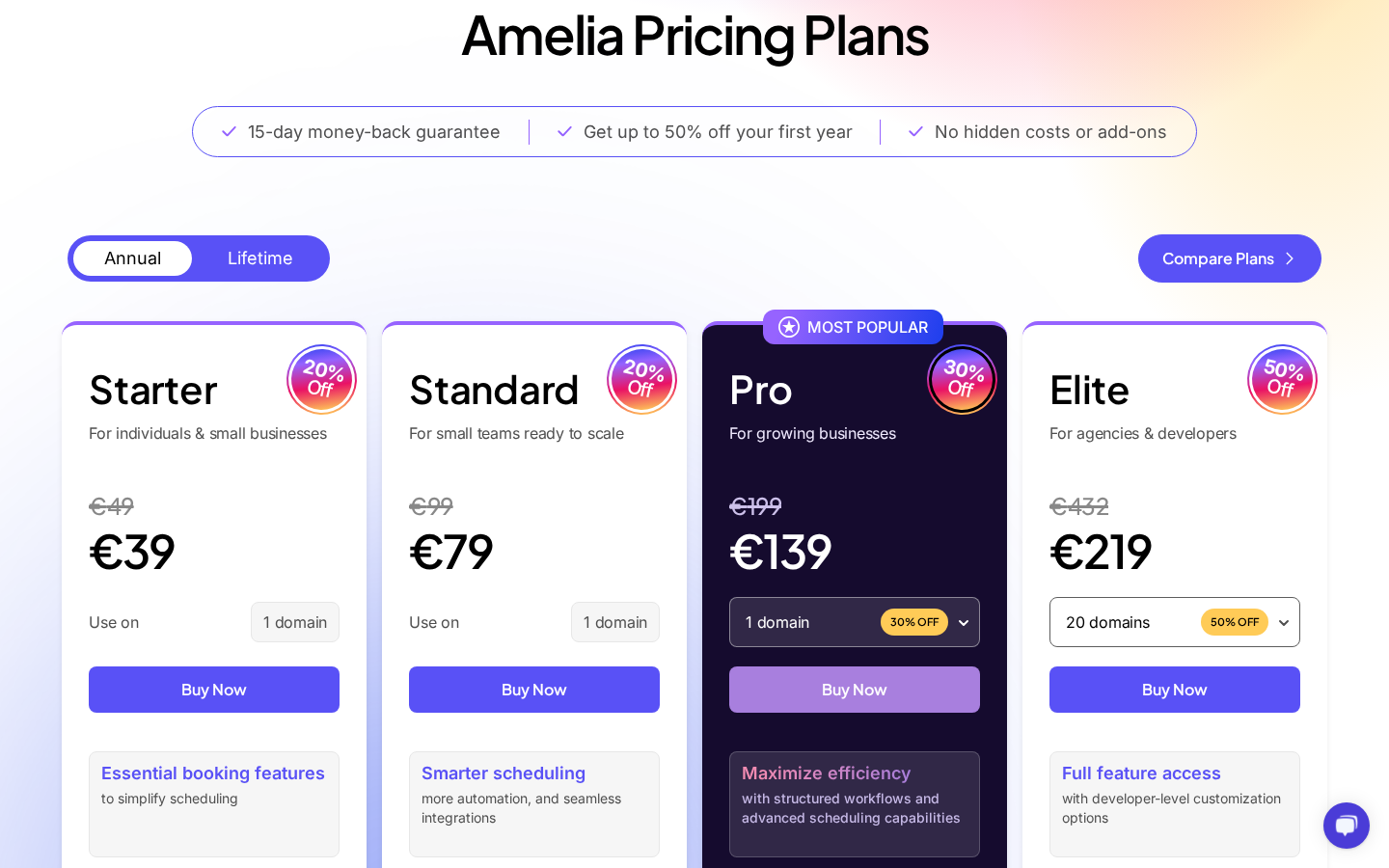
Amelia is priced in both EUR and USD at comparable rates. Based on the pricing page as of June 2026 (promotional pricing active):
Annual plans
- Starter: $49/year, 1 domain. Core booking features: automated notifications, group appointments, coupons, service extras, Square payments, taxes, invoices, unlimited locations, multilingual support. No recurring appointments, no calendar sync, no packages.
- Standard: $89/year (regular $99), 1 domain. Adds custom notifications and reminders, recurring appointments and events, deposit payments.
- Pro: $149/year (regular $199), 1 domain. Adds packages, resources, cart, REST API, event waiting list, WhatsApp integration, refund payments, calendar sync (Google, Outlook, Apple), online meetings (Zoom, Google Meet, Microsoft Teams), custom service duration, event tickets, and webhooks. Most Popular.
- Elite: $259/year (regular $432), 20 domains. All Pro features plus Stripe Connect, advanced developer tools, REST API access, and BuddyBoss integration.
Lifetime plans (one-time purchase, no annual renewal)
- Standard Lifetime: $299
- Pro Lifetime: $449
- Elite Lifetime: $799
Note: There is no Starter Lifetime option. Money-back guarantee: 15 days on all plans.
How to read the pricing
The jump from Standard ($89) to Pro ($149) is the most important upgrade decision. Pro unlocks everything that powers a real service business: packages, calendar sync, online meetings, WhatsApp notifications, refunds, and REST API. If you need any one of those features, you need Pro.
The jump from Pro ($149) to Elite ($259) is primarily about domain count: Pro caps at one domain, Elite gives 20. Agencies or business owners with more than one WordPress site need Elite. There is no intermediate three-to-five domain option, which is a noticeable gap compared to some competitors.
The main watch-out on Amelia’s pricing is what is not in Starter and Standard. A Standard license gives you one domain, no packages, no calendar sync, no online meetings, and no WhatsApp. For most active service businesses, Standard alone is not enough; Pro is the practical entry point for a professional setup.
The Lifetime plans are strong for long-term use. Pro Lifetime at $449 breaks even against the annual renewal at roughly three years. If you are confident you will run Amelia on the same site for three or more years, Lifetime is the better math.
Pros and cons
Pros
- Native appointment and event booking in one plugin: no need for a separate event management tool.
- Free tier (Amelia Lite) includes Square payment processing, making it a genuine option for solo practitioners at no cost.
- 90,000+ active installs and 4.6-star rating on WordPress.org across 773 reviews, with 661 five-star ratings.
- Modern, fast, mobile-first booking UI across both step-by-step wizard and catalog form styles.
- Strong calendar and meeting integrations: Google Calendar, Apple Calendar, Outlook (all with multi-calendar support), Zoom, Google Meet, Microsoft Teams, Lessonspace.
- WhatsApp notifications included in Pro and above.
- GDPR-friendly: customer data stays on your own server, not on Amelia’s infrastructure.
- Event management with QR code e-tickets, variable ticket pricing, and event waiting lists.
- IvyForms integration for pre-booking intake forms (added June 2026).
- AI Assistant integrations via WordPress Abilities API (added May 2026).
- Lifetime purchase option available on Standard, Pro, and Elite.
- 15-day money-back guarantee.
Cons
- Pro plan caps at one domain, same as Standard. Agencies or multi-site businesses must buy Elite ($259+) to get 20 domains; there is no two-to-five domain option.
- No Telegram notification channel. Email, SMS, and WhatsApp only.
- No built-in loyalty points system. MyCred integration requires a third-party plugin.
- No white-labeling feature for agencies who want to rebrand the admin for clients.
- Starter plan has no Lifetime purchase option.
- First-time setup has no guided wizard; new users must navigate Settings manually to configure integrations.
- Custom notification timing requires Standard plan or above; Starter only sends default confirmation and reminder.
Alternatives to Amelia
Covering alternatives honestly is part of a useful review. Here are the plugins I see compared to Amelia most often and where the comparison lands.
- Booknetic: The closest direct competitor. Similar pricing tier model, similar WordPress-native positioning. Booknetic adds white labeling, a Telegram notification channel, and a planned mobile app (coming soon). Amelia counters with native event management, a free tier, Apple Calendar sync, Microsoft Teams, and a larger active install count. Pick Booknetic if white labeling or a deeper add-on ecosystem matters more; pick Amelia if you need event booking or want a free starting tier.
- Bookly Pro: Long-standing booking plugin with a heavy add-on model. Its base feature set is narrower than Amelia’s, and building up to feature parity requires stacking paid add-ons. A reasonable choice if you are already on existing Bookly installs.
- LatePoint: Simpler, flatter pricing with a single-tier license. Less complex than Amelia for single-practitioner use, but lighter on multi-staff routing, events, and integrations. A good fit for solo practitioners who want simplicity.
- FluentBooking: Newer entry from the Fluent family. Cleaner default UI, faster feature roadmap, but still building parity on the deeper booking and event features. A solid option for teams that prefer the Fluent product ecosystem.
- SaaS schedulers (Calendly, Acuity, SimplyBook.me): Run outside WordPress, charge per user per month, and are stronger on cross-team and cross-platform scheduling. Pick them if your booking flow does not live on WordPress or if you manage scheduling across non-WordPress properties.
For most WordPress-first service businesses, the real comparison is Amelia vs Booknetic vs LatePoint. Amelia wins on event management and the free tier. Booknetic wins on add-on depth and white labeling. LatePoint wins on simplicity for small single-practitioner setups.
Final verdict
Amelia does the job it is built for, and it does more than most in its category by handling both appointments and events inside a single install without treating either as a second-class feature.
My practical recommendation: if you are a solo operator, start with Amelia Lite (free), connect Square, and upgrade when you outgrow one employee. If you run a multi-staff service business, buy Pro, which gives you the calendar sync, packages, online meetings, and WhatsApp notifications that make the system worth running. If you are an agency building booking systems for multiple clients, evaluate whether 20 domains at the Elite tier is enough; if you manage more than 20 client sites, you will need to buy multiple licenses or evaluate a plugin with unlimited-domain licensing.
The Lifetime plans are worth considering if you plan to use Amelia on the same site for three or more years. Pro Lifetime at $449 makes the renewal math disappear and is the tier I would buy for a single-location service business with a clear long-term WordPress commitment.
Amelia is one of the more complete WordPress appointment booking options in 2026, especially for businesses that also run events. The 90,000+ install count and 4.6-star rating over nearly eight years of operation are a reasonable signal that the plugin delivers on its promises in real-world conditions.
You can find more hands-on plugin reviews in the Reviews section.