

Twenty thousand active installs. That number may look modest next to MonsterInsights’ two million or ExactMetrics’ three hundred thousand, but it comes with something those plugins do not: a 4.7 out of 5 star rating from 487 reviewers, with 435 five-star reviews against only 25 one-star reviews. In the analytics cluster on WordPress.org, Analytify has the cleanest satisfaction record of the three.
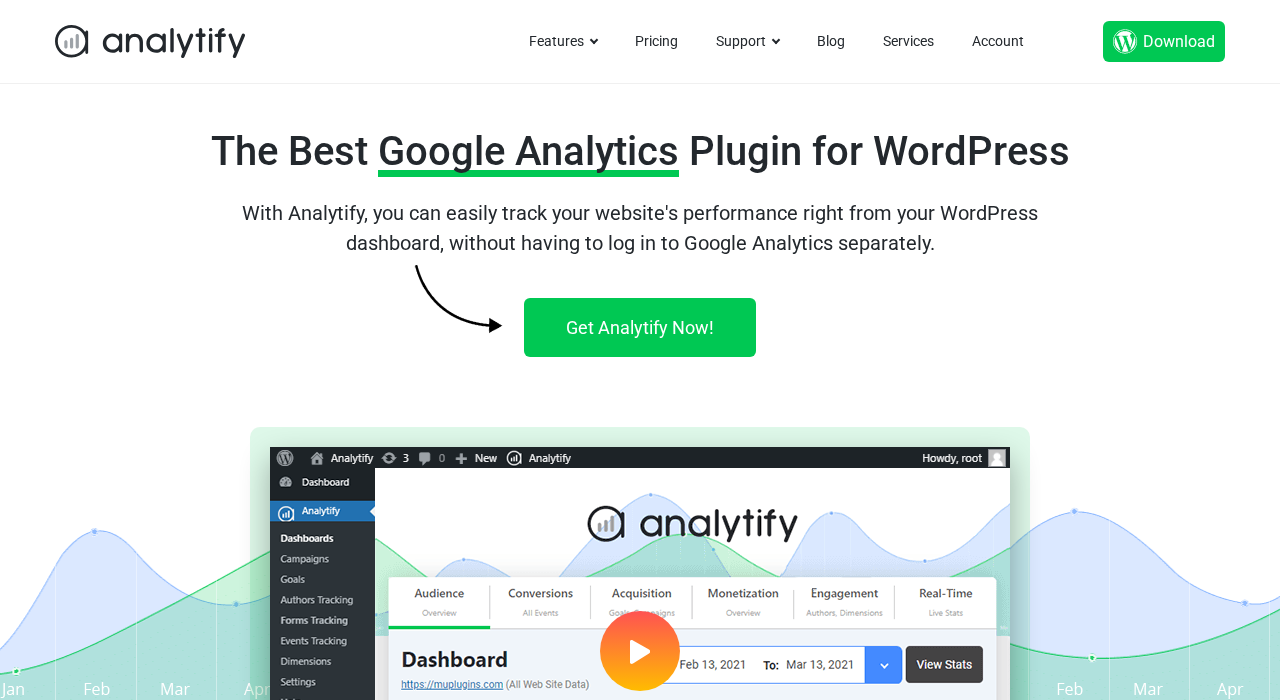
Analytify is a Google Analytics 4 dashboard plugin for WordPress, built by Adnan Raza Ansari and positioned as the straightforward, budget-friendly option in a category that MonsterInsights and ExactMetrics have historically dominated. The pitch is simple: surface your GA4 data inside WordPress without the complexity, and include eCommerce tracking from the lowest paid tier rather than gating it behind a more expensive plan. This review covers version 9.1.2, updated August 17, 2026, with testing up to WordPress 7.0.4. I worked through the official Analytify website, pricing page, feature and add-on pages, the WordPress.org listing and changelog, and user reviews. Where a paid feature was not directly accessible, the relevant section says so clearly.

At a glance
Audited on: analytify.io features, pricing, and add-on pages; the WordPress.org plugin listing (version 9.1.2, last updated August 17, 2026, tested up to WordPress 7.0.4); plugin screenshots; and user reviews. Pricing checked against analytify.io/pricing/ on August 20, 2026.
Free tier: GA4 connection, backend dashboard (sessions, pageviews, countries, referrers, devices), per-post and per-page analytics on the edit screen, basic settings.
Paid tiers: StartUp at $99/year for 2 sites (WooCommerce eCommerce included); Agency at $199/year for unlimited sites; Developer at $499 lifetime for unlimited sites. All paid plans include all premium add-ons. 14-day money-back guarantee.
Bottom line: the most affordable entry point for GA4 reporting with WooCommerce eCommerce tracking in WordPress, with the best user satisfaction rating in the analytics plugin category. Lacks AI analytics features and has a narrower integration list than MonsterInsights. The right fit for budget-conscious site owners, small agencies, and anyone who finds the bigger plugins unnecessarily complex.
Quick verdict
Analytify delivers the core GA4 dashboard experience for WordPress without the premium pricing of MonsterInsights or ExactMetrics. The free version gives you a usable overview dashboard and a genuinely useful feature that the bigger plugins skip at this price point: per-post analytics displayed right on the WordPress post edit screen, so you can check how an article is performing without navigating away.
The paid plans make a compelling case on price alone. The StartUp plan at $99/year for two sites includes WooCommerce eCommerce tracking out of the box. MonsterInsights requires its Pro plan at $199.50/year before eCommerce tracking appears. That pricing gap is the most direct reason to consider Analytify over its better-known competitors.
What Analytify does not offer is the deep integration breadth or AI analytics features of MonsterInsights. There is no Charlie Chat equivalent, no AI headline analyzer, no Google Ads conversion tracking layer. Analytify competes on simplicity and affordability, not feature maximalism. For many WordPress site owners, that trade-off is exactly right.
Quick verdict
Best for: WordPress bloggers, small business site owners, WooCommerce store operators, and small agencies who want clear GA4 reports in the WordPress admin at a lower annual cost than MonsterInsights or ExactMetrics.
Best plan for single sites or small businesses: StartUp at $99/year covers two sites, includes WooCommerce eCommerce tracking, and includes all add-ons. This is better value than any competing plugin at this price.
Best plan for agencies: Agency at $199/year for unlimited sites. No site-count cap. This undercuts MonsterInsights Agency ($399.50/year for 25 sites) and ExactMetrics Agency ($399.50/year for 25 sites) by a wide margin.
Standout: WooCommerce eCommerce tracking included at the lowest paid tier; per-post analytics on the edit screen; LMS tracking (LearnDash and LifterLMS) with no equivalent in MonsterInsights; pixel tracking for 7 ad platforms; lifetime license option at $499.
Watch out for: no AI analytics features; smaller integration list than MonsterInsights; 20,000 active installs signals a smaller user base and support community; the free version is a strong start but the overview dashboard is limited without a paid plan.
What Analytify is
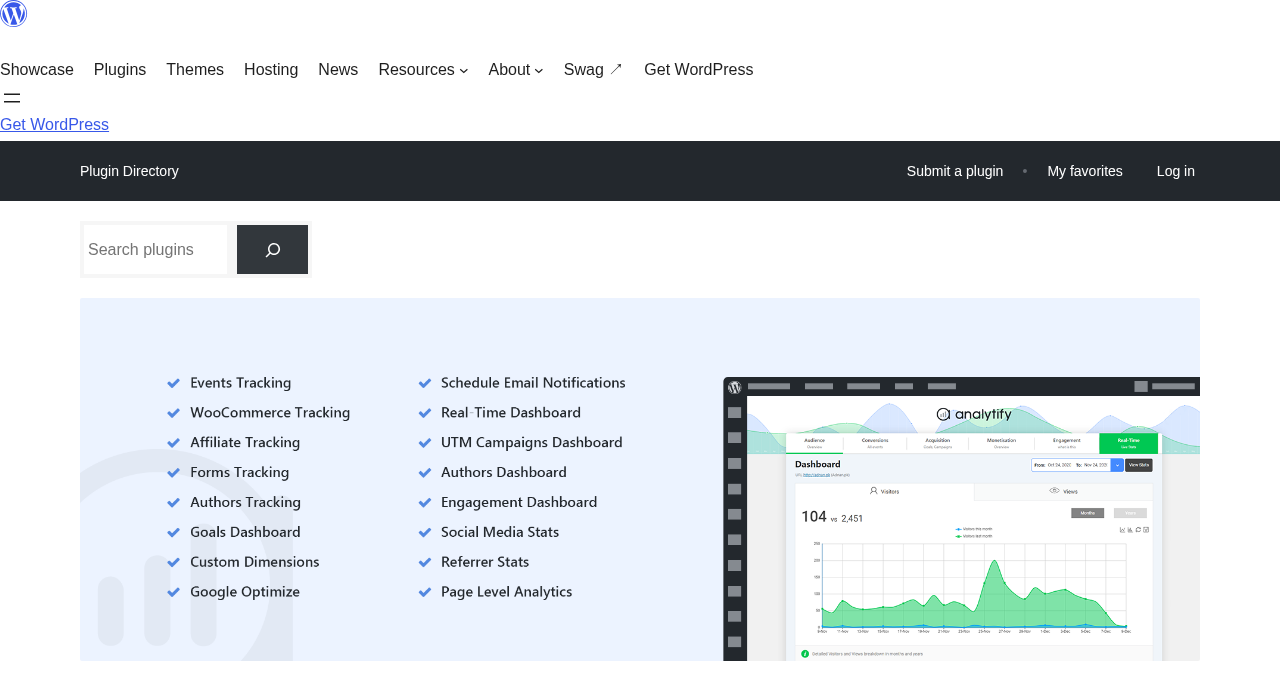
Analytify is a WordPress plugin that connects your site to Google Analytics 4 and surfaces the resulting data in a dashboard inside the WordPress admin. It was created by Adnan Raza Ansari, released on WordPress.org under the slug wp-analytify, and runs on a free-plus-paid model where the free version provides the core dashboard and the paid add-ons extend it with eCommerce, form tracking, authors reporting, and more.
The plugin’s defining position in the analytics plugin market is that it prioritizes breadth at a lower price rather than deep integrations at a premium. Where MonsterInsights and ExactMetrics sit at $99.50/year for a single-site plan that excludes eCommerce, Analytify’s StartUp plan covers two sites at $99/year and bundles WooCommerce tracking into the package. The Agency plan goes further: unlimited sites for $199/year, compared to $399.50/year for 25 sites at either competitor’s Agency tier.
Analytify does not store analytics data independently. All data lives in your Google Analytics 4 property. The plugin reads that data through the GA4 API and presents it inside WordPress. Uninstalling the plugin does not affect the underlying GA4 data. The free version on WordPress.org shows 20,000+ active installs and a 4.7-star rating across 487 reviews as of August 2026, a significantly smaller install count than MonsterInsights (2 million) or ExactMetrics (300,000+), but an unusually high satisfaction score for the category.
Who Analytify is best for
Strong fit:
- WordPress bloggers and content publishers who want to check sessions, pageviews, top pages, and referral sources directly in the WordPress admin without navigating Google Analytics 4’s complex interface.
- WooCommerce store operators who need eCommerce tracking (revenue, transactions, average order value, top products) and want it included in the lowest paid tier rather than needing to upgrade to a more expensive plan.
- Small agencies managing multiple client sites and looking to keep costs down. The Analytify Agency plan at $199/year covers unlimited sites with no per-site cap, a structure not offered by MonsterInsights or ExactMetrics at any price.
- Course creators and eLearning site operators. Analytify supports LearnDash and LifterLMS tracking natively, enabling course enrollment, lesson progress, and student activity tracking. MonsterInsights has no equivalent LMS-specific tracking.
- Site owners who want a lifetime license option. The Developer plan at $499 one-time payment covers unlimited sites permanently, a model that MonsterInsights and ExactMetrics do not offer.
- WordPress site owners who prioritize simplicity. Analytify’s interface is lighter and more focused than MonsterInsights, which adds value for non-technical users who want quick answers without a large feature set to navigate.
- GDPR-conscious sites. Analytify supports CookieYes, Cookie Notice, and similar consent management plugins, and is compatible with WPML for multilingual sites.
Weak fit:
- Sites that need AI-powered analytics queries or AI-assisted content writing tools. Analytify has no equivalent to MonsterInsights’ Charlie Chat or AI Headline Analyzer. If AI analytics is a priority, MonsterInsights is the right tool.
- Large enterprise WordPress operations needing deep Google Ads conversion tracking across many platforms. MonsterInsights Pro covers more advertising platform integrations with deeper campaign attribution.
- Developers building custom GA4 event tracking directly with gtag.js or Google Tag Manager. Adding Analytify alongside a custom implementation creates the same abstraction-layer conflicts as any auto-tracking plugin.
- Sites that only need a tracking code inserted with no in-WordPress reporting. Site Kit by Google or a simple code-inserter plugin is zero-cost and zero-overhead for this use case.
- Privacy-first operations that do not want any Google Analytics dependency. Self-hosted analytics alternatives (Matomo, Burst Statistics, Plausible) are the correct path.
Setting up Analytify
Analytify installs from the WordPress admin under Plugins > Add New. Searching “Analytify” returns the plugin as the top result. Free installation is one click.
After activation, Analytify prompts you to connect a Google Analytics account. You navigate to Analytify in the left menu, click the setup button, and authenticate with Google. The plugin uses OAuth to connect to your Google Analytics 4 property; no Google Tag Manager is required and no manual measurement ID entry is needed. Analytify’s documentation describes the setup as taking about 60 seconds. In practice, it is a short OAuth flow: select your Google account, authorize Analytify, select the GA4 property to connect.
After authentication, Analytify begins pulling data from your GA4 property and inserts the GA4 tracking script (gtag.js) automatically on the frontend; no separate code embedding step is needed. The settings panel covers profile selection, user role access controls, tracking exclusions for logged-in users, and the add-on management area where premium add-ons can be toggled. The settings are organized and readable without the layered complexity of a larger plugin.
Dashboard and main reports
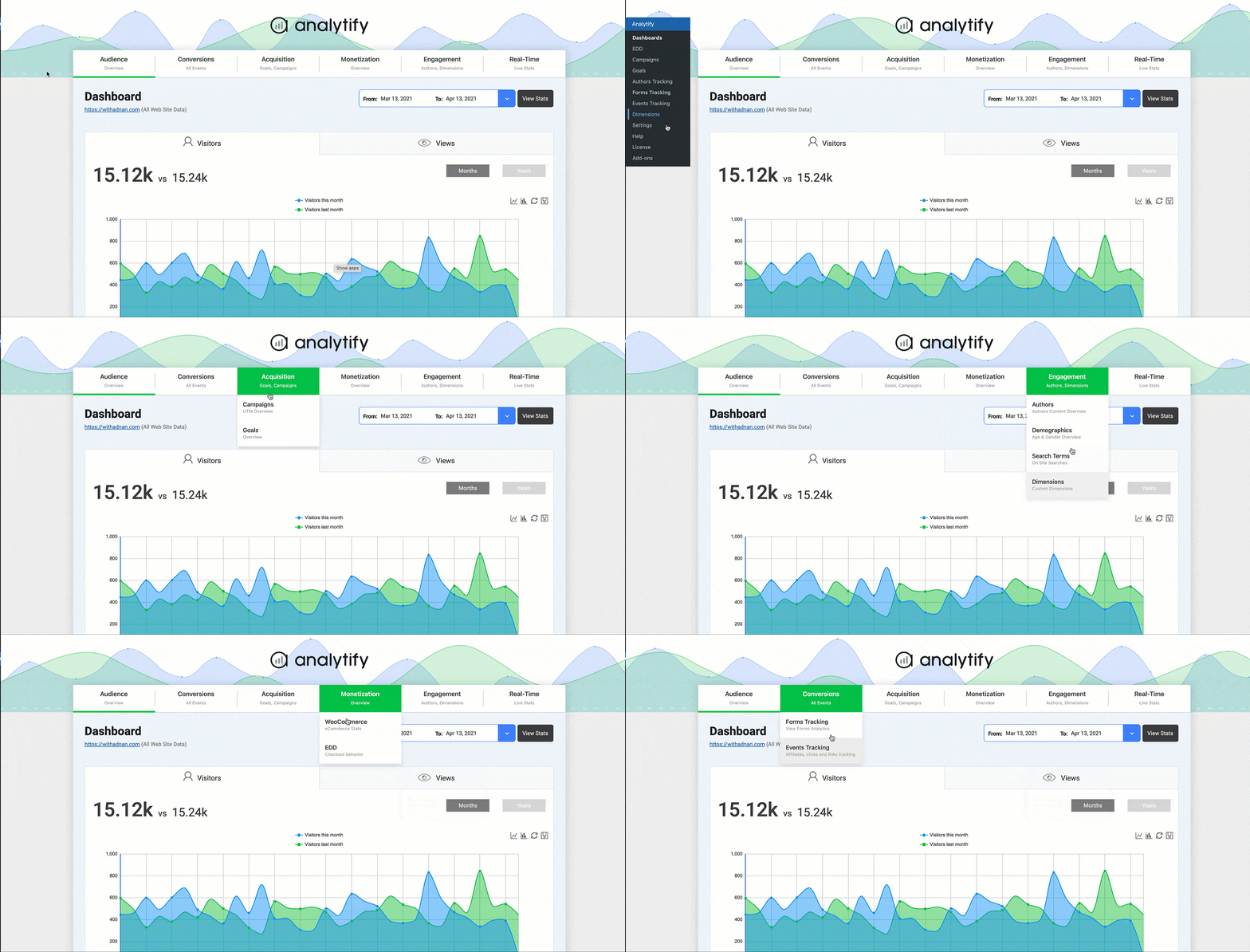
The Analytify dashboard, accessible from the left WordPress admin menu, shows:
- Sessions and pageviews over the selected date range.
- Bounce rate and average session duration.
- New versus returning visitor comparison.
- Top countries by session count.
- Top referral sources and browser breakdown.
- Device split (desktop, mobile, tablet).
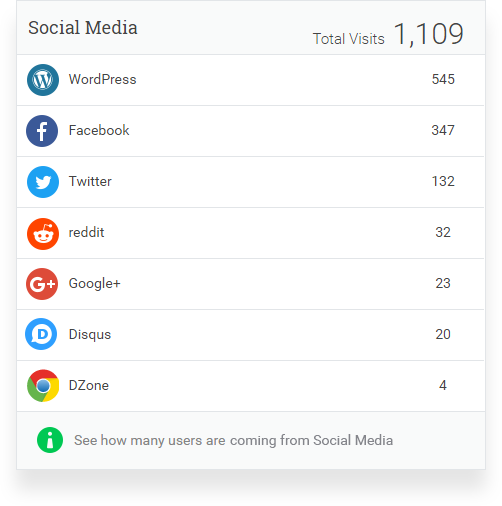
- Social media traffic sources.
- Top pages by session count.
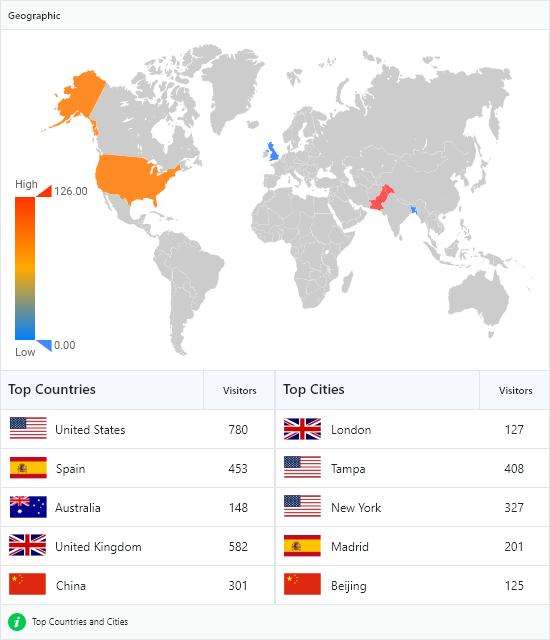
The date range selector offers preset options (7, 14, 30 days) and a custom date range picker. For paid plans, the full date history from your GA4 property is accessible. The real-time stats screen shows currently active visitors, the pages they are on, and their geographic origin.
Per-post and per-page analytics
One of Analytify’s most practical free features is per-post analytics displayed directly on the WordPress post edit screen. When you open any post or page to edit it, Analytify adds an analytics panel at the bottom showing that specific URL’s sessions, pageviews, bounce rate, and average time on page.
This is a meaningful workflow improvement for content teams. Instead of navigating from the post editor to the Analytify dashboard, searching for the page, and reading the data, you see it inline where you are already working. For content audits, updating old posts, or deciding whether a piece of content needs a refresh, the per-post panel surfaces the relevant data with zero navigation friction. MonsterInsights includes a similar feature through its admin bar integration, but Analytify’s implementation embeds the data directly in the edit screen panel, which is more visible for users doing bulk content work.
eCommerce tracking
eCommerce tracking is where the Analytify pricing story becomes most compelling.
Standard WooCommerce does not automatically send GA4 eCommerce events. Correct implementation of purchase, add-to-cart, begin-checkout, and refund events requires custom code or a Google Tag Manager setup. Analytify’s WooCommerce add-on handles this automatically and, unlike MonsterInsights or ExactMetrics, includes this add-on in the StartUp plan at $99/year for two sites.
The WooCommerce eCommerce dashboard shows:
- Total revenue over the selected period.
- Number of transactions.
- Average order value.
- Top products by revenue and units sold.
- Shopping behavior funnel: sessions that added to cart, reached checkout, completed purchase.
- Product list performance.
The Easy Digital Downloads add-on covers the same use case for digital product stores, including shopping funnel tracking, coupon performance, and refund monitoring.
Form conversion tracking
Analytify’s form tracking add-on monitors form submissions across the major WordPress form plugins: Contact Form 7, Gravity Forms, WPForms, Ninja Forms, and others. When a visitor submits a form, the event is recorded in GA4 and surfaces in the Analytify forms tracking dashboard.
The forms dashboard shows impressions (how many times a form was displayed) and conversions (submissions), enabling conversion rate calculation per form. For service businesses where form leads are the primary site goal, this replaces the gap in standard GA4 reporting where form submissions appear only after manual custom event configuration. The form tracking add-on is included in all paid plans.
Goals and custom event tracking
The Goals (Key Events) add-on provides a conversion tracking dashboard aligned with GA4 key events. You define goals in GA4 (or through the Analytify interface) and the dashboard reports on goal completions, conversion rates, and trend data over time. This is the standard GA4 goals equivalent that marketers use to track purchases, signups, downloads, or any other defined conversion action.
Custom event tracking allows advanced users to define and monitor specific user interactions without writing JavaScript. Events can be set up through the Analytify interface for file downloads, video plays, button clicks, scroll depth, and other standard interaction types.
Authors and LMS tracking
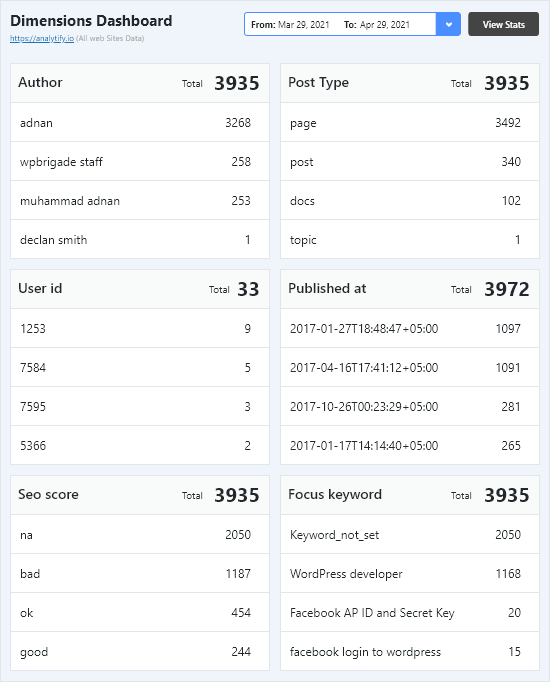
The Authors Tracking add-on attributes GA4 session and pageview data to individual WordPress authors. For multi-author publications, this means tracking which writers drive the most traffic, which author’s content has the lowest bounce rate, and which categories perform best over time.
Analytify includes dedicated tracking for two major WordPress LMS platforms: LearnDash and LifterLMS. These add-ons track course enrollments, lesson completions, quiz performance, and student activity, surfacing eLearning-specific metrics in the dashboard. MonsterInsights and ExactMetrics do not offer dedicated LMS tracking at any tier. For course creators and online education site owners, this is a meaningful differentiator that justifies choosing Analytify over the larger competitors.
Link, file, and event tracking
Analytify tracks several user interaction types automatically through toggle settings:
- Affiliate and external link clicks: records outbound clicks matching path prefixes or patterns you configure.
- File download tracking: records downloads for specified file extensions (PDF, ZIP, MP3, DOCX, and others).
- Scroll depth tracking: records how far down a page visitors scroll.
- Video tracking: monitors play, pause, and completion events for embedded video.
- 404 error and JavaScript error tracking: surfaces these errors in the dashboard rather than requiring a separate error monitoring tool.
All of these behaviors are enabled through the settings panel without writing JavaScript or configuring GA4 events manually.
GDPR and privacy compliance
Analytify supports the standard WordPress consent management plugins for GDPR compliance. When CookieYes or Cookie Notice is active, Analytify withholds analytics tracking until visitor cookie consent is obtained and stops tracking if consent is withdrawn. User role exclusions can be configured to prevent logged-in administrator and editor traffic from appearing in analytics data.
As with all GA4 plugins, whether GA4 data transfers to Google’s US-based servers fully satisfy EU data protection requirements is a legal and regulatory question that no WordPress plugin resolves at the implementation level. Analytify covers the technical compliance layer that consent-based tracking requires.
Pixel tracking
Analytify includes a Pixel Tracking add-on covering seven advertising platforms: Meta (Facebook), TikTok, Pinterest, LinkedIn, X (formerly Twitter), Snapchat, and Microsoft Ads. The add-on manages all seven pixels from a single WordPress interface, simplifying setup for site owners running paid campaigns across multiple platforms. The pixel tracking add-on is included in all paid Analytify plans.
Automated email reports
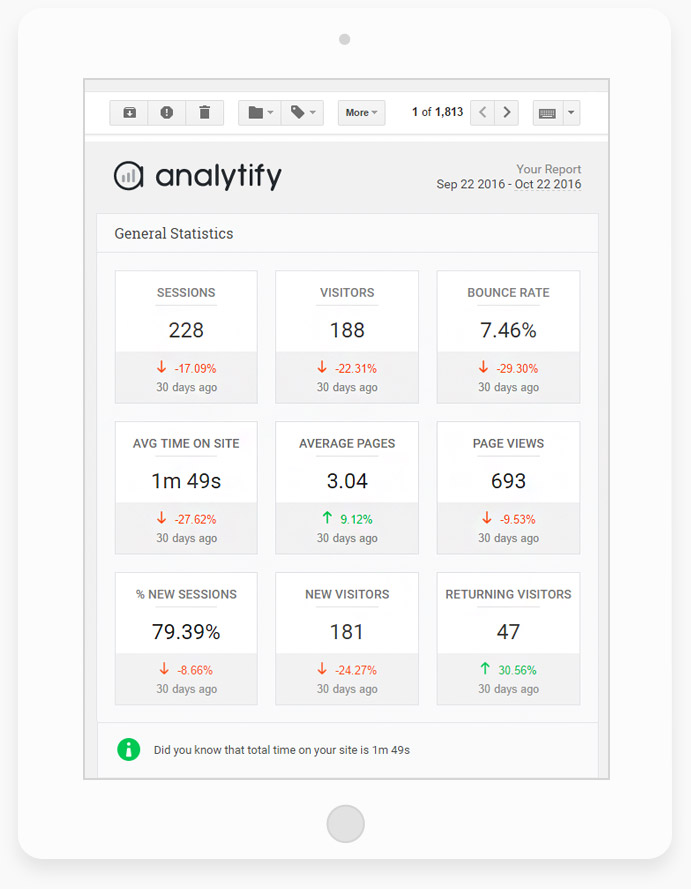
The Email Notifications add-on delivers automated analytics summaries to your inbox on a scheduled basis. Reports can be configured for weekly or monthly delivery and can include overview metrics, top pages, eCommerce summaries, and other selected data sets. Included in all paid plans, the email report feature covers a common request from site owners who want a regular traffic digest without logging into WordPress.
Pricing and license value
Analytify is sold through analytify.io with three paid tiers. All prices are promotional (50% off regular rates). Pricing verified August 20, 2026:
StartUp. 2 sites. $99/year promotional ($199/year regular). Includes all premium add-ons: WooCommerce and Easy Digital Downloads eCommerce tracking, form tracking, authors tracking, campaign tracking, goals, events, pixel tracking, LMS tracking (LearnDash and LifterLMS), Paid Memberships Pro tracking, automated email reports, custom dimensions. General support. 14-day money-back guarantee.
Agency. Unlimited sites. $199/year promotional ($399/year regular). All StartUp features plus VIP support and unlimited site coverage. 14-day money-back guarantee.
Developer. Unlimited sites. $499 lifetime promotional ($999 regular). All Agency features with lifetime license and no annual renewal. Automatic updates included. VIP support. 14-day money-back guarantee.
The pricing comparison with competitors is direct. At the entry level: Analytify StartUp at $99/year for 2 sites includes WooCommerce eCommerce tracking. MonsterInsights Plus at $99.50/year for 1 site does not; eCommerce requires their Pro plan at $199.50/year. ExactMetrics Plus at $99.50/year for 1 site similarly excludes eCommerce. For a WooCommerce store on a single domain, Analytify StartUp delivers equivalent eCommerce tracking at a lower price than any competing entry-level plan.
At the agency level: Analytify Agency at $199/year covers unlimited sites. MonsterInsights Agency is $399.50/year for 25 sites. ExactMetrics Agency is $399.50/year for 25 sites. Analytify’s unlimited-site model at $199/year is the most cost-efficient option in the market for agencies managing many client sites.
The Developer lifetime plan at $499 has no equivalent in MonsterInsights or ExactMetrics. For site owners or developers who calculate that the running annual cost will exceed $499 in three to five years, the lifetime plan eliminates that recurring cost entirely. The promotional pricing caveat applies: current prices are 50% off regular rates. Verify renewal pricing at purchase time, particularly for the annual plans.
Pros and cons
Pros
- WooCommerce eCommerce tracking included in the StartUp plan at $99/year for 2 sites. No need to upgrade to a more expensive tier to get eCommerce data, unlike MonsterInsights or ExactMetrics.
- Best user satisfaction rating in the analytics plugin category. A 4.7/5 star average from 487 reviews, with 435 five-star reviews against only 25 one-star reviews.
- Unlimited-site Agency plan at $199/year. No site cap. Analytify covers more sites at lower cost than any comparable competitor’s agency tier.
- Lifetime license option at $499. No other major GA4 dashboard plugin offers a one-time payment for permanent access with ongoing updates.
- Per-post analytics on the WordPress edit screen. A practical feature that surfaces per-URL data where content teams are already working, without requiring dashboard navigation.
- LMS tracking (LearnDash and LifterLMS) with no equivalent in MonsterInsights. Course creators and eLearning operators can track enrollment, lesson progress, and student activity.
- Pixel tracking for 7 ad platforms in a single add-on: Meta, TikTok, Pinterest, LinkedIn, X, Snapchat, and Microsoft Ads. Included in all paid plans.
- The free version is a usable basic analytics setup, not just a trial gate. Per-post stats and the core dashboard work at zero cost.
- Active development: version 9.1.2 released August 17, 2026; version 9.0 included four specific GA4 data accuracy fixes.
- 14-day money-back guarantee on all plans.
Cons
- No AI analytics features. MonsterInsights offers Charlie Chat for natural language analytics queries, an AI Headline Analyzer, and AI Traffic Reports. If AI-powered analytics is a priority, Analytify is not the right choice.
- 20,000 active installs is a significantly smaller user base than MonsterInsights (2 million) or ExactMetrics (300,000+). A smaller community means fewer public tutorials, community threads, and third-party integrations built around Analytify.
- Integration breadth is narrower than MonsterInsights. MonsterInsights Pro covers advertising platform conversion tracking with deeper campaign attribution than Analytify’s pixel add-on.
- The free version’s dashboard is basic and may require a GA4 property with some Universal Analytics history for certain reports to populate correctly (per the WordPress.org FAQ). New sites going fresh to GA4 may encounter initial setup friction.
- VIP support is reserved for Agency and Developer plans. StartUp plan users get General support only.
- Promotional pricing on annual plans reverts to full rates on renewal: StartUp regular rate is $199/year, Agency is $399/year. Factor real renewal costs into the calculation.
- Smaller support community relative to competitors makes troubleshooting less straightforward than with the larger MonsterInsights ecosystem.
Alternatives to Analytify
- MonsterInsights. The market-leading WordPress GA4 plugin with 2 million active installs and the broadest integration list. MonsterInsights Pro at $199.50/year for 5 sites includes eCommerce tracking and Charlie Chat AI analytics. The right choice if integration depth, AI analytics features, or a larger support community is a priority over price.
- ExactMetrics. A closely related plugin from MonsterInsights’ parent company, MonsterInsights LLC. ExactMetrics Plus starts at $99.50/year for 1 site (no eCommerce) and Agency covers 25 sites at $399.50/year. ExactMetrics adds a 100-site plan at $699.50/year that Analytify does not match.
- Site Kit by Google. The official free plugin from Google connecting WordPress to GA4, Search Console, PageSpeed Insights, and AdSense. Zero cost, no subscription, no in-WordPress eCommerce reporting. The right choice if you are comfortable using native GA4 and want zero plugin overhead.
- Burst Statistics. A privacy-first, self-hosted analytics plugin. Tracks visitors without cookies, stores data on your own server, sends no data to Google. The correct tool if Google Analytics is not acceptable for privacy or compliance reasons.
- Matomo for WordPress. Self-hosted analytics with a full feature set including eCommerce goals, heatmaps, session recording, and complete data ownership. More complex to configure than Analytify. The right choice for organizations that need full data sovereignty.
- GA Google Analytics (by RaMMicHaeL). A minimal plugin that inserts only the GA4 tracking code. No dashboard, no reports. The zero-cost option for developers who manage GA4 natively and need only code insertion.
For buyers choosing between Analytify and MonsterInsights: the decision comes down to price and feature set. If WooCommerce eCommerce tracking at $99/year and an unlimited-site agency plan are the priorities, Analytify wins on value. If AI analytics queries, a larger integration list, or a larger support community are priorities, MonsterInsights is the stronger choice.
Final verdict
Analytify earns its position in the WordPress analytics plugin market by competing where MonsterInsights and ExactMetrics are weakest: on price. Delivering WooCommerce eCommerce tracking from the lowest paid tier, covering unlimited sites at the agency tier for $199/year, and offering a lifetime license option makes Analytify the most cost-efficient GA4 dashboard plugin available for WordPress in 2026.
The 4.7/5 star rating from 487 reviews confirms that users who choose Analytify are largely satisfied with what they get. The plugin does what it says, installs cleanly, and presents GA4 data in a readable format without requiring technical expertise. The per-post analytics on the edit screen is a small but practical feature that fits naturally into content workflows. The LMS tracking for LearnDash and LifterLMS covers a use case that no competitor in this category addresses.
The honest limitation is what Analytify leaves out. AI analytics features, a large integration ecosystem, and an active community of millions are MonsterInsights’ advantages and Analytify’s gaps. Analytify is not building toward ChatGPT-style analytics queries or a 30-integration ecosystem. It is building a simpler, more affordable version of the same core product, and it executes that product position well.
For a WooCommerce store looking for the most affordable GA4 analytics setup with eCommerce reporting: Analytify StartUp at $99/year is the most direct answer in the market. For an agency managing many client sites on a tight analytics budget: Analytify Agency at $199/year for unlimited sites is hard to match. For a course creator who needs LMS analytics alongside standard reporting: Analytify is the only plugin in this category that provides dedicated LearnDash and LifterLMS tracking.
For site owners who need AI analytics queries, a large plugin ecosystem, or the reassurance of a two-million-install product: MonsterInsights Pro remains the more complete choice. The promotional pricing caveat always applies: confirm renewal rates before purchasing.