


Contact Form 7 has been on more WordPress sites than any other form plugin, by a long way. Ten million active installations puts it well ahead of WPForms, Fluent Forms, and Gravity Forms combined. It has held that position for years, and nothing about the core product suggests it will lose it soon.
That install count creates a strange problem for a reviewer. It is tempting to conclude that something used on ten million sites must be good. But “most installed” and “best fit for your site” are entirely different questions in 2026. Contact Form 7 was built for a different era of WordPress. Its tag-based editor, its philosophy of deliberate minimalism, and its complete lack of entry storage by default are features of that era, not accidental oversights. Whether that philosophy makes Contact Form 7 the right choice for your specific situation depends entirely on what you actually need from a contact form.
For this review, I examined the plugin’s WordPress.org listing, the official Contact Form 7 documentation, the companion Flamingo plugin, and the CF7 Apps add-on, cross-referencing all claims against current release notes and third-party sources. Here is what I found.
At a Glance
Plugin details
- Plugin: Contact Form 7 by Rock Lobster Inc.
- Current version: 6.1.6 (last updated May 2026)
- Price: Free, forever. No paid tiers.
- Active installs: 10+ million
- WordPress.org rating: 4 out of 5 (2,174 reviews)
- Requires: WordPress 6.7 or higher, PHP 7.4 or higher
- Tested up to: WordPress 7.0
- Best for: Developers, technically comfortable site owners who want a lightweight, highly hackable form plugin with a large ecosystem of third-party add-ons
- Weakest point: No drag-and-drop editor, no built-in entry storage, no conditional logic, and no meaningful spam protection without external service configuration
Quick Verdict
Quick Verdict: Rating 3.8 / 5
Contact Form 7 is genuinely useful for the audience it was built for: people who are comfortable editing form tags, configuring email notifications by hand, and installing companion plugins to fill in the gaps. For that audience, it is the most flexible and least expensive option available. There is no drag-and-drop editor to get in the way, no per-feature upsell wall, and no premium tier to worry about. Everything is free and open source.
For everyone else, the picture is more complicated. Modern alternatives like Fluent Forms, WPForms, and even the free Forminator ship with drag-and-drop builders, built-in entry management, and conditional logic included at no cost. Contact Form 7 requires add-ons to reach the same baseline. Those add-ons are free too, but the setup overhead is real, and it grows with every new requirement.
Is it still worth it in 2026? Yes, for the right use case. But the install count alone should not decide that for you.
What Contact Form 7 Is
Contact Form 7 is a free WordPress plugin for building and managing contact forms. It was created by Takayuki Miyoshi and first published in August 2007, making it one of the oldest continuously maintained plugins in the WordPress ecosystem. The plugin is now developed and maintained by Rock Lobster Inc.
The plugin’s stated philosophy is that it should be a “practical tool for all WordPress users who embrace the philosophy of free and open source software.” That philosophy is not marketing copy. It genuinely shapes every design decision in the plugin. There are no paid tiers, no premium add-ons sold by the core team, and no commercial support option. The entire experience is built around the open source model: free software, community documentation, and a donation link if you want to contribute to the project.
Contact Form 7 uses what it calls a “Schema-Woven Validation” architecture (introduced in version 6.0) and a tag-based form editor that predates the drag-and-drop era of WordPress plugin design. You build forms by writing form tags inside a text editor rather than dragging fields onto a canvas. The output is either a shortcode or a Gutenberg block that you insert into any page or post.
The plugin does not store submitted messages by default. That is a deliberate decision, not an oversight, and it has its own documented rationale. But it is the single most important fact to understand before installing Contact Form 7, and I will come back to it in detail.
Who Contact Form 7 Is Best For
Contact Form 7 is a strong match for some use cases and a poor fit for others.
Good fit:
- WordPress developers who want a lightweight, hackable form plugin with a large hook system
- Technically comfortable site owners who are happy to configure form tags and read documentation
- Agencies deploying simple contact forms on client sites where the form is genuinely just a contact form: name, email, message, send
- Sites where page performance matters and every kilobyte counts
- Developers who want full control over form HTML and email templates without fighting a GUI layer
Weaker fit:
- Non-technical users who want a working contact form in five minutes with no documentation reading
- Businesses that need to store, browse, search, or export submission data inside WordPress (possible with Flamingo, but not built-in)
- Sites that need conditional logic: showing or hiding fields based on prior answers
- Anyone who needs email marketing integrations, payment collection, or multi-step workflows without installing and configuring additional plugins
- Site owners who want any meaningful commercial support
Setup and First Impressions
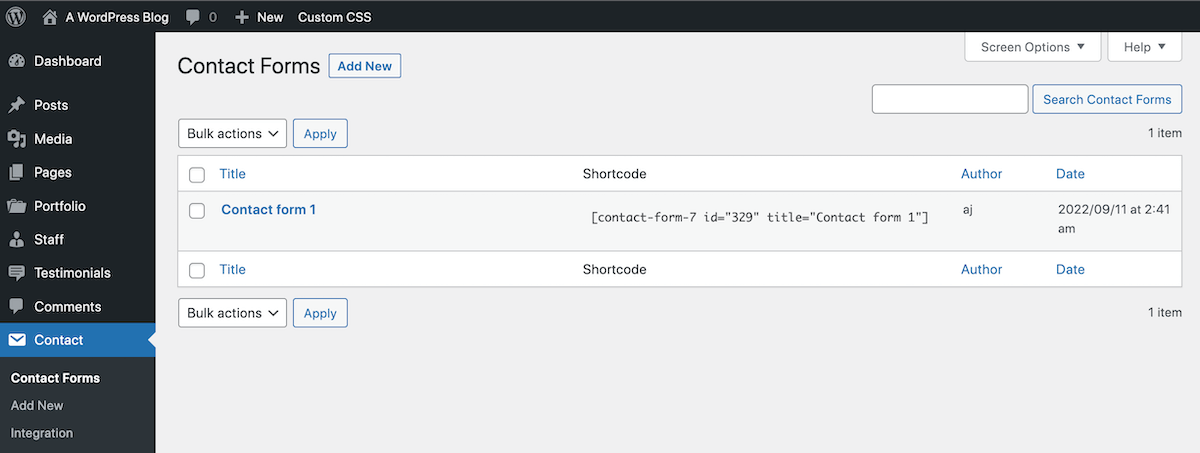
Installation from WordPress.org is instant. The plugin activates without friction and adds a “Contact” item to the WordPress admin menu.
The first thing you see in the Contact Forms list is a pre-built sample form: “Contact form 1.” Clicking it opens the form editor.
This is where Contact Form 7 diverges sharply from every modern alternative.
The Form Tag Editor
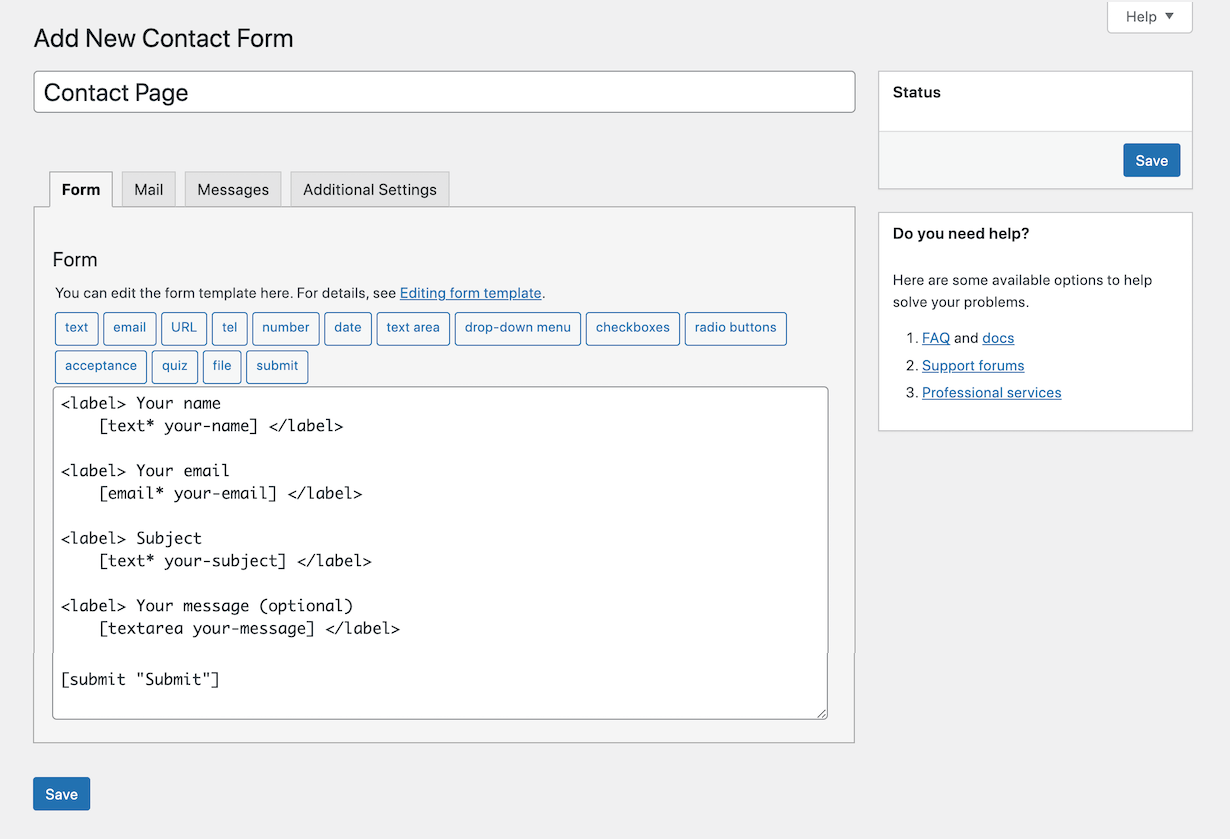
Instead of dragging fields onto a canvas, you write form tags in a plain text area. A tag like [text* your-name] adds a required text input field named “your-name.” A tag like [email* your-email] adds a required email field. The asterisk marks a field as required.
A row of buttons above the textarea generates these tags via a dialog. You click “email,” fill in a short dialog (placeholder text, required toggle, custom class if needed), and the button inserts the correct tag syntax at the cursor position. It works, but it is fundamentally different from any visual builder you have used in the last five years.
For experienced users, this is actually faster than drag-and-drop. You can build a complete contact form from scratch in under two minutes by typing or by using the tag generators. For first-time users, the editor is confusing. The official documentation covers every form tag type in detail, but you have to read it.
Field types available:
- Text
- URL
- Telephone
- Number
- Date
- Textarea (multi-line)
- Drop-down menu
- Checkboxes
- Radio buttons
- Acceptance (GDPR consent)
- Quiz (basic question-and-answer spam trap)
- File upload
- Submit button
That field set covers the majority of contact form use cases. What it does not include: repeating field groups, multi-page (wizard-style) forms, conditional logic, or any visual styling beyond what your theme provides.
Email Notifications
Contact Form 7 handles form submissions exclusively through email notification. When someone submits a form, the plugin sends an email to the configured address.
The Mail tab in the form editor lets you configure:
- To: Who receives the notification (defaults to the WordPress admin email address)
- From: The sender address on the notification email
- Subject: The email subject line, which can include mail tags to pull in field values
- Additional headers: Reply-To, CC, BCC
- Message body: A free-form template that can include any form field value using mail tag syntax
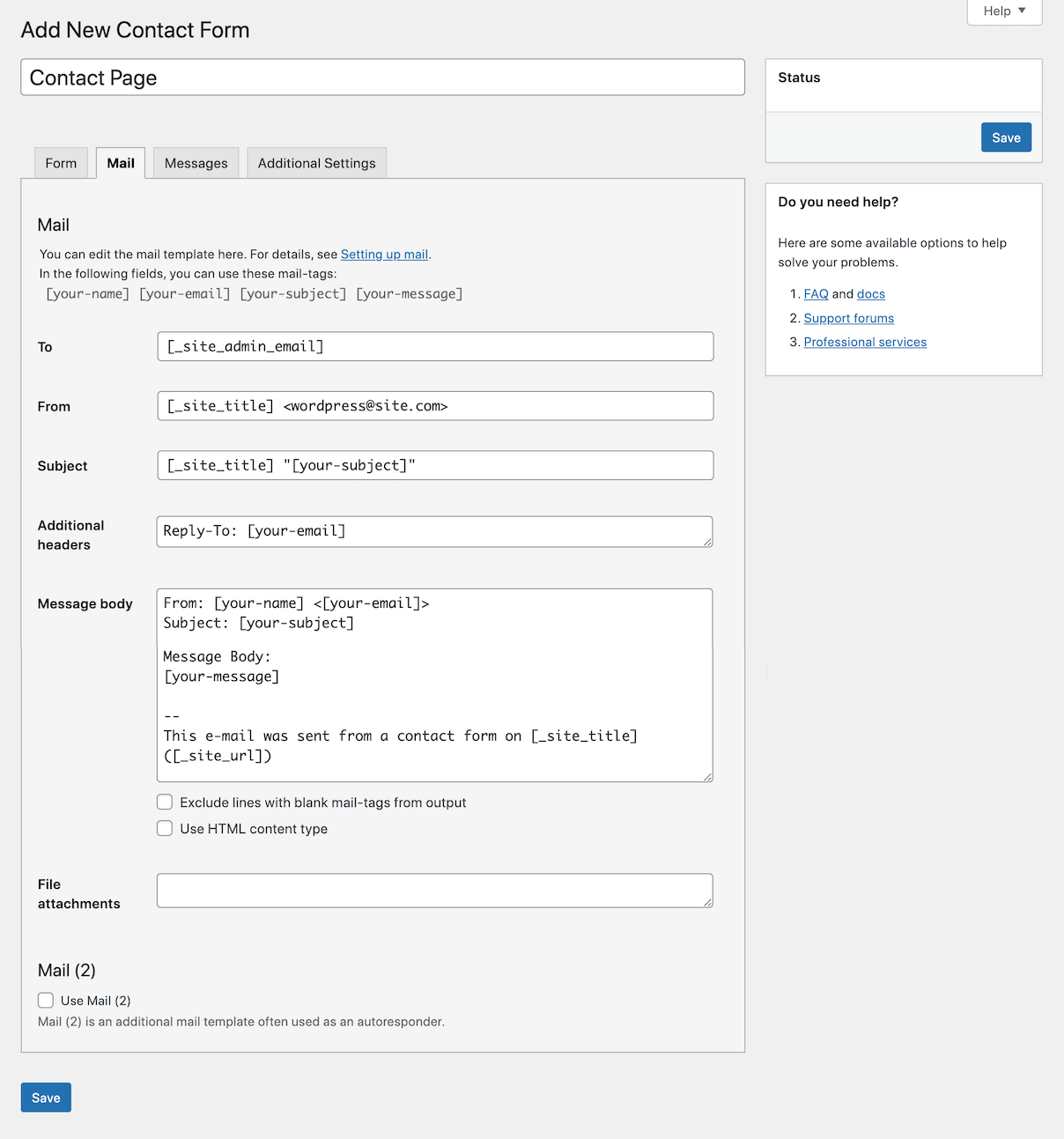
Mail tag syntax mirrors form tag syntax. If you have a field named “your-name,” the mail tag [your-name] inserts that value into the email body. This system is straightforward once you understand it.
There is also a Mail 2 option, which sends a second email. The typical use case is sending a confirmation message to the person who submitted the form, using their email address as the recipient. Mail 2 is disabled by default and must be configured manually.
The critical limitation here is that email is the only delivery mechanism. If the notification email fails to reach the recipient, whether because of hosting SMTP configuration, spam filtering, or an incorrect To address, the submission is gone. Contact Form 7 does not store it locally by default.
This is the real operational risk of using Contact Form 7 for anything other than a low-stakes contact page. A misconfigured email server on shared hosting, which is a very common issue, means lost lead inquiries, lost booking requests, and no fallback.
Entry Storage: The Flamingo Question
Contact Form 7 does not store submitted messages in the WordPress database by default. This is documented, deliberate, and regularly cited as a reason to avoid the plugin or to install a companion plugin immediately after activation.
The official companion solution is Flamingo, a separate free plugin created by the same author (Rock Lobster Inc.).
Flamingo at a glance:
- Version 2.6.2 (last updated May 2026)
- 800,000+ active installs (versus CF7’s 10+ million)
- Free, open source
- Adds an “Inbound Messages” admin section that lists all CF7 submissions
- Submissions are searchable and include submitter name, email, and all form field values
- Includes a Contact Book that records unique submitters
- Export functionality (CSV, with some reported encoding issues for non-Latin characters)
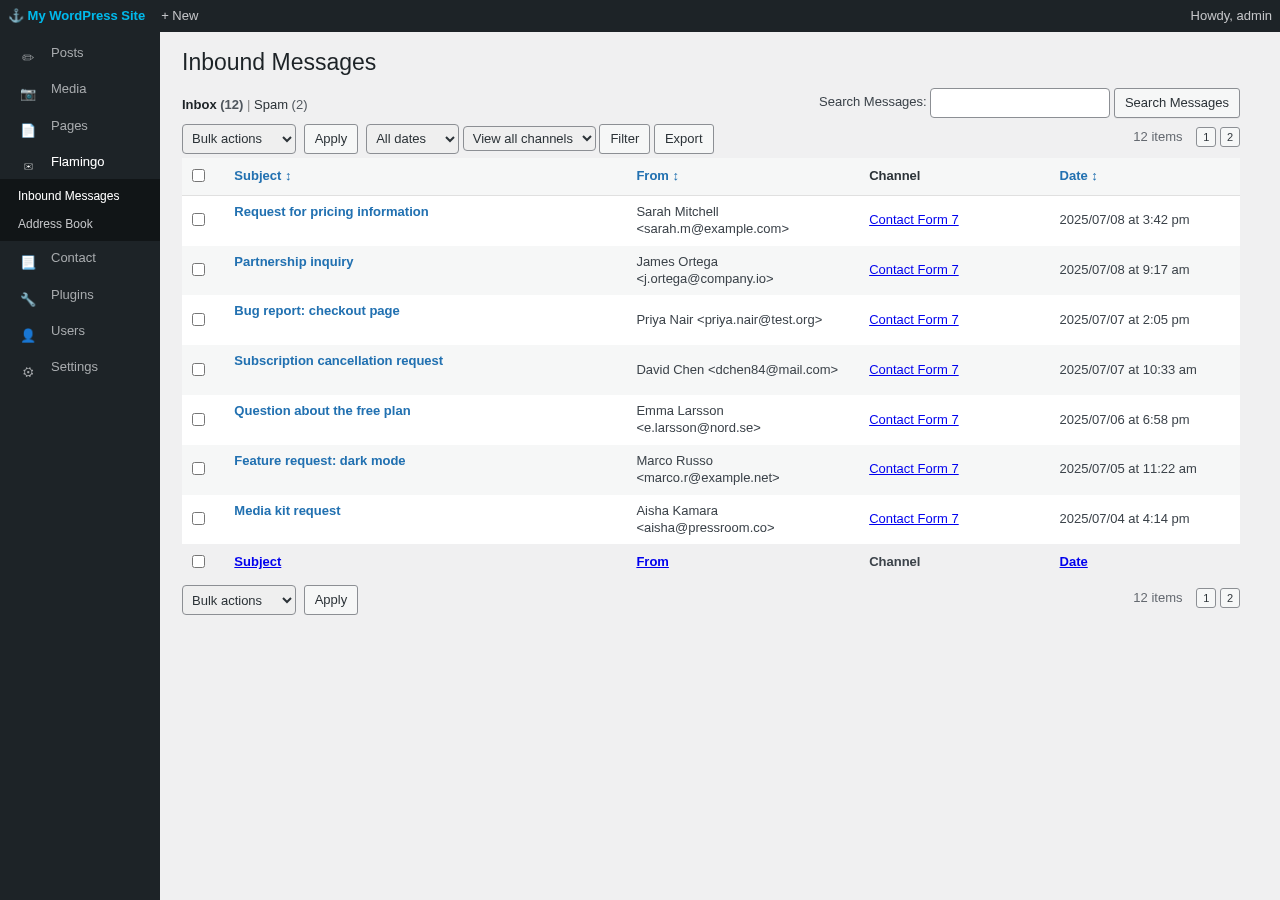
Installing Flamingo resolves the entry storage problem cleanly. Once both plugins are active, every CF7 submission is stored in WordPress regardless of whether the email notification succeeds. If email delivery fails, you can still retrieve the submission from Flamingo. That is the use case it was built for, and it works.
A few caveats worth knowing:
- Flamingo has 800,000+ active installs, which means roughly 9 million CF7 users are running without any local entry backup. If you are setting up Contact Form 7 for a site that collects anything important, Flamingo is essentially mandatory.
- One user on WordPress.org reported that Flamingo does not save entries when using an external SMTP plugin instead of PHP mail. If your hosting uses a third-party SMTP relay (WP Mail SMTP, FluentSMTP, or Postmark, for example), verify that Flamingo is capturing submissions correctly after setup.
- The Contact Book feature in Flamingo shows only WordPress-registered users in some configurations, limiting its usefulness as a general lead database.
Spam Protection
Spam protection is a significant real-world concern for Contact Form 7 users. Because the plugin has ten million installs, bots actively target CF7 forms. Out of the box, the spam protection built into CF7 is limited.
What Contact Form 7 includes natively:
- Quiz field: A basic question-and-answer field that trips up simple bots. The question and answer are plain text. Effective against very unsophisticated automated submissions, not against targeted spam.
- Acceptance field: A required checkbox (typically used for GDPR consent) that blocks submissions where the box is left unchecked. Not anti-spam in the traditional sense.
Integration-based spam protection (requires setup):
Contact Form 7 has an Integration admin page where you connect external spam protection services. As of version 6.1.6, the supported integrations are:
- Google reCAPTCHA v3: Score-based, invisible verification. CF7 5.1 and later support reCAPTCHA v3 only. There is no visible checkbox widget: the plugin evaluates a risk score on submission and flags entries below the configured threshold (default 0.50) as spam. No
[recaptcha]form tag is required or used; if old v2 tags exist in a form template, CF7 ignores them. Requires a Google reCAPTCHA v3 API key pair. If you need reCAPTCHA v2 (the “I’m not a robot” checkbox), you will need a third-party add-on plugin. - Cloudflare Turnstile: Added in version 6.1 (June 2025). A free CAPTCHA alternative that is generally less intrusive than reCAPTCHA. Works at the integration level without modifying form tags. Requires a Cloudflare account and API keys.
- Akismet: Statistical spam filtering. Requires marking specific CF7 fields with Akismet option attributes (for example, adding
akismet:authorto a name field andakismet:author_emailto an email field) so Akismet can evaluate submissions correctly.
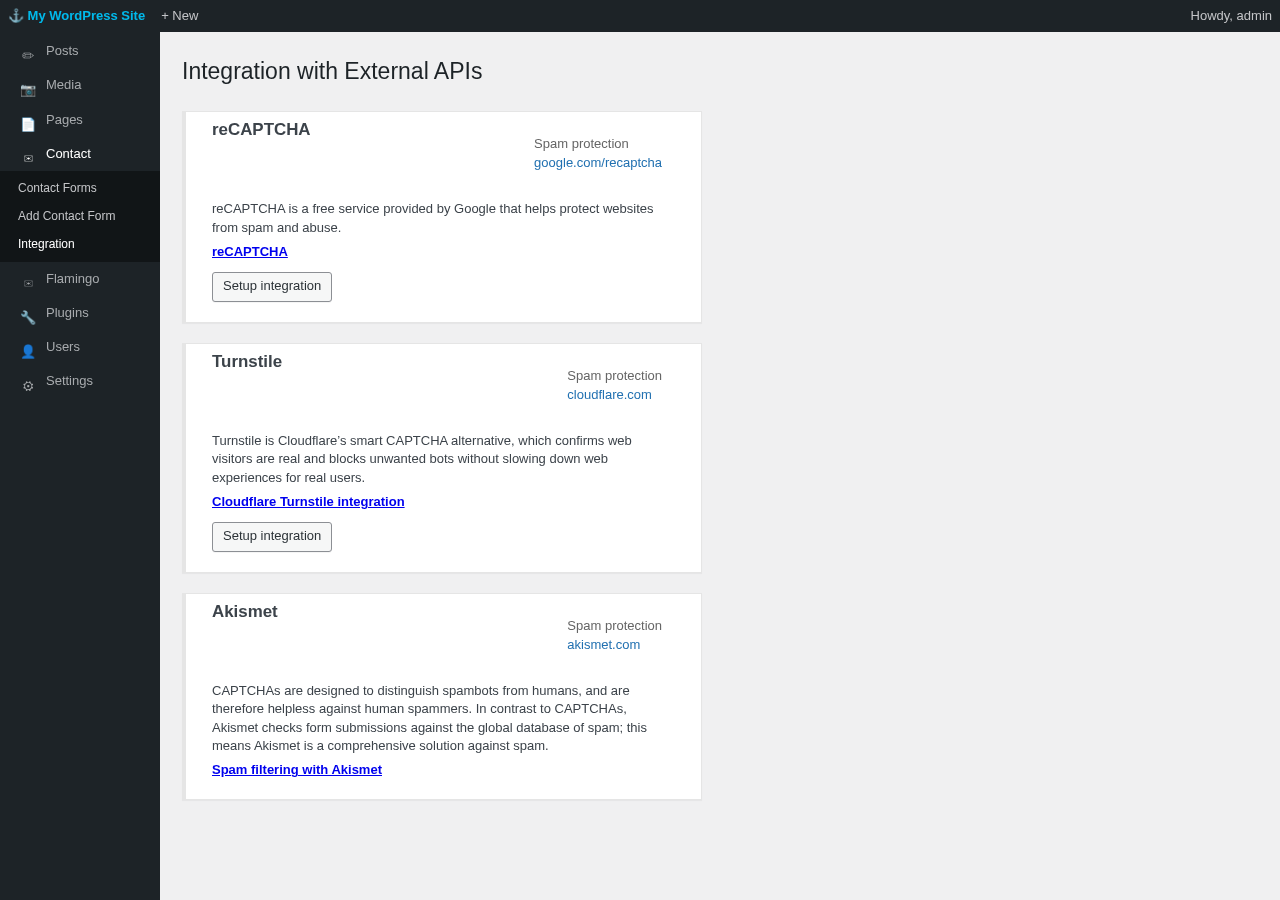
The practical situation: A fresh Contact Form 7 installation with no integrations configured will get spammed on any reasonably trafficked site. The quiz field helps with simple bot traffic. For anything beyond that, you need to configure at least one integration. reCAPTCHA v3 and Turnstile work at the integration level (no form tag changes needed), but both require obtaining API keys from an external provider. Akismet requires editing individual form tag attributes to label which fields contain the author name and email. That is a reasonable ask for a developer. It is a meaningful friction point for a non-technical site owner.
The recommended layered approach in 2026 is Cloudflare Turnstile plus Akismet, with the disallowed list used as a secondary rule-based filter for recurring spam patterns. Cloudflare Turnstile is free and requires no CAPTCHA interaction from users. Akismet is free for personal use and requires an account.
If you want honeypot anti-spam (hidden fields that catch bots), you need an add-on. The built-in CF7 toolkit does not include a honeypot.
Stripe and Payment Integration
Contact Form 7 added a Stripe integration module in version 5.x. It allows you to collect one-time payments through a CF7 form using a [stripe] payment field tag.
In practice, this is a limited payment capability. It is not a full payment form builder: there are no quantity fields, no product selectors, no order total calculations, and no subscription billing. What you get is a Stripe payment element embedded in a form that charges a fixed amount on submission.
For a basic donation form or a fixed-price single product form, this works. For anything more complex, a dedicated WooCommerce setup, a plugin like WP Easy Pay, or a higher-featured form builder is a better fit.
The Add-On Ecosystem
Because CF7 deliberately keeps its core feature set minimal, a significant third-party ecosystem has grown up around it. The most widely used add-ons address the same gaps that most CF7 users eventually hit.
CF7 Apps (formerly CF7 Honeypot)
CF7 Apps (version 3.6.1, 300,000+ installs) is the most popular third-party CF7 extension and the standard recommendation for users who need more from Contact Form 7 without switching plugins.
What it adds:
- Honeypot: A hidden field that catches bots without any user interaction. Effectively invisible to real visitors, visible to bots that fill in all available fields.
- hCaptcha: A privacy-focused alternative CAPTCHA that competes with reCAPTCHA.
- Database Entries: Stores CF7 submissions in WordPress, similar to Flamingo but within the CF7 Apps admin screen.
- Redirection: Send users to a custom page after form submission, without JavaScript custom code.
- Webhooks: Forward submission data to external services (Zapier, Make, CRMs) via HTTP POST.
- ACF Integration: Map Advanced Custom Fields data into CF7 form fields.
- AI Form Generator: Describe a form in natural language and generate CF7 form tag syntax automatically.
CF7 Apps recently rebranded from a focused honeypot plugin to a broader add-on suite, which has attracted some criticism from users who preferred the original lightweight scope. A recent review flagged that the honeypot had intermittent reliability issues (sometimes blocking everything, sometimes blocking nothing). The plugin has active development and responsive support, but the honeypot behavior issue is worth monitoring.
Conditional Fields for Contact Form 7
Conditional logic is not built into CF7. Showing or hiding fields based on a user’s selection requires a third-party plugin. Conditional Fields for Contact Form 7 is the most commonly installed solution. It adds a conditional logic interface to the CF7 form editor. Coverage varies by hosting configuration and form complexity.
Third-Party Integration Plugins
For email marketing, CRM connections, and automation workflows, CF7 relies entirely on third-party plugins. Unlike WPForms, Fluent Forms, or Gravity Forms, there are no official first-party integration add-ons beyond reCAPTCHA, Turnstile, Akismet, Brevo, and Stripe. Every other integration (Mailchimp, ActiveCampaign, Zapier, HubSpot) is built and maintained by third-party developers with varying quality, update cadence, and compatibility guarantees.
Pricing
Contact Form 7 is completely free. There are no paid plans, no premium licenses, no upsell banners, and no feature walls. The core plugin costs nothing. The companion Flamingo plugin costs nothing. The Turnstile, reCAPTCHA, and Akismet integrations are free.
The only financial ask is a voluntary donation through the official donation page. The plugin’s documentation explicitly states that ongoing maintenance is difficult without user support and invites contributions in various forms: testing, translation, code contributions, forum help, and financial donations.
This model is both Contact Form 7’s strongest appeal and a real long-term sustainability question. Unlike WPForms or Gravity Forms, which have commercial backing and dedicated development teams, CF7’s continued maintenance depends on voluntary contributions and the goodwill of one primary developer. That said, the plugin has been actively maintained since 2007 without interruption, which is a 19-year track record worth acknowledging.
Pros and Cons
Pros
- Completely free, with no paid tiers or feature walls
- 10+ million active installs and almost 19 years of continuous maintenance
- Lightweight: minimal JavaScript and CSS, low impact on page performance
- Highly extensible through a developer-facing hook and filter system
- Built-in Cloudflare Turnstile, reCAPTCHA v3, and Akismet integration modules for spam protection
- Gutenberg block included for modern block editor workflows
- Stripe payment integration for simple fixed-amount payment forms
- Tested up to WordPress 7.0; active development cadence
- Privacy-first by default: no user tracking, no cookies, no external data sent without explicit configuration
- Large ecosystem of third-party add-ons for extended functionality
Cons
- Tag-based editor: no drag-and-drop builder, no visual field preview during editing
- No entry storage by default; Flamingo must be installed and activated separately to prevent data loss from email failures
- No conditional logic built in; requires a third-party add-on
- No form templates; every form starts from scratch
- No visual styling tools; form appearance is entirely controlled by the active theme’s CSS
- No official commercial support; support is community-only through the WordPress.org forum
- Support resolution rate on WordPress.org was 25 out of 63 open issues in the most recent two-month window
- Spam protection requires external API configuration; out-of-the-box protection is minimal
- Third-party add-on ecosystem has uneven quality and maintenance levels
Alternatives
WPForms is the most beginner-friendly Contact Form 7 alternative. The free WPForms Lite version includes a drag-and-drop builder, 71 templates, and solid built-in spam protection including Cloudflare Turnstile, reCAPTCHA, and hCaptcha. The trade-offs are a 3% surcharge on Stripe transactions in the free tier and no local entry storage on the free plan. Paid plans start at $49.50/year.
Fluent Forms has the most generous free tier of any serious Contact Form 7 alternative. The free version includes a drag-and-drop builder, conditional logic, local entry storage in WordPress, basic email marketing integrations, and conversational form mode. If you are switching from Contact Form 7 because of the missing features, Fluent Forms free addresses most of them without paying anything. Paid plans start at $63/year for a single site.
Gravity Forms is the premium choice for agencies and developers who need deep conditional logic, a mature developer API with 500+ hooks and filters, and a large first-party integration library. No free version exists, and pricing starts at $59/year for one site. Best for complex form requirements where Contact Form 7’s flexibility is still not enough.
Forminator (WPMU Dev) is a free alternative that includes a drag-and-drop builder, conditional logic, basic entry storage, payment support (Stripe and PayPal), and quiz functionality at no cost. Less established than WPForms or Fluent Forms, but a capable free option for users who need the features CF7 lacks.
Ninja Forms has a free version with a drag-and-drop builder and basic entry management. Advanced features are sold as individual paid add-ons, which can make total cost unpredictable for sites with multiple integration requirements.
Final Verdict
Contact Form 7 is a reliable, well-maintained, zero-cost form plugin with a philosophy that has not changed in almost two decades. If you agree with that philosophy, it is an excellent tool. If you need a drag-and-drop builder, built-in entry storage, conditional logic, and one-click integrations, you will spend more time configuring add-ons than CF7’s simplicity saves you, and a modern alternative will serve you better from day one.
The ten million install number is real, but it tells you something about CF7’s historical dominance more than it tells you whether it is the right choice for a new project in 2026. A large portion of those installs are legacy sites built when CF7 was the only serious option. New WordPress installs today have more competition at the same price point of free.
I would still recommend Contact Form 7 to developers who want a minimal, hackable form foundation and to technically comfortable site owners setting up a simple contact page where email notification alone is genuinely sufficient. I would not recommend it as the default choice for non-technical site owners, businesses tracking leads, or anyone who plans to collect form data they cannot afford to lose.
If you do install Contact Form 7, install Flamingo alongside it immediately. Do not wait to discover why entry storage matters after you have already missed submissions.
Rating: 3.8 / 5
A workhorse plugin for the right audience. Outpaced by modern alternatives on features and user experience, but still unbeatable on price, flexibility for developers, and long-term reliability.