


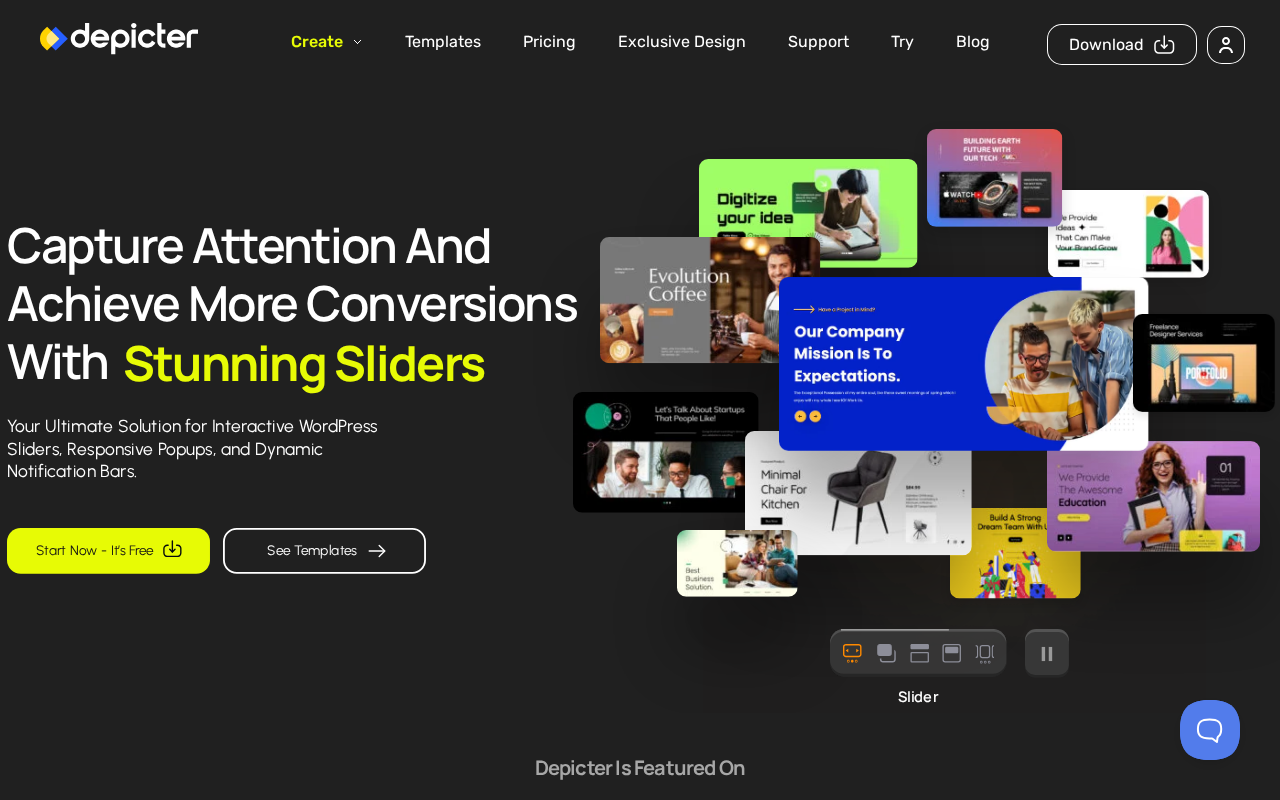
The WordPress slider category has been dominated by a handful of plugins for years. Slider Revolution and Smart Slider 3 set the standard, and most competitors have stayed close to that template. Depicter, built by Averta, takes a different angle. Instead of competing as another slider plugin, it positions itself as a full visual content builder: sliders, popups, carousels, hero sections, and notification bars all live under one roof.
The pitch is a modern drag-and-drop editor with no row-column constraints, WooCommerce product carousels from dynamic post data, an AI content wizard, and a template library that now exceeds 800 designs in the Pro tier. The free version is available on WordPress.org and includes genuinely useful features.
This review covers version 4.8.1, last updated August 27, 2026, and tested up to WordPress 7.0.4. I worked through the official Depicter website at depicter.com, the pricing page, the WordPress.org listing (version 4.8.1, 80,000+ active installs, 4.6/5 stars from 234 reviews), the plugin changelog, the Averta comparison blog posts, and independent plugin performance reports. Where a paid Pro feature was not directly testable, the relevant section says so clearly.
At a glance
- Audited on: depicter.com features, pricing, and comparison pages; the WordPress.org plugin listing (version 4.8.1, last updated August 27, 2026, tested up to WordPress 7.0.4); the plugin changelog; independent plugin performance tests. Pricing verified against depicter.com/pricing on August 30, 2026.
- Free tier: unlimited sliders, popups, carousels, hero sections, and notification bars; 146 templates; 15 elements; 100 asset library items; basic animations and display targeting; form builder for lead capture.
- Paid tiers: Starter at $39/year for 1 site (200 pro templates, 42 elements, 1M assets library, AI builder, WooCommerce integration, advanced triggers); Freelancer at $49/year for 3 sites (800 pro templates, VIP 24/7 support); Agency from $119/year for 5 sites up to $189/year for 10 sites. A 14-day money-back guarantee applies to all paid plans.
- Bottom line: the most feature-complete slider-and-popup bundle at its price point in the WordPress ecosystem for 2026. Depicter competes on breadth, template volume, and a genuinely modern editor experience. The honest trade-off is performance weight: Depicter’s JavaScript footprint is heavier than leaner single-purpose competitors, and the auto-save behavior can frustrate users who need reliable undo. For WooCommerce stores and content-heavy sites that need engaging visual content without a developer, the value is strong.
Quick verdict
Depicter earns its 4.6-star rating by solving a real WordPress problem: most visual content builders are either limited (basic sliders with no popup or notification tools) or expensive and complex (Slider Revolution at significantly higher price points). Depicter occupies a middle ground that many site owners actually need.
The free version is useful. Unlimited sliders and carousels with 146 templates and a form builder for lead capture is a legitimate free offering, not a teaser that requires upgrading to do anything meaningful. The 15-element count is the most obvious ceiling; power users will hit it.
The Pro plans are well-structured. Starter at $39/year for one site is the lowest entry price in the serious slider category. Freelancer at $49/year for three sites is where most WordPress consultants and developers find the real value, covering multiple client sites at a price that undercuts Smart Slider 3’s single-site plan.
The honest limitations: Depicter is not the lightest option on the market. Independent JavaScript performance tests rank it heavier than MetaSlider and Smart Slider 3. The auto-save system, while convenient for most users, removes the safety net of undoing a change before it is saved. And the “made by Depicter” watermark that appears when a subscription expires has drawn justified criticism from paid users.
Quick verdict summary
- Best for: WordPress site owners and agencies who want a single plugin covering sliders, popups, carousels, hero sections, and notification bars. WooCommerce store owners building dynamic product carousels and on-sale product popups. Designers who need a true freeform editor and more template variety than Smart Slider 3’s free tier.
- Best plan for single sites: Starter at $39/year covers one site with the full Pro feature set including AI builder, WooCommerce integration, 200 pro templates, and advanced popup triggers.
- Best plan for agencies: Freelancer at $49/year covers 3 sites with 800 pro templates and VIP support. Agency plan at $119/year for 5 sites and $189/year for 10 sites scales from there.
- Standout: 800+ pro templates covering all content types; true freeform drag-and-drop with separate responsive layouts per breakpoint; built-in AI Slider Wizard; WooCommerce dynamic product carousels; ACF support; popup and notification bar builder in the same plugin.
- Watch out for: JavaScript footprint is heavier than lighter alternatives; auto-save removes the undo safety net; “made by Depicter” watermark reappears on subscription expiry; 80,000+ installs is far behind Smart Slider 3 or Slider Revolution so community resources are thinner; the plugin’s breadth adds code to your site even if you only need a slider.
What Depicter is
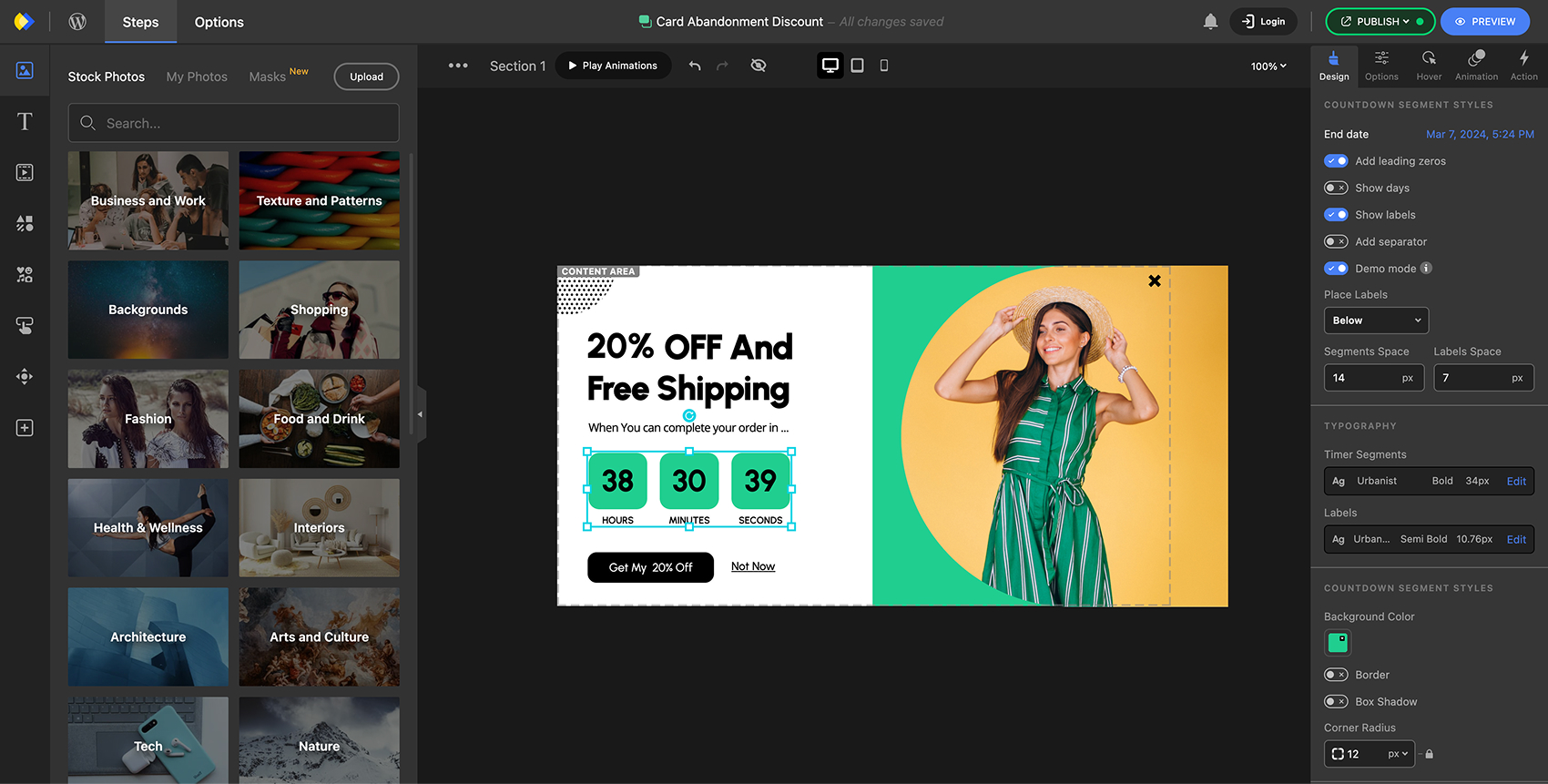
Depicter is a WordPress visual content builder developed by Averta. The plugin builds sliders, popups, carousels, hero sections, and notification bars through a single drag-and-drop interface. No code is required. Content is created inside the WordPress admin using a visual canvas editor, then embedded anywhere using a shortcode or block.
Averta is a WordPress-focused development studio. Before Depicter, Averta was known for Phlox, a popular WordPress theme with strong design quality. Depicter extends that design-first philosophy into a plugin product.
In 2026, Depicter reached version 4.8.1. The most recent update on August 27, 2026, addressed security vulnerabilities and improved lead export functionality. Version 4.8.0 before it introduced confetti animation elements and marquee selection tools inside the editor. The changelog reflects active development: updates are frequent and cover both feature additions and security patching.
The current free version on WordPress.org has 80,000+ active installs and a 4.6-star rating across 234 reviews, with 203 five-star ratings. Within the slider plugin category, this places Depicter below the install counts of Smart Slider 3 and Slider Revolution but above many newer entrants. The 4.6-star score is competitive for a plugin this feature-dense.
Depicter is notable because it covers multiple content types in a single plugin. Most slider plugins build sliders. Depicter builds sliders, popups, carousels, hero sections, and announcement bars. This breadth means one license and one plugin installation replaces what would otherwise require two or three separate plugins.
Who Depicter is best for
Strong fit
- WordPress site owners who need sliders AND popup lead capture AND notification bars but want to manage only one plugin.
- WooCommerce store operators who want dynamic product carousels that pull live product data: on-sale products, new arrivals, featured products, or specific category collections.
- Designers and freelancers who find Smart Slider 3’s row-column grid system limiting. Depicter’s freeform canvas allows elements to be placed anywhere, layered, and given separate positions and animations per responsive breakpoint.
- Content marketers who want to build sliders and hero sections quickly from templates. Depicter’s 800+ pro template library covers portfolios, eCommerce stores, SaaS landing pages, local businesses, and more.
- Agencies managing 3 to 10+ client sites who need a capable visual content builder at a price that makes sense across multiple licenses.
- Site owners who want to capture email leads through exit-intent popups without a separate lead capture plugin.
- Advanced users who need ACF (Advanced Custom Fields) support for dynamic slider content from custom post types.
Weak fit
- Sites where JavaScript bundle size and page speed are the top priority above all else. MetaSlider and Smart Slider 3 free are consistently lighter in independent performance tests.
- Site owners who only need a basic image slider with no popup, no lead capture, and no WooCommerce product integration.
- Users who need predictable undo history. The auto-save behavior saves changes continuously, which means there is no “unsaved state” to fall back on.
- Site owners who plan to let a subscription lapse and still want a clean output. The “made by Depicter” watermark that reappears when Pro expires is a real consideration for agencies.
- Organizations that need built-in A/B testing tied to popup conversion rates. Depicter tracks leads but does not offer native A/B testing.
Setting up Depicter
Installation follows the standard WordPress pattern. From the admin, navigate to Plugins, Add New Plugin, search for “Depicter,” and install the result by Averta. Activation takes one click. No external account is required for the free version.
After activation, Depicter adds a top-level item to the WordPress admin sidebar. The dashboard opens to a content overview listing all created sliders, popups, carousels, hero sections, and notification bars in one unified view. The first-run experience shows an empty state with a prompt to create your first item or browse templates.
Creating new content follows three paths: start from a template (fastest for most users), use the AI Slider Wizard to generate a starting layout from natural language (Pro only), or start from a blank canvas. System requirements are low: WordPress 4.9 or higher, PHP 7.2.5 or higher, MySQL 5.0 or higher.
The visual editor
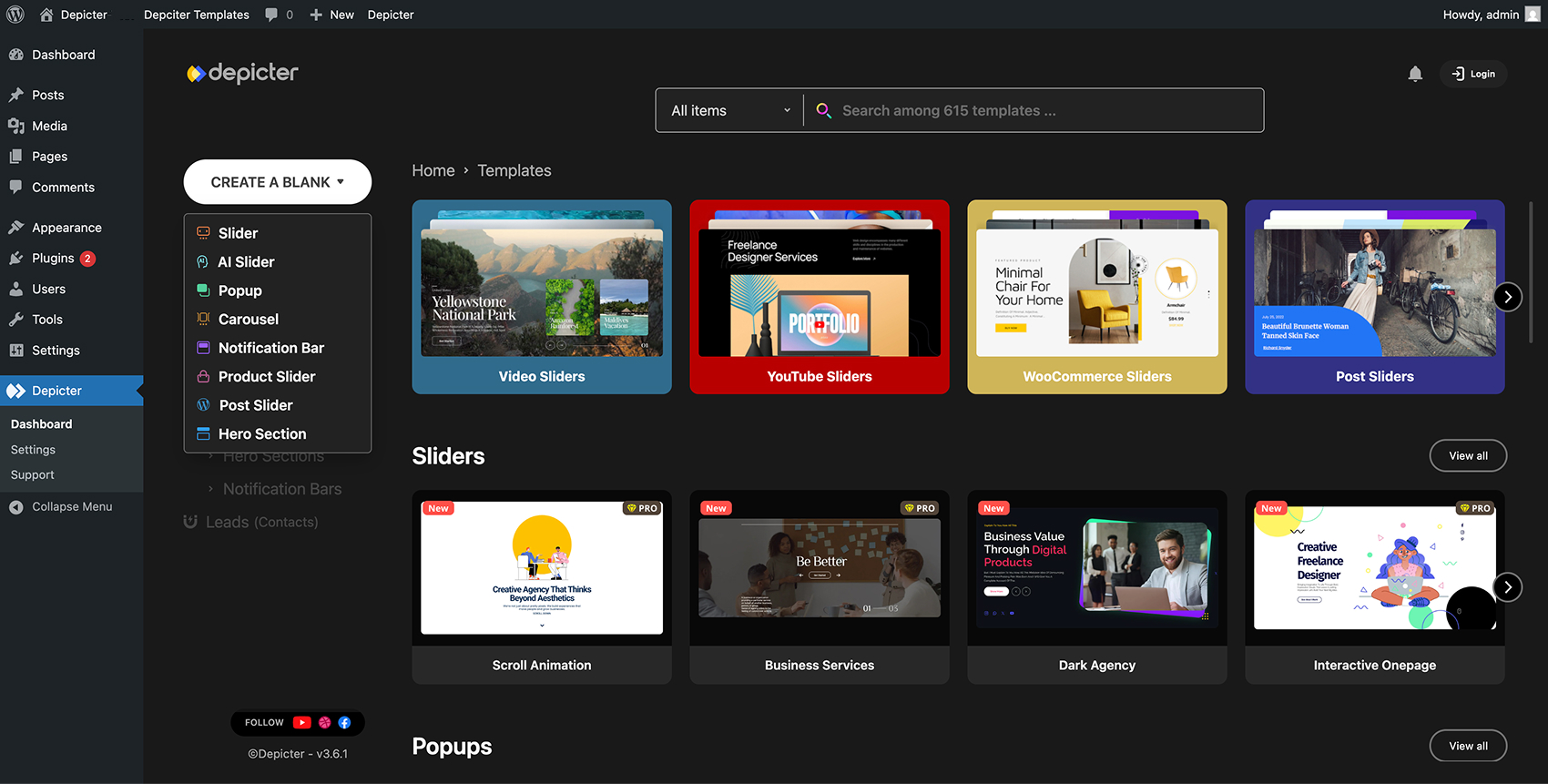
The Depicter editor is the plugin’s most distinctive characteristic. It is a freeform canvas interface, not a row-column layout builder. Elements are placed by dragging onto the canvas, then resized and repositioned freely. There are no grid cells constraining where elements can go.
This differs meaningfully from Smart Slider 3’s editor, which uses a row-column structure for certain element types. In Depicter, a text block can overlap an image, a button can float over a video background, and a shape can be layered behind all other elements, all without wrestling against a grid constraint.
The element palette in the free version includes 15 element types. The Pro palette expands to 42. Key element types include:
- Text and heading blocks with full typography controls
- Images and image masks
- Buttons and CTAs with multiple click actions (link, show/hide element, navigate slide, custom JavaScript)
- Video elements (YouTube, Vimeo, self-hosted)
- Background shapes and SVG overlays
- Lottie animation elements
- Coupon code boxes
- Countdown timers and number counters
- Before-and-after comparison sliders
- Form fields for lead capture
- WooCommerce product data elements
Animation is handled through a timeline editor. Each element has entrance, idle, and exit animations with configurable timing, duration, easing, and delay. The Animation Wizard generates complete animation sequences from a preset or prompt, removing the need to configure the timeline manually.
Responsive behavior is a genuine strength. Each responsive breakpoint (desktop, tablet, mobile) can have a completely different element layout. An element can be visible on desktop and hidden on mobile. Its position, size, and typography can all differ per breakpoint, producing genuinely device-appropriate designs.
Template library
The Depicter template library is one of its primary selling points. The free version includes 146 templates. The Pro Freelancer plan includes 800, with new templates added regularly.
Templates span all five content types: sliders, popups, hero sections, carousels, and notification bars. Design categories cover common use cases: promotional sliders for sales and seasonal events, product showcase carousels for WooCommerce stores, email capture popups for lead generation, announcement notification bars, and hero sections for landing pages and homepages.
Template quality is consistent. Designs reflect current web conventions rather than the skeuomorphic slider styles that older plugins were known for. Importing a template is a single click. The template loads into the editor with all elements, animations, and responsive settings intact.
The AI Slider Wizard (Pro) allows users to generate custom layouts by describing what they want. This is positioned as an alternative to browsing templates for users who have a specific concept but do not find an exact match in the library.
WooCommerce and dynamic content
WooCommerce integration is available from the Starter plan ($39/year) and above. Free version users cannot access the WooCommerce data source.
With WooCommerce connected, Depicter can build dynamic carousels and sliders that pull product data automatically. You configure the data source once: select “WooCommerce products” as the source type, then apply filters (by category, tag, on-sale status, featured status, newest, best-selling, or specific product IDs). The slider or carousel populates with the filtered products and updates automatically when the product catalog changes. No manual rebuilding is required when you run a sale or add new products.
The WooCommerce elements available inside sliders include product title, product price (including sale price display), product image, add-to-cart button, stock availability indicator, and custom product fields via WooCommerce meta.
Beyond WooCommerce, Depicter supports any WordPress post type as a dynamic data source. Blog posts, portfolio items, testimonials from custom post types, and ACF field data can all populate slider and carousel templates dynamically. This is useful for post-feed sliders that stay current without manual intervention.

Popup and notification bar builder
The popup and notification bar tools are included in the same plugin as the slider and carousel builder. This bundling is a practical advantage: one plugin, one editor, one template library for all visual marketing content.
The popup builder supports multiple trigger types: exit intent, scroll depth, time on page, inactivity timer, click on a specific element, and page load. Display rules let you control where a popup appears: on specific pages, post types, categories, tags, or user login states.
The form builder inside the popup editor captures email addresses, names, and phone numbers. Submitted data stores in the Depicter lead directory inside WordPress. Integrations with third-party email marketing tools are available through webhook connections in the Pro tier.
The notification bar builder handles announcement banners that appear at the top or bottom of the page: shipping threshold messages, sale countdowns, cookie notices, and general announcements. Like sliders and popups, notification bars are built in the same visual editor and share the template library.
Performance considerations
Performance is the most important caveat to state clearly about Depicter. The plugin claims a lightweight, performance-optimized approach using WebP output, adaptive image sizing, lazy loading, built-in slider cache, and parallel asset loading. These are real features. But independent tests tell a more nuanced story.
Comparative WordPress slider plugin performance tests show Depicter carrying a heavier JavaScript CPU load than lighter alternatives like MetaSlider. The plugin serves more JavaScript than a basic slider requires because it also loads the popup engine, notification bar logic, and form builder code even if you are only using the slider feature.
This is not unusual for a multi-feature plugin. The trade-off is inherent in bundling five content tools into one plugin. The practical impact depends on context:
- Sites already using a page builder (Elementor, Divi) are loading significant JavaScript anyway. Depicter’s additional footprint is proportionally smaller in that context.
- Sites aiming for near-perfect Core Web Vitals scores on minimal WordPress installations should test Depicter’s impact in a staging environment before committing.
- The lazy loading and cache features do reduce the perceived performance impact for the visitor experience on content-heavy pages.
Version 4.8.1 addresses security vulnerabilities. Security is an area where Averta has been responsive: patch releases have come quickly when vulnerabilities are reported.
Pricing and license value
Depicter is available free on WordPress.org with no site limits and no expiry. Pro plans are sold at depicter.com with a 14-day money-back guarantee. Pricing verified August 30, 2026.
| Plan | Price | Sites | Templates | Elements |
|---|---|---|---|---|
| Free | $0 | Unlimited | 146 | 15 |
| Starter | $39/year | 1 | 200 pro | 42 |
| Freelancer | $49/year | 3 | 800 pro | 42 |
| Agency (5 sites) | $119/year | 5 | 800 pro | 42 |
| Agency (10 sites) | $189/year | 10 | 800 pro | 42 |
Pricing comparison: Against Smart Slider 3 Pro: Smart Slider 3’s Standard plan for one site starts at $49/year. Depicter Starter for one site is $39/year, $10/year cheaper while including popup and notification bar tools that Smart Slider 3 does not offer. Against MetaSlider: MetaSlider Pro starts at $49/year and is consistently the lightest slider in performance tests. If raw page speed is the deciding factor, MetaSlider’s performance advantage may outweigh Depicter’s feature depth.
One pricing consideration: Depicter Pro adds a “made by Depicter” watermark to published content when a subscription expires. For agencies who build sites that outlast the license, planning for this behavior before deploying Pro features to client sites is advisable.
Pros and cons
Pros
- Five content tools in one plugin: sliders, popups, carousels, hero sections, and notification bars in a single install.
- 800+ pro templates with regular additions across all content types.
- True freeform drag-and-drop editor with no row-column constraint and separate responsive layouts per breakpoint.
- WooCommerce dynamic product carousels and popups that update automatically from the live product catalog.
- ACF support for dynamic content from custom post types.
- AI Slider Wizard generates starting layouts from natural language descriptions (Pro).
- Competitive pricing: Starter at $39/year (1 site) undercuts Smart Slider 3 and Slider Revolution. Freelancer at $49/year for 3 sites is exceptional agency value.
- Excellent user support — multiple reviews mention Averta going beyond standard responses to investigate and resolve issues directly.
- Active development with frequent updates including security patches.
- GDPR compliant with no external data transmission from core plugin functions.
Cons
- Heavier JavaScript footprint than lighter alternatives. MetaSlider and basic slider-only plugins are consistently faster in independent performance tests.
- Auto-save removes the traditional undo safety net. Changes save continuously in the editor.
- “Made by Depicter” watermark reactivates on license expiry, which can affect client sites unexpectedly for agencies.
- Editor stability issues reported by some users: occasional crashes when switching animation phases.
- 80,000+ active installs is far smaller than Smart Slider 3 or Slider Revolution, meaning a thinner community of tutorials and support resources.
- Free tier element count (15) is a real ceiling for power users who need shapes, masks, Lottie animations, coupons, or countdown timers.
- WooCommerce data source is gated behind the Starter plan ($39/year), not available in the free version.
- Plugin breadth loads code for all five content tools regardless of which ones you actually use.
Alternatives to Depicter
Smart Slider 3. The most direct head-to-head competitor. Smart Slider 3 has over 900,000 active installs and a 4.8-star rating. The free version includes 120+ templates and is one of the most refined no-cost slider experiences available. The Pro plan starts at $49/year for one site. Smart Slider 3’s editor is more structured (row-column grid) and less freeform than Depicter. The trade-off is that Smart Slider 3 is a dedicated slider plugin with no popup builder or notification bar tool. If you only need sliders and carousels, Smart Slider 3’s editor reliability and larger community make it a strong choice. If you also need popups and notification bars, Depicter’s bundle saves a license fee. Smart Slider 3 is also lighter in performance tests. See our best WordPress carousel and slider plugins roundup for a side-by-side comparison across the category.
Slider Revolution. The longest-established premium slider plugin for WordPress. Slider Revolution’s editor is more complex and the learning curve is steeper, but the ecosystem (templates, add-ons, community) is the largest in the category. Pricing is higher than Depicter for comparable site coverage. Slider Revolution suits advanced designers who want fine-grained animation control and do not mind the learning investment.
MetaSlider. The performance-optimized choice. MetaSlider is consistently the lightest slider plugin in JavaScript performance tests, loading significantly less JavaScript than Depicter or Slider Revolution. The trade-off is a simpler feature set: MetaSlider focuses on image and video sliders with clean output, without the freeform editor, popup tools, WooCommerce dynamic carousels, or AI features that Depicter offers. MetaSlider Pro starts at $49/year. The right choice when Core Web Vitals score is the top priority.
Soliloquy. A WordPress-native slider plugin focused on simplicity and performance. Soliloquy integrates well with WooCommerce for basic product sliders and offers clean output with minimal JavaScript. Less feature-complete than Depicter but lighter. Worth considering for sites that need a straightforward slider without popup or notification bar functionality.
Elementor Pro (built-in widgets). If your site already runs Elementor Pro, the built-in Image Carousel and Slides widgets cover many common slider and hero section use cases without adding another plugin. For Elementor Pro users who also need a popup layer, Elementor’s Popup Builder is included in the same license. In that context, Depicter’s primary value is partially addressed by Elementor Pro already.
The direct choice between Depicter and Smart Slider 3: if a single slider with a reliable editor and the largest possible community is the goal, Smart Slider 3 free or Pro is the more established answer. If a modern freeform editor, popup tools, WooCommerce dynamic carousels, and a lower per-site price for multi-site coverage are the priority, Depicter’s Freelancer plan at $49/year for three sites is the stronger value.
Final verdict
Depicter has earned its place in a category that most people assumed was settled. The five-in-one positioning (slider, popup, carousel, hero section, notification bar) solves a real problem: WordPress sites often end up running a slider plugin AND a popup plugin AND a notification bar plugin, each with its own editor, settings panel, and performance cost. Depicter replaces all of that with one installation and one learning curve.
The editor is genuinely modern. The freeform canvas, per-element action system, separate responsive layouts per breakpoint, and AI-assisted animation wizard are features that Depicter’s older competitors are still catching up to. The template library at 800+ designs in Pro is one of the largest available in a single slider plugin.
The WooCommerce integration works as described. Dynamic product carousels that pull from live product data are useful for any store running promotions, managing seasonal inventory, or wanting to surface featured collections without updating a slider manually. The on-sale product popup, populated automatically from WooCommerce sale flags, is a practical e-commerce marketing tool.
The honest limitations are worth repeating. The JavaScript footprint is real. Test Depicter in a staging environment before deploying to production if Core Web Vitals are critical. The auto-save behavior means you need to work with intention in the editor. The watermark on license expiry should be factored into any agency workflow where sites will outlive the license.
At $49/year for three sites, the Freelancer plan is one of the strongest value propositions in the visual content builder category: a popup builder, slider builder, carousel builder, hero section builder, and notification bar tool, all in one plugin, at a price lower than Smart Slider 3’s single-site plan.
Depicter is the right choice for site owners and agencies who need visual content breadth, a modern editor experience, WooCommerce integration, and a competitive license price. For teams where raw performance weight is the top constraint, lighter single-purpose alternatives remain the better fit.
FAQ
Is Depicter free?
Yes. Depicter is available on WordPress.org at no cost with no expiry and no install limit. The free version supports unlimited sliders, popups, carousels, hero sections, and notification bars. It includes 146 templates, 15 element types, and 100 asset library items. The form builder and lead directory are included in the free version. The paid Pro plans (Starter at $39/year, Freelancer at $49/year, Agency from $119/year) add more templates, more elements, the WooCommerce data source, the AI Slider Wizard, advanced popup triggers, and VIP support.
Who makes Depicter?
Depicter is developed by Averta, a WordPress-focused design and development studio. Averta is also the developer behind Phlox, a popular WordPress theme. The August 27, 2026 release (version 4.8.1) addressed security vulnerabilities and improved lead export, reflecting ongoing active maintenance.
Does Depicter work with WooCommerce?
Yes, from the Starter plan ($39/year) and above. The WooCommerce data source integration allows Depicter to build dynamic product carousels and sliders that pull live data from your product catalog: on-sale products, new arrivals, best-sellers, featured products, or products from a specific category. These update automatically when the product catalog changes. The on-sale products popup shows the current discounted products based on WooCommerce sale flags. The free version does not include WooCommerce data source access.
How does Depicter compare to Smart Slider 3?
Both plugins serve the WordPress slider market with free and paid tiers. Key differences: Depicter includes a popup builder, notification bar builder, and hero section builder alongside the slider; Smart Slider 3 focuses on sliders and carousels. Depicter’s editor is freeform (elements placed freely on canvas); Smart Slider 3 uses a more structured row-column grid for some element types. Depicter’s Pro Starter plan is $39/year for one site; Smart Slider 3 Pro Standard is $49/year for one site. Smart Slider 3 has significantly more active installs and a larger community. Smart Slider 3 is lighter in JavaScript performance tests. Depicter offers more templates in its Pro tier (800 vs. approximately 180 for Smart Slider 3).
Does Depicter affect page speed?
Yes. All slider plugins add JavaScript to your site, and Depicter adds more than single-purpose alternatives because it also loads the popup engine, notification bar logic, and form builder code. Independent performance tests show Depicter carrying a heavier JavaScript CPU load than MetaSlider. Depicter uses WebP output, adaptive images, lazy loading, a built-in slider cache, and parallel asset loading to reduce perceived performance impact. On sites already running page builders or multiple marketing plugins, Depicter’s additional footprint is proportionally less significant. Testing in a staging environment before deployment is recommended for sites targeting perfect Core Web Vitals scores.
What content types can Depicter build?
Depicter builds five types of visual content: sliders (layer-based, full-width, video background, image rotation), popups (exit-intent, scroll-triggered, timed, inactivity-triggered, click-triggered), responsive carousels (image, post, WooCommerce product), hero sections (full-page or partial introductory sections with lead capture forms), and notification bars (announcement banners at the top or bottom of the page). All five content types are built in the same visual editor and draw from the same template library. The free version covers all five types.
What are Depicter’s popup trigger options?
Depicter supports six popup trigger types: exit intent (cursor movement toward browser controls), scroll depth (percentage of page scrolled), time on page (seconds since page load), inactivity timer (after defined period without interaction), click on a specific page element, and immediate display on page load. Display rules control where each popup appears: specific pages, post types, categories, tags, user login status, or device type. Advanced triggers require a Pro plan.
Is Depicter GDPR compliant?
Yes. Depicter does not transmit visitor data to external servers as part of its core operation. Lead data captured through popup forms is stored in the Depicter lead directory inside your WordPress database. No data is sent to Averta or third-party analytics platforms by default. Form integration with third-party email marketing tools is optional and configured by the site owner.
What happens when a Depicter Pro license expires?
When a Depicter Pro license expires, the plugin reverts to the free feature set. Published sliders and carousels continue to display, but Pro-only elements and WooCommerce data sources may no longer render correctly. A “made by Depicter” watermark attribution is re-added to published content. Planning for this behavior before deploying Pro features to client sites is advisable for agencies.
Can Depicter be used with Elementor, Divi, or other page builders?
Yes. Depicter is compatible with Elementor, Divi, Beaver Builder, Oxygen Builder, and the WordPress block editor (Gutenberg). The plugin provides a Gutenberg block for inserting sliders and carousels into block editor content. For Elementor and Divi, Depicter content is embedded using the standard shortcode output. Page builder compatibility is available in both the free version and Pro plans.