


WordPress does more image processing than many people realize: it creates multiple thumbnail sizes on upload, applies a default JPEG quality setting of 82 percent to those resizes, and since version 5.3 has automatically scaled down images wider than 2,560 pixels. What it does not do is compress images meaningfully for web delivery, convert them to modern formats like WebP or AVIF, or give you any visibility into how much file weight you are actually sending to visitors. A 4 MB source JPEG may still arrive at a visitor’s browser as a heavily weighted file if it falls below the big-image scaling threshold, with no responsive format delivery and no optimization for Core Web Vitals.
Imagify is one of the most widely used tools to close that gap. It was built by WP Media, the same team behind WP Rocket, one of the most popular WordPress caching plugins in the world. That heritage matters: Imagify comes from developers who understand WordPress performance at a deep level, and the plugin reflects that with reliable automation, clean UI decisions, and a feature set that keeps pace with the current state of image delivery on the web.
This review covers what the Imagify WordPress plugin actually does, where the free tier runs out, how the paid plans compare, and which type of site will get the most value from it.
What we reviewed
This review is based on direct inspection of the official Imagify website (imagify.io), the pricing page, the features page, and the API documentation; the WordPress.org plugin listing for version 2.3.1 (last updated late July 2026), including the vendor-provided admin interface screenshots, the changelog, and a sample of recent public reviews. The plugin’s settings interface and bulk optimization workflow were examined through official screenshots and documentation. A full live install against a production media library was not part of this review. Where a feature is documented but not exercised directly, the relevant section says so explicitly. Pricing verified against imagify.io/pricing on 2026-08-05; verify current prices directly on the pricing page before purchasing.
At a glance
- Audited on: imagify.io (homepage, pricing, features, API docs) and the WordPress.org plugin listing (version 2.3.1, July 2026).
- Active installs: 1+ million. Rating: 4.3/5 from 1,651 reviews on WordPress.org.
- Free tier: 20 MB of optimization quota per month, roughly 200 images. WebP and AVIF conversion included at no cost. No credit card required.
- Paid plans: Growth ($4.99/month billed annually, 500 MB) and Infinite ($9.99/month billed annually, unlimited).
- Bottom line: an approachable image optimization plugin from a trusted WordPress performance team, with genuinely useful free-tier features and straightforward paid plans that scale well.
Quick verdict
If you manage a personal blog, a portfolio, or a small business site with a modest upload cadence, Imagify’s free plan is worth installing today. You get WebP and AVIF conversion, three compression modes, background bulk optimization, and automatic backup with one-click restore, all without a credit card. The 20 MB monthly quota will cover roughly 200 standard JPEG or PNG images, which is more than enough for low-volume sites.
If you run a WooCommerce store, a photography site, or any site where you regularly upload more than a couple hundred images per month, the free tier will expire mid-month. Growth ($4.99/month annually) extends the quota to 500 MB and removes the 2 MB per-image upload cap. Infinite ($9.99/month annually) removes the quota ceiling entirely.
The main thing that distinguishes Imagify from closer competitors in 2026 is that WebP and AVIF conversion are both available on the free plan. That is not the case with all alternatives. If next-gen format conversion is your primary goal and budget is a constraint, Imagify’s free tier delivers more than most.
Quick verdict card
- Best for: Small site owners who want WebP and AVIF conversion without paying, WooCommerce stores and photography sites with active upload schedules (paid plans), teams already using WP Rocket who want a tightly integrated optimization workflow.
- Best plan for individuals: Free plan for low-volume sites; Growth for active publishers.
- Best plan for agencies or high-volume sites: Infinite, which covers unlimited data across unlimited websites under one subscription.
- Standout: Both WebP and AVIF conversion are free on every plan, including the free tier. The quota model charges per megabyte of data rather than per image thumbnail, which is simpler to predict than credit-based systems.
- Watch out for: The 20 MB free quota runs out quickly on image-heavy sites. The per-image upload limit of 2 MB on the free plan blocks optimization of large photography or product files. There is no stated money-back guarantee on the pricing page.
What Imagify is
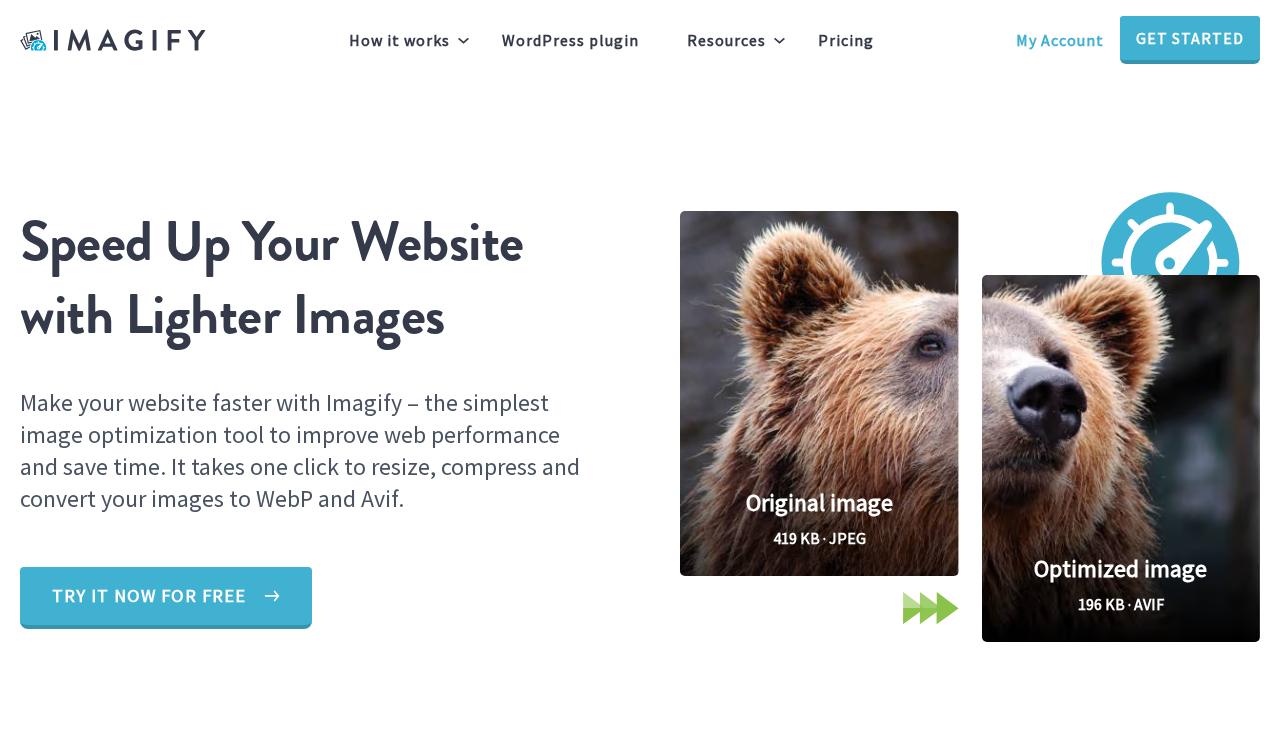
Imagify is a cloud-based image optimization service with a WordPress plugin as its primary delivery method. The plugin sends images to Imagify’s servers for processing, which compress and convert them to smaller files, then returns the results to your WordPress media library. Your server is not involved in the compression computation itself, which keeps CPU load on your hosting account near zero during optimization runs.
The company behind Imagify is WP Media, a French WordPress-focused software company also responsible for WP Rocket. If you have used WP Rocket, you already have an accurate picture of the design philosophy: opinionated defaults that work well without manual tuning, with advanced settings available for users who want them.
Imagify has been in the WordPress plugin directory for several years and now sits at over 1 million active installs with a 4.3 out of 5 rating across 1,651 reviews on WordPress.org. The rating breakdown shows strong polarization: 1,290 five-star reviews alongside 222 one-star reviews. The most common criticism in negative reviews centers on upsell notifications inside the free version and, in at least one recent case, a billing issue with the Growth plan. Those are covered in the cons section.
Version 2.3.1, released in late July 2026, added OAuth 2.1 and PKCE authentication for the plugin’s new AI and MCP (Model Context Protocol) integration, a newer feature that lets AI tools such as Claude and GitHub Copilot interact with Imagify directly. More on that in the features section.
Who Imagify is best for
Strong fit:
- Small site owners and bloggers who upload images at a pace of a few hundred per month and want WebP and AVIF conversion without a paid subscription.
- WP Rocket users who want a performance plugin from the same developer, with a workflow that fits naturally alongside WP Rocket’s caching and performance defaults.
- WooCommerce store operators who need automatic compression on product image uploads and want bulk optimization for an existing catalog.
- Photography portfolio sites where lossless compression is needed to preserve image quality (the Normal compression mode covers this).
- Teams managing multiple websites: all Imagify plans, including free, allow unlimited websites under one account.
- Sites working toward better Core Web Vitals and Google PageSpeed scores, where next-gen format delivery (WebP, AVIF) is one of the most common audit recommendations.
- WordPress Multisite operators: Imagify supports multisite fully.
Weak fit:
- Sites that regularly upload large images above 2 MB and cannot move to a paid plan. The free tier will reject or be unable to optimize those files.
- Sites where images must not leave the server for processing. Imagify, like all cloud-based optimization services, transmits images to its servers during the optimization pass. Imagify states that images processed via the plugin are deleted from its servers after one hour.
- Users who expect unlimited free usage. The 20 MB monthly cap is generous enough for minimal publishing but will stop mid-month on any active publishing schedule.
- Sites that need a stated refund window before committing to a paid plan. Imagify does not list a money-back guarantee on its pricing page.
Setup and user experience
The Imagify plugin installs from Plugins > Add New in the WordPress admin. Search for “Imagify” and it appears at the top of results. After activation, the plugin prompts you to connect an API key. Getting the key requires a free account at imagify.io, which takes about two minutes.
The setup flow requires leaving WordPress once to register on imagify.io, copy an API key, and paste it into the plugin settings. That extra step is a minor friction point compared to Smush, which activates without any registration for basic compression. However, the account also serves as the quota dashboard, where you can see how much of your monthly data allowance remains, which is useful information that a no-account setup cannot provide.
Once the key is entered, the plugin shows your plan, your current quota, and a bulk optimization button. The interface is clean and does not require configuration before first use. The default settings (Aggressive compression, WebP generation enabled, original backup enabled) are sensible choices for most sites.
Compression modes
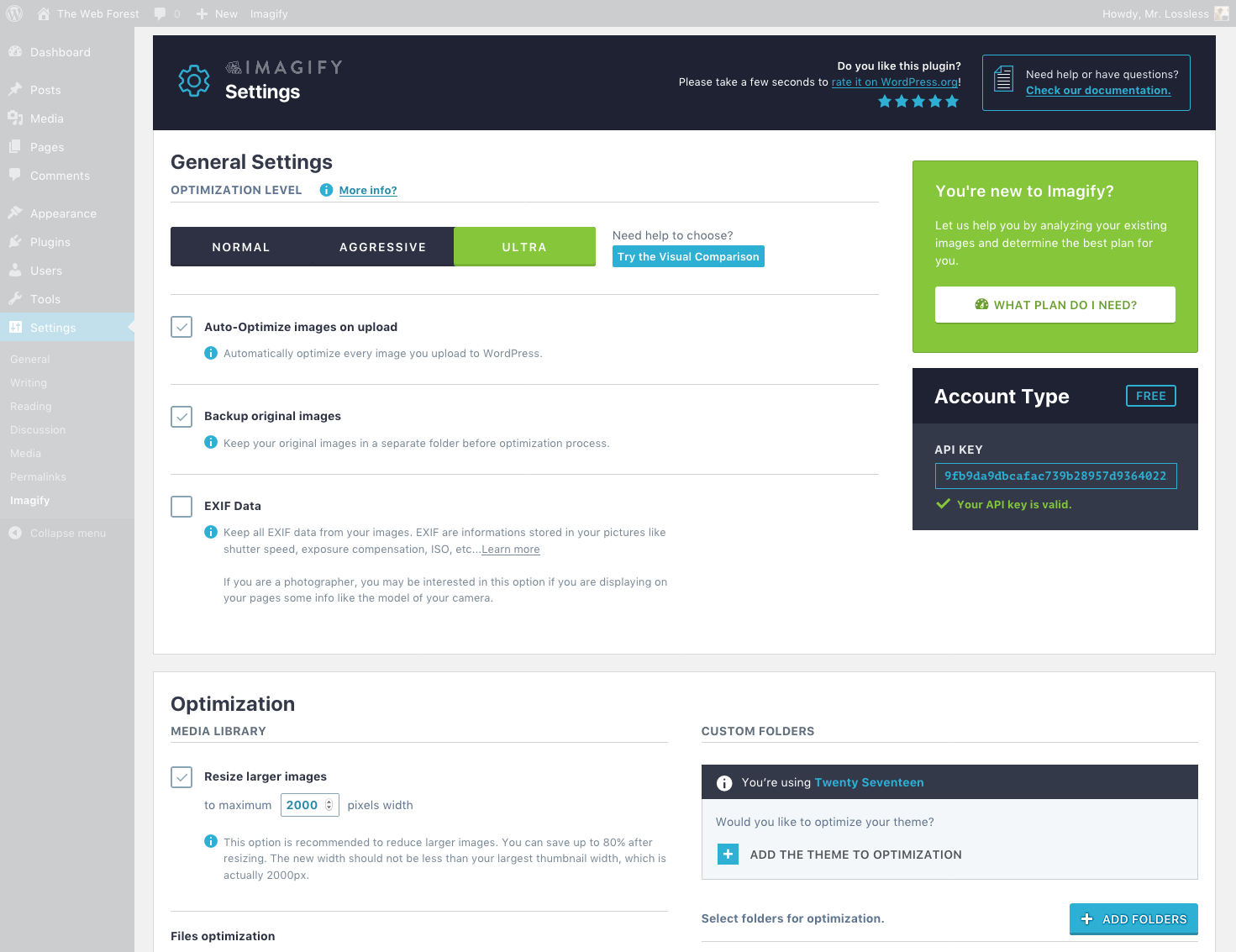
Imagify offers three compression levels, available in the Settings screen and via the API:
- Normal is lossless compression. It removes metadata and non-visible data without changing pixel values. File size reductions are smaller than the other modes, typically 10 to 30 percent. This is the right choice for photographers, print-quality images, or any image where pixel accuracy matters more than file size.
- Aggressive is the default and is the mode Imagify calls “Smart Compression.” It applies lossy compression at a balanced quality setting, typically reducing JPEG files by 50 to 80 percent. Most images look visually identical to the original on screen. This is the setting most sites should leave enabled.
- Ultra applies maximum lossy compression. File sizes are smaller than Aggressive, but some visible quality reduction may appear on detailed images or high-density displays.
The mode applies globally to all images. Imagify does not currently offer a per-image mode selector in the standard plugin UI, so you pick one approach for the whole library.
One thing Imagify does not have is a mid-point perceptual quality mode equivalent to ShortPixel’s “Glossy.” If you need Aggressive-level file savings on most images but want a higher-quality option for specific product shots or portfolio images, you would need to switch compression modes manually and re-optimize those images. That is doable but adds manual steps.
WebP and AVIF conversion
This is where Imagify stands apart from several alternatives in 2026: both WebP and AVIF conversion are available on every plan, including the free tier.
When WebP or AVIF generation is enabled, Imagify creates a converted version of each image alongside the original. WordPress serves the next-gen version to browsers that support it and falls back to the JPEG or PNG for browsers that do not. That automatic fallback requires no additional configuration in the plugin.
AVIF typically delivers 20 to 50 percent smaller files than WebP at equivalent perceptual quality. As of mid-2026, AVIF has solid browser support across Chrome, Firefox, Edge, and Safari.
Unlike ShortPixel, which charges a credit for each format file generated, Imagify’s quota is data-volume based. Generating both a WebP and an AVIF version of an image draws from your monthly MB allowance proportionally to the output file sizes, rather than multiplying a fixed credit cost per thumbnail. Whether that works out to a lower or higher effective cost per image depends on your image mix, but the model is simpler to reason about when planning a budget.
The practical implication: if next-gen format delivery is your primary goal and you are on a budget, Imagify’s free tier gives you both WebP and AVIF conversion with no credit card. That combination is not available for free on every major alternative.
Auto-optimization on upload
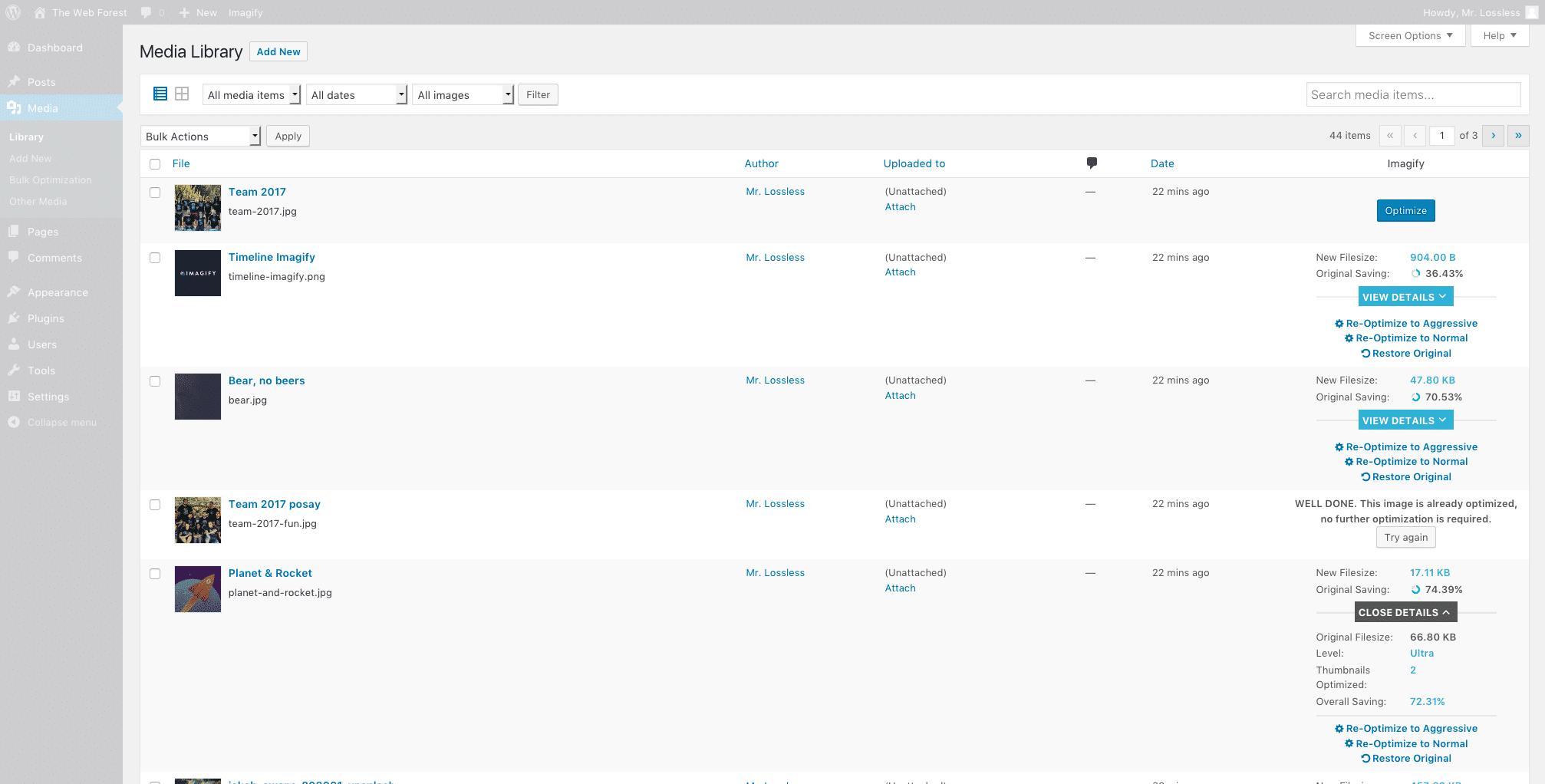
When the plugin is active and configured, it automatically compresses every new image you upload to the Media Library. You do not need to run bulk optimization for new uploads. The plugin intercepts the upload, sends the image to Imagify’s servers for processing, and returns the compressed version and any next-gen format versions to your library.
Auto-optimization is on by default. You can disable it in Settings if you prefer to batch-optimize manually.
WordPress generates multiple thumbnail sizes for each uploaded image (typically four or more, depending on your theme and any plugins that register additional sizes). Imagify optimizes each of those thumbnails alongside the original. You can select which image sizes to include in the Settings panel, so if your theme registers a size you do not actually use on the front end, you can exclude it from optimization to conserve monthly quota.
Bulk optimization
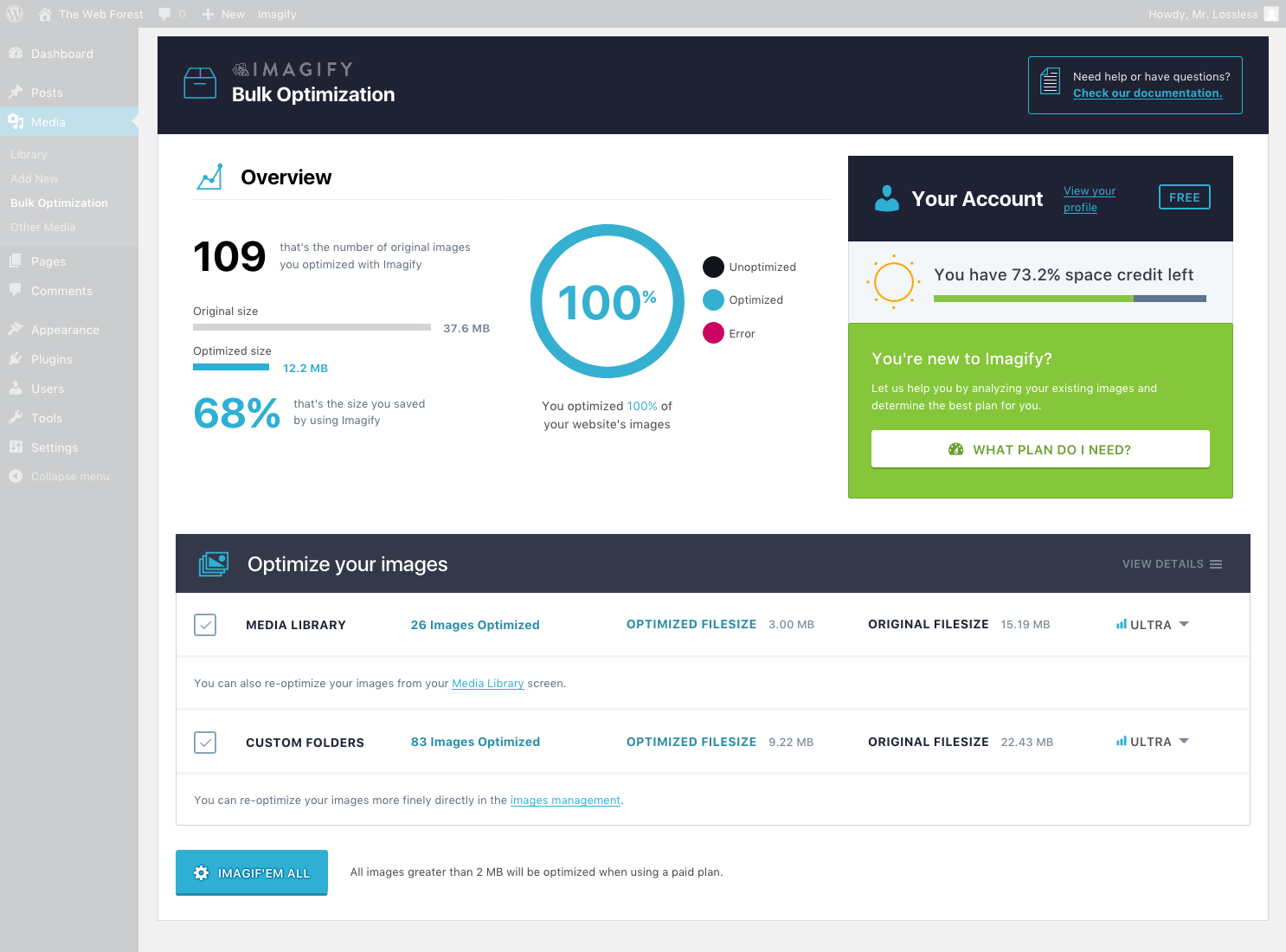
For sites with an existing media library, Imagify includes a bulk optimizer that processes all unoptimized images in the background. The bulk optimization runs asynchronously, meaning you can close the WordPress tab and the queue continues processing via server-side cron. You do not need to keep a browser window open.
The bulk optimizer screen shows a count of optimized and unoptimized images, a progress indicator while running, and a summary of savings once complete. According to recent user reviews, the experience is reliable for large libraries; one reviewer noted a 75 percent overall size reduction across 14,000 images using the Infinite plan.
Note: the bulk optimization flow was reviewed through official plugin screenshots and the vendor’s feature documentation. The asynchronous background processing behavior is confirmed in the WordPress.org plugin description and developer FAQ. A live bulk run against a production media library was not part of this review.
Backup and restore
When the backup setting is enabled (which it is by default), Imagify moves the original image to a dedicated backup folder before optimization. If you ever want to restore an image to its uncompressed original, one click in the Media Library does it.
This is a practical safety net. It means you can run Ultra compression on your library, decide the output quality is not right for your use case, switch to Aggressive, and restore and re-optimize without any data loss. The originals are preserved on your server in the backup folder.
One consideration: the backup folder grows proportionally to your media library size. On a site with tens of thousands of images, that means a significant amount of additional disk space. Imagify does not offer a Smart Backups mode (backing up only the original without all thumbnail sizes) the way ShortPixel now does, so the backup folder includes all sizes.
Importantly, Imagify states that compressed images remain on your server permanently even if you delete your account or remove the plugin. Optimization is not reversible from outside WordPress without the backup, but the optimized images themselves persist.
Image resizing
Imagify can automatically resize images that exceed a maximum width threshold. The default is 2,560 pixels wide, which matches WordPress’s own big-image scaling default since version 5.3. Where WordPress’s native scaling stops at resizing, Imagify then applies compression and next-gen format conversion on top, compounding the file size savings beyond what the core resize achieves.
You can adjust the maximum width in Settings or disable automatic resizing entirely.
MCP and AI integration
Version 2.3.0, released in mid-2026, introduced native Model Context Protocol (MCP) support. This means AI tools that support MCP, including Claude Desktop, GitHub Copilot, and others, can interact with Imagify directly using natural language.
Practical examples of what an AI agent can do via MCP:
- Query the current optimization status of your media library.
- Check your remaining quota for the month.
- Trigger optimization or restoration of individual images.
This feature requires WordPress 6.9 or higher and Imagify 2.3 or higher. It is enabled by default for users meeting those requirements.
Version 2.3.1 added OAuth 2.1 with PKCE authentication for MCP clients, which is the authentication standard recommended for public clients. It also added a confirmation step before MCP actions consume quota credits, so an AI agent cannot silently exhaust your monthly allowance without a confirmation.
Whether this matters to most users in the near term is debatable. MCP-connected AI workflows are still relatively specialist configurations in 2026. But for developers who work with AI-assisted tooling, having a major WordPress plugin support MCP natively is a meaningful feature to track.
WP-CLI support
Imagify supports WP-CLI for command-line operations, including bulk image restoration (added in version 2.2.9). This is useful for larger sites where a browser-based queue would be impractical, or for developers who manage WordPress through automated deploy and maintenance workflows.
WP-CLI support is available on all plans, including free.
Multisite and WooCommerce
Imagify is fully compatible with WordPress Multisite. Each site in a network can connect to the same Imagify account. Quota consumption is shared across the account, so a network with multiple active sites will draw from the same monthly allowance collectively.
WooCommerce compatibility is noted in the changelog, with specific improvements to AVIF compatibility for WooCommerce in recent versions. Product images, thumbnails, and gallery images are handled through the standard WordPress Media Library, so the standard optimization workflow covers them automatically.
Pricing
Imagify uses a data-volume quota model rather than a per-image credit system. The distinction matters: your monthly allowance is measured in megabytes of optimization data processed, not in the number of individual files or thumbnails.
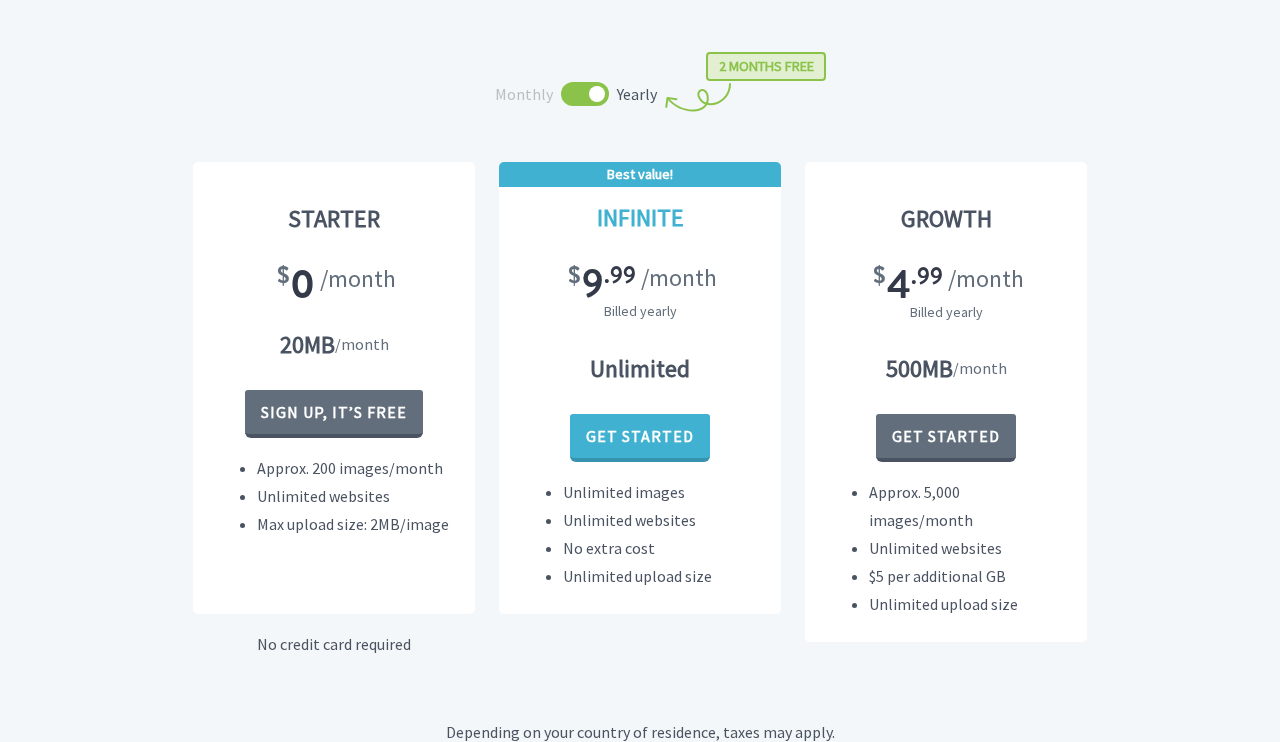
The three plans, with prices verified on imagify.io on 2026-08-05:
Starter (Free)
$0 per month. No credit card required.
- 20 MB of optimization quota per month (roughly 200 standard images)
- 2 MB maximum upload size per image
- All compression modes (Normal, Aggressive, Ultra)
- WebP and AVIF conversion included
- Bulk optimization, backup and restore, auto-optimize on upload
- Unlimited websites
- Images kept on Imagify servers during processing: 1 hour (plugin/API method)
- Images stored via the web app: 24 hours on free plan
Growth
$5.99/month on a monthly billing cycle. $4.99/month billed annually (saves roughly two months’ cost per year).
- 500 MB of optimization quota per month (roughly 5,000 standard images)
- No per-image upload size limit
- All Starter features
- Overage: $5 per additional gigabyte if you exceed 500 MB in a month
Infinite
$11.99/month on a monthly billing cycle. $9.99/month billed annually (saves roughly two months’ cost per year).
- Unlimited optimization data per month
- No per-image upload size limit
- All Growth features
- No overage charges
A few practical notes on pricing:
- No stated money-back guarantee: The pricing page does not mention a trial period or refund window. If a refund policy exists, it is not displayed prominently where you would expect to find it before purchase. This is a notable gap compared to competitors like UpdraftPlus (10 days) or Duplicator (30 days) that show their guarantee clearly.
- Annual billing saves about 17 percent: Two months free per year applies to both Growth and Infinite.
- Taxes may apply: The pricing page notes that taxes may be added depending on your country of residence.
- Overage on Growth: The Growth plan charges $5 per gigabyte over the 500 MB monthly allowance, so a heavy month of uploading will add to the bill without warning. Infinite avoids this completely.
- No per-image credit math: Because the quota is MB-based, you do not need to calculate credits per thumbnail the way ShortPixel users do. One megabyte of processed data is one megabyte of quota, regardless of how many thumbnail sizes are generated. This is simpler for predicting usage.
Who each plan suits:
- Free: Personal blogs, portfolios, and small sites with modest image upload schedules. The 20 MB limit is roughly 200 compressed images, which is adequate for sites that publish weekly with a few images per post.
- Growth: Active publishing sites, small WooCommerce stores, and freelancers managing a handful of client sites. 500 MB covers approximately 5,000 standard images, which is ample for most mid-sized publishing workflows.
- Infinite: High-volume sites, agencies with multiple client sites, WooCommerce stores with large product catalogs, and any site where upload volume is unpredictable and overage charges would be a management burden.
Pros and cons
Pros
- WebP and AVIF conversion are both included at no cost, even on the free plan. Several competitors charge for AVIF specifically, or gate next-gen format conversion behind paid tiers.
- The MB-based quota model is easier to predict and reason about than per-thumbnail credit systems. You know what your quota is without needing to calculate credits times thumbnail count times format variants.
- All plans, including free, support unlimited websites. Most competing services restrict the free tier to one or a small number of sites.
- Background asynchronous bulk optimization: the bulk optimizer runs via cron and does not require an open browser tab.
- One-click backup and restore for original images, included and enabled by default.
- Strong compatibility: WordPress Multisite, WooCommerce, NextGEN Gallery, WP Rocket’s lazy load, AMP, WP-CLI, and all major managed hosting environments.
- Version 2.3.1 is actively maintained and shipping regularly. Recent updates include genuine new capabilities (AVIF, MCP support, OAuth 2.1) rather than only maintenance patches.
- MCP/AI integration: the new Model Context Protocol support in v2.3 allows AI tools to interact with Imagify, which is a forward-looking feature for developer workflows.
- Made by WP Media, the team behind WP Rocket. A track record of reliable WordPress performance tooling.
- No credit card required for the free plan.
- Automatic resizing of images wider than 2,560 pixels reduces file sizes before compression even runs.
Cons
- The 20 MB free quota is thin for any site with active image publishing. A single photoshoot of 30 to 40 large JPEGs can consume most of the monthly allowance in one upload session.
- The 2 MB per-image upload cap on the free plan rules out optimization of high-resolution photography, large product shots, and other files where the source is routinely larger. Photographers and WooCommerce stores will almost always need a paid plan.
- No stated money-back guarantee or refund window. Competing plugins and services often offer 7 to 30 days. Imagify’s pricing page does not mention one.
- At least one recent user review (June 2026) reports a billing defect in the Growth plan where the plugin did not stop processing at the quota limit and did not charge the overage rate correctly. Imagify’s response, per the review, was to suggest upgrading to Infinite. This is a credible enough report to flag, though it may have been resolved in a subsequent patch.
- Upsell notifications inside the free version are a recurring complaint in negative reviews. Several users describe the popups as intrusive. This is a common trade-off in freemium WordPress plugins, but worth knowing before installing.
- Images are transmitted to Imagify’s servers for processing. Imagify deletes plugin-processed images after one hour and web-app images after 24 hours (free plan), but the transmission is still a privacy consideration for sensitive content.
- Global compression mode selection: you cannot set different compression levels for different images without manually switching modes and re-optimizing. Sites that need Aggressive on most images but lossless for specific photography have to handle this manually.
- The 222 one-star reviews out of 1,651 total (about 13.5 percent) is a higher ratio of negative feedback than some alternatives. The common themes are billing friction and upsell notifications rather than technical failures, but the volume is worth knowing.
Alternatives
ShortPixel Image Optimizer is the closest direct competitor. ShortPixel uses a credit-based system (credits per thumbnail, not per MB), which provides more granular accounting but requires more upfront math. ShortPixel’s “Glossy” compression mode, positioned between lossy and lossless, is a genuine differentiator for photography and product images. It also offers AVIF, SmartCompress, Cloudflare cache purging, and AI alt text generation. Its free tier gives 100 credits per month, which is tighter than Imagify’s 20 MB but does not expire mid-session for individual uploads. Unlimited plans start at $9.99/month. Choose ShortPixel if the Glossy mode matters for your image quality needs or you prefer a credit-based system with granular per-image tracking.
EWWW Image Optimizer processes images locally on your server rather than sending them to an external service. For basic lossless compression, it is free and unlimited with no data leaving your server. Lossy compression and WebP require an API key and a small paid plan. EWWW suits privacy-sensitive sites or developers comfortable with server configuration who want maximum control. The trade-off is that it consumes server CPU during optimization runs.
Smush (by WPMU DEV) requires no API key or account for basic compression on the free plan, making it the lowest-friction entry point in the category. Its free tier covers lossless and lossy compression, bulk optimization, and lazy loading. WebP and AVIF are Pro-only features. The 5 MB per-image upload limit on the free tier is more generous than Imagify’s 2 MB cap. Smush is a better starting point for beginners who want zero-setup compression; Imagify is the better choice if WebP and AVIF conversion are needed without paying.
Optimole serves images through a CDN and applies optimization on the fly based on each visitor’s device, viewport, and connection speed. No changes are made to your WordPress Media Library; images are served from Optimole’s CDN instead. The trade-off is that your images are hosted externally rather than on your own domain. Optimole’s free tier allows 5,000 monthly visits and 1 GB CDN bandwidth. Choose Optimole if CDN delivery with automatic device-adaptive sizing matters more than in-library optimization.
Final verdict
Imagify earns its position as one of the most-installed WordPress image optimization plugins in 2026, and after reviewing the current version, there are no compelling reasons to dispute it. The free plan is more useful than the headline numbers suggest: 20 MB and roughly 200 images per month covers a surprising range of low-volume publishing scenarios, and including WebP and AVIF conversion in that free tier puts it ahead of alternatives that charge for next-gen formats.
The MB-based quota model is one of the more honest approaches in the category. You get a clear monthly budget, a simple overage rate on Growth if you exceed it, and a quota-free Infinite plan if predictability is worth $9.99 a month. No credit math. No per-thumbnail multiplication surprises.
The honest caveats are real. The 2 MB upload cap on the free plan is a genuine restriction for photographers and WooCommerce operators. The absence of a stated refund policy is a gap that competing services handle better. The billing issue reported in a recent review, if unresolved, is worth monitoring before committing to Growth specifically.
For most small site owners, freelancers, and mid-sized WooCommerce stores, Imagify is a competent, well-maintained choice from a team with a proven WordPress track record. Install the free plan, run a bulk optimization pass, and you will see meaningful file size reductions with minimal configuration. If your monthly upload volume grows past what the free quota covers, the path to a paid plan is clear and reasonably priced.
Score: 4.2 / 5
FAQ
Browse all WordPress plugin reviews on Best WordPress Plugins.