

Five years ago, building a WordPress membership site meant assembling a stack of separate plugins: one for access control, one for courses, one for community, one for payments, one for affiliate tracking. Each had its own admin panel, its own update cycle, and its own support forum. Getting them to work together cleanly was a project in itself.
MemberPress has spent the past decade trying to change that premise. The plugin started as a content-restriction and subscription tool, and over successive releases it absorbed course delivery, coaching programs, community forums, member directories, an affiliate platform, and an AI course generator. In 2026, the vendor markets it as an “all-in-one” membership platform that can replace what would otherwise be four or five separate plugin subscriptions.
Whether that consolidation justifies the price tag is the core question this review tries to answer.
What this review covers and how it was researched. I do not have a paid MemberPress license for this review. My research was built from the official MemberPress website, features pages, pricing pages, documentation, onboarding wizard documentation, add-on pages, the vendor’s own blog, Capterra and G2 reviews, third-party plugin comparisons from multiple independent sources, and the vendor’s published FAQ on what happens when a license expires. Where a feature is described from documentation rather than first-hand use, the relevant section says so. Pricing figures and feature inclusions are from memberpress.com as of July 2026 and should be verified before purchasing, as MemberPress updates plan inclusions without notice.
At a glance
Platform: Premium commercial plugin, sold only through memberpress.com (no WordPress.org listing) | Free version: no | Paid plans start at: $199.50 per year (introductory; renews at $399 per year) | Transaction fee: 4.9% per payment on Launch plan; 0% on Growth and Scale | Site license: 1 site per plan; additional sites at $69 per year each (up to 15 extras) | Capterra rating: 4.8 out of 5 | G2 rating: 4.7 out of 5 | Trustpilot rating: 4.8 out of 5 | Money-back guarantee: 14 days, full refund | Vendor milestone: customers have together earned over $2.5 billion in total revenue through MemberPress-powered sites | Bottom line: the most complete all-in-one WordPress membership platform in 2026, with a pricing structure that rewards careful plan selection and a renewal cost that buyers should budget for from day one

Quick verdict
MemberPress is the right choice when you need membership access control, online courses, and a community all managed from one WordPress admin, and you are willing to invest in a mid-to-premium annual subscription to get that.
The Growth plan, at $314.55 per year introductory, is where MemberPress becomes a genuinely compelling all-in-one platform: zero transaction fees, content dripping, a full LMS with quizzes and certificates, the CoachKit coaching platform, and ClubSuite community tools (forums and member directories) are all included. If you are running a course-and-community membership site, that replaces a realistic $500 to $1,000 per year in separate plugin subscriptions.
The catch is the renewal price. The introductory prices are roughly half the standard annual rate. What costs $314.55 in year one costs $699 at renewal. Buyers who plan for the first year and not the second will face a significant cost increase they did not budget for.
The other watch-out is the admin lockout policy: if you let your license lapse, MemberPress removes your ability to manage memberships from the WordPress admin. You cannot add new members, issue refunds, or change access rules. Your members can still log in and access their content on the frontend, but your site becomes unmanageable from the backend until you renew. This is an unusual policy in the WordPress plugin market, and it has generated repeated criticism from users who discovered it after the fact.
Quick verdict
Best for: content creators, coaches, and course educators who want one plugin to run courses, community, and gated content on WordPress without building a multi-plugin stack. | Best plan for most sites: Growth, for full LMS, community forums, member directory, coaching tools, and zero transaction fees. | Watch out for: first-year discounts are not the renewal price; Launch plan’s 4.9% transaction fee adds up at scale; admin access is locked if you do not renew; real-time member messaging (ClubConnect) requires the Scale plan. | Standout: one of the only WordPress plugins that combines membership gates, a built-in LMS, a coaching platform, and community forums in a single product.
What MemberPress is
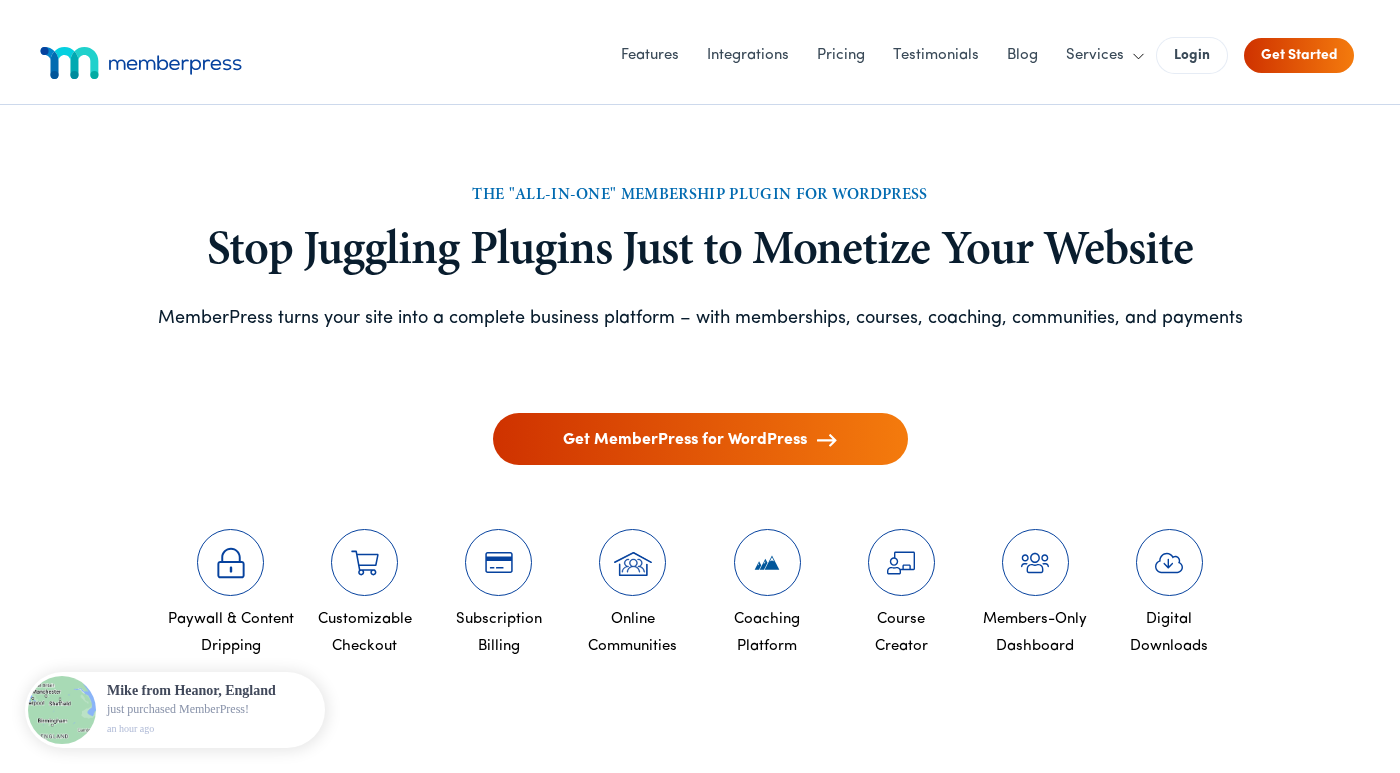
MemberPress is a self-hosted WordPress plugin for running paid membership sites. It handles three core jobs: restricting access to content based on membership status, billing members on a recurring or one-time schedule, and providing members with a registration and account management experience directly inside WordPress.
The company behind the plugin is Caseproof, LLC. Blair Williams is the founder and CEO. Caseproof also recently brought MemberMouse, a competing membership plugin, into the same family. The company reports revenues of approximately $14 million per year with a team of 11 to 50 people. MemberPress launched in 2012-2013 and has added major feature expansions in each subsequent year, most recently ClubSuite community tools (November 2025) and an AI Course Generator.
Unlike WooCommerce, which treats memberships as an extension of product-based ecommerce, MemberPress is built from the ground up around the idea of recurring access. Unlike platforms like Kajabi or Teachable, MemberPress is self-hosted: it runs inside your own WordPress installation, gives you full ownership of member data, and does not route transactions through a third-party platform. That self-hosted model is both an advantage and a responsibility.
MemberPress does not have a WordPress.org listing. It is distributed exclusively through memberpress.com. There is no free tier or trial version; the 14-day money-back guarantee is the entry point.
Who MemberPress is best for
Strong fit:
- Content creators with gated libraries. If you produce videos, articles, podcasts, or downloadable resources that you want to sell behind a subscription paywall, MemberPress’s access rules engine covers the most common and most unusual protection scenarios without custom code. Restricting a specific post, an entire category, a custom post type, or a URL pattern all work from the same Rules interface.
- Online course creators who want one plugin instead of two. The built-in Courses add-on (included in all plans) eliminates the need for a separate LMS like LearnDash or LifterLMS if your course requirements are straightforward. Drag-and-drop curriculum building, quizzes, assignments, drip content, and certificates are all available without an extra subscription.
- Coaches running cohort-based programs. CoachKit, included from the Growth plan, is designed for structured coaching with milestone tracking, habit tracking, client progress dashboards, and scheduling integrations with Calendly and Simply Schedule Appointments. There is not a direct equivalent in the competing membership plugin market.
- Community site builders on WordPress. ClubSuite (Growth and Scale plans) adds private discussion forums and searchable member directories inside WordPress, without a third-party platform like Circle or Mighty Networks. The Scale plan extends this with ClubConnect, which adds real-time messaging between members. For membership site owners who want community features in the same admin and under the same member login, ClubSuite reduces vendor sprawl.
- B2B sellers who need corporate accounts. The Scale plan’s Corporate Accounts feature lets businesses purchase a parent membership that covers multiple sub-accounts. This handles the scenario where a company wants to buy 10 employee seats under one invoice without each employee needing to purchase individually.
- Affiliate-driven membership businesses. The Scale plan includes Easy Affiliate, MemberPress’s own affiliate tracking platform, as a bundled feature. Sites that rely on affiliate partners to drive subscriptions avoid a separate affiliate plugin fee.
Weaker fit:
- Simple paywall sites that do not need courses or community. If all you need is content restriction and a payment form, MemberPress is a larger investment than necessary. Paid Memberships Pro has a free tier with unlimited membership levels, content protection, and payment processing. Restrict Content Pro offers a leaner interface for access-control-only use cases. Either is cheaper for simple paywalls.
- Sellers who want to avoid platform risk on a tight budget. No free tier means zero runway. If a site does not generate enough revenue to justify the renewal, you face either paying the full renewal price or losing backend access to your membership management tools.
- WooCommerce-native stores adding memberships. If your site is already a WooCommerce store and you want to offer product-linked memberships, WooCommerce Memberships integrates into the WooCommerce order flow natively. MemberPress runs alongside WooCommerce but is not built around it.
- Course-first sites with advanced LMS requirements. The built-in Courses add-on covers the standard LMS feature set. It does not match the depth of LearnDash in areas like group management, prerequisites across multiple courses, detailed grade reporting, or SCORM support. If your product is a high-complexity learning management system, a dedicated LMS is a stronger choice.
Installation and setup
MemberPress is distributed as a zip file from the vendor dashboard. You download the plugin file after purchasing a plan, upload it through WordPress via Plugins > Add New > Upload Plugin, and activate it. The plugin does not appear in the WordPress plugin directory search.
After activation, MemberPress displays an onboarding wizard that walks through six setup stages:
- License activation. MemberPress requires a valid license key to function. You log into your MemberPress account from the wizard and the license activates automatically. Without an active license, the plugin will not operate.
- Enable features. The wizard lets you activate add-ons included with your plan, such as Courses or Downloads. Not all add-ons are available on every plan.
- Select content to protect. You choose existing WordPress pages, posts, or courses to protect, or create new ones from this step.
- Create your first membership. You name the membership, choose a billing type (one-time or recurring), and set the price. This first membership is what users will purchase.
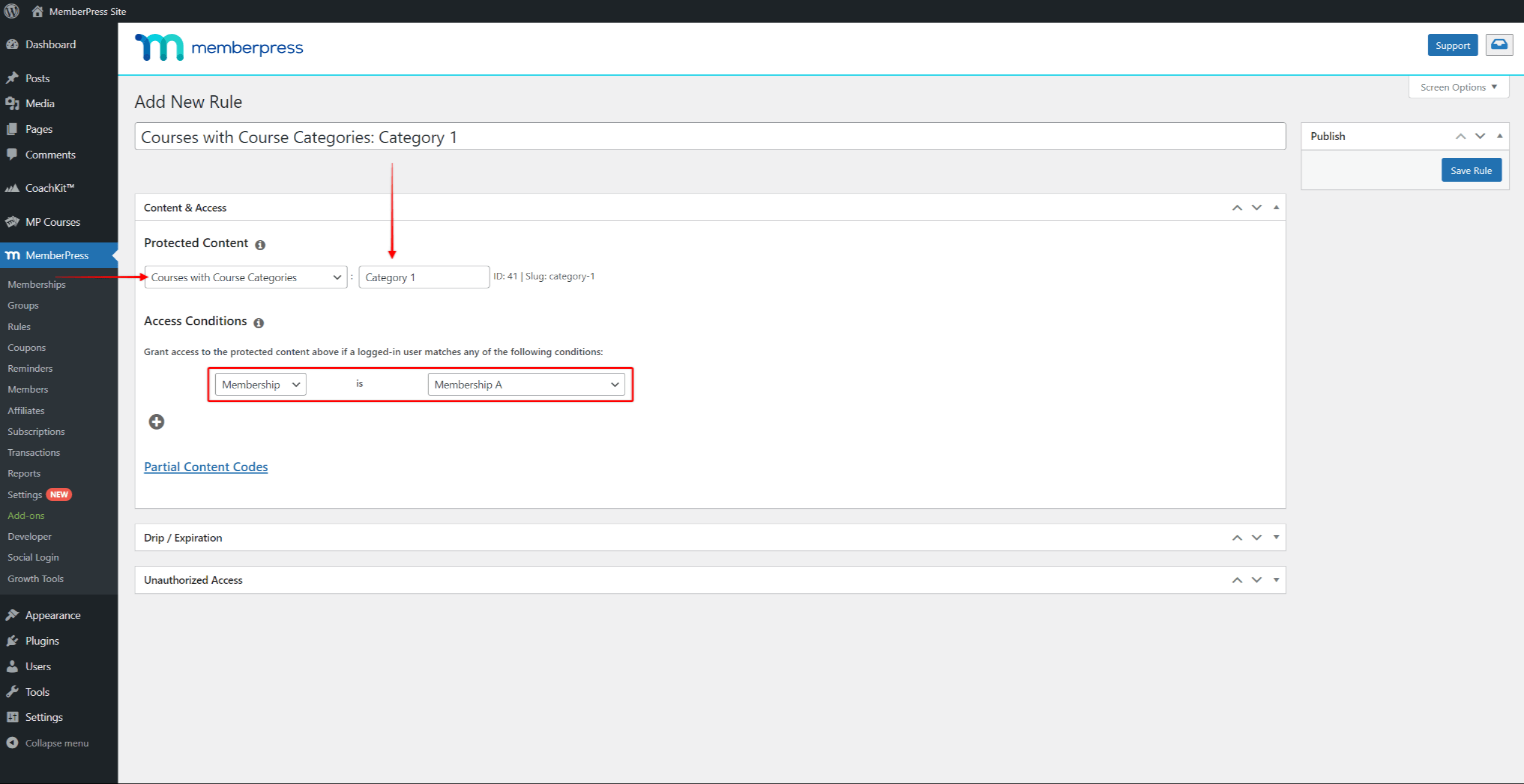
- Set up content protection. The wizard creates a Rule linking the content you selected to the membership you just created. This is the core mechanic: a Rule that says “this content is accessible only to members of this level.”
- Configure payments. You connect a payment processor. On the Launch plan, Stripe is the only option. Growth and Scale plans add PayPal and Square. The Scale plan also adds Authorize.net.
The vendor documentation reports that a new user can complete a working membership site configuration in this wizard in 35 to 60 minutes. The sequential structure is well thought out. Each step builds on the previous one, so by the end of the wizard you have one complete end-to-end flow: a payable membership, content tied to it, and a payment processor ready to accept transactions.
That said, MemberPress has a lot of configuration surface beyond the wizard. Multiple membership tiers, complex rule combinations, email automation, coupons, order bumps, and add-on settings each require separate setup. For a first-time user, the learning curve is real, even if the onboarding starting point is gentle.
(Note: the setup description above is based on official MemberPress documentation and onboarding guides. I did not complete a live installation with a paid license in this review window.)
Access rules: the core mechanic
The Rules system is the engine everything else in MemberPress is built around. A Rule is a definition: a piece of content (or category of content), paired with an access condition (which membership or memberships can access it), with optional time conditions (when the content becomes available or expires).
Rules can protect:
- Individual posts or pages
- All posts in a category or tag
- All posts of a specific custom post type
- Child pages of a specific parent page
- Custom URI patterns (useful for protecting directories or downloadable files at specific paths)
- Partial content within a page (via shortcode or PHP)
- Specific user roles and capabilities
When an unauthorized visitor lands on a protected page, MemberPress can redirect them to a configurable URL (typically a registration or sales page), display a customizable “unauthorized” message, or show a partial excerpt and invite them to subscribe. The exact behavior is configurable per rule.
Drip content. Rules include a drip option that controls when content becomes available after a member joins. You can release content at specific intervals (for example, one lesson per week after registration), on a fixed calendar date, or triggered by a specific membership purchase. The drip is defined at the Rule level rather than the individual post level, which means you can apply consistent release timing across an entire category of content with a single rule.
Expiration. Rules also support content expiration: content that becomes unavailable after a set period following a member’s registration or membership purchase. This is useful for time-limited access products (a one-month course access window, for example) without requiring a separate expiration date per member.
Membership tiers and billing
MemberPress supports an unlimited number of membership tiers. Each tier is a product with its own price, billing cycle, access rules, and registration page. A typical setup might include a monthly tier and an annual tier for the same access level, each priced differently.
Billing types available:
- Recurring subscriptions. Monthly, quarterly, biannually, or annually, with a configurable number of billing cycles (for example, six monthly payments and then the membership expires).
- One-time payments. Lifetime or term-limited access in exchange for a single payment.
- Free memberships. Useful for creating a free tier with limited content access alongside paid tiers.
Trial periods. Memberships can include a configurable free trial before the first billing cycle begins. You can also set a reduced-price introductory period (for example, the first month at $1) before the standard recurring rate applies.
Coupons. MemberPress includes a coupon system with configurable expiration dates, usage limits, discount amounts (fixed or percentage), and the option to restrict coupons to specific membership levels or products.
Order bumps. From the checkout step, MemberPress can display upsell offers at the point of purchase. A visitor buying a basic membership can be offered an upgrade or an add-on before completing their transaction.
Member self-service options include upgrading or downgrading between tiers, canceling subscriptions, updating payment methods, and downloading PDF invoices. These actions are available from the member account area without contacting the site owner.
Built-in courses and LMS
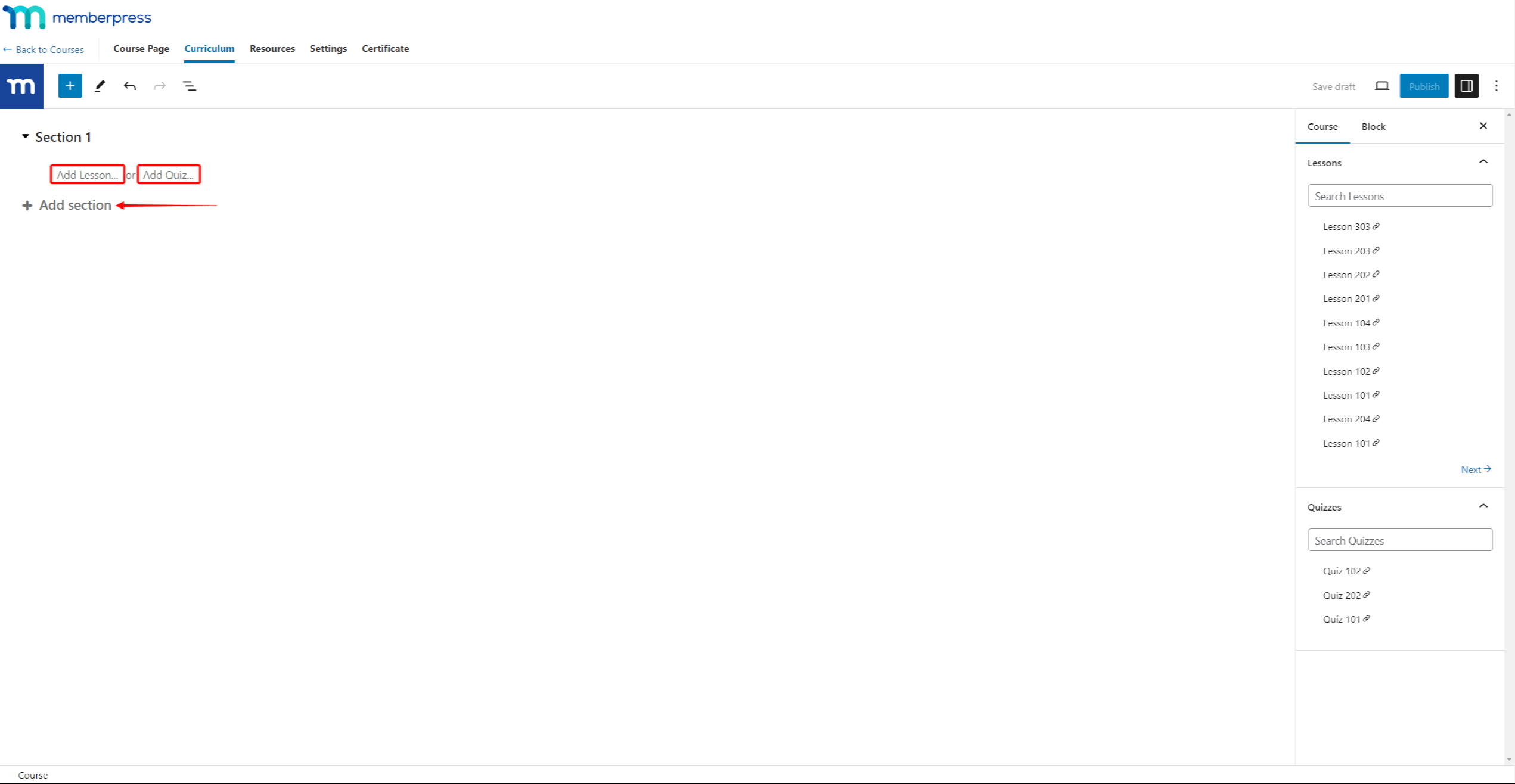
All MemberPress plans include the Courses add-on, which provides a drag-and-drop curriculum builder inside the WordPress Block Editor. This makes MemberPress one of the only membership plugins that bundles LMS functionality rather than leaving you to install LearnDash or LifterLMS separately.
The course structure is: Course > Sections > Lessons. You build the curriculum in a visual editor, add content to each lesson, and publish. Courses integrate with the MemberPress access rules system, so you can gate an entire course or individual sections behind specific membership tiers.
What is included across plans:
On the Launch plan: unlimited courses and lessons, drag-and-drop curriculum builder, and the AI Course Generator (25,000 AI credits, which can generate course outlines, lesson text, and quizzes from a prompt).
On Growth and Scale plans: everything in Launch, plus unlimited quizzes (nine quiz types available), assignment submissions (essays, files, videos), course completion certificates, content dripping at the individual lesson and section level, and a gradebook for student progress tracking.
AI Course Generator. MemberPress ships an AI-powered tool that lets you describe a course topic in plain language and receive a draft curriculum with sections, lessons, and quiz questions. The output is a starting point rather than finished course content, but for site owners building their first course, it reduces the time cost of structuring a curriculum. The AI credit allocation varies by plan: 25,000 on Launch, 50,000 on Growth, 100,000 on Scale.
Where the built-in LMS has limits. The MemberPress Courses add-on handles the most common online course requirements well. It does not match the depth of dedicated LMS plugins in certain areas: there is no SCORM or xAPI content import support, group enrollment management for organizations, prerequisite chains across multiple courses (only basic prerequisites within a single course), or advanced instructor-led grading workflows. For a straightforward online course business, these omissions will not matter. For enterprise training programs or complex eLearning environments, a dedicated LMS is a stronger foundation.
Community features with ClubSuite
ClubSuite is MemberPress’s answer to the “community” problem: membership sites that want discussion and member discovery without adding a separate platform like Circle or Mighty Networks.
Launched in November 2025, ClubSuite components are included from the Growth plan upward, with the full suite available on Scale.
ClubDirectory (Growth and Scale). A searchable member directory where members can build public (or member-only-visible) profiles, add photos, and list information relevant to the membership community. Directories are filterable by membership level, location, and custom fields. This is the feature that enables a membership site to function as a professional network where members can find and contact each other.
ClubCircles (Growth and Scale). Private discussion forums built inside the membership site. Members can post threads, reply, react with emoji, and follow discussions. Circles can be open to all members or restricted to specific membership tiers. The forum experience is basic compared to a dedicated forum platform, but it lives inside the same WordPress login, which eliminates the friction of sending members to an external community tool.
ClubConnect (Scale only). Real-time direct messaging, available exclusively on the Scale plan. ClubConnect adds one-to-one and group messaging inside the site, along with live chat within directories and circles. For coaching programs using CoachKit, this provides a direct messaging channel between coaches and clients that does not require a separate messaging tool.
Growth-plan sites get community forums and a member directory, which handles the core community use case for most membership businesses. Real-time messaging between members requires upgrading to Scale.
ClubSuite is a meaningful addition to the MemberPress ecosystem because it covers the most common community requirements inside WordPress. Whether the features are deep enough to replace a dedicated community platform depends on the site’s needs. For a course-and-community membership where community is a supporting feature, ClubSuite on Growth handles the requirement. For a community-first business where discussion, real-time interaction, and engagement tools are the core product, a purpose-built community platform will offer more flexibility in moderation, analytics, and scale.
Coaching with CoachKit
CoachKit is described as “the industry’s only membership-coaching platform for WordPress.” It is included from the Growth plan and provides structure for coaching businesses where clients follow defined programs rather than simply accessing gated content.
CoachKit includes:
- Unlimited coaching programs with customizable structures
- Milestone and habit tracking for client progress
- Personalized learning paths
- Scheduling integrations with Calendly and Simply Schedule Appointments
- Automated progress reminders
- Direct messaging between coach and clients via ClubConnect (requires Scale plan)
The practical use case is a coach who runs cohort programs: for example, a 12-week business coaching course where each client progresses through milestones, checks in with progress tracking, and books sessions with the coach through an embedded scheduling tool. MemberPress handles the subscription billing, the content access, the course delivery, and the coaching management layer in one dashboard.
For coaches who run straightforward one-on-one or group programs, CoachKit provides meaningful structure that would otherwise require a separate coaching platform subscription. It is not a full coaching CRM; it does not replace HoneyBook, Dubsado, or similar business management tools for coaches who need proposals, contracts, and invoicing outside the membership context.
Payment gateways
MemberPress’s payment gateway coverage depends on the plan:
Launch plan: Stripe only. Stripe integration covers credit and debit cards, Apple Pay, Google Pay, Cash App, and buy-now-pay-later options where supported by Stripe in the buyer’s region. International currencies supported via Stripe’s standard capabilities. A 4.9% MemberPress transaction fee applies to every successful payment in addition to Stripe’s own processing fees.
Growth plan: Adds PayPal and Square. The 4.9% MemberPress transaction fee is eliminated. You pay only the standard rates charged by your payment processor.
Scale plan: Adds Authorize.net. Zero transaction fees from MemberPress.
MemberPress does not publish its own transaction fee as a separate line item on the checkout page. The 4.9% is deducted from the payment before it reaches your account via Stripe. At $1,000 per month in membership revenue, that is $49 per month going to MemberPress on top of the annual plan fee. At $5,000 per month, it is $245 per month. The fee makes the Launch plan significantly more expensive than its $199.50 price tag suggests once revenue grows.
Tax calculation is available across all plans. MemberPress can compute VAT and sales tax based on the buyer’s billing country, with a TaxJar integration available for automated US sales tax compliance on the Scale plan.
PDF invoices are generated automatically and available for members to download from their account area.
Integrations
MemberPress integrates with several categories of tools:
Email marketing. Mailchimp is included on the Launch plan. ActiveCampaign, Drip, Constant Contact, ConvertKit, GetResponse, and AWeber are available on paid add-on tiers or higher plans. Tags and lists can be assigned based on which membership a user purchases, enabling segmented email sequences per product.
Automation. Zapier integration is included on the Scale plan, connecting MemberPress events (new member, cancelled membership, membership expired) to any Zapier-connected tool.
REST API. Available on Scale, giving developers programmatic access to member data, memberships, and transactions.
Affiliate marketing. Easy Affiliate is bundled into the Scale plan. For lower-plan users, third-party affiliate plugins (AffiliateWP, for example) can integrate with MemberPress, though this requires a separate license.
Page builders. An Elementor integration is available that adds MemberPress access conditions to Elementor containers, letting you show or hide page sections based on membership status without creating a separate protected page.
Amazon S3. Available on Scale, for hosting course files and downloads outside WordPress’s media library.
The integration list covers the most common marketing and automation needs. The narrower coverage on lower plans (Mailchimp only for email on Launch, no Zapier below Scale) means buyers who rely on other email providers or automation tools need to budget for either an upgrade or a third-party bridge.
Pricing
MemberPress offers three plans. All prices shown are first-year introductory rates. Renewals are at the standard rate, which is roughly double the introductory price. The pricing page states: “Special introductory pricing, all annual renewals are at full price.”
Launch ($199.50 per year introductory; $399 per year at renewal)
- 1 site
- Stripe payments only
- 4.9% MemberPress transaction fee on every payment
- Unlimited courses and lessons
- Drag-and-drop curriculum builder
- AI Course Generator (25,000 AI credits)
- Unlimited members
- Unlimited membership levels
- Content protection and access rules
- Digital downloads
- Coupons and order bumps
- ReadyLaunch page builder
- Mailchimp integration
- PDF invoices
- Basic support
Growth ($314.55 per year introductory; $699 per year at renewal)
Everything in Launch, plus:
- 0% MemberPress transaction fee (keep 100% of revenue from your payment processor)
- PayPal and Square payment gateways
- Full LMS: unlimited quizzes, assignments, course completion certificates
- Content dripping at lesson and section level
- CoachKit coaching platform
- ClubSuite community: ClubDirectory (member directory) and ClubCircles (discussion forums)
- AI Course Generator (50,000 AI credits)
- Priority support
Scale ($399.60 per year introductory; $999 per year at renewal)
Everything in Growth, plus:
- Authorize.net payment gateway
- ClubConnect real-time messaging and live chat for member directories and circles
- Amazon S3 integration
- REST API access
- Zapier integration
- Easy Affiliate platform (affiliate program management)
- Corporate Accounts (bulk B2B membership sales)
- Gifting and gift cards
- 100,000 AI credits
- VIP support
Additional site licenses. Each plan covers one WordPress installation. Additional sites cost $69 per year each, up to a maximum of 15 additional licenses per account (16 sites total). Agencies or developers managing multiple client sites should factor this per-site cost into their pricing calculations.
The renewal price math. A site on Growth paying $314.55 in year one pays $699 in year two and every year thereafter. Over three years, the total cost is $1,727.55 ($314.55 + $699 + $699). A buyer comparing MemberPress Growth to a stack of Paid Memberships Pro (free), a dedicated community tool, and a basic LMS may find the renewal price changes the value calculation significantly in years two and three.
A 14-day money-back guarantee applies to all plans.
What happens if you do not renew
MemberPress’s renewal policy is more restrictive than most WordPress plugin vendors. According to the official FAQ, if your license expires:
- Frontend stays active. Existing members can log in, access content they were approved for, and use any features already active on the site.
- Backend becomes inaccessible. You lose the ability to manage memberships from the WordPress admin. This means you cannot add new members, issue refunds, change access rules, or modify membership settings.
This is an unusual policy in the WordPress plugin market. Most commercial plugins continue to function fully after a license expires; they simply stop receiving updates and support. MemberPress’s backend lockout means a lapsed license leaves the site in an unmanageable state. Users who discovered this policy without expecting it have been vocal critics of it.
For buyers building a business on MemberPress, this makes renewal effectively mandatory rather than optional.
Pros and cons
Pros
- Genuine all-in-one platform: membership access control, billing, built-in LMS, community forums, member directories, coaching tools, and (on Scale) real-time messaging, all in one plugin from a single vendor.
- Access rules engine is mature and flexible. You can protect individual pages, categories, custom post types, URL patterns, and partial page sections without code.
- Content dripping and expiration are first-class features, not afterthoughts. They are configured at the Rule level, making it practical to drip an entire content library with a manageable number of rules.
- Built-in Courses add-on (all plans) eliminates the cost of a separate LMS plugin for most course-based membership sites.
- CoachKit (Growth+) is a differentiated feature with no direct equivalent among competing membership plugins on WordPress.
- ClubSuite (Growth+) brings community forums and a searchable member directory inside WordPress, reducing the need for a separate community platform for the core discussion and discovery use case.
- Zero transaction fees on Growth and Scale plans. You pay only what Stripe, PayPal, or Square charge.
- Unlimited membership levels on all plans. There is no plan-based cap on the number of tiers you can create.
- Member self-service for upgrades, downgrades, cancellations, and payment method updates. Reduces support burden.
- Order bumps and coupons available on all plans. Both features are standard, not gated behind higher tiers.
- PDF invoices generated automatically and accessible to members from their account area.
- 14-day money-back guarantee.
- Over $2.5 billion in revenue earned by MemberPress customers since launch, per the vendor.
- Strong recent support reputation. Third-party reviews consistently cite fast, detailed responses.
- AI Course Generator across all plans, with credit allocation increasing at higher tiers.
Cons
- No free version. There is no free plugin, no sandbox, and no trial period beyond the 14-day money-back guarantee. You must purchase to test in a real environment.
- Admin lockout on license expiry. If you do not renew, you lose access to the membership management backend. You cannot add members, issue refunds, or modify rules. This is a more restrictive expiry policy than most WordPress plugin vendors.
- Renewal prices are significantly higher than first-year introductory prices. Growth renews at $699 per year after a $314.55 first year. Scale renews at $999 per year after a $399.60 first year. The actual ongoing cost of MemberPress is roughly double what the pricing page initially displays.
- The Launch plan’s 4.9% transaction fee is a material cost at any meaningful revenue level. On $2,000 per month in membership revenue, that is $98 per month added to the $399 renewal, making the real annual cost around $1,575 on the lowest plan. The case for upgrading to Growth to eliminate the fee is strong once revenue exceeds roughly $600 per month.
- 1 site per plan. Each additional WordPress installation costs $69 per year. Agencies or developers managing multiple client sites face meaningful add-on costs.
- No WordPress.org listing. Distribution through the vendor’s own website means no independent install count, update prompts work through a custom mechanism, and the plugin does not benefit from the visibility and trust signals of the WordPress directory.
- CoachKit and ClubSuite forums and directory are Growth-and-above features. The Launch plan cannot run a community or coaching program, limiting its usefulness to straightforward paywall and course delivery sites.
- Real-time member messaging (ClubConnect) requires the Scale plan. Growth-plan community sites get forums and directories but not live chat or direct messaging between members.
- Zapier and REST API access require Scale. Sites on Launch or Growth that need automation or API integrations must upgrade or use workarounds.
- Built-in LMS does not support SCORM, group enrollment management at scale, or advanced prerequisite logic. For enterprise eLearning use cases, a dedicated LMS is a stronger match.
- Email marketing integrations beyond Mailchimp require Growth or custom add-ons. A ConvertKit or ActiveCampaign user on the Launch plan cannot connect their email platform without additional cost or workaround.
Alternatives to MemberPress
- Paid Memberships Pro. The most obvious free-tier alternative. Paid Memberships Pro offers unlimited membership levels, content restriction, Stripe and PayPal integration, and member management at no cost on its core plugin. It lacks MemberPress’s built-in LMS, community tools, and coaching features, but for straightforward paywall sites it is a fully capable free option. Paid plans start at $247 per year for advanced payment gateways and add-ons.
- LearnDash. The leading dedicated WordPress LMS plugin. Choose LearnDash if courses are your primary product and you need advanced prerequisites, group enrollments, SCORM support, or enterprise learning features. LearnDash pairs with a separate membership plugin (including MemberPress) for subscription billing. LearnDash starts at $199 per year.
- Restrict Content Pro. A developer-favored membership plugin now bundled within Easy Digital Downloads Pro plans. Choose Restrict Content Pro if you want a lean, performance-focused access control plugin without community or coaching overhead. It is a simpler tool than MemberPress, suitable for gated content and subscription billing without the all-in-one feature surface.
- WooCommerce Memberships. A native fit if your site already runs on WooCommerce. WooCommerce Memberships ties access rules to WooCommerce product purchases, enabling product-linked memberships that feel native to an ecommerce flow. It requires WooCommerce and works best when memberships are tied to physical or digital product purchases rather than standalone subscription plans.
- BuddyBoss. A platform purpose-built for community membership sites. BuddyBoss includes member profiles, activity feeds, messaging, groups, and a course player (via LearnDash integration) in a cohesive design system. Choose BuddyBoss if community is the primary product and course delivery or coaching is secondary. BuddyBoss starts at $228 per year.
- Kajabi. A fully hosted all-in-one platform for courses, memberships, coaching, and community. Choose Kajabi if you want to avoid WordPress hosting, plugin updates, and site maintenance entirely. The trade-off is vendor lock-in, higher per-seat pricing, and less control over site design and data. Kajabi starts at $149 per month.
Final verdict
MemberPress earns its position as the leading all-in-one WordPress membership plugin in 2026 by delivering a coherent platform rather than a collection of loosely connected features. The access rules engine is mature and reliable. The built-in LMS is genuinely useful for most course creators without requiring a separate LMS subscription. CoachKit and ClubSuite, both relatively recent additions, close the gaps that previously sent membership site owners to external platforms for community and coaching. For a creator who wants to build a complete membership business on WordPress and does not want to manage a four-plugin stack, MemberPress makes a credible case.
The pricing requires clear-eyed evaluation. The introductory rates are marketing prices, not operating costs. A membership site running on the Growth plan for three years pays $1,727.55 over that period, not $314.55. That comparison matters when evaluating whether MemberPress saves money versus a separate-plugin approach. In many cases, it still does: a realistic stack of a membership plugin, a course plugin, a community platform subscription, and a coaching tool can easily cost more than $999 per year at renewal. But the math depends on which alternatives you would otherwise use.
The admin lockout on license expiry is the policy I would want every buyer to understand before purchasing. Most WordPress plugins stop sending updates when a license lapses, but the plugin keeps working fully. MemberPress takes your backend access away. For a site with active members, that is not a hypothetical inconvenience. If the renewal cost is unaffordable in a given year, the site’s membership operations become frozen until it is paid. That dynamic makes MemberPress’s renewal pricing a committed operational cost rather than an optional software upgrade expense.
For course creators, coaches, and community-driven membership site owners who plan to sustain and grow their platform long-term, MemberPress is the most complete WordPress-native solution available. Buy in knowing the renewal price, understand the lockout policy, and the platform delivers real value.