

BackupBuddy launched in 2010 and spent more than a decade as the go-to premium WordPress backup plugin for developers and agencies who wanted something more than a free option from the plugin directory. It was reliable, it ran on your server, and the ImportBuddy restore script gave it a recovery path that competitors did not match. A lot of agency workflows were built around it.
By 2026, the plugin has been through three names, two acquisitions, and a consolidation that ended its life as a standalone product. It is now called Kadence Backups, bundled into the Kadence platform, and no longer available for purchase on its own. The official solidwp.com URL redirects to a Liquid Web page. Legacy security updates run through April 2027.
That context matters before you read anything else in this review. Solid Backups is still running on hundreds of thousands of WordPress sites, and the plugin itself still works. But buying it is no longer a simple decision the way it was in 2023.
This review covers what Solid Backups actually does, what it costs in its current form, what the brand consolidation means practically for new and existing users, and where it fits (and does not fit) in the 2026 backup plugin landscape.
Note on basis: this review is built on the official SolidWP documentation (now archived via Nexcess docs), the plugin changelog through version 9.1.18, third-party hands-on reviews, pricing pages from before and after the May 2026 consolidation, and public user feedback. A full live paid install with real restore drills against a production database was not available in this test window. Where features are documented but not exercised against a live account, the relevant section says so. Pricing was checked across multiple sources through July 2026. Verify current pricing and availability directly from the Liquid Web or Kadence product pages before purchasing.
At a Glance
- Product history: BackupBuddy (2010) to Solid Backups (2022/2023 rebrand) to Kadence Backups (May 2026). Three names, one underlying plugin.
- Current availability: No longer sold as a standalone plugin. Bundled into the Kadence Pro plan. Existing standalone licenses honored until renewal; standalone plan structure no longer available for new purchases.
- Free tier: None. Never had a free version.
- Unique feature: Stash Live, a cloud-side incremental backup system that runs backups from SolidWP’s servers rather than your hosting account.
- Bottom line: A historically reliable plugin that reached 2026 mid-transition. Existing users on active licenses get a functional tool with a clear support horizon. New buyers should weigh the Kadence bundle pricing against standalone alternatives before committing.
Quick verdict
Solid Backups has earned its reputation over 15 years. The combination of scheduled full-site backups, Stash Live real-time cloud storage, and the ImportBuddy restoration script gives it a feature set that genuinely differs from what most self-hosted backup plugins offer. ImportBuddy in particular solves a problem most plugins ignore: how do you restore a WordPress site when wp-admin is down?
For buyers in 2026, the honest recommendation is more nuanced. If you are already on a paid Solid Backups license and your renewal is active, the plugin still works and your investment is protected through April 2027 for security updates. If you are a new buyer evaluating backup options, the story is harder to tell: the standalone product is gone, and accessing Kadence Backups now requires a Kadence Pro bundle at roughly $219 per year that includes a theme builder, block library, and other features you may not need.
Quick Verdict
- Best for: WordPress agencies and developers already in the Kadence or SolidWP product ecosystem who need backup integrated with their existing tool stack.
- Best plan for most users: Kadence Pro (the current bundle that includes backup functionality, starting around $219/year). For standalone backup needs, the value case is weaker than it was in 2024.
- Standout: Stash Live cloud-side incremental backup removes server load entirely; ImportBuddy restore script works when wp-admin is down.
- Watch out for: No standalone purchase available since May 2026; Google Drive support was removed in 2024; 1 GB of included Stash Live storage fills quickly on content-heavy sites; no free version to evaluate before buying.
What Solid Backups is
Solid Backups started life in 2010 as BackupBuddy, built by iThemes, a WordPress theme and plugin company founded in 2008 in Oklahoma City. It became one of the first widely adopted premium WordPress backup plugins, building a reputation for reliability at a time when the alternatives were thin.
Liquid Web acquired iThemes in January 2018. In 2022 and 2023, the company rebranded its product suite under the SolidWP banner: iThemes Security became Solid Security, BackupBuddy became Solid Backups, and iThemes Sync became Solid Central. The rebrand was positioned as a fresh start with renewed focus on core functionality.
On May 12, 2026, Liquid Web merged all of its brand subsidiaries, including SolidWP, IconicWP, Restrict Content Pro, and MemberDash, into a unified Kadence ecosystem. The SolidWP brand was dissolved. Solid Backups became Kadence Backups. It is no longer sold as a standalone plugin.
The underlying plugin, Solid Backups Legacy (version 9.1.18 as of February 2026), is still operational on existing installations. The product roadmap had also introduced a new cloud-native version called Solid Backups NextGen before the consolidation, which runs backups from SolidWP’s own servers rather than the hosting account. That NextGen approach is now the basis of Kadence Backups within the current Kadence bundle.
As a self-hosted WordPress plugin, Solid Backups Legacy installs directly from the SolidWP member portal (not from WordPress.org, as this is a commercial plugin with no free directory listing). It runs on your server, reads your files and database, and writes backup archives to whichever storage destination you configure.
The plugin protects WordPress sites across three use cases:
- Backup: scheduled and manual full-site or component-specific backups with retention rules and offsite storage to multiple cloud destinations.
- Restore: one-click restore from the WordPress dashboard, database-only rollback, individual file recovery, and the ImportBuddy standalone restore script.
- Migrate: site cloning, staging environment creation, domain migration with URL search-and-replace, and deployment tools.
Who Solid Backups is best for
Strong fit:
- WordPress agencies and freelancers who are already using Kadence, formerly Solid Security, or formerly Solid Central, and want backup integrated into the same product ecosystem.
- Existing Solid Backups license holders with active subscriptions who want to continue using a familiar tool with a clear support horizon through April 2027.
- Development teams who need the ImportBuddy restore path: a standalone PHP script that can recover a WordPress site even when the WordPress admin is completely inaccessible.
- Site owners managing larger content sites where Stash Live’s server-side processing is valuable because it does not consume hosting account resources during backup runs.
- Developers running staging workflows who want push/pull deployment and site cloning built into the same backup tool.
Weak fit:
- New buyers evaluating standalone backup plugins for a single site. The standalone purchase option is gone; you now need a Kadence Pro bundle at a significantly higher price than the old $99 Basic plan, and that bundle includes products you may not need.
- Budget-conscious site owners who want a capable free version to test before paying. Solid Backups has never had a free tier, and the current bundled pricing raises the entry cost further.
- Sites with large media libraries where Stash Live’s included 1 GB of cloud storage fills quickly. Additional Stash storage is available but adds cost on top of the bundle price.
- Sites that rely on Google Drive as a backup destination. Google Drive support was removed from the plugin in version 9.1.14 (released November 2024) and does not return in later releases.
- Teams building new long-term infrastructure who want a vendor with a stable standalone roadmap. The current Kadence integration introduces uncertainty about how the backup feature will evolve within a multi-product bundle.
Installing and setting up Solid Backups
Solid Backups is not available in the WordPress.org plugin directory. It is a premium-only plugin. You access it through the SolidWP member portal (now redirected to Liquid Web’s Nexcess documentation infrastructure) after purchasing a license.
After downloading and installing the plugin through WordPress, Solid Backups adds a “Solid Backups” or “BackupBuddy” menu item to the WordPress left navigation, depending on the version. The main tabs in the interface are:
- Backups: shows existing backups with options to download, restore, or delete each one.
- Scheduling: configures automatic backup schedules, frequencies, and retention limits.
- Remote Destinations: configures connections to cloud storage accounts (Amazon S3, Dropbox, OneDrive, and others).
- Stash Live: the real-time cloud incremental backup control panel.
- Restore/Migrate: backup-based restore wizard and the ImportBuddy migration option.
- Settings: backup profile configuration and plugin preferences.
- Diagnostics/Tools: server environment checker and site health information.
The setup flow for a basic backup involves: creating a backup profile (which files and database tables to include), connecting a remote storage destination, and setting a schedule. Most users will configure at least two scenarios: a full-site backup running weekly or monthly, and a database-only backup running daily or more frequently.
Solid Backups also has a one-button backup option on the main screen for immediate manual runs, which is useful before plugin updates or theme changes.
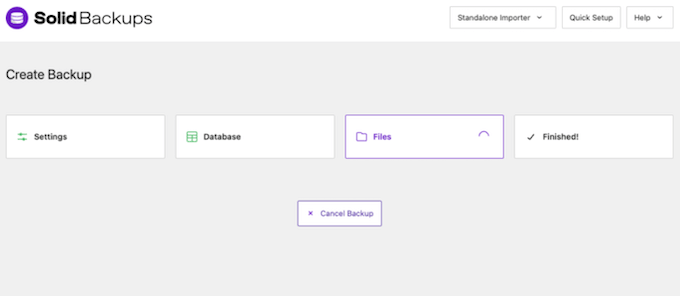
The setup process is straightforward for a premium plugin. Reviewers consistently describe the initial configuration as manageable without technical expertise, though the scheduling interface and backup profile options offer enough configuration depth to satisfy experienced developers who want fine-grained control.
One legitimate critique of the interface: it shows its age. The admin panel layout has not had a significant redesign in recent years, and it does not match the cleaner, more modern feel of newer backup plugins. Functional, but visually dated.
Backup features
Backup types
Solid Backups supports four backup types:
- Complete backup: the entire WordPress installation, including the database, all plugins, themes, the uploads folder, and WordPress core files. This is the all-in type that produces a single archive of everything.
- Database-only backup: captures only the MySQL/MariaDB database (all WordPress tables). Produces a smaller archive; useful for frequent scheduled runs between less frequent full-site backups.
- Files-only backup: captures all site files without the database.
- Custom backup profiles: select specific database tables, specific directories, or a defined subset of the full site. Advanced users can build profiles targeting, say, only the wp-content/uploads folder or a set of custom database tables.
The custom profile system is genuinely useful for agencies managing complex sites where different components need different backup cadences. Back up the database every 4 hours, run a full-site backup every Sunday, and create a custom profile just for the uploads directory once a week. All three schedules can run independently.
Scheduling
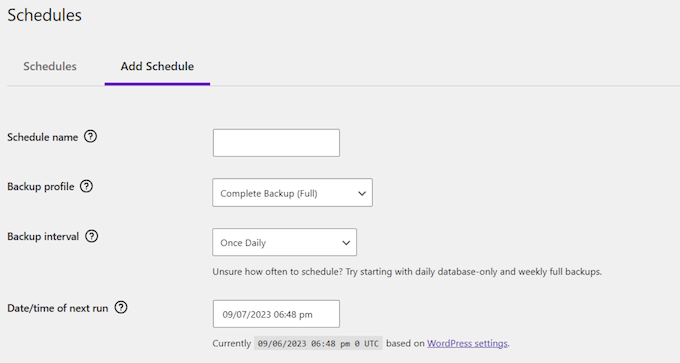
Solid Backups runs backups via the Action Scheduler system (as of the 9.1.0 release), replacing the older WordPress cron approach for Stash Live operations. The Action Scheduler change improved reliability: backup operations continue even when the administrator who started the run is no longer in the admin interface, which was a known failure point for cron-based backups on shared hosting.
Schedule frequency options include hourly, daily, weekly, and monthly, with user-selectable execution times. Retention rules control how many backups to keep per schedule. Each schedule can point to a different remote storage destination.
The Action Scheduler change benefits Stash Live specifically. For standard scheduled full-site backups, the plugin still uses WordPress cron. On shared hosting environments where cron is unreliable (cron fires only when a page is visited), large or infrequent backups can still be delayed. The plugin surfaces a warning when it detects cron health issues, but cannot fix the underlying hosting constraint.
Backup profiles
Backup profiles are a notable strength. They let you define reusable backup templates with a specific combination of: which files to include or exclude, which database tables to include, which remote destination to send the archive to, and how long to retain it.
Multiple profiles can run on different schedules from a single plugin install. An agency managing a WooCommerce store, for example, could configure: a real-time Stash Live profile for the database, a nightly database backup to Amazon S3, and a weekly full-site backup to Dropbox, all running automatically.
Storage destinations
Solid Backups Legacy (pre-consolidation) supports the following remote storage destinations:
- Stash Live (SolidWP’s own cloud storage service, included with every plan)
- Amazon S3 and S3-compatible services
- Dropbox
- Microsoft OneDrive
- Rackspace Cloud Files
- FTP and SFTP
- Email delivery
- Local server (on-disk storage within wp-content; not recommended as a primary destination)
One important change to note: Google Drive support was removed in version 9.1.13 (deprecated July 2024) and fully removed in 9.1.14 (November 2024). If you are an existing user who configured Google Drive as a backup destination before version 9.1.14, your Google Drive connection was automatically removed from your schedules when you updated the plugin. You need to reconfigure a different destination.
This is a meaningful reduction in the plugin’s storage destination list. Google Drive is one of the most commonly used free cloud storage accounts among WordPress site owners, and removing it without a direct replacement affects a significant number of users. The plugin’s current storage list is functional but shorter than what UpdraftPlus offers on its free tier.
The Stash Live service is the primary cloud destination for most Solid Backups users and deserves its own section below.
Stash Live: cloud-side backup
Stash Live is the feature that most clearly differentiates Solid Backups from competing self-hosted backup plugins. Here is what it does and why it matters.
Most self-hosted backup plugins run the backup process on your hosting server: reading files, compressing them into a zip archive, and then uploading that archive to a remote destination. On a shared hosting account, that process consumes CPU and memory, can slow the site for visitors during the backup run, and can time out on large sites if PHP execution limits are reached.
Stash Live runs differently. The backup engine runs on SolidWP’s cloud servers rather than your hosting account. Your site sends changed files and database changes to the Stash cloud; SolidWP’s infrastructure handles the processing and storage. The practical result: backup runs do not tax your hosting resources in the same way a traditional plugin backup does.
Stash Live also runs incrementally. After the initial full backup, only changed files and database records are captured and sent to the cloud. This keeps ongoing storage consumption low and makes each subsequent backup run fast, without requiring a full site archive every time.
The granular tracking of changes covers posts, pages, plugin updates, media uploads, and theme files. You can view the backup history in a timeline, which shows backups in context with site events.
Limitations to understand:
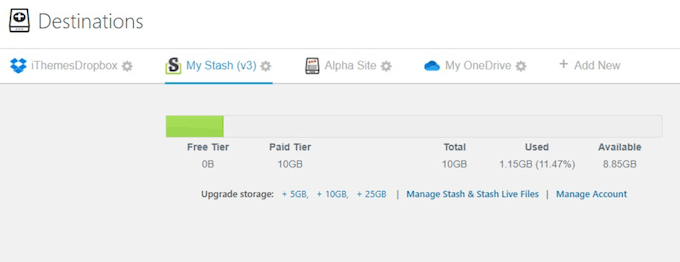
- Storage included is minimal. Every Solid Backups plan includes only 1 GB of Stash Live storage. A site with more than a few dozen images and a moderately sized database will fill 1 GB quickly. Additional Stash storage is available, but at extra cost on top of the plugin license.
- Stash Live is SolidWP’s proprietary cloud. Unlike connecting to your own Google Drive or Amazon S3 account, Stash Live stores your backup on SolidWP’s infrastructure (via their own managed servers). You do not control the storage account directly. If your Solid Backups subscription lapses, access to your Stash Live backups may also lapse.
- The restore from Stash Live still requires WordPress access. The cloud-side processing advantage applies to the backup direction. Restoring from Stash Live runs through the WordPress admin. If your site is fully down, you need ImportBuddy for the restore path (covered in the next section).
The NextGen version of Solid Backups (introduced before the May 2026 consolidation and now the basis of Kadence Backups) extends this cloud-first model further: backups are initiated entirely from the cloud side, with no plugin-based cron dependency at all. This is the cleaner architectural evolution, though it is available only through the new Kadence bundle pricing.
Restore and recovery
Solid Backups gives you four distinct restore paths, which is more granularity than most competing plugins provide.
One-click restore from the dashboard
The standard restore: go to Solid Backups, select the backup you want, click Restore, choose full restore or database-only, and the plugin handles the rest. This is the appropriate path for most scenarios, including plugin update breaks, theme changes that went wrong, and content accidents. It requires a working WordPress install and admin access.
Database rollback
If you need to undo a database change without touching your theme files, plugins, or media, the database rollback option restores only the database tables from a selected backup. This is useful for rolling back a bulk content edit, a migration error, or a faulty plugin data change without disrupting everything else.
Individual file recovery
You can restore individual files from a backup archive without running a full-site restore. This is useful for recovering a deleted or corrupted file (a modified template, a specific media file, a configuration file) without overwriting a working site.
ImportBuddy
ImportBuddy is a standalone PHP script that ships with every Solid Backups installation. It is the plugin’s most distinctive recovery feature and the reason many agencies standardised on BackupBuddy in the first place.
The restore flow using ImportBuddy:
- Download the backup archive and the importbuddy.php file to your computer.
- Upload both files to the root directory of the destination server via FTP or a file manager.
- Point a browser at
yourdomain.com/importbuddy.php. - The ImportBuddy wizard runs: it reads the archive, creates or connects the database, runs a full-database search-and-replace for the old domain URL, updates wp-config.php, and completes the site restoration.
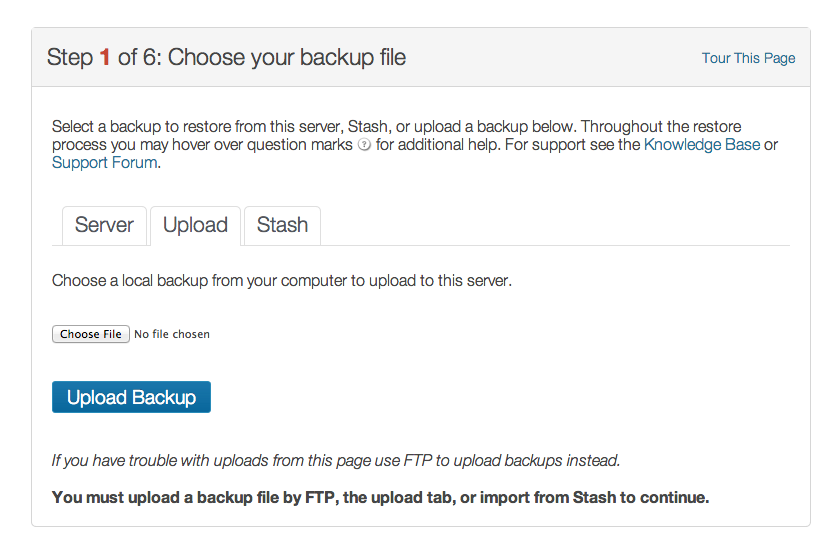
The critical capability here: ImportBuddy does not need a working WordPress install to run. You are not restoring through wp-admin. You are running a standalone PHP script directly against the server. If WordPress itself is broken, if the database is corrupted, or if a botched update left the site completely unresponsive, ImportBuddy can still restore the site from a previously downloaded archive.
This is a genuine advantage over most self-hosted backup plugins, which restore through the WordPress admin panel and cannot help if that panel is unavailable.
ImportBuddy also handles site migrations: the URL search-and-replace engine rewrites old domain references across all database tables, including serialized data, which handles the common case of internal links pointing to the old domain after a server move.
(Note on basis: ImportBuddy’s behavior is documented from the official plugin documentation, the SolidWP changelog, and third-party tested reviews. A live ImportBuddy restore on a production database was not exercised in this test window, but the restore workflow is well-documented and consistent across multiple independent sources.)
Malware scanning
Solid Backups includes a built-in malware scanner that checks your site against four external reputation databases:
- Google Safe Browsing
- Norton Safe Web
- PhishTank
- SiteAdvisor (McAfee)
These databases flag known malicious domains and pages. The scanner checks whether your site’s URLs appear in any of them, surfacing a warning if the site is flagged as unsafe.
This is a reputation-based scanner rather than a file-level malware scanner. It tells you whether your site has been flagged by third-party blocklists, not whether malicious code is present in your wp-content directory. If you need a file-scanning tool that detects obfuscated PHP injections or malicious JavaScript in your theme files, you need a dedicated security plugin (Solid Security, Wordfence, or similar) rather than the scanner built into Solid Backups.
The scanner is a useful early-warning tool, but it is not a replacement for a security plugin. The two do different things.
Diagnostics and site health
The Diagnostics section surfaces information about your WordPress installation that can affect backups and general site health: PHP configuration limits, server memory, database table sizes, and any configuration issues that might cause a backup to fail or slow. This is useful for identifying problems before a backup fails mid-run rather than troubleshooting after the fact.
The diagnostics dashboard is particularly helpful on shared hosting accounts where PHP memory limits and execution timeouts are the most common causes of failed large-site backups. Seeing these values before you need them in an emergency saves time.
The 2026 situation: what buyers need to know
This deserves its own section because it directly affects every purchasing decision.
What happened: On May 12, 2026, Liquid Web consolidated all of its brand subsidiaries, including SolidWP, into a unified Kadence platform. Solid Backups was absorbed into this platform and renamed Kadence Backups. It is no longer available for standalone purchase.
For existing license holders: Your license remains valid as long as your subscription stays active. Features and pricing do not change during the active subscription period. Security patches for legacy versions continue through April 2027. After that date, the legacy version receives no further updates.
For new buyers: You cannot purchase Solid Backups as a standalone plugin. To access the backup functionality (now branded Kadence Backups), you need to purchase a Kadence Pro plan, which bundles the backup feature with a page builder, block library, theme, and other tools. Kadence Pro is priced around $219 per year as of mid-2026. This represents a significant price increase from the old $99 Basic standalone plan if backup is all you want.
What this means in practice: For buyers who want backup functionality only, paying $219 per year for a bundle of products, most of which are not relevant to the backup use case, is a poor value compared with standalone alternatives. UpdraftPlus Premium covers two sites with incremental backups and a wider storage destination list for roughly $70 per year ex-VAT. BlogVault starts at $89 per year with managed cloud storage, real-time WooCommerce capture, and an emergency restore path. Both are available as standalone backup-specific products.
If you are already using Kadence as your page builder and block library, the bundle becomes much more reasonable because you are paying for a product suite you actually use. For buyers who are not in the Kadence ecosystem and are evaluating backup options specifically, the value case for the current pricing is hard to make.
Pricing
Pre-consolidation standalone pricing (no longer available for new purchases):
- Basic: $99/year (1 site, 1 GB Stash Live storage)
- Plus / Small Business: $199/year (5 sites)
- Agency: $299/year (10 sites)
- Larger agency: $499/year (50 sites)
- Lifetime: $599 one-time payment
Additional Stash Live cloud storage was available separately, starting at approximately $35/year for 5 GB. All standalone plans included one year of updates and support with annual renewal required. The standalone plan structure is no longer available for new purchases as of May 2026.
Current pricing (post-consolidation):
Solid Backups functionality is now included in Kadence plans. Kadence Pro is approximately $219/year. The NextGen cloud-backup version is available as a standalone cloud service starting at approximately $8.25/month (billed annually), but this is a fully cloud-managed service distinct from the Legacy plugin model.
Existing legacy license holders retain their features and pricing during their active subscription period. Renewals after the consolidation are subject to new terms.
Notes for buyers:
- Verify all pricing directly from the Kadence or Liquid Web pricing pages before purchasing, as the pricing and bundle structure changed significantly in May 2026.
- Existing users renewing after May 12, 2026 may be subject to updated terms, including Liquid Web’s master service agreement introduced at the merger.
- The April 2027 support cutoff for legacy versions is a hard deadline: after that date, running the legacy plugin means running without security patches.
Pros and cons
Pros
- More than 15 years of real-world use across hundreds of thousands of WordPress sites; BackupBuddy was a category-defining plugin that demonstrated what reliable WordPress backup could look like.
- Stash Live cloud-side processing removes backup load from your hosting server, a genuine architectural advantage for content-heavy sites on shared hosting.
- Incremental backup via Stash Live means only changed content is captured after the first full run, keeping ongoing storage usage low.
- ImportBuddy is the most practical restore path available in any self-hosted backup plugin: it works when WordPress admin is down, and it handles domain search-and-replace automatically during migration.
- Multiple backup types and custom profiles give experienced users fine-grained control over what gets backed up, how often, and where it goes.
- Database-only rollback and individual file recovery let you undo targeted changes without running a full-site restore.
- Push/pull deployment and site cloning support staging workflows from within the same tool.
- Malware reputation scanning via Google Safe Browsing, Norton Safe Web, PhishTank, and SiteAdvisor for early-warning threat detection.
- Diagnostics panel surfaces PHP and server configuration issues before they cause backup failures.
- Active development through version 9.1.18 as of February 2026; the plugin was being maintained to within months of the consolidation.
Cons
- No free version, ever. You cannot try the plugin before purchasing. The entry cost is a full paid license.
- No longer sold standalone as of May 2026. New buyers must purchase a Kadence Pro bundle to access the backup functionality, at around $219/year compared with the former $99 entry price.
- Google Drive support was removed in November 2024 (version 9.1.14). If you relied on Google Drive as your backup destination, you must reconfigure a different storage account.
- Only 1 GB of Stash Live cloud storage is included with all legacy plans. Additional storage costs extra. A single image-heavy site can fill 1 GB quickly.
- Legacy version support ends in April 2027. Running the plugin beyond that date means running without security updates, which is not a safe long-term strategy.
- The transition from BackupBuddy to Solid Backups to Kadence Backups represents three names in roughly four years. The brand confusion is real and makes support documentation, third-party tutorials, and community knowledge harder to find and apply.
- Dated interface. The legacy admin panel has not received a significant UX refresh. Compared with newer backup plugins, the settings panel looks and feels several years old.
- Stash Live storage lives on SolidWP/Kadence’s infrastructure, not your own cloud account. If your subscription lapses, so does your Stash cloud backup access.
- Full-site backup archives can become unmanageable in size for sites over 10 GB without relying on Stash Live’s incremental approach.
- WooCommerce backup is scheduled, not real-time. Orders placed between the last scheduled backup and a failure event will not appear in the most recent backup.
Alternatives to Solid Backups
- UpdraftPlus. The most-installed WordPress backup plugin. The free version includes scheduled backups to eight remote storage destinations with selective restore. UpdraftPlus Premium adds incremental backups, pre-update auto-snapshots, and a wider storage list. For buyers who were evaluating Solid Backups as a standalone backup plugin at the former $99 price point, UpdraftPlus Premium Personal (roughly $70 ex-VAT per year for two sites) is the first alternative to consider. It does not have ImportBuddy’s standalone restore path, but it covers more storage destinations including Google Drive, which Solid Backups removed.
- BlogVault. A fully managed backup service where the engine and storage run on BlogVault’s cloud. The Emergency Connector restores your site even when the hosting server is fully down and WordPress is inaccessible, covering the scenario ImportBuddy addresses in a different way. BlogVault also includes real-time WooCommerce order capture and integrated staging. Paid only, starting at $89/year.
- Duplicator. A migration-first plugin that also functions as a backup tool. The free version handles unlimited manual full-site migrations. Duplicator Pro adds scheduled cloud backups and Recovery Points. If site migration is a primary use case, Duplicator is the strongest free migration tool available.
- Jetpack VaultPress Backup. Real-time activity log backups from Automattic, included in the Jetpack Creator plan. Choose it if you are already in the Jetpack ecosystem and want event-driven backup capture for WooCommerce. Subscription model adds up quickly for agencies.
- WPvivid. A free backup and migration plugin with direct site-to-site migration tokens in the free tier. A simpler, lower-cost alternative for sites that do not need the depth of Solid Backups or UpdraftPlus.
For most buyers evaluating backup plugins in 2026 who are not already in the Kadence ecosystem, the practical decision is UpdraftPlus (free for personal sites, $70/year for one or two business sites) or BlogVault (managed service with stronger emergency restore and WooCommerce support). Solid Backups was a strong contender at $99/year; at Kadence Pro pricing, the value proposition for backup-only buyers has narrowed significantly. Browse more options in the reviews category.
Final verdict
Solid Backups built a legitimate reputation over 15 years. ImportBuddy’s standalone restore, Stash Live’s cloud-side incremental processing, the granular backup profile system, and the consistent reliability that agencies came to depend on were all genuine differentiators. This is not a plugin that fell out of favour because it stopped working. It is a plugin that got absorbed into a corporate consolidation that changed the terms for everyone.
In 2026, the honest assessment is this: if you already hold an active Solid Backups license and your workflow is built around it, continue using it. It is a proven tool, your license terms are protected through April 2027 for security updates, and there is no reason to rebuild a working backup workflow before your situation requires it. When renewal or migration becomes necessary, evaluate at that point.
If you are choosing a WordPress backup plugin today with no prior commitment, Solid Backups is no longer the clean recommendation it was in 2023. The standalone purchase option is gone. The Kadence bundle represents a different value calculation than a purpose-built backup plugin. The removal of Google Drive support removed a destination that many users depended on. And the April 2027 legacy support cutoff introduces a hard deadline that did not exist before.
For the broad majority of WordPress site owners who want backup, and backup only, the alternatives are clearer value in 2026.