


WP Event Manager has been around for over nine years. It has 20,000 active installs according to WordPress.org, a 4/5 star rating across 248 reviews, and a positioning it repeats loudly: the number one all-in-one event management plugin for WordPress.
That positioning is debatable. The Events Calendar has 600,000 installs. Modern Events Calendar has 150,000. WP Event Manager does not lead the category in raw install count. What it does offer, though, is a genuinely useful free plugin with a feature most competitors lock behind a paywall: frontend event submission.
This review covers WP Event Manager as it stands in 2026, version 3.4.1. I tested the free plugin’s event listing, frontend submission, and admin setup. Premium add-ons are covered from official documentation and verified public sources, with clear disclosure where I did not have hands-on access.
WP Event Manager: At a glance
Free core plugin: Yes, on WordPress.org (20,000+ installs, version 3.4.1)
Premium bundles: From ~$99/yr for 1 site (Event Manager Plus, 20 add-ons)
Ticketing: Commission-free via WooCommerce (paid Sell Tickets add-on)
Frontend submission: Free, included in core plugin
Calendar view: Paid add-on required
Recurring events: Paid add-on required
Developer: WP Event Manager team / Ashok Dudhat (9+ years active)
Quick verdict
WP Event Manager’s free plugin delivers more than most event plugins offer for nothing. Frontend event submission, filterable listings, a field editor, and WooCommerce compatibility all ship in the free tier. If you run a community event directory or multi-organizer site and budget is tight, the free plugin gets you further than almost any alternative.
The premium story is more nuanced. The add-on model is flexible, but the math adds up quickly once you need a calendar, ticketing, recurring events, and email alerts. Bundles help, but bundle pricing is not cheap. A handful of recent negative reviews point to breaking updates and support inconsistencies that are worth knowing before you commit.
Quick verdict
Best for: Community event directories, multi-organizer sites, and developers who want a flexible listing framework.
Easiest win: Free plugin for straightforward event listing with frontend submission and search filters.
Most defensible paid option: Event Manager Plus bundle (~$99/yr for 1 site) if you need calendar, ticketing, and core add-ons together.
Skip if: You need recurring events and a calendar in the free tier. WP Event Manager makes you pay for both.
Watch out for: Breaking changes in past updates, support response inconsistencies, and pricing that grows fast if you buy individual add-ons rather than bundling.
What WP Event Manager is
WP Event Manager is a WordPress event listing and management plugin built on a directory framework. Its architecture is closer to a job board plugin than a traditional calendar plugin. Events are custom post types. The frontend shows filterable listing pages, not a calendar grid by default. A calendar view is available, but only through a paid add-on.
The free plugin has been live on WordPress.org since around 2015. Version 3.4.1 is the current release as of mid-2026, updated approximately one month ago. Active installs sit at 20,000 or more. The plugin is maintained by a dedicated team led by developer Ashok Dudhat.
The plugin handles in-person, virtual, and hybrid events, and can integrate with WooCommerce for ticketing with the appropriate add-on. It is available in 40 or more languages with RTL support included.
Who WP Event Manager is best for
Strong fit:
- Community organizations and membership sites that want visitors or members to submit their own events through a frontend form, without admin access.
- Event directories and local listing sites where multiple organizers post independently.
- Developers and agencies building custom event experiences who want a clean custom post type framework and developer-friendly code structure.
- WordPress sites that already run WooCommerce and want to add ticket sales without adopting a completely separate plugin ecosystem.
- Nonprofits and associations with modest budgets that can get meaningful functionality from the free tier alone.
Weaker fit:
- Site owners who need a calendar view without paying extra. WP Event Manager’s free plugin shows events as filterable listings, not a traditional month-grid calendar.
- Users who need recurring events at no cost. Recurring event management requires the Recurring Events add-on.
- Teams who need Zoom integration or virtual event networking. Both are paid add-on features.
- Sites where the admin is the sole event creator and frontend submission adds no value. In that case the free plugin’s main differentiator does not apply.
Setup and first impressions
WP Event Manager installs from the WordPress plugin directory like any standard plugin. The setup is clean: one core plugin, no forced account creation, no API key to obtain before the plugin works.
After activation, the plugin creates three pages automatically: Events, Submit Event, and My Events. The Events page shows the listing. The Submit Event page shows the frontend submission form. My Events shows each logged-in user their own submitted events. These shortcode-driven pages are inserted for you, which is convenient.
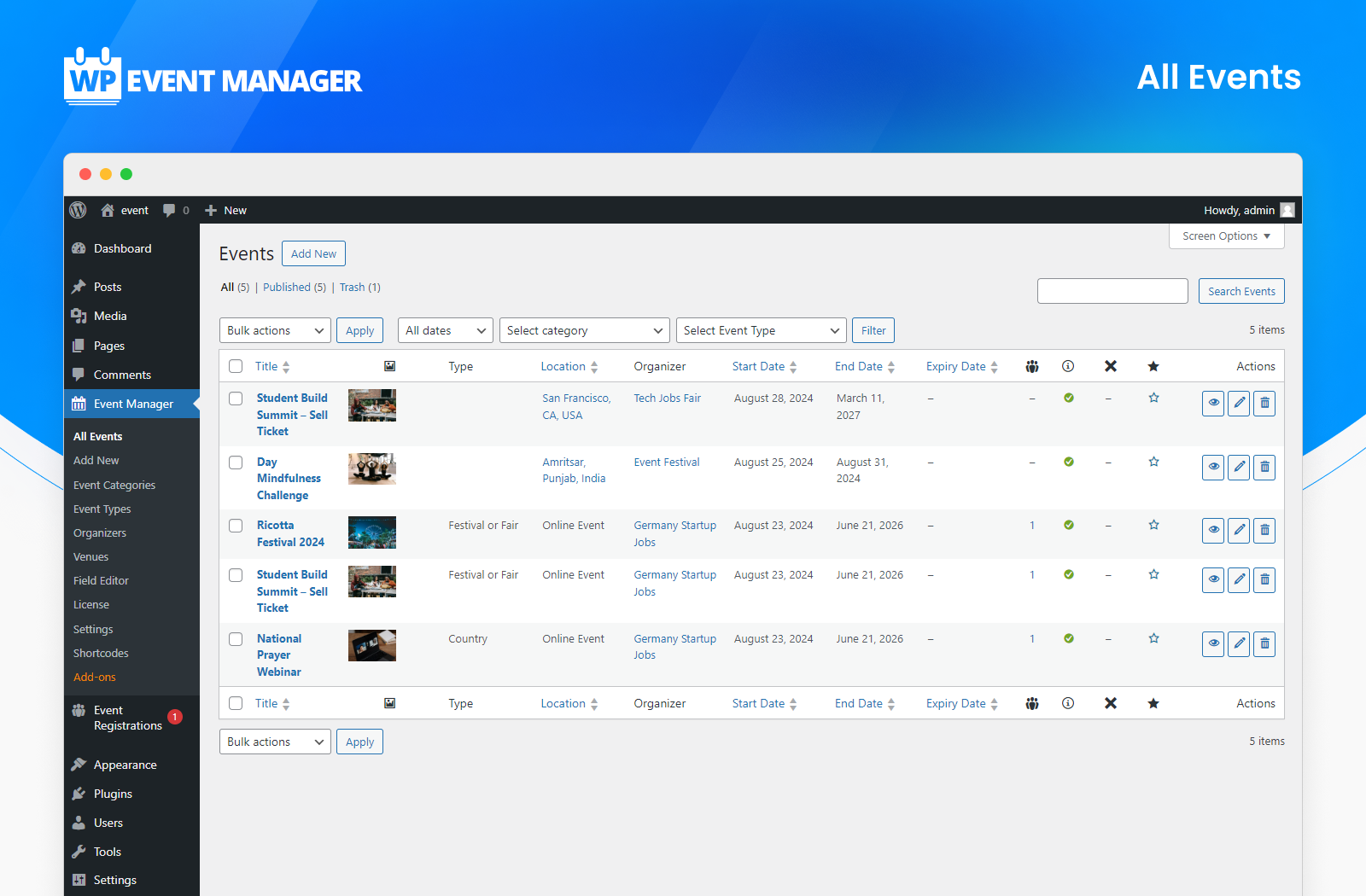
The admin interface is familiar WordPress territory. Events live under a dedicated Events menu item. You create categories, event types, organizer records, and venue records from sub-menus. The backend event creation form has fields for title, description, event date and time, venue, organizer, and categories.
The settings panel is extensive. You can control whether events require admin approval before publishing, set expiry dates for listings, configure which fields show on the frontend submission form, and toggle WooCommerce integration. Nothing here is difficult to find, though the number of settings tabs can feel like a lot on first pass.
The free plugin: what you actually get
Frontend event submission
This is the defining feature of WP Event Manager’s free tier, and the one that sets it apart from most competitors.
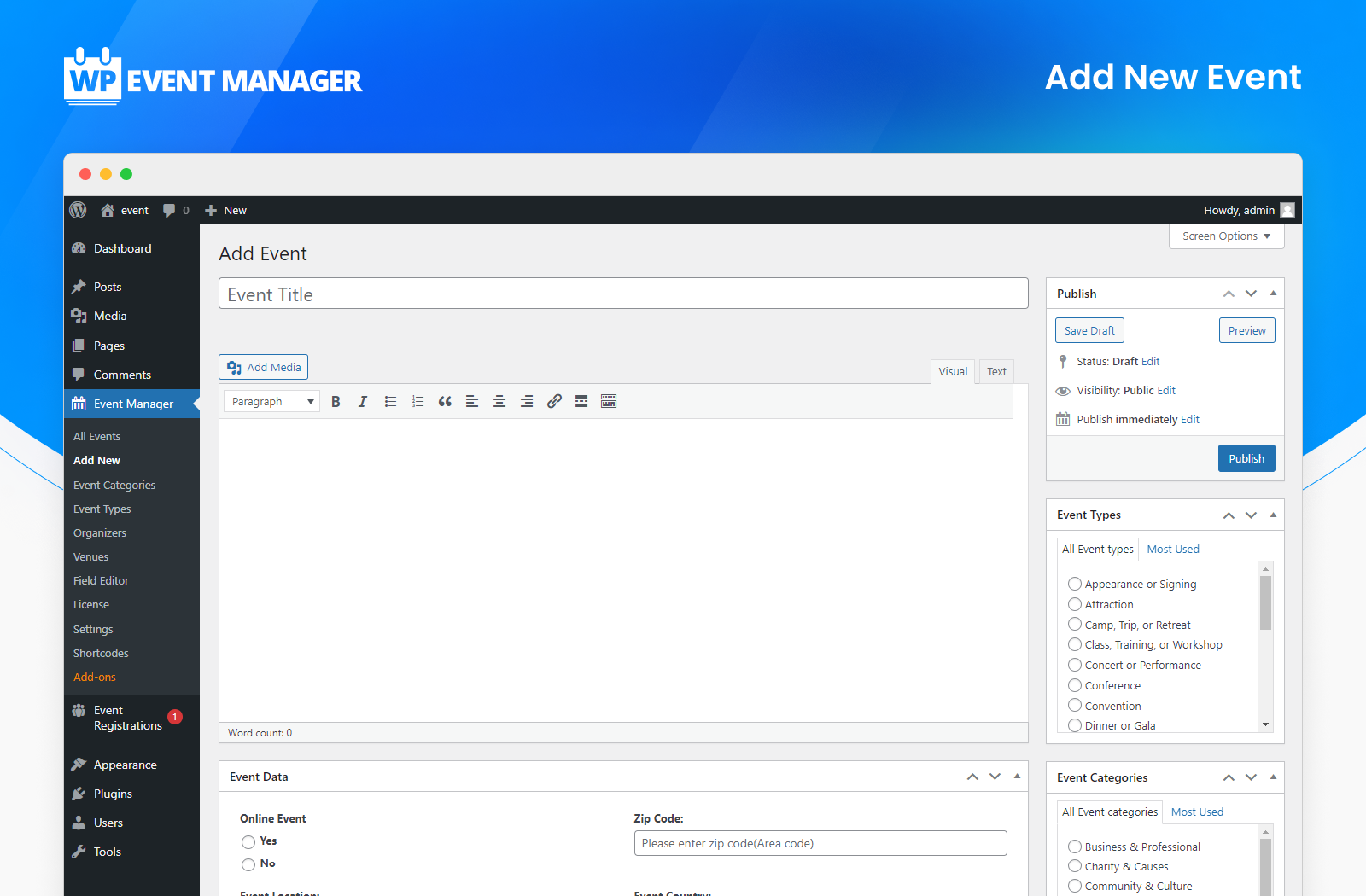
Logged-in users can submit events from the frontend via the Submit Event page. The form accepts event title, description, date and time, location, organizer, and a featured image. Users can preview their submission before publishing it. Admins can set submitted events to require approval or to publish automatically.
Most competing plugins, including The Events Calendar and Modern Events Calendar, lock frontend submission behind a paid tier. WP Event Manager gives it away in the free plugin. For community sites, directories, and membership platforms where multiple people should be able to post events without WordPress admin access, this matters.

Event listings with search and filters
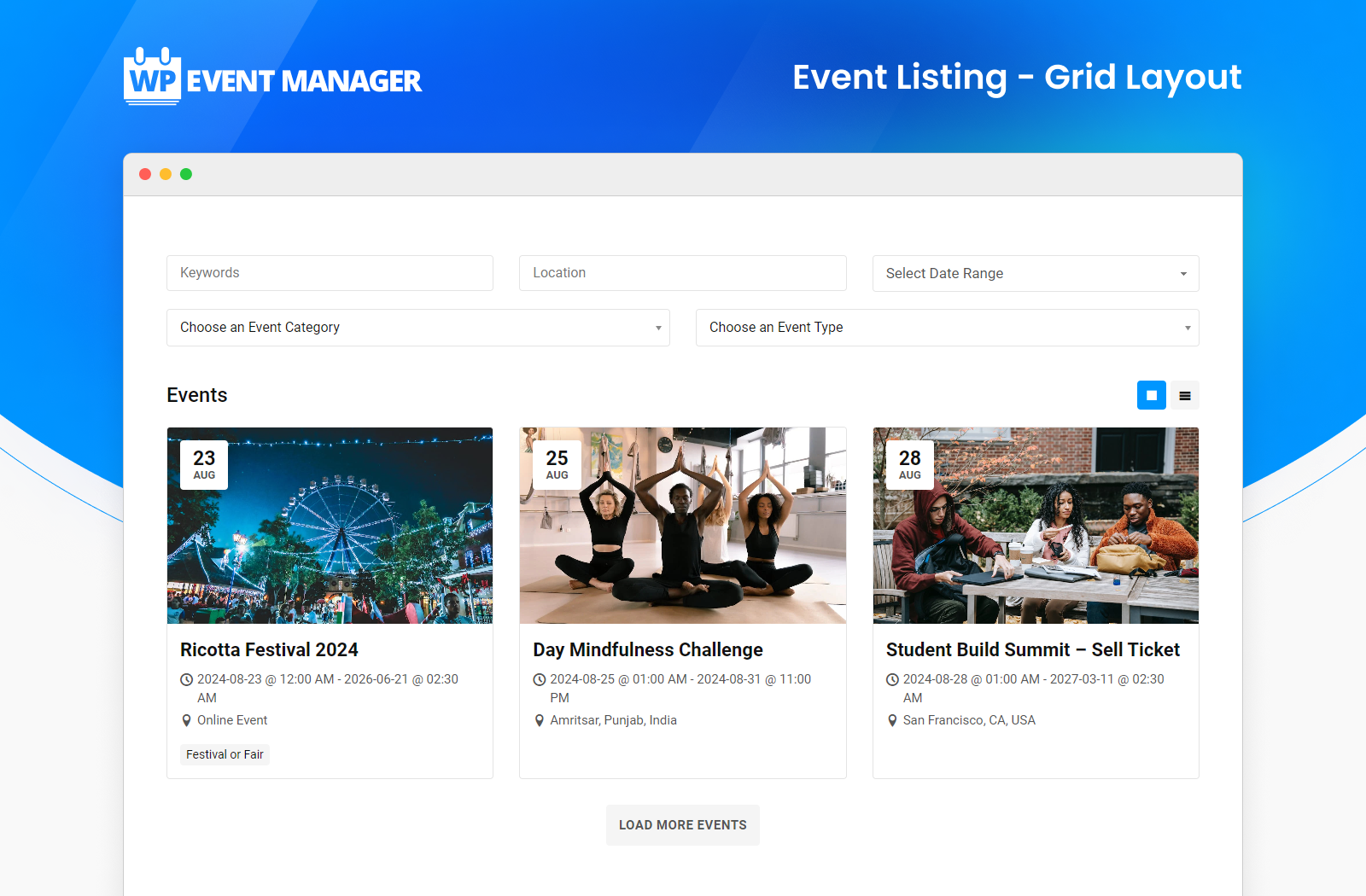
The main events page displays events in either grid or list view. Visitors can filter events by keyword, location, category, event type, and date range. The filtering updates the listing without a full page reload.
This listing display is the plugin’s core output. It is clean, functional, and responsive across devices. The grid view shows event cards with featured images; the list view renders a more compact text-heavy layout. Both views work well for directory-style sites.
Field editor
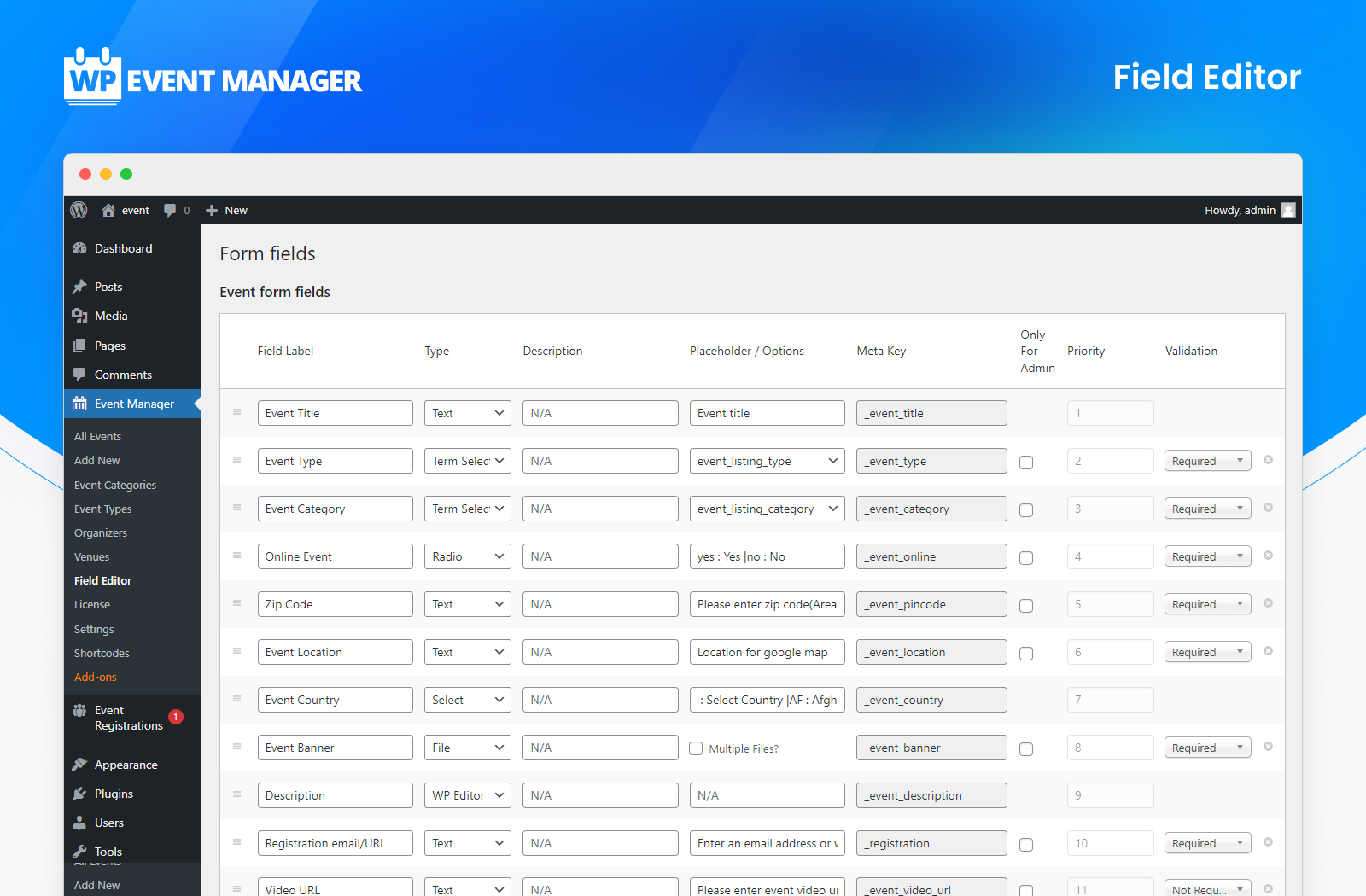
The field editor is a notable free feature. You can add, edit, and reorder custom fields on the event submission form without touching any code. New fields can be text inputs, dropdowns, checkboxes, date pickers, or file upload slots. This flexibility makes the plugin viable for use cases far outside the default template: ticketing links, video embed fields, dress codes, accessibility information, whatever your events require.
WooCommerce compatibility and Gutenberg/Elementor support
The free plugin integrates with WooCommerce at the configuration level. Full ticketing through WooCommerce requires the Sell Tickets add-on, but the underlying WooCommerce connection is wired in the free version.
The plugin works with Gutenberg and Elementor for page layout. It does not provide native block editor blocks for events in the free version, but shortcodes embed cleanly in any page builder that supports them.
Multi-language and RTL support
The plugin ships with 40 or more built-in translations. RTL (right-to-left) language support is included. For multilingual sites or regional community platforms, these are meaningful baseline features.
What the free plugin does not include
- Calendar view (monthly or yearly grid): requires the Calendar add-on (~$49/yr per site)
- iCal and Google Calendar export: requires the iCal add-on
- Recurring events: requires the Recurring Events add-on
- Email notifications and alerts: requires the Alerts or Emails add-on
- Ticket sales and QR check-in: requires the Sell Tickets add-on
- Google Maps on event pages: requires the Google Maps add-on
- Mobile organizer app: requires the Event App add-on
- CRM integrations (Mailchimp, HubSpot, Salesforce): individual add-ons required
- Zoom or virtual event tools: require the Zoom or Expo Networking add-ons
Paid add-ons and bundles
WP Event Manager sells over 37 individual add-ons organized into four categories: Feature, Ticket Selling, Marketing, and Virtual. Individual add-ons are available for specific needs. Bundles collect the most commonly needed add-ons at a lower combined price.
Bundle pricing
Buying individual add-ons one at a time becomes expensive quickly. The Calendar and Sell Tickets add-ons alone are ~$49 each, totaling ~$98/yr per site. That is almost the same as the entry-level Event Manager Plus bundle, which includes 20 add-ons.
| Bundle | Add-ons | 1 site/yr | 3 sites/yr | Unlimited/yr |
|---|---|---|---|---|
| Event Manager Plus | 20 | ~$99 | See pricing page | See pricing page |
| Event Manager Pro | 27 | ~$199 | See pricing page | See pricing page |
| Virtual Event Manager Pro | 30 | ~$599 | See pricing page | See pricing page |
| All Events Manager Pro | All | ~$1,099 | See pricing page | See pricing page |
The Event Manager Plus bundle is the sensible starting point for most sites. At approximately $99/yr for one site, it bundles 20 add-ons including Calendar, iCal, Recurring Events, Alerts, Bookmarks, Colors, Contact Organizer, Google Maps, and Sliders. For the majority of non-ticketing event sites, Plus covers everything needed.
The Event Manager Pro bundle adds ticketing-related add-ons: Sell Tickets, Registrations, Attendee Information, WooCommerce Paid Listings, Stripe Split Payment, Name Badges, and the Event Countdown timer. This is the right tier for sites that sell tickets.
The Virtual Event Manager Pro bundle adds Zoom integration, Expo Networking, and Speaker and Schedule on top of Pro. Appropriate for conference-style or fully virtual event platforms.
Calendar add-on
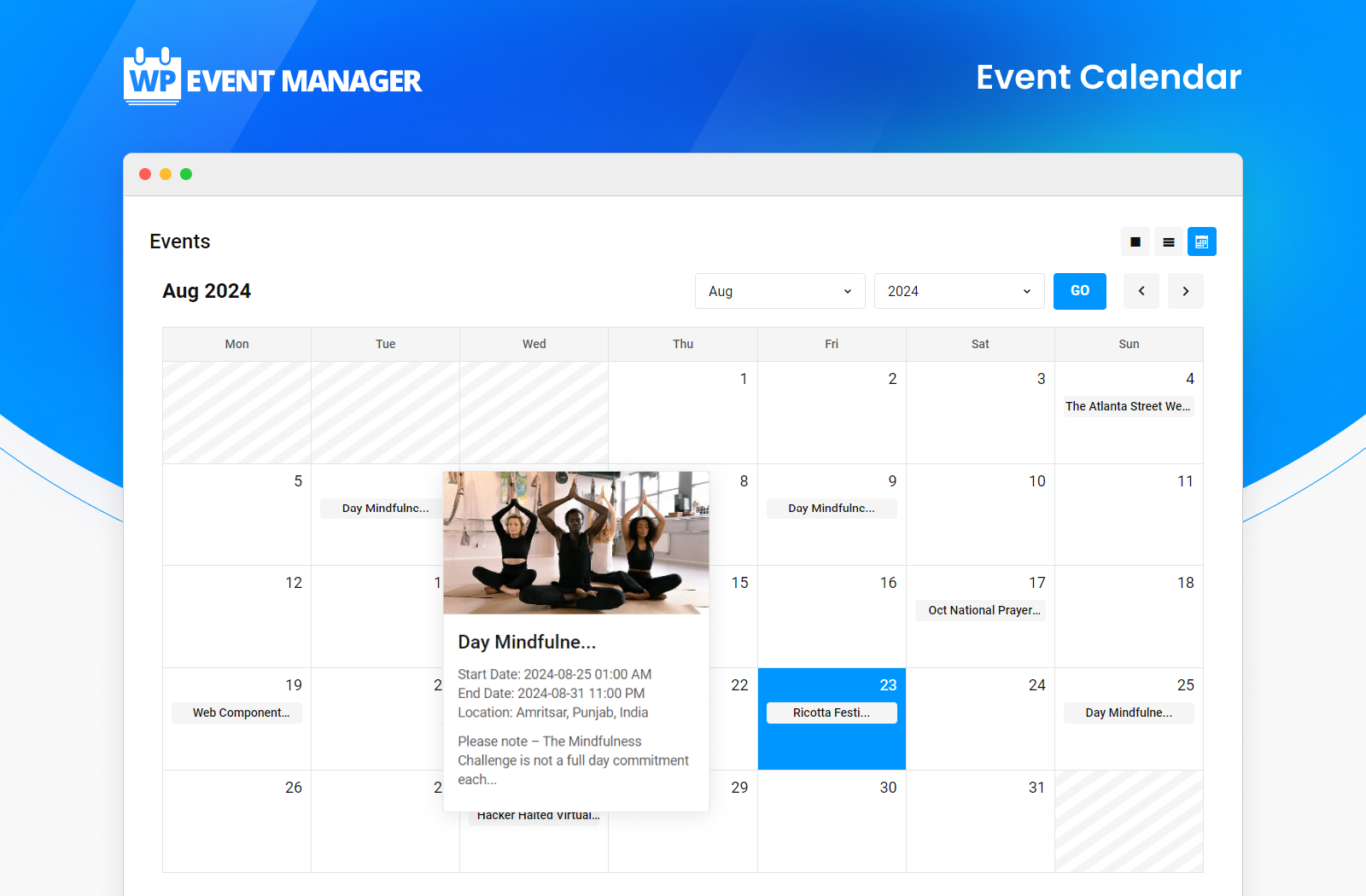
The Calendar add-on transforms the default list and grid view into a monthly or yearly calendar layout. It adds a sidebar widget calendar, shortcode placement options, and quick popup event previews when hovering over a calendar date. The popup shows event name, date, time, and a banner image without leaving the calendar page.
The calendar is filterable by venue, organizer, category, time, and price range. It is responsive across devices. For most event sites, the calendar view is expected by visitors, which makes this add-on effectively a required purchase.
Sell Tickets add-on
The Sell Tickets add-on connects the plugin to WooCommerce to handle ticket inventory, purchase flow, payment processing, and digital ticket delivery. Ticket types can be free, paid, or donation-based. Minimum and maximum purchase limits are configurable per ticket type. PDF e-tickets with QR codes are sent to buyers automatically via email.
The plugin processes payments through any WooCommerce-compatible payment gateway, which includes Stripe, PayPal, and 100 or more others. WP Event Manager explicitly markets this as commission-free ticket sales: the plugin does not take a percentage of revenue.
The mobile organizer app (Event App add-on) lets staff scan QR codes at the door for check-in, including offline. Attendee data is exportable for post-event reporting.
CRM and marketing integrations
Marketing add-ons connect WP Event Manager data to Mailchimp, HubSpot, Salesforce, Zoho CRM, ActiveCampaign, Constant Contact, and Sendinblue. Zapier integration enables custom automation workflows with hundreds of other tools. SMS notifications through a separate add-on handle real-time attendee communication.
These integrations are described from official documentation. If a specific CRM is a hard requirement, confirm compatibility with your CRM’s current API version before purchasing.
Pros and cons
Pros
- Frontend event submission is free, a genuine differentiator against almost every major competitor
- Field editor in the free plugin allows custom form fields without code
- Commission-free ticket sales with the Sell Tickets add-on (no platform cut)
- Modular add-on model lets you pay only for the features you actually use
- Event Manager Plus bundle (~$99/yr) provides strong value for non-ticketing sites
- 40+ language translations and RTL support built into the free plugin
- WooCommerce-native ticketing leverages an ecosystem most WordPress sites already run
- Gutenberg and Elementor compatibility for page building
- REST API for headless or external integrations
- Over nine years of active development with regular releases
- Mobile organizer app for check-in scanning at events
Cons
- No calendar view in the free plugin; even a basic monthly calendar requires a paid add-on
- No recurring events in the free plugin
- Individual add-on prices add up fast if you do not choose a bundle
- Breaking changes in past updates renamed functions without adequate changelog notice, requiring template updates from theme developers
- Support response times have been inconsistent, with multiple WP.org reviewers reporting multi-day or unanswered tickets
- Licensing issues reported by some users since 2025 (conflicting activation responses, delayed refunds)
- 20,000 installs is modest by WordPress plugin standards, meaning fewer community resources and third-party theme integrations than larger competitors
- No built-in Gutenberg event blocks; relies on shortcodes for embedding
- Free plugin lacks email notifications; you need the Alerts or Emails add-on for basic automated communication
Alternatives
The Events Calendar
The Events Calendar has 600,000 or more active installs and is the dominant plugin in this category. The free plugin includes month, list, and day calendar views without needing an add-on. Its paid plans, now through Liquid Web/Nexcess, start at $259/yr and bundle features rather than selling them individually. Read the full The Events Calendar review for a complete breakdown. If you need a traditional calendar view for free and are willing to pay more for the full feature set, The Events Calendar is a stronger option for pure calendar sites. For community directories with frontend submission, WP Event Manager is the better free option.
Modern Events Calendar (MEC)
Modern Events Calendar has 150,000 or more active installs and provides significantly more in the free tier, including multiple calendar views, event countdown, and Elementor integration. Its Pro add-on bundles extensive functionality. MEC is worth comparing directly if you need a calendar view out of the box without paying. Read the Modern Events Calendar review for a full breakdown.
Eventin (WP Event Solution)
Eventin’s free version includes multi-tier ticket pricing, WooCommerce integration, QR code check-in, PDF ticket generation, recurring events, and CSV export. It is a direct competitor to WP Event Manager’s paid tiers, offered at no cost. If ticketing and recurring events are your primary requirements, test Eventin’s free plugin before committing to any paid option.
Sugar Calendar
Sugar Calendar is a lightweight calendar plugin focused on clean calendar display without feature bloat. It is built for sites that need calendar UI and basic event scheduling without a full ticketing and directory framework. Pricing is lower than WP Event Manager’s bundles. A practical option if you need simple calendar output and do not need frontend submission or ticket sales.
Final verdict
WP Event Manager does one thing no major competitor does for free: it hands over the event submission form to visitors. For community platforms, local event directories, and membership sites, that single feature changes the economics entirely. A nonprofit or local events organization can run a full community calendar for nothing, including search filters, custom fields, and multi-language support.
The paid side is more complicated. You need to buy the Calendar add-on before your site looks like what most visitors expect from an event website. You need the Sell Tickets add-on before any revenue moves. The bundle pricing is reasonable, but the value proposition depends entirely on which bundle fits your use case. The Event Manager Plus bundle at roughly $99/yr is defensible for non-ticketing community sites. The Pro bundle at ~$199/yr is the right tier for anyone selling tickets.
The support and stability concerns are real. Breaking template changes, licensing activation issues, and inconsistent support response times have appeared in verified reviews in the past 12 months. These are not dealbreakers for every team, but they are worth knowing before you build a production site on this plugin. If consistent dedicated support is a hard requirement, verify the support channel and response time commitments before purchasing.
My overall recommendation: if you are building a community event directory or multi-organizer listing site, start with the free plugin. It holds up well. If you need calendar display and ticketing, price out the Event Manager Plus or Pro bundle against the cost of Eventin (free) and The Events Calendar ($259/yr). WP Event Manager wins on modularity and free-tier depth. It loses on install base, out-of-box calendar, and support track record compared to the category leader.
FAQ
Is WP Event Manager free?
The core WP Event Manager plugin is free on WordPress.org. It includes frontend event submission, grid and list event listings, filterable search, a field editor for custom form fields, organizer and venue management, WooCommerce compatibility, and multi-language support. A calendar view, ticket sales, recurring events, and most communication and integration features require paid add-ons starting at approximately $49/yr per feature or from ~$99/yr in a bundle.
What is WP Event Manager used for?
WP Event Manager is used to create event listing and management functionality on WordPress sites. It is especially suited to community event directories and multi-organizer platforms because the free plugin allows visitors and members to submit their own events from the frontend, without WordPress admin access.
How much does WP Event Manager cost?
The free plugin is $0. Paid add-ons start at approximately $49/yr per site individually. The Event Manager Plus bundle (20 add-ons) costs approximately $99/yr for a single site. The Event Manager Pro bundle (27 add-ons) costs approximately $199/yr for a single site. The Virtual Event Manager Pro bundle (30 add-ons including Zoom) costs approximately $599/yr for a single site. Multi-site and unlimited-site licenses are available at higher price points. Promotional discounts of 15-30% are frequently active on the pricing page.
Does WP Event Manager support recurring events?
Recurring events require the Recurring Events add-on, which is not included in the free plugin. The add-on is bundled in all paid bundle tiers from Event Manager Plus upward.
Can visitors submit events without a WordPress account?
The default setup requires users to be logged in to submit events. Guest submission behavior depends on plugin configuration. Some teams use membership plugins to manage submission access. Review the plugin documentation before deployment to confirm the exact setup for your use case.
Does WP Event Manager charge ticket commissions?
No. The Sell Tickets add-on processes payments through WooCommerce, and WP Event Manager does not take a percentage of ticket revenue. You pay for the add-on or bundle on an annual license basis, and all ticket revenue passes directly through your WooCommerce store.
How does WP Event Manager compare to The Events Calendar?
The Events Calendar leads on install base (600,000 vs 20,000), out-of-box calendar views (free in TEC vs paid add-on in WP Event Manager), and community resources. WP Event Manager leads on free frontend submission, a more modular pricing model, and lower entry-level paid pricing. Both are capable plugins. The right choice depends on whether calendar-first or directory-first design suits your site.
Is WP Event Manager compatible with Elementor and Gutenberg?
Yes. The free plugin is listed as compatible with both Gutenberg and Elementor. Embedding uses shortcodes, which work in both builders. The plugin does not ship native block editor event blocks, so event pages are built around shortcode-powered containers rather than drag-and-drop event blocks.
What are the best alternatives to WP Event Manager?
The closest free alternatives are Eventin (which includes ticketing and recurring events in its free version), The Events Calendar (which includes free calendar views), and Modern Events Calendar Lite (which includes multiple calendar views for free). For lightweight calendar display without directory features, Sugar Calendar is a simpler paid option. The best choice depends on whether you prioritize free calendar views, free ticketing, or free frontend submission.
Is WP Event Manager actively maintained?
Yes. The plugin has been active for over nine years and version 3.4.1 was released approximately one month before this review was written in September 2026. The development team pushes regular updates. However, some past updates introduced breaking changes to template functions without clear changelog notices, which is worth noting if you build custom templates on top of the plugin.
Browse more plugin reviews in the WordPress plugin reviews section.