


Yoast SEO has been on WordPress sites longer than most of the plugins competing with it today. It shipped its first version in 2008, reached 10 million active installs by the mid-2020s, and is still the name most developers and clients recognize when SEO comes up. That history creates a specific challenge when writing a Yoast SEO review in 2026: the plugin’s reputation often speaks louder than its current feature set, and the feature set has real gaps compared to free alternatives.
I installed Yoast SEO free (v27.9) on a clean WordPress 6.8 sandbox, walked through the setup flow, reviewed the admin screens and post list view, and checked every settings panel. The post editor panel screenshots in this review (the SEO and readability analysis sidebar) are sourced from the official WordPress.org plugin listing, as the block editor on the sandbox environment exceeded the headless browser’s memory limits during testing; the behavior described for those panels is consistent with the official WordPress.org listing and Yoast’s own documentation. All other screenshots are original captures from the sandbox. Paid Premium features were researched from official documentation, the pricing page, and the WordPress.org listing. Any section based on documentation rather than direct testing says so.
At a glance
- Tested: Yoast SEO free v27.9 on WordPress 6.8 (clean sandbox). Setup flow, post list view, all settings panels, tools, integrations, plans, and redirects screens.
- Audited: yoast.com product page, premium features page, pricing page, WordPress.org listing.
- Active installs: 10+ million
- WordPress.org rating: 4.8 out of 5 stars (27,812 reviews)
- Price: Free; Premium $118.80/year per site (ex VAT)
- Developer: Yoast BV (Newfold Digital)
- WordPress.org listing: wordpress.org/plugins/wordpress-seo/
- Bottom line: The most recognized WordPress SEO plugin still delivers a competent free tier for beginners. In 2026, its readability analysis and Schema output remain genuinely strong. But the free tier is thinner than Rank Math’s, and the per-site Premium pricing model is hard to justify for multi-site operators.
Quick Verdict
Yoast SEO is the plugin you already know. It works, it updates every two weeks, and it handles the fundamentals without drama: titles, meta descriptions, sitemaps, Schema, and a readability check that is better than anything a competitor offers at the same price tier.
The honest problem in 2026 is value positioning. The free version gives you one focus keyphrase per post, no redirect manager, no multiple keyword tracking, and no Search Console data inside the dashboard. All of those features are free in Rank Math. Yoast gates them behind a $118.80/year subscription (ex VAT) that is priced per site, which makes the math painful the moment you manage more than one or two domains.
If you are a solo blogger who has used Yoast for years and does not want to migrate, staying is a rational decision. If you are evaluating WordPress SEO plugins fresh in 2026, the case for choosing Yoast Premium over Rank Math’s free tier requires either a strong preference for Yoast’s UI or a specific need for one of its exclusive features like AI Generate, the Redirect Manager, or the Google Docs add-on.
Quick verdict card
- Best for: bloggers, content teams, and small business owners who want reliable on-page SEO guidance with a clean UI and strong readability feedback.
- Best plan for most users: Free for personal sites and simple blogs where one focus keyword per post is enough; Premium for active content teams that want AI-generated titles and meta descriptions, automatic redirects, and 24/7 support.
- Standout features: readability analysis that goes beyond keyword density; AI Generate and AI Optimize in Premium; bundled Local SEO, Video SEO, and News SEO plugins; a two-week update cycle that keeps Schema current.
- Watch out for: per-site Premium pricing adds up fast across multiple domains; the free tier is narrower than Rank Math’s; the redirect manager and IndexNow are Premium-only while Rank Math includes both in its free tier.
What Yoast SEO Is
Yoast SEO is a WordPress SEO plugin published by Yoast BV (now part of Newfold Digital). The free plugin (slug: wordpress-seo) has been available on WordPress.org since 2010, but the underlying codebase traces back to the “All in One SEO Pack” era of 2008. Joost de Valk, the original author, shaped much of what the WordPress SEO plugin space looks like today before selling the company in 2021.
The plugin’s core job is to let WordPress site owners control their SEO metadata, structured data, and content quality without editing theme files or writing code. It ships two separate components: the free plugin handles most on-page basics, and Yoast SEO Premium (a separate plugin file activated against a paid licence) layers AI tools, redirect management, and other advanced features on top.
As of June 2026, Yoast SEO free is at version 27.9 with 10+ million active installs and a 4.8-star rating across 27,812 reviews on WordPress.org. Those numbers make it the most-installed dedicated SEO plugin in the repository.
Who Yoast SEO Is Best For
Good fit
- Bloggers and content creators who want step-by-step guidance rather than a feature-dense dashboard
- Teams using Elementor, WooCommerce, or Google Site Kit, where Yoast’s direct integrations add real workflow value
- News publishers and local businesses that want Video SEO, Local SEO, or News SEO without juggling separate plugin bills (all three are bundled in Premium)
- Developers building client sites for non-technical owners who need the clearest possible traffic-light feedback
- Teams already using Yoast who do not want the risk and time cost of migrating to Rank Math
Poor fit
- Anyone managing more than two or three WordPress sites at once, where per-site Premium pricing becomes expensive
- Operators who want a free redirect manager, 404 monitor, or Search Console data inside the dashboard (Rank Math free covers all three)
- Agencies building client portfolio SEO dashboards, where Rank Math’s Business or Agency tiers deliver more at lower total cost
- Sites that need advanced Schema customization beyond the common types
Hands-On: Setup and First Impressions
Installation from the WordPress.org repository is straightforward. I activated the plugin on a clean WordPress 6.8 sandbox that already had Rank Math SEO installed (the two plugins do not conflict, though running both simultaneously is not recommended for production).
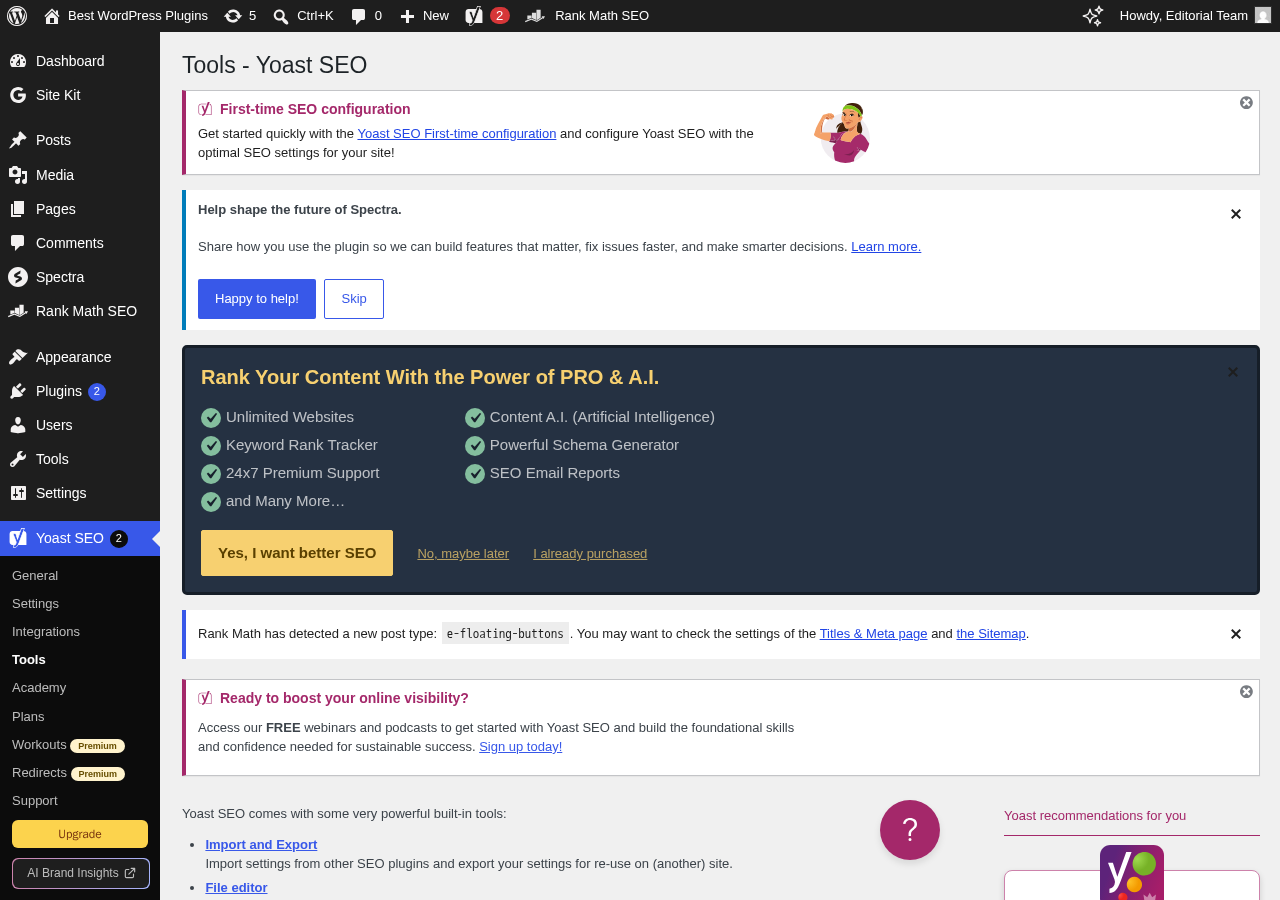
After activation, Yoast added 22 notifications to the admin menu badge. These are configuration prompts rather than errors: Yoast wants you to set a site organization type, logo, and name before it generates Schema output. The badge count looks alarming on first glance but most notifications clear once you step through the first-time configuration.
The configuration wizard sits at SEO > General > First-time SEO configuration. It is a multi-step React flow that covers:
- Site representation: person or organization, name, logo
- Social profiles: links for Schema and Open Graph defaults
- Search appearance defaults for posts, pages, and custom post types
- Site visibility (whether to allow search engine indexing)
- A final step that connects Yoast to your Yoast account for update checks
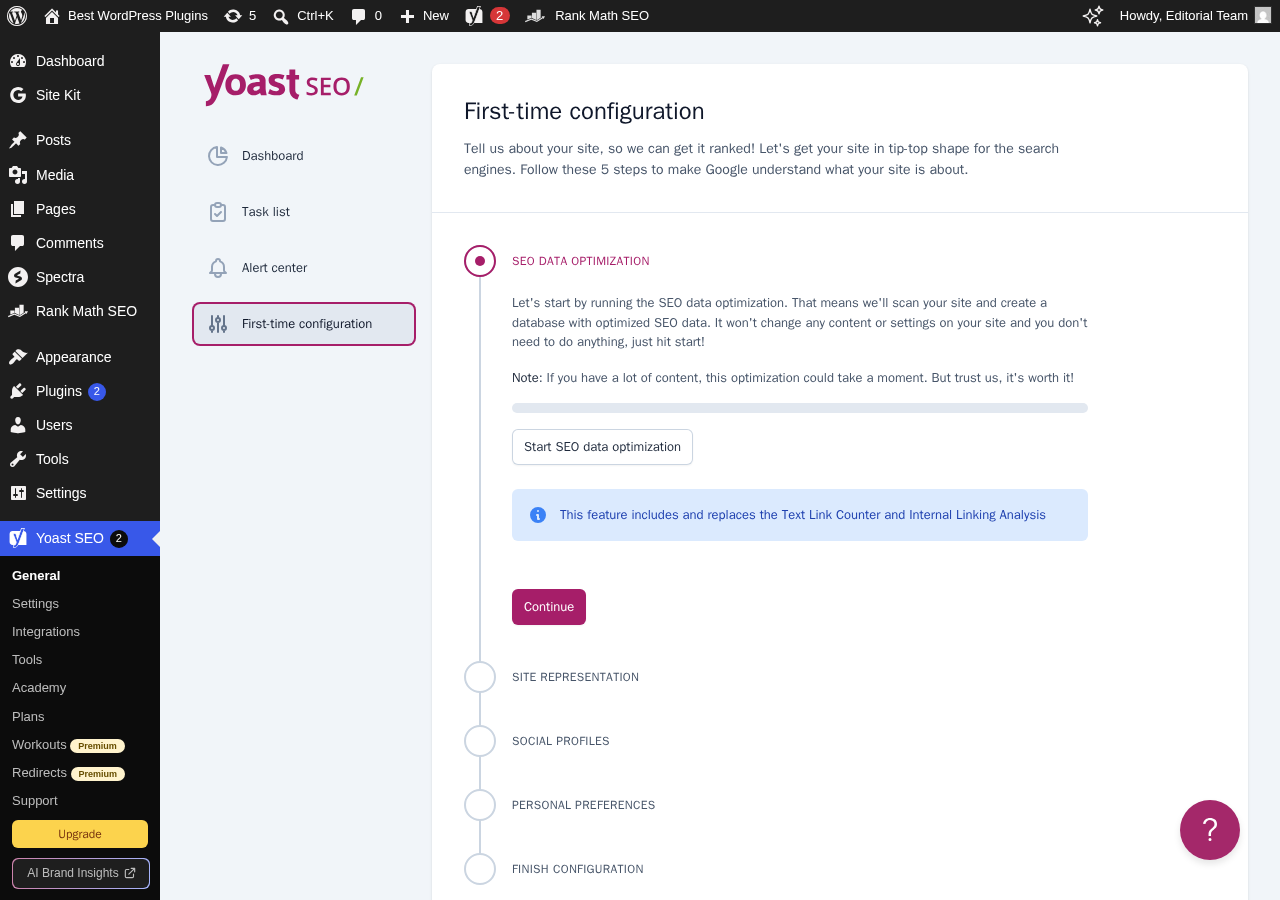
The wizard is clean and non-threatening for beginners. It does not demand a Google Search Console connection at setup, which is a reasonable call given the OAuth permissions involved. The tradeoff is that the dashboard does not show ranking or impression data after setup; you get that only through a Semrush or Wincher integration, which requires separate accounts.
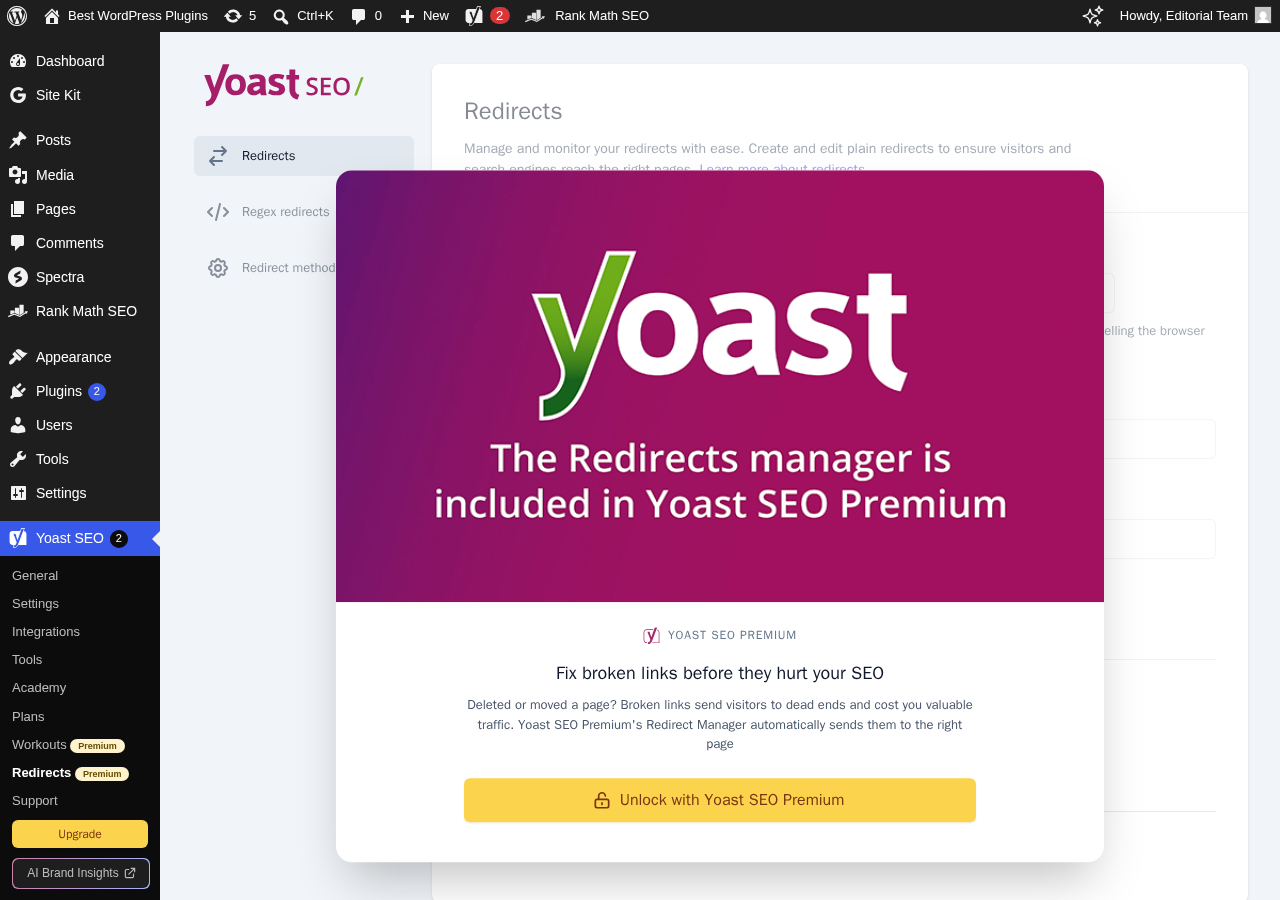
One thing I noticed: the admin menu after fresh activation has more items than you might expect, including Redirects (a Premium-locked screen) and Upgrade. The presence of Redirects in the free menu is a nudge toward Premium rather than a working feature. Clicking it on a free install surfaces an upsell screen.
Post Editor Experience
The following description of the Yoast SEO post editor panel is based on the official WordPress.org plugin listing screenshots and Yoast’s published documentation, as the block editor on the test sandbox exceeded the headless browser’s memory limits during testing.
The Yoast SEO panel appears in the WordPress block editor right sidebar under the “Yoast SEO” plugin icon. It is divided into three tabs: SEO, Readability, and Schema.
The SEO tab shows:
- A focus keyphrase field (one keyphrase on free, up to five in Premium)
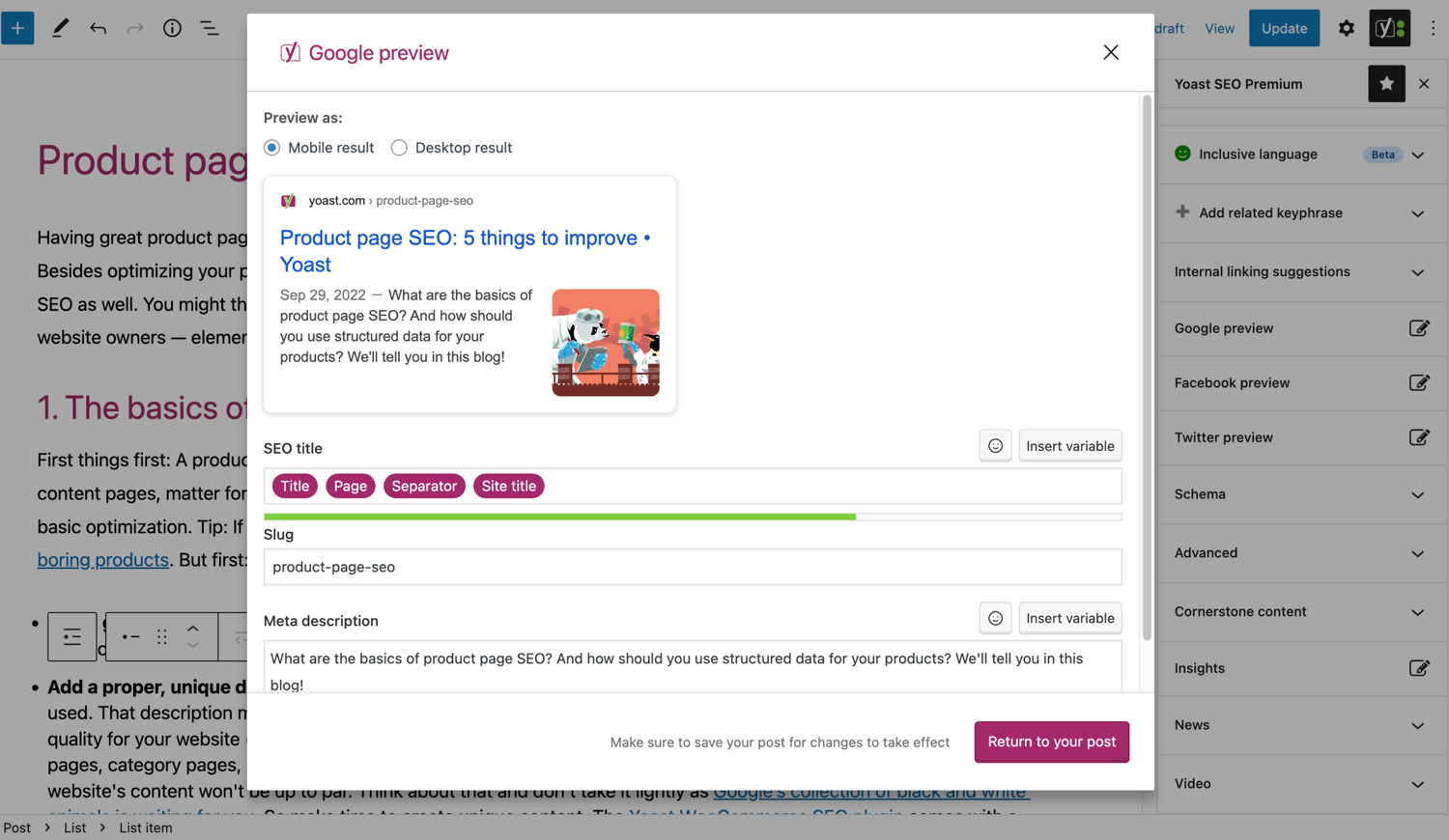
- A SERP preview for both desktop and mobile
- A Google preview that shows how the title and meta description will appear in search results
- A traffic-light analysis list with checks for keyphrase in title, meta description, URL, introduction, headings, and image alt text; keyphrase density; internal links; outbound links; and text length
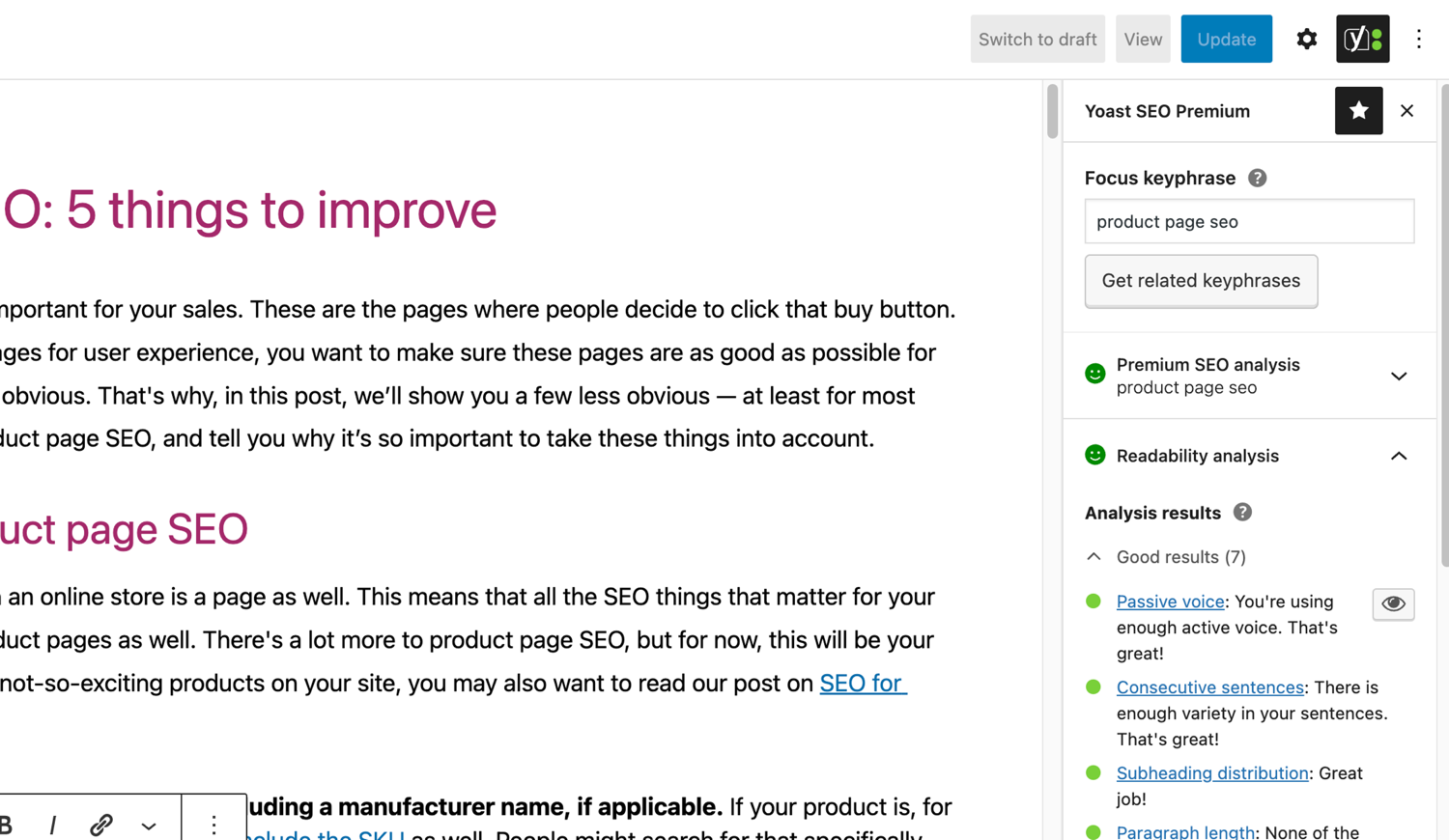
The Readability tab runs a separate set of checks covering sentence length, paragraph length, passive voice use, transition word frequency, subheading distribution, and consecutive sentence beginnings. This is where Yoast stands out from most competitors. The readability analysis is the most detailed in any WordPress SEO plugin I have researched, and it gives specific guidance rather than a single score.
The Schema tab lets you set the page type (Article, FAQ, HowTo, WebPage, or others) and author. Schema output is JSON-LD, included automatically in the page head.
One practical note I confirmed directly in the sandbox: the posts list view in the WordPress admin gains five columns from Yoast: SEO score (colored dot), Readability score, SEO Title, Meta Description, and Keyphrase. This makes it easy to scan a content library for pages that need attention without opening each post individually.
Core Features
On-Page SEO Analysis
The on-page analysis in Yoast free covers around 30 checks, organized by traffic-light colors: green for good, orange for needs improvement, and red for problems. The list is detailed enough to guide a less experienced writer without being overwhelming.
Checks covered include:
- Keyphrase in the SEO title
- Keyphrase in the meta description
- Keyphrase density (between 0.5% and 3%)
- Keyphrase in the URL slug
- Keyphrase in the introduction paragraph
- Image alt text using the keyphrase
- Outgoing internal links (present or missing)
- Content length (Yoast recommends 300+ words, but the threshold varies by post type)
The SERP preview updates in real time as you type the title and meta description, with a character counter and color feedback when you hit optimal length ranges. Desktop and mobile previews switch with a single click.
The single-keyphrase limit on the free plan is the most practical constraint. Most well-optimized posts target a primary keyword plus several related terms and synonyms. Premium unlocks up to five keyphrases and adds synonym recognition, which is a meaningful upgrade for content-heavy sites.
Readability Analysis
The readability panel runs Flesch Reading Ease tests and checks for:
- Average sentence length (flags sentences over 20 words)
- Paragraph length (flags paragraphs over 150 words)
- Passive voice percentage (flags if over 10% of sentences use passive construction)
- Transition words (checks that at least 30% of sentences start with or include a transition word)
- Consecutive sentence beginnings (flags three or more consecutive sentences starting with the same word)
- Subheading distribution (flags sections over 300 words without a subheading)
These checks push writers toward clear, structured prose. The passive voice and transition word guidance are useful for technical writers who default to complex sentence structures. No other free-tier WordPress SEO plugin matches this depth of readability feedback.
The limitation is that the analysis does not understand context. A deliberately dense technical article may score orange on sentence length while being perfectly appropriate for an expert audience. The guidance is a starting point, not a verdict.
Schema and Structured Data
Yoast handles Schema.org output automatically using its indexables system, which stores SEO metadata in a custom database table for performance. The plugin generates a JSON-LD graph that includes:
- Organization or Person schema (set in the configuration wizard)
- WebSite with SearchAction (enables Google Sitelinks Search Box)
- WebPage or Article schema on content pages
- BreadcrumbList
- HowTo and FAQ schema when you use Yoast’s native blocks
On the free plan, Schema customization is limited. You can set the page type (Article, WebPage, FAQ, HowTo, CollectionPage, ContactPage) and author, but you cannot add or edit Schema properties beyond those fields. Rank Math’s free tier ships 18+ schema types with field-level editing; Yoast’s free tier is more constrained in this area.
Schema for e-commerce products, local businesses, events, videos, and news articles requires either the WooCommerce SEO extension (separate purchase on top of Premium), the Local SEO bundle (included in Premium), or the Video/News SEO add-ons (also included in Premium).
XML Sitemap
Yoast generates XML sitemaps automatically. The sitemap index is at /sitemap_index.xml by default, with separate sitemaps for posts, pages, categories, tags, authors, and custom post types.
Configuration options include enabling or disabling sitemaps per content type, setting whether a post type should be included regardless of its noindex setting, and setting maximum posts per sitemap file (useful for large sites). The settings screen is clear and requires no technical knowledge to configure.
One limitation: there is no dedicated news sitemap in the free version. Yoast News SEO, included with Premium, adds a Google News-specific sitemap for publishers. Similarly, video sitemaps require the Video SEO add-on.
Technical SEO Controls
Yoast free handles several technical SEO settings that used to require separate plugins:
- Canonical URLs (automatic and manually overridable per post)
- Noindex controls at the post level and by content type
- Meta robots configuration (nofollow, noarchive, noodp)
- Breadcrumb generation via a PHP function or shortcode
- Crawl settings that let you disable author archives, date archives, format archives, and other thin-content pages from being crawled
- LLMs.txt management: a newer feature that lets you tell large language model crawlers which pages to access or avoid
The crawl settings in particular are a useful addition. Disabling unnecessary archive pages reduces crawl budget waste without requiring .htaccess changes or additional SEO tools.
Integrations
Yoast SEO free includes active integrations with:
- Semrush: keyword research directly inside the post editor, without leaving WordPress
- Wincher: connect a Wincher account to track keyword position data inside the Yoast dashboard
- Google Site Kit: surface Search Console, Analytics, and PageSpeed data if Site Kit is installed
- Elementor: full Yoast SEO analysis works inside the Elementor editor
- Advanced Custom Fields (ACF): with the separate ACF Content Analysis for Yoast SEO plugin, custom field content is included in the SEO analysis
- WooCommerce: basic product optimization (full ecommerce Schema requires the WooCommerce SEO add-on)
- Jetpack: Yoast and Jetpack share social preview and site verification data
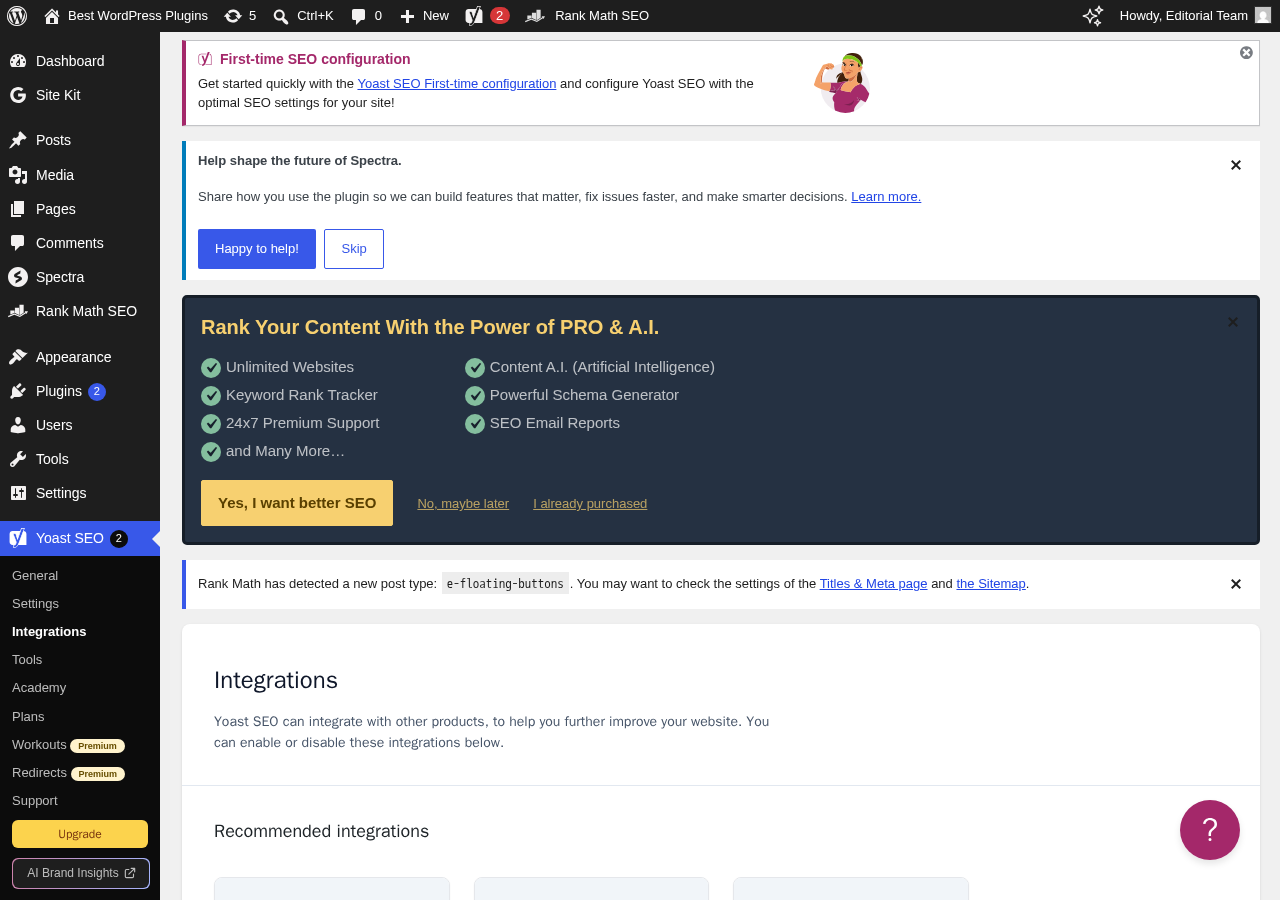
The Semrush integration is the standout in the free tier. Having keyword volume and difficulty data inside the WordPress post editor without a separate browser tab genuinely improves the writing workflow. It requires a Semrush account (a free Semrush account has limited daily queries).
Import and Migration
Yoast includes import tools for Rank Math, All in One SEO, SEOPress, and other plugins. The import covers metadata, titles, descriptions, and focus keyphrases. Export to third-party tools is also available from the Tools menu.
Yoast SEO Premium: What Changes
Premium activates a second plugin file that adds the following features. Sections on premium features are based on the official documentation and feature pages, not hands-on testing.
AI tools
- AI Generate: create five SEO-friendly title and meta description options per post with a single click, with one-click regeneration for more alternatives
- AI Optimize: automatically improve keyphrase placement in the introduction, subheadings, and throughout the content
- AI Summarize (added 2025): generate a content summary for briefs or social posts
These AI features are powered by Yoast’s own infrastructure. There are no separate API accounts, token limits, or additional costs described on the pricing page.
Redirect Manager
A full redirect management dashboard that handles 301, 302, 303, 307, 410, and 451 redirect types. Premium also adds automatic redirect creation when you change a post’s URL slug. On the free plan, clicking Redirects in the admin menu leads to a Premium upsell screen rather than a working tool.
Other Premium features
- Multiple keyphrases: up to five focus keyphrases per post, with synonym and word-form support
- Internal linking suggestions: relevant internal links from your existing content suggested while you write
- Social media previews: preview and edit how content looks when shared on Facebook and X before publishing
- Orphaned content finder: shows you pages with no incoming internal links
- SEO Workouts: guided tasks for improving site structure and cornerstone content strategy
- Bot Blocker: block specific AI crawlers (GPTBot, CCBot, Google-Extended) without editing
robots.txt - IndexNow: submit content updates to Bing and Yandex instantly on publish (note: Rank Math’s free version also includes IndexNow)
- Bundled add-ons: Yoast Local SEO, Yoast Video SEO, and Yoast News SEO at no extra cost
- Support: 24/7 support via email and live chat
- Yoast SEO Academy: full access to all Yoast SEO courses
- Google Docs add-on: 1 free seat for teams writing content outside WordPress
Pricing
Yoast SEO Premium costs $118.80/year per site (ex VAT). The same price applies across USD, EUR, and GBP regions according to the current pricing page.
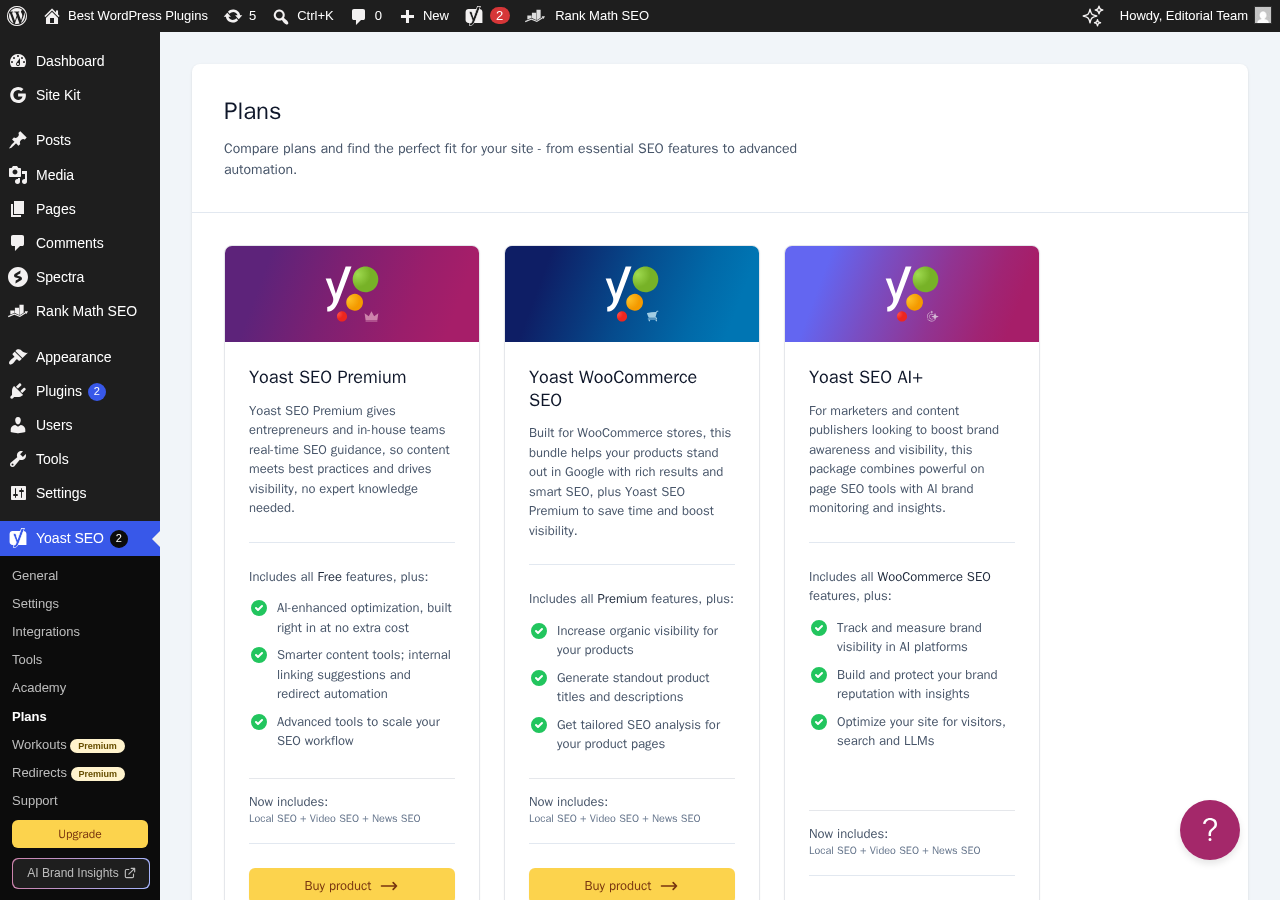
Multi-site pricing scales linearly: two sites at $237.60, five sites at $594, ten sites at $1,188. There is no “unlimited sites” tier.
The WooCommerce SEO add-on is an additional purchase on top of Premium. A Yoast WooCommerce SEO subscription requires you to already have Yoast SEO Premium active.
Comparison with the nearest competitor: Rank Math Pro costs $96/year (billed annually) for unlimited personal websites. For a single site, the price difference is modest. For three or more sites, Rank Math is substantially cheaper.
Yoast SEO vs Rank Math
Since readers will be making a direct comparison, here is an honest assessment after testing both:
| Yoast SEO Free | Yoast SEO Premium | Rank Math Free | Rank Math Pro | |
|---|---|---|---|---|
| Focus keyphrases | 1 | Up to 5 | Unlimited | Unlimited |
| Readability analysis | Full | Full | Basic | Basic |
| Schema types (free) | Core types only | Full set via add-ons | 18+ with field editing | 840+ |
| Redirect manager | No | Yes (automatic) | Yes | Yes |
| 404 monitor | No | No | Yes | Yes |
| Search Console data | No | No | Yes (free) | Yes |
| IndexNow | No | Yes | Yes (free) | Yes |
| AI content tools | No | AI Generate, Optimize, Summarize | No | Content AI (separate credit plan) |
| Internal link suggestions | No | Yes | No | Yes (Link Genius) |
| Social preview | No | Yes | No | Yes |
| Price (1 site/year) | Free | $118.80 | Free | ~$96 |
| Price per site (3 sites) | Free | ~$357 | Free | ~$96 (unlimited) |
The free tier gap is real and significant. Rank Math’s free version covers several features that Yoast gates behind Premium, including the redirect manager, 404 monitoring, unlimited focus keyphrases, and IndexNow. If you are starting a new site and have no existing Yoast data to migrate, Rank Math’s free tier delivers more out of the box.
Where Yoast Premium earns its price: the readability analysis is deeper than Rank Math’s equivalent; the AI tools (Generate, Optimize, Summarize) are tightly integrated and require no external accounts; bundled Local SEO, Video SEO, and News SEO add-ons add genuine value for publishers and local businesses; the Google Docs add-on covers teams writing content outside WordPress.
Where Rank Math wins outright: free tier feature depth (redirects, 404 monitoring, Search Console data, unlimited keyphrases, IndexNow); multi-site pricing (unlimited personal sites for $96 vs Yoast’s per-site model); Schema type depth (840+ Schema types in PRO vs Yoast’s narrower set). Neither plugin is universally better; the right choice depends on which features you actually use and how many sites you manage.
Pros and Cons
Pros
- The deepest readability analysis available in any WordPress SEO plugin, free or paid
- Excellent Schema output with a clean JSON-LD graph that covers the common types reliably
- A two-week update cycle means compatibility and Schema definitions stay current
- Premium AI tools (Generate, Optimize, Summarize) are well-integrated and cost nothing extra on top of the subscription
- Local SEO, Video SEO, and News SEO add-ons bundled with Premium add real value for publishers
- Strong Elementor integration for teams that use that page builder
- Google Docs add-on for content teams working outside WordPress
- 10+ million installs means client sites are almost always already familiar with it
- 4.8-star rating across nearly 28,000 reviews indicates consistently reliable behavior
- Semrush integration brings keyword research directly into the post editor on the free tier
Cons
- Free tier lacks redirect manager, 404 monitor, Search Console data, multi-keyword tracking, IndexNow, and social preview; all of these are free in Rank Math
- Per-site Premium pricing becomes expensive for multi-site operators: three sites cost roughly $357/year vs $96 with Rank Math Pro for unlimited sites
- Schema depth on free is limited; Rank Math free ships 18+ types with field-level editing vs Yoast’s narrower core set
- The Redirects menu item on free installs is confusing because it leads to a Premium upsell rather than being absent from the menu
- No dedicated keyword rank tracker in the free version; Wincher integration requires a separate account
Alternatives
Rank Math SEO is the direct competitor to evaluate. Its free tier is wider than Yoast’s, its paid tiers are cheaper per site, and it has caught up on Schema depth. Readability analysis is less detailed. A full head-to-head is covered in our Rank Math review.
All in One SEO (AIOSEO) is a solid alternative for users who want a cleaner settings UI. Its free tier covers more than Yoast’s free tier. Premium pricing is roughly comparable.
SEOPress is a lighter plugin favored by performance-conscious developers. It covers the basics without the weight of Yoast’s indexables system and works well on high-traffic sites where database query efficiency matters.
Final Verdict
Yoast SEO is not the best value SEO plugin for WordPress in 2026 if you evaluate it purely on features per dollar. Rank Math’s free tier covers more ground than Yoast free, and Rank Math Pro costs less for anyone running multiple sites.
What Yoast still does better than any competitor is readability analysis. If your team writes content and wants structured, actionable feedback on sentence length, passive voice, transition words, and paragraph distribution, Yoast’s content analysis is worth the install even if you use it alongside a different plugin. (Running two full SEO plugins in production is not recommended, but if I had to name one feature that Yoast owns outright, it is this one.)
For a solo blogger building one site who wants premium features: evaluate whether the AI Generate and Redirect Manager tools justify $118.80/year over Rank Math’s free tier. For many personal sites, they will not.
For a content team or agency managing multiple sites: the per-site Premium pricing model works against Yoast in direct comparisons with Rank Math’s unlimited-sites Pro tier.
For someone who already uses Yoast and manages one or two sites comfortably: there is no compelling reason to migrate. Yoast is stable, well-maintained, and the readability tools add genuine value in day-to-day content work.
Install it if: you want the best readability analysis on the market, you run a news site or local business that benefits from the bundled add-ons, or your team writes in Google Docs and wants the Docs add-on.
Look elsewhere if: you manage more than two WordPress sites, you need a full-featured free redirect manager and 404 monitor, or you want extensive Schema customization without add-on costs.
FAQ
Browse all WordPress plugin reviews on Best WordPress Plugins.