


The SEO plugin market is crowded at the top. Yoast SEO has five million active installs. Rank Math crossed two million. All in One SEO sits at three million. Into this landscape, SEOPress entered in 2017 with a different pitch: do what the big plugins do, charge less for multi-site operators, and skip the dashboard advertising entirely.
Seven years later, version 10.1 lands on WordPress 7.0.4 with an AI metadata engine supporting five different providers, basic redirections now available in the free plugin, and unlimited target keywords at no cost. Three hundred thousand active sites run it, and its 4.8-star average across 1,245 WordPress.org reviews is the highest rating of any major WordPress SEO plugin I have tested this year.
I installed SEOPress free (v10.1) on a clean WordPress 7.0.4 sandbox, walked the setup wizard end-to-end, reviewed the post editor panel, content analysis tool, sitemap settings, schema configuration, redirect manager, analytics dashboard, and all free admin screens. Pro features were audited from the official feature pages, pricing page, and v10.0/v10.1 changelog.
At a glance
- Tested: SEOPress free v10.1 on WordPress 7.0.4 (clean sandbox). Setup wizard, post editor panel, content analysis, sitemap settings, schema configuration, analytics dashboard, and full admin navigation.
- Audited: seopress.org feature pages, pricing page, Pro features page, v10.0 and v10.1 changelogs, and WordPress.org listing (300,000+ active installs, 4.8/5 across 1,245 reviews).
- Bottom line: SEOPress delivers the most price-efficient path to a complete WordPress SEO stack in 2026. Unlimited focus keywords and basic redirections are free. The Pro plan adds Google Search Console data, a full redirect manager, schema automation, white-label branding, and an analytics dashboard supporting GA4 and Matomo, at pricing that beats every major competitor for multi-site operators.
Quick Verdict
SEOPress earns its 4.8-star rating by making the right trade-offs: it stays lightweight, keeps its free version genuinely capable, and does not fill the admin with upgrade prompts. Version 10.1 is the plugin’s most capable release, adding AI metadata on autopilot, improved site audit tools, WooCommerce schema enhancements, and WordPress command palette integration.
Its two honest limitations are a smaller community than Yoast or Rank Math (fewer third-party tutorials, fewer pre-answered support threads) and a content analysis workflow that runs after saving rather than live while editing. Both are real trade-offs, not marketing footnotes.
Quick Verdict
- Best for: agencies managing multiple client sites, developers who want a lightweight and hook-rich SEO foundation, site owners who want a clean admin without dashboard ads, and WooCommerce operators who need product schema without per-site plugin costs.
- Best plan for most users: PRO Unlimited at $149/year covers every site you run with the full feature set and white-label branding. For a single site, PRO 1 Site at $49/year gives you the complete Pro feature set including Google Search Console data, full redirect management, analytics dashboards, schema automation, and white-label.
- Standout features: unlimited focus keywords with no paywall (competitors cap this at one free keyword); basic redirections included free as of v10.1; AI metadata generation supporting OpenAI, Google Gemini, Claude by Anthropic, Mistral, and DeepSeek; white-label ready at every Pro tier; zero admin ads in free or paid versions.
- Watch out for: smaller community than Yoast or Rank Math means fewer tutorials and third-party extensions; content analysis runs after saving rather than in real time during editing; advanced schema types such as Product, Event, and Local Business require Pro; pricing changed in August 2025 so the single-site plan now costs the same as the old five-site plan.
What SEOPress Is
SEOPress is a WordPress SEO plugin first released in 2017 by Benjamin Denis, an independent developer working under the WPBoutiq brand. Unlike Yoast SEO (owned by Newfold Digital) or All in One SEO (backed by WPBeginner’s Semper Plugins), SEOPress remains independently developed without a large corporate parent behind it.
As of August 2026, the free plugin is at version 10.1 with 300,000+ active installs and a 4.8-star rating across 1,245 reviews on WordPress.org. Tested up to WordPress 7.0.4. Required PHP: 7.4 or higher.
The free plugin handles core SEO metadata, XML and HTML sitemaps, basic structured data, Open Graph, Twitter Cards, basic redirections, image SEO, Google Indexing API, and IndexNow. The Pro tier adds Google Search Console integration, a full redirect manager with 404 monitoring, WooCommerce SEO, local SEO, advanced schema types, white-label branding, an analytics dashboard, and AI-powered metadata generation.
SEOPress integrates natively with 20+ plugins including WooCommerce, Elementor, WPML, and Polylang. It exposes 650+ developer hooks and REST API support, making it one of the most extensible SEO plugins available for custom WordPress builds.
Who SEOPress Is Best For
Good fit:
- Agencies and freelancers managing multiple client sites: the PRO Unlimited plan at $149/year covers every site you operate with full white-label branding, no per-site fees, and no SEOPress attribution visible in the client admin
- Developers building custom WordPress setups: 650+ documented hooks and REST API support give developers more extension points than most comparable plugins
- WooCommerce operators on a budget: Pro covers product schema with price, availability, and review attributes; custom product meta titles and descriptions; and WooCommerce breadcrumbs without a separate extension
- Site owners migrating from Yoast SEO: SEOPress imports metadata, titles, descriptions, and redirects from Yoast with a one-click migration tool; for a site paying $118.80/year for Yoast Premium, switching to SEOPress PRO 1 Site at $49/year is a 59% cost reduction
- Privacy-conscious operators: native Matomo Analytics integration and GDPR-compliant tracking options make SEOPress a workable full-stack SEO and analytics solution for sites that avoid Google Analytics or operate under strict data protection requirements
Poor fit:
- Absolute beginners who want the plugin to guide them through every SEO decision: SEOPress assumes basic familiarity with SEO concepts and does not coach you step by step the way AIOSEO’s TruSEO score or Yoast’s traffic-light system does during the editing phase
- Writers who rely on real-time feedback while composing: Yoast updates its readability and keyphrase checks as you type; SEOPress requires a save before the content analysis reflects your latest edits
- Sites that have invested heavily in Rank Math’s specific schema block architecture or Content AI workflow: switching would require rebuilding those custom configurations from scratch
Hands-On: Setup and First Impressions
After activating SEOPress from the WordPress.org repository, the plugin presents a setup wizard. The wizard is functional and fast: most users finish it in under five minutes.
The wizard covers five steps:
- Welcome: orientation and access to starter documentation
- Import metadata: one-click migration from twelve competing SEO plugins
- Your site: organization details, logo, and social profile URLs for Knowledge Graph schema
- Indexing: which content types and taxonomies to expose to search engines
- Advanced options and confirmation
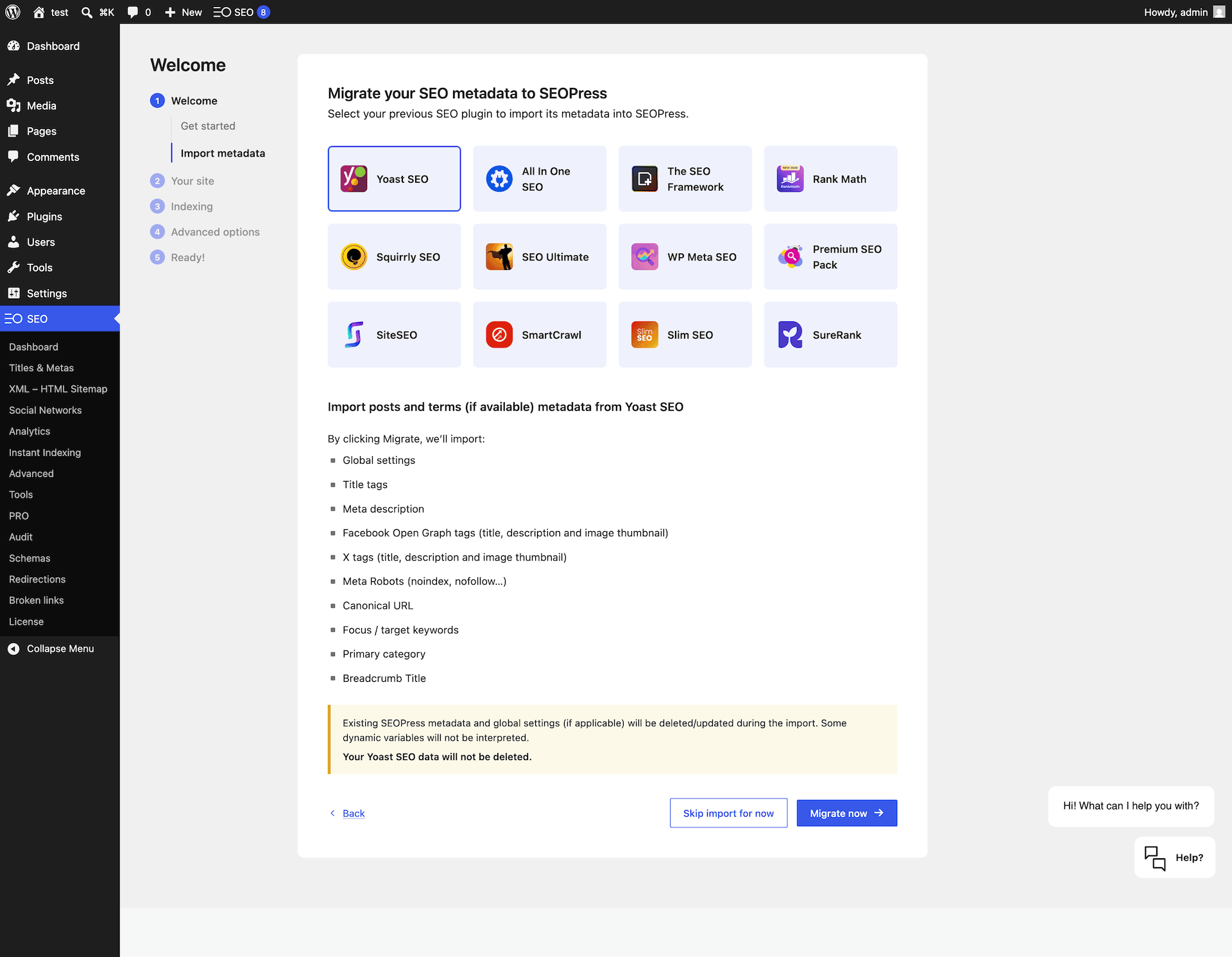
The twelve-plugin migration list is one of the most comprehensive in any SEO plugin. Most plugins support Yoast and Rank Math import; SEOPress adds eight more sources. The import wizard also shows exactly what it will migrate from each source before you confirm, which reduces post-migration surprises.
After the wizard, the WordPress admin sidebar gains a SEO top-level menu. Every sub-page available on the free plan shows working settings rather than an upgrade prompt. That distinction matters in daily use: Yoast SEO free shows an upgrade screen when you click its Redirects menu item; AIOSEO free shows dedicated upsell pages for Redirects and Link Assistant. SEOPress free shows its available settings; Pro-only items are labeled but you do not land on a sales page.
Post Editor Experience
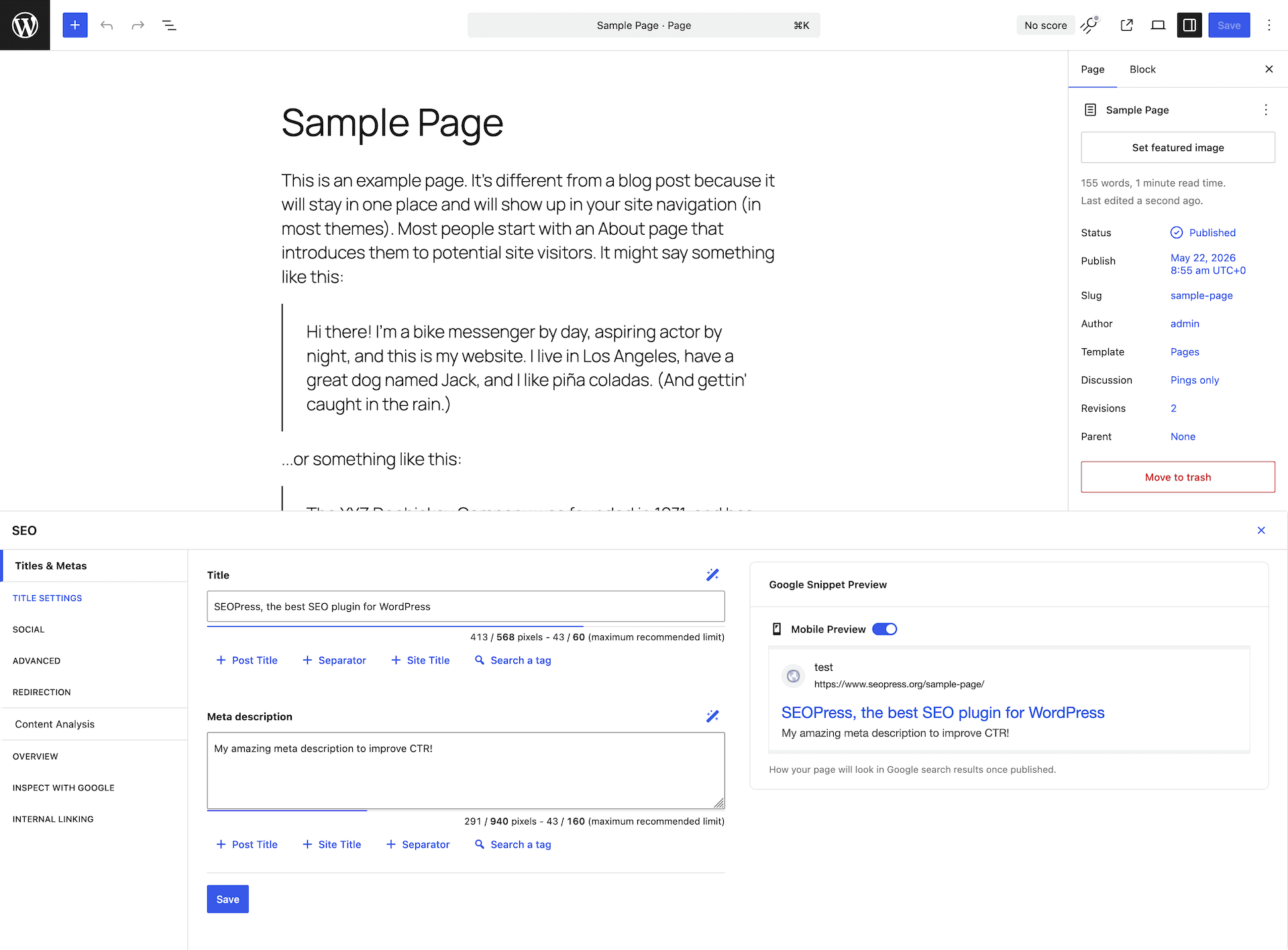
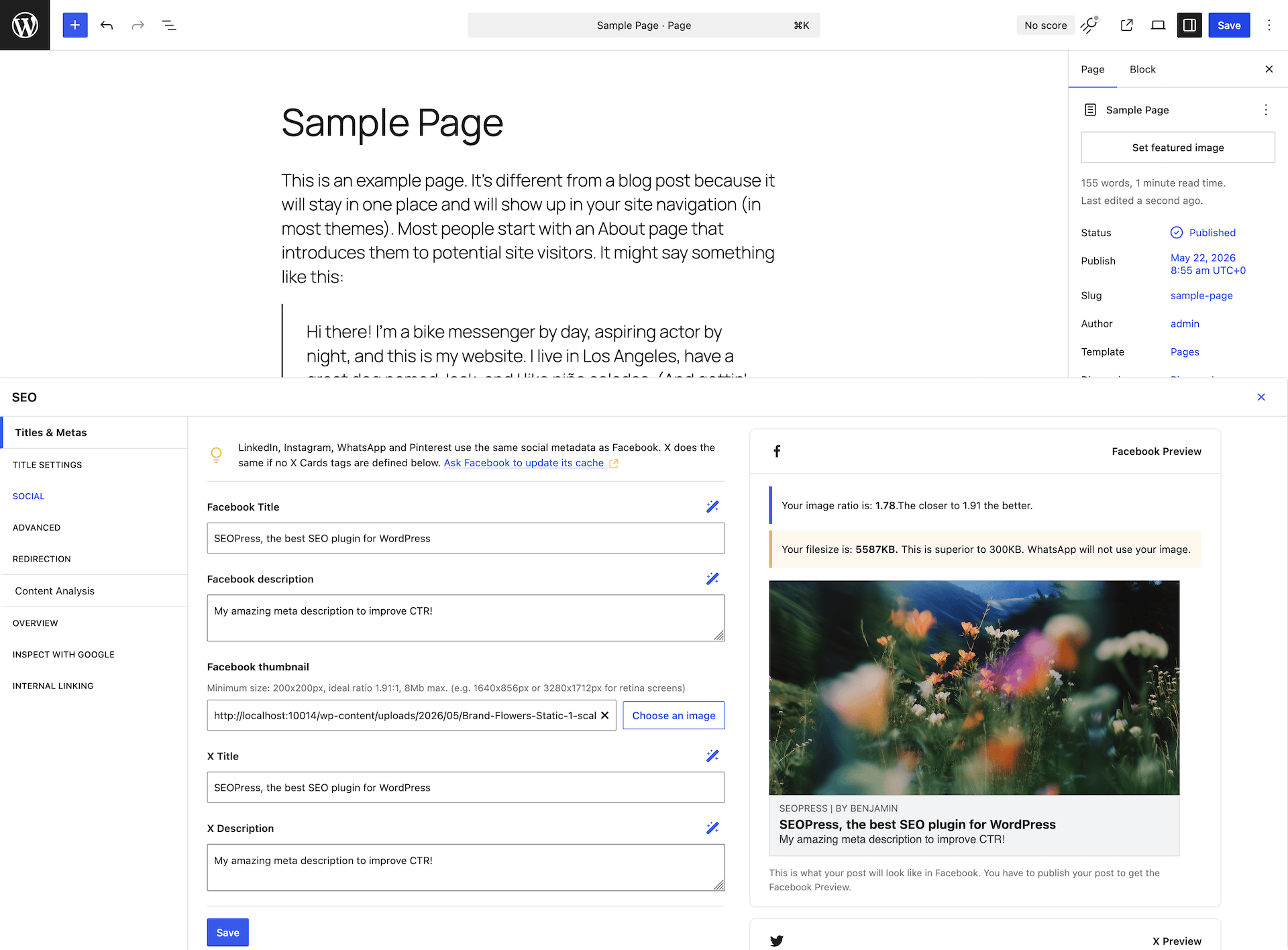
The SEOPress panel integrates with the WordPress block editor as a bottom panel below the content area, and with the classic editor as a metabox. It uses a left-side navigation to switch between tabs: Titles & Metas, Title Settings, Social, Advanced, Redirection, Content Analysis, Overview, Inspect with Google, and Internal Linking.
The Titles & Metas tab shows the SEO Title field with dynamic tag support (%post_title%, %sep%, %site_title%, and others) and a pixel counter; quick-insert buttons for separator and site title tags; a Meta Description field with pixel counter and character guidance; and a live Google Snippet Preview toggleable between desktop and mobile layout.
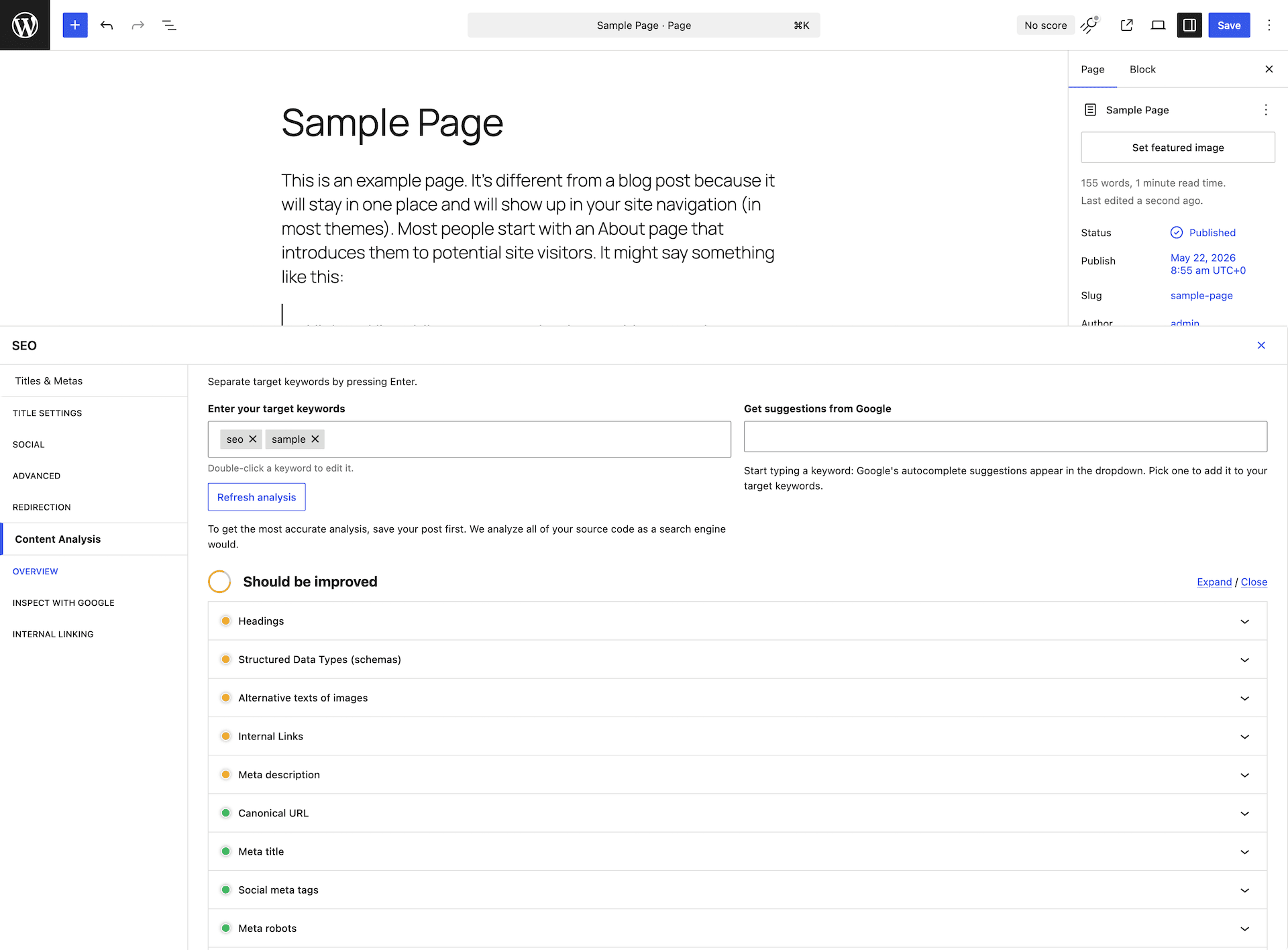
The focus keyword input (in the Content Analysis tab) accepts multiple keywords without a plan restriction. Adding a second or third keyword in the free version works directly. This is meaningfully different from Yoast SEO free and AIOSEO free, both of which limit you to one focus keyword and require a paid plan for additional keyphrases. Rank Math free also allows unlimited focus keywords, making both SEOPress and Rank Math the leaders on this specific capability.
Core Features
Content Analysis
SEOPress evaluates each post against an SEO checklist covering meta title, meta description, focus keyword placement in the title, meta description, first paragraph, headings, and alt text, as well as internal links, external links, image alt text, content word count, and heading structure.
The analysis appears after you save the draft, not as you type. Unlike Yoast SEO’s live traffic-light system, SEOPress requires a save before the checklist reflects your current content. For most publishing workflows this is a minor friction point. For teams that use real-time feedback to guide writing decisions, Yoast’s live analysis is the more responsive experience.
SEOPress presents pass/fail checklist items with no numerical score. There is no TruSEO score (like AIOSEO’s 0-100 metric) or content score percentage (like Rank Math’s Content AI). Teams that benchmark per-post SEO quality with a single number will need to supplement with a separate tracking system.
The unlimited keywords advantage is real. Yoast free caps at one keyword; Yoast Premium allows up to five. AIOSEO free caps at one; AIOSEO paid allows up to ten additional. SEOPress free accepts as many focus keywords as you add, and the analysis checks placement for each one.
Schema and Structured Data
Schema markup is one of SEOPress’s strongest areas even in the free version. The Schema tab in the post editor lets you assign a schema type to any post or page and fill in the relevant fields directly.
Free schema types include Article, BlogPosting, FAQ Page, HowTo, Person, Organization, WebPage, and NewsArticle. Pro adds Product (WooCommerce with price, availability, review count, and variant attributes), Local Business (with address, opening hours, and geo coordinates), Event, Video, Recipe, Review, and Service.
Schema output is JSON-LD in the page head. Version 10.1 introduced WooCommerce schema enhancements that map product price, stock status, review count, and variant attributes automatically to the Product schema output, improving Rich Snippet eligibility for WooCommerce product pages.
The free-tier schema breadth is competitive. Yoast SEO free supports Article, FAQ, and HowTo through dedicated blocks but does not include a standalone schema editor with per-post type assignment from the post editor. AIOSEO free covers a comparable set. Rank Math free covers the most types at no cost, including Product, Video, and Event schemas.
XML Sitemaps
SEOPress generates a sitemap index at /seopress-sitemap.xml with child sitemaps per content type. Configuration options in the free version include per-content-type toggles (posts, pages, custom post types, categories, tags, authors), exclusion of specific posts by ID, image sitemap inclusion, HTML sitemap generation via shortcode or widget, last-modified date control, and URL count per sitemap file for large sites.
Video sitemaps and News sitemaps are Pro features. The free sitemap covers standard site needs. Configuration is on a single settings screen rather than spread across multiple tabs as AIOSEO organizes it.
Version 10.1 added explicit compatibility with the WordPress core XML sitemap (introduced in WP 5.5). SEOPress can coexist with or fully replace the core sitemap, eliminating duplicate sitemap conflicts that previously required manual disabling of the core sitemap on larger sites.
Redirect Manager and 404 Monitor
Version 10.1 introduced a noteworthy change: basic redirections are now part of the free plugin. You can create 301 redirects directly in the WordPress admin without a Pro license. This puts SEOPress ahead of Yoast free (redirects only in Premium), on par with Rank Math free (redirect manager always included at no cost), and ahead of AIOSEO free (redirects start with the Basic paid plan).
The Pro redirect manager adds 301, 302, 307, 410 Gone, and 451 Unavailable for Legal Reasons redirect types; automatic redirect suggestion when a post slug changes; 404 error monitoring with a log of broken URLs detected from real visitor traffic; CSV import and export for bulk redirect management; and per-redirect hit count logs.
404 monitoring in the Pro tier lets you detect broken links caused by content restructuring without installing a separate monitoring plugin. This is functionally equivalent to the 404 monitor in Rank Math free and comparable to AIOSEO’s Pro-level 404 tracking.
Google Search Console Integration
Google Search Console integration is a Pro feature. Once connected, SEOPress pulls clicks, impressions, CTR, and position data from Search Console and surfaces them inside the WordPress post list and within each post’s editor panel. You can filter content by search performance, identify which posts are gaining or losing visibility, and prioritize optimization work without switching between WordPress and Search Console.
On pricing: Rank Math free includes Google Search Console data at no cost. SEOPress Pro 1 Site includes it at $49/year. AIOSEO includes it in the Elite tier at $299.50/year first-year promotional price. For site owners who want Search Console data inside WordPress without paying Elite tier pricing, SEOPress Pro is the accessible path.
Analytics Integration
SEOPress functions as a native analytics connection layer, displaying performance data inside WordPress without requiring a separate analytics plugin. The Pro analytics dashboard shows GA4 metrics (visits, users, bounce rate, sessions), traffic source breakdowns, top posts by traffic volume, and a Matomo Analytics alternative view.
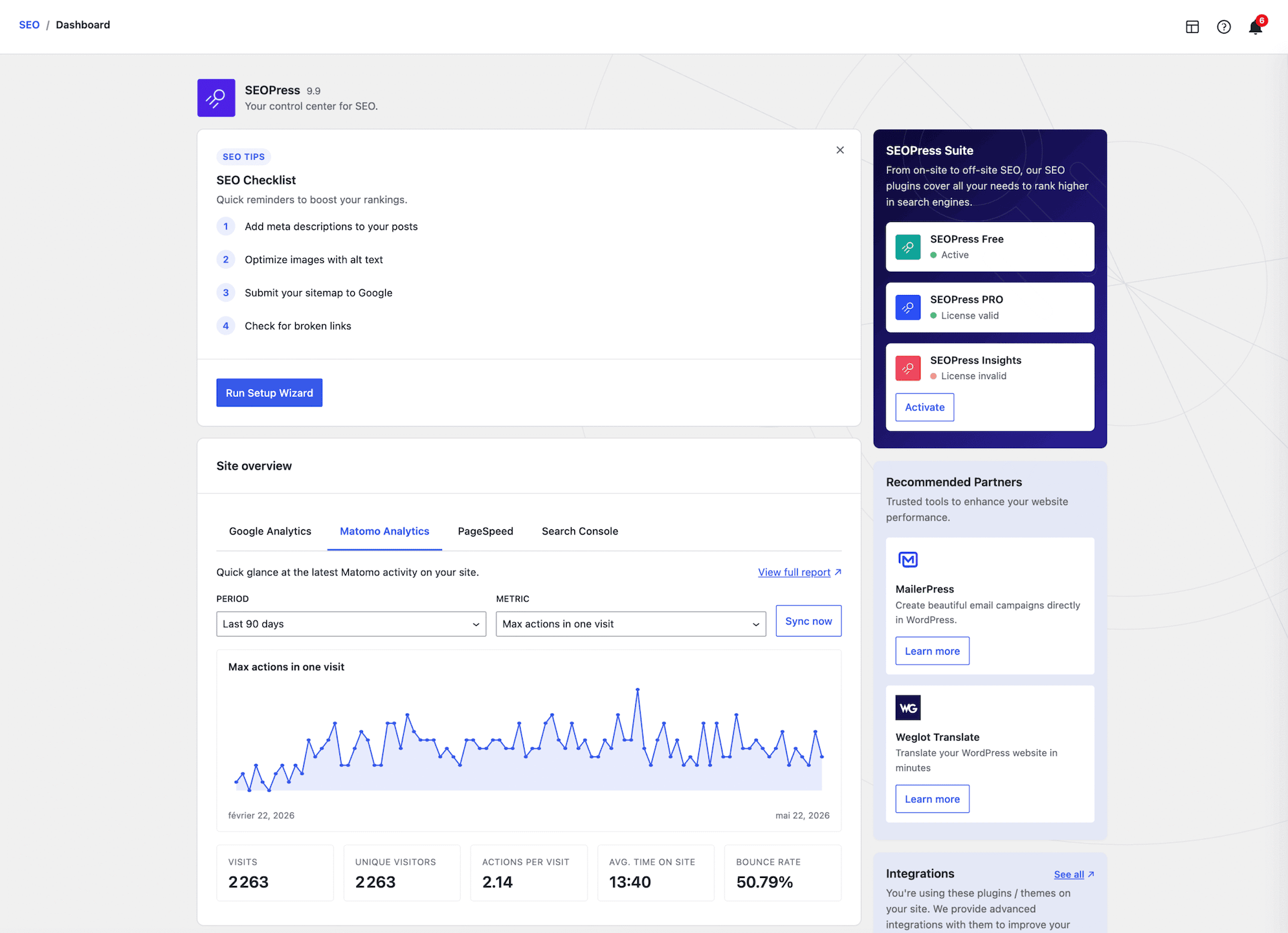
Native Matomo support distinguishes SEOPress from all major competitors. Yoast, Rank Math, and AIOSEO focus exclusively on Google’s analytics stack. For European sites or operators running Matomo for GDPR compliance, SEOPress combined with Matomo provides a complete SEO and analytics workflow without additional plugins.
White-Label Branding
White-label is available on all Pro tiers. Agencies can deliver WordPress sites to clients with SEOPress branding entirely removed from the admin. Configurable options include: custom plugin name in the admin menu, custom plugin icon, removal of all seopress.org links from admin pages, and custom footer text on SEOPress settings screens.
White-label at $149/year for unlimited sites is the lowest price for this capability among major WordPress SEO plugins. Yoast does not offer white-label at any price. AIOSEO white-label starts at the Pro tier ($199.50 first year for 10 sites). Rank Math Business includes white-label at $199/year. SEOPress Pro Unlimited delivers white-label for unlimited sites at $149/year.
Technical SEO Controls
Beyond the headline features, SEOPress covers a complete set of technical controls in the free version: canonical URLs with per-page override fields; noindex and nofollow controls per post, per category, and per post type; robots.txt management with a visual editor (Pro adds revision history); Open Graph meta tags with per-post image and description overrides; Twitter/X Card support; IndexNow for instant Bing and Yandex indexing on publish; Google Indexing API for direct Google indexing requests on publish; URL cleanup to strip query parameters like ?replytocom and ?lang; breadcrumbs via shortcode or PHP function with JSON-LD output; image SEO with auto-populate alt text; and bot settings to configure AI crawler access.
AI Features
Version 10.1 introduced AI metadata on autopilot, extending earlier AI tools. SEOPress Pro supports five AI providers: OpenAI, Google Gemini, Claude by Anthropic, Mistral, and DeepSeek. You bring your own API key for any of these, or use SEOPress AI credits purchased separately.
AI capabilities include meta title generation with a one-click trigger in the post editor; meta description generation; image alt text generation per image or via bulk action; bulk metadata generation across all posts from the post list screen; and AI on autopilot to schedule automatic metadata generation for new posts without manually written titles or descriptions.
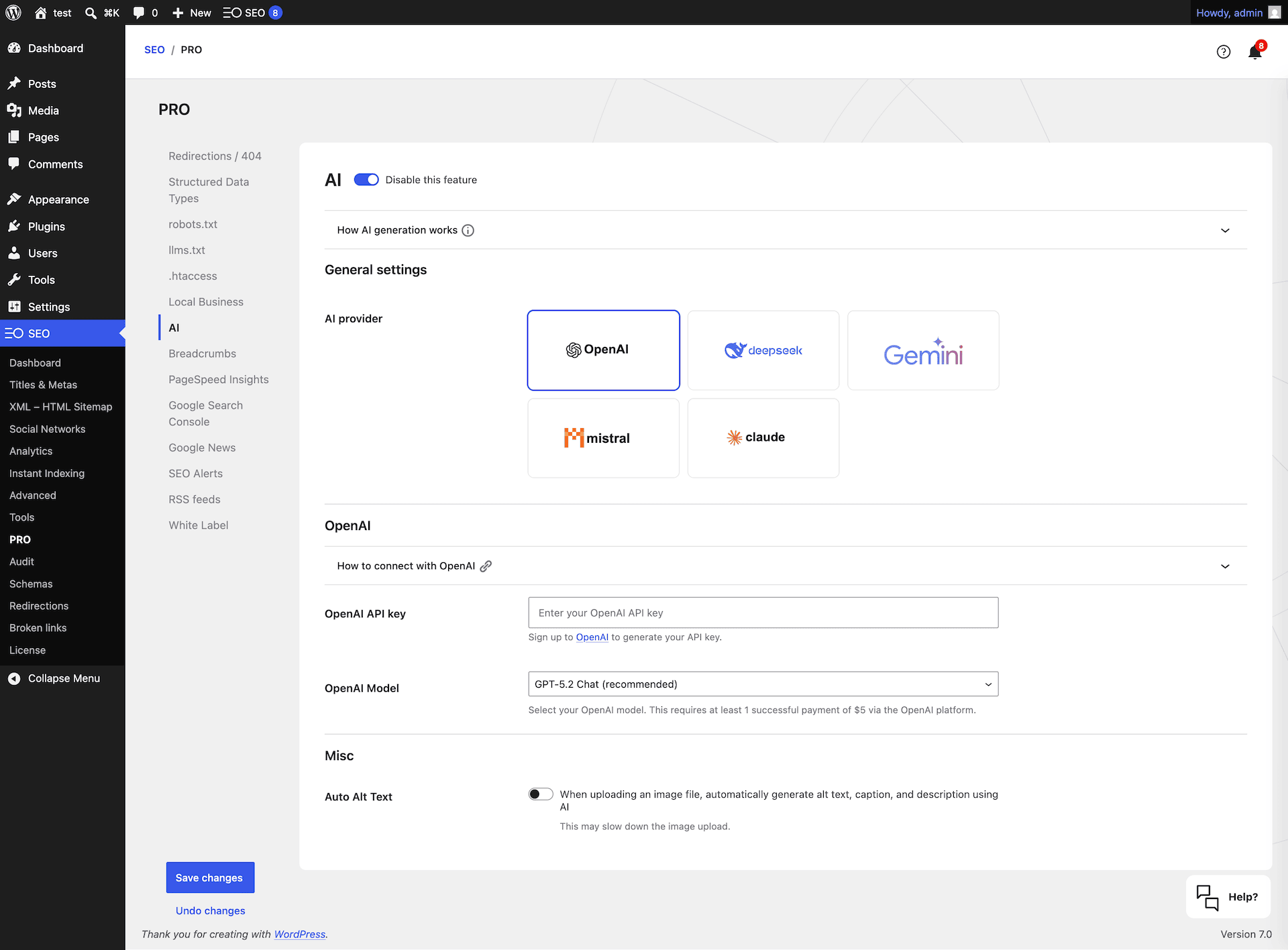
Supporting five AI providers is a practical differentiator. AIOSEO uses a proprietary credit system. Rank Math Content AI is a proprietary model. SEOPress lets you use whichever AI provider you already pay for, rather than adding a new subscription.
AI features are Pro-only. Rank Math free includes limited AI credits in its free tier.
SEOPress vs Yoast SEO
| Feature | SEOPress Free | SEOPress Pro | Yoast SEO Free | Yoast SEO Premium |
|---|---|---|---|---|
| Focus keywords | Unlimited | Unlimited | 1 | Up to 5 |
| Redirect manager | Basic (v10.1+) | Full (all types) | No | Yes |
| 404 monitor | No | Yes | No | No |
| Schema types | Core types | 20+ advanced | Core types | Extended |
| Search Console data | No | Yes | No | No |
| IndexNow | Yes | Yes | No | Yes |
| Google Indexing API | Yes | Yes | No | No |
| Analytics dashboard | No | GA4 and Matomo | No | No |
| White-label | No | Yes | No | No |
| AI metadata tools | No | 5 AI providers | No | AI Generate |
| Content analysis | Post-save | Post-save | Real-time | Real-time |
| Price (1 site/year) | Free | $49 | Free | $118.80 |
Where SEOPress wins over Yoast:
- Unlimited focus keywords in the free version (Yoast free allows one; Yoast Premium allows up to five)
- Google Search Console integration in Pro at $49/year versus no native equivalent in any Yoast tier
- GA4 and Matomo analytics dashboard built into Pro, with no equivalent in any Yoast plan
- White-label branding in Pro ($149/year unlimited sites) versus not available in any Yoast plan
- Basic redirect management free since v10.1 versus Yoast Premium required for any redirect capability
- Full redirect manager at $49/year (one site) versus Yoast Premium at $118.80/year per site
- Google Indexing API included free versus not available in Yoast
- Multi-site pricing: $149/year unlimited versus $118.80/year per site at Yoast
Where Yoast wins over SEOPress:
- Real-time content analysis that updates as you type versus SEOPress’s post-save analysis
- Deeper readability feedback: Flesch reading ease, passive voice percentage, transition word counts, and per-sentence feedback versus SEOPress’s pass/fail checklist
- Much larger community with more tutorials, answered support questions, and third-party integrations
- Tightly integrated AI writing tools that require no external API keys
- Longer production track record at scale
Pricing
SEOPress uses flat annual renewal pricing. There are no first-year discounts that reset to a higher renewal rate. The price you pay in year one is the same in year two and beyond.
| Plan | Price | Sites |
|---|---|---|
| Free | $0 | Unlimited |
| PRO 1 Site | $49/year | 1 |
| PRO 5 Sites | $59/year | 5 |
| PRO Unlimited | $149/year | Unlimited |
| Insights Add-on | $99/year | Requires Pro |
All Pro plans include the same complete Pro feature set. The only difference between tiers is the number of sites covered.
The Insights add-on ($99/year, requires an active Pro license) adds keyword rank tracking with daily position monitoring and backlink monitoring. Aimed at site owners who want rank and link data integrated into their SEO workflow without a separate tool subscription.
Pricing context for existing users: The pricing structure changed on August 1, 2025. The previous plan at $49/year covered unlimited sites. Under the current structure: $49/year covers one site, $59/year covers five sites, and $149/year covers unlimited sites. Existing subscribers with auto-renewal were not affected and retained their original pricing terms.
Multi-site pricing comparison: For a single site, SEOPress Pro 1 Site ($49/year) directly undercuts Yoast SEO Premium ($118.80/year) and is comparable to AIOSEO Basic ($49.50 first year, approximately $99 at renewal). Rank Math Pro ($96/year) covers unlimited personal sites, which is more expensive at one site but better value for large personal portfolios. For unlimited commercial or agency sites, SEOPress Pro Unlimited ($149/year) is the most affordable unlimited-site plan among major WordPress SEO plugins.
Pros and Cons
Pros
- Unlimited focus keywords in the free version: one of the only major SEO plugins that does not impose a keyword cap at any tier
- Clean, ad-free admin interface at every tier: no promotional banners in the WordPress dashboard on the free or Pro plan
- Basic redirect management included free as of v10.1: ahead of Yoast free and AIOSEO free on this capability
- Google Search Console integration available in Pro at $49/year: dramatically cheaper than AIOSEO Elite for equivalent functionality
- White-label branding in all Pro plans including the $149/year unlimited-site option: the lowest price for white-label in the category
- Multi-site pricing best in class for agencies: $149/year for unlimited sites beats all major competitors
- AI metadata generation supports five providers (OpenAI, Google Gemini, Claude, Mistral, DeepSeek): use the AI platform you already pay for
- Native Matomo Analytics integration: a full-stack SEO and analytics option for privacy-focused or non-Google sites
- Lightweight runtime: consistently rated lighter than AIOSEO and Yoast in independent performance tests
- Flat annual renewal pricing: no first-year promotional rate that doubles on renewal
- 650+ developer hooks and REST API support for custom integrations
- One-click migration from twelve competing SEO plugins with detailed pre-migration summaries
Cons
- Smaller community and ecosystem: fewer third-party tutorials, community forum answers, and extension plugins than Yoast or Rank Math; troubleshooting unusual configurations may require direct support
- Content analysis is post-save rather than real-time: the checklist only updates after saving, which disrupts writing-with-live-feedback workflows that Yoast handles better
- No numerical content score: the pass/fail checklist does not give an at-a-glance quality metric; content quality tracking across a large portfolio requires a separate system
- Advanced schema types (Product, Event, Local Business, Video, Recipe) require Pro; the free tier handles editorial content but not e-commerce or local business sites
- Pricing changed in August 2025: the single-site plan now costs what the old unlimited-site plan cost ($49/year), which is a price increase for users who previously held an unlimited license at that price
- 300,000 active installs versus Yoast’s 5 million: smaller install base means less real-world compatibility data and fewer community-documented edge cases
- No dedicated readability analysis: sentence length, passive voice, transition words, and reading ease scores are absent from the content checklist; teams focused on prose quality need a supplementary tool
Alternatives
Rank Math SEO covers the most features at zero cost: unlimited focus keywords, Google Search Console data, redirect manager with 404 monitoring, video and news sitemaps, and IndexNow are all free. Its Pro tier at $96/year for unlimited personal sites is competitive for personal site portfolios, and Business at $199/year covers agencies with white-label. Rank Math’s admin is denser and can feel overwhelming for beginners. Covered in our Rank Math review.
Yoast SEO is the most established option with the deepest readability analysis and the largest community. Its free tier is narrower than SEOPress and Rank Math on several key points. Premium pricing at $118.80/year per site makes it the most expensive for multi-site operators. Covered in our Yoast SEO review.
All in One SEO provides the most polished beginner setup experience with a guided wizard, E-E-A-T author tooling, and a well-integrated AI suite. Its runtime overhead is higher than SEOPress, and its most analytically useful features sit behind more expensive plan tiers. Covered in our All in One SEO review.
The SEO Framework takes the same lightweight, no-bloat approach as SEOPress but with a narrower feature set and no in-editor content analysis by default. A good option for developers and performance-first sites that do not need guided on-page feedback.
Final Verdict
SEOPress’s pitch in 2026 is straightforward: professional-grade WordPress SEO without per-site pricing, dashboard advertising, or the feature gating that defines its larger competitors.
The free version is genuinely capable. Unlimited focus keywords, basic redirections, IndexNow, the Google Indexing API, and a full content analysis checklist are there without a paid plan. The admin is clean. There are no interstitial upgrade prompts between you and the settings you need.
The Pro plan’s strongest value case is for multi-site operators. At $149/year for unlimited sites, you get white-label branding, a full redirect manager with 404 monitoring, Google Search Console integration, GA4 and Matomo analytics dashboards, and AI metadata tools that work with whichever AI provider you already use. Replicating that feature set from Yoast would cost $118.80 per site per year with no multi-site discount.
The honest case against SEOPress comes down to community size, real-time analysis, and the missing score. If you rely on Yoast’s readability traffic light updating as you write, SEOPress’s post-save analysis will feel like a downgrade. If your team troubleshoots unusual configurations by searching community forums, Rank Math and Yoast’s larger ecosystems will serve you better. If you track content quality per post using a single score, the absence of a numerical metric will require a workflow adjustment.
For agencies, developers, and multi-site operators who already understand SEO and want to spend less time on dashboard ads and per-site licensing invoices: SEOPress Pro is genuinely hard to argue with.