


Most WordPress anti-spam plugins ask you to choose between friction and complexity. CAPTCHA plugins add a puzzle your visitors have to solve. Cloud-based services like Akismet or CleanTalk route form data through external servers. Free options like Antispam Bee cover only WordPress comments.
WP Armour takes a different position. It uses a honeypot field to trap spam bots, covers a broad range of WordPress forms in the free version, requires zero setup after activation, and keeps all processing on your own server. There is no API key, no subscription, and no CAPTCHA for legitimate visitors.
I went through version 2.4.02, the current release as of September 2026. I covered the WordPress.org listing, the plugin description and FAQ, the developer’s site, the changelog, and the public support forums to understand how WP Armour actually works, what the free and paid tiers include, and where the edges are.
At a glance
- Reviewed version: 2.4.02, last updated September 3, 2026, tested to WordPress 7.1
- Made by: Dnesscarkey (Dinesh Karki)
- WordPress.org rating: 5 out of 5 stars (1,436 ratings, 1,418 five-star)
- Active installs: 400,000+
- Free tier: yes – covers WP Comments, WP Registration, Contact Form 7, WPForms, Gravity Forms (non-Ajax), Elementor Forms, Fluent Forms, Divi, BBPress, Caldera Forms, Toolset Forms, Formidable Forms, Theme My Login, WooCommerce Reviews Pro
- Paid tier (WP Armour Extended): Personal $19.99/year (1 site), Business $49.99/year (up to 5 sites), Corporate $99.99/year (up to 100 sites)
- GDPR compliant: yes – no external API calls, no cookies, no tracking
- Bottom line: a reliable zero-config honeypot that covers more forms for free than any comparable plugin. The Extended tier adds IP blocking, spam logging, keyword filtering, and support for WooCommerce checkout and many additional form plugins.
Quick verdict
WP Armour is the easiest honeypot plugin to recommend when you want broad WordPress form coverage without CAPTCHA friction or cloud API dependency. Activate it, and spam bot protection turns on automatically across Contact Form 7, WPForms, Gravity Forms, Elementor Forms, Fluent Forms, Divi, and the WordPress comment and registration system. No API key, no account, no configuration required.
The technique is sharper than a standard server-side honeypot. WP Armour injects the honeypot field via JavaScript, which spam bots cannot execute. The field simply does not exist from the bot’s perspective, so it cannot be filled. Legitimate visitors never see it. This approach blocks the overwhelming majority of automated spam submissions with zero visitor friction.
The one honest limit is scope: some of the most useful features (IP blocking, spam logs, WooCommerce checkout protection, Ninja Forms, MC4WP Mailchimp, Beaver Builder, Bricks Builder) require WP Armour Extended. The free version handles a wide range, but if your spam problem is coming through WooCommerce or a less common form plugin, check the compatibility list before choosing free over Extended.
Quick verdict card
- Best for: WordPress sites using Contact Form 7, WPForms, Gravity Forms, Elementor, or Fluent Forms that want zero-config bot protection without CAPTCHA
- Also solid for: privacy-focused and GDPR-sensitive sites that want no external API calls
- Extended for: sites needing WooCommerce checkout protection, spam log visibility, IP blocking, or support for Ninja Forms, Mailchimp for WP, Beaver Builder, and others
- Standout: JavaScript-based honeypot injection that bots cannot see; 400,000+ active installs; near-perfect 5-star rating from 1,436 reviews; GDPR compliant; free forever for core use cases
- Watch out for: Extended needed for WooCommerce checkout and some popular form plugins; JavaScript-dependent (no-JS visitors not protected, though this is very rare); manual human spam bypasses honeypot logic; support thread resolution rate is low per public forum data
What WP Armour is
WP Armour – Honeypot Anti Spam is a free WordPress plugin that blocks automated spam submissions by inserting a honeypot field into WordPress forms. It was added to the WordPress repository in June 2020 and has grown to 400,000+ active installs as of September 2026, with a near-perfect 5-star rating from 1,436 reviews (1,418 of them five-star).
The plugin is made by Dnesscarkey, a developer based in Nepal who also created Use Any Font and jQuery Validation for Contact Form 7. The main support channel is the WordPress.org forum.
The core idea is honeypot anti-spam: a hidden field is added to every supported form. Real users never see it because it is visually hidden. Spam bots, which blindly fill every field in a form, fill the honeypot field. When the server detects the honeypot field was filled, the submission is flagged as spam and rejected.
What makes WP Armour different from most honeypot plugins is how the hidden field is inserted. Most honeypot plugins add the field from the server side in PHP. A persistent bot can learn to recognize and skip known PHP-injected honeypot fields. WP Armour injects the field via JavaScript on the client side. Since spam bots cannot run JavaScript, the honeypot field never appears in the form from the bot’s perspective. The field does not exist to be filled. The submission fails the server-side check automatically.
Additionally, WP Armour generates a unique honeypot field name for each WordPress installation, making it harder for bot operators to create a one-size-fits-all bypass.
Who WP Armour is best for
WP Armour fits a wide range of WordPress sites. It is a strong match when:
- The site uses Contact Form 7, WPForms, Gravity Forms, Elementor Forms, or Fluent Forms and needs form spam blocked without CAPTCHA
- Privacy or GDPR compliance matters and you want spam filtering with no data leaving the server
- Zero-config protection is a priority: activate and done
- Budget is a constraint: the free version handles the most common form spam scenarios
- The site already relies heavily on JavaScript, so JS dependency is not a concern
WP Armour is less suitable when:
- Spam is coming from manual human submissions rather than bots (honeypot does not catch this)
- WooCommerce checkout protection is needed on the free tier (Extended required)
- The site uses a form plugin not on WP Armour’s compatibility list
- Detailed spam analytics are needed without paying for Extended
How WP Armour works
The plugin’s mechanism is straightforward. On activation, WP Armour hooks into supported form rendering functions and appends a hidden input field. The field has a unique name generated at install time, styled to be invisible to the user via CSS positioning. It is not simply set to display:none, since some bots check for that.
When a form is submitted, WP Armour checks whether the honeypot field was filled. If it was filled, the submission is treated as spam. If the field is empty or absent (as happens when bots cannot see a JavaScript-injected field), the submission is allowed through.
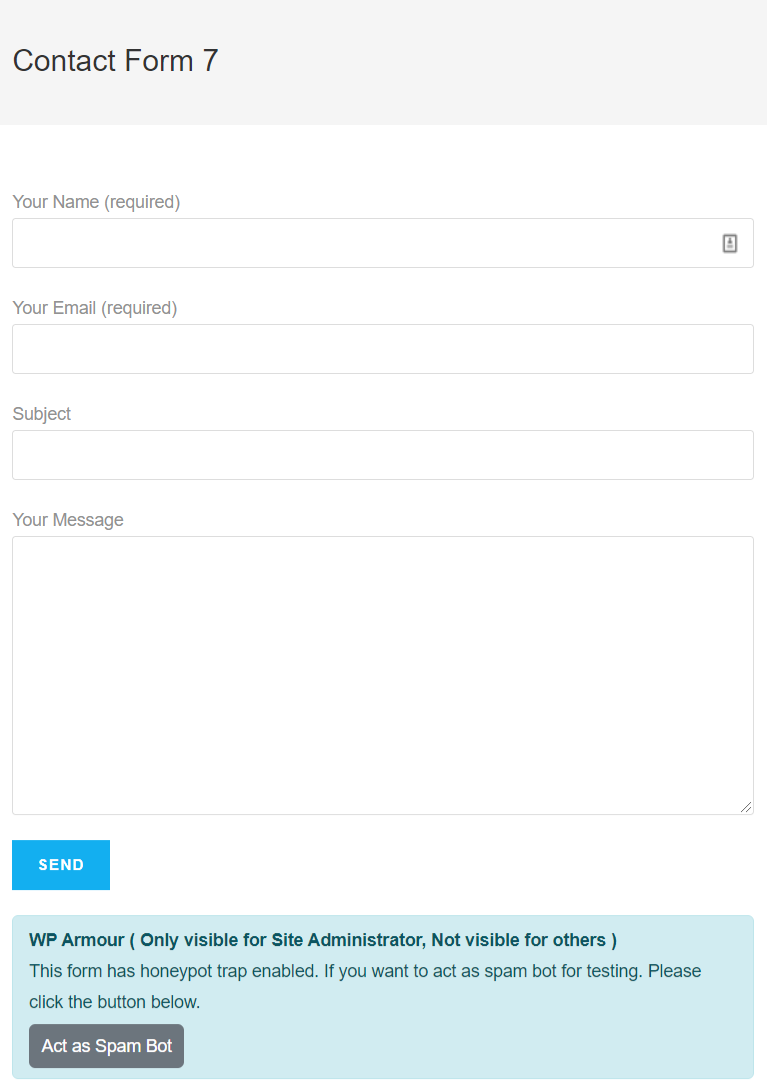
The admin confirmation widget is a useful practical touch. When logged in as Administrator, a small test widget appears below any protected form. It confirms protection is active and lets you simulate a spam bot submission for testing. Most site owners will never need to dig into source code to verify the plugin is working.
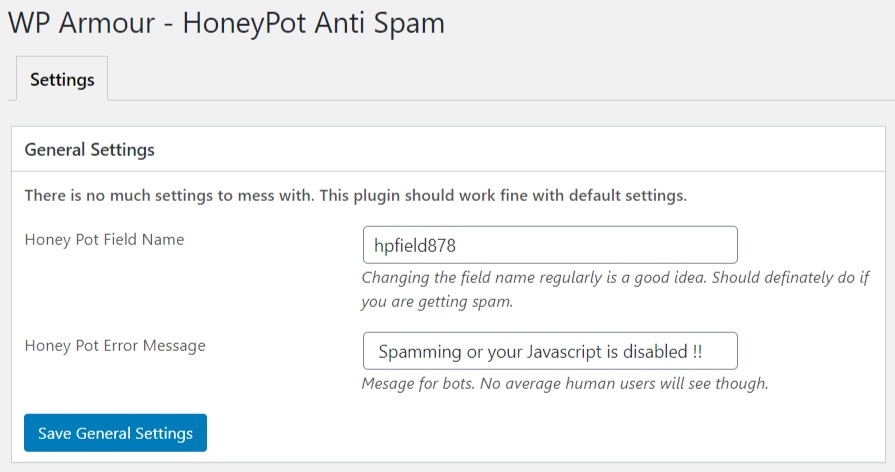
You can also change the honeypot field name from the settings page if you suspect bot operators have learned the current field name, though the default unique-per-installation approach makes this unnecessary in most cases.
Free version coverage
WP Armour’s free version protects a genuinely broad range of forms automatically with no configuration required. Activating the plugin enables protection for all of the following:
- WordPress Comments
- WordPress Registration
- BBPress Forum posts
- Contact Form 7
- Gravity Forms (non-Ajax, single-page forms)
- WPForms
- Formidable Forms
- Caldera Forms
- Toolset Forms
- Elementor Forms
- Fluent Forms
- Divi Theme Contact Form
- Theme My Login
- WooCommerce Reviews Pro
This list covers the majority of form plugins used on typical WordPress sites. If your site uses Contact Form 7, Elementor, WPForms, or Fluent Forms, installing WP Armour means you can stop thinking about form spam.
WP Armour Extended: what the paid tier adds
The Extended version adds features that go beyond basic honeypot protection. It is available as a yearly license from the developer’s site:
- Personal: $19.99/year (1 site)
- Business: $49.99/year (up to 5 sites)
- Corporate: $99.99/year (up to 100 sites)
The Extended tier adds:
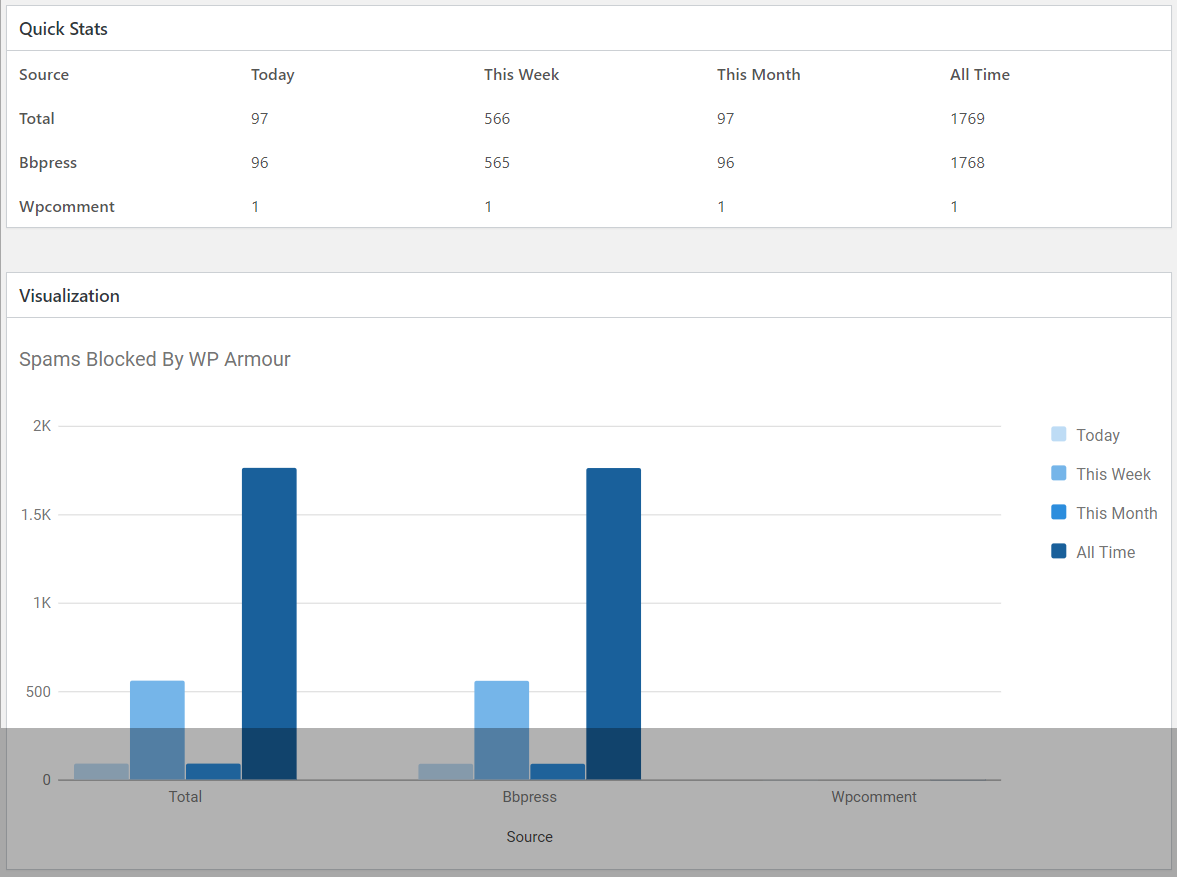
Spam logs. View what spam bots actually tried to submit. Useful for understanding the nature of the spam hitting your site.
IP logging and blocking. The plugin logs IP addresses of spam attempts and can automatically block an IP after multiple spam submissions. This adds a second layer of defense beyond the honeypot alone.
Spam keyword filter. Mark submissions as spam when they contain specified words or phrases. Useful for catching human spam that a honeypot cannot catch.
Additional form integrations, including: WooCommerce Checkout and Registration (with card testing order prevention), Easy Digital Downloads Checkout, Ninja Forms, Gravity Forms (Ajax-based and multi-step), MC4WP Mailchimp for WordPress, Beaver Builder Contact Form Module, Bricks Builder Form, BricksForge Pro Form, JetForm Builder, Forminator, WS Form, BuddyPress and BuddyBoss, MailPoet, Brevo, Ultimate Members, S2Member, and several more.
The WooCommerce coverage in Extended is particularly valuable. WooCommerce checkout spam and card testing attacks are a real problem for e-commerce sites, and blocking them at the form level before they reach payment processors saves both money and headaches. All plans include a 30-day refund policy.
Setup and user experience
Setup is as close to zero as a WordPress plugin gets. Install and activate WP Armour, and spam protection is running. There is no wizard, no API key to retrieve, no form-by-form configuration, and no third-party account to create.
The settings page is minimal: view and change the honeypot field name, and adjust the spam rejection message visitors see if their submission is flagged. Most users will never touch these settings.
The admin test widget is the most useful UX detail. On any page that contains a protected form, WP Armour shows a small widget at the bottom of the form when logged in as admin. The widget confirms protection is active and gives you a button to simulate a spam bot submission for testing. This is genuinely helpful for site owners who want to verify coverage without reading source code.
There is no dashboard showing blocked spam counts in the free version. Extended adds spam statistics, which is useful for understanding spam volume over time.
Rating and track record
The numbers on WP Armour’s WordPress.org profile are unusually strong. 400,000+ active installs places it firmly in the top tier of anti-spam plugins by adoption. The 5-star rating with 1,436 ratings (1,418 of them five-star, 12 four-star, and only 6 lower) reflects real-world satisfaction that is hard to fake across six years of active use.
The plugin was last updated September 3, 2026, is tested up to WordPress 7.1, and has maintained consistent development since June 2020.
On the caution side: at the time of this review, the support forum shows 7 open threads and 0 resolved threads. This does not mean the plugin is unreliable. WP Armour’s zero-config approach means most users simply never need to open a support thread. But if you run into an edge case, direct developer responsiveness is a potential weak point worth factoring in.
Pros and cons
Pros
- Completely free for the most common WordPress form plugins
- No setup after activation: protection is automatic
- JavaScript-based honeypot is harder to bypass than server-side PHP honeypots
- GDPR compliant: no external API calls, no cookies, no data leaves your server
- 400,000+ active installs and near-perfect 5-star rating from 1,436 reviews
- Admin test widget confirms coverage is active without reading code
- Unique honeypot field name per installation
Cons
- JavaScript dependency: visitors with JS disabled will not have honeypot protection (very rare in practice)
- Manual human spam is not caught by honeypot logic
- WooCommerce checkout, Ninja Forms, Ajax-based Gravity Forms, and many integrations require the paid Extended tier
- Support thread resolution rate is low in public forums
- Extended version requires a yearly subscription with no lifetime option
Alternatives
Akismet: Cloud-based spam filter using machine learning trained on 5+ million WordPress sites. Very effective for comment spam. Free for personal non-commercial sites, paid for commercial sites (approximately $9.95/month for one site). Sends submission data to Automattic’s servers, which has GDPR implications. Does not add CAPTCHA. Read the Akismet review for the full picture.
Antispam Bee: Free, GDPR-friendly, covers only WordPress default comments. No CAPTCHA, no external API. The best pick when your spam problem is limited to comments. Not suitable for contact forms or form plugins. Read the Antispam Bee review for details.
CleanTalk: Cloud-based subscription service covering comments, registrations, forms, and WooCommerce. Starts at approximately $12/year. Effective and broad, but sends data to CleanTalk’s servers and requires an API key. Read the CleanTalk review.
If you want zero-config, zero-friction, zero-external-API protection for the most common WordPress forms at no cost, WP Armour is the most direct answer. If you need cloud-trained machine learning or WooCommerce coverage in the free tier, consider CleanTalk or Akismet.
Final verdict
WP Armour does what it promises. The JavaScript-based honeypot approach is smarter than server-side PHP honeypot plugins. The free version covers Contact Form 7, WPForms, Gravity Forms, Elementor Forms, Fluent Forms, Divi, WordPress comments and registrations, and several more without any setup. For GDPR-sensitive sites, the absence of any external API call is a meaningful advantage.
The 400,000 active installs and near-perfect 5-star rating from over 1,400 reviews across six years of active use are the strongest signals available. This is a well-validated approach with a long track record.
Extended pricing is reasonable for what it adds. $19.99/year for a single site covers IP blocking, spam logs, keyword filtering, and a much broader set of form integrations including WooCommerce. Sites with more serious spam problems or a specific need for WooCommerce checkout protection get a genuinely useful upgrade path.
The one gap is support responsiveness. If you run into an edge case, the public forum data suggests prompt support is not guaranteed. For most sites using supported forms, that will never matter. For edge cases, factor that in.
For most WordPress sites dealing with form spam, WP Armour on the free tier is the first plugin to try. It is free, fast to deploy, and does not make your visitors solve puzzles.
FAQ
What is WP Armour?
WP Armour – Honeypot Anti Spam is a free WordPress plugin that blocks spam bot submissions on WordPress forms using a JavaScript-injected hidden field. Spam bots cannot execute JavaScript and therefore cannot see or fill the honeypot field, causing their submissions to fail server-side validation automatically.
Does WP Armour work without any configuration?
Yes. After activation, WP Armour automatically adds honeypot protection to all supported forms and form plugins with no configuration required. A settings page exists to change the honeypot field name and spam rejection message, but most users never need to change either.
Is WP Armour free?
The core plugin is completely free with no time limit. It covers WordPress comments, registrations, Contact Form 7, WPForms, Gravity Forms (non-Ajax), Elementor Forms, Fluent Forms, Divi, BBPress, and several more. WP Armour Extended is a paid yearly license that adds IP blocking, spam logging, keyword filtering, and additional form plugin integrations. Extended starts at $19.99/year for one site.
Is WP Armour GDPR compliant?
Yes. WP Armour makes no external API calls, stores no cookies, and does no user data tracking. All processing happens on your own WordPress server. This makes it one of the most GDPR-friendly anti-spam options available for WordPress.
Does WP Armour protect WooCommerce?
WooCommerce Reviews Pro is covered in the free version. WooCommerce Checkout and Registration, including card testing order prevention, requires WP Armour Extended ($19.99/year and up).
Does WP Armour work with Contact Form 7?
Yes. Contact Form 7 is supported in the free version and protection activates automatically after plugin activation. No additional configuration is needed.
Can WP Armour block human spam?
No. WP Armour’s honeypot approach only catches automated spam bots. Spam submitted manually by a human will pass the honeypot check because the human can see and interact with the form normally. The spam keyword filter in WP Armour Extended can help catch some human spam by flagging specific words or phrases, but no automated tool fully replaces moderation for manual spam.
What is WP Armour Extended?
WP Armour Extended is the paid upgrade that adds spam logging, IP logging and blocking, spam keyword filtering, and support for additional form plugins including Ninja Forms, Ajax-based Gravity Forms, WooCommerce Checkout, Mailchimp for WordPress, Beaver Builder, Bricks Builder, JetForm Builder, BuddyPress, BuddyBoss, and many more. Pricing starts at $19.99/year for one site, $49.99/year for up to five sites, and $99.99/year for up to 100 sites.
How does WP Armour compare to Akismet?
WP Armour is a client-side honeypot: no external API, GDPR-safe, free for commercial sites. Akismet is a cloud-based machine learning filter that sends comment data to Automattic’s servers and requires a paid plan for commercial use. WP Armour is better for form spam across multiple form plugins. Akismet is better for high-volume comment spam where machine learning accuracy matters. Read the Akismet review for a full comparison.
Where can I get WP Armour?
The free version is available at wordpress.org/plugins/honeypot. WP Armour Extended is available from the developer’s site at dineshkarki.com.np. You can also install the free version directly from the WordPress admin under Plugins, Add New by searching for “WP Armour”.
Browse more WordPress plugin reviews in the Reviews category.