


Most WordPress site owners do not think much about comment spam until it becomes a problem. Akismet handles it, but it carries a commercial use clause: personal use is free, business sites need a paid plan. Some owners discover this only after running a business site on the free tier for months.
Antispam Bee takes a different position. It is 100% free for any site, commercial or personal. It does not require an API key. It does not send user data to external servers. And it does not add CAPTCHA, so visitors have no extra friction when leaving comments.
I went through version 2.11.13, the current release as of September 2026. I covered the WordPress.org listing (700,000+ active installs, 4.8/5 stars from 226 reviews), the documentation at antispambee.pluginkollektiv.org, the GitHub repository, and the support forums to understand what the plugin actually does, where it performs well, and where it has hard limits.
At a glance
- Reviewed version: 2.11.13, tested up to WordPress 7.1
- Made by: pluginkollektiv (originally created by Sergej Muller)
- WordPress.org rating: 4.8 out of 5 stars (226 reviews)
- Active installs: 700,000+
- Free: Yes, forever, for private and commercial sites
- Paid tier: None
- Key limit: Works with default WordPress comments only; does not protect forms, registrations, or iframe-based comment systems
Quick verdict
Antispam Bee is the cleanest solution available for WordPress comment spam on privacy-conscious or GDPR-sensitive sites. It costs nothing, requires no third-party account, and keeps visitor data entirely on your own server. For sites that need to protect the standard WordPress comment section and want to avoid sending any user data to Akismet’s cloud API or CleanTalk’s cloud service, Antispam Bee is the right answer.
The hard limit is equally clear: if you need spam protection for contact forms, WooCommerce checkout, user registrations, or third-party comment systems, Antispam Bee does not cover those. You need a different tool for that scope.
Quick verdict
- Best for: privacy-focused or GDPR-sensitive WordPress sites that use default WordPress comments
- Not for: sites that need form spam protection or that run Jetpack Comments, Disqus, or wpDiscuz
- Standout: fully free for commercial sites, no CAPTCHA, no external API calls, no account required
- Watch out for: comment-only scope; does not protect contact forms or user registrations
What Antispam Bee is
Antispam Bee is a free, open-source WordPress plugin built to stop comment spam without relying on external services, API keys, or CAPTCHAs. The plugin was originally created by Sergej Muller and is now maintained by pluginkollektiv, a collaborative team of WordPress developers who also maintain Cachify, Statify, and other privacy-focused WordPress plugins.
The plugin reached 700,000 active installs and a 4.8-star rating across 226 reviews, making it one of the top-rated anti-spam tools in the WordPress ecosystem. Matt Mullenweg mentioned it at WordCamp Europe 2014 as “another popular solution to fight spam,” which says something about how long it has maintained a recognized position.
The core design principle is local processing. All spam checks run server-side, on your installation, without forwarding comment data to a third-party database. This contrasts directly with Akismet, which sends every comment to Automattic’s cloud API, and with CleanTalk, which operates as a subscription cloud service.
Who Antispam Bee is best for
Antispam Bee is a strong fit when:
- Your site is in the EU and you need to demonstrate GDPR compliance without sending user data to US-based cloud services
- You run a personal blog, portfolio, or small business site and want to avoid Akismet’s commercial use requirement
- You want effective spam filtering without adding CAPTCHA friction for genuine commenters
- Your site uses the default WordPress comment form and spam volume is manageable
- You want a lightweight, zero-config starting point that you can layer more controls onto over time
Antispam Bee is the wrong choice when:
- You need protection for Contact Form 7, WPForms, Gravity Forms, or other form plugins
- Your site runs Jetpack Comments, wpDiscuz, or Disqus (incompatible; those systems load inside iframes)
- You need to stop spam user registrations
- Your spam volume is extremely high and you need a cloud-powered global threat database behind your defense
Setup and first use
Installation is standard. Go to Plugins, Add New, search for Antispam Bee, install and activate. No API key prompt, no account creation, no required configuration step before the plugin starts working.
The plugin adds a settings page under Settings in the WordPress admin. The page is divided into two sections: detection methods on the left, spam handling options on the right.
The interface is functional but visually dated. Each detection method has a checkbox with a short explanation beneath it. The explanations are accurate, but minimal. New users may not immediately understand the difference between “Gravatar validation” and “local database” without reading the external documentation.
The plugin starts blocking spam immediately after activation using its default-enabled options: honeypot field, approved commenter trust, and comment timing. No configuration is required for basic protection. The more powerful options, including country blocking, language filtering, and automatic deletion, require deliberate selection.
Main features
Honeypot field
The honeypot is the plugin’s primary detection method. Antispam Bee adds a hidden field to the WordPress comment form that is invisible to human visitors but readable by spam bots. When a bot submits the form and fills in that hidden field, the comment is flagged as spam.
The plugin uses CSS to hide the honeypot field from browsers. Version 2.11.13 introduced a new filter, antispam_bee_honeypot_styles, that lets developers remove the inline CSS and handle the field via their own stylesheet instead. This matters for sites with strict Content Security Policies that block inline styles.
In practice, the honeypot catches most automated submission scripts reliably. Long-term users in the review section consistently note that the plugin stops spam without any CAPTCHA visible to real visitors.
Approved commenter trust
Previously approved commenters bypass further spam checks. The identifier is the commenter’s email address. If someone has had a comment approved before, subsequent comments from the same email go through immediately.
This improves the experience for returning readers on active blogs while keeping friction only for first-time or unknown submitters.
Gravatar validation
Commenters with a registered Gravatar, a globally recognized avatar, receive additional trust. The check queries the Gravatar service using a hashed email, not the raw email address. The documentation explicitly notes that “other data of the commentator like the IP address are not part of the transmission.”
This is an optional check. Sites that want zero external requests can disable Gravatar validation and rely entirely on honeypot, timing, and local database checks.
Comment timing analysis
Antispam Bee tracks how quickly a comment is submitted after the comment form loads. Comments submitted in under five seconds are flagged as likely bot-generated. Genuine visitors take longer to type even a brief response.
This check has minimal false positive risk. Most spam bots operate faster than a human could type even a short message.
Country-based blocking
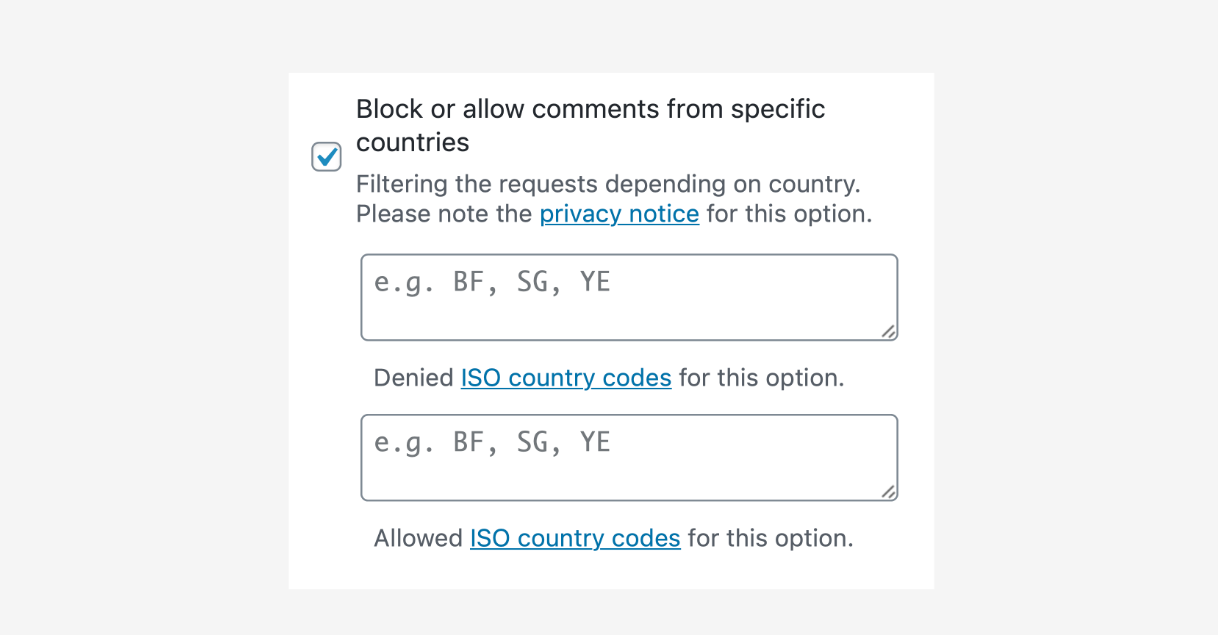
Antispam Bee can restrict or allow comments from specific countries. You configure an ISO country code allowlist or blocklist. Comments from blocked countries are flagged as spam.
This check requires sending a shortened (anonymized) IP address to an external geolocation service (currently iplocate.io). Version 2.11.5 specifically fixed an IP-handling issue for GDPR compliance in this feature. All other detection methods in the plugin run locally with no external network requests.
Language filtering
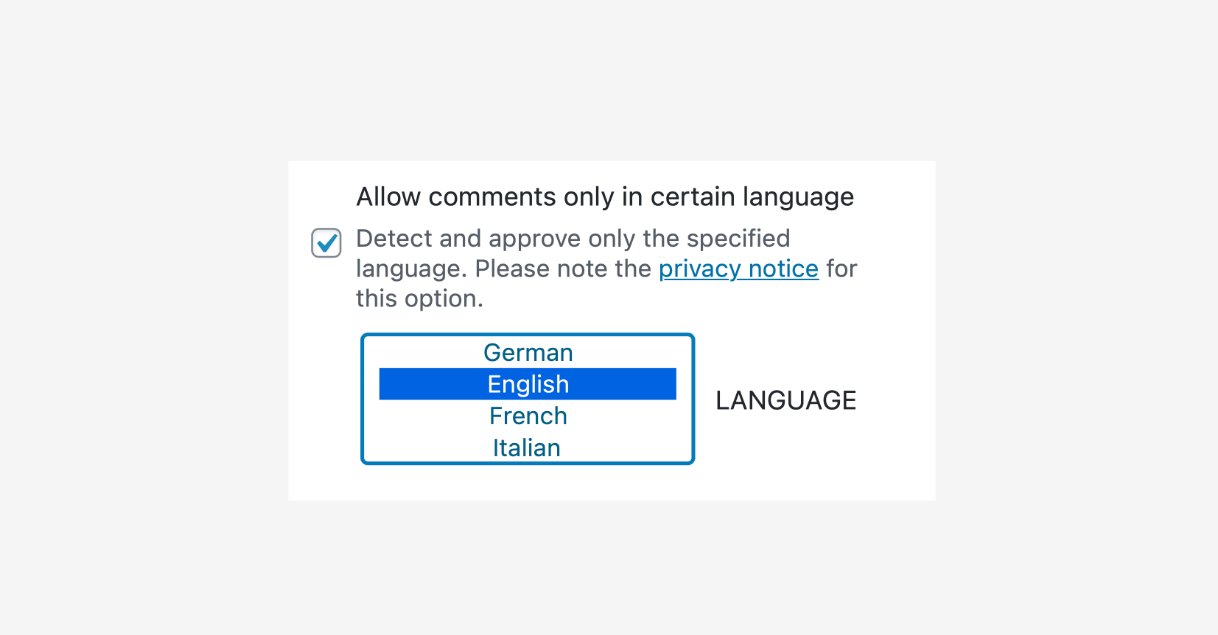
The language filter restricts comments to one or more selected languages. Comments detected as written in a different language are marked as spam. Language detection runs via a service called franc over HTTPS.
This is a blunt tool. It works well for single-language blogs where all readers are expected to write in one language. It would incorrectly block legitimate multilingual readers on a more global site.
Local spam database
Antispam Bee maintains a local database of previously detected spam, indexed by IP address, email, and URL. When a new comment arrives, it is cross-referenced against this database. Repeat offenders are caught immediately without any external lookup.
The local database is the privacy-preserving alternative to Akismet’s shared global spam database. It is less comprehensive for first-time spammers that have not previously targeted your site, but it costs nothing and shares no data externally.
BBCode and regex detection
The plugin detects BBCode markup (forum-style links like [url=...]) commonly used in comment spam, as well as applying regular expression patterns against comment text, email addresses, URLs, and user agents. Developers can extend the built-in patterns via the antispam_bee_patterns hook.
These filters are passive background checks. Most users never need to interact with them directly.
Dashboard statistics
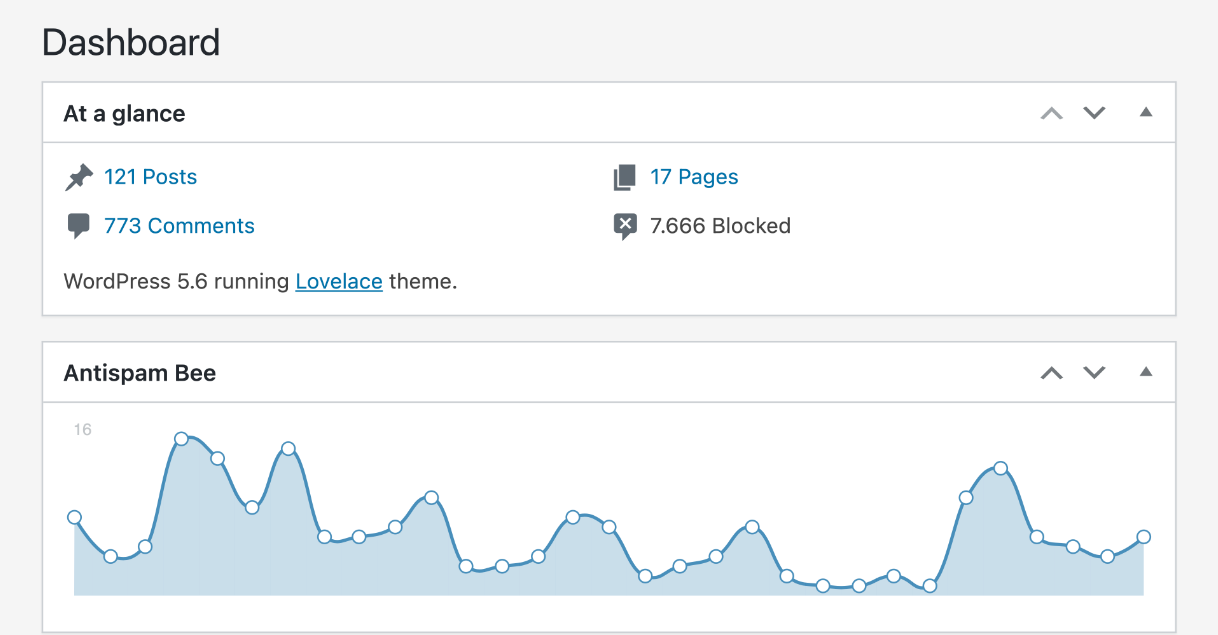
Antispam Bee adds a dashboard widget showing spam statistics: total spam caught, breakdown by detection reason (honeypot, timing, country, language, database match, and others), and a daily detection chart.
The statistics help verify that the plugin is working and show which detection methods are doing the most work for your specific site.
Spam handling options
Beyond detection, the plugin gives control over what happens to flagged comments:
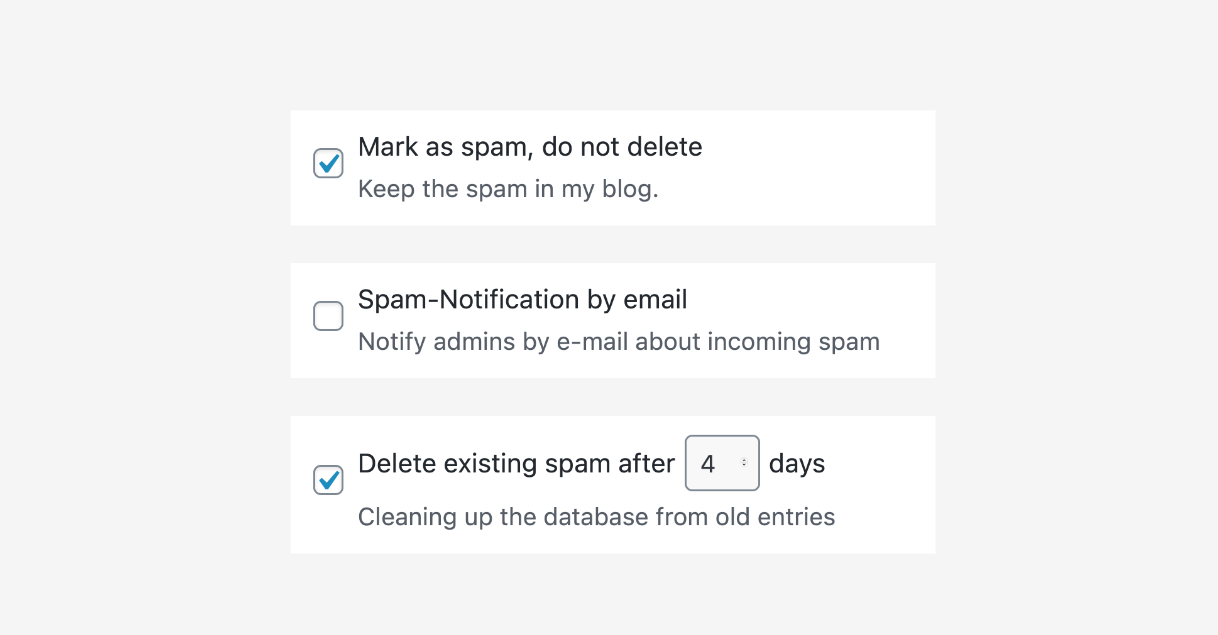
- Mark as spam and hold for manual review (default)
- Automatically delete spam after a configurable number of days
- Immediately delete comments flagged by specific high-confidence reasons (for example, honeypot hits)
- Email notifications for spam events, with configurable recipients and custom subject lines
The automatic deletion option keeps the spam queue manageable on sites with high bot traffic.
Pricing
Antispam Bee is free. There is no paid tier, no premium version, and no commercial restriction. The plugin states explicitly: “Antispam Bee is free forever, for both private and commercial projects.”
This is the key differentiator from Akismet, which requires a paid plan for commercial WordPress sites. CleanTalk starts at around $12 per year for a cloud anti-spam service that also covers forms and registrations in addition to comments.
For sites that only need comment spam protection and want no cost while staying GDPR-compliant, Antispam Bee has no direct competition on price.
Pros and cons
Pros
- Completely free for any site type, including commercial, with no plan tiers
- No API key or external account required; install and it works
- GDPR-compliant by design; most checks are local with no external data transmission
- No CAPTCHA friction added to comment forms
- 700,000+ active installs and 4.8/5 stars from 226 reviews
- Multiple detection layers: honeypot, timing, Gravatar, country, language, regex, local database
- Active maintenance by pluginkollektiv, compatible with WordPress 7.1
- Automatic spam deletion and email notifications included
Cons
- Works only with default WordPress comments; no protection for contact forms, WooCommerce, or user registrations
- Incompatible with Jetpack Comments, Disqus, and wpDiscuz
- Local spam database is less comprehensive than Akismet’s global shared database for novel spammers
- Country blocking and language filtering require optional external service calls, adding a minor GDPR consideration
- Interface is functional but dated; feature explanations are minimal for new users
- No cloud-powered intelligence means first-time spammers from unknown IPs may get through once before the local database catches them
Alternatives
Akismet Anti-Spam is the most widely installed WordPress spam filter, bundled by default with new WordPress sites. It sends every comment to Automattic’s cloud API for comparison against a shared spam database, giving it stronger coverage for novel spam patterns. The trade-off: comment data leaves your server, which creates GDPR considerations, and commercial sites need a paid plan (from $10 per month). Read the full Akismet review.
CleanTalk Anti-Spam is a subscription cloud service (from around $12 per year) that covers comment spam, form spam, registrations, and WooCommerce checkout in a single install. More comprehensive than Antispam Bee in scope, but requires a paid subscription and sends data to an external cloud service. Read the full CleanTalk review.
Titan Anti-Spam and Security combines comment spam filtering with WordPress security hardening in one free plugin, with a pro tier that adds machine learning detection, two-factor authentication, and backups. A reasonable option for sites that want spam protection and security basics without running two separate plugins. Read the full Titan Anti-Spam review.
Final verdict
Antispam Bee does exactly what it says. It blocks comment spam effectively, without CAPTCHA, without API keys, without external data sharing by default, and without charging anything, including for commercial sites.
The scope is fixed: it only works with the standard WordPress comment form. If you need protection for contact forms, checkout pages, or registrations, you need CleanTalk or a dedicated form anti-spam layer alongside or instead of Antispam Bee.
For the use case it targets, Antispam Bee is hard to beat. Privacy-focused blogs, EU-based sites that take GDPR seriously, and anyone who needs a reliable free alternative to Akismet for commercial use will find it a solid, low-maintenance solution that just works.
FAQ
Is Antispam Bee really free for commercial sites?
Yes. The plugin’s FAQ explicitly states: “Antispam Bee is free forever, for both private and commercial projects.” There is no paid tier and no commercial restriction.
Does Antispam Bee use CAPTCHA?
No. Antispam Bee does not add any CAPTCHA challenge to comment forms. It uses server-side checks (honeypot, timing, database lookups) that are invisible to genuine visitors.
Is Antispam Bee GDPR compliant?
Yes, with one note. Most detection methods (honeypot, timing, local database, comment analysis) run entirely on your server with no external data transmission. The optional country-blocking feature sends a shortened IP address to a geolocation service. The optional Gravatar check sends a hashed email to Gravatar. If you need zero external requests, disable those two options.
Does Antispam Bee work with Contact Form 7 or other form plugins?
No. Antispam Bee works exclusively with the default WordPress comment form. It does not integrate with Contact Form 7, WPForms, Gravity Forms, or any other form plugin.
Does Antispam Bee work with Jetpack Comments, Disqus, or wpDiscuz?
No. Those services load comment forms inside iframes, which prevents Antispam Bee from accessing the form data. The plugin only works with the native WordPress comment system.
How does Antispam Bee compare to Akismet?
Akismet sends every comment to a shared cloud API, which makes its spam database more comprehensive but creates privacy and GDPR considerations. It also requires a paid plan for commercial sites. Antispam Bee processes comments locally, shares no data externally by default, and is free for all site types. The trade-off: Antispam Bee’s local database is less powerful for catching brand-new spam patterns from IPs that have not targeted your site before.
Does Antispam Bee require any configuration before it starts working?
No. Install, activate, and the plugin starts filtering spam immediately using its default settings: honeypot field, approved commenter trust, and comment timing analysis. Advanced features like country blocking and language filtering require deliberate configuration.
What happens to spam comments detected by Antispam Bee?
By default, detected comments are marked as spam and held in the WordPress spam queue for manual review. You can also configure the plugin to automatically delete spam after a set number of days, or to immediately delete comments flagged by high-confidence reasons such as the honeypot.
Does Antispam Bee affect website performance?
No noticeable impact for most sites. The checks run at comment submission time only and are not triggered on every page load. The dashboard statistics widget adds a minor load to the WordPress admin dashboard. Most detection methods are local lookups with no network requests.
Who maintains Antispam Bee?
The plugin was originally created by Sergej Muller and is now maintained by pluginkollektiv, a team of WordPress developers who also maintain Cachify, Statify, and other privacy-focused WordPress plugins. The plugin has 947+ commits on GitHub and active maintenance confirmed through recent releases.
Browse more plugin reviews in the WordPress plugin reviews section.