

Most WordPress site owners approach spam protection and site security as two separate problems. They install Akismet for comment spam, then add Wordfence or Solid Security on top. Two plugins, two settings panels, two subscription renewals. Titan Anti-Spam and Security takes a different approach: combine both into one install, keep the free tier genuinely useful, and add pro features like two-factor authentication and automated backups that most pure anti-spam tools do not offer.
That pitch is either convincing or overreaching, depending on how well the execution holds up. I went through the Titan plugin listing on WordPress.org (version 7.5.2, last updated May 2026), the official documentation at docs.themeisle.com, the pricing page at titansitescanner.com, the Themeisle support forums, and the 370 public WordPress.org reviews to put this review together. Where I tested the plugin directly, that is noted. Where I relied on official materials or public documentation, that is noted too.
At a glance
- Reviewed version: 7.5.2 (May 2026), tested up to WordPress 7.1
- Made by: Themeisle (1M+ WordPress users trust Themeisle products)
- WordPress.org rating: 4.5/5 stars (370 reviews)
- Active installs: 50,000+
- Free: Yes, with meaningful features and no commercial restriction
- Pro: From $39/year for 1 site (Starter plan, current promotional price)
- Bottom line: the best choice when you want basic spam protection and security hardening in a single free plugin, without running two separate tools. The pro tier adds 2FA and automated backups that go beyond what most anti-spam plugins offer.
Quick verdict
Titan fills a real gap in the WordPress plugin landscape. Most dedicated anti-spam tools stop at comment filtering. Most security plugins are heavy, complex, and expensive. Titan positions itself in the middle: a plugin that handles comment spam without CAPTCHA and applies security hardening to close the most common WordPress configuration gaps, all in the free tier.
The free version has no commercial restriction. Any site can run Titan free without the “personal use only” limitation that Akismet imposes. For small business sites that want spam and security basics covered and do not want to manage multiple plugins, that is a meaningful advantage.
The Pro tier is where Titan separates itself most clearly. Machine learning spam detection, two-factor authentication with TOTP app support, and scheduled backups to FTP or Dropbox are all included from $39/year for one site. These features go beyond what Akismet or CleanTalk offer at comparable prices.
The trade-offs are real: the active install base is smaller than Akismet or CleanTalk, which means a narrower community spam database. The plugin history includes a significant rebranding event around 2019 that left older users unhappy, and a small number of reported error 500 crashes appear in the one-star reviews.
Quick verdict card
- Best for: sites that want spam protection and security hardening in one free plugin, without the commercial restrictions of Akismet
- Best free plan: the free tier, which covers comment spam blocking and security hardening for any site type
- Best paid plan: Starter at $39/year for 1 site (current promotional price), adding machine learning detection, 2FA, vulnerability scanning, and backups
- Standout: combines spam filtering and security in a single plugin; genuinely free for commercial sites; 2FA and backup features in pro go beyond what most anti-spam tools offer; local spam database avoids per-submission cloud API calls
- Watch out for: smaller spam database than Akismet or CleanTalk; limited form coverage compared to CleanTalk; some users have reported stability issues after updates; pro requires both the free plugin and a separate add-on installed simultaneously
What Titan is
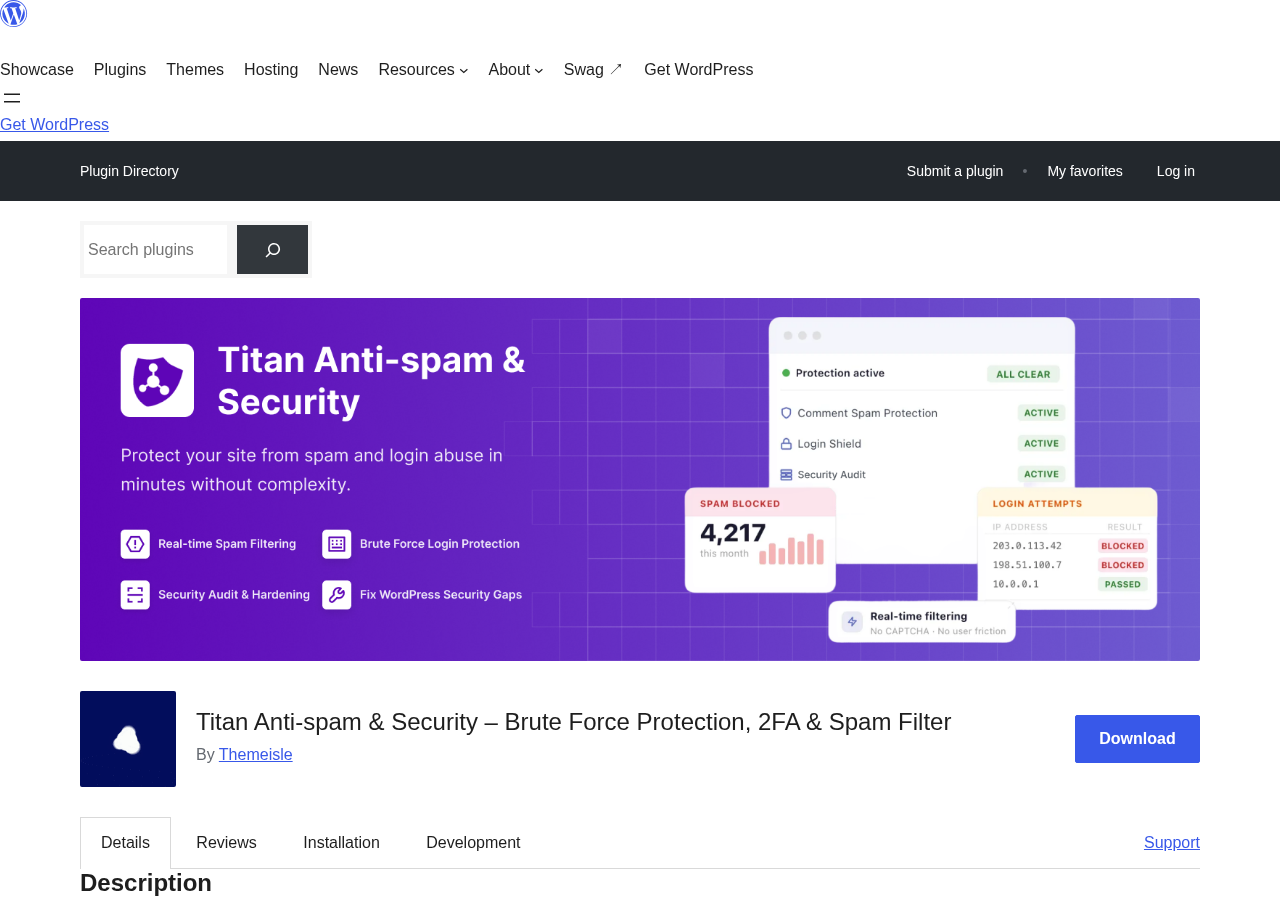
Titan Anti-spam and Security is a WordPress plugin built and maintained by Themeisle, a Romanian software company trusted by over one million WordPress users through products like Neve theme and Hestia. The plugin launched on WordPress.org in September 2012, making it over 13 years old in 2026, with a significant rebranding and pivot around 2019 that expanded it from a comment spam filter to its current combined spam-and-security scope.
The core pitch is consolidation. Rather than maintaining separate plugins for spam filtering, login protection, security hardening, and backups, Titan handles all of these under a single menu item in your WordPress dashboard.
The spam detection approach uses a global spam database that the plugin updates periodically. When a comment is submitted, Titan checks it against this database. The free tier relies on pattern-matching and database lookups. The Pro tier adds machine learning analysis that re-checks unfiltered comments and adapts to emerging spam patterns. Titan’s documentation describes the approach as operating locally without continuous external API calls per submission, which is a meaningful difference from Akismet and CleanTalk, both of which send each submission to their cloud APIs for analysis.
The WordPress.org listing shows:
- Active installs: 50,000+
- Total ratings: 370
- Rating breakdown: 5-star: 312, 4-star: 6, 3-star: 3, 2-star: 6, 1-star: 43
- Rating: 4.5 out of 5 stars
- PHP required: 7.4 or higher
- WordPress required: 5.6 or higher
- Languages: 10 locales
- Added to WordPress.org: September 6, 2012
The 43 one-star reviews are worth noting. A significant portion of them date from the 2019 rebranding period, when the plugin shifted scope and changed its interface substantially, frustrating long-term users. More recent one-star reviews cite occasional update-related crashes. The current plugin is a different product from what those early critics encountered.
Who Titan is best for
Strong fit:
- Sites without an existing security plugin that want spam and security covered by one tool. Titan eliminates the need to separately install Wordfence, Solid Security, or a similar plugin for basic hardening.
- Commercial sites on a budget who cannot use Akismet’s free tier. Titan’s free version has no commercial use restriction, unlike Akismet’s “personal non-commercial use only” free plan.
- Small business sites and bloggers who want basic protection without learning two separate plugin interfaces.
- Sites that receive comment spam and also want to enforce strong passwords, hide WordPress version information, disable XML-RPC, and limit login attempts, all in one plugin.
- Privacy-sensitive deployments. Because Titan uses a periodically updated local database rather than sending each submission to a cloud API, it avoids the GDPR implications of real-time external data processing that affect Akismet and CleanTalk.
- Sites on tighter budgets that also need 2FA and backups. At $39/year for one site, the Pro plan includes 2FA and backup features that would cost extra if purchased as separate plugins.
Weak fit:
- Sites that need to stop WooCommerce checkout spam, registration spam, and login form spam through a single subscription. Titan’s spam blocking focuses on comments. It does not have CleanTalk’s broad form-by-form coverage across WooCommerce, registration pages, and contact forms simultaneously.
- Sites with high comment volume where detection accuracy matters most. Akismet’s five-million-site database and CleanTalk’s 1.1-million-site network have more training data than Titan’s smaller community.
- Sites already running a dedicated security suite like Wordfence or Solid Security. Installing Titan on top would overlap features and create redundancy without proportional benefit.
- Teams that need a detailed cloud-based spam analytics dashboard to track and report on spam volumes. Titan’s logging is local; there is no external analytics portal.
Setting up Titan
Titan installs from the WordPress plugin directory without requiring an account or API key. That is the most friction-free setup of any anti-spam plugin I have reviewed.
The process is:
- Go to Plugins in your WordPress admin.
- Click Add New and search for “Titan Anti-Spam and Security.”
- Click Install Now, then Activate.
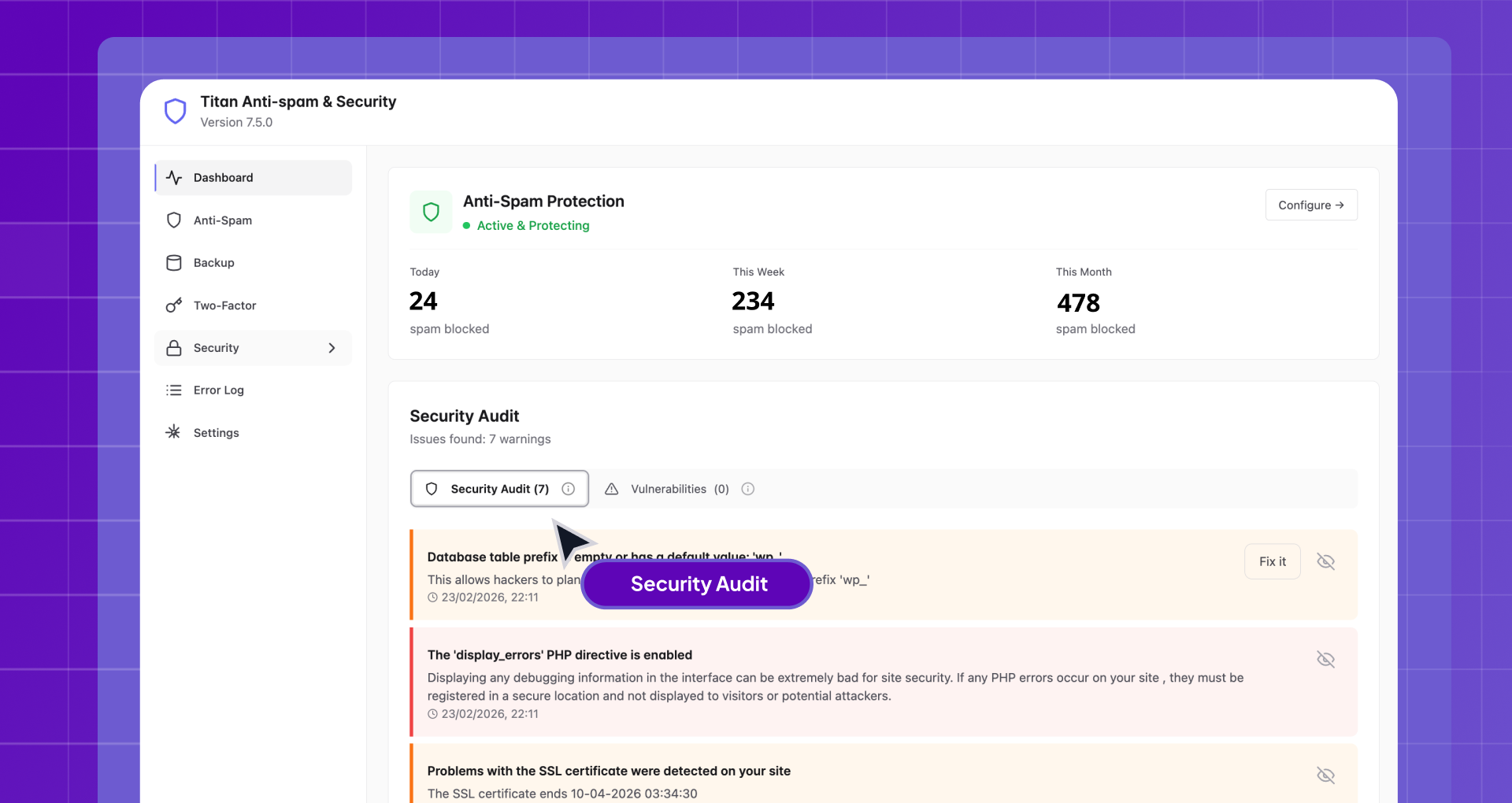
After activation, a new Titan Security menu appears in the sidebar. The plugin activates its spam filter and default security settings immediately, with no setup wizard and no mandatory configuration steps. Default settings work for most sites without adjustment.
From the Titan Security menu you can access:
- Anti-Spam: configure the spam filter sensitivity, enable spam comment storage, view the spam log
- Tweaks: apply security hardening recommendations (each is a toggle with a description)
- Activity Log: view recent events including login attempts, lockouts, and spam catches
- Error Log: debug information if something breaks
- Pro features (when the add-on is installed): ML detection, 2FA, Backup
Installing the Pro add-on requires an additional step: after purchasing from Themeisle, you download a separate Pro ZIP file from your account dashboard and upload it to your site via Plugins > Add New > Upload Plugin. Both the free plugin and the Pro add-on must remain active at the same time. This two-plugin approach can confuse first-time buyers who expect a single pro plugin to replace the free version.
Core features
Comment spam filtering (free)
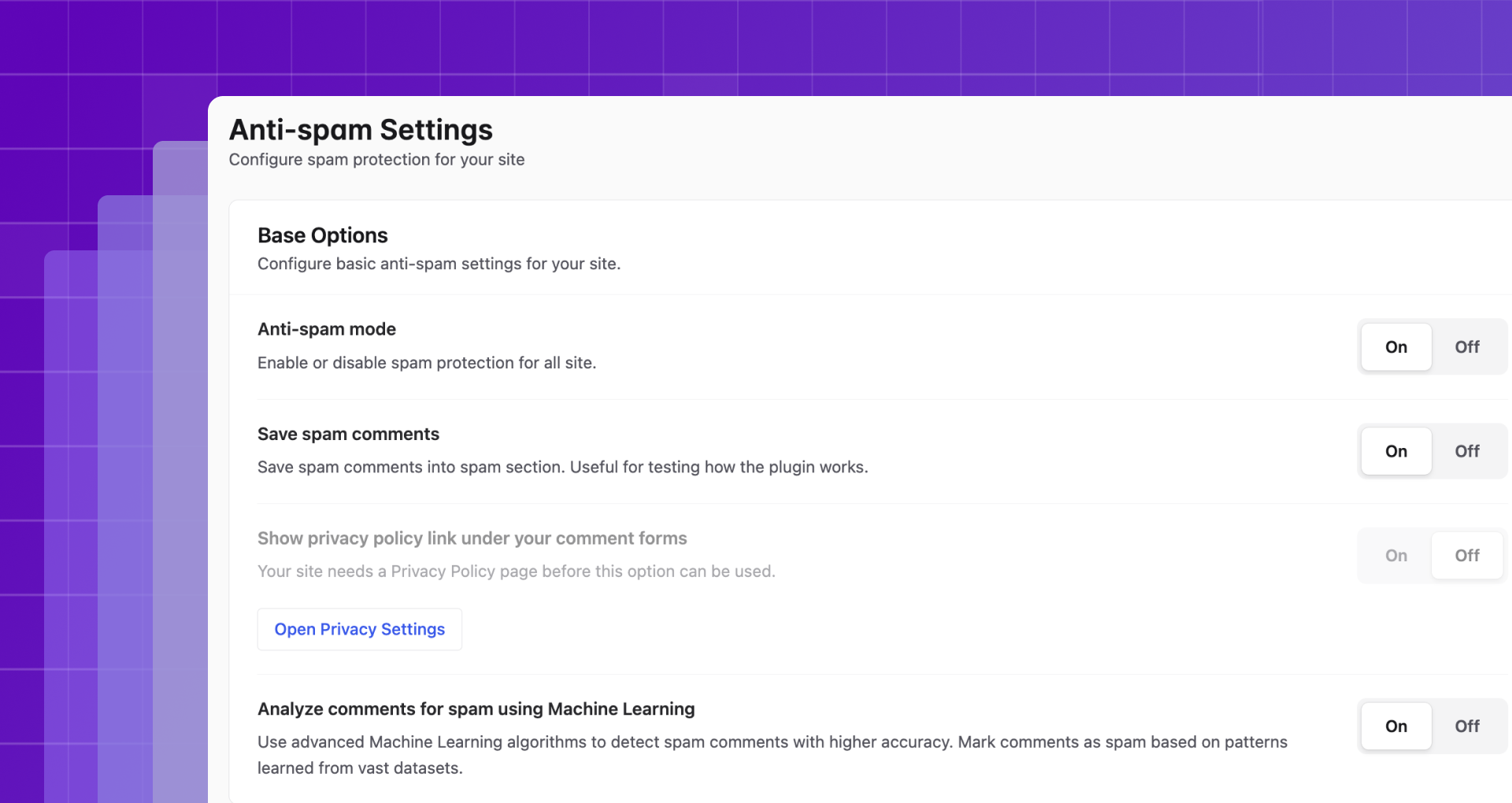
The spam filter activates immediately after plugin install. When a visitor submits a comment, Titan checks it against its global spam database. Comments matching known spam patterns are automatically marked as spam and removed from the public comment queue before they appear on your site.
The filter works without any CAPTCHA, checkbox, or visible challenge for visitors. Users with legitimate comments never see a verification step. The filtering is invisible.
By default, spam comments are not stored, which keeps your database clean. You can enable spam comment storage in the Anti-Spam settings if you want to review blocked submissions. The spam log shows each blocked comment with its timestamp and reason.
Titan’s free spam filter covers WordPress comments. It does not automatically extend to WooCommerce checkout forms, user registration pages, or third-party contact form plugins without additional configuration. This is the most significant gap compared to CleanTalk, which protects all of those form types through the same subscription.
Security hardening (free)
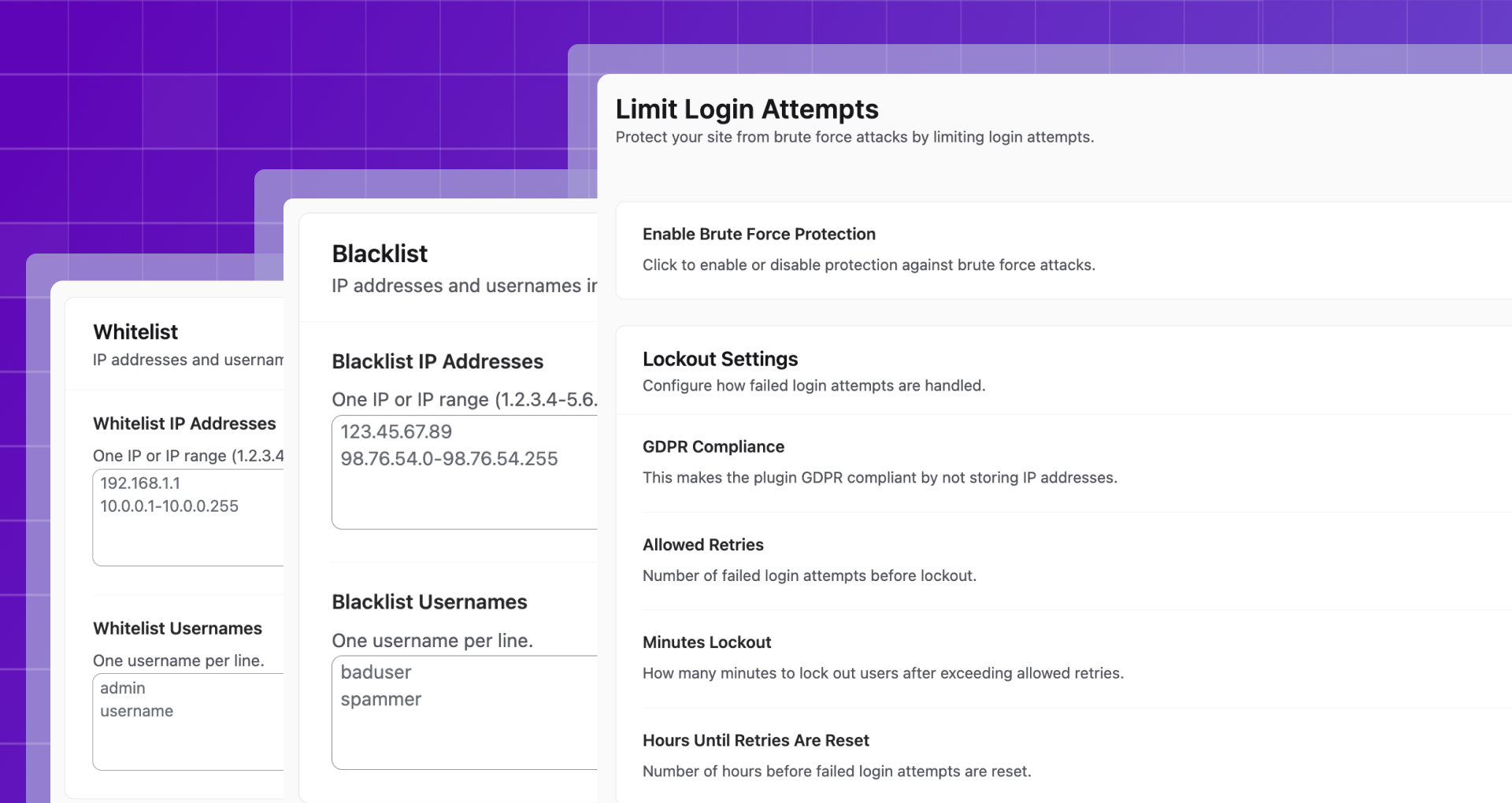
The Tweaks section is one of Titan’s most practical free features. It presents a checklist of WordPress configuration recommendations, each explained in plain language, each applicable with a single toggle.
Hardening options include:
- Enforce strong passwords on all user accounts
- Hide the WordPress version number from page source and feeds
- Disable XML-RPC access (a common brute-force attack vector)
- Remove generator meta tags that reveal WordPress version information
- Hide author login names from the public URL structure (prevents user enumeration attacks)
- Remove HTML comments left by WordPress in page source
- Disable query strings on enqueued scripts and styles
Each toggle is independently controlled. You apply only the hardening options appropriate for your site. For sites running plugins that legitimately require XML-RPC (like Jetpack or certain mobile apps), you can skip that toggle without affecting the others.
This hardening checklist would normally require either manual code edits to wp-config.php and functions.php or a dedicated security plugin. Having it available in the same interface as the spam filter is the clearest example of Titan’s consolidation value.
Login protection (free)
Titan tracks login attempts and can lock out IP addresses that exceed a configurable failure threshold. The settings let you define maximum login attempts before lockout, lockout duration, and whether to notify the site administrator of lockout events.
The activity log records each login attempt with the username tried, IP address, timestamp, and outcome (success, failure, locked out). This gives you a clear picture of brute-force activity against your site without needing a separate security plugin’s dashboard.
For most small to medium sites, this built-in login protection replaces the login protection feature that Wordfence or Solid Security provide. Sites already running those plugins do not need Titan’s login protection; for sites not running a security plugin, it covers the most common attack vector.
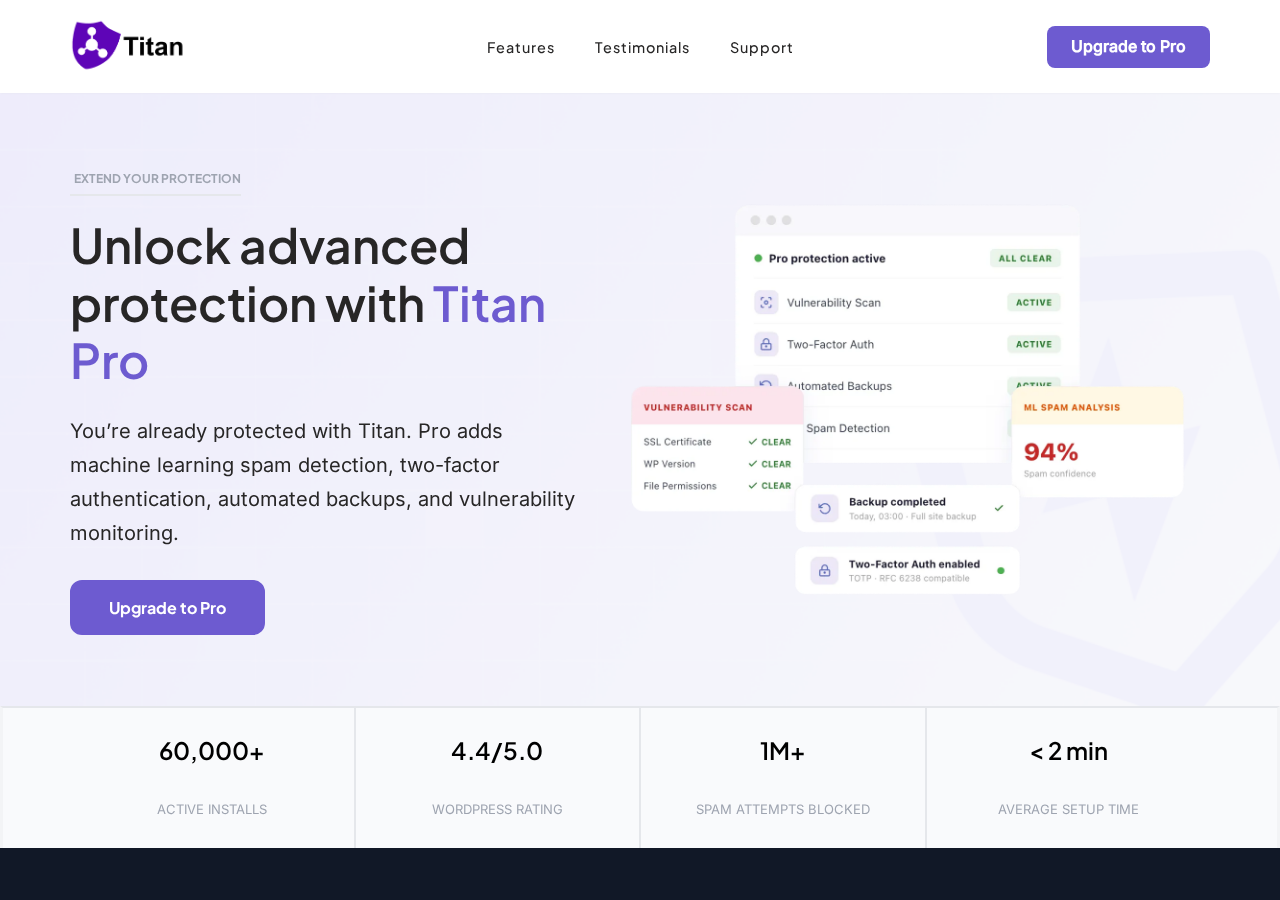
Machine learning spam detection (Pro)
The Pro add-on upgrades the spam filter with machine learning analysis. Where the free tier uses pattern matching against a static database, the Pro tier adds an adaptive layer that re-evaluates comments the database did not conclusively classify.
The ML component is trained on spam patterns across Titan’s user network and updates to adapt to emerging spam tactics. Themeisle’s documentation describes it as a second pass: after the database check, the neural network evaluates ambiguous comments to reduce false negatives (spam that slips through) and false positives (legitimate comments wrongly blocked).
The Pro tier also adds tools to scan existing comments and registered users against the spam database. This is useful when migrating to Titan from no spam protection: you can audit your existing comment and user tables in bulk and mark or delete historical spam.
Two-factor authentication (Pro)
Titan Pro adds TOTP-based two-factor authentication for WordPress logins. Setup uses a QR code that you scan with any compatible authenticator app (Google Authenticator, Authy, 1Password, and others). Manual entry key setup is also available for apps that do not support QR scanning.
The 2FA applies to admin accounts and can be enforced for other user roles. Once enabled, users are prompted for their TOTP code after entering their password. This is a significant feature at the Starter plan price point. Having 2FA bundled with spam filtering and security hardening at $39/year for one site makes Titan Pro’s value case materially different from Akismet Pro or CleanTalk for sites that need login security alongside spam protection.
Vulnerability scanner (Pro)
The Pro tier includes a vulnerability scanner that checks installed plugins and themes against a database of known security vulnerabilities. When a vulnerability is detected, the dashboard surfaces an alert with the affected plugin or theme name and a recommendation to update. This is similar to what Wordfence and Solid Security offer, but included here as part of the anti-spam and security bundle.
Automatic backups (Pro)
Titan Pro includes scheduled backup creation with external storage options. You can configure backups to run on a schedule (daily, weekly) and send them to FTP or Dropbox storage. Archive cleanup settings prevent old backups from consuming unlimited storage space.
Backup functionality is unusual for an anti-spam plugin. For a small-site owner who does not already have a backup plugin like UpdraftPlus, having backups in the same subscription as spam filtering and 2FA simplifies the overall stack. For sites that already run dedicated backup solutions, this feature is redundant.
Pricing
Titan pricing is based on annual subscriptions. The free version is available on WordPress.org with no account required. Pro plans are sold through titansitescanner.com with a current 50% promotional discount described as permanent. Prices below reflect the current promotional pricing; verify current rates at titansitescanner.com before purchasing.
Free
- Available on WordPress.org with no account, API key, or commercial restriction required
- Includes: comment spam filtering, security hardening tweaks, login attempt limiting, activity logging, error log viewer
- No time limit, no commercial use restriction
Starter (from $39/year for 1 site)
- Regular price: $79/year
- Includes everything in the free version, plus: machine learning spam detection, existing comment and user scanning, two-factor authentication, vulnerability scanner, automated backups with FTP and Dropbox storage, email support
- 30-day money-back guarantee
Growth (from $99/year for 5 sites)
- Regular price: $199/year
- Identical features to Starter across 5 sites
Scale (from $199/year for 50 sites)
- Regular price: $399/year
- Identical features to Starter across 50 sites
For context on value: Akismet Pro costs approximately $120/year for one commercial site (comment spam only). CleanTalk costs $12/year for one site (cloud-based, broader form coverage, no 2FA or backups). Titan Starter costs $39/year for one site (spam + security + 2FA + vulnerability scanning + backups).
Pros and cons
Pros
- No commercial restriction on the free tier. Any site can run Titan free without the “personal non-commercial only” limitation that Akismet imposes.
- No account, API key, or sign-up required to activate the free version. Install, activate, and protection starts immediately.
- Combines spam filtering, security hardening, and login protection in a single free plugin.
- Local database approach avoids per-submission external data transmission that creates GDPR complications for Akismet and CleanTalk.
- 4.5/5 stars across 370 reviews with 312 five-star ratings.
- Pro plan at $39/year bundles ML spam detection, 2FA, vulnerability scanning, and backups.
- No CAPTCHA for visitors. Filtering is invisible.
- Security hardening tweaks are individually selectable with plain-language descriptions.
- Backed by Themeisle, with 13+ years of WordPress plugin development and 1M+ users.
- 2FA and backups in Pro go beyond what any other anti-spam plugin in the category offers.
- Tested to WordPress 7.1 with active maintenance as of 2026.
- 10 languages supported, including Spanish, Arabic, Dutch, and Korean.
Cons
- Smaller install base than Akismet (50,000 vs 5+ million) or CleanTalk (200,000). Narrower training dataset for spam detection.
- Does not cover WooCommerce checkout, registration, and login forms with the same breadth as CleanTalk.
- Pro installation requires running both the free plugin and a separate Pro add-on simultaneously.
- 43 one-star reviews, including some recent reports of error 500 crashes after updates.
- No cloud analytics dashboard. Logging is entirely local in WordPress admin.
- Free tier relies on a periodically updated database rather than real-time cloud checking. Very new spam patterns may take longer to be blocked.
- Support is email-based for Pro users. Free tier relies on the WordPress.org forum.
- Promotional pricing creates some uncertainty about renewal costs if the promotion changes.
Alternatives to Titan Anti-Spam
Akismet. The most-installed WordPress anti-spam plugin with 5+ million active installs. Free for personal non-commercial use; Pro costs approximately $120/year for one commercial site. Akismet has a larger spam database and 20-year track record, but it does not cover login protection, security hardening, or 2FA. Its commercial pricing is significantly higher than Titan for equivalent spam-only coverage. Choose Akismet if you already have a separate security plugin and want the best-trained spam database for comment filtering.
CleanTalk. The most cost-efficient cloud anti-spam option at $12/year for one site with no commercial restrictions. CleanTalk has the broadest form coverage in the category: comments, registrations, WooCommerce, contact forms, and login forms all through one subscription. It also includes SpamFireWall, which blocks known spam bot IPs at the HTTP layer. The trade-off: no security hardening, no 2FA, no backups, and external cloud processing with GDPR implications. Choose CleanTalk if broad form-by-form spam coverage is your primary need and you already have security elsewhere.
Wordfence Security. A full-featured security plugin that includes a web application firewall, malware scanner, login protection, and IP blocking, with comment spam filtering as a secondary feature. The free version is capable; the paid version adds real-time threat feeds. Choose Wordfence if security is the primary concern and spam protection is secondary.
Solid Security (formerly iThemes Security). A broad security plugin with hardening tools, two-factor authentication, and login protection built in. Choose Solid Security if you want more extensive security features than Titan offers and plan to pair it with a dedicated spam plugin.
Antispam Bee. A free, open-source comment spam filter that runs entirely on your server with no cloud API, no subscription, and no external data transmission. Covers comments only with no security hardening or login protection. Choose Antispam Bee if privacy is the top priority and you want the simplest possible comment spam filter with no ongoing cost.
Final verdict
Titan Anti-Spam and Security earns its rating by doing something no other plugin in the anti-spam category does as cleanly: bundle spam filtering, security hardening, and login protection in a genuinely free tier with no commercial restriction.
The free version is more immediately useful than Akismet free (which restricts commercial sites) or CleanTalk (which expires after 7 days). You get spam blocking, the WordPress hardening checklist, and login attempt limiting without signing up for anything or paying anyone. For a site owner who wants both problems solved and wants to manage them in one place, Titan’s consolidation is real value.
The Pro tier’s addition of 2FA and automated backups makes the value case even stronger for small-site owners. At $39/year (current promotional price), covering spam filtering, security hardening, machine learning detection, two-factor authentication, and scheduled backups under one license is an argument that Akismet Pro at $120/year for comment spam alone cannot match on pure economics.
The weaknesses are meaningful but not disqualifying. The spam database is smaller than Akismet’s, which matters most on sites that attract unusual or sophisticated spam. The WooCommerce and registration form coverage is thinner than CleanTalk’s. The 43 one-star reviews deserve acknowledgment, though many date from a specific rebranding event rather than from the current plugin.
What I would say to a site owner evaluating Titan in 2026: if you are setting up a new commercial WordPress site and you do not already have a security plugin, install Titan free and see how it performs. You get meaningful free protection with no strings attached, and you can upgrade to Pro if you want ML spam detection and 2FA without paying for separate plugins. If you already run CleanTalk for broad form spam coverage or Wordfence for deep security, Titan adds less value because the overlap is significant. In every other scenario, Titan’s free tier and reasonably priced Pro plan make it one of the most practical dual-purpose plugins in the category.
FAQ
Is Titan Anti-Spam free?
Yes. Titan has a fully functional free version available on WordPress.org with no account, API key, or sign-up required. The free tier includes comment spam blocking, security hardening options, login attempt limiting, and activity logging. Unlike Akismet’s free plan, Titan’s free version has no commercial use restriction: any site, including sites that sell products, run ads, or generate revenue, can use the free version without violating any terms. Paid Pro plans start from $39/year for one site and add machine learning spam detection, 2FA, vulnerability scanning, and automated backups.
How does Titan detect spam?
The free tier checks comments against a global spam database that Titan updates periodically. Comments matching known spam patterns are automatically blocked. The Pro tier adds a machine learning layer that re-analyzes comments not conclusively classified by the database, adapting to new spam patterns over time. Unlike Akismet and CleanTalk, which send each comment submission to a cloud API for real-time analysis, Titan’s approach uses a locally held and periodically refreshed database, meaning comment data is not transmitted to an external server with each submission.
Does Titan work with WooCommerce?
Titan’s spam filtering focuses on WordPress comments. It does not have the same breadth of WooCommerce-specific coverage that CleanTalk provides: Titan does not automatically protect WooCommerce checkout forms or registration pages with dedicated spam blocking. The login protection feature does limit brute-force attempts on the WordPress login screen, which benefits WooCommerce customer accounts. If protecting WooCommerce checkout from fake orders is a primary concern, CleanTalk is the more suitable option.
What is the difference between Titan free and Titan Pro?
The free version covers: comment spam filtering, security hardening tweaks, login attempt limiting, activity logging, and error log access. The Pro add-on, purchased separately from titansitescanner.com, adds: machine learning spam detection, bulk spam scanning of existing comments and users, two-factor authentication (TOTP-based with QR code setup), automated backups with FTP and Dropbox storage, and a vulnerability scanner that checks installed plugins and themes for known security issues. Both the free plugin and the Pro add-on must remain installed and active simultaneously.
Is Titan Anti-Spam GDPR compliant?
Titan’s spam detection uses a locally held database rather than sending each comment submission to an external cloud API. This is a meaningful privacy difference from Akismet and CleanTalk, which transmit visitor data (including IP addresses and email addresses) to their cloud servers with every submission. Because Titan checks against a local database, it does not create the same per-submission external data flow. For sites with strict GDPR requirements, Titan’s local processing model is generally less complicated than cloud-dependent alternatives. The Pro tier includes a GDPR privacy notice option to help site operators disclose the plugin’s presence in their privacy policies.
How does Titan compare to Akismet?
The two plugins have different strengths. Akismet has a far larger spam database trained on 5+ million active sites and 573+ billion blocked submissions, giving it more training data for accurate detection. Its free tier is genuinely free for personal non-commercial blogs. But Akismet Pro costs approximately $120/year for one commercial site and covers only comments and a few integrated form plugins, with no security hardening or 2FA. Titan’s free tier has no commercial restriction and includes security hardening and login protection alongside spam filtering. Titan Pro at $39/year for one site adds 2FA and backups that Akismet does not offer at any price. Choose Akismet if maximum spam database accuracy is the priority. Choose Titan if you want spam and security coverage in one plugin without commercial restrictions.
How does Titan compare to CleanTalk?
CleanTalk is the stronger choice if broad form-by-form spam coverage is the primary need. At $12/year, CleanTalk covers comments, registrations, WooCommerce checkout, contact forms, and login forms simultaneously. It also includes SpamFireWall, which blocks known spam bot IPs at the HTTP level before WordPress loads. Titan does not match CleanTalk on per-form coverage. On the other hand, Titan has a genuinely useful free tier with no commercial restriction, while CleanTalk expires after a 7-day trial. Titan Pro adds 2FA and backups that CleanTalk does not include at any price. Choose CleanTalk for lowest cost and broadest form spam coverage. Choose Titan if free-forever with no commercial restriction matters, or if 2FA and backups are part of the value case.
What does the security hardening feature do?
The Tweaks section in Titan’s dashboard presents a set of WordPress hardening recommendations, each toggleable individually with a plain-language explanation of what it does. Options include: enforcing strong passwords, hiding the WordPress version number from page source and RSS feeds, disabling XML-RPC (a common brute-force attack vector), removing author enumeration from public URLs, disabling query strings on scripts and styles, and removing HTML comments in page source. These are standard WordPress hardening practices that developers typically apply via wp-config.php edits or dedicated security plugins. Titan makes them accessible without code.
Does Titan support two-factor authentication?
Yes, but only in the Pro tier. Titan Pro includes TOTP-based two-factor authentication with QR code setup for any compatible authenticator app (Google Authenticator, Authy, 1Password, and others). Once enabled, users are required to enter their authenticator code after their password on the WordPress login screen. The 2FA applies to admin accounts and can be extended to other user roles. Manual key entry is also available for authenticator apps that do not support QR code scanning.
Is Titan still actively maintained in 2026?
Yes. Version 7.5.2 was released in May 2026 and confirmed tested to WordPress 7.1. Themeisle, the developer, is an active WordPress plugin company with over a million users across its product portfolio. Recent changelog entries show ongoing dependency updates and bug fixes. The plugin has been continuously maintained since 2012, through a major rebranding period in 2019 and into the current version.