


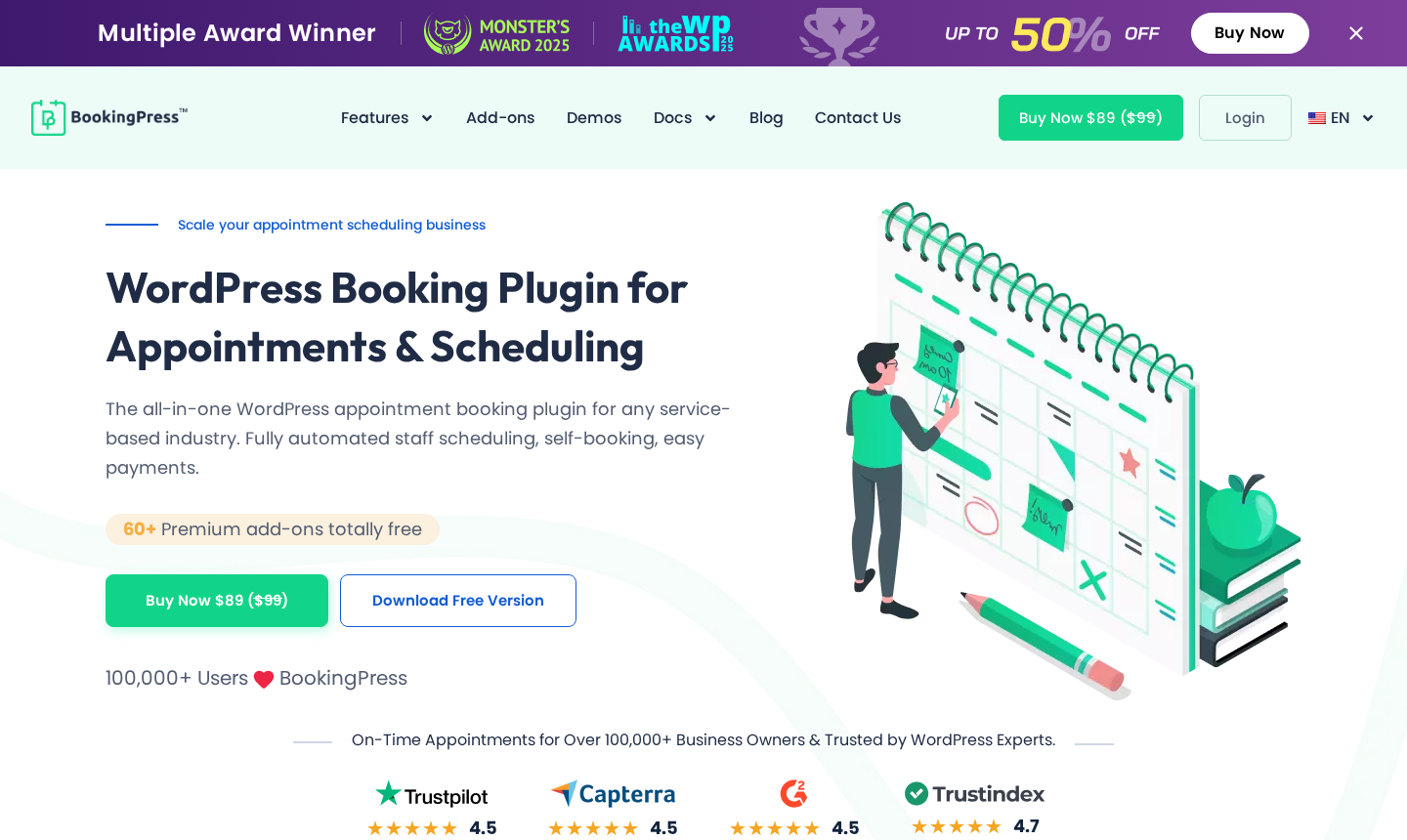
BookingPress positions itself as a single-plugin answer to WordPress appointment booking: one install, 60+ premium add-ons included, and support for 21 payment gateways. On paper, that is one of the most generous feature bundles in its price bracket. In practice, there is one detail every buyer should know before signing up: BookingPress was removed from WordPress.org in February 2025 for a guideline violation. The plugin is still actively developed and sold directly by the vendor, but new installs, updates, and the trust layer that WP.org provides all come from the vendor’s site, not the official WordPress repository.
That single fact changes how you evaluate everything else.
For this review, I walked through the customer-facing booking wizard on the official spa and salon demo environments, reviewed the admin panel through the publicly accessible admin demo, audited the pricing page, changelog, and feature documentation, and researched the security history on WPScan. The free plugin is no longer available on WordPress.org and requires downloading from the vendor’s site, which was not testable in this review’s environment. Where behavior was observed directly on the demos, I say so. Where it comes from official documentation, I note that.
Here is what I found.
At a glance
Tested on: Official BookingPress demo environments (spa/beauty and salon demos for the booking wizard; admin demo for the dashboard), the official features page, pricing page, changelog, and WPScan vulnerability database. No sandbox install of the free plugin was performed; see the testing note in the Free tier section.
Free version: Yes, available from bookingpressplugin.com. Current Lite version: 1.6.0 (July 24, 2026). Includes unlimited appointments, PayPal payments, and basic customization. Not installable from WordPress.org.
Premium version: Current version 6.0.4 (July 24, 2026). The Premium and Free/Lite tracks are developed in parallel with separate version numbering.
Active installs: The plugin was removed from WordPress.org in February 2025. The WP.org listing showed approximately 20,000 installs at the time of closure. The vendor’s website claims 100,000+ active users including direct downloads.
Bottom line: A feature-rich WordPress booking plugin at a competitive price, but the WordPress.org removal is a trust signal you need to weigh honestly before buying. If WP.org listing is a prerequisite for your stack, look at Amelia, Booknetic, or LatePoint instead.
Quick verdict on BookingPress
One sentence: BookingPress is one of the widest-featured appointment booking plugins for WordPress at its price point, but its removal from WordPress.org for a guideline violation creates a legitimate trust question that buyers should factor into the decision, not ignore.
The plugin’s selling point is its add-on model: instead of charging separately for each feature, BookingPress bundles 60+ premium add-ons into its paid plans. Recurring appointments, service packages, deposit payments, multi-location management, gift cards, a waiting list, and more are included rather than sold as separately priced modules. That approach is a real advantage over plugins where extending functionality quickly multiplies the price.
The honest caveats: The WordPress.org removal is not a minor footnote. It means no auto-updates through wp-admin’s built-in update mechanism (users must update via the vendor updater plugin), no wp.org-based review process, and no wp.org security audit pipeline. On the security side, WPScan documents 17 vulnerabilities in the plugin’s history, including a CVSS 9.8 authentication bypass that was discovered and patched in 2024. The vendor has continued to patch security issues since the WP.org closure, including a CVSS 8.1 PHP object injection fixed in Lite version 1.5.6 and the corresponding Premium version 6.0 in July 2026. The fixes are real, but the cadence of vulnerability discovery is something to factor in.
Quick verdict card
Best for: Single-site service businesses (Standard plan) or small agencies (Professional, 3 sites) that want a wide feature set without paying per add-on.
Best plan for most teams: Professional ($139/year, 3 sites) if multi-location, recurring appointments, or service packages are needed; Standard ($89/year) for a single straightforward service site.
Standout: 60+ premium add-ons included, Telegram notification support, 21+ payment gateways, and a competitive per-site multi-site pricing model.
Watch out for: WordPress.org removal; no native mobile app; REST API is Enterprise-only; lifetime support is capped at 3 years even on lifetime license purchases.
What BookingPress is
BookingPress is a WordPress appointment booking plugin developed by Repute Infosystems. The plugin was first published on WordPress.org and grew to approximately 20,000 active installs before being closed on February 1, 2025, under a “Guideline Violation” flag. The exact nature of the violation was not publicly disclosed by either Repute Infosystems or the WordPress.org team at the time of closure.
The plugin continues to be actively developed and sold directly at bookingpressplugin.com. It runs on two parallel version tracks: a Premium track currently at version 6.0.4, and a Free/Lite track currently at version 1.6.0. Both were updated on July 24, 2026. The two tracks share core functionality but carry separate version numbers; security patches appear in both tracks. Premium version 6.0 (July 16, 2026) introduced Vue.js 3 compatibility and a redesigned backend calendar. Updates are delivered through a vendor-side updater plugin rather than through WordPress.org.
The plugin’s scope covers:
- A 4-step customer-facing booking wizard: service selection, date and time, customer details, payment and confirmation.
- Unlimited services, staff members, and appointments on all paid plans.
- 21+ built-in payment gateways on paid plans, including Stripe, PayPal, Mollie, Authorize.net, Square, and others.
- Email, SMS, WhatsApp, and Telegram notification channels.
- Google Calendar, Outlook, and Apple iCal bidirectional sync.
- Zoom, Google Meet, and Microsoft Teams online meeting integrations.
- Multi-location management.
- Service packages, recurring appointments, group bookings, deposits, and waiting lists.
- 60+ add-ons included in the Professional and Enterprise plans.
The free plan ($0) gives access to unlimited appointments, PayPal, basic customization, and limited support. It is available from the vendor’s site, not from WordPress.org.
Who BookingPress is best for
Strong fit:
- Service businesses with a WordPress site that want a wide feature set at a single flat price rather than paying per add-on.
- Salons, spas, yoga studios, gyms, pet groomers, dental clinics, tutors, photographers, and cleaning service companies: all use cases the 13 official demo environments cover.
- Multi-location businesses that need location-specific staff and service routing.
- Teams that use Telegram as a notification or customer communication channel. BookingPress supports Telegram natively, which most competing plugins do not.
- Agencies or freelancers managing two to three client sites, where the Professional plan’s 3-site license reduces the per-site cost.
- Businesses looking for competitive multi-domain pricing: Enterprise covers 20 sites at $249/year.
Weak fit:
- Teams that require a WordPress.org-listed plugin for policy, client approval, or supply chain trust reasons.
- Developers who need REST API access: this is locked behind the Enterprise plan at $249/year.
- Teams building on the Fluent ecosystem: FluentBooking integrates natively with FluentCRM and FluentForms.
- Businesses that need a native iOS or Android mobile app for staff: BookingPress has no native mobile app.
- Users who prioritize the simplest possible setup without add-on management complexity.
The customer-facing booking widget
BookingPress uses a single booking form style: a four-step vertical wizard that walks the customer through service selection, date and time, personal details, and payment. The same widget adapts to different demo environments with different services, colors, and fields.
I walked through the booking flow on the spa demo (Lotus Spa with Wellness, Beauty, and Massage categories) and the salon demo (eight beauty services including makeup, hair color, haircuts, and bridal packages). Both demos are publicly accessible from bookingpressplugin.com/demo/ without any account.
Step 1: Service selection
The customer sees service categories at the top, with services listed below by category. Each service card shows name, duration, and price. Clicking a service selects it; the customer can optionally add “extras” (add-on services with quantity controls) and a “bring anyone” group count before proceeding. The extras step is useful for spas and salons that upsell products or additional treatments during the booking.
Step 2: Date and time
A calendar picker shows available dates. Once a date is selected, time slots appear grouped by period (Morning, Afternoon, Evening, Night). If a staff member is selectable, the customer can see staff availability by slot or leave it to the system to assign. The time slot display is clean and readable.
Step 3: Customer details
A form collects name, email, and any custom fields configured by the administrator. Custom field types available in paid plans include text, dropdown, checkbox, radio button, and file upload.
Step 4: Summary and payment
The confirmation step shows the full booking summary (service, date, time, extras, subtotal) with a coupon code field, tax display, deposit vs. full-payment toggle, and the total payable. From here, the customer completes payment via whichever gateway the admin has enabled.
The widget is embeddable via shortcode or blocks for Gutenberg, Elementor, Divi, and WPBakery. URL parameters allow pre-filling service, category, or staff to build direct-booking landing pages for individual services or team members.
One design detail worth noting: the widget runs on Vue.js 3 as of Premium version 6.0 (July 16, 2026). The upgrade replaced the earlier frontend framework and brings faster rendering and a more stable foundation. The transition introduced several minor bugs that were addressed in patch releases 6.0.1, 6.0.2, 6.0.3, and 6.0.4 over the following week.
The widget is not the flashiest in the market. It prioritizes clarity over visual flourish. The catalog-style browse view that some competitors offer (where all services appear in a filterable grid) is not a built-in option here: the flow is always wizard-sequential. That makes it simpler to use but less suited to businesses where customers want to browse a wide menu of services before choosing.

Admin experience and calendar
The admin dashboard received a full calendar redesign in Premium version 5.5 (April 2026), ahead of the Vue.js 3 migration in version 6.0. The redesigned admin calendar supports day, week, and month views, plus a list view for tabular appointment management.
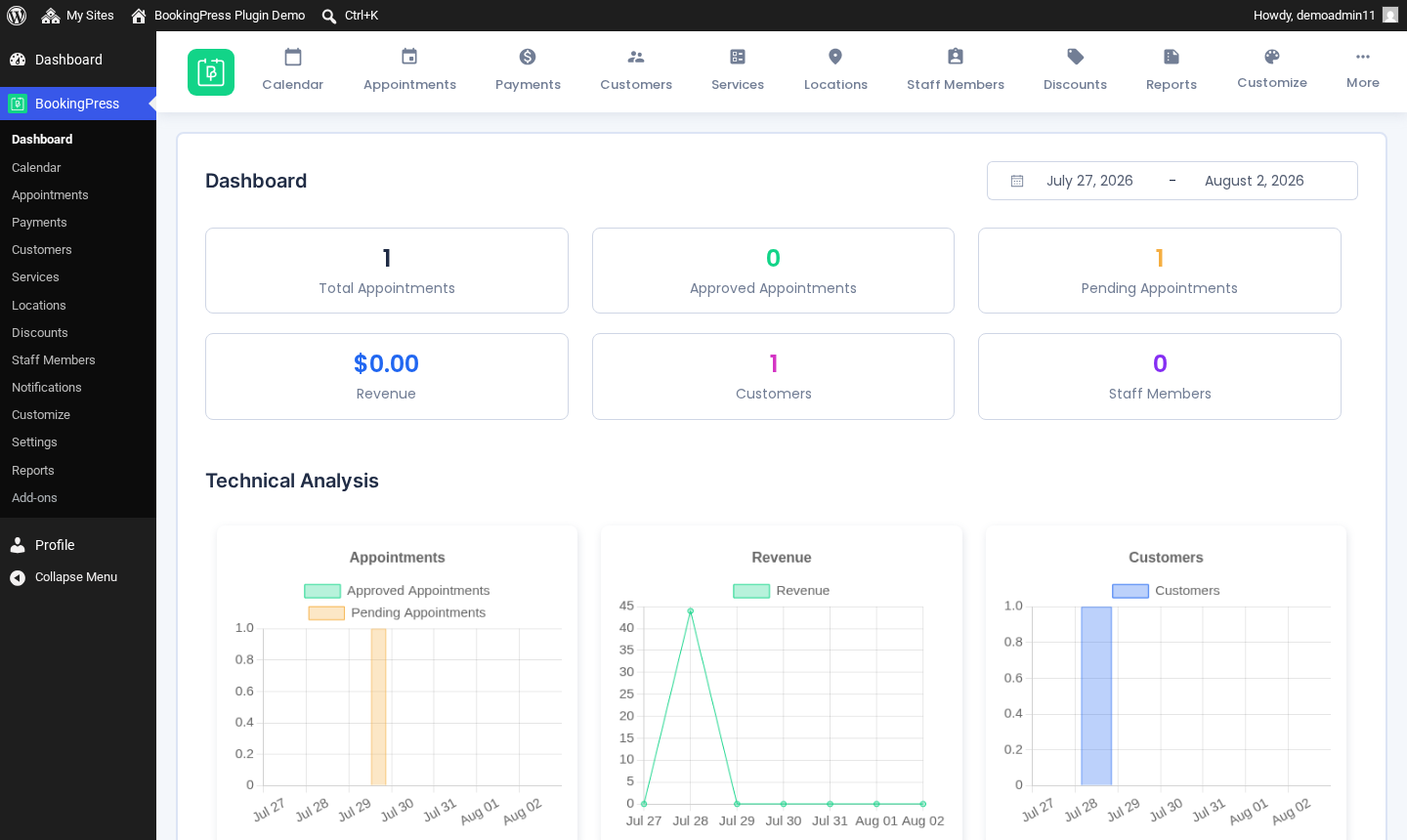
From the publicly accessible admin demo, the dashboard shows summary tiles for today’s appointments, this week’s revenue, and new bookings. The Appointments module provides a paginated table of all bookings with filters by status, staff, service, location, and date range. From the table, admins can view, edit, reschedule, or cancel appointments without leaving the list view.
Creating appointments from the admin side uses the same step sequence as the public booking form, which keeps the two workflows consistent. Manual entry is available for walk-ins or phone bookings.
The Settings area covers company information, working hours, staff management (individual schedules, breaks, days off, linked services per staff member), service and category configuration, payment gateway setup, notification template editing, and integration settings for calendar sync, online meetings, and automation.
One notable addition is the Staff Commission module, introduced in version 5.5 (April 2026). It lets admins configure commission rates per staff member and track earnings alongside appointment revenue. This is useful for salons, fitness studios, and multi-provider clinics where staff are compensated on a commission basis.
The admin experience is functional and reasonably organized, though it is not as polished as some competitors. The Settings area requires some navigation to locate all options, and some screens lack inline guidance.
The add-on ecosystem: 60+ included
The most prominent selling point for BookingPress is that its paid plans include 60+ premium add-ons rather than selling them separately. This is a meaningful differentiator compared to Bookly Pro, where the base plugin is deliberately narrow and building a comparable feature set requires purchasing individual add-ons at $19 to $39 each.
Here is what the “60+ add-ons included” coverage looks like in practice:
Booking flow add-ons
- Recurring appointments (daily, weekly, monthly).
- Service packages with bulk-discount pricing.
- Deposit payments (fixed or percentage upfront).
- Cart add-on for booking multiple services in one checkout.
- Waiting list.
- Custom service duration (customer-selectable time increments).
- Multi-service booking (book multiple services in one appointment).
- Multi-staff booking.
- Guest booking without account creation.
- Happy Hours (time-based dynamic pricing discounts).
- Gift cards.
- Tip functionality.
- Ratings and reviews.
Payment and finance add-ons
- Tax fees.
- PDF invoices.
- Stripe POS (in-person payments, Enterprise plan only).
- WooCommerce integration.
- 17+ additional payment gateways beyond the built-in set.
Communication add-ons
- WhatsApp notifications.
- Telegram notifications.
- SMS notifications (30 gateways supported).
- Email marketing integrations: Mailchimp, AWeber, Omnisend, FluentCRM.
Calendar and meeting add-ons
- Google Calendar two-way sync.
- Outlook Calendar sync.
- Apple iCal sync.
- Zoom meeting auto-creation.
- Google Meet auto-creation.
- Microsoft Teams.
Automation add-ons
- Zapier.
- Make (formerly Integromat).
- n8n.
Location and roles add-ons
- Multiple location management.
- Roles and capabilities.
- Google Address Autocomplete.
Security and compliance add-ons
- GDPR and HIPAA compliance tools.
- Two-factor authentication.
- Google reCaptcha.
- Cloudflare Turnstile Captcha.
Loyalty and membership add-ons
- ARMember subscription integration.
- myCred loyalty points.
Developer and data add-ons
- REST API (Enterprise plan only).
- Migration add-on (from Amelia, Bookly, Booknetic, LatePoint).
- Import/Export.
The add-on distribution across plans matters. Standard (1 site, $89/year) includes 45+ add-ons covering core booking needs but excludes recurring appointments, multi-location, and service packages. Professional (3 sites, $139/year) unlocks 60+ add-ons including those three, plus advanced discounts, gift cards, multi-staff and multi-service bookings, and custom service duration. Enterprise (20 sites, $249/year) adds Stripe POS, roles and capabilities, and REST API.
In practice, most active service businesses will find Professional is the practical minimum. Standard is suitable for simpler single-service setups without recurring schedules or packages.
Payment integrations
BookingPress supports 21+ payment gateways on paid plans. The free version includes PayPal only.
Confirmed gateways on paid plans include: Stripe, PayPal, Authorize.net, Square, Mollie, 2Checkout, Skrill, and additional regional and local gateways via the payment gateway add-ons. WooCommerce integration lets the plugin route payments through WooCommerce’s checkout, making the full WooCommerce payment gateway ecosystem available.
For in-person payments, the Stripe POS add-on (Enterprise plan) enables point-of-sale transactions via Stripe Terminal.
Deposit payments (requiring a percentage or fixed amount upfront at booking) are available on Professional and above. Tax configuration lives in its own Tax Fees add-on, included on paid plans. PDF invoice generation is also an included add-on.
The payment gateway breadth is a real advantage. At $89/year on the Standard plan, you get access to Stripe, PayPal, Mollie, Authorize.net, and 15+ others without paying for each separately. Competitors like Amelia include a narrower set of gateways at comparable starting prices.
Notifications: email, SMS, WhatsApp, and Telegram
BookingPress supports four notification delivery channels:
- Email: Included on all plans including the free tier. Templates are customizable per event type (confirmation, reminder, cancellation, reschedule, follow-up) with placeholder tags for customer name, service, date, time, staff, and so on.
- SMS: Available via add-on on paid plans. Supports 30 SMS gateways, including Twilio, so teams can use their existing SMS provider account rather than a proprietary credits system.
- WhatsApp: Available via add-on on paid plans. WhatsApp notifications require pre-approved message templates created inside Twilio or Meta before they appear in BookingPress, so factor this setup step into your launch timeline.
- Telegram: Available via add-on on paid plans. Telegram notification support is a genuine differentiator. Amelia, for example, does not support Telegram at all. For businesses or teams where Telegram is the primary customer communication channel, this matters.
Custom notification timing (changing reminder offset, adding follow-up sequences) requires the paid notification tools. The free version sends default confirmation emails only.
Calendar and meeting integrations
Calendar sync and online meeting generation are delivered via the included add-ons:
- Google Calendar: Two-way sync. Appointments booked in BookingPress appear on the staff member’s Google Calendar, and existing Google events block corresponding BookingPress slots.
- Outlook Calendar: Two-way sync via the Outlook Calendar add-on.
- Apple iCal: One-way sync for staff availability.
- Zoom: Auto-generates a Zoom meeting link at booking. The link is included in the confirmation notification.
- Google Meet: Auto-generates a Google Meet link at booking.
- Microsoft Teams: Auto-generates a Teams meeting link at booking.
Calendar sync add-ons are included in the Professional plan and above. Standard does not include calendar sync, making Professional the recommended tier for any business that uses Google Calendar or Outlook for staff scheduling.
Customization
BookingPress provides a “Customize” module with a live-preview editor for the booking widget’s appearance. Colors, fonts, typography, and layout can be adjusted through this panel without touching CSS directly. The live-preview approach is one of the more positively noted admin UX touches, because it makes the result predictable before saving.
The booking form can also be customized in structure: custom checkout fields allow collecting additional information at the customer detail step. Field types include text, dropdown, checkbox, radio button, and file upload.
For page builder integration, BookingPress supports Gutenberg (block), Elementor (widget), Divi (module), and WPBakery (element). The shortcode is also available for any page or template that supports it.
The free tier: what the free plan actually covers
The BookingPress free plan includes:
- Unlimited appointments (no booking volume cap).
- Unlimited services.
- PayPal payment processing.
- Basic booking form customization.
- Basic email notifications.
- Limited support (no priority support).
What it does not include: SMS, WhatsApp, and Telegram notifications; calendar sync; Zoom, Teams, and Meet integrations; recurring appointments; service packages; deposits; multi-location; most payment gateways beyond PayPal; premium add-ons; or full support.
One important note on installation: the free plan is no longer installable from WordPress.org, since the plugin was closed there in February 2025. Free plan users must download from bookingpressplugin.com and manage updates via the vendor’s updater plugin.
A note on testing basis: a clean free-version install was not completed for this review, so free-tier scope is based on the vendor’s pricing page, features page, and the Free/Lite changelog (current version: 1.6.0, July 24, 2026). The hands-on testing was performed on the official public demo environments, which reflect the full Premium feature set. If the free tier is a deciding factor for your purchase, download it from bookingpressplugin.com and use the 14-day money-back window on a paid plan to test the full feature set in your own environment.
For basic single-service solo businesses that only need PayPal, the free plan is functional. For any business that needs calendar sync, multiple payment gateways, or core features like recurring appointments, an upgrade to Standard or Professional is required from day one.
The WordPress.org removal: what buyers need to know
This deserves its own section because it changes the practical reality of using BookingPress.
On February 1, 2025, WordPress.org closed the BookingPress plugin listing under the reason “Guideline Violation.” The exact nature of the violation was not publicly explained by the plugin author or the WordPress.org team. The WordPress.org plugin directory handles closure notices without always publishing detailed public reasons; the support thread that surfaced this closure offered no confirmed explanation from either party.
What the WP.org closure means in practice:
- No more WP.org installs: Users cannot find or install BookingPress via the WordPress plugin search. Installation requires downloading from the vendor’s site.
- Updates via vendor updater: Automatic update delivery moved to the Repute Infosystems updater plugin. wp-admin’s “Plugin Update” notifications no longer trigger for BookingPress. Sites not running the vendor updater will miss security patches.
- No wp.org security pipeline: WordPress.org’s plugin review team no longer processes or flags security issues in BookingPress. Security issues are reported to and handled by the vendor directly.
- Client and agency trust concerns: Some clients explicitly require WordPress.org-listed plugins for vendor approval or procurement policy purposes. A plugin not listed on WP.org fails that check.
The vendor has continued active development since the closure. The Premium track is on version 6.0.4 and the Free/Lite track on version 1.6.0 (both July 24, 2026). The development trajectory is not abandoned.
On security: WPScan documents 17 vulnerabilities in BookingPress’s history. The most severe was a CVSS 9.8 authentication bypass vulnerability, patched in Lite version 1.1.8 in August 2024. More recently, a CVSS 8.1 unauthenticated PHP object injection vulnerability was disclosed in June 2026 and patched in Lite version 1.5.6 and the corresponding Premium version 6.0 (both released July 16, 2026). The vendor has patched these issues, but 17 documented CVEs over the plugin’s lifetime is above the category average, and buyers should factor this in, particularly for sites handling health information, payment data, or sensitive customer records.
My honest read: if you are comfortable sourcing and updating plugins directly from the vendor rather than via WordPress.org, and you keep the plugin updated through the vendor’s updater plugin, BookingPress is a workable choice. If WordPress.org listing is a requirement, or if the security history gives you pause given your site’s risk profile, Amelia, Booknetic, and LatePoint all remain fully listed on WP.org.
Pricing and license value
All prices are based on the bookingpressplugin.com pricing page as of July 2026.
Annual plans
- Free: $0/year. Unlimited sites. Unlimited appointments. PayPal. Basic customization. Limited support.
- Standard: $89/year (regular $99). 1 site. 21+ payment gateways. 45+ add-ons. Premium support.
- Professional: $139/year (regular $199). 3 sites. All Standard features. 60+ add-ons. Adds: recurring appointments, multi-location, service packages, advanced discounts, gift cards, multi-staff and multi-service booking, happy hours pricing.
- Enterprise: $249/year (regular $499). 20 sites. All Professional features. Adds: Stripe POS, roles and capabilities management, REST API.
Lifetime plans (one-time purchase)
- Standard Lifetime: $229 (1 site, 3-year support included).
- Professional Lifetime: $379 (3 sites, 3-year support included).
- Enterprise Lifetime: $599 (20 sites, 3-year support included).
Note: Lifetime licenses include support for 3 years, not in perpetuity. After 3 years, additional support requires a renewed support subscription. Software updates are not stated to be time-limited on lifetime purchases.
Money-back guarantee: 14 days on all paid plans.
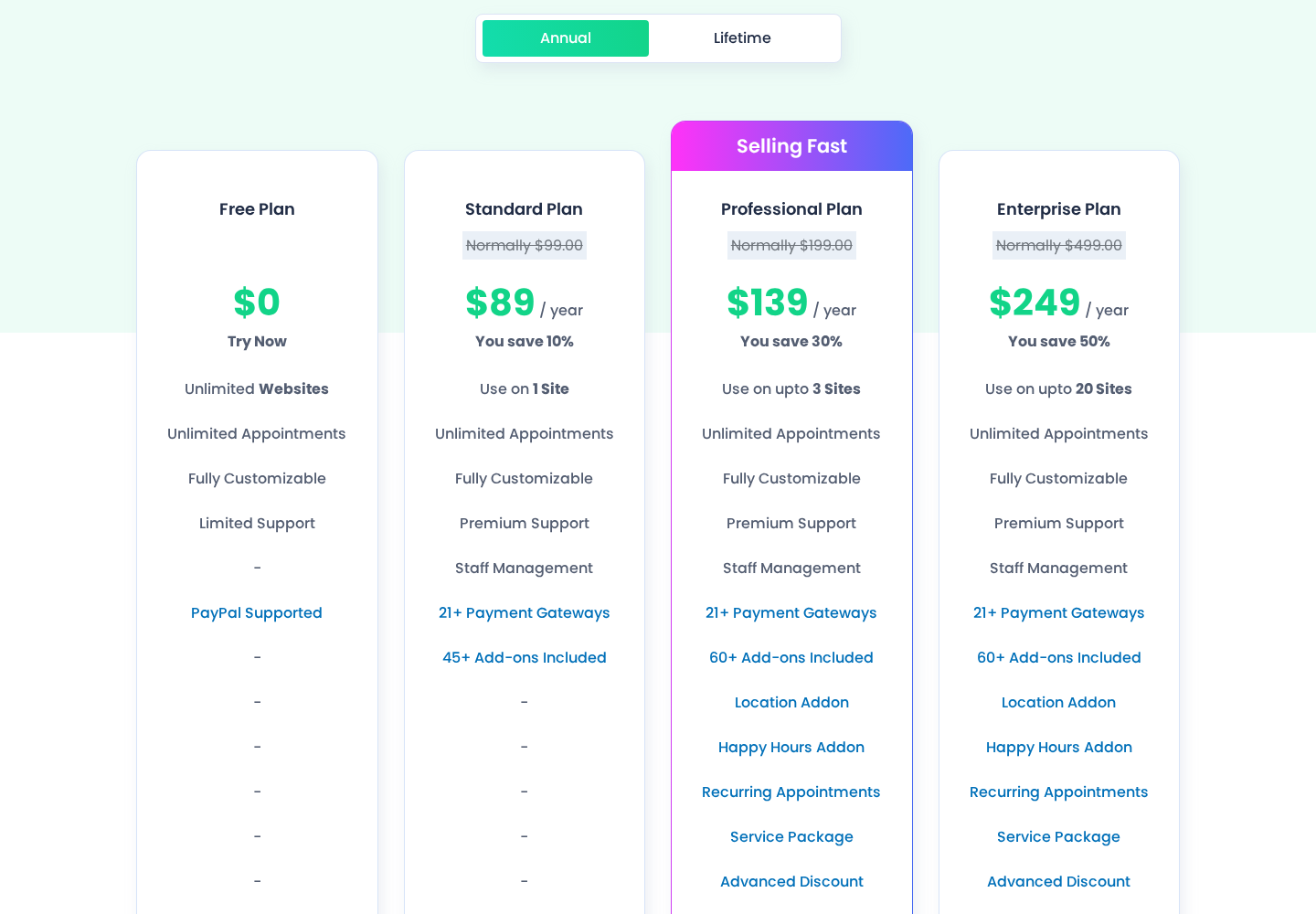
How to read the pricing: Standard at $89/year is competitive for a single-site booking plugin with 21+ payment gateways and 45+ add-ons. But if you need recurring appointments, multi-location, or service packages, Standard is not enough: those features sit in Professional. Most active service businesses will need Professional ($139/year) or above.
The multi-site pricing model is one of BookingPress’s stronger points: 3 sites at $139/year and 20 sites at $249/year is meaningfully cheaper than competitors’ per-site pricing for agencies or business owners with multiple properties.
The Lifetime plans cap support at 3 years, which is worth reading carefully before purchasing. If long-term support access is important, factor in the cost of a support renewal after year three.
Pros and cons
Pros
- 60+ premium add-ons included in Professional plan: recurring appointments, service packages, deposits, gift cards, waiting lists, and more without per-add-on fees.
- 21+ payment gateways on paid plans: Stripe, PayPal, Square, Mollie, Authorize.net, WooCommerce, and more.
- Telegram notification support: one of the few WordPress booking plugins to natively support Telegram as a notification channel.
- Competitive multi-site pricing: 3 sites at $139/year and 20 sites at $249/year is efficient for agencies.
- Actively developed: Premium version 6.0.4 and Lite version 1.6.0 as of July 24, 2026, with a major Vue.js 3 migration and backend calendar redesign completed in recent releases.
- 13 demo environments covering different industry use cases (salon, fitness, medical, yoga, rental, tutoring, pet grooming, and more).
- Email, SMS, WhatsApp, and Telegram notification channels on paid plans.
- Google Calendar, Outlook, and Apple iCal sync included in Professional and above.
- Live-preview customization for the booking widget without code.
- Zoom, Google Meet, and Microsoft Teams online meeting integrations.
- Migration add-on to import data from Amelia, Bookly, Booknetic, or LatePoint.
Cons
- Removed from WordPress.org in February 2025 for a guideline violation (exact reason not publicly disclosed): WP.org trust layer and auto-update pipeline not available.
- 17 documented security vulnerabilities (WPScan), including a CVSS 9.8 authentication bypass (patched August 2024) and a CVSS 8.1 PHP object injection (patched July 2026).
- REST API is Enterprise-only ($249/year): Standard and Professional users have no programmatic API access.
- No native iOS or Android mobile app: all admin and staff functions run in-browser.
- Lifetime licenses include only 3 years of support, not perpetual support.
- No native event management: BookingPress handles appointments only, not ticketed events with multiple ticket types.
- Booking widget is wizard-only; no catalog browse mode.
- Calendar sync requires Professional plan or higher.
- WhatsApp notifications require pre-approved message templates set up through Twilio or Meta before the integration is operational.
Alternatives to BookingPress
- Amelia: WordPress.org-listed, free tier (Amelia Lite with Square payments), native event ticketing with QR codes, Google, Outlook, and Apple calendar sync on Pro. The better choice if WP.org trust is a requirement or if you need event management alongside appointments. A relevant pricing comparison: Amelia Pro at $149/year (1 site) vs BookingPress Professional at $139/year (3 sites).
- Booknetic: WordPress.org-listed, white-labeling included, Telegram support, add-on ecosystem. Booknetic Standard starts at $99/year (1 site). Strong for agencies that need white labeling. No free tier.
- LatePoint: WordPress.org-listed, clean and fast to set up, simpler feature set. Better for solo practitioners or small service businesses that do not need multi-location or complex add-ons. Starts at $79/year.
- FluentBooking: WordPress.org-listed, modern UI, integrates natively with FluentCRM and FluentForms. Growing feature set. A strong option for teams already on the Fluent product ecosystem.
- Bookly Pro: Long-established, modular add-on model where add-ons are purchased individually. WP.org-listed. Better for agencies that want to control exactly which features are active per client project, but total cost rises quickly as add-ons accumulate.
Final verdict
BookingPress is a capable WordPress appointment booking plugin with a strong add-on bundle, competitive multi-site pricing, and active development as of July 2026. If you are a single-site service business that wants a wide feature set at $89 to $139/year without paying per add-on, the value proposition is real.
The WordPress.org removal is the reason I cannot give it a straightforward recommendation for all buyers. The exact cause of the guideline violation remains publicly unknown, WP.org’s auto-update and security pipeline is gone, and the plugin’s vulnerability history includes high-CVSS issues. None of these are individually fatal for a buyer who maintains their plugins carefully, but together they raise the due-diligence bar.
My practical recommendation: if you are considering BookingPress, install the vendor’s updater plugin immediately after setup and commit to checking for updates monthly. Use the 14-day money-back window to verify that your notification channels work reliably in your specific setup and hosting environment. If your host provides a web application firewall, confirm it covers vendor-sourced plugins the same way it covers WP.org-sourced ones.
If the WP.org removal is a dealbreaker for your policy or your client’s policy, Amelia and Booknetic are the closest feature-comparable alternatives that remain fully listed on WP.org.
If you specifically need 60+ features at a flat annual price, Telegram notifications, or 3-site or 20-site multi-domain licensing at competitive rates, BookingPress clears those requirements better than most in the field.