


Three hundred thousand active installations. A 4.4-star rating across 161 reviews. Completely free, with no premium tier and no feature gated behind a paywall. WebP Express is one of the more unusual plugins in the WordPress image optimization space: technically sophisticated, built and maintained by a single developer, and it costs nothing to use.
This review covers WebP Express version 0.25.15, audited in June 2026. I went through the WordPress.org listing, the GitHub repository, support forum threads across 37 pages, the changelog, and the plugin documentation to understand what this free WordPress WebP plugin actually does, where it works well, and where it creates friction. I also reviewed two security patches issued in the last eight months and the 184 open GitHub issues that reflect the reality of solo-developer maintenance.
The short version: WebP Express is technically capable and genuinely free. On the right server setup, it can cut image sizes by more than half and improve Core Web Vitals scores without any cloud subscription. If you need a one-click solution or run a CDN that requires careful configuration, the setup complexity may outweigh the savings.
At a glance:
- Audited on: WordPress.org plugin listing (version 0.25.15, last updated June 19, 2026), GitHub repository (rosell-dk/webp-express), 37 pages of support forum threads, and official plugin documentation.
- Free tier: everything the plugin does is free. No paid upgrade exists.
- Conversion methods: ten total, including Imagick, Gmagick, cWebP, VIPS, GD, ImageMagick binary, GraphicsMagick binary, ffmpeg (local server-side), EWWW cloud (paid third-party), and Remote WebP Express (free).
- Bottom line: the most technically complete free WebP conversion plugin available in 2026, built for Apache and LiteSpeed environments and users comfortable reading documentation.
Quick Verdict
Quick Verdict
WebP Express earns its 300,000+ install count by delivering real WebP conversion and delivery at zero cost. The plugin’s feature list is deeper than most paid image optimization services: ten conversion methods, five delivery modes, WP CLI integration, automatic quality detection, and support for 26 languages.
The honest caveat is that depth comes with complexity. Setup is straightforward on a standard Apache server with Imagick or cWebP available. It gets harder on NGINX (requires manually added rewrite rules), CDN setups (requires switching delivery modes to avoid caching conflicts), and WordPress Multisite (several unresolved GitHub bugs). Support forum response is inconsistent, and the solo developer cannot match the pace of a plugin this widely installed.
Quick verdict card:
- Best for: technically confident WordPress users on Apache or LiteSpeed hosting who want free, server-side WebP conversion without a monthly subscription.
- Not a fit for: beginners, NGINX users who want automatic configuration, or sites running CDNs that need a fully hands-off solution.
- Standout: 100% free, no upsell, ten conversion methods, and a clean .htaccess-based delivery system that works without JavaScript or HTML changes.
- Watch out for: 184 open GitHub issues, solo-developer support gaps, two security patches in the last 8 months, and NGINX requiring manual rewrite rules.
What WebP Express Is
WebP Express is a free WordPress plugin that converts JPEG and PNG images to WebP format and serves the WebP files to browsers that support them. It was built and is maintained by Bjarke Rosell, a solo developer based in Denmark. The plugin is published under the GPL-3.0 license on WordPress.org. The underlying conversion library (WebP Convert, also by the same author) is MIT-licensed and available separately via Composer.
The core idea is straightforward. WebP is a modern image format developed by Google. A WebP file is typically less than half the size of an equivalent JPEG at comparable visual quality. When served to supported browsers (now roughly 97% of all web traffic), smaller images mean faster page loads, lower bandwidth costs, and better Google Core Web Vitals scores.
What the plugin does in practice:
- Converts existing JPEG and PNG images to WebP using whichever conversion method is available on your server.
- Converts new images automatically as they are uploaded to the Media Library.
- Serves WebP files to WebP-capable browsers while falling back to originals for older browsers.
- Stores converted files on the same server, so no external service is required.
WebP Express has been available since around 2018. The current version is 0.25.15, last updated June 19, 2026. The sub-1.0 version number reflects the developer’s conservative versioning, not a beta status. The plugin is mature and widely deployed.
Who WebP Express Is Best For
Strong fit:
- Technical WordPress users and developers comfortable reading documentation and following server-side configuration steps.
- Sites hosted on Apache or LiteSpeed where the plugin can write .htaccess rules automatically.
- Sites with large image libraries where free, server-side WebP conversion would meaningfully reduce bandwidth and hosting costs.
- Developers who want WP CLI integration to automate bulk conversion and cleanup in a deploy workflow.
- Environments where passing images through a third-party cloud service is not acceptable for privacy or compliance reasons.
- Users who want zero ongoing cost with no upgrade path to manage.
Weak fit:
- NGINX server users who are not comfortable manually adding rewrite rules to their server config.
- Beginner WordPress users who want a set-and-forget solution.
- Sites behind CDNs (Cloudflare, Fastly, Bunny.net) where the default delivery mode causes caching conflicts and the CDN-compatible mode adds configuration overhead.
- WordPress Multisite operators: multiple open GitHub issues document Multisite-specific bugs with no committed resolution timeline.
- Sites where image plugin issues need timely support. The solo-developer model means inconsistent response times.
- Security-sensitive deployments where two recent patches in eight months are a flag that requires internal review.
Installing and Setting Up WebP Express
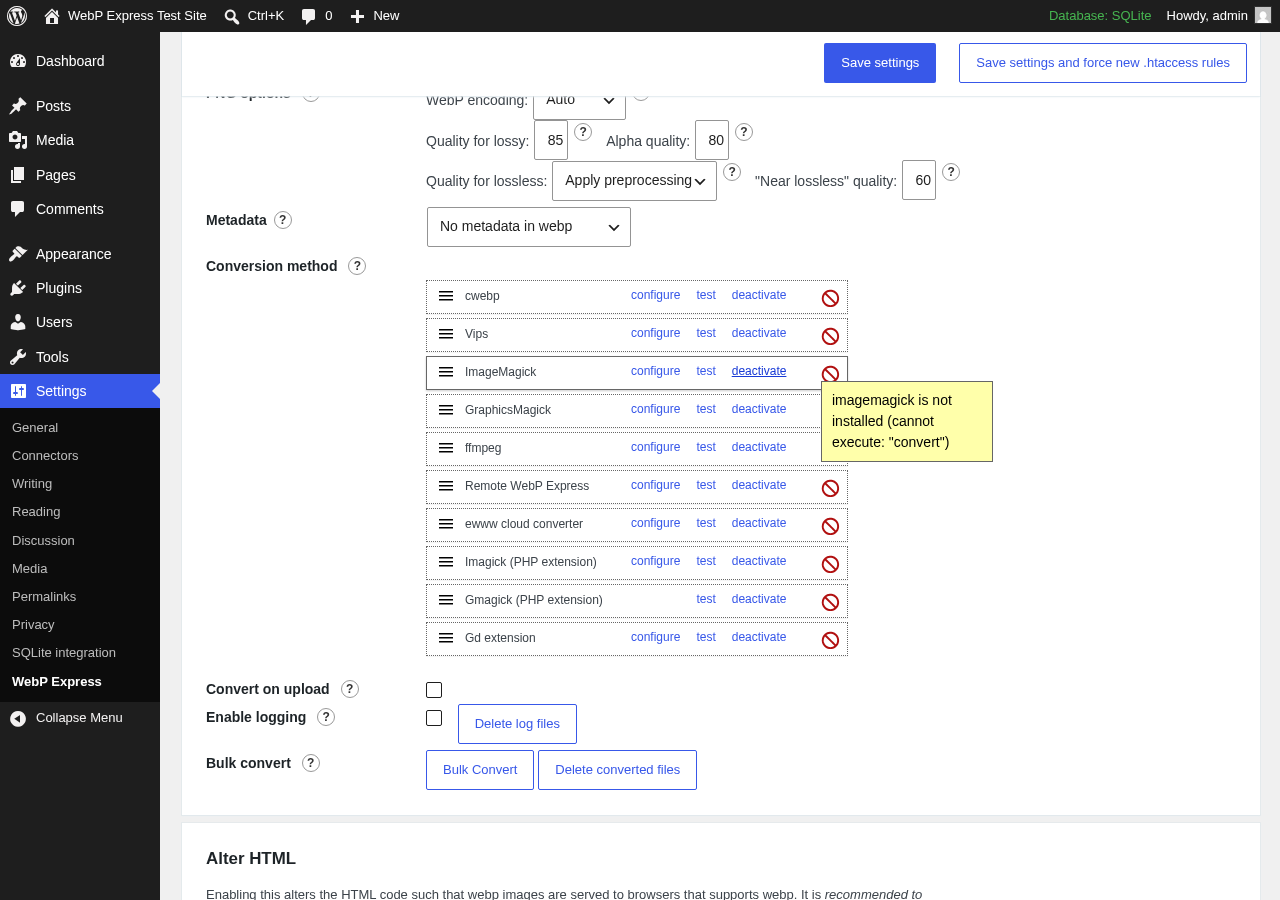
WebP Express installs from Plugins > Add New in the WordPress admin. Search “WebP Express,” click Install Now, and activate. A Settings > WebP Express menu item appears.
The settings screen is not a simple toggle. It is a structured configuration panel with several decisions to make before conversion starts.
Step 1: Choose an Operation Mode
The first and most consequential setting is the operation mode.
- Varied Image Responses. The recommended mode for non-CDN setups. Apache intercepts requests for JPEG/PNG files and serves WebP to browsers that include “image/webp” in their Accept header, falling back to originals for everyone else. This mode requires no JavaScript and makes no changes to your page HTML.
- CDN Friendly. Alters the page HTML to embed WebP sources instead of varying server responses. Required when a CDN caches server responses, because CDNs cannot serve different content to different browsers from a single cached response.
- Just Redirect. Redirects to an existing WebP file if one is already present, but does not trigger on-demand conversion. Lighter-weight, but does not auto-convert new uploads.
- Tweaked. Full manual control over every option. For advanced users who need a custom combination of settings.
For most Apache setups without a CDN, Varied Image Responses is the correct choice. For Cloudflare or similar, CDN Friendly is required.
Step 2: Select Conversion Methods
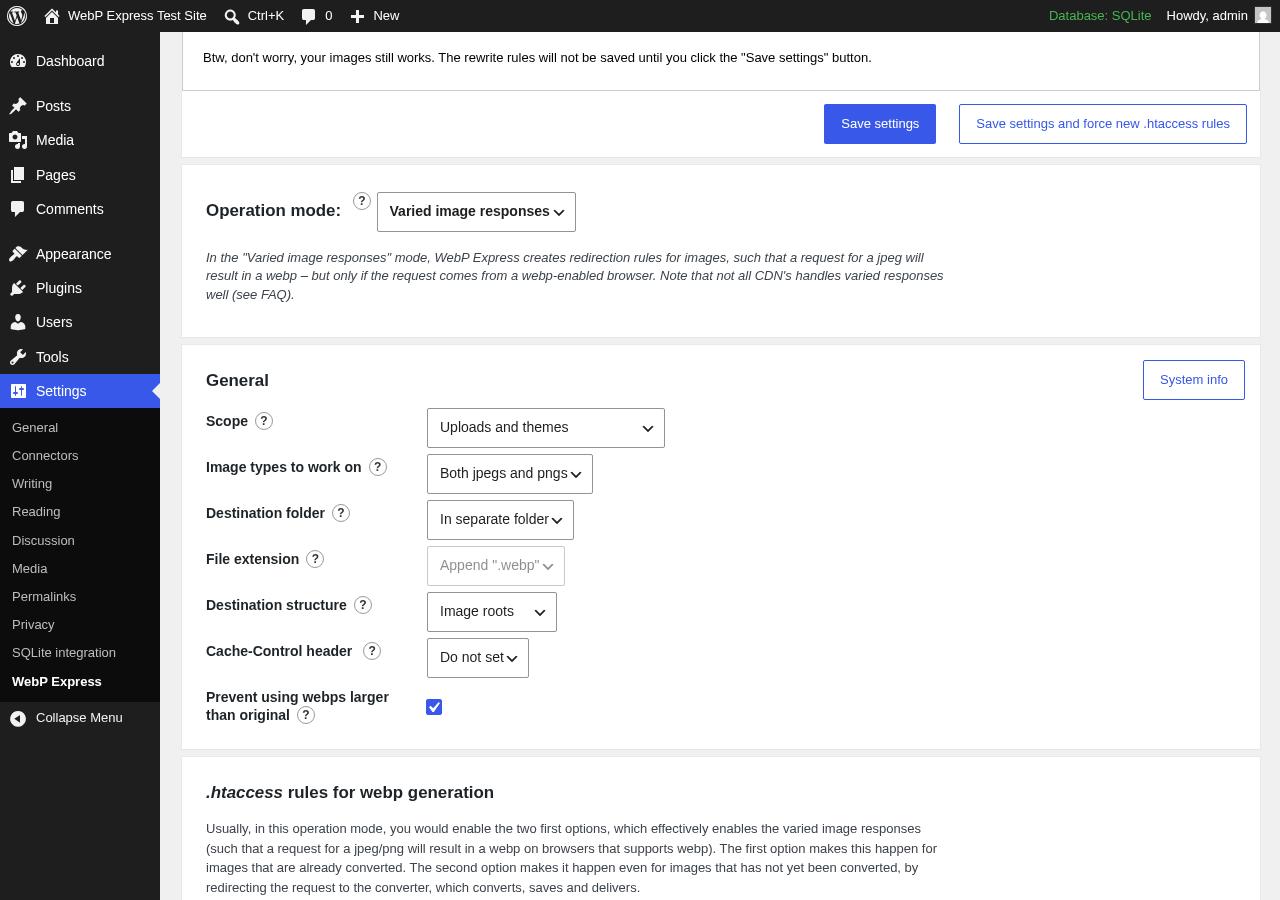
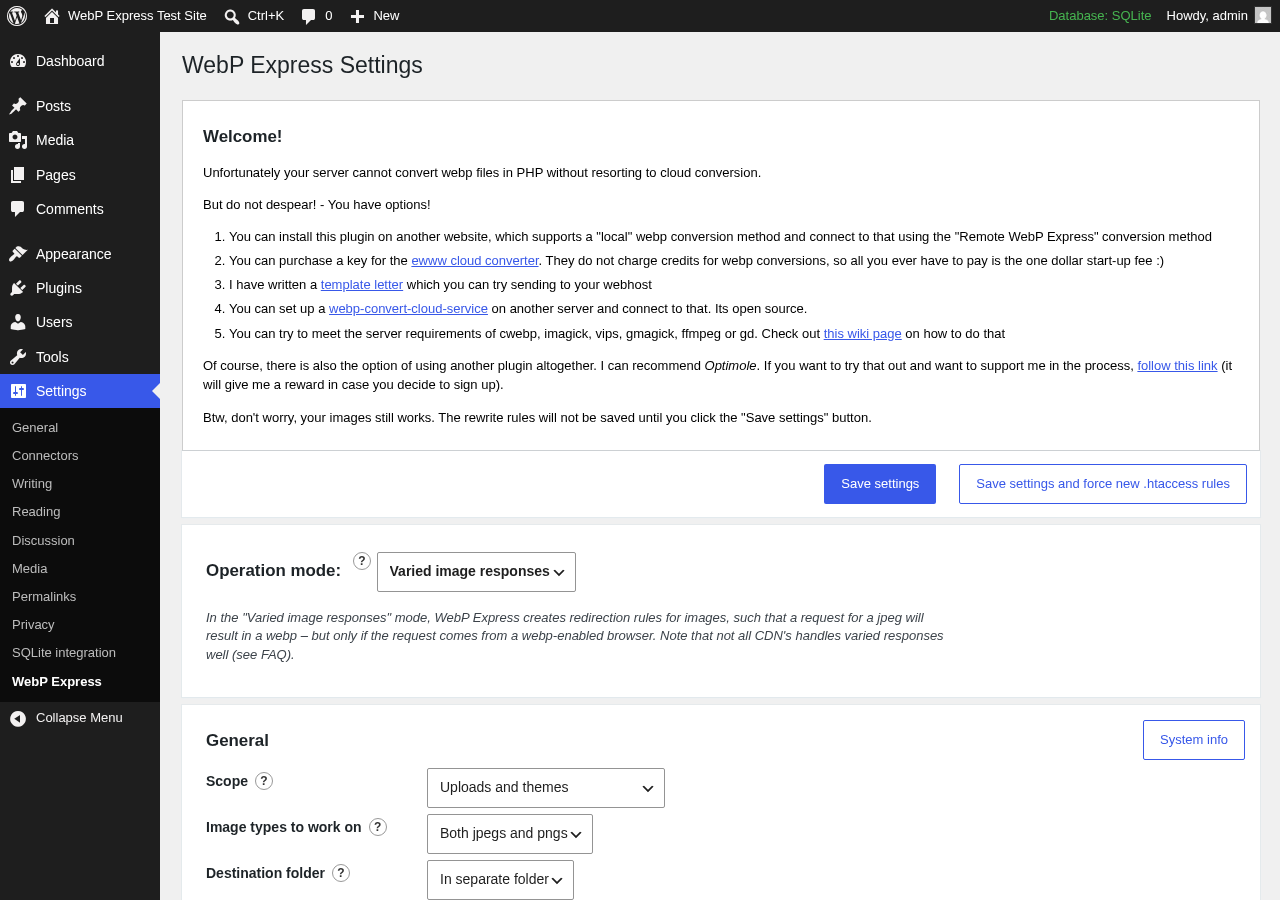
The plugin tests which conversion methods are available on your server and shows a status indicator for each. Version 0.25.15 lists ten methods in total, grouped by how they run.
Binary-based methods (require shell execution via exec() or proc_open()):
- cWebP. Google’s cwebp command-line binary. Excellent quality and widely available on managed hosting.
- VIPS. A high-performance image processing library binary. Fast on large files.
- ImageMagick binary. Calls the system ImageMagick command via shell. A good fallback when the Imagick PHP extension is unavailable.
- GraphicsMagick binary. Calls the system GraphicsMagick command via shell. Similar role to the ImageMagick binary.
- ffmpeg. The video processing tool also handles image conversion. Available as a fallback on some server environments.
PHP extension-based methods (no shell execution needed):
- Imagick. The PHP extension wrapping ImageMagick. Best local option when available. Uniquely enables automatic quality matching: the plugin reads the original JPEG’s encoded quality and applies the same quality level to the WebP output, preventing over-compression.
- Gmagick. The PHP extension wrapping GraphicsMagick. A PHP-level alternative to the GraphicsMagick binary, useful when shell execution is disabled.
- GD. PHP’s built-in image library. Present on almost all shared hosting, but produces lower-quality WebP output compared to Imagick or cWebP.
Remote and cloud methods:
- Remote WebP Express. Uses a second WebP Express installation as a remote conversion server. A free option for restricted environments where no local method works.
- EWWW cloud converter. EWWW Image Optimizer’s cloud conversion service (paid third-party subscription required). Useful when no local or binary method is available.
On most managed hosting (WP Engine, Kinsta, SiteGround, Flywheel), Imagick or cWebP is available. On basic shared hosting, GD is often the only working local method. The plugin falls through the method list automatically and uses the first one that works.
Step 3: Test and Confirm
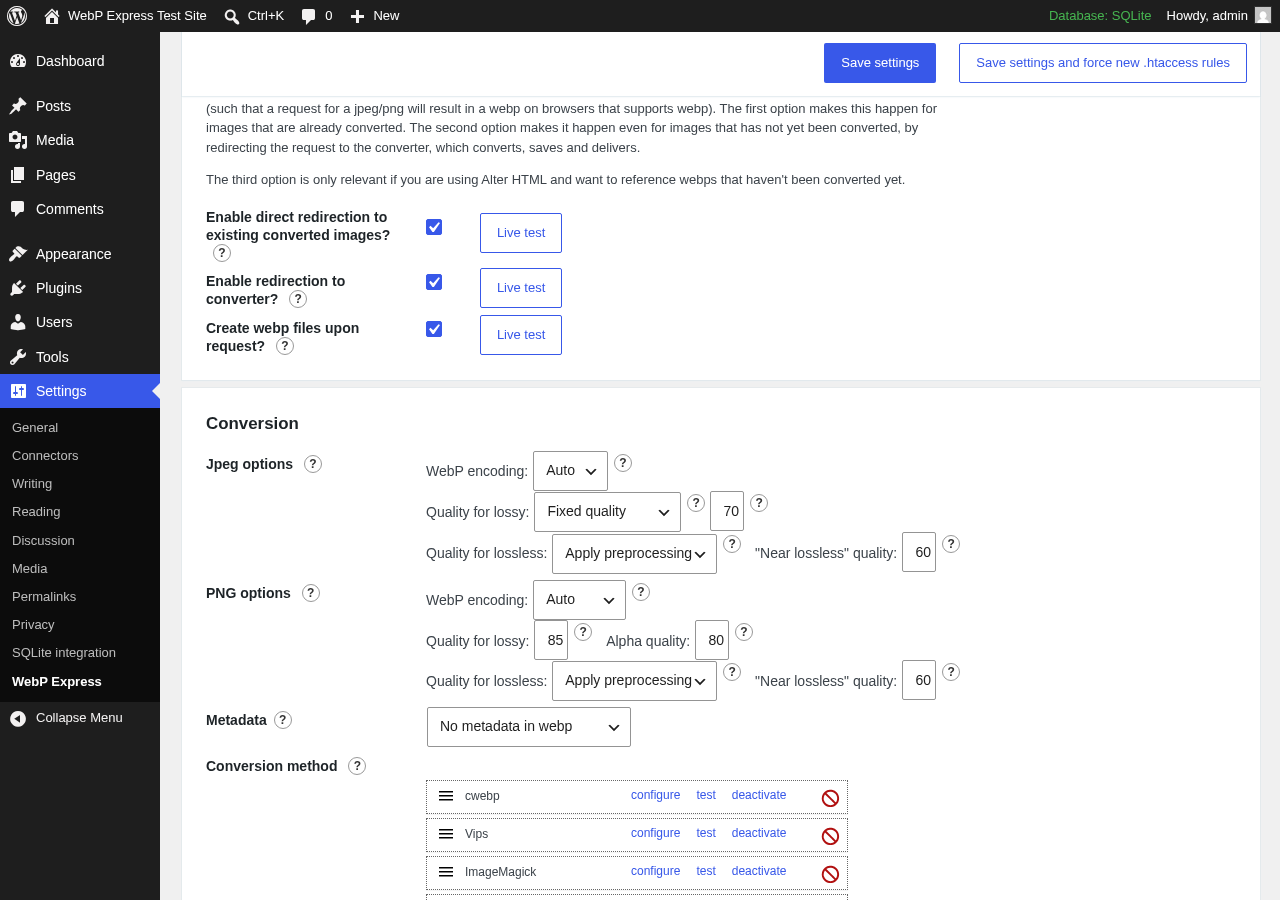
After saving, the plugin writes .htaccess rules on Apache/LiteSpeed. A set of Live Test buttons lets you verify that WebP delivery is working without inspecting browser network requests manually.
NGINX users see a different path. The plugin generates suggested rewrite rules but cannot apply them. You must paste these into your NGINX server block and reload the service. Recent versions (0.25.10 through 0.25.13) introduced a hash parameter requirement in those rewrite rules that was reversed in 0.25.13. NGINX users on intermediate versions encountered a breaking change. Running the latest version avoids this.
Step 4: Bulk Convert Existing Images
After confirming delivery works, run Bulk Convert (Settings > WebP Express) to process pre-existing images. On large media libraries, this is CPU-intensive. Multiple support forum threads and GitHub issues document PHP-FPM crashes during bulk conversion on shared and managed hosting. Running bulk conversion during off-peak hours is advisable.
Conversion Methods: The Depth of the Feature Set
Server-Side Local Conversion
WebP Express’s strongest differentiator among free plugins is its range of local conversion methods. Most competing plugins offer one (typically GD). WebP Express falls through from the highest-quality available method down to GD automatically, so it finds a working method on a wider range of hosting environments.
The Imagick automatic quality matching is worth highlighting. When you convert a JPEG that was originally saved at quality 85, the plugin encodes the WebP at quality 85 rather than applying a fixed default. This prevents two common problems: over-compression of high-quality originals, and unnecessary file size growth when re-encoding low-quality files at a higher setting. No other method in the list offers this feature.
The binary-based methods (cWebP, VIPS, ImageMagick binary, GraphicsMagick binary, ffmpeg) all require shell execution to be available on the server. Many shared hosting plans disable exec() and proc_open() for security reasons, in which case the PHP extension methods (Imagick, Gmagick, GD) are the fallback. This layered approach is why WebP Express works on a wider range of hosting configurations than plugins that rely on a single conversion path.
Cloud and Remote Methods
EWWW cloud conversion handles environments where no local method works. It sends the image to EWWW’s API and stores the returned WebP file locally. Version 0.25.9 patched a compatibility issue following an EWWW API change. If you use this method, keeping both WebP Express and your EWWW API key active is necessary.
Remote WebP Express is a free alternative for users with access to a second server. The use case is narrow but genuinely useful in restricted hosting environments where exec() is disabled and no PHP image extension is available.
Delivery Modes: Serving WebP to the Right Browser
A converted WebP file is only useful if it reaches browsers that can display it. WebP Express offers five delivery approaches:
- .htaccess routing. The cleanest option for Apache/LiteSpeed. The server reads the browser’s Accept header and routes to the WebP file or the original. No JavaScript, no HTML changes.
- Alter HTML: picture tags. Wraps
<img>tags in<picture>elements with a<source type="image/webp">child. Works on any server type, including NGINX and CDN setups. - Alter HTML: replace image URLs. Swaps image src attributes to WebP equivalents for capable browsers. Requires careful mode configuration to avoid delivering WebP URLs to browsers that cannot use them.
- Cache Enabler integration. Designed to work alongside the Cache Enabler caching plugin for page-level WebP caching.
- webpjs (JavaScript fallback). Detects WebP support client-side and swaps image sources via JavaScript. The heaviest method; appropriate as a last resort only.
For most users on Apache without a CDN, the .htaccess routing in Varied Image Responses mode is the right choice. It requires the least ongoing maintenance once configured.
Pricing and License Value
WebP Express is free. There is no Pro tier, no premium add-on, and no lifetime license. The plugin is GPL-3.0. Everything it does is available at no cost.
The only cost a user might incur is the EWWW cloud conversion API, which is a separate third-party product only needed if no local conversion method is available. Most sites on decent managed hosting never need it.
This pricing model is unusual in the image optimization plugin category. ShortPixel, Imagify, Kraken.io, and Optimole all charge monthly or per-image. EWWW Image Optimizer has a free local mode but monetizes through cloud services. WebP Express gives you everything without requiring a subscription.
The trade-off: you are the support ticket, the bug reporter, and the documentation reader. When something does not work, the path is the GitHub issue tracker and the WordPress.org support forum. Both have documented backlog.
| WebP Express | Typical Cloud Image Optimizer | |
|---|---|---|
| Price | Free | $5 to $25/month |
| Local conversion methods | 8 (Imagick, Gmagick, cWebP, VIPS, GD, ImageMagick binary, GraphicsMagick binary, ffmpeg) | Usually 1 (or none, cloud-only) |
| Cloud conversion | EWWW (paid, 3rd party) | Included in subscription |
| CDN image delivery | No (server-side only) | Often included |
| Privacy (no 3rd party required) | Yes (by default) | No |
| Support | Forum and GitHub (solo dev) | Ticket system |
Pros and Cons
Pros
- Completely free, forever. No premium tier, no monthly subscription, no per-image credits.
- Ten conversion methods cover more hosting environments than any competing free plugin.
- .htaccess-based delivery in Varied Image Responses mode is the cleanest implementation available: no JavaScript, no HTML changes, no visible overhead.
- Automatic quality matching via Imagick prevents over-compression of high-quality JPEG originals.
- WP CLI integration supports automated bulk conversion and WebP file cleanup in deploy workflows.
- Convert on Upload processes new images automatically without manual intervention after setup.
- Five delivery modes give flexibility across server types and CDN configurations.
- Privacy-friendly: no images leave the server by default.
- Actively maintained: v0.25.15 shipped June 2026 with a security fix.
- Tested against WordPress 6.9.7; supports PHP 5.6+.
- 300,000+ active installs with a 4.4-star rating across 161 reviews.
Cons
- NGINX requires manual server configuration. No automatic rewrite rule generation.
- Solo developer: support forum threads frequently go unresolved. 184 open GitHub issues.
- Two security patches in 8 months (December 2025: NGINX config exposure filed via WPScan; May 2026: medium-severity WPC converter issue).
- Bulk conversion is CPU-intensive and has caused PHP-FPM crashes on some hosting environments.
- Orphaned WebP files: deleted originals do not reliably trigger deletion of the corresponding WebP files.
- Technical settings panel with terms like “Accept header routing” and “htaccess capability tests” that will confuse inexperienced users.
- CDN compatibility requires switching delivery modes and additional per-CDN configuration.
- Multisite has documented unresolved bugs on GitHub.
- The plugin’s homepage (rosell.dk) currently has an expired SSL certificate.
- EWWW cloud dependency adds a third-party paid cost in environments where no local method works.
Alternatives to WebP Express
EWWW Image Optimizer. A WordPress image optimization plugin with a free local mode and optional paid cloud conversion. Choose EWWW Image Optimizer if you want a single plugin that handles JPEG/PNG compression and resizing alongside WebP, or if you are already using EWWW cloud services.
ShortPixel Image Optimizer. A cloud-based service that converts and compresses images and serves WebP automatically. Choose ShortPixel if you want a managed experience without server-side configuration. Free plan covers 100 images per month; paid plans are competitively priced per image.
Imagify. Cloud-based WebP conversion and image compression from the team behind WP Rocket. Choose Imagify if you already use WP Rocket for caching and want a unified performance stack from one vendor.
Optimole. A CDN-based image optimization service that delivers WebP automatically via its own global CDN. Choose Optimole if you want fully hands-off WebP delivery and are comfortable routing image traffic through a third-party CDN.
Smush (WPMU Dev). A popular image optimization plugin with a simpler interface. WebP conversion is part of the paid Pro tier. Choose Smush if you are in the WPMU Dev ecosystem or want a more guided interface than WebP Express provides.
The practical decision for most users comes down to two paths: if you are technically comfortable and want free server-side conversion with no ongoing cost, WebP Express is the strongest free option available. If you want a managed, one-click experience, a cloud-based service is a better match even at a modest monthly cost.
Final Verdict
WebP Express has earned 300,000+ active installs by doing something the market would otherwise charge for: complete, server-side WebP conversion and delivery, free, with more configuration depth than most paid alternatives.
The feature list is genuinely impressive. Ten conversion methods, five delivery modes, automatic Imagick-based quality matching, WP CLI, on-upload conversion, and a delivery architecture that serves WebP without JavaScript or HTML changes on a compatible server. If you are running Apache or LiteSpeed with Imagick or cWebP available, setup takes under ten minutes and the results are measurable.
The limits are also real. This is not a one-click plugin. NGINX users must write server configuration. CDN users must read about delivery modes and test their setup. The sole developer cannot provide consistent support at the scale of 300,000 installs, and the GitHub issue backlog reflects that. Two security patches in eight months are not alarming for an active project, but they are worth reviewing if you audit third-party plugin dependencies for client sites.
For technical users on Apache-based hosting who want free WebP conversion with no strings attached: install it, read the documentation, and run the live test. For everyone else: the cloud-based services are more predictable, even at their modest subscription cost. WebP Express is the right tool when the conditions fit. Knowing your server environment before you install is the prerequisite.