

Most image optimization plugins work the same way under the hood: your images leave your server, travel to a cloud service for processing, and come back smaller. That model is convenient, but it has trade-offs. You are dependent on an external service, you are subject to credit limits or monthly quotas, and your images are transmitted to a third party, even if only briefly.
EWWW Image Optimizer takes a different approach. Its default free mode processes images directly on your server using locally installed binaries, which means your files do not leave your hosting environment for compression. No account required, no monthly quota, no credit system. That architectural choice defines everything else about EWWW: what it can do for free, where it gets complicated, and when the paid Easy IO CDN service becomes worth considering.
This review covers how the free plugin actually performs, what the settings UI looks like, where the limitations appear, how Easy IO CDN works, and what EWWW offers compared to cloud-first alternatives.
What we reviewed
Sandbox testing: The plugin was installed via WordPress Playground (playground.wordpress.net) in a clean WordPress environment with EWWW Image Optimizer version 8.7.5. Installation was observed through the Playground boot sequence, confirming that the plugin downloaded and initialized correctly alongside a standard WordPress setup. WordPress loaded with the admin logged in and the EWWW plugin active. Extended admin navigation was not possible due to WASM PHP runtime memory limits in the testing container (the same constraint documented in prior BWP image plugin reviews in this cluster). The sandbox confirmed plugin installation and initial boot behavior.
Official screenshots: The four screenshots published by the EWWW developer on the WordPress.org plugin listing were examined as the primary UI reference. These show the current settings page layout, media library integration, and bulk optimizer interface. Where article descriptions reference specific UI elements (labels, default states, field values), they are verified against these official screenshots.
Documentation and site research: Direct inspection of the official EWWW website (ewww.io), the pricing page, the SWIS Performance product page, the Easy IO CDN documentation, and the full plugin changelog; the WordPress.org plugin listing for version 8.7.5 (August 5, 2026), including the official plugin description and FAQ; and the official documentation at docs.ewww.io covering settings configuration, WebP delivery, and the Image Detective tool. Pricing verified against ewww.io/plans/ on 2026-08-07.
At a glance
Audited on: WordPress Playground sandbox (v8.7.5, August 2026) + ewww.io (homepage, pricing, features) + WordPress.org plugin listing.
Active installs: 1+ million. Rating: 4.8/5 from 1,837 reviews on WordPress.org.
Free tier: Unlimited lossless JPG, PNG, GIF, SVG compression and free WebP conversion. No account, no API key, no credit limit. Default mode processes images locally on your server.
Paid plans: Standard ($8/month or $80/year), Growth ($16/month or $160/year), Infinite ($32/month or $320/year). All include Easy IO CDN, premium Compress API credits, and SWIS Performance.
Bottom line: the most genuinely free image optimizer in the WordPress category, with a local-first architecture that keeps images on your server by default. Setup is more hands-on than cloud alternatives, and the free lossless compression savings vary significantly per image type.
Quick verdict
EWWW Image Optimizer stands apart from every other major image optimization plugin in one important way: you can install it today and compress every image in your media library without an account, an API key, or spending a single credit. The free tier is genuinely unlimited.
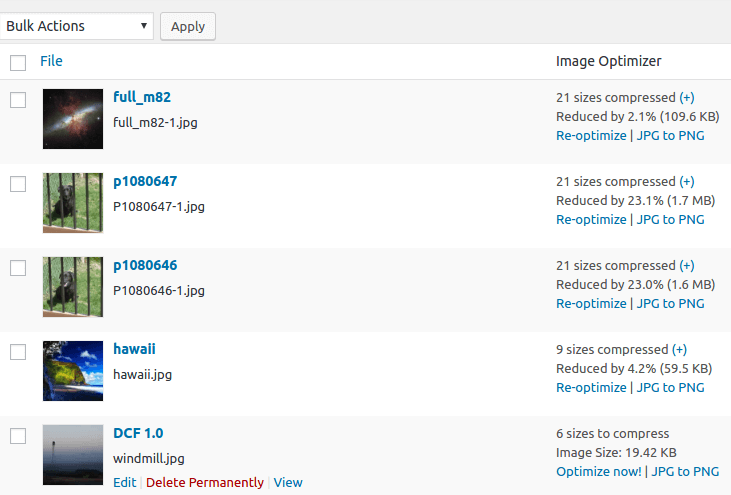
That unlimited-free positioning comes with honest trade-offs. Local lossless compression averages around 8% file size reduction for JPEGs according to the vendor, though the official media library screenshot shows actual per-image results ranging from 2.1% (a well-encoded JPEG) to 23.1% (a less-optimized camera file). WebP conversion is free, but it is not enabled by default; you toggle it on in settings, and delivering WebP to visitors on the free plan requires a server configuration step (an .htaccess or Nginx rewrite rule) that cloud alternatives handle automatically.
If you are running a privacy-sensitive site, a development environment, a site where images should not leave the server by default, or a large media library that needs free unlimited optimization without quotas, EWWW is the strongest option available. The setup takes a few more minutes than zero-friction cloud plugins, but the trade-offs are transparent and the plugin delivers what it promises.
For sites that want maximum compression ratios, automatic next-gen format delivery without configuration, or CDN-based image scaling, the paid Easy IO CDN service addresses all of those needs, at a price that bundles CDN bandwidth, premium compression credits, and the SWIS Performance caching plugin.
Quick verdict card
Best for: Privacy-conscious sites where images should stay on the server; any WordPress site that wants unlimited free optimization without quotas; developers comfortable with a short .htaccess or Nginx step for WebP delivery.
Best plan for individuals: Free plugin for unlimited lossless compression; Standard plan ($80/year) for Easy IO CDN and premium lossy compression.
Best plan for agencies: Growth or Infinite plan for higher CDN bandwidth allocations and more compression credits.
Standout: The free tier is the most permissive in the category. No account needed, no file size cap, no monthly quota, default local processing keeps images on your server.
Watch out for: WebP conversion is off by default and requires a manual toggle plus server configuration for delivery. Free lossless compression savings vary widely (2% to 23% in real use, depending on image quality). Background Mode for the bulk optimizer is not on by default.
What EWWW Image Optimizer is
EWWW Image Optimizer is a WordPress plugin that compresses images using optimization binaries installed locally on your server. The core toolset includes jpegtran, optipng, gifsicle, pngquant, and cwebp, utilities bundled with the plugin for most supported platforms (Windows, Linux, Mac OS, and FreeBSD). When you upload an image, the plugin passes it through the appropriate binary and returns the optimized version. In this default local mode, no data leaves your server during processing.
The plugin was developed by nosilver4u (Shane Bishop), a single developer with a long track record in the WordPress ecosystem. EWWW has been in the plugin directory for over a decade and now carries 1+ million active installs with a 4.8/5 rating across 1,837 reviews on WordPress.org as of August 2026. That rating, from a credible install base, suggests a plugin that delivers reliably on its core promise.
Version 8.7.0 (May 2026) updated all bundled binaries to their latest versions and transitioned Linux binaries to 64-bit architecture. Version 8.7.5 (August 2026) addressed PHP compatibility in BuddyPress functions and refined file handling. Version 8.7.4 patched an authenticated cross-site scripting vulnerability.
Alongside the local compression path, EWWW offers two cloud upgrades. The Compress API enables premium lossy compression by sending images to EWWW’s servers, achieving up to 5x better reduction than free lossless compression. Easy IO CDN replaces image delivery entirely with a CDN-powered system that automatically converts images to WebP or AVIF, scales them to each visitor’s device size, and serves them from global edge locations. Both cloud services are paid features.
One important nuance to note: the plugin description on WordPress.org states that for web servers where local binaries cannot run, EWWW offers “unlimited lossless JPG image optimization and WebP conversion via our Compress API for free” as a fallback. This means that on some managed hosting environments where the bundled binaries cannot execute, a free cloud API path exists, but this does involve images leaving your server. The distinction matters: local binary mode keeps images on your server; the cloud API fallback does not.
Who EWWW Image Optimizer is best for
Strong fit:
- Sites where images should stay on the server by default. The free local binary mode is the only approach in the category that processes images entirely on your hosting without cloud transmission.
- WordPress administrators who want unlimited free optimization without tracking quotas, credits, or monthly caps.
- Sites on shared hosting where cloud-based alternatives’ API usage might be restricted or where the cost of paid credits adds up on large libraries.
- Developers managing multiple sites who want a single account covering both free local compression and optional paid CDN delivery with no per-site licensing.
- Sites with large existing media libraries (the official screenshot shows a 623-image library queued for bulk optimization).
- WooCommerce stores that want product images optimized on upload without paying per image or per credit.
Weak fit:
- Sites that want maximum JPEG compression without additional configuration. Free lossless compression shows real-world savings of 2-23% per the media library screenshot, significantly less than lossy cloud alternatives.
- Beginners who want zero-configuration WebP delivery. WebP is off by default, and serving it to visitors requires an .htaccess or Nginx configuration step.
- Sites on managed hosting environments where file execution permissions restrict the bundled binaries. These sites can use the free or paid cloud API path, but the setup differs from the default flow.
- Sites that want AVIF conversion without a paid plan. AVIF is a paid Easy IO feature.
Setup and user experience
The EWWW Image Optimizer was installed and observed in a WordPress Playground environment (version 8.7.5). The plugin downloaded and installed cleanly alongside a standard WordPress setup, with no manual activation steps beyond the standard Plugins screen. WordPress confirmed admin access was active immediately after installation.
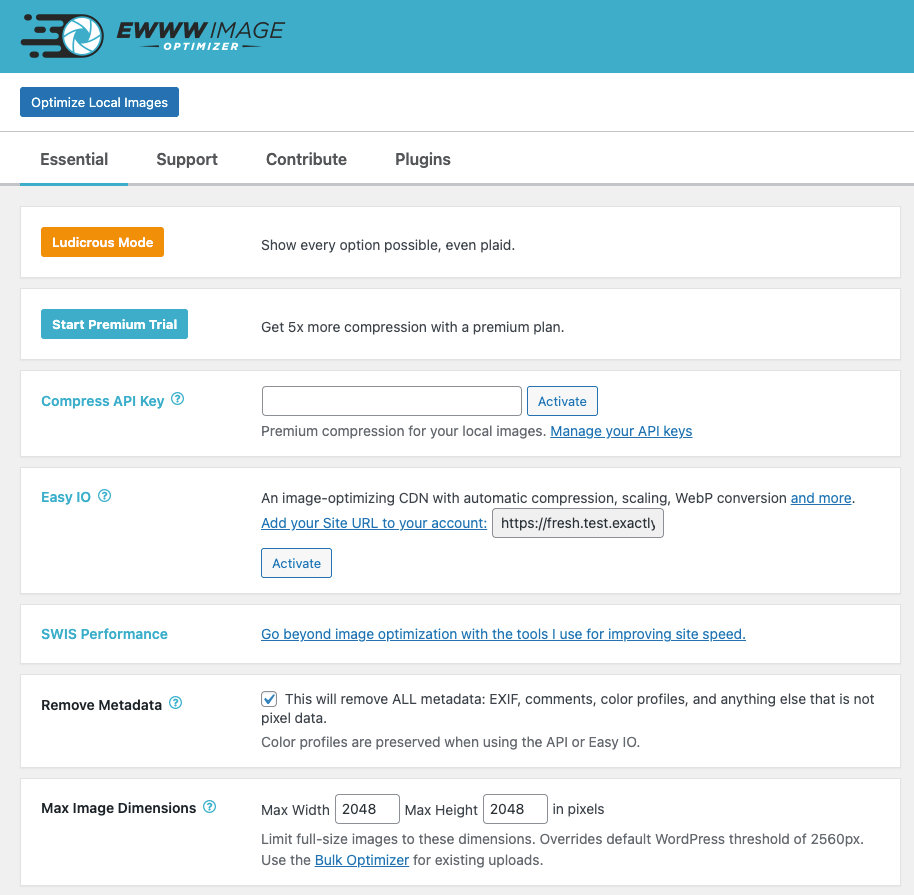
The plugin’s settings page, viewed through the official vendor screenshots published on WordPress.org, is organized into a tabbed interface (Essential, Support, Contribute, Plugins) with a clean card layout for each setting. The Essential tab presents a logical progression: service upgrade options at the top, followed by core configuration settings.
The default state after activation is:
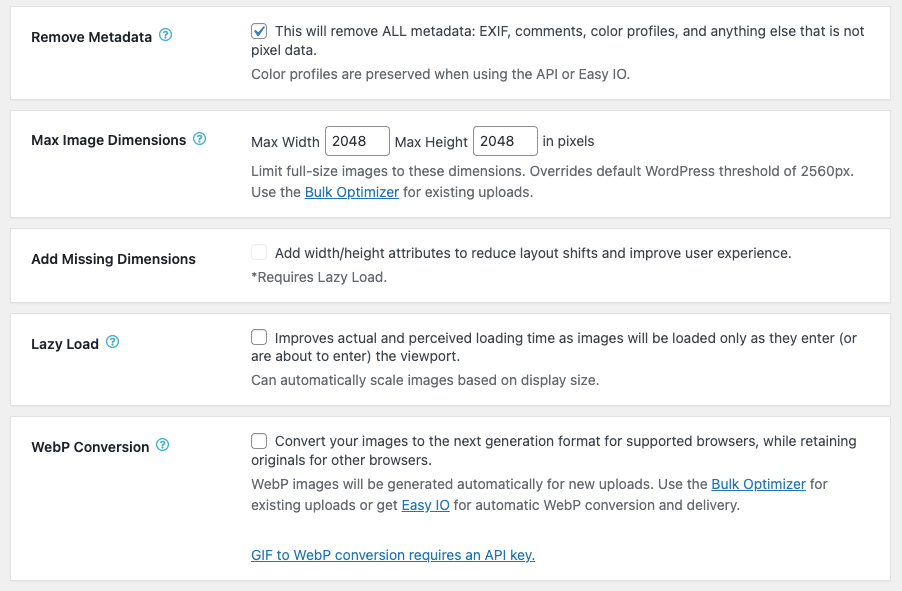
- Remove Metadata: enabled (checked). The plugin strips all EXIF, comments, color profiles, and non-rendering data by default. Color profiles are preserved when using the API or Easy IO, but not in the free local binary mode.
- Max Image Dimensions: 2048 x 2048 pixels. Images larger than this are resized on upload. This overrides WordPress’s own 2560-pixel threshold.
- Lazy Load: disabled by default. Must be toggled on manually.
- WebP Conversion: disabled by default. Must be enabled manually. Once enabled, new uploads are converted automatically; existing images require a bulk optimizer run.
The “Ludicrous Mode” toggle (present at the top of the settings page, labeled with that name) reveals the full expanded settings list. The name is a fair description: enabling it surfaces a substantially longer set of options covering format conversions, quality adjustments, thumbnail sharpening, and GIF animation handling.
The most important friction point for free-plan users is WebP delivery. Enabling WebP conversion in settings generates the WebP files, but serving them to browsers requires an additional step: adding rewrite rules to .htaccess (Apache) or Nginx configuration. The plugin provides the required code. For a developer, this takes about five minutes. For a non-technical site owner unfamiliar with server files, it is a real barrier that cloud alternatives skip entirely.
A smaller but notable friction point: GIF-to-WebP conversion requires an API key (noted explicitly in the settings description under WebP Conversion). If your site uses animated GIFs, the free local-only path will not convert them to WebP.
Easy IO CDN setup is described in the settings as: “Add your Site URL to your account” with a text input field and an Activate button. Starting a trial is a single click from the settings page.
Free compression: local lossless optimization
The free tier runs lossless compression on every image you upload, using open-source binaries that require no external service. Lossless compression removes non-rendering data from image files (metadata, redundant headers) without changing pixel values.
The vendor claims an average of 8% savings on JPEGs using lossless compression. The official Media Library screenshot confirms that real savings vary considerably: full_m82-1.jpg was reduced by 2.1% (109.6 KB saved), while P1080647-1.jpg saw 23.1% reduction (1.7 MB saved) and P1080646-1.jpg saw 23.0% reduction (1.6 MB saved). The hawaii.jpg image fell at 4.2% (59.5 KB). The spread reflects real-world JPEG diversity: a well-encoded camera export will show minimal improvement from lossless passes, while a less-optimized file may show meaningful savings.
EWWW also shows “21 sizes compressed” next to the larger images in the official screenshot, confirming that it processes all registered WordPress thumbnail sizes alongside the original. On a site with many additional image sizes registered by themes or plugins, that means each upload triggers optimization across the full set, not just the original file.
A practical implication: if you upload standard camera-exported JPEGs, the free lossless compression will reduce file sizes, but the reductions are modest on well-encoded files. For 50-80% savings, lossy compression is needed: either the paid Compress API or a cloud-based alternative.
Where the unlimited-free model shines is the cost math. Every image in your library gets processed, including all thumbnail sizes. There is no per-image credit cost, no monthly cap, no decision about which images to prioritize.
WebP conversion
WebP conversion is included free in EWWW and is one of the most significant free-tier features in the category. The vendor reports 60% average file size savings over JPEG for WebP output.
Important clarification on defaults: WebP conversion is off by default. After activation, the settings page shows the WebP Conversion toggle unchecked. You must enable it manually before any WebP files are generated. Once enabled, new uploads are converted automatically. Existing images require a bulk optimizer run.
As noted in the settings UI: “GIF to WebP conversion requires an API key.” If your site uses animated GIFs and you want them converted to WebP, you need a paid API key for that specific format.
WebP delivery is a separate step from WebP generation. Having WebP files on your server does not automatically serve them to browsers. You need either:
- Server-side rewrite rules: Add .htaccess rules (Apache) or Nginx config that serve the .webp file when a browser indicates WebP support, falling back to the original JPEG/PNG for browsers that do not.
- Easy IO CDN: Handles WebP (and AVIF) delivery automatically at the CDN edge, no server configuration required.
The plugin provides the .htaccess/Nginx code when you activate WebP conversion. For most WordPress sites on Apache-based shared hosting, the .htaccess approach is straightforward.
Image Detective
Image Detective is a diagnostic tool in the EWWW settings panel, visible only to administrators and invisible to site visitors. It identifies two categories of problems:
- Improperly scaled images: images where the source file is significantly larger than its displayed dimensions, meaning visitors download more data than the page uses.
- Largest Contentful Paint elements: images serving as the LCP element for each page view, so you can prioritize them for preloading or optimization.
This goes beyond what most image optimization plugins provide. Standard tools compress images without indicating which ones are hurting performance scores the most. Image Detective makes the specific problem visible.
Image Detective is free and requires no API key.
Bulk optimization
The bulk optimizer processes all unoptimized images in the media library in a single run, handling WordPress-generated thumbnail sizes alongside originals.
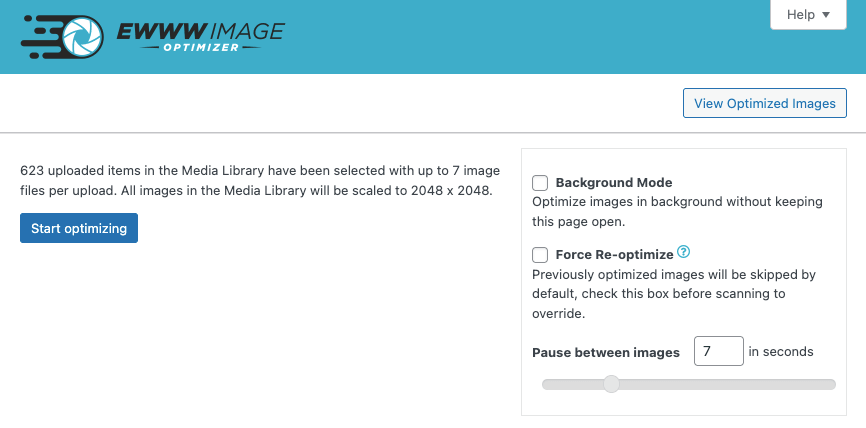
From the official bulk optimizer screenshot:
- The screen shows a count of how many items are queued (“623 uploaded items in the Media Library have been selected with up to 7 image files per upload”) and the active dimension settings (“All images in the Media Library will be scaled to 2048 x 2048”).
- Start optimizing button initiates the run.
- Background Mode (unchecked by default): “Optimize images in background without keeping this page open.” By default, the bulk optimizer requires an open browser tab. You must manually enable Background Mode to run via cron without browser dependency.
- Force Re-optimize (unchecked by default): Previously optimized images are skipped unless this is checked.
- Pause between images: Default is 7 seconds. The slider controls the delay between images during bulk optimization, reducing server CPU load during long runs.
The 7-second pause default is a notable characteristic: on a 623-image library, a full bulk run at the default pause setting takes over an hour. Users on shared hosting may want to leave this setting in place to avoid CPU usage spikes; users on dedicated or high-powered hosting can reduce or eliminate the pause.
For very large libraries, WP-CLI support removes execution time constraints that affect browser-based bulk runs.
Lazy loading
EWWW includes a lazy load module that defers image loading until images approach the viewport. Once enabled, the plugin description notes it “can automatically scale images based on display size” alongside the defer behavior.
Lazy loading is off by default in the settings. The “Add Missing Dimensions” feature (which adds width/height attributes to img elements to reduce Cumulative Layout Shift) is also unchecked by default and requires Lazy Load to be active.
Both features are free and require no API key. They are enabled from the Essential settings tab.
Easy IO CDN
Easy IO is EWWW’s paid cloud CDN service, visible in the settings page as the second major section after the Compress API. The settings description reads: “An image-optimizing CDN with automatic compression, scaling, WebP conversion and more.” Setup requires adding your site URL to your account and clicking Activate.
Easy IO changes how image delivery works at a fundamental level. Where the free local path compresses images on your server and leaves serving to you, Easy IO rewrites image URLs to point to a CDN. Images are served from the CDN edge, converted to WebP or AVIF for compatible browsers, scaled to each visitor’s device dimensions, and cached globally.
The core Easy IO capabilities:
- Auto-WebP and auto-AVIF: no server configuration needed. Format selection happens at the CDN edge.
- Automatic responsive scaling: images served at the dimensions their container requires for each visitor’s viewport.
- Global CDN delivery: nearest edge location per visitor.
- Automatic JS and CSS compression: Easy IO also covers JS and CSS delivery.
Easy IO does not modify your original Media Library files. Optimization happens at the CDN layer, originals stay on your server.
The SWIS Performance plugin is bundled with all paid plans. The settings page shows a direct link to SWIS: “Go beyond image optimization with the tools I use for improving site speed.” SWIS adds page caching, deferred and async JS/CSS loading, Critical CSS generation, minification, and asset compression.
Pricing
EWWW’s paid plans bundle Easy IO CDN, the Compress API for premium lossy compression, and SWIS Performance. A trial is available before committing. The settings page presents “Start Premium Trial” with the note “Get 5x more compression with a premium plan.”
Prices verified against ewww.io/plans on 2026-08-07.
Standard
$8/month billed monthly, or $80/year (annual billing saves two months’ cost).
- Easy IO CDN, unlimited images and sites
- 50 GB CDN bandwidth/month
- 25,000 Compress API credits/month (monthly) or 300,000/year (annual)
- SWIS Performance: page cache, JS/CSS optimization
- 1 Critical CSS site/month
- 30-day cloud image backups
Growth
$16/month or $160/year.
- All Standard features
- 200 GB CDN bandwidth/month
- 50,000 monthly or 600,000 annual Compress API credits
- 100+ CDN edge locations
- Custom domain support
- 10 Critical CSS sites/month
Infinite
$32/month or $320/year.
- All Growth features
- 400 GB CDN bandwidth/month
- 100,000 monthly or 1,200,000 annual Compress API credits
- 25 Critical CSS sites/month
- Bandwidth overage: $0.065/GB beyond 400 GB
Practical notes on pricing:
- No stated money-back guarantee: the pricing page mentions a trial but does not list a formal refund window. Confirm trial terms at ewww.io before purchasing.
- Two limits on paid plans: Compress API credits (for premium lossy compression) and CDN bandwidth (for Easy IO). Both are shared across all sites under one account.
- Annual billing: Standard annual gives 300,000 credits vs. 25,000/month on the monthly plan, an important difference if you have a large library to process.
- Free plugin remains free: local lossless compression continues to work regardless of plan status.
- Separate purchases: Easy IO CDN, Compress API credits, and SWIS Performance can be purchased individually outside the bundled plans.
- Free support for all users: EWWW offers free one-on-one email support to free and paid users, which is unusual for a freemium plugin.
Who each plan suits:
- Free plugin: any site that wants unlimited lossless compression and free WebP conversion (with manual setup for delivery) and does not need CDN or lossy compression.
- Standard: active blogs and small WooCommerce stores that want Easy IO CDN’s automatic WebP and AVIF delivery. 50 GB/month suits most small to medium sites.
- Growth: sites with higher image delivery volume or agencies needing 100+ CDN locations and custom domain support.
- Infinite: high-volume sites, WooCommerce stores with large catalogs, and agencies where CDN bandwidth predictability is the priority.
Pros and cons
Pros
- The free tier is the most permissive in the image optimization category: no account, no API key, no quota, no file size limit.
- Local binary mode keeps images on your server during compression, with no default transmission to external services. This is the only major image optimization plugin in the category that offers this on a free basis.
- WebP conversion is free and unlimited. The 60% average savings over JPEG source files is a real improvement for page weight and Core Web Vitals.
- Image Detective identifies improperly scaled images and LCP elements, providing diagnostic value beyond what standard optimization plugins offer.
- 4.8/5 rating across 1,837 reviews is one of the highest in the category from a credible install base.
- Actively maintained: multiple updates in 2026 including binary upgrades, security patches, and multisite fixes.
- WP-CLI support for command-line bulk optimization on large libraries.
- Free one-on-one email support for all users, including free-plan users.
- EWWW processes all registered image sizes (the official screenshot shows “21 sizes compressed” per image), not just the original file.
- Broad compatibility: BuddyPress, NextGEN Gallery, FileBird, FooGallery, WP Offload Media (Amazon S3, Google Cloud, Digital Ocean Spaces), Cloudflare, WPML, WooCommerce.
- API key works across unlimited websites with optional sub-keys per site.
Cons
- Free local lossless compression delivers modest savings. The official media library screenshot shows 2.1% to 23.1% per image depending on source quality, significantly less than the 50-80% achievable with lossy cloud compression.
- WebP conversion is off by default and requires two steps to use: toggle on in settings, then configure server delivery rules. Cloud alternatives automate both.
- GIF-to-WebP conversion requires a paid API key. Free-plan users cannot convert animated GIFs to WebP.
- The bulk optimizer has a 7-second pause between images by default and background mode is off. Bulk processing a large library takes time and requires an open browser tab unless Background Mode is manually enabled.
- Local binary execution can fail on some managed hosting environments. The free cloud API fallback exists but involves image transmission, which negates the server-privacy advantage.
- The settings interface is dense. Ludicrous Mode reveals a substantially longer options list that can be overwhelming for beginners.
- AVIF conversion is a paid Easy IO feature only.
- No clearly stated money-back guarantee on the pricing page.
- Monthly paid plan credit allocations (25,000/month on Standard) are significantly lower than the effective annual allocation, making monthly billing a worse value proportionally.
Alternatives
Imagify applies cloud-based lossy compression by default (Aggressive mode) and delivers WebP and AVIF conversion on all plans including free. Free quota is 20 MB/month (roughly 200 images). JPEG reductions are typically 50-80%. Images are transmitted to Imagify’s servers. Choose Imagify if you want strong lossy compression and automatic next-gen format delivery without configuration, and the 20 MB monthly quota fits your upload volume.
Smush (by WPMU DEV) requires no account or API key for basic free compression (lossless and lossy via Super mode), making it the lowest-friction entry point in the category. WebP and AVIF are Pro-only features. The 5 MB per-image free-tier ceiling means high-resolution images may go unoptimized. Choose Smush if you want zero-setup compression with no account required and are not immediately concerned about WebP.
ShortPixel Image Optimizer offers comparable depth to EWWW’s paid tier via a cloud-based credit system. WebP and AVIF are available on paid plans. The Glossy compression mode (a quality-preserving lossy option between lossless and standard lossy) is unique to ShortPixel with no equivalent in EWWW. Unlimited plans start at $9.99/month. Choose ShortPixel if maximum compression quality on photography matters, particularly if the Glossy mode addresses a specific use case.
Optimole serves images through its own CDN and optimizes on the fly without modifying the WordPress Media Library. Images are delivered from Optimole’s network. The free tier covers 5,000 monthly visits and 1 GB CDN bandwidth. Choose Optimole if a CDN-first approach is the primary goal and you are comfortable with images hosted on a third-party domain.
Final verdict
EWWW Image Optimizer earns its 4.8/5 rating and million-plus install base through a clear value proposition that no competitor matches on a free basis: unlimited compression with images processed locally on your server by default.
The free tier limitation is worth being precise about. Lossless compression shows real-world savings ranging from 2% to 23% per image (per the official media library screenshot), not a uniform figure. Well-encoded camera JPEGs show minimal improvement; less-optimized files show more. For heavy compression ratios, you need lossy compression: either a paid plan or a cloud alternative.
The setup is less seamless than cloud alternatives. WebP conversion requires a manual toggle and a server configuration step for delivery. The bulk optimizer’s 7-second default pause and browser-tab dependency (unless you enable Background Mode) mean a large library takes hours to process. These are real trade-offs, not hidden ones; they appear directly in the plugin’s settings UI.
Easy IO CDN closes the delivery gap cleanly. For sites that want automatic AVIF, responsive scaling, and global CDN serving, the Standard plan at $80/year is competitive with cloud-first alternatives. The bundled SWIS Performance plugin adds real caching and JS/CSS optimization value on top.
For privacy-conscious sites, developers who want full control, large-library bulk optimization without quotas, or any site where unlimited free matters more than maximum compression ratios, EWWW is the right choice. For beginners who want the simplest path to next-gen format delivery, Imagify or Smush are lower-friction starting points.
Score: 4.1 / 5