


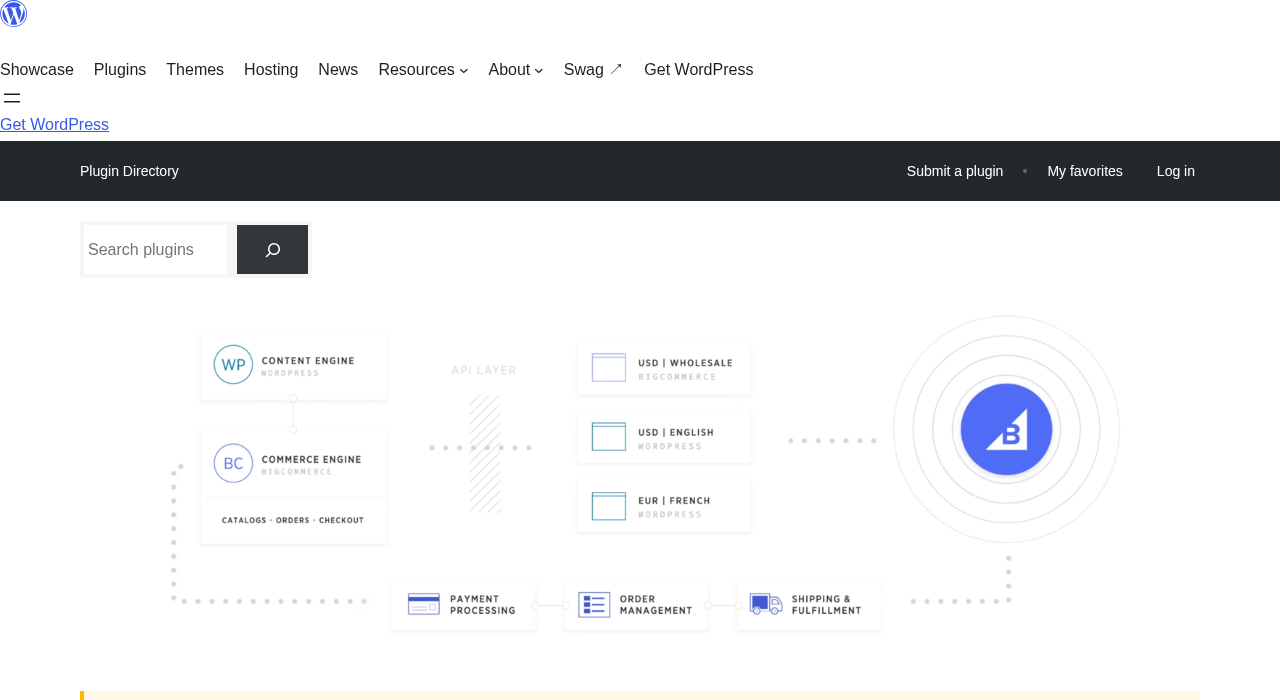
BigCommerce for WordPress promises the best of two worlds: WordPress handling your content and design, BigCommerce handling your catalog, checkout, and fulfillment behind the scenes. On paper, the combination is compelling for merchants who love WordPress as a CMS but want enterprise-grade commerce infrastructure without managing it themselves.
In practice, the plugin tells a more complicated story. With just 200+ active installations, a last-updated date of December 2024 (approximately 21 months before this review), and a WordPress.org compatibility warning flagging the last three major WordPress releases as untested, BigCommerce for WordPress deserves careful examination before any production commitment.
What this review covers and how it was researched. This is a research-based review of the BigCommerce for WordPress plugin as of September 2026. I reviewed the official BigCommerce product page, the WordPress.org plugin listing (version 5.1.2, last updated December 12, 2024), the BigCommerce pricing page, the official installation documentation, WordPress.org user reviews (42 reviews, 3.9 out of 5), and the plugin’s vendor-provided screenshots. A hands-on live install was not completed because the plugin requires an active BigCommerce account to function beyond the connection screen. All interface descriptions refer to the vendor-provided screenshots from the WordPress.org listing, and that basis is noted where relevant. Pricing figures are from BigCommerce.com as of September 2026 and should be verified before purchasing.
At a glance:
- Plugin version reviewed: 5.1.2 (December 12, 2024)
- Active installs: 200+ (WordPress.org)
- WordPress.org rating: 3.9 out of 5 (42 reviews)
- Last updated: December 2024 (approximately 21 months ago)
- Compatibility note: not tested with the latest three major WordPress releases
- Plugin cost: free (requires a paid BigCommerce account to use)
- BigCommerce plans: $29 to $299 per month (annual billing); custom pricing above $1M GMV
- Bottom line: a developer-friendly headless option for WordPress that has stalled in active maintenance, with a low install count and a growing compatibility question that merchants should weigh carefully
Quick verdict
BigCommerce for WordPress works well for one specific scenario: a developer or merchant who already uses BigCommerce for their commerce backend and wants WordPress as the content presentation layer. If you are in that situation, the plugin does what it says it does. Products sync, the embedded checkout works, and the headless architecture genuinely offloads server load from WordPress.
For everyone else, the numbers are hard to ignore. WooCommerce has 7 million active installs and active weekly releases. BigCommerce for WordPress has 200+ installs and has not pushed a plugin update in 21 months. The compatibility warning on the WordPress.org listing is not a cosmetic concern: it means the plugin has not been tested with the latest three major WordPress releases beyond 6.7.x. That matters for security patches, block editor compatibility, and plugin conflict resolution.
- Best for: WordPress developers building headless storefronts for existing BigCommerce merchants, content-first brands that already run BigCommerce as their commerce platform.
- Best fit by business type: mid-size to enterprise merchants invested in the BigCommerce platform who want WordPress CMS, agencies building custom headless experiences for BigCommerce clients.
- Standout: headless architecture reduces WordPress server load, 65+ payment gateways on the commerce side, enterprise-grade catalog management, multi-channel selling via BigCommerce’s backend.
- Watch out for: nearly two-year gap in plugin updates, WordPress.org compatibility warning, 200+ installs (very low adoption), unreliable syncing with catalogs over 500 products, no analytics data visible inside WordPress, and the mandatory paid BigCommerce subscription starting at $29 per month (annual).
What BigCommerce for WordPress is
BigCommerce for WordPress is a headless ecommerce integration plugin that connects the BigCommerce platform to a WordPress frontend. The concept is a decoupled architecture: WordPress manages your site structure, content, and design; BigCommerce manages your product catalog, inventory, pricing, orders, payments, and fulfillment.
When you install and activate the plugin, it pulls your BigCommerce product catalog into WordPress as custom post types. Each product gets an automatically generated product page on your WordPress site. The cart and checkout are either embedded within WordPress pages (using BigCommerce’s hosted checkout flow) or redirect to BigCommerce’s own checkout URL.
The plugin does not create a standalone ecommerce solution within WordPress. It is a bridge. Without an active BigCommerce account and a live store configured there, the plugin has nothing to display or manage.
BigCommerce the company launched the WordPress plugin in 2019 as part of its push into headless commerce. The stated goal was to let merchants benefit from WordPress’s content flexibility and SEO strengths while keeping commerce operations on BigCommerce’s enterprise-grade infrastructure, including PCI-compliant checkout, fraud protection, and carrier-grade uptime.
The most recent plugin release on WordPress.org is version 5.1.2, dated December 12, 2024. That version is the last official release as of September 2026.
Who BigCommerce for WordPress is best for
Strong fit
- Existing BigCommerce merchants who want WordPress as their CMS. If your commerce backend is already BigCommerce and you want a richer content publishing environment than BigCommerce’s native templating system provides, this plugin is the intended solution.
- Developer teams building headless WordPress storefronts. The plugin exposes hooks, filters, template overrides, and custom post types that developers can use to build highly customized product pages and shopping experiences on WordPress without touching the commerce backend.
- Content-driven brands that need editorial control alongside ecommerce. WordPress has a deep advantage in blogging, SEO structure, custom page templates, and multi-author workflows. If your site is genuinely content-first and commerce-second, the WordPress frontend plus BigCommerce backend split makes architectural sense.
- Merchants with multi-channel selling requirements. BigCommerce natively connects to Amazon, eBay, Facebook, Instagram, and Google Shopping. Those channel connections are managed from the BigCommerce control panel, independent of whatever frontend is attached.
- Enterprise teams that need PCI compliance handled at the platform level, not by the hosting team. BigCommerce handles PCI-DSS compliance for its embedded checkout. WooCommerce shifts that responsibility to your hosting environment.
Weak fit
- Sellers who want a low-cost or free ecommerce solution. The plugin is free, but it does nothing without a BigCommerce account. Plans start at $29 per month on annual billing. At scale, transaction fees apply unless you are using BigCommerce’s own embedded payment providers.
- Small stores just getting started. The 200+ active install count is an important signal. Very few small store operators use this plugin, and the ecosystem of compatible themes, extensions, and tutorials reflects that.
- Stores with catalogs larger than a few hundred products. User reviews on WordPress.org consistently report severe syncing issues at 500+ products and catastrophic sync failures at 9,000+ products. This is not a theoretical limitation: multiple reviewers document it in detail.
- Sites that need analytics inside WordPress. The plugin does not pass conversion data, order revenue, or channel performance metrics to WordPress. You manage all analytics through the BigCommerce control panel, not your WordPress dashboard.
- Merchants who want to stay current with WordPress core. The plugin’s last update was December 2024, and it carries a WordPress.org compatibility warning for three consecutive WordPress major versions. That is a non-trivial operational risk.
Setup and initial configuration
Installing the plugin follows the standard WordPress process. Search for “BigCommerce” in Plugins > Add New, install, and activate. The plugin is listed by BigCommerce on WordPress.org under the slug “bigcommerce.”
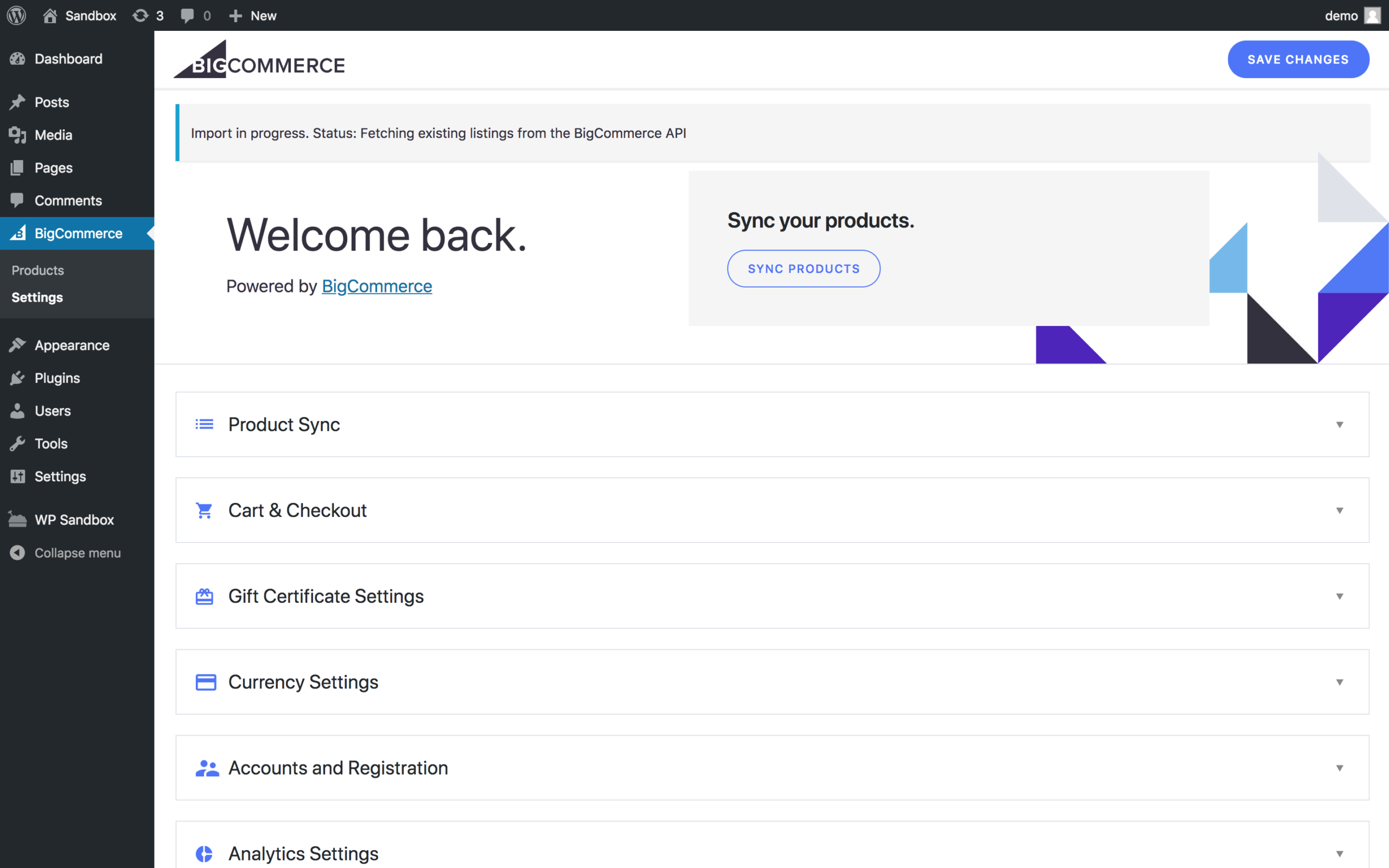
After activation, the setup flow asks you to either connect an existing BigCommerce account or create a new one. The connection uses OAuth and creates a new “channel” within your BigCommerce control panel, representing your WordPress storefront. Once authenticated, the plugin begins an initial product sync. This sync imports your BigCommerce product catalog into WordPress as custom post types (bc_product).
The connection step is straightforward in practice. One critical detail to handle correctly: the channel name you set during onboarding cannot be changed without contacting BigCommerce support. Multiple WordPress.org reviews report that domain misconfiguration at this stage locked users out of checkout functionality and required Level 2 support intervention to resolve. Take the initial setup steps carefully.
After the initial sync, the plugin’s settings panel exposes the core configuration options: product listing layout, import settings, currency display, cart and checkout behavior (embedded vs. redirected), and Gutenberg block preferences.
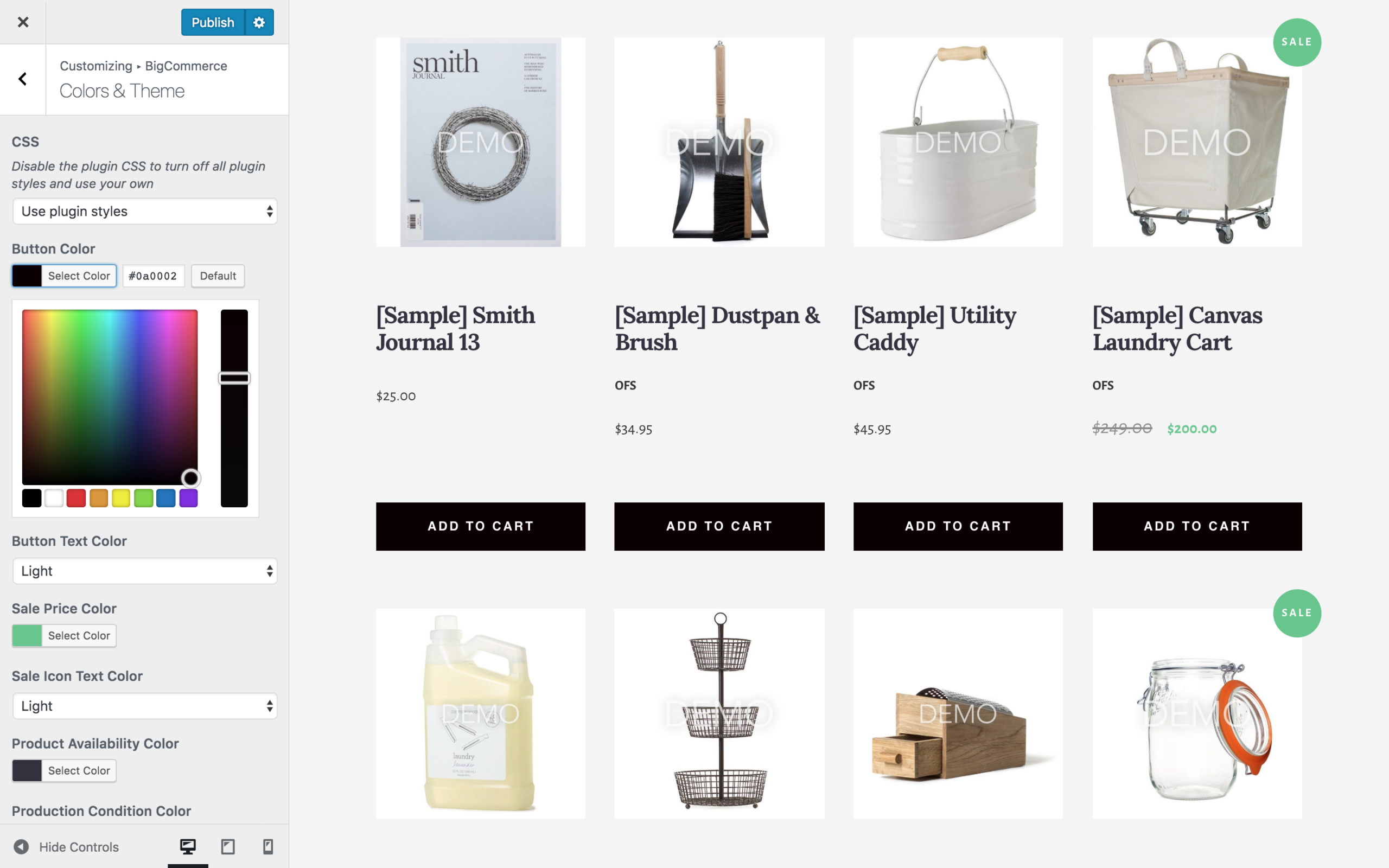
For theme integration, BigCommerce for WordPress uses the WordPress Customizer. You can adjust product grid density (number of columns), card layout, and basic styling from the Customizer without touching theme code. Template override support allows deeper customization: you can copy plugin templates into your child theme and modify them without losing changes on plugin updates.
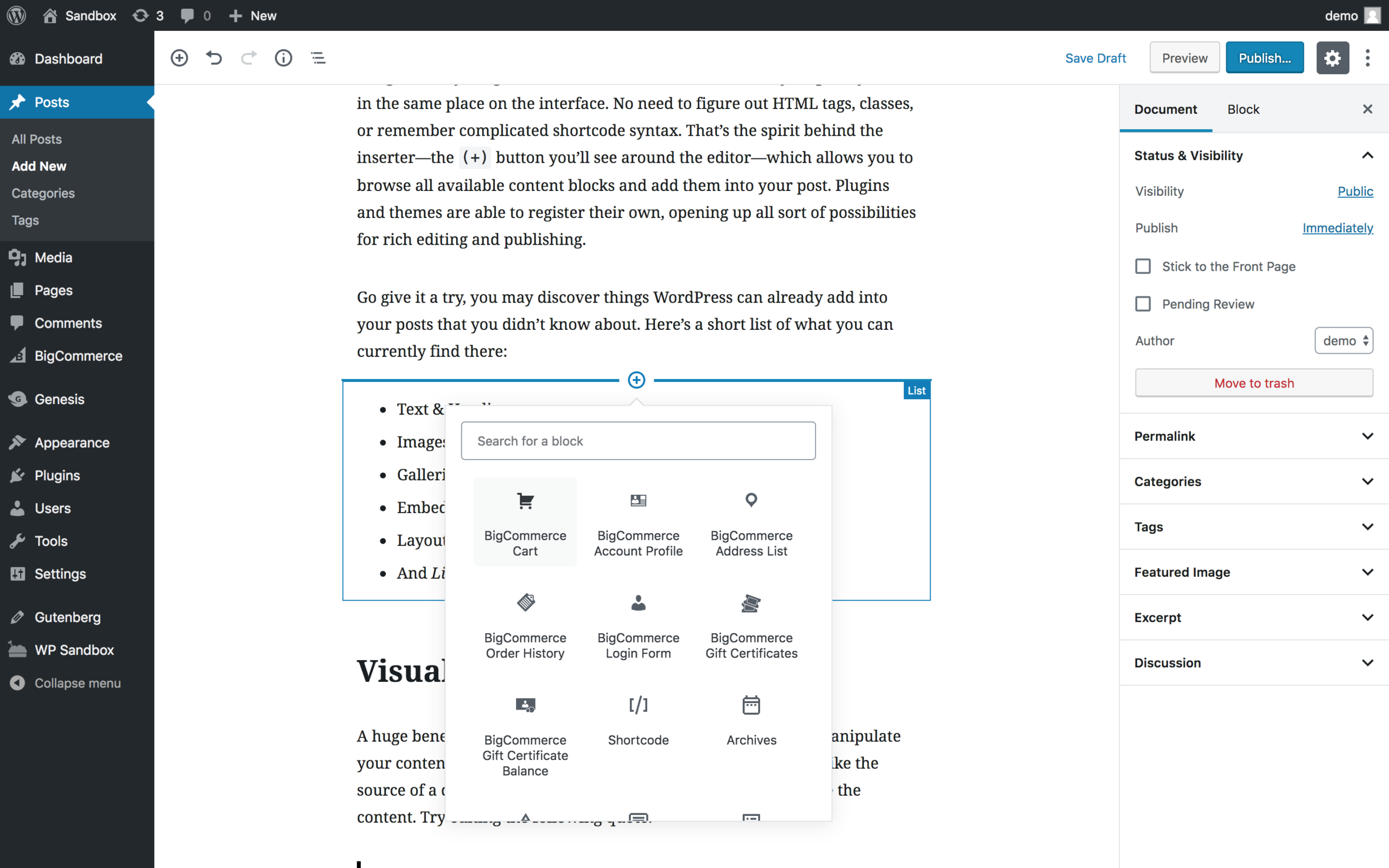
The Gutenberg integration adds blocks for embedding product grids, individual products, and category listings anywhere in posts or pages.
Core features
Catalog sync and custom post types
The central mechanism of the plugin is catalog sync. BigCommerce products are pulled into WordPress as custom post types. Each product in your BigCommerce catalog becomes a WordPress post (bc_product), complete with product name, description, pricing, images, variants, and inventory status.
This approach gives you full access to your product data inside WordPress for SEO purposes: custom page templates, WordPress meta fields, Yoast or Rank Math integration, and standard WordPress permalink structures for product URLs.
Syncing is automatic. When you update a product in BigCommerce, a webhook triggers an update in WordPress. For stock-level updates, webhooks handle near-real-time changes. For full catalog refreshes, the plugin runs a scheduled sync.
The sync system works reliably for catalogs under approximately 300 to 500 products according to user reports. Above that threshold, sync duration increases significantly, and failures become more common. One WordPress.org reviewer reported losing approximately 80 percent of their product data during a sync event with a large catalog. Another reported that daily full syncs were necessary because webhooks were missing stock updates. BigCommerce’s own documentation does not define a hard product limit for the WordPress plugin, but user experience data suggests treating 500 products as a practical upper boundary.
Embedded checkout
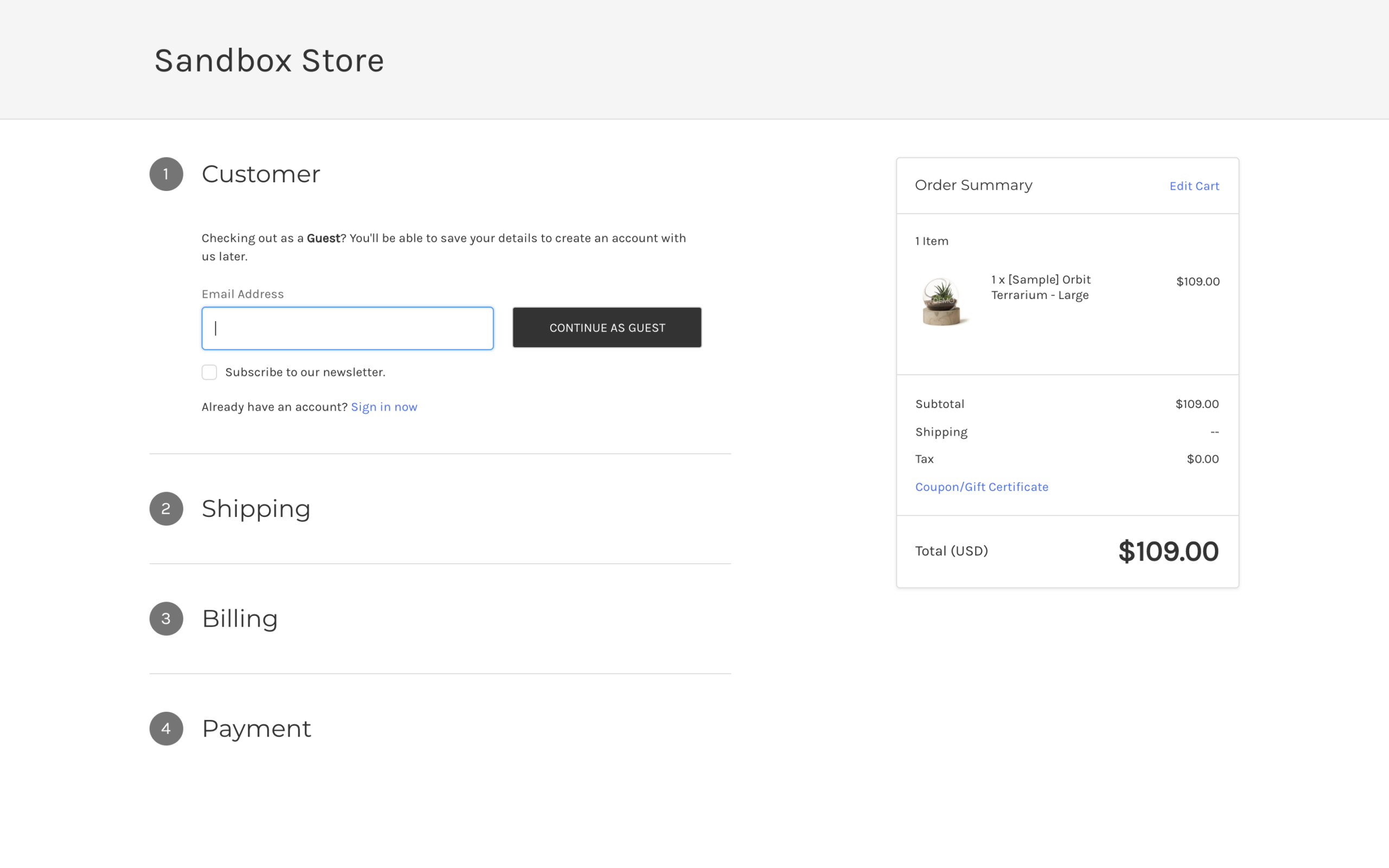
BigCommerce for WordPress offers two checkout modes: embedded checkout and redirected checkout.
Embedded checkout renders the BigCommerce checkout flow inside a WordPress page, giving the appearance of a native WordPress checkout experience. Under the hood, the checkout is hosted on BigCommerce’s servers, not WordPress. This means PCI-DSS compliance is handled by BigCommerce, not your host.
Redirected checkout sends the customer to a BigCommerce-hosted URL to complete their purchase. This is simpler to configure and slightly more reliable, but the URL switch is visible to the customer and may reduce checkout conversion rates compared to a seamless embedded experience.
Both modes connect to BigCommerce’s payment gateway ecosystem. The plugin supports 65+ payment gateways on the BigCommerce side, including Stripe, PayPal, Amazon Pay, Apple Pay, Square, and Braintree. Gateways categorized as “embedded payment providers” (approximately 20+) carry no additional transaction fee on any BigCommerce plan.
One consistent complaint in WordPress.org reviews: the checkout experience has no analytics visibility within WordPress. Visits to the checkout page, abandonment rates, and completed orders do not appear in your WordPress dashboard, Google Analytics via the standard GA4 integration, or any WordPress-native reporting. All order and conversion analytics require logging into the BigCommerce control panel separately.
Multi-channel selling
One of BigCommerce’s genuine strengths over WooCommerce is its native multi-channel infrastructure. From the BigCommerce control panel, merchants can list products on Amazon, eBay, Facebook Shop, Instagram Shopping, Google Shopping, and TikTok Shop. These channel connections are independent of which frontend (WordPress or otherwise) is attached.
For the WordPress plugin, this means your catalog management, multi-channel listing, and fulfillment all happen inside BigCommerce. WordPress simply renders the frontend. If multi-channel selling is a priority, this architecture is genuinely cleaner than WooCommerce, which achieves similar results through third-party extension integrations.
Developer tools and extensibility
BigCommerce for WordPress is explicitly developer-focused. The plugin provides:
- WordPress action and filter hooks throughout the product display, cart, and checkout lifecycle
- Template override system: copy any plugin template into your child theme to modify output without losing customization on plugin updates
- REST API access to BigCommerce’s commerce endpoints from within WordPress
- Gutenberg blocks for embedding products, grids, and category filters
- AMP compatibility for accelerated mobile page rendering
- Multisite support for running multiple WordPress frontend instances against the same BigCommerce backend
For agencies and development teams building custom storefronts, this toolkit is reasonable. The codebase is open source with contributions from 22+ developers, and the GitHub repository receives sporadic updates outside the official WordPress.org release track.
Product display
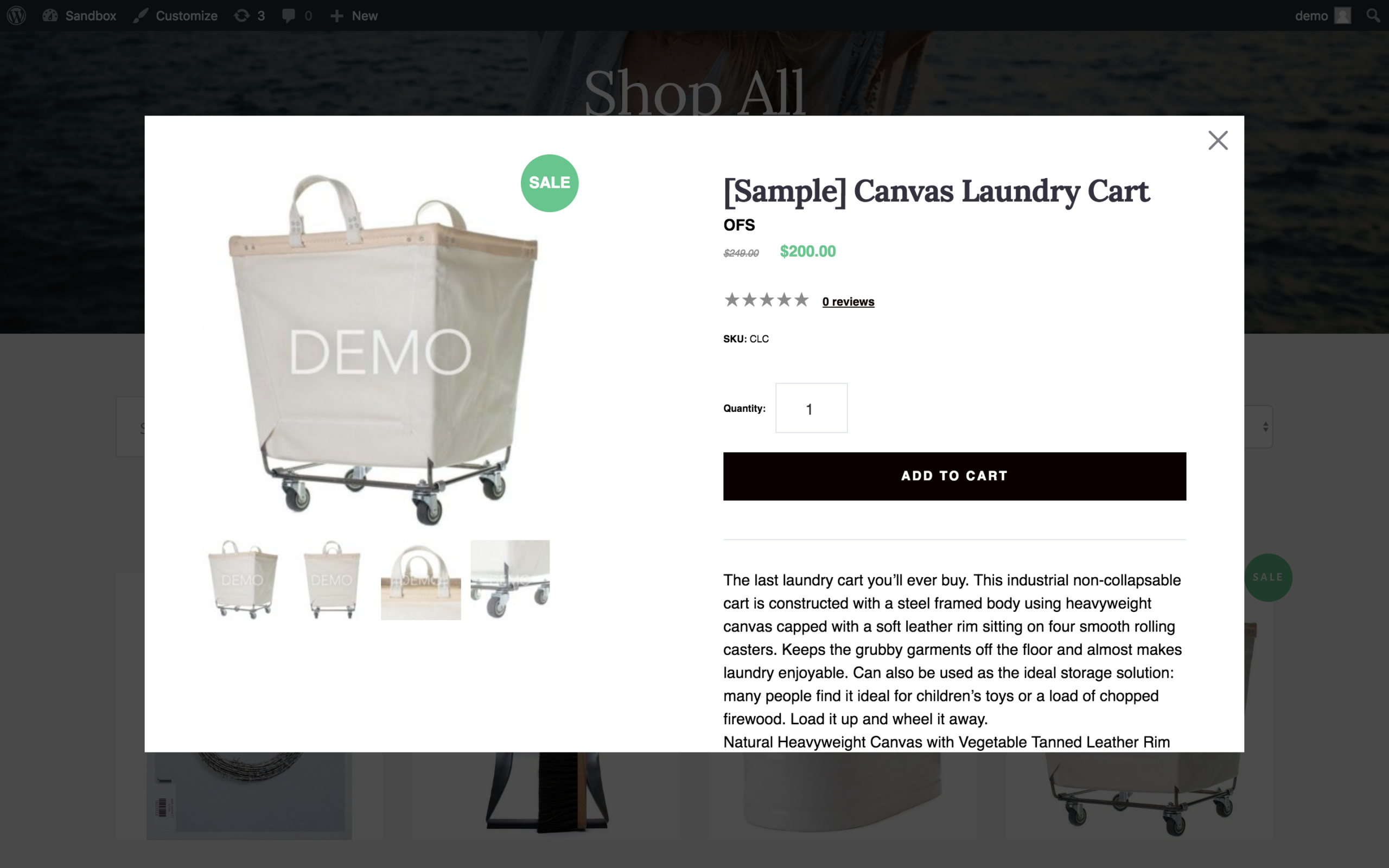
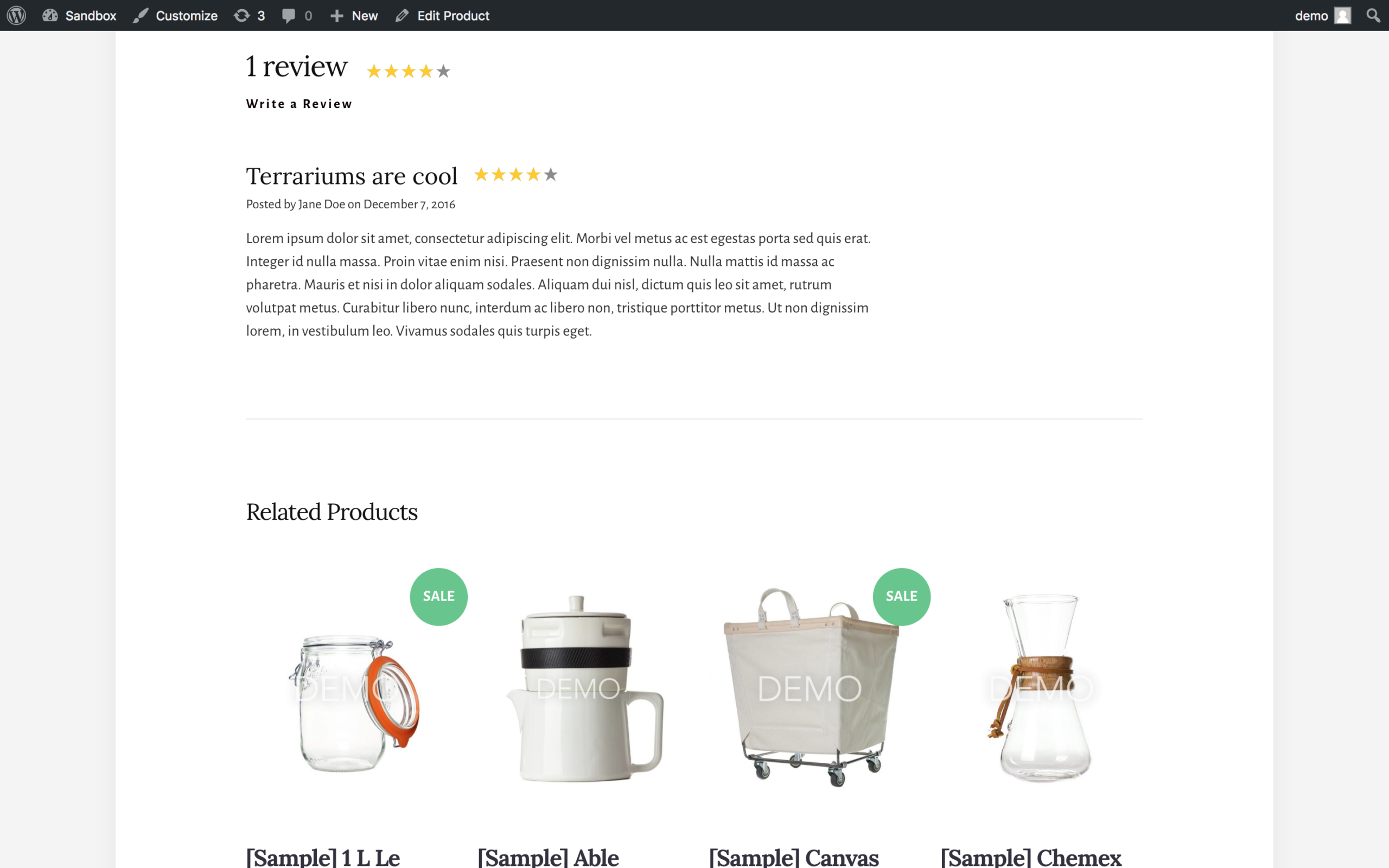
Products sync to WordPress with automatically generated product pages. Each page includes the product name, images, description, pricing, variant selectors (size, color, or custom attributes), an add-to-cart button, user reviews, and a related products section. These pages are powered by WordPress templates and can be customized or overridden.
The product listing grid layout is controlled through the Customizer. You can set the number of columns and basic card layout without coding. Quick View is supported natively, displaying a product overlay with key details and an add-to-cart option without navigating away from the listing page.
Page and post editors can embed individual products or product groups by brand or category using a content insertion tool, making it practical to feature products within blog posts, landing pages, or editorial content.
Pricing and license value
The BigCommerce for WordPress plugin itself is free. The cost is the BigCommerce subscription.
| Plan | Annual billing | Monthly billing | GMV cap |
|---|---|---|---|
| Core | $29/mo | $39/mo | $30K/year |
| Growth | $79/mo | $105/mo | $100K/year |
| Scale | $299/mo | $399/mo | Approx. $1M/year |
| Performance | Custom, from $1,499/mo | Annual only | $1M+/year |
Transaction fees apply to “open payment providers” (third-party gateways not in BigCommerce’s embedded provider list): 2.0% on Core, 1.0% on Growth, 0.6% on Scale, 0% on Performance. Embedded payment providers (PayPal, Stripe, Square, and others in BigCommerce’s approved set) carry no extra transaction fee on any plan.
GMV auto-upgrades: BigCommerce automatically upgrades your account to the next tier when your trailing 12-month sales exceed the plan cap. There is no manual upgrade step required, but the cost jumps automatically.
A 15-day free trial is available. No credit card required for the trial period.
For context against WooCommerce: WooCommerce’s plugin is free, and the platform charges no transaction fee at any volume level. A production WooCommerce store incurs hosting costs (typically $20 to $350 per month depending on traffic and setup), optional extension costs, and your payment gateway’s own processing fee. For stores under $30K per year in revenue, WooCommerce’s total cost of ownership is likely lower. Above $100K per year, BigCommerce’s managed infrastructure, compliance handling, and 0.6% transaction fee can be cost-competitive with a high-quality managed WooCommerce host plus extensions.
Pros and cons
Pros
- Headless architecture genuinely reduces WordPress server load; checkout and catalog operations run on BigCommerce infrastructure
- 65+ payment gateways on the BigCommerce side; embedded providers carry no transaction fee
- PCI-DSS compliance handled at the platform level, removing that responsibility from your hosting environment
- Native multi-channel selling (Amazon, eBay, Facebook, Instagram, Google Shopping) managed from the BigCommerce control panel
- Developer-friendly: hooks, filters, template overrides, REST API access, multisite support, open-source codebase
- Single BigCommerce control panel manages catalog, orders, shipping, and promotions across multiple WordPress frontends
- Gutenberg block support and AMP compatibility
Cons
- Plugin has not been updated since December 2024 (18+ months), with a WordPress.org compatibility warning for three consecutive major WordPress releases
- Only 200+ active installations: very low adoption means a sparse ecosystem of tutorials, compatible themes, and community support
- Large catalog sync issues: users with 500+ products report slow and unreliable syncing; users with thousands of products report failures and data loss
- No analytics data inside WordPress: order revenue, conversion rates, and checkout behavior require logging into BigCommerce separately
- Mandatory paid BigCommerce subscription starting at $29 per month (annual billing); no free tier for production use
- GMV-based tier caps with automatic plan upgrades can result in unexpected subscription cost increases
- Channel name misconfiguration during setup requires Level 2 BigCommerce support to fix
- Cannot be used as a standalone solution; requires an active BigCommerce account
Alternatives
If BigCommerce for WordPress’s limitations are a concern, these alternatives are worth considering.
WooCommerce is the most obvious comparison. Seven million active installs, free core plugin, no platform transaction fee, full ownership of your data and checkout, and a massive extension ecosystem. The trade-off is that you own the infrastructure: hosting, security, plugin updates, and performance tuning are your responsibility. For most WordPress site owners starting an online store in 2026, WooCommerce remains the default starting point. Read our WooCommerce review for a full breakdown.
SureCart takes a different approach to headless ecommerce on WordPress. It is a newer plugin that handles checkout via a hosted SureCart backend, similar in concept to BigCommerce for WordPress but focused on simpler product types and lower price points. The free tier supports real sales, and the paid plans are significantly cheaper than BigCommerce. If you like the idea of offloading checkout complexity to a hosted service but do not need enterprise-scale catalog management, SureCart is worth evaluating. We covered it in our SureCart review.
Easy Digital Downloads is the specialist option for stores selling digital products, software licenses, or downloads. If BigCommerce’s broad catalog-management focus is more than you need and your products are digital, EDD is simpler and better optimized for that use case. See our Easy Digital Downloads review.
Shopify is not a WordPress plugin, but it is the direct competitor to BigCommerce as a hosted commerce platform. If you are prepared to move your frontend off WordPress, Shopify’s hosted environment offers a more actively maintained and widely adopted SaaS commerce solution than BigCommerce for WordPress’s current plugin state suggests.
Final verdict
BigCommerce for WordPress solves a real problem in a technically sensible way. The headless architecture works. The catalog sync, embedded checkout, and developer toolkit are genuinely useful for the right team. If you are an agency building a custom WordPress frontend for an enterprise BigCommerce merchant, or a BigCommerce user who wants WordPress’s editorial flexibility, the plugin delivers on its core promise.
The problem is timing and maintenance. An nearly two-year gap in plugin releases with a WordPress.org compatibility warning is not a cosmetic issue. It means the plugin has not been verified against three consecutive WordPress major versions, and that creates uncertainty around block editor compatibility, security patches, and plugin conflict behavior. 200+ active installations, compared to WooCommerce’s 7 million, tells you clearly that very few merchants have chosen this path and fewer are supporting the ecosystem.
If you are starting a new WordPress store in 2026, WooCommerce is the defensible default. If you are expanding an existing BigCommerce store to include a WordPress frontend, this plugin may still serve that specific need, but verify its compatibility with your WordPress version before committing, and have a plan for what happens if the maintenance gap continues.
I would not recommend BigCommerce for WordPress as a primary ecommerce setup for new stores. For existing BigCommerce merchants exploring a WordPress CMS layer, proceed with a tested sandbox before deploying to production.
FAQ
Does BigCommerce for WordPress require a paid BigCommerce account?
Yes. The plugin is free to install, but it does nothing without an active BigCommerce account. BigCommerce plans start at $29 per month on annual billing (Core plan). There is a 15-day free trial available with no credit card required.
Can I use BigCommerce for WordPress with any WordPress theme?
The plugin is designed to work with any WordPress theme. Product pages are created as custom post types, and styling is handled through the Customizer and optional template overrides. Some themes may require minor adjustments for layout compatibility. The plugin was designed to follow WordPress conventions, so most themes handle it without major issues.
How does catalog sync work?
After connecting your BigCommerce account, the plugin runs an initial sync that imports your product catalog into WordPress as custom post types. Subsequent updates are triggered via webhooks when you change products in BigCommerce. A scheduled full sync also runs periodically. Syncing is reliable for catalogs under approximately 300 to 500 products; larger catalogs have a documented history of sync failures based on WordPress.org user reports.
Is the checkout PCI-compliant?
Yes. The BigCommerce embedded checkout is hosted on BigCommerce’s servers and is PCI-DSS compliant. Your WordPress host does not need to handle PCI compliance for the checkout process because payment data never passes through your WordPress server.
Can I see order and sales analytics inside WordPress?
No. Order revenue, conversion rates, and checkout analytics are available only in the BigCommerce control panel, not in WordPress. This is a meaningful limitation if you use WordPress-native analytics tools or rely on the WP admin dashboard for business reporting.
Is BigCommerce for WordPress still actively maintained?
As of September 2026, the last update to the WordPress.org plugin listing was December 12, 2024. The WordPress.org listing shows a compatibility warning noting the plugin has not been tested with the latest three major WordPress releases. BigCommerce maintains a GitHub repository with occasional commits, but official WordPress.org releases have been inactive for approximately 21 months.
What is the difference between embedded checkout and redirected checkout?
Embedded checkout renders the BigCommerce checkout experience inside a WordPress page, keeping customers visually on your site. Redirected checkout sends customers to a separate BigCommerce-hosted URL to complete the purchase. Embedded checkout requires more careful setup but offers a seamless experience. Redirected checkout is simpler but involves a visible URL change during the checkout process.
How does BigCommerce for WordPress compare to WooCommerce?
WooCommerce is a self-hosted ecommerce solution running entirely on your WordPress server, with no platform subscription required. BigCommerce for WordPress uses a decoupled architecture where the commerce backend runs on BigCommerce’s servers. WooCommerce has 7 million+ active installs, regular updates, and no transaction fee. BigCommerce for WordPress has 200+ installs, an nearly two-year update gap, and requires a BigCommerce subscription starting at $29 per month. WooCommerce is generally the better starting point for new stores; BigCommerce for WordPress suits merchants already committed to the BigCommerce platform who want WordPress as their CMS.
Can I sell on Amazon and eBay using BigCommerce for WordPress?
Multi-channel selling to Amazon, eBay, Facebook, Instagram, and Google Shopping is available, but it is a BigCommerce platform feature managed from the BigCommerce control panel, not from the WordPress plugin itself. If you connect BigCommerce to those channels, your products become available there regardless of which frontend is attached.
What happens when my sales exceed the BigCommerce plan cap?
BigCommerce automatically upgrades your account to the next plan tier when your trailing 12-month GMV exceeds the cap. You do not need to manually upgrade, but the billing increases automatically. The Core plan upgrades to Growth at $30K GMV, and Growth upgrades to Scale at $100K GMV.
Explore more hands-on reviews in our WordPress plugin reviews directory.