


A WordPress booking plugin that has been in active development since 2014 earns either genuine trust or quiet skepticism, depending on how well it has held up against a market that has changed significantly since it launched. Bookly sits in the trust camp for many agencies and WordPress developers, but in 2026 it competes in a space where newer plugins bundle natively what Bookly charges as individual add-ons. How that trade-off plays out depends almost entirely on which plan you buy and what your business actually needs.
I tested Bookly the way I evaluate any appointment booking plugin: a hands-on pass through the free version and the official booking demo, a full audit of the Pro add-on features and the add-on catalog, a complete pricing analysis across all tiers, and an honest look at how the plugin’s architecture and development trajectory hold up in 2026. Where a feature was not directly exercised in a live install, I say so.
At a glance
- Tested on: Bookly free version (WordPress.org, version 27.7), Bookly Pro add-on feature documentation, official pricing page, add-ons catalog, and public booking demo at booking-wp-plugin.com/demo/free/. Booking form step flow was walked through directly on the demo page.
- Free version: Yes. A genuinely usable free plugin limited to 1 staff member and 5 services, with no online payments and no add-on access.
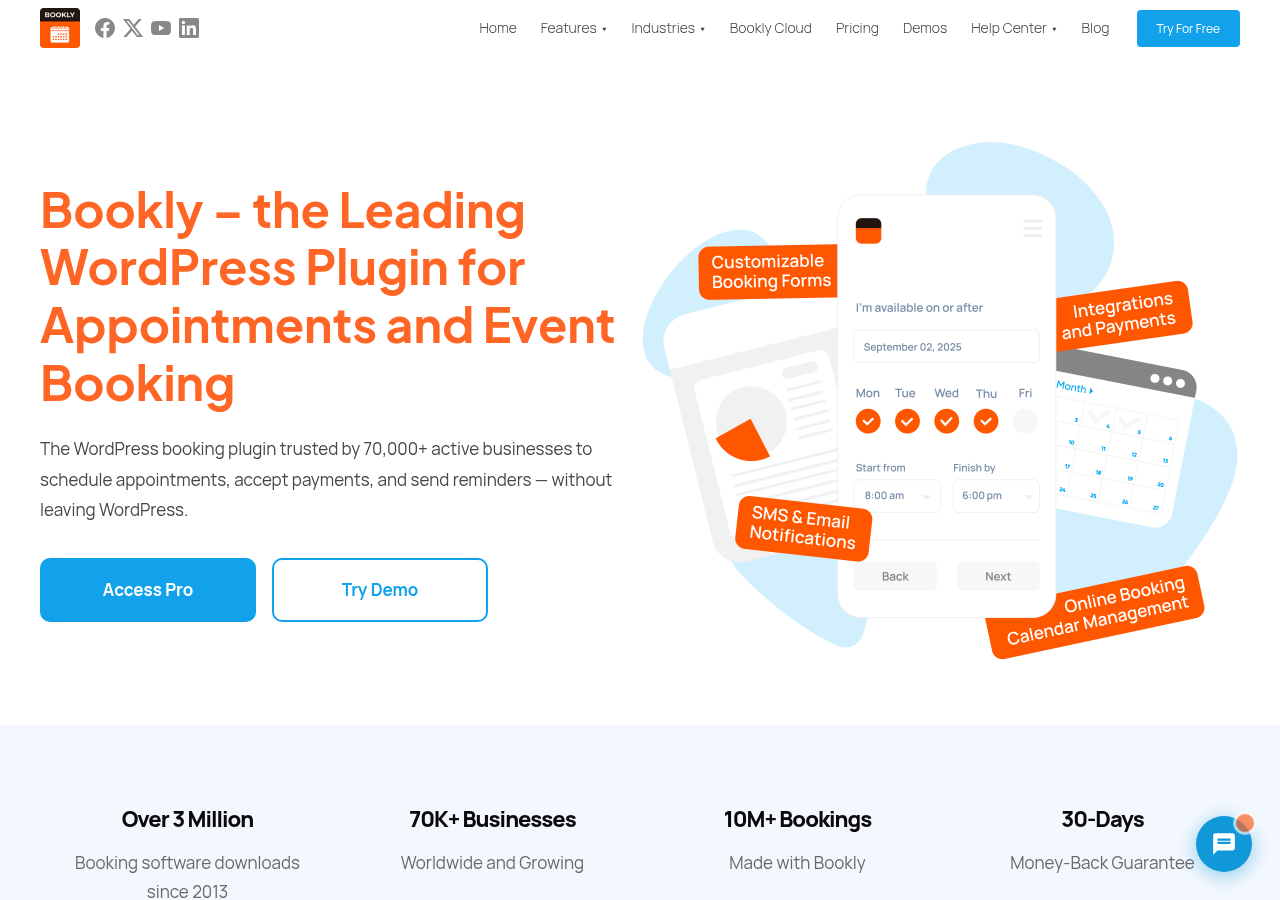
- Active installs: 60,000+ on WordPress.org. Developer claims 70,000+ active businesses and 3+ million downloads since 2013.
- Bottom line: A proven, long-established booking plugin with a genuine free tier, competitive lifetime pricing, and a modular add-on catalog. The main friction is that the base Pro plan is not a complete booking system for most real businesses; the Business Bundle is the practical minimum for most service operators.
Quick verdict on Bookly
If you want one sentence: Bookly is a solid, battle-tested WordPress booking plugin that rewards careful buyers who know exactly which tier or add-on stack they need, but creates cost surprises for anyone who assumes the base Pro license delivers a full production booking setup.
The plugin earns its place because of a genuinely useful free tier, a 12-year track record since 2013, lifetime license options that remove annual renewal risk, and a modular model that lets agencies pay only for the features each client project actually uses. The booking widget is clean, responsive, and well-tested across a range of business types.
The honest caveats: the base Pro plan ($49/year) is not a complete booking system for most real service businesses. Online payment gateways (Stripe, PayPal, Square), full two-way Google Calendar sync, recurring appointments, custom booking form fields, a customer self-service portal, and multi-location support are all sold as separate add-ons on top of the Pro license. The Business Bundle ($149/year) addresses this by bundling the most commonly needed add-ons, and the Ultimate Bundle ($249/year) bundles everything. Choosing the right tier before you buy is more important than any individual feature comparison.
Quick verdict card
- Best for: WordPress-native service businesses that want a proven plugin with modular flexibility, a genuine free tier, and strong lifetime pricing.
- Best plan for most businesses: Business Bundle ($149/year for 1 site, or $449 lifetime for 5 sites) for single or small multi-location setups with standard booking needs.
- Standout: Lifetime licensing on all plans, including multi-site coverage. A genuine free tier for solo operators. Zoom and Google Meet included in Pro at no extra cost.
- Watch out for: The base Pro plan leaves out most commercially important features. SMS and WhatsApp notifications require a separate Bookly Cloud subscription with metered messaging costs. The admin UI shows its 2014 origins compared to more recently built competitors.
What Bookly is
Bookly is a WordPress appointment and event booking plugin first published in October 2014 by NOTA-INFO S.R.L. under the Bookly brand. It runs as a standard WordPress plugin, adds its own admin section inside wp-admin, and renders booking forms on the front end via shortcode, Gutenberg block, or Elementor widget. The plugin’s homepage now positions it as a tool for both appointments and event booking, with a separate Events add-on covering ticketed events and attendee management.
The plugin has two distinct layers that every buyer needs to understand before purchasing.
The free version (available directly from WordPress.org at no cost) gives any WordPress site a functional booking system. It handles one staff member, up to five services, unlimited appointments, basic email notifications, and a customizable booking form. For a solo practitioner who takes in-person or invoice-based payment, the free version is a genuine production tool.
The Pro add-on (a separate paid plugin that installs on top of the free version) unlocks the full platform: unlimited staff, unlimited services, online payment capability, Google Calendar integration, Zoom and Google Meet, analytics, advanced email notification templates, WPML multilingual support, and the ability to install any of Bookly’s 40+ paid add-ons.
This two-layer architecture is the most important thing to understand about Bookly before evaluating it. “Pro” refers to the add-on that unlocks the platform, not to a tier that includes everything. The commercially important features (Stripe, two-way Google Calendar sync, recurring appointments, custom form fields, customer portal) each live in separate paid add-ons purchased on top of Pro. The Business and Ultimate bundles address this by combining the most-needed add-ons into a single purchase.
The plugin covers:
- A multi-step, responsive booking widget for service, staff, date, time, and customer information.
- An admin calendar in day, week, month, and list views with filter controls.
- Unlimited services organized into categories, with per-service pricing, duration, color coding, capacity, and availability settings.
- Unlimited staff with individual schedules, service associations, and per-staff pricing.
- Customer management with a searchable, sortable client database.
- Email notifications included natively, with SMS, WhatsApp, and Voice available through Bookly Cloud.
- Zoom and Google Meet integration included with Pro.
- A modular catalog of 40+ paid add-ons for payments, calendar sync, booking types, client portals, events, and more.
- WooCommerce compatibility for stores that want to route booking payments through WooCommerce checkout.
- WPML integration for multilingual sites (40+ languages).
The current release is version 27.7, last updated June 4, 2026.
Who Bookly is best for
Bookly’s specific architecture makes the fit question important to answer before purchasing.
Strong fit:
- Solo operators and single-staff service businesses who want to start with the free version and upgrade only when revenue justifies it.
- Salons, spas, dental clinics, physiotherapy practices, tutoring centers, consultants, coaches, photographers, and similar appointment-based businesses already running on WordPress.
- Developers and agencies who want modular control over exactly which features are licensed per client site. The add-on model lets you build a lean, targeted stack per project rather than overpaying for unused features.
- Buyers who want lifetime licenses with multi-site coverage without a per-seat SaaS subscription. Business Lifetime covers 1 or 5 sites; Ultimate Lifetime covers 20 or 100 sites at one fixed price.
- Teams that want all customer booking data self-hosted inside their own WordPress database rather than stored on a third-party SaaS platform.
Weak fit:
- Service businesses that expect a complete booking and payment stack in a single license without add-on purchases. The bare Pro plan does not deliver this.
- Teams that need a modern, recently designed admin interface. Bookly’s admin works correctly but reflects 2014-era WordPress conventions.
- Businesses that need WhatsApp or SMS reminders without the setup overhead of a separate Bookly Cloud account.
- Buyers who need event ticketing as a first-class feature without an extra purchase. The Events add-on extends Bookly into event booking, but it is a separate add-on, not a native module bundled into Pro.
The booking widget and customer experience
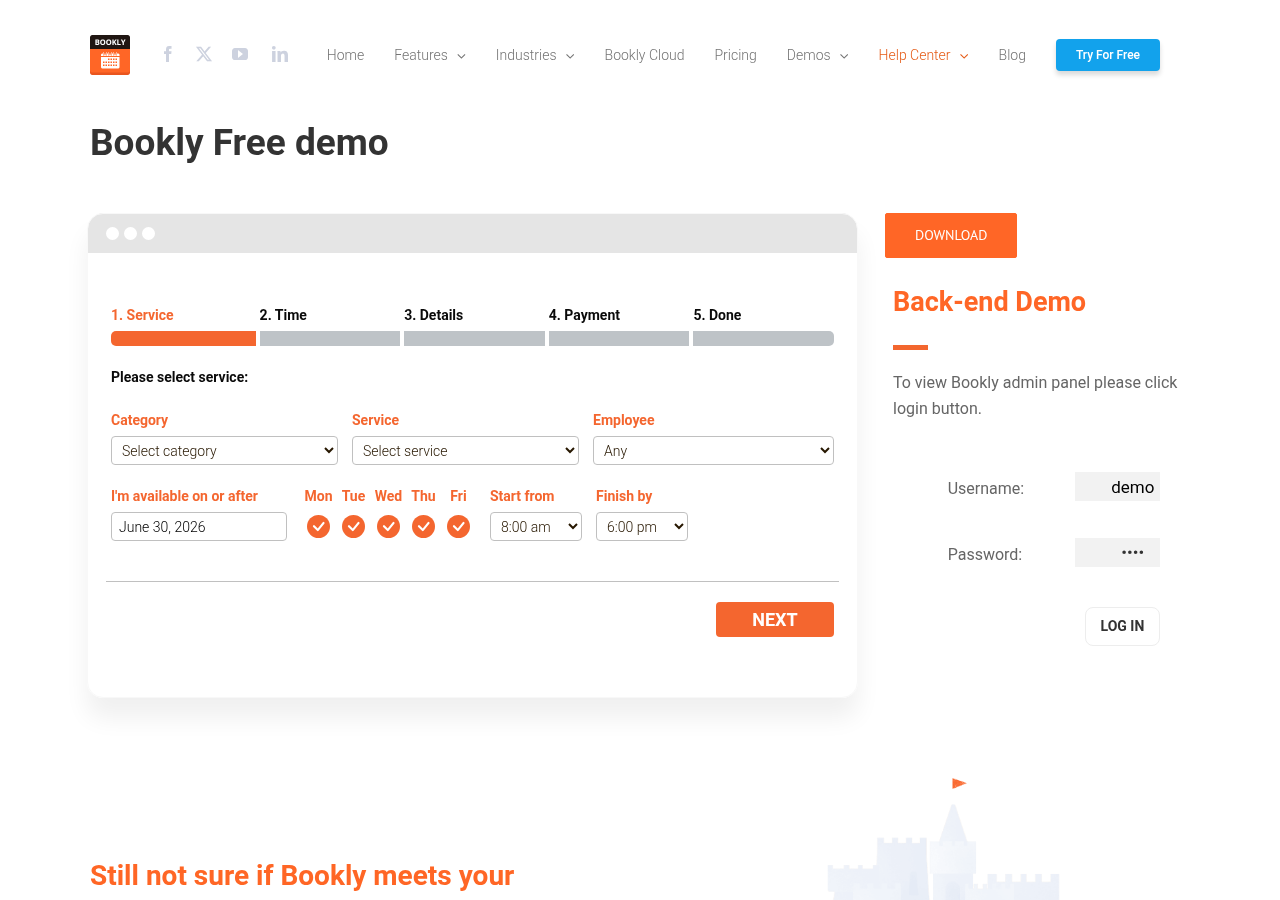
The Bookly booking form is a multi-step widget that embeds on any WordPress page or post with a shortcode ([bookly-form]), a Gutenberg block, or an Elementor widget. The default step flow takes the customer through five clearly labeled stages: Service, Time, Details, Payment, and Done.
The service step groups offerings by category and lets customers filter by employee (or leave it as “Any”). The time step shows the customer their availability preferences with day-of-week toggles and time range selectors, then presents available slots. The details step collects contact information. The payment step handles online payment if a gateway add-on is connected. The Done step shows the confirmation.
The step-by-step approach keeps the form focused and reduces abandonment compared to a long single-page form. Each step is one screen. The customer cannot advance until the current step is complete, which enforces a clean data collection flow.
What I noticed testing the demo:
- The form is fully responsive. The same shortcode renders correctly on a phone, tablet, and desktop without extra CSS.
- URL parameters let you pre-select category, service, staff, and location. This is what teams use for service-specific landing pages and paid ad creatives that should skip directly to a particular booking path.
- The Appearance settings in Bookly’s admin let business owners customize colors, button text, field labels, step heading text, and which fields appear or are hidden, all without touching code.
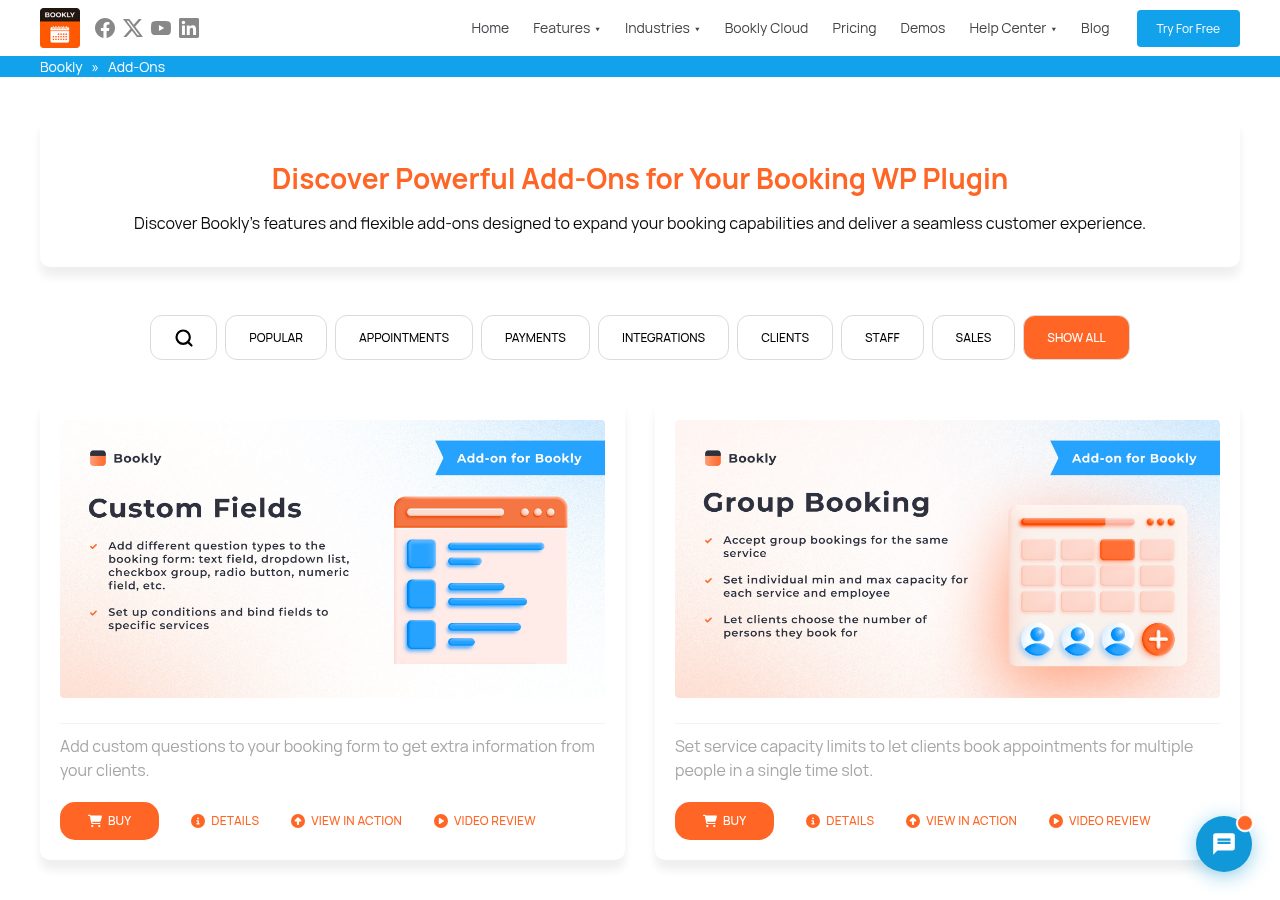
- With the Custom Fields add-on ($18.95/year or $59 lifetime), you can add text fields, dropdowns, checkboxes, radio buttons, file uploads, and Google Maps address fields to the customer information step.
The booking widget covers the standard flow cleanly and has done so consistently for a long time. Where it shows age relative to more recently built plugins is the absence of a catalog-browse or package-selection mode in the default widget. The step-by-step flow handles service-selection well, but there is no built-in service grid or card-layout browsing mode without add-on purchases.
Note on basis: The booking form flow was walked through on the official demo at booking-wp-plugin.com/demo/free/ running version 27.7. Custom Fields behavior was confirmed from the add-on feature page. The Add-ons feature for advanced field types was not exercised end-to-end against a live licensed install in this test window.
Setup and the admin experience
The Bookly free plugin installs directly from Plugins > Add New in WordPress by searching “Bookly.” The Pro add-on installs as a second plugin, uploaded from your Bookly account after purchase and activated alongside the free version. Both plugins need to be active simultaneously.
Initial configuration requires adding at least one staff member and one service before the booking form can accept appointments. The setup sequence is: create a service under Bookly > Services, create a staff member under Bookly > Staff members, link the staff member to the service, set working hours, and then embed the [bookly-form] shortcode on any page.
The admin sidebar navigation groups everything clearly: Calendar, Appointments, Services, Staff members, Customers, Notifications, Bookly Cloud, Appearance, Settings, and Analytics. The layout is functional and consistent. A few admin UX observations worth noting for buyers evaluating the interface:
- The settings area is deep. Working hours, holidays, days off, service pricing per staff member, location assignments (with the Locations add-on), and notification templates each live in separate sections. New admins should budget 30 to 45 minutes for initial configuration.
- The Appearance section offers real visual customization without code: colors, button styles, field labels, and form layout options are all configurable from a single admin screen.
- The Analytics module (available with Pro) answers basic operational questions: appointments per period, revenue per staff member, payment status totals. It is a functional dashboard rather than a deep reporting layer.
- The admin interface works correctly but was last significantly redesigned some years ago. Compared to more recently built competitors like Amelia, Booknetic, or FluentBooking, the visual design reflects older WordPress admin conventions. This is a practical concern only if your team spends significant time in the admin daily.
Note on basis: Admin setup flow was confirmed through official Bookly documentation and the Pro add-on feature pages. Direct wp-admin hands-on testing against a live licensed Pro install was not part of this review window. The public backend demo at demo.booking-wp-plugin.com was not accessible during this test window.
Admin calendar and appointment management
The admin calendar is the operational center of any booking plugin. Bookly’s calendar renders appointments in monthly, weekly, daily, and list views, with color-coding applied per service. Filters let you narrow the view by staff member, service, or status.
Appointment cards show the service name, customer name, start time, and status. Clicking a card opens a detail panel where you can change the status (pending, approved, completed, canceled), reassign the staff member, adjust the date or time, add a note, or issue a refund if a connected payment gateway supports it.
Creating appointments from the admin side uses the same five-step flow as the public booking form, which keeps admin and customer experiences consistent. Staff members with their own cabinet access (Staff Cabinet add-on, $12.95/year or $39 lifetime) can manage their own appointments from a dedicated interface without wp-admin access.
The Appointments screen provides a table view of the same data with filtering, sorting, search by customer name or email, bulk status update, and CSV export. The export and import functionality is one of the features agencies value most when migrating customer lists between environments.
Note on basis: Calendar and appointment list behavior was confirmed through official Bookly feature documentation and the admin panel screenshots provided in the official Bookly materials. The admin calendar backend demo was not directly accessible in this test window. Drag-to-reschedule behavior was not confirmed.
Services, staff, and scheduling
Bookly separates its core scheduling primitives into distinct modules, which gives granular control at the cost of some initial configuration complexity.
Services define the bookable unit: name, category, duration (5 minutes to 7 days), price, color, visibility, capacity, padding time before and after, minimum and maximum advance booking, and cancellation controls. Services are organized into categories, which appear on the booking form’s first step as the customer’s entry point.
Staff members link to one or more services with optional per-staff, per-service pricing that overrides the service-level default. Each staff member has an individual working schedule with per-day-of-week hours, personal days off, and vacation settings. A salon with three stylists who work different days can configure each correctly without a shared global schedule constraint.
Locations (via the Locations add-on, $12.95/year or $39 lifetime) let you assign staff and services to multiple physical addresses. A medical group with two clinic sites and shared staff uses the Locations add-on to route patients to the correct building without separate booking systems per location.
Notable scheduling features available as add-ons:
- Group Booking ($12.95/year or $39 lifetime): set a capacity limit on a service and let multiple customers book the same time slot. Used for group fitness classes, workshops, group tutoring, and multi-person consultations.
- Recurring Appointments ($12.95/year or $39 lifetime): let customers book a repeating weekly or monthly session in one booking flow rather than scheduling each occurrence separately.
- Custom Duration ($9.95/year or $29 lifetime): offer multiple appointment lengths for the same service. The customer picks the duration they want during booking.
- Chain Appointments ($9.95/year or $29 lifetime): let a customer book consecutive sessions with different staff members in one booking flow. Used by salons where a coloring session with one stylist is followed by a blow-dry with another.
- Collaborative Services ($12.95/year or $39 lifetime): coordinate appointments that require multiple staff members simultaneously.
Note on basis: Group Booking, Recurring Appointments, and Chain Appointments behavior was confirmed from the respective add-on feature pages and the Bookly demo list. End-to-end booking of a recurring appointment series was not exercised against a live licensed install in this test window.
Notifications and Bookly Cloud
Bookly sends automated notifications at every stage of the appointment lifecycle: confirmation, approval, reminder before, follow-up after, rescheduling, and cancellation. Notification templates use shortcode-style variables to personalize messages with the customer’s name, service name, date, time, and staff member details.
Email notifications are included with the free version and all paid plans. Email templates are editable inside Bookly’s admin and support basic HTML formatting.
SMS notifications run through Bookly Cloud, a separate subscription account distinct from the plugin license. Setting up SMS requires creating a Bookly Cloud account, funding it with a credit balance, and connecting the account to your WordPress install via the Bookly Cloud menu. SMS rates vary by country and are billed per message from your credit balance. This is structurally different from how Amelia handles SMS (via its own built-in credit system) and how Booknetic handles SMS (via Twilio, configured directly). The Bookly Cloud model works, but it adds a setup step and an ongoing metered cost that buyers should budget for separately from the plugin license.
WhatsApp notifications also run through Bookly Cloud and require a WhatsApp Business Account with a Facebook Developer Account. WhatsApp’s own messaging policies require pre-approved message templates for business-initiated messages. For teams with existing WhatsApp Business infrastructure, this is manageable. For teams new to the WhatsApp Business API, the setup is a meaningful hurdle.
Zapier automation is available via Bookly Cloud, connecting booking events to hundreds of third-party tools without custom code.
The notification architecture works well, but the dependency on Bookly Cloud for SMS and WhatsApp is worth planning for clearly before purchase. The Pro add-on price does not cover outgoing message delivery costs.
Note on basis: Email notification template behavior was confirmed in the free version. SMS and WhatsApp setup flow was confirmed from the Bookly Help Center documentation and Bookly Cloud product page. Live SMS or WhatsApp delivery was not tested in this review window.
Payment integrations and what the Pro plan actually covers
This section matters most for buyers comparing Bookly against bundled-pricing competitors. Here is the exact picture for payment processing.
Free version: No online payment processing. Customers select “pay locally” (cash or invoice). Sufficient for businesses that take cash or invoice.
Bookly Pro ($49/year or $129 lifetime, 1 site): Enables online payment processing in principle, but each payment gateway is a separate add-on purchase.
Payment gateway add-ons, each purchased separately:
- Stripe: $12.95/year or $39 lifetime
- PayPal Standard: $9.95/year or $29 lifetime
- PayPal Checkout: $9.95/year or $29 lifetime
- Square: $9.95/year or $29 lifetime
- Mollie: $12.95/year or $39 lifetime
- Authorize.Net: $9.95/year or $29 lifetime
- 2Checkout: $9.95/year or $29 lifetime
- PayU Latam: $9.95/year or $29 lifetime
- PayUbiz: $9.95/year or $29 lifetime
A single-location business using Stripe needs Pro ($49) + Stripe add-on ($12.95) = $61.95/year minimum to accept card payments. That is competitive on its own. The issue is what you need next: Advanced Google Calendar sync ($15.95/year), Custom Fields ($18.95/year), Recurring Appointments ($12.95/year), and Customer Cabinet ($9.95/year) push the total annual cost to roughly $120/year in add-ons alone, on top of the Pro license.
The Business Bundle (from $149/year or $349 lifetime) solves exactly this problem. It bundles Pro with the most commonly needed add-ons: Custom Fields, Group Booking, Stripe, Service Extras, Staff Cabinet, Coupons, and Recurring Appointments. For most single-location service businesses, the Business Bundle is the effective starting point, not the bare Pro plan.
The Ultimate Bundle ($249/year for 20 sites, or $799 lifetime for 100 sites) bundles Pro with all available add-ons plus priority support. For agencies building booking systems across many client sites, the per-site math on the Ultimate Lifetime is compelling.
The add-ons catalog
Bookly’s catalog has over 40 add-ons organized by function. The granularity lets agencies assemble a lean stack per client project, but the total count can be confusing to navigate for first-time buyers.
Scheduling and booking types: Custom Fields, Group Booking, Recurring Appointments, Custom Duration, Chain Appointments, Compound Services, Collaborative Services, Tasks, Waiting List, Multiply Appointments.
Payments and financial: Stripe, PayPal Standard, PayPal Checkout, Square, Mollie, Authorize.Net, 2Checkout, PayU Latam, PayUbiz, Deposit Payments, Discounts, Coupons, Packages, Gift Cards, Taxes, Invoices.
Client and staff management: Customer Cabinet, Staff Cabinet, Customer Information, Customer Groups, Ratings.
Locations and schedule: Locations, Special Days, Special Hours.
Integrations: Advanced Google Calendar (full 2-way sync), Outlook Calendar, Mailchimp, Google Maps Address.
Shopping: Cart (multi-service booking in one session).
Events: Events add-on ($9.95/year or $29 lifetime) adds the ability to create events, sell multiple ticket types, and track attendees in the admin panel. This is how Bookly extends into the event booking space that the homepage now markets.
System: Multisite, Custom Statuses, Files (customer file uploads in the form).
Calendar and meeting integrations
Google Calendar: Basic Google Calendar integration is included in the Pro plan and pushes Bookly appointments to the connected staff calendar. Full two-way synchronization (where existing Google Calendar events block availability in Bookly) requires the Advanced Google Calendar add-on ($15.95/year or $49 lifetime). For most businesses, two-way sync is the practical requirement, which makes the add-on a near-essential purchase on top of Pro.
Outlook Calendar: The Outlook Calendar add-on ($15.95/year or $49 lifetime) syncs staff schedules with Outlook. Relevant for law firms, clinics, and corporate service businesses where staff primarily work in Microsoft environments.
Zoom and Google Meet: Both are included in the Bookly Pro plan without an additional add-on. Appointments with Zoom or Google Meet integration generate a meeting link automatically and include it in the confirmation notification. For remote service businesses (tutors, coaches, consultants), this is one of the cleaner no-extra-cost inclusions in Bookly’s feature set.
Event booking
Bookly now explicitly markets itself as a platform for “Appointments and Event Booking,” and the Events add-on ($9.95/year or $29 lifetime) extends the plugin into event management: create events, sell multiple ticket types with different pricing, and track attendees in the admin panel.
This is meaningfully different from Amelia’s native event management. Amelia ships event booking as a first-class feature on all paid plans, with recurring events, QR code e-tickets, and event waiting lists built in. Bookly’s event capability requires a separate add-on purchase and, based on the feature description, covers the core event booking use case without the depth of Amelia’s event layer.
For businesses that primarily need appointment scheduling and occasionally run an event or workshop, the Bookly Events add-on at $29 lifetime is a practical low-cost addition. For businesses that run both appointments and regular events as equal priorities, Amelia’s native event integration is a stronger fit.
Customer and staff portals
Both the Customer Cabinet and Staff Cabinet are separate add-ons rather than native features included in the Pro license.
The Customer Cabinet ($9.95/year or $29 lifetime) gives registered customers a self-service interface: view booking history, reschedule, cancel, and update their profile. The practical benefit is what it removes from your support workload. “Can you move me from Tuesday to Wednesday?” requests stop arriving once customers can handle it themselves.
The Staff Cabinet ($12.95/year or $39 lifetime) gives team members access to their own appointment schedule and customer records without needing a wp-admin login. For a small salon where the receptionist manages the main admin but each stylist checks their own daily bookings, the Staff Cabinet solves the access control problem cleanly.
Both portals are included in the Business Bundle and Ultimate Bundle without additional purchase.
Note on basis: Customer and Staff Cabinet behavior was confirmed from the respective add-on feature pages and the Bookly Pro demo. End-to-end self-service rescheduling was not tested in a live licensed install in this test window.
Pricing and license value
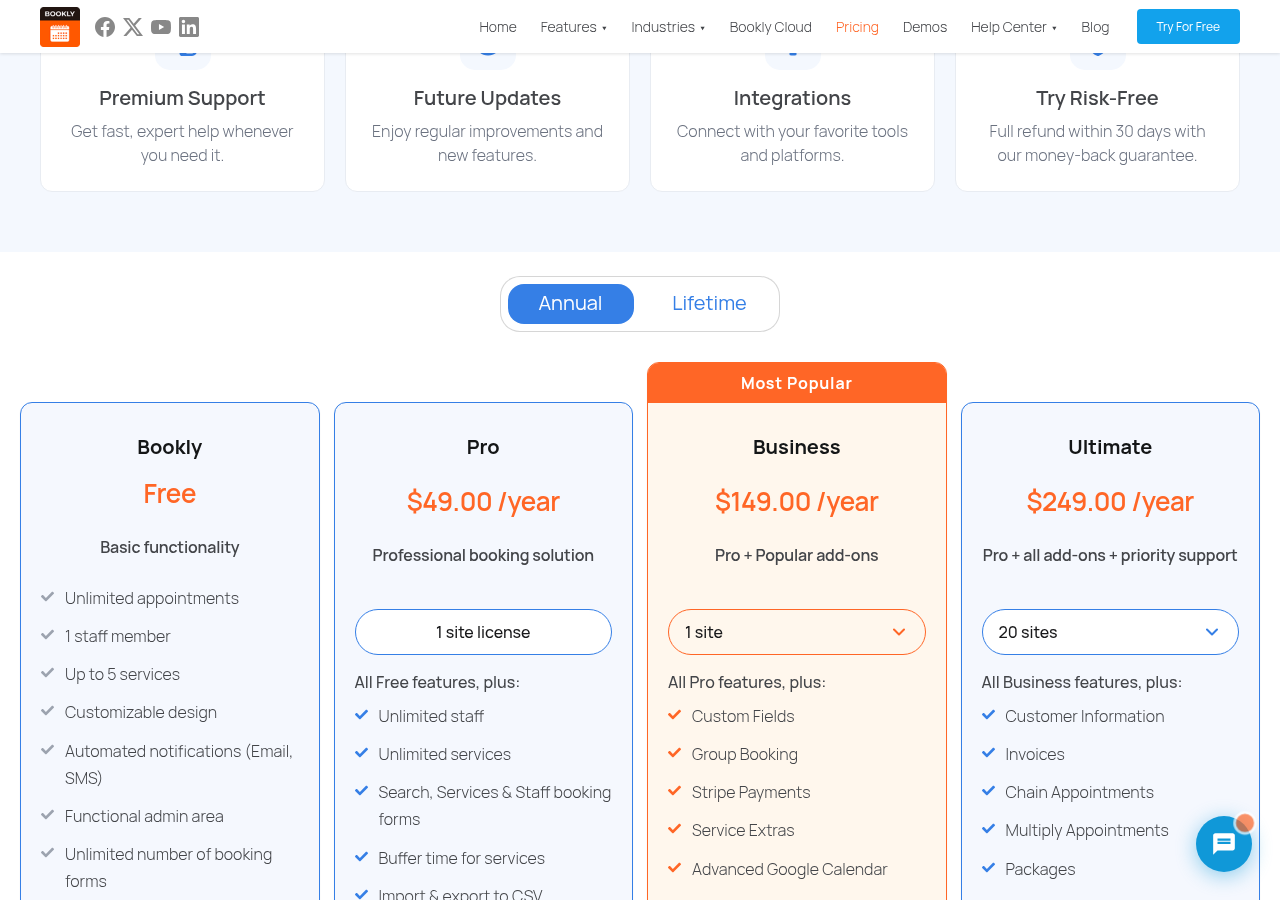
Bookly has four pricing tiers. As of June 2026, confirmed from the official pricing page at booking-wp-plugin.com/pricing/:
Free: No cost, unlimited installs. Limited to 1 staff member, 5 services, no online payments, no add-on access.
Pro: $49/year or $129 lifetime (1 site). Unlocks unlimited staff, unlimited services, online payment capability, basic Google Calendar integration, Zoom and Google Meet, analytics, WooCommerce compatibility, and add-on access. Does not include any payment gateway add-on or most commercially significant add-ons.
Business (Most Popular): Annual: $149/year (1 site) or $199/year (5 sites). Lifetime: $349 (1 site) or $449 (5 sites). Includes Pro plus: Custom Fields, Group Booking, Stripe, Service Extras, Staff Cabinet, Coupons, and Recurring Appointments. This is the practical minimum for most real service businesses.
Ultimate: Annual: $249/year (20 sites) or $299/year (100 sites). Lifetime: $599 (20 sites) or $799 (100 sites). Includes Pro plus all available add-ons and priority support.
Money-back guarantee: 30 days on all purchases.
How to read the pricing:
The lifetime options change the cost equation significantly. Business Lifetime starts at $349 for 1 site, or $449 for 5 sites, with no renewal required. If you run two or more WordPress booking sites, the 5-site lifetime at $449 is almost always better math at roughly two years of use. The Ultimate Lifetime at $599 for 20 sites, or $799 for 100 sites, is the strongest value in the catalog for agencies building booking-enabled sites regularly. At $7.99 per site on the 100-site plan, it is hard to beat on a per-install basis with any competing plugin.
Annual renewal pricing on the base Pro plan stays at $49/year without a significant price jump at renewal. This is a genuine advantage over Booknetic and Amelia, which both raise prices substantially after the first year.
The main pricing risk is the bare Pro plan. Many buyers see $49/year and expect a fully functional booking system. The Business Bundle at $149/year is closer to what most businesses actually need.
Changelog context: what recent development looks like
For any plugin you plan to run long-term, the development trajectory matters. Here is an honest read of Bookly’s recent release history.
Version 27.7 (June 2026) fixed a data display issue in the Appointments section. Version 27.6 introduced an updated table design. Version 27.5 patched a security vulnerability in the Zapier integration. Version 27.4 fixed an appointments export issue. Version 27.3 fixed a security issue (CVE-2026-5513), added search inside the settings interface, and improved the Appointments section design. Version 27.2 improved PHP 8+ compatibility. Version 27.1 patched a security issue (CVE-2026-2519). Version 27.0 improved frontend form technical stability.
The pattern is maintenance-oriented: security patches, compatibility improvements, and incremental UI refinements rather than major new capabilities. This is a reasonable lifecycle stage for a 12-year-old plugin with 70,000+ active businesses. The codebase is stable and actively maintained. However, buyers looking for a fast-moving feature roadmap with significant new functionality each quarter will find more activity at newer competitors.
The two CVEs patched in 2026 (CVE-2026-5513 and CVE-2026-2519) and the Zapier vulnerability in 27.5 mean the team is actively responding when security issues are identified. For a plugin with this install base, that response is what matters.
Pros and cons
Pros
- Genuine free version: 1 staff member, up to 5 services, unlimited appointments, and email notifications at no cost. Suitable for solo operators who take in-person payment.
- 12-year track record since 2013, 70,000+ active businesses, and 4.4 out of 5 stars across 569 reviews on WordPress.org.
- Lifetime licenses available on all plans, including multi-site coverage (1 or 5 sites on Business Lifetime, 20 or 100 sites on Ultimate Lifetime).
- Modular add-on model lets agencies and developers assemble a lean stack per client project.
- Business Bundle ($149/year or $349 lifetime) groups the most important add-ons at a sensible combined price.
- Zoom and Google Meet integration included in the Pro license at no additional add-on cost.
- Annual Pro renewal stays at $49/year without a dramatic price increase after year one.
- 30-day money-back guarantee.
- WooCommerce compatibility.
- WPML integration for 40+ language multilingual sites.
- Events add-on ($29 lifetime) extends the platform into event booking at low incremental cost.
Cons
- Base Pro plan ($49/year) is not a complete booking system: payment gateways, two-way Google Calendar sync, custom fields, recurring appointments, and customer portal all require separate add-on purchases.
- SMS and WhatsApp notifications require a Bookly Cloud subscription, a separate metered account, adding setup complexity and ongoing messaging costs beyond the plugin license.
- WhatsApp setup requires a Facebook Developer Account and verified WhatsApp Business message templates. The setup burden is significant for teams without existing WhatsApp Business infrastructure.
- Add-on cost accumulation is a real risk for buyers who build their stack piecemeal on bare Pro rather than using the Business or Ultimate Bundle.
- Admin UI reflects its 2014 origins. It works correctly but is visually dated compared to Amelia, Booknetic, and FluentBooking, which were built more recently.
- Development focus in recent versions has been on maintenance and security patches rather than new capabilities.
- User reviews on Capterra (4.0 out of 5 across 70 reviews) and WordPress.org mention inconsistent support response times for non-priority support users.
- Annual plan licenses are domain-specific; moving a license to a new domain requires a manual support request.
- No built-in event management at the Pro level; events require the separate Events add-on.
Alternatives to Bookly
- Amelia. A strong direct competitor with a modern UI, native event management (included on all paid plans), a genuine free tier with Square payments, and cleaner plan bundling. Amelia’s Pro tier bundles calendar sync, packages, WhatsApp, and online meetings without separate add-on purchases. The main Amelia trade-off is that Pro covers one domain; agencies need Elite ($259+) for multiple sites. Pick Amelia if you need event booking as a native feature, prefer a modern interface, or want features bundled rather than modular.
- Booknetic. Published by FS Code, with a deep add-on ecosystem, a built-in workflow notification engine, white labeling, and a planned mobile app. Booknetic’s renewal prices climb more steeply than Bookly’s, but its feature breadth at the Premium and Elite tiers is competitive with any plugin in the category. Pick Booknetic if white labeling, Telegram notifications, or the broadest add-on ecosystem are priorities.
- LatePoint. Simpler, flatter pricing with an active roadmap. Lighter on multi-location and agency-scale features. A strong fit for solo practitioners and small businesses that want simplicity over customizability.
- FluentBooking. A newer entry from the Fluent team with a modern UI and active feature development. Still building parity on deeper booking features. A good fit for teams already in the Fluent ecosystem.
- SaaS schedulers (Calendly, Acuity, SimplyBook.me). Run outside WordPress with monthly per-user fees. Better for cross-team or cross-platform scheduling without a WordPress dependency. Pick them if your booking flow does not live on WordPress or if you need a dedicated SaaS support organization.
For most WordPress-first service businesses, the main comparison is Bookly vs Amelia vs Booknetic. Bookly wins on annual pricing stability, lifetime licensing value, and modular add-on flexibility. Amelia wins on modern UI, native event management, and cleaner plan bundling. Booknetic wins on feature depth, white labeling, and the workflow engine.
Final verdict
Bookly is a proven, long-established WordPress booking plugin that does what it says. It has earned its place with 70,000+ active businesses over 12 years because the booking widget works, the free tier is useful, and the modular add-on model suits developers who want to build lean, targeted stacks per client.
What has changed in 12 years is the competition. When Bookly launched in 2013, a responsive booking widget plus email notifications was a significant plugin. In 2026, Amelia ships event booking and a free tier with card payments, Booknetic bundles workflow automation and white labeling, and FluentBooking is growing quickly with a modern codebase. Bookly’s architecture and admin interface show their age against these newer entrants, and the add-on model that felt innovative in 2014 requires more active cost planning from buyers today.
My practical recommendation: if you want to test a booking plugin at zero cost, start with the Bookly free version. If you need a full production setup for a single-location service business, buy the Business Bundle ($149/year). If you are an agency building booking systems across many client sites, evaluate the Ultimate Lifetime ($799, 100 sites) seriously, because on a per-site basis it competes with or beats any alternative in the market. Do not buy the bare Pro plan at $49 expecting a complete system.
Bookly is not the most exciting booking plugin in 2026. But it is dependable, well-documented, affordable at the right tier, and will almost certainly still be here and working correctly five years from now. For a business that needs a booking plugin they can install and largely trust over the long haul, that reliability counts for something.