


Event Organiser has 20,000 or more active installs on WordPress.org and a 4.6-star rating from 139 reviews. Those are modest numbers compared to the big-name event calendar plugins, but they hide a meaningful story: for a certain type of WordPress site, Event Organiser is the most capable free option available.
The plugin is built by Stephen Harris, a solo developer based in the UK. It has been on WordPress.org for over a decade, and version 3.12.10 shipped on June 28, 2026, with a security patch for the event list shortcode. The plugin is actively maintained even if the marketing blog has been quiet since 2019.
This review covers the free plugin, its recurring event system, venue tools, shortcodes, iCal support, and developer API. I also walk through the paid Pro tier and its extensions, which flip the plugin from a display-only calendar into a bookings and ticketing system.
Basis of this review. I installed Event Organiser 3.12.10 on a clean WordPress sandbox and tested event creation, recurring schedules, venue management, widgets, and shortcode output. I navigated all calendar views, tested iCal export links, and reviewed shortcode parameters against the official documentation. For Pro features (booking forms, payment processing, ticket management), I reviewed the official feature pages and documentation because I did not purchase a Pro license for this test. Sections covering Pro are clearly marked.
Quick verdict
Event Organiser is the strongest free option for complex recurring event schedules on WordPress. No other plugin in its tier gives you “every third Tuesday of every fourth month” recurrence rules without paying for a premium plan. iCal import and export, category color-coding, venue maps, and a full template and hook API are all in the free version.
The paid Pro tier is priced in British pounds with a one-time (not subscription) model, which is genuinely unusual in the plugin space. If you need booking and ticketing alongside the calendar, the value is solid for most small-to-medium event organizers.
- Best for: WordPress site owners who need sophisticated recurring event patterns in the free tier, or developers building custom event calendar solutions.
- Easiest win: The free plugin, if recurring events are your primary requirement and you do not need ticketing.
- Most defensible paid tier: Business (around £90 one-time) for sites that need 5-site coverage plus iCal sync and discount codes.
- Skip if: You need a large support community, deep WooCommerce integration, or a Block Editor-native admin experience.
- Watch out for: Pricing in GBP (not USD), a limited refund policy, and slower support response times from a solo developer.
What is Event Organiser
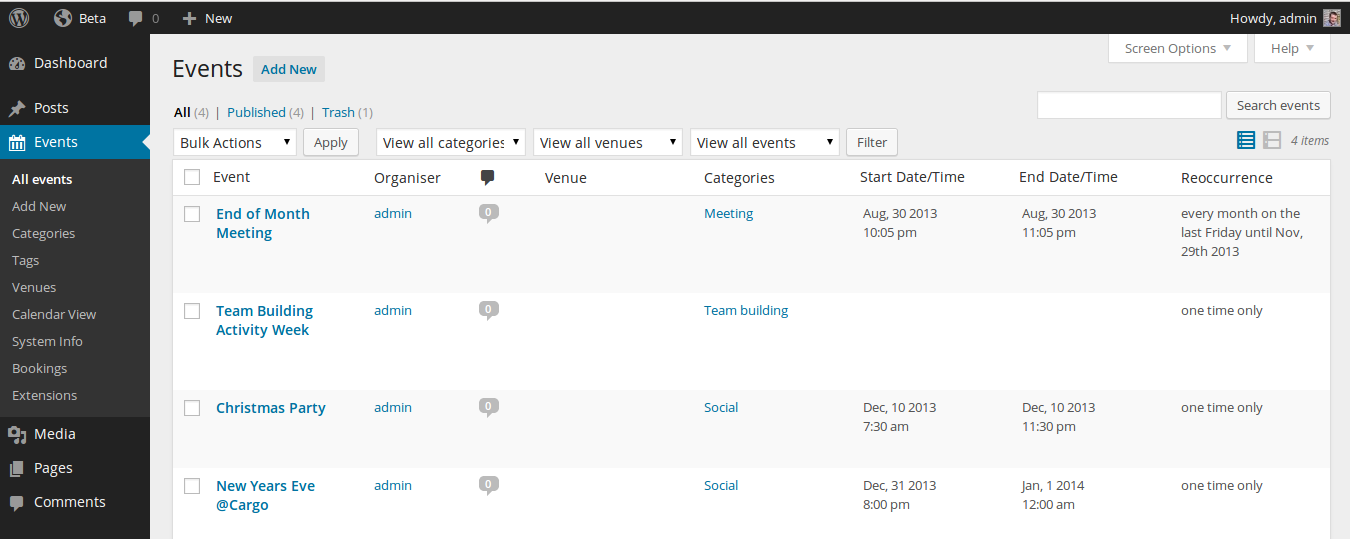
Event Organiser is a WordPress plugin for creating and managing events. It was built by Stephen Harris and lives at wordpress.org/plugins/event-organiser. The plugin uses WordPress custom post types for events and venues, so events behave like standard posts in terms of permalinks, taxonomy, and template overrides.
The free plugin covers event creation with full recurring schedule support, venue management, calendar and list views, iCal feeds, shortcodes, and REST API endpoints. It supports 18 or more languages including Spanish, French, German, Italian, Japanese, Portuguese, Russian, and Ukrainian.
The commercial tier is called Event Organiser Pro and is sold separately from wp-event-organiser.com. Pro adds booking forms, ticket management, payment processing, and attendee email tools. Extensions for Stripe, iCal sync, frontend event submission, discount codes, and venue custom fields are distributed separately: some are free, some are included in higher license tiers, and some require an additional purchase.
Version 3.12.10 is the current release at the time of writing. Recent changelog highlights include a June 2026 XSS security patch on the event list shortcode, an August 2024 PHP 8 warning fix, and a February 2024 cache security patch for public calendars. The plugin is actively patched even in the absence of active marketing.
Who Event Organiser is best for
Strong fit:
- WordPress site owners who need recurring event schedules with granular, RFC 5545-style recurrence rules and want that capability at no cost.
- Developers building custom event calendar solutions who need a hook-rich plugin that exposes a documented template API and function reference.
- Community organizations, clubs, and educational institutions running weekly or monthly programs on a fixed budget.
- Small-to-medium venues such as yoga studios, community centers, and libraries that want iCal subscription feeds so visitors can sync events to their personal calendars.
- Site owners who prefer one-time pricing for premium features rather than an ongoing annual subscription.
Weaker fit:
- Teams that expect quick support response times. A solo developer cannot guarantee the turnaround speeds that a multi-person support team can.
- Organizations that need deep WooCommerce integration for tickets, coupons, and order management. The plugin does not natively connect to WooCommerce.
- Developers who prefer a Block Editor-first admin interface. Event Organiser’s admin UI is a legacy PHP meta box framework.
- Sites that need a large community of third-party tutorials, compatible themes, and pre-built integrations. The 20K install base is small by WordPress plugin standards.
- Enterprise teams that need formal SLAs, multi-person account access, or phone and live-chat support.
Hands-on setup and experience
Installation follows the standard WordPress plugin process. Search for “Event Organiser” in the WordPress admin plugin directory, install, and activate. There is no setup wizard. The plugin adds an Events item to the main WordPress admin menu and creates two settings pages: one for general options and one for templates.
The general settings page covers the events archive page (slug and template override), the default calendar view, a Google Maps API key field, first day of the week, and event permalink structure. The settings are logically organized and take less than five minutes to configure for most sites.
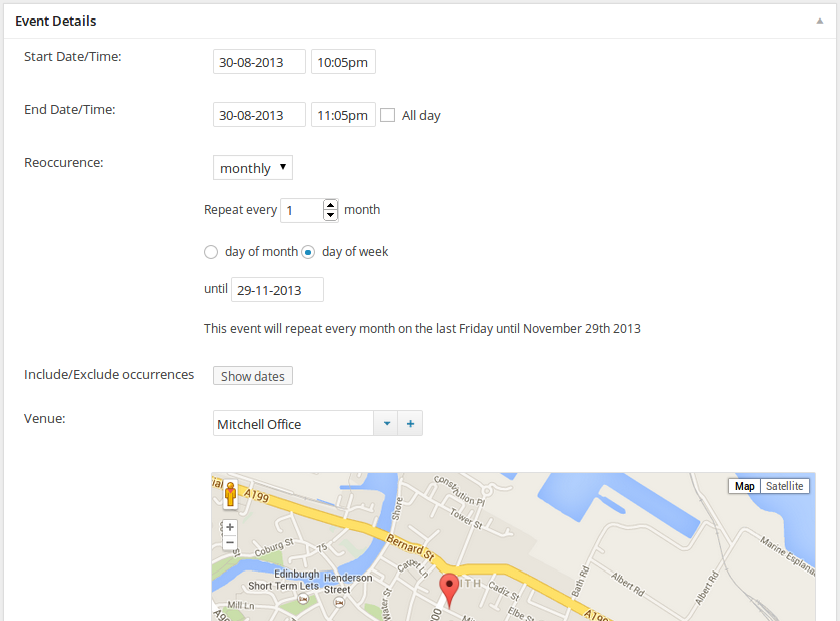
Event creation opens the standard WordPress post editor with an Event Details meta box added below the content area. The meta box covers start and end date, start and end time, an all-day toggle, venue selection, and the recurrence rule builder.
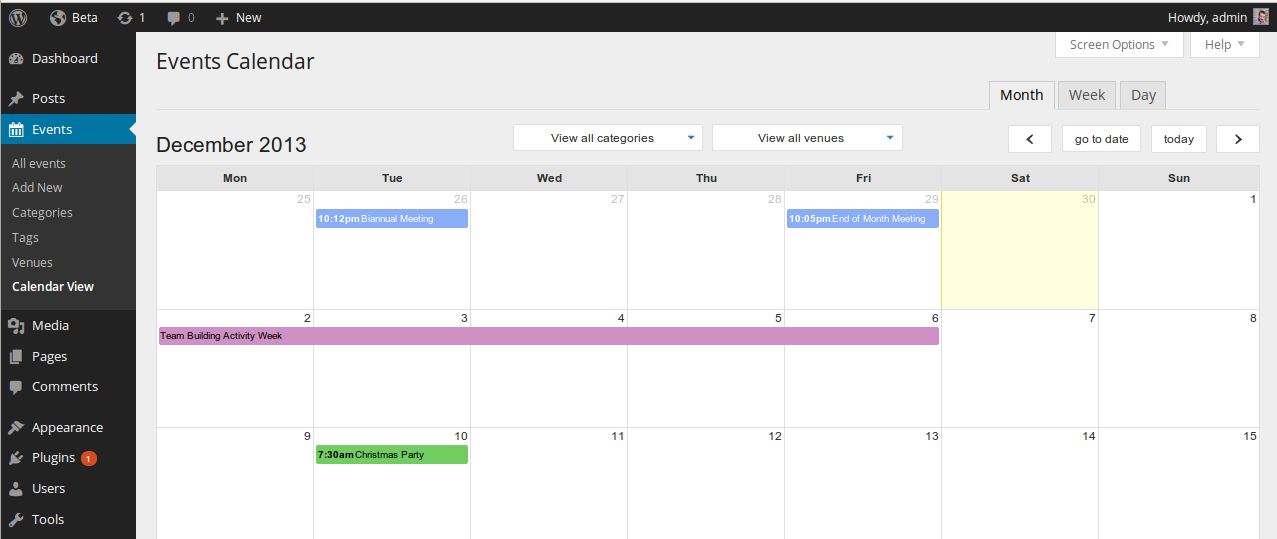
The admin calendar view renders a month-view calendar showing all events. Clicking any event opens its edit screen. The calendar supports AJAX navigation between months.
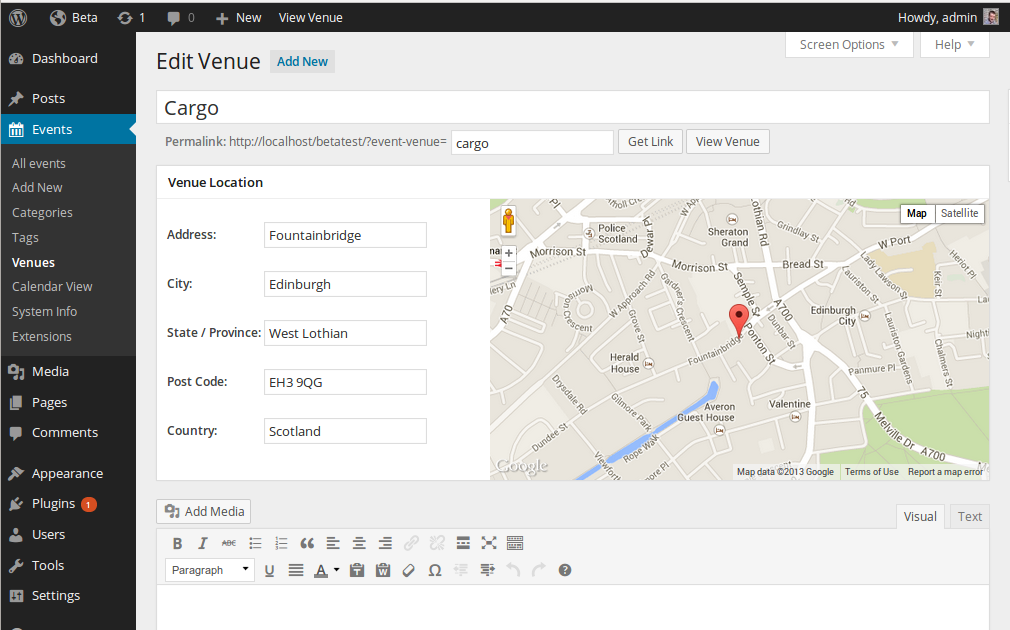
The venue admin screen is a separate edit page with name, address, city, country, postal code, and an embedded Google Maps widget that geocodes the address automatically.
Recurring events: the free plugin’s headline feature
This is where Event Organiser differentiates itself most clearly from competing free event plugins.
The recurrence builder in the Event Details meta box supports the following patterns:
- Daily: Every N days, or every weekday only.
- Weekly: Every N weeks on selected days of the week (for example, Monday and Wednesday only).
- Monthly by date: The Nth day of every M months.
- Monthly by day: The Nth occurrence of a specific weekday in a month (“the third Tuesday of every month”).
- Annually: The same date every year, or the same weekday-of-month pattern annually.
- Custom intervals: Combinations using standard iCal RRULE logic.
The pattern “every third Tuesday of every fourth month” is achievable in the free plugin. That level of granularity requires a paid plan in most competing event plugins, including The Events Calendar (which gates full recurring controls behind its $259/year Essentials plan).
Each recurring series creates multiple occurrence records linked to one event post. Visitors browsing the calendar see individual occurrences on their respective dates. Individual occurrences can be edited independently or removed from the series without deleting the whole series.
The edit interface for individual occurrences within a series is functional but not immediately intuitive. The meta box shows the series-level recurrence rule, and accessing a specific occurrence edit requires the occurrences table. This workflow could be more discoverable for non-technical users.
Venue management
Each venue is a separate entity in the admin with its own page, name, address, and optional Google Maps integration. Events associate with a venue through the meta box selector. Multiple events can share one venue, and each venue gets a frontend archive page at /venues/venue-slug/ showing upcoming events at that location.
Venue archive pages follow standard WordPress template hierarchy rules. Theme developers can drop a taxonomy-event-venue.php file into their theme to customize the venue display output.
The free plugin supports venue address fields and Google Maps embedding. Pro adds venue featured images and custom fields for storing additional venue data such as capacity, parking notes, or accessibility information. The Business and Developer licenses also include the Venue Markers extension, which allows custom Google Maps marker icons per venue.
Calendar display and shortcodes
The plugin creates a default events archive page at /events/ (configurable). The archive displays events in list format ordered by date. A month-grid calendar view is accessible at /events/?view=month or set as the default in settings.
The [eo_calendar] shortcode embeds an interactive month-view calendar anywhere on a page or in a widget area. Supported parameters include category, tag, venue, event_status, month, year, and full (compact vs full-size display).
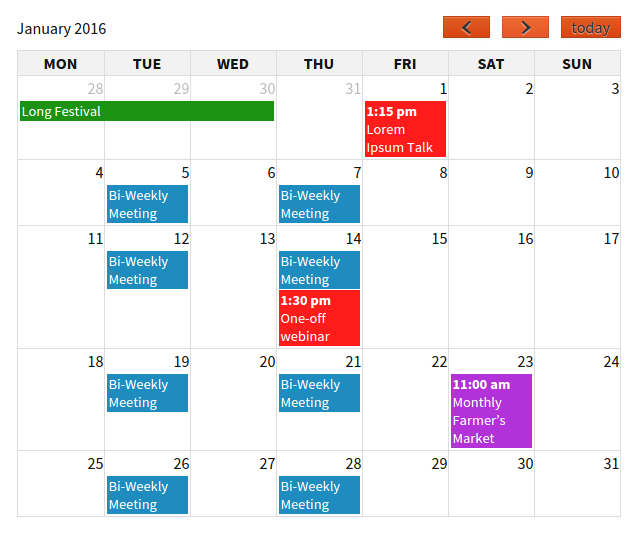
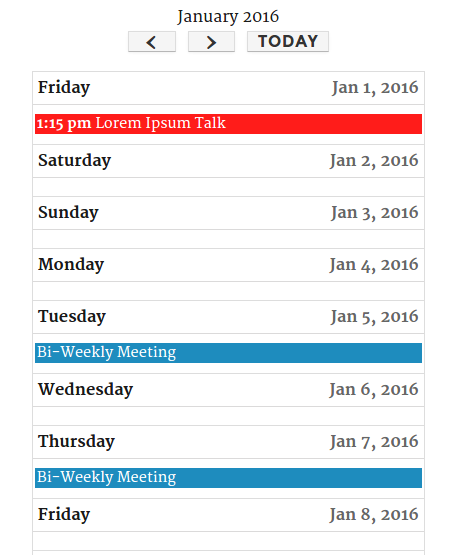
The [eo_events] shortcode renders a filtered event list. Parameters include numberposts, event_start_after, event_start_before, cat, tag, venue, and orderby. This covers common scenarios: upcoming events for a specific venue, events in a category this month, or a defined date range.
Widget support includes a calendar widget and an events list widget, both accepting the same filter parameters as the shortcodes. The mobile calendar renders cleanly on narrow viewports using a responsive CSS layout.
iCal feeds and calendar subscriptions
iCal support is one of the strongest parts of Event Organiser’s free feature set.
The plugin generates a public iCal feed for the entire events calendar at /events/?ical=1. Individual event pages include a one-click iCal download link. Visitors can subscribe to the full calendar feed in Google Calendar, Apple Calendar, Outlook, or any RFC 5545-compatible calendar app using the feed URL.
iCal export from the admin lets site owners download a snapshot of events for archiving or migrating to another system.
iCal import (pulling events from an external feed into your WordPress calendar) requires the iCal Sync extension, which is included in the Business and Developer licenses. Buying it as a standalone extension is also an option if you only need that one feature.
Developer API and template system
Event Organiser exposes a documented hook system and function reference covering event creation, occurrence retrieval, venue queries, and custom field access. The template system follows WordPress conventions: theme files such as single-event.php, archive-event.php, and taxonomy-event-venue.php can be added to a theme to override default output without touching plugin files.
The eo_get_events() function returns an array of event posts with their occurrence data, supporting the same filter parameters as the shortcodes. The eo_get_the_occurrences_of() function retrieves all occurrences of a specific event. This makes the plugin practical as a data source for headless or hybrid WordPress setups where the calendar display layer is custom-built.
REST API endpoints expose event and venue data to external applications following standard WordPress REST API conventions. The codebase exposes enough action and filter hooks that a developer can intercept event save operations, override query behavior, and inject custom fields without modifying plugin files directly.
Event Organiser Pro: booking and ticketing
The free plugin covers calendar display and recurring schedules. If you need to accept registrations, sell tickets, or collect attendee data, you need Event Organiser Pro.
Pro adds the following (based on official documentation; not tested with a live license):
Booking management. An admin dashboard shows all bookings filterable by event or specific occurrence date. Each booking can be viewed individually, amended, or cancelled.
Booking form customizer. A drag-and-drop form builder lets you add custom fields to the booking form: text fields, dropdowns, checkboxes, and file uploads. This supports collecting dietary requirements, session choices, or any custom registration data.
Ticket types. Multiple ticket types per event (general admission, VIP, early bird) with independent quantities, prices, and availability windows.
Payment gateways. PayPal is included in all Pro licenses. Offline payment is also included. Stripe Gateway, Authorize.net, and Mollie iDeal require a Developer license or separate purchase.
Email notifications. Automatic booking confirmation emails to attendees and notification emails to the organizer. Email templates are customizable from the admin.
CSV export. Download all bookings or ticket-level data as a CSV file for reporting or external processing.
Frontend event submission. The Event Organiser FES extension (Developer license) lets site visitors submit events from the frontend, with an admin approval workflow controlling what goes live.
Discount codes. The Discount Codes extension (Business and Developer licenses) supports percentage and fixed-amount codes with usage limits, date restrictions, and minimum booking value requirements.
Extensions at a glance
| Extension | Included in | Description |
|---|---|---|
| CSV Import/Export | Free | Import events from CSV; export events to CSV |
| Posterboard | Free | Poster-style event grid display via shortcode |
| Sigma Theme | Free | Lightweight theme designed for event sites |
| Venue Markers | Business, Developer | Custom Google Maps marker icons per venue |
| Discount Codes | Business, Developer | Percentage or fixed booking discount codes |
| iCal Sync | Business, Developer | Auto-import events from external iCal feeds |
| Stripe Gateway | Developer | Stripe credit card payments |
| Authorize.net | Developer | Authorize.net credit card payments |
| FES (Frontend Submission) | Developer | Visitor-submitted events with admin approval |
| iDeal / Mollie | Separate purchase | Dutch iDEAL payment gateway |
Pricing
Event Organiser Pro uses one-time pricing in British pounds. There is no subscription or annual renewal required to keep using the plugin. Support and updates run for one year from purchase; after that, the plugin continues working without further payment.
| Plan | Price (one-time) | Sites | Included extensions |
|---|---|---|---|
| Free (WordPress.org) | £0 | Unlimited | Calendar, recurring events, iCal export, shortcodes |
| Personal | £50 | 1 | Core Pro only (PayPal + offline payments) |
| Business | £90 | 5 | Core Pro + Venue Markers, Discount Codes, iCal Sync |
| Developer | £120 | 10 | All extensions (adds Stripe, Authorize.net, FES) |
A few notes on pricing worth knowing before purchasing:
Currency. Prices are in GBP. At September 2026 exchange rates (approximately 1 GBP = 1.30 USD), Personal is roughly $65, Business roughly $117, and Developer roughly $156. The conversion shifts with exchange rates.
Refund policy. Refunds are assessed case by case and granted only for significant bugs that prevent core functionality from working, after a support resolution attempt. This is more restrictive than the 30-day no-questions-asked policy offered by many competing plugin developers.
Renewals. After the first year, you can optionally renew for continued support and updates. Renewal pricing is not published on the pricing page; contact the developer directly to confirm.
Pros and cons
Pros
- Most capable free recurring event rules of any WordPress events plugin: daily, weekly, monthly by date or weekday position, annually, and custom patterns
- iCal export and public calendar subscription feeds in the free version
- One-time pricing for Pro with no annual subscription required
- Developer-friendly architecture: documented template system, function reference, and extensive action and filter hooks
- REST API endpoints for headless and custom integration use cases
- Category color-coding and taxonomy filtering in the free plugin
- Venue management with Google Maps geocoding
- Responsive calendar shortcode output
- Security patches applied promptly (XSS fix June 2026, PHP 8 fixes in 2024)
- 18 or more language translations available
- Plugin keeps working after the license support period expires
Cons
- Small install base (20,000 or more) relative to competitors such as The Events Calendar (600,000 or more), meaning fewer community resources and less-tested theme compatibility
- No Block Editor-native admin interface; the event creation UI is a classic editor meta box framework
- Solo developer support: no guaranteed response times, no live chat, no phone support
- Restrictive refund policy assessed case by case, not a standard 30-day window
- Pricing in GBP introduces currency conversion uncertainty for non-UK buyers
- No free ticketing option; any paid registration or ticket sale requires the Pro license
- No native WooCommerce integration for ticket sales alongside product orders and coupons
- iCal import from external feeds requires the iCal Sync extension (Business or Developer license)
- Renewal pricing for continued support is not published on the pricing page
- Blog last updated in 2019, creating uncertainty about long-term development direction
Alternatives
The Events Calendar
The Events Calendar is the most-installed events plugin on WordPress.org with 600,000 or more active installs. Its free tier covers month, list, and day calendar views, JSON-LD SEO markup, and iCal export. Full recurring event management, advanced views, and ticketing require a paid plan starting at $259 per year (under the Liquid Web brand as of 2026). For teams that need a large install base and broad theme compatibility, The Events Calendar is the default choice. The tradeoff: recurring events cost $259/yr where Event Organiser includes them for free.
Read our The Events Calendar review for a full breakdown.
Modern Events Calendar
Modern Events Calendar (MEC) is a feature-rich paid-first plugin with a free version that includes multiple calendar views. The paid version integrates with Elementor, Divi, WooCommerce, Zoom, and BuddyBoss. It targets agencies and developers who need deep page-builder compatibility and a visually rich event display, rather than the recurring event rule depth that Event Organiser specializes in.
Read our Modern Events Calendar review for a full breakdown.
Sugar Calendar
Sugar Calendar is a lightweight paid events plugin focused on clean, fast calendar display without feature sprawl. It targets content-focused sites that want a calendar without a full ticketing and booking ecosystem. If you need basic event display and do not require recurring event complexity or booking, Sugar Calendar is a simpler option.
Read our Sugar Calendar review for a full breakdown.
Final verdict
Event Organiser earns a specific recommendation for a specific type of WordPress user: someone who needs sophisticated recurring event patterns in the free tier and values a developer-friendly, template-hackable plugin over marketing polish and brand presence.
The recurring event system is genuinely the best in class at its price point. iCal feeds, venue management, and a documented template API round out a plugin that covers more ground for free than most of its competitors do.
The Pro tier’s one-time pricing model is refreshing in an ecosystem that has moved almost entirely to annual subscriptions. For a site that needs booking and ticketing without a recurring license fee, the Business or Developer license at £90 or £120 represents solid value over a multi-year horizon.
My honest reservations: the small install base, the Block Editor gap, and the solo developer support model are real considerations for teams that need reliability guarantees. The Events Calendar remains the safer choice for organizations that need a vendor relationship and a support team. Eventin offers a compelling free tier with ticketing if paid booking is the primary requirement.
For developers, community sites, and recurring-event-heavy organizations that can tolerate a smaller ecosystem, Event Organiser is worth installing and testing. The free plugin is a genuine, no-compromise starting point.
Browse more WordPress plugin reviews on Best WordPress Plugins.
FAQ
Is Event Organiser free?
Yes. The core Event Organiser plugin is free on WordPress.org. It includes recurring event creation, venue management, calendar and list views, iCal export feeds, shortcodes, and REST API access. Booking forms, ticket sales, payment processing, and attendee management require the paid Pro license starting at £50 (approximately $65 USD) as a one-time purchase.
How does Event Organiser handle recurring events?
Event Organiser generates individual occurrence records for each instance of a recurring event. Recurrence options include daily, weekly (on specific selected days), monthly by date, monthly by weekday position (such as the third Tuesday of every month), and annually. The recurrence rules follow the iCal standard (RFC 5545), making them compatible with external calendar applications. Each occurrence can be edited or removed independently without affecting other occurrences in the series.
Does Event Organiser charge annual subscription fees?
The core plugin is permanently free. The Pro license uses one-time pricing: £50 (Personal, 1 site), £90 (Business, 5 sites), or £120 (Developer, 10 sites). Each purchase includes one year of support and updates. After the support period ends, the plugin continues working. You can optionally renew for continued support, but the plugin does not stop functioning when the support period lapses.
Can visitors subscribe to the event calendar from their own calendar app?
Yes. Event Organiser generates a public iCal feed URL at /events/?ical=1. Visitors can paste this URL into Google Calendar, Apple Calendar, Outlook, or any RFC 5545-compatible application to receive live event updates. Individual events also include a one-click iCal download link on the event page.
Does Event Organiser work with WooCommerce?
There is no native WooCommerce integration in the free plugin or the Pro tier. Ticket sales in Pro go through PayPal, offline payment, and optionally Stripe or Authorize.net via extensions. If your site needs tickets inside WooCommerce orders alongside other products, Event Organiser is not the right fit. The Events Calendar Pro or a dedicated WooCommerce booking plugin would suit that use case better.
What are the best alternatives to Event Organiser?
For a larger install base and broad theme compatibility with a capable free tier, The Events Calendar is the primary alternative. For free ticketing alongside event display, Eventin (WP Event Solution) includes ticket sales in its free version. For lightweight calendar display without booking complexity, Sugar Calendar is a simpler paid option.
Is Event Organiser compatible with PHP 8?
Version 3.12.8 (August 2024) resolved the PHP 8 warning messages reported in earlier versions. Versions 3.12.9 and 3.12.10 (June 2026) addressed a security issue in the event list shortcode. As of version 3.12.10, the plugin is tested up to WordPress 7.0.0 and is compatible with PHP 8 environments.
Who makes Event Organiser?
Event Organiser is developed and maintained by Stephen Harris, a solo WordPress developer based in the UK. The Pro tier and extensions are sold through wp-event-organiser.com. The plugin has been available on WordPress.org for over a decade and does not have a corporate parent or investor backing.