


Ninja Forms launched in December 2011, making it one of the oldest WordPress form builders still in active development. Fifteen years is a long time for any software to survive on the WordPress plugin market. Most plugins either stagnate, get acquired and abandoned, or quietly fall behind. Ninja Forms has done none of those things. It shipped its 3.14.8 release in early July 2026 and still claims over 50 million all-time downloads.
What makes Ninja Forms worth evaluating in 2026 is the approach it takes to monetization. In a market where WPForms withholds local entry storage from free users and Gravity Forms charges a license fee before you can install anything, Ninja Forms ships a genuinely capable free core plugin and sells optional add-ons separately. That trade-off shapes everything about how the plugin works and who it is best for.
For this review, I analyzed the plugin through its official WordPress.org listing, the complete changelog through July 2026, official UI screenshots on WordPress.org, the ninjaforms.com documentation, and each of the 42 official add-on product pages. Where the builder interface is described, the analysis draws from the official WordPress.org plugin screenshots, which are captures from an actual running installation. Add-on features not available for testing are described from official product page documentation.
At a Glance
Plugin Details
- Plugin: Ninja Forms by Saturday Drive INC
- Current version: 3.14.8 (released July 3, 2026)
- Free version: Yes, unlimited sites, on WordPress.org
- Active installs: 600,000+
- All-time downloads: 50 million+
- Rating: 4.4 / 5 (1,394 reviews on WordPress.org)
- Pricing: Core free; Plus $59.40/year (3 sites); Pro $119.40/year (20 sites); Elite $299.40/year (unlimited)
- Best for: Users who want genuine free submission storage, flexible add-on selection, and a no-upsell building experience
- Weakest point: Conditional logic, email marketing integrations, and file uploads all require paid add-ons or a membership plan
Quick Verdict
Quick Verdict: Rating 4.1 / 5
Ninja Forms delivers more in its free core plugin than any major competitor. Submission storage is local, free, and unlimited. Email notifications are free. The form builder runs without upgrade interruptions. For anyone who has grown tired of free WordPress form plugins that paywall the basics, Ninja Forms is a genuine relief.
The catch is the add-on economy. The moment you need conditional logic, a Mailchimp connection, multi-step forms, or file uploads, you are either buying individual add-ons at $29 to $49 each per year, or stepping up to a membership plan. The Plus plan ($59.40/year introductory) bundles the most commonly needed add-ons reasonably well. The Pro plan ($119.40/year) adds Stripe, CRM integrations, and automation tools. But renewal pricing jumps to $99 and $199 respectively after the first year, which is a cost that deserves careful thought before committing.
For a small business or nonprofit that needs clean, stored submissions and basic forms at no cost, the free tier is excellent. For anyone who needs conditional logic or integrations from day one, the Plus plan at the introductory rate is competitive with what WPForms and Fluent Forms charge for equivalent capability.
What Ninja Forms Is
Ninja Forms is a WordPress form builder plugin created by Kevin Stover and now owned and maintained by Saturday Drive INC, a company built around the Ninja Forms product. It launched on December 21, 2011, predating WPForms by five years and making it one of the senior citizens of the WordPress plugin ecosystem.
The plugin is built on a core-plus-extensions model. The free core handles the building, submission collection, and basic notification logic. Premium capabilities like conditional logic, payment processing, email marketing integrations, and file uploads are sold as separate add-ons, either individually or bundled into membership plans.
This is a different philosophy from competitors like WPForms, which gate features at the core level but offer one integrated paid plan, or Gravity Forms, which bundles everything into a tiered license. Ninja Forms lets you be surgical: buy only what your specific site needs.
The plugin is available on WordPress.org and installs like any other plugin. No license key is required to use the free version.
Who Ninja Forms Is Best For
Clear fit:
- Small businesses, nonprofits, and bloggers who need a reliable contact form with stored submissions and do not want to pay for something basic
- Developers who want clean, extensible code and a documented hook API without the weight of a full premium license just to start building
- Sites with specific integration needs who would rather buy one $29 Mailchimp add-on than pay for a bundle that includes fifteen things they do not use
- Agencies managing multiple client sites who need the Elite plan’s unlimited site licensing and full add-on access
Less ideal:
- Teams that need conditional logic out of the box at no cost (Fluent Forms is stronger here)
- Users who want a visual, Typeform-style conversational form experience (Ninja Forms does not offer this natively)
- Anyone who budgets annually and needs the renewal price to match the first-year price
Installation and Setup
According to the WordPress.org plugin listing and official documentation, installation follows the standard WordPress plugin path: search for “Ninja Forms” in the plugin repository, install, and activate. The plugin does not require a license key to use the free version.
After activation, Ninja Forms adds a Ninja Forms item to the WordPress admin sidebar. The dashboard shows existing forms as cards, a button to create new forms, and a left-side navigation with links to forms and the add-ons marketplace. The plugin’s own WordPress.org description positions its admin experience as: “No aggressive marketing, pushy review asks, constant popups, or unsolicited emails.” This is a vendor claim. WordPress.org reviews are mixed on this point: most users describe the experience as clean and low-friction, but some reviews mention rating prompts or pop-ups. The positioning is generally consistent with a plugin that does not add persistent upgrade banners, which is a distinguishing feature compared to competitors like WPForms Lite.
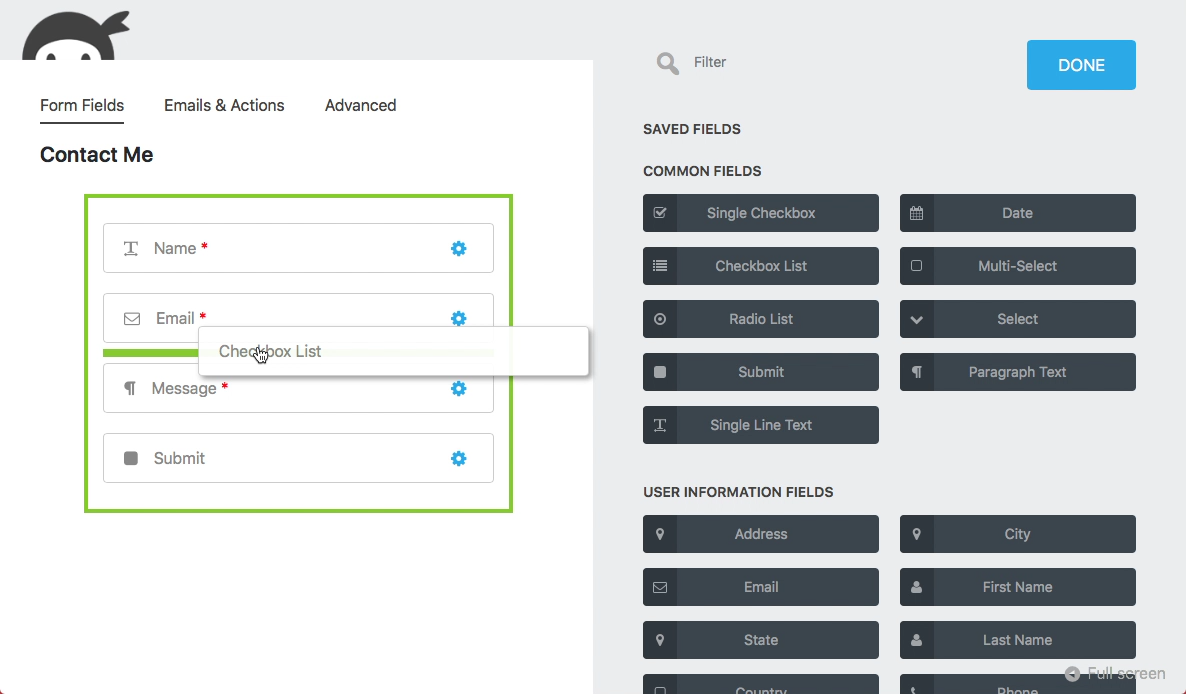
Creating a new form opens the builder, which uses a split-panel layout. The left side shows the form canvas. The right side shows available fields, organized into categories. Three tabs at the top control different aspects of the form: Form Fields, Emails and Actions, and Advanced.
The Form Builder
The official WordPress.org screenshots show the Ninja Forms builder using a split-canvas layout that differs from the traditional drag-and-drop approach used by WPForms or Gravity Forms. Rather than dragging fields from a sidebar into a canvas, you click a field in the right-hand panel and it is added to the form list. Fields can be reordered by dragging within the canvas after placement.
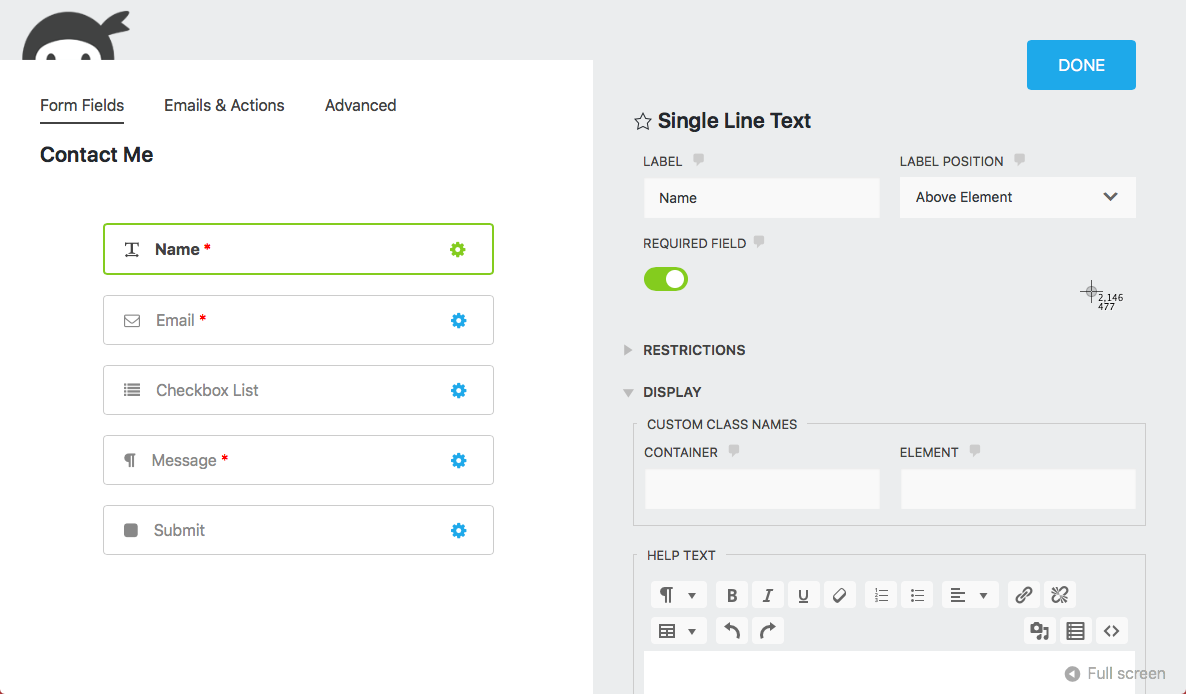
Clicking the gear icon next to any field opens that field’s settings panel on the right, replacing the field picker. The settings panel shows label, placeholder, required status, help text, and field-specific options. Settings are organized into collapsible sections: General, Restrictions, Display, and Administration.
Free Field Types
The free core plugin includes 28+ field types. The following are documented in the WordPress.org plugin FAQ and official feature listing:
Input fields: Single Line Text, Paragraph Text, Number, Email Address, Phone Number, First Name, Last Name
Choice fields: Checkbox List, Single Checkbox, Radio List, Select List, Multi-Select List, Select Image List
Date/time: Date/Time (basic date picker in core; Advanced Datepicker add-on extends this further)
Address fields: Address, City, US States, Country, Zip Code
Special fields: Hidden, Confirm (for password/email confirmation), Repeatable Fieldset, HTML, Divider, Star Rating
Spam protection: reCAPTCHA (Google v2 and v3), Anti Spam honeypot, hCaptcha (added v3.12.0, September 2025), Cloudflare Turnstile (added v3.11.0, July 2025)
Newer additions to the free core: Signature field (added v3.13.0, October 2025)
Submit: Standard submit button
File Upload is notably absent from the free tier and requires a paid add-on, which is a practical limitation for any site collecting documents or images.
Emails and Actions Tab
The Emails and Actions tab is where Ninja Forms distinguishes itself from simpler form builders. According to the official plugin documentation, every submission can trigger multiple actions: send an email, redirect to a URL, display a success message, call a WordPress action hook, or connect to any premium add-on.
Email notifications are free and unlimited in the core plugin. Multiple notification emails can be configured per form, routed to different addresses, using merge tags to pull submitted field values into the email body. The merge tag system allows including field values, the form title, the submission date, and more in any email or success message.
This is a meaningful differentiator. Gravity Forms limits notification routing at lower tiers. WPForms handles notifications well in its free tier but stores no entries locally. Ninja Forms offers both stored entries and flexible notification routing for free.
Submission Management
According to the WordPress.org plugin FAQ, all form submissions are stored locally in the WordPress database. The FAQ is explicit: “Ninja Forms does not paywall submissions. You can view, edit, export, and more from Ninja Forms > Submissions with the core, free plugin. No purchase necessary.”
The Submissions dashboard shows every form entry with the ability to search by field, filter by date, and drill into individual submissions. Documented capabilities include editing submitted values, re-firing email notifications from past submissions, CSV export, and bulk export. Automated GDPR data export and deletion tools integrate with WordPress Core’s privacy framework at no cost.
For users coming from WPForms Lite, which stores no entries without a paid plan, this difference is significant. Submission management of this depth is typically a paid feature in competing form builders.
Advanced Tab
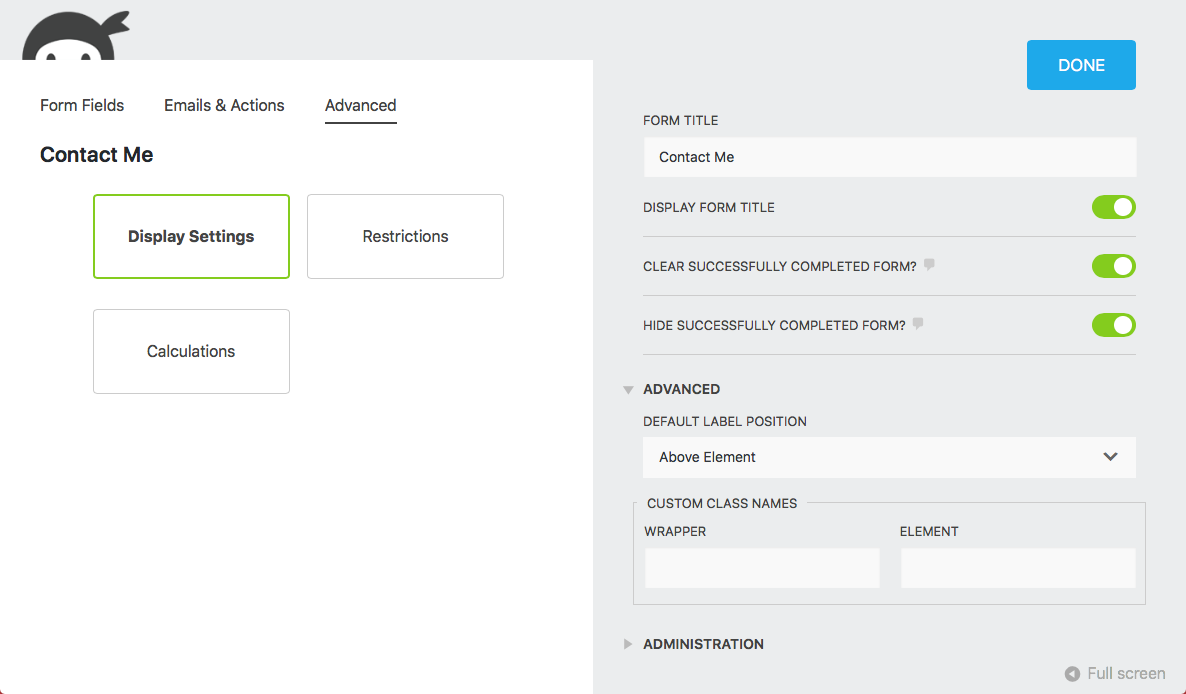
The official WordPress.org screenshots show the Advanced tab presenting three configuration tiles: Display Settings, Restrictions, and Calculations. The Display Settings panel controls whether to show the form title, clear the form after successful submission, and hide the form after submission. Restrictions allow limiting total submissions by count, date range, or schedule.
The calculations capability deserves specific attention. Per the plugin documentation and FAQ, numeric values can be assigned to checkbox, radio, and select fields and combined into computed totals or formulas. This powers pricing calculators and quiz scoring in the free core plugin without a paid add-on.
Conditional Logic (Paid Add-On)
Conditional logic, which shows or hides fields based on user input, is not included in the free core plugin. It requires either:
- The Conditional Logic add-on: $49/year for a single site
- The Plus plan ($59.40/year): includes Conditional Logic, File Uploads, Multi-Step Forms, Layout and Styles, PayPal, and ten email marketing integrations for three sites
Per the Conditional Logic add-on product page, the add-on provides a visual rule builder inside the form editor. Rules attach to individual fields, notifications, or success actions. A “How did you hear about us?” field can be shown only when a specific checkbox is checked, or a different notification email can be sent based on a form value.
The standalone add-on pricing ($49/year) is higher than the Plus plan ($59.40/year introductory) for users with one site who also need an email marketing integration. The Plus plan is a better deal in most single-site scenarios.
By comparison, Fluent Forms includes conditional logic in its free version. For users whose primary concern is branching form logic at no cost, that is a meaningful difference.
Payment Processing
Payment integrations are all add-ons in Ninja Forms:
| Gateway | Standalone (1 site) | Available in |
|---|---|---|
| PayPal | $29/year | Plus and above |
| Stripe | $29/year (extensions listing); $39/year (product page) | Pro and above |
| Authorize.net | $29/year | Pro and above |
| Elavon | $29/year (extensions listing); $39/year (product page) | Pro and above |
| Recurly (subscriptions) | $29/year | Sold separately |
The Stripe integration supports credit cards, debit cards, Apple Pay, Google Pay, ACH bank transfers, SEPA Direct Debit, and iDEAL (per the official Stripe add-on documentation). Recurring subscriptions with optional trial periods are supported. No additional Ninja Forms transaction fee applies on top of Stripe’s standard processing rate, which is a clean approach compared to WPForms Lite’s 3% surcharge on free-tier Stripe payments.
Note: a pricing discrepancy exists between the extensions listing page ($29/year for both Stripe and Elavon) and the individual product pages ($39/year on each product page). The discrepancy may reflect different tier pricing or a listing that has not been updated. Check the product pages at ninjaforms.com/extensions/stripe/ and ninjaforms.com/extensions/elavon/ for the current price before purchasing.
Email Marketing and CRM Integrations
Every email marketing and CRM integration requires a paid add-on or membership plan. There is no native free marketing integration in the free core, unlike the basic Constant Contact connection bundled into WPForms’ free version.
Plus plan includes (10 email marketing tools): ActiveCampaign, AWeber, Campaign Monitor, CleverReach, Constant Contact, Kit (ConvertKit), EmailOctopus, Emma, Mailchimp, MailPoet
Pro plan adds (CRM integrations): HubSpot, Salesforce, Zoho CRM, plus Zapier, Slack, and Trello for automation
Available as individual add-ons ($29/year each for most): All of the above, plus Capsule CRM, CiviCRM, Insightly, OnePageCRM, PipelineCRM, ClickSend SMS, Twilio SMS, Webhooks ($49/year), Zapier ($49/year)
For a site that only needs Mailchimp, buying that single add-on at $29/year is significantly cheaper than a full membership plan. This is where the modular model genuinely serves users who have narrow integration needs.
Developer Tooling
Per the official developer documentation, Ninja Forms provides a hook API, developer mode, and support for custom field types and custom actions. The plugin’s front end uses Vue.js, which is relevant if extending the builder UI. The back end follows standard WordPress patterns.
Ninja Forms added WordPress Abilities API support in version 3.14.0 (January 2026), allowing AI assistants and headless WordPress setups to interact with forms programmatically. The changelog for v3.14.1 (February 2026) replaced the Summernote rich text editor with Quill.js, reducing total codebase size, improving accessibility, and removing Bootstrap dependencies.
Consistent security hardening across 2025 and 2026 includes protections against PHP object injection in form imports, XSS in success messages, block token endpoint hardening, and unauthorized access prevention. The plugin’s changelog is publicly detailed and shows genuine ongoing maintenance.
Pricing in Full
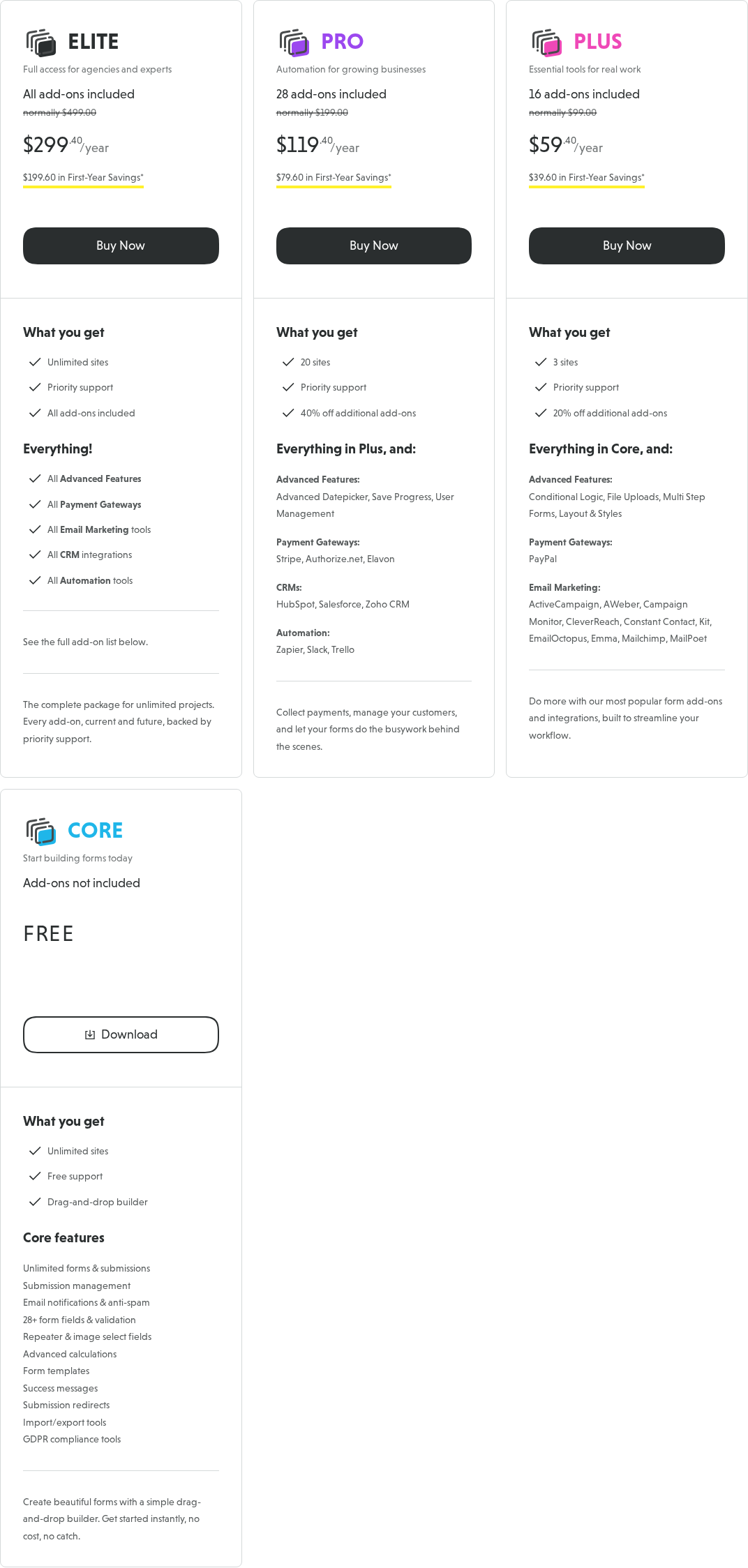
Introductory pricing reflects a 40% first-year discount. Renewal prices are full rate:
| Plan | Introductory | Renewal | Sites | Add-ons |
|---|---|---|---|---|
| Core | Free | Free | Unlimited | None |
| Plus | $59.40/year | $99/year | 3 | 16 |
| Pro | $119.40/year | $199/year | 20 | 28 |
| Elite | $299.40/year | $499/year | Unlimited | All (current and future) |
A 14-day no-questions-asked money-back guarantee applies to all paid plans.
The renewal price is the key number to evaluate. After year one, Plus at $99/year for three sites is comparable to WPForms Plus ($199/year renewal for three sites) but notably above Fluent Forms Pro ($79/year with no renewal inflation). Pro at $199/year for twenty sites is competitive for agencies. Elite at $499/year for unlimited sites and all future add-ons is notably higher than Gravity Forms Elite ($259/year).
Individual add-ons for single sites cost $29-49/year each. If you need only one or two integrations on one site, buying individual add-ons can be cheaper than a full membership plan, but this scales poorly as needs grow.
Spam Protection
The free core plugin handles spam without requiring any add-on. Per the WordPress.org plugin listing:
- Honeypot anti-spam field (active by default, invisible to real users)
- Google reCAPTCHA (v2 checkbox, v2 invisible, and v3)
- hCaptcha (added in v3.12.0, September 2025, privacy-focused alternative)
- Cloudflare Turnstile (added in v3.11.0, July 2025, frictionless CAPTCHA)
- Akismet integration (requires a separate Akismet account, but no Ninja Forms charge)
Three modern CAPTCHA options at no cost, plus a honeypot built in. Most sites will have no reason to buy anything additional for spam protection.
Accessibility and GDPR
The Ninja Forms changelog shows consistent accessibility investment across recent releases. Version 3.14.3 (April 2026) specifically addressed WCAG 2.2 AA color contrast compliance for form names on the admin dashboard and the Add New button. Version 3.14.1 added ARIA attributes, keyboard navigation, and focus styles to the Quill.js rich text editor. Earlier releases fixed radio button alignment for RTL languages and label accessibility issues.
GDPR compliance is built into the free core per the official plugin FAQ:
- All submission data is stored locally on your server only (Ninja Forms never receives it)
- Fields can be individually flagged as PII and excluded from submission records
- Automated data export and deletion requests integrate with WordPress Core’s privacy tools
The WordPress.org FAQ also addresses HIPAA: Ninja Forms can be used on HIPAA-applicable sites, though overall compliance depends on the full hosting and data handling setup.
Pros and Cons
Pros
- Free submission storage, locally on your server, no plan required
- Unlimited email notifications free, with merge tag support
- 28+ field types free, including repeatable fieldsets, calculations, and signature field
- Three modern CAPTCHA options free (reCAPTCHA, hCaptcha, Cloudflare Turnstile)
- Positioned as having no persistent upgrade banners or aggressive upsells (vendor claim; most users report a low-friction experience)
- Modular add-on model lets you buy only what you need
- Free support for all users, paid and free
- 42 official add-ons covering payments, CRMs, email marketing, and automation
- Strong accessibility investment across recent releases
- Actively developed, consistent security patches, clean changelog
Cons
- Conditional logic requires a paid add-on ($49/year standalone or Plus plan)
- File uploads require a paid add-on ($49/year standalone)
- All email marketing integrations require a paid add-on or membership plan
- Multi-step forms require a paid add-on ($29/year standalone)
- Layout and styling customization requires a paid add-on ($49/year)
- Zapier and Webhooks cost $49/year each as standalone add-ons
- Renewal pricing is notably higher than introductory pricing (Plus from $59.40 to $99/year)
- Builder UI appears functional but dated compared to WPForms’ more polished editor (based on official screenshots)
- No conversational/Typeform-style form mode available
Alternatives
WPForms
WPForms has a cleaner form editor (based on its own official screenshots and demo) and a larger template library (2,143 templates vs Ninja Forms’ more limited set). But WPForms Lite withholds local entry storage entirely, which is a significant drawback for free-tier users. WPForms’ renewal pricing is also notably higher. If the editor experience matters more than what is free, WPForms is worth testing. If you need real submission storage at no cost, Ninja Forms is the better call.
Gravity Forms
Gravity Forms is the option for teams with complex technical requirements. No free version, flat pricing at renewal (no doubling), a deep developer API with 500+ hooks, and a mature third-party ecosystem. Starts at $59/year for one site. Best for developers and agencies with complex form logic requirements. The price-to-complexity ratio favors Ninja Forms for simpler use cases.
Fluent Forms
Fluent Forms is the strongest competitor to Ninja Forms for free-tier users. Fluent Forms includes conditional logic in its free version, which Ninja Forms does not. Paid plans start at $63/year (single site) and do not inflate at renewal. If conditional logic for free is the deciding factor, Fluent Forms wins on that specific point. Ninja Forms has the edge in modular add-on flexibility and a longer track record.
Contact Form 7
Contact Form 7 is the extreme other end of the spectrum: completely free, no drag-and-drop editor, no stored entries, no templates. Works reliably and has a large third-party ecosystem, but requires more technical comfort to configure. For anyone who wants something more beginner-friendly than CF7 but truly free, Ninja Forms is the natural step up.
Forminator (WPMU Dev)
Forminator offers free conditional logic, free payment support, and basic entry storage at no cost. Less polished, less mature ecosystem, but covers some of the ground that Ninja Forms’ add-on model requires payment for.
Final Verdict
Final Verdict: Rating 4.1 / 5
Ninja Forms earns its reputation as the honest WordPress form builder. It does not pull the classic free-plugin bait-and-switch where you build your form, start getting submissions, and then discover you cannot see them without upgrading. Submissions are yours, stored locally, from day one, for free. The WordPress.org FAQ states this plainly: “Ninja Forms does not paywall submissions.”
What Ninja Forms does instead is apply a clear line between form building (free) and form enhancement (paid). Building is genuinely capable at no cost. Enhancing with conditional logic, file uploads, or marketing integrations costs money. At the Plus plan level ($59.40/year introductory for three sites), the bundle is competitive. Individual add-ons at $29-49/year each make sense for narrow, single-feature needs.
The honest friction points are real. Conditional logic, a feature that competing free plugins like Fluent Forms include at no cost, requires a paid add-on in Ninja Forms. The official UI screenshots suggest a builder that is functional but not as visually polished as WPForms. Renewal pricing is higher than introductory pricing and needs to be factored into any multi-year cost comparison.
For a small site owner who wants a solid contact form with stored submissions, GDPR controls, and zero cost, Ninja Forms is the strongest free option in its category. For a growing business that needs conditional logic, payment processing, and CRM connections, the Plus or Pro plan is competitive once you account for what comparable plans cost elsewhere. For a developer who prioritizes a builder that grows with the project rather than locking in immediately at a high license price, Ninja Forms’ modular philosophy is worth the trade-off.