


Squirrly SEO has spent more than a decade positioning itself as something different from Yoast and Rank Math. While those two plugins built their identities around on-page metadata and technical SEO checklists, Squirrly went wider: keyword research, rank tracking, site audits, and an editorial Live Assistant baked directly into the plugin, so a content creator in theory never leaves the WordPress dashboard. In 2026, the pitch has evolved further. Squirrly recently rebranded its flagship plugin as the “GEO Plugin by Squirrly SEO,” adding Generative Engine Optimization and Answer Engine Optimization tools to sit alongside its traditional SEO layer.
I installed the free plugin (v14.2.3) on a clean WordPress 6.8 sandbox, walked through the registration flow, explored the dashboard, ran a keyword research session in the Briefcase, set up a Focus Page, and stepped through the GEO Audit and Live Assistant screens. Paid-only features were researched from the official documentation, pricing page, and WordPress.org listing. Where a section relies on documentation rather than direct testing, I say so.
At a glance:
- Tested: Squirrly SEO free v14.2.3 on WordPress 6.8 (clean sandbox). Registration flow, dashboard, Focus Pages, Live Assistant, Briefcase keyword research, GEO Audit, technical SEO settings.
- Audited: squirrly.co product pages, pricing page, WordPress.org listing, changelog, public documentation.
- Bottom line: Squirrly SEO is the most feature-bundled option in the WordPress SEO plugin market, and its GEO/AEO layer is a genuine differentiator in 2026. The plugin rewards patient, content-focused site owners who want a single tool for keyword research, rank tracking, and on-page optimization. The free version is highly limited, the UI can feel busy, and the learning curve is steep enough to slow down less technical users.
Quick Verdict
Squirrly SEO packs more raw capability into a single WordPress plugin than any direct competitor. Keyword research, rank tracking, site audits, on-page live guidance, GEO/AEO scoring for AI visibility, and llms.txt management are all in one install. For content creators and small teams who want to stop paying for separate Semrush and rank-tracking subscriptions, the value argument is real.
The catch is execution. The free version is too restricted for serious use, the interface throws a lot at you at once, and the plugin requires internet access and a cloud account from the first screen. Cloud dependency means the plugin does not work on local development sites, and the email that registers your account starts a drip sequence that reviewers have called aggressive.
- Best for: bloggers and content creators who want a guided, all-in-one SEO workflow; small business owners who need keyword research, rank tracking, and on-page help without juggling three separate tools; agencies needing multi-site management with auditing at scale.
- Best plan for most users: The Pro plan at $9.99/month makes Squirrly usable, but five Focus Pages per site and 50 monthly keyword researches are tight for active content teams. Web Dev Kit or Business tier is where the tool delivers its full promise.
- Standout features: built-in keyword Briefcase with competition scoring; Focus Pages that analyze a priority page the way Moz or Ahrefs would; the GEO/AEO Audit that scores content for AI engine citation; llms.txt generation and LLM Indexing to help AI crawlers discover and trust your content.
- Watch out for: the free tier is one Focus Page and five keyword researches per month, which is not enough to run a real content operation; the cloud architecture requires internet access at all times; registration starts a marketing email sequence; the full-screen overlay Live Assistant breaks the standard WordPress editor flow for some users.
What Squirrly SEO Is
Squirrly SEO is a WordPress plugin published by Squirrly Limited, a UK-based company founded in 2012. The plugin was one of the earliest to build keyword research and editorial guidance directly into the WordPress post editor, instead of treating those as external tasks handled in separate browser tabs.
In mid-2026, the plugin completed a significant rebrand. Version 14.0.0 relaunched it as the “GEO Plugin by Squirrly SEO,” adding a dedicated Generative Engine Optimization (GEO) and Answer Engine Optimization (AEO) layer on top of the existing SEO foundation. The rationale: traditional Google search and AI-powered answer engines (ChatGPT, Perplexity, Claude, Gemini, Google AI Overviews) are now separate distribution channels, and the plugin claims to optimize for both simultaneously.
As of August 2026, the plugin carries a 4.6-star rating across 679 reviews on WordPress.org, with 30,000+ active installs and a current version of 14.2.3. Those install numbers are modest compared to Yoast’s 10+ million or Rank Math’s millions, but the review-to-install ratio skews favorably, suggesting a user base that engages actively with the product.
The plugin is free to install. Meaningful use requires a cloud account registered with your email and a paid plan for anything beyond the bare minimum. That cloud architecture is central to how Squirrly works: processing is offloaded to Squirrly’s servers, which keeps the local plugin lighter than competitors but introduces a dependency on their uptime and your connectivity.
Who Squirrly SEO Is Best For
Good fit:
- Bloggers and content creators who want guided SEO without studying technical documentation. The Live Assistant and SEO Goals provide step-by-step direction rather than a settings screen.
- Small business owners who want to handle keyword research, rank monitoring, and on-page optimization from a single dashboard and do not want to subscribe to Semrush or Ahrefs separately.
- Agencies and web developers managing multiple client sites who need multi-site auditing, bulk metadata editing, and per-site Focus Page quotas. The Web Dev Kit tier is built for this.
- Marketers interested in AI search visibility. The GEO/AEO Audit, llms.txt management, and LLM Indexing tools are among the most developed in any WordPress plugin right now.
- Sites already running Rank Math or Yoast that want to add Squirrly’s keyword research and GEO features without switching plugins. Squirrly can run in compatibility mode alongside most major SEO plugins.
Poor fit:
- Anyone who wants a simple, lightweight plugin that just handles meta tags and sitemaps. Squirrly is a platform, not a lightweight tool.
- Developers working on local sites. The cloud dependency breaks the plugin on localhost environments.
- Beginners who would be overwhelmed by a feature-dense dashboard. The UI requires patience.
- Sites that need an unlimited free tier. The free plan’s one Focus Page and five monthly keyword researches will not sustain any content program.
Hands-On: Setup and First Impressions
Installing Squirrly SEO from WordPress.org is straightforward. After activation, the plugin does not let you proceed to any feature without first registering a cloud account. You supply an email, confirm it, and the plugin authenticates against Squirrly’s API. This is a harder gate than Yoast or Rank Math, both of which let you use the plugin locally without any account. If you are testing on a site that does not have a publicly accessible URL, the plugin’s remote scanning will not work.
After registration, Squirrly imports data from any existing SEO plugin and runs an initial site scan. The dashboard that appears is dense. The left menu adds items for SEO Goals, Focus Pages, Research, Briefcase, Audit Suite, Rankings, and more. This is the first UX challenge: the plugin presents everything at once rather than surfacing only what the current user needs.
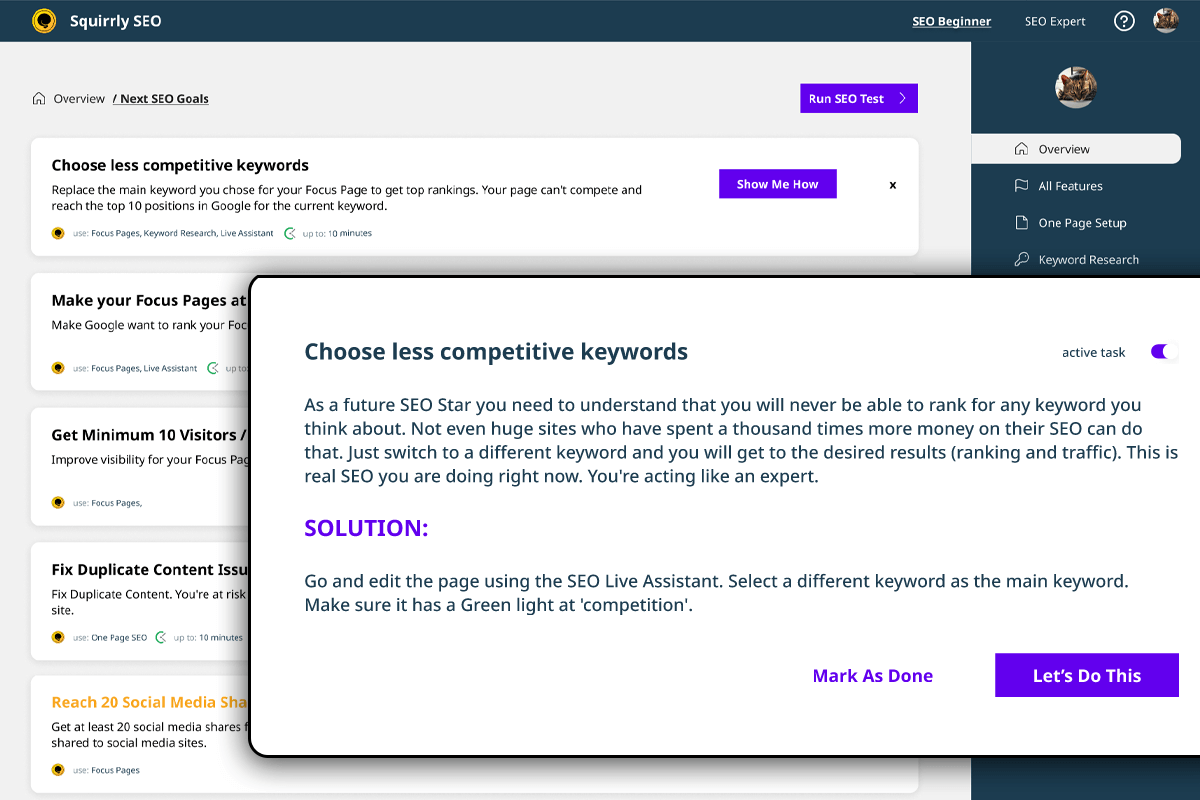
The onboarding suggestion is to start with SEO Goals, which generates a prioritized list of actions for your site. In my test, this produced a mix of technical checks (sitemap submission, canonical configuration) and content tasks (add keywords to the Briefcase, set a Focus Page). The gamification element, where completing tasks moves a progress indicator, is either motivating or infantilizing depending on your experience level. For a site owner who finds SEO concepts confusing, the guided approach is genuinely useful. For an experienced SEO practitioner, it may feel like extra clicking.
The plugin automatically configures XML sitemaps, canonical URLs, and Open Graph tags during setup. No manual intervention is needed for these basics.
Core Features
Live Assistant
The Live Assistant is Squirrly’s on-page optimization layer. It appears inside the WordPress block editor as you write, checking your content against your chosen keyword and providing real-time feedback on:
- Keyword presence in the title, URL, headings (H1-H6), first paragraph, and alt text
- Keyword density and overoptimization risk
- Content length and readability signals
- Internal and external link presence
- Google-friendliness checks (on paid plans)
The assistant uses a traffic-light system similar to Yoast’s. Checks turn green as you satisfy each condition. The free version covers the basic keyword checks. The Pro plan adds the full Google-friendliness analysis and overoptimization detection.
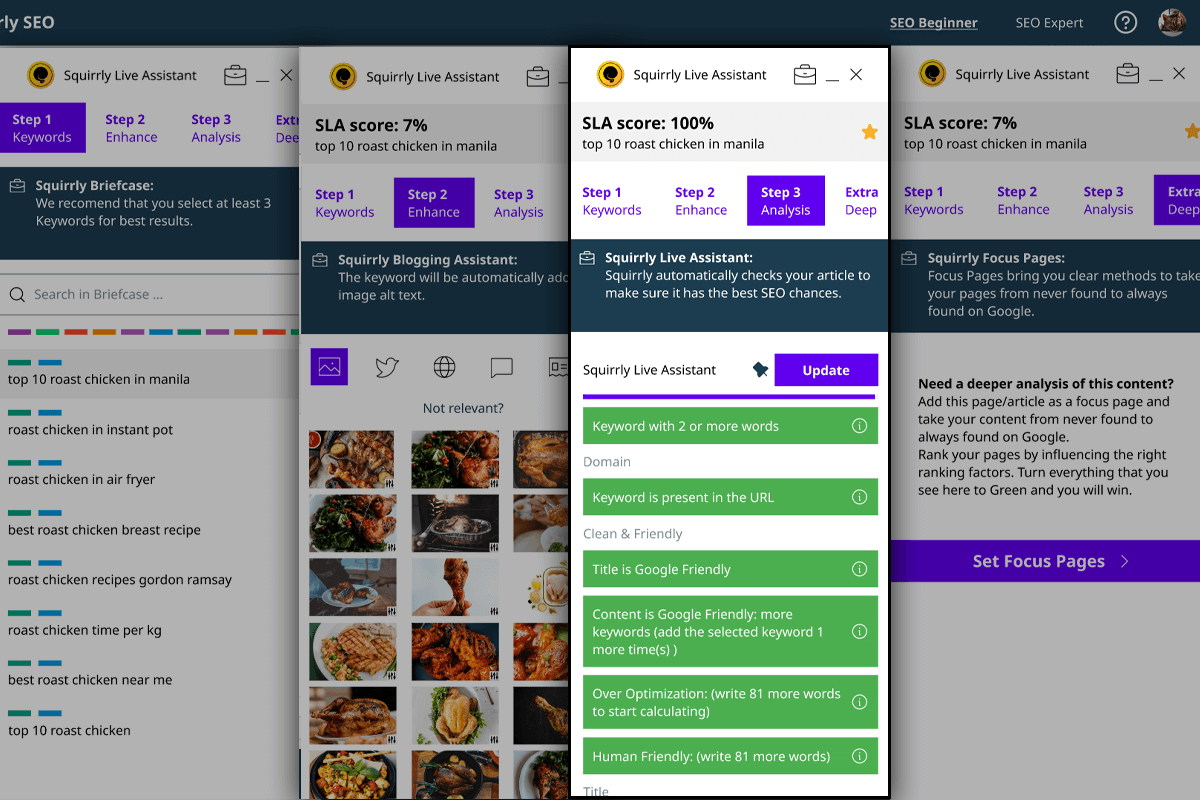
One design note: the Live Assistant opens as a floating overlay rather than a native sidebar, which can interrupt the writing flow. The interface integrates with Gutenberg, Elementor, and Divi, but the overlay approach feels different from how Yoast and Rank Math embed their panels into the WordPress editor sidebar. This is a preference issue rather than a functional one, but it is worth noting for teams with established writing workflows.
Focus Pages
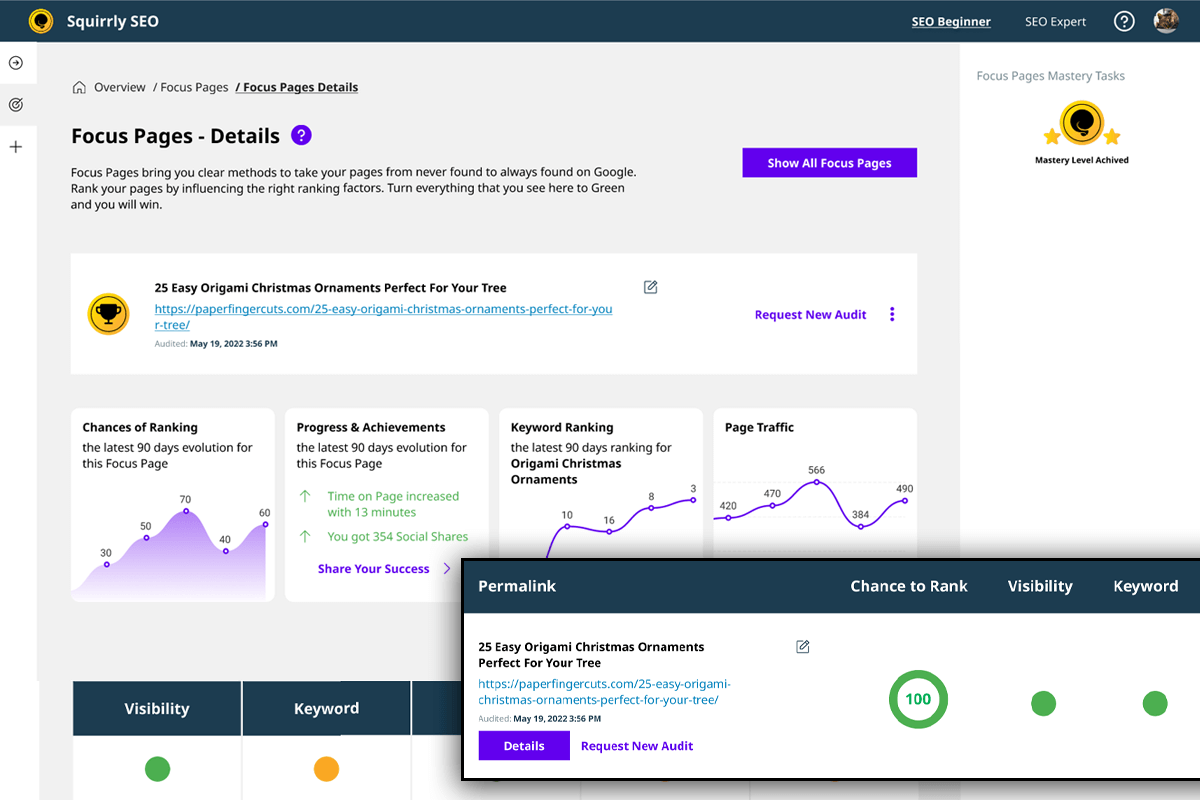
Focus Pages are one of Squirrly’s most distinctive features. You designate a page or post as a Focus Page, and the plugin performs a deep analysis of that URL, pulling signals from multiple sources: on-page factors, backlink data, traffic metrics, social signals, and competitor benchmarking.
The plugin’s own documentation compares Focus Pages to what Moz or Ahrefs provide for page-level analysis. That is an ambitious comparison, but the feature is genuinely more comprehensive than a standard on-page score. You see a priority task list specific to that page, the ability to track improvement over time, and a breakdown of where the page stands relative to competitor pages targeting the same keyword.
The free plan allows one Focus Page per account total. Pro allows 25 Focus Pages per account (five per site). For a site with an active content program, those limits are tight. The Web Dev Kit and Business tiers raise the limit to 70 Focus Pages per account.
Built-In Keyword Research and Briefcase
Squirrly builds keyword research directly into the plugin. You type a keyword or topic, and the tool returns competition data, search volume, social popularity, and an overall difficulty signal. The data comes from Squirrly’s own index, which the plugin claims is refreshed with a maximum 48-hour cache, compared to competitors that may cache data for weeks or months.
Keywords you want to track or target go into the Briefcase. This is an organizational layer that groups keywords by label or campaign. When you open the Live Assistant in the editor, you can pull keywords from your Briefcase rather than typing them each time. It is a workflow improvement that reduces repetitive setup across multiple posts targeting related terms.
The free plan allows five keyword research queries per month. Pro allows 50. For a site publishing several articles a week, 50 researches per month is workable. The Web Dev Kit and Business tiers both provide 300 per month.
The built-in research tool does not replace a dedicated platform like Semrush for volume, competitor analysis depth, or backlink data. But for a content creator who primarily needs directional data before writing, it removes the cost and context-switching of a separate subscription.
GEO and AEO Features
The newest layer of Squirrly SEO is also its most forward-looking. The plugin now addresses what it describes as the splitting of search into two parallel channels: traditional Google ranking (SEO) and AI-powered answer generation (GEO and AEO).
GEO/AEO Audit: The audit scores each page for its readiness to be cited by AI answer engines including ChatGPT, Perplexity, Claude, Gemini, and Google AI Overviews. The score factors in structured data quality, content structure, entity clarity, and signals that these engines have been shown to weight when selecting citations.
llms.txt management: Squirrly generates and deploys llms.txt and llms-full.txt files. These are an emerging format similar to robots.txt, designed to tell AI language models which content on your site is trustworthy, how to use it, and what to avoid. The plugin automates this file generation and updates it as your content changes.
LLM Indexing: The plugin submits content to AI indexing endpoints via IndexNow and the Google Indexing API, aiming to accelerate discovery by AI crawlers rather than waiting for passive crawls.
AI Crawler Control: You can selectively allow or block specific AI crawlers (GPTBot, ClaudeBot, PerplexityBot, Google-Extended) from accessing your content. This is useful for publishers who want AI engines to discover their content but need to exclude specific crawlers for licensing or traffic reasons.
Direct AI connection (v14.2.0): The most recent major feature addition lets you connect an AI assistant (Claude or ChatGPT) directly to Squirrly SEO through the WordPress Abilities API. This enables automation via REST API and WP-CLI, allowing workflows where an AI agent can query or update SEO settings programmatically.
These features are genuinely differentiated. No other mainstream WordPress SEO plugin offers this complete a set of AI-search tools in one place. The GEO/AEO space is new enough that no tool can guarantee citation results, and Squirrly says so directly in its FAQ. What the plugin provides is the infrastructure to maximize the conditions for citation.
Technical SEO Automation
Squirrly handles the standard technical SEO layer automatically after setup:
- XML sitemaps for posts, pages, custom post types, and Google News (news sitemap available)
- Canonical URL management at both the global and per-post level
- Meta robots configuration (noindex, nofollow, noarchive) per content type and per URL
- Open Graph and Twitter Card meta tags with per-post image customization
- 301 redirect management via the All Snippets Visibility section
- JSON-LD Schema output covering FAQ, HowTo, Article, Organization, Person, Product, Event, Course, and more (expanded significantly in v14.1.0)
- Breadcrumb support
- Noindex pages excluded from XML sitemap
The Schema output is solid. Version 14.1.0 expanded the auto-generated types considerably, and the manual Schema options cover the most common needs without requiring custom code. The Schema generator does not match Rank Math’s 840+ types, but it covers the practical use cases for most WordPress sites.
Rankings Tracking and Audit Suite
Squirrly pulls ranking data from Google Search Console to show keyword positions, clicks, impressions, and click-through rates. The Audit Suite scores your site across categories including blogging quality, traffic patterns, SEO health, social signals, links, and domain authority. Even the free plan allows one page audit; paid plans raise the monthly audit quota significantly.
The rank tracking and audit tools are basic by the standards of dedicated platforms like Semrush or Ahrefs, but they provide enough signal for a content site owner who does not need granular competitive intelligence. The value is in consolidation rather than depth.
Compatibility with Other SEO Plugins
One of Squirrly’s more practical claims is that it can run alongside Rank Math, Yoast, SEOPress, and other SEO plugins without conflict. In compatibility mode, Squirrly disables its own overlapping settings and defers to the other plugin for metadata output, while still providing its keyword research, rank tracking, Focus Pages, and GEO features. This makes Squirrly usable as a layered addition rather than a full replacement, which lowers the switching cost for sites already committed to a different primary plugin.
Pricing
Squirrly SEO operates on a tiered subscription model with a permanently free plan. Prices below are verified from the official squirrly.co pricing page (plugin.squirrly.co/squirrly-seo-pricing/).
| Plan | Price | Sites | Focus Pages | AI Keyword Researches/month | Audit Pages/month |
|---|---|---|---|---|---|
| Free | $0 | 1 | 1 per account, 1 per site | 5 | 1 |
| Pro | $9.99/month | 5 | 25 per account, 5 per site | 50 | 100 |
| Web Dev Kit | $51.20/month | 10 | 70 per account, 10 per site | 300 | 300 |
| Business | $71.99/month | 7 | 70 per account, 10 per site | 300 | 300 + full analytics and rank tracking |
One notable detail in the plan structure: the Business tier at $71.99/month supports seven sites, while the cheaper Web Dev Kit at $51.20/month supports ten. The difference is the analytics layer. Business includes full content marketing analytics and professional rank tracking; Web Dev Kit is built for developers who want site control and scale but can manage without the advanced reporting suite.
The Pro plan at $9.99/month is the entry point for real use, but five Focus Pages per site and 50 monthly keyword researches are limiting for an active content team. The Web Dev Kit is aimed at developers managing several client sites. The Business plan adds the full analytics and professional rank tracking layer on top of the Web Dev Kit quota.
No free trial is available, but the free plan exists and requires no credit card. Credit card is only required when upgrading to a paid tier.
Compared to the main alternatives: Rank Math Pro costs approximately $96/year for unlimited personal websites. Yoast SEO Premium costs $118.80/year per site. At $9.99/month (roughly $120/year), Squirrly Pro’s cost is broadly similar to Yoast Premium and slightly higher than Rank Math Pro, but Squirrly bundles keyword research and rank tracking that neither competitor includes. The comparison is not apples-to-apples.
Squirrly SEO vs Rank Math
The two plugins occupy different parts of the WordPress SEO market rather than directly substituting for each other.
| Squirrly Free | Squirrly Pro | Rank Math Free | Rank Math Pro | |
|---|---|---|---|---|
| Focus keyphrases | 1 | Unlimited in editor | Unlimited | Unlimited |
| Keyword research | 5/month | 50/month (built-in) | Via Semrush integration | Via Semrush integration |
| Rank tracking | No | Yes (GSC data) | Yes (GSC data, free) | Yes (extended) |
| Site audit | 1 page/month | 100 pages/month | No | Yes |
| Schema types | Core types | Core + expanded | 24 types (free) | 840+ types |
| GEO/AEO audit | Yes (free) | Yes (full) | No | No |
| llms.txt | Yes | Yes | No | No |
| AI crawler control | Yes | Yes | No | No |
| Redirect manager | Yes (basic) | Yes | Yes (free) | Yes |
| Readability analysis | No | No | No | No |
| Works with other SEO plugins | Yes (compatibility mode) | Yes | No | No |
| Price (annual, 1 site) | Free | ~$120/year | Free | ~$96/year |
Rank Math wins on Schema depth, free-tier technical features, and price-per-site for multi-site setups. Squirrly wins on built-in keyword research, rank tracking at the Pro level, GEO/AEO features, and the ability to layer on top of a site’s existing SEO plugin rather than replacing it.
Pros and Cons
Pros
- Built-in keyword research removes the need for a separate Semrush or Ahrefs subscription for directional data
- GEO/AEO Audit, llms.txt generation, and LLM Indexing are genuinely ahead of what other WordPress SEO plugins offer for AI search visibility
- Focus Pages deliver page-level analysis comparable to dedicated audit tools, not just a basic on-page score
- Can run alongside Rank Math, Yoast, or SEOPress in compatibility mode without conflicts
- Rank tracking integrated via Google Search Console data at Pro tier, no separate account needed
- Schema output expanded significantly in v14.1.0; covers the common structured data types well
- 4.6-star rating across 679 WordPress.org reviews and responsive support reputation
- No credit card required for the free plan; meaningful exploration is possible before committing
- Works with Gutenberg, Elementor, Divi, WooCommerce, WPML, and WordPress Multisite
Cons
- Free tier is highly restrictive: one Focus Page per account and five keyword research queries per month are not enough for sustained content operations
- Cloud account required from the very first screen; the plugin does not function on local development sites without internet access
- Registration triggers a marketing email sequence that reviewers have described as aggressive
- The interface is busy and can be overwhelming. The full-screen overlay Live Assistant breaks the native WordPress editor sidebar pattern
- 30,000+ active installs is a small base compared to Rank Math or Yoast, which may be a concern for long-term plugin stability
- No dedicated readability analysis, which Yoast still provides better than anyone
- Pro at $9.99/month still imposes tight per-site quotas (five Focus Pages, 50 keyword researches) that may require a Business upgrade sooner than expected
Alternatives
Rank Math SEO is the strongest direct competitor for most WordPress sites. Its free tier includes redirect management, 404 monitoring, unlimited focus keyphrases, Search Console data, and 24 Schema types without any account requirement. For technical SEO and Schema depth, Rank Math’s Pro tier ($96/year for unlimited personal sites) is excellent value. It does not include built-in keyword research, rank tracking, or GEO features. See our Rank Math review for a full breakdown.
Yoast SEO is the plugin you already know. Its readability analysis is deeper than anything Squirrly offers, and the Premium tier’s AI Generate and bundled Local/Video/News SEO add-ons add real value for publishers. At $118.80/year per site, the per-site pricing is a problem for multi-site operators. See our Yoast SEO review.
All in One SEO (AIOSEO) offers a cleaner settings experience and stronger local SEO schema support. Its free tier is more generous than Squirrly’s. Worth evaluating for local businesses and WooCommerce stores.
SEOPress is a lightweight option for performance-conscious developers who want clean meta output without the resource overhead of a full SEO platform.
Final Verdict
Squirrly SEO is the right plugin for a specific kind of user: the content-focused site owner or small team who wants to handle keyword research, rank tracking, on-page optimization, and now AI search visibility from a single tool, without stitching together multiple subscriptions.
The GEO/AEO features are a real differentiator in 2026. No other WordPress SEO plugin comes close on the depth of llms.txt management, LLM Indexing, AI crawler control, and the GEO/AEO Audit. For any site where appearing in AI-generated answers matters, Squirrly has done the most systematic work of any plugin in this area.
The honest problems are value structure and UX. The free tier is too restricted to serve as a genuine on-ramp. The Pro plan at $9.99/month unlocks meaningful use but still imposes per-site Focus Page and keyword research limits that push active sites toward the more expensive tiers. The interface packs a lot in, and the cloud-first design is a different mental model than the local plugins most WordPress users are familiar with.
Install it if: you want GEO/AEO features alongside traditional SEO and are willing to pay Pro or above; you want built-in keyword research and rank tracking without a separate subscription; you run multiple client sites and need a scalable audit and Focus Pages workflow; or you want to add Squirrly’s features alongside your existing Rank Math or Yoast setup.
Look elsewhere if: you need a fully functional free tier; you work on local development sites; you find feature-dense dashboards demotivating; or you need deep Schema customization where Rank Math’s 840+ types are a better fit.
FAQ
What is Squirrly SEO, and how does it differ from Yoast or Rank Math?
Squirrly SEO is an all-in-one WordPress SEO platform that bundles keyword research, rank tracking, site audits, on-page optimization guidance, and GEO/AEO tools for AI search visibility into one plugin. Yoast and Rank Math focus on metadata, on-page analysis, and Schema output. Squirrly covers more surface area but requires a paid plan and a cloud account to unlock practical use.
Does Squirrly SEO have a free version?
Yes. The free version is available on WordPress.org with no credit card required. It includes one Focus Page per account, five keyword research queries per month, and one audit page per month. This is enough to test the interface but too limited for active content operations.
What is Squirrly SEO Pro, and is it worth the cost?
Pro costs $9.99/month and unlocks 25 Focus Pages per account (five per site), 50 monthly keyword research queries, 100 audit pages, the full Live Assistant, and email support. For a single active content site, Pro provides meaningful value over competitors that do not include built-in keyword research and rank tracking. For teams with heavy content output, the per-site Focus Page limit may push toward the Web Dev Kit or Business tier.
Can Squirrly SEO run alongside Rank Math or Yoast?
Yes. Squirrly offers a compatibility mode that disables overlapping metadata settings while preserving its own keyword research, Focus Pages, rank tracking, and GEO features. This makes it possible to use Squirrly as an additive layer rather than a full replacement.
What is a Focus Page in Squirrly SEO?
A Focus Page is a page or post you designate for priority optimization. Squirrly performs a detailed analysis of that URL, including on-page factors, backlink signals, traffic data, and competitor benchmarking, and generates a specific task list for improving its rankings. The concept is similar to what you would do manually in Moz or Ahrefs, but integrated into WordPress.
What are the GEO and AEO features in Squirrly SEO?
GEO (Generative Engine Optimization) and AEO (Answer Engine Optimization) are tools for improving your content’s visibility in AI-generated answers from ChatGPT, Perplexity, Claude, Gemini, and Google AI Overviews. Squirrly provides a GEO/AEO Audit that scores pages for AI citation readiness, llms.txt file generation (similar to robots.txt but for AI engines), LLM Indexing via IndexNow and Google APIs, and controls for allowing or blocking specific AI crawlers.
Does Squirrly SEO work on local development sites?
No. The plugin’s cloud architecture requires internet access and a publicly accessible URL for its scanning and API features. Local development environments without external access will not be able to use the plugin’s core functionality.
How does Squirrly SEO’s keyword research compare to Semrush?
Squirrly’s built-in keyword research provides directional data: search volume, competition level, social popularity, and difficulty. It is useful for content planning and is updated with a short cache window (maximum 48 hours per the FAQ). It does not replace a dedicated platform like Semrush for competitor gap analysis, deep backlink data, or granular SERP analysis. For sites that need only basic keyword guidance before writing, Squirrly’s built-in tool is practical and saves a separate subscription.
Is Squirrly SEO good for beginners?
Partially. The SEO Goals feature and guided task lists help beginners understand what to prioritize. The Live Assistant provides real-time writing guidance. But the overall dashboard is dense, and the interface can overwhelm users who are new to SEO concepts. Yoast SEO’s simpler interface and clearer readability guidance may be a better starting point for absolute beginners.