


Most WordPress SEO plugins do the same thing: they replace your theme’s default title output, let you type a meta description, add a content analysis sidebar, and then remind you to upgrade every time you log in.
The SEO Framework does something different.
It installs quietly, sets itself up with intelligent defaults, and gets out of your way. There is no configuration wizard, no traffic-light score waiting for you in every post, and no upgrade banner in your admin header. What it does instead is automate the fundamentals so well that many sites need almost no manual intervention.
I researched The SEO Framework thoroughly: the official website, pricing page, WordPress.org listing (plugin slug: autodescription), knowledge base, and third-party reviews. I reviewed the extension ecosystem and compared it directly against Yoast SEO for the buyers most likely to be deciding between them.
At a glance
- Tested version: 5.1.4
- Active installs: 200,000+
- Rating: 4.9/5 stars across 378 WordPress.org reviews
- Free tier: Yes, unlimited sites, full core SEO
- Paid plans: from $7/month billed yearly
- Best for: Developers, agencies, and technically confident site owners who want automation over hand-holding
Quick Verdict
The SEO Framework is the most privacy-respecting, performance-focused SEO plugin available for WordPress in 2026. Its free core covers everything a typical WordPress site needs: automated title and description generation, Schema.org JSON-LD, XML sitemaps, canonical URLs, and a uniquely useful SEO bar in the post list.
The honest trade-off is guidance. This plugin trusts you to know what SEO is. It does not score your content, grade your keyword density, or nudge you to add more subheadings. If you want that kind of hand-holding, Yoast or Rank Math will serve you better. If you want a clean, fast, automated foundation you can build on, The SEO Framework is hard to beat.
Quick Verdict
- Best for: developers, agencies managing multiple sites, performance-conscious site owners, and privacy-first projects
- Best plan for most users: Free (unlimited sites) for the vast majority of cases; Pro or Business if you need the Focus keyword analysis extension or the Articles structured data extension
- Standout features: automation-first SEO with smart defaults, the unique color-coded SEO bar, genuine privacy-by-design (no tracking, no cookies, no telemetry), fastest footprint of any full-featured SEO plugin
- Watch out for: no on-page content analysis in the free tier, no redirect manager anywhere in the plugin, extensions add meaningful cost if you need keyword guidance, and the interface can feel opaque to beginners
What The SEO Framework Is
The SEO Framework is a WordPress SEO plugin first published in 2015 by Sybre Waaijer. Its early name, “AutoDescription,” is still embedded in the plugin’s WordPress.org slug (autodescription) and reflects its founding idea: let WordPress generate your SEO metadata intelligently from existing content instead of requiring manual input for every page.
The plugin now covers a much broader scope than automated descriptions. It handles the full technical SEO layer for a WordPress site, including Schema.org structured data, XML sitemaps, canonical URL management, robots meta configuration, Open Graph and Twitter card output, and a post-list SEO audit bar. All of that comes in the free version.
Paid extensions are available through a separate Extension Manager plugin. They add focused features: keyword content analysis, Google News sitemaps, local business structured data, analytics connections, and anti-spam tools. The core plugin does not require any extensions to function well for most sites.
As of August 2026, the free plugin is at version 5.1.4 with 200,000+ active installs and a 4.9-star rating across 378 reviews on WordPress.org. That rating, across a meaningful review count, is the highest of any full-featured WordPress SEO plugin I have researched.
Who The SEO Framework Is Best For
Good fit:
- WordPress developers who want a clean, code-friendly SEO foundation without UI noise
- Agencies managing 20 or 200 client sites, where the Business and Agency plans offer substantially lower per-site costs than Yoast’s or Rank Math Pro’s per-site tiers
- Performance-critical sites where SEO plugin overhead matters (The SEO Framework claims to be up to 12 times faster than some competitors in benchmarks)
- Privacy-first projects, NGOs, or businesses where no third-party data collection is a hard requirement
- Experienced content creators who already understand SEO and prefer automation to checklists
- WooCommerce and Easy Digital Downloads stores wanting clean SEO without extra plugin weight
Poor fit:
- Beginners who want step-by-step keyword and content guidance in the post editor
- Content teams that depend on traffic-light scoring and readability analysis to guide writers
- Sites that need a built-in redirect manager (The SEO Framework does not include one; a separate plugin is required for bulk redirect management)
- Publishers who need a Google News sitemap in the free tier (it requires the Articles extension, which is paid)
- Anyone who relies on in-dashboard Search Console or rank-tracking data
Hands-On: Setup and First Impressions
Installation from WordPress.org is standard. You search “The SEO Framework” in the plugin repository (or search for “autodescription”), install, and activate.
What happens next is different from every other major SEO plugin I have tested. There is no setup wizard. No multi-step onboarding flow. The plugin activates, adds an “SEO” menu item to the WordPress admin sidebar, and is already functional with sensible defaults already in place.
The settings page is a single scrollable screen organized into 10 collapsible sections. The design is intentionally minimal. There are no upgrade banners, no review request popups, no affiliate links for related tools. The interface blends into the WordPress admin as if it were a core feature.
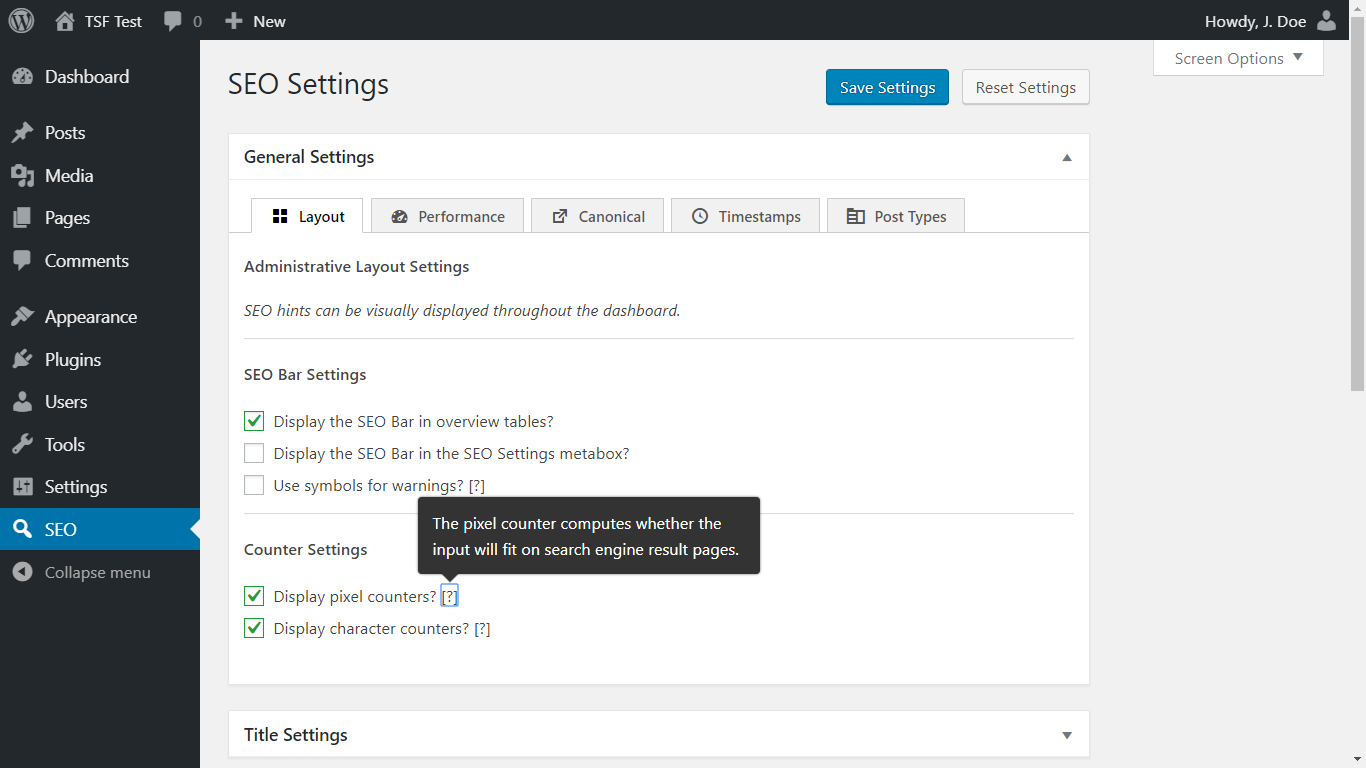
The developer’s documentation is direct about the setup expectation: “somewhere between four and ten options require your attention.” Those options are:
- Homepage SEO title and meta description (with character-count color guides)
- Open Graph data: site name and logo
- Schema.org presence: company or individual name, logo URL
- Webmaster verification codes (Google, Bing, Yandex, Baidu)
- Robots meta: which archive types to noindex (tags, author pages, and similar)
That covers first-time setup. The remaining settings exist for advanced configurations: sitemap tweaks, breadcrumb output, redirect handling, and privacy-related crawl controls. Most sites can leave them at defaults and never return.
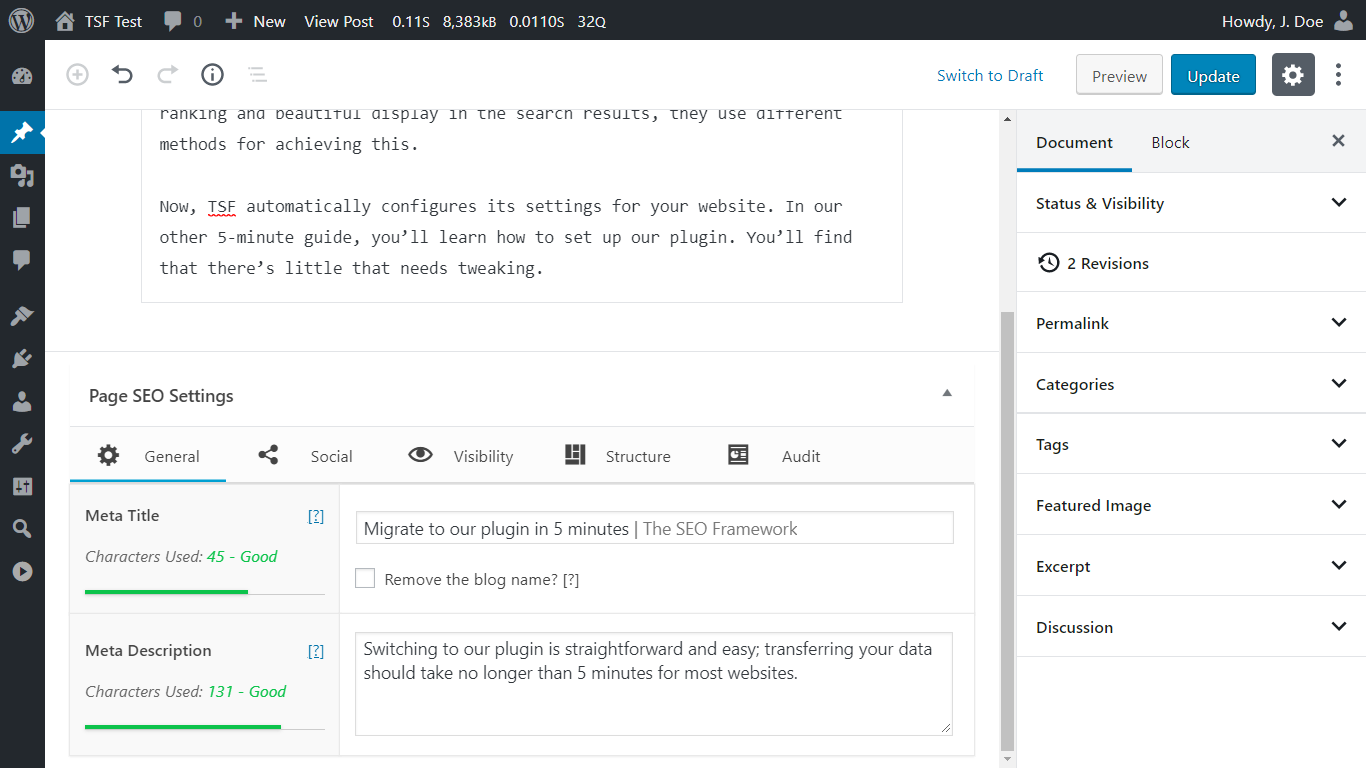
Each post and page gains a compact “SEO Settings” meta box beneath the content editor. It has three tabs:
- General: custom title and description with auto-generated fallbacks and character-count color indicators. The auto-generated description strips formatting from the post content and produces a readable default, which means pages without manual descriptions still get sensible meta output.
- Social: Open Graph and Twitter metadata per page. Lets you set a custom social title, description, and image separate from the SEO meta.
- Visibility: canonical URL, robots directives (noindex, nofollow), 301 redirect target, and archive control settings.
Core Features
The SEO Bar
This is the feature that most separates The SEO Framework from its competitors, and it is available in the free version.
In the WordPress Posts and Pages list views, The SEO Framework adds a dedicated “SEO” column. Each row shows a small color-coded bar with multiple indicator segments, each representing a specific check. The bar runs over 70 automated checks per page.
Color coding follows a simple system:
- Green: no issues found for this check
- Orange: a warning worth reviewing
- Red: a problem that likely affects indexing or SEO quality
Checks include: title length, description presence, indexability status, canonical conflicts, duplicate title detection, structured data output, and more. A tooltip on each bar segment explains what that specific indicator is flagging.
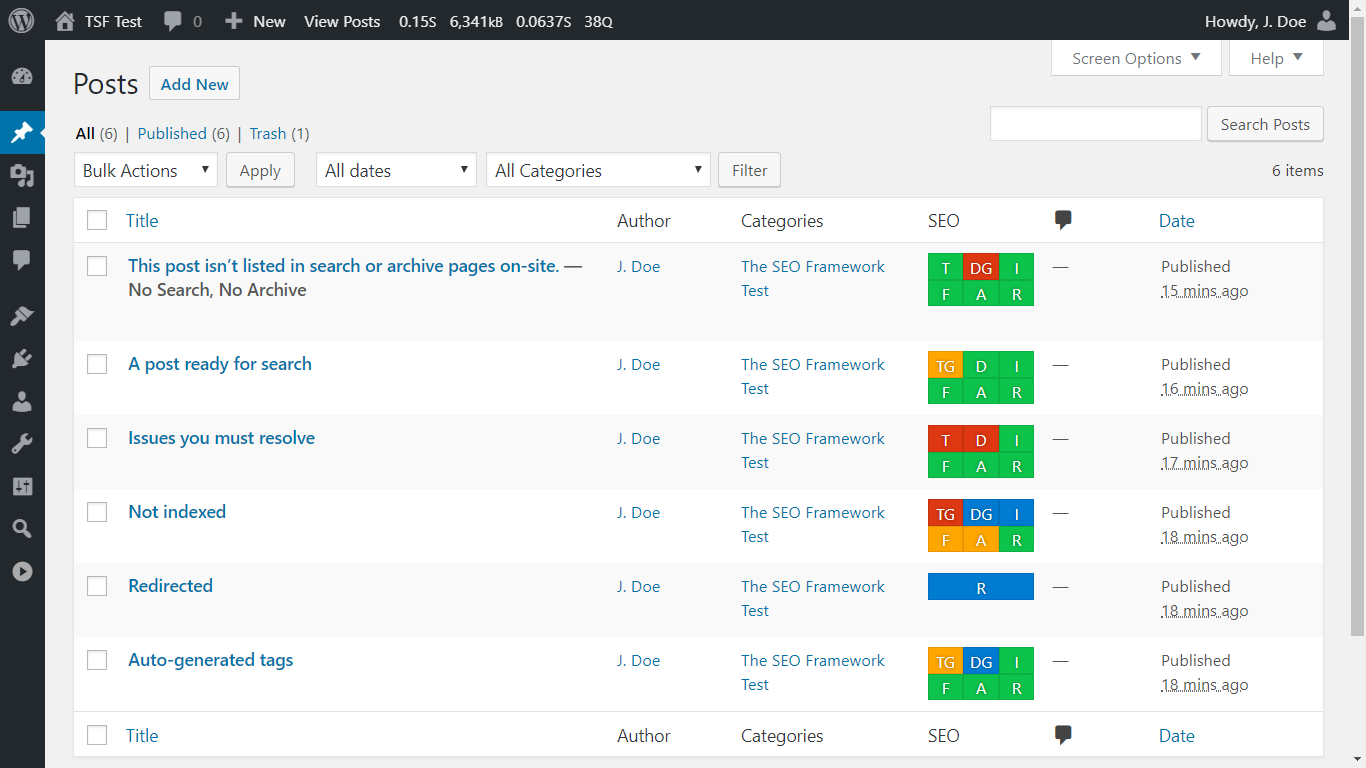
The practical value is significant. For sites with hundreds or thousands of posts, the SEO bar gives an immediate audit of which pages need attention. You do not need to open each post individually. Hover over any segment and a tooltip explains what that check found.
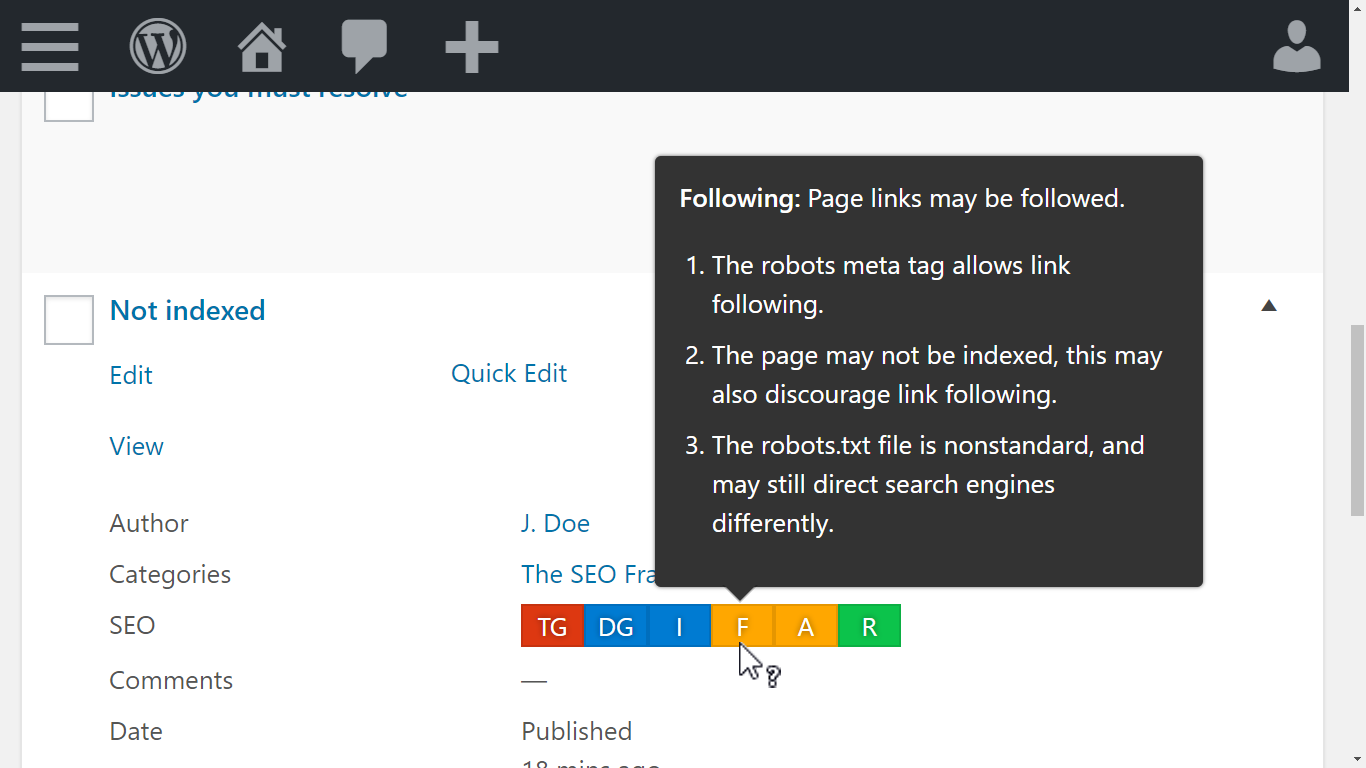
No other major free WordPress SEO plugin provides this kind of per-post audit column at the list level without requiring a manual crawl or a paid add-on. It is one of those features that sounds minor until you have a 500-post site and need to find which pages have missing descriptions.
Automated Meta Title and Description Generation
The SEO Framework reads your WordPress environment to generate meta titles and descriptions automatically. It uses the post title for the meta title, appending the site name with a configurable separator and position. For descriptions, it strips formatting from the post’s first paragraphs to build a readable default.
This automation is the plugin’s foundational design principle. Other SEO plugins default to empty description fields and prompt you to fill them in. The SEO Framework defaults to a generated value that is usually adequate, and lets you override only when you need something different.
The title generation respects WordPress’s dynamic title system. For archive pages, taxonomy archives, author pages, and other template-driven URLs, titles are generated contextually rather than left blank or shown as generic placeholders.
Schema and Structured Data
The SEO Framework outputs Schema.org JSON-LD on every page. The core schema types covered in the free plugin include:
- Organization or Person (configured from the global settings)
- WebSite with SearchAction (sitelinks search box signal)
- WebPage or Article on content pages
- BreadcrumbList (when breadcrumbs are enabled)
One technically notable behavior: the plugin wires schema entities together using ID references rather than repeating full entity definitions across multiple scripts. This produces a cleaner, deduplicated JSON-LD graph compared to plugins that output multiple separate schema blocks with duplicated organization data.
For more advanced schema needs, the Articles paid extension adds Google News-specific structured data. The Local extension adds LocalBusiness structured data. These are kept separate from the free core as optional extensions, which keeps the base plugin lightweight for sites that do not need those schema types.
XML Sitemaps
The built-in sitemap generates an XML sitemap index at /sitemap.xml and notifies Google and Bing automatically when you publish or update content. Configuration options let you include or exclude specific content types, set URL count limits per sitemap file, and control whether lastmod tags are included.
Version 5.1.4 added new settings for breadcrumb title output: you can now choose between meta titles or page titles for breadcrumb display, a useful option for sites where the two differ significantly.
One limit to note: there is no Google News sitemap in the free version. That requires the Articles paid extension, available on any paid plan.
Technical SEO Controls
The Visibility tab in the per-post settings covers the technical controls most sites need:
- Canonical URL: auto-generated and manually overridable per post
- Robots directives: noindex, nofollow, noarchive per post or globally by content type
- 301 redirect target: a redirect URL field directly in the post settings, so individual redirects do not require a separate plugin
- Archive controls: per-taxonomy and per-post-type indexability from the global settings page
Global technical settings include disabling author archives, date archives, and format archives from being indexed. These crawl efficiency controls reduce thin-content exposure without requiring .htaccess edits or additional plugins.
The plugin also supports AI crawler blocking via robots.txt controls, letting you exclude specific crawlers such as GPTBot without editing the robots file manually.
The one technical gap is bulk redirect management. There is no redirect manager for site-wide or import-based redirect handling. The per-post 301 field covers the most common single-URL redirect use case, but for redirects from deleted posts or bulk redirect imports, a dedicated plugin like Redirection is needed alongside The SEO Framework.
Social Media Meta
Open Graph and Twitter card output is handled automatically from the same title and description fields used for SEO. The Social tab in the per-post meta box lets you set custom social titles, descriptions, and images for posts where the SEO defaults are not appropriate for sharing context.
This covers the social sharing layer without requiring a separate plugin or additional configuration beyond the basic setup.
Privacy and Performance
Privacy: The SEO Framework collects no data. There is no telemetry, no crash reporting, no usage analytics sent to the developer. No third-party scripts are loaded on the front end. No cookies are set. The plugin is entirely self-contained. This makes it the strongest privacy-positioned SEO plugin in the market, and a natural fit for projects operating under strict data protection requirements.
Performance: The plugin claims to load up to 12 times faster than some competitors and benchmarks at around 5.6 times faster than Yoast SEO in published third-party tests. It uses a real-time caching layer to avoid repeated database queries on each page load. The front-end footprint is small by design.
For most WordPress sites on shared hosting, SEO plugin performance is not a measurable issue. For high-traffic sites processing thousands of requests per minute, or for sites where Core Web Vitals are under active optimization, the difference between a heavy and a light SEO plugin can be meaningful in the millisecond margin.
Extension Manager and Paid Extensions
The Extension Manager is a separate free plugin that you install to manage add-ons. Once installed, paid extensions unlock based on your license tier.
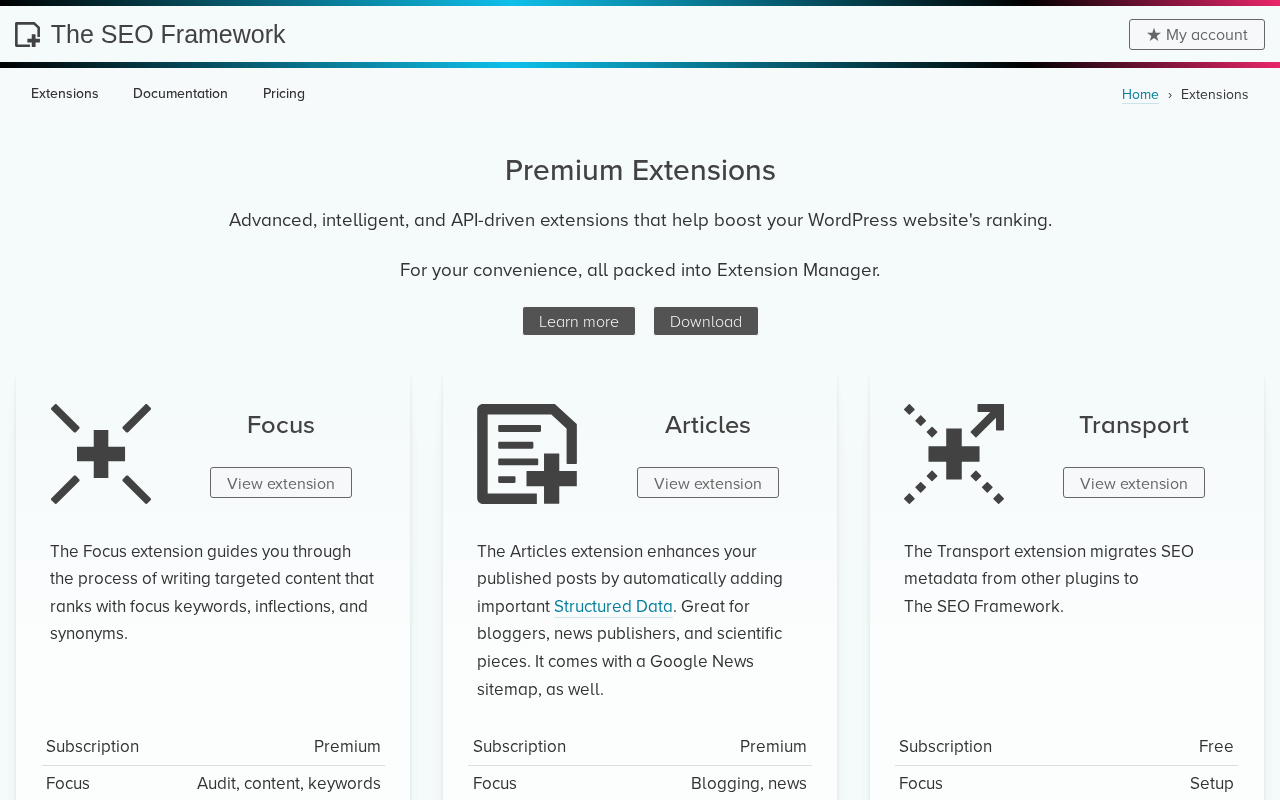
Focus is the extension most relevant to content creators. It brings keyword analysis into the post editor: target keyword matching, inflection support, synonym recognition, and a density analysis. For users moving from Yoast Premium who rely on multi-keyword tracking in the editor, Focus is the equivalent capability. It requires a Pro plan or above.
Articles expands structured data for blog posts and adds a Google News sitemap. For publishing-focused sites that need to appear in Google News or Top Stories, this is the extension that enables it.
Honeypot adds anti-spam protection for comment and contact forms with a claimed 99.99% catch rate using six layered spam-detection methods.
Cord connects the site to Google Analytics, Meta Pixel, and other third-party services. For developers who want to load tracking scripts through a privacy-controlled plugin rather than a theme or separate plugin, this provides a cleaner implementation path.
Local adds structured data for local businesses: address, phone, hours, geo coordinates. It outputs LocalBusiness JSON-LD configured from a settings screen rather than requiring code.
Monitor tracks SEO optimizations and statistics over time, functioning as a lightweight internal audit tool for ongoing SEO health tracking.
Five free extensions are also available: Transport (migrates metadata from other SEO plugins), AMP (integrates with the AMP plugin), Incognito (removes framework comments from source code), Origin (redirects attachment pages to parent posts), and Title Fix (corrects title output on themes that break WordPress’s title filter).
Pricing
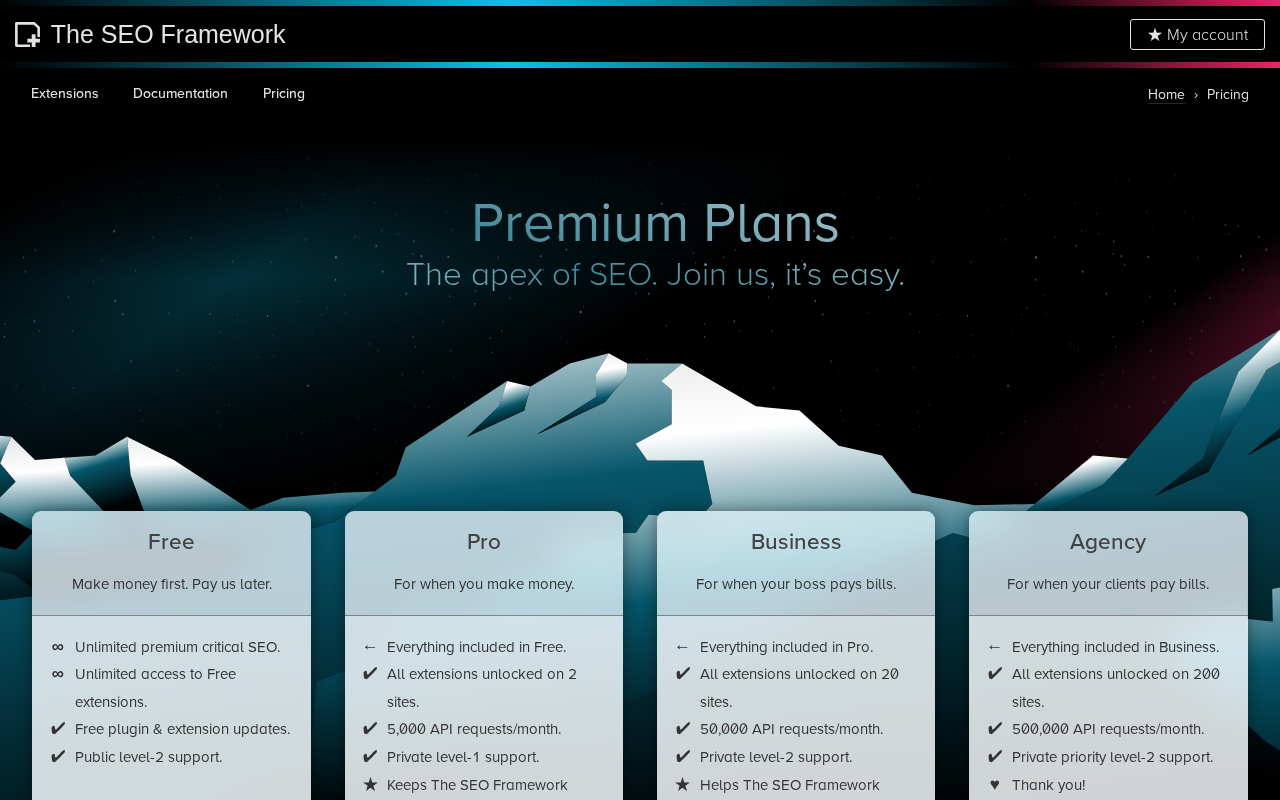
| Plan | Monthly cost (billed yearly) | Sites | API requests/month | Support |
|---|---|---|---|---|
| Free | $0 | Unlimited | N/A | Public (WP.org forum) |
| Pro | $7 | 2 | 5,000 | Private level-1 |
| Business | $17 | 20 | 50,000 | Private level-2 |
| Agency | $27 | 200 | 500,000 | Priority private level-2 |
The free tier covers unlimited sites with the full core SEO feature set. Paid tiers unlock all six premium extensions and increase API request quotas used by extensions like Monitor and Cord. The “2-site” minimum on Pro is explained as a built-in staging allowance: you get a production site and a staging copy covered under a single license.
For context: Yoast SEO Premium costs $118.80/year per site. The SEO Framework Pro at $84/year ($7 x 12) covers 2 sites. For an agency managing 20 client sites, The SEO Framework Business at $204/year compares very favorably against Yoast’s $2,376/year for the same count. Against Rank Math Pro at $96/year for unlimited personal sites, The SEO Framework is competitive on price but different in feature scope.
A 30-day refund policy applies to all paid plans.
The SEO Framework vs. Yoast
This is the comparison most people searching for The SEO Framework are making. Here is my honest assessment:
| Feature | TSF Free | TSF Pro/Business | Yoast Free | Yoast Premium |
|---|---|---|---|---|
| On-page content analysis | No | Yes (Focus ext.) | Yes (1 keyword) | Yes (up to 5 keywords) |
| Readability analysis | No | No | Full | Full |
| Redirect manager | No | No | No | Yes (automatic) |
| 404 monitor | No (by design) | No | No | No |
| Search Console data | No | No | No | No |
| IndexNow | No | No | No | Yes |
| News sitemap (free) | No | Yes (Articles ext.) | No | Yes (News SEO) |
| AI content tools | No | No | No | Yes (Generate, Optimize, Summarize) |
| Internal link suggestions | No | No | No | Yes |
| SEO bar in post list | Yes | Yes | No | No |
| Privacy (no tracking) | Yes | Yes | No | No |
| Performance | Fastest | Fastest | Heavy | Heavy |
| Price: 1 site/year | Free | $84 (2 sites) | Free | $118.80 |
| Price: 20 sites/year | Free | $204 (Business) | Free | $2,376 |
Where The SEO Framework wins outright:
- Multi-site agency value: Business plan covers 20 sites for $204/year vs. Yoast at $2,376/year for 20 sites
- Privacy: zero data collection, zero telemetry, zero third-party front-end scripts
- Performance: consistently the lightest SEO plugin footprint in benchmark comparisons
- SEO bar: the only free plugin with a post-list audit column showing 70+ checks per page
- Interface: no ads, no upgrade banners, no nag screens in any part of the admin
Where Yoast wins:
- Readability analysis: the deepest in the market, covering sentence length, passive voice, transition words, and paragraph structure; no equivalent in The SEO Framework at any tier
- Content guidance: on-page keyword analysis in the free tier helps writers without SEO knowledge
- AI writing tools: Premium includes AI Generate, Optimize, and Summarize with no external API required
- Internal link suggestions: Premium feature with no equivalent in The SEO Framework
- IndexNow: included in Premium; not available in The SEO Framework
- Support scale: 24/7 live chat and email with Premium; The SEO Framework’s developer handles support personally with a 72-hour response target
The right choice between these two depends entirely on what you need from an SEO plugin. Content teams who rely on in-editor keyword scoring will find The SEO Framework frustrating. Developers managing multiple sites for clients will find Yoast’s per-site pricing frustrating. Neither plugin is universally better.
Pros and Cons
Pros
- Entirely free for unlimited sites with full core SEO functionality and no feature gating
- SEO bar in the post list is unique and genuinely useful for content auditing at scale
- Automation-first design means far less manual configuration than any competitor
- Absolute privacy: no telemetry, no cookies, no data collection at any tier
- Fastest performance footprint of any full-featured WordPress SEO plugin
- Nag-free interface with no upgrade banners or review requests anywhere in the admin
- Clean Schema.org JSON-LD output with entity ID wiring to prevent graph duplication
- Built-in 301 redirect target per post, without needing a separate redirect plugin for single-URL redirects
- Excellent multi-site value on paid plans: 20 sites for $204/year (Business)
- 4.9-star rating across 378 reviews, the highest average of any full-featured SEO plugin
- Developer-maintained with personal support; over 5,000 support inquiries answered in nine years
- Strong accessibility support including keyboard navigation, screen reader compatibility, and color-vision deficiency accommodation
- WordPress Multisite compatible, with WPML and Polylang support
Cons
- No on-page content analysis in the free tier; keyword guidance requires the paid Focus extension
- No readability analysis at any tier (no sentence length, passive voice, or transition word feedback)
- No bulk redirect manager; per-post 301 redirect field covers individual redirects only
- No 404 monitoring at any tier (intentional design decision, but a real gap if you need it)
- No analytics integration in the free tier; Cord extension for tracking connections is paid
- No AI content tools at any tier
- No built-in rank tracking or Search Console data integration
- The extension pricing structure can feel fragmented if you need several add-ons
- Settings interface uses technical terminology that may feel opaque to beginners
- Documentation is functional but less polished than Yoast’s or Rank Math’s
- Smaller community (200,000 installs vs. Yoast’s 5+ million) means fewer tutorials and community-answered edge cases
- No Google News sitemap without the Articles paid extension
Alternatives
Yoast SEO covers more ground on the content guidance side. Its readability analysis, AI writing tools (Premium), and on-page keyword feedback are stronger than anything The SEO Framework offers. If your primary use case is guiding non-technical writers through content optimization, Yoast is the better fit. See our Yoast SEO review for the full comparison.
Rank Math SEO is the alternative most often compared alongside The SEO Framework for feature breadth. Rank Math’s free tier includes a redirect manager, 404 monitor, Google Search Console integration, and unlimited focus keywords. It is heavier than The SEO Framework and collects usage data by default, but offers more free features for those who need them. See our Rank Math review for the full breakdown.
SEOPress occupies a similar “lightweight alternative” niche. It is cheaper than Yoast Premium for multi-site use, has a cleaner interface than Rank Math, and as of version 10.1 includes basic redirections in the free tier. The SEO Framework has a stronger privacy record and lighter runtime; SEOPress offers more free-tier features. See our SEOPress review for a direct comparison.
Final Verdict
The SEO Framework earns a specific kind of recommendation: not “best SEO plugin for everyone” but “best SEO plugin for people who have outgrown checklists.”
If you are a developer managing client sites, an agency handling dozens of WordPress installs, or an experienced site owner who understands SEO at a foundational level, The SEO Framework gives you more than you will pay for. The free tier covers everything a typical site needs without compromise. The paid plans are competitive at scale. The plugin stays out of your way.
The limitation is real and worth stating plainly. If your team writes content and relies on the post editor for guidance, whether that is keyword density feedback, readability scoring, or AI-generated alternatives, this plugin does not provide that in the free tier. The Focus extension (paid) adds keyword analysis, but there is still no readability layer at any price point.
For a solo blogger building a first site: start with Yoast or Rank Math. The guided experience will teach you things while you work, and the free tiers of both are comparable in feature depth for beginners.
For a developer setting up a client site, an agency standardizing their WordPress stack, or a technically confident site owner who wants speed and clean automation: install The SEO Framework, spend ten minutes on setup, and move on to the work that actually grows your site.
Check out all our WordPress plugin reviews to see how it compares across the broader SEO plugin landscape.