


Eighty thousand active WordPress installs. A 4.8-star rating from 249 reviews. A pricing model that charges by website rather than by contact list size. FluentCRM has been quietly building a loyal following among WordPress operators who are tired of paying SaaS platforms more money every time their audience grows.
This review is a close look at what FluentCRM actually delivers in 2026, how the free and paid versions compare, where the plugin earns its price, and where it falls short. I audited the official fluentcrm.com website, the WordPress.org plugin listing (version 3.1.10, updated July 27, 2026), the free vs pro comparison page, the WooCommerce integration page, and the changelog. Research is drawn from official vendor materials, WordPress.org documentation, and public reviews and forum posts.
At a glance:
- Plugin version: 3.1.10 (July 27, 2026)
- Active installs: 80,000+
- Rating: 4.8/5 from 249 reviews
- Free version: available on WordPress.org (basic CRM and campaigns)
- Paid plans: from $103/year for one site (unlimited contacts on all tiers)
- Requires external SMTP for email delivery: FluentSMTP, Amazon SES, Mailgun, Brevo, or similar
Quick verdict
FluentCRM is a self-hosted CRM and email marketing automation plugin for WordPress. It is one of the few tools in the category that charges per website rather than per subscriber, which makes it genuinely attractive for sites with large or fast-growing contact lists.
The free version is real: you can manage contacts, send one-off email campaigns, and use basic list and tag segmentation without paying anything. The paid Pro version unlocks the features that serious email marketers actually need: the visual automation builder, email sequences, drag-and-drop composer, A/B testing, dynamic segments, and deep integrations with WooCommerce, LMS platforms, and third-party automation tools.
There is one constraint worth understanding before anything else. FluentCRM does not include an email sending service. The plugin handles everything up to the moment an email needs to leave your server, then passes it to whatever SMTP provider you have configured. If you do not have one set up, emails will likely end up in spam or not send at all. FluentSMTP (their companion plugin, also free) makes the connection easy, but the sending cost is separate.
Quick verdict card:
- Best for: WordPress site owners, WooCommerce stores, membership sites, and online course creators who want CRM-grade contact management and email automation without paying subscriber-based SaaS fees.
- Best plan for most individuals: free version to evaluate; Solo ($103/year) for anyone who needs automation workflows and email sequences.
- Best plan for agencies: Agency license ($399/year) covering 50 sites.
- Standout feature: the visual marketing funnel builder lets you design complex, multi-branch automation sequences directly inside WordPress.
- Watch out for: no built-in email sending service; Pro pricing discounts apply only in year one, then renew at full price; no native sales pipeline; bulk contact actions are capped at around 600 contacts.
What FluentCRM is
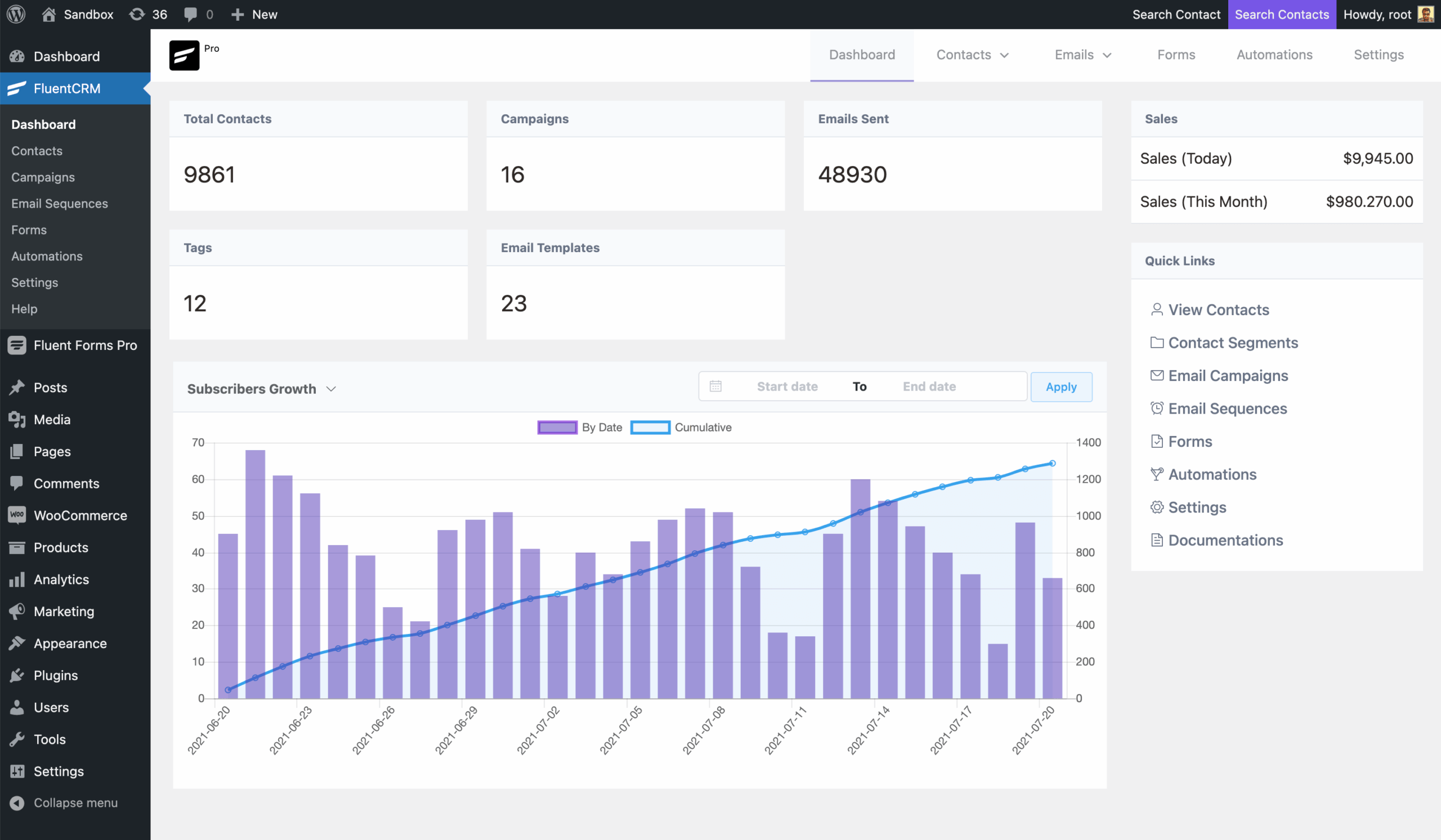
FluentCRM is a WordPress plugin for managing contacts, sending email campaigns, and automating customer journeys, all from inside your WordPress admin. Unlike SaaS email marketing platforms that store your subscriber data on their servers, FluentCRM keeps everything in your own WordPress database.
The plugin was created by WPManageNinja, the same team behind Fluent Forms, FluentSMTP, Fluent Support, and FluentBooking. Version 3.1.10, the current release at the time of this review, was published on July 27, 2026. It requires WordPress 5.0 or higher (tested up to 7.0.4) and PHP 7.4 or higher.
At its core, FluentCRM handles four things:
- Contact management: store contacts with unlimited custom fields, detailed activity history, and a 360-degree view pulling in data from WooCommerce, LMS plugins, membership plugins, and support tools.
- Email campaigns: create and send broadcast emails to all contacts or specific segments using a built-in email editor.
- Email sequences: drip email series that send automatically based on enrollment timing (Pro only).
- Automation workflows: trigger-based marketing funnels with conditional logic, time delays, and multi-path branching (Pro only).
The plugin connects to your email delivery service through SMTP configuration or via the FluentSMTP plugin, which supports Amazon SES, Mailgun, SendGrid, Brevo, Postmark, Zoho, and others.
Who FluentCRM is best for
Strong fit:
- WooCommerce store owners who want to automate post-purchase emails, abandoned cart sequences, and customer re-engagement campaigns using their own purchase data.
- Membership site operators using MemberPress, Restrict Content Pro, or WishList Member who want to trigger onboarding sequences on signup and track member behavior.
- Online course creators on LearnDash, LifterLMS, LearnPress, or TutorLMS who want to send automated emails when a student enrolls, completes a lesson, or drops off.
- Businesses with large contact lists who are frustrated by subscriber-based SaaS pricing. FluentCRM charges per website, not per contact. Unlimited contacts on every plan.
- WordPress-first teams who want a single dashboard for CRM, email, and automation without logging into an external platform.
- Agencies building and managing sites for multiple clients, where the 50-site Agency license brings the per-site cost to under $8/year.
Weak fit:
- Sites that need a built-in email sending service with managed deliverability. FluentCRM requires SMTP configuration; if you want deliverability handled out of the box, MailPoet (with its own Sending Service) is a better fit.
- Businesses that need a sales pipeline with deals, stages, and contact ownership. FluentCRM has no pipeline view and no way to assign contacts to specific team members.
- Teams coming from HubSpot or Salesforce expecting CRM features like deal tracking, activity logging per rep, or territory management. FluentCRM is an email-first CRM, not a sales CRM.
- Users who need multi-channel marketing across SMS, WhatsApp, and social ads from one platform. FluentCRM supports SMS marketing via Twilio and Amazon SNS, but it is not a cross-channel marketing suite.
- Sites on shared hosting with very limited server resources. Large list processing and automation runs depend on your server’s cron execution and memory limits.
Installing and getting started with FluentCRM
The free version installs from the standard WordPress plugin repository. Search for “FluentCRM” in Plugins, Add New. The plugin appears immediately, installs in seconds, and activates without prompting for external account creation.
After activation, a FluentCRM menu appears in the WordPress admin sidebar. An onboarding wizard walks through the initial setup: company name, address, and email settings. The setup process asks you to configure your email sending method. This is the step where users need to have an SMTP solution ready. FluentCRM recommends installing FluentSMTP (free, also from WPManageNinja), then connecting it to a provider such as Amazon SES (roughly $0.10 per 1,000 emails) or a free tier from Brevo or Mailgun.
Once sending is configured, the plugin populates your contact list from existing WordPress users and, if WooCommerce is active, from order history. The dashboard shows an overview of contacts, recent campaign activity, and automation status.
The Pro version activates via a license key entered in the FluentCRM settings panel. No reinstall is required. The Pro features appear immediately after the key is verified.
A note on research basis: this review is built on the official FluentCRM website, pricing and features pages, WordPress.org plugin listing (v3.1.10), and the free-vs-pro comparison page. I also reviewed vendor documentation and public user reviews. A live sandbox install was not part of this review. Descriptions of admin interfaces are drawn from official vendor screenshots and documentation.
The email editor and templates
The free version includes the native WordPress block (Gutenberg) editor for composing emails. You can use standard text, image, and button blocks to build email content.
The Pro version adds a dedicated drag-and-drop visual email builder with richer email-specific blocks:
- Latest Posts: pull recent blog content directly into email campaigns
- Product Block: insert WooCommerce products with images and pricing
- Conditional Sections: show or hide content blocks based on subscriber properties or tags
- Merge Tags: personalize emails with contact name, custom fields, company name, and more
- Raw HTML: paste custom HTML for fully coded email designs
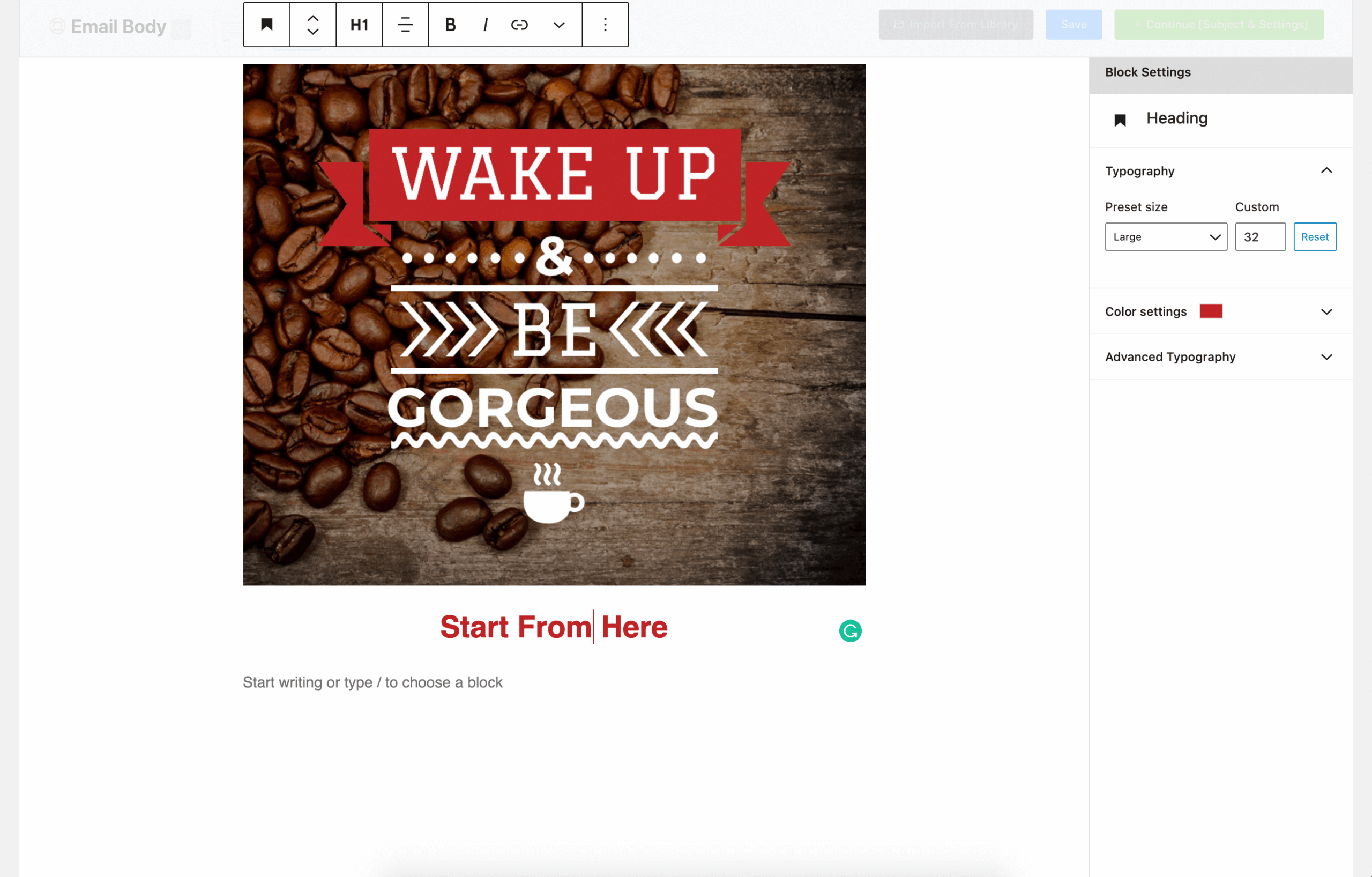
Template imports and exports are available in both free and Pro. You can save designs as reusable templates, which speeds up campaign creation for recurring content types.
Contact management and segmentation
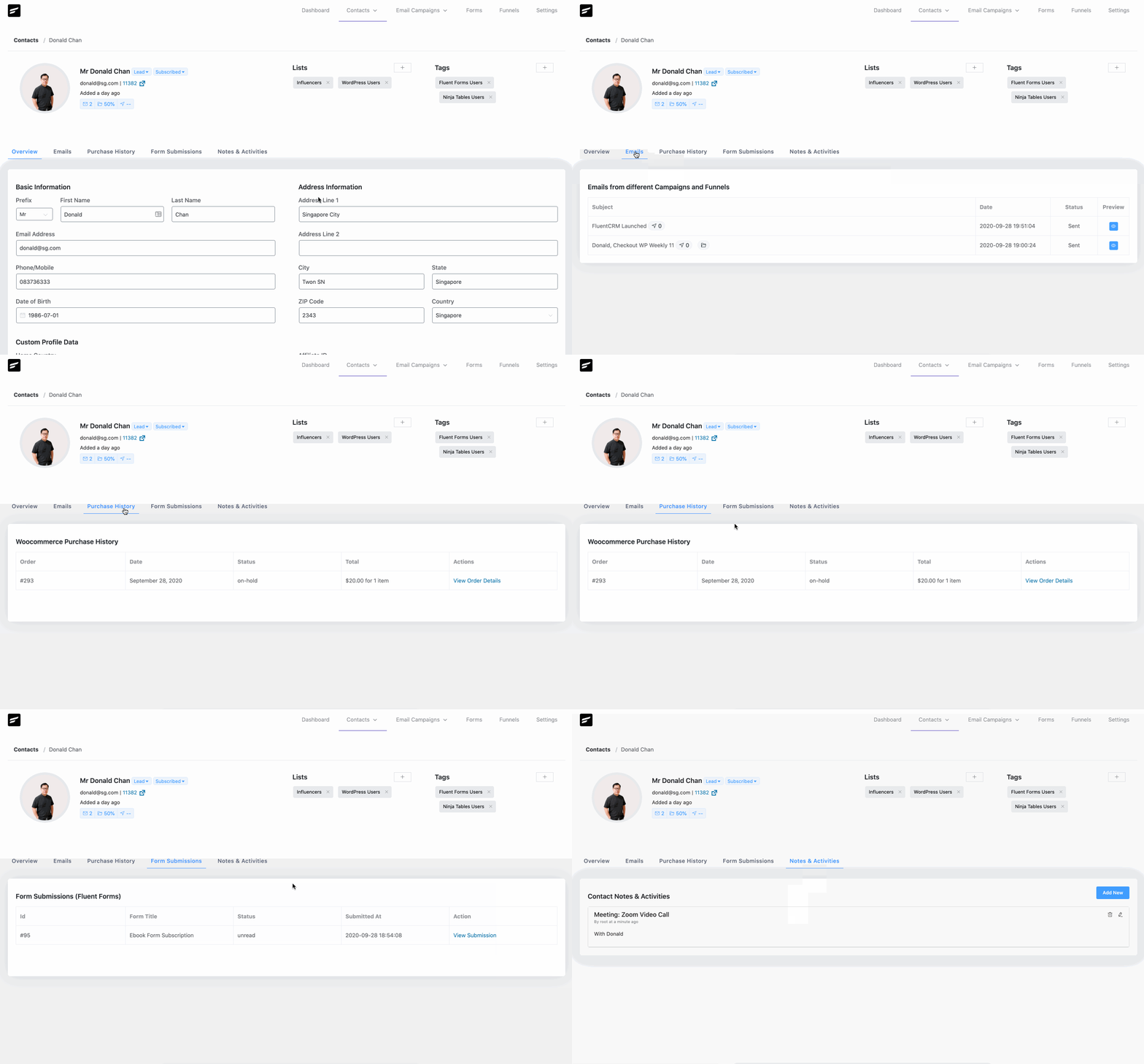
FluentCRM stores all contact data in your WordPress database. Each contact record is a centralized profile aggregating data from every integrated tool:
- WooCommerce: purchase history, order value, last order date
- LearnDash / LifterLMS / TutorLMS: enrolled courses, completion progress
- MemberPress / Paid Memberships Pro: active memberships, signup date
- Fluent Support: support tickets linked to the contact
- FluentBooking: appointment history
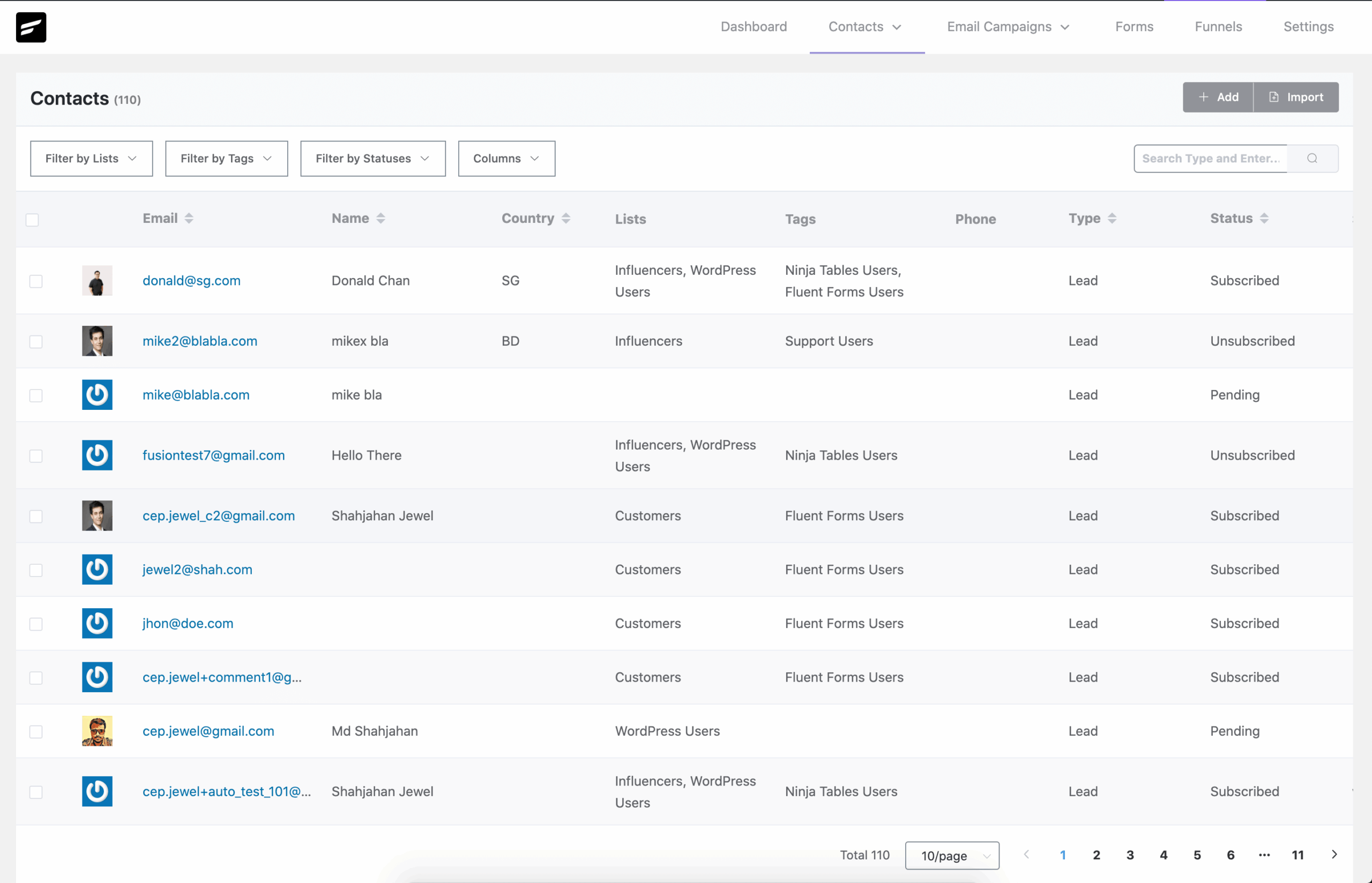
The individual contact overview pulls all of this into one screen, including email engagement history (opens, clicks, unsubscribes) and a custom notes area for manual entries.
Lists and tags
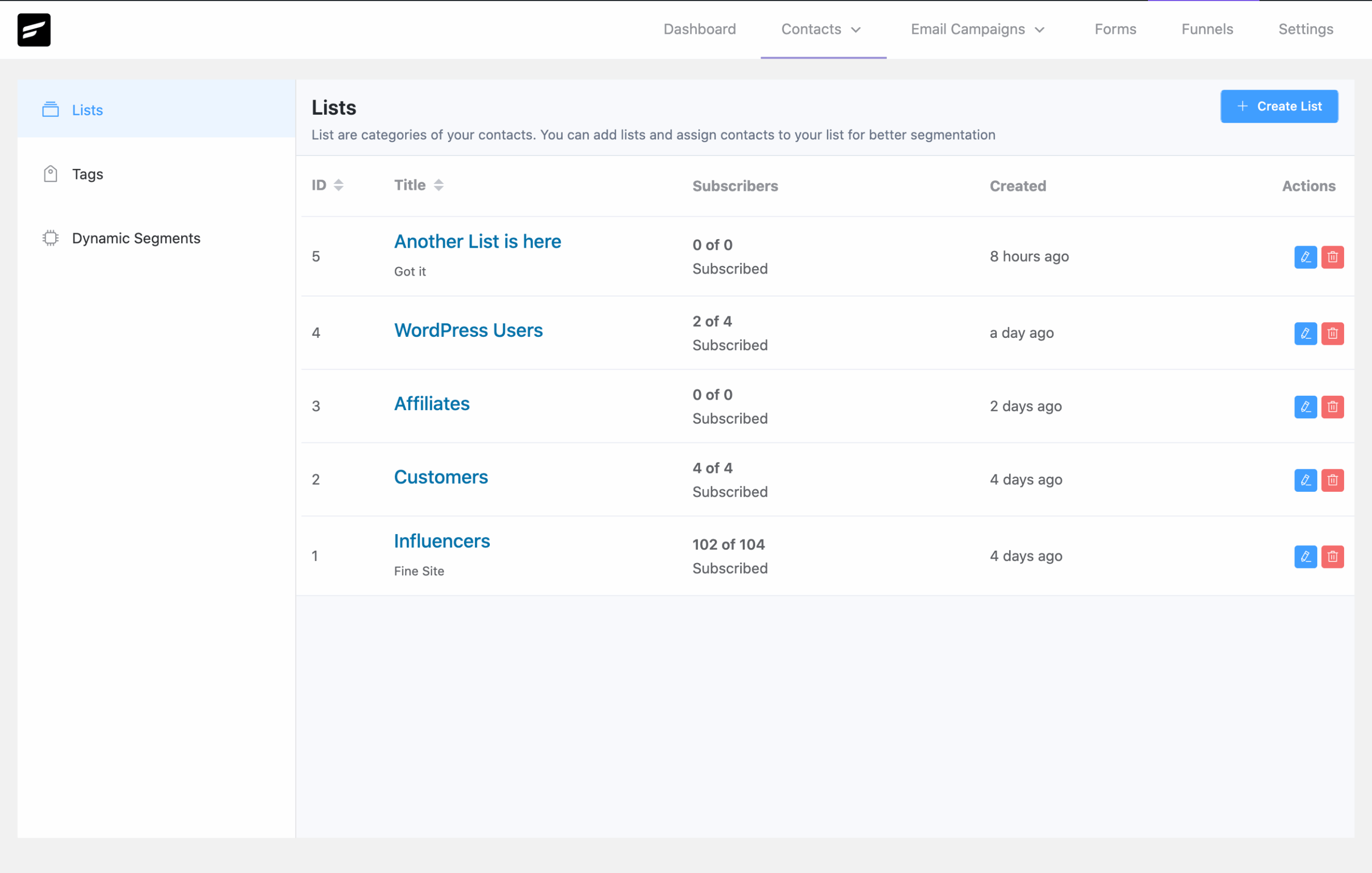
FluentCRM uses a two-layer segmentation structure: lists and tags. Lists are broader groupings (such as “Newsletter Subscribers” or “Customers”). Tags are granular labels applied to individual contacts based on behavior, product purchases, or manual assignment.
Free version segmentation:
- List segmentation
- Tag segmentation
- Basic filtering and sorting
Pro version adds:
- Dynamic Segments: segments that update automatically based on real-time criteria (for example, contacts who purchased a specific product in the last 30 days and have not opened an email)
- Advanced filtering: combine multiple conditions including purchase history, engagement level, course enrollment, and custom fields
- Activity-based segmentation
Email campaigns and sequences
Broadcast campaigns
Email campaigns in FluentCRM are one-time sends to a selected audience. You choose the recipient segment, write or load the email content, and schedule or send immediately. Version 3.1.10 introduced immediate campaign sending without waiting for the next cron tick, which means campaigns start going out faster than in earlier versions.
Pro campaign features:
- A/B testing for subject lines: send two variants to a subset of the list, then automatically send the winner to the rest
- Recurring campaigns: set a campaign to repeat on a defined schedule
- UTM tracking: append tracking parameters to links automatically for Google Analytics attribution
- Post-campaign actions: trigger automation based on engagement after the campaign sends
Email sequences
Email sequences (drip campaigns) are a Pro-only feature. A sequence is a series of emails that send to a contact at defined intervals after they are enrolled. A typical sequence might send a welcome email on day 0, a follow-up on day 3, a case study on day 7, and a promotional offer on day 14.
Sequences integrate with the automation system: you can enroll contacts in a sequence as an action step within a larger automation funnel, giving you control over when the drip starts in relation to a trigger event.
Automation workflows
The visual automation funnel builder is the most-discussed Pro feature. It lets you build multi-step marketing workflows using a flow diagram interface, connecting triggers to actions and conditions with drag-and-drop connections.
Triggers
The automation engine supports a wide range of triggers across integrated plugins:
- WooCommerce: order placed, order completed, subscription started, subscription cancelled, product purchased, category purchased, abandoned cart
- LearnDash / LMS: course enrolled, lesson completed, course completed, quiz failed
- MemberPress / memberships: membership started, membership cancelled, membership renewed
- FluentForms: form submitted (specific form or any form)
- CRM events: tag added, tag removed, list added, list removed, link clicked in campaign
- WordPress: user registration, user role changed, custom post type events
Actions and conditions
Within a funnel, you can chain:
- Send email
- Enroll in sequence
- Add/remove tag
- Add/remove from list
- Add delay (wait a specific number of hours or days)
- Send SMS via Twilio or Amazon SNS
- Trigger a webhook
- Conditional branches: if/else logic based on contact properties, tag presence, purchase history, or engagement behavior
The conditional branching is what separates FluentCRM’s automation from simpler sequence tools. You can build funnels where a contact who purchased a product goes down one path, a contact who did not goes down another, and a contact who clicked a specific link gets a third experience.
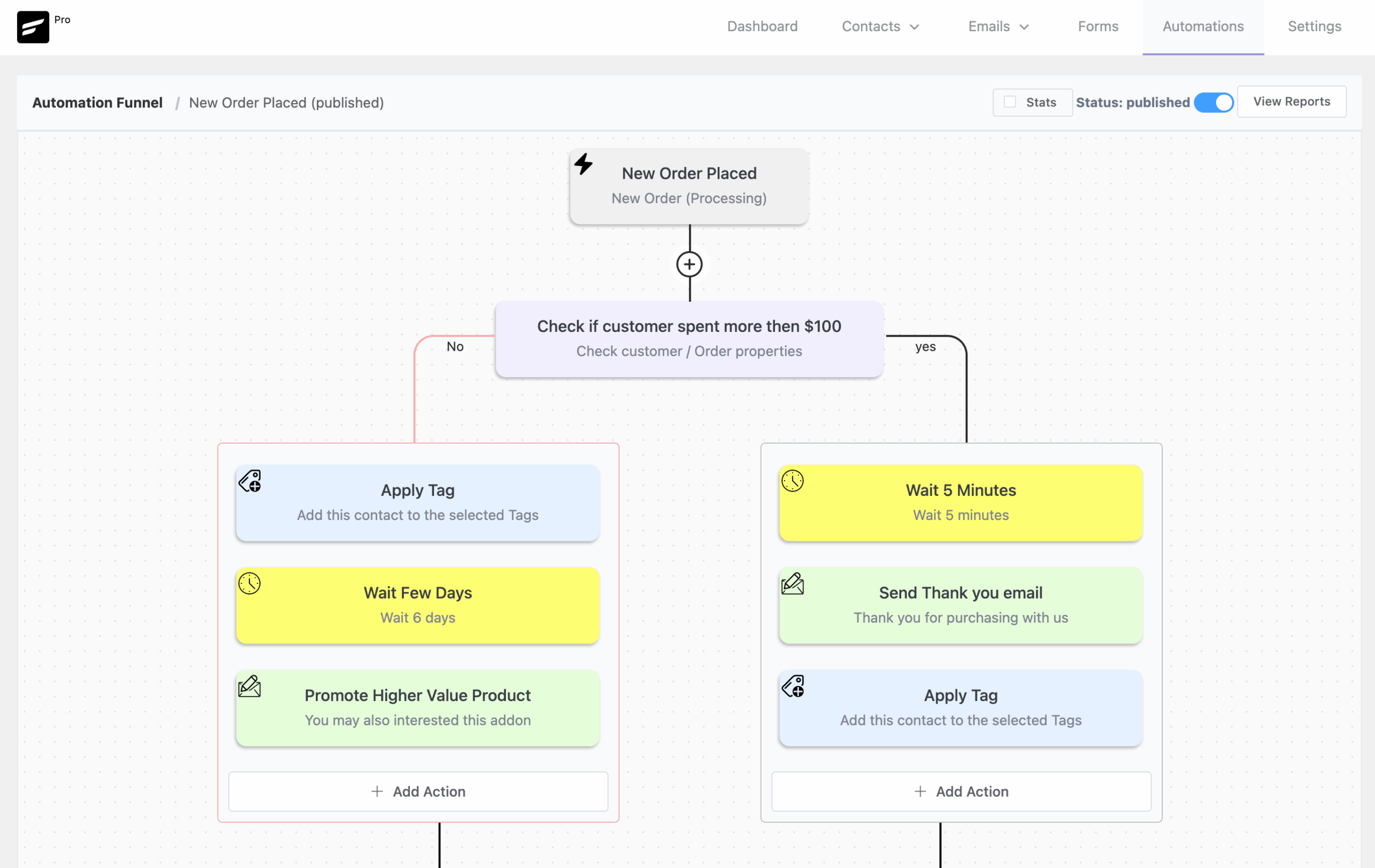
The free version includes one automation funnel with a limited set of triggers and actions (primarily WPManageNinja ecosystem triggers: Fluent Forms submissions, WooCommerce basics, and Fluent Forms-connected membership plugins). The Pro version expands this to 5+ funnels with the full trigger and action library.
WooCommerce and LMS integrations
FluentCRM’s integrations with WooCommerce and LMS platforms are deeper than most email marketing plugins because the plugin treats those data sources as segmentation inputs, not just subscriber sources.
WooCommerce
When WooCommerce is active, FluentCRM syncs customer data on each order, making the following available for segmentation and automation triggers:
- Purchased product (specific product or variation)
- Purchased category
- Lifetime customer value (total spend)
- Number of orders placed
- Last order date
- Refund history
- WooCommerce Subscriptions: active, cancelled, expired
The WooCommerce Store Report (Pro) gives a dedicated analytics view for revenue driven by email campaigns, order counts, and product-level breakdowns. This makes it possible to measure email marketing impact on actual revenue, not just click rates.
Abandoned cart recovery automation is available in Pro through the WooCommerce trigger set: set a time delay after cart abandonment, then send a recovery sequence, with a conditional branch based on whether the purchase was completed in between.
LMS integrations
For online course businesses, the integrations with LearnDash, LifterLMS, LearnPress, TutorLMS, and Academy LMS let you trigger sequences and funnels based on student progress:
- Enroll contact in a course onboarding sequence on course signup
- Send a completion certificate email when a course is finished
- Trigger a re-engagement campaign if a student has not logged in for 14 days
- Tag contacts based on which courses they have completed, then segment future campaigns accordingly
Analytics and reporting
FluentCRM tracks standard email metrics across all plans, with deeper reporting unlocked in Pro.
Free:
- Campaign-level open and click counts
- Basic CRM contact activity log
Pro:
- Open rate, click rate, unsubscribe rate per campaign
- Per-subscriber engagement history (opens and clicks per contact)
- WooCommerce Store Report: revenue, order volume, and product attribution
- LMS Reports: enrollment and completion tracking
- Automation Reports: funnel performance and completion rates
- Recurring Campaign Reports: trends over repeated sends
- UTM tracking integration for Google Analytics attribution
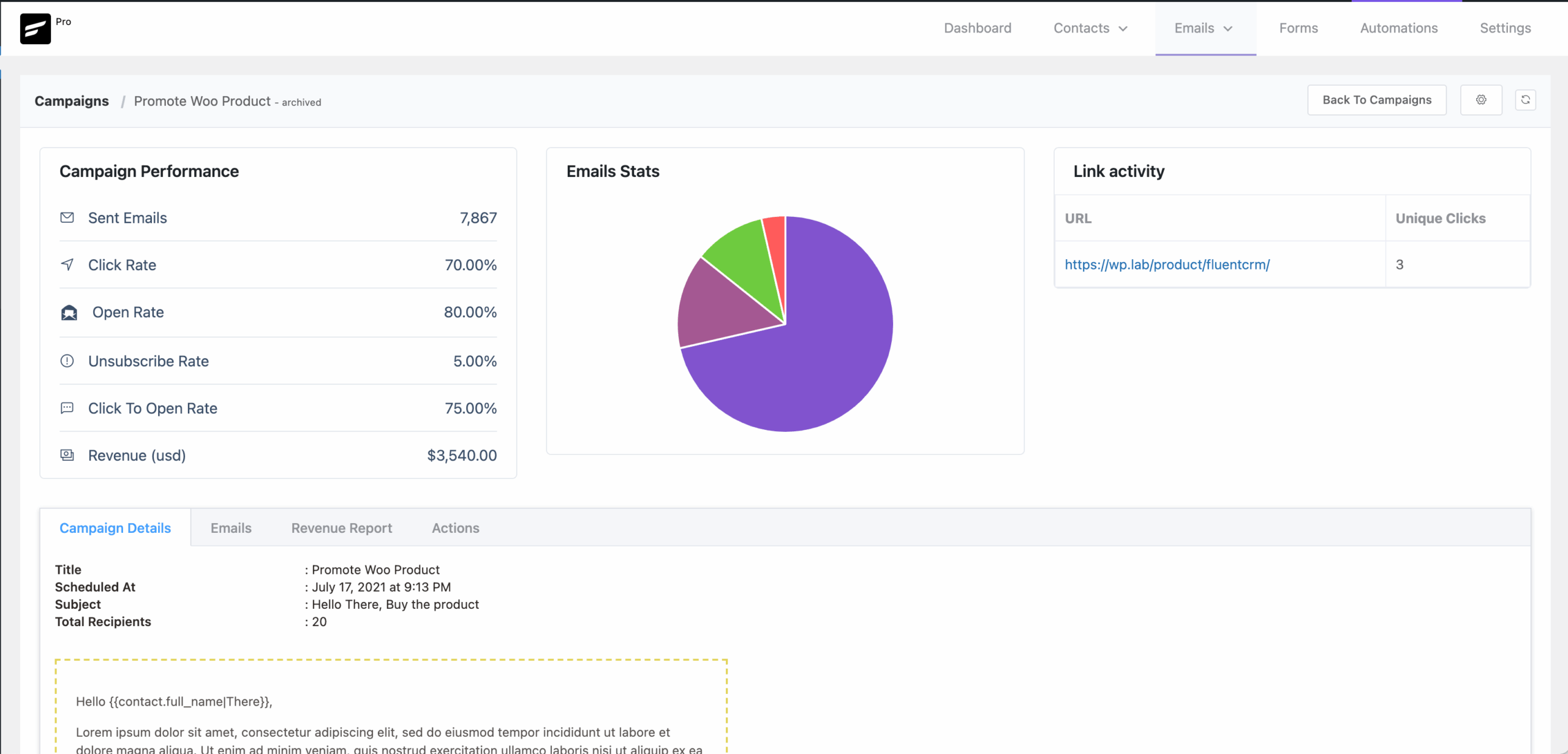
The per-contact engagement history is particularly useful for CRM workflows: you can see at a glance which contacts are active in campaigns and which have gone cold, then use that data for dynamic segments or re-engagement funnels.
Pricing
FluentCRM uses annual licensing priced by number of websites, not by contacts. All plans include unlimited contacts. There is no monthly billing option.
| Plan | Regular price | Current price | Sites |
|---|---|---|---|
| Solo/Blogger | $129/year | $103/year | 1 |
| Small Business | $249/year | $199/year | 5 |
| Agency | $499/year | $399/year | 50 |
All paid plans include:
- All Pro features (no add-on upsells)
- Unlimited contacts
- 1 year of plugin updates
- Priority support
Important note on renewal pricing: the discounted rates shown above (20% off) apply to the first year. Renewals are at the full regular price: $129, $249, or $499/year depending on plan. Plan for the full renewal cost when budgeting long-term.
The free version is available on WordPress.org with no license required. It includes basic contact management, list and tag segmentation, one automation funnel with limited triggers, and one-off email campaigns using the Gutenberg editor.
Value assessment
The per-site pricing model is FluentCRM’s strongest competitive argument. A list of 10,000 contacts pays the same $103/year on the Solo plan regardless of whether it is 1,000 contacts or 500,000. Compare that to MailPoet ($145+/year for 10,000 contacts on the Business plan) or ActiveCampaign ($186+/year for 10,000 contacts on the Plus plan). The larger your list, the better FluentCRM’s value proposition becomes.
The two-part cost structure is the tradeoff. FluentCRM at $103/year still needs an SMTP provider. Amazon SES at $0.10/1,000 emails is genuinely cheap for most lists, but Mailgun, Brevo, and Postmark have their own pricing tiers. A site sending 100,000 emails per month would pay roughly $10/month in SES costs on top of the FluentCRM license. Factor this in when comparing total costs.
Pros and cons
Pros:
- Pricing by website rather than by contact: unlimited contacts on every plan. Directly benefits fast-growing lists.
- The free version is functional: contact management, list/tag segmentation, basic campaigns, and one automation funnel are available with no payment.
- The visual automation builder supports complex, multi-branch workflows with conditional logic, time delays, and diverse triggers across WooCommerce, LMS, and membership plugins.
- 360-degree contact overview aggregates data from WooCommerce, LMS, membership, support, and booking tools into one contact record.
- 45+ integrations in Pro, all included in the license fee. No paid add-ons required.
- A/B testing for subject lines included in Pro.
- WooCommerce Store Report gives revenue attribution tied to specific email campaigns.
- Dynamic Segments auto-update based on real-time contact behavior, enabling always-fresh audience targeting.
- No external account needed to install and start using. Subscriber data stays on your own server.
- GDPR-compliant by design: no data leaves WordPress without your SMTP configuration.
- 4.8 out of 5 stars from 249 WordPress.org reviews (228 five-star). Consistently high satisfaction.
- Support record: 6 out of 6 issues resolved in the last two months.
- Actively maintained: version 3.1.10 added immediate campaign sending and multi-threaded email delivery enabled by default.
- Unlimited team access with no per-seat charges.
Cons:
- No built-in email sending service. Every FluentCRM site requires an external SMTP provider. This adds complexity and a second line item to your budget.
- No sales pipeline. There is no deal board, no stage management, and no way to assign a contact to a specific team member. This is an email-first CRM, not a sales CRM.
- Pro discount applies only in year one. Renewals are at the full price ($129/$249/$499/year). The gap between first-year and renewal pricing is not prominently displayed on the pricing page.
- Bulk contact actions are capped at approximately 600 contacts per operation, a deliberate constraint to support wide-ranging hosting environments. On large lists, bulk tag application or list changes must be done in batches.
- Email sequences and the visual automation builder are Pro-only. The free version’s automation is limited to a single funnel with a restricted trigger set.
- Server resource dependency: automation processing, email queuing, and large campaign sends all depend on your hosting environment’s cron job execution and PHP memory limits. On cheap shared hosting, this can cause delays.
- The plugin does not manage bounces natively unless you configure Amazon SES or Mailgun with their bounce handling APIs. Bounce handling setup is the user’s responsibility.
- No native landing page builder. For opt-in forms with dedicated landing pages, you need a companion page builder or form tool.
Alternatives to FluentCRM
- MailPoet: the strongest comparison for WordPress-native email marketing. MailPoet includes a built-in sending service with managed deliverability and bounce handling, which removes the SMTP setup complexity. Its free Starter plan covers up to 500 subscribers; paid plans are subscriber-based (not site-based), making it more expensive than FluentCRM for large lists. Best for: sites that want everything handled in one plugin, especially WooCommerce stores with smaller lists.
- Groundhogg: another self-hosted WordPress CRM and marketing automation plugin. Closer in scope to FluentCRM than MailPoet. Has a free version and a similar annual license model. Less polished interface than FluentCRM in most reviews, but a credible alternative for teams that want local data control.
- ActiveCampaign: the most common external comparison. A SaaS platform with deeper CRM features (deal pipelines, contact ownership, territory management), more advanced reporting, and a larger integration ecosystem. Significantly more expensive for growing lists and adds external data dependency. Best for: sales teams that need pipeline management alongside email automation.
- Brevo (formerly Sendinblue) for WordPress: a send-based pricing model rather than per-contact or per-site. Routes emails through Brevo’s cloud. Includes transactional email, SMS, and basic CRM. Better choice for sites that primarily care about transactional deliverability and want the simplest possible setup.
- Klaviyo: the dominant choice for large WooCommerce stores that want deep ecommerce analytics and predictive segmentation. Expensive at scale; overkill for most WordPress sites. Best for: high-volume stores where revenue attribution depth justifies the cost.
- FunnelKit (formerly WooFunnels): WooCommerce-focused automation plugin with sales funnel building, order bumps, and upsells alongside email automation. Aimed at conversion optimization alongside CRM. A better fit for shops where checkout conversion is the primary goal.
Final verdict
FluentCRM 3.1.10 delivers a well-built, genuinely capable CRM and email marketing system for WordPress. The per-site pricing model is its defining advantage: one fixed annual fee regardless of how large your contact list grows. For any site with an existing audience of thousands, or any business that expects to grow, that model translates into real, measurable savings compared to subscriber-based SaaS pricing.
The free version earns its place. You can manage contacts, segment by lists and tags, and send campaigns without touching the Pro license. That is more than most free tiers in the category provide.
The Pro upgrade is where FluentCRM becomes genuinely powerful. The visual automation builder, email sequences, A/B testing, dynamic segments, and deep WooCommerce/LMS integrations add up to a serious marketing automation platform. For a WooCommerce store running automated abandoned cart recovery, post-purchase sequences, and re-engagement campaigns, the $103/year Solo license is hard to argue against on cost.
The weaknesses are real and worth stating. No built-in sending service means every user must configure and maintain an SMTP provider. That is a setup hurdle that MailPoet’s Sending Service completely bypasses. No sales pipeline means sales-led teams will need a separate CRM tool. And the 20% first-year discount that quietly steps up to full renewal pricing requires attention when budgeting.
For a WordPress-first business that wants unlimited contacts, real automation capabilities, and data that never leaves their own server, FluentCRM at the Solo license price is one of the best-value email marketing tools in the WordPress ecosystem. Start with the free version to verify it fits your stack, connect FluentSMTP with Amazon SES or your SMTP provider of choice, and upgrade to Pro when you need sequences and automation workflows. The investment pays back quickly once you have those funnels running.
FAQ
Does FluentCRM have a free version?
Yes. FluentCRM’s free version is available on WordPress.org. It includes contact management with unlimited contacts, list and tag segmentation, one-off email campaigns using the WordPress block editor, and one automation funnel with a limited trigger set (primarily WPManageNinja ecosystem triggers). The free version does not include the visual drag-and-drop email builder, email sequences, A/B testing, dynamic segments, or the full integration library. Those features require the paid Pro license.
Does FluentCRM send emails on its own?
No. FluentCRM handles contact management, campaign building, and automation logic, but it does not include an email delivery service. You must connect an SMTP provider to send emails reliably. The FluentSMTP plugin (free, from the same team) is the recommended connection tool and supports Amazon SES, Mailgun, Brevo, SendGrid, Postmark, Zoho, and others. Without a properly configured SMTP provider, emails sent from FluentCRM are likely to be flagged as spam or fail to deliver.
How many contacts can FluentCRM handle?
FluentCRM imposes no contact limit on any plan, free or paid. You can store an unlimited number of contacts in your WordPress database. The practical limit depends on your hosting environment’s database capacity and server resources. For very large lists (100,000+ contacts), a managed WordPress host with sufficient database resources is recommended.
What is the difference between FluentCRM free and Pro?
The free version covers: contact management, basic list and tag segmentation, the WordPress block editor for emails, one-off campaigns, and one automation funnel with a limited trigger set. The Pro version adds: the visual drag-and-drop email builder, email sequences (drip campaigns), full visual automation builder with conditional branching, A/B testing for subject lines, dynamic segments, recurring campaigns, UTM tracking, WooCommerce Store Reports, LMS reports, automation reports, 45+ integrations, bounce handling (via SES/Mailgun), the Company Module, frontend campaign archive, and removal of FluentCRM branding.
How does FluentCRM pricing compare to ActiveCampaign?
FluentCRM charges per website (not per contact) starting at $103/year for one site with unlimited contacts. ActiveCampaign charges per contact on a monthly or annual subscription basis, starting at around $15/month (billed annually) for up to 1,000 contacts and increasing as your list grows. For a site with 10,000 contacts, ActiveCampaign’s Plus plan runs approximately $186/year at 1,000 contacts and increases sharply. FluentCRM at $103/year covers unlimited contacts on that same site. The tradeoff is that ActiveCampaign includes managed email delivery, a sales pipeline, and a more advanced reporting suite. FluentCRM requires you to source and pay for an SMTP provider separately.
What SMTP service works with FluentCRM?
FluentCRM works with any SMTP provider you can configure in the FluentSMTP plugin or WordPress’s native SMTP settings. Commonly used providers: Amazon SES (most cost-effective for high volume), Mailgun (generous free tier), Brevo (free tier up to 300 emails per day), SendGrid, Postmark, and Zoho Mail. For bounce handling and spam complaint automation (important for list hygiene), Amazon SES and Mailgun offer native webhook integrations with FluentCRM Pro.
Does FluentCRM work with WooCommerce?
Yes. When WooCommerce is installed, FluentCRM automatically syncs customer data into contact records, including purchase history, lifetime value, order count, and last order date. The Pro version unlocks WooCommerce-specific automation triggers (order placed, product purchased, abandoned cart, subscription events), the WooCommerce Store Report, and WooCommerce-based dynamic segments. Abandoned cart recovery, post-purchase sequences, and product-triggered email automations are available in Pro.
Is FluentCRM GDPR compliant?
FluentCRM stores all contact data inside your own WordPress database. No subscriber data is transmitted to external servers other than through the SMTP provider you configure. The plugin includes opt-in form tools with consent tracking, unsubscribe link management, and contact data export and deletion capabilities to support GDPR right-to-erasure requests. The compliance posture depends on your own data handling practices, privacy policy, and the GDPR compliance of your chosen SMTP provider.
What changed in version 3.1.10?
Version 3.1.10 (released July 27, 2026) introduced immediate campaign sending rather than waiting for the next scheduled cron tick, which means campaigns begin going out without the delay that older versions experienced. It also enabled multi-threaded email functionality by default, improving throughput for large campaign sends.
Can FluentCRM replace ActiveCampaign?
For WordPress-centric businesses, yes. FluentCRM covers the core use cases: contact management, segmentation, email campaigns, sequences, and multi-step automation with conditional logic. What it does not replace: ActiveCampaign’s sales pipeline and CRM deal management, ActiveCampaign’s cross-channel marketing (SMS and landing pages are more limited in FluentCRM), and ActiveCampaign’s managed deliverability infrastructure. If your workflow depends on deal stages, contact ownership, or a dedicated customer success pipeline, you will need a separate sales CRM alongside FluentCRM.