


Most WordPress form plugins make the same pitch: drag-and-drop builder, conditional logic, Stripe integration, email marketing connections, done. Formidable Forms makes a different pitch. It positions itself as a platform for building data-driven web applications, not just contact forms. The headline feature is not a cleaner builder or a lower price. It is the ability to take data your visitors submit and display it back to them as searchable directories, real estate listings, member portals, or mortgage calculators, all built directly inside WordPress with no additional plugin.
That is a meaningful claim, and it deserves a careful look. I tested Formidable Forms Lite (the free version, v6.32.1) on a clean WordPress install, reviewed the full Pro feature set through official documentation and the plugin’s own demo resources, and mapped out exactly what each pricing tier unlocks. Here is what I found.
At a Glance
- Plugin: Formidable Forms by Strategy11
- Free version: Yes, available on WordPress.org (Formidable Forms Lite)
- Current version: 6.32.1 (released June 2026)
- Active installs: 300,000+
- WordPress.org rating: 4.8 / 5 (1,375 reviews, 91% five-star)
- Pricing: Basic $39.50/year (1 site) | Plus $99.50/year (3 sites) | Business $199.50/year (7 sites) | Elite $299.50/year (unlimited)
- Best for: Businesses that need calculator forms, front-end data displays, or web application features built inside WordPress
- Weakest point: Conditional logic and multi-page forms require a paid plan; Views require Plus ($99.50) rather than the entry-level Basic tier
Quick Verdict
Formidable Forms occupies a specific niche that competitors do not fully cover. If you need a WordPress form plugin that can build a mortgage calculator, display submitted entries as a searchable job board, or power a client-facing quoting tool, Formidable is the most capable native option in the ecosystem.
The free version is more generous than most: it stores entries in your WordPress database (something WPForms Lite does not do), ships with a visual form styler, and includes basic spam protection and email notifications. The paywall hits at the features most sites actually need day-to-day: conditional logic, multi-page forms, file uploads, and calculators.
For developers and businesses building complex data-driven applications, the Business plan ($199.50/year for seven sites) is the sweet spot: it unlocks Views, calculator fields, AI form generation, Zapier, and most email/CRM integrations in one license. For simple contact forms, Formidable is more plugin than most sites need.
Rating: 4.3 / 5
What Is Formidable Forms?
Formidable Forms is a WordPress plugin built by Strategy11, the company founded by Steve and Steph Wells. The plugin launched in December 2009, making it one of the oldest continuously maintained form builders in the WordPress ecosystem. Strategy11 is based in Boise, Idaho, and also has Syed Balkhi (the founder of WPBeginner and WPForms) listed as an advisor, which occasionally causes confusion about whether WPForms and Formidable are related products. They are separate companies with separate products.
The free plugin on WordPress.org is called Formidable Forms Lite. The premium version, called Formidable Pro, is sold through formidableforms.com on annual subscriptions across four tiers. The plugin is not sold through a marketplace. All licensing and updates come directly from Strategy11.
What sets Formidable apart from most form builders is its web application layer. Most form plugins focus on the input side: collecting data from visitors and emailing it to site owners. Formidable adds an output side through its Views feature, which lets you display submitted form data back to site visitors as structured front-end content. That combination of input plus output is what enables the job boards, directories, and calculators the plugin is known for.
Who Is Formidable Forms Best For?
Good fit:
- Businesses that need real-time calculator forms (mortgage calculators, quote generators, pricing tools, loan estimators)
- Sites that want to display submitted data on the front end without a separate database plugin (directories, listings, booking systems)
- Developers building client applications who need a flexible WordPress data layer
- Agencies managing multiple sites (Business plan allows 7 sites, Elite is unlimited)
- Educational or HR teams who need quiz grading, scored assessments, or survey analytics
- Sites already using WooCommerce that want dynamic product configurator forms
Weaker fit:
- Bloggers or small sites that need only a basic contact form (overkill and higher cost than simpler alternatives)
- Users who need conditional logic for free (both WPForms and Gravity Forms also lock this, but Fluent Forms includes it at no cost)
- Beginners who prioritize a visually polished, guided building experience
- Single-site users who only need standard email form functionality at the lowest price
Hands-On Setup and the Free Version
I installed Formidable Forms Lite through the WordPress plugin repository. The process is identical to any other plugin: search, install, activate. No license key is required for the free version.
After activation, Formidable adds a top-level menu to the WordPress sidebar with entries for Forms, Entries, Views, Reports, and Settings. The plugin does not open an onboarding wizard or immediately prompt for a license upgrade. The first screen is simply a list of your forms with a large “Add New” button.
The most immediately useful thing I confirmed in the free version: form entries are stored directly in the WordPress database. When a visitor submits a form, the entry appears under Formidable > Entries. This is not the case with WPForms Lite, which sends entries only to email and relies on a cloud backup system for recovery. Formidable stores entries locally in the free tier. That is a meaningful advantage for any site where entry data matters.
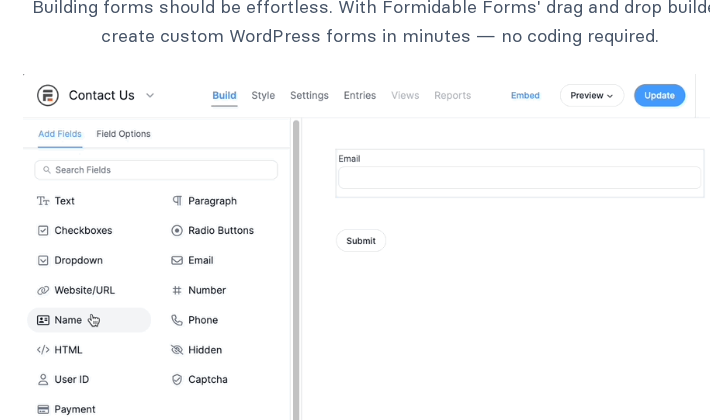
I created a basic contact form using the form builder. The process was fast. Formidable ships a Contact form template by default, and I used it as a starting point. The builder opened immediately with a three-column layout.
The Form Builder
The Formidable form builder uses a three-column interface. The left panel lists available fields, organized into Standard, Advanced, Pricing, and other categories. The center canvas shows the form as it is being built. The right panel shows settings for whichever field is selected.
Dragging a field from the left panel into the canvas places it immediately. Clicking a field in the canvas opens its settings on the right: label, placeholder text, required status, CSS classes, and field-specific options. Navigation is intuitive, though the interface is denser than WPForms’ full-screen editor.
Free fields available without a paid plan:
- Single line text, email, website/URL, paragraph text
- Checkboxes, radio buttons, dropdown select
- Number, phone number, hidden field, user ID
- HTML block, section heading
- CAPTCHA (Google reCAPTCHA v2/v3, hCaptcha, Cloudflare Turnstile)
- GDPR consent field
- Product, Quantity, and Total fields (added free in version 6.30)
Premium fields (require Basic or higher):
- File upload
- Rich text editor
- Date, time, scale, star rating, ranking, range slider, toggle
- Dynamic field (for entry relationships)
- Repeater field (for adding multiple rows in a single form)
- Tags, summary, lookup (cascading dropdowns)
- Page break (for multi-page forms)
- Embed form, password field
- Address field with Google autofill
- Digital signature
- AI response field
The field library is deep. Even in the free version, the range of basic fields is sufficient for most contact forms, registration forms, and simple surveys.
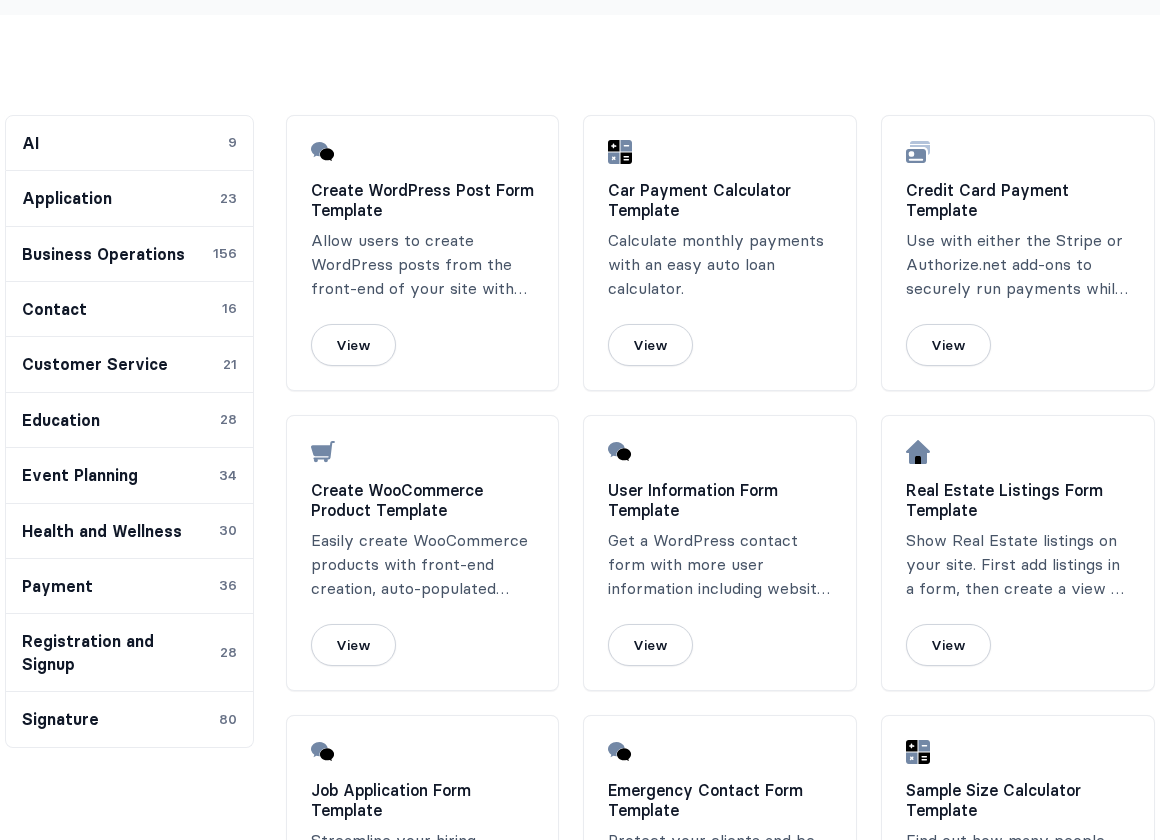
Formidable ships 300+ pre-built form templates across more than a dozen categories. Categories include AI (9 templates), Application (23), Business Operations (156), Contact (16), Education (28), Event Planning (34), Health and Wellness (30), Payment (36), Registration and Signup (28), and more. Calculator templates are a notable subset, with 50+ spanning mortgage, loan, BMI, pricing, and fitness use cases.
One notable free feature: Formidable includes a visual form styler in both free and paid versions. You can adjust colors, fonts, border radius, field spacing, and layout without writing any CSS. This is uncommon at the free tier. Most competitors require a paid plan for custom styling or expect you to write your own CSS.
Free vs. Paid: Where the Paywall Sits
The free Formidable Forms plugin is more capable than average but still has a clear paywall for features most sites will eventually need.
What requires a paid plan (Basic, $39.50/year minimum):
- Conditional logic (show or hide fields based on user input)
- Multi-page forms with progress bars
- File upload fields
- Quiz grading and scored assessments
- Email marketing integrations (Mailchimp, AWeber, etc.)
- Repeater fields
- Cascading dropdown (lookup) fields
- Front-end form editing by users
- Most premium field types
What requires Plus ($99.50/year) or higher:
- Formidable Views (front-end data display)
- Grid, table, calendar, map, and timeline layouts
- Most calculator templates
What requires Business ($199.50/year) or higher:
- Zapier integration
- AI form builder (1,000 monthly credits)
- Advanced CRM integrations (HubSpot, GetResponse, ActiveCampaign)
- Most advanced application templates
What requires Elite ($299.50/year):
- Salesforce CRM
- White labeling
- 3,000 monthly AI credits
- Unlimited site licenses
The split is somewhat predictable by industry standards, though it is worth noting that conditional logic in the Basic plan at $39.50 is competitively priced. The more significant constraint is that Views, which is arguably Formidable’s most distinctive feature, is not available at the Basic level. You need Plus at $99.50 to unlock it.
Conditional Logic
Conditional logic in Formidable Forms lets you show or hide fields, sections, and pages based on what a user selects or types. It is available from the Basic plan upward.
The logic rules use an if/then structure with “all” or “any” matching. You can build AND conditions (show field if X = yes AND Y is not empty) and OR conditions within the same rule set. Logic can also be applied at the form level to control which notification is sent, which confirmation message appears, and what happens after submission.
For Basic-tier users, this is a core feature that turns a static form into a dynamic one. The implementation in Formidable is clean and well-documented, comparable to what Gravity Forms and WPForms offer at similar price points.
Calculator Forms
Calculator forms are Formidable’s clearest differentiator. No other WordPress form plugin builds this capability as deeply into the core product.
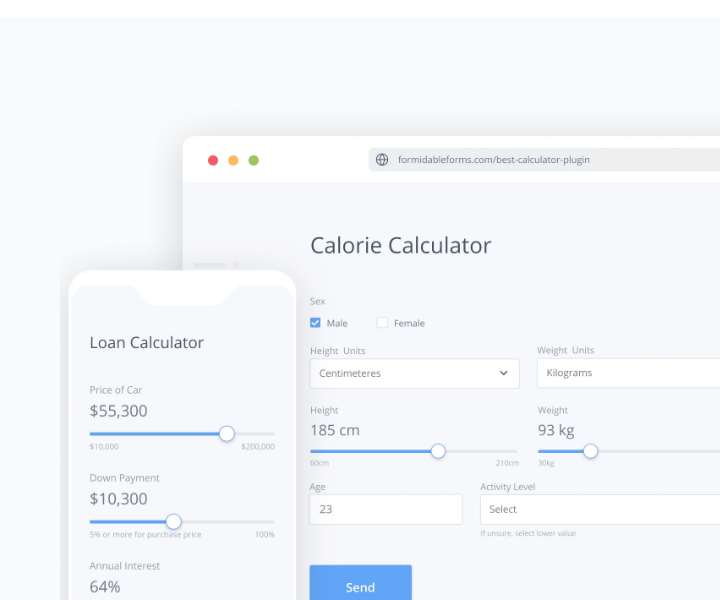
A calculator form works by placing number fields into the builder and then using the “calculated value” option to compute a result from those inputs. The formula editor accepts standard arithmetic operators, references to other field values, and a library of advanced math functions (round, max, min, abs, conditional IF statements, and date calculations).
In practice, this means you can build:
- A mortgage calculator that takes loan amount, interest rate, and term, then returns a monthly payment
- A BMI calculator that computes from height and weight inputs
- A quote form that sums selected service options and outputs a total price
- An ROI calculator where a business can input metrics and see an estimated return
- A WooCommerce product configurator where variable selections update a live price before adding to cart
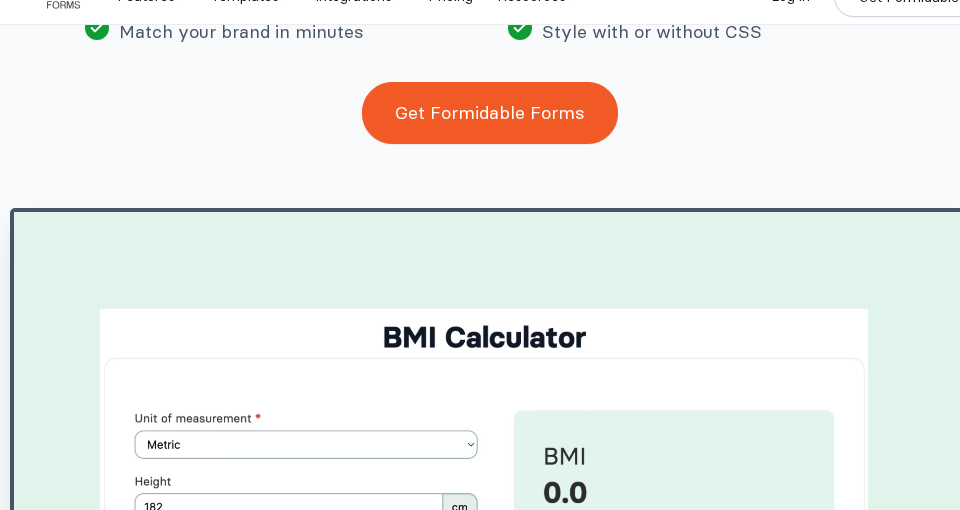
Formidable ships 50+ pre-built calculator templates covering finance, health, ecommerce, legal billing, construction costs, and more. These are a fast starting point: import the template, adjust field labels and formulas, embed the shortcode on a page.
The calculator output can be displayed inline in the form (as a live-updating result field) or used to trigger conditional logic, email notifications, or payment totals. This is the feature that brings financial services companies, consultants, and service businesses to Formidable specifically.
Formidable Views
Views is the feature that separates Formidable Forms from every other WordPress form builder, including Gravity Forms (which requires the separate, paid GravityView plugin to do the same thing).
After form data is collected, Views lets you display it on the front end of your WordPress site. You choose a layout, map form fields to display positions, add search and filter controls, and embed the result on any page via shortcode. The result is a working front-end application built entirely from form data.
Layout options in Views include:
- Grid: Card-based layout, suitable for member directories or product listings
- Table: Sortable, scannable rows for data-heavy displays
- Calendar: Date-based entry display for event listings or booking schedules
- Timeline: Chronological arrangement of entries
- Map: Location-based pins, useful for location directories or store finders
- List: Standard entry listing format
Views supports role-based visibility (logged-in users see different data than guests), front-end entry editing (users can edit their own submissions without accessing the WordPress admin), and search/filter controls that visitors can use to narrow results.
Common applications built with Views include:
- Member or team directories
- Job boards where visitors can browse and filter listings
- Real estate listings with search by price, location, and type
- Event calendars that pull from form submissions
- Client portals where users log in to view their own submitted data
- Business directories with map integration

Views is included from the Plus plan ($99.50/year, 3 sites) upward. It is not available on Basic. If your primary reason for choosing Formidable is the Views application layer, plan for Plus minimum.
Payment Processing
Formidable Forms supports payment collection through Stripe, PayPal Commerce, Square, and Authorize.net. There is no platform transaction fee on any paid plan. On the free version, Stripe payments are available but a transaction fee applies, similar to WPForms Lite’s model.
Stripe is the most fully featured gateway. It supports one-time payments, recurring subscriptions, ACH bank transfers, Cash App, Klarna, iDeal, Affirm, and Apple Pay/Google Pay. Stripe is available on all paid plans.
PayPal Commerce was added to the core free plugin in version 6.31 (May 2026). You connect your PayPal business account through Formidable Global Settings without a paid plan, though the no-fee experience requires a paid license.
Square is available on paid plans and supports both online and in-person payment recording.
Authorize.net handles one-time payments on Business and Elite.
For ecommerce sites running WooCommerce, Formidable offers a direct WooCommerce integration on Elite. You can build custom product configuration forms where user selections feed directly into the WooCommerce cart with dynamic pricing.
Payment-specific form fields (single item, multiple items, checkbox items, dropdown items, product quantity, total, and credit card) are available in Lite as of version 6.30, meaning you can build the form structure before upgrading for live payment collection.
AI Form Builder
Formidable added an AI form builder to its paid plans. The implementation has two distinct parts.
AI form creation (Business and Elite): You type a description of the form you need in plain language, and Formidable generates a complete form with relevant fields, labels, and structure. This is fully functional on Business (1,000 AI credits/month) and Elite (3,000 credits/month). Not available on Basic or Plus.
AI response field (paid): You can add an AI-powered field to any form. When a visitor fills in other fields and triggers the field, an AI-generated response appears based on their input. Use cases include personalized quiz results, instant recommendations, and dynamic explanations tied to calculator outputs. The AI field uses OpenAI under the hood.
AI suggestions in the builder (free): Even without a paid plan, the builder includes AI-assisted field suggestions and Smart Edit functionality, which lets you type instructions to modify an existing form directly in conversational language.
The AI form creation feature is genuinely useful for getting a first draft quickly, especially for unfamiliar form types. The AI response field is more specialized but opens interesting possibilities for lead qualification forms or personalized tool outputs.
Survey, Quiz, and Poll Features
Formidable includes survey and quiz functionality built into the plugin rather than as a separate add-on (unlike Gravity Forms, where Survey and Quiz are Elite-only add-ons).
Survey fields available with a paid plan include NPS (Net Promoter Score) fields, Likert scale matrices, star ratings, image choice selections, and ranking fields. Survey results appear as charts and graphs under Formidable > Reports in the admin panel. You can also display charts on the front end via shortcodes or Views.
Quiz grading is available from the Basic tier. You assign correct answers to fields, set point values, and Formidable calculates the score automatically on submission. Results can be displayed in the confirmation message, in email notifications, or conditionally (show a “pass” message if score is above a threshold).
Poll forms can be built by combining radio or checkbox fields with a View that shows aggregate results. There is no standalone poll builder, but the combination works effectively.
For educational platforms, HR assessments, and customer feedback tools, the built-in survey and quiz depth is a strong point, especially at Basic pricing.
Conversational Forms
Formidable offers conversational forms as an add-on within the Pro package. Conversational forms present one question at a time, similar to the Typeform experience, with a clean full-screen layout, a progress indicator, and animated transitions between questions.
The conversion from a standard form to a conversational layout is done through a toggle in the form settings. You can customize colors, add a logo, and set a background image.
Conversational forms are included in the Business and Elite plans. Verify the current plan tier before purchasing if this is a priority use case.
Developer Tools
For developers, Formidable exposes a hook and filter system for customizing form behavior at multiple levels. The plugin supports:
- Custom field HTML via the
frm_field_htmlfilter - Entry manipulation hooks before and after saving (
frm_after_create_entry_{form_key}added in v6.32) - Import/export via XML for form templates and entries
- REST API support for retrieving and submitting form data programmatically
- Shortcode-based embedding anywhere in WordPress
The plugin also allows full HTML customization per field, which the official docs describe as “similar to Contact Form 7 but with drag-and-drop power on top.” This is accurate: you can drop into raw HTML for precise control of form output while still using the visual builder for the overall structure.
The Gravity Forms importer is a notable tool for teams migrating from Gravity Forms. Formidable ships a free Gravity Forms importer plugin (available on WordPress.org as a separate plugin) that converts forms and entries.
Integrations
Formidable connects to a wide range of email marketing platforms, CRMs, and automation tools. The integration access depends on the plan tier.
Native integrations (plan-dependent):
- Email marketing: Mailchimp, AWeber, Constant Contact, GetResponse, Campaign Monitor, MailPoet (Plus and above)
- CRM: HubSpot, ActiveCampaign (Business), Salesforce (Elite), Highrise
- Automation: Zapier with 5,000+ apps (Business and above)
- Google Sheets: via Zapier or direct (Business)
- WooCommerce: Elite
Via Zapier and webhooks (Business and above):
- Slack, Airtable, Google Drive, Google Calendar
- Discord, Asana, Microsoft Outlook and Office 365
- Shopify, QuickBooks, Evernote, Dropbox, Zendesk, Trello
- Twilio SMS notifications (via Zapier)
WPML and Polylang support makes Formidable a solid choice for multilingual WordPress sites. Language-specific forms translate cleanly.
For developers who want to wire Formidable into custom systems, the REST API and webhook support provide direct data output without Zapier as a middle layer.
Pricing Breakdown
All prices shown are the current discounted introductory rates. Renewals are billed at the full regular prices: Basic $79/year, Plus $199/year, Business $399/year, and Elite $599/year. The introductory discount runs at approximately 50% off for new subscribers; verify current rates on the official pricing page before purchasing.
| Plan | Price | Sites | Key Features Unlocked |
|---|---|---|---|
| Basic | $39.50/year | 1 | Conditional logic, multi-page forms, file upload, quiz grading, entry-level email integrations |
| Plus | $99.50/year | 3 | Everything in Basic, plus Views (grid/table/calendar/timeline), Mailchimp, Bootstrap styling |
| Business | $199.50/year | 7 | Everything in Plus, plus Zapier, AI form builder (1,000 credits/month), HubSpot, ActiveCampaign, GetResponse |
| Elite | $299.50/year | Unlimited | Everything in Business, plus Salesforce, white labeling, AI (3,000 credits/month), unlimited sites |
All plans include:
- Unlimited forms and entries
- Support with stated response time targets (Basic/Plus: 12 hours, Business: 6 hours, Elite: 4 hours)
- 14-day money-back guarantee
The Basic plan at $39.50/year is a legitimate starting point for sites that need conditional logic and multi-page forms on a budget. But if your interest in Formidable comes from the Views feature or calculator applications, Basic will disappoint. Those require Plus at minimum. For the full application-building experience, Business at $199.50 is where the platform becomes genuinely powerful.
The renewal prices ($79, $199, $399, $599/year) are the official full rates charged after the first year. If long-term subscription cost matters for your budget, factor in the renewal increase before committing to a plan.
Pros and Cons
Pros
- Free version stores entries in the WordPress database (unlike WPForms Lite)
- Calculator forms for financial, health, and pricing applications are industry-leading
- Formidable Views provides front-end data display without a separate plugin (GravityView costs extra with Gravity Forms)
- Visual form styler available in the free version
- 300+ form templates including 50+ calculator templates
- WooCommerce product configurator integration on Elite
- Survey fields (NPS, Likert, star rating, ranking) built in from Basic
- WCAG-compliant forms by default
- AI form builder and AI response fields on Business/Elite
- Gravity Forms importer included
- 4.8/5 stars on WordPress.org (1,375 reviews)
Cons
- Conditional logic not available in the free version (Fluent Forms includes it free)
- Views require Plus ($99.50), not available on Basic ($39.50)
- AI form creation requires Business ($199.50), not Basic or Plus
- 300,000 active installs vs WPForms’ 5 million installs: smaller ecosystem
- Builder interface is functional but less visually polished than WPForms
- Stripe transaction fee applies in free version
- Perpetually advertised “50% discount” is effectively the standard price; regular pricing is inflated for marketing purposes
Alternatives Worth Considering
Gravity Forms is the most direct competitor at the advanced end. It has a deeper developer API (500+ hooks), a larger third-party ecosystem (GravityWiz, GravityFlow), and stronger conditional logic tooling. But front-end data display requires GravityView (a separate paid product). Gravity Forms pricing starts at $59/year and goes to $259 for unlimited sites. If your use case is complex logic, payment routing, or developer-grade customization, Gravity Forms competes strongly. If front-end data display is important, Formidable’s built-in Views are a meaningful advantage.
WPForms is the easier choice for non-developers who prioritize a clean building experience and extensive beginner documentation. WPForms Pro ($199.50/year for 5 sites) competes with Formidable Business, but WPForms Lite does not store entries locally, and WPForms has no Views equivalent. For simple contact forms and marketing integrations, WPForms is solid. For calculators or data displays, Formidable wins.
Fluent Forms is the strongest value competitor. Its free version includes conditional logic (which Formidable does not offer free), and paid plans start at $63/year for a single site. Fluent Forms does not have a Views equivalent or built-in calculator engine. For users who want the most capable free form builder on a WordPress site, Fluent Forms Lite is worth testing first. For users who need calculator forms or a data display layer, Formidable is the stronger choice.
Ninja Forms offers a genuinely capable free tier with local entry storage and no persistent upgrade banners. The add-on model lets you pay only for what you need, though total cost can climb quickly. Ninja Forms has no built-in calculator engine or Views equivalent.
JotForm and Typeform are SaaS alternatives for users who do not need data to stay in their WordPress database. Typeform’s conversational design is the benchmark for engagement. JotForm has an enormous template library. Neither keeps your data on your own server, which is a meaningful consideration for compliance-sensitive use cases.
Final Verdict
Formidable Forms earns its position in the WordPress form builder market because it does something no competing plugin does as well: it turns form data into front-end applications inside WordPress. If you are building a mortgage calculator, a searchable member directory, a quote form with live pricing, or a WooCommerce product configurator, Formidable is the most direct path to that outcome without purchasing multiple plugins.
The free version is a genuine step above what most competitors offer at the same price point of zero. Entry storage is local, the visual styler is included, and the field set covers most basic use cases. Where the free tier falls short is anything dynamic: conditional logic, multi-page forms, and file uploads all require a paid plan.
For the specific use cases where Formidable excels, the Business plan ($199.50/year for 7 sites) offers serious value. It packages calculators, Views, AI generation, Zapier, and most CRM integrations in a single license. Agencies running client sites can serve up to seven sites per Business license before stepping to Elite.
For users who just need a contact form, Formidable is more tool than the job requires. Fluent Forms or even Contact Form 7 will serve simpler needs at lower cost.
My recommendation: if your project involves user-submitted data that needs to be displayed, searched, calculated, or acted on by site visitors, Formidable Forms is worth serious evaluation. For everything else, check the alternatives first.
Rating: 4.3 / 5
Formidable Forms stands out in a crowded market for genuinely unique capabilities. The calculator engine and Views feature are worth the premium over simpler form builders when you actually need them.