


Most WordPress site owners discover spam protection is more complicated than it looks once they move beyond comments. Akismet covers comment spam well, but it does not touch Contact Form 7, WPForms, or WooCommerce registrations. Antispam Bee is free and GDPR-friendly, but it explicitly works only with the default WordPress comment form. The gap between “I need comment spam protection” and “I need spam protection across my entire site” is wider than most people expect.
Zero Spam for WordPress addresses that broader scope. It connects to multiple IP reputation databases, applies server-side detection across comment forms, contact forms, registration forms, WooCommerce, and several other integration points, and does all of this without adding a CAPTCHA challenge to your visitors. The plugin is free to install and activate, with optional paid API tiers that add cloud-powered IP reputation analysis.
I went through version 5.5.8, the current release as of March 2026. I reviewed the WordPress.org listing (20,000+ active installs, 4.1/5 stars from 143 reviews), the official documentation at zerospam.org, the GitHub repository (710 commits, maintained by Highfivery), and the support forums to understand what the plugin actually does, where it excels, and where it has real limitations.
At a glance:
- Reviewed version: 5.5.8 (March 16, 2026), tested up to WordPress 6.9.7
- Made by: Ben Marshall / Highfivery
- WordPress.org rating: 4.1 out of 5 stars (143 reviews)
- Active installs: 20,000+
- Free tier: Yes, plugin is free with core detection methods included
- Paid tiers: Optional Zero Spam API plans from $8/month (10,000 requests) to $100/month (unlimited)
- Key strength: Covers comments, contact forms, registrations, WooCommerce, and more without CAPTCHA
- Key limit: Requires WordPress 6.9+ and PHP 8.2+; admin interface has a learning curve and active upsell prompts
Quick verdict
Zero Spam for WordPress is the most coverage-flexible free anti-spam plugin I have reviewed in this cluster. While Antispam Bee and WP Armour focus exclusively on comment or form honeypots, Zero Spam extends protection to WooCommerce registrations, GiveWP donations, Gravity Forms, Contact Form 7, WPForms, Formidable, Fluent Forms, wpDiscuz, Mailchimp for WordPress sign-ups, and ProfilePress. That breadth in a free plugin is notable.
The trade-offs are real. The plugin requires PHP 8.2 and WordPress 6.9, which means it will not install on older hosting. The admin panel is more complex than simpler alternatives and includes persistent upsell prompts for the paid Zero Spam API. Some reviews note the interface feels cluttered. The plugin is also less installed than Akismet or Antispam Bee, which means the community knowledge base is smaller.
For technically capable site owners who need spam protection across a broad range of form types and do not want to run a CAPTCHA, Zero Spam for WordPress is a strong candidate. For simple sites that only need comment spam protection, Antispam Bee is lighter and purpose-fit.
- Best for: sites that need spam protection across comments, contact forms, WooCommerce, and user registrations without adding CAPTCHA
- Not for: older hosting environments running PHP below 8.2 or WordPress below 6.9; owners who prefer a minimal-UI, single-purpose plugin
- Standout: broadest free multi-surface spam protection in the cluster; REST API and WP-CLI support; connections to Stop Forum Spam, Project Honeypot, and the Zero Spam reputation network
- Watch out for: admin complexity; persistent paid API upsell; smaller community than Akismet; some false-positive risk with IP reputation-based blocking
What Zero Spam for WordPress is
Zero Spam for WordPress is a free anti-spam plugin developed by Ben Marshall under the Highfivery organization. It aims to block spam and malicious submissions across a WordPress site’s entire comment and form surface without requiring CAPTCHAs or manual moderation queues.
The plugin achieves this through a layered approach. It applies David Walsh’s JavaScript-based form detection technique, which uses a honeypot hidden field combined with a timing check. It cross-references submitting IPs and emails against external blocklists: Stop Forum Spam, Project Honeypot, and optionally the Zero Spam reputation API. It can block entire geographic regions by country, region, city, or postal code. It also maintains an admin-accessible log of all blocked submissions with the specific reason for each block.
The plugin is open-source, licensed under GPLv2+, and the repository on GitHub shows 710 commits. The developer communicates through the WordPress.org support forum and through zerospam.org.
Who Zero Spam for WordPress is best for
Zero Spam for WordPress is a strong fit when:
- Your site uses multiple form plugins (Contact Form 7, WPForms, Gravity Forms, Fluent Forms, Formidable) and you want a single anti-spam layer across all of them
- You run WooCommerce and need to block spam registrations at checkout without a CAPTCHA
- You want to block submissions from known bad IPs using Stop Forum Spam or Project Honeypot without paying for a cloud service
- You need developer-level control, including REST API access and WP-CLI commands for managing settings across multiple environments
- Your hosting meets the modern PHP 8.2 and WordPress 6.9 requirements
Zero Spam for WordPress is the wrong choice when:
- Your server runs PHP below 8.2 or WordPress below 6.9 (installation will fail)
- You only need comment spam protection and want the simplest possible setup
- Your site is GDPR-sensitive and you want zero external IP lookups (the plugin integrates with several external services)
- You prefer a plugin with a clean, minimal admin UI and no upsell prompts
Setup and first use
Installation is standard. Search for Zero Spam in the Plugins section of the WordPress admin, install, and activate. The plugin activates immediately and starts applying its default detection methods.
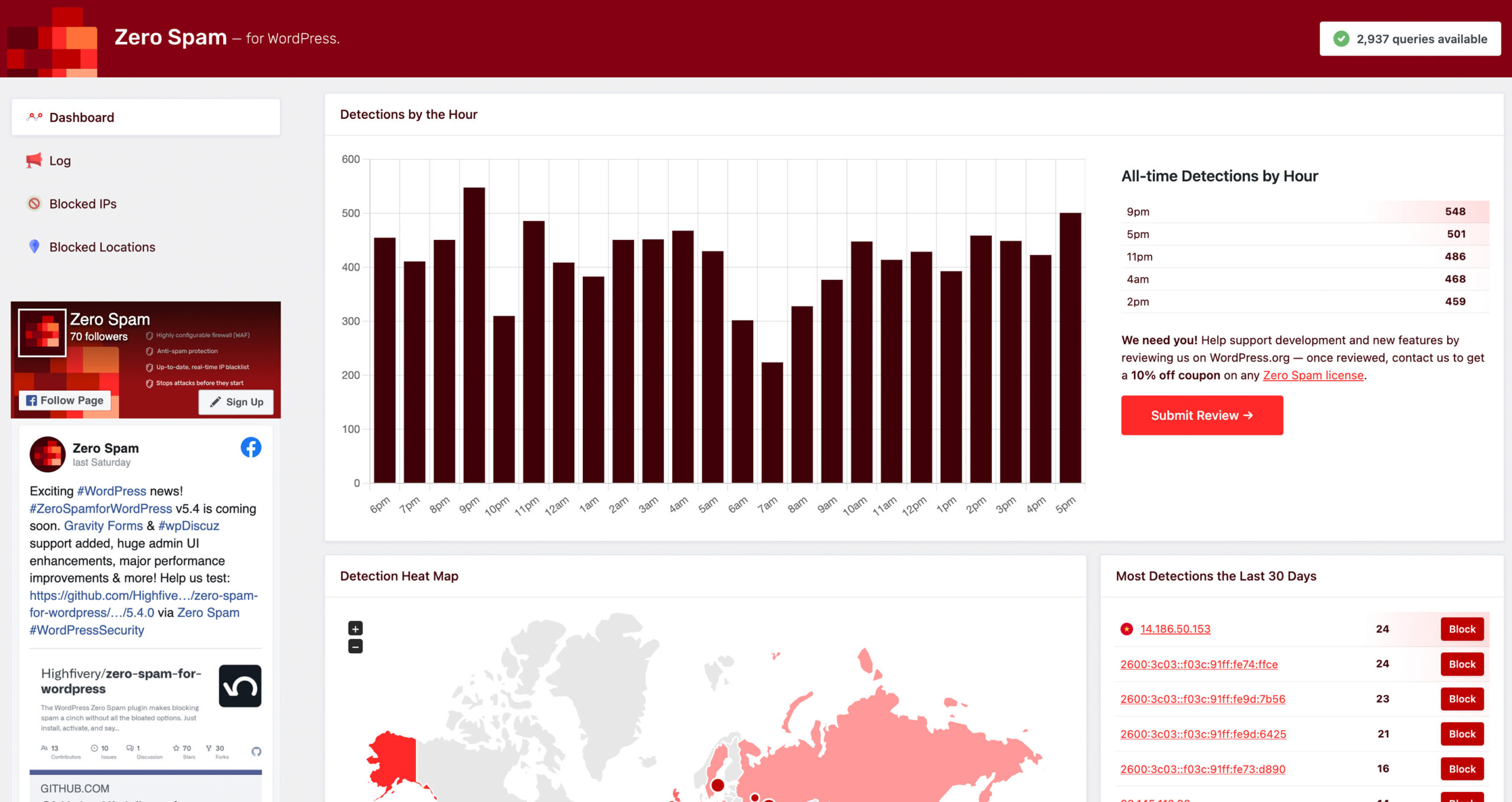
After activation, a Zero Spam menu item appears in the WordPress admin sidebar. The main dashboard shows a summary of blocked threats over time and an option to connect to the Zero Spam API. Below that, the log section lists every blocked submission with timestamp, IP, country, and the detection method that triggered the block.
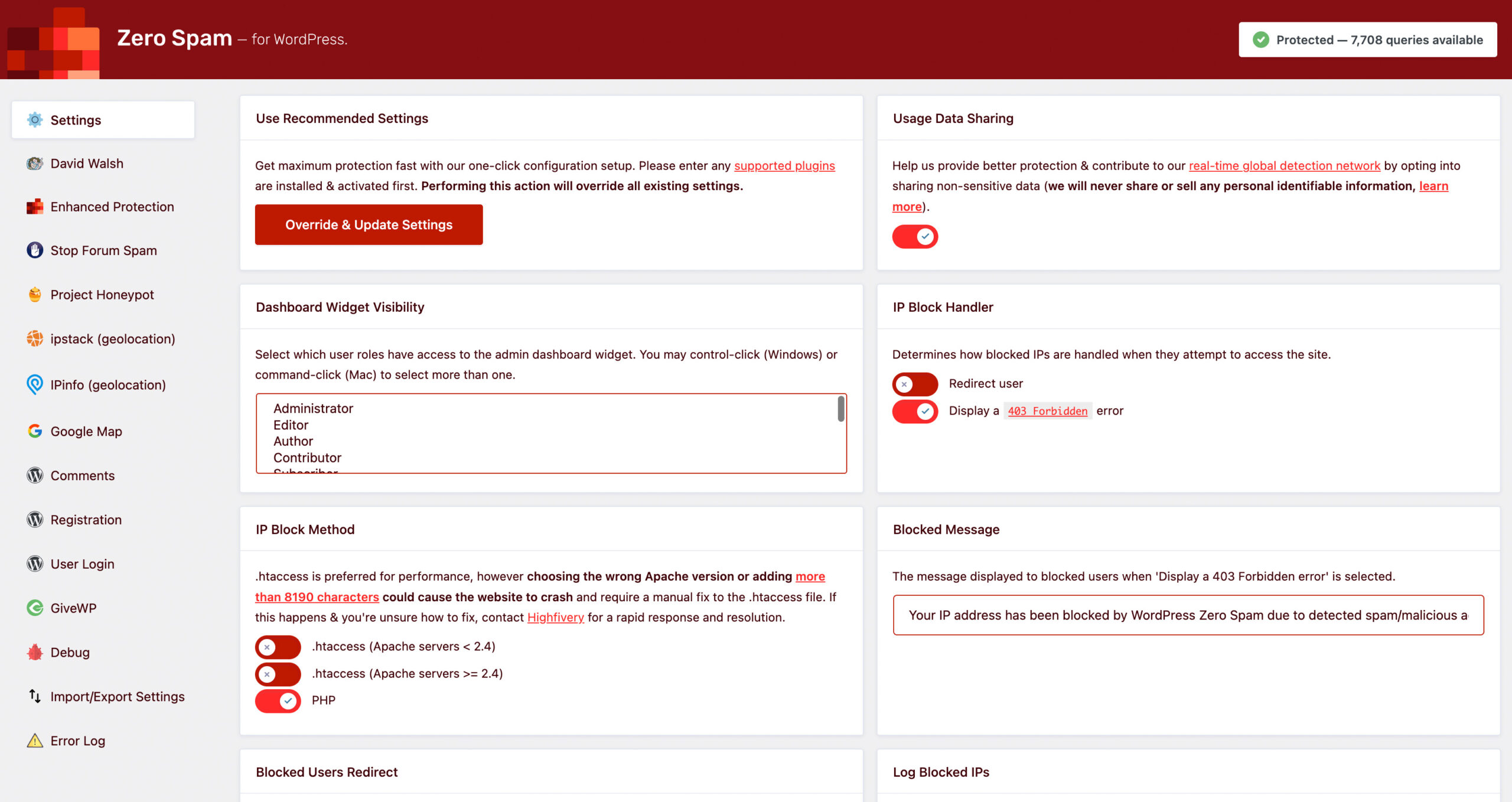
The settings page is the most complex part of the interface. It is divided into tabs for general settings, each integration (comments, WooCommerce, Contact Form 7, and so on), third-party services, and IP management. Each integration has its own on/off toggle and detection settings. The layout is functional but will take new users some time to work through.
The plugin prompts for a Zero Spam API key on several screens. The API is optional. Without a key, the plugin still applies JavaScript detection, the Stop Forum Spam check, Project Honeypot, and its disallowed-keyword and disposable-email filters. With a free API key (10 requests per month), it also queries the Zero Spam reputation database. Paid API plans increase the monthly request limit.
Main features
JavaScript-based form detection
The core detection method used by Zero Spam is based on David Walsh’s form submission technique. The plugin adds a hidden field to forms and uses JavaScript to validate the submission. Spam bots that do not execute JavaScript or that fill all fields automatically are caught and blocked.
This approach is CAPTCHA-free. Genuine visitors see nothing, and legitimate submissions are not delayed or interrupted. It is the default-enabled detection method and works across every integration the plugin supports.
Multi-source IP reputation
Zero Spam connects to three external IP reputation databases:
Stop Forum Spam is a community-maintained database of known spam IP addresses and email addresses gathered from forum operators worldwide. The plugin queries this service on each submission and blocks IPs listed there.
Project Honeypot is a distributed network of honeypot web pages that attract spam bots. Submitting IPs are checked against the Project Honeypot HTTP:BL API. If an IP has been flagged by the honeypot network, the submission is blocked. Project Honeypot integration requires a free API key from the Project Honeypot website.
Zero Spam API is the developer’s own reputation network with 120 million records, sub-millisecond latency, and threat data from 50,000 contributors. The free tier provides 10 lookups per month. Paid plans start at $8/month for 10,000 lookups.
Each service can be individually enabled or disabled in settings, which gives you granular control over which external services receive your visitors’ IP data.
Wide integration coverage
This is the plugin’s strongest differentiator. Most free anti-spam plugins protect only one or two surfaces. Zero Spam covers:
- WordPress comments
- WordPress registration forms
- WordPress login
- WooCommerce registrations and checkout
- GiveWP donation forms
- Gravity Forms
- Contact Form 7
- WPForms
- Formidable Form Builder
- Fluent Forms
- wpDiscuz comment system
- Mailchimp for WordPress sign-up forms
- ProfilePress registrations
Each integration is individually toggleable. You can enable comment protection while leaving form protection off, or vice versa. This level of control means you can phase in coverage across a complex site without disrupting existing form behavior.
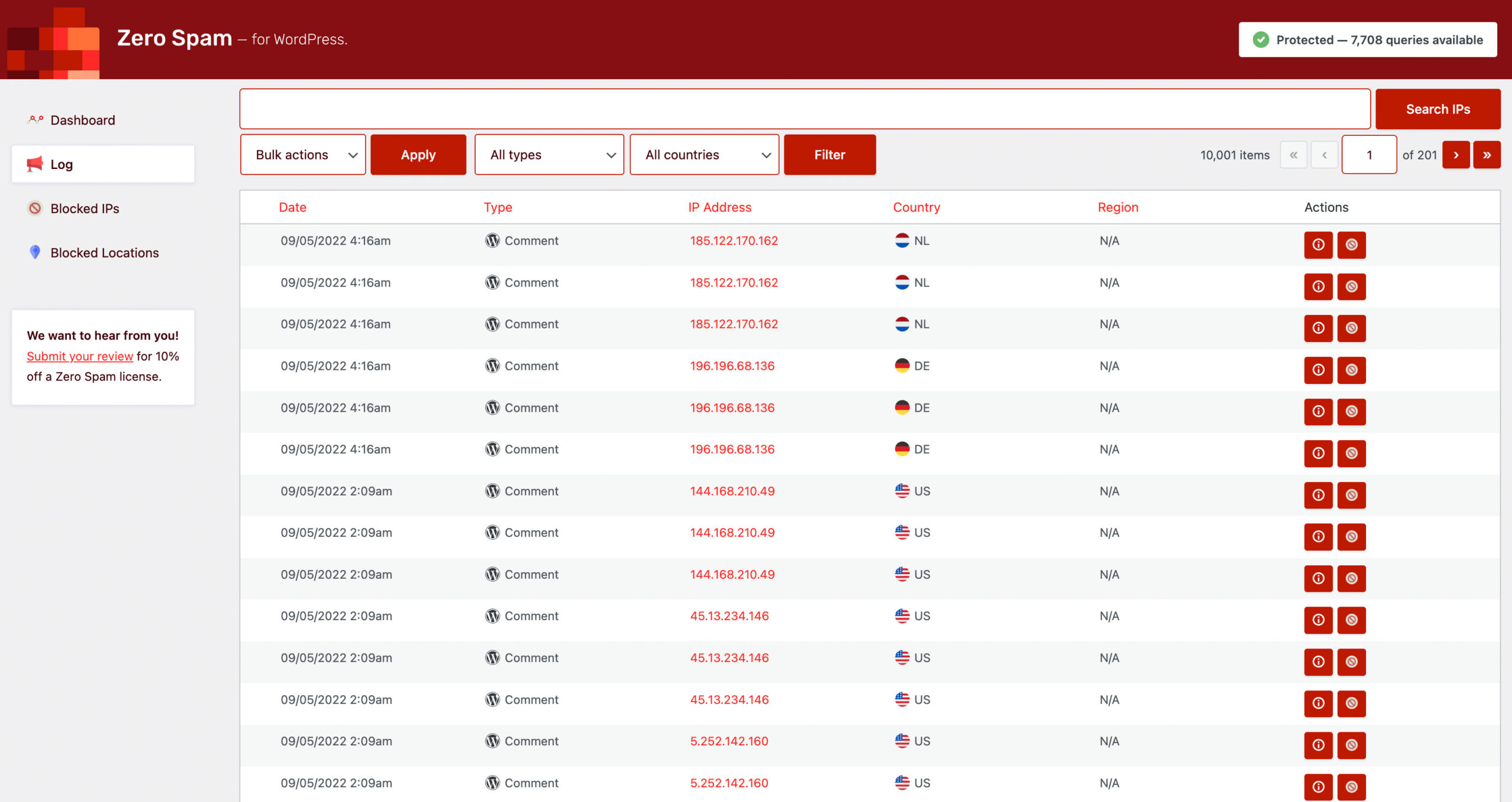
Attack log
The log section of the admin shows every blocked submission in reverse chronological order. Each entry includes the timestamp, the IP address, the country, the detection reason (for example, “Stop Forum Spam match” or “JavaScript check failed”), and the form or entry point that was targeted.
The log is genuinely useful for diagnosing false positives. If a legitimate user reports being blocked, you can look up their IP in the log, see why the block occurred, and either remove the IP from the blocklist or adjust the strictness of the third-party check that triggered it.
Geolocation and IP blocking
Zero Spam lets you block traffic by country, region, city, or postal code. Blocking operates on the IP address of the submitter and uses an optional geolocation service. The plugin supports ipbase.com, ipinfo.io, and ipstack as geolocation providers. Each requires a separate API key from the respective service.
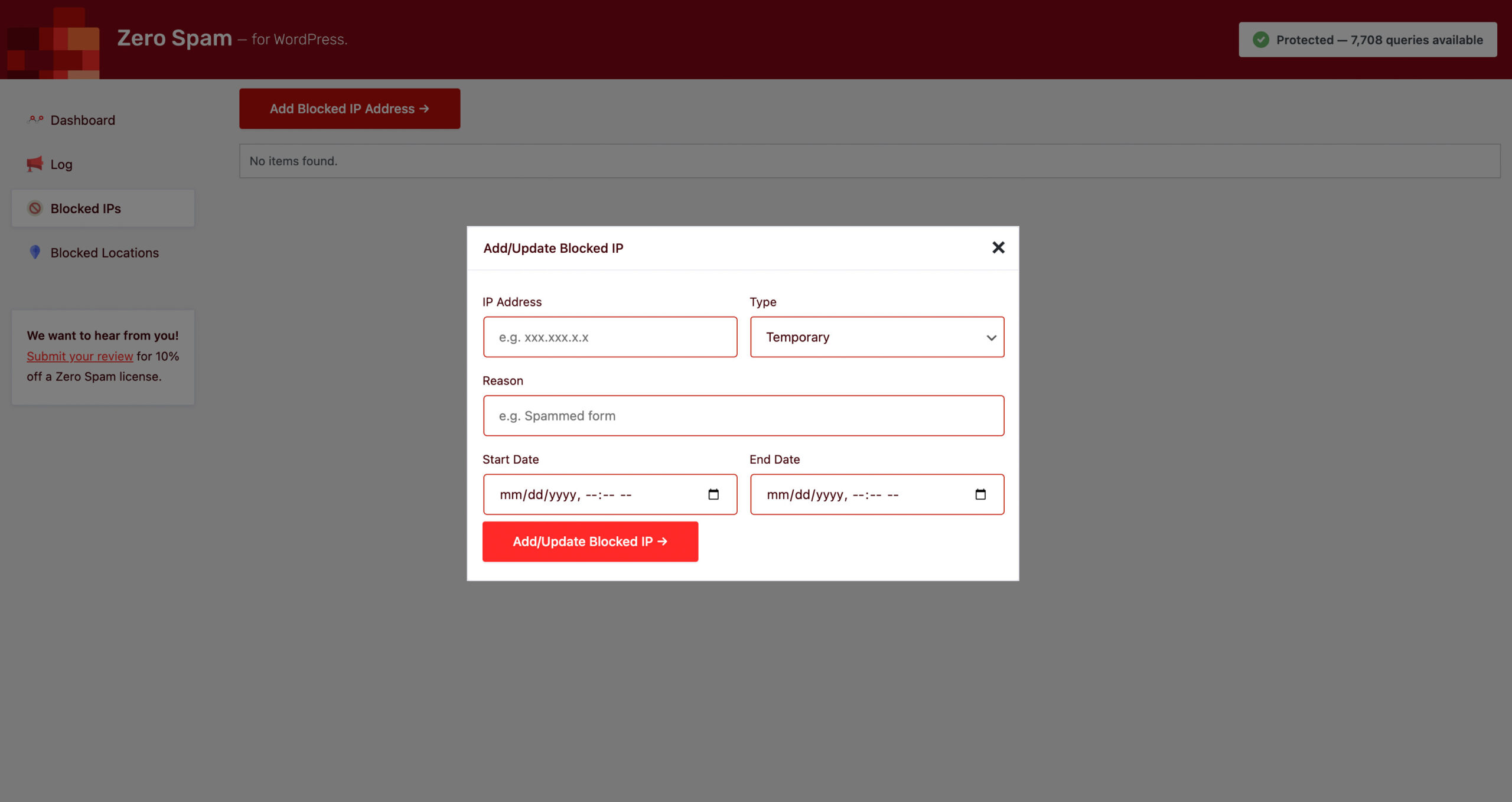
Manual IP blocking is also available. You can add individual IPs or CIDR ranges to a permanent or temporary blocklist from the admin. Temporary blocks expire after a configurable duration.
Disposable email blocking
The plugin maintains a list of known disposable email domains (temporary email services). Registrations and form submissions using email addresses from these domains are automatically blocked. This is useful for sites that see spam registrations through throwaway email providers.
Developer tools: REST API and WP-CLI
Zero Spam is one of the few WordPress anti-spam plugins to offer a documented REST API and WP-CLI support, making it practical for developers who manage WordPress at scale.
The REST API uses WordPress Application Password authentication and allows programmatic management of plugin settings. This is useful for staging-to-production syncing, CI/CD pipelines, and multisite management without logging into each site’s admin panel.
WP-CLI supports three commands: wp zerospam autoconfigure applies recommended settings, wp zerospam settings displays all current settings, and wp zerospam set --[SETTING_KEY]=[VALUE] updates individual settings. This makes Zero Spam the only plugin in the anti-spam cluster that can be fully configured from the command line.
Pricing
The Zero Spam for WordPress plugin is free to install and use. The core detection methods, including JavaScript validation, Stop Forum Spam, and Project Honeypot integration, are included with no payment required.
The Zero Spam API (the developer’s own reputation database) is an optional paid service with the following tiers:
- Explorer: Free, 10 API requests per month, single site
- Essentials: $8/month or $78/year, 10,000 requests per month, single site
- Business: $15/month or $144/year, 50,000 requests per month, single site
- Platform: $100/month or $960/year, unlimited requests, 3 sites, priority support
For most small-to-medium WordPress sites, the free tier with Stop Forum Spam and Project Honeypot (both free with a key) provides adequate protection without spending anything.
The admin panel surfaces the Zero Spam API upsell prominently. Some reviewers find this approach intrusive for a plugin they installed for free protection. The upsell prompts are visible across the dashboard and settings screens and cannot be permanently dismissed without connecting an API key.
Pros and cons
Pros
- Free to use; no required payment for core spam protection
- Widest integration coverage in the free anti-spam category: comments, WooCommerce, 8+ form plugins, registrations, and login
- No CAPTCHA required; detection is invisible to genuine visitors
- Multiple IP reputation sources: Stop Forum Spam, Project Honeypot, and optional Zero Spam API
- Detailed attack log with per-entry detection reason, enabling diagnosis of false positives
- REST API and WP-CLI support for developer and agency workflows
- Geolocation blocking by country, region, city, or postal code
- Disposable email detection at the registration level
- Active open-source development (710 commits on GitHub), compatible with WordPress 6.9
Cons
- Requires PHP 8.2 and WordPress 6.9; drops out of contention for older hosting
- Admin interface is complex relative to simpler alternatives; multiple tabs and integration toggles require deliberate setup
- Persistent Zero Spam API upsell prompts across multiple admin screens
- Smaller community than Akismet (5M installs) or Antispam Bee (700K+); fewer support threads and community tutorials
- IP-based blocking can produce false positives for visitors on shared IP ranges flagged by Stop Forum Spam
- Rescue mode requires server access to wp-config.php if you accidentally block your own IP
- Geolocation blocking requires a separate paid API key from ipbase.com, ipinfo.io, or ipstack
Alternatives
Akismet Anti-Spam is the most widely installed WordPress spam filter and the easiest to recommend for personal bloggers. It relies on a cloud API trained on 5 million sites, requires no CAPTCHA, and handles comment spam reliably. Commercial sites need a paid plan (from around $9.95/month). It also does not cover WooCommerce or form plugins natively without integrations. Read the full Akismet review.
CleanTalk Anti-Spam is a subscription cloud service (from around $12/year) that covers comment spam, contact form spam, WooCommerce, registrations, and login forms in a single install with a shared global spam database. Its coverage is comparable to Zero Spam’s, but CleanTalk relies entirely on cloud-based detection and charges from day one. Read the full CleanTalk review.
Antispam Bee is the best choice for privacy-conscious or GDPR-sensitive sites that only need comment spam protection. It runs entirely on your server, shares no data externally by default, and is 100% free with no commercial restriction. The strict limit: it only works with the WordPress default comment form. Read the full Antispam Bee review.
Final verdict
Zero Spam for WordPress is a capable, free-to-start anti-spam plugin that stands out in one specific way: it is the only plugin in this cluster that covers comments, contact forms, WooCommerce registrations, donation forms, and user registrations in a single free install. If your site has multiple spam entry points and you want to avoid a CAPTCHA, it is worth evaluating.
The caveats are legitimate. The PHP 8.2 requirement will eliminate it for some hosts. The admin interface demands more setup time than simpler tools. The upsell for the Zero Spam API is persistent. And the community is smaller than Akismet or Antispam Bee, so you may find fewer answers when troubleshooting edge cases.
For the right site, though, Zero Spam for WordPress is a strong, low-cost option. Developers who need WP-CLI and REST API access, agencies managing multiple sites, and site owners who run a mix of comment forms and plugin-powered contact or donation forms will get real value from it.
FAQ
Is Zero Spam for WordPress free?
Yes. The plugin itself is free to install and use. The core spam detection, including JavaScript validation, Stop Forum Spam, and Project Honeypot, are included at no cost. The Zero Spam API (the developer’s own reputation database) is an optional paid add-on with plans starting at $8/month for 10,000 lookups.
Does Zero Spam use CAPTCHA?
No. Zero Spam applies server-side and JavaScript-based detection that is invisible to visitors. No CAPTCHA challenge is shown to users who submit forms normally.
What server requirements does Zero Spam have?
The plugin requires PHP 8.2 or higher and WordPress 6.9 or higher. It will not install or run on older setups. If your host runs PHP 7.x or earlier WordPress versions, you will need to upgrade before using this plugin.
Which form plugins does Zero Spam protect?
Zero Spam integrates with WordPress comments, WooCommerce, GiveWP, Gravity Forms, Contact Form 7, WPForms, Formidable Form Builder, Fluent Forms, wpDiscuz, Mailchimp for WordPress, and ProfilePress. Each integration can be individually enabled or disabled in the settings.
Does Zero Spam block legitimate users?
It can, particularly when IP reputation services are active. If a legitimate visitor is on a shared IP address flagged by Stop Forum Spam, they may be blocked. The admin log shows why each block occurred, and you can remove individual IPs from the blocklist or reduce the strictness of third-party checks.
Does Zero Spam work with Jetpack Comments?
No. The plugin does not integrate with Jetpack’s comment system. Zero Spam only covers the surfaces listed in its integrations settings.
Can I use Zero Spam without an API key?
Yes. The plugin works without a Zero Spam API key. You lose access to the Zero Spam reputation database, but Stop Forum Spam, Project Honeypot (which requires its own free key), JavaScript detection, and disposable email filtering still function.
Is Zero Spam GDPR compliant?
Partially. The JavaScript detection method is local and does not send data externally. However, the Stop Forum Spam, Project Honeypot, and geolocation service integrations send IP addresses to external servers. If complete data locality is required, disable those integrations. For full on-server GDPR compliance without external calls, Antispam Bee is a better fit.
How do I manage Zero Spam settings from the command line?
Use WP-CLI. The plugin supports wp zerospam autoconfigure (applies recommended settings), wp zerospam settings (lists current settings), and wp zerospam set --[KEY]=[VALUE] (updates a setting). A REST API using WordPress Application Passwords is also available for programmatic management.
What happens if I block my own IP?
Add define('ZEROSPAM_RESCUE_KEY', 'your-key'); to your wp-config.php and then append ?zerospam_rescue=your-key to your site URL to regain access. Alternatively, rename the plugin folder via FTP to deactivate the plugin temporarily.
Browse all WordPress plugin reviews in the Reviews category.