


Selling a ticket is a different job than displaying a date. A calendar plugin can show visitors when your event happens. A booking and ticketing plugin has to take a payment, hold a seat or a slot, generate a ticket, and let someone scan that ticket at the door, all without double-selling the same seat twice. That is a narrower, higher-stakes feature set, and not every plugin marketed as an “event plugin” actually does it.
This roundup covers seven plugins built for that job: taking money for a dated event and managing everything that follows. If you only need a public calendar of upcoming dates with no checkout involved, our Best WordPress Event Calendar Plugins roundup covers that display-first use case instead. Several plugins appear in both lists because they do both jobs, but the sections here focus specifically on their booking, ticketing, and seating capability rather than their calendar views.
I checked each plugin’s official pricing page, feature documentation, and WordPress.org listing (where one exists) to confirm what is actually free versus paid, whether the plugin or a third party takes a cut of ticket revenue, and what a reserved-seating setup actually requires. The goal is a comparison you can use to pick a plugin, not a repeat of marketing copy.
How I chose these WordPress event booking plugins
Event booking and ticketing is a transactional feature, so the bar for inclusion was higher than “has a calendar.” My criteria:
- Real checkout, not just a display. Can the plugin take a payment and issue a ticket, or does it only show event dates?
- Commission structure. Does the plugin or vendor take a percentage of every ticket sold, or only the standard payment processor fee?
- Reserved seating. Is a seat map available, and at what tier?
- Free-tier scope for booking. Is ticket selling usable in the free version, or does it require a paid plan from the first sale?
- WooCommerce dependency. Does the plugin need an existing WooCommerce store, or does it run standalone?
- Check-in and attendee management. QR codes, door lists, and mobile scanning apps.
- Pricing transparency. First-year price versus renewal price, and what triggers the jump.
- Maintenance and security signals. Update cadence, WordPress.org status, and any disclosed vulnerabilities.
Quick comparison table
| Plugin | Best for | Free version | Starting paid price | Standout feature | Main limitation |
|---|---|---|---|---|---|
| Eventnetic | All-in-one booking, ticketing, and reserved seating | Yes, unlimited events and bookings, no time limit | $99/yr Starter (first year) | Zero-commission checkout on your own site; seat maps reuse per venue | Brand new in 2026, no install history or third-party reviews yet |
| Tickera | Zero-commission dedicated ticketing plugin | Yes (3 basic payment gateways) | $149/yr Standard (first year, renews at $99/yr) | Never takes a cut of ticket sales, on any plan | Free tier lacks Stripe/PayPal; seating charts need Bundle or Lifetime |
| FooEvents for WooCommerce | Adding ticket sales to an existing WooCommerce store | No, premium only | $99/yr (core plugin) | Uses your existing WooCommerce checkout, gateways, taxes, and coupons | Requires an active WooCommerce store; nothing to trial for free |
| Eventin | Free WooCommerce ticketing for conferences and hybrid events | Yes (WooCommerce ticketing included) | $89/yr Standard, sale price (list $99/yr, 2 domains) | Zoom, QR check-in, and speaker profiles all in the free plugin | Standard plan covers only 2 domains |
| WP Event Manager | Community directories with frontend booking submission | Yes (submission free, ticketing needs an add-on) | $49/yr per add-on (1 site), or $199/yr Pro bundle | Any logged-in visitor can submit and manage their own event listing | Commission-free ticket sales require the separate Sell Tickets add-on |
| Modern Events Calendar | Built-in appointment booking plus ticketing | Yes (limited, not on WP.org) | $99/yr (1 site) | Appointment/time-slot booking and Stripe Connect revenue split in Pro | Removed from WordPress.org; four CVEs disclosed since 2024 |
| Sugar Calendar | Lightweight free Stripe ticketing for small businesses | Yes (Stripe ticketing included) | $49.50/yr intro, Basic (1 site) | Free-tier Stripe ticketing with no plugin-level commission | WooCommerce ticketing and multiple ticket types need the Plus plan |
1. Eventnetic: best all-in-one WordPress event booking and ticketing plugin
Eventnetic is a standalone WordPress event ticketing and booking plugin: create an event, sell tickets, and manage bookings from its own dashboard, with no WooCommerce dependency. It is a genuinely new product, version 1.0.0, released in 2026 by FS Code (the team behind Booknetic), so there is no long install history or years of WordPress.org reviews to point to yet. What stands out instead is how much of the core booking and ticketing workflow ships in the free version, and how the pricing model is structured around a flat licence fee rather than a cut of ticket revenue.
The free plugin lets you create events, sell tickets through a checkout that stays on your own site, and manage bookings with no cap. Unlimited active events, unlimited bookings, and no time limit, confirmed directly against the current eventnetic.com/pricing page as of this review.
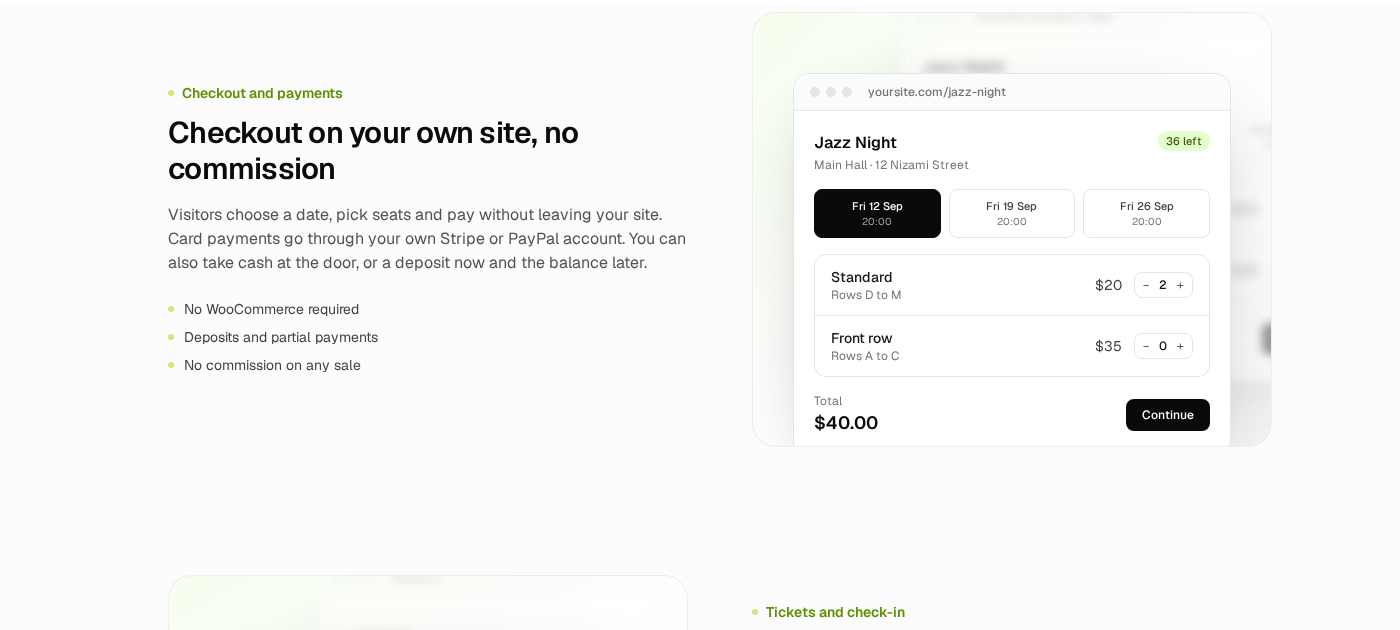
Paid tiers add the features most ticketing use cases eventually need: recurring dates (one event holding many dates, each with its own capacity and attendee list), reserved seating with seat maps that belong to a venue and get reused across every event held there, PDF tickets with QR check-in, Stripe and PayPal integration, deposits, coupons, invoices, and a waiting list. Every feature ships in the licence; there is no separate add-on marketplace to shop in.
Best for: Venues, studios, and event businesses that want ticket sales, reserved seating, and checkout handled by one plugin without adding WooCommerce or a third-party ticketing platform to the stack.
Key features:
- Unlimited events and bookings in the free plan, no time limit
- Checkout stays on your own WordPress site, no redirect to a third-party platform
- Zero commission on ticket sales; Eventnetic never touches ticket revenue
- Recurring dates as one event with per-date capacity, price, and attendee list (paid)
- Reserved seating with seat maps tied to a venue and reused across events (paid)
- PDF tickets with QR check-in and phone-camera scanning at the door (paid)
- Deposits: partial payment now, balance later, with automated reminders (paid)
- 15 automation triggers with email notifications included free; Telegram, SMS, and WhatsApp alerts on paid plans
- Waiting list with automatic offers when a spot frees up (paid)
- Stripe, PayPal, and WooCommerce-as-payment-method integrations (paid)
Research notes: As of this review (checked September 24, 2026), the free plan on eventnetic.com/pricing shows no event limit, no booking limit, and no time limit. Because the plugin is brand new, there is no WordPress.org listing, install count, or independent rating to cite yet; treat that as a real gap to weigh against the feature set rather than something to gloss over. The 14-day money-back guarantee applies to paid plans if you want to test the paid features risk-free.
Pricing: Free forever (unlimited events and bookings). Starter $99/yr first year, renews at $199/yr (1 site), or $199 one-time lifetime. Pro $199/yr first year, renews at $299/yr (5 sites), or $399 one-time lifetime. Elite $299/yr first year, renews at $399/yr (25 sites), or $599 one-time lifetime. No commission on ticket sales at any tier; standard Stripe/PayPal processing fees still apply.
Pros
- Free plan has no event or booking cap and no time limit
- Zero commission on ticket sales at every tier, including free
- Reserved seating and recurring dates in one plugin, no separate booking plugin needed
- Checkout stays on your own site rather than redirecting to a hosted page
- All features included in the licence; no add-on marketplace to navigate
- 14-day money-back guarantee on paid plans
Cons
- Version 1.0.0, released in 2026; no long-term track record yet
- Not yet listed on WordPress.org, so there is no independent install count or review history
- Reserved seating, recurring dates, and PDF tickets all require a paid plan
- Renewal pricing is higher than the first-year price on annual plans
2. Tickera: best zero-commission dedicated ticketing plugin
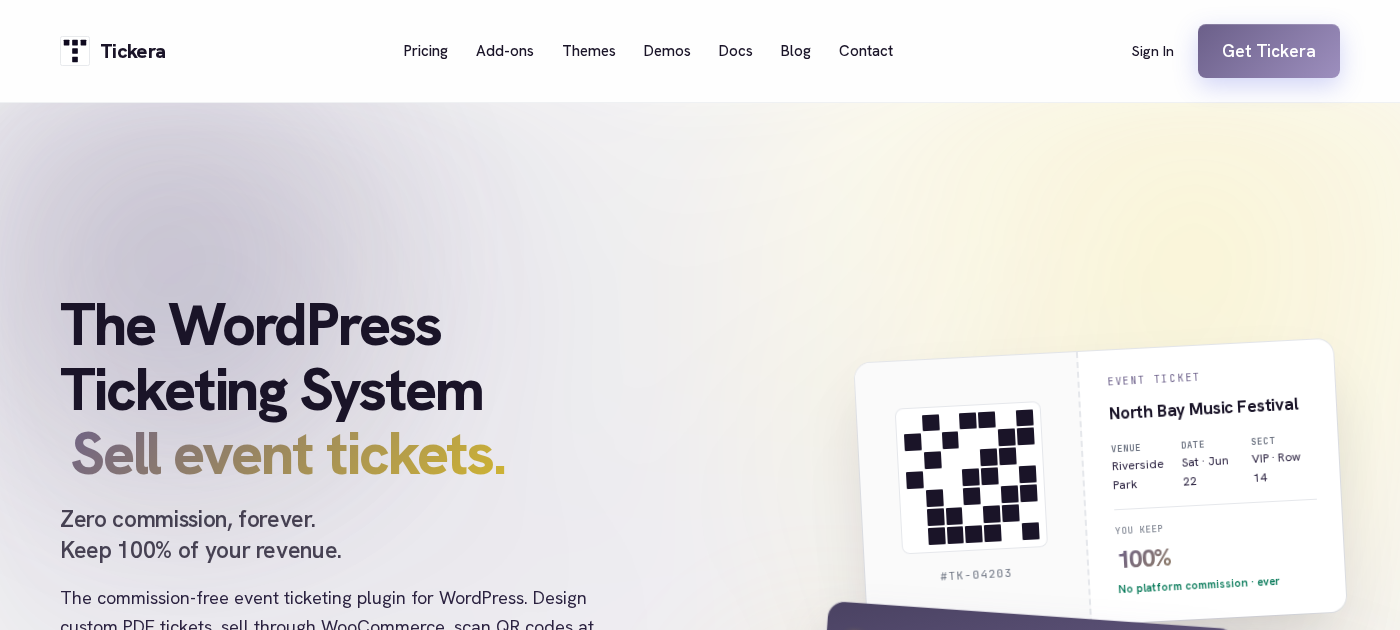
Tickera is a purpose-built WordPress ticketing plugin with one pricing promise it repeats everywhere on its site: it never takes a cut of a ticket sale, on any plan, free or paid. That distinguishes it from hosted ticketing platforms that charge a percentage plus a flat fee per ticket, and it is true down to the free tier.
The free version, available on WordPress.org with 2,000+ active installs and a 4.5-star rating across 289 reviews (240 of them five-star), includes real ticket-selling functionality: event creation, a drag-and-drop PDF ticket designer, QR and barcode codes on every ticket, buyer and attendee registration fields, multiple ticket types, discount codes, and free mobile check-in apps for iOS and Android. The catch is payment methods: the free plugin ships with only three gateways (2Checkout, custom offline payments, and free/zero-cost orders), so Stripe and PayPal both require a paid upgrade.
The paid Standard plan adds the other 16 payment gateways and works on unlimited sites under one licence, which is unusually generous compared to per-site pricing elsewhere in this category. Seating charts, a WooCommerce bridge, custom forms, and bulk discount codes are bundled into the Bundle plan rather than sold as one-off add-ons.
Best for: Organizers who want a dedicated, no-WooCommerce-required ticketing plugin and consider a zero-commission guarantee a deciding factor, and who are comfortable installing Stripe or PayPal access on a paid plan.
Key features:
- Event creation and management in the free plugin
- Drag-and-drop PDF ticket designer with live preview, free
- QR and barcode codes on every ticket, free
- Buyer and attendee registration fields, multiple ticket types, discount codes, fees and taxes, free
- Free mobile check-in apps (Checkinera) for iOS and Android on any plan
- 19 built-in payment gateways on paid plans, versus 3 in the free version
- Reserved seating charts (Bundle and Lifetime plans)
- WooCommerce Bridge for connecting Tickera to an existing WooCommerce checkout (Bundle and Lifetime)
- Custom registration forms and bulk discount codes (Bundle and Lifetime)
- One licence works on unlimited sites at every paid tier
Research notes: The unlimited-sites licensing is a genuine differentiator in a category where most competitors charge per site. The free tier is usable for low-volume or donation-style ticketing where offline or zero-cost orders are acceptable, but any business that needs card payments should budget for the Standard plan from the start. Version 3.6.0.5 shipped just two days before this review was researched, which is a good sign of active maintenance.
Pricing: Free on WordPress.org (3 payment gateways). Standard $149/yr first year, renews at $99/yr (unlimited sites, 19 gateways). Bundle $199/yr first year, renews at $149/yr (adds all 25 premium add-ons, including seating charts). Lifetime $399 one-time (all Bundle features permanently, plus Checkinera app source code). 7-day money-back guarantee. Zero commission on ticket sales at every tier.
Pros
- Genuinely takes 0% commission on ticket sales, free or paid
- One licence covers unlimited sites on every paid plan
- Free mobile check-in apps included at every tier
- Active development; frequent WordPress.org updates
- Lifetime plan is a real one-time alternative to annual renewal
- 4.5-star rating across 289 reviews on WordPress.org
Cons
- Stripe and PayPal are not available in the free version
- Reserved seating requires the Bundle or Lifetime plan, not Standard
- Only 2,000+ active installs, a smaller footprint than category leaders
- Bundle and Lifetime pricing is a jump from the Standard plan if seating is a requirement from day one
3. FooEvents for WooCommerce: best for stores that already run WooCommerce
FooEvents takes a different approach from every other plugin on this list: instead of building its own checkout, it turns WooCommerce products you already sell into ticketed events, using your existing WooCommerce payment gateways, tax rules, coupons, customer accounts, and order workflow. For a store that already runs WooCommerce for physical or digital products, that means no second checkout system to configure and no separate customer database to reconcile.
There is no free tier. FooEvents is sold exclusively as a premium plugin, either as the standalone core plugin or as one of four pre-configured bundles that combine the core plugin with specific add-ons (Point of Sale, Premium, Bookings, or Basic) at a discount versus buying pieces separately. Every purchase includes free iOS and Android check-in apps and 12 months of updates and support, renewing annually after that.
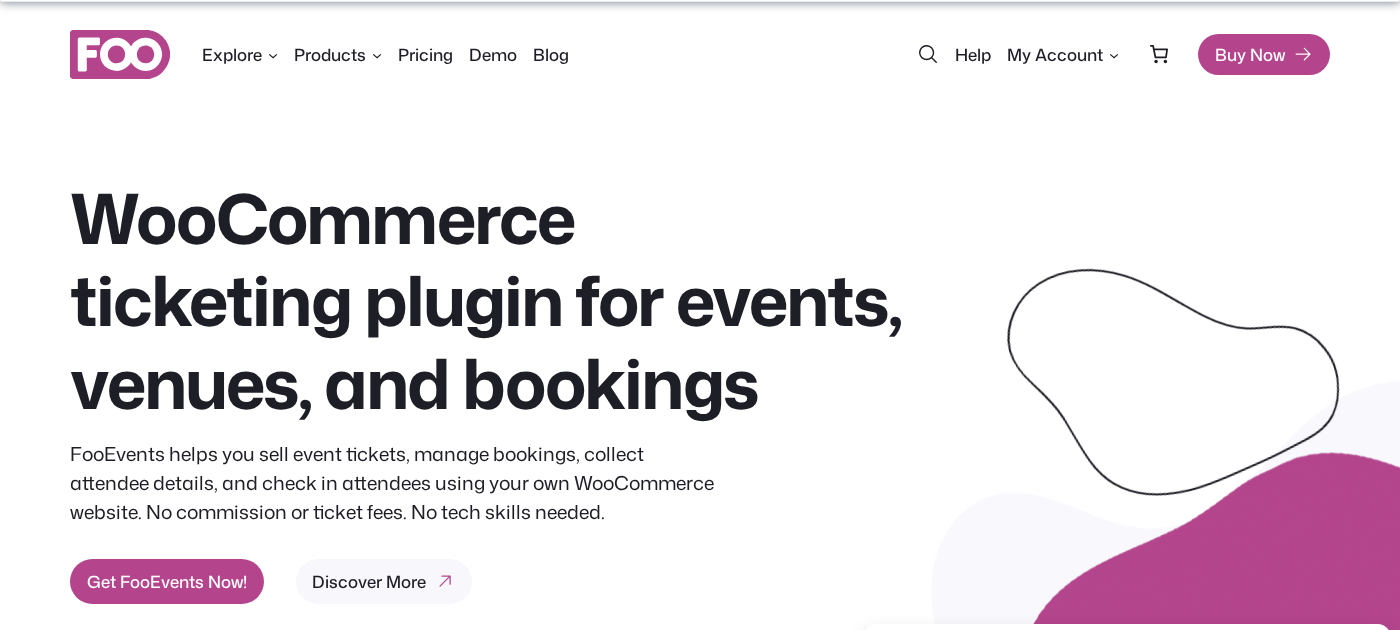
Because tickets are WooCommerce products under the hood, FooEvents inherits WooCommerce’s full payment gateway ecosystem rather than being limited to whatever gateways the plugin itself integrates, which is a real advantage over plugins that maintain their own smaller gateway list.
Best for: WooCommerce stores that want to add event tickets alongside products they already sell, without introducing a second checkout or payment system.
Key features:
- Converts WooCommerce products into ticketed events using the existing WooCommerce checkout
- Inherits WooCommerce’s full payment gateway, tax, and coupon system, no separate configuration
- QR code and barcode tickets
- Free iOS and Android check-in apps included with every licence
- Customizable ticket themes and attendee data capture
- Zoom and Mailchimp integrations
- Bundle options add Point of Sale, in-person booking management, or additional premium add-ons
- No per-ticket commission; you keep whatever WooCommerce’s own gateways charge
Research notes: Because there is no free version, there is no way to trial real ticket sales before purchasing; the 14-day money-back guarantee is the practical safety net if it does not fit. Pricing is structured as bundles rather than a straightforward core-plus-add-ons list, so it is worth comparing the standalone core price against a bundle carefully. The bundles’ “save X%” framing is measured against buying every included add-on separately, not against the core plugin alone.
Pricing: No free version. Core plugin $99/yr standalone. Bundles: Basic $169 (does not include Seating), Bookings $199 (does not include Seating), Premium $249 (includes FooEvents Seating), Point of Sale $399 (includes FooEvents Seating and Bookings). All licences include 12 months of updates and support, renewing annually. 14-day money-back guarantee. Verified directly against fooevents.com/pricing on September 24, 2026.
Pros
- Uses your existing WooCommerce checkout, gateways, taxes, and coupons, no second system
- Free iOS and Android check-in apps included with every purchase
- No plugin-level commission on ticket sales
- Bundles cover in-person Point of Sale selling, a feature few competitors on this list offer
- 14-day money-back guarantee
Cons
- No free version to test before buying
- Requires an active WooCommerce installation; not usable standalone
- Bundle structure takes some comparison work to find the right fit
- Reserved seating (FooEvents Seating) is included only in the Premium and Point of Sale bundles, not in the core plugin, Basic, or Bookings bundles
4. Eventin: best free WooCommerce ticketing for conferences
Eventin takes the most generous approach to its free tier of any plugin in this roundup that still depends on WooCommerce. The free version includes WooCommerce-based multi-tier ticket sales with no Eventin commission, automated Zoom link distribution to attendees, QR code check-in, recurring events, speaker profiles, multi-session conference scheduling, and PDF tickets, all without a paid plan.
Built and maintained by ThemeWinter, Eventin has 10,000+ active installs and a 4.7-star rating from 400 reviews on WordPress.org. Unlike FooEvents, which extends products in an existing store, Eventin creates its own event post type with its own registration flow, and uses WooCommerce as the payment processor behind that flow rather than requiring you to already be running a WooCommerce catalog.
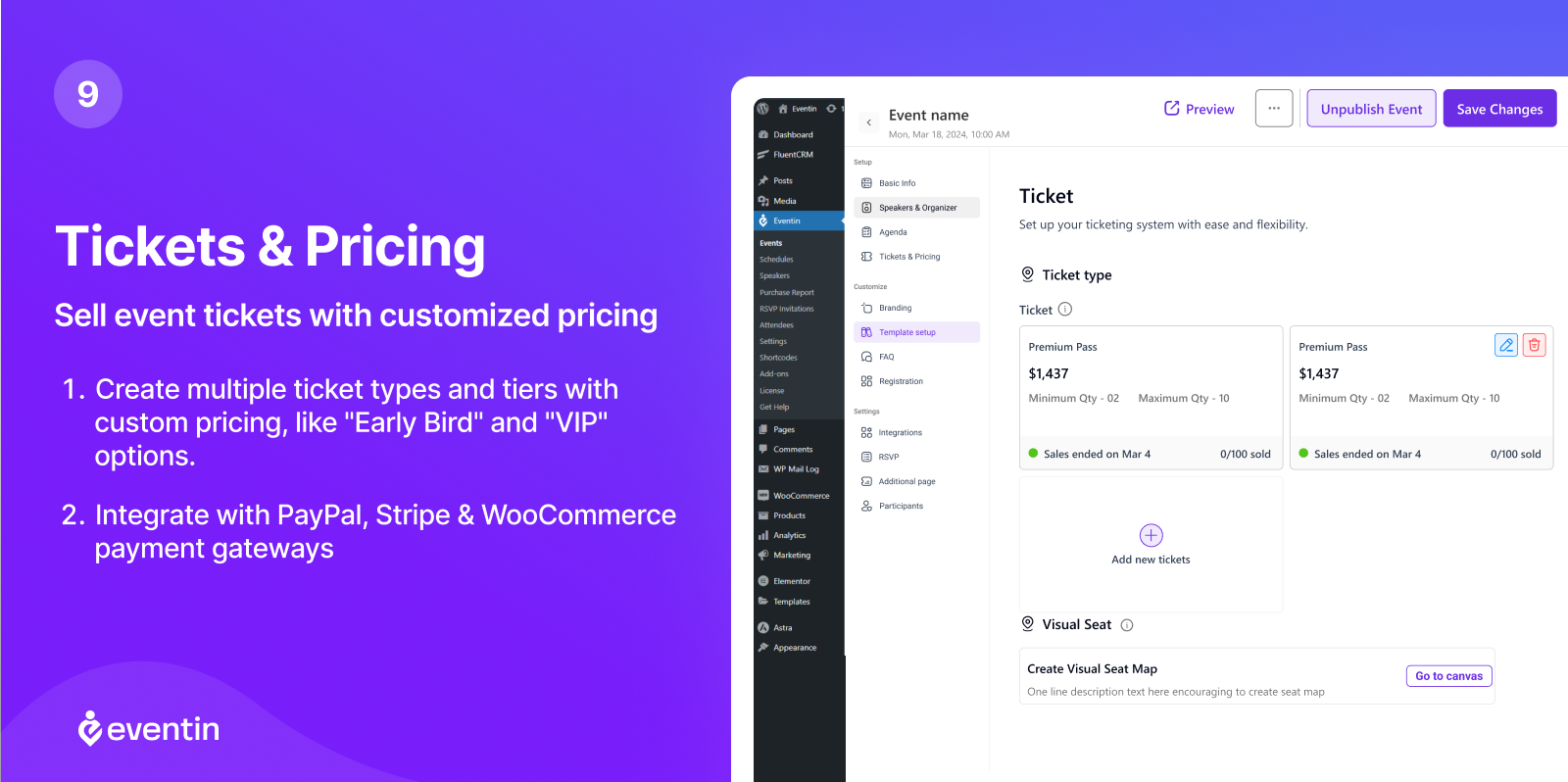
The paid Pro tier adds visual seat mapping, an email automation builder, direct Stripe and PayPal integration without WooCommerce as an intermediary, CRM connections, and Dokan multivendor marketplace support.
Best for: Conference and summit organizers, hybrid event producers, and course instructors who want free WooCommerce-backed ticket sales without first needing an existing WooCommerce store built around other products.
Key features:
- Multi-tier ticket pricing via WooCommerce in the free version, no Eventin commission
- Automated Zoom link distribution to attendees after registration, free
- QR code attendee check-in, free
- Recurring events with custom intervals, free
- Speaker directory and multi-session conference scheduling with room and track assignments, free
- PDF tickets with QR codes delivered automatically, free
- Visual seat mapping (Pro)
- Direct Stripe and PayPal integration without WooCommerce as intermediary (Pro)
- Email automation builder with event-triggered sequences (Pro)
- Dokan multivendor marketplace integration (Pro)
Research notes: WooCommerce must still be installed for the free ticketing flow to work, but Eventin sets up its own event and ticket structure rather than requiring you to build WooCommerce products manually, which is a meaningfully lighter lift than FooEvents for a site starting from zero. The Standard Pro plan’s 2-domain limit is worth noting for agencies managing several client sites.
Pricing: Free on WordPress.org (WooCommerce ticketing included). Current site pricing shows a promotional sale price alongside the list price on every tier: Standard $89/yr on sale (list $99/yr, 2 domains). Premium $149/yr on sale (list $299/yr, 100 domains). Agency $299/yr on sale (list $599/yr, unlimited domains). Lifetime Standard $119 one-time on sale (list $199, 1 domain). 15-day money-back guarantee. Verified directly against themewinter.com/eventin/pricing on September 24, 2026; the sale pricing may be time-limited, so confirm current figures before purchasing.
Pros
- Free WooCommerce ticketing, Zoom, QR check-in, and speaker profiles with no paid plan
- Purpose-built for multi-track conferences and hybrid events
- Visual seat mapping included in every Pro tier at no extra add-on cost
- Lifetime licence option available
- Company-backed development and support from ThemeWinter
Cons
- Still requires WooCommerce to be installed for checkout, even though it manages its own event data
- Standard annual plan covers only 2 domains
- Seat mapping and direct Stripe/PayPal integration are Pro-only
- 10,000+ installs is a smaller footprint than the largest players in the category
5. WP Event Manager: best for community booking directories
WP Event Manager takes a directory model rather than a single-organizer model: events are frontend-submittable by any logged-in user, without needing WordPress admin access. That single capability makes it the strongest option in this list for sites where booking listings come from many independent organizers rather than one team, such as community event directories, local listing sites, and membership platforms.
Booking and ticket sales are not part of the free core plugin; they come through the modular add-on system. The Sell Tickets add-on connects to WooCommerce for commission-free ticket sales, and a mobile check-in app is available through a separate Event App add-on. With 20,000+ active installs and nine years on WordPress.org, the core plugin has a stable track record, even though the paid add-on structure means the true cost of a full booking setup is higher than the free core plugin implies on its own.
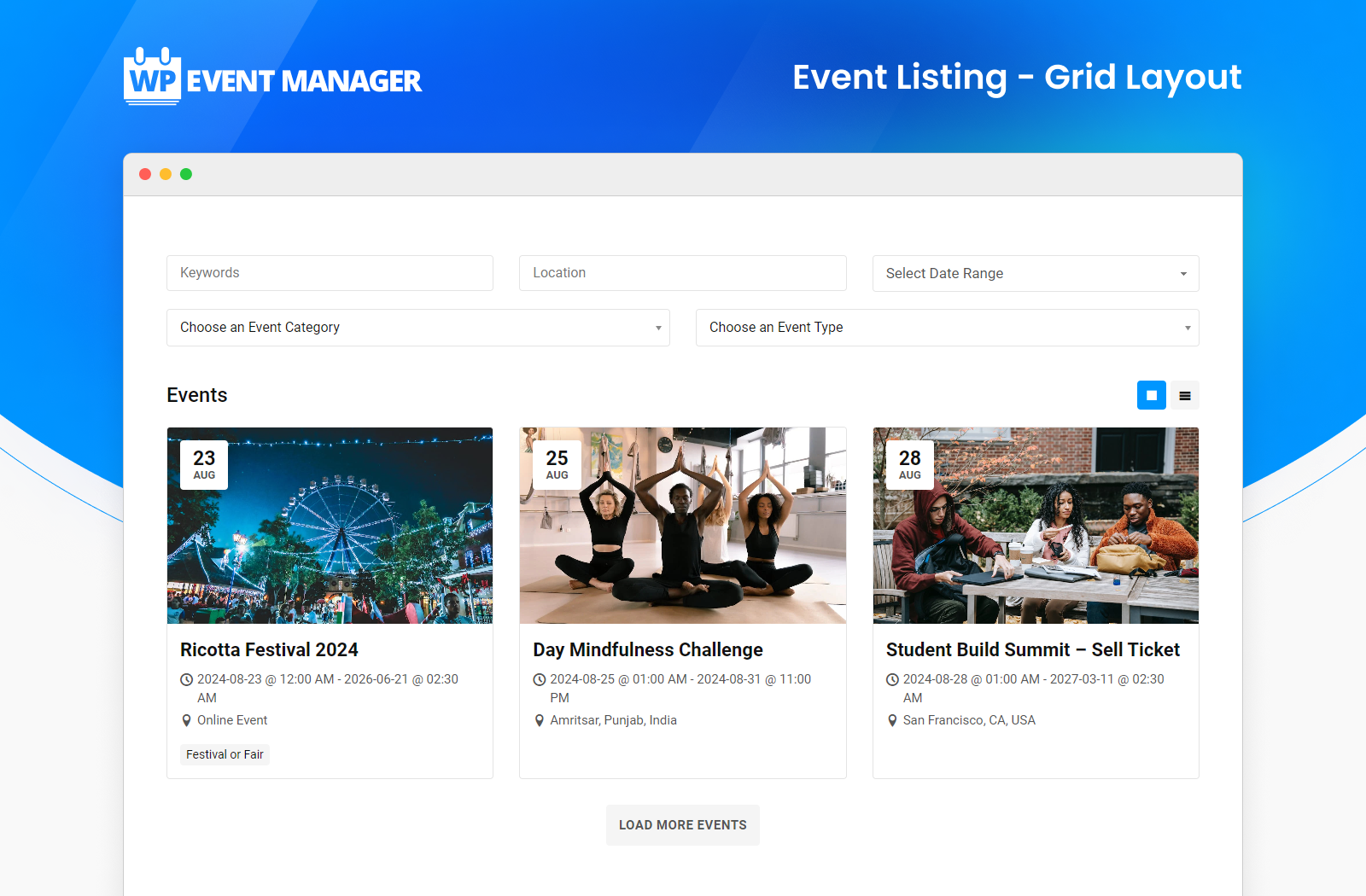
Best for: Community event directories, local listing sites, and membership platforms where multiple independent organizers submit and manage their own event bookings.
Key features:
- Frontend event submission in the free plugin, no admin access required
- Custom form field editor (text, dropdowns, file uploads, date pickers), free
- Grid and list event listings with search and filtering, free
- WooCommerce compatibility in the free plugin; full commission-free ticketing via the Sell Tickets add-on
- Mobile organizer app for QR check-in (Event App add-on)
- CRM integrations: Mailchimp, HubSpot, Salesforce, Zoho, ActiveCampaign (individual add-ons)
- 40+ language translations with RTL support, free
- REST API for headless and external integrations, free
Research notes: The free plugin’s booking capability stops at listing management; actual ticket sales require the Sell Tickets add-on ($49/yr for 1 site standalone, up to $399/yr for unlimited sites, or bundled into the $199/yr Event Manager Pro bundle alongside 26 other add-ons). Budget for that add-on cost from the outset if commission-free ticket sales are the goal, rather than assuming the free plugin covers it. Support response times have been inconsistent in recent WordPress.org reviews.
Pricing: Free core plugin on WordPress.org. Individual add-ons (including Sell Tickets) start at $49/yr for 1 site, scaling up to $399/yr for unlimited sites. Event Manager Plus bundle $99/yr (20 plugins, 1 site). Event Manager Pro bundle $199/yr (27 plugins including all ticket-selling add-ons, 1 site). Higher bundles: Virtual Event Manager Pro $299/yr (30 plugins), All Events Manager Pro $399/yr (every plugin). Verified directly against wp-eventmanager.com/pricing and the Sell Tickets product page on September 24, 2026.
Pros
- Frontend event submission is free, a genuine differentiator for directory-style booking sites
- Commission-free ticket sales through WooCommerce once the Sell Tickets add-on is active
- Modular pricing means you pay only for the booking features you use
- 40+ language translations and RTL support in the free plugin
- Over nine years of active development and a large install base
Cons
- No ticket sales in the free core plugin; the Sell Tickets add-on is required
- Add-on costs accumulate quickly without buying a bundle
- No reserved seating option at any tier
- Support response times have been inconsistent per recent reviews
Read our full WP Event Manager review
6. Modern Events Calendar: best built-in appointment booking plus ticketing
Modern Events Calendar (MEC) is best known for its calendar view variety, but its Pro package also includes a genuine booking engine: appointment and time-slot booking that removes the need for a separate booking plugin, custom booking forms with reorderable fields and file uploads, and ticketing through PayPal, Stripe with SCA, WooCommerce, bank transfer, and Stripe Connect for splitting ticket revenue between multiple recipients. That revenue-split capability through Stripe Connect is not something most other plugins on this list offer.
The context every buyer needs: the free Lite version was permanently removed from WordPress.org in 2022 following a guideline violation, and four vulnerabilities have been disclosed since 2024, three rated high severity (the most recent, an 8.6-severity SQL injection issue, was published June 29, 2026). All are patched as of version 7.34.0. Because the plugin sits outside the WordPress.org automatic update system, confirming you are on a patched version requires active management rather than relying on background updates.
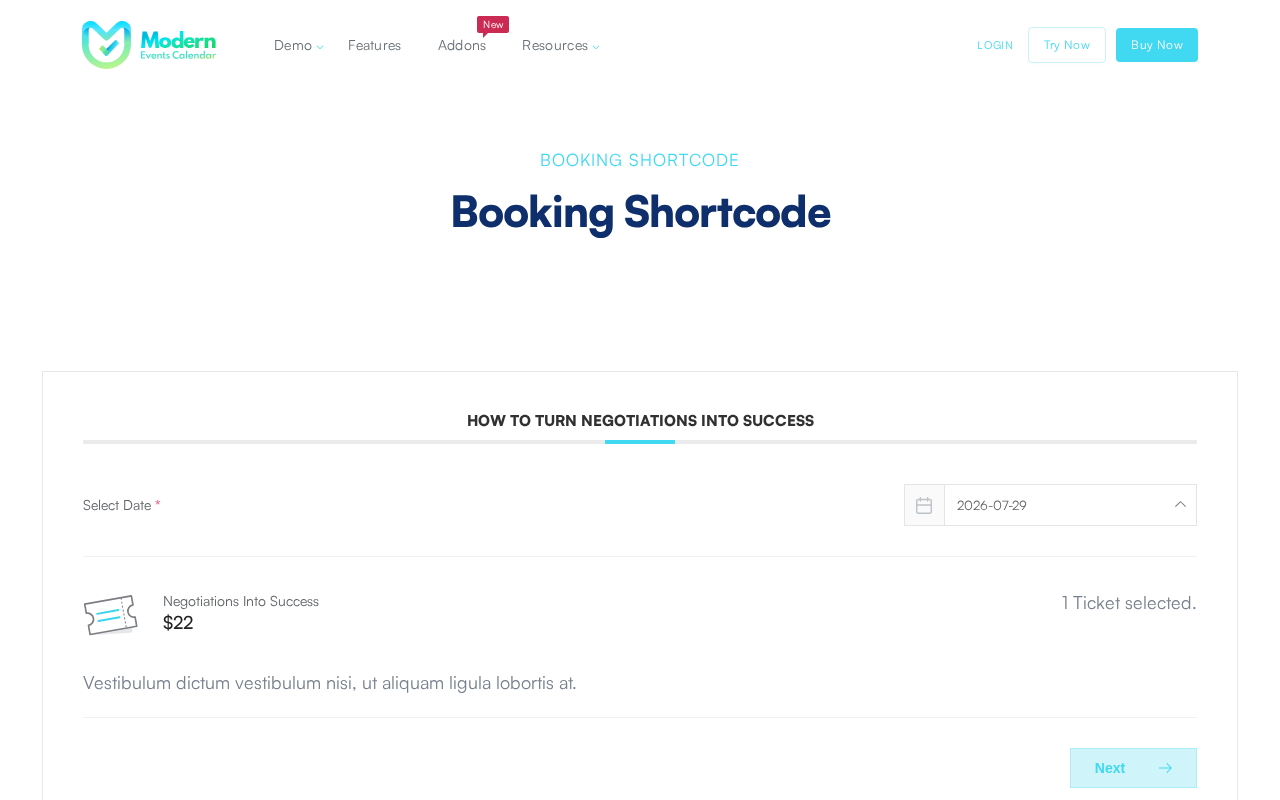
Best for: Event businesses and agencies that want appointment-style booking and ticketing bundled with calendar display in one plugin, and that are comfortable managing plugin updates outside WordPress.org.
Key features:
- Appointment and time-slot booking built in, no separate booking plugin needed
- Integrated ticketing: PayPal, Stripe with SCA, WooCommerce, bank transfer
- Stripe Connect for splitting ticket revenue between multiple recipients
- Custom booking forms with reorderable fields and file upload support
- QR code check-in with an Android companion app
- One-click migration from other event plugins, including ticket and booking data
- REST API with approximately 25 endpoints for custom booking integrations
Research notes: The booking and revenue-split features are genuinely differentiated, particularly for marketplaces or multi-organizer sites that need to split ticket payouts automatically. Before installing, confirm the site is running MEC 7.34.0 or later to be clear of all four disclosed CVEs; because updates do not flow through WordPress.org, that check has to be done manually rather than assumed.
Pricing: Free Lite (registration required at my.webnus.net, not on WordPress.org). Pro 1 site $99/yr, 5 sites $199/yr, unlimited sites $999/yr. A Developer Diamond Bundle is available for agencies (MEC Pro plus Kata Pro, ShopPress Pro, and all add-ons) as an annual subscription; pricing is not published and requires contacting sales. There is no lifetime licence option. 30-day money-back guarantee. Verified directly against my.webnus.net/pricing on September 24, 2026.
Pros
- Appointment/time-slot booking included in Pro, removing the need for a separate plugin
- Stripe Connect revenue splitting is a rare feature at this price point
- $99/yr single-site pricing undercuts several ticketing-only competitors
- One-click migration from 10 competing plugins, including booking data
Cons
- Removed from WordPress.org in 2022; updates require manual version management
- Four CVEs since 2024, three rated High severity, patched in 7.34.0
- No native reserved-seating maps in the base booking engine
- Not discoverable via standard WordPress.org plugin search
Read our full Modern Events Calendar review
7. Sugar Calendar: best lightweight free ticketing for small businesses
Sugar Calendar’s free Lite version is unusually generous for ticket sales specifically: Stripe payment processing with no plugin-level commission, registration forms for attendee details, free-ticket RSVP claiming without a payment provider at all, and Zoom meeting integration, all included at no cost. The trade-off in the free and Basic tiers is a 3% Stripe processing markup on top of Stripe’s own fee; that markup disappears once you move to the Plus plan.
Now part of the Awesome Motive portfolio, Sugar Calendar has company backing rather than solo-developer maintenance. Advanced recurring events and WooCommerce-based ticketing with multiple ticket types both require paid plans, with the recurring-event unlock arriving at the lowest price point of any plugin in this roundup.
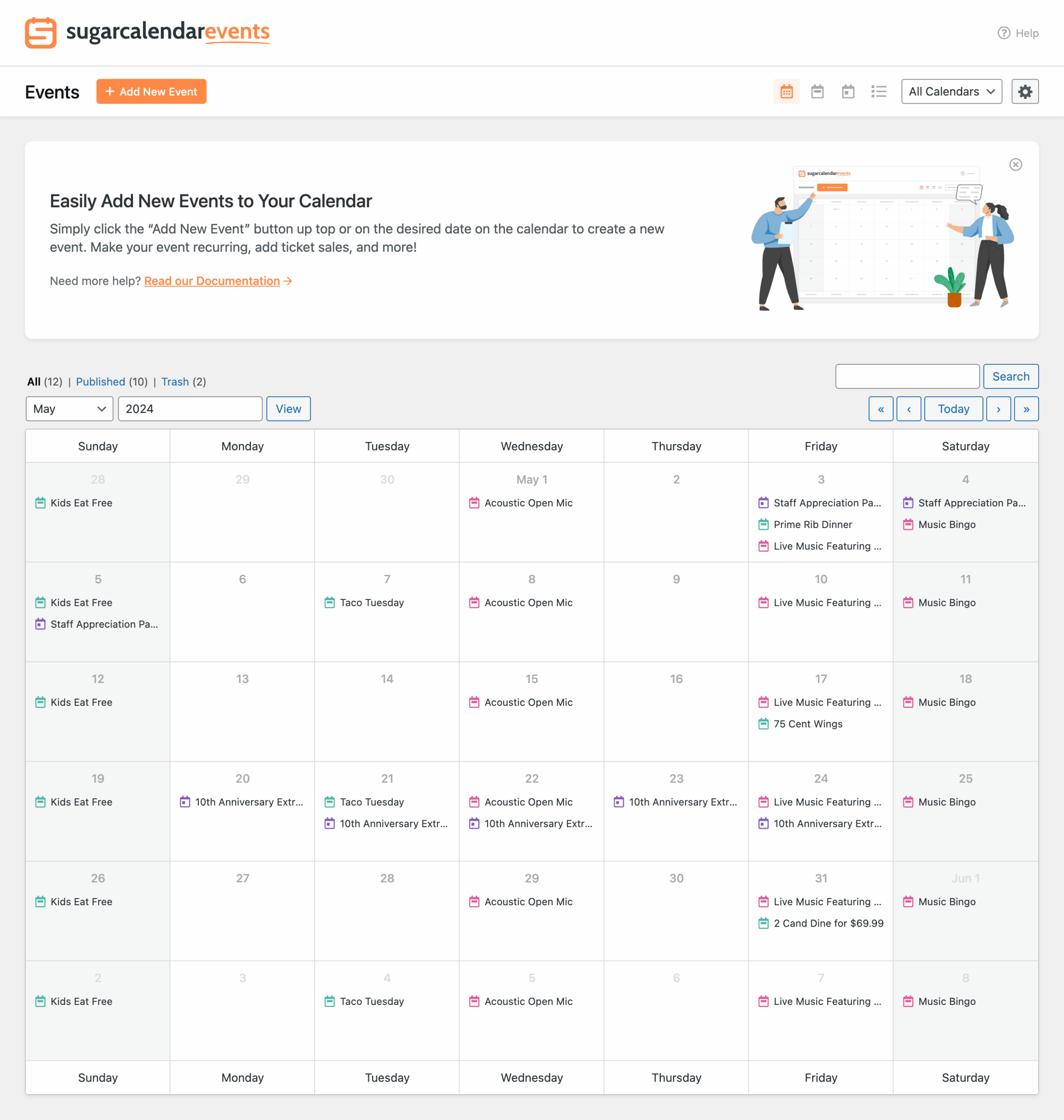
Best for: Small businesses, fitness studios, and nonprofits that want straightforward paid ticket sales without the setup overhead of a full ticketing system, and that can accept a small processing markup on the free tier.
Key features:
- Stripe ticketing with no plugin-level commission in the free version
- Free-ticket RSVP and attendee claiming without a payment provider, free
- Registration forms for custom attendee fields, free
- Zoom meeting integration in the free version
- Email notifications to ticket holders from the WordPress admin, free
- One-click migration from The Events Calendar
- Advanced recurring events with patterns like “every 2nd Tuesday” (Basic plan and above)
- WooCommerce ticketing, multiple ticket types, and RSVP collection (Plus plan and above, removes the 3% markup)
Research notes: The free and Basic tiers’ 3% Stripe markup is a real cost at volume, worth calculating against expected ticket sales before assuming the free tier is the cheapest option long-term. For a business selling a meaningful number of paid tickets, the Plus plan’s removal of that markup can pay for itself.
Pricing: Free Lite on WordPress.org. Basic $49.50/yr intro ($99/yr renewal, 1 site). Plus $99.50/yr intro ($199/yr renewal, 1 site, removes Stripe markup, adds WooCommerce ticketing). Pro $199.50/yr intro ($399/yr renewal, 3 sites). Elite $299.50/yr intro ($599/yr renewal, 10 sites). 14-day money-back guarantee.
Pros
- Free Stripe ticketing with no plugin-level commission is the standout free feature
- Basic plan at $49.50 intro is the lowest entry price for advanced recurring events in this category
- Free RSVP claiming for no-cost events, no payment provider required
- Company-backed development (Awesome Motive) rather than solo maintenance
- 14-day money-back guarantee
Cons
- 3% Stripe processing markup applies on the free and Basic tiers
- WooCommerce ticketing and multiple ticket types require the Plus plan
- No reserved-seating map option at any tier
- 10,000+ active installs, a smaller ecosystem than the largest calendar plugins
Read our full Sugar Calendar review
How to choose the right WordPress event booking or ticketing plugin
Choose Eventnetic if you want ticket sales, reserved seating, and recurring dates handled by one standalone plugin with zero commission and a genuinely unlimited free tier, and you are comfortable being an early adopter of a new product.
Choose Tickera if a zero-commission guarantee matters most, you want one licence to cover unlimited sites, and you can budget for the Standard plan to unlock Stripe or PayPal.
Choose FooEvents if you already run a WooCommerce store and want to sell event tickets through the exact same checkout, gateways, and coupons you use for everything else you sell.
Choose Eventin if you want free WooCommerce-backed ticketing with conference features like speaker profiles and Zoom distribution, without needing an existing WooCommerce catalog first.
Choose WP Event Manager if your site is a community directory where independent organizers submit their own event bookings from the frontend, and you are prepared to add the Sell Tickets add-on for ticketing.
Choose Modern Events Calendar if you need built-in appointment booking or Stripe Connect revenue splitting alongside ticketing, and you can manage plugin updates outside the WordPress.org auto-update system.
Choose Sugar Calendar if you want simple, low-overhead Stripe ticket sales at the lowest entry price in this roundup, and a small processing markup on the free tier is an acceptable trade-off.
If your primary need is a public calendar of dates rather than paid ticket sales, see our Best WordPress Event Calendar Plugins roundup instead, it covers display-first plugins like The Events Calendar in more depth.
Frequently asked questions
Is there a free WordPress plugin for event bookings and ticket sales?
Yes, several genuinely sell tickets for free, not just display dates. Eventnetic’s free plan allows unlimited events and bookings with checkout on your own site. Tickera’s free version sells tickets through three built-in payment methods (Stripe and PayPal require a paid upgrade). Eventin’s free version includes WooCommerce-based ticketing at no cost. Sugar Calendar’s free Lite version includes Stripe ticketing with a small processing markup. FooEvents has no free tier at all.
Which WordPress ticketing plugin charges the smallest commission?
Eventnetic and Tickera both charge 0% commission on ticket sales at every tier, including free, taking only their licence fee rather than a cut of revenue. You still pay standard payment processor fees (Stripe, PayPal, and so on) regardless of which plugin you use; none of the plugins in this roundup add a commission on top of that except Sugar Calendar’s free-tier 3% Stripe markup.
Do I need WooCommerce for WordPress event ticketing?
No. Eventnetic, Tickera, Sugar Calendar, and Modern Events Calendar all include standalone checkouts that do not require WooCommerce. FooEvents requires an existing WooCommerce store by design. Eventin’s free ticketing flow uses WooCommerce as its payment processor even though it manages its own event and registration data separately.
Which plugin supports reserved seating and seat maps?
Eventnetic includes seat maps as a paid feature, tied to a venue and reused across every event held there. Tickera offers seating charts on its Bundle and Lifetime plans. Eventin includes visual seat mapping in its Pro tier. WP Event Manager, Modern Events Calendar’s core booking engine, and Sugar Calendar do not offer reserved seating at any tier.
Can I sell tickets to recurring or repeating events?
Yes, in several of these plugins. Eventnetic’s paid plans support one event with multiple dates, each with its own capacity and attendee list. Eventin includes recurring events with custom intervals for free. Modern Events Calendar supports full recurring event series in Pro. Sugar Calendar’s advanced recurring patterns require the Basic plan or above.
What is the difference between an event booking plugin and an event calendar plugin?
A booking and ticketing plugin handles the transaction: taking payment, tracking seat or ticket inventory in real time, issuing a ticket, and supporting check-in at the door. A calendar plugin’s core job is displaying upcoming dates, which may or may not include a checkout. Several plugins in this roundup, including Eventin, Modern Events Calendar, and Sugar Calendar, do both; others, like Eventnetic, Tickera, and FooEvents, are purpose-built for the transaction rather than the display. If display is your only requirement, our Best WordPress Event Calendar Plugins roundup is the better starting point.
Conclusion
For a single plugin that handles ticket sales, reserved seating, and recurring dates without a commission cut or a WooCommerce dependency, Eventnetic’s unlimited free tier and zero-commission model make it the strongest starting point on this list, with the caveat that it is a new product without years of track record yet.
For a dedicated ticketing plugin with a firm zero-commission guarantee and unlimited-site licensing, Tickera is the practical alternative, provided you budget for the Standard plan to unlock card payments.
For stores that already run WooCommerce, FooEvents is the most direct path to selling tickets through the exact checkout you already use for everything else.
For free conference-style ticketing with Zoom and speaker management, Eventin’s free tier goes further than most competitors’ paid plans.
For community directories built on frontend submissions, WP Event Manager has no real equivalent in this list, provided you plan for the Sell Tickets add-on from the start.
For appointment-style booking with revenue splitting, Modern Events Calendar covers ground no other plugin here does, if you are comfortable with its update model.
For the simplest, lowest-cost paid ticketing setup, Sugar Calendar’s free Stripe ticketing and $49.50 entry price are hard to beat for a small business just getting started.
Test the free tier of your top two candidates with a real event before committing to a paid plan. Booking and ticketing behavior, especially around seat inventory and check-in, is easier to judge by running an actual transaction than by reading a feature list.