


Choosing a WordPress event calendar plugin looks simple until you start comparing them. The install-count leader has changed ownership twice and raised prices significantly. The most feature-complete option was removed from WordPress.org for a policy violation and has a documented history of high-severity security vulnerabilities. Several plugins that look identical from the outside are built for completely different use cases: one is designed for community event directories, another for recurring fitness classes, another for multi-track conferences with seat-level ticketing.
I reviewed all nine plugins on this list against their actual feature sets, free tier scope, pricing pages, WordPress.org listing data, and security and ownership history. The goal is a practical comparison you can use to choose, not a generic feature checklist.
If your priority is selling tickets, taking bookings, and managing reserved seating rather than just displaying dates, see our Best WordPress Event Booking and Ticketing Plugins roundup, it focuses specifically on the checkout and seat-inventory side of event management.
How I chose these WordPress event calendar plugins
The shortlist covers the range of event management needs you encounter on WordPress sites: standard community calendars, conference and ticketing platforms, accessibility-first event display, developer-friendly calendar frameworks, and one-time-purchase alternatives to subscription-heavy competitors.
My selection criteria:
- Free tier scope. What does the plugin actually give you for free? Does it include a calendar view, recurring events, or ticketing without a paid plan?
- Ticketing capability. Can the plugin sell tickets? Is that gated behind a subscription, or available in the free version?
- Recurring events. Routine events are one of the most common use cases; plugins that lock this feature behind a paywall cost more in practice than their headline price suggests.
- Setup experience. How quickly can a non-developer have a working calendar on their site?
- Security and ownership track record. For plugins with acquisition history or documented vulnerabilities, this is relevant context, not a footnote.
- Pricing transparency. Is the true cost clear before you commit?
- Maintenance signals. Last updated date, active install count, and rating on WordPress.org.
Quick comparison table
| Plugin | Best for | Free version | Starting paid price | Standout feature | Main limitation |
|---|---|---|---|---|---|
| Eventnetic | Selling tickets to recurring dated events without WooCommerce | Yes (unlimited events and bookings) | $99/yr Starter (1 site) | Unlimited free events and bookings; no per-ticket commission ever | Seat maps need Elite; brand-new WordPress.org listing with very few installs so far |
| The Events Calendar | Organizations and venues with large event programs | Yes (display only) | $259/yr (Essentials) | Largest ecosystem, 600,000+ installs | Recurring events require a paid plan; pricing jumped 2.6x under Liquid Web |
| Modern Events Calendar | Sites needing 20+ display layouts and built-in booking | Yes (limited, not on WP.org) | $99/yr (1 site) | Most calendar views of any plugin; appointment booking included | Removed from WP.org; high-severity CVEs in 2024 and 2026 |
| Eventin | Conference and hybrid event management with free ticketing | Yes (WooCommerce tickets included) | $99/yr Standard (2 sites) | Free WooCommerce ticketing, Zoom, QR check-in, speaker profiles | Standard plan covers only 2 domains |
| Sugar Calendar | Small businesses and nonprofits wanting clean calendar plus ticketing | Yes (Stripe ticketing included) | $49.50/yr intro, Basic (1 site) | Free Stripe ticketing; lowest entry price for advanced recurring events | 10,000 installs; smaller ecosystem |
| WP Event Manager | Community directories with frontend event submission | Yes (submission included) | $99/yr, Plus bundle (20 add-ons) | Frontend event submission free; modular add-on system | Calendar view requires a paid add-on |
| Event Organiser | Complex recurring schedules; developer-friendly builds | Yes (recurring events included) | £50 one-time, Personal (1 site) | Best free recurring event rules; one-time pricing | Solo developer; no WooCommerce integration |
| My Calendar | Sites with WCAG accessibility requirements | Yes (recurring events included) | $69/yr, Site Owners (3 sites) | Accessibility-first design, WCAG-tested admin and front end | My Tickets does not support recurring events |
| EventON | Sites wanting distinctive tile or accordion calendar layout | Yes (limited Lite) | $50 one-time, Full (1 site) | One-time base plugin pricing; visual tile layout | Traditional grid view requires a separate paid add-on |
1. Eventnetic: best standalone plugin for unlimited free ticketing
Eventnetic is the newest plugin in this comparison, a standalone WordPress ticketing and booking plugin that reached the WordPress.org plugin directory in September 2026. Most of the plugins on this list build ticketing on top of a calendar. Eventnetic is built the other way around: it is a box-office plugin first, with a server-rendered public calendar as one of five front-end shortcodes, and it does not require WooCommerce, a page builder, or a separate calendar plugin underneath it to work.
The free plan has no artificial ceiling. Unlimited events, unlimited bookings, and unlimited customers, with ticket types priced individually, cash and offline payment collection, automated emails, and check-in by name or booking code, all included at no cost and with no time limit. Eventnetic also takes no commission on ticket sales at any tier: payment goes directly to your own Stripe or PayPal account, or is collected offline, and the only recurring cost is the license fee itself.
Built by FS Code, the Azerbaijan-based team also behind the appointment-scheduling plugin Booknetic, Eventnetic is a genuinely new listing: version 1.2.1, with only a handful of active installations and reviews on WordPress.org at the time of writing, both figures small enough that they shift from week to week. That is a thin track record next to plugins that have been on WordPress.org for a decade, and it is worth weighing if plugin longevity and a large existing user base matter for your project. What is independently checkable on the WordPress.org listing itself, rather than taken from the plugin’s own marketing copy, is the scope of the free plan and the architecture described below.
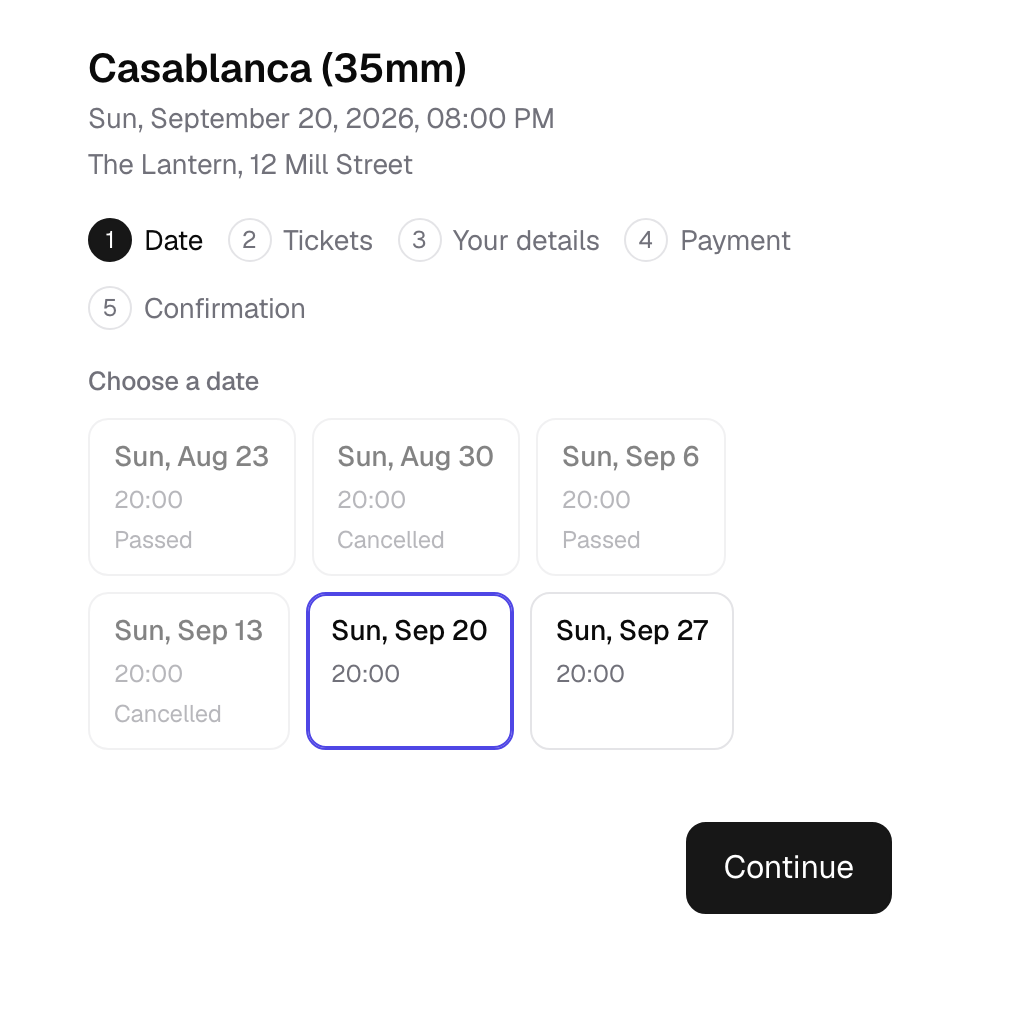
Best for: Cinemas and repertory screenings, yoga and fitness studios with recurring class schedules, live music venues, museums and galleries running timed entry, theatres, walking tour operators, and workshop or conference organizers who want ticketing and a public calendar in one plugin without adding WooCommerce or an events-directory framework.
Key features:
- Unlimited events, bookings, and customers on every plan including Free, with no time limit
- One event, many dates: a recurring event keeps a single event page, but each date carries its own capacity, price, and attendee list; cancelling one date only notifies that date’s bookers (recurring dates require Starter or above)
- Server-rendered
[eventnetic_calendar]shortcode with month, week, day, and list views, readable by search engines and functional with JavaScript off - Ticket types with independent pricing and mixed baskets that combine multiple ticket types in one purchase
- Cash and offline payments included free; Stripe and PayPal from the Starter plan
- Booking widgets render inside a shadow root, so the active theme’s CSS cannot restyle or break the form
- PDF tickets with a template designer and QR code check-in (Starter and above)
- Waiting lists that offer a freed spot to the next person in the queue automatically (Pro and above)
- Seat maps and reserved seating, drawn once per venue and reused across every event held there (Elite only)
- Automation with 15 triggers, including booking created, check-in, payment received, and event start, with email, Telegram, SMS, and WhatsApp notification channels
- Gutenberg blocks and Elementor widgets for every front-end shortcode, plus schema.org Event structured data on event pages
Research notes: Eventnetic’s pricing page groups its feature checklist by plan card rather than a single feature-by-feature matrix, so it takes deliberate checking to see exactly what moves between tiers, and the marketing copy does not always make the boundary obvious. Verified directly against the live pricing page: Starter adds recurring dates, Stripe and PayPal, tax and discount codes, custom forms, and PDF tickets with QR check-in over the Free plan. Pro adds extras sold alongside a ticket, date-specific pricing, invoices, waiting lists, and per-date Zoom meetings. Seat maps and reserved seating, WooCommerce integration, and the full notification channel set (Telegram, SMS, WhatsApp) are Elite-only; they are not included on Starter or Pro despite sitting next to those plans’ feature lists on the pricing page. If reserved seating is the reason you are evaluating Eventnetic, budget for Elite specifically, not just any paid plan.
Pricing: Free forever, one site, unlimited events and bookings. Starter $99/yr first year ($199/yr renewal, one site) or $199 one-time lifetime. Pro $199/yr first year ($299/yr renewal, five sites, Eventnetic’s most popular annual plan) or $399 one-time lifetime. Elite $299/yr first year ($399/yr renewal, 25 sites, required for seat maps) or $599 one-time lifetime. VAT not included. 14-day money-back guarantee on paid plans.
Pros
- Free plan has no event, booking, or time cap, a genuine unlimited free tier rather than a trial
- No commission on ticket sales at any tier, ever
- Standalone: does not require WooCommerce, a page builder, or another calendar plugin
- Server-rendered public calendar shortcode with month, week, day, and list views
- Booking form is theme-proof by design (shadow root rendering)
- Lifetime one-time pricing available on every paid tier for teams that want to avoid renewals
- 14-day no-questions-asked refund on paid plans
Cons
- Recurring dates require the Starter plan or above; the free plan covers single-date and multi-day events only
- Seat maps and reserved seating require the Elite plan specifically, not any paid plan
- Very new WordPress.org listing with only a handful of active installs and reviews so far, figures too small and fast-moving to quote precisely, and little independent long-term track record yet
- Annual renewal pricing roughly doubles after the first year on every paid plan, standard in this category but worth budgeting for
2. The Events Calendar: best for large organizations and established event venues
The Events Calendar is the dominant plugin in this category, with 600,000 or more active installs on WordPress.org. It has powered event calendars since 2010 and carries the kind of ecosystem depth that comes with being the default choice for over a decade. Every major WordPress theme developer tests against it. Third-party integrations list it first.
The 2026 situation is more complicated than the install count suggests. The plugin was rebranded under Liquid Web’s Nexcess banner in early 2026. The old individual add-on model (Events Calendar Pro at roughly $99 per year) is gone for new customers. The minimum paid plan now starts at $259 per year, a 2.6x price increase for teams previously on Events Calendar Pro alone. Support quality has visibly declined based on verified WordPress.org reviews from mid-2026.
The free plugin is still genuine and usable. Month, list, and day calendar views, JSON-LD structured data for SEO, iCal export, Google Calendar integration, and a REST API are all available at no cost. For organizations that only need event display without ticketing, the free plugin holds up well.
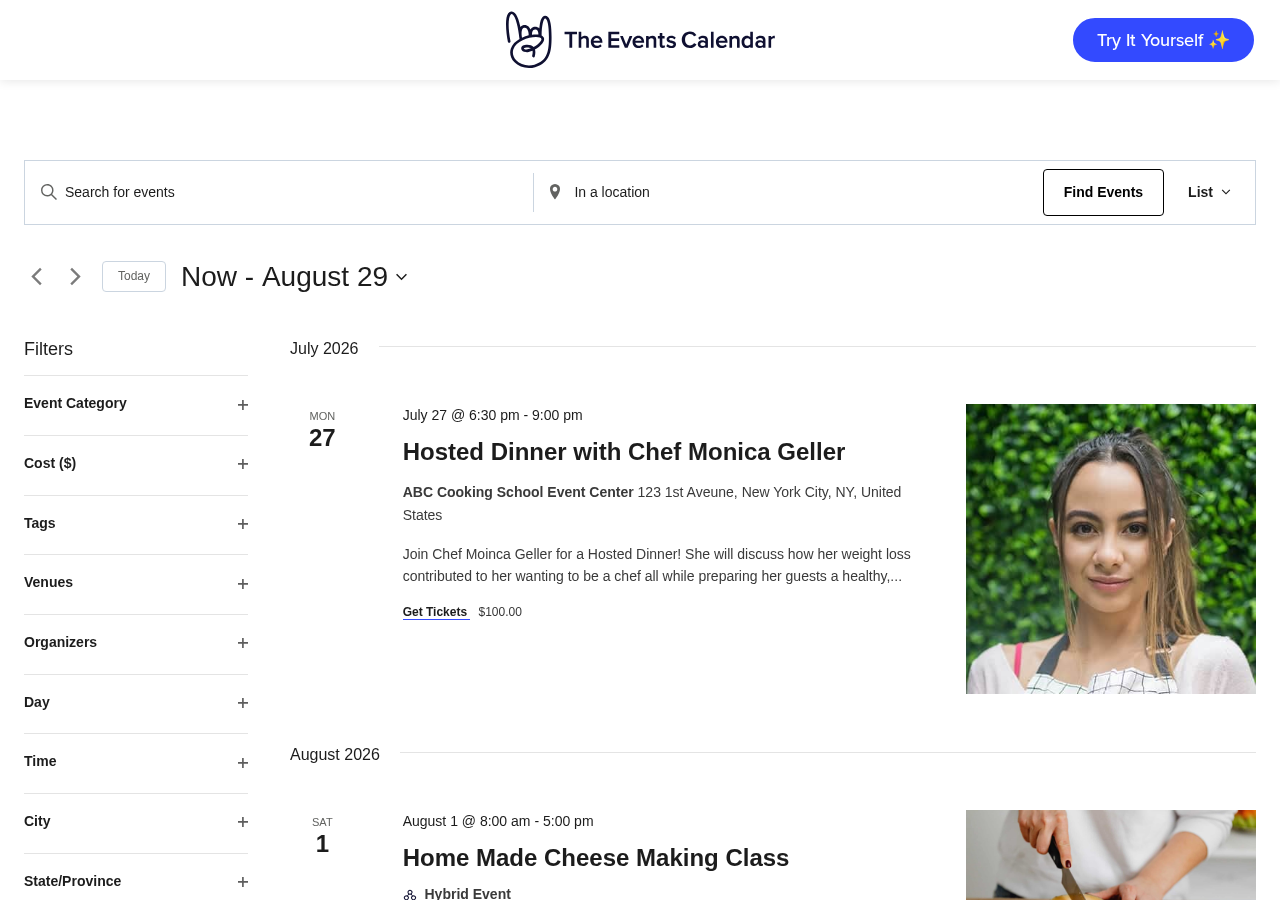
Best for: Community organizations, universities, conference producers, music venues, and any operation that needs the broadest possible theme and plugin compatibility with a 15-year track record.
Key features:
- Month, list, and day calendar views in the free plugin
- JSON-LD structured data for Google rich snippets at no cost
- iCal and Google Calendar export
- REST API for headless and external integrations
- Google Maps venue integration
- Ticketing via Stripe, PayPal, and Square (Essentials plan and above)
- Full recurring event series management (Essentials plan)
- QR code check-in with offline-capable app (Pro plan)
- Zero-commission ticket sales (Pro plan)
- Interactive venue seating maps (Elite plan only)
- Automated email marketing via former Promoter add-on (Elite plan only)
Research notes: The free plugin delivers clean event display and is the safest default for teams that need broad compatibility. Paid tiers are now bundled plans rather than individual add-ons. A 48-hour free trial of paid features is available without a credit card at demo.theeventscalendar.com, which is the right way to test Pro features before committing. Teams evaluating the paid tier should verify the Essentials commission rate on ticket sales, which is not disclosed on the Liquid Web product page despite “no commission fees” being a stated Pro differentiator.
Pricing: Free core plugin on WordPress.org. Essentials $259/yr (all calendar views, ticketing, full recurring events). Pro $399/yr (zero-commission tickets, WooCommerce, QR check-in). Elite $599/yr (email marketing, seating maps).
Pros
- Largest install base and ecosystem in the category
- Free plugin delivers real value for display-only use cases
- JSON-LD structured data in the free version is a genuine SEO benefit
- Zero-commission ticketing at Pro can offset the annual cost at moderate ticket volumes
- Offline-capable QR check-in app
- Actively patched with regular security releases
- 48-hour trial of paid features with no credit card required
Cons
- Recurring events require a paid plan starting at $259/yr
- Minimum paid tier is 2.6x the previous Events Calendar Pro price
- Individual add-ons no longer available for new customers
- Support quality has declined post-acquisition per verified user reports
- Block Editor admin experience lags behind current WordPress conventions
- Essentials ticket commission rate not disclosed on product page
Read our full The Events Calendar review
3. Modern Events Calendar: best for feature depth and display variety
Modern Events Calendar (MEC) leads every other plugin on this list in sheer feature count. More than 20 distinct calendar views, built-in appointment booking, WooCommerce and Stripe ticketing, QR check-in, Zoom integration, two-way Google Calendar sync, email marketing integrations with eight platforms, and a one-click migration from competing plugins are all part of the Pro package at $99 per year for a single site.
That comprehensive feature set comes with context that every buyer needs to understand. The free Lite version was permanently removed from WordPress.org in May 2022 following a guideline violation. Two high-severity vulnerabilities were disclosed in 2024 and 2026 (CVSS scores of 8.8 and 8.6 respectively). All are patched in version 7.34.0 and later, but the update flow sits outside the WordPress.org automatic update system, meaning version currency requires active management.

For teams comfortable managing plugin updates manually and evaluating the plugin on its merits, MEC Pro at $99/year is genuinely strong value for the feature set delivered.
Best for: Event businesses, conference organizers, agencies building event sites, and teams migrating from The Events Calendar or EventOn that want comparable feature depth without the higher Liquid Web pricing.
Key features:
- 20+ calendar view styles including grid, list, masonry, agenda, timetable, carousel, cover, and map layouts
- Full recurring events with per-occurrence editing and exception handling
- Integrated ticketing: PayPal, Stripe with SCA, WooCommerce, bank transfer, and Stripe Connect for revenue splitting
- Custom booking forms with reorderable fields and file upload support
- Appointment and time-slot booking (removes the need for a separate booking plugin)
- QR code check-in with Android companion app
- Two-way Google Calendar sync
- Zoom and Webex integration (via add-ons)
- Email marketing sync with Mailchimp, ActiveCampaign, MailerLite, and five more platforms, included in base Pro
- One-click migration from The Events Calendar, EventOn, and nine other platforms
- REST API with approximately 25 endpoints
- WPML support for multilingual sites
- 30-day money-back guarantee and lifetime license option
Research notes: The view variety is the most significant differentiator: no other plugin ships this many ready-built calendar layouts without requiring separate purchases. The add-on model for Zoom, PDF ticketing, and seat maps can push total annual cost well above the base $99/yr. Before installing, confirm the site is running MEC 7.34.0 or later to be clear of all disclosed CVEs.
Pricing: Free Lite (registration required at webnus.net, not on WordPress.org). Pro 1 site $99/yr, 5 sites $199/yr, 10 sites $299/yr. Lifetime Diamond bundle from $2,248 (3 sites). 30-day money-back guarantee.
Pros
- Widest selection of calendar layouts of any plugin reviewed
- Appointment booking included in Pro, removing the need for a separate plugin
- $99/yr single-site pricing is significantly below The Events Calendar’s $259/yr minimum
- One-click migration from 10 competing plugins
- Two-way Google Calendar sync
- Email marketing integrations with eight platforms in base Pro
- Lifetime license option for teams avoiding recurring costs
Cons
- Removed from WordPress.org in 2022; updates require manual management
- Three CVEs since 2024, including two rated High severity
- Add-ons for Zoom, PDF tickets, and seating maps are separate annual costs
- Not discoverable via standard WordPress.org plugin search
Read our full Modern Events Calendar review
4. Eventin: best free ticketing and conference management
Eventin takes the most ambitious approach to its free tier of any plugin on this list. The free version includes WooCommerce-based multi-tier ticket sales, automated Zoom and Google Meet link distribution, QR code attendee check-in, recurring events, speaker profiles and session schedules, registration form customization, and PDF ticket delivery. Most competing plugins gate ticketing alone behind a paid subscription.
Built and maintained by ThemeWinter, a Bangladesh-based development company with an active release track, Eventin brings company-backed development and support rather than solo developer maintenance. With 10,000+ active installs and a 4.7-star rating from 397 reviews, it is production-tested software with a growing user base.
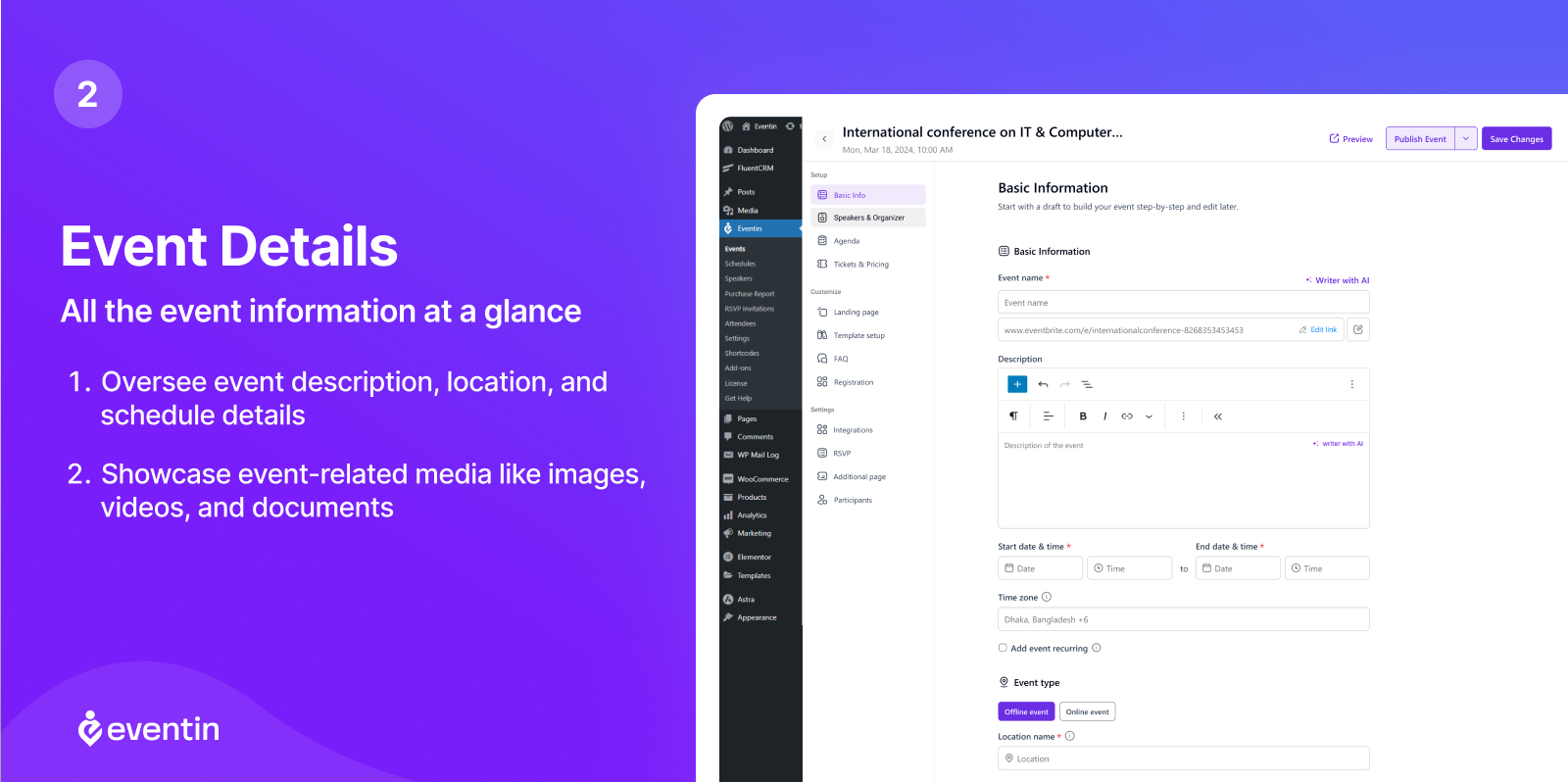
The Pro tier adds visual seat mapping, email automation, Stripe direct integration, CRM connections (FluentCRM, Groundhogg), Dokan multi-vendor marketplace capability, AI event creation, and certificate generation.
Best for: Conference and summit organizers, hybrid event producers, course instructors running live webinar series, and community organizations that need free registration and ticketing without paying for a premium plan.
Key features:
- Multi-tier ticket pricing via WooCommerce in the free version (no plugin commission taken)
- Automated Zoom link distribution to attendees after registration
- QR code attendee check-in
- Recurring events with custom intervals
- Speaker directory with reusable profiles assignable to multiple events
- Multi-session conference scheduling with room and track assignments
- Custom registration form fields
- PDF tickets with QR codes delivered automatically
- iCal, Google Calendar, Outlook, and Yahoo Calendar sync
- Elementor, Divi, Gutenberg, and Beaver Builder compatibility
- Visual seat mapping (Pro only)
- Email automation builder with event-triggered sequences (Pro only)
- Dokan multivendor marketplace integration (Pro only)
Research notes: The free tier genuinely delivers an end-to-end event registration and ticketing workflow. WooCommerce must be installed for ticket sales to work, which adds one dependency but also means you get the full WooCommerce payment gateway ecosystem for free. Stripe and PayPal direct integration without WooCommerce as the intermediary require the Pro license. The Standard Pro plan covering 2 domains is a friction point for agencies; the jump to Premium at $299/yr covers 100 domains.
Pricing: Free on WordPress.org. Standard Pro $99/yr (2 domains). Premium Pro $299/yr (100 domains). Agency Pro $599/yr (unlimited domains). Lifetime Standard $199 one-time (1 domain). Promotional pricing frequently available.
Pros
- WooCommerce ticketing, Zoom integration, QR check-in, and speaker profiles all in the free version
- Speaker and schedule management designed for multi-track conferences
- Visual seat mapping in all Pro plans with no separate add-on cost
- Email automation reduces dependency on external email tools
- Lifetime plans available
- 14-day money-back guarantee
- Company-backed support from ThemeWinter
Cons
- Standard annual plan covers only 2 domains
- Google Maps venue integration requires a Pro license
- 10,000+ installs is smaller than The Events Calendar’s 600,000+
- AI event creation requires your own OpenAI API key
5. Sugar Calendar: best lightweight option for small businesses and nonprofits
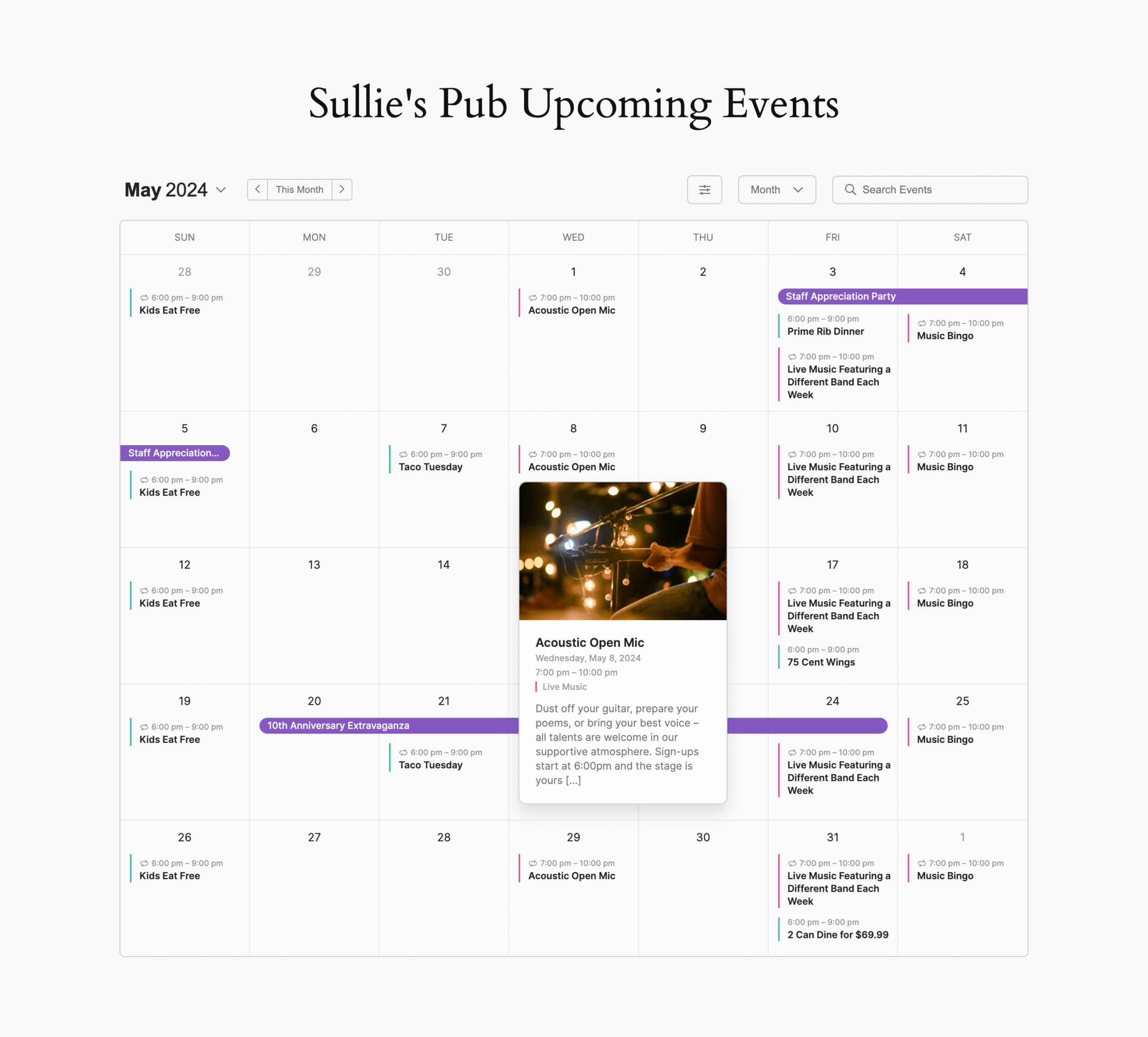
Sugar Calendar positions itself as the opposite of feature sprawl. Clean calendar display, reliable Stripe ticketing, and predictable pricing without ecosystem lock-in. The free Lite version on WordPress.org is unusually generous: Stripe payment processing, registration forms for collecting attendee details, Zoom meeting integration, iCal and Google Calendar export, JSON-LD structured data, and multiple calendar views are all included at no cost.
Now part of the Awesome Motive portfolio (the team behind WPForms, MonsterInsights, and All in One SEO), Sugar Calendar is backed by an established company rather than a solo developer. Version 3.13.0 shipped in August 2026 with registration form support and CSV event export as headline additions.
The main caveat: advanced recurring event patterns require a paid plan starting at $49.50 for the first year, still the lowest entry price for this feature among the plugins on this list.
Best for: Small businesses, fitness studios, yoga instructors, cooking schools, community organizations, and nonprofits that need a clean public calendar with optional Stripe ticket sales at a reasonable annual cost.
Key features:
- Month, week, day, and list calendar views in the free plugin
- Stripe ticketing in the free version (free and Basic plans carry a 3% markup above standard Stripe processing rates; removed at Plus tier)
- Free-ticket RSVP and attendee claiming without a payment provider
- Registration forms for custom attendee fields (added in v3.13.0)
- Zoom meeting integration in the free version
- Email notifications to ticket holders from the WordPress admin
- iCal, Google Calendar, Outlook, and Apple Calendar export
- Google Maps venue integration
- JSON-LD structured data for online and in-person events
- One-click migration from The Events Calendar
- Dark mode calendar display
- Gutenberg blocks, Elementor widgets, and shortcode embedding
- Advanced recurring events with patterns like “every 2nd Tuesday” (Basic plan and above)
- WooCommerce ticketing, multiple ticket types, and RSVP collection (Plus plan and above)
Research notes: The free tier is the most practical for organizations that primarily need paid Stripe ticketing and do not require advanced recurring event rules. The 3% Stripe processing markup in the free and Basic plans is a real cost consideration at volume; the Plus plan removes this markup. Migration from The Events Calendar is supported via a one-click importer.
Pricing: Free Lite on WordPress.org. Basic $49.50/yr intro ($99/yr renewal, 1 site). Plus $99.50/yr intro ($199/yr renewal, 1 site). Pro $199.50/yr intro ($399/yr renewal, 3 sites). Elite $299.50/yr intro ($599/yr renewal, 10 sites). 14-day money-back guarantee.
Pros
- Stripe ticketing built into the free version; free and Basic plans carry a 3% Stripe processing markup (removed at Plus tier)
- Basic plan at $49.50 intro is the lowest entry price for advanced recurring events in this category
- Free Zoom integration and registration forms in the free version
- Actively developed: three major updates between July and August 2026
- 14-day money-back guarantee
- One-click migration from The Events Calendar
Cons
- Advanced recurring events not in the free version
- 10,000+ active installs means a smaller ecosystem than TEC
- WooCommerce ticketing and RSVP collection require the Plus plan
- No venue seating or automated email marketing sequences at any tier
Read our full Sugar Calendar review
6. WP Event Manager: best for community event directories and frontend submission
WP Event Manager is built around a different model from most plugins on this list. Its architecture is closer to a directory framework than a traditional calendar: events are custom post types with filterable frontend listings, and the defining free feature is that any logged-in user can submit an event from the frontend without WordPress admin access.
That single capability makes WP Event Manager the strongest free option for community event sites, local event directories, nonprofit member calendars, and membership platforms where multiple organizers post independently. No competing plugin offers frontend submission in the free tier.
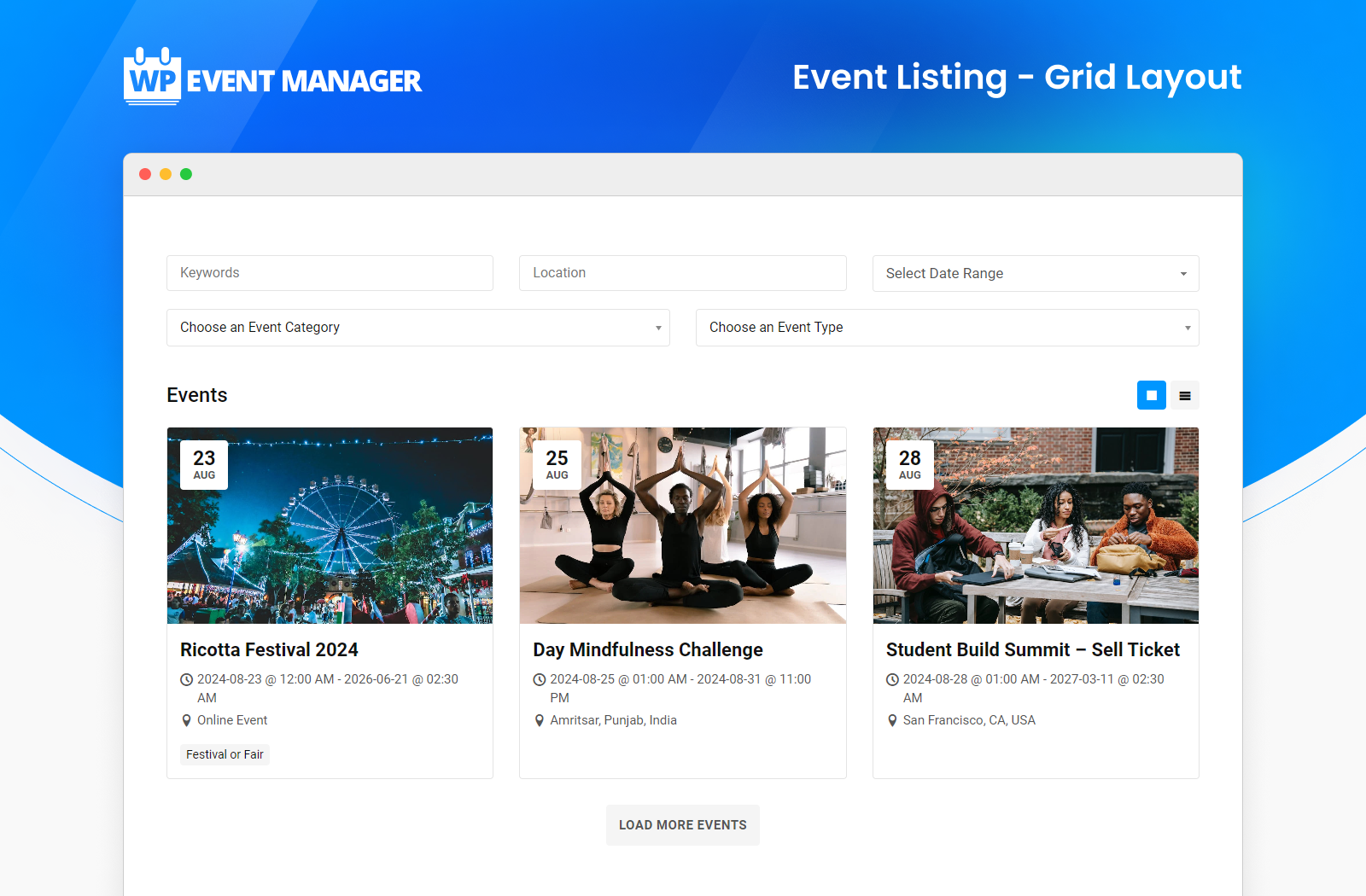
With 20,000+ active installs and over nine years on WordPress.org, WP Event Manager has a stable history. The plugin includes a field editor that lets you add custom form fields without writing code, making it flexible for use cases well outside the default template.
Best for: Community event directories, local listing sites, membership platforms, and any WordPress site where multiple organizers or members need to submit events without admin access.
Key features:
- Frontend event submission form in the free plugin
- Grid and list event listings with search and filtering
- Custom form field editor (text, dropdowns, checkboxes, date pickers, file uploads) in the free plugin
- WooCommerce compatibility in the free plugin (full ticketing via Sell Tickets add-on)
- 40-plus language translations with RTL support
- REST API for headless integrations
- Commission-free ticket sales through WooCommerce (Sell Tickets add-on)
- Mobile organizer app for QR code check-in (Event App add-on)
- CRM integrations: Mailchimp, HubSpot, Salesforce, Zoho, ActiveCampaign (individual add-ons)
- Calendar grid view (Calendar add-on, included in Plus bundle)
Research notes: The free plugin’s biggest practical limitation is the absence of a calendar view. Visitors see events as filterable list and grid entries, not a traditional month-grid calendar. Adding a calendar view requires the Calendar add-on (approximately $49/yr) or the Event Manager Plus bundle (approximately $99/yr), which also includes iCal, recurring events, and core add-ons. Support response times have been inconsistent per recent WordPress.org reviews.
Pricing: Free core plugin on WordPress.org. Individual add-ons from approximately $49/yr per feature. Event Manager Plus bundle approximately $99/yr (20 add-ons). Event Manager Pro bundle approximately $199/yr (27 add-ons, includes ticketing). Promotional discounts frequently available.
Pros
- Frontend event submission is free; a genuine differentiator no competitor matches
- Field editor allows custom form fields without code
- Commission-free ticket sales through WooCommerce
- Modular add-on model: pay only for features you use
- 40+ language translations and RTL support in the free plugin
- Over nine years of active development
Cons
- No calendar view in the free plugin; a paid add-on or bundle is needed
- No recurring events in the free plugin
- Add-on costs add up quickly without a bundle
- Breaking template changes in past updates required manual fixes
- Support response times have been inconsistent per user reviews
- 20,000 installs is modest compared to larger competitors
Read our full WP Event Manager review
7. Event Organiser: best for complex recurring schedules and developer-friendly builds
Event Organiser is the strongest free option for sites that need sophisticated recurring event rules. The “every third Tuesday of every fourth month” pattern that requires a paid plan in most competing plugins is available in the free version here. The recurring event system follows RFC 5545 (the iCal standard) and generates individual occurrence records for each instance, making the plugin compatible with external calendar applications out of the box.
Built and maintained by Stephen Harris, a UK-based WordPress developer, Event Organiser has been on WordPress.org for over a decade. The free plugin also includes iCal export and public subscription feeds, venue management with Google Maps, category color-coding, a full shortcode and template API, and REST API endpoints for headless integrations.
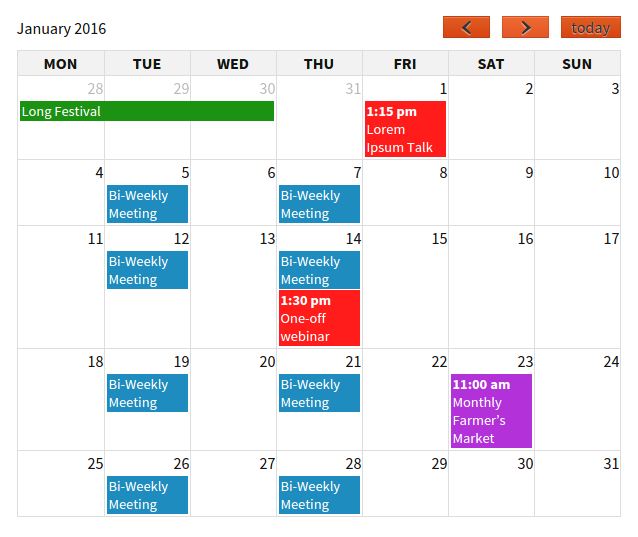
The paid Pro tier uses one-time pricing in British pounds rather than an annual subscription, which is unusual in the current plugin market.
Best for: WordPress site owners who need granular recurring event patterns for free, developers building custom calendar solutions, community organizations running weekly programs on a fixed budget, and teams that prefer one-time pricing for premium features.
Key features:
- Advanced recurring events in the free plugin: daily, weekly, monthly by date or weekday position, annually, and custom intervals
- iCal export and public calendar subscription feeds
- Venue management with Google Maps geocoding
- Category color-coding and taxonomy filtering
- Shortcodes: [eo_calendar] for month-view calendar, [eo_events] for filtered event lists
- Calendar and event list widgets for sidebars
- Documented template and hook system for developer customization
- REST API endpoints for event and venue data
- 18+ language translations
- Pro tier: booking forms, ticket types, PayPal and offline payment, email notifications, CSV export (one-time purchase)
- Stripe gateway extension (Developer license or separate purchase)
- iCal import from external feeds (Business and Developer licenses)
- Frontend event submission with admin approval workflow (Developer license)
- Discount codes (Business and Developer licenses)
Research notes: The free plugin is a strong starting point for organizations where the recurring event system matches the primary requirement. The one-time pricing for Pro (£50 Personal, £90 Business, £120 Developer) is a real advantage for teams that want to avoid annual subscription costs. Refund policy is case-by-case rather than a standard 30-day window. Solo developer support means response times are not guaranteed. Pricing is in GBP, which introduces exchange rate variability for non-UK buyers.
Pricing: Free on WordPress.org. Pro Personal £50 one-time (1 site). Pro Business £90 one-time (5 sites, adds iCal sync, discount codes, venue markers). Pro Developer £120 one-time (10 sites, adds Stripe, Authorize.net, frontend submission).
Pros
- Best free recurring event rules of any plugin in this roundup
- iCal public subscription feeds in the free version
- One-time Pro pricing; plugin keeps working after the support period expires
- Developer-friendly: documented template system, function reference, and hook API
- REST API for custom and headless integrations
- Security patches applied promptly
Cons
- Solo developer: no guaranteed support response times
- 20,000 installs means smaller ecosystem and fewer community resources than TEC
- No Block Editor-native admin interface
- No native WooCommerce integration
- Restrictive refund policy (case-by-case, not a standard 30-day window)
- Pricing in GBP creates exchange rate uncertainty for non-UK buyers
Read our full Event Organiser review
8. My Calendar: best for accessibility-first WordPress sites
My Calendar has been on WordPress.org since 2010 with an unwavering focus: make event calendars genuinely accessible. Both the front-end calendar and the WordPress admin event management interface are tested with assistive technology including screen readers. Calendar navigation uses semantic button elements rather than links (corrected in version 3.7.0 because buttons carry the correct interaction semantics for non-navigating controls). Dedicated fields for documenting accessibility services at events and venues are first-class form fields, not afterthoughts.
With 20,000+ active installs, a 4.7-star rating from 159 reviews, and version 3.8.4 released in September 2026, the plugin is actively maintained by Joe Dolson, a recognized WordPress accessibility contributor. The free version includes full recurring events, multiple calendar and list views, iCal export, JSON-LD structured data, a template editor, a style editor, and multisite support.
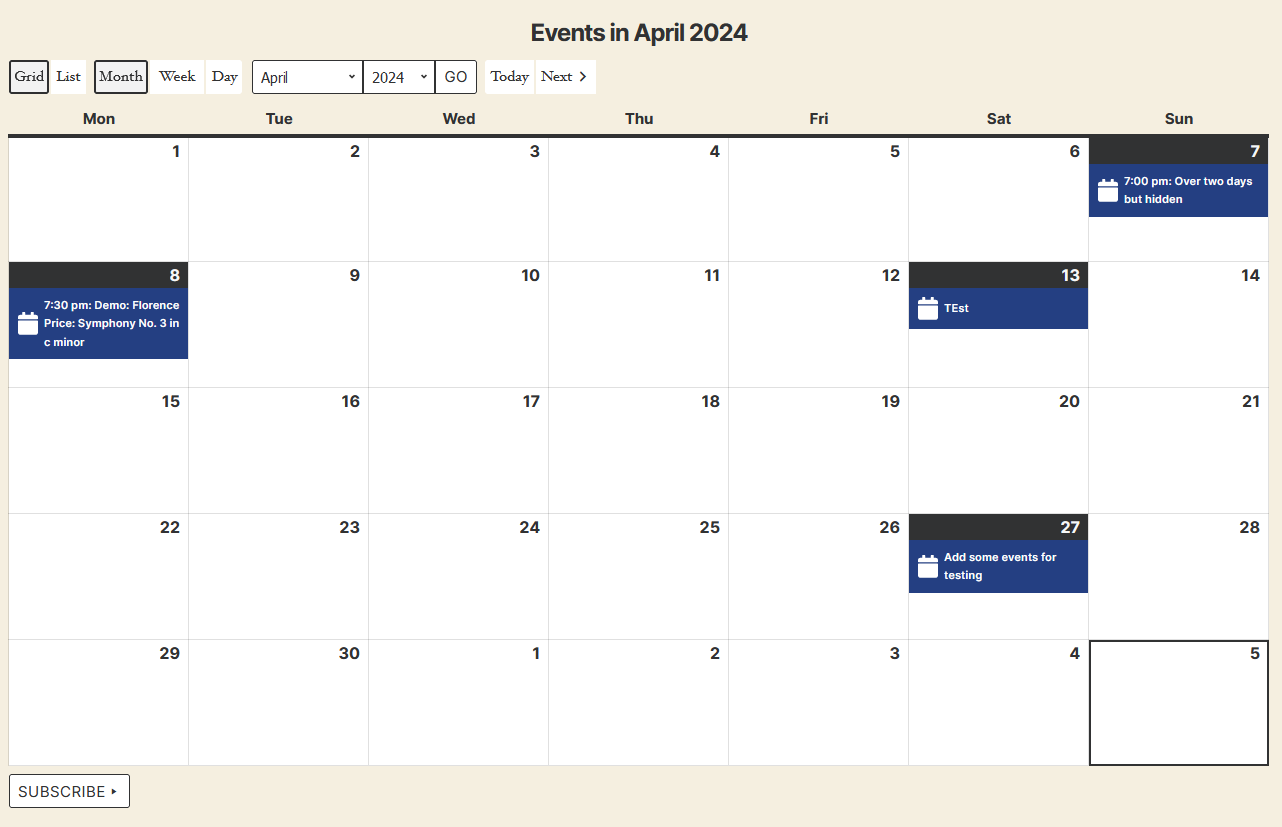
Best for: Nonprofits, community organizations, universities, government agencies, schools, libraries, and any WordPress site with real WCAG compliance requirements or users who rely on assistive technology.
Key features:
- Monthly grid, week, day, list, and card calendar views in the free plugin
- Full recurring events (daily, weekly, monthly, annual, and custom intervals) in the free plugin
- Dedicated accessibility fields for events and venues (wheelchair access, ASL interpretation, audio descriptions, and other accommodations)
- WCAG-tested front end and WordPress admin with assistive technology
- Template editor for customizing event markup without coding
- Style editor for visual customization without CSS files
- Category color-coding and icon support
- Location management with optional Google Maps links
- iCal and Google Calendar export
- JSON-LD structured data
- jQuery-free front end (removed in v3.8.0) for improved performance
- Multisite compatible with REST API event sharing between subsites
- My Calendar Pro: community event submissions, custom fields, CSV and iCal import, advanced search, front-end editing
Research notes: The free plugin delivers more baseline features than most plugins gate behind a paid tier: recurring events, multiple views, and structured data are all available without paying. My Tickets (a free companion plugin by the same developer) handles basic PayPal ticket sales but has one important limitation: it does not support recurring events. Sites running recurring weekly or monthly events where ticket sales are needed per occurrence must create each occurrence as a separate post rather than using the recurring event feature. My Tickets currently has 600+ active installs, indicating limited community testing of the ticketing path.
Pricing: Free on WordPress.org. My Calendar Pro: Site Owners $69/yr (3 sites), Developers $199/yr (10 sites), Agencies $399/yr (unlimited sites). My Tickets companion plugin: free (PayPal). My Tickets payment add-ons (Stripe, Authorize.net) sold separately.
Pros
- Best-in-class accessibility with WCAG-tested admin and front end
- Dedicated accessibility fields for venue and event accommodation documentation
- Recurring events and multiple views included in the free plugin
- Template and style editors for non-developer customization
- Pro entry at $69/yr is significantly below The Events Calendar’s $259/yr minimum
- jQuery removed from front end for performance
- 30-day refund policy on Pro purchases
Cons
- My Tickets does not support recurring events for ticket sales
- My Tickets has only 600+ active installs
- Solo developer; support capacity constraints apply
- 20,000+ installs means a narrower ecosystem than TEC
- Not Block Editor-native
Read our full My Calendar review
9. EventON: best one-time pricing and distinctive visual design
EventON stands apart visually. Instead of a standard month-grid calendar, the default layout uses a tile or accordion approach: events appear in horizontal bars or image-forward cards, and clicking a bar slides open the full event detail inline without a page load. It is a polished, app-like interface that immediately looks different from any other plugin in this roundup.
Originally sold on CodeCanyon where it accumulated 63,000+ sales, EventON is now distributed through myeventon.com as a direct purchase. A free Lite version on WordPress.org gives a limited preview of the interface. The Full version costs $50 as a one-time purchase for a single site, which includes lifetime plugin updates and one year of support, with no auto-renewing subscription.
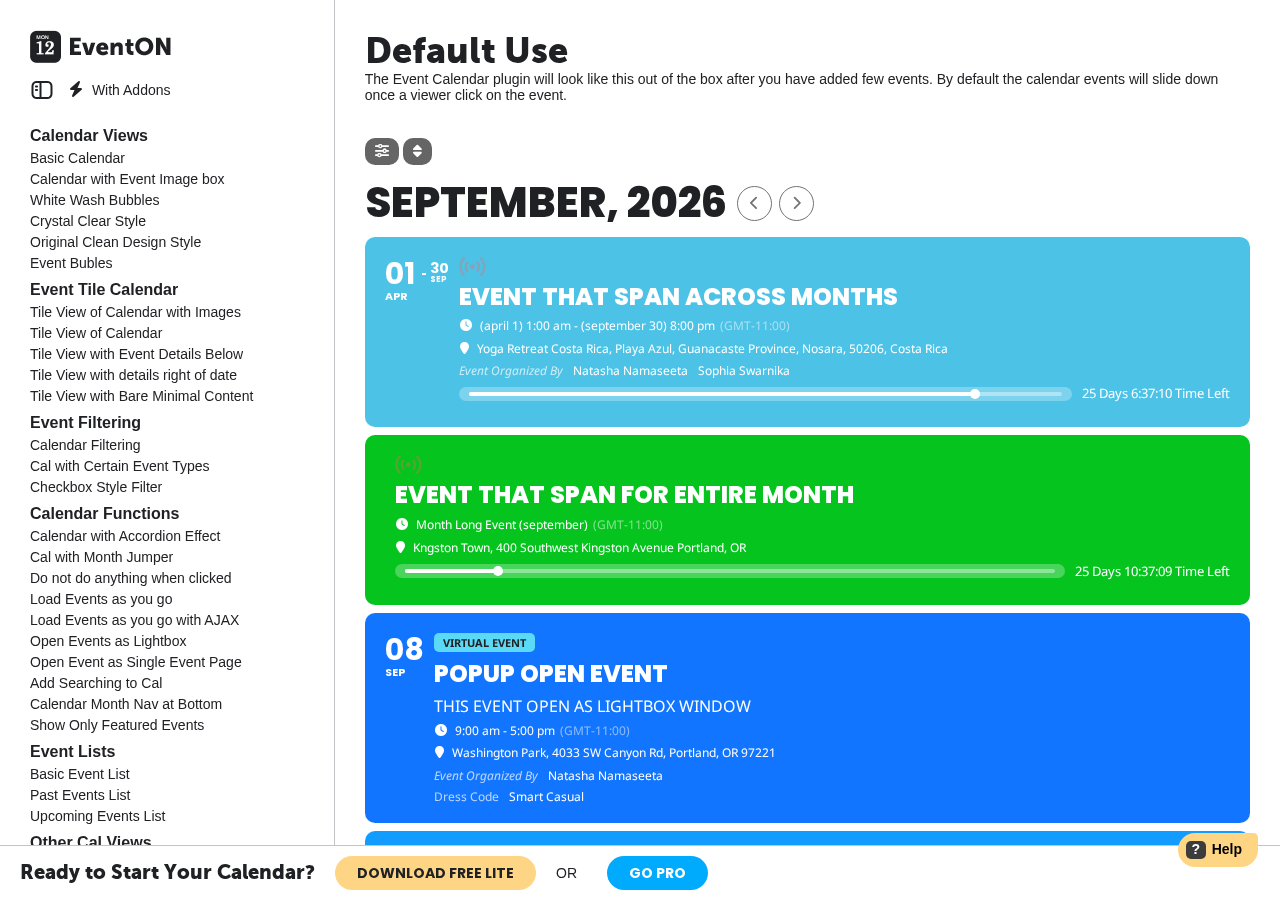
Built by Ashan Perera, a solo developer, EventON supports recurring events, Zoom and Jitsi virtual events, and an AI-assisted event creation feature powered by OpenAI in the base Full version. Ticketing, RSVP, advanced views, and other capabilities are sold as separate annual add-on subscriptions.
Best for: Small to mid-size sites that want a visually distinctive calendar with a one-time base purchase, and developers building client sites where the tile layout is a design requirement.
Key features:
- Tile, accordion, bubble, and schedule view layouts in the Full version
- Recurring events in the Full version without a separate add-on
- Zoom (OAuth) and Jitsi virtual event support
- AI-assisted event content creation via OpenAI API
- Drag-and-drop EventTop Designer for customizing the event bar layout
- iCal and Google Calendar export
- Time zone support for international events
- Traditional month-grid view via Full Cal add-on ($55/yr)
- Ticket sales via WooCommerce via Event Tickets add-on ($120/yr)
- RSVP registration via RSVP Events add-on ($100/yr)
- Interactive seating charts via Seats add-on ($150/yr)
- 40+ additional add-ons for views, attendance tracking, imports, and specialty features
Research notes: The one-time $50 base price is competitive, but the total cost picture changes when add-ons are needed. Ticketing alone adds $120/yr. RSVP adds $100/yr. The traditional grid view costs $55/yr. A site that needs all three would pay $275/yr in add-on subscriptions on top of the one-time $50 license. Calculate your full add-on cost before assuming savings versus subscription-based competitors.
Pricing: Lite free on WordPress.org. Full one-time: $50 (1 site), $150 (5 sites), $250 (10 sites). Add-ons sold separately at annual subscription rates from $20 to $150 per add-on per year. Bundle packages at approximately 15% savings.
Pros
- One-time $50 base plugin pricing; no recurring annual license for the core plugin
- Tile and accordion layout is visually distinctive
- Recurring events included in the Full version without an extra add-on
- Virtual events via Zoom (OAuth) and Jitsi
- AI-assisted event content creation
- Extensive add-on catalog for specialized functionality
Cons
- Traditional month-grid view requires a separate $55/yr add-on
- Ticketing requires the Event Tickets add-on ($120/yr)
- Add-on subscription costs can exceed the one-time plugin cost quickly
- Solo developer; long-term support continuity is a consideration
- 6,000+ installs for Lite is the smallest in this roundup
- Not Block Editor-native
How to choose the right WordPress event calendar plugin
Choose Eventnetic if you want unlimited free events and bookings with no commission on ticket sales, ever, and a standalone plugin that does not require WooCommerce. It is worth the early-adopter trade-off of a brand-new WordPress.org listing for most ticketing use cases; upgrade to Elite specifically if reserved seating is a requirement.
Choose The Events Calendar if you need the broadest possible ecosystem compatibility, the largest community of tutorials and developer expertise, and can justify the $259/yr minimum paid plan. The free plugin alone covers a substantial share of basic community calendar needs.
Choose Modern Events Calendar if you need 20+ calendar display layouts, built-in appointment booking, and a lower paid price ($99/yr) than The Events Calendar, and can manage plugin updates outside the WordPress.org auto-update system.
Choose Eventin if you want WooCommerce ticketing, Zoom integration, and QR check-in in the free tier, or if you run multi-track conferences that need speaker profiles and visual seat maps in one plugin.
Choose Sugar Calendar if you want free Stripe ticketing, a clean and low-overhead calendar, and the lowest entry price for advanced recurring events. Best for small businesses and nonprofits with simple requirements.
Choose WP Event Manager if you run a community directory or membership site where multiple organizers need to submit their own events from the frontend, and the directory listing display suits your use case better than a traditional calendar grid.
Choose Event Organiser if you need sophisticated free recurring event rules or prefer one-time pricing for premium features instead of an annual subscription.
Choose My Calendar if WCAG accessibility compliance is a formal requirement for your project, or if you serve users who rely on screen readers or keyboard navigation and want a calendar tested with assistive technology.
Choose EventON if the tile and accordion visual layout fits your site design and you want a one-time base purchase without an ongoing plugin subscription. Factor in add-on costs before committing.
Frequently asked questions
Is there a free WordPress event calendar plugin?
Yes, several. The Events Calendar, WP Event Manager, My Calendar, Event Organiser, Eventin, and Eventnetic all have free versions on WordPress.org with functional calendar features. Sugar Calendar Lite is also free and includes Stripe ticketing. Eventnetic’s free plan has no cap on events or bookings but does not include recurring dates. The main differences are in what each free version includes: recurring events, ticketing, calendar views, and frontend submission are all locked in some free tiers and open in others.
Which WordPress event calendar plugin includes free ticketing?
Eventin, Sugar Calendar, and Eventnetic all include ticketing in their free versions. Eventin uses WooCommerce for payment processing at no cost. Sugar Calendar includes Stripe-based ticketing directly. Eventnetic’s free plan includes ticket types and cash or offline payment collection with no cap on events or bookings, though card payments via Stripe or PayPal require the Starter plan. The Events Calendar’s free Event Tickets companion plugin supports PayPal-only ticketing at no cost. WP Event Manager and Event Organiser require paid tiers for ticketing.
Which WordPress event calendar plugin is best for recurring events?
For free recurring event support, Event Organiser and My Calendar both include comprehensive recurring event rules in their free plugins, including complex patterns like “the third Tuesday of the month.” The Events Calendar’s free plugin includes only limited recurring support; full control requires the $259/yr Essentials plan. Sugar Calendar’s advanced recurring patterns require the Basic plan starting at $49.50/yr intro. Eventnetic supports recurring dates from its Starter plan ($99/yr first year), where each date under one event keeps its own capacity and price.
Which event calendar plugin works best with Elementor?
Modern Events Calendar, Eventin, and Eventnetic all include dedicated Elementor widget sets. The Events Calendar supports Elementor via shortcodes. Sugar Calendar provides native Elementor widgets. EventON has Elementor compatibility through its add-on system.
Can WordPress event calendar plugins handle virtual and hybrid events?
Several plugins include virtual event support. Eventin includes Zoom and Google Meet integration in the free version. Sugar Calendar includes Zoom integration in the free version. Modern Events Calendar supports Zoom and Webex via add-ons. EventON includes Jitsi in the free Lite version and Zoom in the Full version. Eventnetic supports online and hybrid events with a joining link released a set number of minutes before the start, plus per-date Zoom meetings from the Pro plan. The Events Calendar marks events as virtual in its event creation screen.
Is Modern Events Calendar safe to use?
Modern Events Calendar has had three security vulnerabilities disclosed since 2024. The most serious (CVE-2026-11349, CVSS 8.6) was an unauthenticated SQL injection patched in version 7.34.0 in June 2026. Sites running 7.34.0 or later are not affected. Because the plugin is not on WordPress.org, updates must be managed manually or via the Webnus update system with an active license. Confirm your version before installing or recommending MEC.
Conclusion
For the majority of WordPress event sites, the right plugin comes down to three questions: Do you need ticketing? Do you need recurring events? And how much ecosystem compatibility matters?
For most sites that need to sell tickets to dated events without adopting WooCommerce or a full events-directory framework, Eventnetic is the strongest starting point on this list: a genuinely unlimited free plan, no commission on ticket sales at any tier, and paid plans that stay reasonably priced up through reserved seating on Elite. It is brand new to WordPress.org, so weigh that limited track record against your appetite for adopting an early-stage plugin.
For organizations that need the broadest compatibility and can justify the annual subscription, The Events Calendar remains the default choice despite its pricing changes under Liquid Web.
For sites that need comprehensive free ticketing and conference management tools, Eventin is the strongest option at the free tier.
For lightweight, clean calendar display with optional Stripe ticketing at the lowest paid entry price, Sugar Calendar is the practical choice.
For community directories and membership sites where members submit their own events, WP Event Manager’s free submission capability has no equivalent.
For sophisticated recurring events in the free tier, Event Organiser and My Calendar both deliver without an annual fee. My Calendar adds the strongest accessibility foundation of any plugin in this category.
Modern Events Calendar and EventON fill specific gaps: MEC for agencies and developers who want maximum view variety and are comfortable outside the WordPress.org ecosystem; EventON for sites where the visual tile layout is a deliberate design decision and one-time pricing matters.
Test the free tier of your top two candidates before committing to any paid plan. Each plugin behaves differently in practice, and most of the relevant trade-offs become clear inside the admin after ten minutes of use.