


My Calendar has been quietly serving WordPress event calendars since 2010. While other plugins chased visual polish and feature stacks, Joe Dolson built something different: an event calendar where accessibility comes first. That means WCAG-compliant navigation, screen reader testing on both the front end and the admin, and structured support for documenting accessibility services at venues and events.
With 20,000+ active installations and a 4.7-star rating from 159 reviews on WordPress.org, it sits well below the reach of The Events Calendar but above the noise of plugins that never see meaningful real-world use. It is not trying to be the biggest calendar on the market. It is trying to be the most usable one for sites that take inclusive design seriously.
I tested the free plugin, reviewed My Calendar Pro's feature set and pricing, and checked how the companion My Tickets plugin handles event ticket sales. Here is what I found.
Basis of this review. I installed the free My Calendar plugin (version 3.8.4) and walked through the admin interface: event creation, category setup, location management, the settings panel, and the style and template editors. I also reviewed the official documentation at docs.joedolson.com/my-calendar/, the WordPress.org changelog, the My Calendar Pro feature page, and the My Tickets companion plugin. Where features are described from documentation rather than direct admin testing, the text says so.
Quick verdict
My Calendar delivers a capable free event calendar with genuine accessibility depth. If you run a community site, a nonprofit, or any organization with WCAG requirements, this plugin provides accessibility controls and testing that most other calendar plugins simply do not offer.
The trade-offs are clear: 20,000+ installs is smaller than the install base of major competitors, and the plugin is maintained by a solo developer. The My Tickets ticketing integration is capable but limited in scope, and it does not support recurring events. Block Editor integration is not a priority; the admin experience uses a classic meta panel approach.
- Best for: Sites with real accessibility requirements, community organizations, nonprofits, and public-sector WordPress sites.
- Easiest win: The free plugin for sites that need a clean, WCAG-tested calendar with multiple views and recurring events at no cost.
- Best Pro use case: Organizations that need community event submissions with custom fields and form control.
- Skip if: You need a high-volume ticketing system, a large plugin ecosystem, or you rely on the Block Editor for your workflow.
- Watch out for: My Tickets does not support recurring events, which limits ticket sales to one-off event posts.
What My Calendar is
My Calendar is a WordPress plugin for creating and publishing event calendars, written and maintained by Joe Dolson, a WordPress accessibility specialist. It was first published in April 2010 and has been continuously updated since, reaching version 3.8.4 in September 2026.
The plugin's central design principle is accessibility. Both the front-end calendar display and the wp-admin management interface are tested against WCAG guidelines and with assistive technologies including screen readers. Recent releases have continued this work: version 3.7.0 converted calendar navigation from links to buttons (an accessibility best-practice change), version 3.7.10 included major accessibility improvements and performance optimizations, and version 3.8.0 modernized the front-end JavaScript by removing the jQuery dependency entirely.
My Calendar is free on WordPress.org. A premium extension, My Calendar Pro, adds event submission, custom fields, CSV/iCal import, and advanced search. A separate companion plugin, My Tickets, handles ticket sales.
The plugin carries 20,000+ active installs, a 4.7 out of 5 rating from 159 reviews (141 of which are five-star), and works with WordPress 6.5 or higher and PHP 7.4 or higher, including WordPress 7.1.
Who My Calendar is best for
Strong fit:
- Nonprofits, community organizations, universities, government agencies, and public sector sites with WCAG compliance requirements.
- Developers building accessible WordPress sites where calendar functionality must be tested with assistive technology.
- Schools, libraries, and civic organizations running community event calendars where end users may include people with disabilities.
- Site owners who need recurring event support in the free version without a paid upgrade.
- WordPress multisite networks that want one calendar plugin with REST API event-sharing between subsites.
Weaker fit:
- Organizations that primarily need professional event ticketing at scale. My Tickets works for basic sales but does not support recurring events and has a small community (600+ installs).
- Teams building sites with complex front-end editing workflows or Block Editor-native plugin requirements.
- Large event platforms that need the deep ecosystem of theme compatibility, third-party integrations, and community documentation that higher-install-count plugins provide.
- Sites that need a traditional month-grid calendar with rich visual design out of the box without any configuration.
Setup and first impressions
Installing My Calendar from WordPress.org takes the standard one-click approach. On activation, the plugin adds a My Calendar section to the WordPress admin sidebar containing entries for Manage Events, Add New Event, Manage Locations, and a nested Settings and Help section.
The event management table shows your events in a sortable list with columns for title, start date, end date, recurrence status, category, location, and author. You can filter the view by category, author, or location, and toggle which columns appear using screen options in the top right.
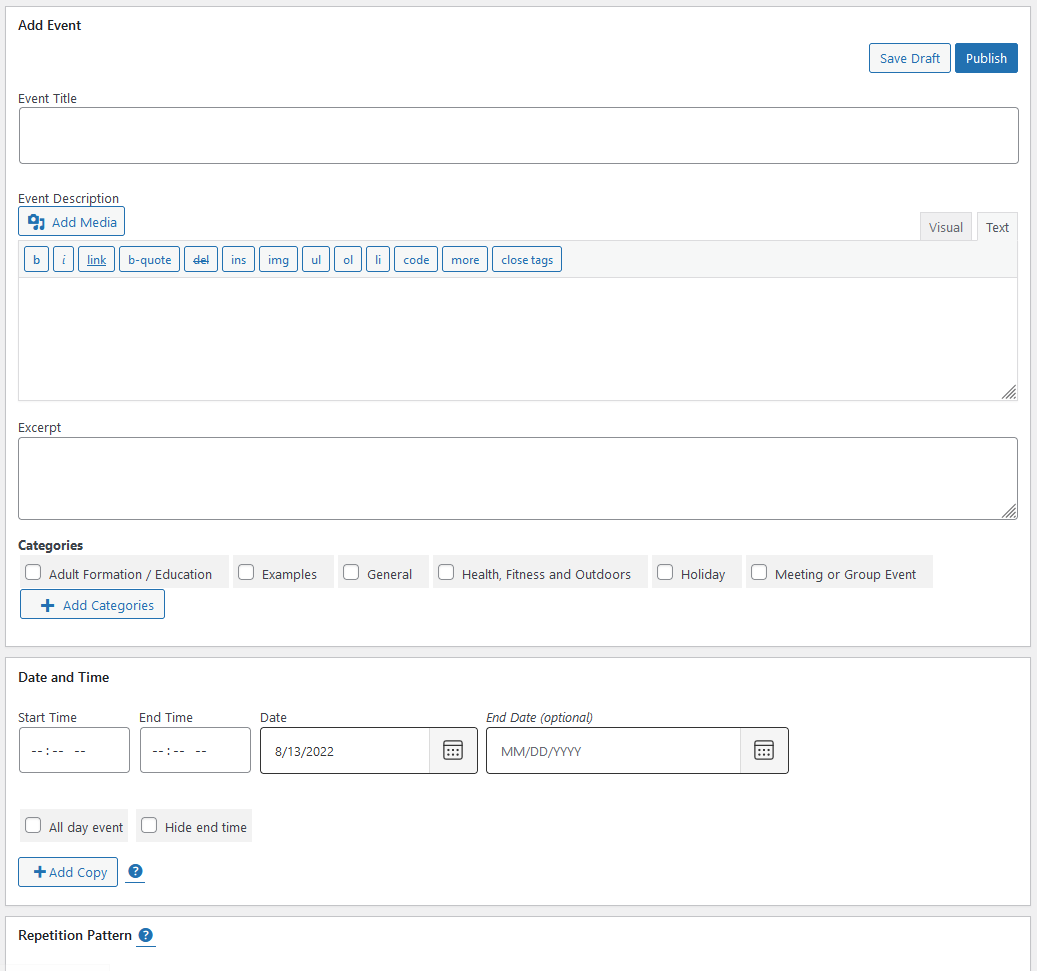
The Add New Event screen presents a structured form covering:
- Event title
- Start and end date and time with time zone support
- All-day event toggle
- Recurrence rules (daily, weekly, monthly, annual, custom)
- Location selection from saved locations or a new entry
- Event category selection
- Accessibility information fields (accessibility services at the event or venue)
- Event description and URL
- Featured image
The accessibility information fields are a direct expression of what makes My Calendar different. You can document whether the event venue has wheelchair access, audio descriptions, ASL interpretation, or other accommodations. These fields render on the public event page so visitors with accessibility needs can check before attending.
Calendar views
My Calendar offers multiple display views controlled via shortcodes and widgets.
Monthly grid view
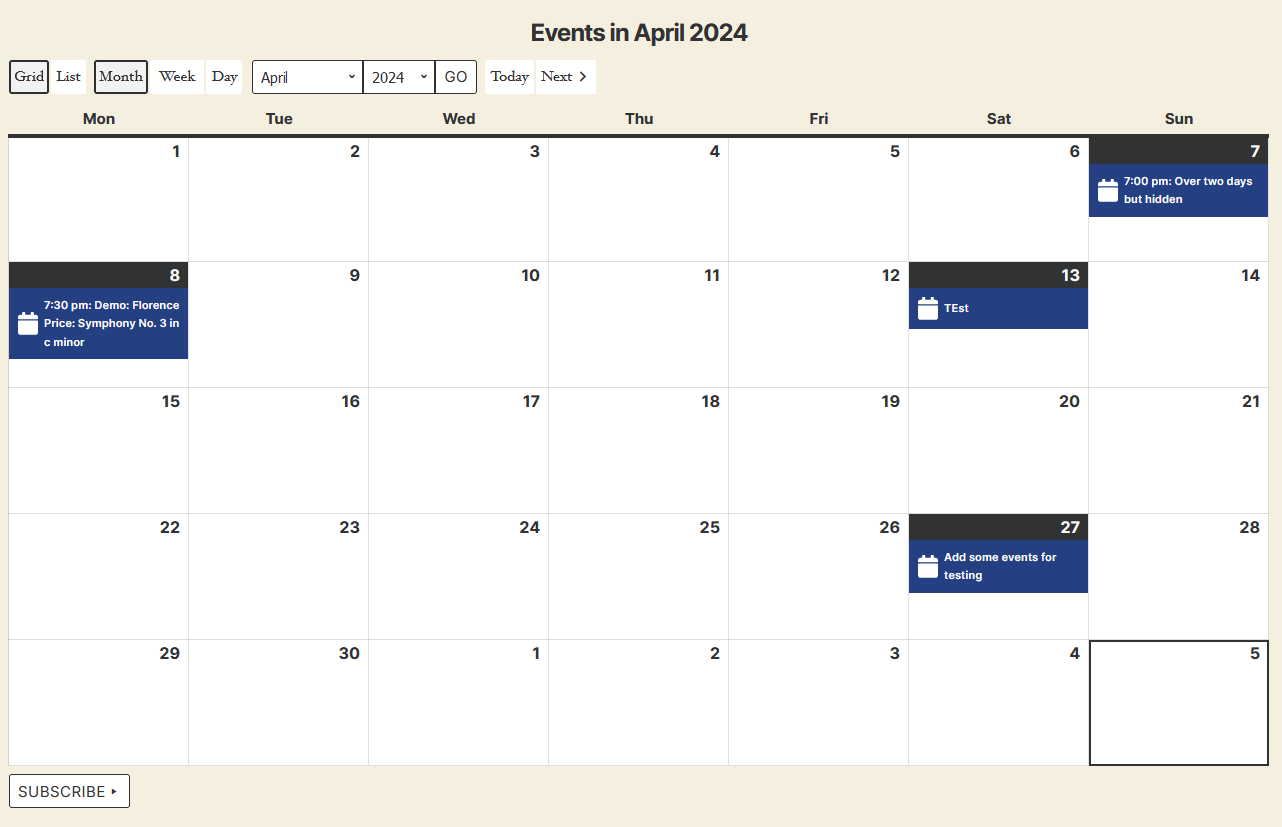
The default grid layout displays a standard monthly calendar with event titles on their date cells. Days with events show the event title as a clickable link to the event detail page. Multiple events on one day stack vertically. A mini-calendar navigation widget displays a compact version useful for sidebars.
List view
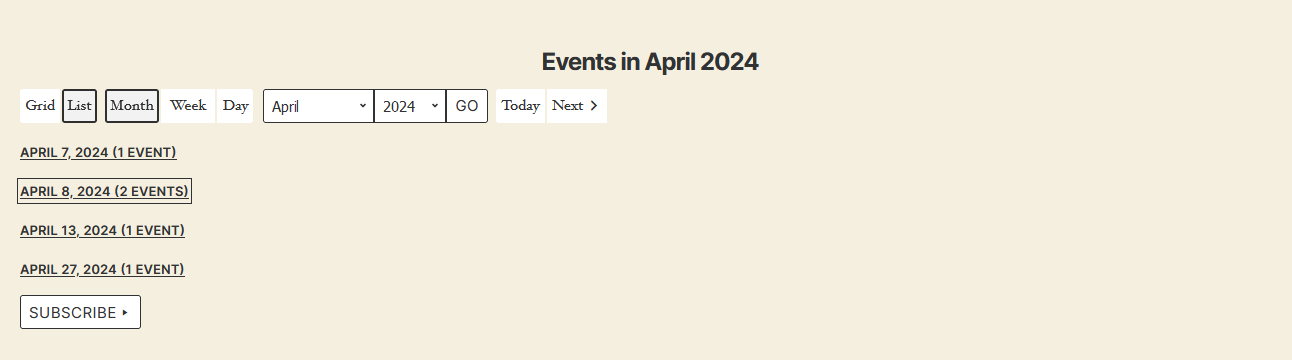
The list view displays events in chronological order. Each entry shows the event title, date, time, and location. This view suits sites where a flat chronological agenda is more useful than the grid, such as community boards or event directories.
Card view
The card view presents events as content cards with more visual space per event than the list view. Each card can display the event image, title, date, location, and a brief description.
Mini-calendar widget
The mini-calendar widget provides a compact monthly grid for the sidebar. Days with events are visually marked, and clicking a date filters the main calendar or event list to show that day's events. This is My Calendar's signature feature: the combination of a sidebar mini-calendar and a main display area forms the core user interface pattern that the plugin has used since its early versions.
Time period options
Beyond the standard month grid, My Calendar supports week view, daily view, and multi-month display. You can embed different views on different pages using shortcode parameters, which gives flexibility for sites that need, say, a monthly overview on the events page and a daily agenda on a sidebar widget.
Recurring events
My Calendar's free version includes full recurring event support. You can set events to repeat daily, weekly, monthly, or annually, and define a custom interval. Individual occurrences in a series can be edited independently.
This is a genuine free-tier differentiator. The Events Calendar requires a paid plan starting at $259 per year to unlock the same granular recurring event controls. My Calendar delivers this in the free plugin, making it a practical choice for organizations running weekly community events, monthly meetings, or annual recurring programs without a budget for a premium events plugin.
Version 3.8.0 also added scheduled event publication, allowing events to be created in advance and published automatically on a scheduled date.
Accessibility in depth
Accessibility is not a checkbox for My Calendar. It is the architectural decision that shapes every feature.
The front-end calendar navigation was converted from links to buttons in version 3.7.0. This matters because buttons carry different semantic meaning for screen reader users: they signal interactive controls, while links signal navigation to another location. For a calendar where month navigation does not change the URL, button semantics are correct. This was a breaking change that Joe Dolson explicitly documented and accepted.
Version 3.7.0 also introduced taxonomy-based accessibility characteristics. You can attach accessibility metadata to categories and locations, meaning the plugin can surface, for example, “this location has ASL interpretation available” or “this event category includes audio description” alongside any event that matches.
The event creation form includes an Accessibility section with dedicated fields for documenting the accessibility services available at the event and venue. These are first-class fields in the plugin, not afterthoughts added via custom fields.
The plugin's documentation notes that both the front end and the back end are “tested with various assistive technology.” For a WordPress plugin, this level of documented testing commitment is uncommon.
Styling and templates
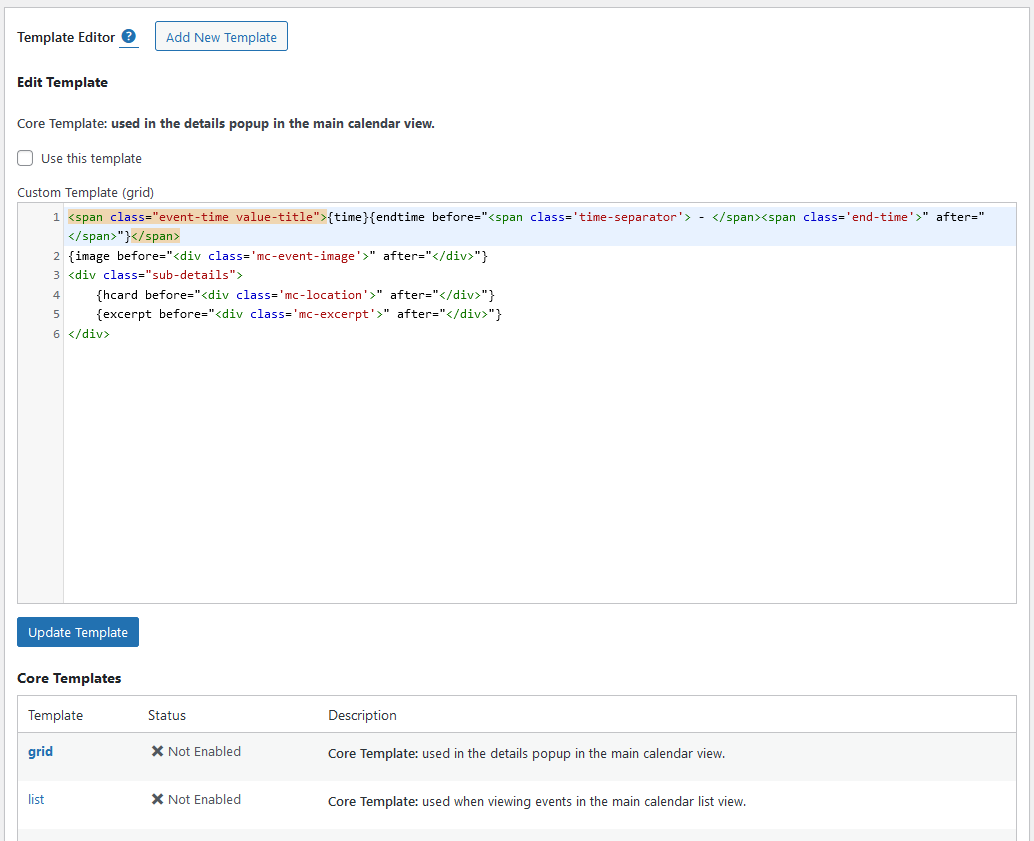
My Calendar includes a built-in style editor accessible under My Calendar, Settings, Styles. You can customize the calendar's color scheme, typography, and visual presentation without touching CSS files directly.
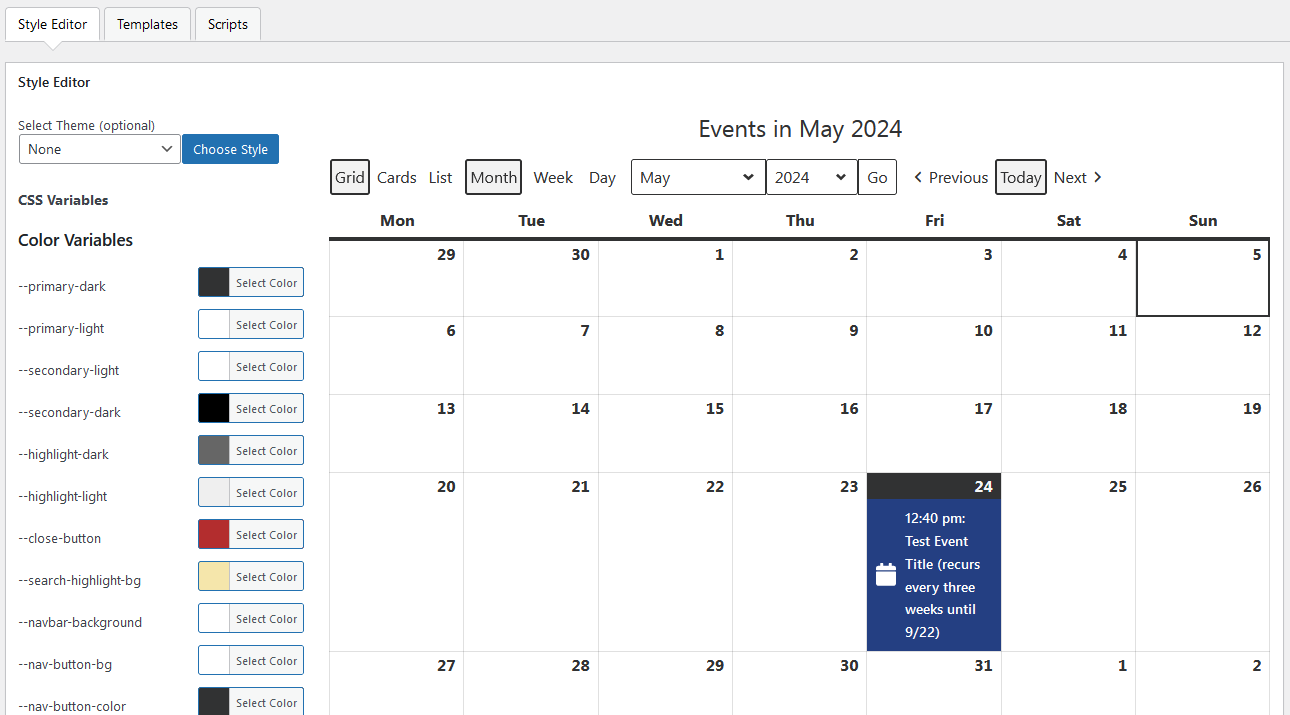
A template editor allows customization of the HTML output for event listings. My Calendar uses a template tag system where placeholders like {title} and {date} are replaced with actual event data when the calendar renders. This gives developers and advanced users precise control over the markup without writing custom code.
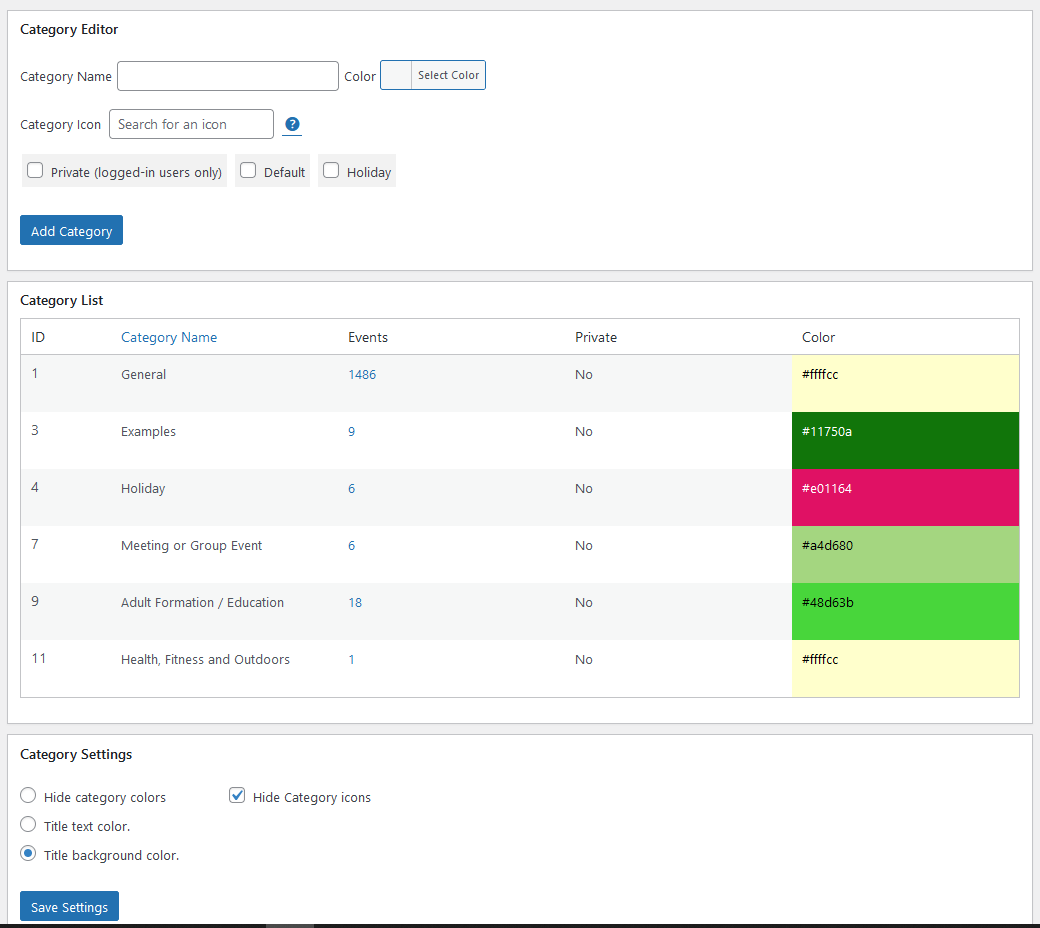
Category management provides color-coding and icon support per event category. Categories display with their assigned colors on the calendar grid and in the legend.
Locations
Location management is a first-class feature in My Calendar, not an add-on. You create locations with a full address, GPS coordinates, and optional accessibility information. Events are assigned to saved locations, and the calendar can display a map link on event detail pages.
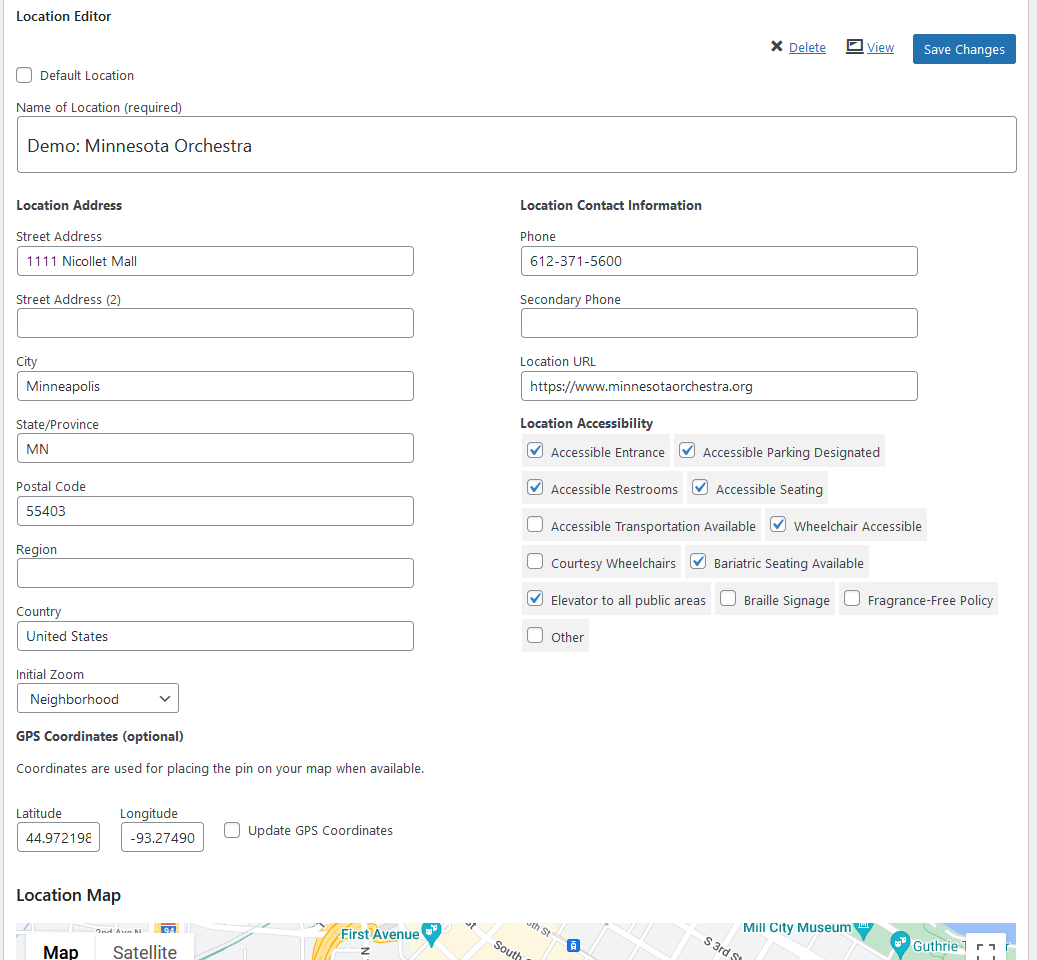
Filtering by location works in the front-end calendar display. Visitors can narrow the calendar to events at a specific venue.
My Tickets: event ticketing
My Calendar does not include built-in ticketing. For ticket sales, the official integration is the My Tickets companion plugin (wordpress.org/plugins/my-tickets/), also by Joe Dolson.
My Tickets is free with PayPal Standard included as the default payment gateway. Premium add-ons for Stripe, PayPal Pro, and Authorize.net payment processing are sold separately. Additional premium features cover discount codes, in-cart donations, and automated waiting lists.
My Tickets adds a Registration Information panel to the My Calendar event creation screen. You set ticket availability, pricing tiers, and sale start and end dates from within the event editor. Ticket confirmation emails go out automatically, and an admin QR code scanner enables check-in at the door.
There is one important limitation: My Tickets does not support recurring events. The plugin associates ticket purchase data with WordPress post IDs, and My Calendar's recurring events share a single underlying post. If ticket sales for a recurring weekly event are required, each occurrence must be created as a separate post rather than using My Calendar's built-in recurrence. This is documented on the My Tickets listing and worth factoring in before building a ticketing workflow around recurring series.
My Tickets currently has 600+ active installs. Compared to the ticketing capabilities bundled into competitors like The Events Calendar's paid plans, it is a simpler solution appropriate for organizations that want straightforward PayPal ticket sales without the complexity or cost of a full event management suite.
My Calendar Pro
My Calendar Pro is the premium extension for My Calendar, sold directly by Joe Dolson at joedolson.com/my-calendar/pro/.
Pro features:
- Front-end event submission forms for community calendars or member-submitted events
- Custom field creation for event-specific data
- Customizable submission forms with reorderable fields and multiple form versions
- Integration between blog posts and events (create events from posts, create posts from events)
- Advanced search filtering by keyword, date, category, location, and author
- CSV and iCal file or URL import with scheduled recurring imports
- WordPress REST API for multi-site event sharing
- Front-end event editing for logged-in users
- Spam control via Akismet integration
- Optional payment collection for event submissions
Pricing
| Version | Price | Sites |
|---|---|---|
| My Calendar (free) | $0 | Unlimited (no submissions, no custom fields, no advanced search) |
| My Calendar Pro – Site Owners | $69/year | 3 sites |
| My Calendar Pro – Developers | $199/year | 10 sites |
| My Calendar Pro – Agencies | $399/year | Unlimited sites |
| My Tickets (free) | $0 | PayPal only; no recurring event support |
| My Tickets payment add-ons | Varies | Stripe, PayPal Pro, Authorize.net sold separately |
For context: The Events Calendar's minimum paid plan is $259/year, and it requires that to unlock recurring events and additional calendar views. Modern Events Calendar starts at around $89/year for a single site. My Calendar delivers recurring events and multiple views in the free tier, with the Pro upgrade focused on community submission and import workflows rather than unlocking basic calendar functionality.
All Pro tiers include personal developer support from Joe Dolson and a 30-day refund policy. Billing is annual; no one-time or lifetime option is currently available.
Pros and cons
Pros
- Free version includes full recurring events, multiple views, and JSON-LD structured data
- Accessibility is the primary design priority: WCAG-tested front and back end
- Navigation uses semantic button elements for correct screen reader behavior
- Taxonomy-based accessibility characteristics for venues and event categories
- Dedicated accessibility fields on events and locations for documenting accommodations
- Template and style editors for non-developer customization
- Multisite compatible with REST API event sharing
- iCal and Google Calendar export in the free version
- jQuery removed from front-end (v3.8.0) for cleaner performance
- $69/year Pro entry price vs. $259/year minimum for The Events Calendar
- 30-day refund policy on Pro purchases
- Actively maintained: version 3.8.4 released September 2026
Cons
- 20,000+ installs is modest compared to 600,000+ for The Events Calendar
- My Tickets does not support recurring events
- My Tickets has only 600+ active installs, indicating limited community testing of the ticketing path
- Solo developer maintenance creates support capacity constraints
- Not Gutenberg-native; event creation uses a classic meta-panel interface
- No built-in ticketing in the core plugin; requires a separate companion plugin install
- Advanced search requires the Pro upgrade
- Visual design of the default calendar is functional but not visually modern
Alternatives
The Events Calendar
The Events Calendar is the most-installed WordPress events plugin with 600,000+ active installs. The free version includes month, list, and day views plus JSON-LD structured data. Paid plans start at $259/year under the current Liquid Web structure and include full recurring events, Stripe ticketing, and advanced views. A better choice for organizations that need a large ecosystem and a high-volume ticketing solution, though the 2026 ownership transition has introduced pricing friction.
Modern Events Calendar
Modern Events Calendar offers a comprehensive plugin with 30,000+ active installs and a paid tier starting around $89/year. It provides more calendar view variety out of the box and a more visually modern default appearance than My Calendar. The trade-off is that its WordPress.org Lite version has been removed from the repository; it is now sold directly and no longer benefits from WP.org distribution visibility.
Sugar Calendar
Sugar Calendar is a lightweight calendar plugin by Awesome Motive with Stripe ticketing built into the free version. It is focused on clean, uncluttered event display without feature complexity. A practical option for content-first sites that need calendar display without advanced accessibility controls or community submission features.
Event Organiser
Event Organiser is a free, developer-focused events plugin with granular recurring event rules including patterns like “every third Tuesday of every fourth month.” It has a full shortcode and template API. A strong choice for developers who want precise control without a subscription cost. Accessibility is not as prominent a focus as in My Calendar.
EventON
EventON is a visually distinctive calendar with a tile and accordion layout. The Full version costs $50 as a one-time purchase. Its visual design stands apart from My Calendar's functional grid approach. Less suitable for sites with WCAG compliance requirements; more suitable for sites prioritizing visual differentiation.
Final verdict
My Calendar earns genuine respect for an area of WordPress plugin development where most competitors have not invested: accessibility. If your site has WCAG requirements, serves users with disabilities, or operates in a public-sector or educational context where inclusive design is expected, My Calendar is the best-tested option in the WordPress calendar space.
The free plugin is not a stripped-down demo. Full recurring events, multiple calendar and list views, iCal export, JSON-LD structured data, and the template and style editors are all available without spending anything. That is a strong free-tier proposition relative to competitors where recurring events or additional views are gated behind subscriptions.
The limitations matter. My Tickets is a simpler ticketing system than what the paid tiers of TEC or Modern Events Calendar include, and the recurring event limitation for My Tickets is a real workflow constraint. The install base is smaller, the community documentation thinner, and the solo developer model means support response times can vary.
My recommendation: if accessibility compliance matters to your project, My Calendar is the right starting point. Install the free version, test the admin experience with a screen reader or keyboard-only navigation if that is your use case, and evaluate whether the Pro upgrade at $69/year adds anything your workflow needs. For sites where accessibility is a priority and ticketing requirements are simple, this plugin will serve you well for years.
For sites where ticketing at volume, visual design, or maximum ecosystem breadth are the primary requirements, The Events Calendar or Modern Events Calendar remain more capable options at a higher total cost.
FAQ
Is My Calendar free?
Yes. My Calendar is completely free on WordPress.org with 20,000+ active installations. The free version includes all calendar views, recurring events, category and location management, iCal export, JSON-LD structured data, template editing, style editing, and multisite support. My Calendar Pro ($69/year for 3 sites) adds community event submissions, custom fields, CSV and iCal import, advanced search, and front-end editing. My Tickets (free, separate plugin) adds PayPal-based event ticketing.
Who built My Calendar?
My Calendar is built and maintained by Joe Dolson, a WordPress developer and accessibility specialist. He has maintained the plugin since its April 2010 release. Joe is a recognized voice in WordPress accessibility and serves as a core accessibility contributor to the WordPress project. The plugin reflects his professional expertise in inclusive design.
Does My Calendar support recurring events?
Yes, the free version includes full recurring event support. You can set events to repeat daily, weekly, monthly, or annually, with custom interval options. Individual occurrences in a series can be edited independently. This is a differentiator from The Events Calendar, which requires a paid plan starting at $259/year to unlock the same granular recurring event controls.
Can I sell tickets with My Calendar?
Not through My Calendar itself. Ticket sales require the My Tickets companion plugin (free, separate install at wordpress.org/plugins/my-tickets/). My Tickets includes PayPal Standard at no cost; premium add-ons cover Stripe, PayPal Pro, and Authorize.net. One important limitation: My Tickets does not support recurring events. If you need to sell tickets to a recurring weekly or monthly event, each occurrence must be a separate post rather than a recurring event.
Is My Calendar accessible and WCAG-compliant?
Accessibility is My Calendar's defining design commitment. The plugin's front end and wp-admin interface are tested with assistive technology including screen readers. Version 3.7.0 converted navigation from links to buttons for correct semantic meaning. Version 3.7.10 delivered major accessibility improvements. The plugin includes dedicated fields for documenting accessibility services at events and venues, making it possible for visitors to check accommodation availability before attending.
What does My Calendar Pro add?
My Calendar Pro adds: front-end event submission forms for community or member-submitted events, custom field creation, customizable submission forms, post-to-event and event-to-post workflows, CSV and iCal URL import with scheduled recurring imports, advanced search (by keyword, date, category, location, author), REST API multi-site event sharing, and front-end editing for logged-in users. Pricing starts at $69/year for a 3-site Site Owners license.
How does My Calendar compare to The Events Calendar?
My Calendar has 20,000+ active installs vs. The Events Calendar's 600,000+. The Events Calendar's free tier and paid plans ($259/year minimum) offer a larger ecosystem, more view options, and a more developed ticketing path. My Calendar's free tier matches or exceeds TEC in recurring event control and adds unique accessibility depth that TEC does not offer. For accessibility-first projects, My Calendar is the stronger starting point. For high-volume ticketing or maximum ecosystem compatibility, The Events Calendar is the more developed platform.