


Most WordPress event plugins start with a calendar grid and build outward. Eventin takes the opposite approach: it ships ticketing, speaker profiles, Zoom integration, and QR-coded attendee check-in in the free version, then layers a paid tier on top for organizations that need seat mapping, email automation, CRM connections, and a multi-vendor event marketplace.
With 10,000+ active installations on WordPress.org, a 4.7-star rating from 397 reviews, and a free version that genuinely handles ticket sales, Eventin has carved a distinct position in a crowded market. It is built and maintained by ThemeWinter, a Bangladesh-based WordPress development company with an active release track.
I went through the free plugin install, reviewed the Pro feature list and documentation in depth, and checked the pricing across all tiers. Here is what I found.
Basis of this review. I installed the free Eventin plugin (version 4.1.23, released August 27, 2026) in a clean WordPress 7.0.4 environment and walked through event creation, ticket setup, speaker profile management, the registration form editor, and the calendar display options. I also reviewed the official documentation at wpeventin.com, the WordPress.org listing and FAQ, and publicly available user feedback. Where Pro features are described from documentation rather than direct testing, the text says so.
Quick verdict
Eventin is one of the most feature-generous free event plugins available on WordPress.org right now. The free version covers the complete cycle from event creation through ticket sales and QR check-in, which puts it ahead of competitors that gate ticketing or payment processing behind a paid upgrade.
- Best for: Conference organizers, online course instructors, community meetup hosts, and hybrid event coordinators who want ticketing in the free tier.
- Easiest win: The free plugin for sites that need event registration, WooCommerce tickets, and Zoom meeting links without paying anything upfront.
- Best Pro use case: Organizations running large multi-day conferences that need visual seat maps, email automation sequences, and CRM attendee syncing.
- Skip if: You only need a simple calendar display without ticketing or registration. Lighter plugins handle that with less configuration overhead.
- Watch out for: Annual pricing jumps significantly between tiers; the Standard plan covers only 2 domains, so growing agencies will need Premium or Agency licenses quickly.
What Eventin is
Eventin (WordPress.org slug: wp-event-solution) is a full event management plugin built by ThemeWinter. It handles the complete event lifecycle: creation, registration, ticket sales, attendee tracking, speaker and schedule management, and post-event reporting, all from a single plugin without requiring a separate event management SaaS.
The plugin reached version 4.1.23 in August 2026, with recent updates focused on security hardening, WooCommerce tax support, and WCFM multivendor integration. It currently carries 10,000+ active installs on WordPress.org with a 4.7 out of 5 star rating drawn from 397 reviews, 354 of which are five-star.
ThemeWinter positions Eventin as an alternative to event platforms that charge for what they consider core functionality. The free version genuinely delivers on that positioning: WooCommerce ticket sales, Zoom integration, recurring events, and attendee QR check-ins are all available without a Pro license.

Who Eventin is best for
Strong fit:
- Conference and summit organizers who need multi-session agendas, speaker profiles, and per-session ticketing in one plugin.
- WordPress site owners running online or hybrid events who want free Zoom link automation without manual meeting distribution.
- Educators and trainers running cohort-based live classes or webinars who want automated registration and attendance management.
- Community organizations and meetup groups that need free-event RSVP alongside paid ticket sales in the same plugin.
- Agencies building event sites for multiple clients who want a Pro license covering 100 sites (Premium tier).
- Multi-vendor marketplace builders who want different organizers to manage their own events using Dokan integration (Pro).
Weaker fit:
- Sites that need only a simple event calendar with no ticketing or registration. The setup overhead is higher than lighter calendar-only plugins.
- Organizations that prefer a plugin with the broadest WordPress theme ecosystem testing and community documentation. Eventin’s install count of 10,000+ is solid but smaller than The Events Calendar at 700,000+.
- Teams whose primary requirement is a visually distinctive tile or accordion calendar layout rather than event management depth. EventON handles that use case more specifically.
- Sites with strict WCAG accessibility requirements as a primary evaluation criterion. My Calendar is the more dedicated accessibility-first option.
Setup and first impressions
Installing Eventin from WordPress.org is standard. After activation, a dedicated Eventin section appears in the WordPress admin sidebar, covering All Events, Add Event, Speakers, Schedules, Attendees, Reports, and Settings.
The onboarding is beginner-friendly. ThemeWinter includes guided setup steps that walk through creating your first event, configuring ticket types, and connecting a payment gateway. Video tutorials and documentation links appear inline during setup.
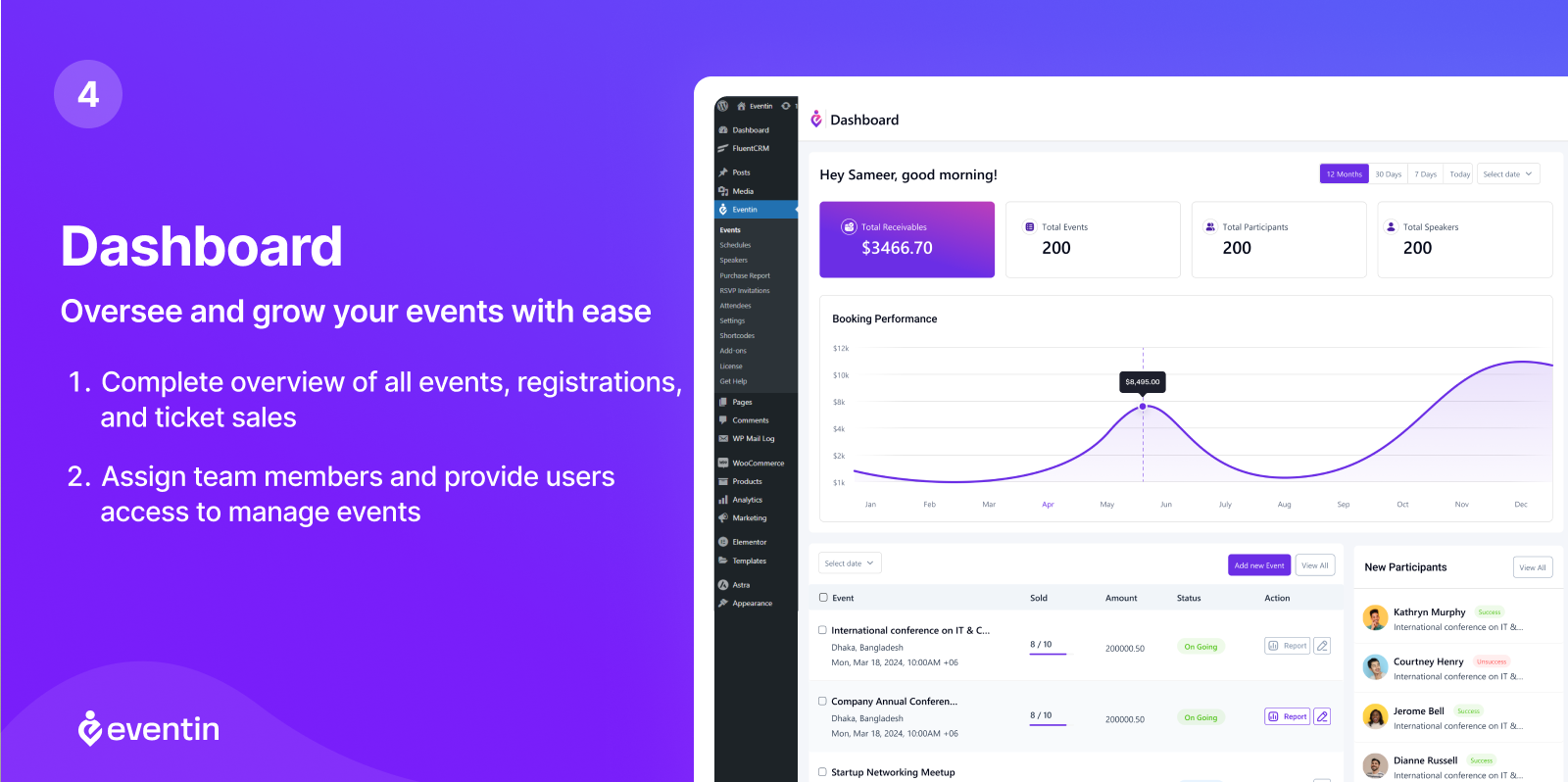
The dashboard view shows upcoming events in a sortable list with status, date, capacity, and ticket sales at a glance. The add-event screen presents a structured form with clear sections for core event details, location, tickets, speaker assignments, and registration settings. The overall layout is more logically organized than some competitors that treat ticketing as an afterthought bolted onto a calendar post type.
Event creation and management
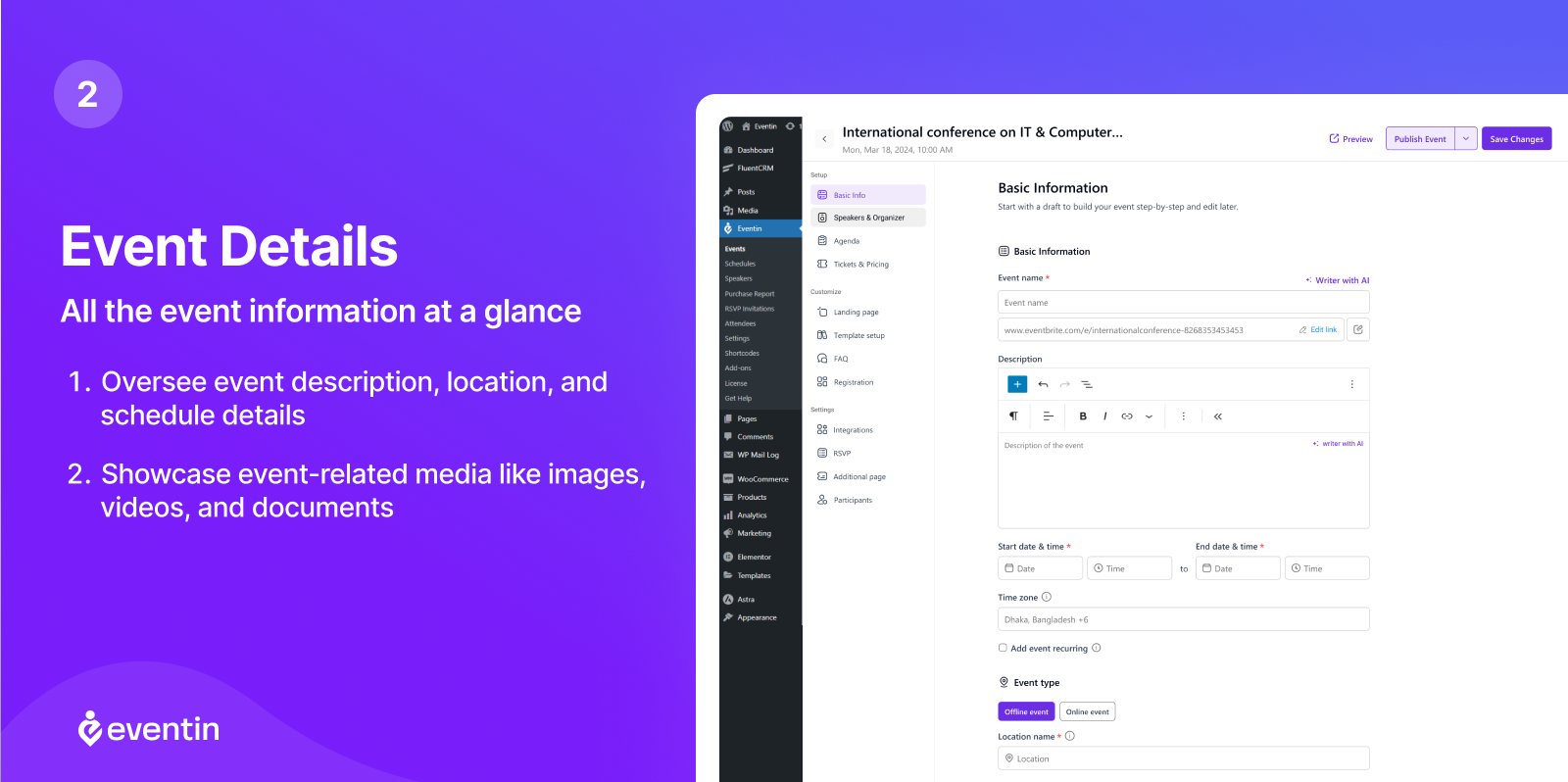
Each event in Eventin is a structured post with dedicated fields for event title and description, start and end date and time with time zone selection, event type (in-person, virtual, or hybrid), physical location with optional Google Maps embed (Pro), recurrence rules, ticket types and pricing tiers, registration form fields, featured image, speaker and schedule assignments, and certificate settings (Pro).
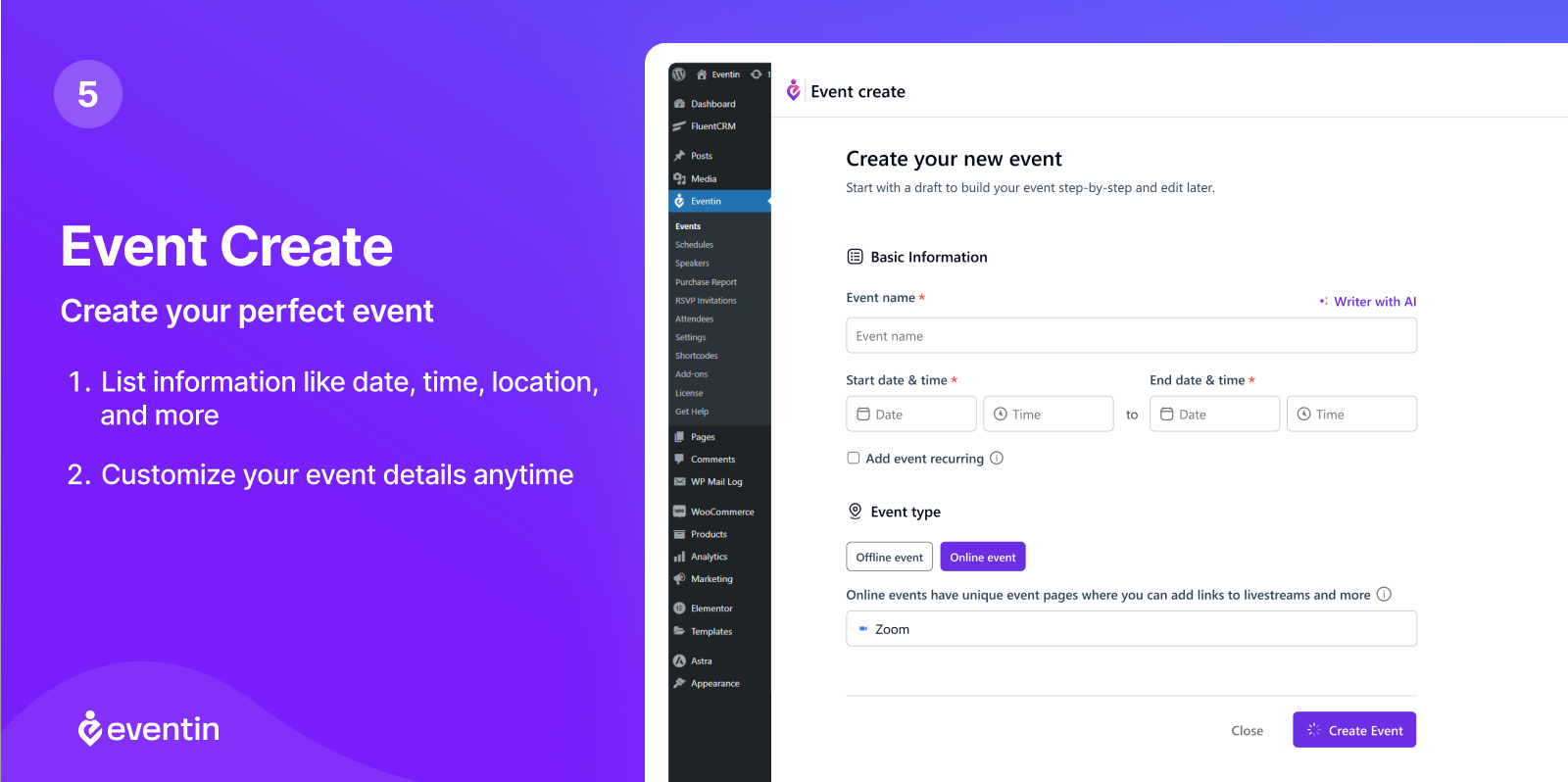
The event type distinction matters for workflow. A virtual event automatically generates a Zoom or Google Meet link field. A hybrid event shows both a physical venue address and a virtual meeting link, and both are surfaced to attendees based on their registration type.
Multi-day and multi-session events are handled through the Schedules feature. You define individual sessions with their own title, time, location, and assigned speakers, then attach the sessions to the parent event. This is particularly useful for conferences running parallel tracks across multiple rooms.
Ticketing
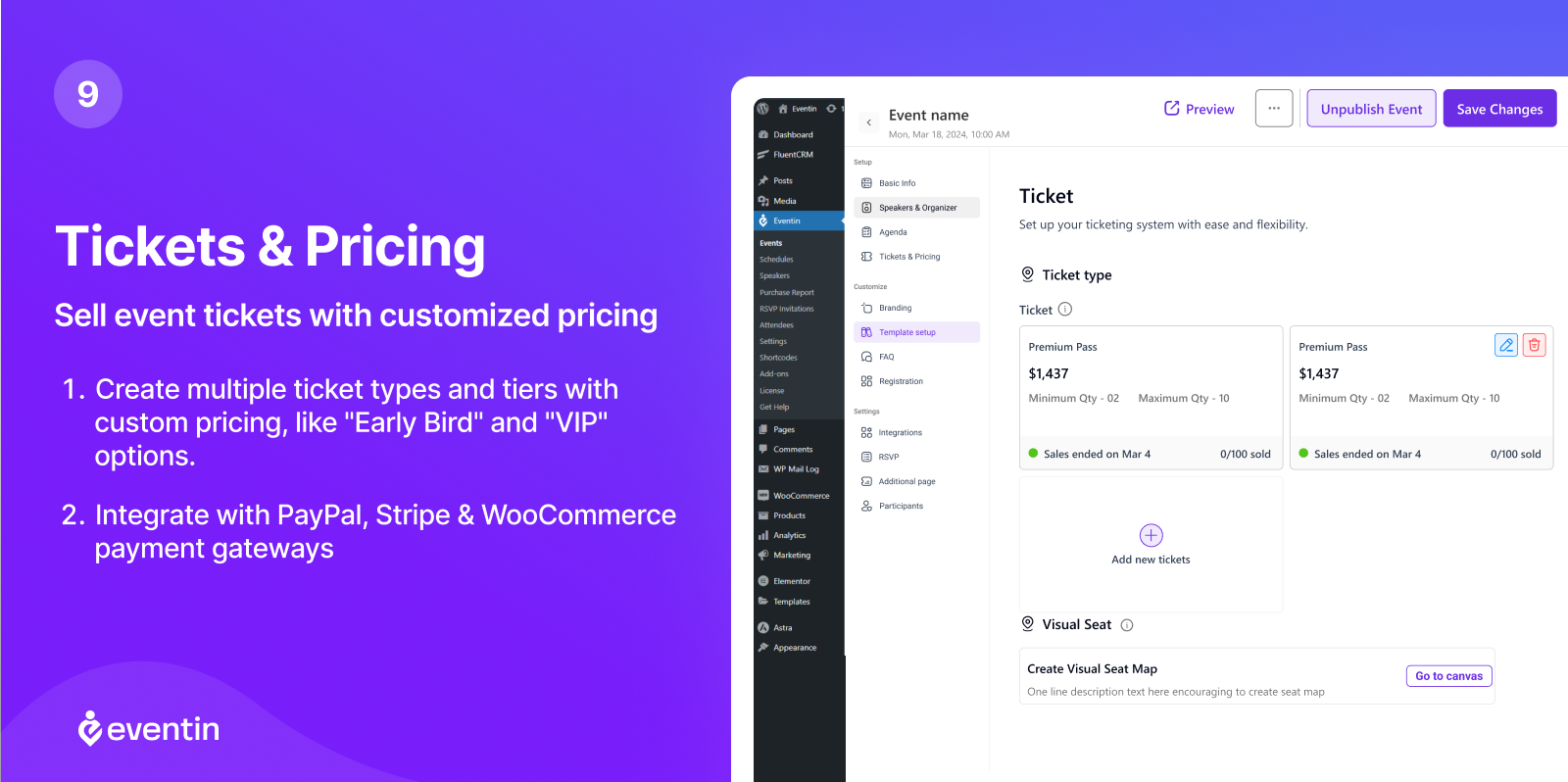
Ticketing is a genuine free feature in Eventin, not a paid upgrade. Within the free plugin, you can create multiple ticket types for a single event (Early Bird, General Admission, VIP), set per-ticket pricing and capacity limits, process payments through WooCommerce with all WooCommerce-supported payment gateways, deliver branded PDF tickets with QR codes automatically after purchase, apply coupon codes for discounts, and track sales and remaining capacity in the admin dashboard.
Stripe and PayPal direct integration (without WooCommerce as the intermediary) are available as Pro features, simplifying setup for organizers who want to avoid the WooCommerce overhead.
The ticket system supports free tickets and RSVP registration alongside paid ticket types, meaning you can run a hybrid event where some passes are complimentary (press, sponsors) and others are paid without needing separate event posts.
Attendee registration
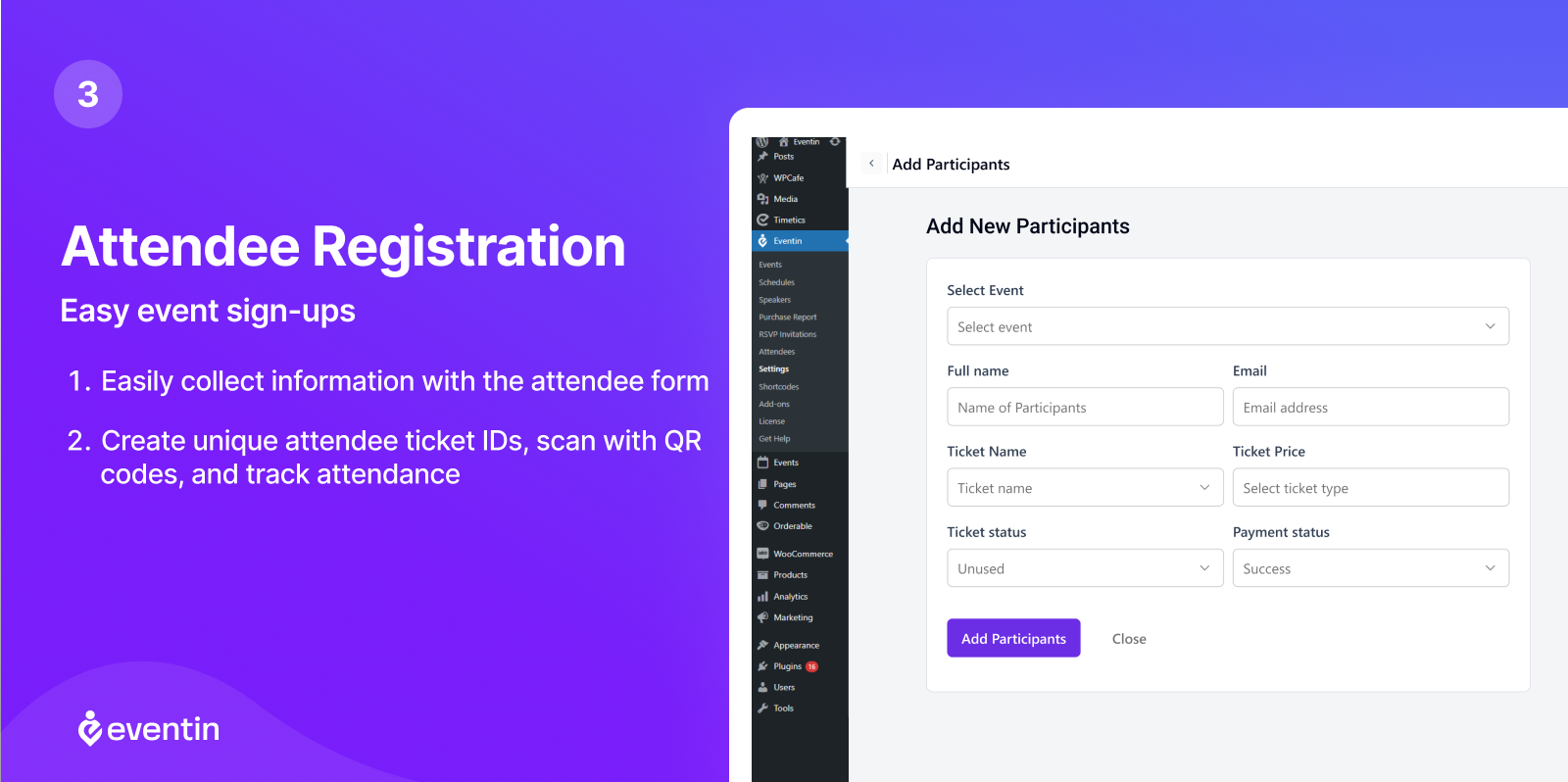
The registration form is customizable. Beyond the standard name and email fields, you can add custom fields to collect information relevant to your event: dietary requirements, accessibility needs, job title, company, session preferences, or anything else.
After registration, attendees receive an automated confirmation email with their ticket. The QR code embedded in the ticket links to the check-in system. At the event door, organizers scan the QR code with any standard scanner to verify attendance and mark the attendee as checked in.
Speaker profiles and schedules
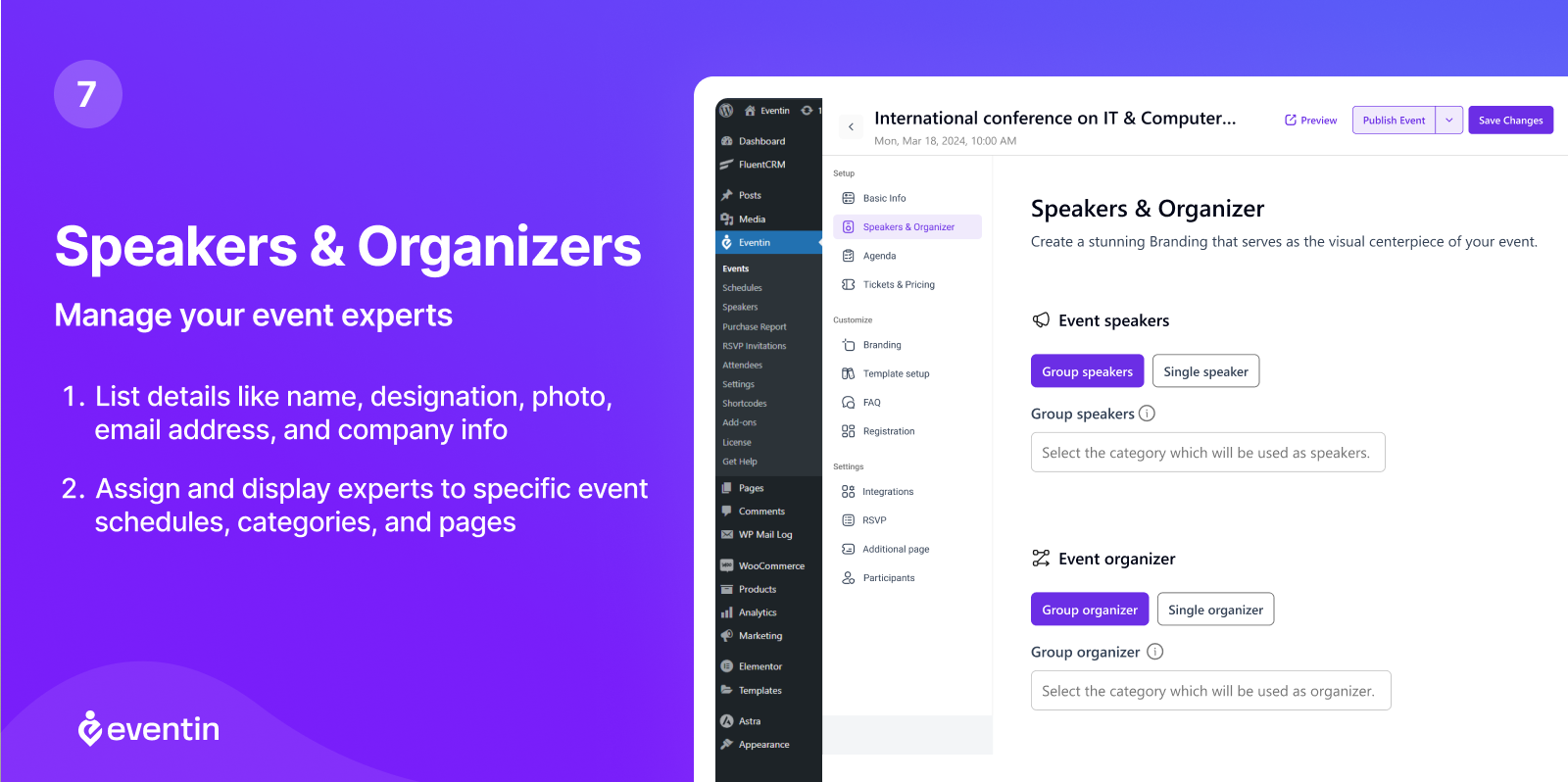
Speaker management is a first-class feature in Eventin. The plugin maintains a reusable speaker directory where each speaker entry holds a name and bio, photo, job title and company, social media links, and session assignments.
Speakers are created once in the Speakers library and can be assigned to multiple sessions or events. This avoids re-entering the same person’s details for every conference where they appear.
The Schedule builder maps sessions to speakers, times, and rooms. A conference with four simultaneous tracks running over two days can be fully structured: each session has its own entry, its speaker list, its time slot, and its room designation. The public-facing schedule display renders as a clean agenda that attendees can browse.
Virtual event support
Eventin includes free Zoom integration in the base plugin. After connecting your Zoom account through OAuth, the plugin handles the full automation loop: when an attendee registers and pays, the plugin generates a Zoom join link and includes it automatically in the confirmation email. Attendees never need to receive a separately shared link.
Google Meet integration works alongside Zoom. For a hybrid event, you can configure the virtual component as either Zoom or Google Meet while also listing the physical venue.
Calendar synchronization extends the virtual event workflow: Eventin generates export-ready iCal links so attendees can add the event and its embedded join link directly to Google Calendar, Outlook, iCal, or Yahoo Calendar with a single click.
Calendar views
The calendar display provides monthly, weekly, daily, and list views, along with a compact calendar widget for sidebars. The monthly grid view shows events on their date cells with color-coded categories. The list view displays a chronological agenda. Events support multiple display templates, and the plugin includes a drag-and-drop template builder (Pro) for customizing how individual event pages look without touching code.
Elementor integration adds 10+ dedicated event widgets for building event listing pages, calendar grids, speaker galleries, countdown timers, and ticket purchase buttons directly in the Elementor page builder. Divi modules, Gutenberg blocks, and Beaver Builder compatibility are also documented.
AI event creation
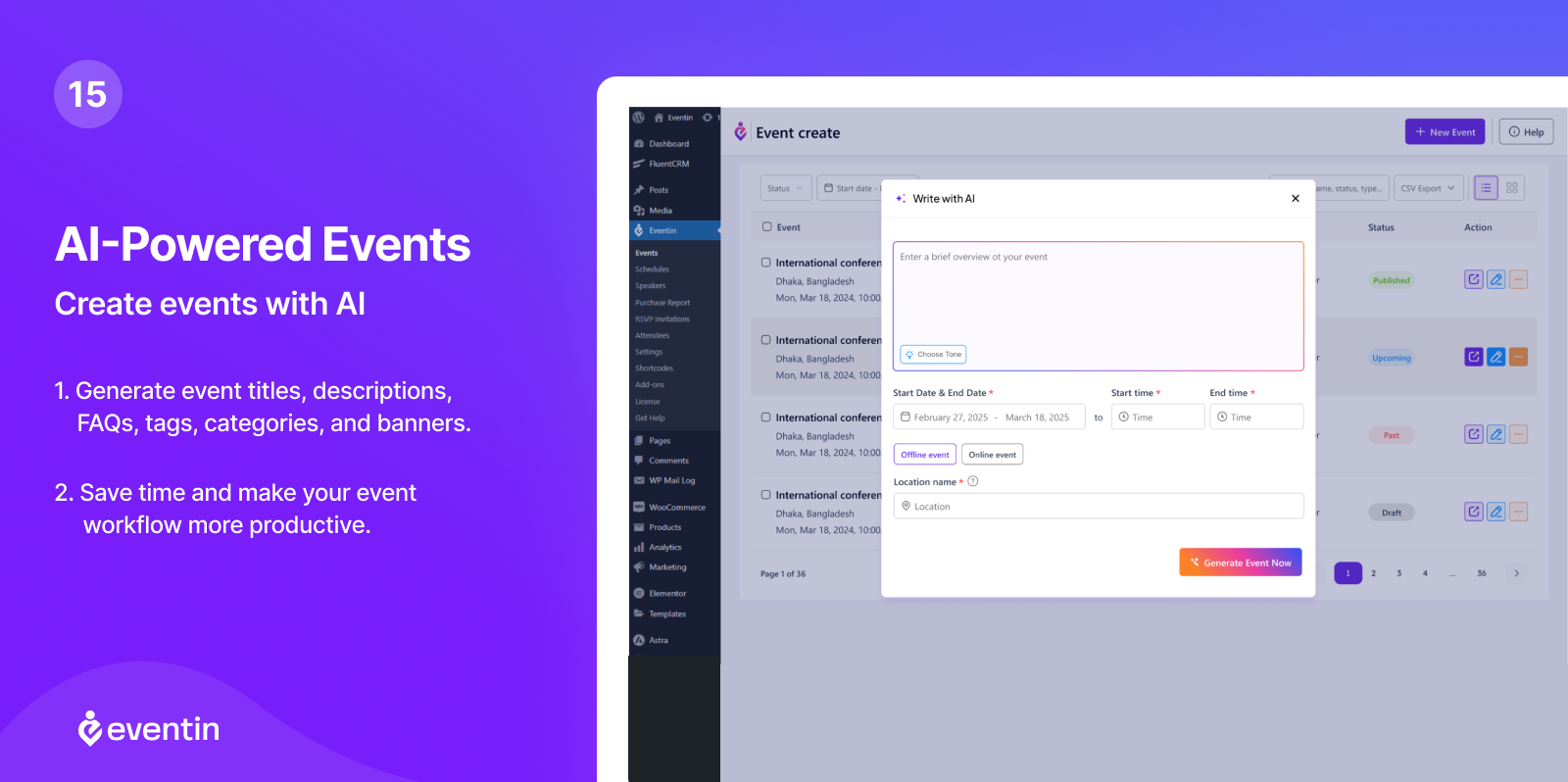
Eventin Pro includes an AI-powered event creation tool. You describe your event in natural language, and the AI generates the event title, description, session schedule, FAQ section, and speaker information stubs.
The implementation uses the OpenAI API, which requires connecting your own API key in the plugin settings. The AI output is editable before saving, so it functions as a drafting accelerator rather than a fully automated publisher.
The feature is most useful for organizers who run frequent events with similar structures: a recurring monthly webinar series or a conference template that needs adaptation rather than creation from scratch each time.
Seat mapping
Visual seat maps are a Pro feature. The seat map builder lets you draw the layout of a venue, define seating sections with different price tiers, and let ticket buyers select their specific seat during checkout.
This is a meaningful feature for theater-style events, sports fixtures, or any event where seat location affects ticket value. Competitors that include seat mapping typically charge at the higher end of their pricing tiers or sell it as a separate addon.
Email automation
Eventin Pro adds a visual email automation builder that sends scheduled messages based on event triggers. You can configure automations for registration confirmation (immediate), reminder emails before the event (configurable timing), post-event follow-up with certificate delivery, and waitlist notifications when seats open.
This replaces the need for a separate email automation tool for event-specific sequences. For smaller organizations that are not running marketing email campaigns, this covers the event communication workflow entirely within WordPress.
Pricing
Eventin uses a split model: a free version on WordPress.org and an annual or lifetime Pro license for advanced features.
Free version
Covers unlimited events, multi-tier ticket pricing via WooCommerce, Zoom and Google Meet integration, recurring events, RSVP registration, QR code check-in, attendee management, calendar synchronization, and Elementor/Divi/Gutenberg compatibility.
Annual Pro plans
| Plan | Annual price | Sites covered |
|---|---|---|
| Standard | $99/year | 2 domains |
| Premium | $299/year | 100 domains |
| Agency | $599/year | Unlimited domains |
Lifetime Pro plans
| Plan | One-time price | Sites covered |
|---|---|---|
| Standard | $199 | 1 domain |
| Premium | $599 | 100 domains |
| Agency | $999 | 500 domains |
| Enterprise | $1,499 | Unlimited domains |
All plans include the full Pro feature set: seat maps, email automation, Stripe integration, Google Maps, FluentCRM and Groundhogg CRM connectivity, Dokan multivendor marketplace, certificate builder, and AI event creation. ThemeWinter offers a 14-day money-back guarantee on annual plans and a 15-day guarantee on lifetime plans. Promotional pricing frequently reduces the Standard annual price to around $79/year.
Context for comparison: The Events Calendar’s minimum paid plan runs $259/year for basic recurring and ticket features. Modern Events Calendar starts around $89/year for one site. Eventin’s Standard annual plan at $99/year (or $79 at promotional rates) covers 2 domains and provides seat mapping and automation that TEC bundles into its higher tiers. The lifetime Standard plan at $199 one-time competes directly with EventON’s $50 one-time base plugin once ticketing addons are factored in.
Pros and cons
Pros
- Free version includes WooCommerce ticket sales, Zoom integration, recurring events, and QR check-in, which most competitors gate behind a paid plan
- Speaker and schedule management is a first-class feature, making it genuinely suitable for multi-track conferences
- Visual seat mapping included in all Pro plans without a separate addon purchase
- Email automation built into Pro reduces dependency on external tools for event communications
- AI event generation accelerates setup for recurring events or conference templates
- Dokan integration enables multi-vendor event marketplaces
- 14-day money-back guarantee on all plans; lifetime plans available
- 10,000+ installs with a 4.7-star rating from 397 reviews
- ThemeWinter provides company-backed support rather than solo developer maintenance
Cons
- Standard annual plan covers only 2 domains, pushing agencies toward the $299/year Premium tier earlier than comparable plugins
- Deep visual customization of event pages requires either the Pro template builder or manual CSS
- Install count (10,000+) is well below The Events Calendar (700,000+), meaning fewer third-party theme compatibility resources
- Google Maps venue integration requires a Pro license; location display in the free version is text-only
- Seat mapping and email automation are Pro-only, so free users needing these face a meaningful upgrade step
- AI event creation requires your own OpenAI API key, adding a separate dependency
- Annual renewal pricing can differ from promotional entry prices
Alternatives
The Events Calendar
The Events Calendar holds the largest install base in the WordPress calendar space at 700,000+ active installs. The free tier provides month, list, and day calendar views plus JSON-LD structured data. Paid plans start at $259/year and include recurring events, Stripe ticketing, and additional views. Eventin competes directly on features at a lower price point, but The Events Calendar wins on ecosystem breadth, theme compatibility documentation, and community resources.
Modern Events Calendar
Modern Events Calendar offers a broad feature set with 30,000+ installs, paid plans from around $89/year for a single site, and more calendar view variety out of the box. It is a strong alternative for teams that prioritize calendar display options over deep conference management features.
Sugar Calendar
Sugar Calendar is a lightweight plugin with Stripe ticketing available in the free tier and a clean admin interface. If your primary need is a simple, uncluttered event calendar with basic ticket sales and no conference management complexity, Sugar Calendar is a practical and lower-overhead choice.
Event Organiser
Event Organiser is a free, developer-focused events plugin with granular recurring event logic and strong iCal import and export capabilities. It is a good fit for sites where sophisticated recurring event patterns are the key requirement and ticketing is not needed.
My Calendar
My Calendar is a free events plugin built with accessibility as its primary design principle. It provides WCAG-tested front-end and admin interfaces, taxonomy-based accessibility metadata for events and venues, and full recurring event support. For sites with formal WCAG compliance requirements, My Calendar is the more rigorously tested option.
EventON
EventON is a visually distinctive calendar plugin with a tile and accordion layout and a one-time $50 base plugin price. It is a better fit for sites where visual differentiation of the calendar is the main goal, while Eventin is a better fit where conference management and built-in ticketing depth are the priorities.
Final verdict
Eventin earns a strong recommendation for any WordPress site that needs real event management, not just a calendar display. The free version is genuinely useful for the complete workflow: create an event, sell tickets through WooCommerce, distribute Zoom links automatically, check in attendees at the door with QR codes. That is a practical event management stack at no cost.
The Pro upgrade makes most sense for three specific use cases. First, conference organizers who need seat maps, email automation, and CRM syncing. Second, agencies managing event sites for multiple clients who need a 100-domain or unlimited license. Third, multi-organizer platforms where the Dokan integration enables independent vendors to manage and sell tickets for their own events.
The pricing is fair but not cheap. At $99/year standard (or $79 at promotional rates), Eventin is competitive with Modern Events Calendar and significantly cheaper than The Events Calendar’s paid tiers for equivalent functionality. The Standard plan’s 2-domain limit is a friction point for small agencies; growing teams will likely need the $299/year Premium license.
My recommendation: start with the free version if your events primarily need registration, basic ticketing, and Zoom. If your conference needs seat maps, automated reminder emails, or you are building a multi-vendor event marketplace, the Pro license is the right investment. Check the current pricing on the official site before purchasing, as promotional rates can meaningfully change the value calculation.
FAQ
Is Eventin free?
Yes, Eventin has a free version available on WordPress.org with 10,000+ active installs. The free version includes unlimited event creation, multi-tier ticket pricing via WooCommerce, free Zoom integration with automated link distribution, recurring events, RSVP registration, QR code attendee check-in, calendar synchronization with Google Calendar, iCal, and Outlook, plus Elementor, Divi, and Gutenberg compatibility. Pro features such as seat maps, email automation, Stripe direct integration, and CRM connections require a paid license.
How much does Eventin Pro cost?
Eventin Pro annual plans start at $99/year for the Standard tier covering 2 domains, $299/year for Premium covering 100 domains, and $599/year for Agency covering unlimited domains. Lifetime plans are available from $199 one-time for a single domain up to $1,499 one-time for an Enterprise unlimited-domain license. ThemeWinter frequently runs promotional pricing; check the current rate at wpeventin.com before purchasing.
Does Eventin support recurring events?
Yes. The free version includes full recurring event support with daily, weekly, monthly, yearly, and custom interval options. You can set an end date for the series, define exclusion dates, and manage recurring series from a single admin entry. This is available in the free plugin without a Pro upgrade.
Can Eventin sell event tickets?
Yes. WooCommerce-based ticket sales are included in the free version. You create ticket types with different prices and capacities, and attendees receive branded PDF tickets with QR codes automatically after purchase. Coupon code support is also included. Stripe and PayPal direct integration (without WooCommerce as the intermediary) require a Pro license. The plugin does not take a commission; you keep 100% of ticket revenue.
Does Eventin support virtual and hybrid events?
Yes. Zoom integration is free and works through OAuth authentication. After registration and payment, attendees automatically receive their Zoom join link by email. Google Meet is also supported. Hybrid events show both a physical venue address and a virtual meeting link. Calendar sync links for Google Calendar, Outlook, iCal, and Yahoo are generated automatically.
What is the difference between the Eventin free and Pro versions?
The free version covers event creation, ticketing via WooCommerce, Zoom and Google Meet integration, recurring events, RSVP, attendee QR check-ins, speaker profiles, and schedule management. The Pro version adds: Stripe direct payment, Google Maps venue integration, visual seat mapping, email automation builder, AI event creation, FluentCRM and Groundhogg CRM integration, Dokan multivendor marketplace, certificate builder, attendee report exports, and additional template customization options.
How does Eventin handle speaker profiles?
Speakers are maintained as a reusable directory in the plugin admin. Each speaker entry holds a name, photo, bio, job title, company, and social media links. Speakers are created once and assigned to any number of sessions or events. The public-facing schedule and speaker pages display the profiles alongside their assigned sessions. This avoids manual re-entry of speaker data for recurring conference formats.
How does Eventin compare to The Events Calendar?
The Events Calendar has roughly 70 times Eventin’s install count (700,000+ vs. 10,000+), a larger ecosystem of compatible themes, and broader community documentation. However, The Events Calendar’s minimum paid plan ($259/year) costs more than Eventin Pro Standard ($99/year), and Eventin’s free tier includes WooCommerce ticketing that TEC gates behind a paid add-on. Eventin is stronger for conference management depth (speaker profiles, seat maps, multi-session scheduling); The Events Calendar is stronger for general-purpose calendar display and ecosystem reach.